Begin
13 pages · ~26 min
Networking Roadmap: Priorities & Milestones
This training guides aspiring network professionals through a prioritized roadmap of milestones and communication strategies to advance their networking careers effectively.
A digital instructor presents all 13 pages. Hold “Ask” at any point and ask out loud — the answer comes from this course. No sign-up needed.
What you’ll learn
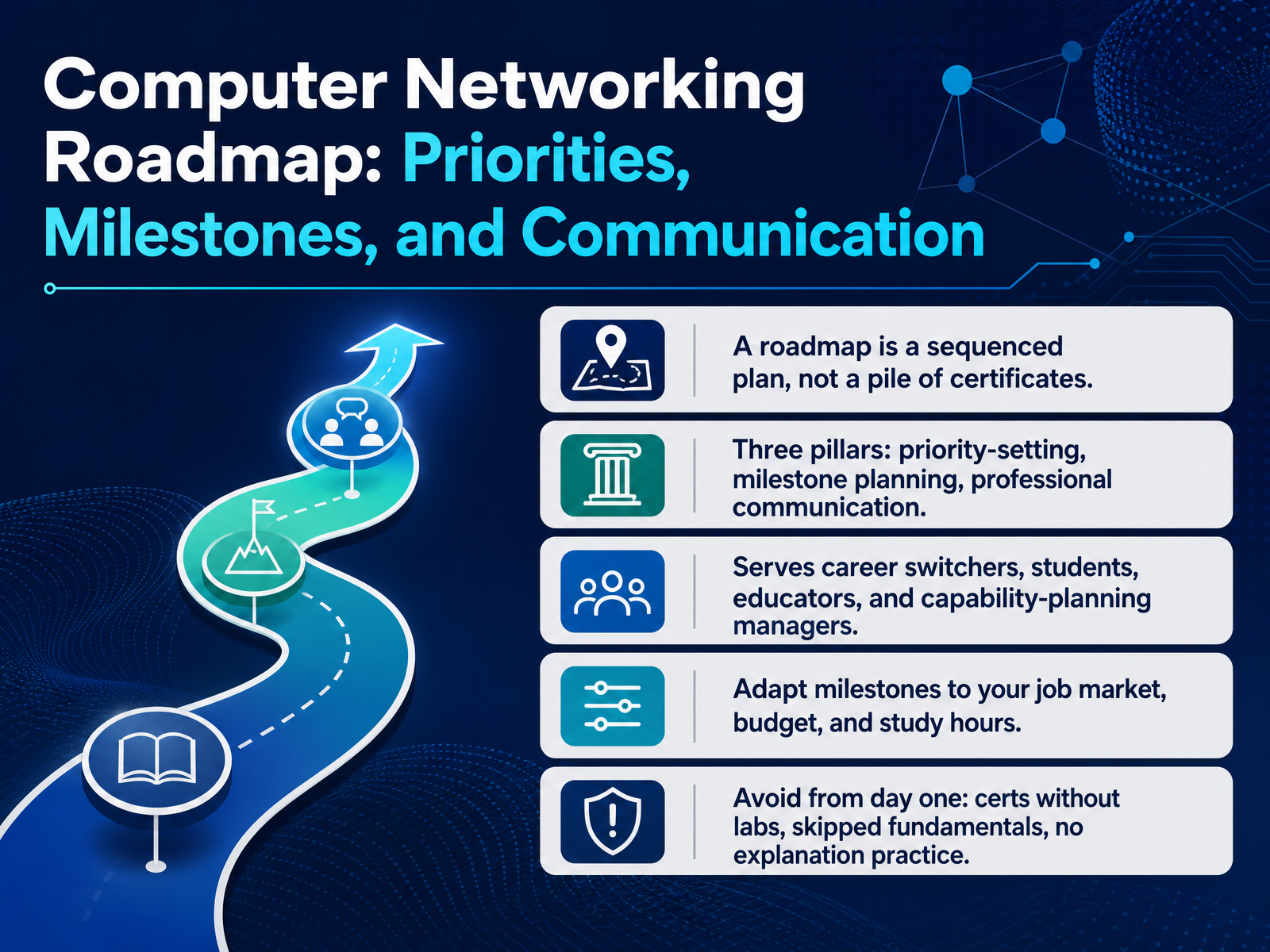
- 01Computer Networking Roadmap: Priorities, Milestones, and CommunicationWelcome. This course is called Computer Networking Roadmap: Priorities, Milestones, and Communication. Our goal is simple. By the end, you will be able to build a sequenced plan for your networking skills, and explain that plan to a manager or an interview panel.
Let us start with a definition. A roadmap is a sequenced plan. It is not a pile of certificates. A pile has no order and no purpose. A plan tells you what comes first, what comes next, and why.
This roadmap rests on three pillars. First, priority setting. Decide what matters most for the jobs you actually want. Second, milestone planning. Break the path into steps you can finish and measure. Third, professional communication. Practice explaining your choices out loud.
This material serves career switchers, technical students, educators, and managers who plan team capability. If you are changing fields, prioritize fundamentals before certifications. If you already work with networks, you may move faster into labs.
Adapt every milestone to your job market, your budget, and your weekly study hours. Start small and stay consistent.
From day one, avoid three traps: certificates without hands-on labs, skipping fundamentals, and never practicing explanations. Employers screen for proof, not paper.
Next, we look at the background: how networking roles have changed.
Background: How Networking Roles Have Changed.netpilot.ionetsandbox.iogithub.com+22 min
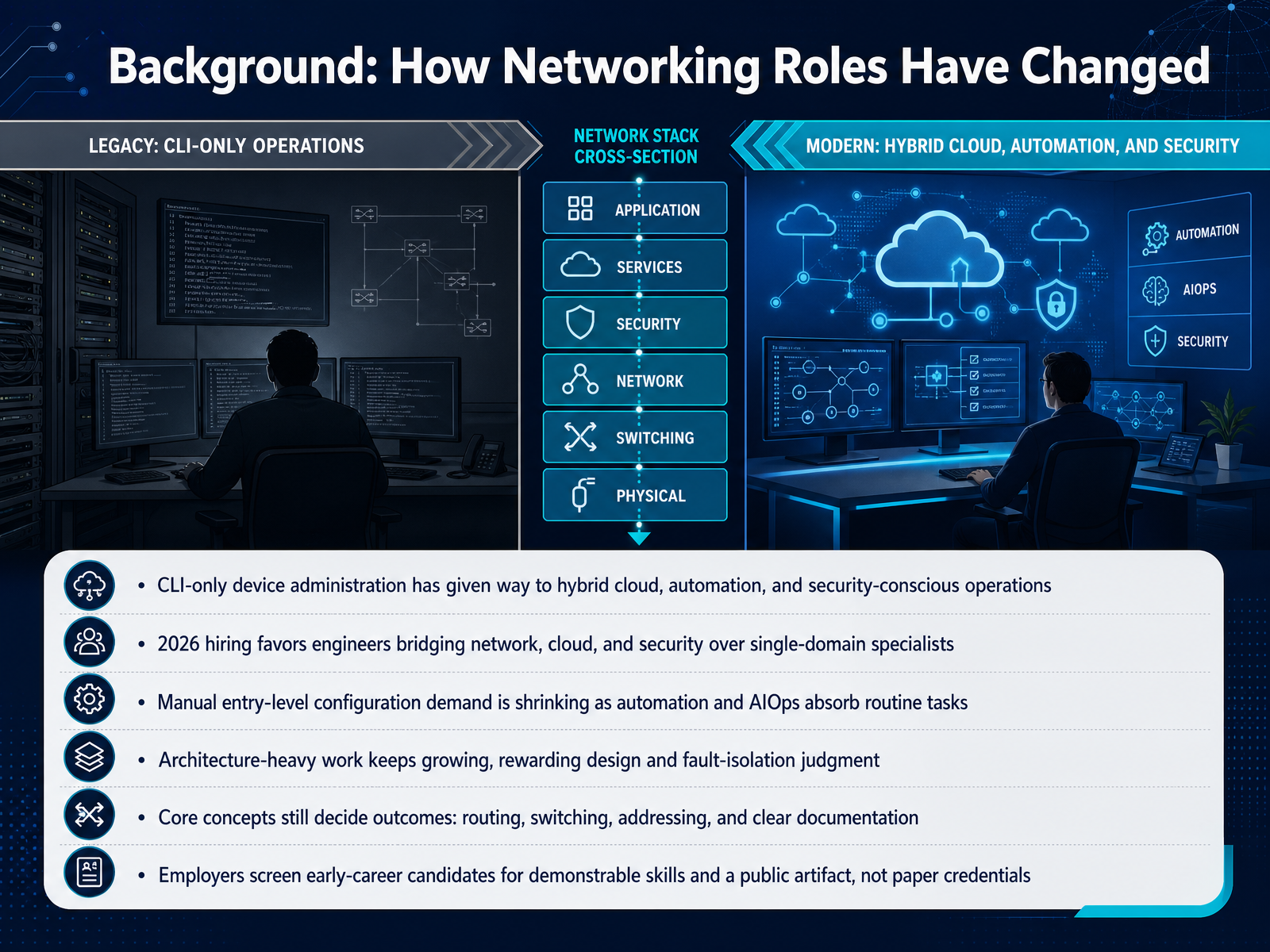
- 02Background: How Networking Roles Have ChangedLet's look at the background. How networking roles have changed. For years, network work meant logging into devices and typing commands in a command line interface, often shortened to CLI. That has shifted. Many teams now run hybrid cloud, automation, and security-conscious operations. In twenty twenty-six, hiring favors engineers who bridge network, cloud, and security work over single-domain specialists. At the same time, manual entry-level configuration demand is shrinking, because automation and AI operations, called AIOps, absorb routine tasks. Architecture-heavy work keeps growing, and it rewards design and fault-isolation judgment. Core concepts still decide outcomes: routing, switching, addressing, and clear documentation. Employers screen early-career candidates for demonstrable skills and a public artifact, not paper credentials. Next, we will cover entry routes and what the hiring market actually screens for.
 interviewstack.ioindeed.comituonline.com+22 min
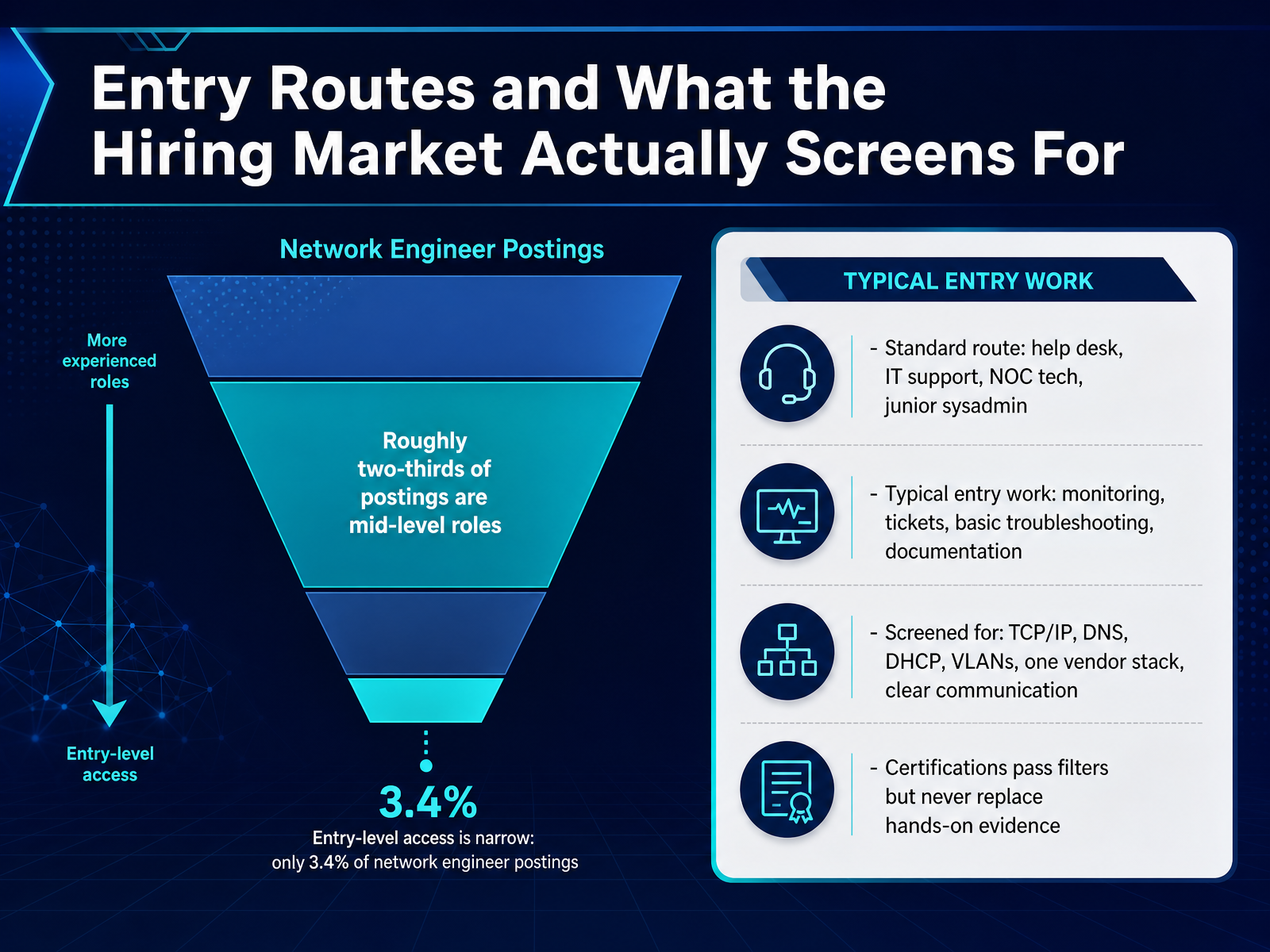
 - 03Entry Routes and What the Hiring Market Actually Screens ForLet us look at the routes into this field, and at what hiring teams actually screen for. The standard entry path runs through four roles in sequence: help desk, I T support, network operations center technician, and junior systems administrator. If you need paid hands-on device access before an engineering title, prioritize these roles first. Entry-level access is narrow. Only three point four percent of network engineer postings are explicitly entry-level, and roughly two-thirds are mid-level. That means most openings expect prior production exposure. Typical entry work includes monitoring, tickets, basic troubleshooting, and documentation. Employers screen for TCP/IP, which is the core protocol suite carrying network traffic, plus DNS, DHCP, VLANs, one vendor stack such as Cisco or Juniper, and clear communication. Certifications pass filters but never replace hands-on evidence. Next, we cover core priorities: what to learn first and why.
 interviewstack.ioindeed.comituonline.com+21 min
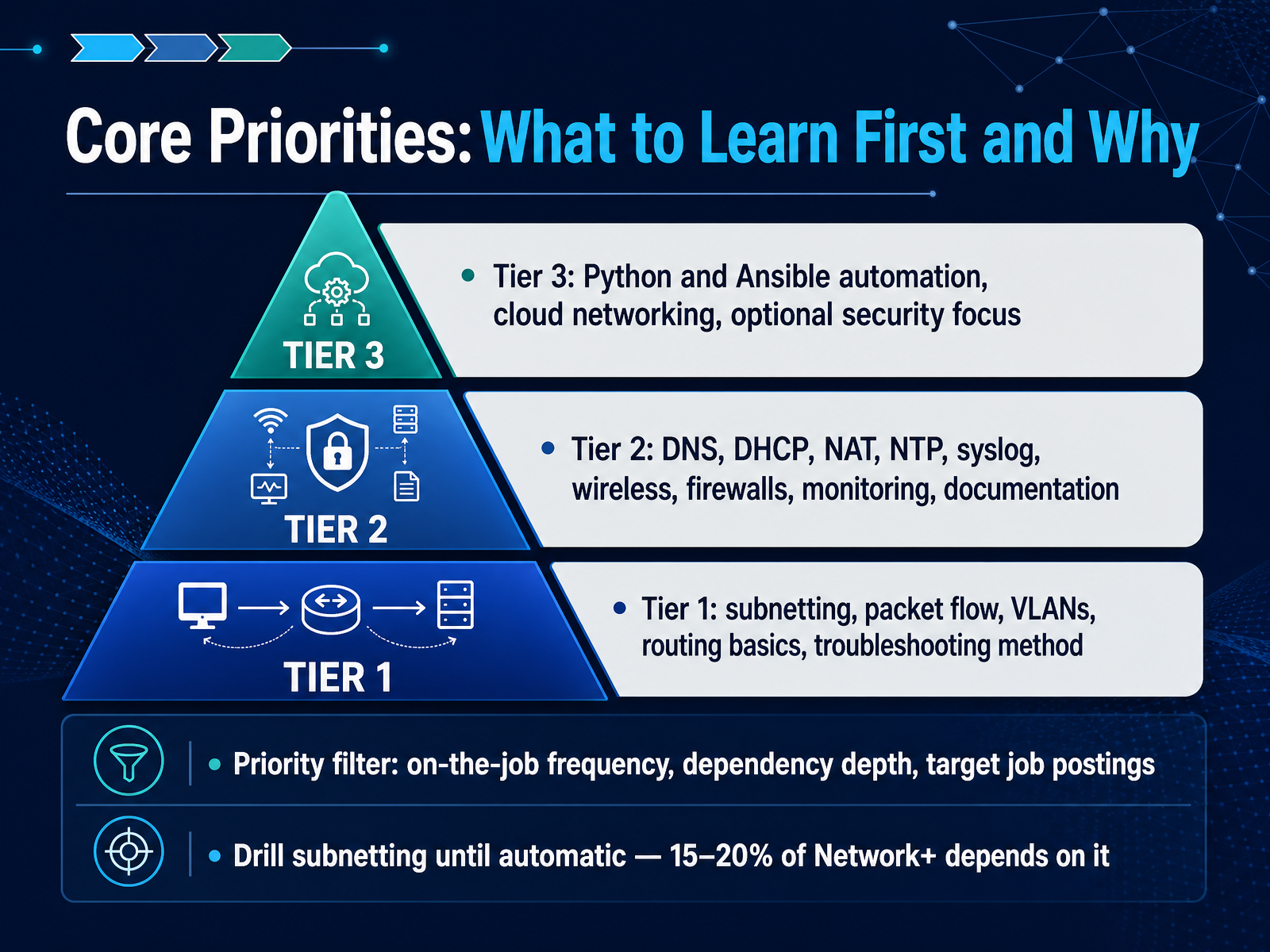
 - 04Core Priorities: What to Learn First and WhyNow let's turn to core priorities. What should you learn first, and why? Think in three tiers. Tier one is subnetting, packet flow, virtual local area networks, routing basics, and one consistent troubleshooting method. These are the skills you use every shift. Tier two covers domain name system, dynamic host configuration protocol, network address translation, time synchronization, logging, wireless, firewalls, monitoring, and documentation. Tier three is Python and Ansible automation, cloud networking, and optional security focus. To choose, apply a priority filter: how often the task appears on the job, how deeply other skills depend on it, and what target job postings actually list. A practical rule: if you are preparing for an entry certification, drill subnetting until it is automatic, because roughly fifteen to twenty percent of the Network+ exam depends on it. If you already subnet comfortably, shift that time to tier two services. Next, here is what the certification blueprints tell you about sequence.
 onlinecerthub.comflashgenius.netonlinecerthub.com+21 min
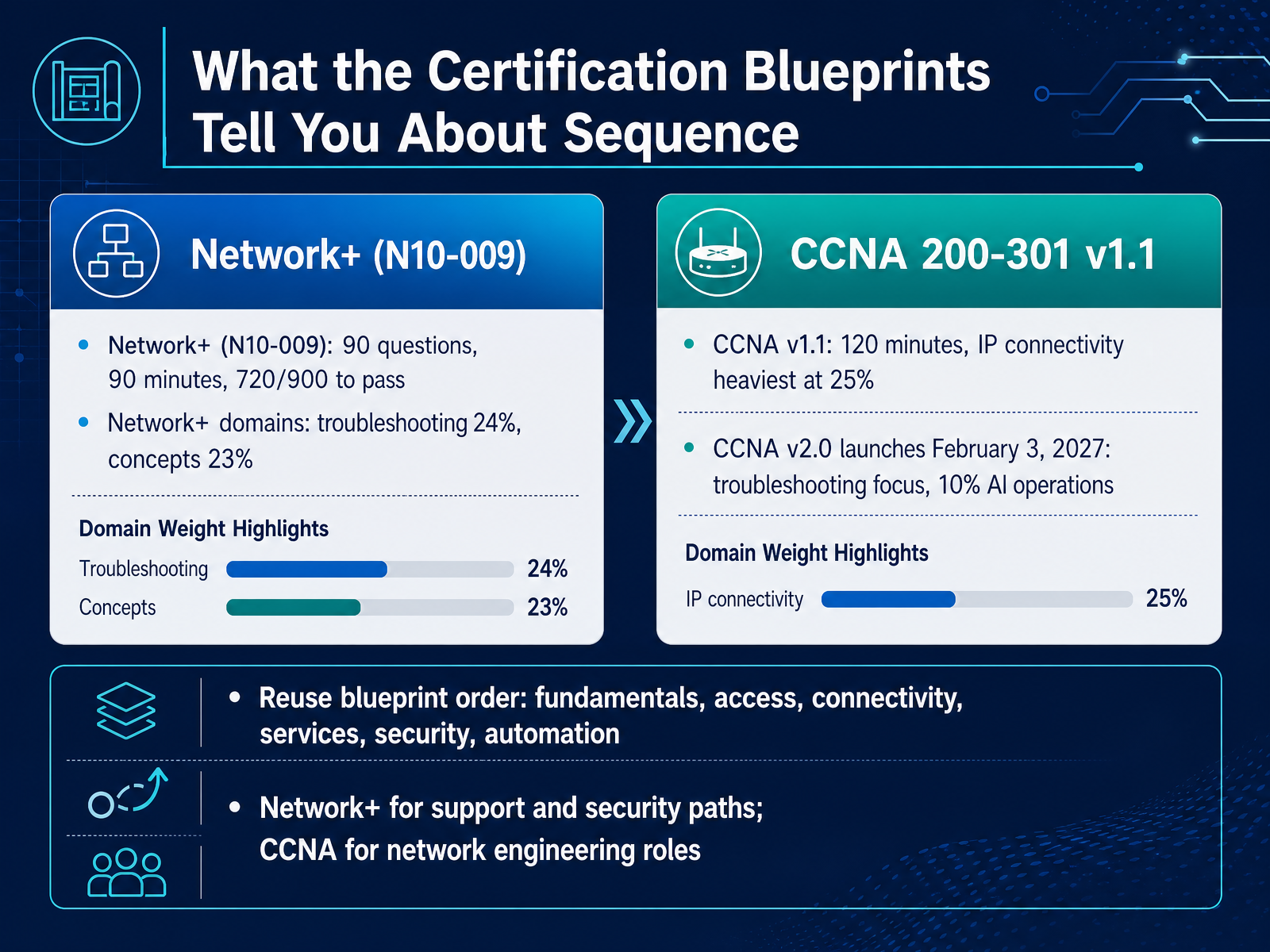
 - 05What the Certification Blueprints Tell You About SequenceNext, let us look at what the certification blueprints tell you about sequence. The exam blueprints are public documents, and they show you the order in which topics are tested. CompTIA Network+ version N ten dash zero zero nine gives you up to ninety questions in ninety minutes, with a passing score of seven hundred twenty out of nine hundred. Its two heaviest domains are troubleshooting at twenty four percent and networking concepts at twenty three percent. The Cisco CCNA version one point one is a one hundred twenty minute exam, and its heaviest domain is IP connectivity at twenty five percent. One important date: CCNA version two point zero launches on February third, twenty twenty seven, adding a stronger troubleshooting focus and a ten percent AI operations domain. Use the blueprint order as your study sequence: fundamentals, access, connectivity, services, security, then automation. If your target is a support or security role, prioritize Network+ before CCNA. If your target is a network engineering role, prioritize CCNA first. Milestones: From Beginner to Job-Ready to Specialist.
 comptia.orgcisco.comlearningnetwork.cisco.com+22 min
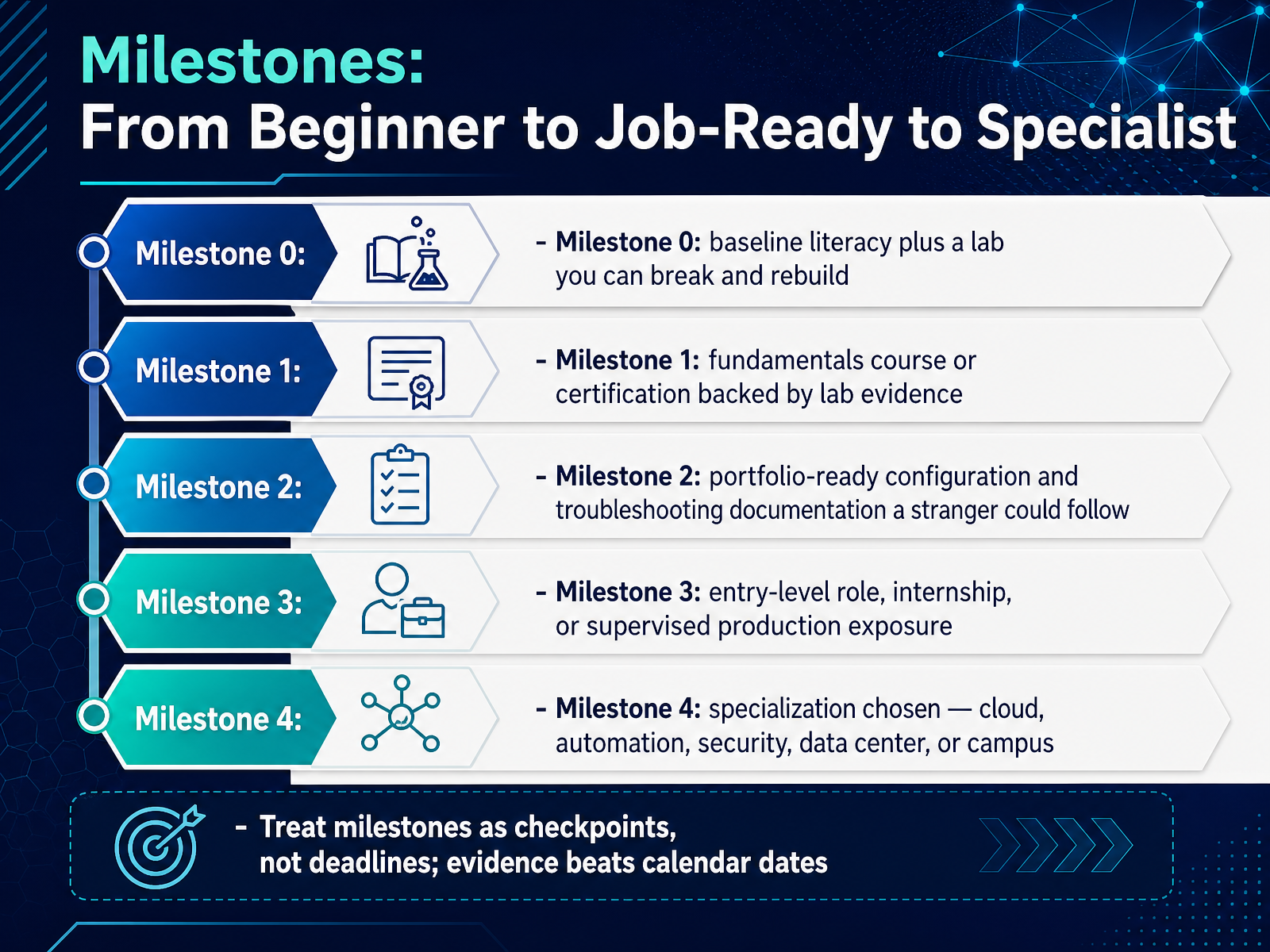
 - 06Milestones: From Beginner to Job-Ready to SpecialistLet's walk through the milestones that move you from beginner to job ready to specialist. Think of each one as a checkpoint, not a deadline. Evidence matters more than calendar dates. Milestone zero is baseline literacy. You understand core concepts, and you have a lab you can break and rebuild. For example, a small virtual lab where you change a configuration, lose connectivity, then restore it. Milestone one is a fundamentals course or certification backed by lab evidence. That means you do not just pass an exam. You can show a configuration you built and explain why it works. Milestone two is portfolio ready documentation. If a stranger can follow your notes to reproduce your configuration and troubleshoot a fault, you have proof of workplace skill. Milestone three is entry level exposure. That could be a role, an internship, or supervised production work. Here you learn change windows, escalation, and real tickets. Milestone four is specialization. You choose a direction such as cloud, automation, security, data center, or campus networking. If you need broad hiring appeal, prioritize fundamentals and documentation first. If you already have lab skill, move toward a specialization earlier. Treat each milestone as a checkpoint. When you reach it, record what you built and what you fixed. That record is what you take to a manager or an interview panel. Next, we will look at the hands-on practice that produces that evidence in Hands-On Practice: Labs, Simulations, and Portfolio Evidence.
 onlinecerthub.comflashgenius.netonlinecerthub.com+22 min
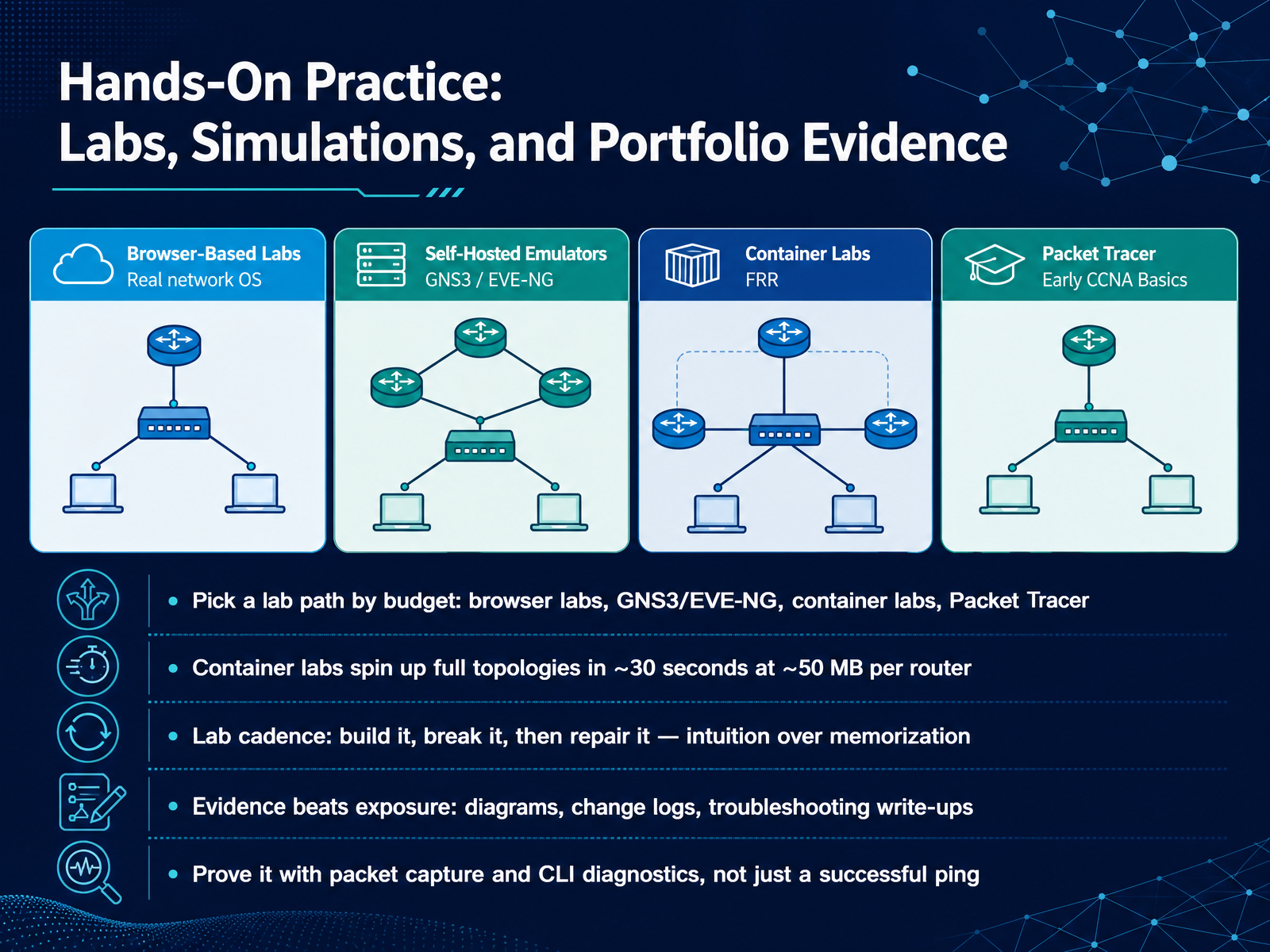
 - 07Hands-On Practice: Labs, Simulations, and Portfolio EvidenceLet us move from planning into practice. This slide is about building hands-on evidence. First, pick a lab path that fits your budget. Browser labs need nothing installed and start free. GNS3 and EVE-NG, short for Emulated Virtual Environment Next Generation, require a server, typically sixteen to thirty-two gigabytes of memory. Container labs are the lightest option. A full topology can start in about thirty seconds, using roughly fifty megabytes of memory per router. Packet Tracer is a free simulator for early fundamentals. Next, set your lab cadence in three steps. Build it, break it, then repair it. That builds intuition instead of memorization. Keep records as you go. Diagrams, change logs, and troubleshooting write-ups are portfolio evidence that lasts. Prove your work with packet capture and command-line diagnostics, not just a successful ping. If you need an interview story, prioritize the repair write-up before adding another topology. Coming next: A Minimum Viable Lab and First Portfolio Artifact.
 netpilot.ionetsandbox.iogithub.com+22 min
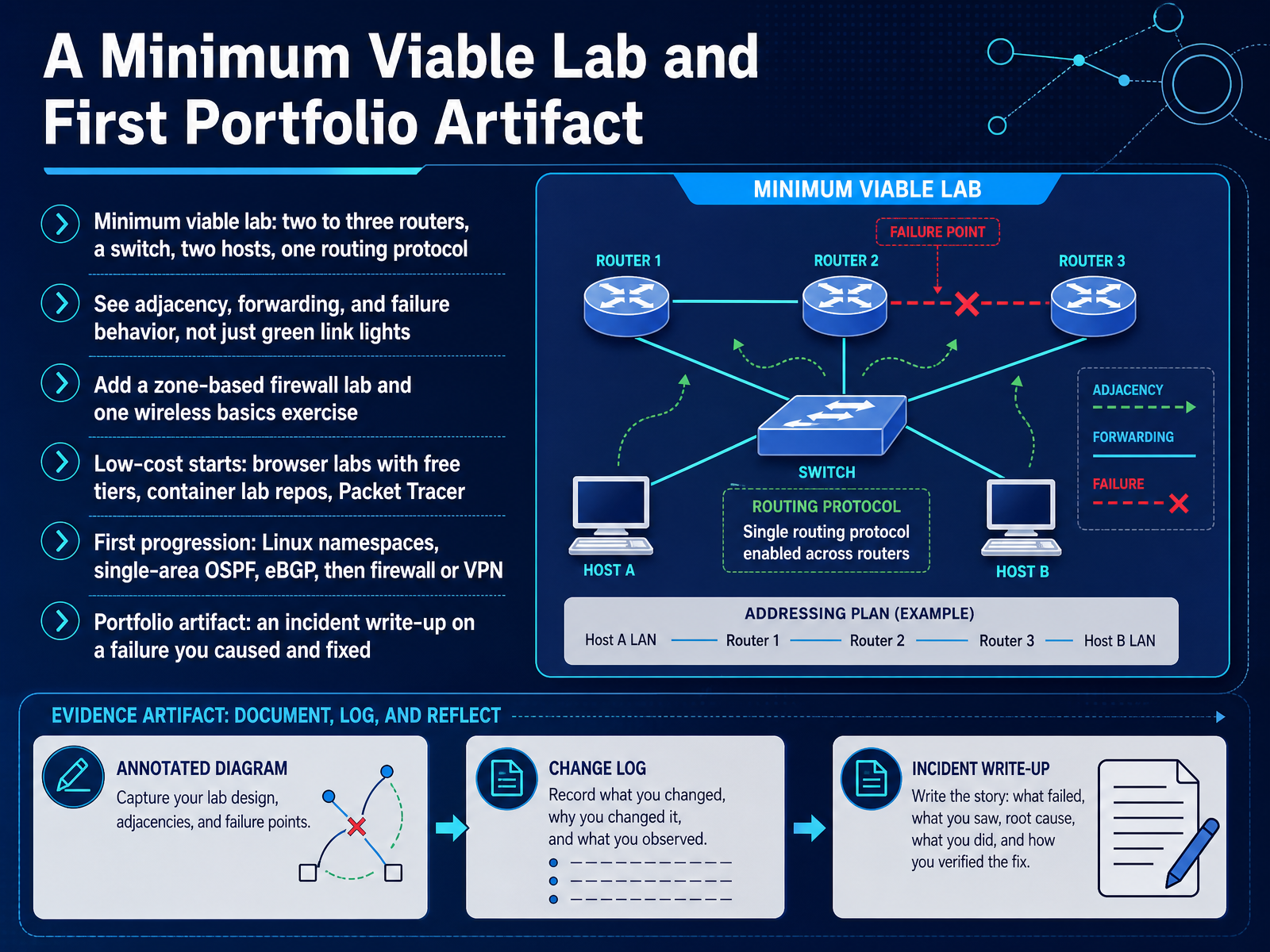
 - 08A Minimum Viable Lab and First Portfolio ArtifactNow let's build your minimum viable lab and your first portfolio artifact. A minimum viable lab is the smallest setup that still teaches you something real: two to three routers, one switch, two hosts, and one routing protocol. That is enough to watch adjacency form, see forwarding decisions, and break a link so you observe failure behavior, not just green link lights. Once that works, add a zone-based firewall lab and one wireless basics exercise. If cost is a constraint, start with browser labs that offer free tiers, container lab repositories, or Packet Tracer. For your first progression, follow this order: Linux namespaces, single-area OSPF, external BGP, then firewall or VPN. That sequence builds from host networking to routing to policy. Your portfolio artifact should be an incident write-up on a failure you caused and fixed. Document the symptom, your hypothesis, the fix, and what you changed afterward. That artifact shows a hiring manager how you think under pressure. Next, we move into practical strategies for communication: explaining, documenting, and escalating.
 netpilot.ionetsandbox.iogithub.com+22 min
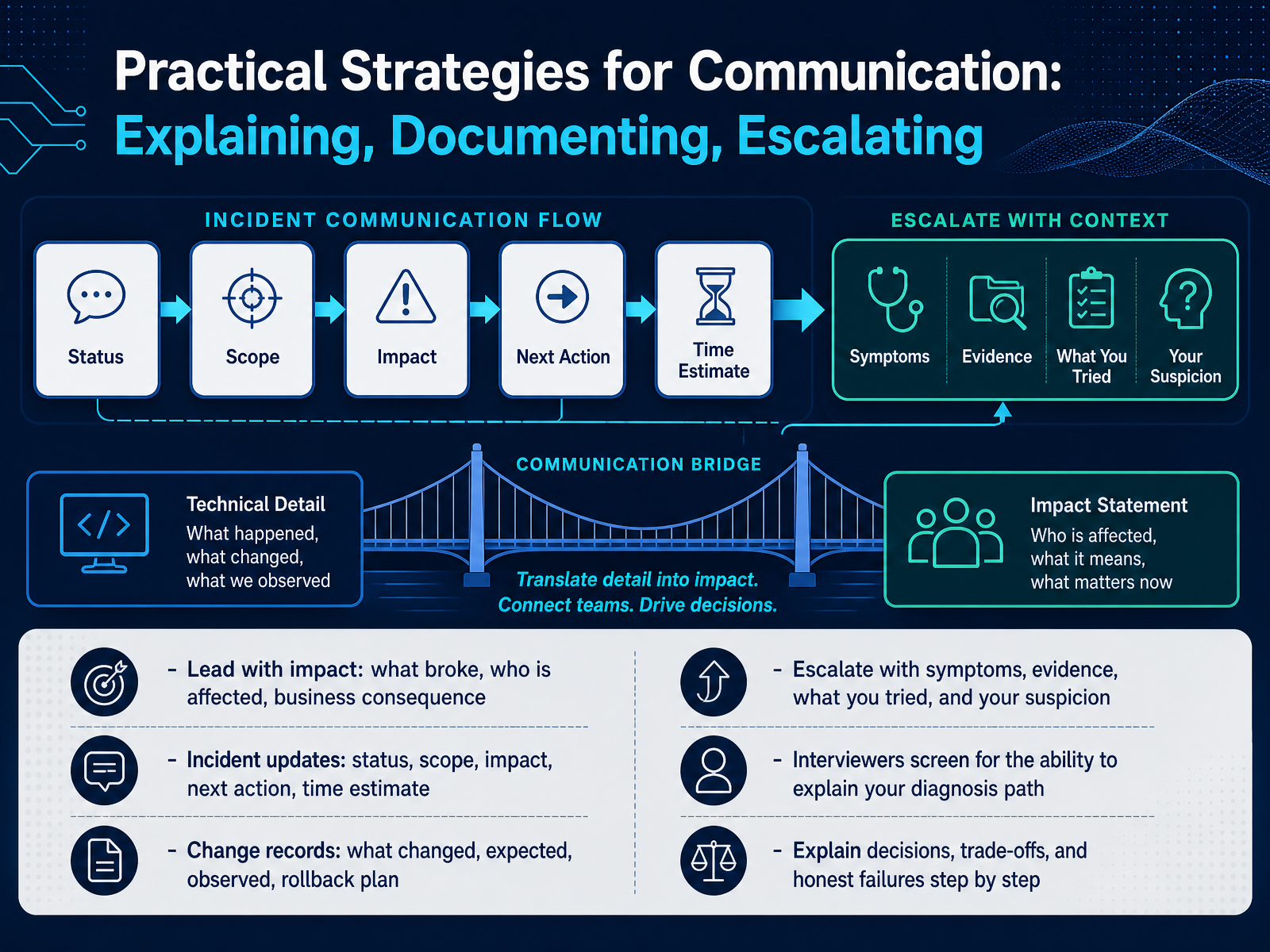
 - 09Practical Strategies for Communication: Explaining, Documenting, EscalatingLet us move into practical strategies for communication: explaining, documenting, and escalating. This is the skill that gets network engineers promoted. When something breaks, lead with impact first. State what failed, who is affected, and the business consequence. Then give an incident update in a fixed order: status, scope, impact, next action, and time estimate. For change records, write four things: what changed, what you expected, what you observed, and your rollback plan. When you escalate, include symptoms, evidence, what you already tried, and your suspicion. In interviews, panels screen for your ability to explain your diagnosis path step by step. So practice explaining decisions, trade-offs, and even honest failures in plain language. If your audience is non-technical, prioritize impact over protocol detail. If your audience is senior engineers, prioritize evidence and your reasoning. Next, we will look at managing the roadmap: time, budget, and support.
 interviewstack.ioindeed.comituonline.com+22 min
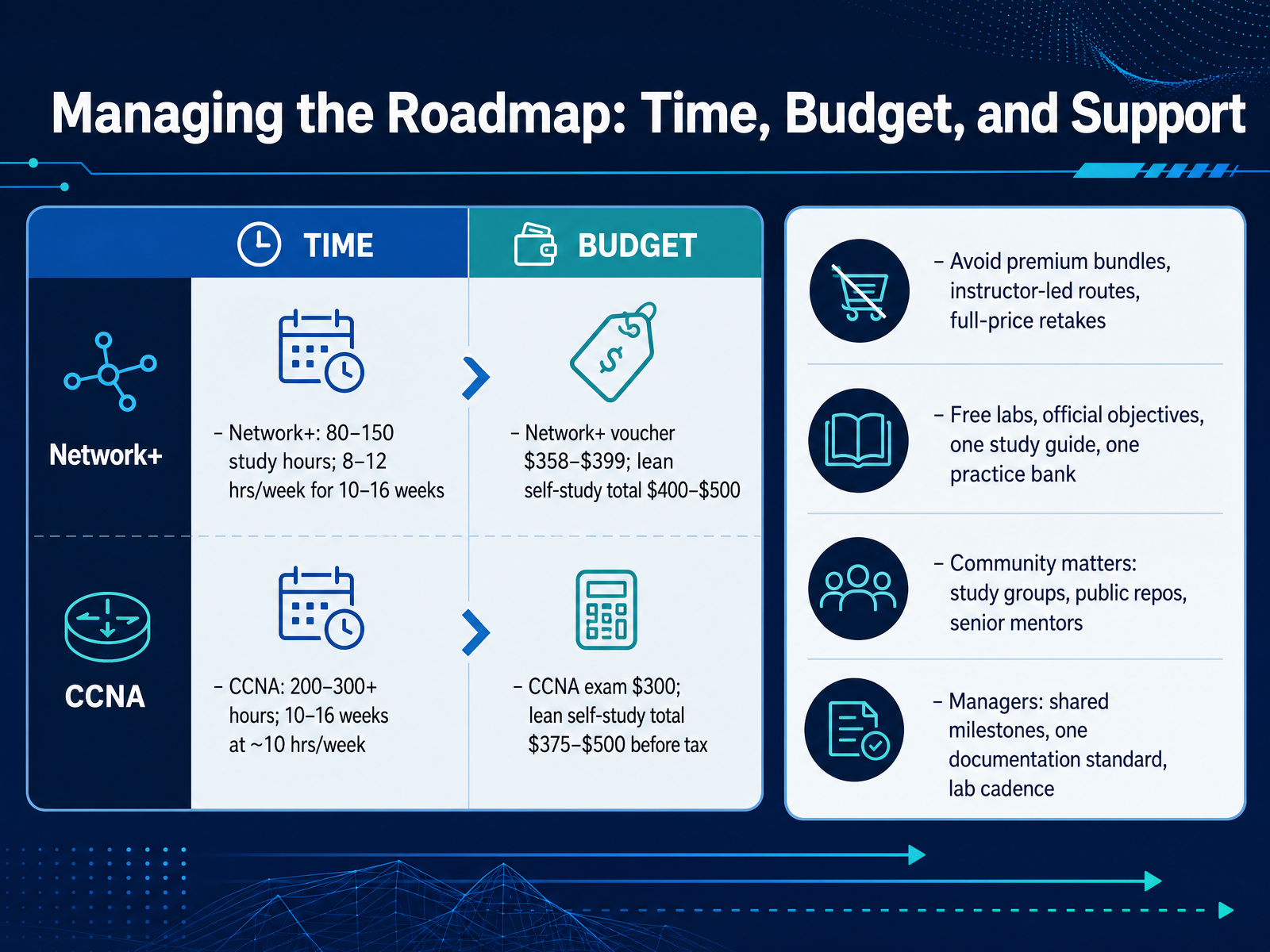
 - 10Managing the Roadmap: Time, Budget, and SupportNow let's talk about managing your roadmap through time, budget, and support. Start with time. For Network Plus, plan for eighty to one hundred fifty study hours, which is eight to twelve hours per week for ten to sixteen weeks. For the Cisco Certified Network Associate, or CCNA, plan for two hundred to three hundred or more hours, roughly ten to sixteen weeks at ten hours per week. Budget next. A Network Plus voucher costs between three hundred fifty eight and three hundred ninety nine dollars, with a lean self study total near four hundred to five hundred dollars. The CCNA exam costs three hundred dollars, with a lean self study total of about three hundred seventy five to five hundred dollars before tax. To control cost, avoid premium bundles, instructor led routes, and full price retakes. Instead, use free labs, official objectives, one study guide, and one practice bank. Community matters too. Join study groups, use public repositories, and find senior mentors. If you are a manager, agree on shared milestones, one documentation standard, and a set lab cadence. Next, we will look at common roadmap mistakes and course corrections.
 onlinecerthub.comflashgenius.netonlinecerthub.com+22 min
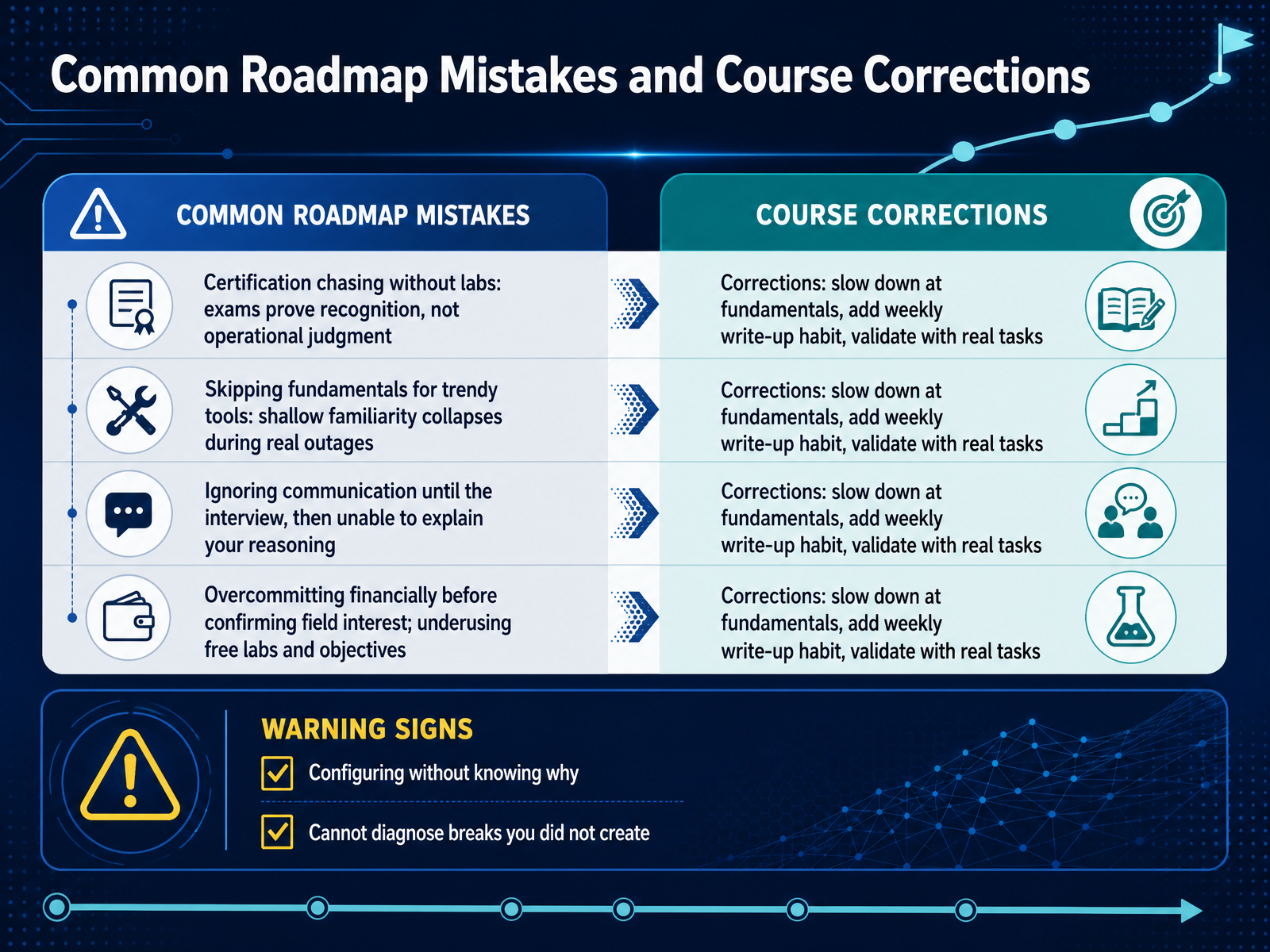
 - 11Common Roadmap Mistakes and Course CorrectionsLet us look at common roadmap mistakes, and how to correct them. First, certification chasing without labs. An exam proves recognition, not operational judgment. If your goal is a hands-on role, prioritize lab hours before you book a test. Second, skipping fundamentals for trendy tools. Shallow familiarity collapses during a real outage, so slow down at the basics before you add automation. Third, ignoring communication until the interview. Build a weekly write-up habit now, so you can explain your reasoning to a manager. Fourth, overcommitting financially before confirming field interest. Use free labs and the official exam objectives first, then decide. Watch for two warning signs. Configuring without knowing why, and being unable to diagnose a break you did not create. If you see them, return to fundamentals, and validate with real tasks. Next, where the market is moving in automation, cloud, and A I operations.
 onlinecerthub.comflashgenius.netonlinecerthub.com+22 min
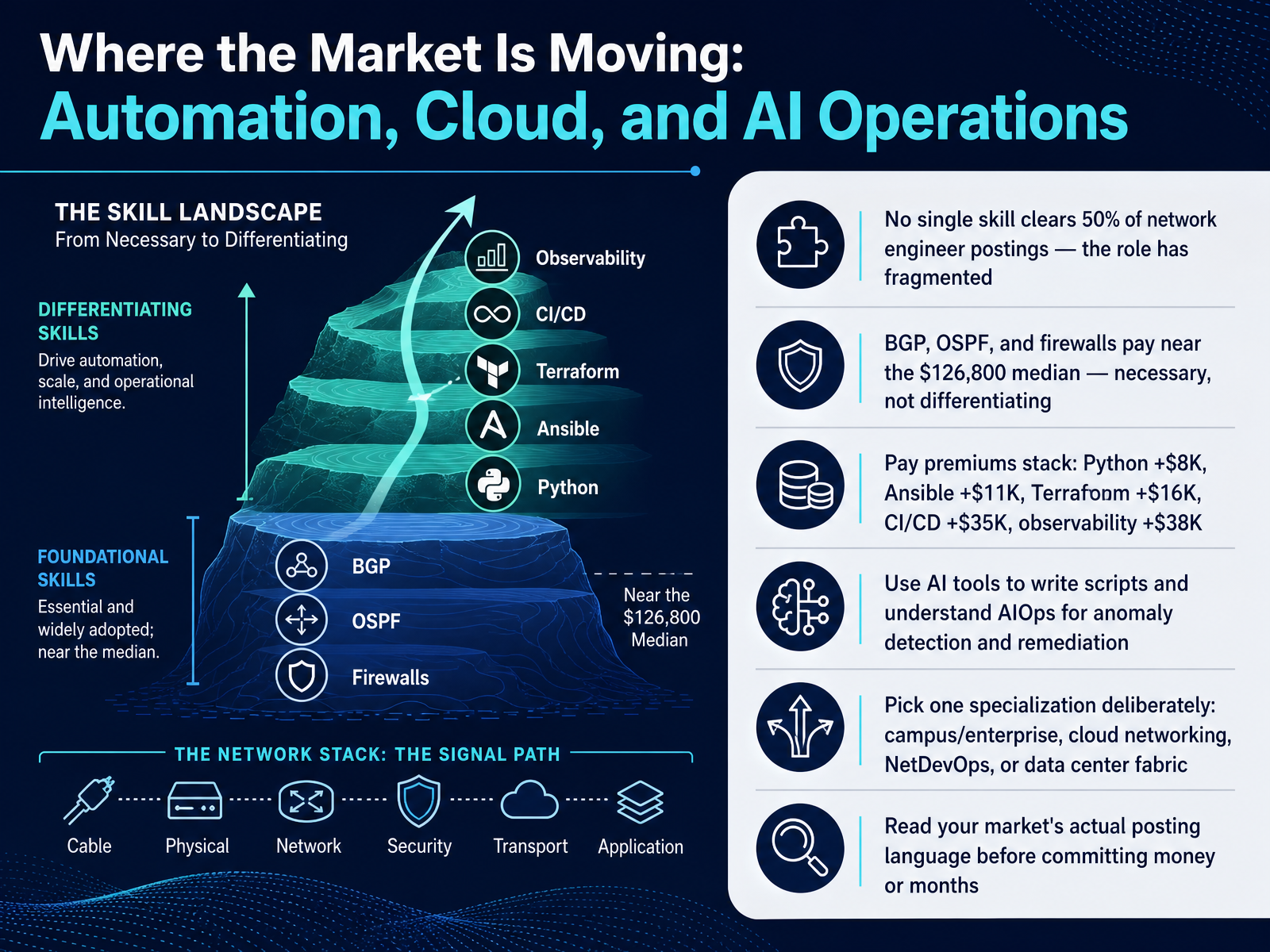
 - 12Where the Market Is Moving: Automation, Cloud, and AI OperationsLet's look at where the market is moving. First, no single skill now appears in more than half of network engineer postings. That tells you the role has fragmented. Second, B, G, P, O, S, P, F, and firewalls still pay close to the median of one hundred twenty-six thousand eight hundred dollars. They are necessary to get hired, but they do not differentiate you. Third, pay premiums stack. Python adds about eight thousand dollars. Ansible adds eleven thousand. Terraform adds sixteen thousand. C I, C D adds thirty-five thousand. And observability adds thirty-eight thousand. Fourth, use A I tools to help write scripts, and understand A I ops, which is using machine learning for anomaly detection and automated remediation. Fifth, pick one specialization deliberately: campus and enterprise, cloud networking, NetDevOps, or data center fabric. If you need stable demand, prioritize campus and enterprise. If you want the highest ceiling, prioritize NetDevOps. Finally, read your market's actual posting language before you commit money or months. Now let's bring this together into your ninety-day action plan.
 interviewstack.ioindeed.comituonline.com+22 min
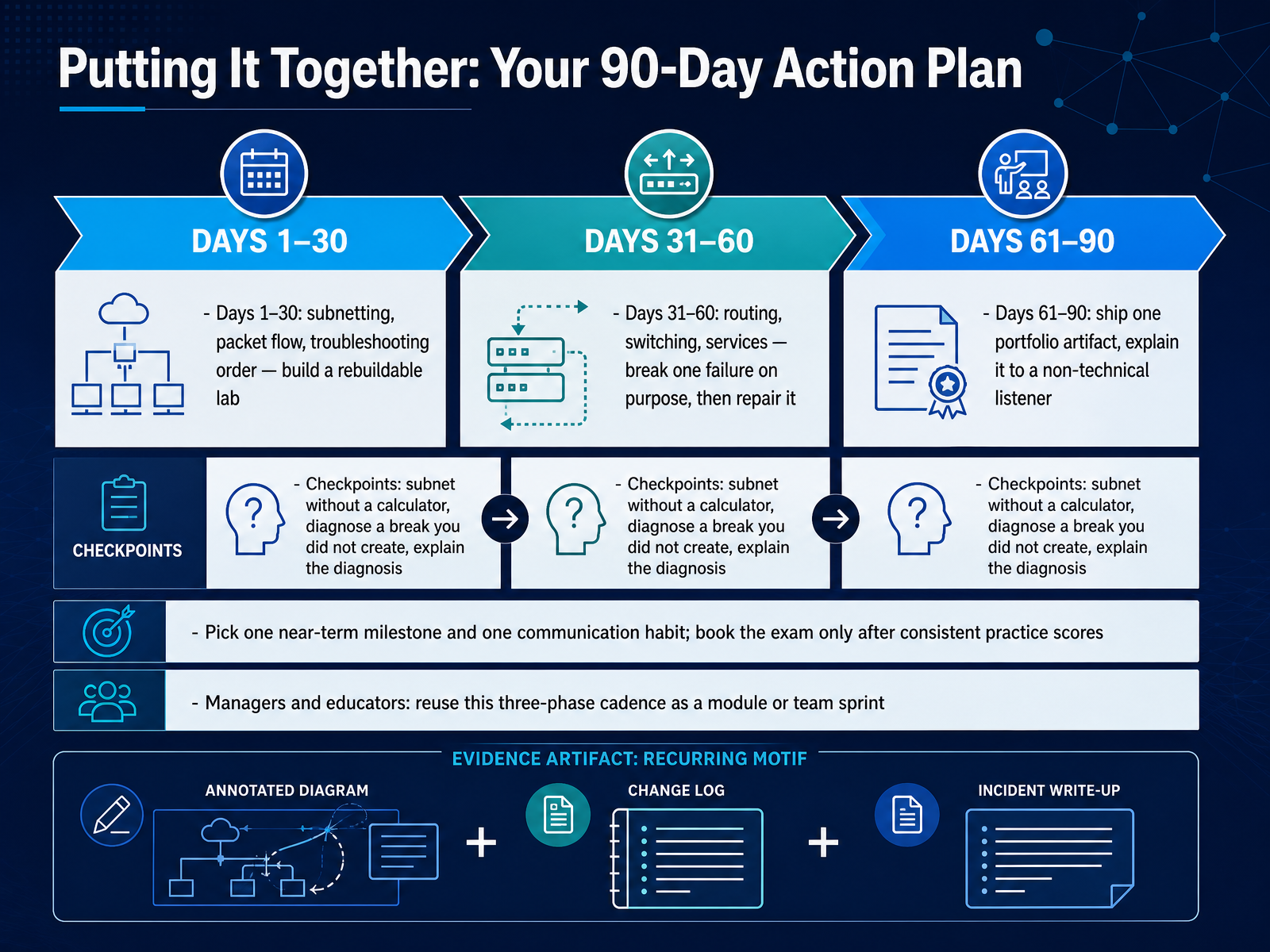
 - 13Putting It Together: Your 90-Day Action PlanLet's close by turning the roadmap into a ninety-day action plan. In the first thirty days, focus on three things: subnetting, packet flow, and troubleshooting order. Those are the job tasks that come up first in a network operations center. Build one lab you can rebuild from scratch. If your goal is a quick credential, prioritize practice tests early. If your goal is job readiness, prioritize hands-on repetition first. From day thirty-one to sixty, add routing, switching, and services. Then break one failure on purpose, and repair it. That mirrors a real ticket, where you diagnose a break someone else created. Days sixty-one to ninety: ship one portfolio artifact and explain it to a non-technical listener. This is the communication habit hiring managers reward, because you will present outages and tradeoffs to people who do not want protocol details. Checkpoints: subnet without a calculator, diagnose a break you did not create, and explain the diagnosis clearly. Book the exam only after consistent practice scores. Managers and educators, reuse this three-phase cadence as a module or a team sprint. Thank you for joining this roadmap. Keep the plan small, repeatable, and documented, and you will be ready to explain every choice you made.
 onlinecerthub.comflashgenius.netonlinecerthub.com+22 min
Take the deck with you
Download this course as a file — free, no sign-up needed.
- PDF handoutEvery slide page, ready to print or share.14 pages · 4.1 MBDownload
- Narrated PowerPointThe deck that presents itself — every slide carries the digital human's narration video.14 pages · 14.9 MBDownload
- PowerPoint slidesThe full deck as a .pptx — open it in PowerPoint, Keynote, or Google Slides.14 pages · 3.9 MBDownload
Free to use in your own training — please keep the PersonWise credit page at the end.
Have your own deck? Turn it into a course
Sources consulted
Web sources consulted while building this course.
- Online Network Lab — Run Multi-Vendor Labs in Your Browser | NetPilot — netpilot.io
- NetSandbox - Build a Network. See If It Works. — netsandbox.io
- ipspace/netlab — github.com
- ciscoittech/containerlab-free-labs — github.com
- PNETLab : Lab is Simple — pnetlab.com
- Network Engineer Skills in 2026: Add Python, Not Just BGP | InterviewStack.io — interviewstack.io
- Network Engineer Job Description [Updated for 2026] — indeed.com
- How to Become a Network Engineer in 2026: A Step-by-Step Guide – ITU Online IT Training — ituonline.com
- University of Texas at Dallas Employment Opportunities | Network Engineer I — jobs.utdallas.edu
- Network Engineer Job Description Template 2026 - KORE1 — kore1.com
- CompTIA Network+ 2026: Worth $358 or Skip to Security+? — onlinecerthub.com
- CompTIA Network+ Costs: The Complete 2026 Guide | FlashGenius — flashgenius.net
- Cisco CCNA 2026: Is It Still Worth It (Pass Rate & Salary)? — onlinecerthub.com
- CompTIA Network+ (N10-009) Exam Guide 2026 — Cost, Format, Passing Score | CertSharp — certsharp.com
- How Much Does the CCNA Cost in 2026? Complete Budget Guide | FlashGenius — flashgenius.net
- Network+ (Plus) Certification | CompTIA Global — comptia.org
- Cisco Certified Network Associate — cisco.com
- CCNA Exam Topics — learningnetwork.cisco.com
- CCNA 200-301 Syllabus Update 2026: What’s New? — networkerschamp.com
- Network+ vs CCNA in 2026: Which Should You Take First? — certcrush.app