Begin
14 pages · ~28 min
Web Development vs Software Development
This training explains the key differences between web and software development, covering tradeoffs and use cases for developers choosing a career path or project approach.
A digital instructor presents all 14 pages. Hold “Ask” at any point and ask out loud — the answer comes from this course. No sign-up needed.
What you’ll learn
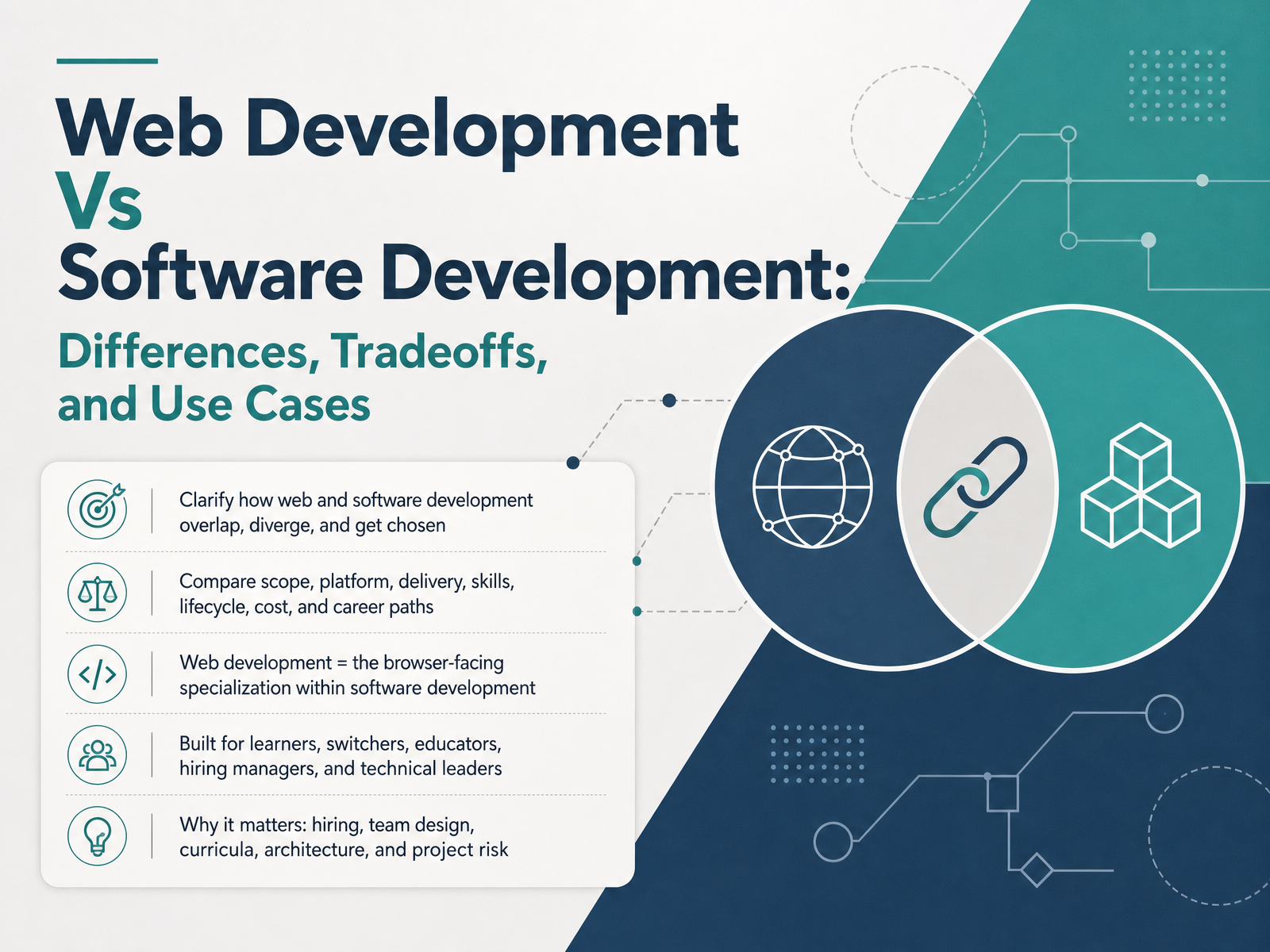
- 01Web Development Vs Software Development: Differences, Tradeoffs, and Use CasesWelcome. If you have ever wondered whether a web developer and a software developer are the same job, you are in the right place. This course is for learners, career switchers, educators, hiring managers, and technical leaders who need a clear way to tell these paths apart and choose between them. Here is the goal: clarify how web and software development overlap, diverge, and get chosen. We will compare scope, platform, delivery, skills, lifecycle, cost, and career paths. One idea anchors everything: web development is the browser-facing specialization within software development. In other words, every web developer does software development, but not every software developer builds for the web. That distinction matters for hiring, team design, curricula, architecture, and project risk. Let's start with the relationship itself: background, the part-and-whole relationship.guvi.inyusmpgroup.comwebo360solutions.com+21 min
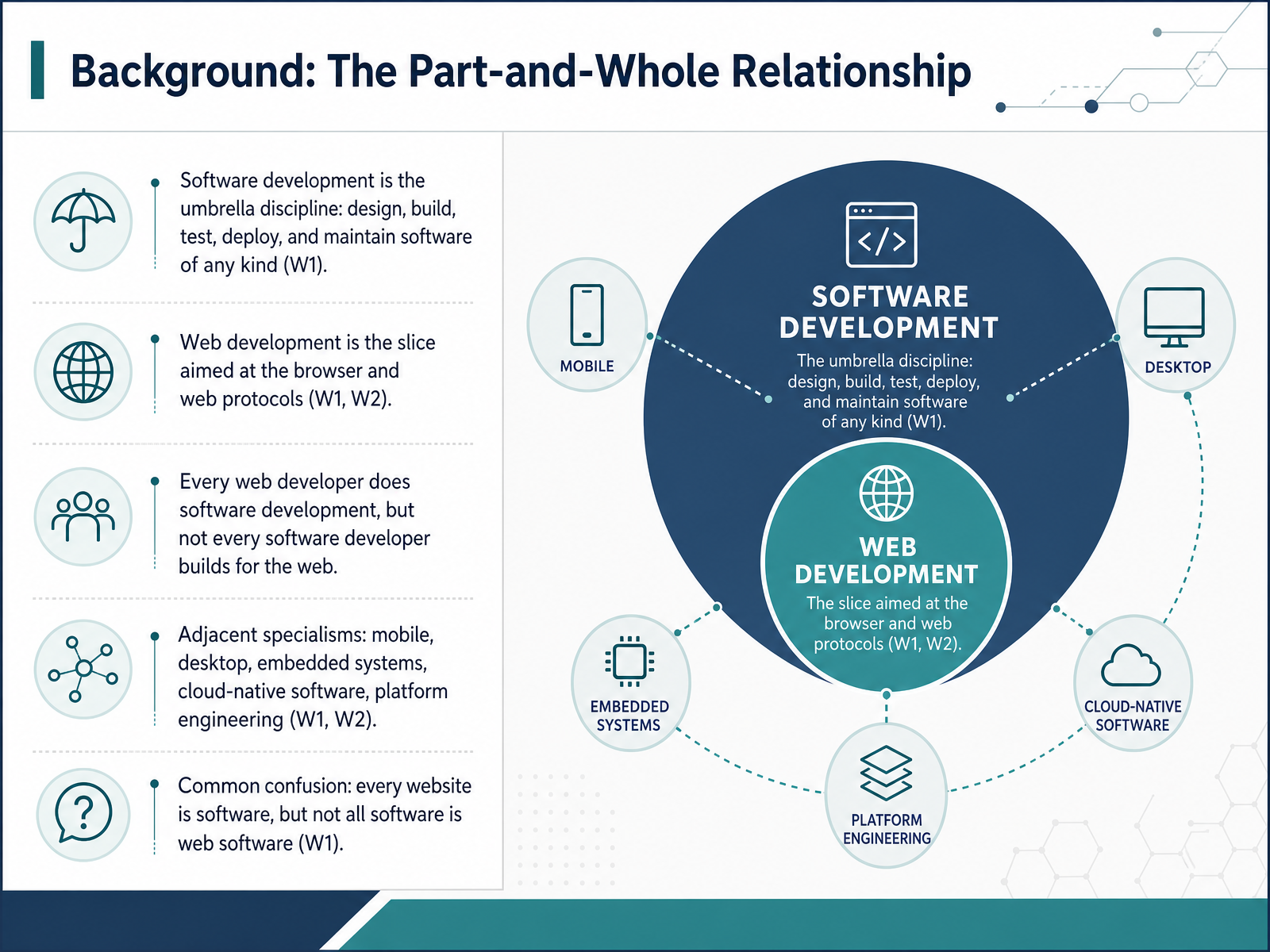
- 02Background: The Part-and-Whole RelationshipNow let's place these two fields in the right order. Web development and software development are not rivals. They have a part-and-whole relationship. Software development is the umbrella discipline. It covers the full lifecycle: designing, building, testing, deploying, and maintaining software of any kind. Web development is one slice inside that umbrella. It targets the browser and web protocols, so tools like HTML, CSS, and JavaScript sit at its center. Here is the sentence worth remembering. Every web developer does software development, but not every software developer builds for the web. Think of a hospital. Medicine is the whole field. Cardiology is one specialty inside it. In the same way, mobile apps, desktop tools, embedded systems, cloud-native software, and platform engineering are adjacent specialisms within software development. One common confusion is worth clearing up early. Every website is software, but not all software is web software. A video game, a car's braking system, and a payroll application are all software. None of them runs in a browser. Hold onto that distinction, because it shapes how you hire, teach, and choose a career path. Next, let's look at the definitions and terminology you will hear in 2026.
 guvi.inyusmpgroup.comwebo360solutions.com+22 min
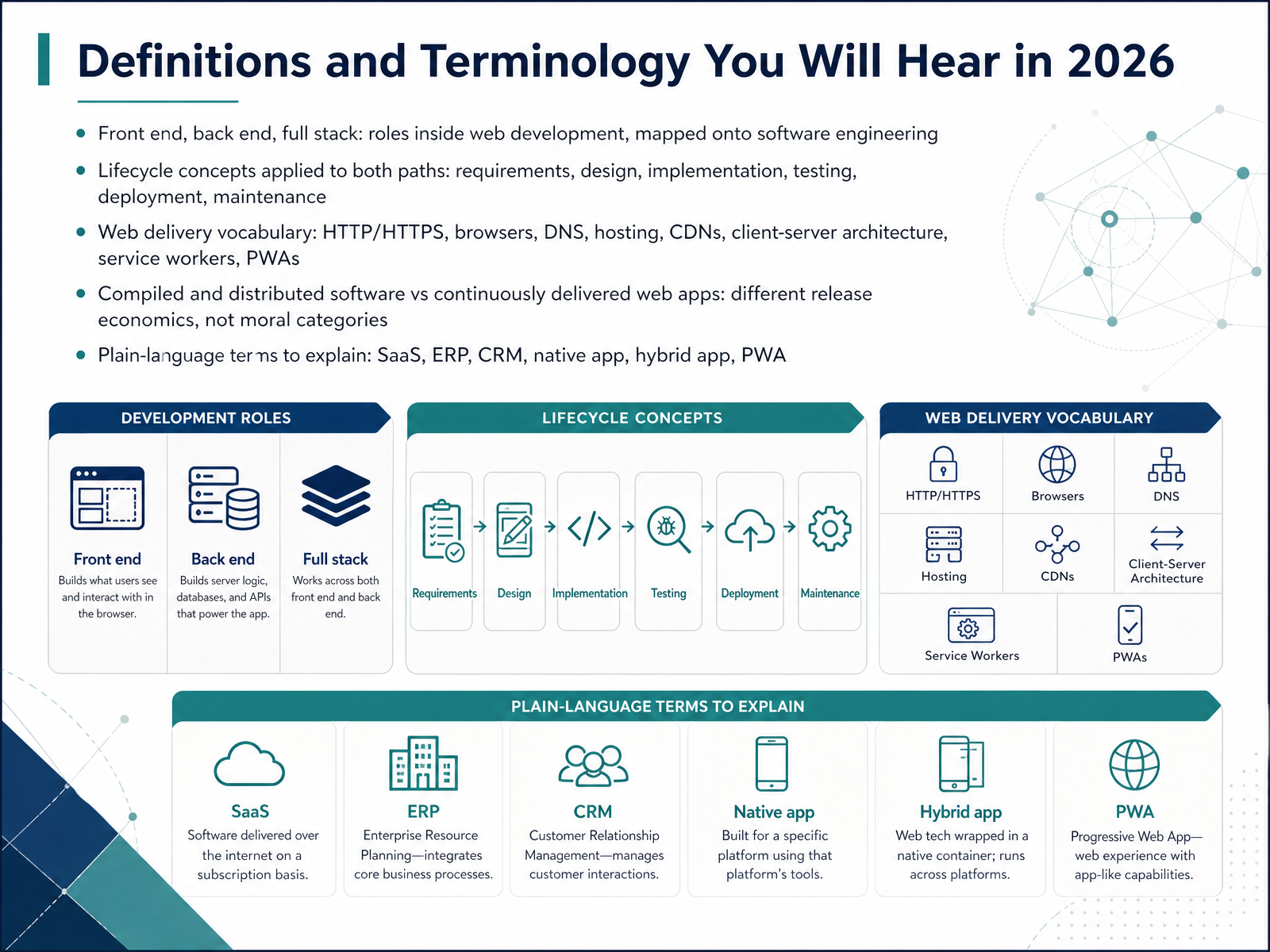
 - 03Definitions and Terminology You Will Hear in 2026Now let's build a shared vocabulary, because these terms will come up throughout the rest of this course. Start with web roles. Front end means the parts users see and interact with in a browser. Back end means the servers, databases, and logic behind the scenes. Full stack simply describes someone comfortable with both. Notice that all three sit inside software engineering, not beside it. Next, the lifecycle. Requirements, design, implementation, testing, deployment, and maintenance apply to both paths, web and software alike. Then there's web delivery vocabulary. HTTP and HTTPS are the rules browsers and servers use to exchange information. DNS is the system that turns a web address into a server location. Hosting is where your site lives, and a CDN, or content delivery network, copies files to servers worldwide so pages load faster. Client-server architecture means a user's device requests data, and a server responds. Service workers run quietly in the background, enabling offline use, and a PWA, or progressive web app, uses them to feel like an installed app. One more comparison worth pausing on. Compiled and distributed software ships through installers or app stores, while web apps are continuously delivered the moment you deploy. That's a difference in release economics, not a ranking of value. Finally, quick plain-language definitions. SaaS means software as a service, like a subscription tool you use online. ERP systems manage core business operations, and CRM tools manage customer relationships. Native apps are built for one specific platform, hybrid apps mix web code with a native shell, and a PWA runs in the browser with app-like features. Keep these terms handy, because precision here shapes every career and hiring conversation ahead. Next, we'll clarify what web development is and is not.
 ca.indeed.comcareers.newark.rutgers.eduguvi.in+22 min
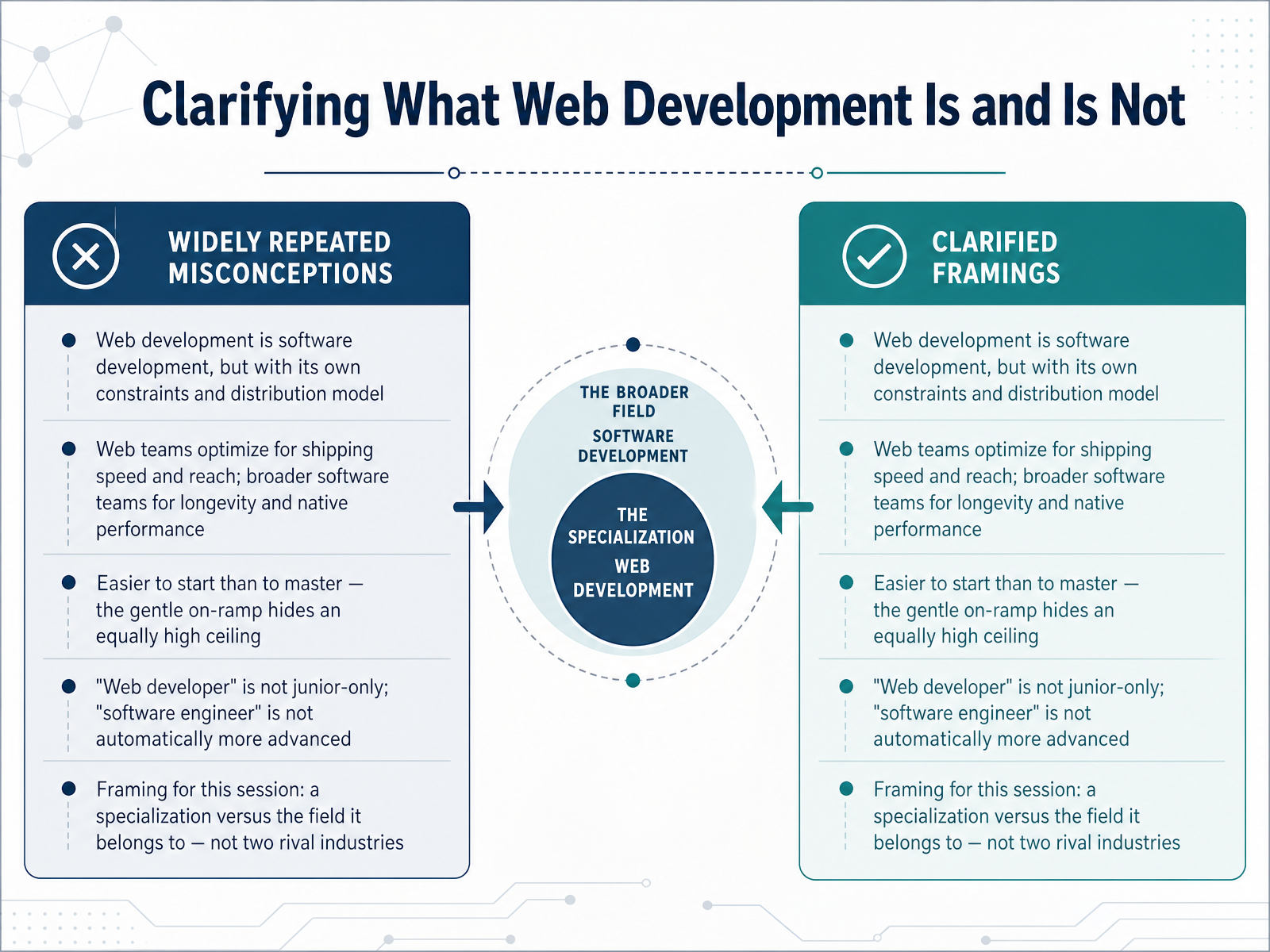
 - 04Clarifying What Web Development Is and Is NotLet's clarify what web development actually is, and what it is not. First, web development is software development. It simply comes with its own constraints and its own distribution model. Updates ship to everyone at once, through a browser and a content delivery network. Web teams tend to optimize for shipping speed and reach. Broader software teams often optimize for longevity and native performance. Second, web development is easier to start than to master. The gentle on-ramp hides an equally high ceiling. Anyone can put a page online in a weekend, but few can build a fast, accessible, secure platform at scale. Third, the title web developer is not junior-only, and software engineer is not automatically more advanced. A senior front-end engineer can be every bit as deep as any systems specialist. So frame this session as one specialization inside the field it belongs to. Not two rival industries. Up next, we get concrete about platform, runtime, and how software is delivered.
 guvi.inyusmpgroup.comwebo360solutions.com+21 min
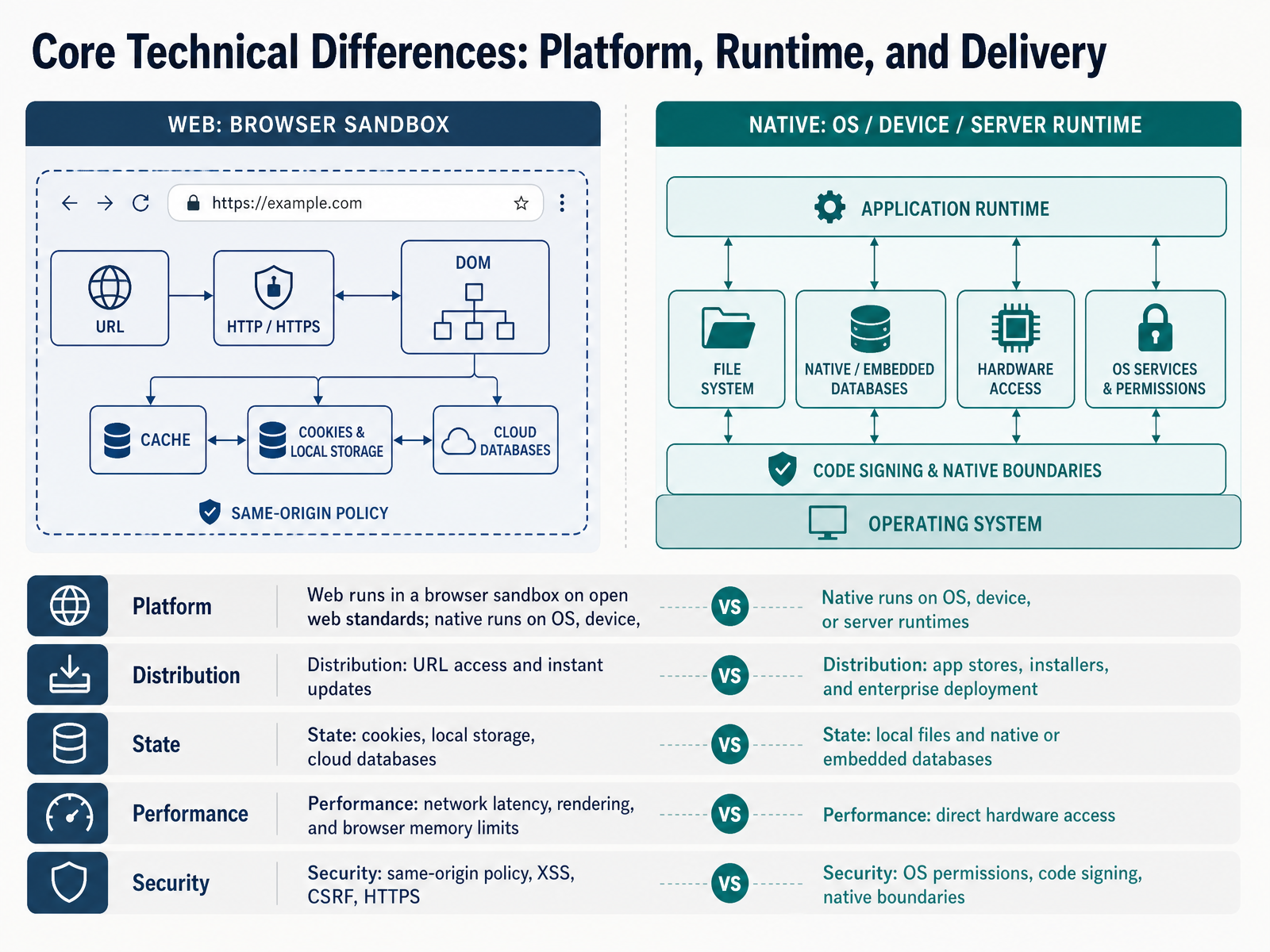
 - 05Core Technical Differences: Platform, Runtime, and DeliveryNow let's look at where the two paths actually diverge technically. Three things matter most: platform, delivery, and runtime constraints.
Web code runs inside a browser sandbox, built on open web standards. Native software runs on an operating system, a device, or a server runtime. That single difference ripples outward.
Take distribution. A web app is reached by a URL, and updates reach everyone instantly. Native software ships through app stores, installers, or enterprise deployment, where review cycles and user downloads slow each release.
State differs too. Web apps lean on cookies, local storage, and cloud databases. Native apps often use local files and embedded databases, which supports stronger offline work.
Performance follows the same pattern. Web faces network latency, rendering, and browser memory limits. Native gets more direct hardware access, which matters for heavy animation or real-time processing.
Security is shaped by the platform as well. Web developers handle same-origin policy, cross-site scripting, cross-site request forgery, and HTTPS. Native developers work with operating system permissions, code signing, and native boundaries.
So the takeaway is not which is better. It is which constraints your product can live with. Next, we look at testing, release, and the update velocity gap.
 guvi.inyusmpgroup.comwebo360solutions.com+22 min
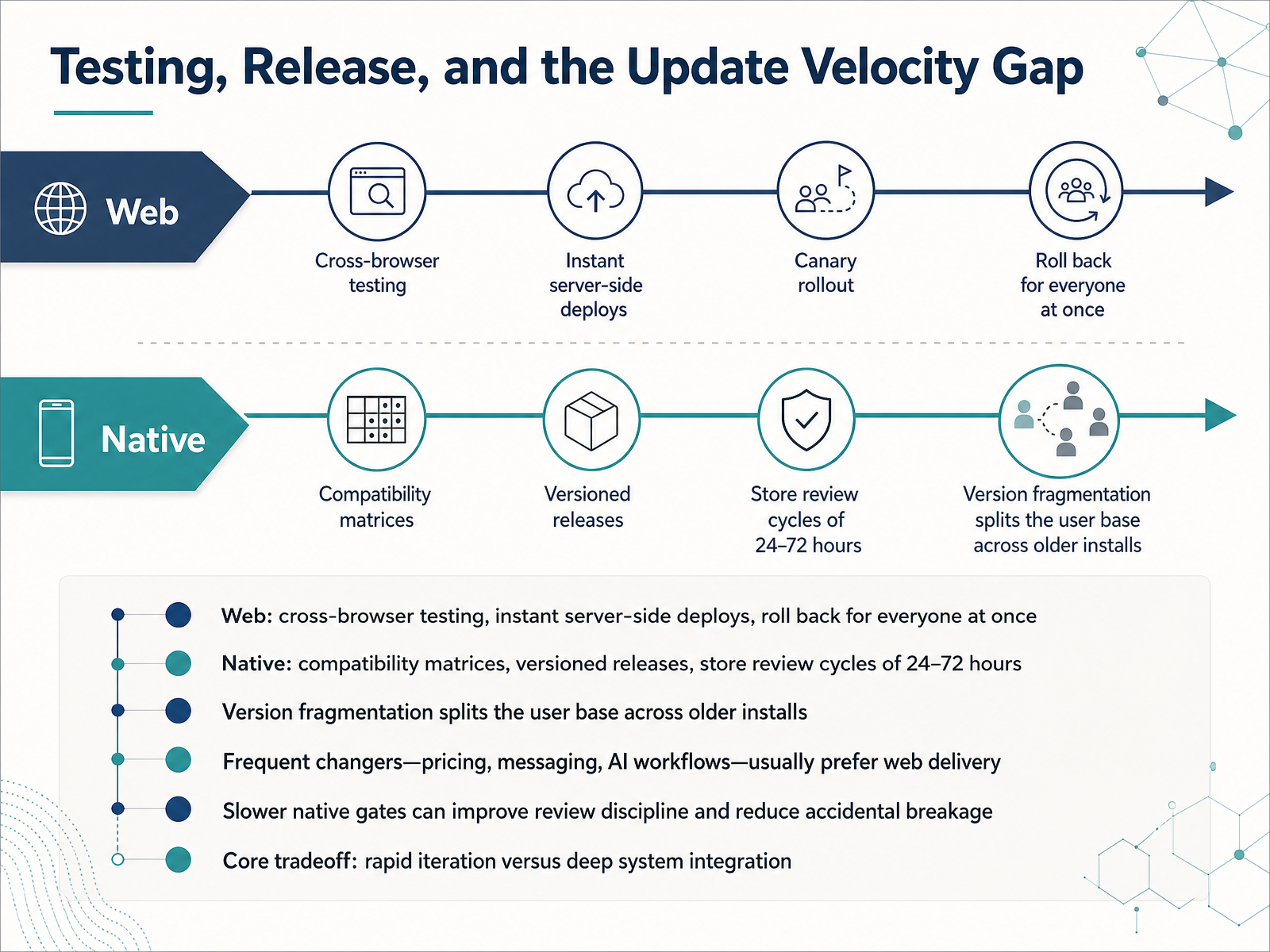
 - 06Testing, Release, and the Update Velocity GapNow let's look at how testing and releases actually differ, which is where the update velocity gap shows up. On the web, you test across browsers, deploy on the server, and every user gets the new version at once. If something breaks, you roll back for everyone in a single step. Native software works differently. You test against a compatibility matrix of devices and operating systems, ship versioned releases, and wait through store review cycles of twenty four to seventy two hours. That delay lets version fragmentation split your user base across older installs. So who benefits from which? Products that change often, like pricing, messaging, or AI workflows, usually prefer web delivery, because a browser update reaches the whole user base together. The slower native gates, though, can improve review discipline and reduce accidental breakage. The core tradeoff is simple: rapid iteration versus deep system integration. Keep that tradeoff in mind as we move on to Skills, Roles, and Shared Foundations.
 aws.amazon.comwondermentapps.comthelinuxcode.com+21 min
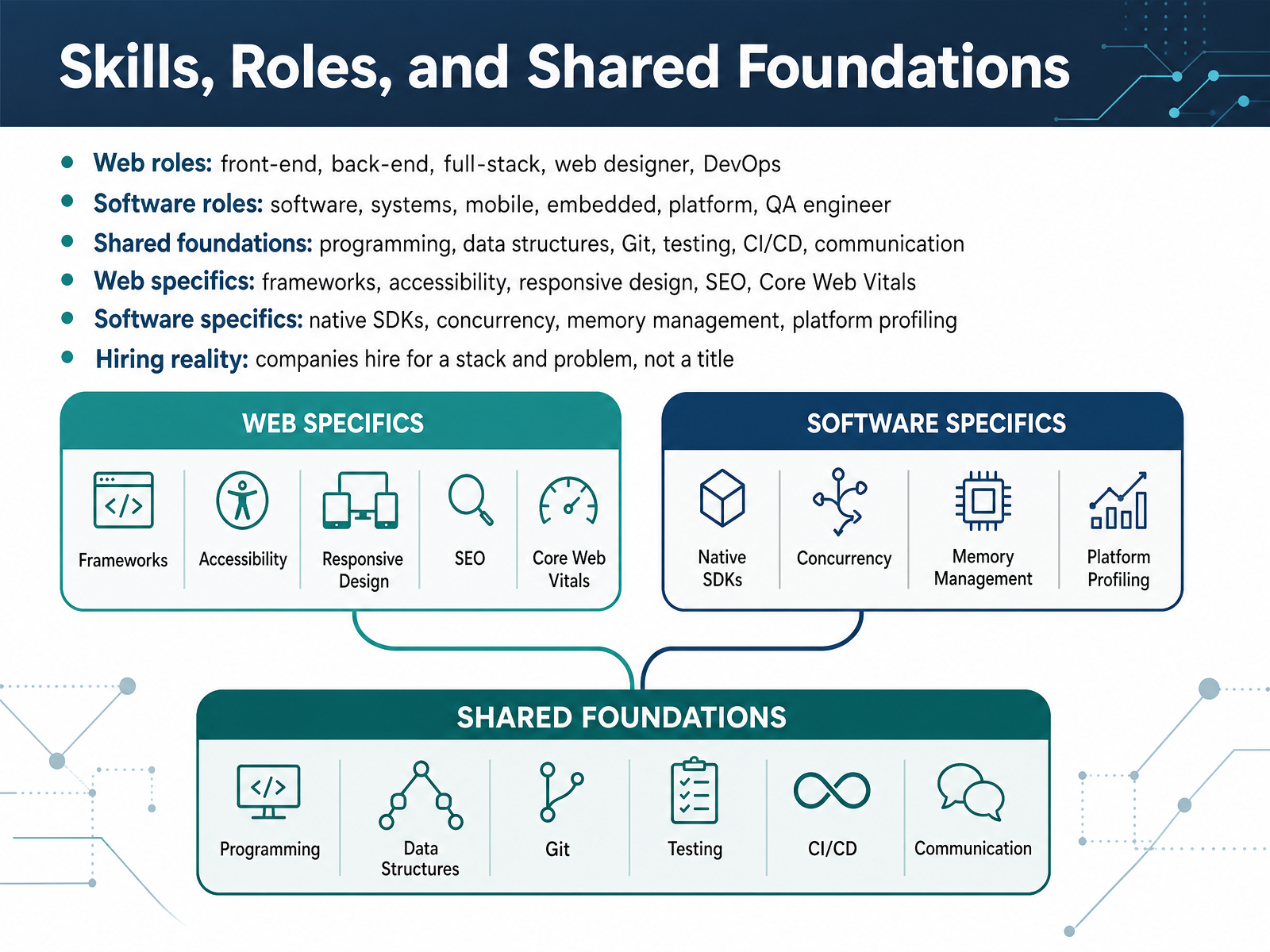
 - 07Skills, Roles, and Shared FoundationsLet's look at skills, roles, and the foundations both paths share. On the web side, you'll see front-end, back-end, and full-stack developers, plus web designers and DevOps engineers. On the software side, roles expand to software, systems, mobile, embedded, platform, and quality assurance, or Q A, engineers. Here's the important part. Both paths rest on the same foundations: programming, data structures, Git for version control, testing, continuous integration and delivery, and clear communication. Where they diverge is in the specifics. Web work leans on frameworks, accessibility, responsive design, search engine optimization, and Core Web Vitals, which are the speed and stability metrics Google uses. Software work leans on native software development kits, concurrency, memory management, and platform profiling. And a hiring reality worth remembering: companies hire for a stack and a problem, not a job title. So ask what you'd actually build, not just what the role is called. Next, we'll look at team structures and how work is organized.
 guvi.inyusmpgroup.comwebo360solutions.com+22 min
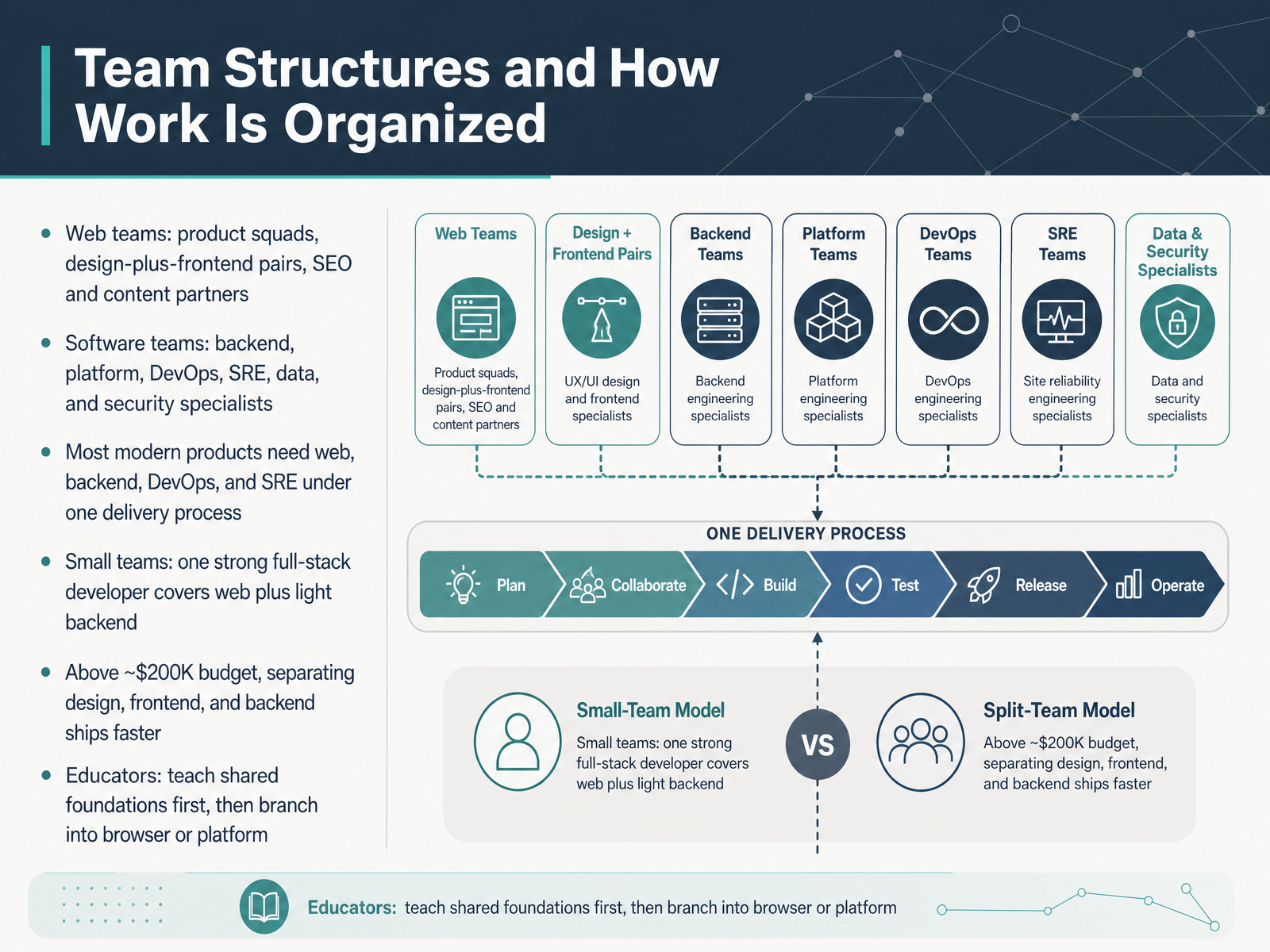
 - 08Team Structures and How Work Is OrganizedNow let's look at how teams are actually organized around these two paths. A web team often works in product squads, with designers and frontend developers paired closely, plus SEO and content partners who care about how pages are found and read. A software team tends to split into specialists: backend, platform, DevOps, SRE, data, and security. That is where the word DevOps comes from: development plus operations, the people who automate builds and deployments, while SRE stands for site reliability engineering, the discipline of keeping systems running. In practice, most modern products need web, backend, DevOps, and SRE working under one delivery process, because the browser, the servers, and the release pipeline all depend on each other. On a small team, one strong full-stack developer can cover the web layer plus light backend work. Once your budget passes roughly two hundred thousand dollars, separating design, frontend, and backend usually ships faster. And if you teach, start everyone on shared foundations, then branch into browser or platform specialties. Next, we will examine the tradeoffs: speed, cost, scalability, and control.
 guvi.inyusmpgroup.comwebo360solutions.com+22 min
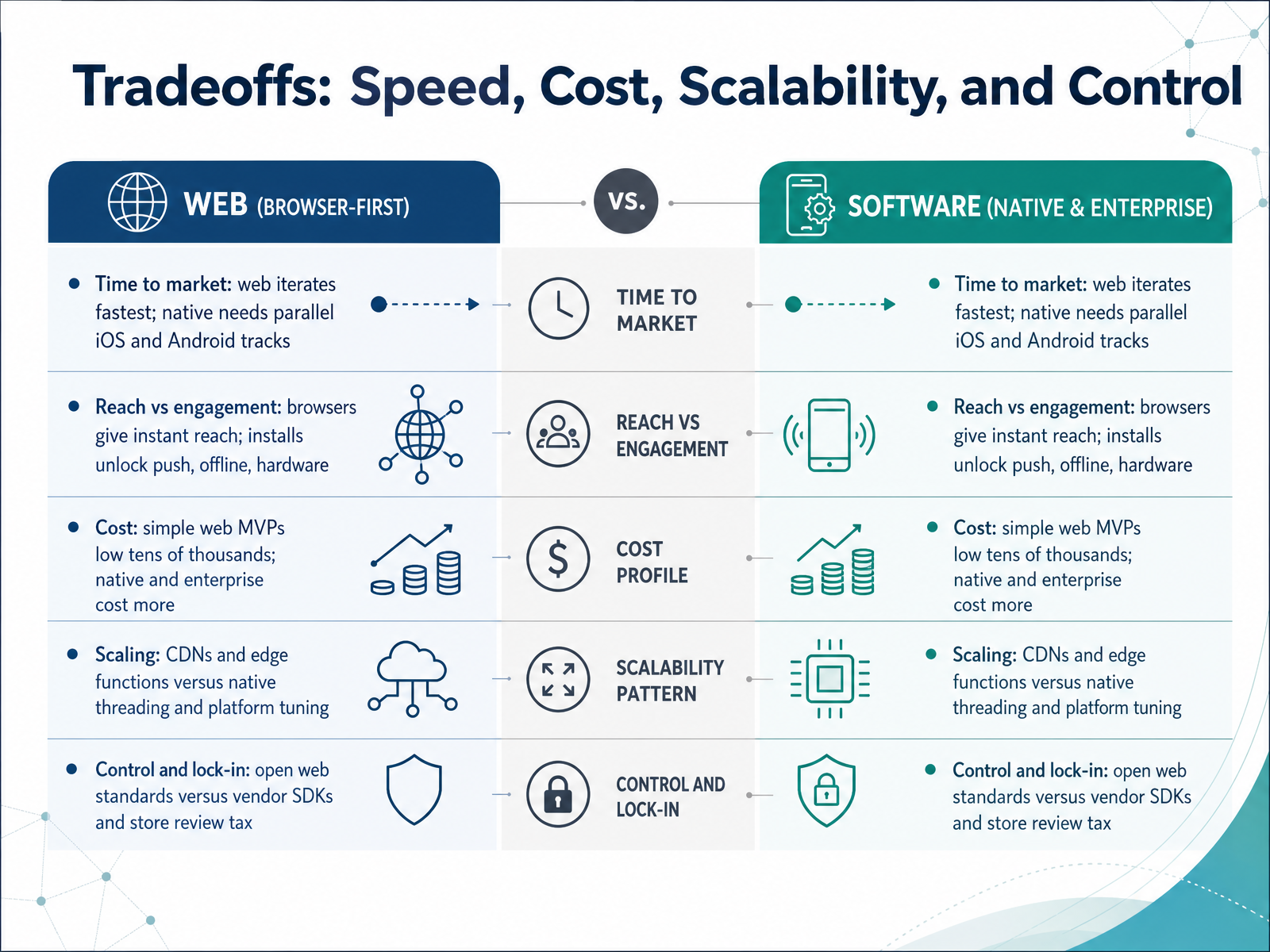
 - 09Tradeoffs: Speed, Cost, Scalability, and ControlLet's walk through the tradeoffs that usually decide this choice: speed, cost, scalability, and control. First, time to market. Web projects iterate fastest because you update one codebase and every user sees the change instantly. A native app needs parallel tracks for iOS and Android, so two build, test, and release cycles.
Next, reach versus engagement. A browser gives you instant reach, since anyone with a link is in. Installs unlock things browsers limit, like push notifications, offline use, and deeper hardware access.
Cost follows that split. A simple web MVP often lands in the low tens of thousands, while native and enterprise systems usually cost noticeably more.
Scalability differs too. Web scales with content delivery networks and edge functions, spreading load closer to users. Native leans on threading and platform tuning for performance.
Finally, control. The open web runs on shared standards, so you avoid lock-in. Native depends on vendor software kits and store review, which can slow releases.
No option wins everywhere. Match these tradeoffs to your product and goals. Next, we'll apply them in Use Cases and Decision Scenarios.
 ca.indeed.comcareers.newark.rutgers.eduguvi.in+21 min
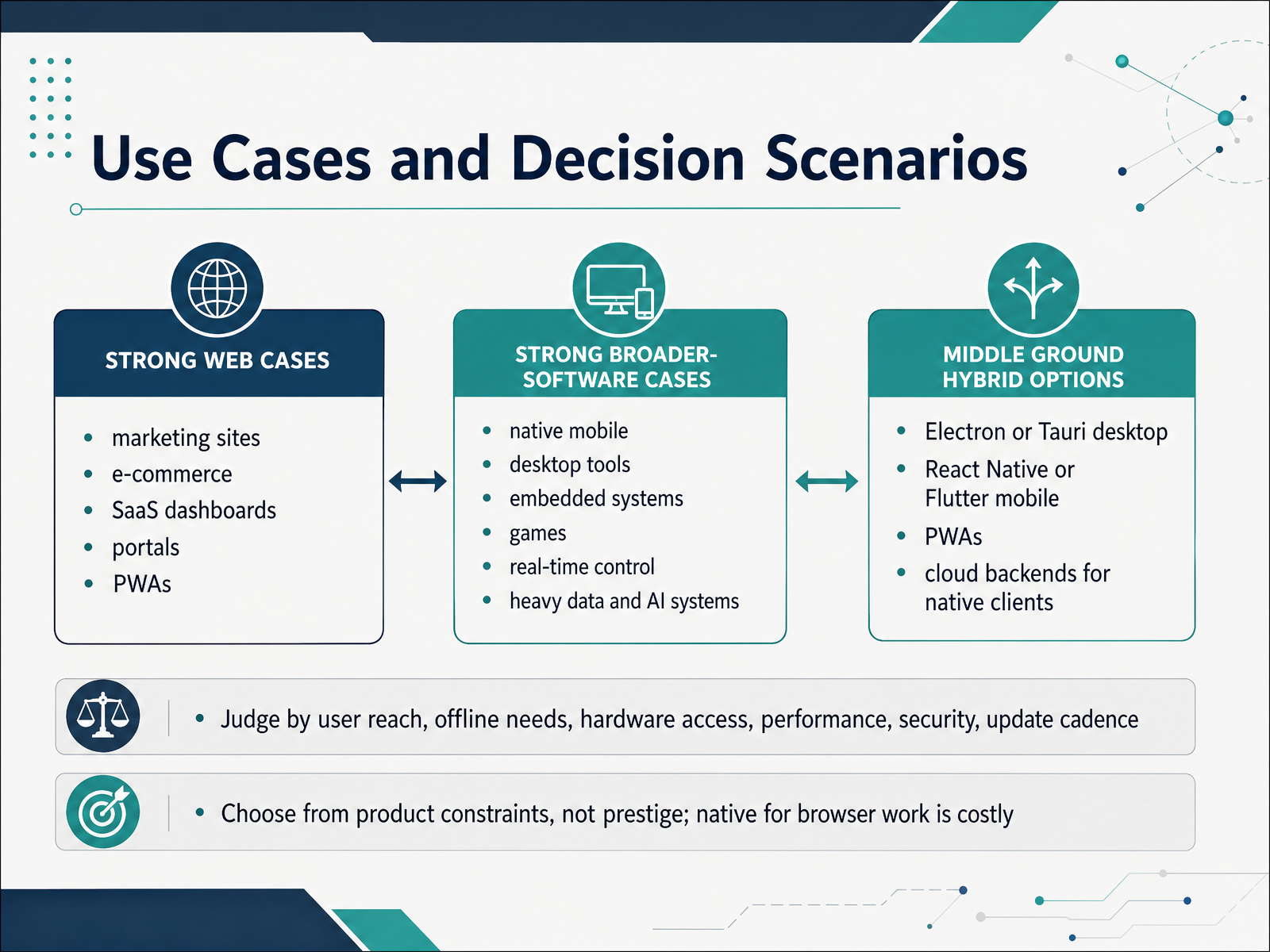
 - 10Use Cases and Decision ScenariosNow let's connect these differences to real decisions. Web-first work fits marketing sites, e-commerce, SaaS dashboards, portals, internal tools, and progressive web apps, which are websites that install to a home screen and work offline. Broader software covers native mobile apps, desktop tools, games, embedded systems, and heavy AI workloads. There is also a middle ground: Electron or Tauri for desktop, React Native or Flutter for mobile, progressive web apps, and cloud backends. How do you judge? Ask about user reach, offline needs, hardware access, performance, security, and update cadence. For example, a field team needing barcode scanning and offline sync points toward native, while a scheduling dashboard points toward the web. Choose from product constraints, not prestige. Building native simply because it sounds more serious is costly, because you maintain separate codebases and wait on store reviews. That sets up our next step: a decision framework technical leaders can apply.
 aws.amazon.comwondermentapps.comthelinuxcode.com+22 min
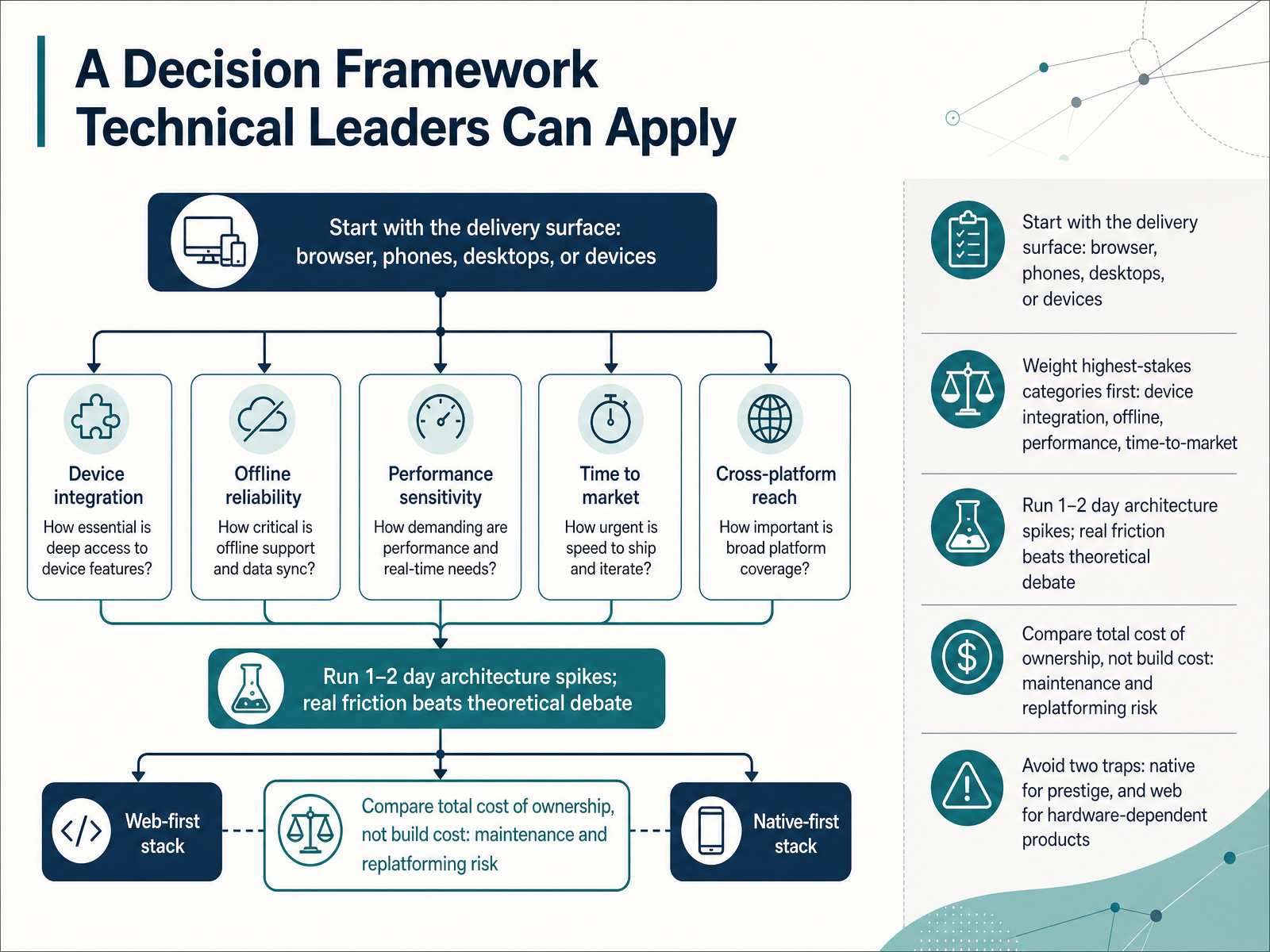
 - 11A Decision Framework Technical Leaders Can ApplyLet's look at a practical decision framework you can apply as a technical leader. Start with the delivery surface. Ask where users actually open the product: a browser, phones, desktops, or a specific device. That single question narrows the field quickly. Next, weight your highest-stakes categories first, such as device integration, offline capability, performance, and time to market. A product needing reliable offline use or hardware access points toward broader software development, while a browser-first workflow points toward web. Then run a one to two day architecture spike. Build a small slice in each realistic option, because real friction beats theoretical debate every time. Compare total cost of ownership, not just build cost. Account for maintenance, updates, and replatforming risk over two to three years. Finally, avoid two common traps: choosing native purely for prestige, and forcing a hardware-dependent product into web delivery. Weigh the highest-stakes categories first, and let evidence decide. Up next, Career Paths, Hiring Signals, and Compensation Realities.
 guvi.inyusmpgroup.comwebo360solutions.com+21 min
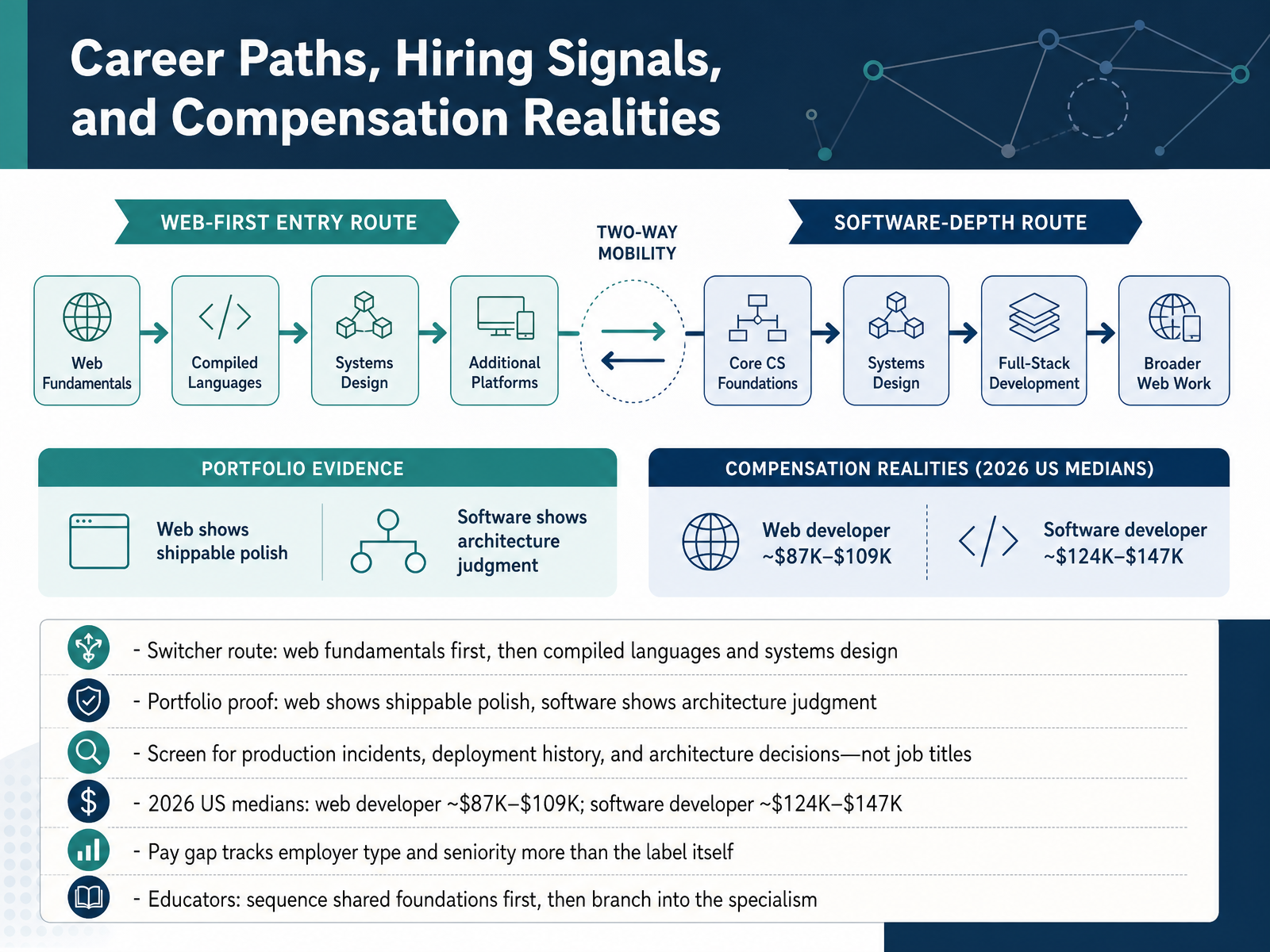
 - 12Career Paths, Hiring Signals, and Compensation RealitiesLet's turn to career paths, hiring signals, and compensation realities. If you're switching in, a practical route is web fundamentals first, then a compiled language like Go, Java, or C Sharp, then systems design. For portfolios, the signals differ. Web work shows shippable polish, a fast, accessible site you can click today. Software work shows architecture judgment, design docs, tests, and deployment history. So when you screen candidates, ask about production incidents they handled, releases they shipped, and architecture decisions they made. Job titles tell you surprisingly little. For 2026 United States medians, web developers earn roughly eighty-seven to one hundred nine thousand dollars, while software developers earn roughly one hundred twenty-four to one hundred forty-seven thousand. But that pay gap tracks employer type and seniority more than the label itself. A senior front-end engineer at a strong product company can out-earn a generalist software developer. And for educators, sequence shared foundations first, then branch into the specialism. Next, we'll look at practical guidance and common pitfalls.
 ca.indeed.comcareers.newark.rutgers.eduguvi.in+22 min
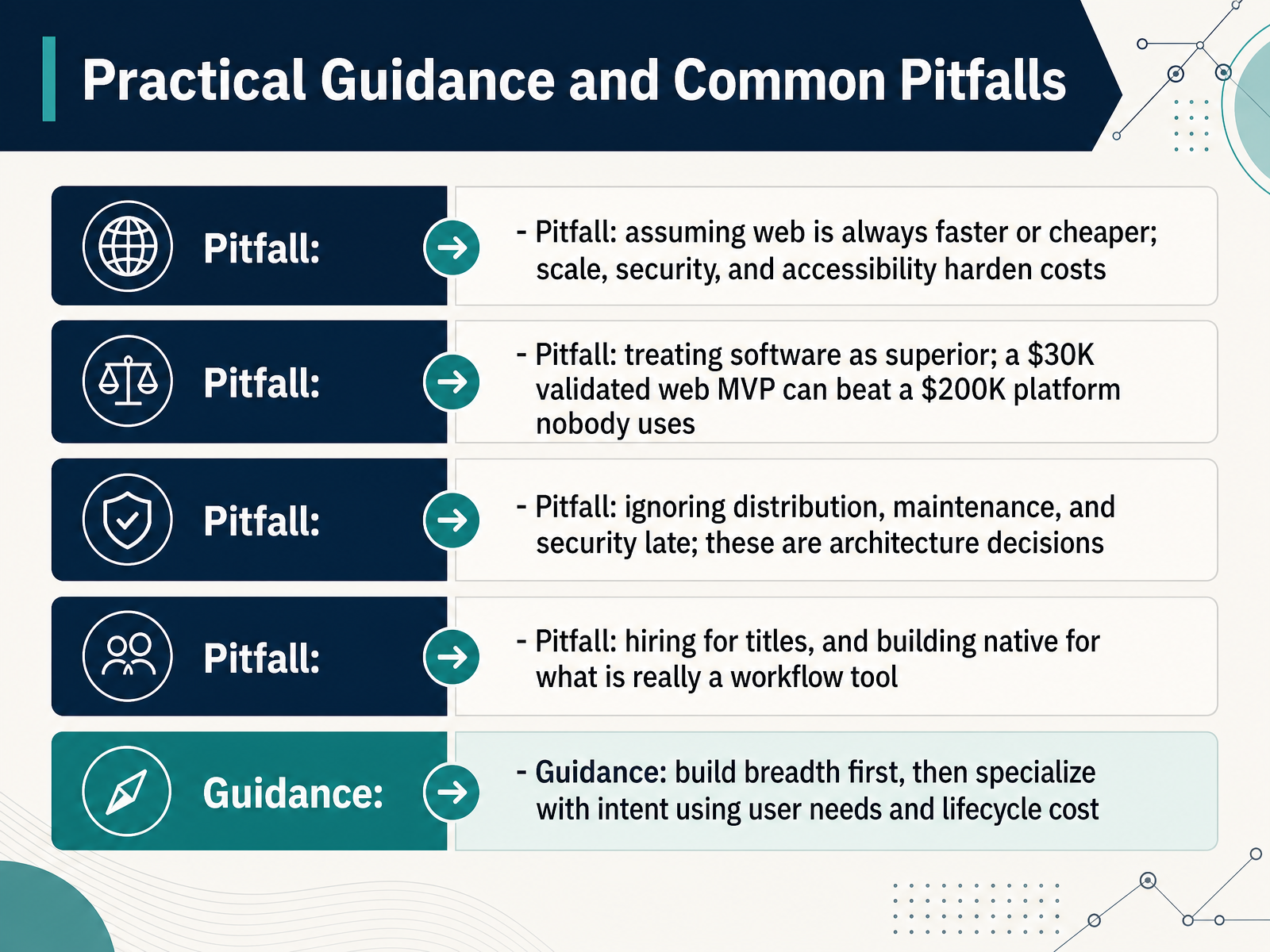
 - 13Practical Guidance and Common PitfallsLet's turn now to practical guidance and the pitfalls that catch teams and careers off guard. First pitfall: assuming web is always faster or cheaper. Scale, security, and accessibility are real engineering work, so hardening costs show up later. Pause on that. Second pitfall: treating software as superior. A thirty thousand dollar validated web MVP can beat a two hundred thousand dollar platform nobody uses. Third: ignoring distribution, maintenance, and security until late. These are architecture decisions, not launch-week tasks. Fourth: hiring for titles, or building native software for what is really just a workflow tool. Here is the guidance. Build breadth first, across web fundamentals and core engineering practice. Then specialize with intent, guided by user needs and lifecycle cost. Ask where your product runs, who maintains it, and what it costs to own in three years. Those answers tell you more than any job title. Next, we will pull it all together in Key Takeaways and Next Steps.
 ca.indeed.comcareers.newark.rutgers.eduguvi.in+22 min
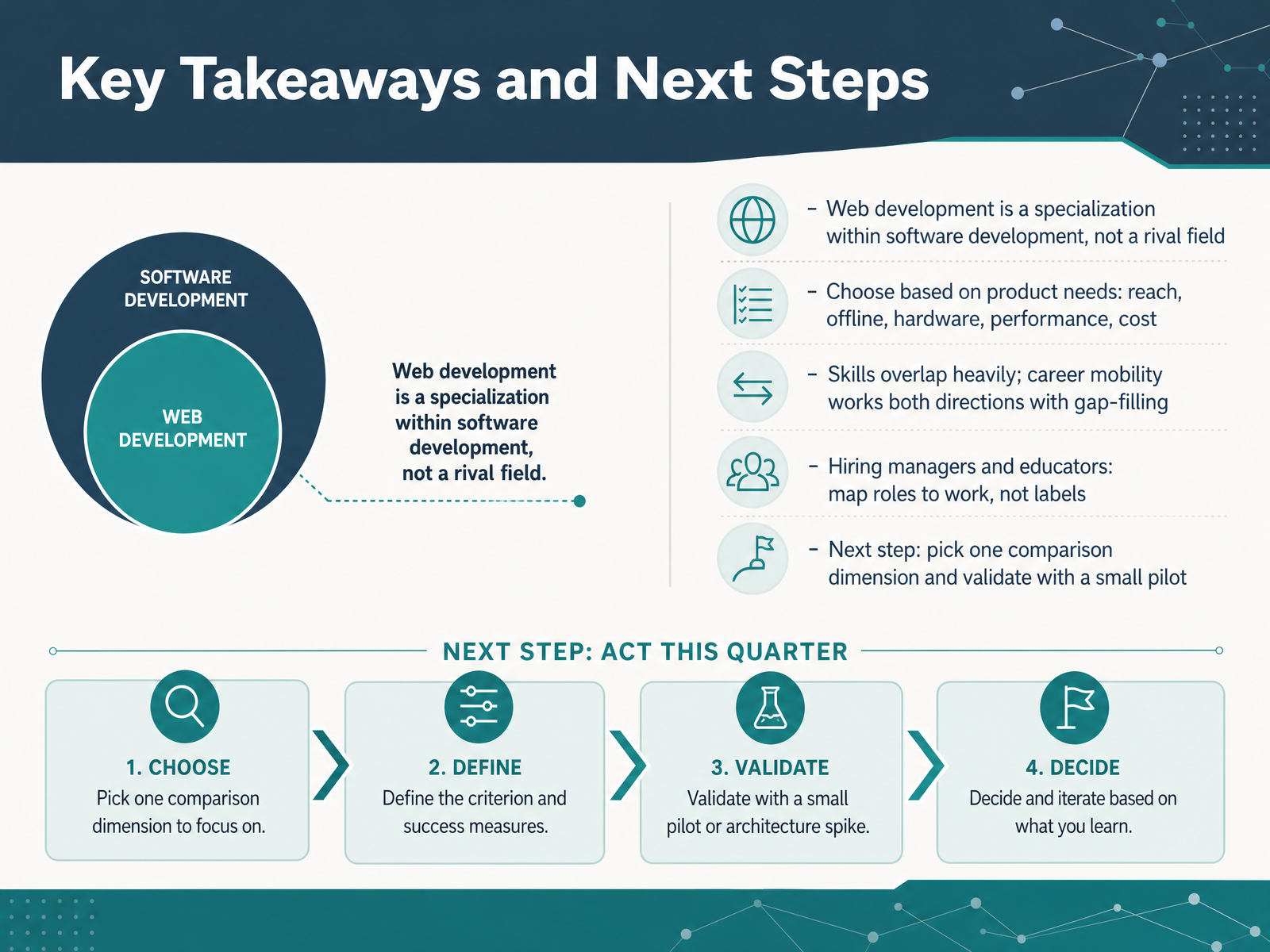
 - 14Key Takeaways and Next StepsLet's bring this all together. First, web development is a specialization within software development, not a rival field. It is a part of the whole. Second, choose based on your product's needs. Ask about reach, offline access, hardware integration, performance, and cost. If users reach it through a browser, that points one way. If it also runs on phones, desktops, or devices, that points another. Third, the skills overlap heavily. Career mobility works in both directions, as long as you fill the gaps. A web developer can move into broader software work by learning new platforms, systems design, and a compiled language. The reverse move is just as common. Fourth, for hiring managers and educators, map roles to the actual work, not to labels. Brief a role by its stack and problem, not by an umbrella title. And here is your next step. Pick just one comparison dimension, like offline capability or hardware access, and validate it with a small pilot. That small experiment will teach you more than any general debate. Thank you for working through this course with me. You now have a clear framework to compare these paths honestly. Keep asking what your product and your team actually need, and you will make a confident, well grounded decision. Good luck, and keep building.
 guvi.inyusmpgroup.comwebo360solutions.com+22 min
Take the deck with you
Download this course as a file — free, no sign-up needed.
- PDF handoutEvery slide page, ready to print or share.15 pages · 3.9 MBDownload
- Narrated PowerPointThe deck that presents itself — every slide carries the digital human's narration video.15 pages · 16.4 MBDownload
- PowerPoint slidesThe full deck as a .pptx — open it in PowerPoint, Keynote, or Google Slides.15 pages · 3.7 MBDownload
Free to use in your own training — please keep the PersonWise credit page at the end.
Have your own deck? Turn it into a course
Sources consulted
Web sources consulted while building this course.
- Web Developer vs Software Developer: Key Differences 2026 — guvi.in
- Web and Software Development: Key Differences 2026 | YuSMP — yusmpgroup.com
- Web Development vs Software Development | 7 Differences (2026) — webo360solutions.com
- Web Developers vs Software Developers: What’s the difference in 2026? - Access Creative College — accesscreative.ac.uk
- Web Developer vs Software Developer | Enests — enests.co
- Software Developer vs. Web Developer (Plus IT Skills) — ca.indeed.com
- Web Developer vs. Software Engineer: What’s the Difference? – Career Resources and Exploration | Rutgers University – Newark — careers.newark.rutgers.edu
- Web Apps vs. Native Apps vs. Hybrid Apps - Difference Between Types of Web and Mobile Applications - AWS — aws.amazon.com
- Native Application vs Web Application The 2026 Guide — wondermentapps.com
- Native Apps vs Web Apps: A Practical, 2026‑Ready Guide from the Trenches – TheLinuxCode — thelinuxcode.com
- Native Applications vs Web Applications: 2026 Guide — capgo.app
- Native vs Cross-Platform vs Web Apps: Which to Build in 2026? | ShipNative — shipnative.dev