Begin
13 pages · ~26 min
Digital Promise AI Literacy Framework
This training introduces educators and learning designers to the Digital Promise AI Literacy Framework, covering its core components and how to apply them in practice.
A digital instructor presents all 13 pages. Hold “Ask” at any point and ask out loud — the answer comes from this course. No sign-up needed.
What you’ll learn
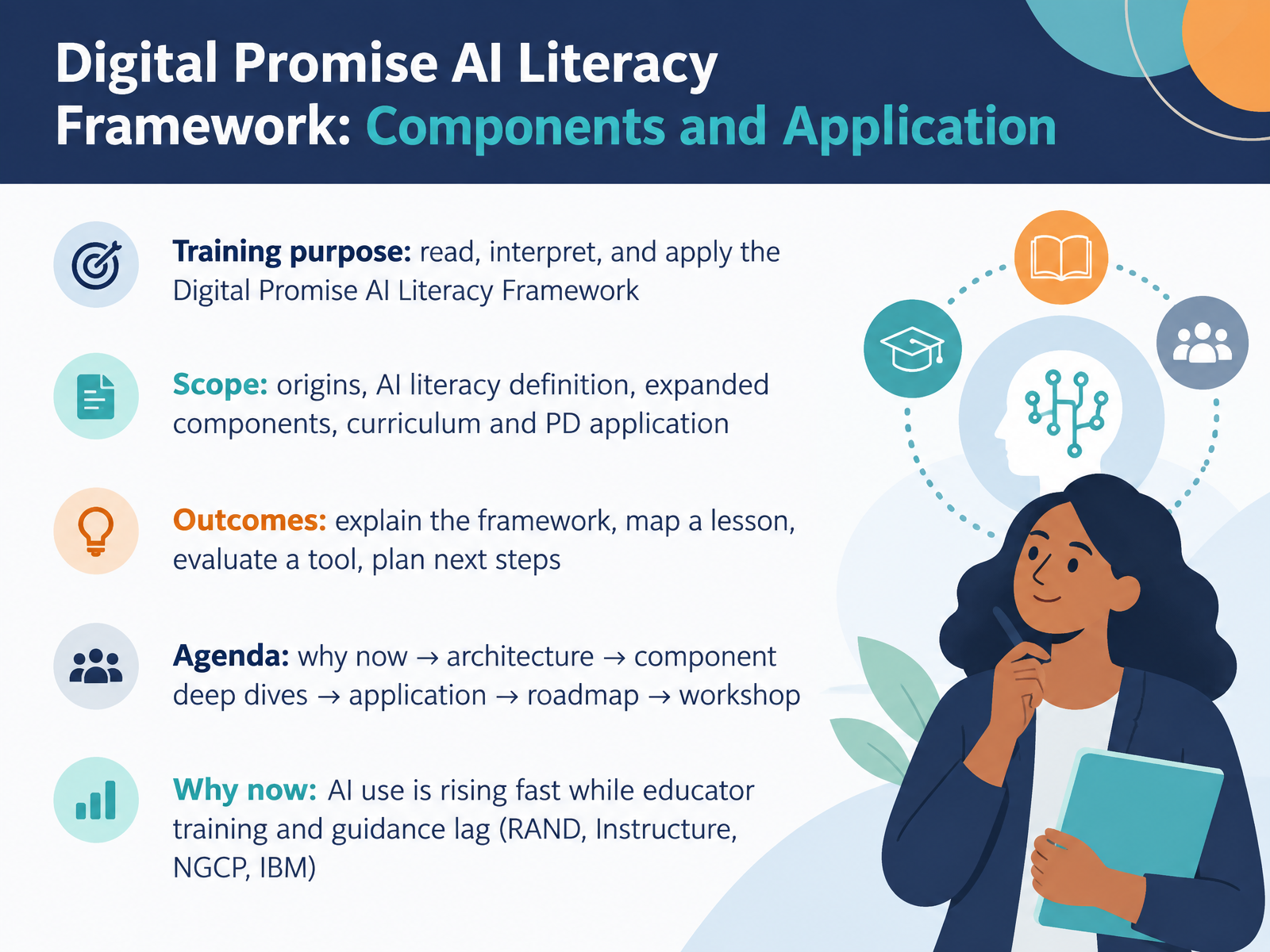
- 01Digital Promise AI Literacy Framework: Components and ApplicationWelcome. In this session, we'll read, interpret, and apply the Digital Promise AI Literacy Framework in practical terms. You'll see where it came from, how it defines AI literacy, what the expanded components are, and how to use them in curriculum and professional learning. Along the way, you'll practice four things you can take back to your own setting: explain the framework, map a lesson, evaluate a tool, and plan next steps. Our path runs from why this matters now, through the architecture of the framework, into component deep dives, then application, a roadmap, and a workshop. A good reason to start now: AI use in classrooms is rising quickly, while educator training and guidance lag behind, as recent RAND, Instructure, NGCP, and IBM surveys consistently show. So keep one question in mind throughout: where in your own course or coaching could this framework help you make a clearer, more defensible decision about if and how to use AI? By the end, you'll have a concrete draft you can keep.
Background: Why AI Literacy Now.digitalpromise.orgdigitalpromise.orgyoutube.com+22 min
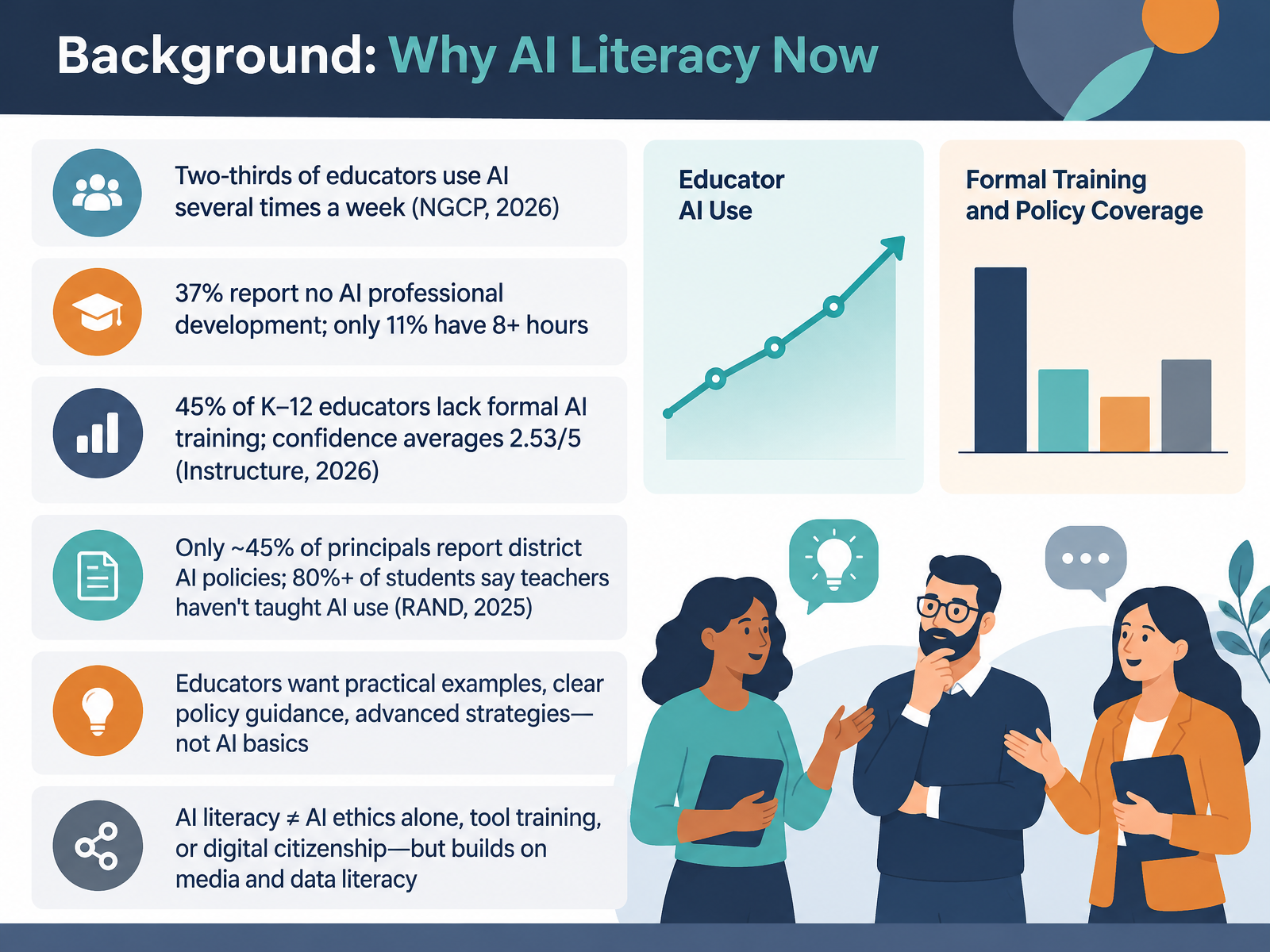
- 02Background: Why AI Literacy NowLet's ground this in the current data. About two thirds of educators now use AI several times a week. Yet thirty seven percent report no AI related professional development, and only eleven percent have completed more than eight hours. Forty five percent of K through twelve educators lack formal training, with confidence averaging two point five three out of five. Meanwhile, only forty five percent of principals report district AI policies, and more than eighty percent of students say teachers have not taught them how to use AI. What educators ask for is telling: practical examples, clear policy guidance, and advanced strategies, not AI basics. And keep one distinction in mind. AI literacy is not ethics alone, tool training, or digital citizenship, though it builds on media and data literacy. Here is your takeaway: before planning any training, survey your staff on current use, training hours, and policy clarity. That baseline tells you which gaps to target. Next, we will define AI literacy through the framework's core definition.
 filecache.mediaroom.comngcproject.orgcdn-dynmedia-1.microsoft.com+22 min
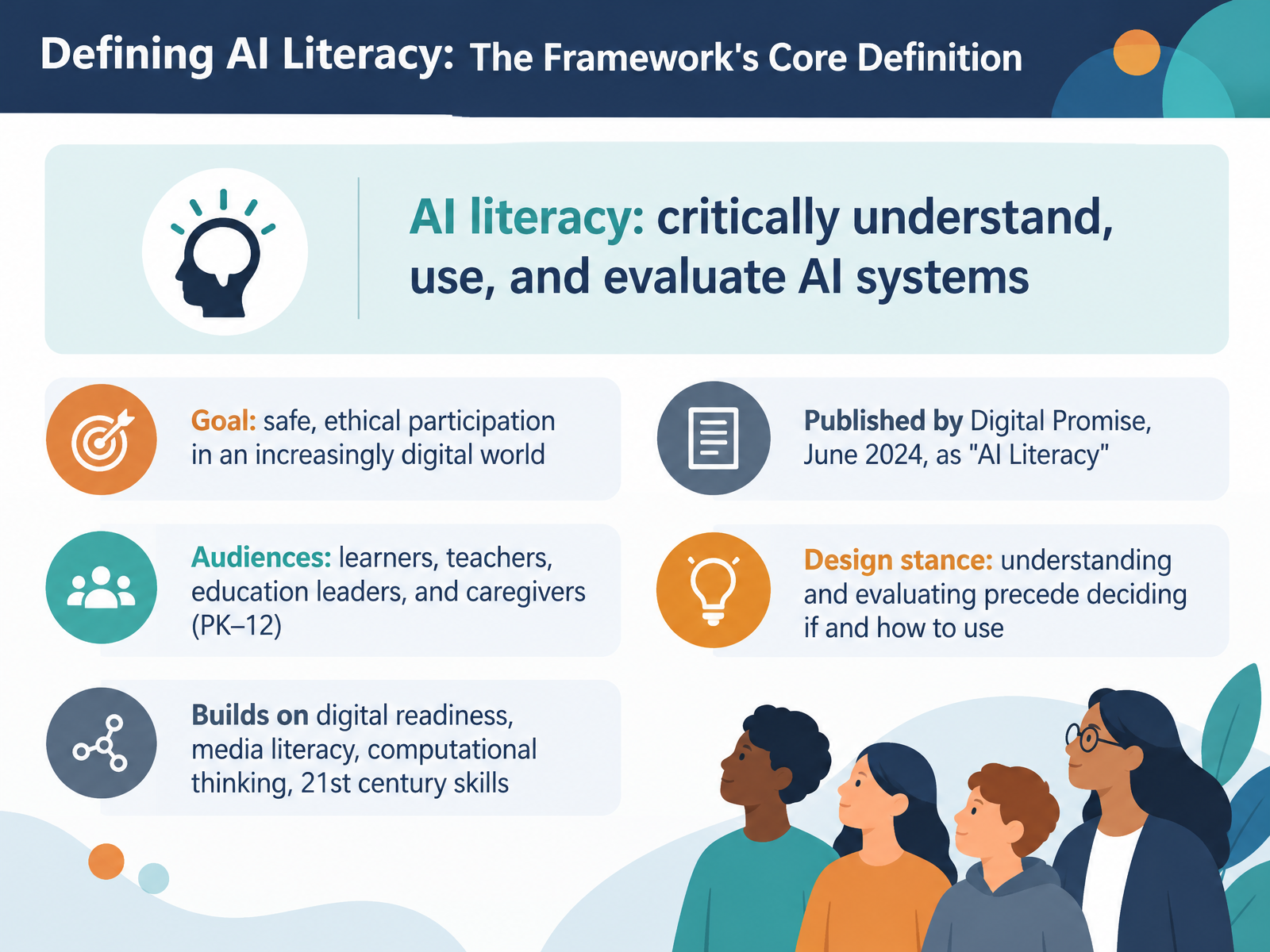
- 03Defining AI Literacy: The Framework's Core DefinitionLet's look closely at the core definition. Digital Promise defines AI literacy as the knowledge and skills that enable people to critically understand, use, and evaluate AI systems and tools, so they can participate safely and ethically in an increasingly digital world. Notice the goal here. It's not fluency with a particular tool. It's safe, ethical participation. The framework was published in June 2024 as AI Literacy, and it addresses four audiences: learners, teachers, education leaders, and caregivers across PK through twelve. One design stance matters for your planning. Understanding and evaluating come before deciding if and how to use AI. So when you review a lesson or a tool, ask students to explain how it works and weigh its risks first. This definition also builds on familiar ground: digital readiness, media literacy, computational thinking, and 21st century skills. Takeaway: adopt this definition as your shared language in the next syllabus or workshop. Next, the framework architecture at a glance.
 digitalpromise.orgdigitalpromise.orgyoutube.com+21 min
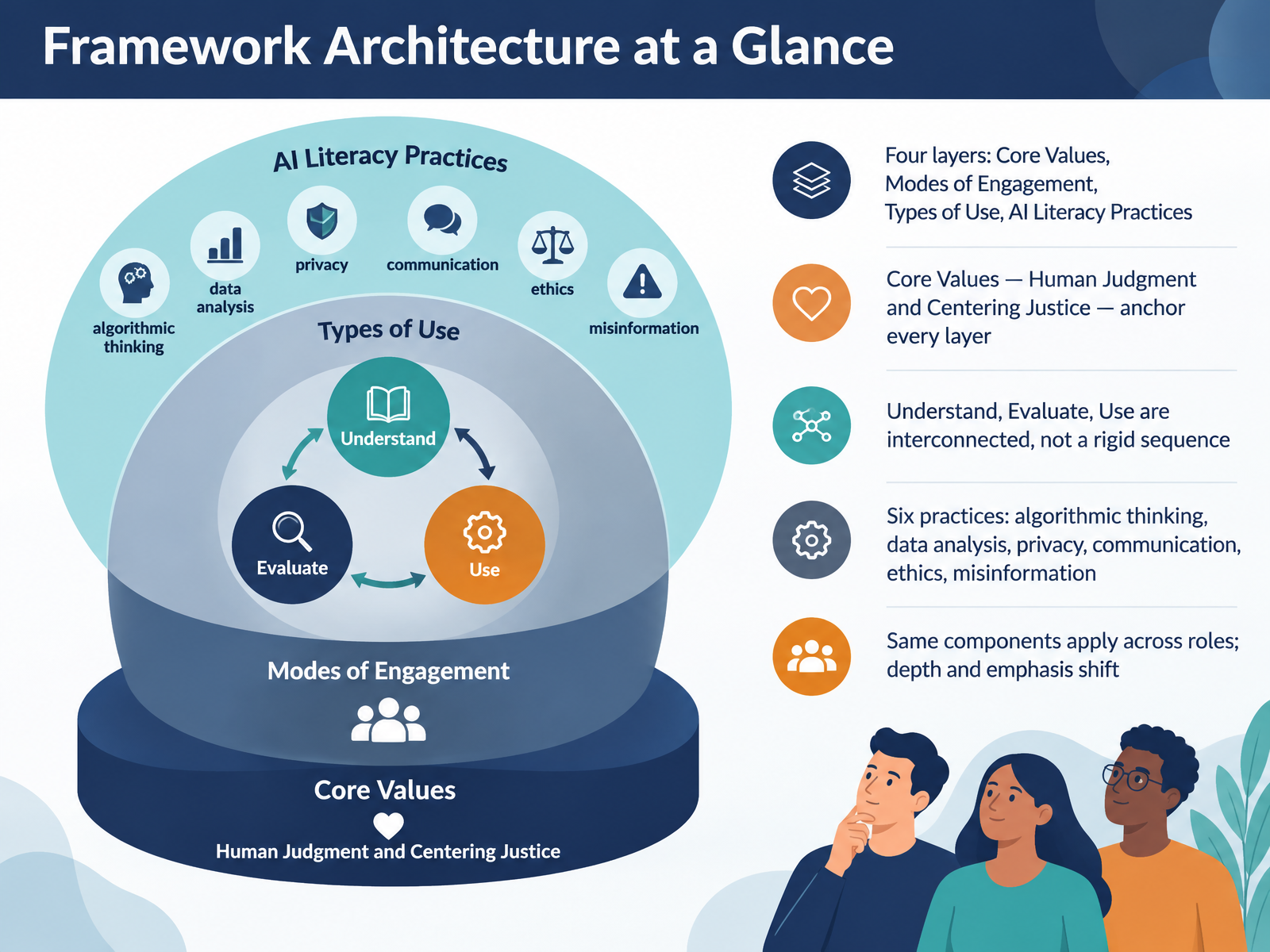
- 04Framework Architecture at a GlanceLet's step back and look at the whole framework at once. You can think of it as four layers. At the center are Core Values: Human Judgment and Centering Justice. These anchor every other layer, and they are the filter you apply when any AI decision is unclear. Around them sit Modes of Engagement: Understand, Evaluate, and Use. Treat these as interconnected rather than a rigid sequence. A student might evaluate output before fully understanding the model, then return to understand it more deeply. Next come Types of Use: interact, create, and problem solve. Finally, six AI literacy practices make literacy observable: algorithmic thinking, data analysis, privacy, digital communication, ethics, and misinformation. Here is what matters for your planning. The same components apply across roles. A fourth grade teacher and a district technology coach use the same framework, but depth and emphasis shift. For example, a media specialist might emphasize misinformation, while a data coach emphasizes data analysis. Takeaway: map one upcoming lesson or training session onto these four layers, and mark where your emphasis sits. Next, we look closely at Core Values: Human Judgment and Centering Justice.
 digitalpromise.orgotan.usdigitalpromise.org+22 min
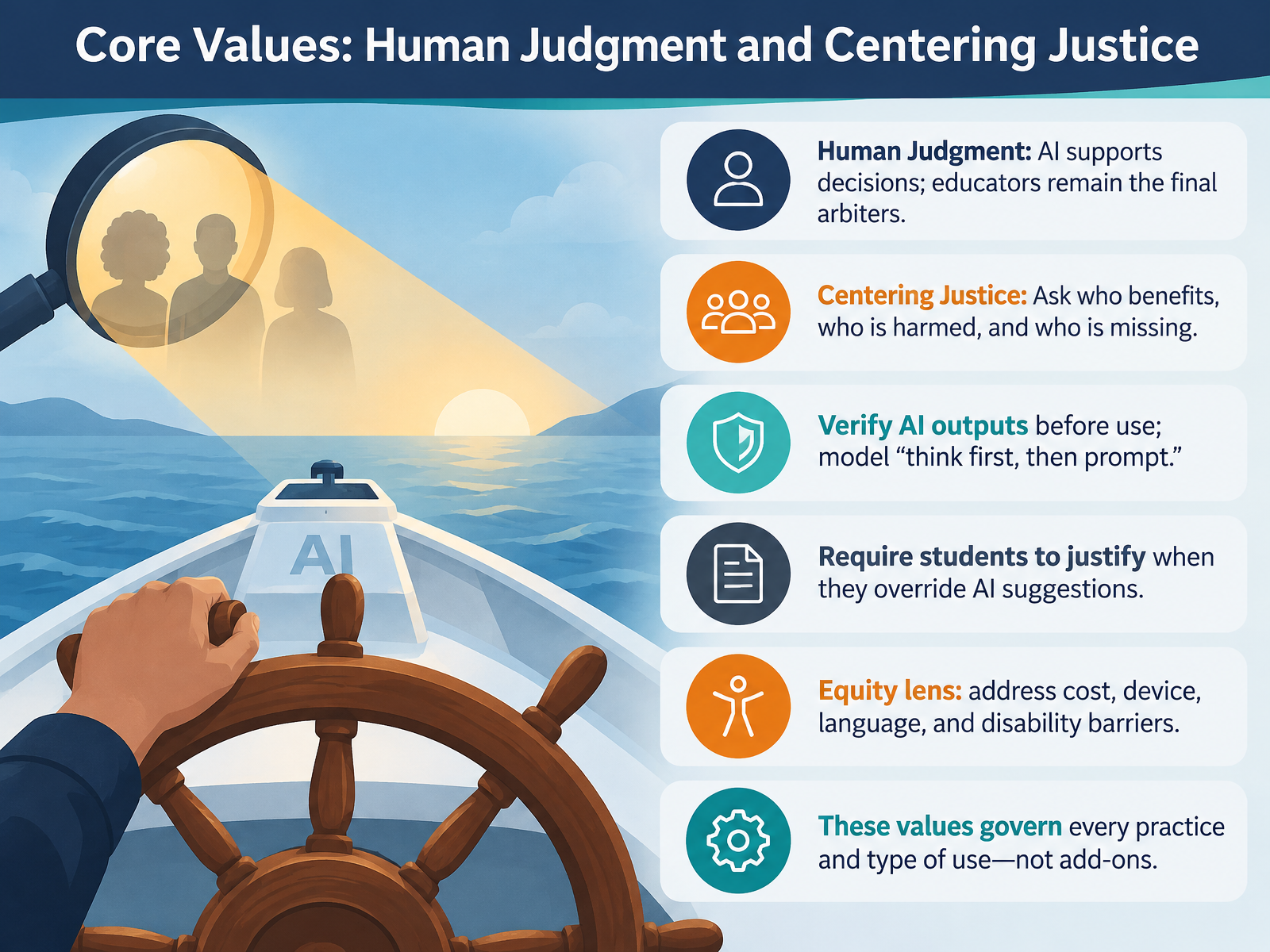
- 05Core Values: Human Judgment and Centering JusticeLet's look at the two core values at the center of this framework: human judgment and centering justice. These are not optional extras. They govern every practice and every type of AI use, whether a student is interacting with a tool, creating with it, or problem solving. Human judgment means AI supports decisions, but educators remain the final arbiters. Verify outputs before you use them, and model the habit of thinking first, then prompting. Ask students to justify their choices when they override an AI suggestion, because that reasoning is where the learning lives. Centering justice means asking who benefits, who is harmed, and who is missing. Apply an equity lens to cost, devices, language, and disability barriers, and check whether your AI activities assume access some students don't have. Here is one takeaway to use in your next course or workshop: choose one AI task and add a short reflection prompt asking students to state what they accepted from the tool, what they changed, and why. That single step turns both core values into visible practice. Next, we move into the first mode of engagement: Understand AI.
 digitalpromise.orgdigitalpromise.orgyoutube.com+22 min
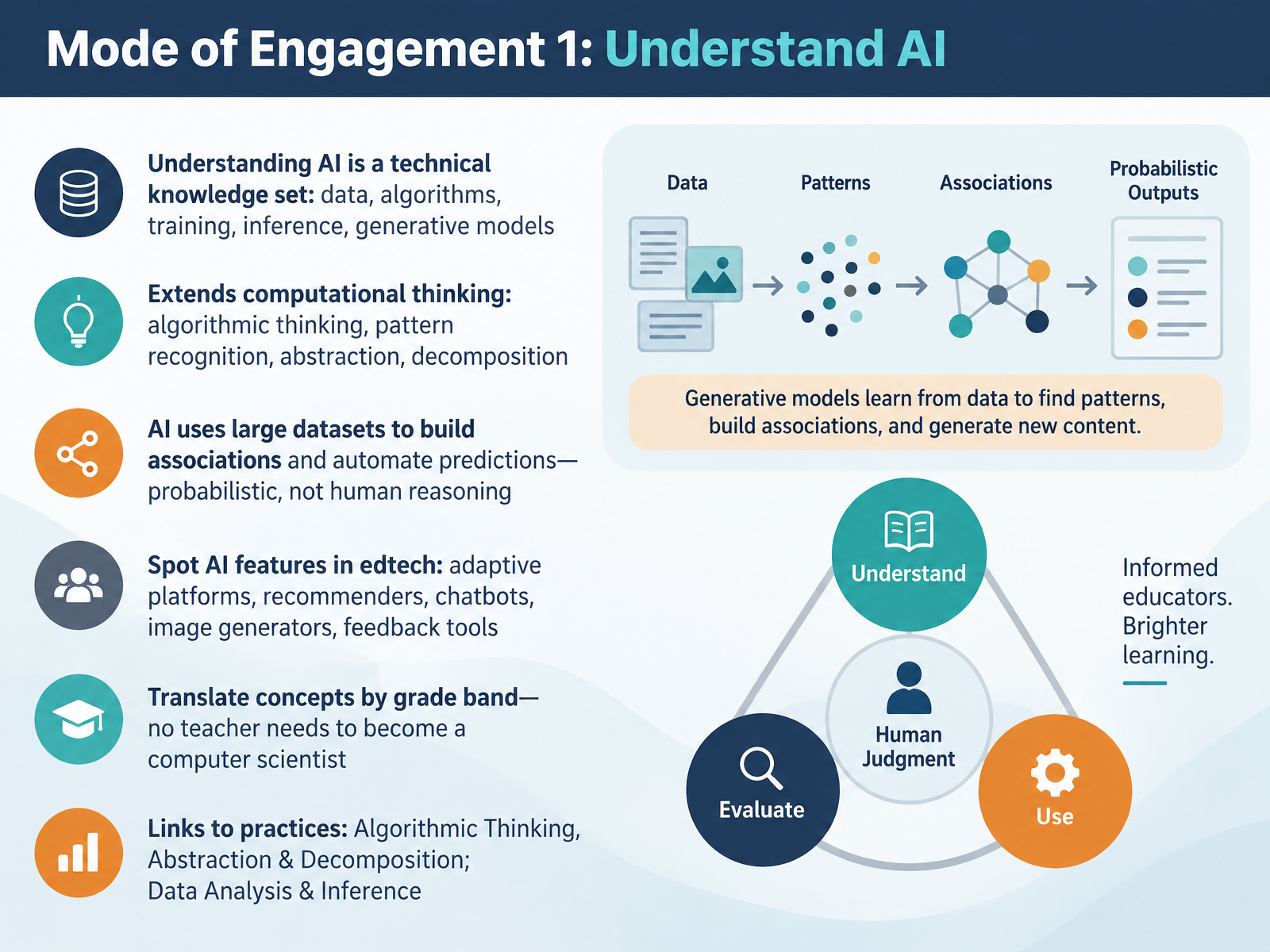
- 06Mode of Engagement 1: Understand AILet's turn to the first mode of engagement: Understand AI. Start by treating understanding as a technical knowledge set. That means data, algorithms, training, inference, and generative models. It also extends computational thinking through algorithmic thinking, pattern recognition, abstraction, and decomposition. Keep one idea clear for students. AI uses large datasets to build associations and automate predictions. It is probabilistic, not human reasoning. Now identify AI features in the edtech you already use, such as adaptive platforms, recommenders, chatbots, image generators, and feedback tools. You do not need to become a computer scientist. Translate these concepts by grade band. For example, younger students can sort labeled images to see how patterns in data lead to predictions, while older students can trace how a recommender system turns clicks into suggestions. This links directly to the practices of Algorithmic Thinking, Abstraction and Decomposition, and Data Analysis and Inference. Takeaway: choose one tool in your course and map two of these concepts to a short classroom activity. Next, we move to Mode of Engagement 2: Use AI, through interact, create, and problem solve.
 digitalpromise.orgdigitalpromise.orgdigitalpromise.org+22 min
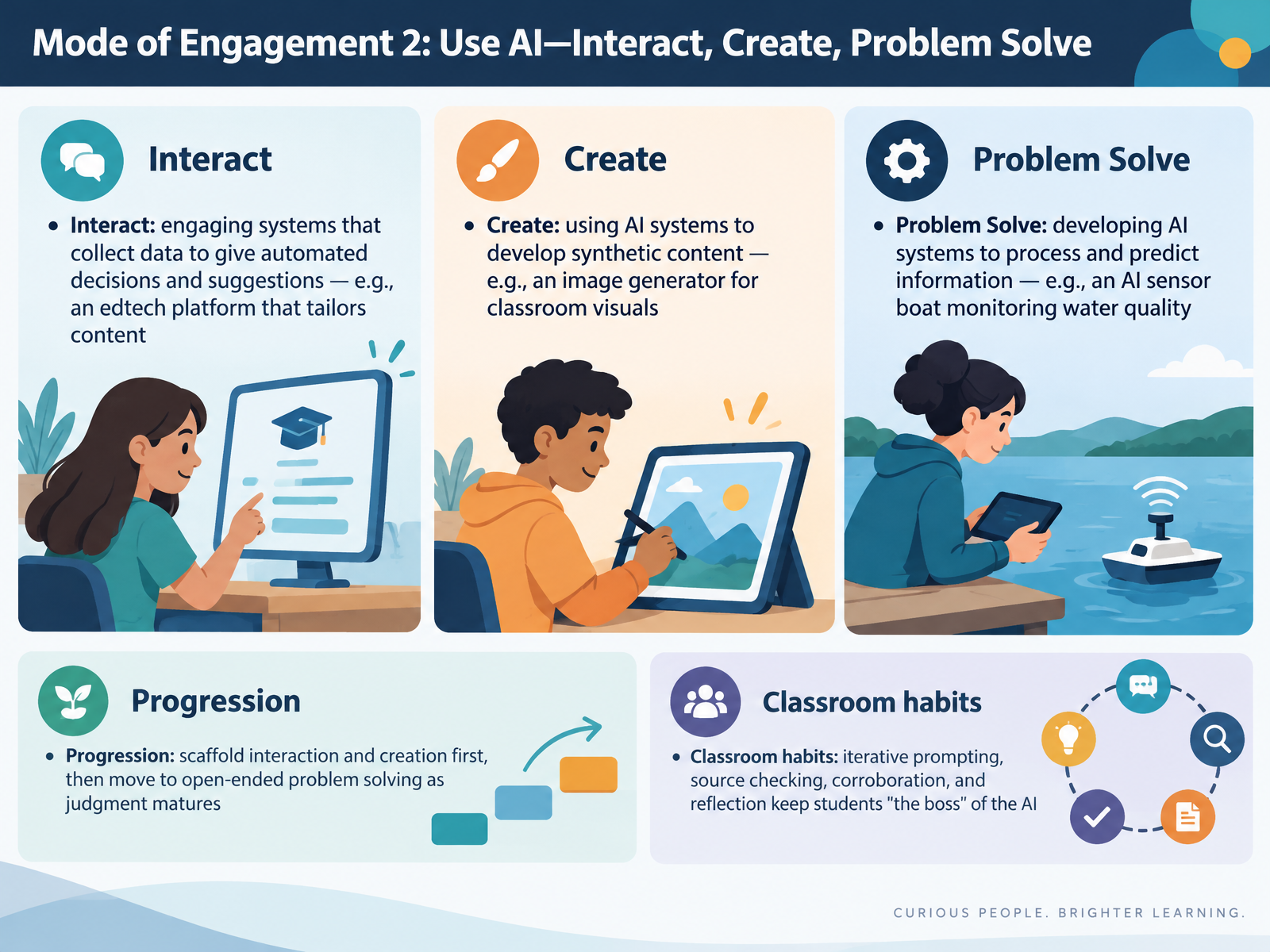
- 07Mode of Engagement 2: Use AI—Interact, Create, Problem SolveNow let's look at the second way learners use AI: interact, create, and problem solve. Interacting means engaging with systems that collect data to produce automated decisions and suggestions, like an edtech platform that tailors content for each student. Creating means using AI to develop synthetic content, such as an image generator for classroom visuals. Problem solving means developing AI systems that process and predict information, like the sensor boat students in Delhi built to monitor water quality. In your planning, scaffold interaction and creation first, then move toward open-ended problem solving as students' judgment matures. Build a few classroom habits: iterative prompting, source checking, corroboration, and reflection. These keep students the boss of the AI. Here's one takeaway: pick one unit and map which of the three types of use it currently asks for, then decide where you want to add the next one. Next, we move to the third Mode of Engagement: Evaluate AI.
 digitalpromise.orgdigitalpromise.orgyoutube.com+22 min
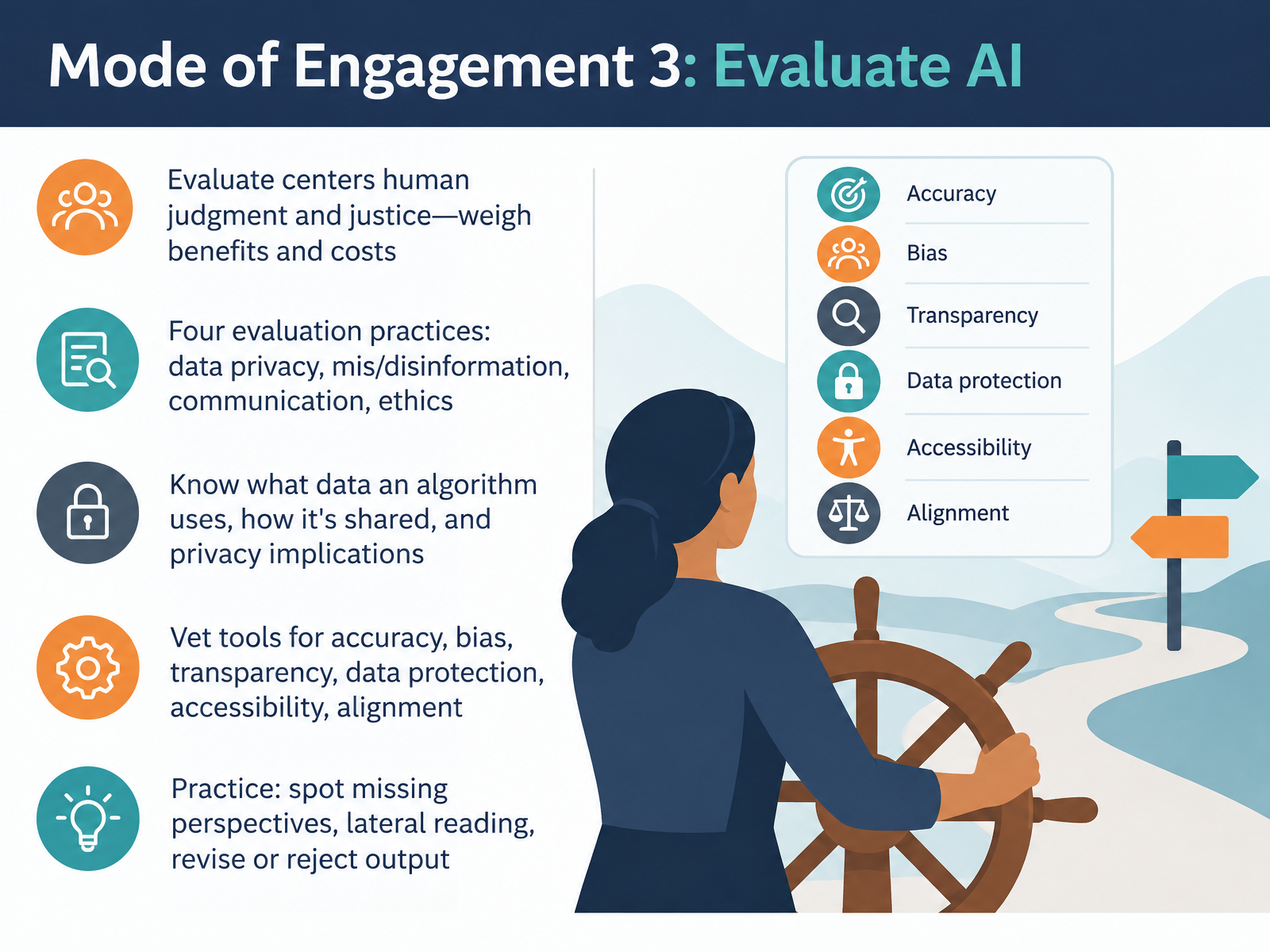
- 08Mode of Engagement 3: Evaluate AINow let's turn to the third Mode of Engagement: Evaluate AI. Evaluation is where human judgment and justice take center stage. You weigh the benefits of a tool against its costs for individuals, society, and even the environment. The framework names four evaluation practices: data privacy, mis and disinformation, communication, and ethics. Start by asking what data an algorithm uses, how that data is shared, and what privacy implications follow for students and families. When you vet a tool, check its accuracy, bias, transparency, data protection, accessibility, and alignment with your learning goals. Then put evaluation into practice with students. Ask them to spot missing perspectives, do lateral reading to verify claims, and revise or reject output that does not hold up. Your takeaway: pick one AI tool you already use and run it through that five-step vetting checklist this week. From Framework to Curriculum Design.
 digitalpromise.orgdigitalpromise.orgyoutube.com+22 min
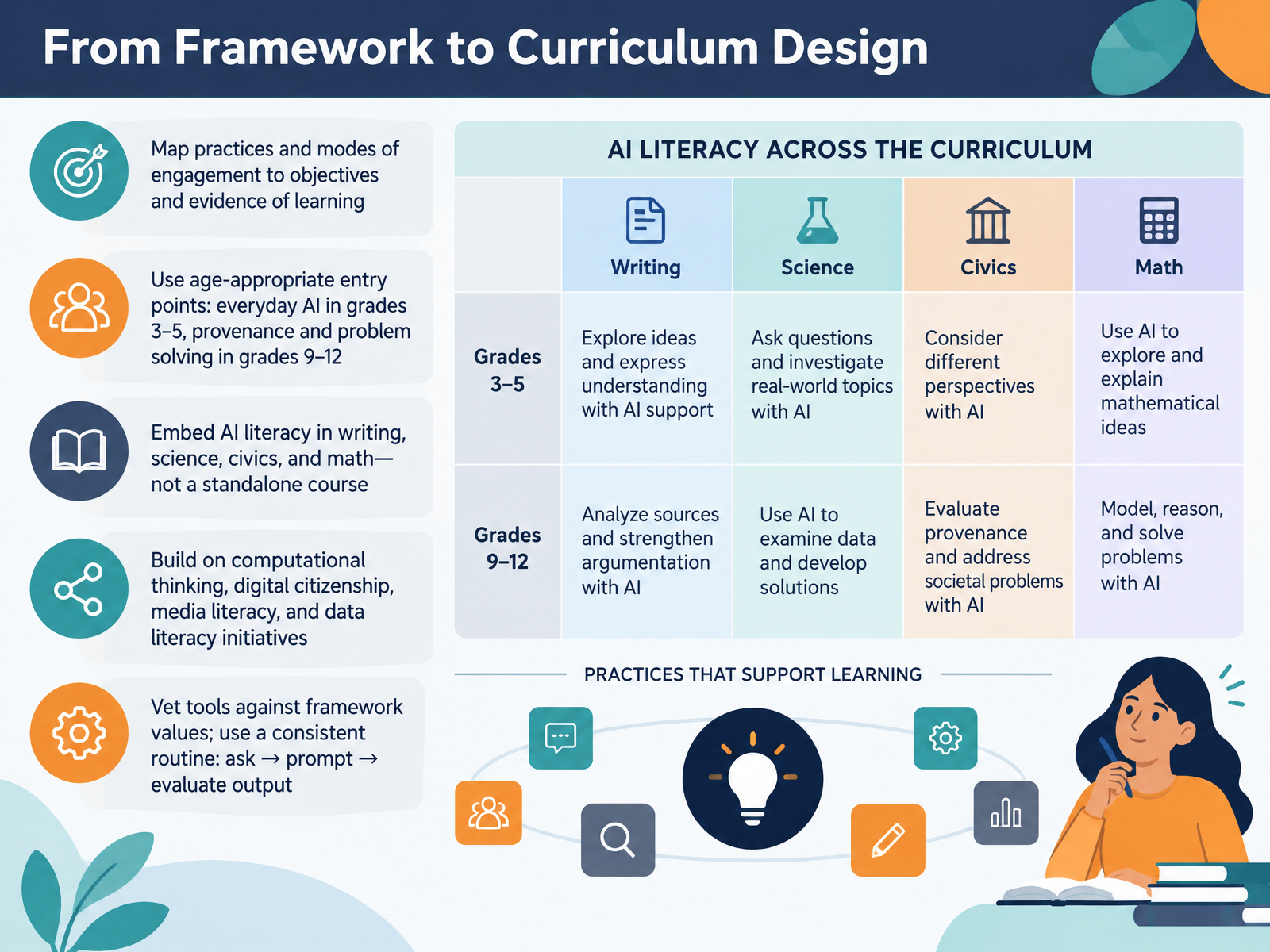
- 09From Framework to Curriculum DesignNow let's move from the framework itself into curriculum design. The practical move is to map practices and modes of engagement directly to your objectives and to the evidence of learning you already collect. Choose age-appropriate entry points. In grades three through five, start with everyday AI students already meet, like recommendations and voice assistants. By grades nine through twelve, move into provenance, sourcing, and problem solving. Embed AI literacy inside writing, science, civics, and math rather than standing up a separate course. And build on work you already have, such as computational thinking, digital citizenship, media literacy, and data literacy. Finally, vet tools against the framework's values, and use one consistent routine with students: ask, prompt, then evaluate the output. Your takeaway: pick one unit this term, map its objectives to a single AI literacy practice, and draft the ask, prompt, evaluate routine into the lesson. Next, we turn to professional learning and capacity building.
 digitalpromise.orgdigitalpromise.orgdigitalpromise.org+22 min
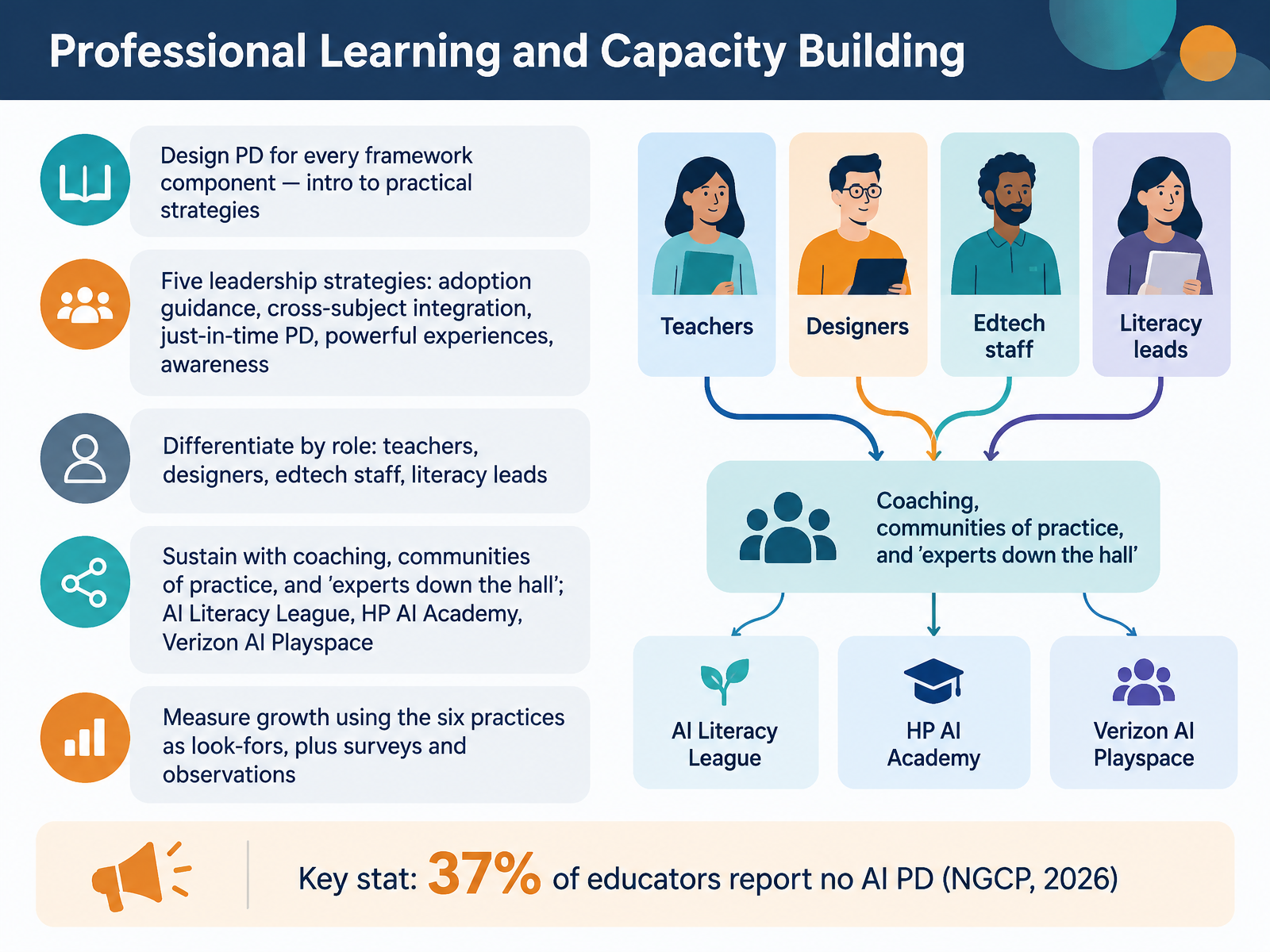
- 10Professional Learning and Capacity BuildingLet's turn to professional learning and capacity building. Design professional development for every framework component, moving from an introduction to practical strategies. Digital Promise names five leadership strategies: provide guidance for adoption, integrate AI literacy across subjects, offer just-in-time learning, design powerful learning experiences, and promote awareness and agency. Differentiate by role. Teachers need classroom strategies. Designers need integration and assessment support. Edtech staff need vetting and privacy guidance. Literacy leads need coaching tools. Sustain the work through coaching, communities of practice, and experts down the hall, alongside free options like the AI Literacy League, HP AI Academy, and Verizon AI Playspace. Measure growth using the six practices as look-fors, plus surveys and observations. Here is the urgency: thirty-seven percent of educators report no AI professional development at all. So map one PD session per framework component this term, and name the coaches who will follow up. Next, we will look at the implementation roadmap and common pitfalls.
 digitalpromise.orgdigitalpromise.orgdigitalpromise.org+22 min
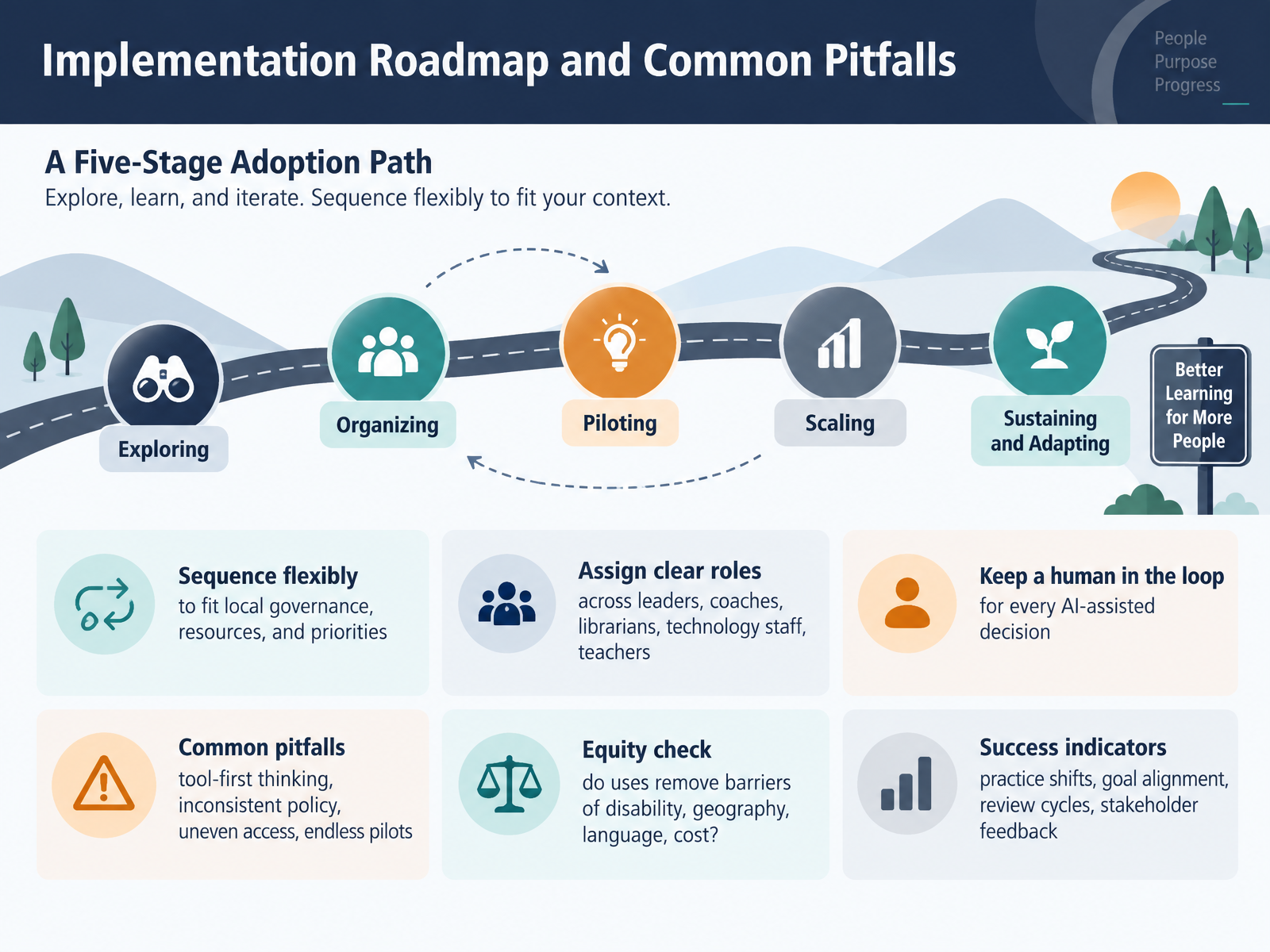
- 11Implementation Roadmap and Common PitfallsLet's turn to implementation. A practical roadmap has five stages: exploring, organizing, piloting, scaling, and sustaining and adapting. You don't have to move through them in lockstep. Sequence them to fit your governance, your resources, and your priorities. Assign clear roles across leaders, coaches, librarians, technology staff, and teachers, and keep a human in the loop for every AI-assisted decision. Watch for four common pitfalls: tool-first thinking, inconsistent policy, uneven access, and endless pilots that never scale. Run an equity check by asking whether a use removes barriers of disability, geography, language, or cost. Then track success through practice shifts, goal alignment, review cycles, and stakeholder feedback. Your takeaway: sketch your current stage, name one pitfall to address this term, and schedule a review cycle before you expand. Next, we'll put this into practice in the application workshop, where you'll map a lesson to the framework.
 digitalpromise.orgdigitalpromise.orgyoutube.com+22 min
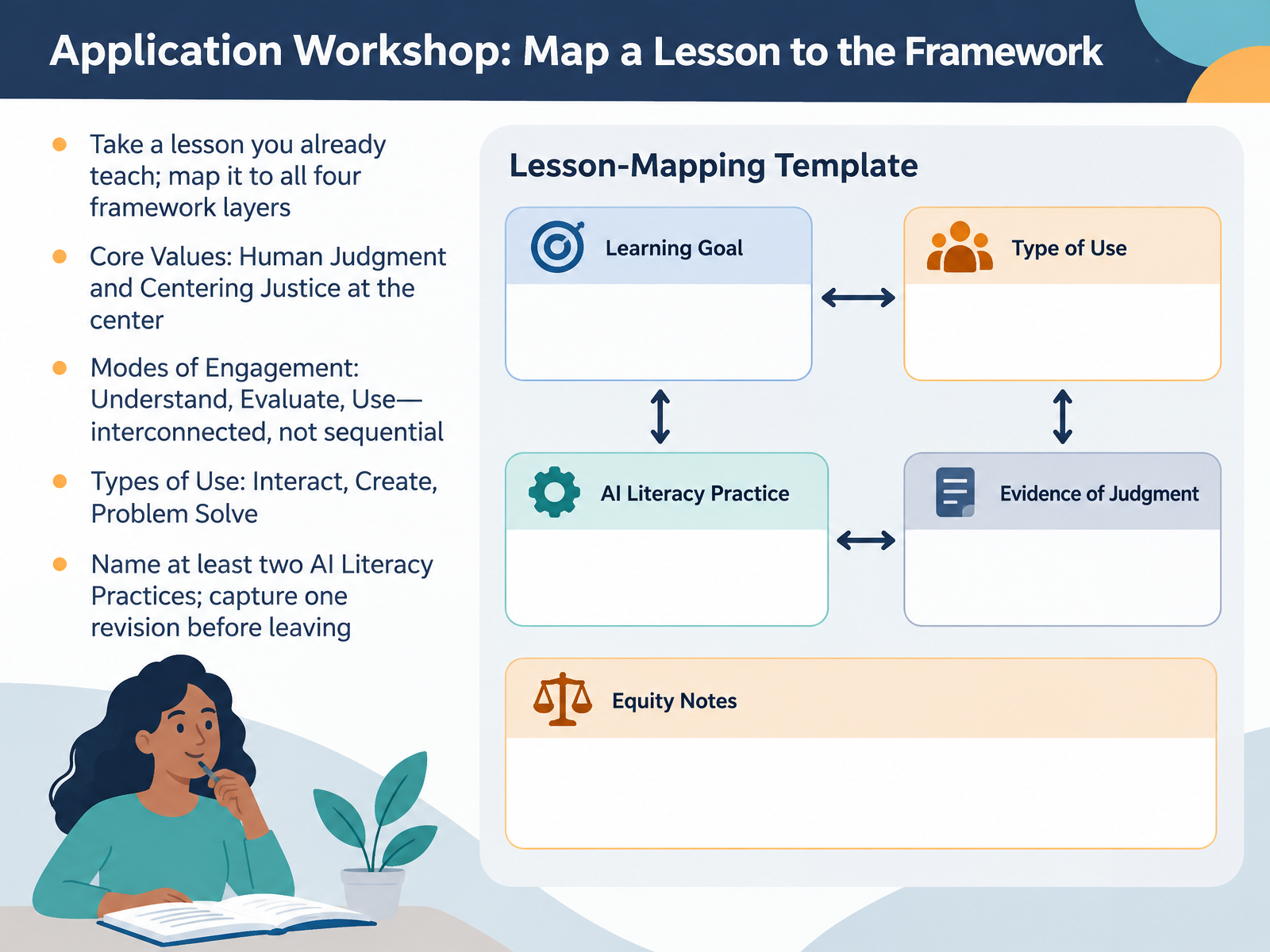
- 12Application Workshop: Map a Lesson to the FrameworkNow let's put the framework to work. Take a lesson you already teach. Choose one you know well, because mapping is easier when the content is familiar. Then map that lesson to all four framework layers. Start at the center, with Core Values. Ask where human judgment stays with the student, and where the lesson centers justice, such as whose perspectives the content includes and who might be affected by an AI decision. Next, identify the Modes of Engagement: Understand, Evaluate, and Use. Treat them as interconnected, not sequential, so students may evaluate an output while they are still building understanding. Then name the Types of Use your lesson involves: interact, create, or problem solve. Finally, choose at least two AI Literacy Practices, for example data privacy and security, or information and mis and disinformation, and write down one concrete revision before you leave today. That revision might be a prompt students critique, a privacy check, or a short reflection on when not to use AI. Here is your takeaway: one lesson, all four layers, two practices, and one revision you can teach next week. Next, in Application Workshop: Evaluate a Tool and Plan Next Steps, you will bring that revision into a tool review.
 digitalpromise.orgotan.usdigitalpromise.org+22 min
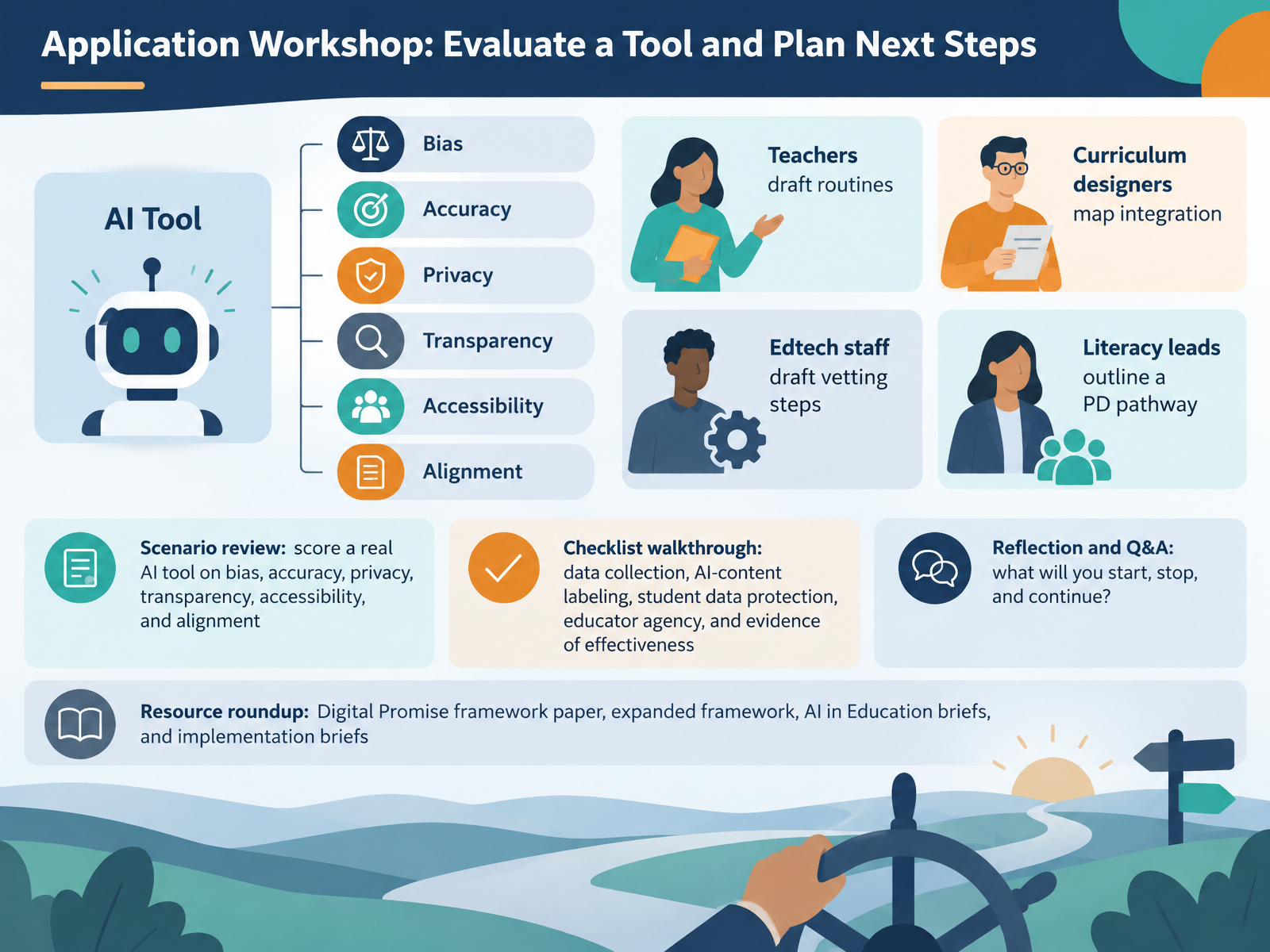
- 13Application Workshop: Evaluate a Tool and Plan Next StepsLet's put the framework to work. In this final workshop, review a scenario and score a real AI tool against six criteria: bias, accuracy, privacy, transparency, accessibility, and alignment with your learning goals. Then walk the checklist: how the tool collects data, whether AI-generated content is labeled, how student data is protected, whether educators keep meaningful agency, and what evidence shows it actually works. Keep your realistic constraints in view, like limited time, privacy rules, and assessment integrity. Next, plan by role. Teachers draft classroom routines. Curriculum designers map where the tool fits. Edtech staff draft vetting steps. Literacy leads outline a professional learning pathway. Reflect together: what will you start, stop, and continue? Finally, use the resource roundup to go deeper: the Digital Promise framework paper, the expanded framework, the AI in Education briefs, and the implementation briefs. Thank you for your steady, thoughtful work. Pick one tool, score it this week, and let that evidence guide your next step. You are more ready than you think.
 digitalpromise.orgdigitalpromise.orgyoutube.com+22 min
Take the deck with you
Download this course as a file — free, no sign-up needed.
- PDF handoutEvery slide page, ready to print or share.14 pages · 3.2 MBDownload
- Narrated PowerPointThe deck that presents itself — every slide carries the digital human's narration video.14 pages · 25.6 MBDownload
- PowerPoint slidesThe full deck as a .pptx — open it in PowerPoint, Keynote, or Google Slides.14 pages · 3.2 MBDownload
Free to use in your own training — please keep the PersonWise credit page at the end.
Have your own deck? Turn it into a course
Sources consulted
Web sources consulted while building this course.
- Revealing an AI Literacy Framework for Learners and Educators - Digital Promise — digitalpromise.org
- AI Literacy – Digital Promise — digitalpromise.org
- Digital Promise's AI Literacy Framework for Learners and Educators — youtube.com
- Digital Promise's AI Literacy Framework — AI for Education — aiforeducation.io
- Examples of AI Literacy Frameworks - AI and Teaching and Learning - Research Guides at University of Southern California — libguides.usc.edu
- AI Readiness in U.S. Schools — filecache.mediaroom.com
- Building AI Literacy for — ngcproject.org
- 2025 AI in Education Report Survey Details — cdn-dynmedia-1.microsoft.com
- New Instructure Research Shows the Current State of AI in Education: Formal Training and Support for Educators | Instructure — instructure.com
- AI Use in Schools Is Quickly Increasing but Guidance Lags Behind: Findings from the RAND Survey Panels | RAND — rand.org
- Outreach and Technical Assistance Network | Building AI Literacy in Adult Education: A Framework for Action — otan.us
- AI Literacy: A Framework to Understand, Evaluate, and Use Emerging Technology - Digital Promise — digitalpromise.org
- Executive Summary - AI Literacy: A Framework to Understand, Evaluate, AI Literacy: A Framework to Understand, Evaluate, and Use Emerging Technology — digitalpromise.org
- AI Literacy Insights and Opportunities - Digital Promise — digitalpromise.org
- Lesson Library for Integrated Computational Thinking - Digital Promise — digitalpromise.org
- Navigating the New Frontier: Building AI Literacy in K-12 Education - Digital Promise — digitalpromise.org
- Advancing AI Literacy Lessons — weteachcs.org
- Transforming K-12 Education with AI: A New Report with Insights from 28 Exploratory Projects - Digital Promise — digitalpromise.org
- Our AI Portfolio – Digital Promise — digitalpromise.org
- AI Literacy League Learning Collaborative – Digital Promise — digitalpromise.org