Begin
14 pages · ~28 min
Package Dependency Management Fundamentals
Learn to manage package dependencies effectively, covering versioning, requirements, and compatibility to ensure reliable software builds. Ideal for developers seeking dependency management skills.
A digital instructor presents all 14 pages. Hold “Ask” at any point and ask out loud — the answer comes from this course. No sign-up needed.
What you’ll learn
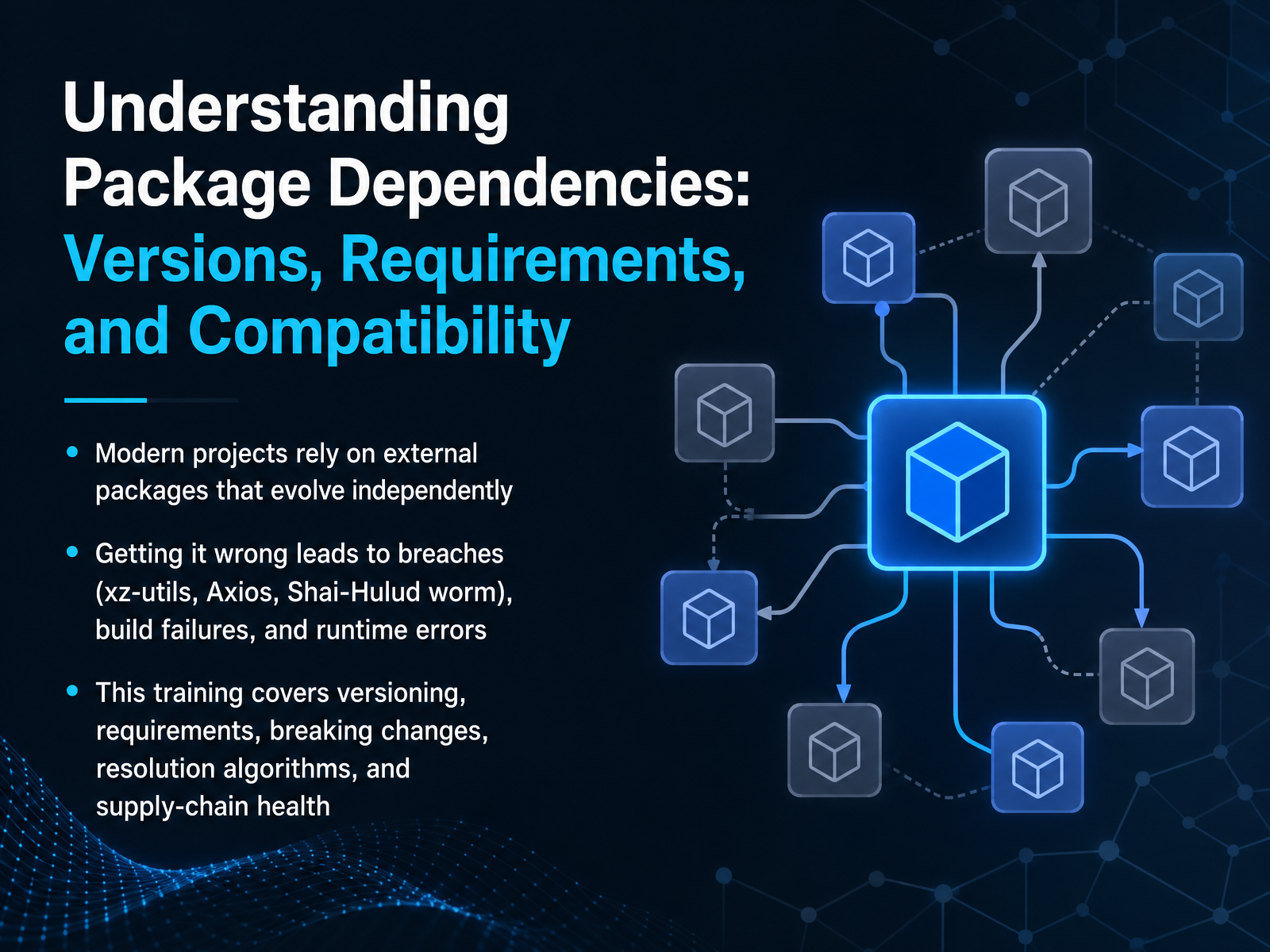
- 01Understanding Package Dependencies: Versions, Requirements, and CompatibilityWelcome. In this module we'll get under the hood of package dependencies—the libraries your project relies on that evolve on their own schedule. We're not here to just define terms. We're here to help you avoid real-world consequences you'll face when these relationships break. Think of the xz-utils backdoor, the Axios supply-chain incident, or a sudden build failure that derails a release. Getting this wrong can mean breaches, stalled builds, or runtime errors that take hours to trace. This training covers versioning, how requirements are specified, what constitutes a breaking change, how resolution algorithms decide which versions land on your machine, and how to evaluate the health of your supply chain. By the end you'll have a clear mental model you can apply directly in your project. Speaking of models, we'll start by mapping out the dependency graph itself in the next slide.1 min
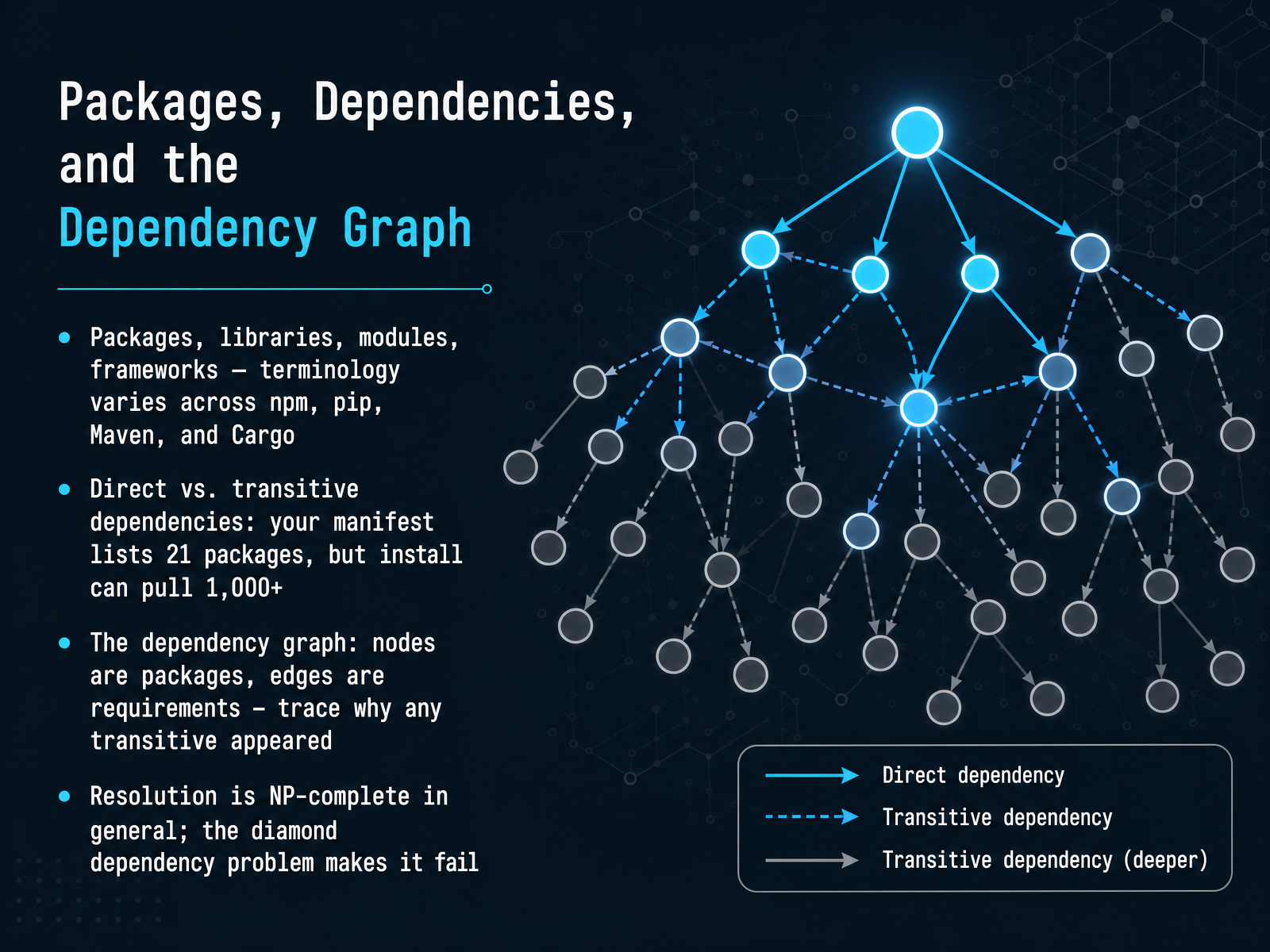
- 02Packages, Dependencies, and the Dependency GraphLet's zoom out for a moment and talk about the landscape. You'll hear terms like packages, libraries, modules, and frameworks thrown around, and they shift a bit depending on whether you're in npm, pip, Maven, or Cargo. At the core, they're all just reusable code, but the real complexity comes from how they connect. When you look at your project's manifest, you might see twenty-one dependencies listed. But hit install, and the actual download might pull over a thousand packages. That gap is where things get interesting. Those twenty-one items are your direct dependencies; the rest are transitive ones, pulled in by your direct choices. To understand why a specific package showed up, you need to trace the dependency graph. Think of each package as a node, and every requirement as an edge connecting them. Following those edges reveals the full chain of why something was included. Now, resolving this graph to find a set of versions that all work together is not a simple task. In general, it's what's known as NP-complete. A classic headache you'll encounter is the diamond dependency problem, where two parts of your project require different, incompatible versions of the same library, and the resolver simply can't make everyone happy. Next, let's dive into that gap between what you declare and what you get, with the iceberg problem of direct versus transitive dependencies.
 2 min
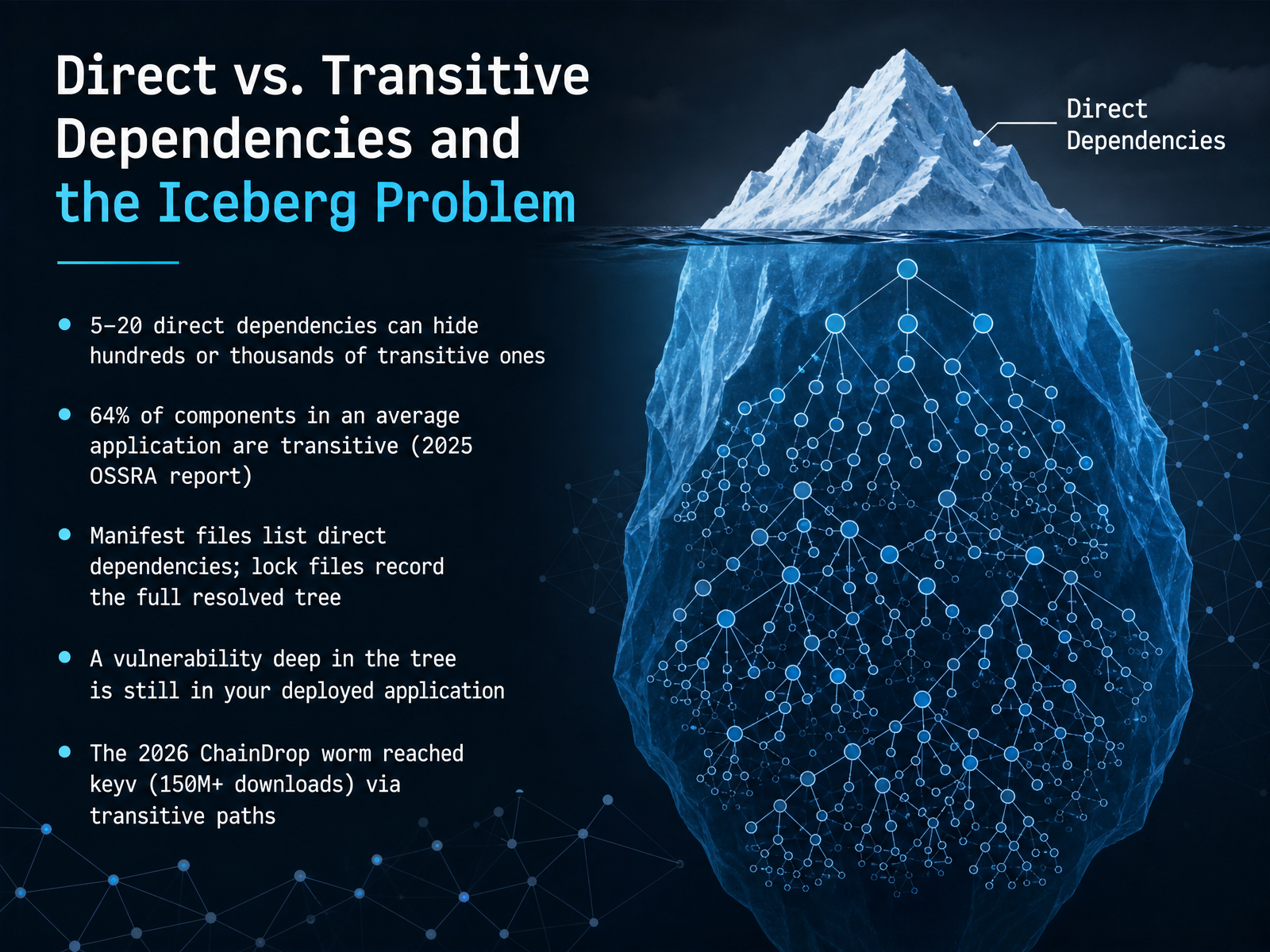
2 min - 03Direct vs. Transitive Dependencies and the Iceberg ProblemNow let's talk about what a dependency tree actually looks like in practice. When you run npm install or pip install, you're not just pulling in the five or twenty libraries you listed in your manifest file. Each of those direct dependencies brings its own dependencies, and those bring even more. It cascades fast. A typical project with a handful of direct dependencies can easily hide hundreds or even thousands of transitive ones underneath. Think of it like an iceberg. The manifest file, like package dot json or requirements dot txt, only shows you the tip, just the libraries you explicitly chose. The lock file is what records the entire resolved tree, every single package that actually got installed. This matters because a vulnerability doesn't have to live in your own code, or even in your direct dependencies. Over sixty percent of the components in an average application are transitive. If one of those deeply nested packages has a critical flaw, it is still running in your deployed application. You own it. A clear example is the 2026 ChainDrop worm. It didn't target applications directly. It reached the key-value store library keyv, a package with over one hundred fifty million downloads, entirely through transitive paths. Most affected teams never even knew they were using it. Next, we'll look at how versioning schemes like SemVer and CalVer help, and sometimes fail, to manage this complexity.
 2 min
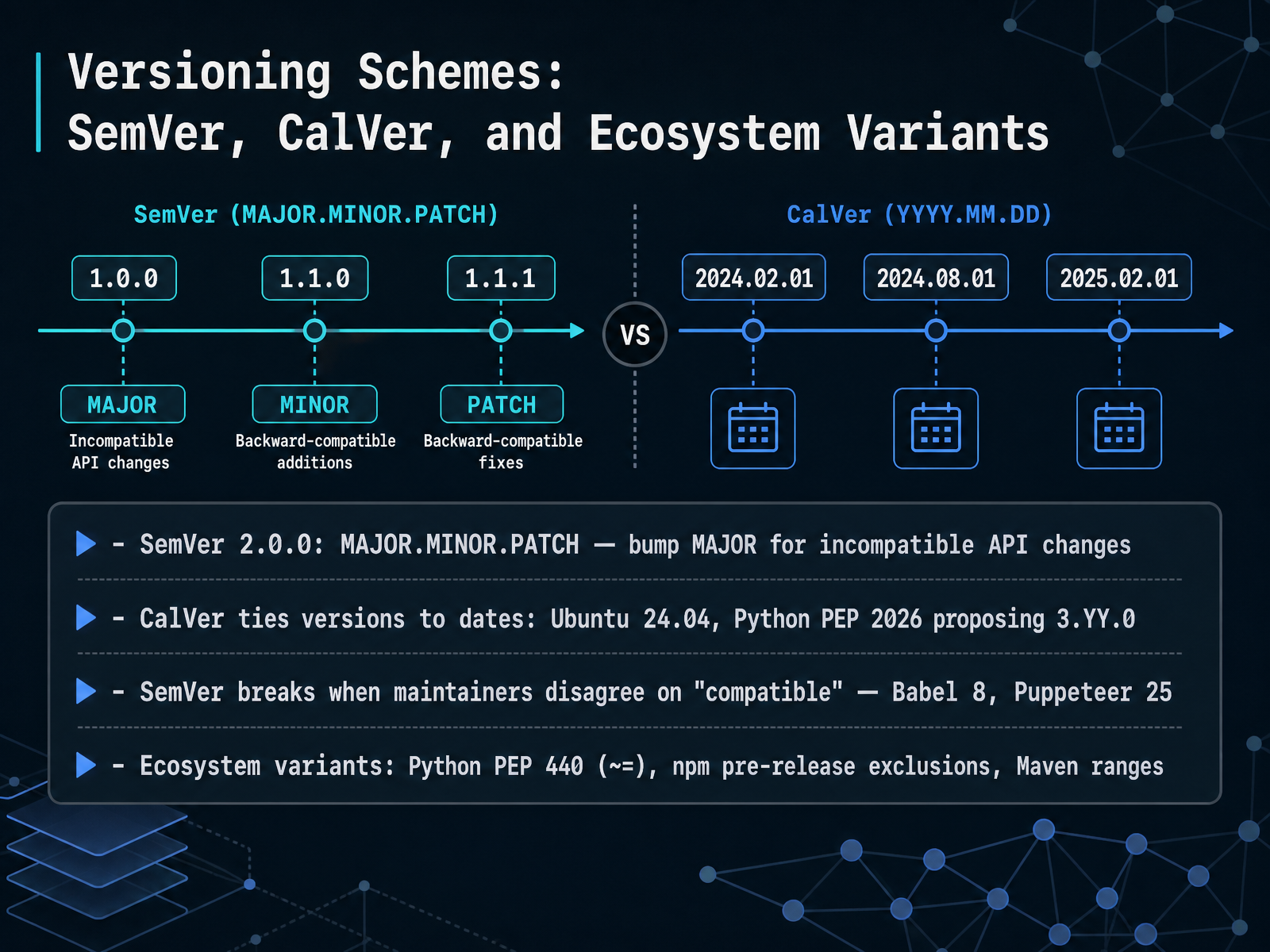
2 min - 04Versioning Schemes: SemVer, CalVer, and Ecosystem VariantsLet's look at the version numbers themselves. The most common scheme you'll run into is Semantic Versioning, or SemVer, version two point zero point zero. It breaks a version into three parts: major, minor, and patch. The core rule is simple: if you change the public API in a way that breaks existing users, you must bump the major number. A minor bump adds backward-compatible features, and a patch just fixes bugs. So, version two point one point zero tells you it added features without breaking anything from the two point oh line. But not everyone uses SemVer. Some projects use Calendar Versioning, or CalVer. Ubuntu is a classic example: version twenty-four point zero four tells you it shipped in April twenty twenty-four. Python's steering council is also exploring this with PEP twenty-twenty-six, proposing a three dot Y Y dot zero format. Now, a core challenge: SemVer breaks down when people disagree on what 'compatible' means. A change that feels like a minor bug fix to one maintainer might be a breaking change in someone else's production system. This tension has led to high-profile major version races, like Babel jumping to version eight or Puppeteer to version twenty-five, often signaling breaking changes that, from a user's perspective, can seem minor. Finally, remember that every ecosystem tweaks these rules. Python's PEP four forty uses a compatible release operator, the tilde-equals sign, which roughly means 'at least this version, but only up to the next major release.' N P M's caret ranges work similarly but exclude pre-release versions by default. Maven, meanwhile, lets you express full version ranges directly. Next, we'll translate these version schemes into actual requirements you put in your project files, talking about declaring requirements, ranges, pinning, and lock files.
 2 min
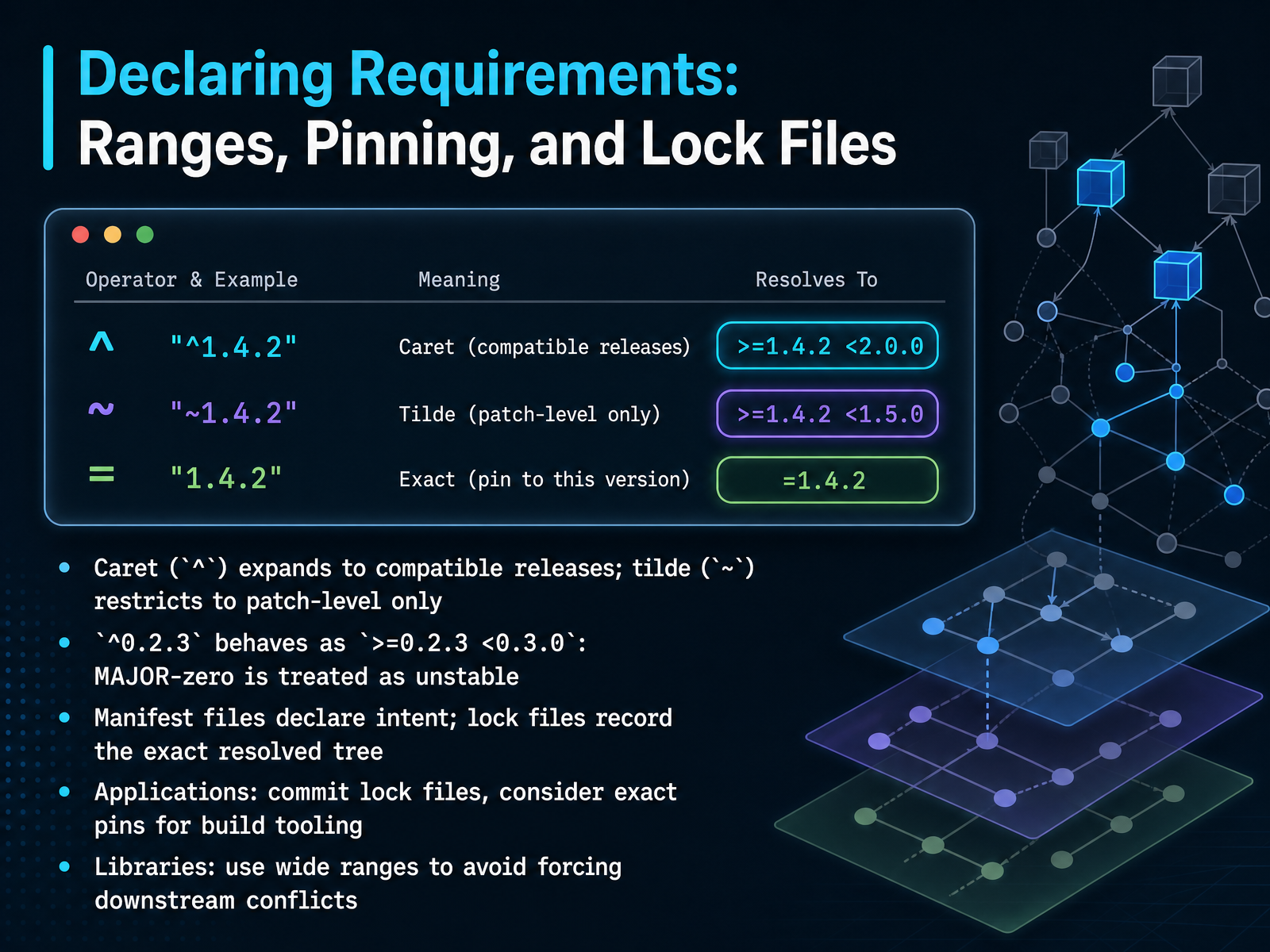
2 min - 05Declaring Requirements: Ranges, Pinning, and Lock FilesNow let's look at the practical side: how do you actually declare which versions your project needs? It starts with two symbols that tell the resolver how far to exploration: the caret and the tilde. A caret before a version means “compatible releases.” So if you write caret one point two point three, you're saying, “anything from one point two point three up to, but not including, two point zero point zero is fine.” It trusts semantic versioning to keep things safe within the same major number. There is one special case: when the major version is zero. Like caret zero point two point three. That gets treated as “at least zero point two point three, but less than zero point three point zero.” The resolver assumes any minor bump in a zero-major package could break you. The tilde is stricter. Tilde one point two point three locks you to patch-level updates only: “at least one point two point three, less than one point three point zero.” Use tilde when you want to absorb bug fixes but avoid new features entirely. These declarations live in your manifest file. Think of the manifest as a statement of intent. But a lock file is different. It’s the exact, resolved tree—every package and every version that actually got installed. For applications, commit that lock file. It guarantees every teammate and every deployment gets identical dependencies. For libraries, the advice flips: declare wide, permissive ranges. If your library demands an exact patch version of a dependency, you force downstream consumers into painful conflicts. Let them choose compatible versions that work with their whole dependency graph. Next, we’ll explore what truly makes a change “breaking,” and how maintainers decide when to bump that major version.
 2 min
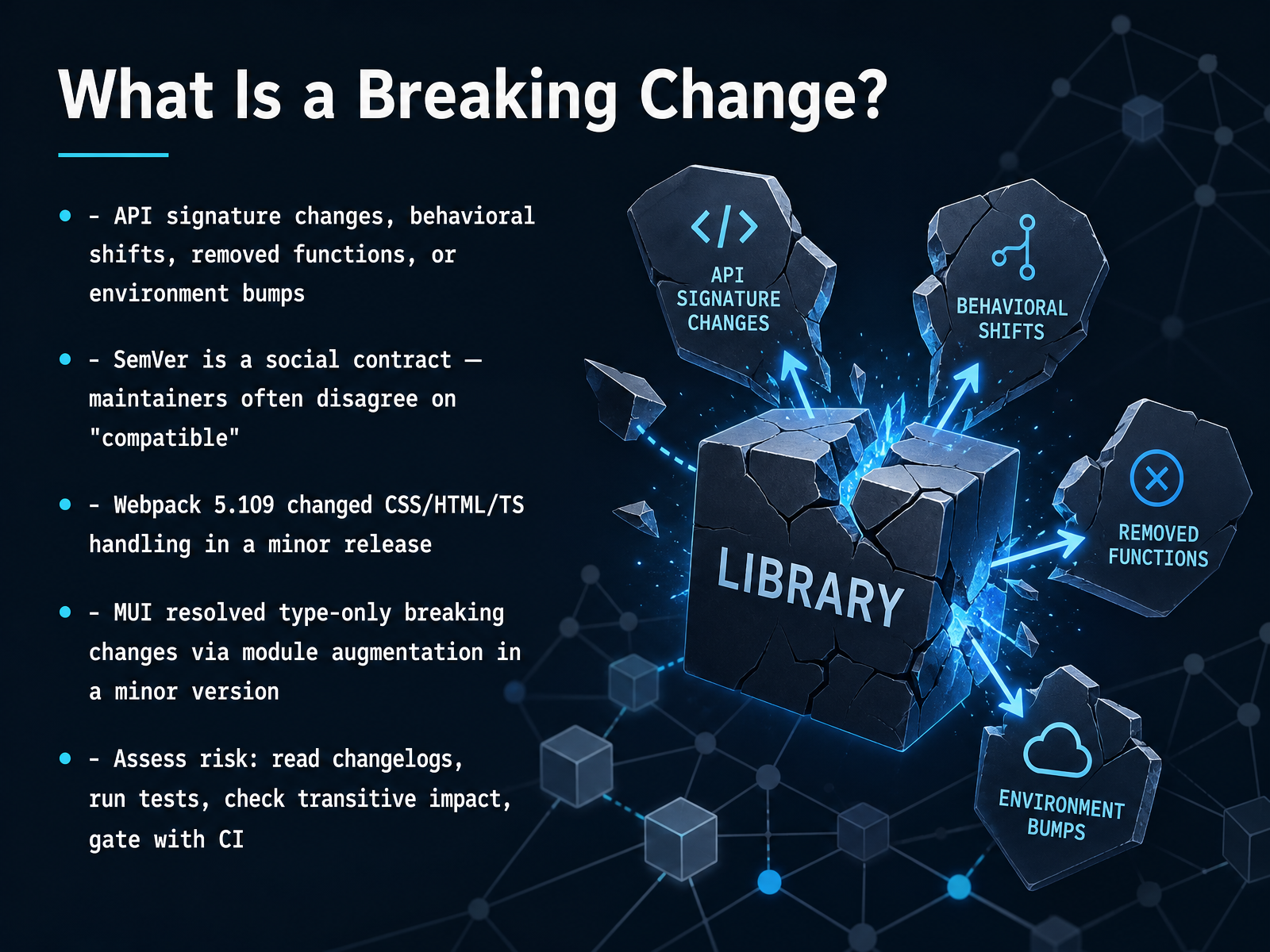
2 min - 06What Is a Breaking Change?So what actually counts as a breaking change in practice? It is more than just an obvious API signature change, where a function suddenly requires a new argument. A breaking change can also be a subtle behavioral shift, a function that gets removed entirely, or even a bump in the required runtime environment. Think of Semantic Versioning, or SemVer, as a social contract between a package maintainer and you. The problem is, maintainers often disagree on what 'compatible' truly means. I have seen this happen in major projects. For instance, Webpack version five point one zero nine introduced significant changes to how it handled CSS, HTML, and TypeScript, and this shipped inside what was labeled a minor release. In another case, the MUI team resolved a set of type-only breaking changes by releasing a module augmentation in their own minor version. So, how do you assess the risk? You cannot just trust the version number. You need to read the changelog carefully, run your project's test suite, and check for transitive impact on your other dependencies. The safest practice is to gate any dependency update with a solid CI pipeline. Up next, let's look at how dependency resolution works, and why it sometimes fails.
 2 min
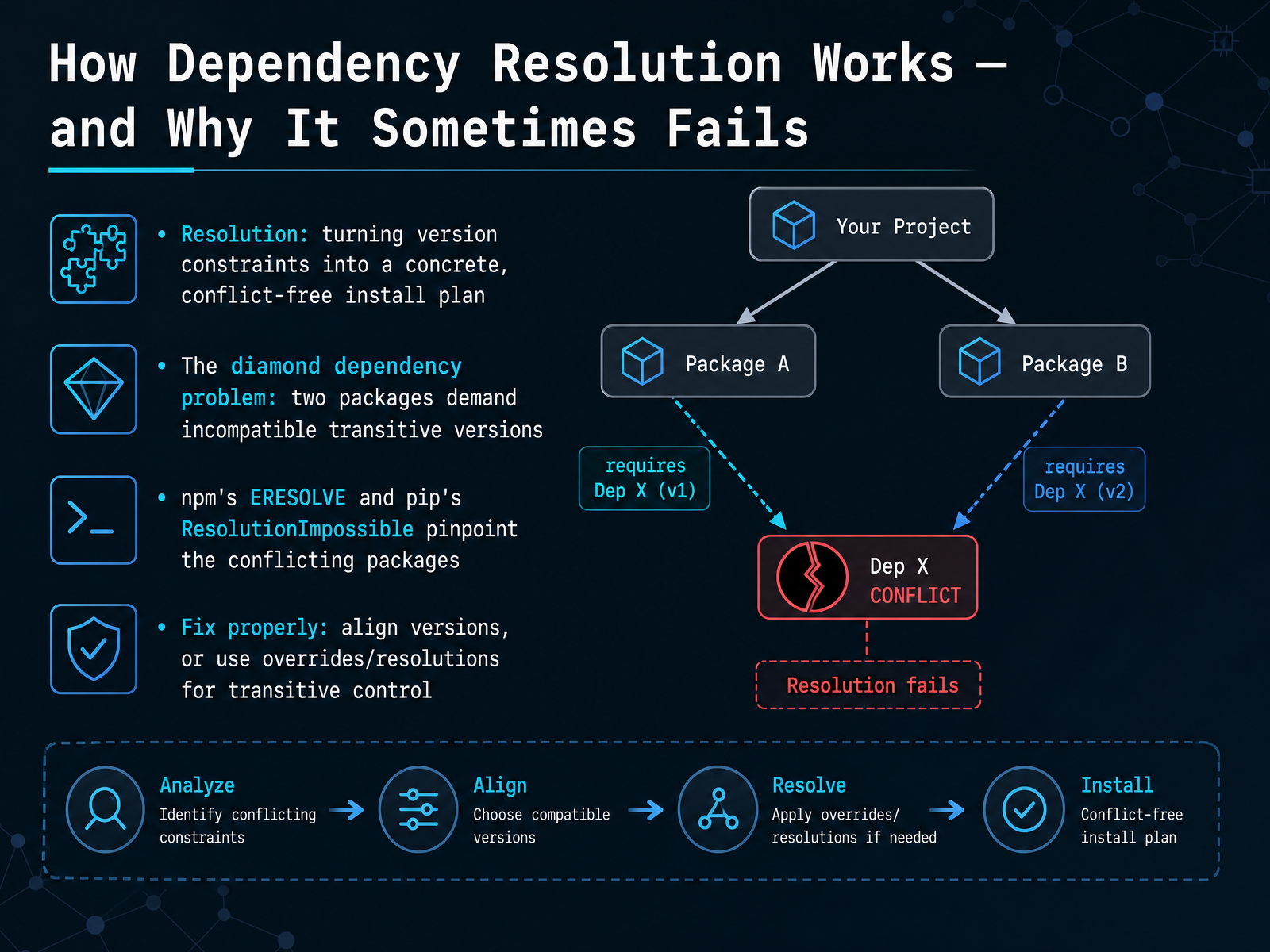
2 min - 07How Dependency Resolution Works — and Why It Sometimes FailsNow we get to the engine room: how a package manager actually resolves everything into a working install plan. Resolution is the process of taking all those version constraints we talked about and turning them into a real, conflict-free set of packages. You give it a list of what you need, and it builds a tree where every package gets exactly one version. That sounds straightforward, but there is a classic trap called the diamond dependency problem. Imagine your project depends on Package A and Package B. Both of those, separately, depend on Package C, but they demand different, incompatible versions. The resolver hits a wall because it cannot install two versions of C in the same place. When this happens, tools give you a very specific error to focus on. In the Node ecosystem, you will see npm's ERESOLVE error. In Python, pip raises ResolutionImpossible. Both pinpoint the exact conflicting packages and their version requirements so you are not hunting in the dark. The right fix is not to ignore the error. First, try aligning the versions of A and B to versions that agree on C. If that is not possible, you can use escape hatches like npm's overrides field or Yarn's resolutions to force a single transitive version, but use these carefully. Let's look at one of the most frequent causes of these conflicts next, where packages declare expectations on their hosts with peer dependencies, and dive deeper into that ERESOLVE error.
 2 min
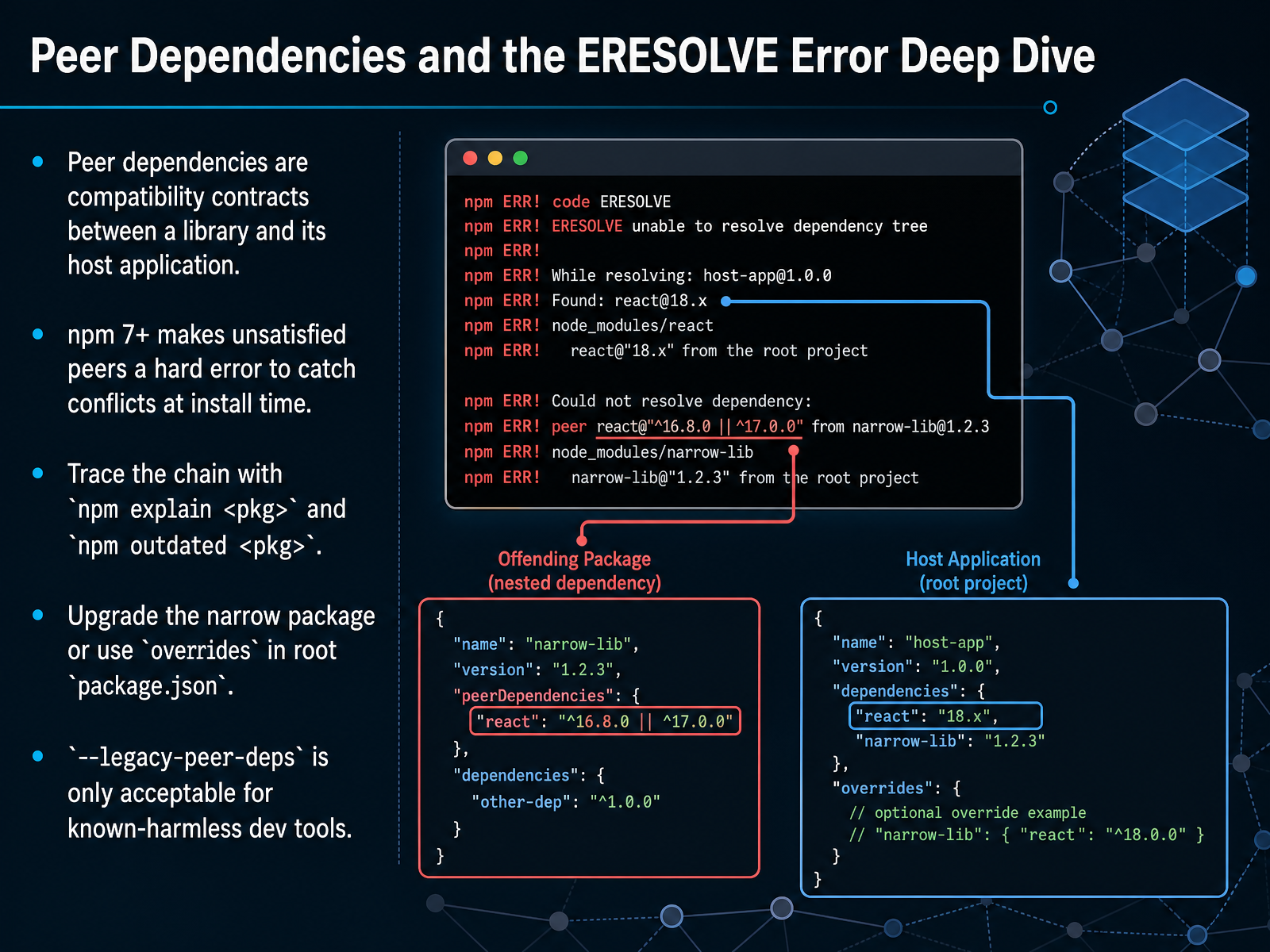
2 min - 08Peer Dependencies and the ERESOLVE Error Deep DiveNow, let’s talk about peer dependencies. Think of a peer dependency as a compatibility contract between a library and the application that hosts it. The library says, “I expect the host to provide a specific version of React,” for example. This avoids having two copies of the same framework loaded in your project. Starting with npm version seven, the installer treats an unsatisfied peer dependency as a hard error, catching these conflicts early before they cause strange runtime bugs. When you hit that dreaded ERESOLVE error, your first tools should be `npm explain` followed by the package name, to trace the dependency chain, and `npm outdated` to see what’s behind. Often, the fix is upgrading the package that enforces a narrow peer range. If you cannot upgrade immediately, you can use the `overrides` field in your root `package.json` to enforce a compatible version. You might see people recommend `--legacy-peer-deps`, but reserve that only for known-harmless dev tools; using it on your core dependencies can paper over real version mismatches that will break your app later. Up next, we’ll walk through practical conflict resolution across npm, pip, and beyond.
 1 min
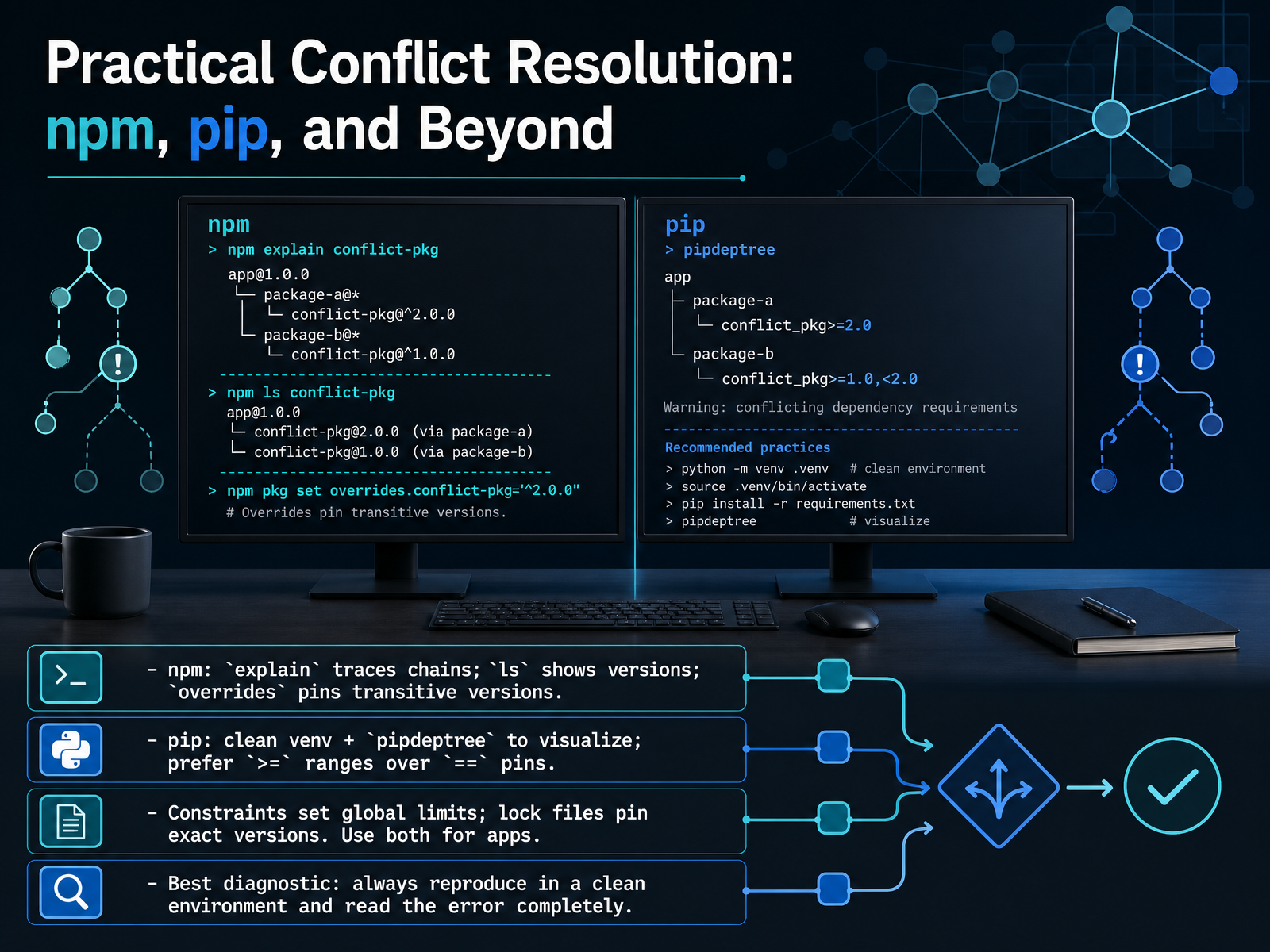
1 min - 09Practical Conflict Resolution: npm, pip, and BeyondWhen a dependency conflict actually hits, your first instinct should be to understand why, not just slap on a fix. Each ecosystem gives you tools for this. In npm, the explain command traces the full dependency chain that led to a particular package version, so you can see exactly which parent pulled it in. The ls command shows a flat list of what's actually installed. And if you need to force a specific version of a transitive dependency, the overrides field in package dot json lets you pin it from the top level. In pip, always start your investigation inside a clean virtual environment. Use a tool called pipdeptree to print the full tree; seeing the hierarchy visually makes version conflicts far easier to spot. When you define your own dependency ranges, prefer greater-than-or-equal to ranges over double-equal-to exact pins, so the resolver has room to find compatible versions. Beyond these per-ecosystem tools, remember the two-layered approach. Use constraints files or their equivalent to set global upper and lower limits across your whole project. Then use a lock file to pin the exact resolved versions for reproduction. For applications, you want both: the constraints frame what's acceptable, and the lock file guarantees what you actually ship. Finally, the best diagnostic step is also the simplest: reproduce the conflict in a clean environment and read every line of the error message carefully. Most resolution paths are hidden right there in plain sight. Next, we'll look at the security side: supply-chain attacks and how dependency risk shows up in real projects.
 2 min
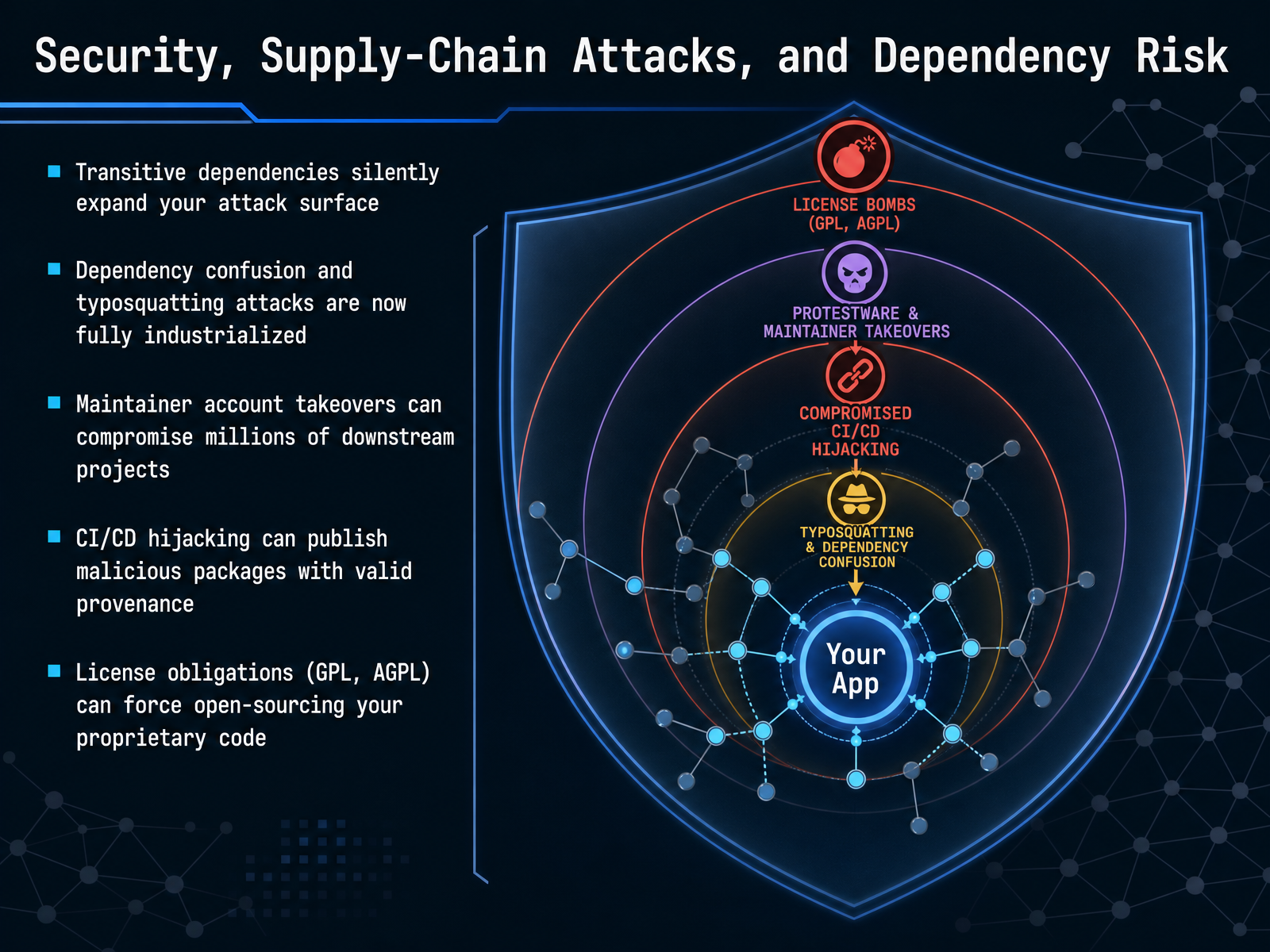
2 min - 10Security, Supply-Chain Attacks, and Dependency RiskLet's shift gears and talk about something less visible but equally critical: the security and risk dimension of your dependency graph. Every library you add also brings its own dependencies, those transitive ones we mentioned earlier. Each one silently expands your project's attack surface, often without you ever reviewing it. Attackers know this. Techniques like dependency confusion and typosquatting, where malicious packages are published under slightly misspelled names or internal-sounding identifiers, have become fully industrialized. A single compromised maintainer account can let an attacker push poisoned updates into thousands of downstream projects in minutes. Even your build pipeline isn't safe; CI/CD hijacking can inject malicious code at build time, while the package itself carries seemingly valid provenance. And alongside the code risk, don't forget the legal side. Licenses like the GPL or AGPL carry strong copy-left obligations. If you ship a proprietary product that links to AGPL code, you may be forced to open-source your own proprietary work. Let that sink in for a moment. Up next, we'll look at how auditing tools and the Software Bill of Materials, or S BOM, can help you map and manage these hidden risks.
 2 min
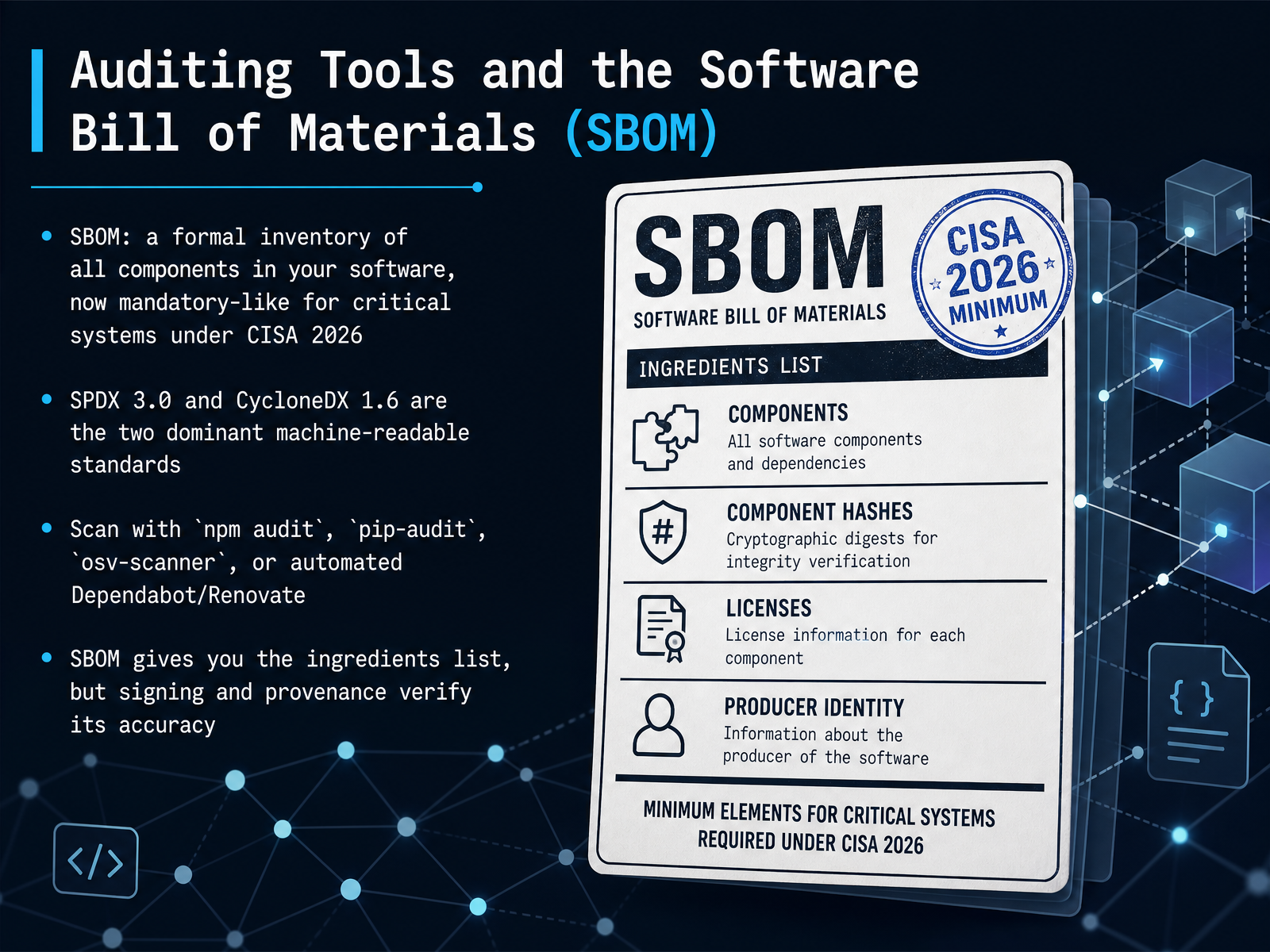
2 min - 11Auditing Tools and the Software Bill of Materials (SBOM)Let's talk about how you actually get a handle on your dependency tree at scale. It starts with a Software Bill of Materials, or S-BOM. Think of it as a formal ingredients list for everything inside your build—every library, every version, every transitive dependency. This isn't just a nice-to-have anymore. For critical systems, under CISA's guidance by 2026, producing an S-BOM is effectively becoming mandatory. Now, to make these lists machine-readable and consistent, we rely on two dominant standards: SPDX 3.0 and CycloneDX 1.6. Your S-BOM isn't something you write by hand. You generate it using auditing tools you probably already run. Things like npm audit for your JavaScript projects, pip-audit for Python, or Google's osv-scanner, which works across languages. In a CI pipeline, automated bots like Dependabot or Renovate can scan and generate this data with every pull request. One crucial point though: an S-BOM gives you the recipe card, but it doesn't tell you if someone swapped the sugar for salt. To verify the ingredients are genuine, you need signing and provenance. That's how you know the content matches the list, which is exactly what we'll cover next with SLSA, Sigstore, and proving what was built.
 2 min
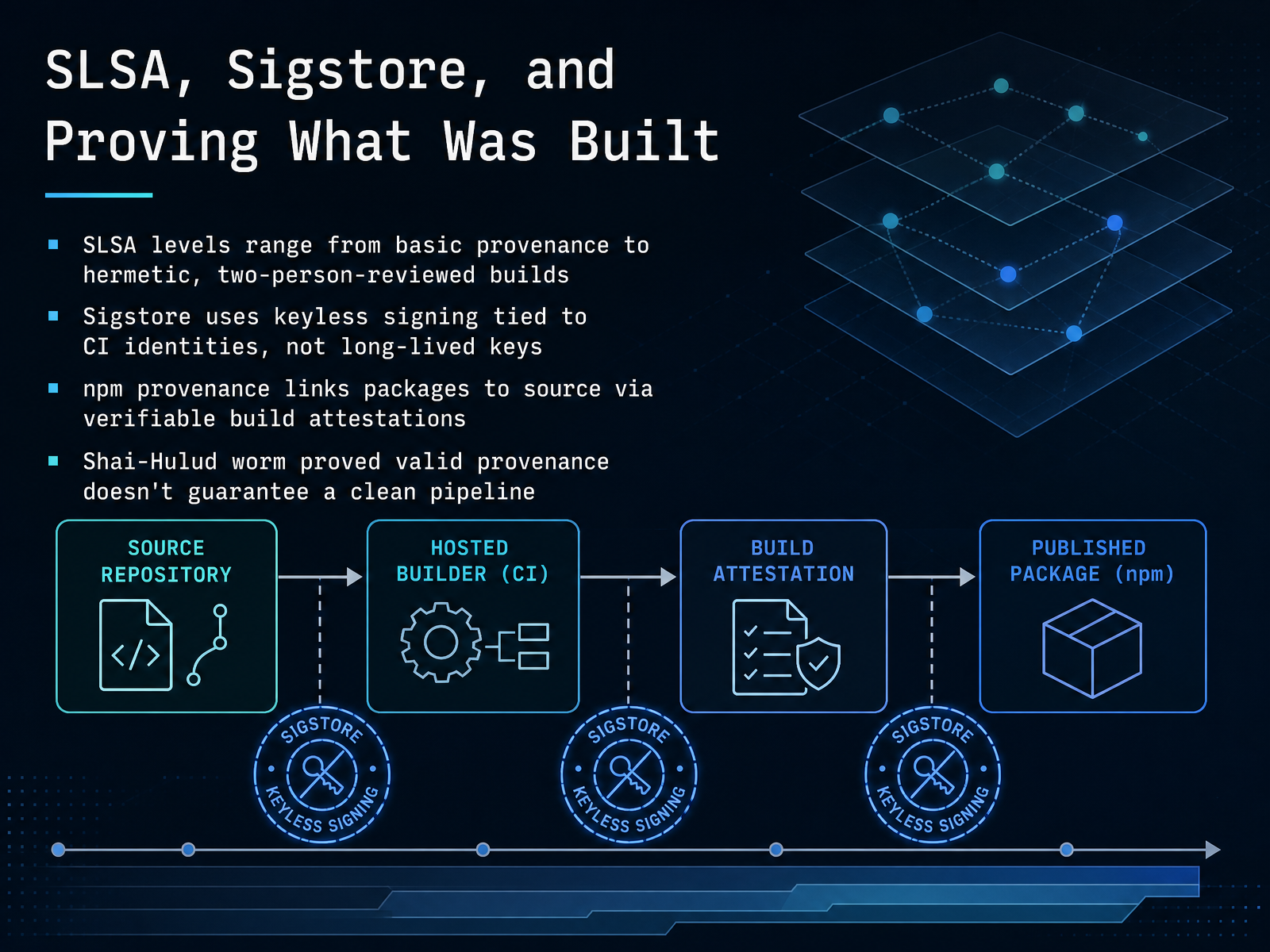
2 min - 12SLSA, Sigstore, and Proving What Was BuiltNow let's talk about proving what was built. The main framework here is called SLSA, or Supply-chain Levels for Software Artifacts. Think of it as a maturity model for build integrity. It ranges from level one, which is just basic provenance showing where things came from, all the way up to level four, which requires hermetic, fully isolated builds that are reviewed by two people. To make this practical, the open source tool Sigstore handles the signing. But instead of managing long-lived cryptographic keys you have to guard forever, Sigstore uses keyless signing. It ties the signature directly to the CI runner’s short-lived identity, like a GitHub Actions workflow. So you know exactly which pipeline produced the artifact. On top of that, npm provenance links a published package back to its source repo and the exact build instructions that created it, using those verifiable attestations. One important reminder though. A clever demo named Shai-Hulud proved that a valid provenance record doesn’t guarantee the pipeline itself was clean. Provenance tells you who built it and how, but you still need to trust the builder. Next, we’ll shift to keeping those dependencies healthy with automation and strategy.
 2 min
2 min - 13Keeping Dependencies Healthy: Automation and StrategyNow, let’s talk about keeping your dependency tree healthy without spending all your time on it. The real key is automation. Tools like Dependabot, which is built right into GitHub, or Renovate, which works across platforms and gives you very fine-grained control, can open pull requests for you automatically. The trick, though, is to avoid PR fatigue. You don’t want a flood of notifications every morning. A solid strategy is to group minor and patch updates into a single weekly batch, but always let security patches through immediately, on their own fast track. Aim for a steady state of fewer than five automated dependency pull requests per week. If you’re seeing more than that consistently, it’s time to tighten your configuration. And while you’re at it, shrink your footprint. Every dependency is a liability. Regularly remove packages you no longer use, prefer well-maintained libraries with a strong community, and really think about the build-versus-buy decision. Adding a small utility you could write yourself might not be worth the extra attack surface it brings. Next, let’s look ahead at how AI is starting to assist with dependency management and what future trends you should watch for.
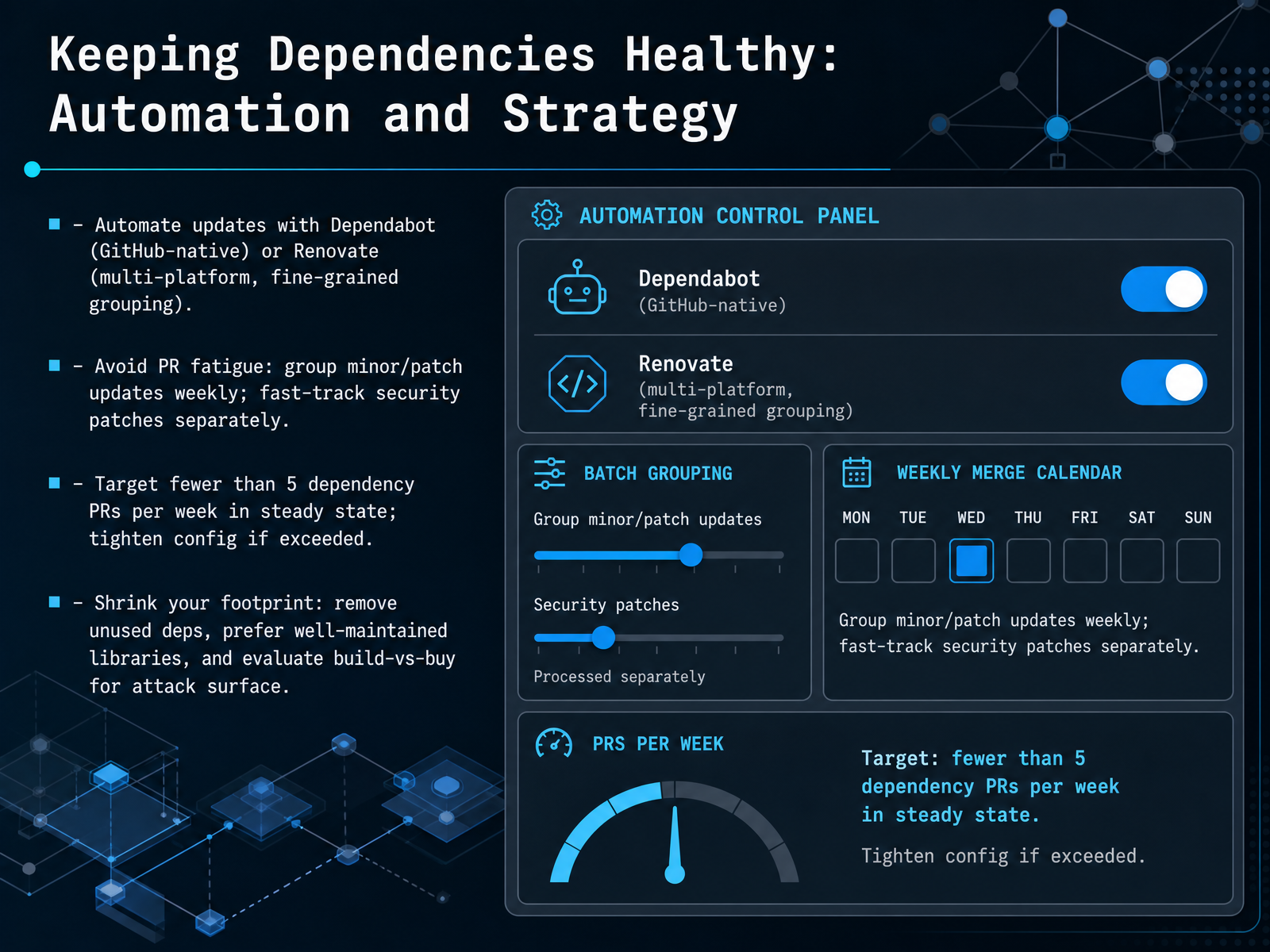 2 min
2 min - 14AI-Assisted Dependency Management and Future TrendsLet's talk about where dependency management is heading, because AI is starting to change how we work. Tools like Dependabump, DepAdvisor, and Gemini inside Android Studio can now suggest version bumps or even auto-resolve conflicts for you. That's powerful, but it comes with a real risk you should know about. Large language models can hallucinate. They might confidently recommend a package version that doesn't exist, or worse, one that contains malware. The fix is grounding these tools against live registry data, so every suggestion is checked against what's actually published. Now, beyond AI, there's a pragmatic shift in strategy. Research shows the No Breaking Changes approach, staying within your declared compatible range instead of always chasing the latest, delivers similar security benefits at about one-fifth the upgrade cost. Looking further ahead, the industry is moving toward a zero-trust model. Think immutable packages, WebAssembly sandboxing, and policy-enforced provenance, where you can cryptographically verify where your code came from and that it hasn't been tampered with. Together, these shifts will make your dependency tree more predictable and trustworthy. Thank you for working through this with me. The next time you stare down a version conflict, you'll have the mental model to resolve it with confidence.
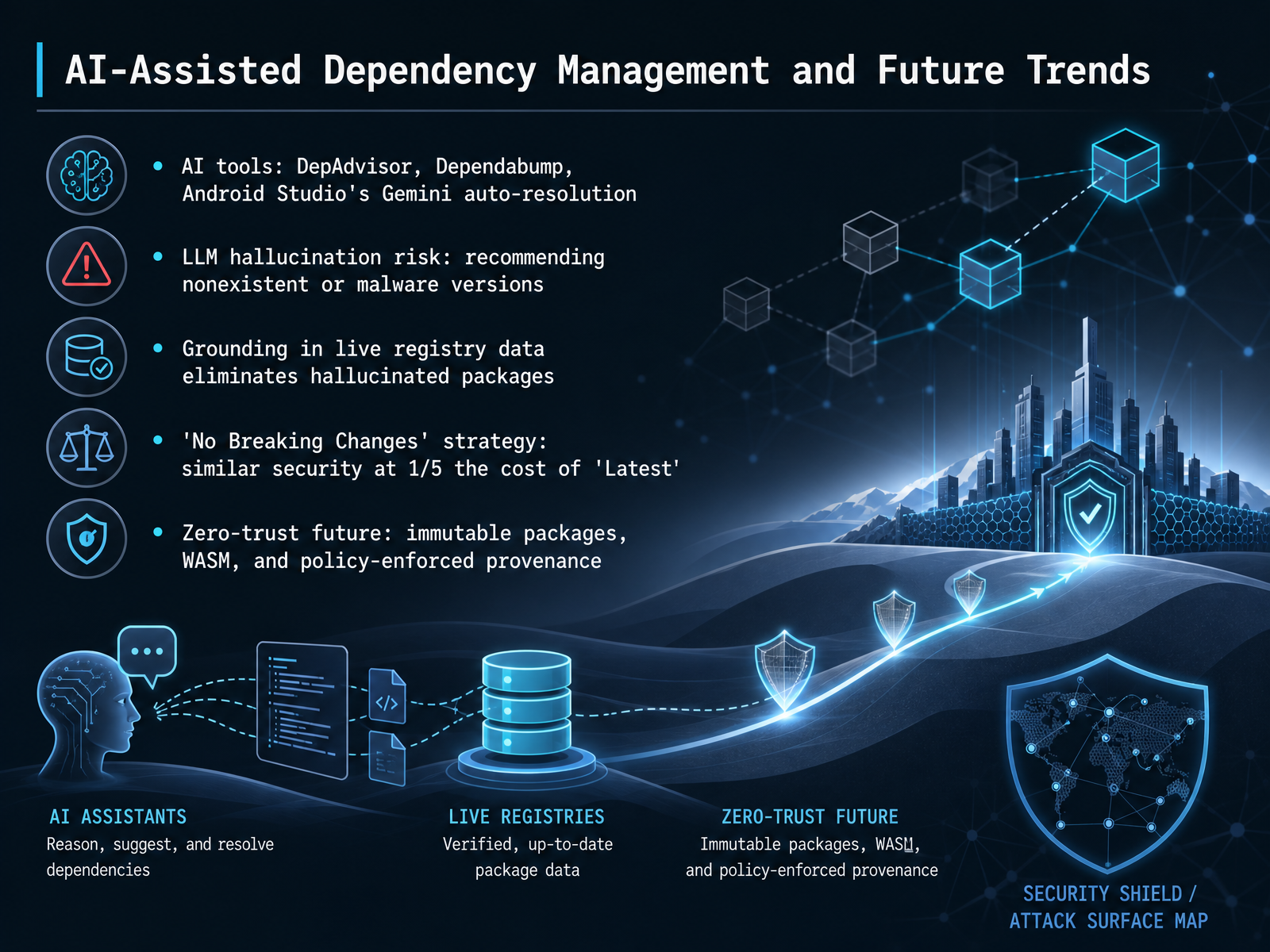 2 min
2 min
Take the deck with you
Download this course as a file — free, no sign-up needed.
- PDF handoutEvery slide page, ready to print or share.15 pages · 3.9 MBDownload
- Narrated PowerPointThe deck that presents itself — every slide carries the digital human's narration video.15 pages · 16.6 MBDownload
- PowerPoint slidesThe full deck as a .pptx — open it in PowerPoint, Keynote, or Google Slides.15 pages · 3.8 MBDownload
Free to use in your own training — please keep the PersonWise credit page at the end.
Have your own deck? Turn it into a course