Begin
14 pages · ~28 min
DMZ Networking: Concepts, Purpose, Examples
Learn the purpose and function of a DMZ in network security, including key concepts and real-world examples. Ideal for IT and cybersecurity professionals.
A digital instructor presents all 14 pages. Hold “Ask” at any point and ask out loud — the answer comes from this course. No sign-up needed.
What you’ll learn
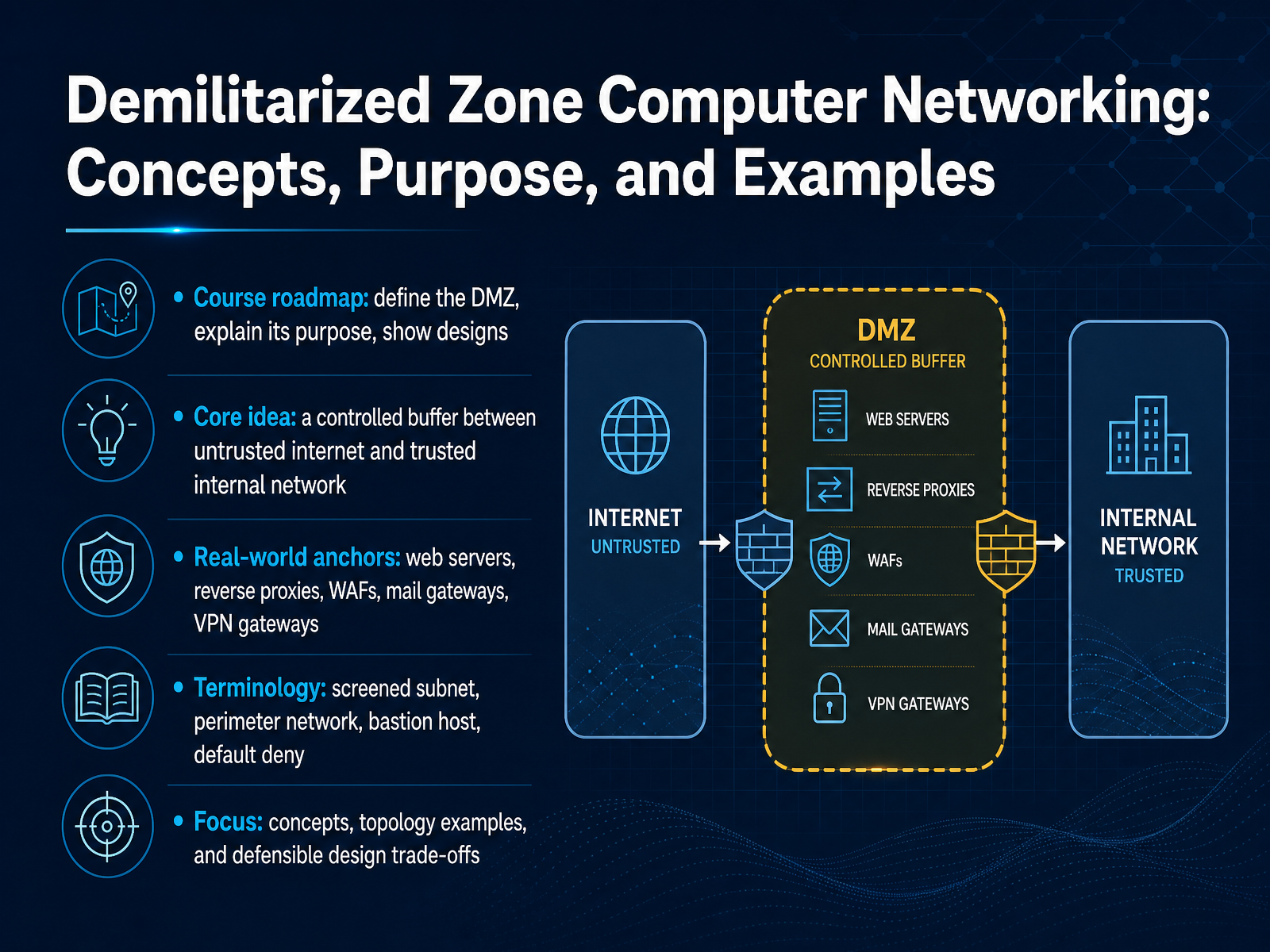
- 01Demilitarized Zone Computer Networking: Concepts, Purpose, and ExamplesWelcome. In this course, we will explore the demilitarized zone, or DMZ, in computer networking. By the end, you will be able to define a DMZ, explain its purpose, and recognize common designs. At its core, a DMZ is a controlled buffer between the untrusted internet and your trusted internal network. You have likely seen this pattern in real life. Web servers, reverse proxies, web application firewalls, mail gateways, and VPN gateways often sit in a DMZ. Along the way, we will clarify key terms, including screened subnet, perimeter network, bastion host, and default deny. Our focus stays practical. We will cover concepts, topology examples, and defensible design trade-offs. Keep one idea in mind: a DMZ does not make you invulnerable. It buys you time, separation, and control. Next, we will start with what a DMZ is and what it is not.1 min
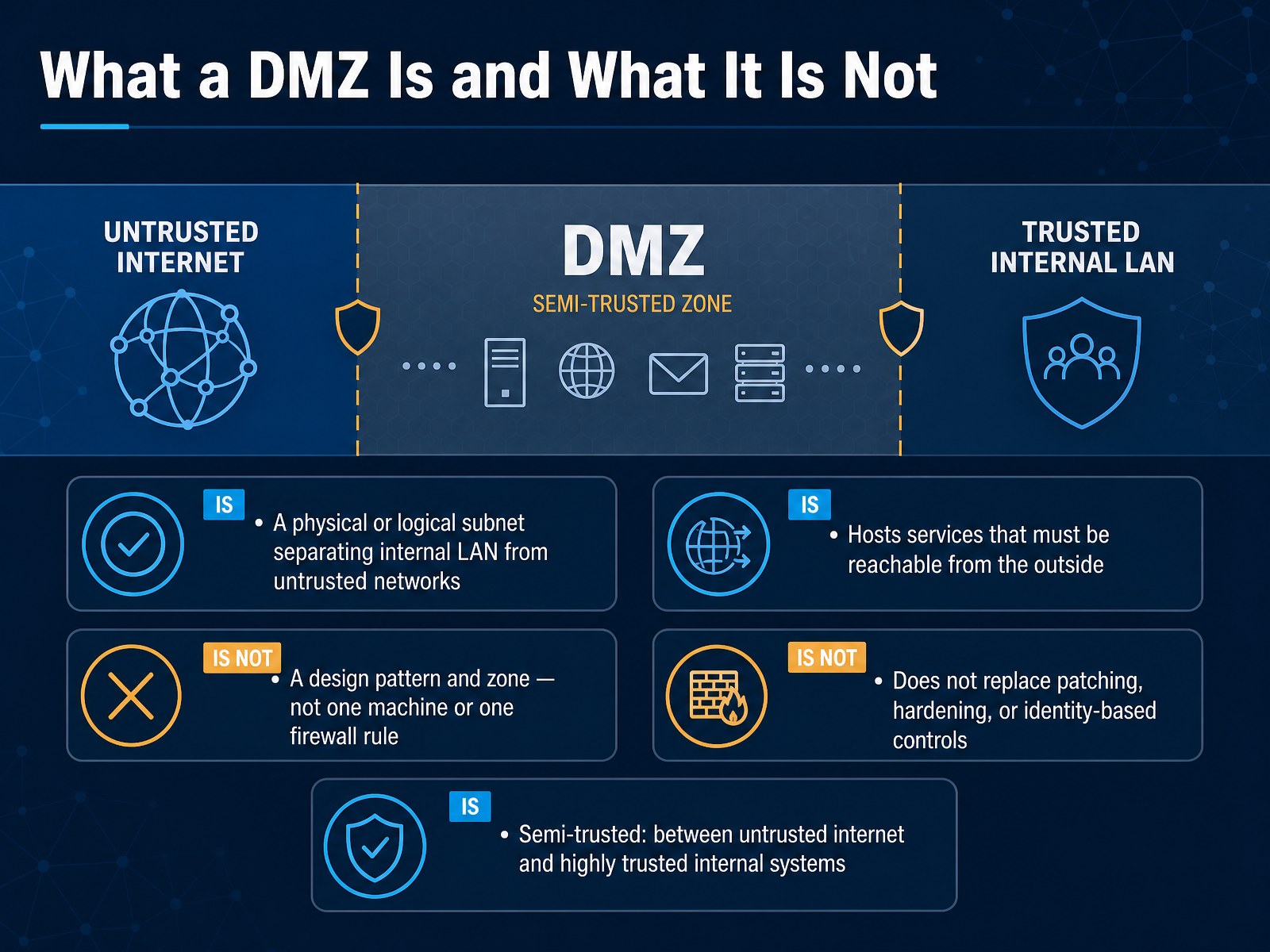
- 02What a DMZ Is and What It Is NotLet's move on to what a DMZ actually is, and what it is not. At its core, a DMZ is a physical or logical subnet that separates your internal local area network from untrusted networks, like the public internet. It hosts services that must be reachable from the outside, such as a public web server, an email gateway, or a DNS server. But here is the key point: a DMZ is a design pattern and a zone, not one machine and not one firewall rule. Think of it as a semi-trusted middle ground, sitting between the untrusted internet and your highly trusted internal systems. For example, if someone compromises your public web server, the DMZ limits how far they can move into your private network. However, a DMZ does not replace patching, system hardening, or identity-based controls. It is one layer in a defense-in-depth strategy, not a fix-all. So, keep it simple: segment, isolate, and monitor. Now, let's look at why segmentation and a DMZ exist in the first place.
 1 min
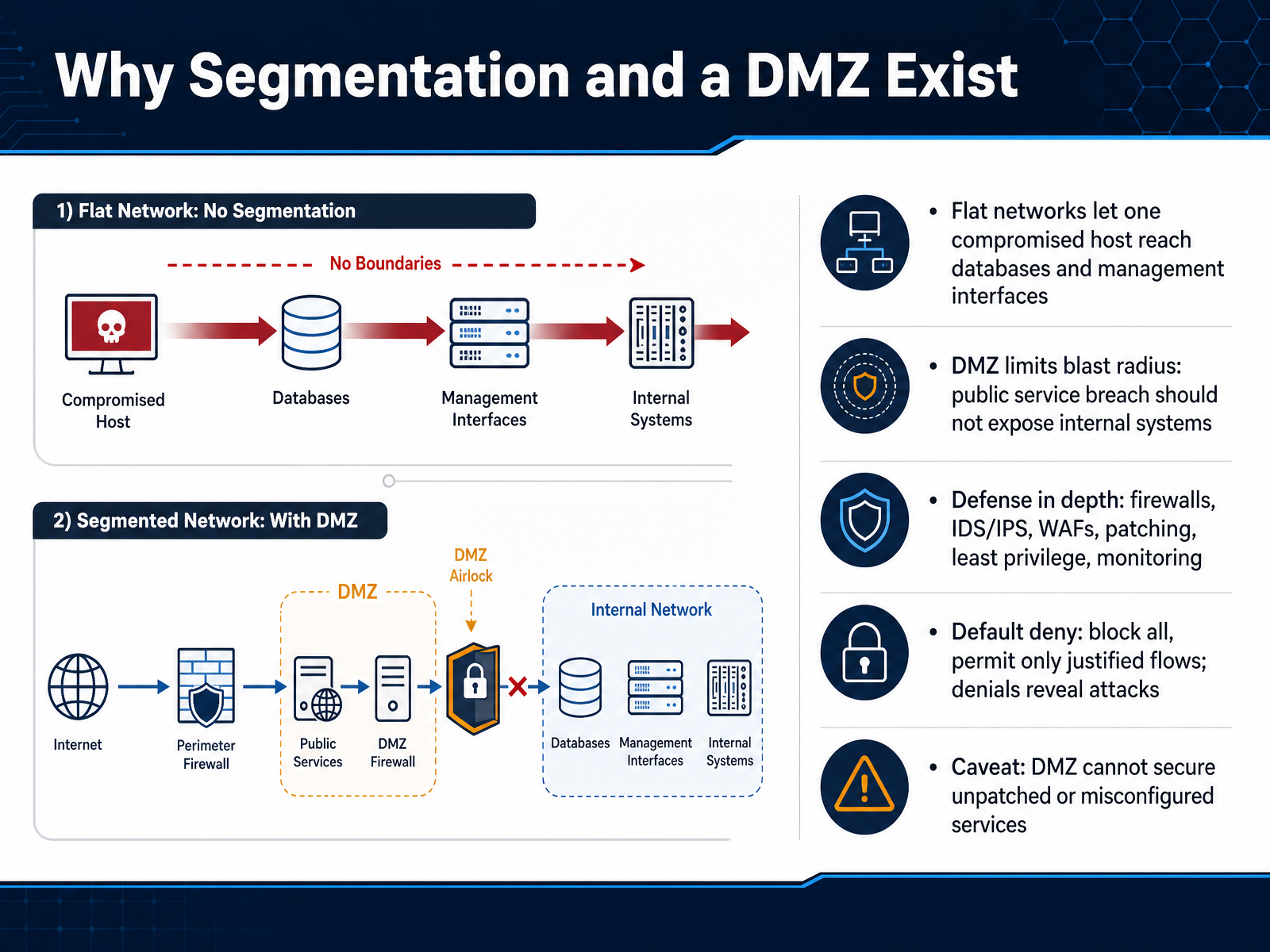
1 min - 03Why Segmentation and a DMZ ExistLet's talk about why segmentation and a DMZ exist. On a flat network, every host can often reach every other host. So if an attacker compromises one public facing server, they may be able to reach your databases, your management interfaces, and your internal file shares. A DMZ changes that. By placing public services in a separate segment, you limit the blast radius. If that public service is breached, the attacker should not gain direct access to internal systems. This is one layer of defense in depth, alongside firewalls, intrusion detection and prevention systems, web application firewalls, patching, least privilege, and monitoring. At the core of this design is default deny. Block all traffic by default, then permit only the flows you can justify. Denied traffic is not just noise. It can reveal scanning and attack attempts. One caveat: a DMZ cannot secure a service that is unpatched or misconfigured. It reduces exposure, but it does not fix vulnerable code. Next, let's look at zones, firewalls, and traffic flow.
 2 min
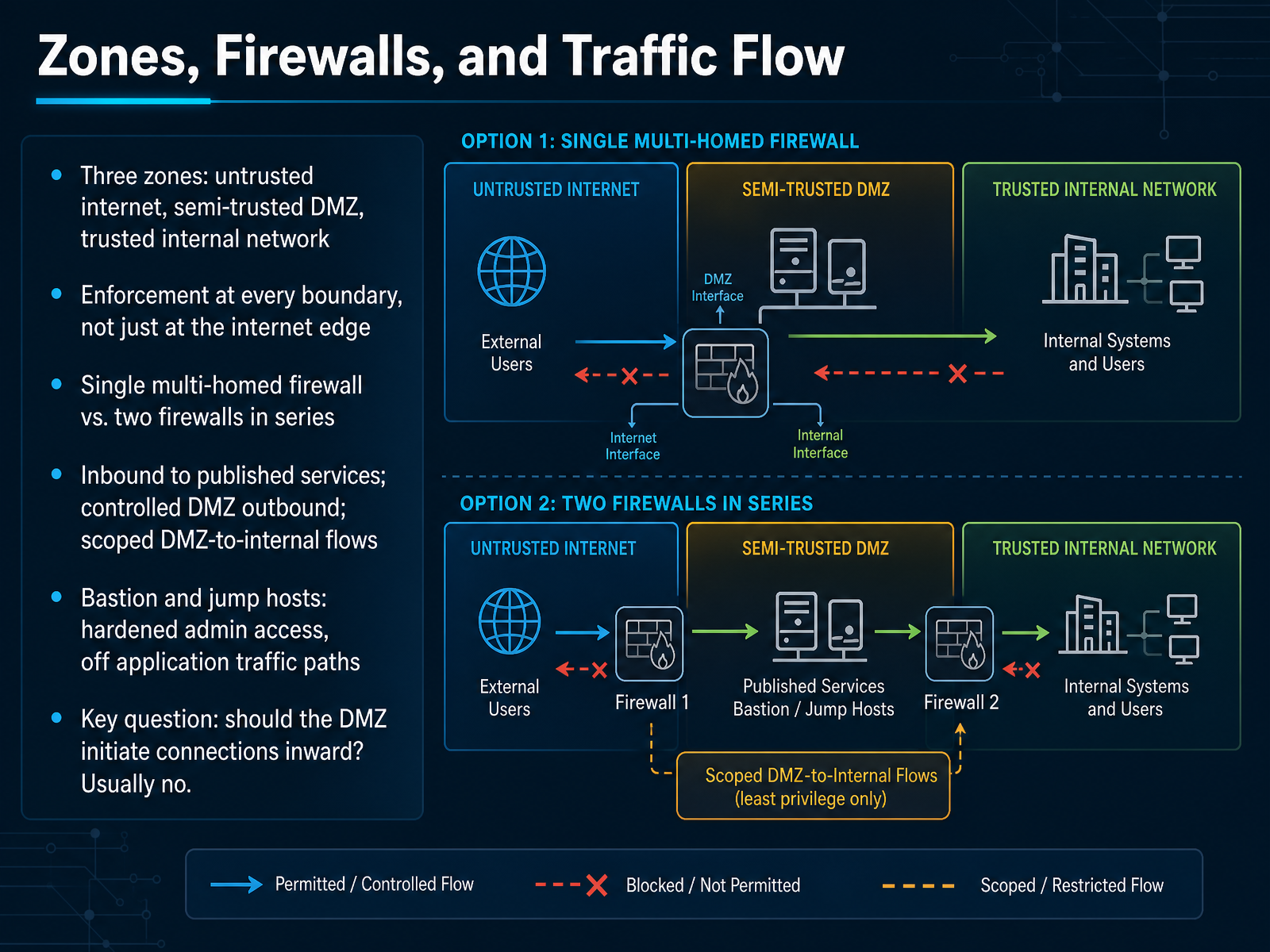
2 min - 04Zones, Firewalls, and Traffic FlowLet's look at how traffic actually moves through a demilitarized zone, or DMZ. Think in terms of three zones: the untrusted internet, the semi-trusted DMZ, and the trusted internal network. Enforcement happens at every boundary, not just at the internet edge. So even traffic leaving the DMZ toward the internal network must be inspected and controlled. You can build this with a single multi-homed firewall, or with two firewalls in series for stronger separation. Inbound traffic reaches published services in the DMZ. Outbound traffic from the DMZ is controlled, and flows from the DMZ to the internal network are tightly scoped. Bastion and jump hosts belong here too. They are hardened admin access points, kept off application traffic paths. A good test question: should the DMZ initiate connections inward? Usually, no. Next, we will cover design principles and rules of engagement.
 1 min
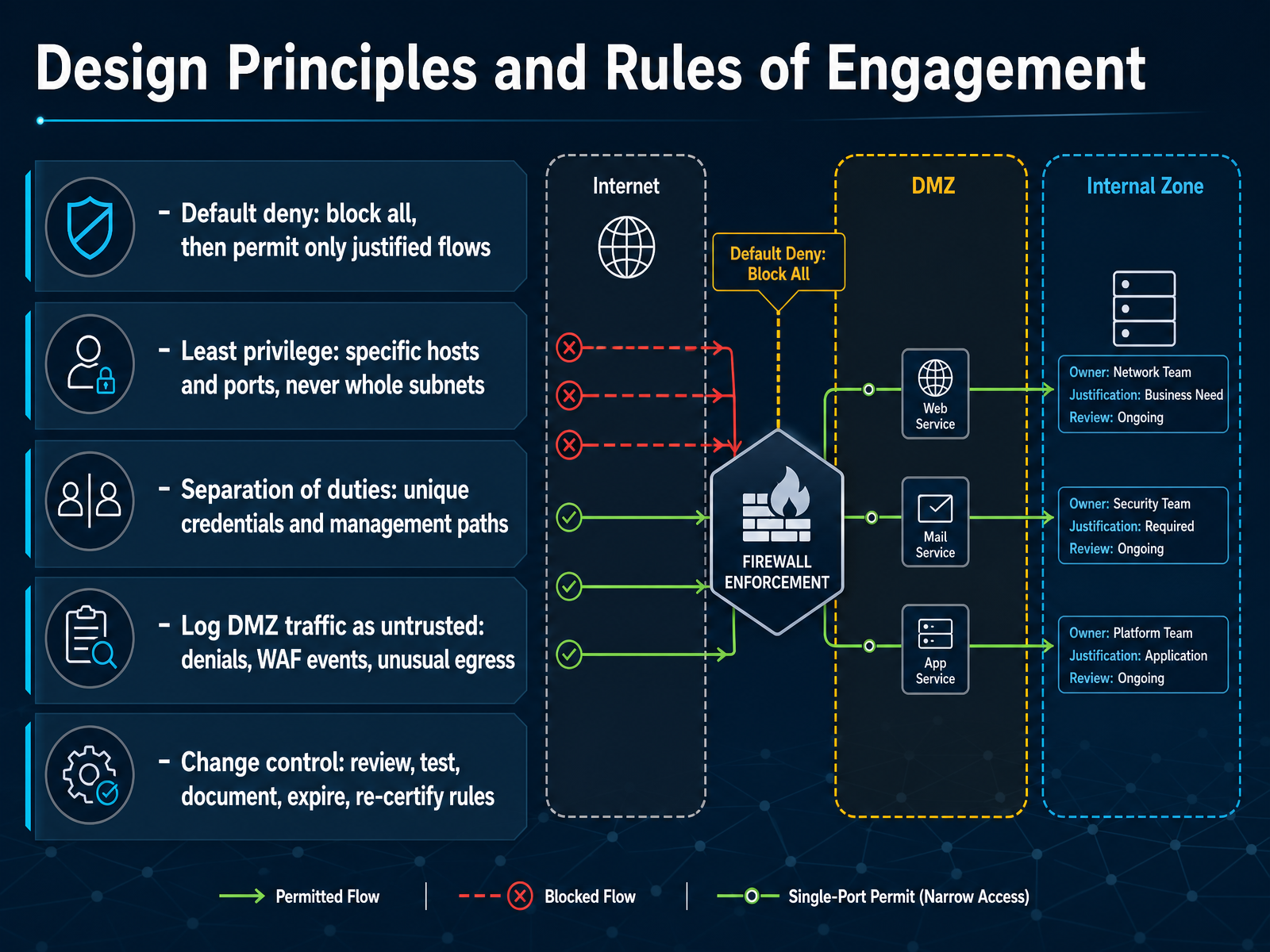
1 min - 05Design Principles and Rules of EngagementNow let's look at the design principles and rules of engagement that keep a DMZ defensible. The first rule is default deny. Block everything by default, then permit only the flows you can justify. For example, allow a web server to receive traffic on port 443, and nothing else. Second, least privilege. Name the specific hosts and ports that need access, and never open communication for an entire subnet. Third, separation of duties. Give each administrator unique credentials, and keep management paths separate from service traffic. Fourth, treat all DMZ traffic as untrusted. Log denials, Web Application Firewall events, and unusual outbound connections. Outbound traffic matters, because attackers often use the DMZ to call back to a command server. Finally, change control. Every rule should be reviewed, tested, documented, given an expiration date, and re-certified on a schedule. Together, these principles turn a DMZ from a simple wall into a governed, observable security zone. Next, we'll see what typically lives in a DMZ, and what should not.
 2 min
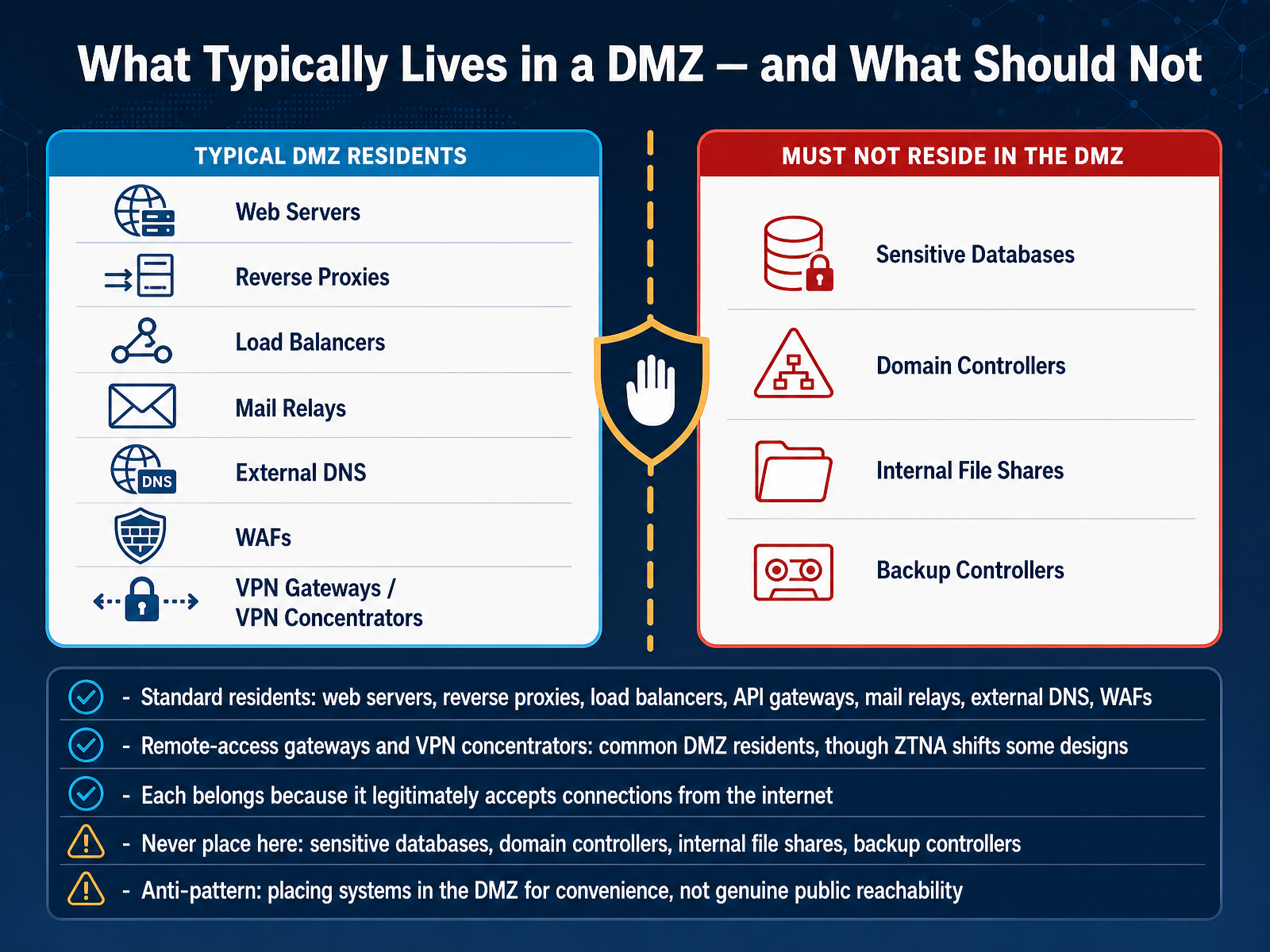
2 min - 06What Typically Lives in a DMZ — and What Should NotNow let's talk about what typically lives inside a DMZ, and what should never go there. The standard residents are systems that legitimately accept connections from the internet. You'll commonly find web servers, reverse proxies, load balancers, API gateways, mail relays, external DNS servers, and web application firewalls, often called WAFs. Remote-access gateways and VPN concentrators are also common DMZ residents, though zero trust network access, or ZTNA, is shifting some of those designs. Each of these belongs in the DMZ because its job is to face the public internet. Now for the critical part. Never place sensitive databases, domain controllers, internal file shares, or backup controllers in a DMZ. If an attacker breaches the DMZ, those systems would become directly exposed. One common anti-pattern is placing systems in the DMZ for convenience rather than genuine public reachability. Treat the DMZ as a buffer, not a storage room. Next, we'll look at a simple example: a basic screened subnet built with a single firewall.
 1 min
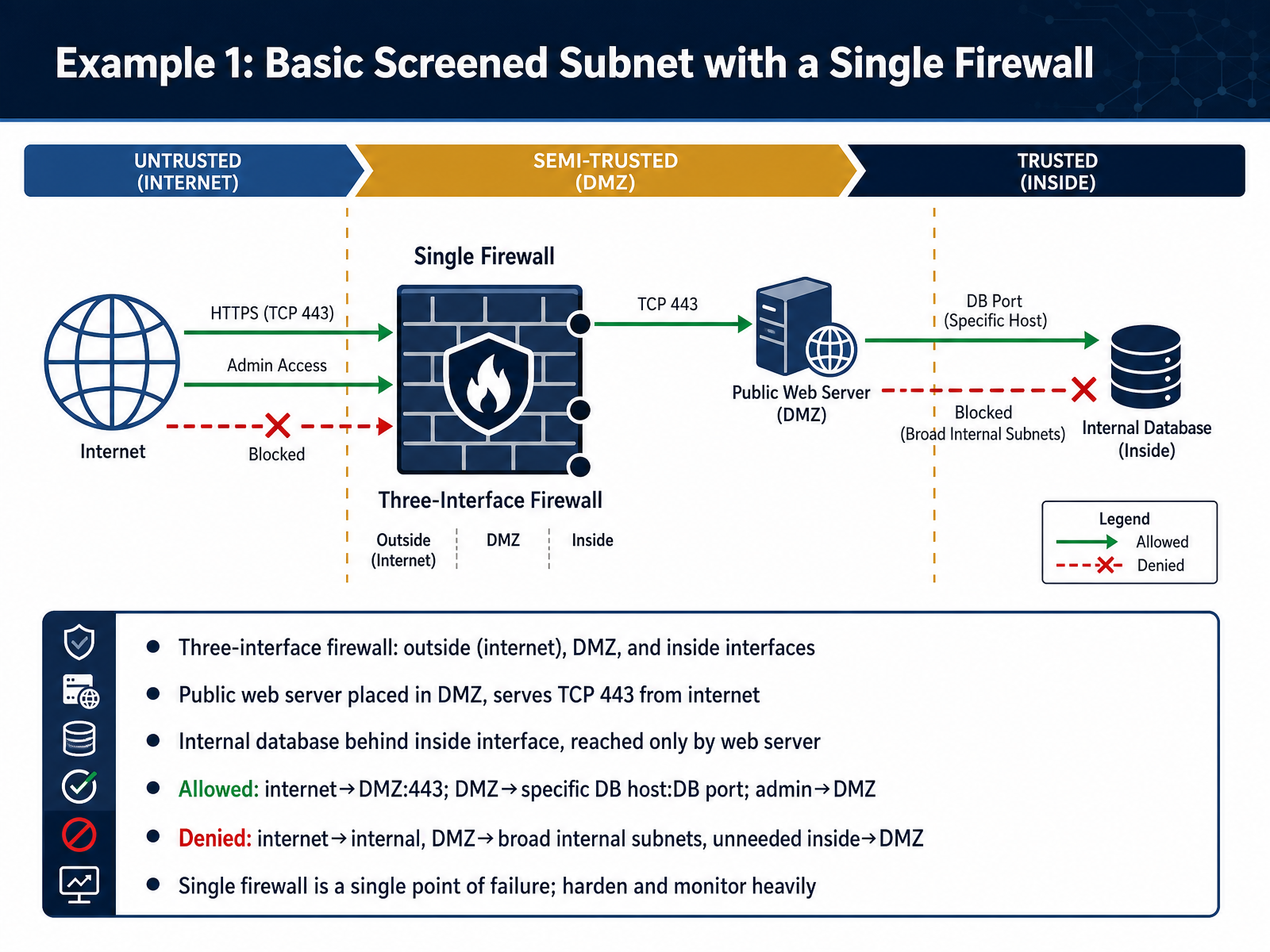
1 min - 07Example 1: Basic Screened Subnet with a Single FirewallLet's walk through a basic screened subnet built with a single firewall. Imagine one firewall with three interfaces. One faces the internet, called the outside. One faces the DMZ. And one faces the trusted internal network. A public web server sits in the DMZ and serves HTTPS on port four four three to internet users. Behind the inside interface is an internal database. The web server is the only system allowed to reach it. Now think about the rules. Traffic from the internet to the DMZ is permitted only on port four four three. The DMZ can reach one specific database host on the database port. Administrators can reach the DMZ to manage those servers. Everything else is denied. The internet cannot touch the internal network. The DMZ cannot scan broad internal subnets. And internal systems cannot send unnecessary traffic back into the DMZ. This design is simple, but the single firewall is a single point of failure. If it goes down or is breached, everything is exposed. So harden it, patch it, and monitor it heavily. Next, we look at a more resilient option: Example two, a dual firewall DMZ and cloud DMZ.
 2 min
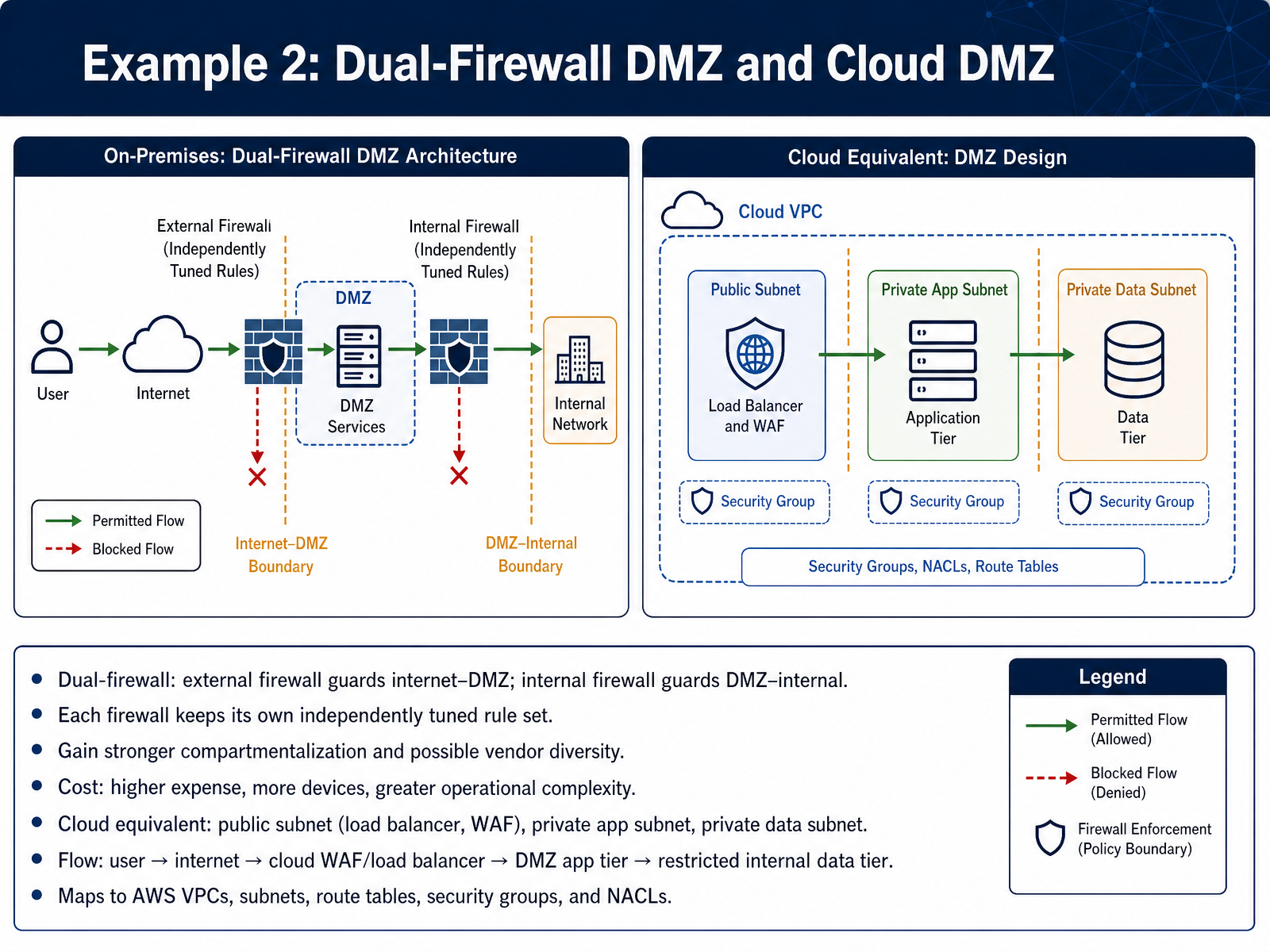
2 min - 08Example 2: Dual-Firewall DMZ and Cloud DMZNow let's look at a stronger version of that design: the dual-firewall DMZ, and its cloud equivalent. With a dual-firewall setup, two firewalls do two separate jobs. The external firewall guards the boundary between the internet and the DMZ. The internal firewall guards the boundary between the DMZ and your internal network. Because these are separate devices, each one keeps its own independently tuned rule set. That gives you stronger compartmentalization, and sometimes vendor diversity, which means one vendor's bug is less likely to open both doors. The tradeoff is real, though. You pay for more devices, more licensing, and more operational complexity. Now, how does this map to the cloud? Think of it as a public subnet hosting your load balancer and web application firewall, a private application subnet for your app tier, and a private data subnet for sensitive data. Traffic flows from the user, through the internet, into the cloud WAF or load balancer, then to the DMZ app tier, and finally to the restricted internal data tier. In AWS terms, this maps to a Virtual Private Cloud, subnets, route tables, security groups, and network access control lists. The principle stays the same: separate layers, separate rules. Next, we will examine common misconfigurations and how they fail.
 2 min
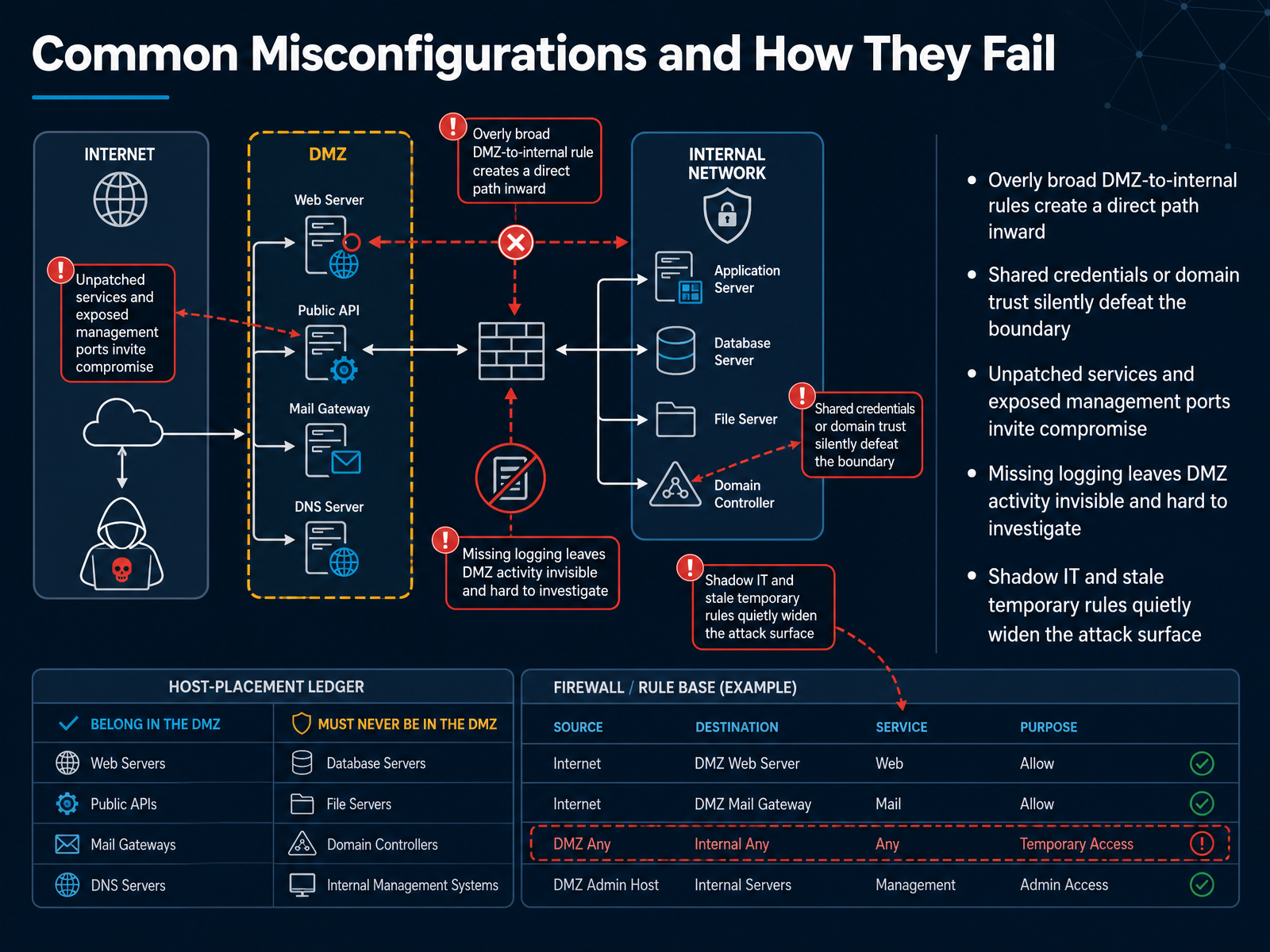
2 min - 09Common Misconfigurations and How They FailNow let's look at how a DMZ fails in practice, starting with common misconfigurations. A DMZ only protects you if its boundaries stay tight, and small mistakes can quietly undo that protection. One frequent problem is overly broad DMZ-to-internal rules. If a rule allows any source in the DMZ to reach a whole internal subnet, an attacker who compromises one public-facing server now has a direct path inward. Instead, allow only the specific hosts and ports that are truly required. Another silent failure is shared credentials or domain trust. If a DMZ server uses the same admin password as your internal systems, or trusts your internal domain, a single breach can cross the boundary without triggering an alert. Next, unpatched services and exposed management ports. Leaving remote desktop or SSH open to the internet, or running outdated software, invites compromise. Missing logging is equally dangerous, because without DMZ logs, you cannot see an intrusion or investigate it later. Finally, shadow IT and stale temporary rules quietly widen the attack surface. A forgotten vendor rule from six months ago can still be active today. Treat the DMZ as untrusted, review rules regularly, and enforce least privilege. That brings us to monitoring, detection, and incident response in the DMZ.
 2 min
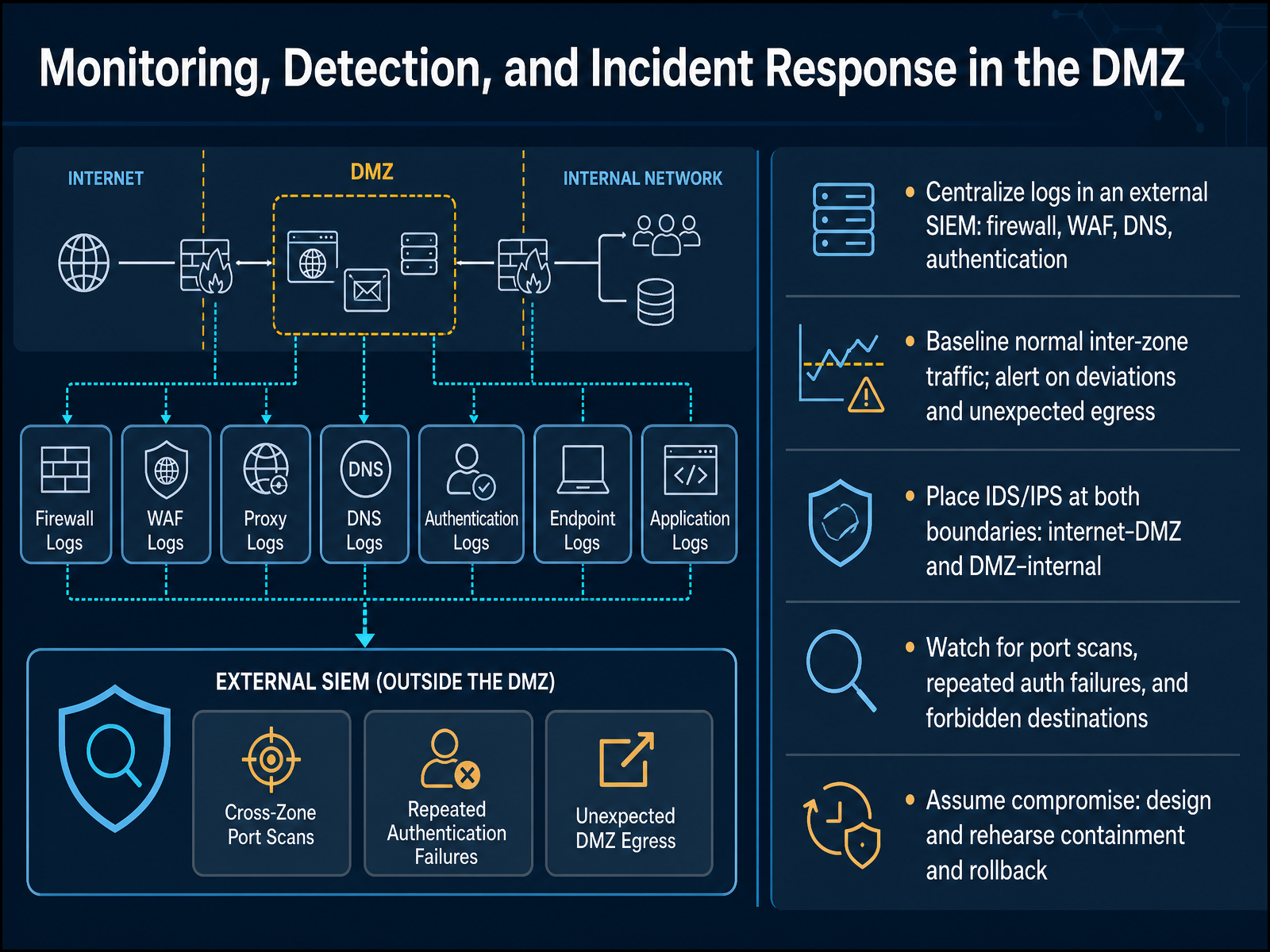
2 min - 10Monitoring, Detection, and Incident Response in the DMZNow let's talk about monitoring, detection, and incident response in the demilitarized zone. A DMZ only stays useful if you can see what happens inside it, so the first step is centralizing logs in an external SIEM. Send firewall, WAF, DNS, and authentication logs to one place, because correlating them reveals attacks that a single device would miss. Next, baseline normal inter-zone traffic, then alert on deviations and unexpected egress. For example, if a web server suddenly connects outbound to an unfamiliar country, investigate immediately. Place IDS and IPS sensors at both boundaries: between the internet and the DMZ, and between the DMZ and the internal network. Watch for port scans, repeated authentication failures, and connections to forbidden destinations. Finally, assume compromise. Design and rehearse containment and rollback, so your team can isolate a host, restore a clean image, and document lessons learned. In short, visibility plus preparation turns a breach into a manageable event. Next, we will look at the DMZ in cloud, hybrid, and Zero Trust contexts.
 2 min
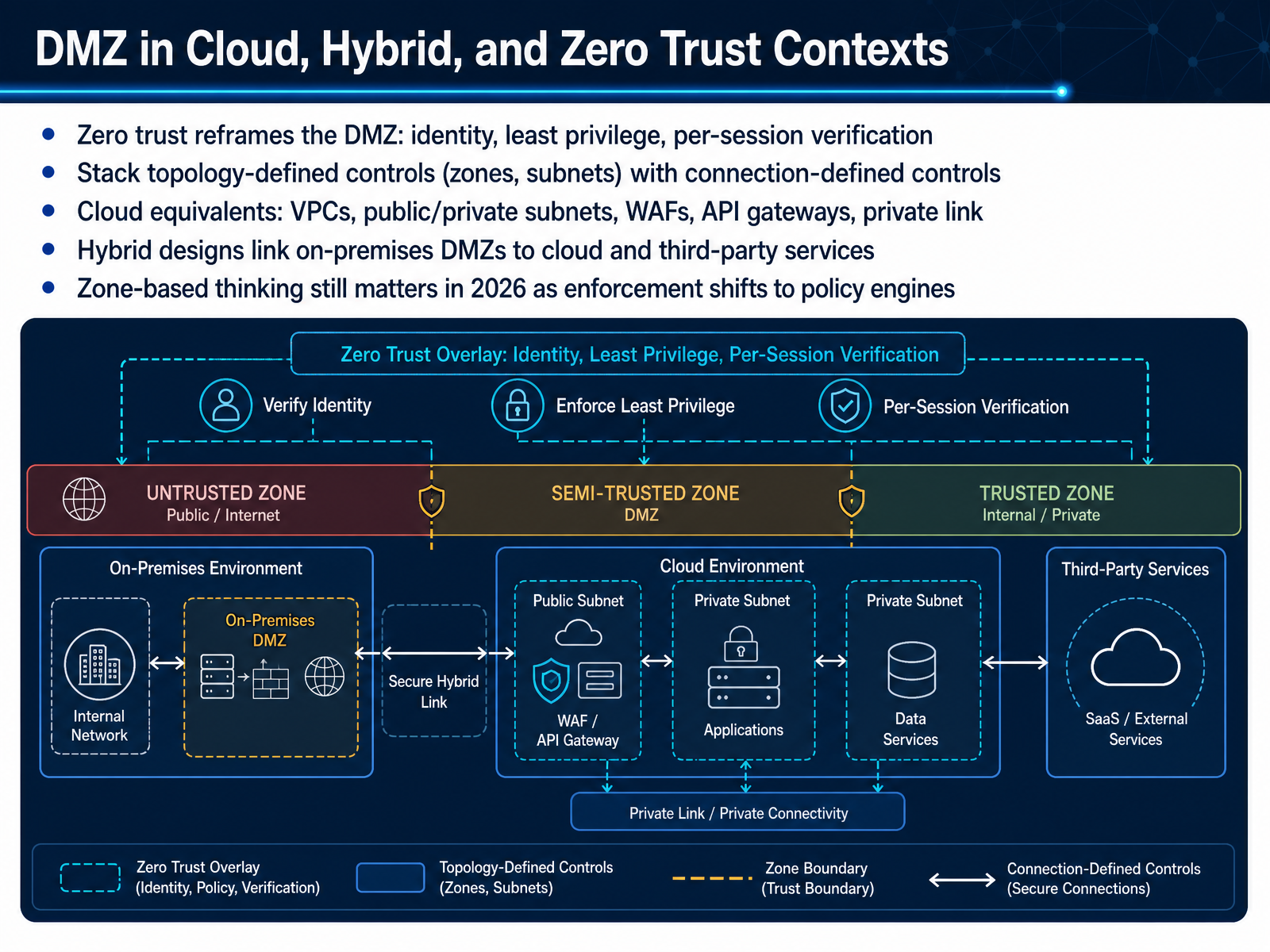
2 min - 11DMZ in Cloud, Hybrid, and Zero Trust ContextsNow let's see how the demilitarized zone concept holds up in cloud, hybrid, and zero trust environments. Zero trust reframes the D M Z. Instead of trusting anything inside a network zone, you verify identity per session and grant least privilege. Think of it this way: a firewall rule says who may enter a room. Zero trust also checks who you are and what you are allowed to touch every single time. In practice, you stack two kinds of controls. Topology-defined controls are the zones and subnets you already know. Connection-defined controls inspect each session, like mutual transport layer security or short-lived tokens. Cloud platforms give you equivalents: virtual private clouds, public and private subnets, web application firewalls, A P I gateways, and private link. Hybrid designs connect your on-premises D M Z to cloud and third-party services. The takeaway: zone-based thinking still matters, but enforcement increasingly lives in policy engines. Next, we move to operational practices: hardening, patching, and rule hygiene.
 2 min
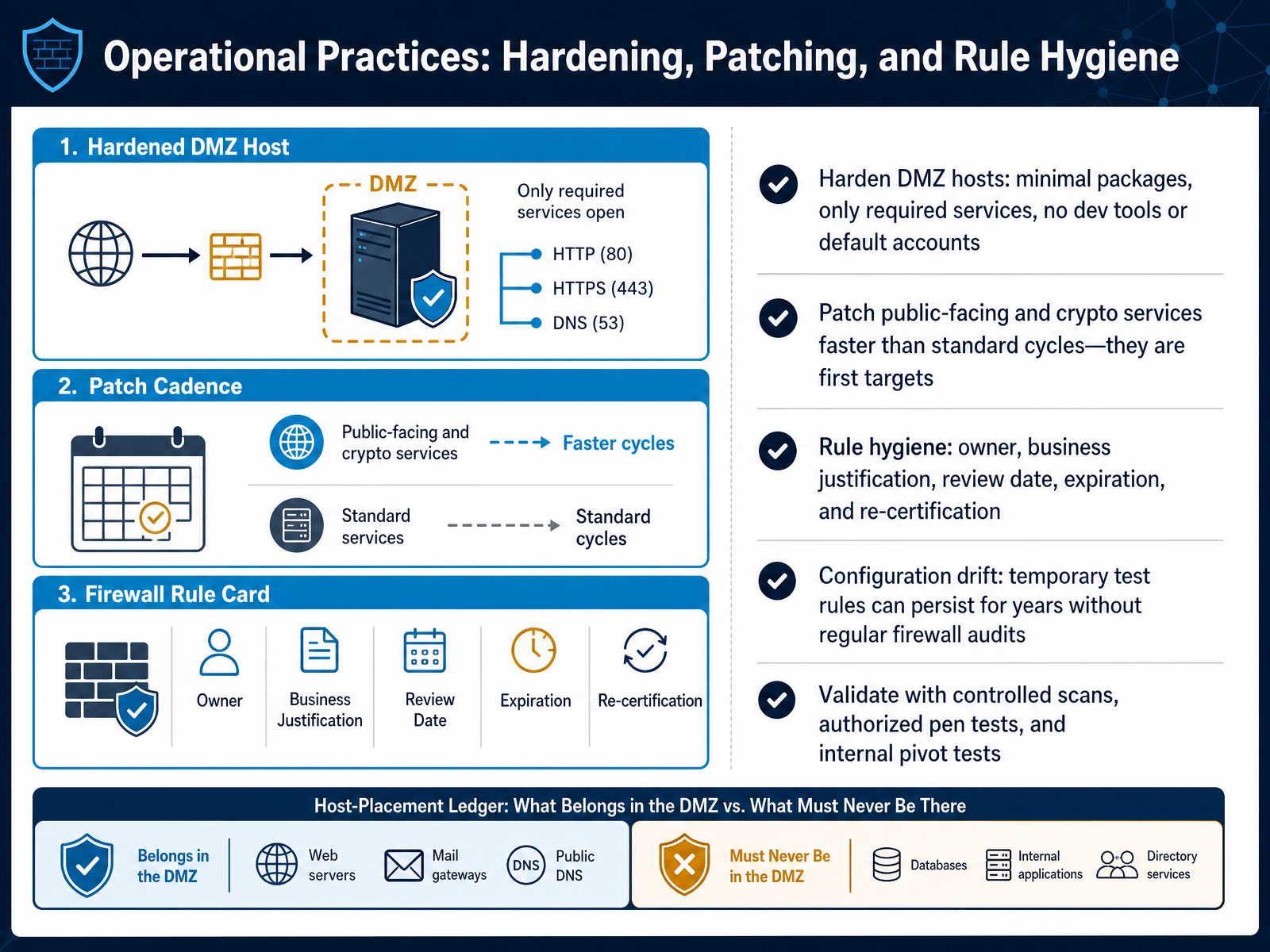
2 min - 12Operational Practices: Hardening, Patching, and Rule HygieneNow let's look at the daily practices that keep a DMZ trustworthy over time: hardening, patching, and rule hygiene. Start with hardening. A DMZ host should run only what it truly needs. That means minimal packages, only required services, and no development tools or default accounts. If a server only publishes a web app, you do not leave a compiler or a vendor admin login sitting on it. Next, patch faster than your standard cycle. Public-facing services and crypto libraries are first targets, so treat their updates as urgent, not routine. Then comes rule hygiene. Every firewall rule should have an owner, a business justification, a review date, an expiration, and a re-certification step. Without that discipline, configuration drift sets in. A temporary test rule can quietly live for years because nobody audits it. Finally, validate with controlled scans, authorized penetration tests, and internal pivot tests. Those checks prove your controls actually work. In short: keep hosts lean, patch quickly, and review every rule on a schedule. Next, we will move into the hands-on lab, where you design and verify a small DMZ.
 2 min
2 min - 13Hands-On Lab: Designing and Verifying a Small DMZNow let's put these ideas into practice with a hands-on lab. Your goal is to design a small DMZ containing a firewall, an external-facing web server, and an internal database. Begin by defining your zones clearly: the untrusted external network, the DMZ, and the trusted internal network. Next, write the allow and deny rules on your firewall. Then map a traffic matrix that shows exactly which sources may reach which destinations and on which ports. For verification, test three separate paths: external to DMZ, DMZ to internal, and external directly to internal. Only the first should succeed. You can build this in Packet Tracer, GNS3, Linux netfilter, or a cloud simulator. As you work, watch for common mistakes: a missing implicit deny at the end of your rule set, rules that are too broad, and denied paths you never actually tested. Take your time here. A correctly verified DMZ proves the design, not just the diagram. Next, we'll close with key takeaways and review questions.
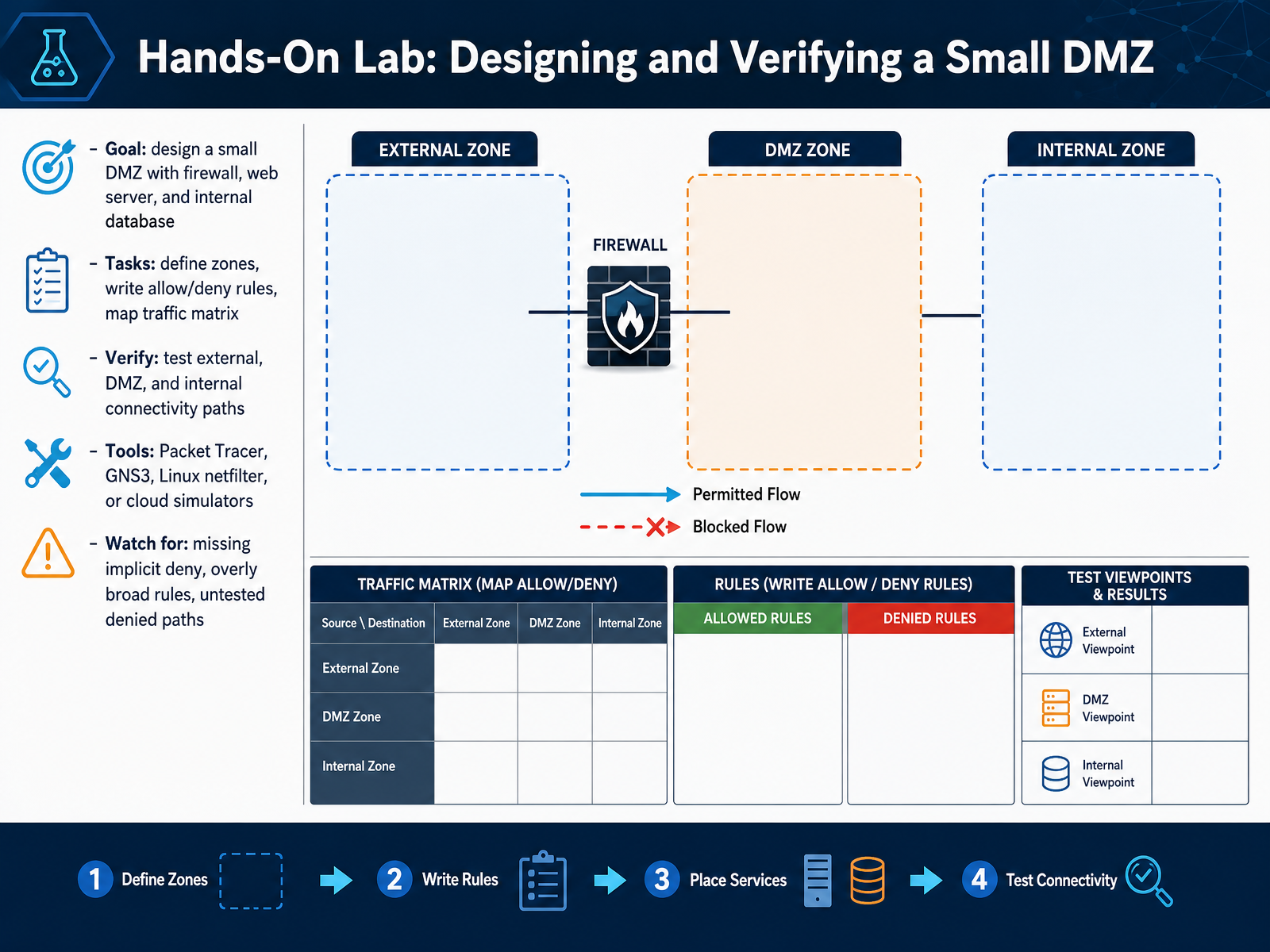 2 min
2 min - 14Key Takeaways and Review QuestionsLet's wrap up with the key takeaways. First, remember that a DMZ is a design pattern, not a product you can buy. It creates controlled separation, not absolute security. Second, the core principles are default deny, least privilege, explicit flows, monitoring, and change control. For example, if a web server only needs to talk to a database on port four four three, allow that single flow and block everything else. Third, never place sensitive databases, directory services, or backup controllers in the DMZ. Those belong in a more protected internal zone. Now, review these questions. Why is the DMZ considered semi-trusted? And how does zero trust change the way you design it? To apply this, start with a next step: audit a network, draft a flow matrix, and fix any misplaced assets. Thank you for your attention. Keep learning, stay curious, and apply these principles to build safer networks.
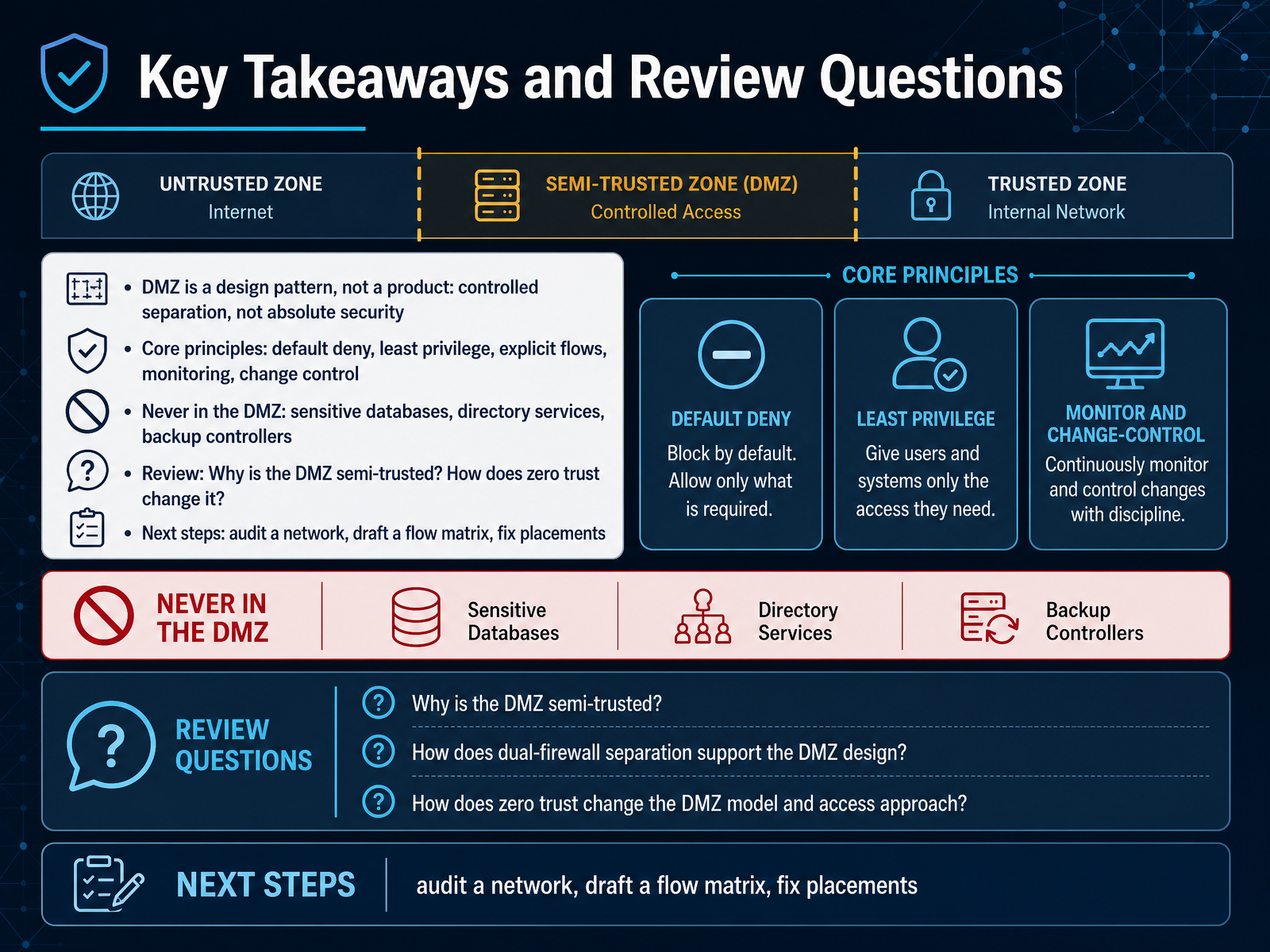 1 min
1 min
Take the deck with you
Download this course as a file — free, no sign-up needed.
- PDF handoutEvery slide page, ready to print or share.15 pages · 4.1 MBDownload
- Narrated PowerPointThe deck that presents itself — every slide carries the digital human's narration video.15 pages · 14.6 MBDownload
- PowerPoint slidesThe full deck as a .pptx — open it in PowerPoint, Keynote, or Google Slides.15 pages · 3.9 MBDownload
Free to use in your own training — please keep the PersonWise credit page at the end.
Have your own deck? Turn it into a course