Begin
13 pages · ~26 min
Communicating UX Design to Stakeholders
This training helps UX designers and researchers present design decisions clearly to non-design stakeholders, building buy-in and alignment.
A digital instructor presents all 13 pages. Hold “Ask” at any point and ask out loud — the answer comes from this course. No sign-up needed.
What you’ll learn
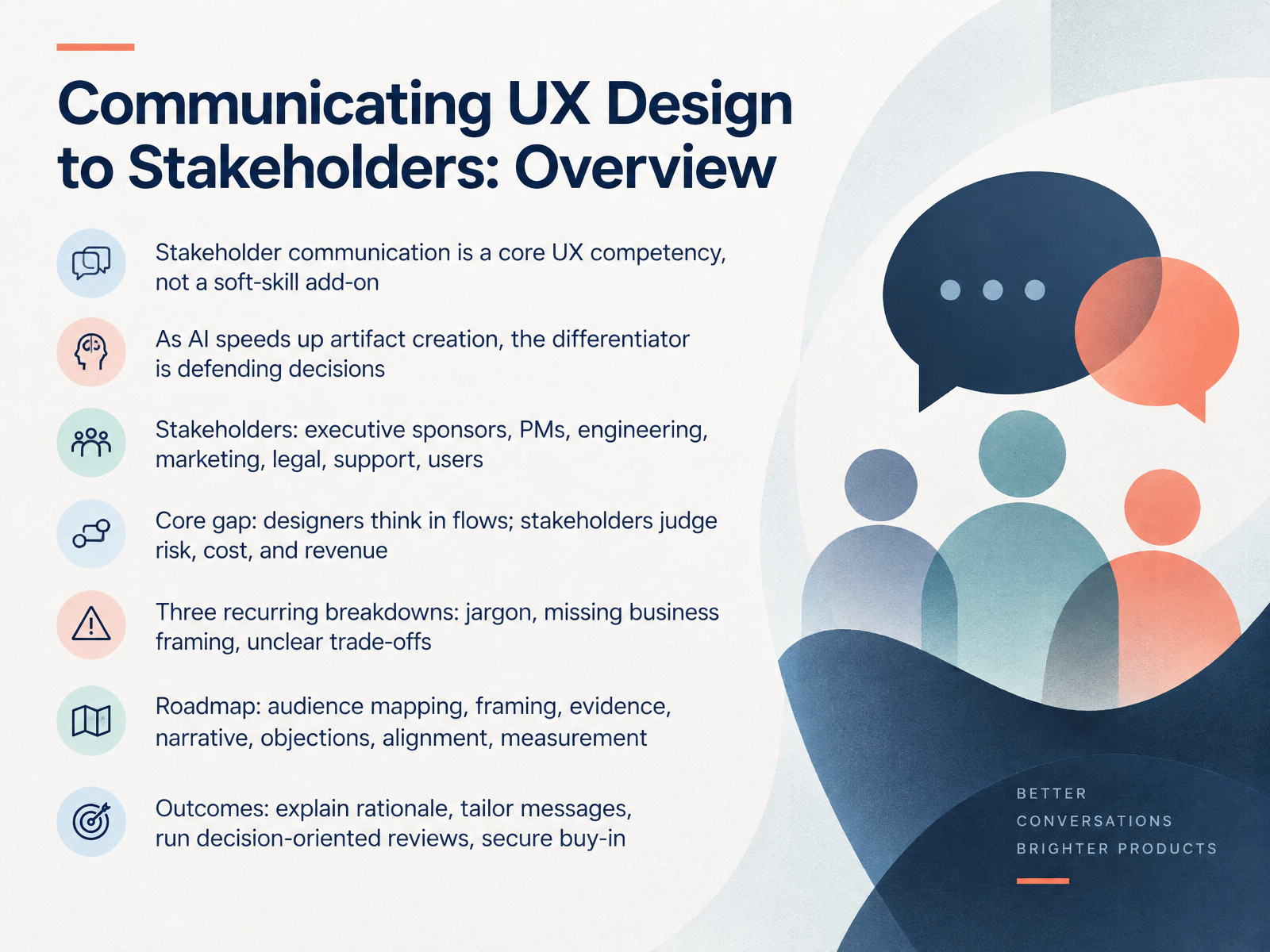
- 01Communicating UX Design to Stakeholders: OverviewWelcome. Over the next few slides, we're going to work on one of the most practical skills in UX: communicating design to stakeholders. Here's the core idea. Stakeholder communication is a real UX competency, not a soft-skill add-on. And as AI speeds up artifact creation, the real differentiator is defending your decisions. So who are these stakeholders? Executive sponsors, product managers, engineering, marketing, legal, support, and of course, users. The gap is simple. You think in flows. They judge risk, cost, and revenue. Three breakdowns show up again and again: jargon, missing business framing, and unclear trade-offs. Over this course, we'll cover audience mapping, framing, evidence, narrative, objections, alignment, and measurement. By the end, you'll be able to explain your rationale, tailor your message, run decision-oriented reviews, and secure buy-in. Next, let's look at who you're actually talking to: mapping power, interest, and decision authority.maven.commantlr.compush-conference.com+22 min
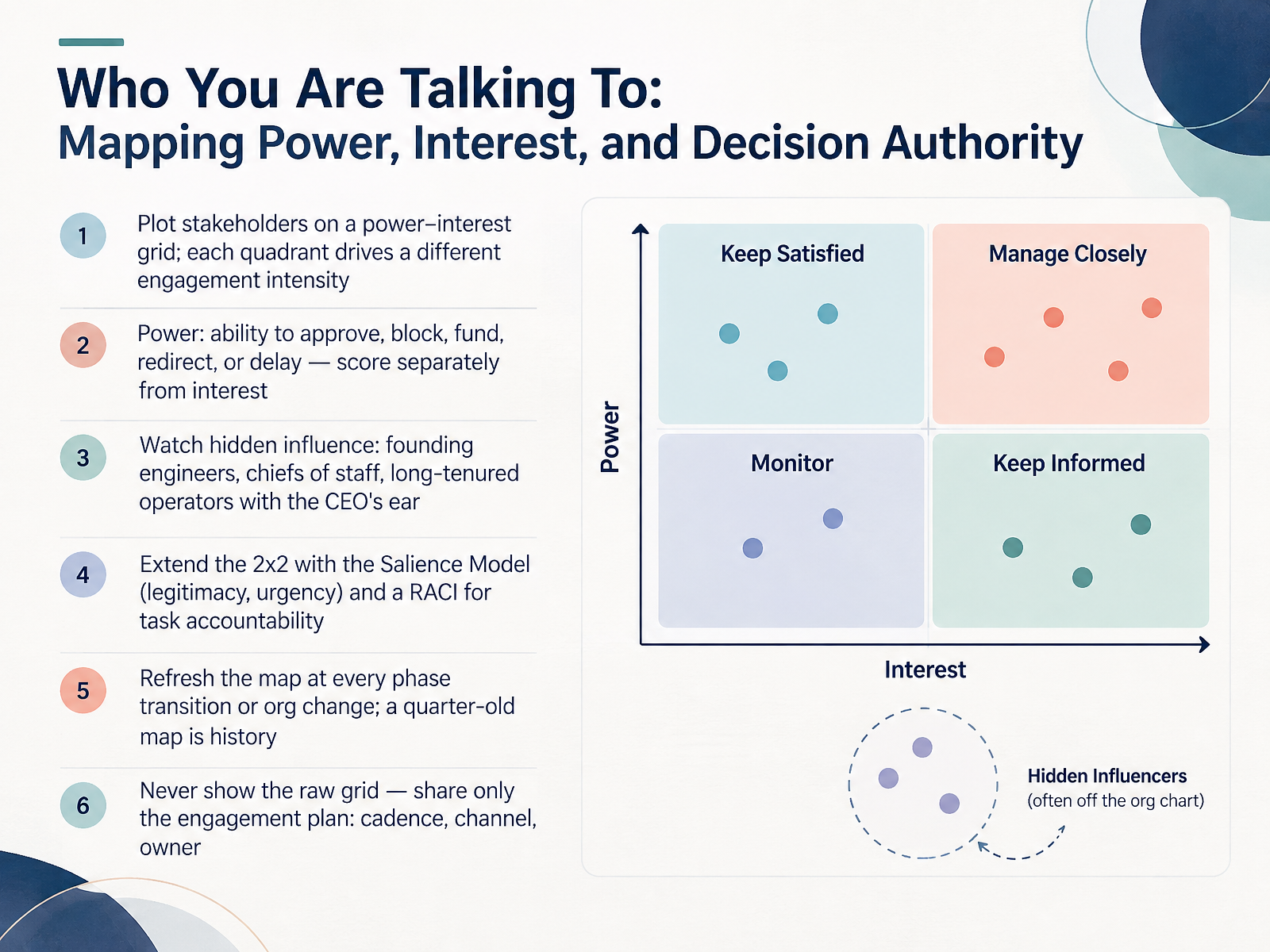
- 02Who You Are Talking To: Mapping Power, Interest, and Decision AuthorityLet's talk about who you're actually talking to. Start with a power versus interest grid. Power means the ability to approve, block, fund, redirect, or delay your work. Score it separately from interest, because someone can care a lot and still hold no authority. Then watch for hidden influence. Founding engineers, chiefs of staff, long-tenured operators with the CEO's ear. Their titles won't show it, but they can quietly veto you. When the grid isn't enough, layer in the Salience Model for legitimacy and urgency, and a RACI for task accountability. Keep your map current. Refresh it at every phase transition or org change. A quarter-old map is history. Biggest rule: never show the raw grid. Share only the engagement plan. Cadence, channel, and owner. That's what moves decisions forward. Next, Stakeholder Empathy: What Each Audience Actually Decides On.
 musemind.agencyfigr.designuxcel.com+21 min
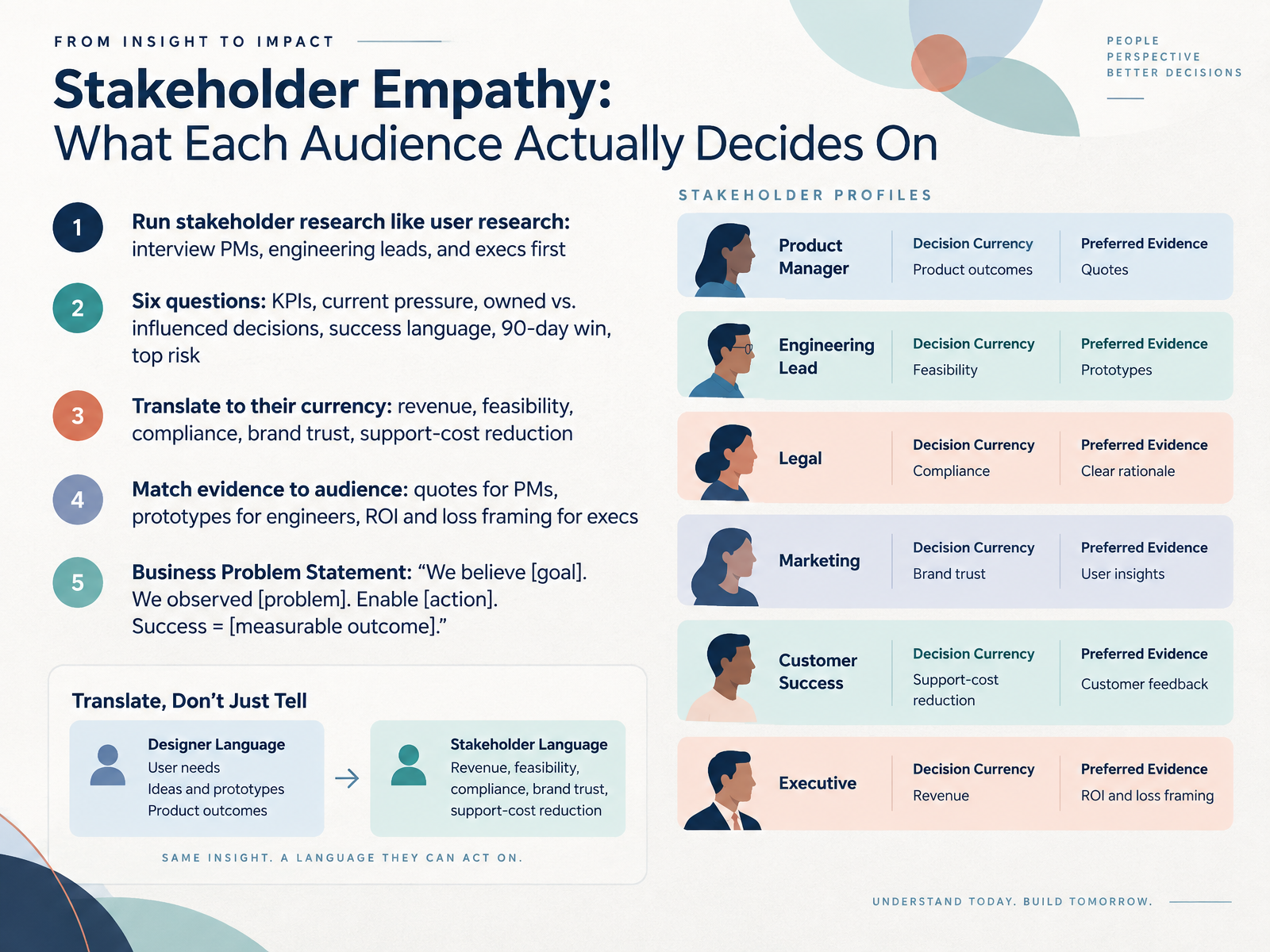
 - 03Stakeholder Empathy: What Each Audience Actually Decides OnNow let's get specific about stakeholder empathy. What does each audience actually decide on? Run stakeholder research like user research. Interview product managers, engineering leads, and executives before you need them. Ask six questions. What are they measured on? What is their current pressure? Which decisions do they own, and which do they only influence? How do they talk about success? What would a ninety-day win look like for them? And what risk are they trying to avoid? Then translate your work into their currency. Revenue, feasibility, compliance, brand trust, or support-cost reduction. Match the evidence to the audience. Quotes and user stories for product managers. Prototypes and edge cases for engineers. Return on investment and loss framing for executives. For example, instead of saying users are confused, say this adds one thousand support tickets a month. Finally, anchor everything in a Business Problem Statement. We believe, insert the goal. We observed, insert the problem. Enable, insert the action. Success equals, insert a measurable outcome. Write it before you design. That single paragraph keeps you and your stakeholders aligned. Next, we'll look at framing the problem before showing the solution.
 maven.commantlr.compush-conference.com+22 min
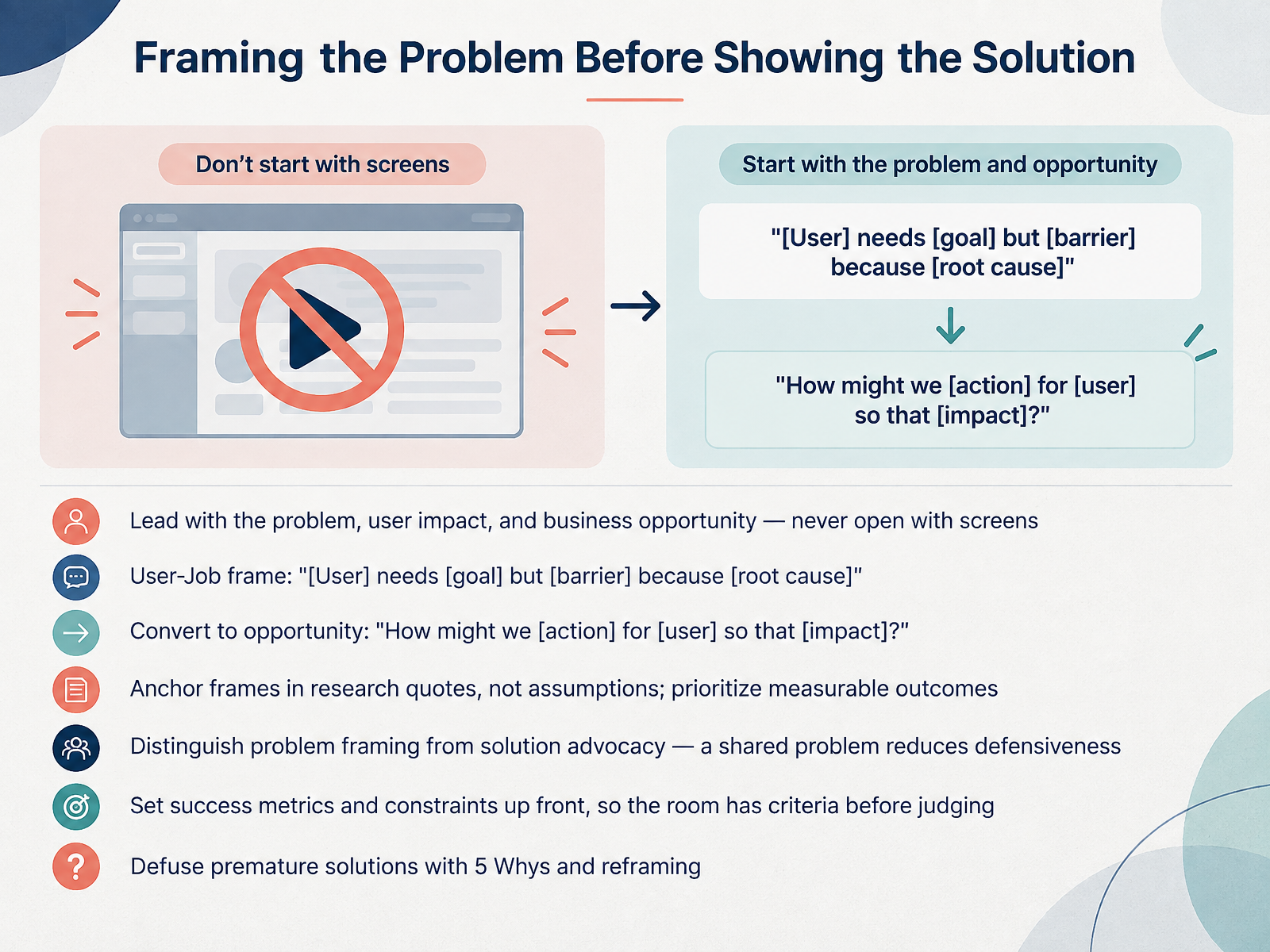
 - 04Framing the Problem Before Showing the SolutionLet's talk about how to open a design conversation. Lead with the problem, the user impact, and the business opportunity. Never open with screens. The moment you show a mockup, the room starts judging pixels instead of understanding the problem.
Use a simple user-job frame: "[User] needs [goal] but [barrier] because [root cause]." Then convert it into an opportunity: "How might we [action] for [user] so that [impact]?"
Anchor every frame in research quotes, not assumptions, and prioritize measurable outcomes. Distinguish problem framing from solution advocacy. A shared problem lowers defensiveness. Set success metrics and constraints up front, so the room has criteria before they judge anything.
If someone jumps to a solution, use the Five Whys and reframe. Next, let's look at evidence and artifacts that persuade.
 gla.ac.ukideaplan.iouitop.design+21 min
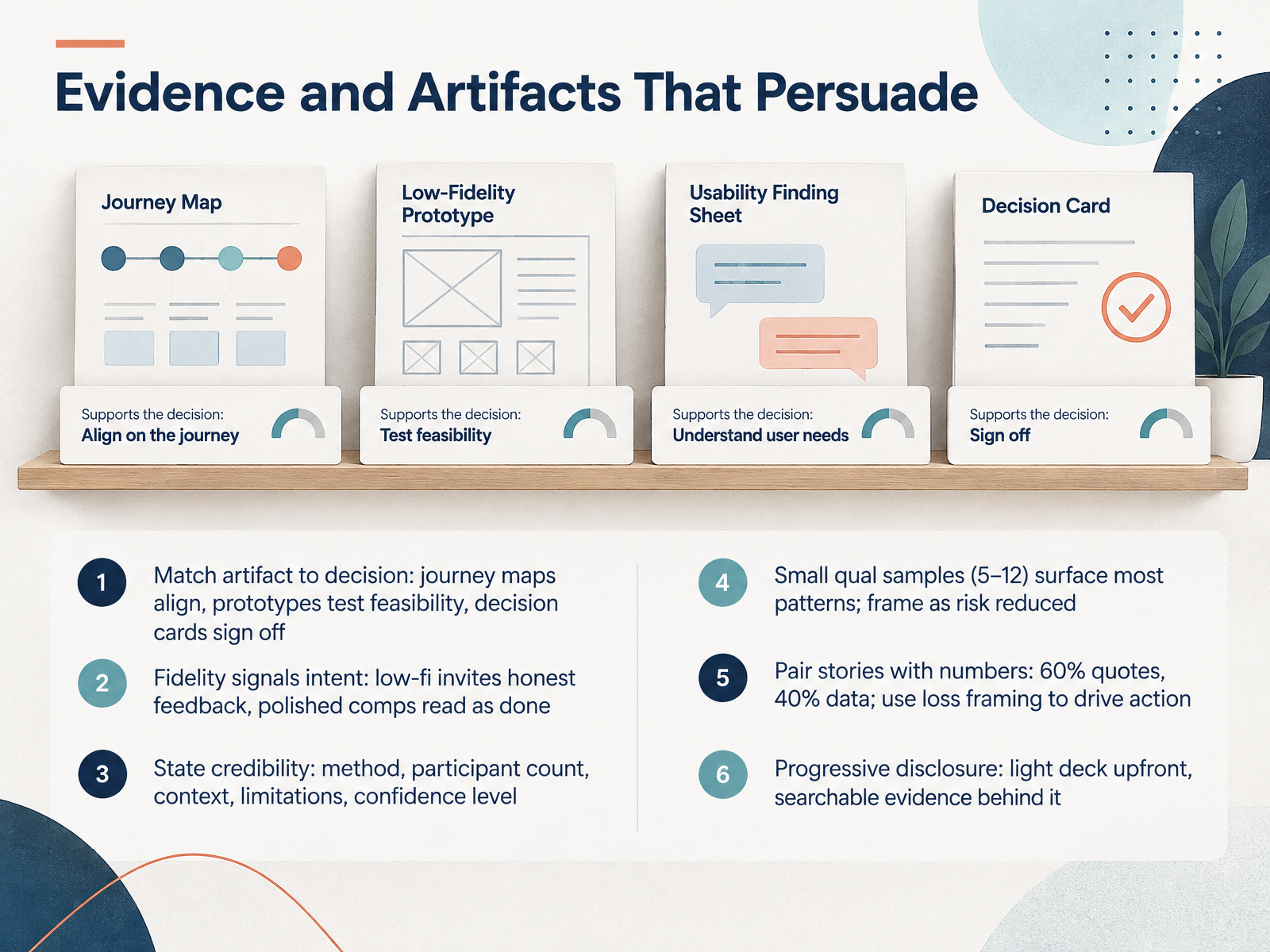
 - 05Evidence and Artifacts That PersuadeNow let's talk about evidence and artifacts that actually persuade. The first rule is simple: match the artifact to the decision. A journey map aligns people on the problem. A prototype tests feasibility. A decision card gets you a sign-off. Don't bring the wrong tool to the meeting. Fidelity signals intent, so be deliberate. Low-fi invites honest feedback. Polished comps read as done, and people critique the color instead of the concept. Next, state your credibility. Name the method, the participant count, the context, the limitations, and your confidence level. That transparency is what makes your findings hard to challenge. On sample size, small qualitative samples of five to twelve people surface most patterns. Frame that as risk reduced, not as a weakness. And pair stories with numbers. Aim for roughly sixty percent quotes and forty percent data. Loss framing drives action, so show what inaction costs. Finally, use progressive disclosure. Lead with a light deck, then keep searchable evidence behind it for anyone who wants to dig in. That way you inform without overwhelming. Let's move on to narrative structure for design reviews.
 userq.commaze.cocleverx.com+22 min
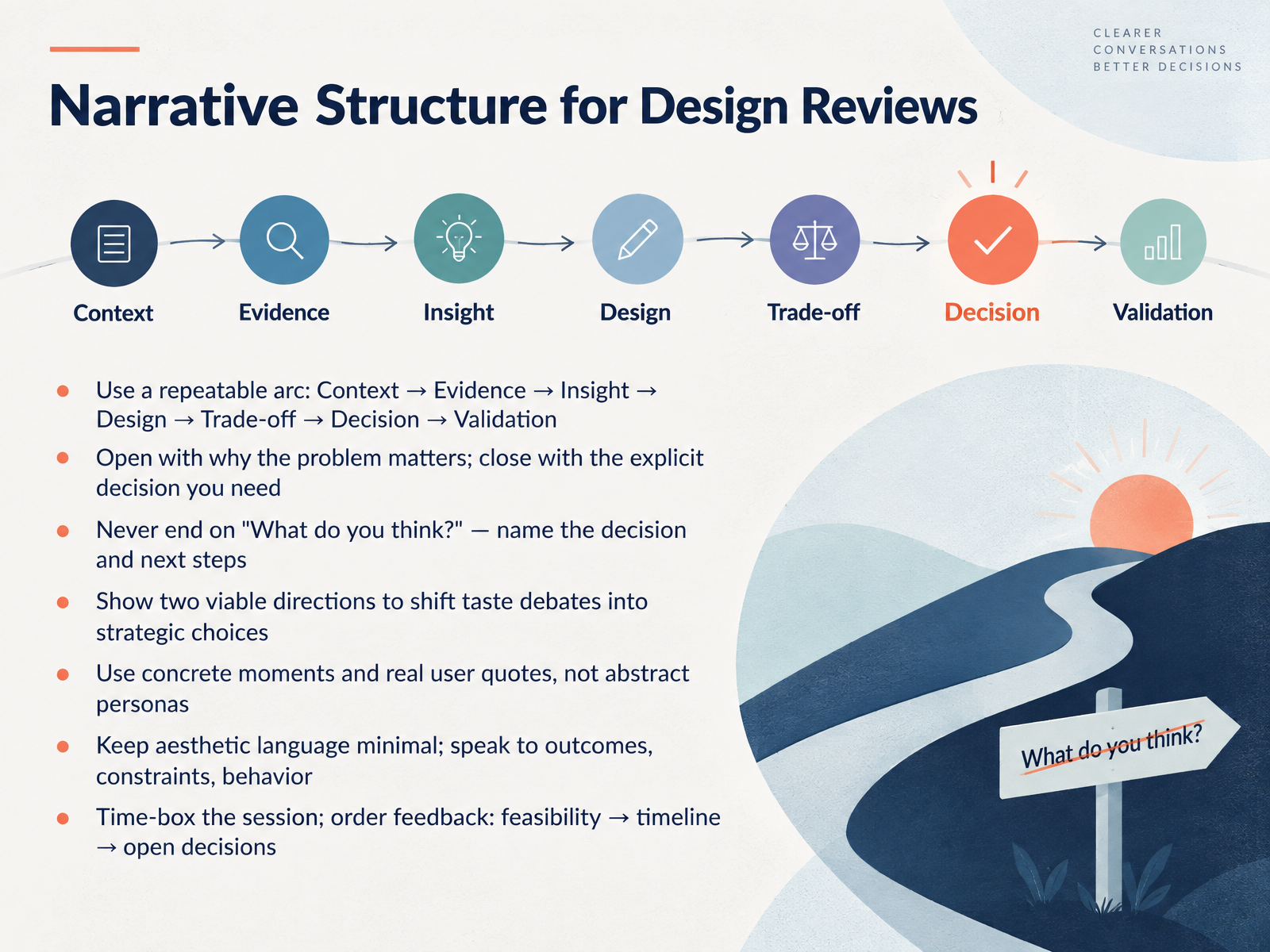
 - 06Narrative Structure for Design ReviewsLet's talk about how you actually structure a design review. Use one repeatable arc. Context, evidence, insight, design, trade-off, decision, and validation. Open with why the problem matters. Close with the explicit decision you need. And never end on, what do you think? Name the decision and the next steps. Here's a practical move. Show two viable directions. That shifts the room from a taste debate into a strategic choice. Ground it in concrete moments and real user quotes, not abstract personas. Keep aesthetic language minimal. Speak to outcomes, constraints, and behavior. Time-box the session, then order feedback. Feasibility first, then timeline, then open decisions. So you leave with clarity, not a list of opinions. Next, let's look at pre-wiring and controlling the feedback loop.
 1 min
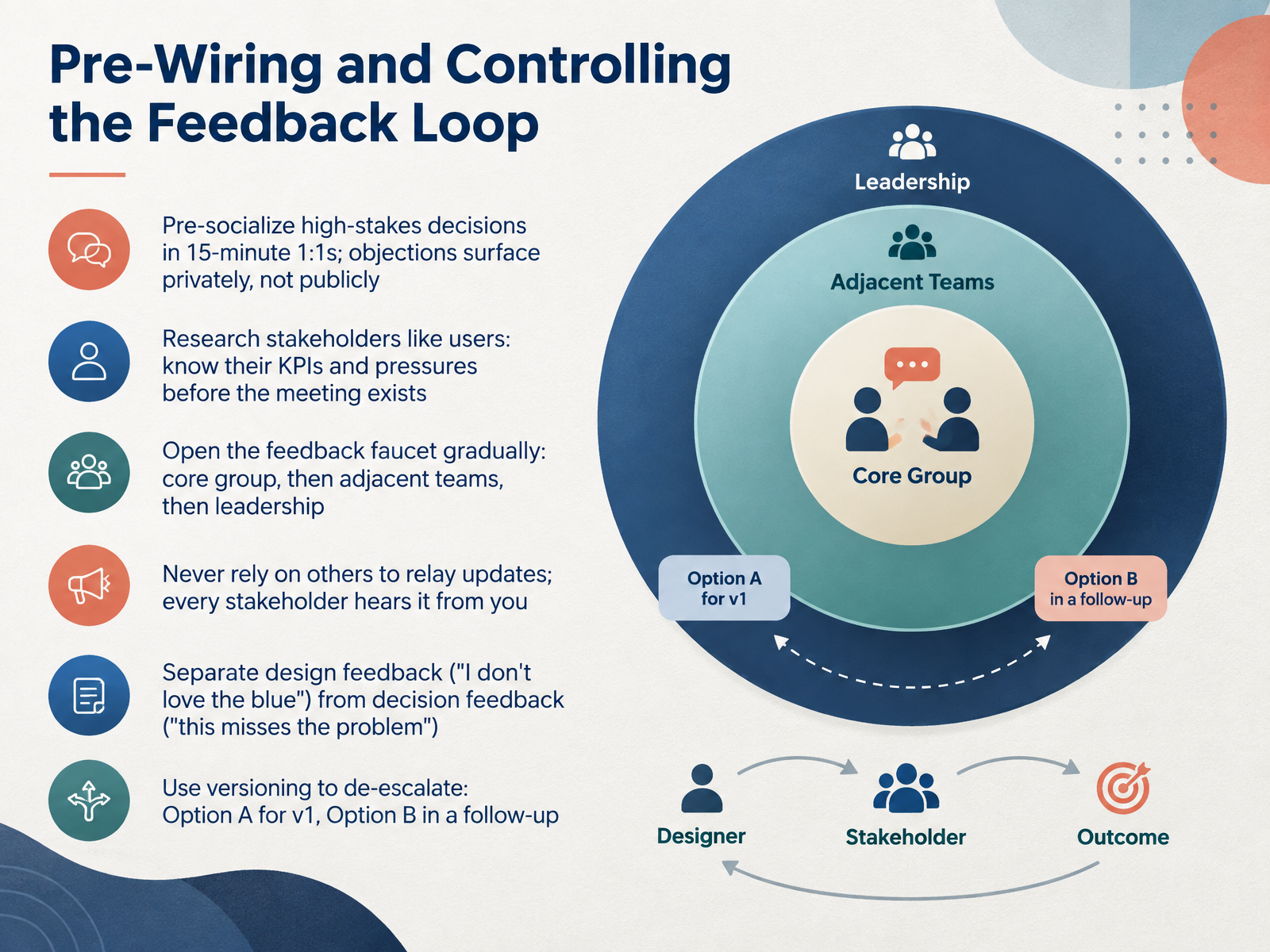
1 min - 07Pre-Wiring and Controlling the Feedback LoopLet's talk about pre-wiring and controlling the feedback loop. The highest-leverage move you can make is a fifteen-minute one-on-one before the group meeting. Walk your key stakeholder through the design, ask what resonates, and surface concerns. Their objections get raised privately, where you can address them. Not publicly, where they become political.
Next, research your stakeholders like users. Know their KPIs and pressures before the meeting exists. The PM cares about timeline and risk. The engineering lead cares about edge cases. Lead with the lens that matters most to them.
And open the feedback faucet gradually. Start with your core group. Then adjacent teams. Then leadership. Never rely on others to relay updates. Every stakeholder hears it from you.
One more distinction. Separate design feedback, like I don't love the blue, from decision feedback, like this misses the problem. Address the decision feedback seriously and acknowledge the rest.
And when you're stuck? Use versioning. Option A for version one, Option B in a follow-up. That gives you room to move forward without burning bridges.
Next, we'll get into handling objections, trade-offs, and difficult conversations.
 maven.commantlr.compush-conference.com+22 min
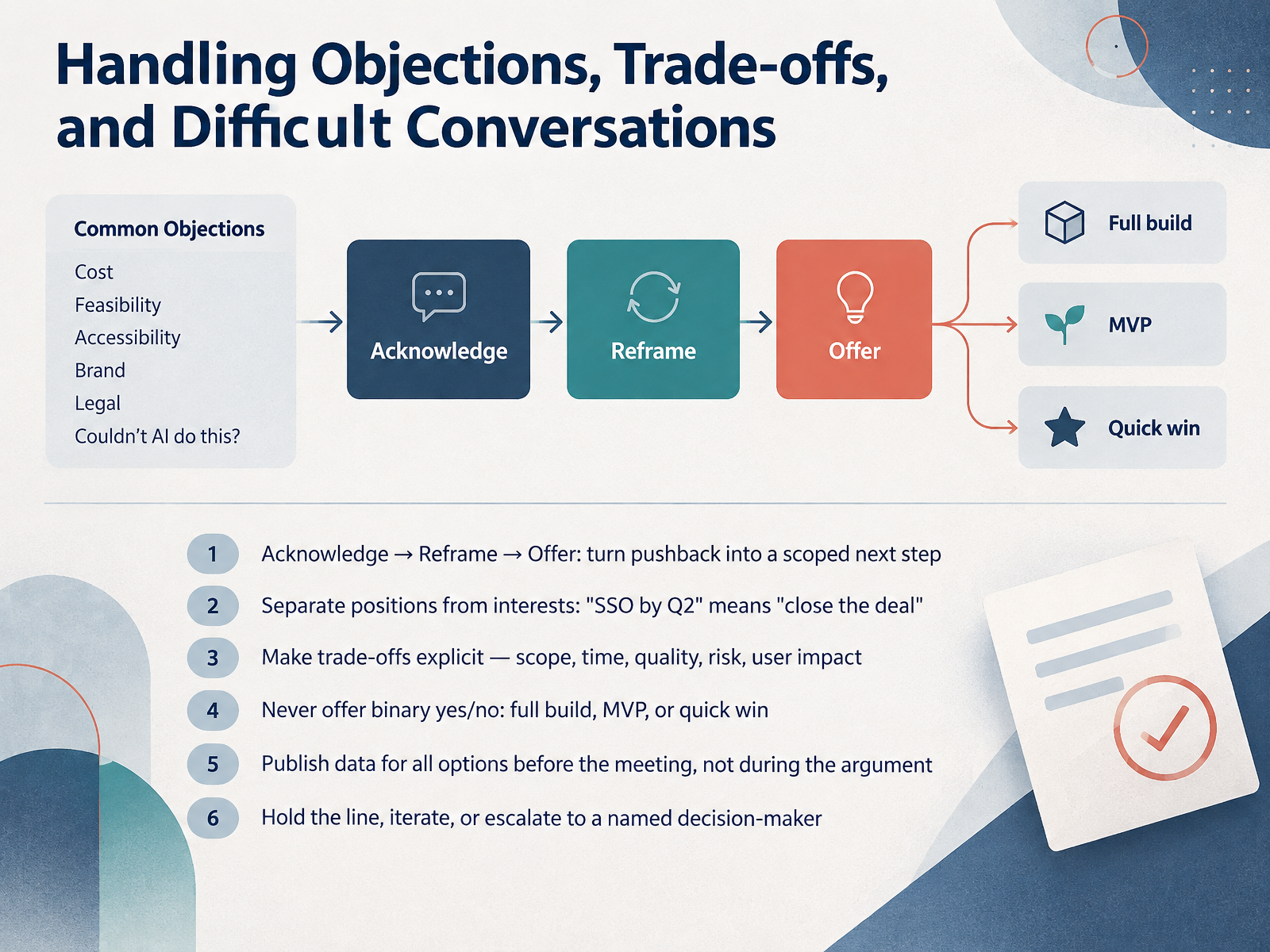
 - 08Handling Objections, Trade-offs, and Difficult ConversationsNow let's talk about the hard part: objections, trade-offs, and difficult conversations. Start with a simple sequence. Acknowledge, reframe, then offer. You turn pushback into a scoped next step. Next, separate positions from interests. When someone says "SSO by Q2," the real interest is "close the deal." Ask what problem they are solving. Then make trade-offs explicit. Scope, time, quality, risk, user impact. Say the quiet part out loud, politely. Never offer a binary yes or no. Give three paths: full build, MVP, or a quick win. And publish the data for all options before the meeting, not during the argument. Share it with everyone, not just the people in the room. Finally, decide how to respond. Hold the line, iterate, or escalate to a named decision-maker. Escalation is leadership, not failure. Align on goals, make costs visible, and move forward. That brings us to aligning decisions, buy-in, and follow-through.
 1 min
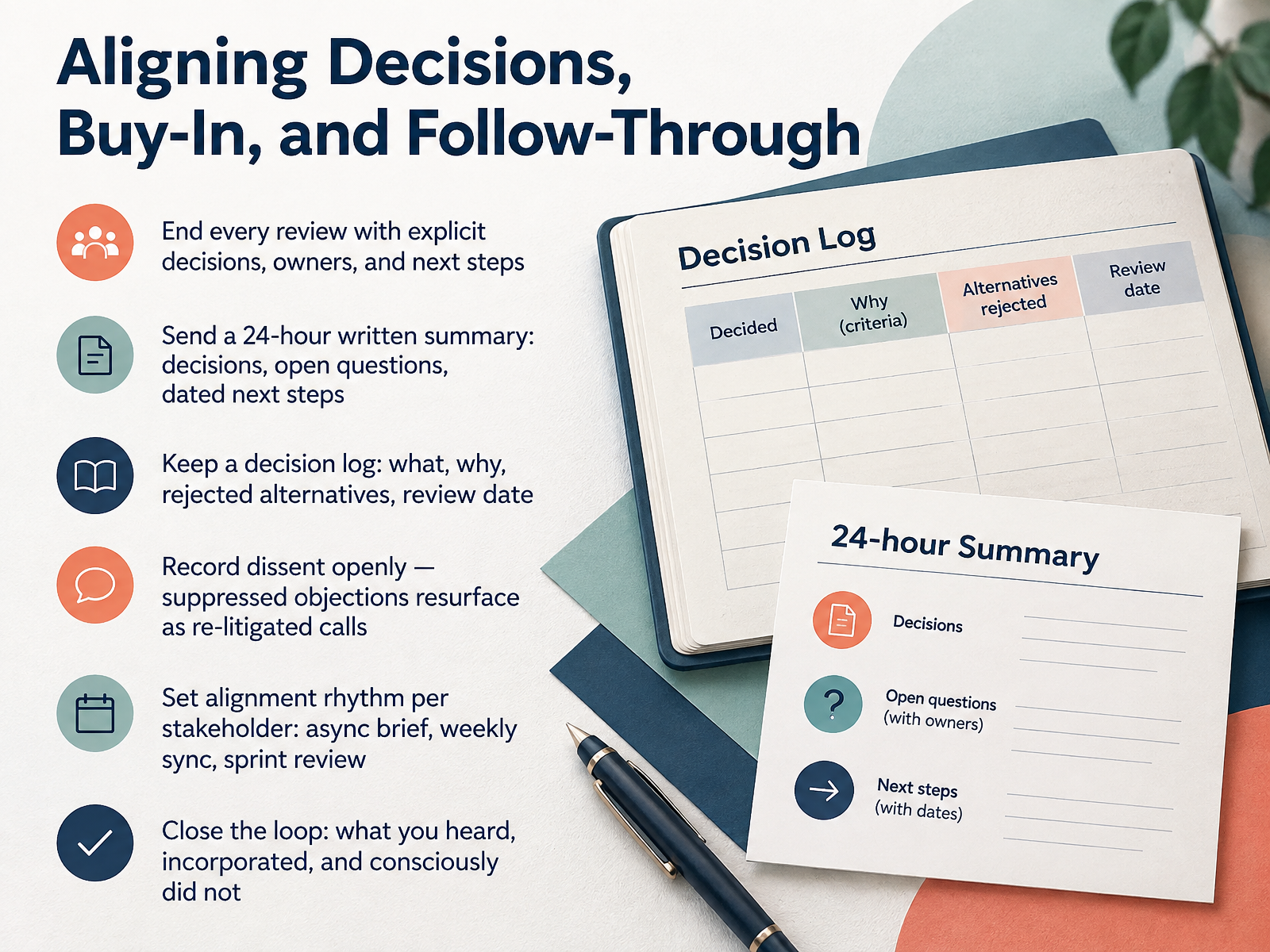
1 min - 09Aligning Decisions, Buy-In, and Follow-ThroughNow let's lock alignment down, so decisions actually stick. End every review with three things: the decision, the owner, and the next step. No decision, no meeting. Then send a written summary within twenty-four hours. Decisions, open questions, and dated next steps. Keep a decision log too. What was decided, why, which alternatives you rejected, and when you'll review it. One owner keeps it alive. Otherwise it becomes a graveyard in two sprints. And record dissent openly. Suppressed objections come back later as re-litigated calls. Say it in the room, put it in the log. Set an alignment rhythm per stakeholder. Executives get an async brief. Cross-functional leads get a weekly sync. Teams get sprint reviews. Match the channel to the person, not your calendar. Finally, close the loop. Tell people what you heard, what you incorporated, and what you consciously did not. That is how trust compounds. Next, Async First Stakeholder Updates in 2026.
 2 min
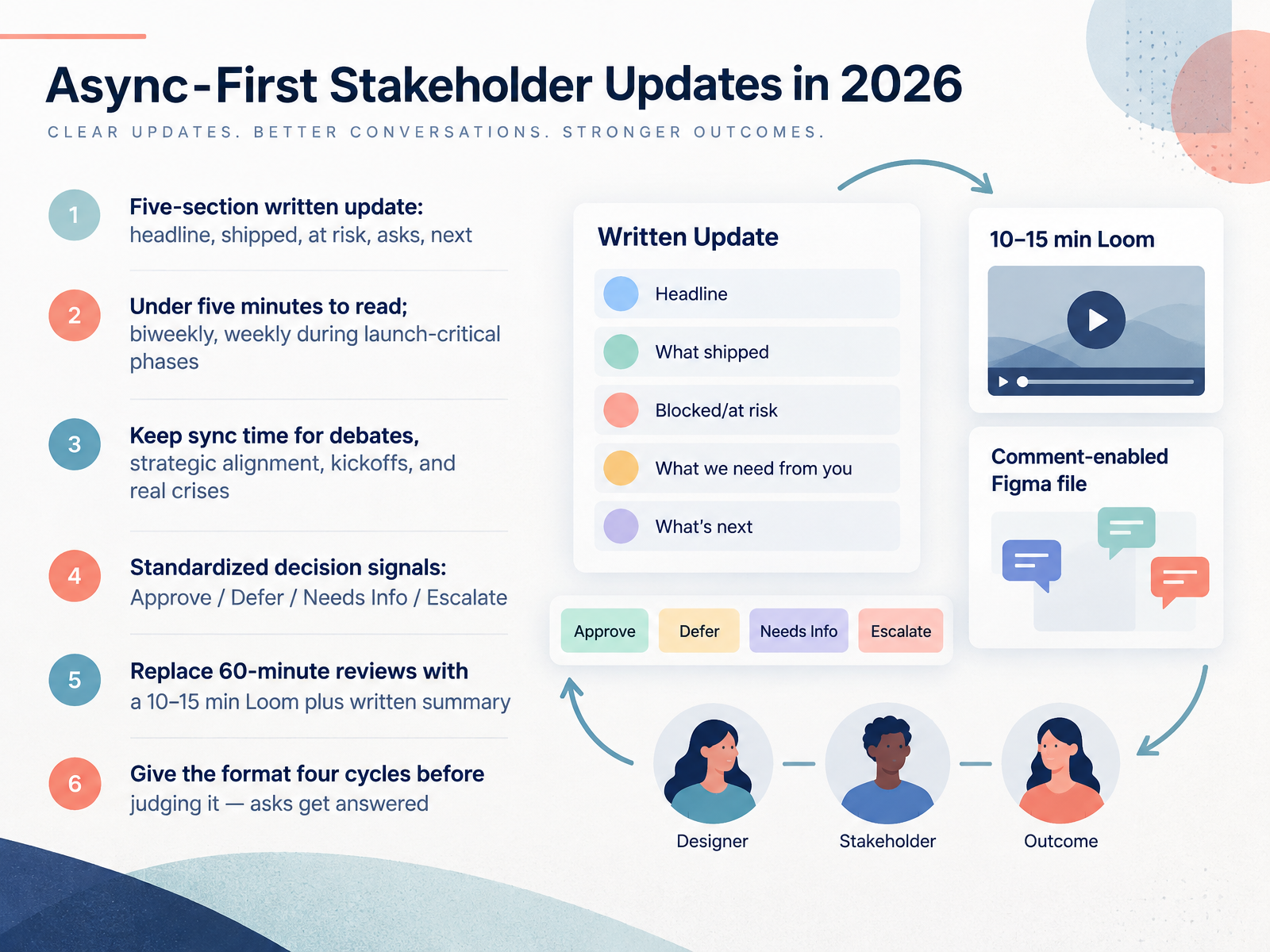
2 min - 10Async-First Stakeholder Updates in 2026Next, let's make stakeholder updates async-first. The core format is a five-section written update: headline, what shipped, what's at risk, the asks, and what's next. Keep it under five minutes to read. Go biweekly for most projects, and weekly during launch-critical phases. Save your sync time for debates, strategic alignment, kickoffs, and real crises. Then standardize your decision signals: Approve, Defer, Needs Info, and Escalate. That way nobody hunts for a reply in a long thread. A practical swap: replace the sixty-minute review with a ten to fifteen minute Loom plus a written summary. And give the format four cycles before you judge it. Early updates may feel ignored, but by the fourth round, your asks start getting answered. Next, we'll look at measuring whether this is actually working.
 1 min
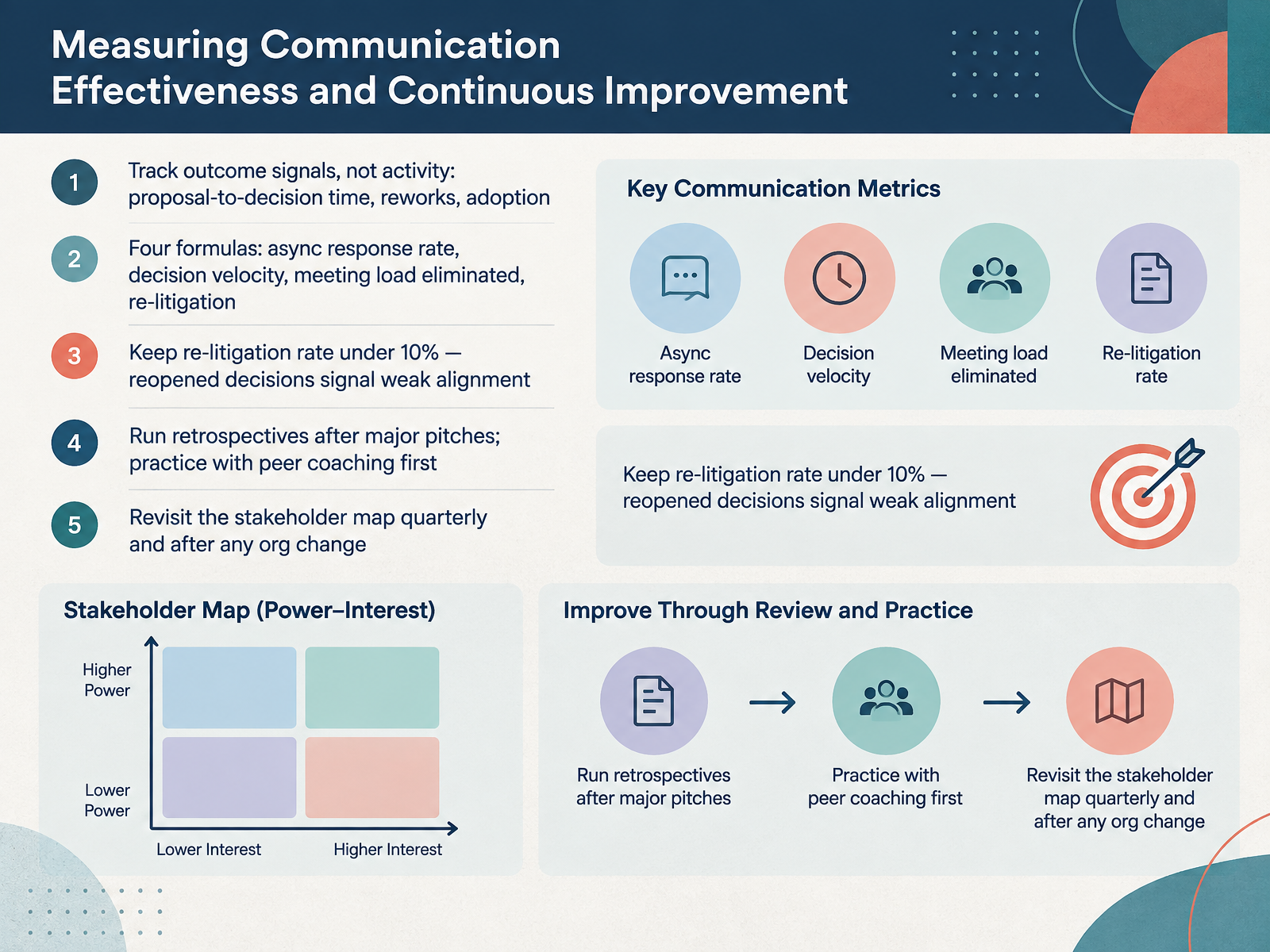
1 min - 11Measuring Communication Effectiveness and Continuous ImprovementNow, how do you know your communication is actually working? Stop tracking activity. Start tracking outcomes: how long it takes a proposal to reach a decision, how much rework comes back, and whether people actually adopt the direction. Four formulas matter here. Async response rate is the share of stakeholders who engage with your updates, divided by the total. Decision velocity is the average time from memo to decision. Meeting load eliminated compares calendar time before and after. And re-litigation rate is decisions reopened, divided by total decisions. Keep that last one under ten percent. If decisions keep reopening, your alignment is weak, not your slides. After any major pitch, run a retrospective, but practice with a peer coach first. And revisit your stakeholder map every quarter, plus after any reorg. Power shifts fast. Coming up next, we put this into practice in the Practice Lab: Simulated Stakeholder Review.
 musemind.agencyfigr.designuxcel.com+22 min
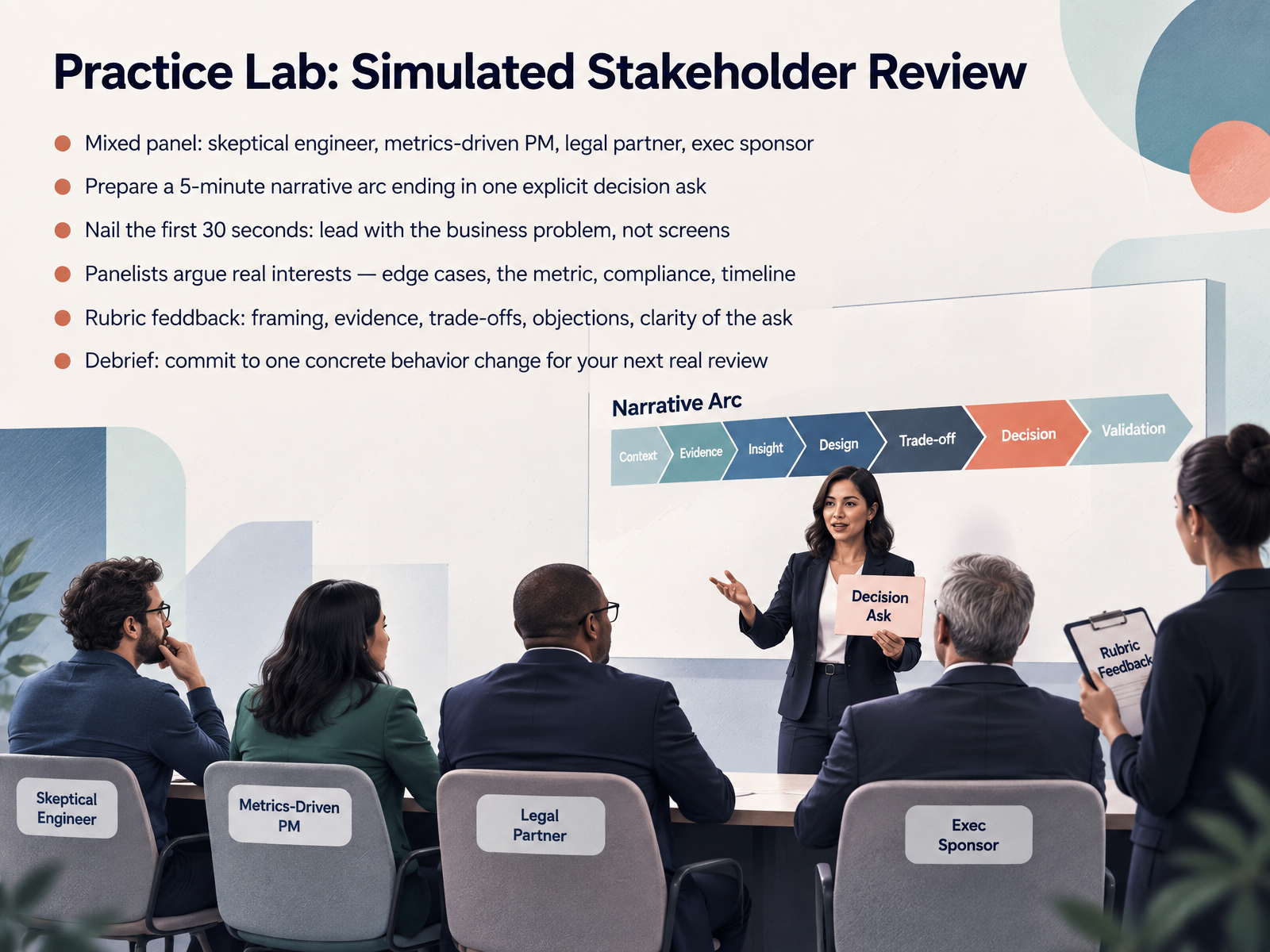
 - 12Practice Lab: Simulated Stakeholder ReviewNow let's put all of this into practice. In this lab, you'll present to a mixed panel: a skeptical engineer, a metrics-driven product manager, a legal partner, and an executive sponsor. Four people, four different sets of interests. The engineer cares about edge cases. The PM cares about the metric. Legal cares about compliance. The exec cares about timeline. Do not treat them as obstacles. Treat each objection as a real concern you can address.
Your task: prepare a five-minute narrative arc that ends in one explicit decision ask. Say exactly what you need from the room. "I need a decision on X by Friday" beats vague approval every time.
And nail the first thirty seconds. Lead with the business problem, not the screens. Something like: "Support costs rose twenty-five percent last quarter, and we believe this change reduces that." Now they're listening. Then walk through framing, evidence, trade-offs, objections, and clarity of the ask.
At the debrief, commit to one concrete behavior change for your next real review. Let's get into it, and then we'll move into your action plan: applying communication skills on the job.
 maven.commantlr.compush-conference.com+22 min
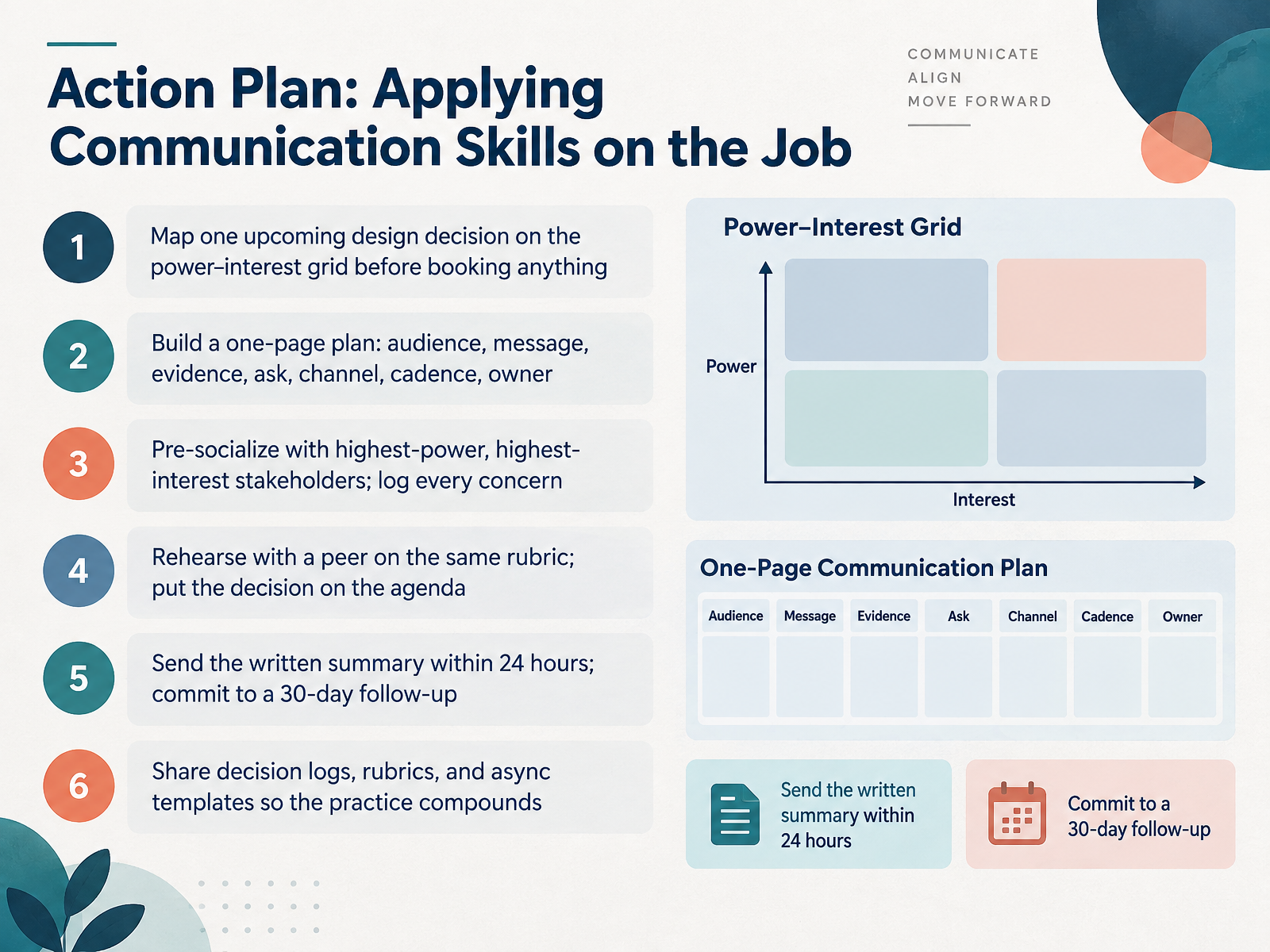
 - 13Action Plan: Applying Communication Skills on the JobLet's turn all of this into an action plan you can actually run. Start with one upcoming design decision. Before you book anything, map your stakeholders on the power and interest grid. Then build a one-page plan: audience, message, evidence, the ask, channel, cadence, and owner. Next, pre-socialize with your highest-power, highest-interest stakeholders, and log every concern you hear. Rehearse with a peer using the same rubric, then put the decision on the agenda. After the meeting, send the written summary within twenty-four hours, and commit to a thirty-day follow-up. Finally, share your decision logs, rubrics, and async templates. That's how one good conversation becomes a habit the whole team can repeat. You've got the skills. Now go apply them on the job.
 2 min
2 min
Take the deck with you
Download this course as a file — free, no sign-up needed.
- PDF handoutEvery slide page, ready to print or share.14 pages · 3.7 MBDownload
- Narrated PowerPointThe deck that presents itself — every slide carries the digital human's narration video.14 pages · 13.3 MBDownload
- PowerPoint slidesThe full deck as a .pptx — open it in PowerPoint, Keynote, or Google Slides.14 pages · 3.7 MBDownload
Free to use in your own training — please keep the PersonWise credit page at the end.
Have your own deck? Turn it into a course
Sources consulted
Web sources consulted while building this course.
- How to Uplevel Stakeholder Management for User Researchers by Amanda Gelb and Anna Avrekh on Maven — maven.com
- How to Present Design Work to Stakeholders (2026) | Mantlr — mantlr.com
- Mastering Stakeholder Dynamics in Complex B2B Environments — push-conference.com
- How to Present UX Research Findings to Get Buy-In From Stakeholders – Baymard — baymard.com
- How UX Professionals Earn a Seat at the Table | Katja Busch | Userbrain Blog — userbrain.com
- Stakeholder Mapping in UX Design: A Practical Guide for Product Teams — musemind.agency
- What Is Stakeholder Mapping? A Guide for Product Teams — figr.design
- Stakeholder Mapping & Influence Interactive Lesson — uxcel.com
- Stakeholder Map: How to Build One in 4 Steps (2026) — rock.so
- Stakeholder Map: Guide, Practical Example & Template for Service Design | SI Labs — si-labs.com
- University of Glasgow - MyGlasgow - UX Framework - Define - Problem framing — gla.ac.uk
- How to Write a Product Brief That Gets Buy-In — ideaplan.io
- UX Problem Statements: How to Write Them Effectively (with Real Examples) | Uitop — uitop.design
- How to Create UX Design Briefs Stakeholders Understand — aienai.co
- Why Problem Framing is Essential for UX - UxInnercircle | — uxinnercircle.com
- Data you can defend: how to present UX research findings to stakeholders | UserQ — userq.com
- A Growing Mandate: Building Stakeholder Trust in UX Research | Maze — maze.co
- How to Present User Research Findings That Win Buy In | CleverX Blog — cleverx.com
- UX research sample size: How small is small enough? - LogRocket Blog — blog.logrocket.com
- How To Make Your UX Research Hard To Ignore — Smashing Magazine — smashingmagazine.com