Begin
14 pages · ~28 min
Software Error Detection and Recovery
This training teaches software professionals to identify, interpret, and recover from common software errors, including detection techniques and effective error message handling.
A digital instructor presents all 14 pages. Hold “Ask” at any point and ask out loud — the answer comes from this course. No sign-up needed.
What you’ll learn
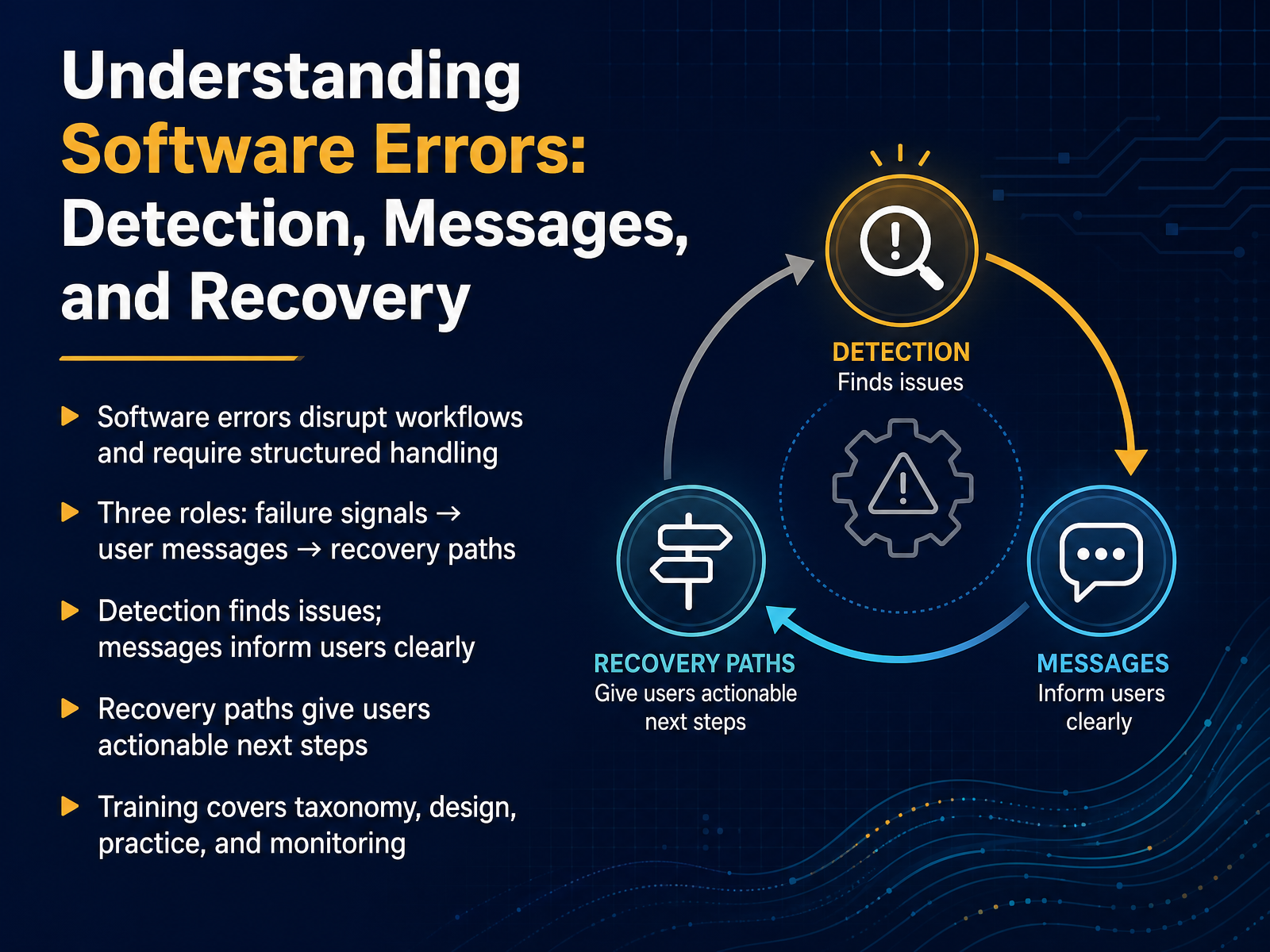
- 01Understanding Software Errors: Detection, Messages, and RecoveryWelcome. In this course, we're going to talk about software errors—not as failures, but as routine system events that need structured handling. The goal is to help you understand three distinct roles that work together every time a program encounters a problem. First, there's the failure signal, which is the internal detection that something has gone wrong. Second, there's the user-visible message, the clear information the person sees on the screen. And third, there's the recovery path, which gives people actionable next steps to move forward. Throughout this training, we'll explore how to classify these events, design helpful messages, practice recovery flows, and monitor how well they work in real use. By the end, you'll be able to separate what the system detects from what the user sees, and from what the user can actually do about it. Next, we'll walk through the error lifecycle and introduce each role in a simple three-part framework.2 min
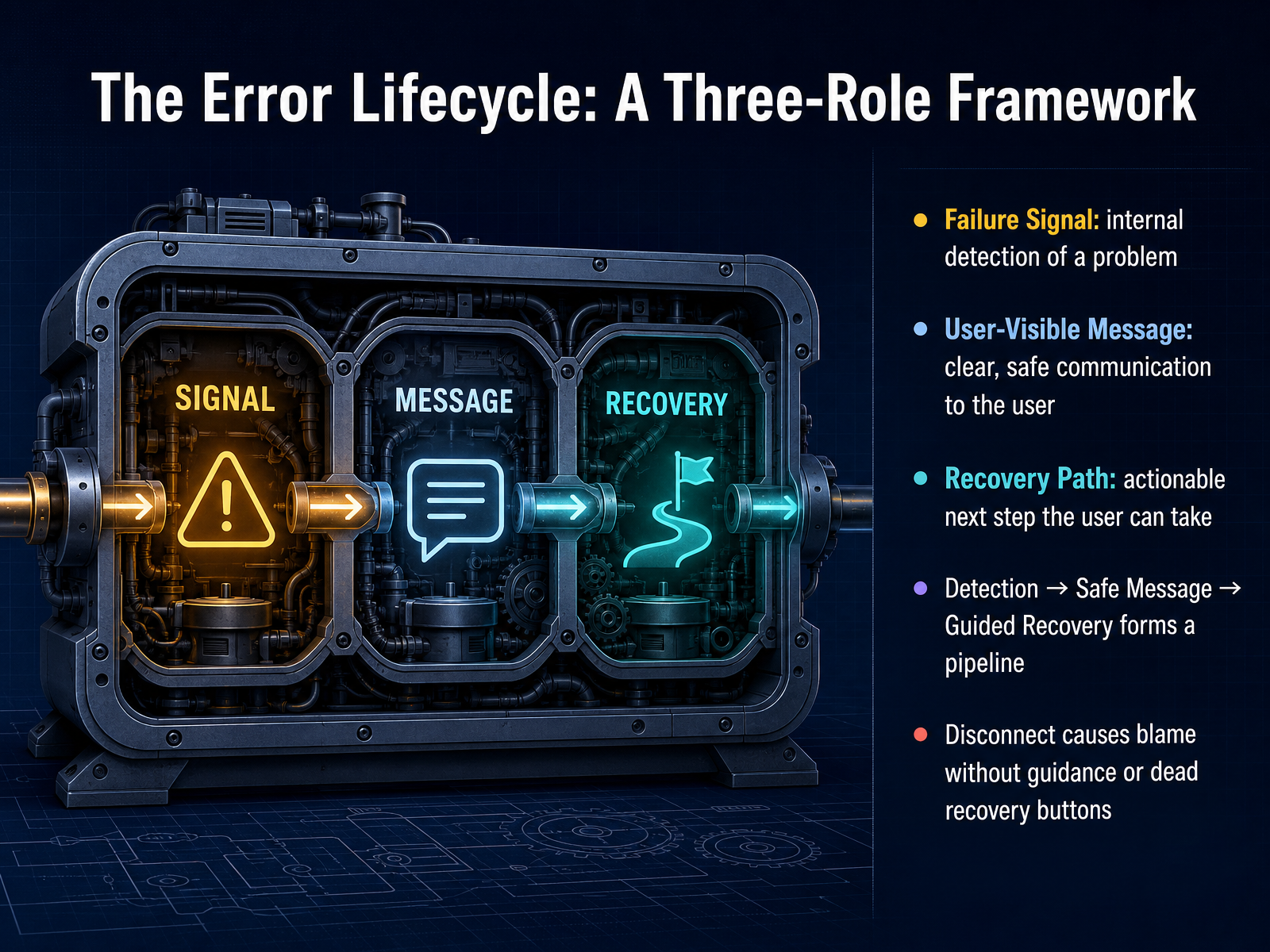
- 02The Error Lifecycle: A Three-Role FrameworkLet's look at how a software error moves through a three-role lifecycle. Think of it as a simple pipeline. First, we have the Failure Signal. This is the system's internal way of detecting that something went wrong. It might be a timeout, an exception, or a null value that was not expected. The user never sees this signal directly. Next comes the User-Visible Message. Once the system knows there is a problem, it needs to tell you what happened in a clear and safe way. A good message says, for example, 'We could not save your file right now,' instead of showing a cryptic code. Finally, there is the Recovery Path. This is the actionable next step the user can actually take. It could be a 'Try Again' button or a suggestion to wait a few minutes. These three roles form a pipeline: Detection leads to a Safe Message, which leads to Guided Recovery. If the pipeline breaks, we get problems. A missing message creates silent blame, and a missing recovery path gives you a dead button that does nothing. Next, let's apply this framework to the Taxonomy of Software Errors.
 2 min
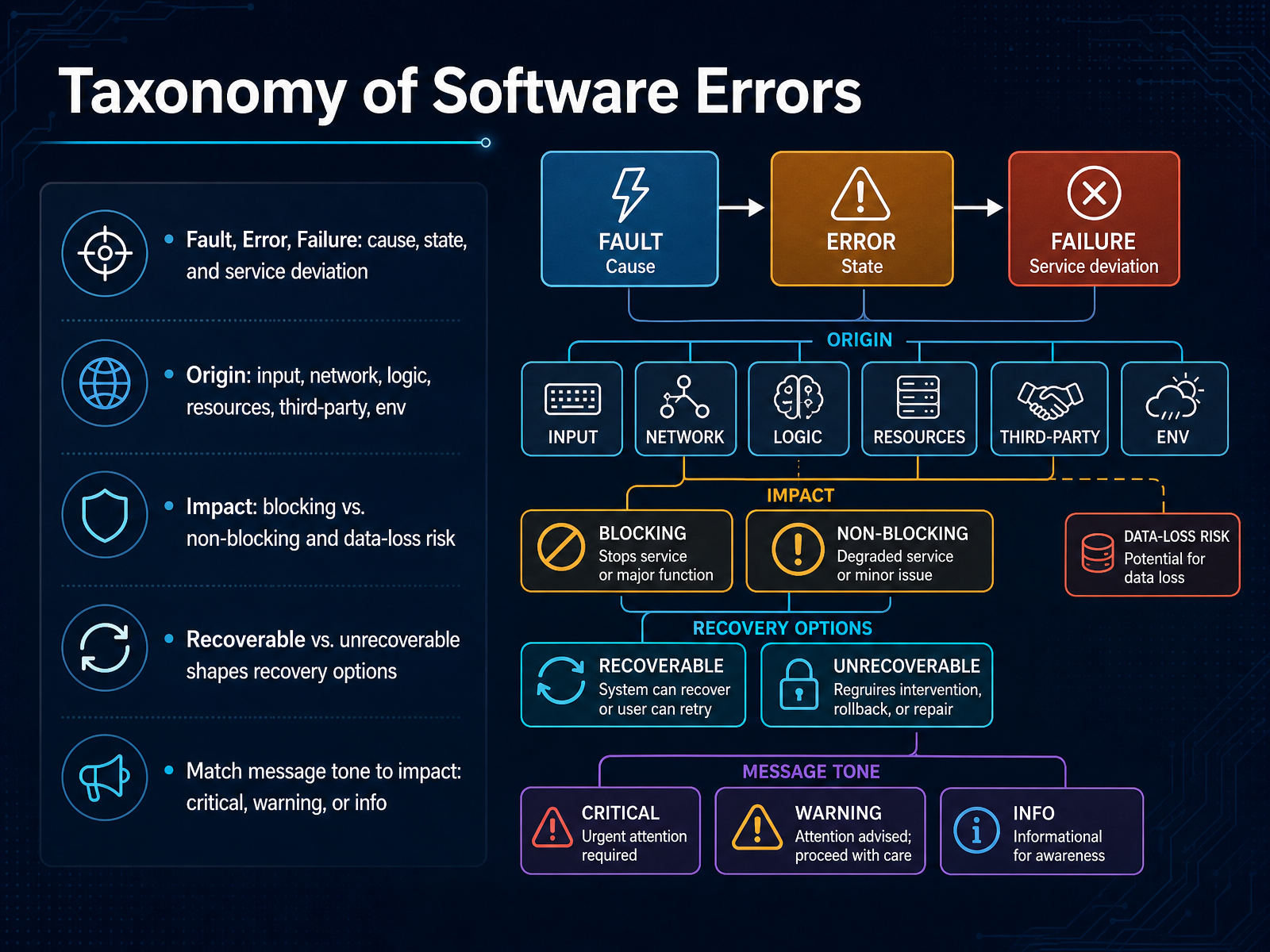
2 min - 03Taxonomy of Software ErrorsNow that we have a basic feel for the landscape, let's put some structure around it. We can group errors into a few clear buckets. First, the failure chain: a fault is the hidden cause, like a bad line of code. An error is the internal broken state it creates. A failure is what the user actually sees, when the service stops working correctly. Keeping those three apart helps us focus our effort. Next, consider the origin. Did it start with bad user input, a dropped network connection, a logic bug, exhausted memory, a third-party service outage, or something in the running environment? The origin often tells us who needs to act. Then we look at impact. Is it blocking, where the task cannot proceed, or non-blocking, where things degrade but keep running? And is there a risk of losing data? That risk changes the urgency. After that, we ask about recoverability. If the system can retry or roll back, it is recoverable. If data is already corrupted or lost, it may be unrecoverable, and the recovery path shifts from retry to damage control. Finally, match the message tone to the impact. Use critical for blocking, data-loss situations. Use warning for non-blocking issues that need attention. Use information for minor, self-corrected events. That taxonomy helps us design the right detection, the right message, and the right recovery. In the next slide we will look at how systems actually detect these errors.
 2 min
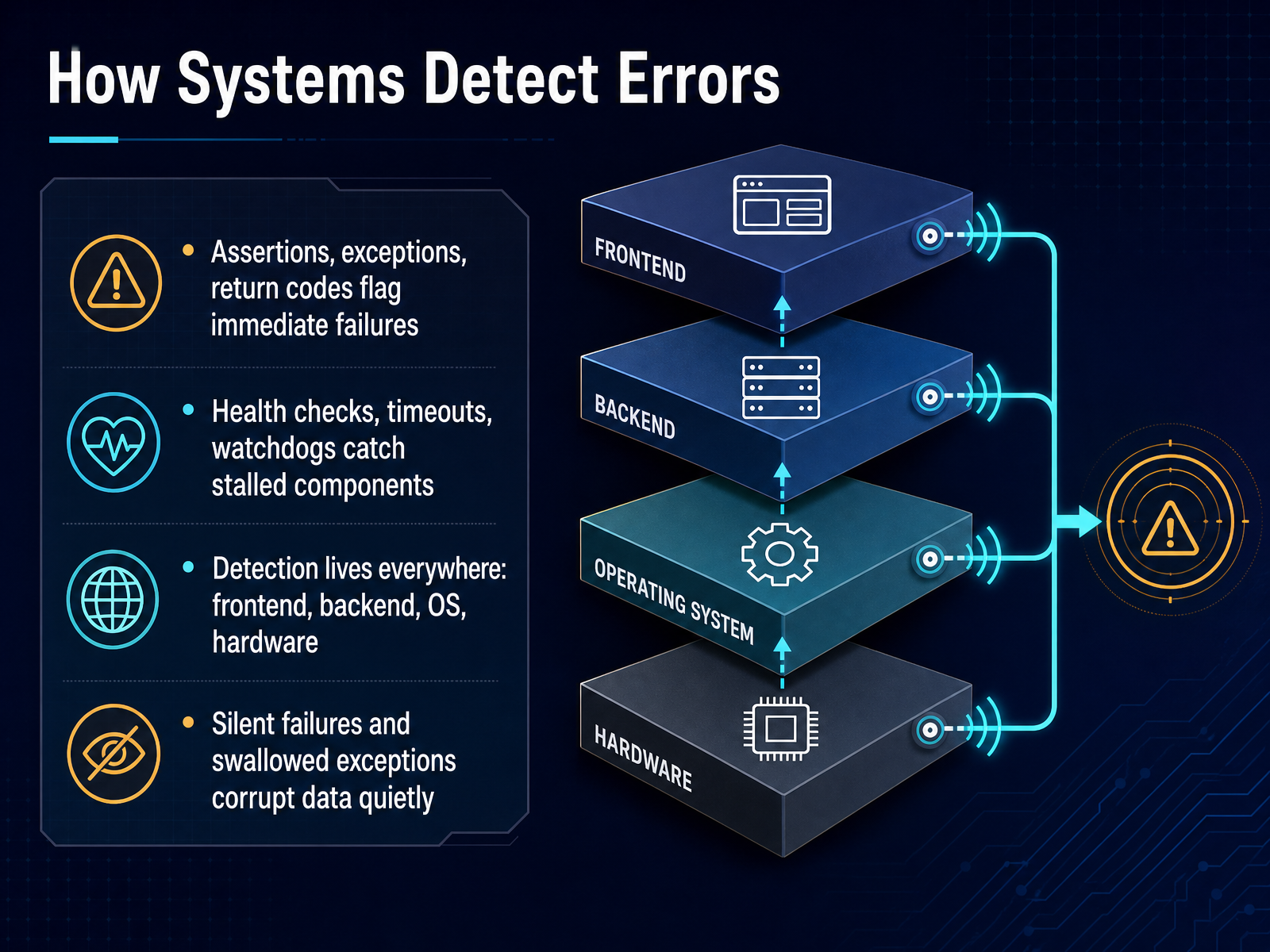
2 min - 04How Systems Detect ErrorsNow that we know the basic roles, let's look at how systems actually detect errors in the first place. Detection is the very first step, happening well before any message reaches a user. Think of a failure signal as a raw alarm that says something went wrong. Systems use a few different tools to raise that alarm. Assertions, exceptions, and return codes all flag immediate failures. For example, an exception might fire the moment a piece of code tries to open a file that doesn't exist. But not every problem is that obvious. For stalled components, systems lean on health checks, timeouts, and watchdogs. A health check might ping a service every few seconds. If it gets no reply, the watchdog knows something is stuck. It's also important to know that detection lives everywhere, on the frontend, in backend services, inside the operating system, and even at the hardware level. Finally, we have to watch out for silent failures and swallowed exceptions. These are errors where the detection tool caught a problem, but the code hid the signal before anyone could see it. That can corrupt data quietly, making the failure much harder to find later. Next, we'll build on these signals and look at how a raw error becomes an actionable trigger in 'Failure Signals: From Raw Error to Actionable Trigger'.
 2 min
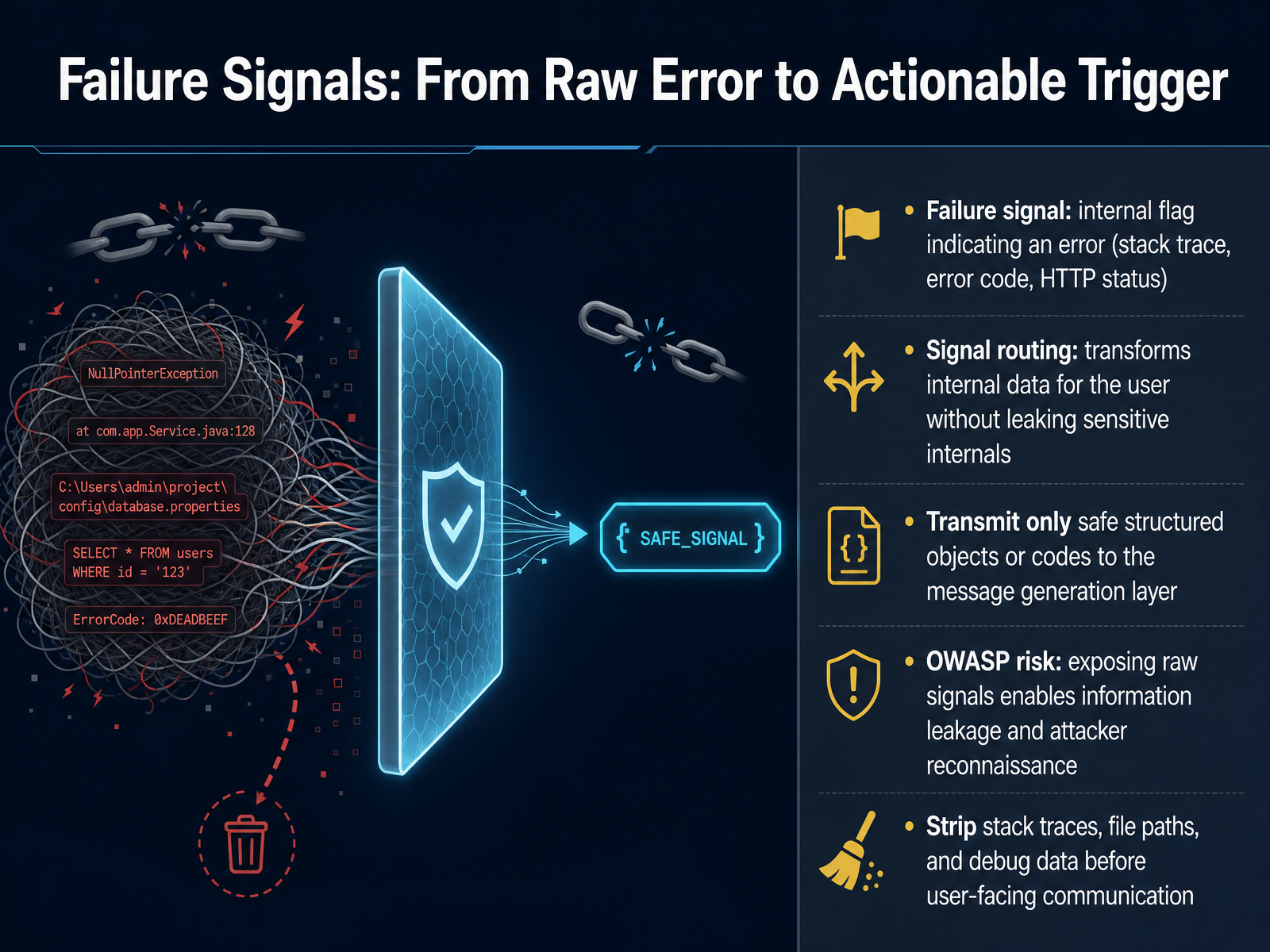
2 min - 05Failure Signals: From Raw Error to Actionable TriggerNow let's look at what actually happens the moment something goes wrong inside a system. We call that first internal alert a failure signal. A failure signal is simply a raw piece of data that says an error occurred. It could be a stack trace showing you line by line where the code stopped, a numeric error code like a four hundred four, or an HTTP status returned by a server. These signals are for machines and developers, not for users. The next step is something called signal routing. Think of it as a safety filter. Routing takes that raw internal data and transforms it into a clean, structured piece of information that the message layer can use. The rule is clear: transmit only safe objects or codes forward. Never let raw internals leak through. The OWASP security guidelines warn us about this directly. If you expose raw failure signals, like full stack traces, file paths, or debug data, you give attackers a reconnaissance map of your system. So before any user-facing communication, we strip all of that out. Only the safe, sanitized trigger moves on. Next, we will see how to shape that trigger into a message that actually helps the user, in our slide on crafting user-visible error messages.
 2 min
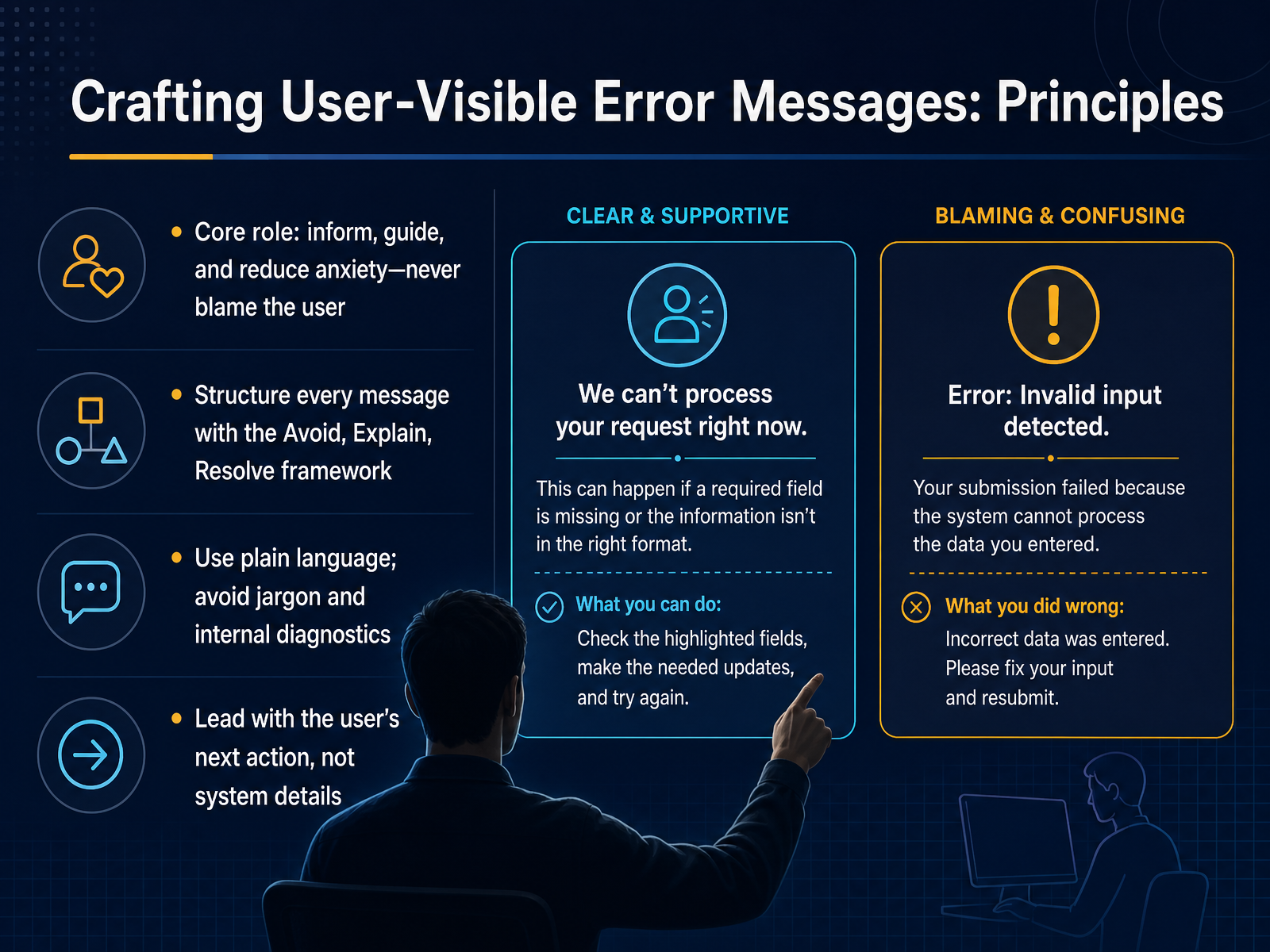
2 min - 06Crafting User-Visible Error Messages: PrinciplesNow that we know the difference between a failure signal and a recovery path, let's talk about the message the user actually sees. The user-visible error message has one core job: inform the person, guide them forward, and reduce anxiety. It should never blame the user. A helpful way to structure every message is what we call the Avoid, Explain, Resolve framework. First, avoid telling the user what the system will do next, like 'Operation will be retried.' Instead, explain what happened in plain language. Skip jargon and internal diagnostics entirely—no error codes or stack traces in the visible text. Finally, resolve by leading with the user's next action, not system details. For example, instead of 'Login failed due to credential mismatch,' a better message starts with the action: 'Check your username and password and try again.' That's the pattern: plain language, no blame, action first. Up next, we'll practice writing messages using exactly this framework in 'Crafting User-Visible Error Messages: Practice.'
 2 min
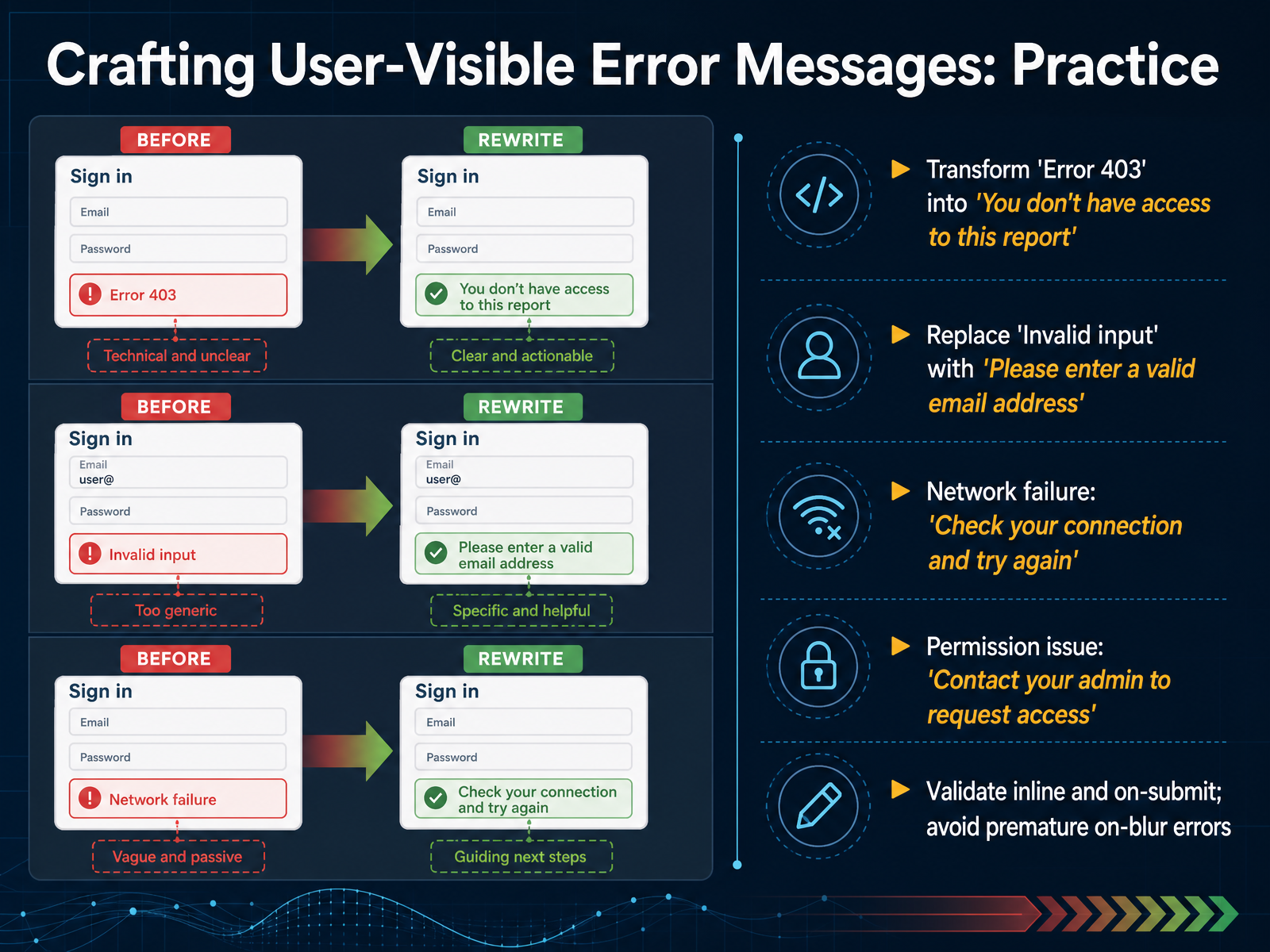
2 min - 07Crafting User-Visible Error Messages: PracticeNow let's practice transforming technical signals into clear user-visible messages. Think back to those three parts we covered: the failure signal, the user-visible message, and the recovery path. Here, we'll rewrite raw errors so they tell someone exactly what went wrong and what to do next. First, take a generic 'Error 403.' The system knows the user lacks permission, but the person just sees a number. Instead, say, 'You don't have access to this report.' Next, replace 'Invalid input' with a more specific guide: 'Please enter a valid email address.' For a network failure, the visible message should point to a recovery path: 'Check your connection and try again.' For a permission issue, tell them how to resolve it: 'Contact your admin to request access.' Finally, think about when messages appear. It's best to validate both inline while typing and on-submit, rather than yelling at someone the moment they leave a field. That premature on-blur feedback often disrupts their flow before they're even finished. If you can pair the signal, the message, and the action, you give the user a complete loop. Up next, we'll see how accessibility shapes every part of this communication.
 2 min
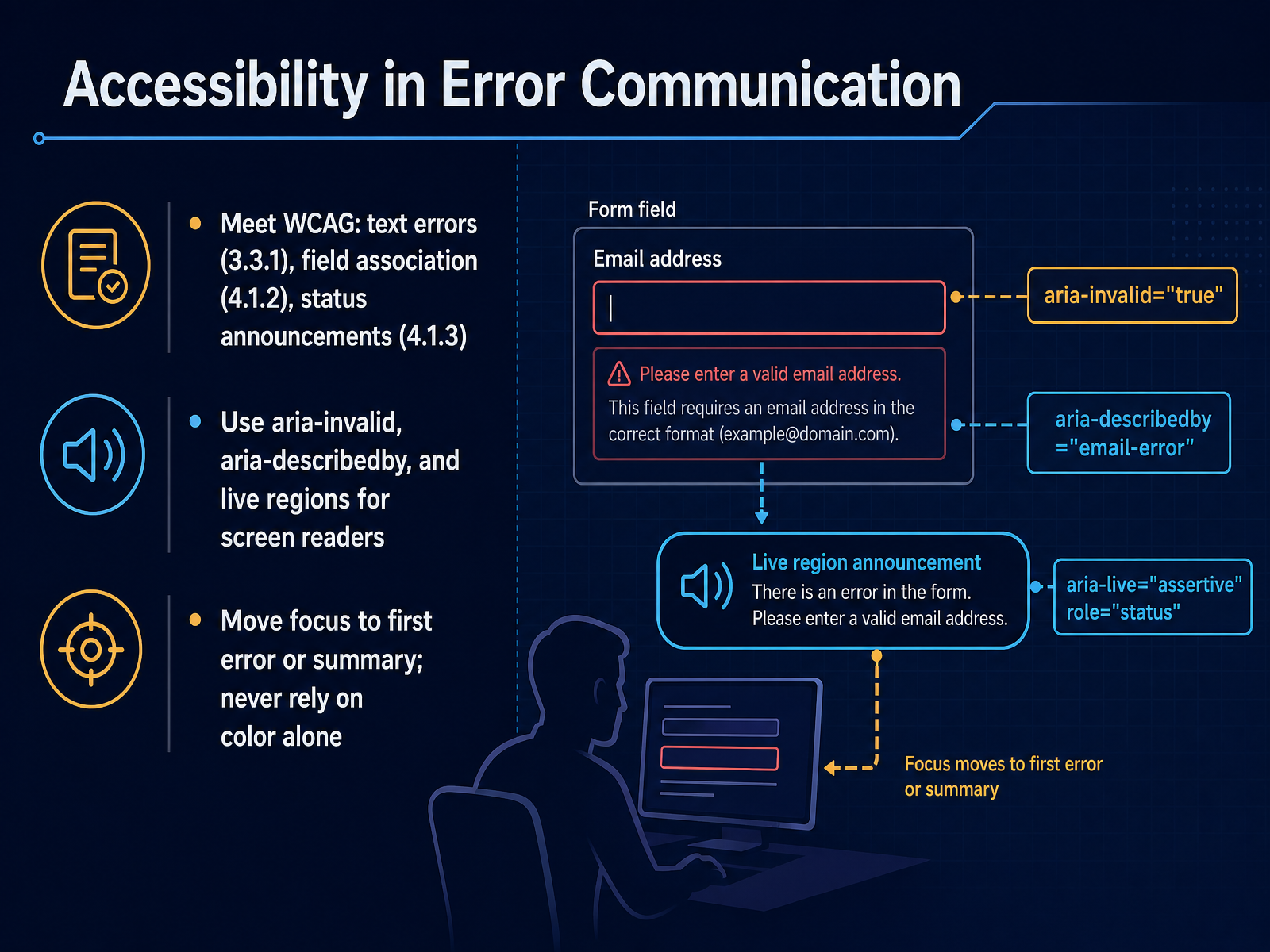
2 min - 08Accessibility in Error CommunicationNow let's make sure our error communication works for everyone, including people who use assistive technology. Accessibility in error messaging starts with meeting the Web Content Accessibility Guidelines, or WCAG. Three rules matter here. First, text errors must be described in words, not just shown with a red border. Second, the error message must be programmatically associated with its form field so a screen reader knows which field the message belongs to. Third, status announcements must update without moving focus, so a screen reader user hears new errors immediately. To put this into practice in code, use aria-invalid equals true on the field that has the problem, link the error text to the field with aria-describedby, and use a polite live region to announce error summaries without disrupting the user. And one more critical point: always move keyboard focus to the first error or to an error summary at the top of the page. Never rely on color alone to signal an error, because someone who is colorblind or blind will miss it entirely. Up next, we will look at recovery paths and how to give users a clear way forward.
 2 min
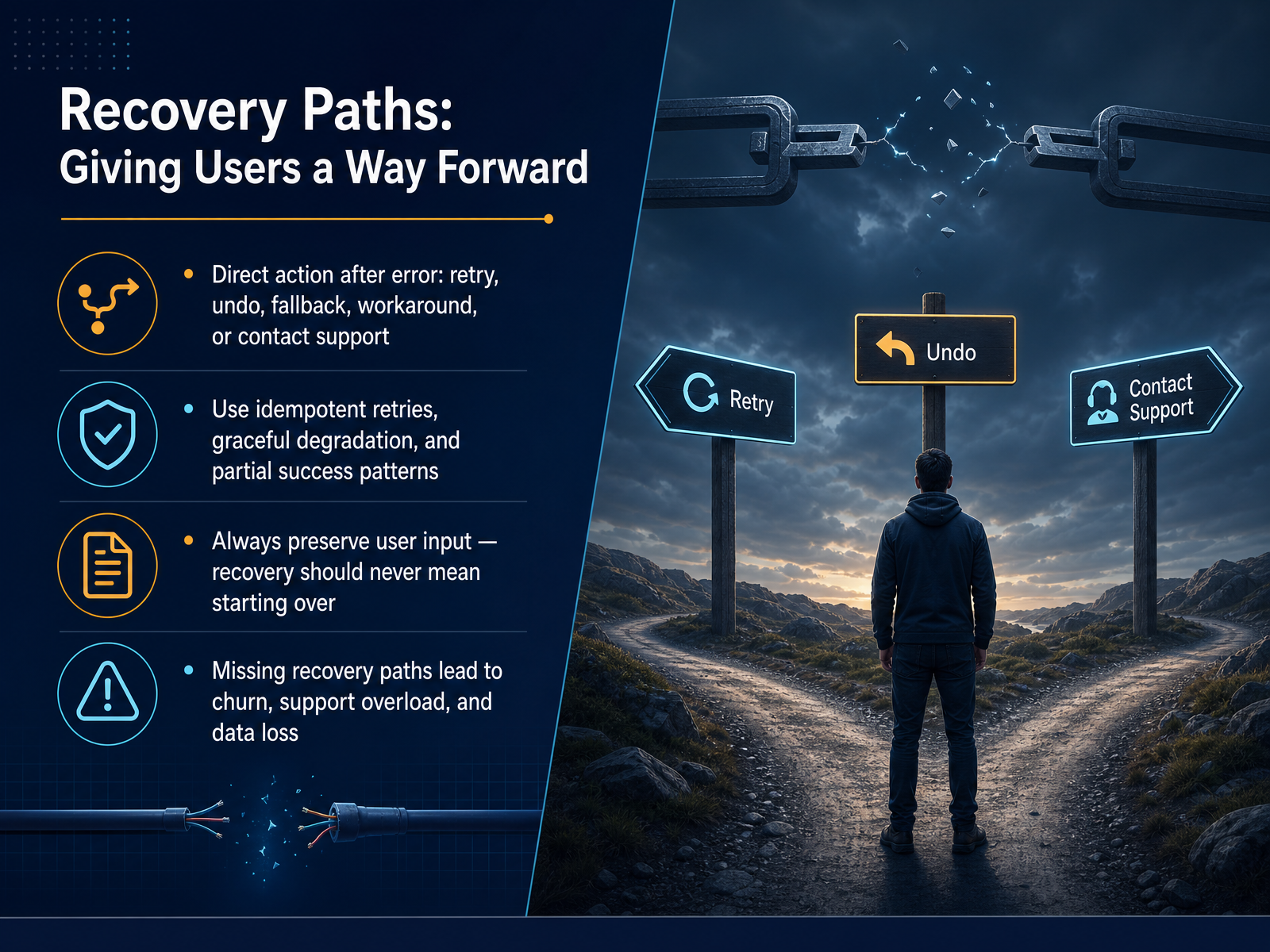
2 min - 09Recovery Paths: Giving Users a Way ForwardNow let's talk about what happens after the system detects a failure and shows a message. That's where recovery paths come in. A recovery path is simply a clear, immediate way for the user to move forward. Common paths include prompting the user to retry the action, offering an undo option, providing a fallback or alternative flow, suggesting a known workaround, or giving precise instructions to contact support. When you build these paths, aim for idempotent retries, meaning the same retry request can safely run multiple times without causing double charges or duplicate records. Also, use graceful degradation so one broken feature doesn't block the rest of the task, and apply partial success patterns so completed work isn't thrown away. Above all, always preserve user input. Recovery should never mean starting over from a blank form. When recovery paths are missing, real business damage follows: user churn increases, support teams get overloaded, and people lose data they already entered. So giving users a way forward isn't just polite, it is essential. Next, we'll map specific error types to the right recovery strategies.
 2 min
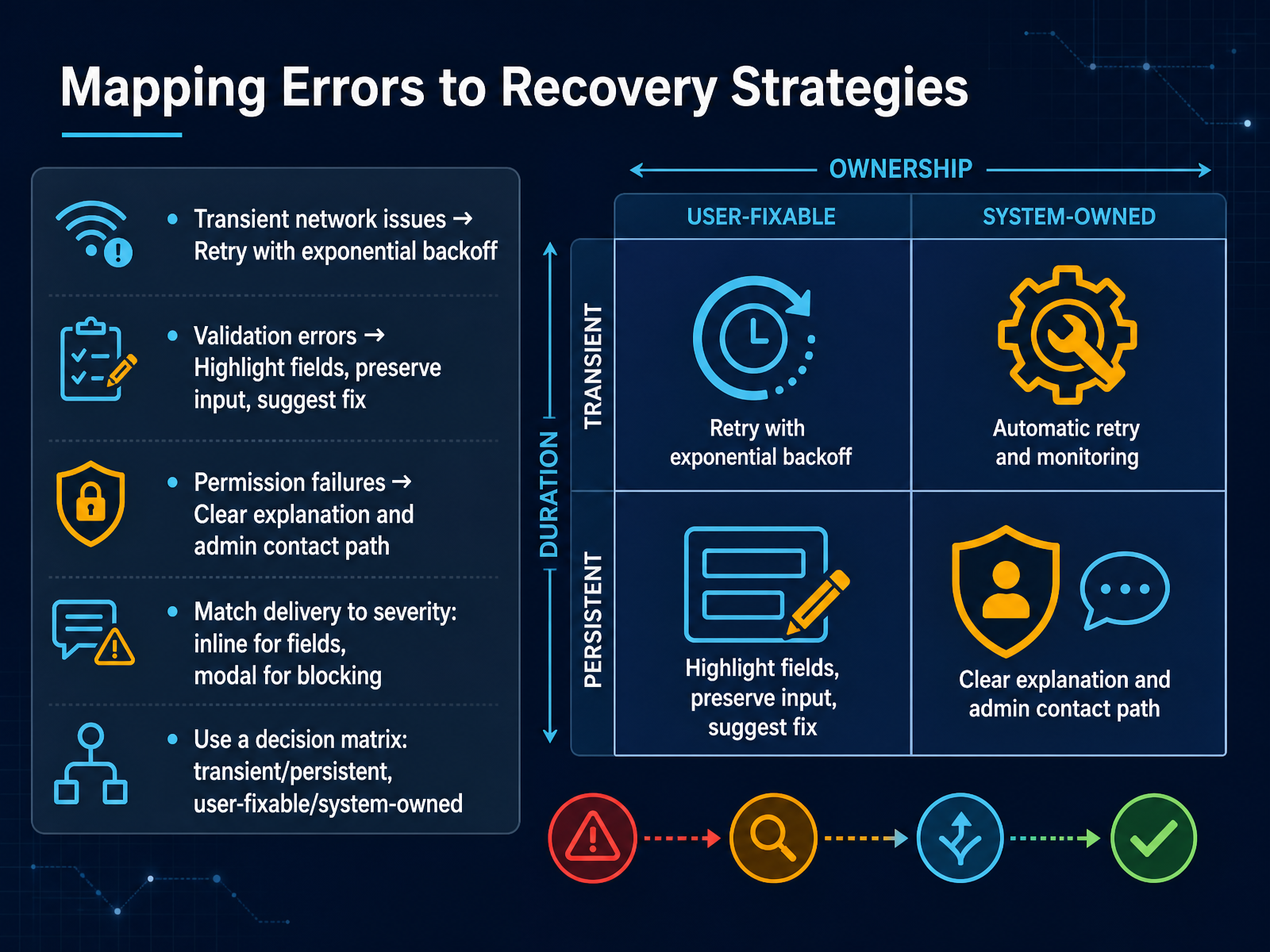
2 min - 10Mapping Errors to Recovery StrategiesNow let's map common errors directly to their recovery strategies. Think of this as matching the right fix to the right situation. When you hit a transient network issue, the best response is usually a retry with exponential backoff. That means the system waits a little longer between each attempt, giving the network time to recover without flooding it with requests. For validation errors, highlight the problem fields, preserve what the person already typed, and suggest the exact fix, like showing 'Please enter a valid email address' right next to the field. Permission failures call for a clear explanation of what access is missing and a direct path to the right administrator, removing the guesswork. Delivery should match severity. Use inline messages next to fields for small, correctable issues. Reserve modal dialogs for blocking problems that need immediate attention. A decision matrix helps here. Ask two questions. Is the error transient or persistent? And is it user-fixable or system-owned? The intersection tells you the right strategy every time. Coming up next, we'll connect detection, messages, and recovery into a single workflow.
 2 min
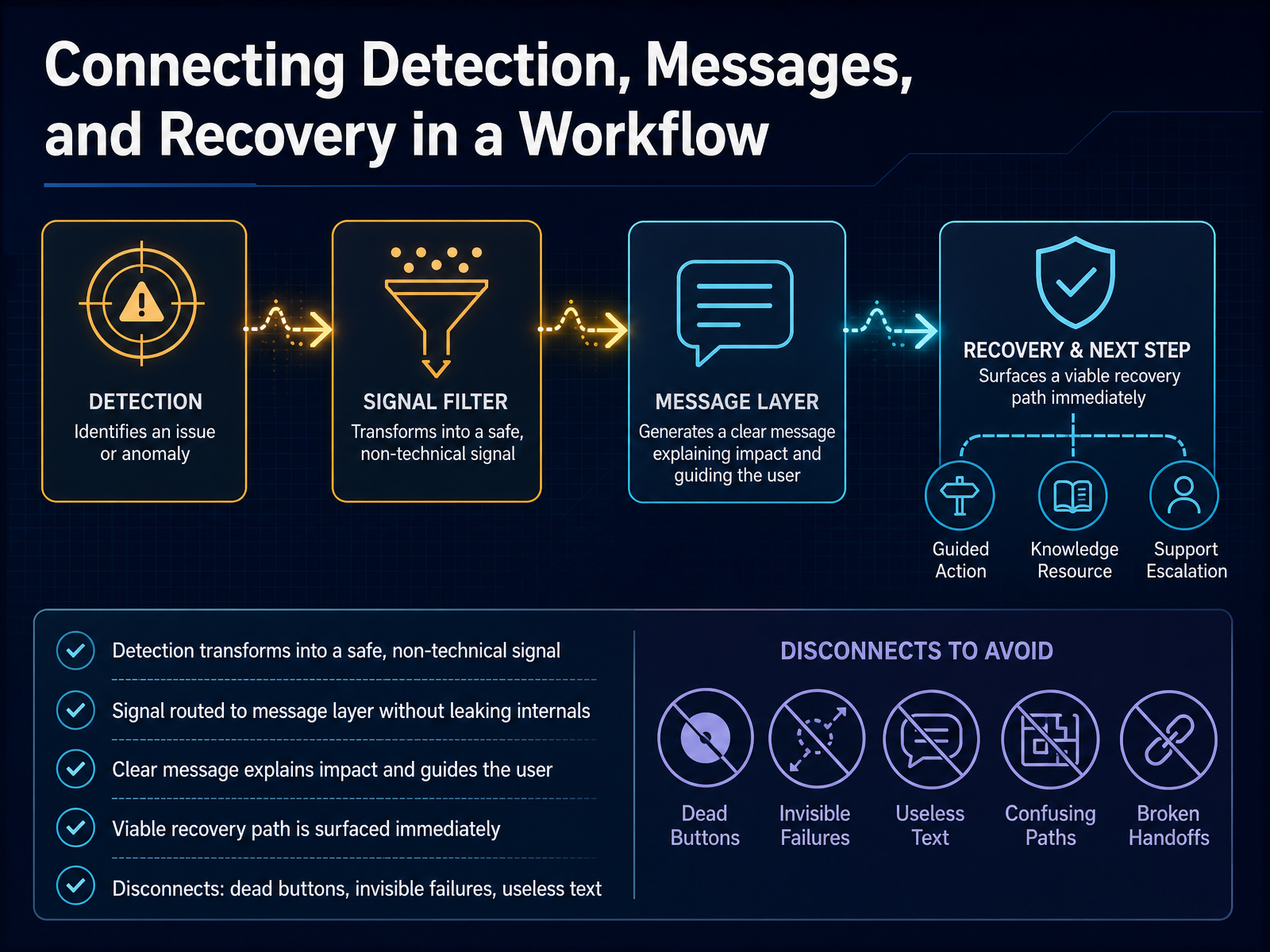
2 min - 11Connecting Detection, Messages, and Recovery in a WorkflowNow let’s connect the three parts we’ve been talking about: detection, messages, and recovery. When the system detects a problem, that failure signal gets transformed right away into a safe, non-technical signal. The raw details stay hidden, and only a clean, simple trigger moves forward to the message layer. That message then explains the impact in plain language and immediately points to a viable recovery path. A good example is when a file won’t upload, and the message says ‘File too large. Try a smaller version or use the compression tool.’ What you see is the clear message and the next step, not the error code. But when the connection breaks down, you get what we call ‘disconnects’: dead buttons that do nothing, invisible failures with no feedback at all, or useless text like ‘Error code 0x4,’ which tells you nothing and offers no way forward. So the whole workflow only works when detection turns into a clean signal, the message actually helps, and the recovery action is right there. Let’s see how this plays out in real products with some practical examples across platforms.
 2 min
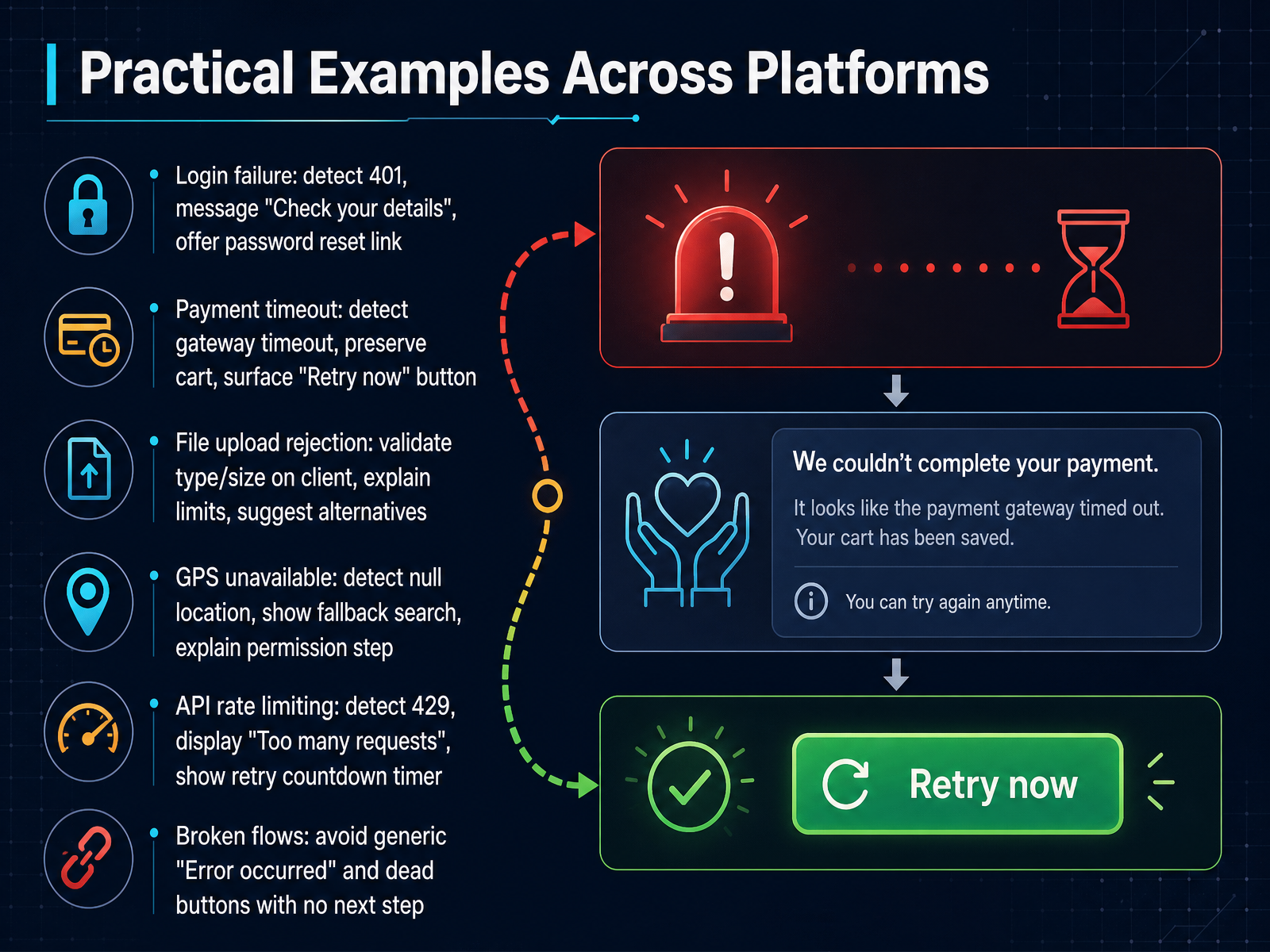
2 min - 12Practical Examples Across PlatformsLet's look at how these pieces fit together in some real examples. First, consider a login failure. The failure signal might be an HTTP 401 status code. The user-visible message could say "Check your details," and the recovery path is a password reset link. Next, think about a payment timeout. Here, the signal is a gateway timeout. The software preserves your shopping cart, shows a "Retry now" button, and keeps the recovery path clear and close. For a file upload rejection, we can validate the type and size on the client side before sending. The message explains the limits, and the recovery path suggests compressed or alternative file formats. When a GPS location comes back null, the signal is the empty result. The recovery path switches to a fallback search box and explains why enabling the permission helps. With an API rate limit, the signal is a 429 status code. The message says "Too many requests," and the recovery path shows a countdown timer before you can try again. All of these examples share one rule: avoid generic messages like "Error occurred" and avoid dead buttons with no next step. Every failure deserves a clear signal, a helpful message, and a visible way forward. Up next, we'll explore how testing and monitoring can keep the error experience reliable.
 2 min
2 min - 13Testing and Monitoring the Error ExperienceLet's talk about testing and monitoring the error experience for your learners. This is where we make sure everything we built actually works under real conditions. First, you want to rigorously test every error path. That means walking through what happens from the moment a failure signal fires, all the way to the user-visible message and the recovery action they take. Check each route manually, and verify that the correct message appears every time. Next, log those failure signals so you can measure what matters. Track how often an error occurs, then compare that to how often users successfully recover from it. That conversion rate tells you if your recovery path is doing its job. You also need to set alerts for broken recovery paths. For example, a dead Retry button that looks clickable but does nothing. That kind of silent failure frustrates users more than the original error. Catch it quickly with automated monitoring. Then refine your messages and recovery flows using real-user data. Look at real user monitoring data, support tickets, and session recordings. Watch where learners hesitate or give up, and adjust the wording or the recovery steps based on that evidence. Finally, make this a continuous process. Let real-user behavior and feedback from your support team guide steady improvements. Each interaction is a chance to make the error experience a little smoother. In the next slide, we'll bring everything together with a summary, design principles, and an action checklist you can use right away.
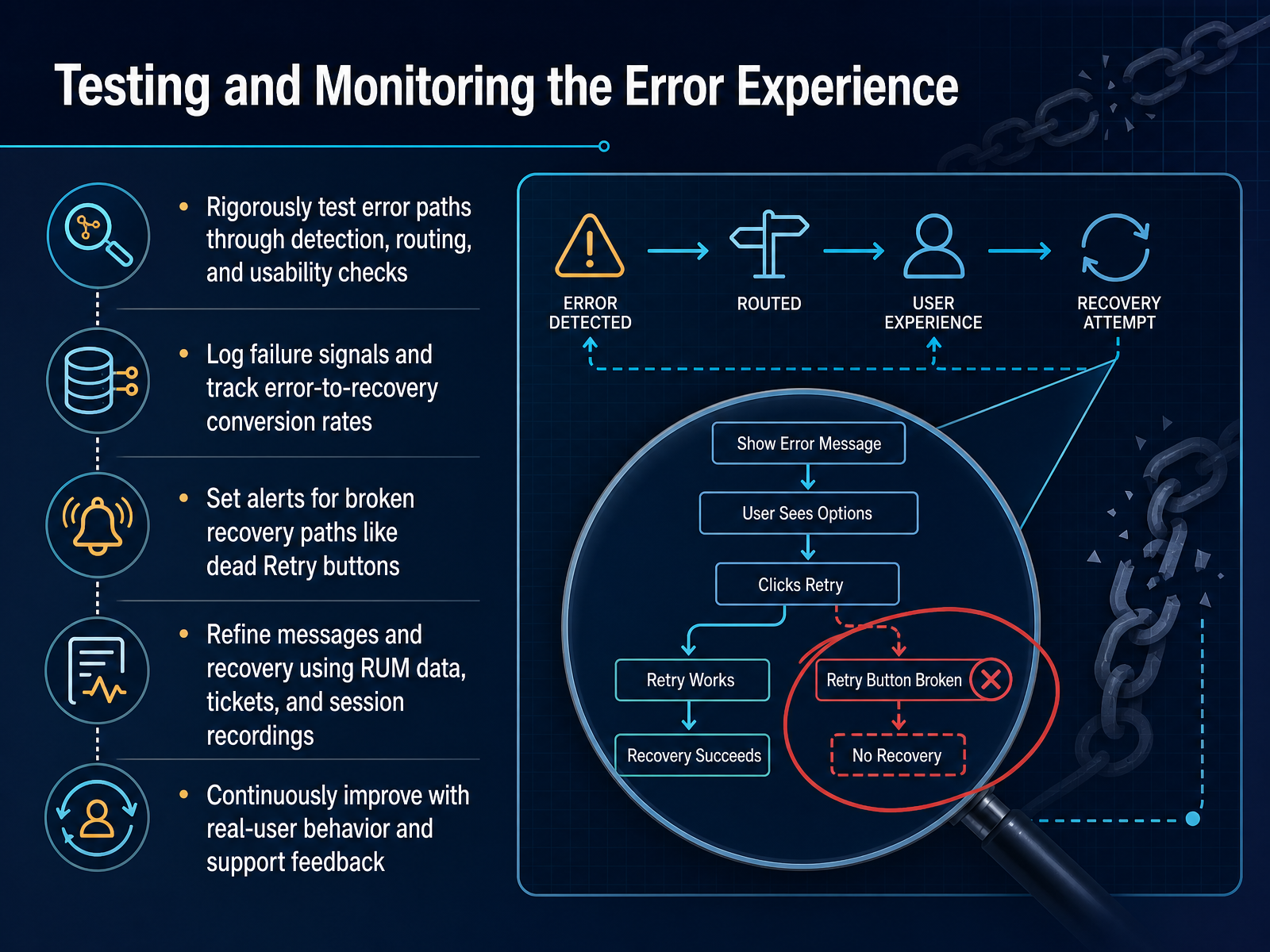 2 min
2 min - 14Summary, Design Principles, and Action ChecklistLet's bring everything together with a quick summary and a practical checklist you can use right away. We covered three distinct roles that every software error contains. First, the failure signal, which is the system-level indication that something didn't complete as expected. Second, the user-visible message, which is the plain-language explanation a person actually sees. And third, the recovery path, which is the clear next step the software offers to move forward. The design principles are simple: detect errors early, communicate clearly, and always preserve the user's work. Never blame the user, and always offer a specific, working next action. Before you finish your next interface, run through this checklist. Is the failure signal safe, or does it expose too much system detail? Is the user-visible message specific and written in plain language? And most importantly, does the error flow include a clear recovery action that actually works? Use these questions as your final review step, and you will build interfaces that feel helpful, not hostile. Thank you for joining me, and I'm confident these principles will serve you well in your work. Happy building.
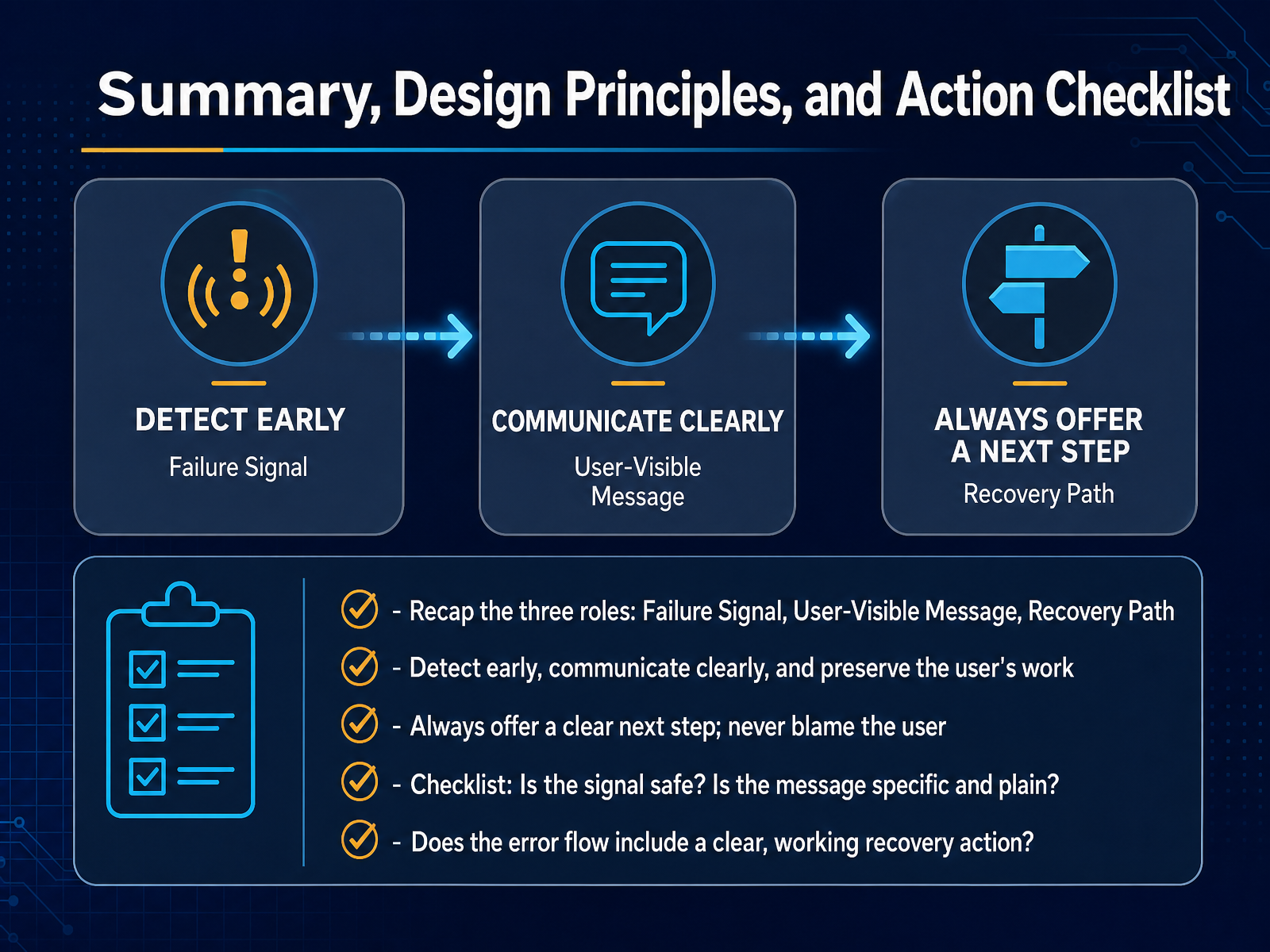 2 min
2 min
Take the deck with you
Download this course as a file — free, no sign-up needed.
- PDF handoutEvery slide page, ready to print or share.15 pages · 3.9 MBDownload
- Narrated PowerPointThe deck that presents itself — every slide carries the digital human's narration video.15 pages · 29.1 MBDownload
- PowerPoint slidesThe full deck as a .pptx — open it in PowerPoint, Keynote, or Google Slides.15 pages · 3.8 MBDownload
Free to use in your own training — please keep the PersonWise credit page at the end.
Have your own deck? Turn it into a course