Begin
12 pages · ~24 min
Computer Memory Fundamentals
This training introduces the fundamentals of computer memory, helping learners understand how data is stored and accessed in computing systems.
A digital instructor presents all 12 pages. Hold “Ask” at any point and ask out loud — the answer comes from this course. No sign-up needed.
What you’ll learn
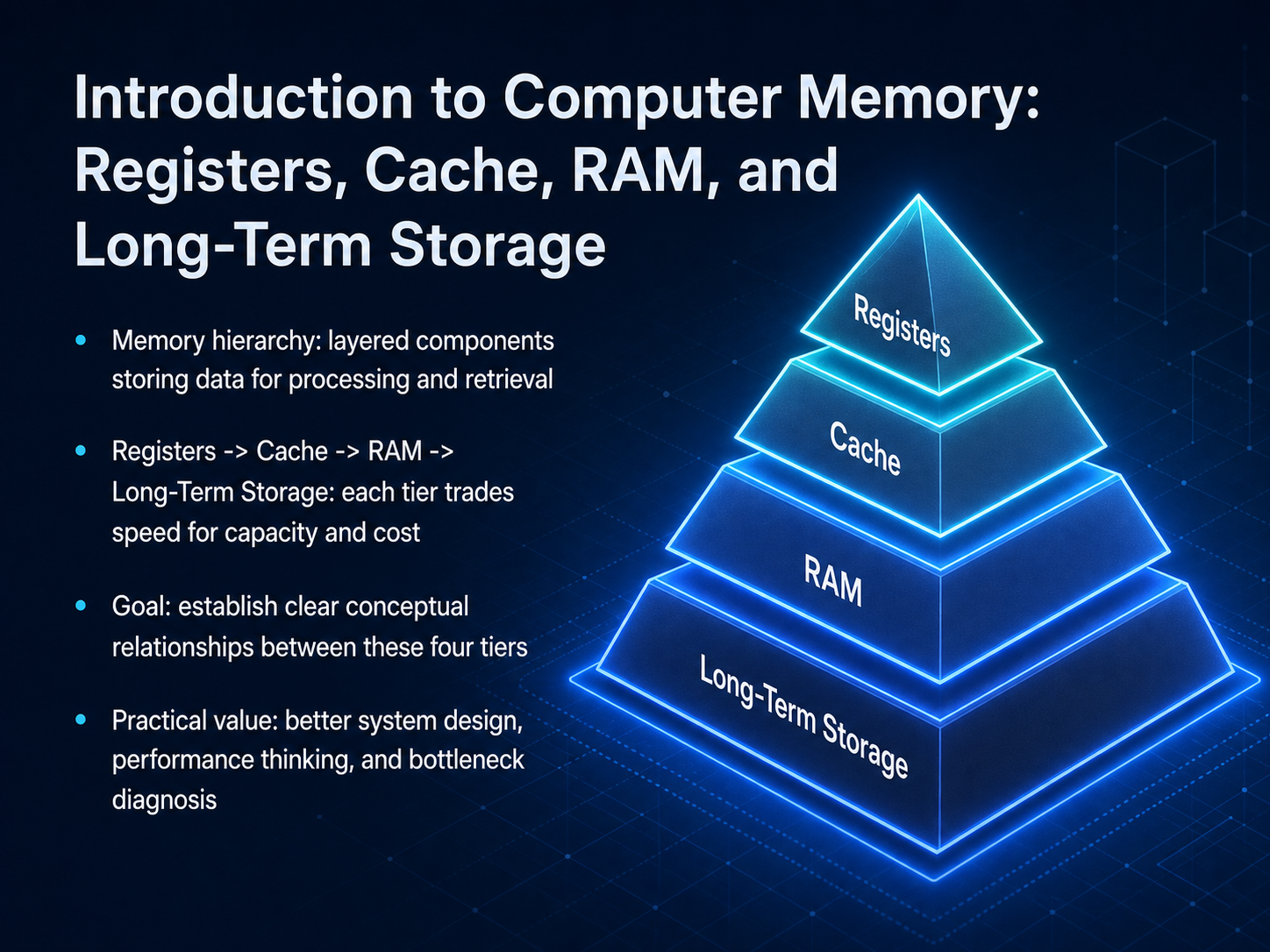
- 01Introduction to Computer Memory: Registers, Cache, RAM, and Long‑Term StorageWelcome. Today we are going to build a mental map of computer memory. We will connect four key pieces: registers, cache, RAM, and long-term storage. Think of these as a hierarchy, like a desk, a filing cabinet, and a warehouse. Each level trades speed for capacity and cost. The closer a piece of data is to the processor, the faster it can be accessed, but you pay more for every byte and you get less space. By the end, you will see why this matters. It helps you write better software, diagnose performance bottlenecks, and reason about system design with real insight. Next up, we will look at why this hierarchy must exist at all, digging into the fundamental trade-off between speed, capacity, and cost.algo-rhythm.deverickguan.medesigndoc.hashnode.dev+21 min
- 02Why a Hierarchy Exists: The Speed, Capacity, and Cost Trade‑OffLet's look at why we even need a memory hierarchy. No single technology can be fast, large, and cheap at the same time. It's a fundamental trade-off. We stack small, expensive, and blazing-fast layers on top of large, cheap, and slower ones. Think of a desk, a filing cabinet, and a warehouse. The top of the hierarchy, registers and cache, are like the clipboard on the desk. They are extremely quick but hold very little. As you move down to DRAM, SSDs, and hard drives, things get slower and cheaper. A good rule of thumb is that each tier is about one hundred times slower and one hundred times cheaper per byte than the one above it. To make this work, computers rely on two principles of locality. Temporal locality means a piece of data you just used will likely be needed again soon. Spatial locality means data stored near a recent access will likely be needed next. Your CPU uses spatial locality by fetching data in 64-byte blocks called cache lines, like grabbing a whole row of boxes instead of just one. Next, let's walk through the full memory pyramid, from sub-nanosecond access times all the way down to milliseconds.
 algo-rhythm.deverickguan.medesigndoc.hashnode.dev+22 min
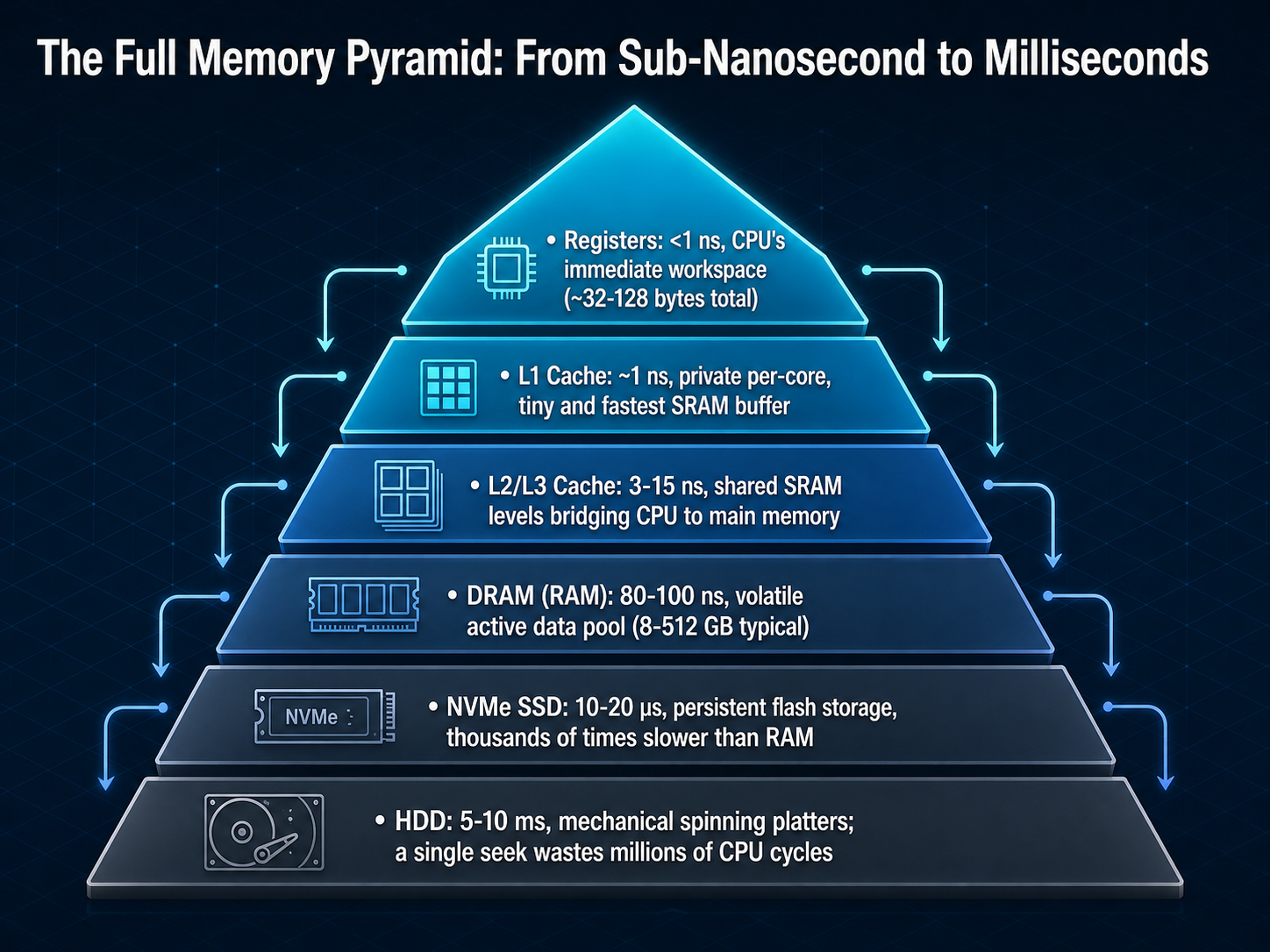
 - 03The Full Memory Pyramid: From Sub‑Nanosecond to MillisecondsNow let's put the whole pyramid together and see how the numbers stack up. At the very top, we have registers inside the CPU core, with access times under one nanosecond. That's the speed of a single CPU cycle. Drop one level to L1 cache, and our latency is about one nanosecond. To make this real, imagine that hitting L1 cache takes one second. On that same scale, a trip to main memory, to DRAM, takes over a minute and a half. That's a hundred times longer. An NVMe SSD, which we think of as lightning fast, takes over a day to return data in our model. And a traditional hard drive? A single seek would keep you waiting for nearly four months. The gap between each level is roughly one hundred times, which is why keeping your working data as high up as possible is the central game of computer performance. Next, we'll zoom into the very top step: registers, the CPU's immediate workspace.
 algo-rhythm.deverickguan.medesigndoc.hashnode.dev+21 min
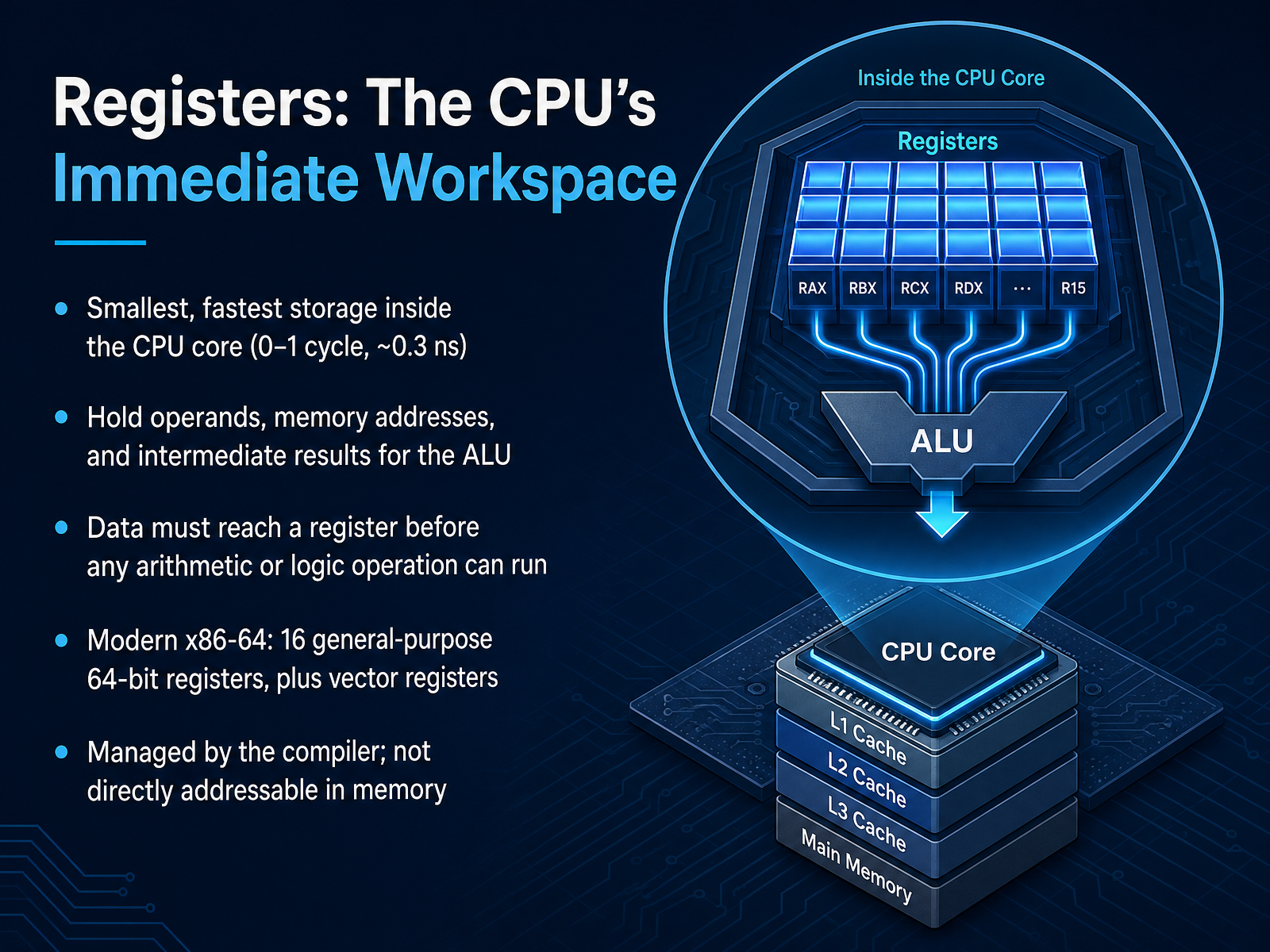
 - 04Registers: The CPU’s Immediate WorkspaceNow let's zoom all the way in to the very top of the memory hierarchy: registers. Think of the CPU core as a person sitting at a desk. The registers are like the front of that person's mind, or maybe the clipboard they're scribbling on right this instant. It's the smallest and fastest storage inside the entire computer, with access times of zero to one cycle, or about a third of a nanosecond. Data must be here before the CPU can do any real work. Before it can add two numbers or execute a logic operation, the operands and memory addresses have to be loaded into these registers. A modern x86 sixty-four processor gives you sixteen general-purpose registers, each sixty-four bits wide, plus extra vector registers for heavier math. The compiler manages them for you; they aren't directly addressable in main memory like your RAM is. This is the CPU's immediate workspace, where the action actually happens. Next, we'll step just outside this immediate workspace to the first level of staging: Cache Memory, the high‑speed buffer between the CPU and RAM.
 youngju.devsemicolony.devmemorysystemsauthority.com+22 min
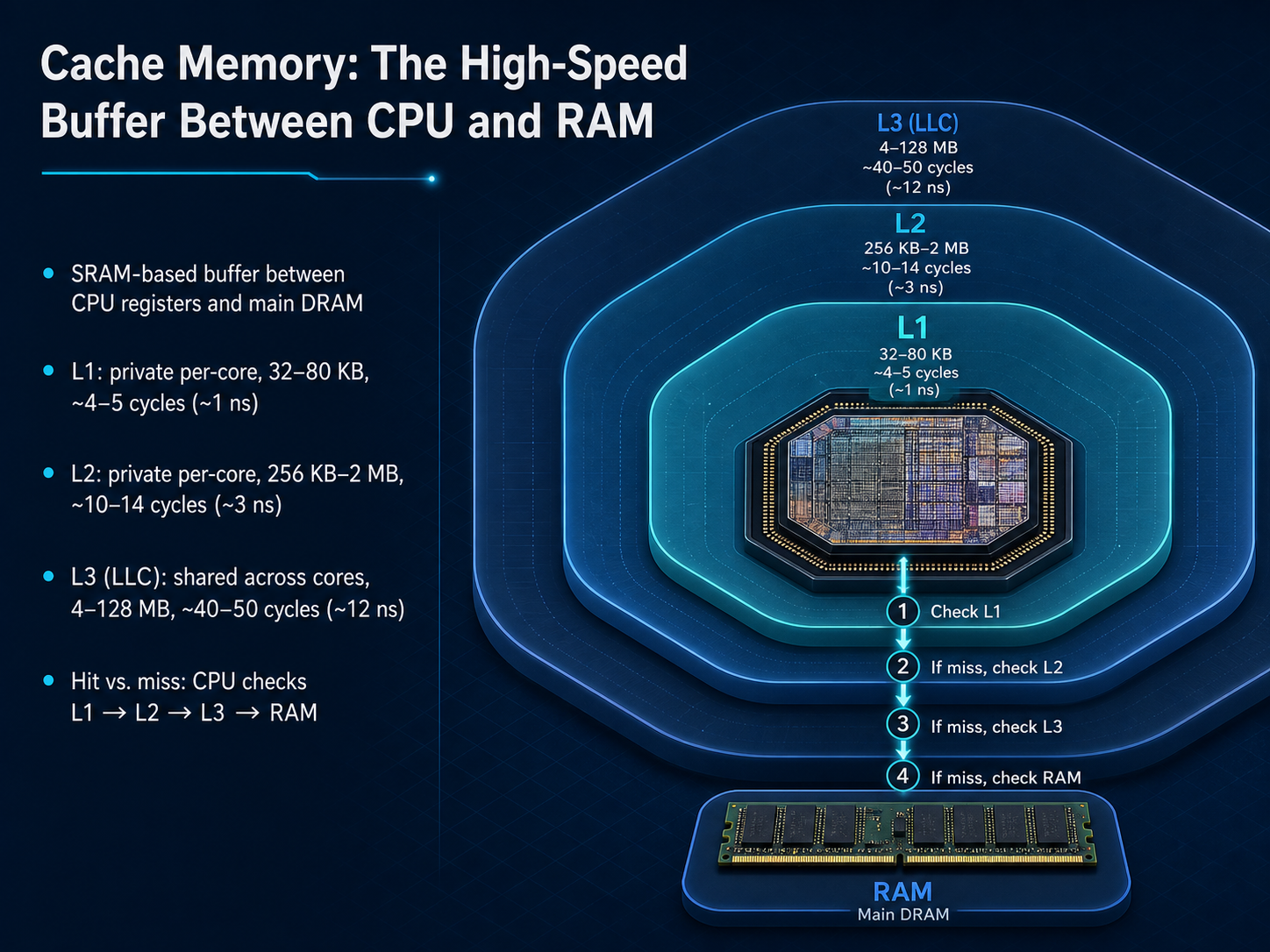
 - 05Cache Memory: The High‑Speed Buffer Between CPU and RAMNow let's zoom in on cache memory, the high-speed buffer sitting right between the CPU's registers and main RAM. Think of it like a set of progressively larger clipboards right next to your work desk. The closer the clipboard, the smaller it is, but the faster you can grab what's on it. The cache is built from SRAM, which is much faster than the DRAM used for your main system memory. L1 is the fastest and smallest. It's private to each core, typically 32 to 80 kilobytes, and delivers data in just 4 or 5 cycles, about 1 nanosecond. When the core can't find what it needs in L1, it checks the L2 cache, still private, but a bit larger, from 256 kilobytes up to 2 megabytes. An L2 hit takes about 10 to 14 cycles, around 3 nanoseconds. If L2 also misses, the request goes to L3, also called the Last Level Cache. This one is shared across all the cores on the chip, ranging from 4 to 128 megabytes. A hit here takes about 40 to 50 cycles, or roughly 12 nanoseconds. So the CPU always searches in sequence: L1 first, then L2, then L3, and only then goes out to main RAM. Each step down this chain costs roughly 10 times the latency of the step above it, which is why high hit rates in the early levels are so critical for performance. Next, let's look under the hood at cache internals that shape performance.
 youngju.devsemicolony.devmemorysystemsauthority.com+22 min
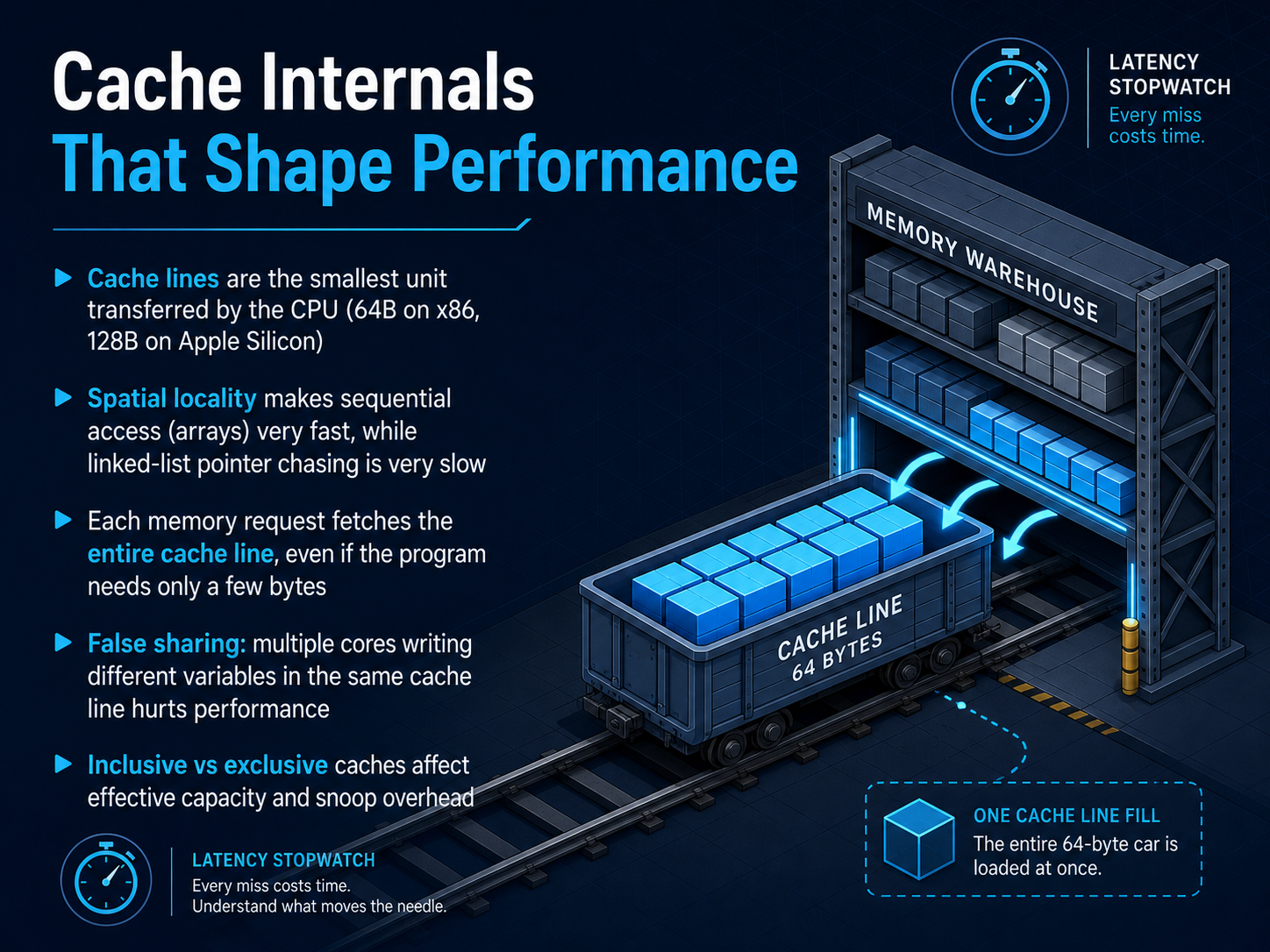
 - 06Cache Internals That Shape PerformanceNow let's look at what actually lives inside the cache and how it shapes performance. Caches move data in fixed-size blocks called cache lines. On most x86 processors, a cache line is 64 bytes. On Apple Silicon, it's 128 bytes. Every time your program reads even a single byte, the CPU pulls the entire cache line into the cache. This is why sequential access, like walking through an array, is so fast. The data you need next is already sitting right there on the same cache line. But pointer chasing, like following a linked list, is slow. Each node might live on a different cache line, and every step can trigger a new cache miss. A similar problem is false sharing. When two cores each write to different variables that happen to share a single cache line, the cache coherence protocol forces constant invalidations between the cores. It becomes a performance killer, even though the threads never touch each other's data. Finally, whether a cache level is inclusive or exclusive changes the effective capacity and how much snooping traffic happens between cores. These internal details explain why two programs with the same algorithm can run at wildly different speeds. Next, we'll move one step down the hierarchy to main memory, the active data pool where everything lives before the cache needs it.
 youngju.devsemicolony.devmemorysystemsauthority.com+22 min
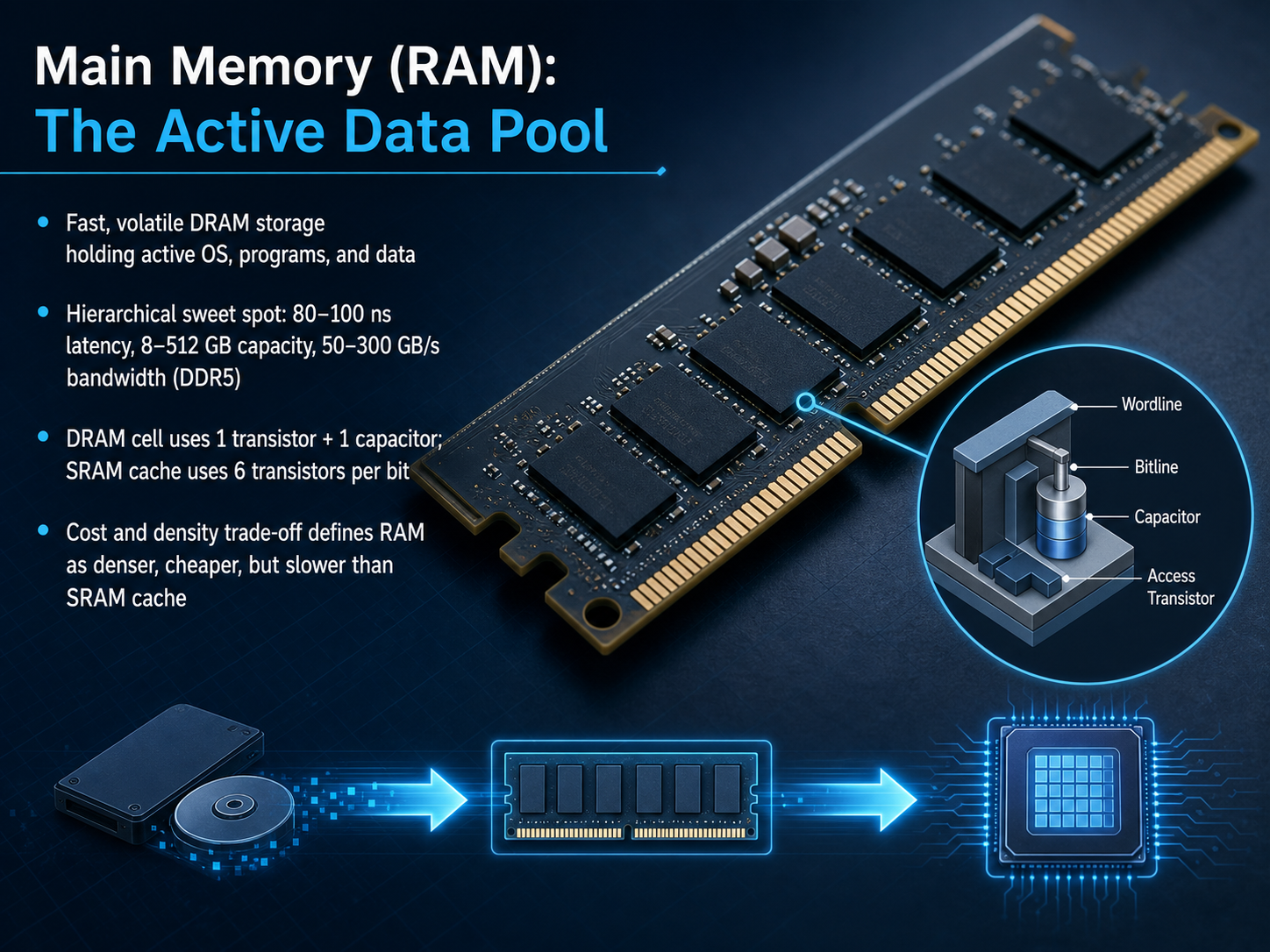
 - 07Main Memory (RAM): The Active Data PoolNext, let's look at the workhorse of active computing: main memory, or RAM. Think of RAM as your actual desk workspace. It’s fast, spacious enough for your current projects, but everything on it disappears if the power goes out. Technically, we call this volatile DRAM storage. It holds your operating system, your open programs, and the data they're actively using. RAM is the perfect sweet spot in our hierarchy. It’s much denser and cheaper than the SRAM inside your CPU cache, but the trade-off is speed. Where L1 cache accesses happen in about one nanosecond, a trip to DDR5 RAM typically takes eighty to one hundred nanoseconds and offers incredible bandwidth for heavy workloads. To understand why it's slower, let's peek inside a memory cell. Your lightning-fast SRAM cache needs six separate transistors to store a single bit of data. A DRAM cell in your RAM stick uses just one transistor and one tiny capacitor. This simpler structure is what allows manufacturers to pack many gigabytes onto a single stick at an affordable price, but it also makes the cell physically slower to read. So, while RAM isn’t as instantaneous as cache, it provides the massive, cost-effective data pool your processor needs to actually run desktop applications, browsers, and enormous datasets.
 youngju.devsemicolony.devmemorysystemsauthority.com+22 min
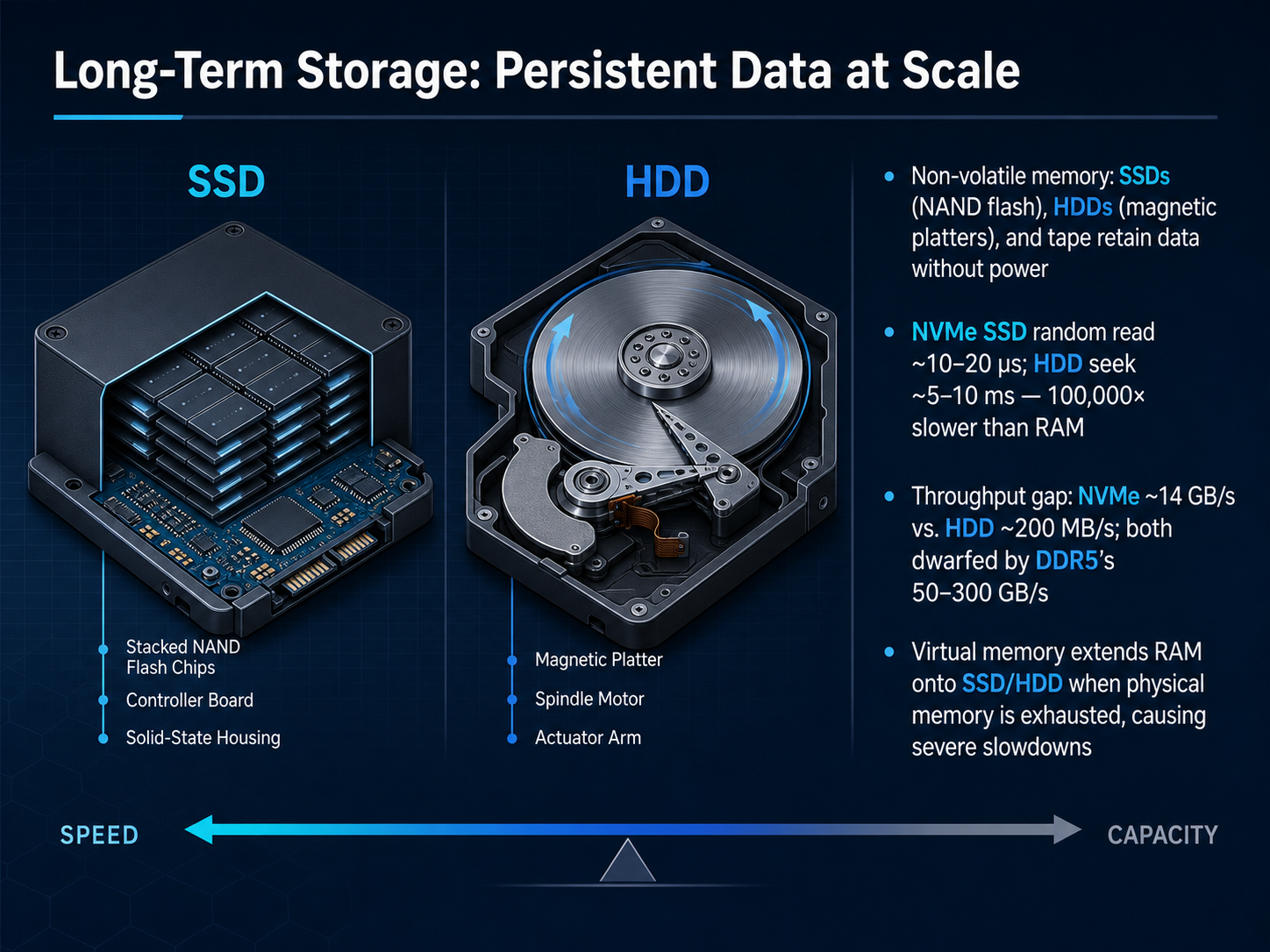
 - 08Long‑Term Storage: Persistent Data at ScaleNow we step completely outside the processor and into long-term storage, the persistent data that lives on when the power goes off. Think of this as the filing cabinet or the bookshelf in our desk analogy. Here we find SSDs and hard drives. An SSD uses NAND flash chips with no moving parts; a modern NVMe SSD can find a random piece of data in roughly ten to twenty microseconds and stream data at up to fourteen gigabytes per second. A hard disk drive uses spinning magnetic platters and a mechanical arm, which takes about five to ten milliseconds to seek random data, a full one hundred thousand times slower than RAM. That throughput gap is just as dramatic, with a fast hard drive topping out around two hundred megabytes per second, a tiny fraction of what DDR5 main memory delivers. When physical RAM runs out, the operating system borrows space from the SSD or hard drive, calling it virtual memory. But because storage is so much slower, this paging creates a severe performance hit. So every time the workload spills from RAM to disk, it is like the whole office grinding to a halt. Next we will trace how a single data request actually travels through every level with the topic: How Information Moves: Tracing a Data Read Through the Hierarchy.
 youngju.devsemicolony.devmemorysystemsauthority.com+22 min
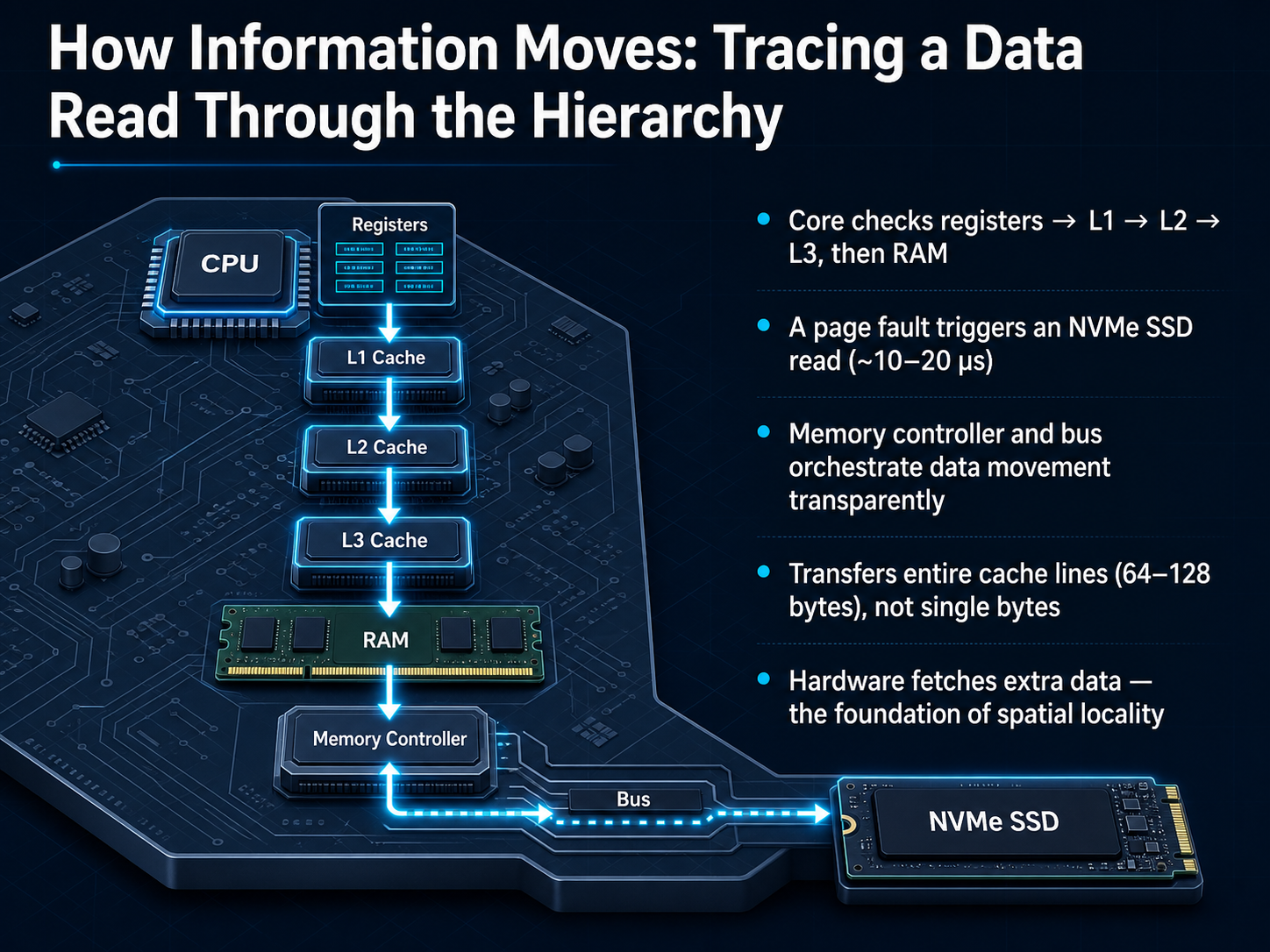
 - 09How Information Moves: Tracing a Data Read Through the HierarchyNow, let's trace what actually happens when the processor needs a piece of data. It feels like one smooth motion, but a whole choreography unfolds in the background. First, the core checks its registers—that's its own immediate workspace. If the data isn't there, it checks the L1 cache, which is a few cycles away. A miss there sends it to the larger L2, and then to the shared L3 cache. If the data still hasn't been found, we finally access main system RAM. If the required data isn't even in RAM—perhaps it's currently on your drive—a special condition called a page fault is triggered. This tells the system to fetch the needed data from your NVMe SSD, a process that takes roughly ten to twenty microseconds. Orchestrating this entire journey is the memory controller, which works transparently so you never have to manage these steps. A key detail here is that the hardware never fetches just a single byte. It always transfers an entire cache line—typically sixty-four or one hundred twenty-eight bytes. Because programs often access nearby memory addresses, fetching extra data automatically primes the pump for future requests. This principle is the foundation of what we call spatial locality. Next, we'll explore the practical implications of how this hierarchy governs real performance.
 youngju.devsemicolony.devmemorysystemsauthority.com+22 min
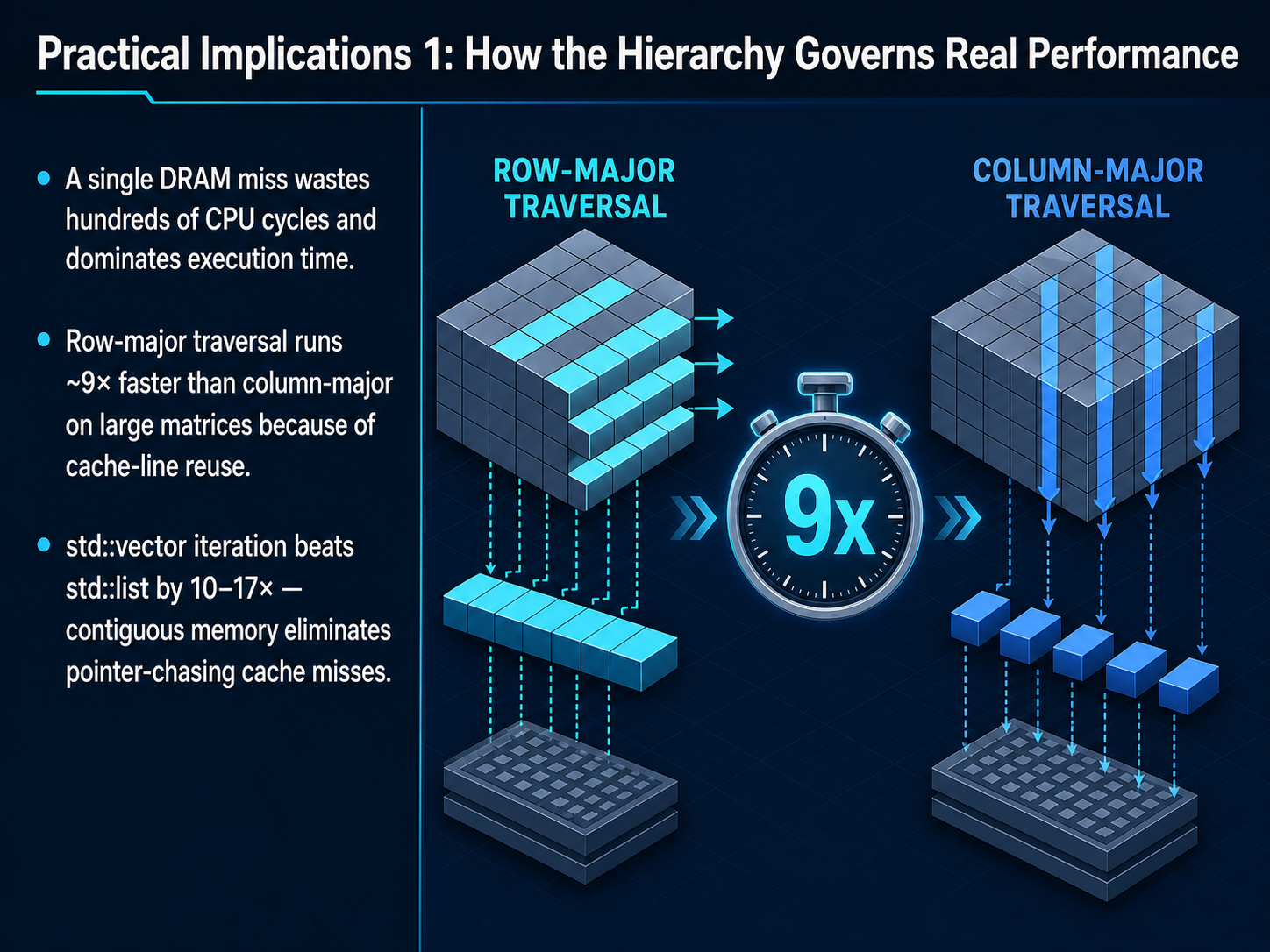
 - 10Practical Implications 1: How the Hierarchy Governs Real PerformanceNow let’s look at how the memory hierarchy actually governs real performance. The biggest impact comes from a single DRAM miss. When your processor has to go all the way out to main memory, it wastes hundreds of CPU cycles. In fact, a one percent DRAM miss rate on a hot loop can steal about seven out of every ten cycles just waiting on memory. That’s why access patterns matter so much. Take a large matrix. Visiting it row by row, the way the data is laid out in memory, runs about nine times faster than visiting it column by column. Why? Because each cache line you fetch brings along the next several elements you need, instead of just one element from a distant row. The same principle shows up in C++ containers. Iterating over a standard vector can be ten to seventeen times faster than iterating over a linked list. The vector packs its elements tightly in sequential memory, so the prefetcher stays happy. A linked list scatters its nodes across the heap, and every step follows a pointer, which often means another cache miss. So the lesson is clear: data layout isn’t a minor detail; it’s often the difference between running at full speed and spending most of your time waiting for memory.
 youngju.devsemicolony.devmemorysystemsauthority.com+22 min
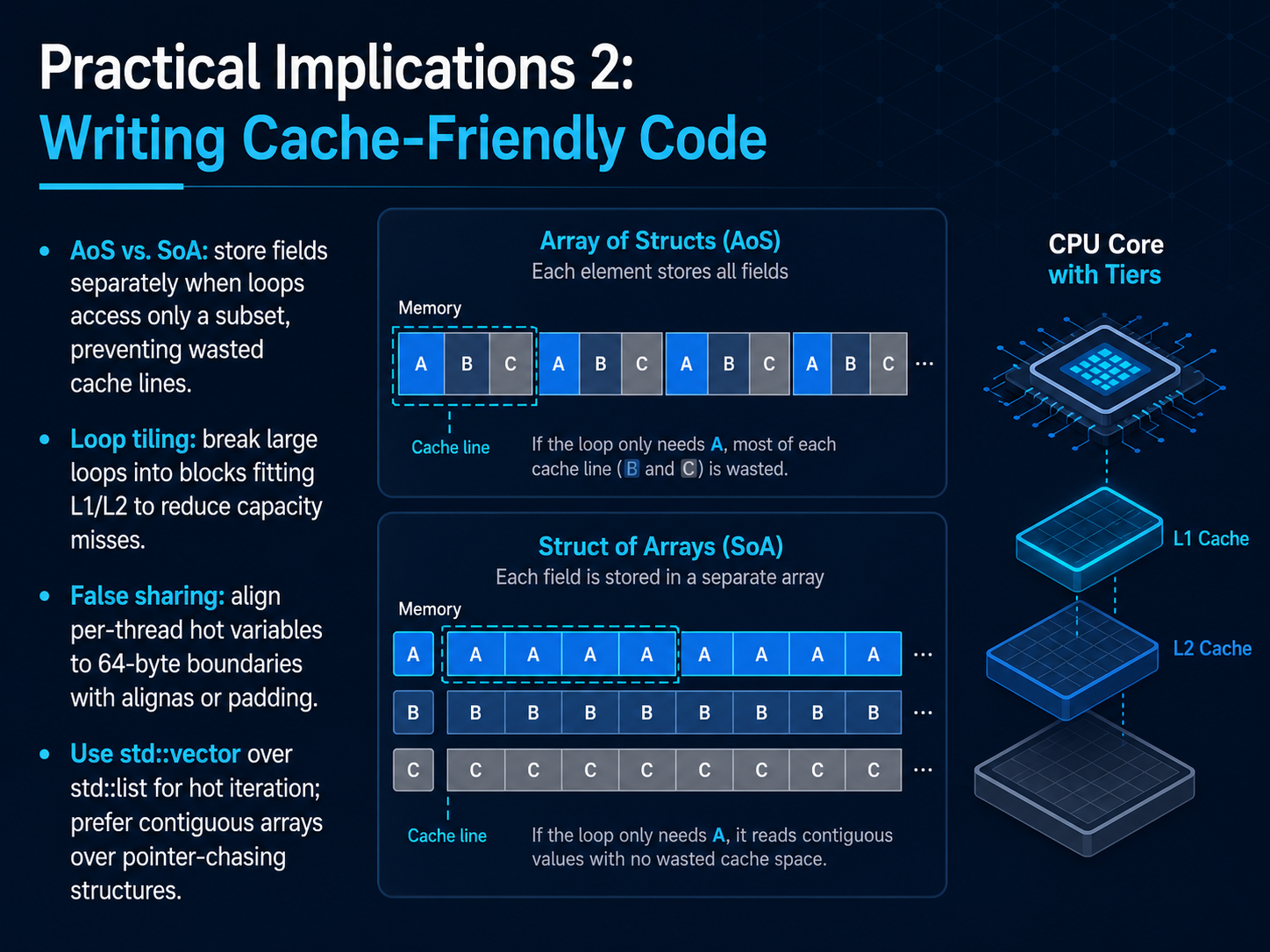
 - 11Practical Implications 2: Writing Cache‑Friendly CodeAligning your data layout with real hardware behavior has direct, practical coding implications. Let’s translate the ideas we just discussed into concrete actions you can take right now. First, think about Array of Structures versus Structure of Arrays. If your loop only needs a few fields from a large collection, split those fields into separate, contiguous arrays. That way, every byte the CPU fetches into a cache line is actually used, instead of wasting space on unused data. Second, use loop tiling, also called blocking. Break a huge loop into smaller chunks that fit comfortably in the L1 or L2 cache. This keeps your working set close to the processor and dramatically reduces capacity misses. Third, watch out for false sharing in multi-threaded code. When different cores write to variables that sit on the same cache line, they trigger expensive invalidation traffic, even if they never touch the same variable. Align hot, per-thread counters or flags to a 64-byte boundary using alignas or simple padding. Finally, in your everyday C++ code, favor std::vector over std::list for hot iteration. Contiguous arrays let the prefetcher work beautifully, while pointer-chasing structures like linked lists cause a cache miss with almost every step. Let’s pull all these layers together in our final summary: The Complete Picture of Computer Memory.
 pkglog.combaeldung.comweb.cecs.pdx.edu+22 min
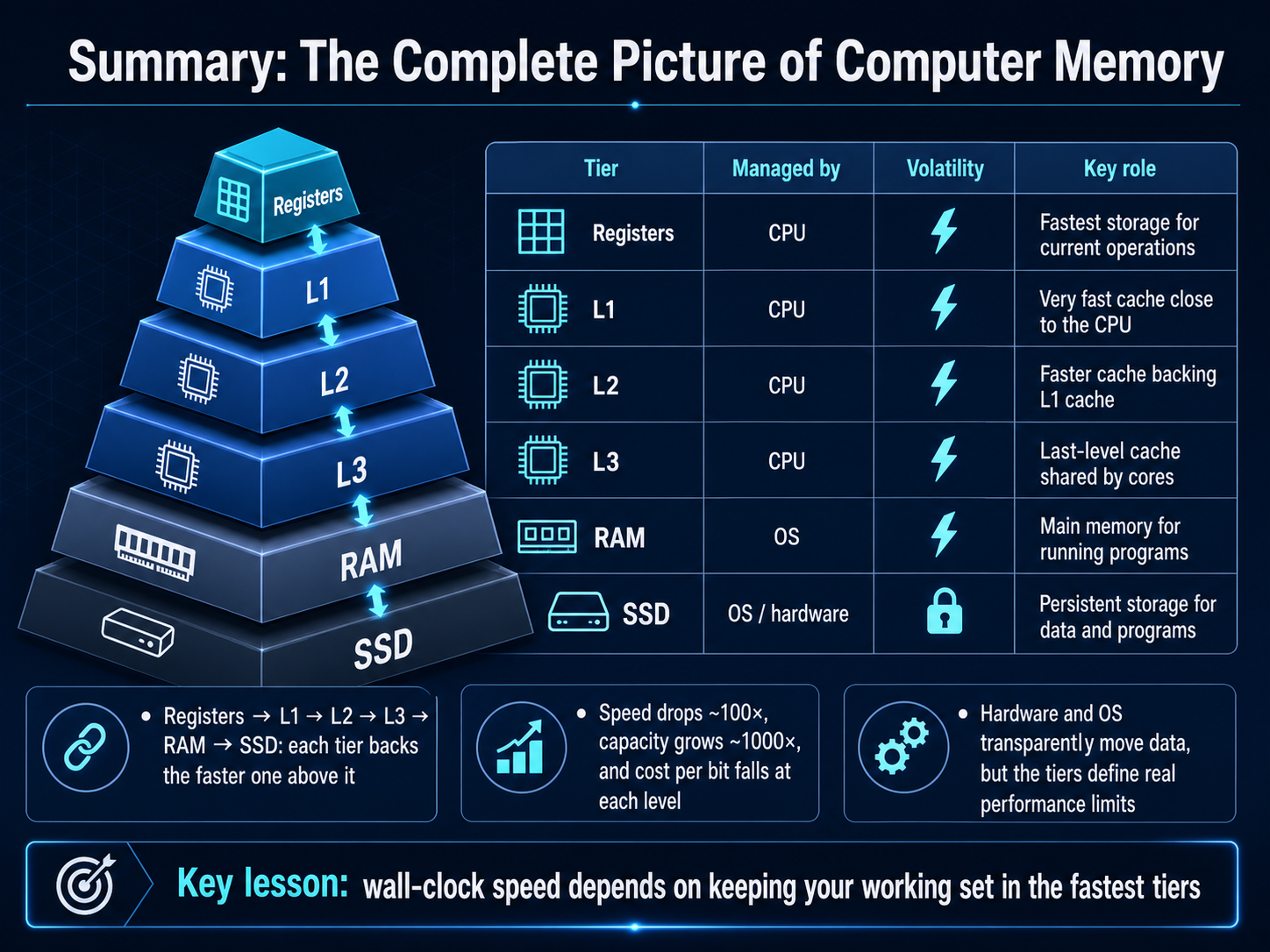
 - 12Summary: The Complete Picture of Computer MemorySo let's bring the whole picture together. Think of the memory hierarchy as a chain of desks, each one backing up the faster desk above it. Registers feed the L1 cache, L1 overflows to L2, L2 to L3, then to your main system RAM, and finally to the long-term storage on your SSD. At each step down, the speed drops dramatically—we're talking roughly a factor of a hundred times slower—while the capacity explodes, often growing by a factor of a thousand. The cost to store each bit of data plummets at the same time. Now, the beautiful part is that the hardware and the operating system transparently shuffle data between these levels so you don't have to manage it. However, these physical tiers define the real performance limits of your machine. The single most important lesson to take away is this: the true, wall-clock speed of any program depends almost entirely on keeping its active working set in the fastest possible tiers—ideally, inside the CPU's own caches. Thank you for joining me on this journey through the memory hierarchy, and happy computing.
 youngju.devsemicolony.devmemorysystemsauthority.com+22 min
Take the deck with you
Download this course as a file — free, no sign-up needed.
- PDF handoutEvery slide page, ready to print or share.13 pages · 3.5 MBDownload
- Narrated PowerPointThe deck that presents itself — every slide carries the digital human's narration video.13 pages · 12.6 MBDownload
- PowerPoint slidesThe full deck as a .pptx — open it in PowerPoint, Keynote, or Google Slides.13 pages · 3.4 MBDownload
Free to use in your own training — please keep the PersonWise credit page at the end.
Have your own deck? Turn it into a course
Sources consulted
Web sources consulted while building this course.
- Memory Hierarchy Primer — Algorhythm — algo-rhythm.dev
- Latency values for programmers in 2024 - Blog — erickguan.me
- Latency Numbers Every Programmer Should Know (2026 Edition) — designdoc.hashnode.dev
- kindatechnical() - Memory Latency Numbers Every Programmer Should Know — kindatechnical.com
- Latency Reference — Event Looped — eventlooped.com
- CPU Cache & Memory Hierarchy Complete Guide 2025: L1/L2/L3, Cache Line, False Sharing, Performance Tuning | Chaos and Order — youngju.dev
- How CPU Caches Work — L1, L2, L3, MESI coherence, false sharing — semicolony.dev
- Memory Hierarchy in Computing Systems Explained | Memory Systems Authority — memorysystemsauthority.com
- CPU Memory Hierarchy: Latencies and Optimization — sudonull.com
- Cache Deep Dive I — The Memory Wall and Locality - DEV Community — dev.to
- Cache-Friendly C++: Data-Oriented Design and AoS vs SoA — pkglog.com
- Cache-Friendly Code | Baeldung on Computer Science — baeldung.com
- CS 201 Writing Cache-Friendly Code — web.cecs.pdx.edu
- Optimize cache-friendly loops in C with tiling, prefetch, and restrict — tech-champion.com
- Why Your Rust Code Is Slow: Writing Cache-Friendly Code for Real Performance — elitedev.in