Begin
14 pages · ~28 min
SQL Database Creation Workflow
Learn to create an SQL database step by step, from initial design to implementation, in this practical workflow guide for aspiring database developers and administrators.
A digital instructor presents all 14 pages. Hold “Ask” at any point and ask out loud — the answer comes from this course. No sign-up needed.
What you’ll learn
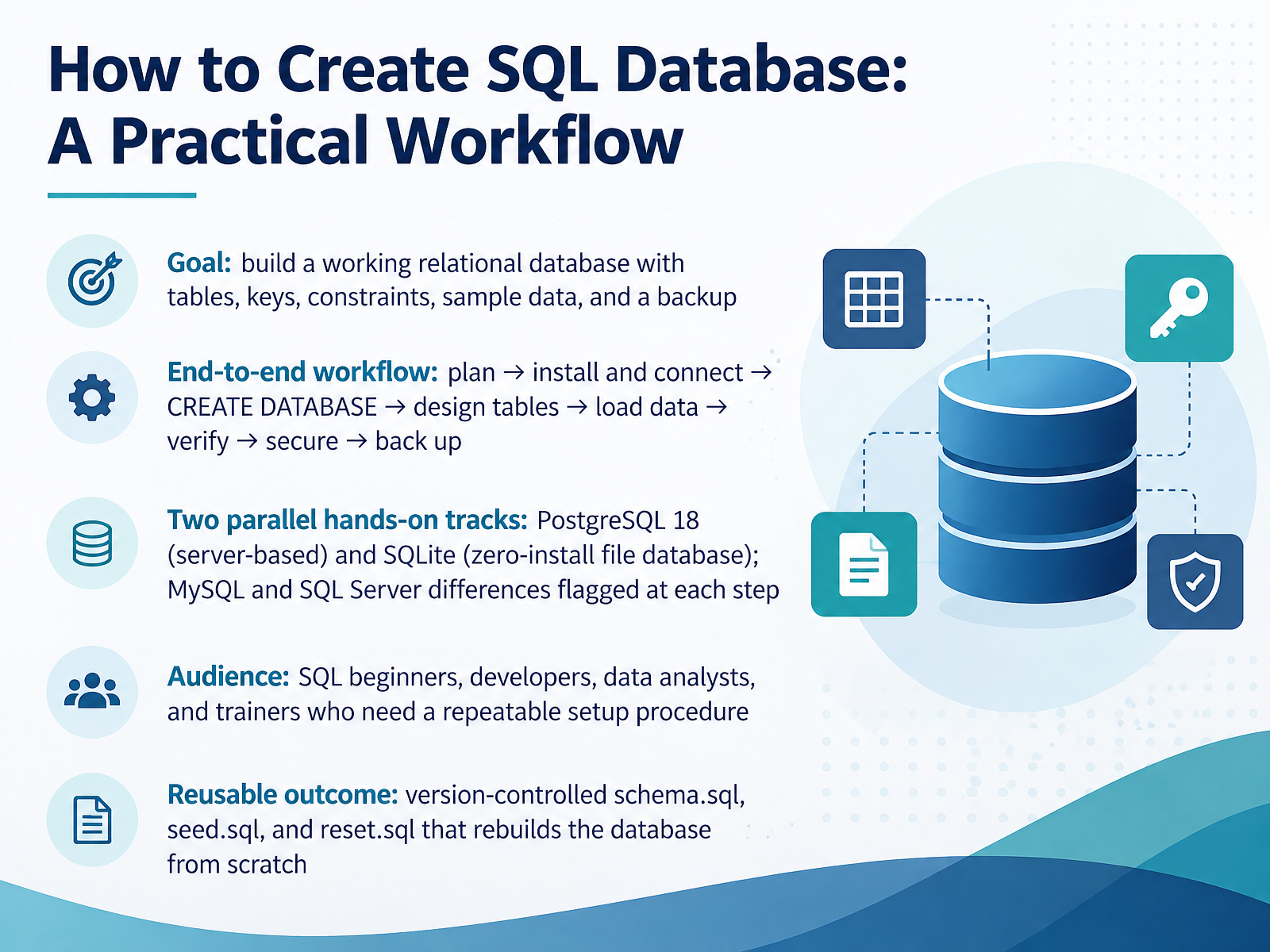
- 01How to Create SQL Database: A Practical WorkflowWelcome. This course walks you through creating a working SQL database, from an empty machine to a database you can rebuild at any time. Our goal is simple. You'll build a relational database with tables, keys, constraints, sample data, and a backup. We'll follow one end-to-end workflow. Plan your design, install and connect, run the create database command, design your tables, load data, verify it, secure access, and back everything up. You'll get two hands-on tracks running in parallel. One uses PostgreSQL eighteen, a server-based database. The other uses SQLite, a zero-install database stored in a single file. Where MySQL or SQL Server differ, I'll flag that at each step. This course is for beginners, developers, analysts, and trainers who want a repeatable setup procedure. And you'll finish with three version-controlled files: schema dot sql, seed dot sql, and reset dot sql, so you can rebuild the database from scratch. Let's start with choosing your engine before you create anything.digitalocean.comsyntaxpathways.commydba.dev+21 min
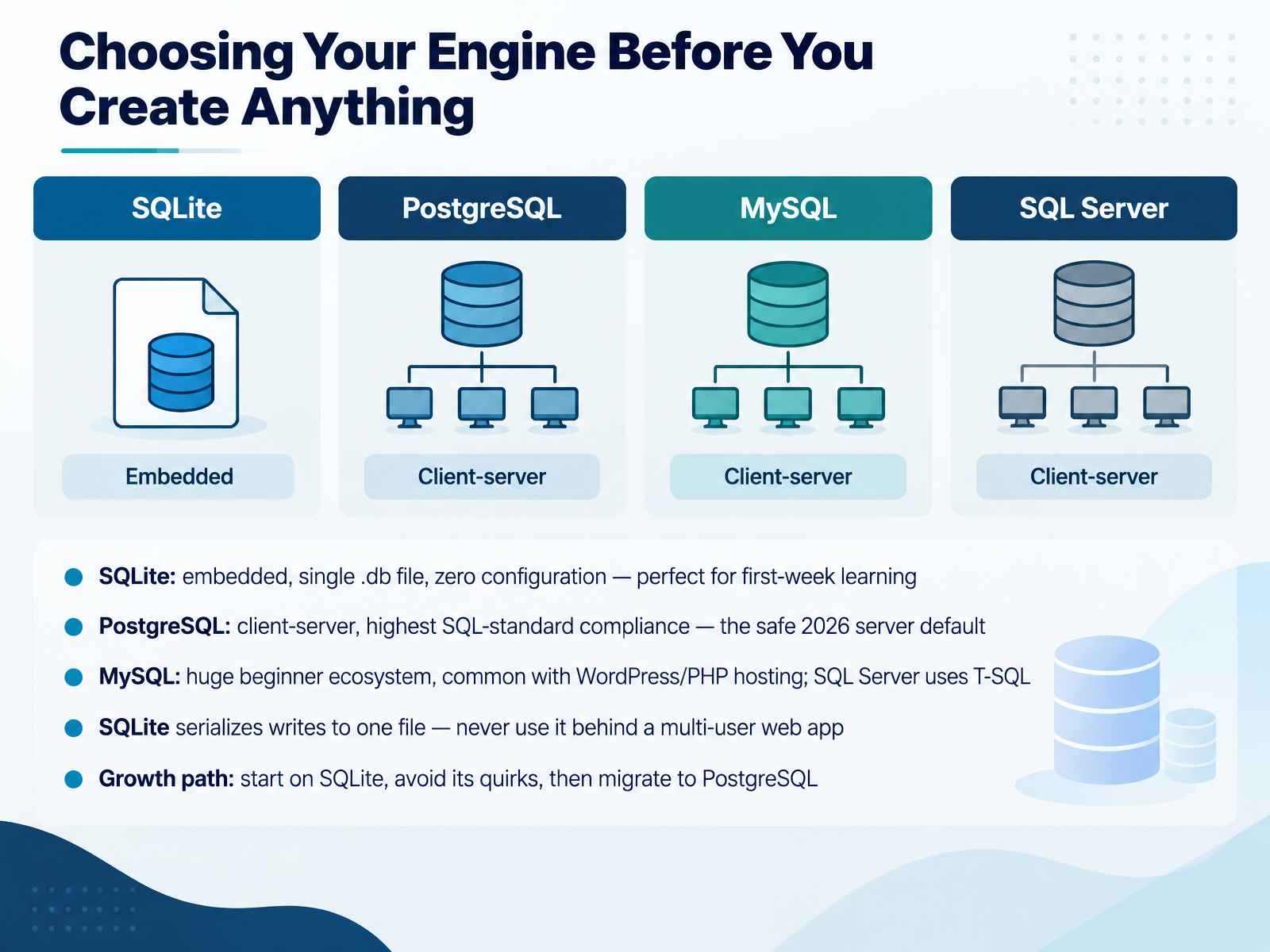
- 02Choosing Your Engine Before You Create AnythingBefore you create any database, one small decision saves you days of confusion. Which engine will you use? Here are three options. SQLite is embedded. No server, no setup. Your whole database is one file, which makes it perfect for your first week of learning. PostgreSQL runs as a client server. It follows the SQL standard most closely, and it is the safe server default in 2026. MySQL has a huge beginner ecosystem and shows up often with WordPress and PHP hosting. Note that SQL Server is different again. It uses its own language, T-SQL. Now a common beginner mistake. SQLite allows only one write at a time to its file. So never put it behind a multi user web app. A good growth path is this. Start on SQLite. Avoid its permissive quirks by writing plain, strictly typed SQL. Then migrate to PostgreSQL when you need shared, concurrent access. Next, we look at core concepts: database, schema, table, and instance.
 digitalocean.comsyntaxpathways.commydba.dev+21 min
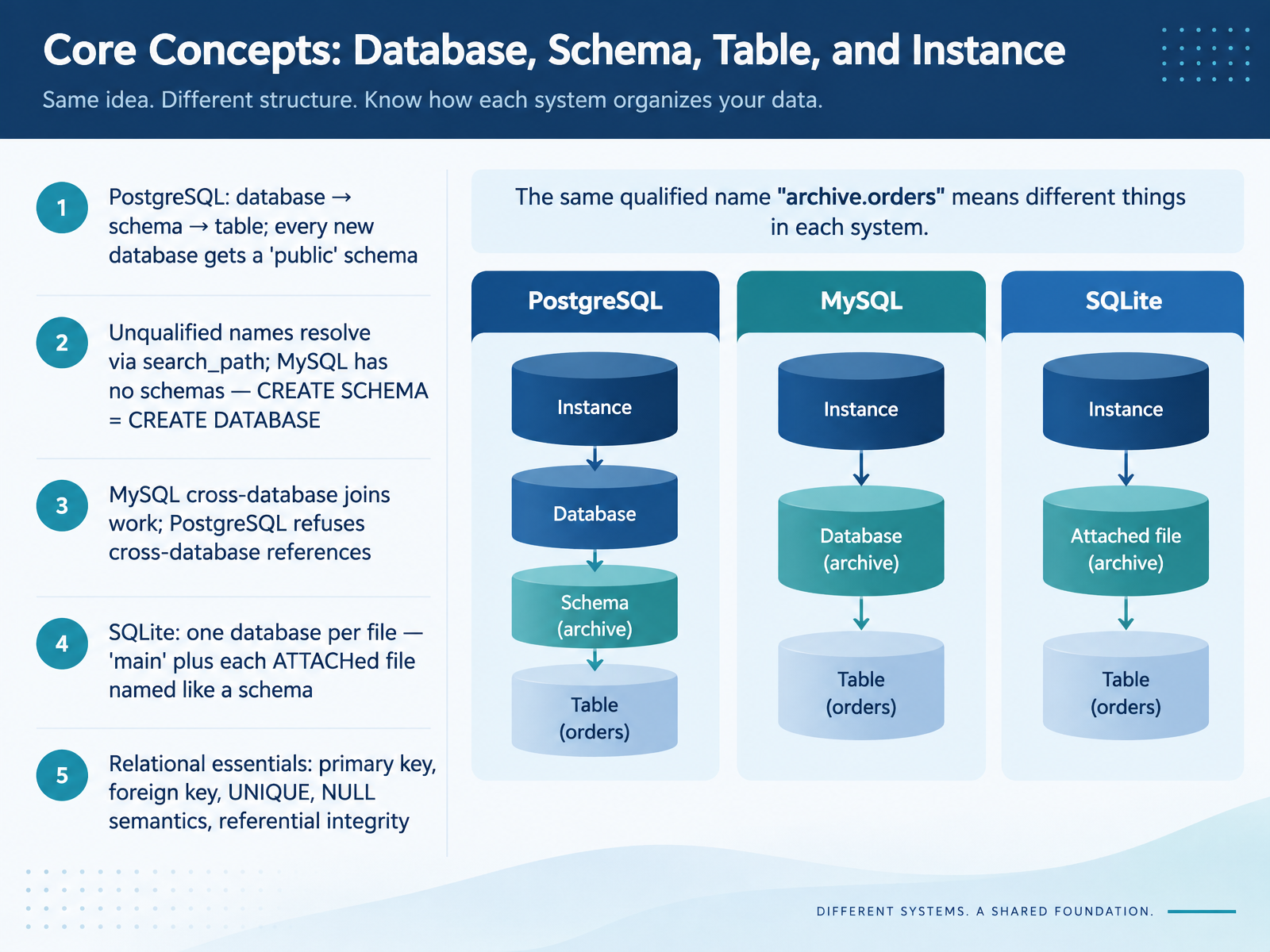
- 03Core Concepts: Database, Schema, Table, and InstanceNow let's clarify the vocabulary. In PostgreSQL, there are three levels: a database contains schemas, and a schema contains tables. Every new database gets a schema called public, and a table created without a schema name lands there. The search path setting decides which schemas are checked first for an unqualified name. MySQL is simpler. Schema and database are the same thing, so CREATE SCHEMA does exactly what CREATE DATABASE does. That is also why MySQL can join tables across databases, while PostgreSQL refuses cross-database references. In SQLite, one file is one database. You get a schema named main, plus a name for each file you attach. Finally, the relational essentials apply everywhere: primary keys, foreign keys, unique constraints, null handling, and referential integrity. One common beginner mistake: in SQLite, foreign keys are off by default, so run the foreign keys pragma on every connection. Next, we plan the database, from requirements to schema sketch.
 stackoverflow.comdbsyntax.commysmartcopilot.com+22 min
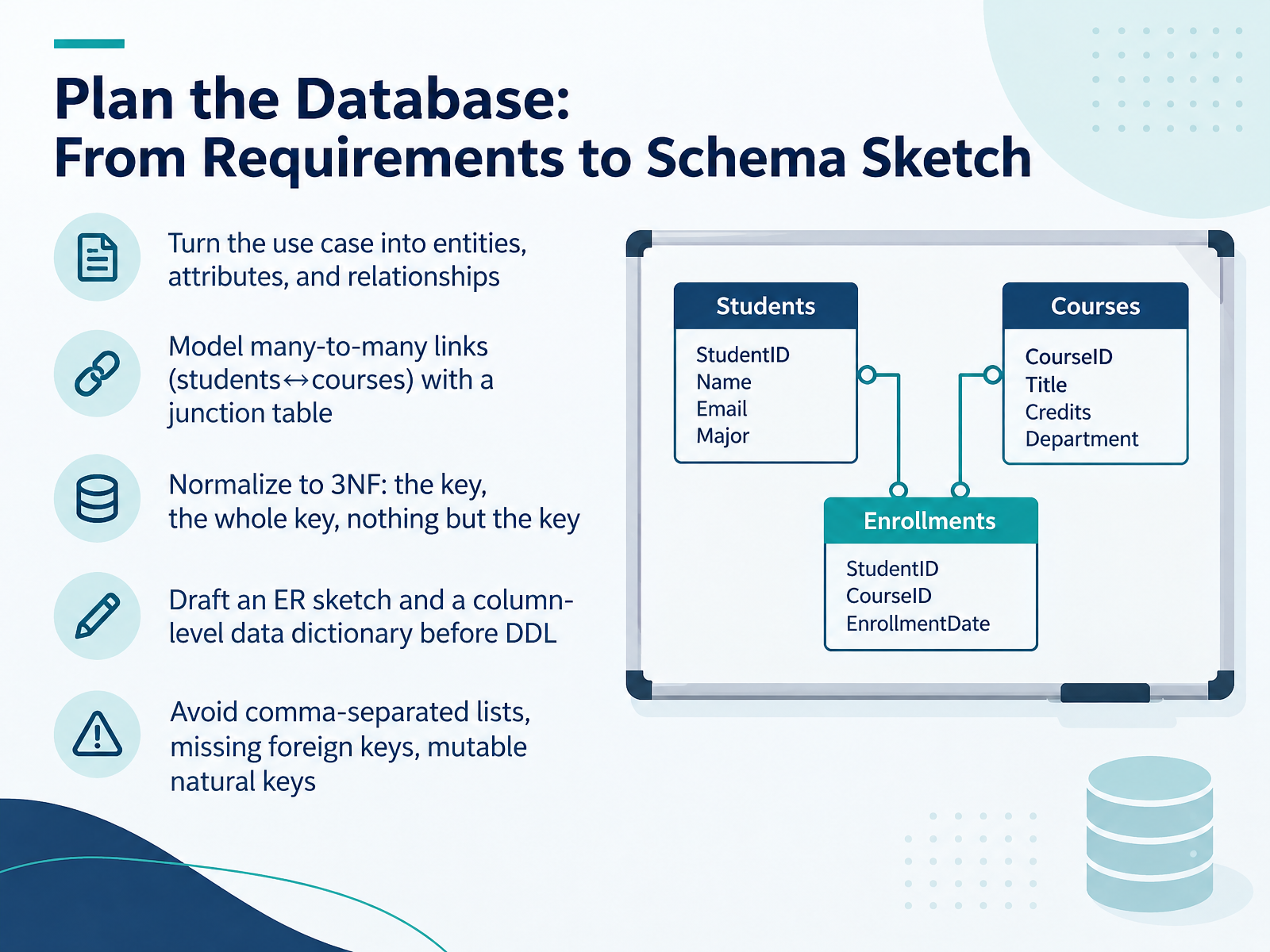
- 04Plan the Database: From Requirements to Schema SketchNow let's plan the database before writing any SQL. Start by turning your use case into entities, attributes, and relationships. An entity is a thing, like a student or a course. An attribute is a fact about it, like a name. When two tables have a many-to-many link, such as students and courses, don't put a list in one column. Create a junction table with one row per pairing. Next, normalize to third normal form. A simple test is: every non-key column must describe the key, the whole key, and nothing but the key. So remove columns that depend on another non-key column. Before writing any create table statements, sketch an entity relationship diagram and a column-level data dictionary. Common beginner mistakes to avoid: comma-separated lists, missing foreign keys, and mutable natural keys. Use stable keys instead. Next, let's set up the environment and connect securely.
 cs.dartmouth.edusimulic.comopencs.aalto.fi+21 min
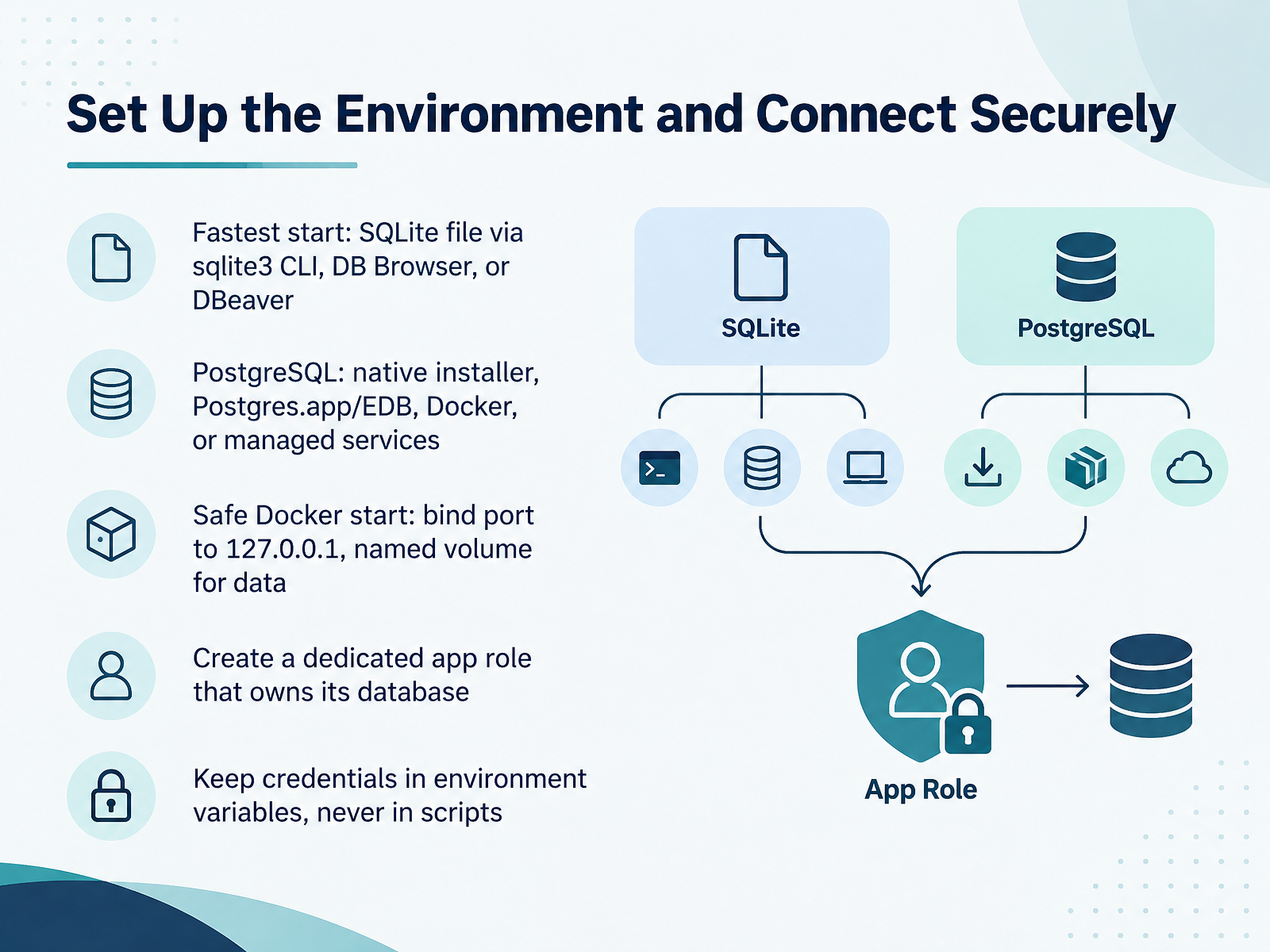
- 05Set Up the Environment and Connect SecurelyNow let's set up your environment and connect securely. The fastest start is SQLite. It's just a single file, and you can open it with the sqlite3 command line tool, DB Browser, or DBeaver. There is no server to install. If you need PostgreSQL, you have several options. Use the native installer, Postgres.app on Mac, the EDB installer on Windows, Docker, or a managed cloud service. If you choose Docker, start it safely. Bind the port to one two seven dot zero dot zero dot one, so it's only reachable from your own machine. Use a named volume for your data, so it survives when the container is recreated. Next, create a dedicated app role that owns its database. Don't connect your application as the superuser. In PostgreSQL, run CREATE ROLE app LOGIN, set its password, then run CREATE DATABASE app OWNER app. Finally, keep credentials in environment variables, never in scripts. A password committed to a file tends to leak. Treat it like a secret from day one. That gives you a safe, repeatable setup. Next, we'll look at CREATE DATABASE and its canonical syntax across engines.
 docs.docker.comhub.docker.comprisma.io+22 min
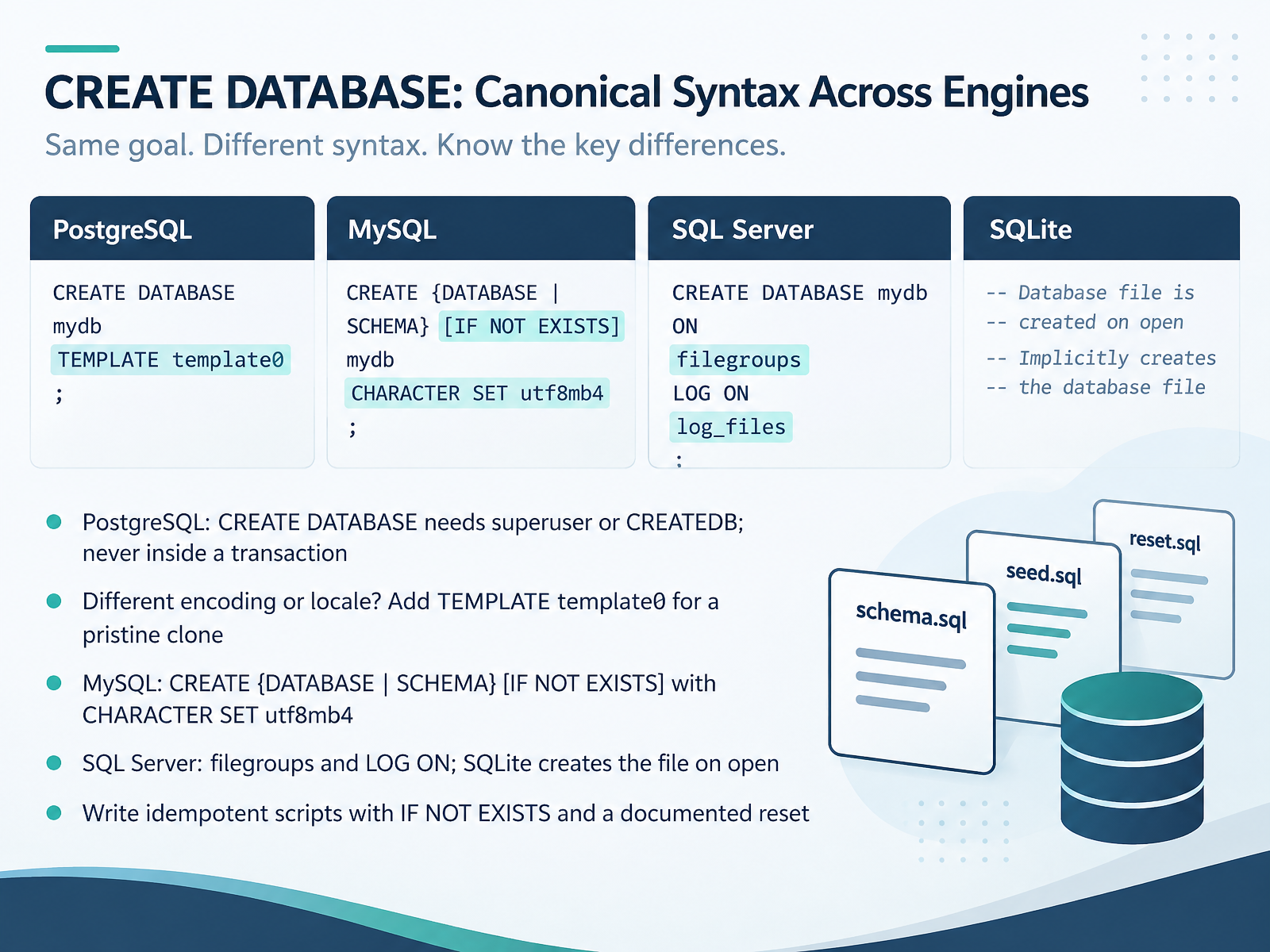
- 06CREATE DATABASE: Canonical Syntax Across EnginesNow let's look at the canonical syntax, engine by engine. In PostgreSQL, CREATE DATABASE requires a superuser or the CREATEDB privilege, and it can never run inside a transaction. Want a different encoding or locale? Add TEMPLATE template0 to get a pristine clone. In MySQL, it's CREATE DATABASE or CREATE SCHEMA, with IF NOT EXISTS, and set CHARACTER SET utf8mb4. In SQL Server, you plan filegroups and a LOG ON clause. And in SQLite, there is no create statement at all. The database is simply a file that appears when you open it. Here is the beginner mistake to avoid. Run the same script twice without protection, and the second run fails because the database already exists. So write idempotent scripts. Use IF NOT EXISTS where the engine supports it, and document a reset step so anyone can rerun the workflow cleanly. Next, we'll cover schemas, namespaces, and verification queries.
 stackoverflow.comdbsyntax.commysmartcopilot.com+21 min
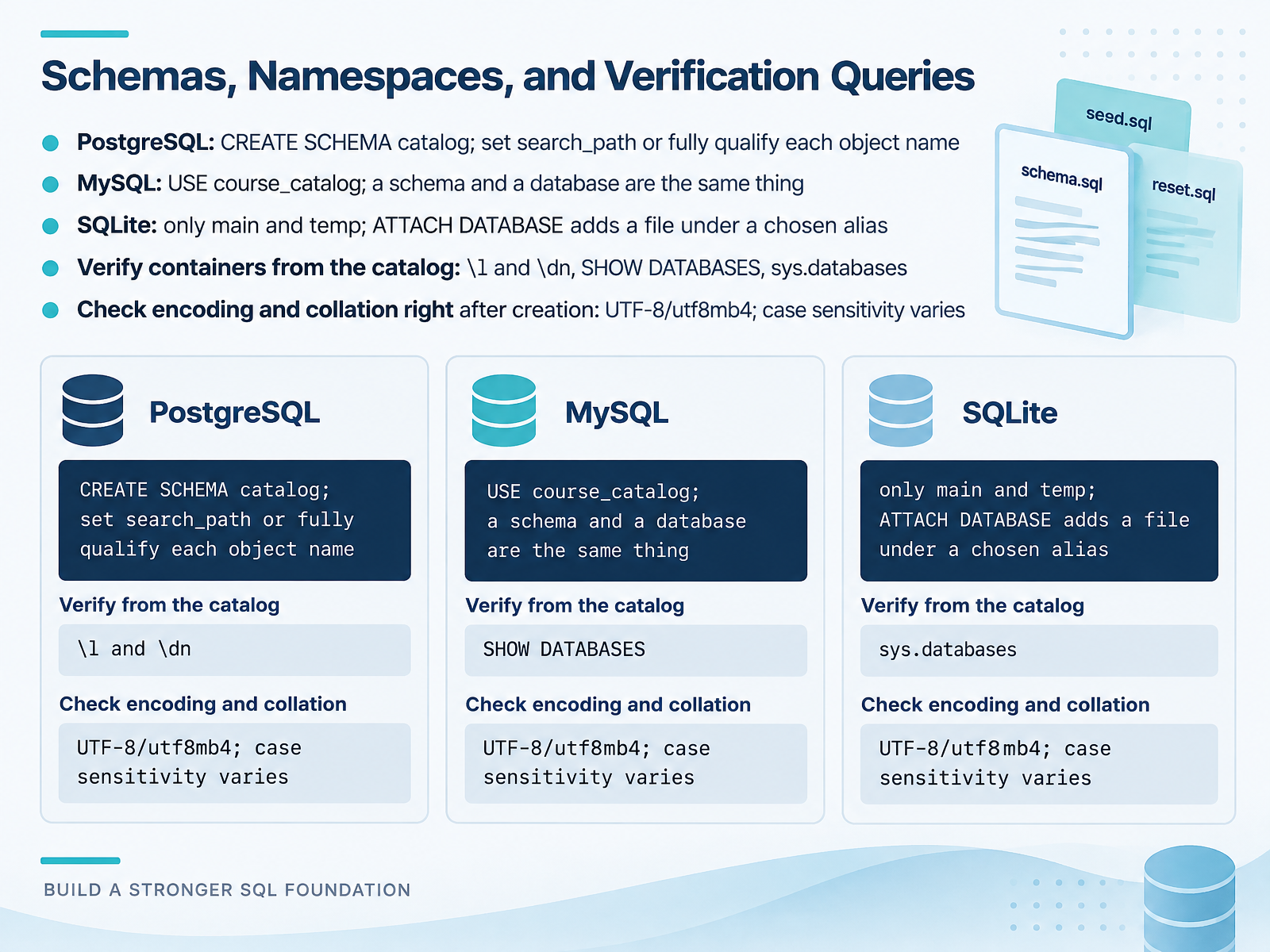
- 07Schemas, Namespaces, and Verification QueriesNext, let's talk about where objects actually live, and how to confirm they were created correctly. PostgreSQL has three levels: a server, then databases, then schemas. A schema is simply a namespace for your tables. Create one with C R E A T E SCHEMA catalog. Then either set your search path, or fully qualify each object name as catalog dot table name. MySQL is simpler. A schema and a database are the same thing. Just run U S E course underscore catalog to switch context. SQLite is different again. It only has main and temp, and A T T A C H DATABASE adds another file under an alias you choose. After creating anything, verify it. In PostgreSQL, backslash L lists databases and backslash D N lists schemas. In MySQL, S H O W DATABASES. For SQL Server, query sys dot databases. And check encoding and collation immediately after creation. Use U T F 8 in PostgreSQL, and utf8mb4 in MySQL. Case sensitivity varies by engine, so confirm it now, not after loading data. Next, we move on to C R E A T E TABLE, covering keys, constraints, and data types.
 stackoverflow.comdbsyntax.commysmartcopilot.com+22 min
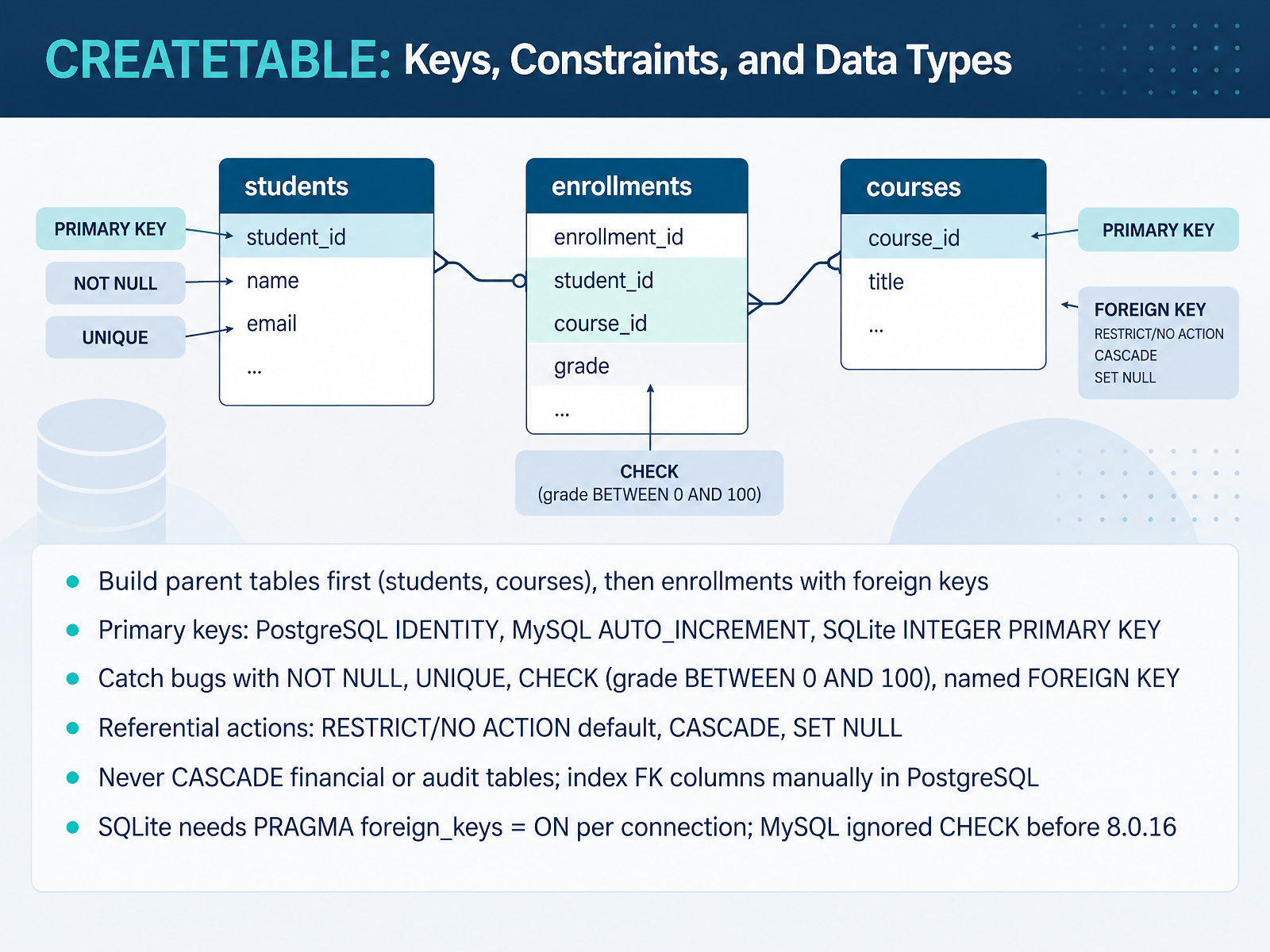
- 08CREATETABLE: Keys, Constraints, and Data TypesNow let's look at defining tables with CREATE TABLE, and the keys and constraints that protect your data. Build parent tables first, like students and courses. Then create enrollments, which holds the foreign keys pointing back to them. For primary keys, each database has its own idiom. PostgreSQL uses IDENTITY, MySQL uses AUTO_INCREMENT, and SQLite uses INTEGER PRIMARY KEY. Next, catch bugs early with constraints. NOT NULL rejects missing values. UNIQUE blocks duplicates. CHECK lets you write rules like grade between zero and one hundred. And give your foreign keys clear names, so error messages tell you exactly what failed. Referential actions decide what happens when a parent row is deleted. RESTRICT and NO ACTION, the default, block the delete. CASCADE removes child rows too, and SET NULL clears the reference. One caution. Never use CASCADE on financial or audit tables. And in PostgreSQL, index foreign key columns yourself. Also remember, SQLite needs PRAGMA foreign_keys equals ON for every connection. And MySQL silently ignored CHECK before version eight point zero point sixteen. Next, we'll load and query sample data.
 2 min
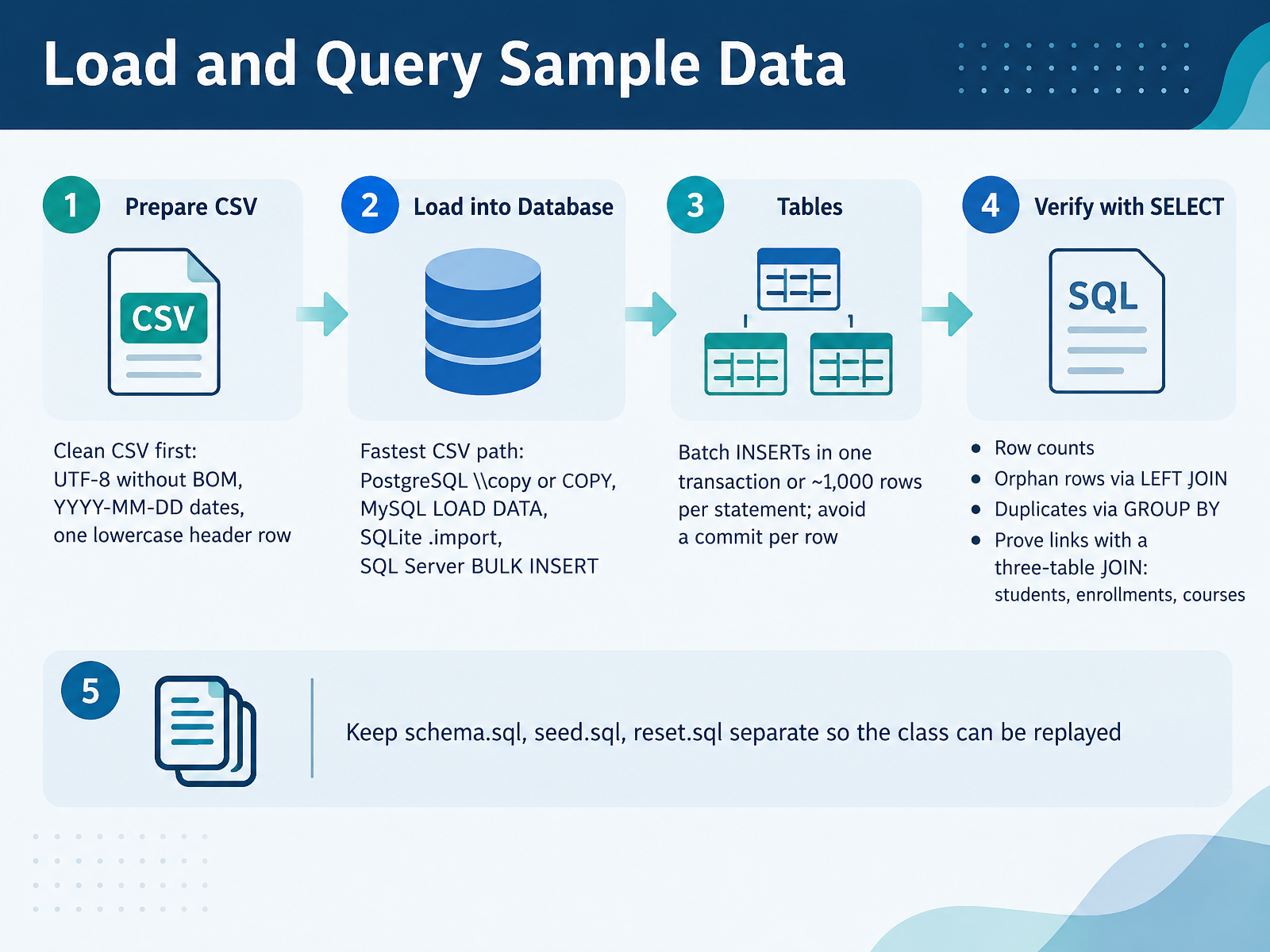
- 09Load and Query Sample DataNow let's load and query your sample data. The fastest path is the database's own CSV loader. In PostgreSQL, that's COPY, or the client-side version, backslash copy. In MySQL, it's LOAD DATA. In SQLite, dot import. And in SQL Server, BULK INSERT. If you're using plain INSERT statements instead, batch them into one transaction, or about one thousand rows per statement. Avoid one commit per row, because that is what makes imports slow. Clean the CSV first. Save it as UTF-8 without a byte order mark, use year-month-day dates, and keep one lowercase header row. After loading, verify with SELECT. Check the row count. Find orphan rows with a LEFT JOIN. Look for duplicates with GROUP BY. Then prove the links with a three-table JOIN across students, enrollments, and courses. Keep schema dot SQL, seed dot SQL, and reset dot SQL as separate files, so the class can be replayed. Next, we'll look at Access Control and Least-Privilege Roles.
 2 min
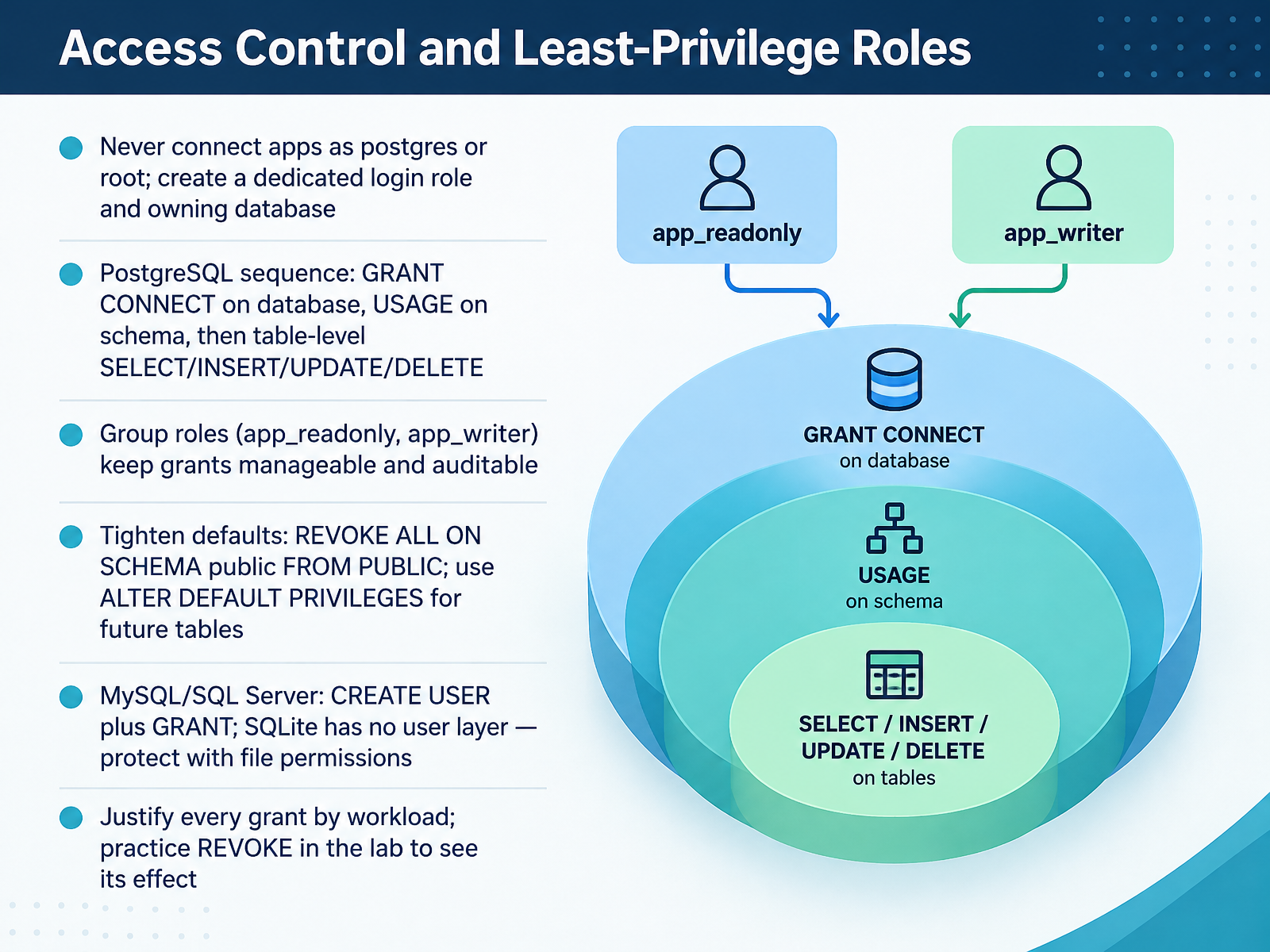
- 10Access Control and Least-Privilege RolesNow let's lock down access with least-privilege roles. The first rule is simple. Never let an application connect as postgres or root. Instead, create a dedicated login role and a database that it owns. In PostgreSQL, grant in order: connect on the database, usage on the schema, then table-level select, insert, update, and delete. Group roles like app_readonly and app_writer keep grants manageable and auditable. Also tighten the defaults. Revoke all on schema public from public, and use alter default privileges so future tables follow the same rules. In MySQL and SQL Server, you create a user and then grant. SQLite has no user layer, so protect the file with operating system permissions. Justify every grant by the actual workload. And practice revoke in the lab, so you can see its effect before you rely on it. Next, we'll look at backups: Back Up, Restore, and Prove the Restore Works.
 docs.docker.comhub.docker.comprisma.io+22 min
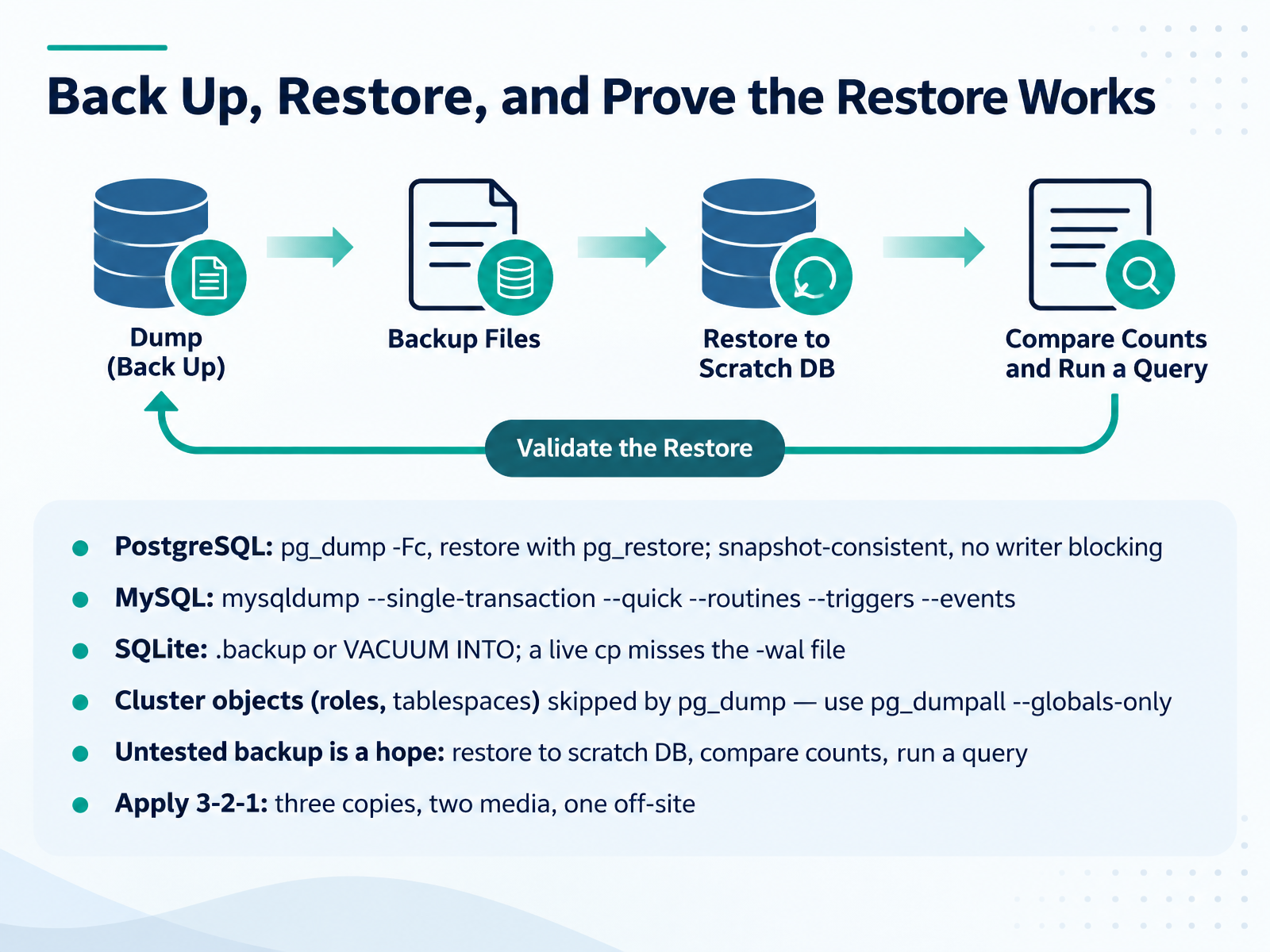
- 11Back Up, Restore, and Prove the Restore WorksNow let's make sure your backup can actually be restored. In PostgreSQL, use pg_dump with the custom format flag, then restore with pg_restore. It captures a snapshot-consistent copy without blocking writers. For MySQL, run mysqldump with single-transaction and quick, plus routines, triggers, and events, so stored procedures and scheduled jobs are not left behind. For SQLite, use the dot backup command or VACUUM INTO. A live file copy misses the write-ahead log file, so it can be corrupt. One common beginner trap: pg_dump skips cluster objects like roles and tablespaces. Pair it with pg_dumpall dash dash globals-only. Finally, an untested backup is just a hope. Restore into a scratch database, compare row counts, and run a real query. And apply the three two one rule: three copies, two media, one off-site. Next, we validate the schema against the design.
 2 min
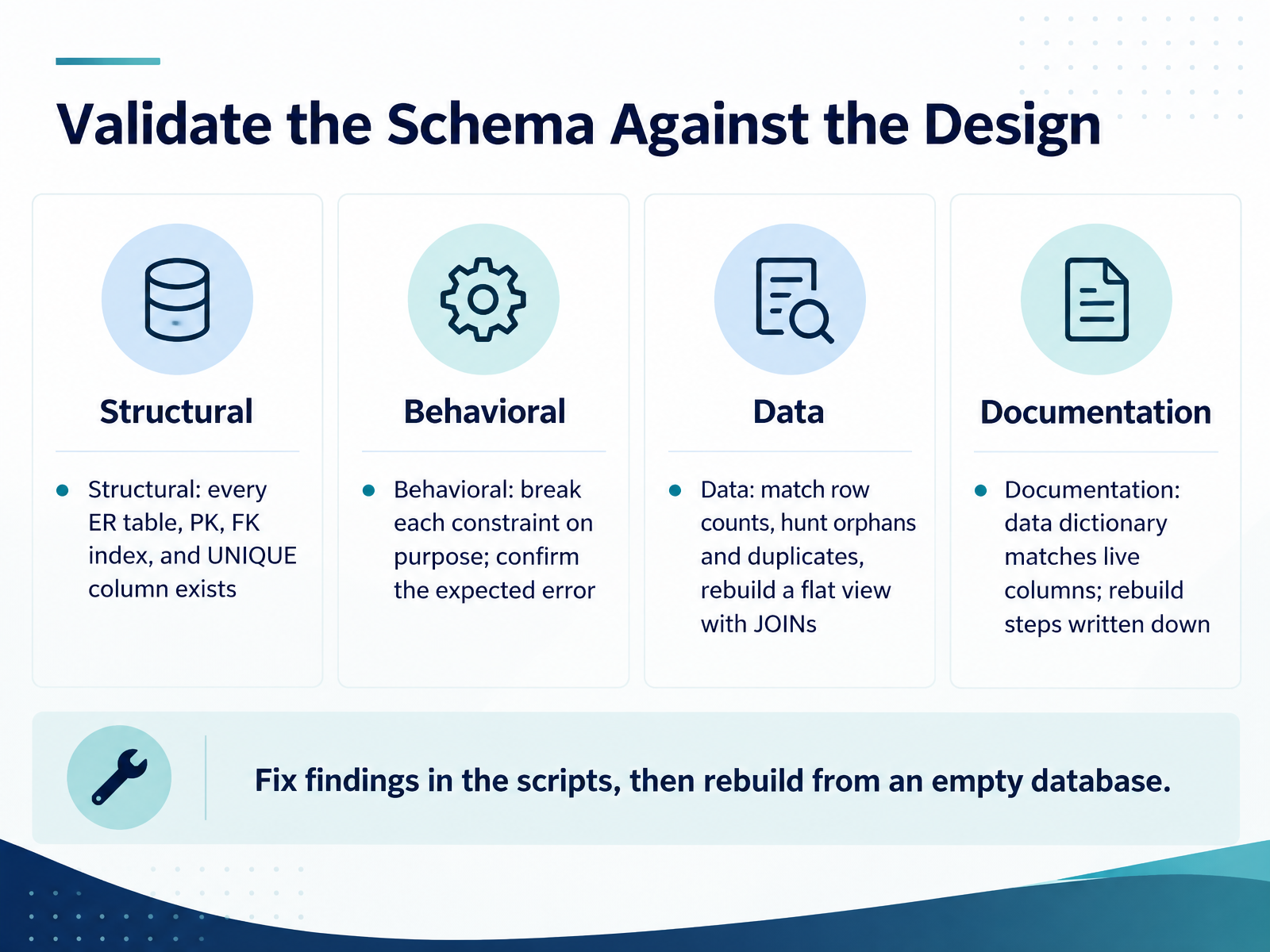
- 12Validate the Schema Against the DesignNow let's validate the schema against your design. Start structurally: confirm every table in your ER diagram exists, and that each primary key, foreign key index, and unique column is really there. Next, test behavior. Break each constraint on purpose, with an insert or delete that should fail, and confirm you get the expected error. If nothing fails, the constraint is not protecting you. Then check the data. Match row counts, hunt for orphan rows and duplicates, and rebuild your flat view with joins to prove nothing was lost. For documentation, make sure the data dictionary matches the live columns, and write down the rebuild steps. Finally, fix any findings in your scripts, then rebuild from an empty database to prove the workflow works. Next, we look at troubleshooting common failures.
 cs.dartmouth.edusimulic.comopencs.aalto.fi+22 min
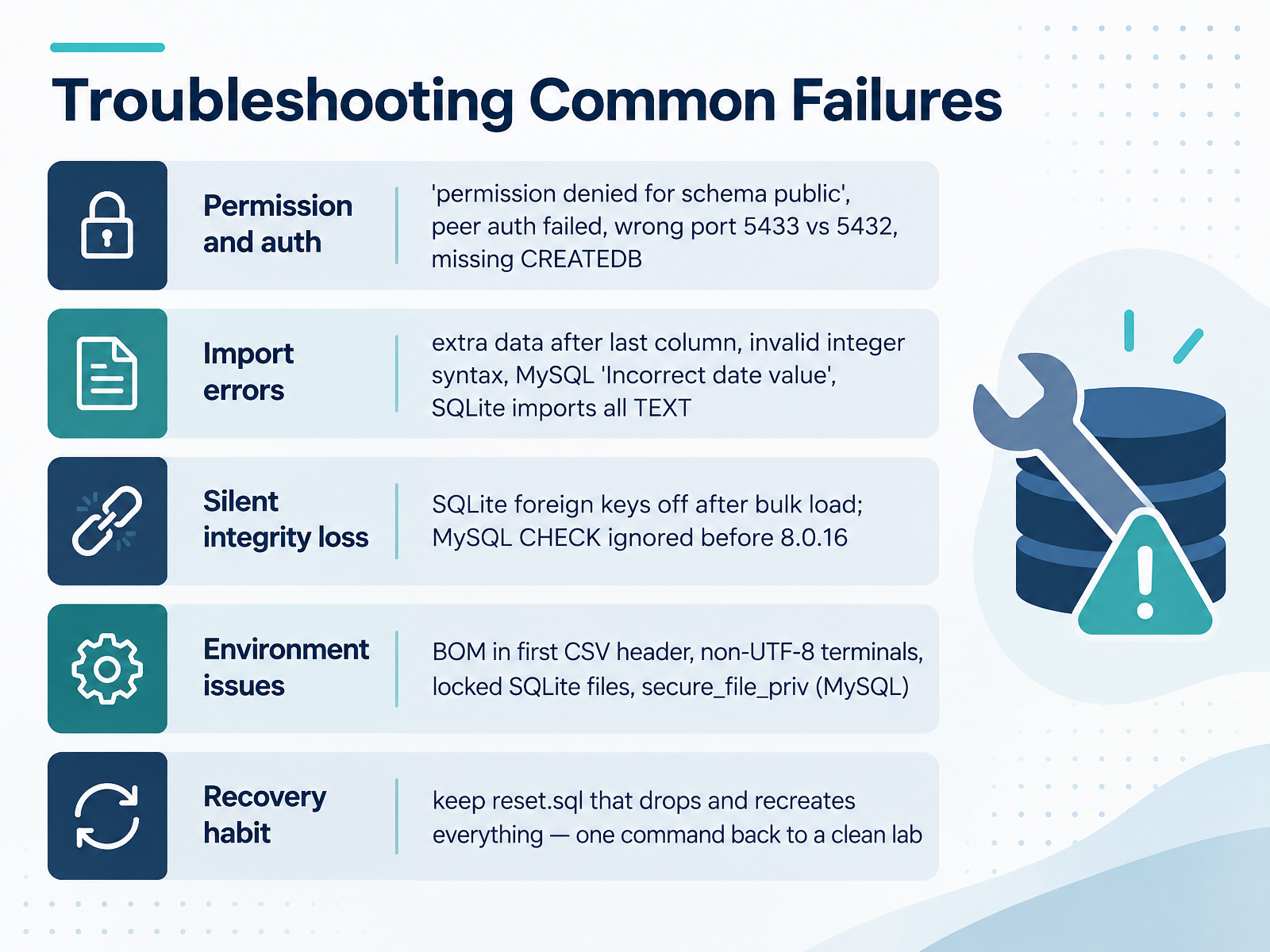
- 13Troubleshooting Common FailuresLet's talk about troubleshooting the failures you're most likely to hit. When things break, don't panic. Read the error message first, because it usually tells you exactly which category you're in.
Start with permissions and authentication. If you see permission denied for schema public in PostgreSQL, the database owner is the wrong role. In PostgreSQL fifteen and later, only the owner and superusers can create tables in public by default. Peer authentication failed usually means you connected through the local socket without the host flag, so add dash host localhost to force a password login. A wrong port like five four three three instead of five four three two means you're not talking to the server you think you are. And missing create database permission means the role needs the createdb attribute.
Then import errors. Extra data after last column usually means an unescaped comma or a column count mismatch. Invalid integer syntax means non numeric text in a numeric column. MySQL's incorrect date value means the date format isn't year month day. And if SQLite imports everything as text, that's expected when the table is auto created.
Watch for silent integrity loss. SQLite has foreign keys off by default, and the setting is per connection, so after a bulk load run prag ma foreign keys to confirm it's on. MySQL ignored check constraints before version eight point zero point sixteen.
Finally environment issues. A byte order mark in the first header, non UTF eight terminals, locked SQLite files, and MySQL's secure file priv setting. Keep a reset dot SQL file that drops and recreates everything, so one command returns you to a clean lab.
Next, we'll bring it all together in Workflow Recap and Hands-On Lab.
 docs.docker.comhub.docker.comprisma.io+22 min
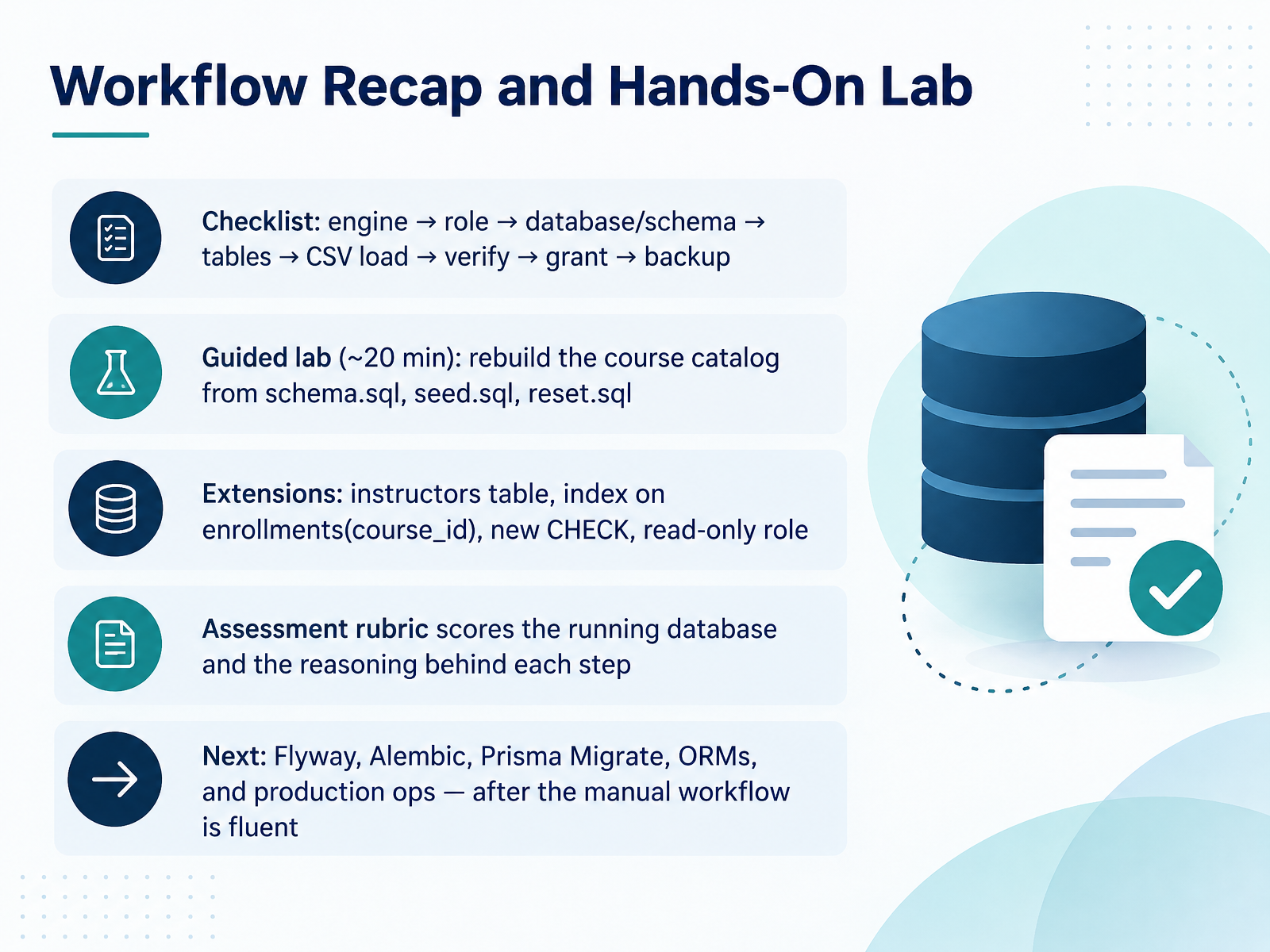
- 14Workflow Recap and Hands-On LabLet's bring the whole workflow together. Here's your checklist. Choose the engine. Create a role. Create the database and schema. Create tables. Load the CSV. Verify the data. Grant least-privilege access. Then back up. That order matters, and it stays the same every time.
Now for the guided lab, about twenty minutes. Rebuild the course catalog using schema dot SQL, seed dot SQL, and reset dot SQL. Run reset often. It gives you a clean, repeatable starting point.
Then extend it. Add an instructors table. Add an index on enrollments course id. Add a new check constraint. And create a read-only role.
The assessment scores the running database and your reasoning behind each step. So be ready to explain your choices.
Next comes Flyway, Alembic, Prisma Migrate, ORMs, and production operations. But save those for after this manual workflow feels fluent.
That's where we'll go together. You've built the foundation, and the next step is yours to run. Thank you, and keep practicing.
 docs.docker.comhub.docker.comprisma.io+22 min
Take the deck with you
Download this course as a file — free, no sign-up needed.
- PDF handoutEvery slide page, ready to print or share.15 pages · 3.3 MBDownload
- Narrated PowerPointThe deck that presents itself — every slide carries the digital human's narration video.15 pages · 13.8 MBDownload
- PowerPoint slidesThe full deck as a .pptx — open it in PowerPoint, Keynote, or Google Slides.15 pages · 3.2 MBDownload
Free to use in your own training — please keep the PersonWise credit page at the end.
Have your own deck? Turn it into a course
Sources consulted
Web sources consulted while building this course.
- SQLite vs MySQL vs PostgreSQL: A Comparison Of Relational Database Management Systems | DigitalOcean — digitalocean.com
- How to Install SQL (MySQL, PostgreSQL, SQLite) in 2026 — syntaxpathways.com
- PostgreSQL vs MySQL vs SQLite: Choosing the Right Database for Your Project | myDBA.dev — mydba.dev
- MySQL vs PostgreSQL vs SQLite: Which Should You Actually Use? [2026 Guide] — en.valley4techs.com
- How to choose a database: SQLite, PostgreSQL, MySQL and more | SQLite Lab — sqlitelab.com
- What is the difference between a schema and a table and a database? — stackoverflow.com
- List databases and schemas — SQL Reference | dbSyntax — dbsyntax.com
- SQL CREATE TABLE and choosing column types | MySmartCoPilot — mysmartcopilot.com
- Relational Databases: PostgreSQL, MySQL, SQLite - Hyperpolyglot — hyperpolyglot.org
- SQL Schema: Definition, Examples, and Design | Exasol — exasol.com
- CS 61 | Database Systems | Spring 2026 — cs.dartmouth.edu
- Database normalisation – from a flat table to 3NF, with ER diagrams | Simulic — simulic.com
- Normalization: From Anomalies to Normal Forms — opencs.aalto.fi
- gabrielml/exercise-db-normalization — github.com
- 3 Normal Forms Database Tutorial — phlonx.com
- PostgreSQL specific guide — docs.docker.com
- postgres - Official Image — hub.docker.com
- Set up a local PostgreSQL database with Docker, Linux, macOS or Windows — prisma.io
- Postgres Docker: The Complete 2026 Guide — dbpro.app
- https://context7.com/websites/hub_docker_postgres/llms.txt — context7.com