Begin
14 pages · ~28 min
Web Application Development
This training equips aspiring developers with core web application development skills. Participants learn to build and deploy functional web apps.
A digital instructor presents all 14 pages. Hold “Ask” at any point and ask out loud — the answer comes from this course. No sign-up needed.
What you’ll learn
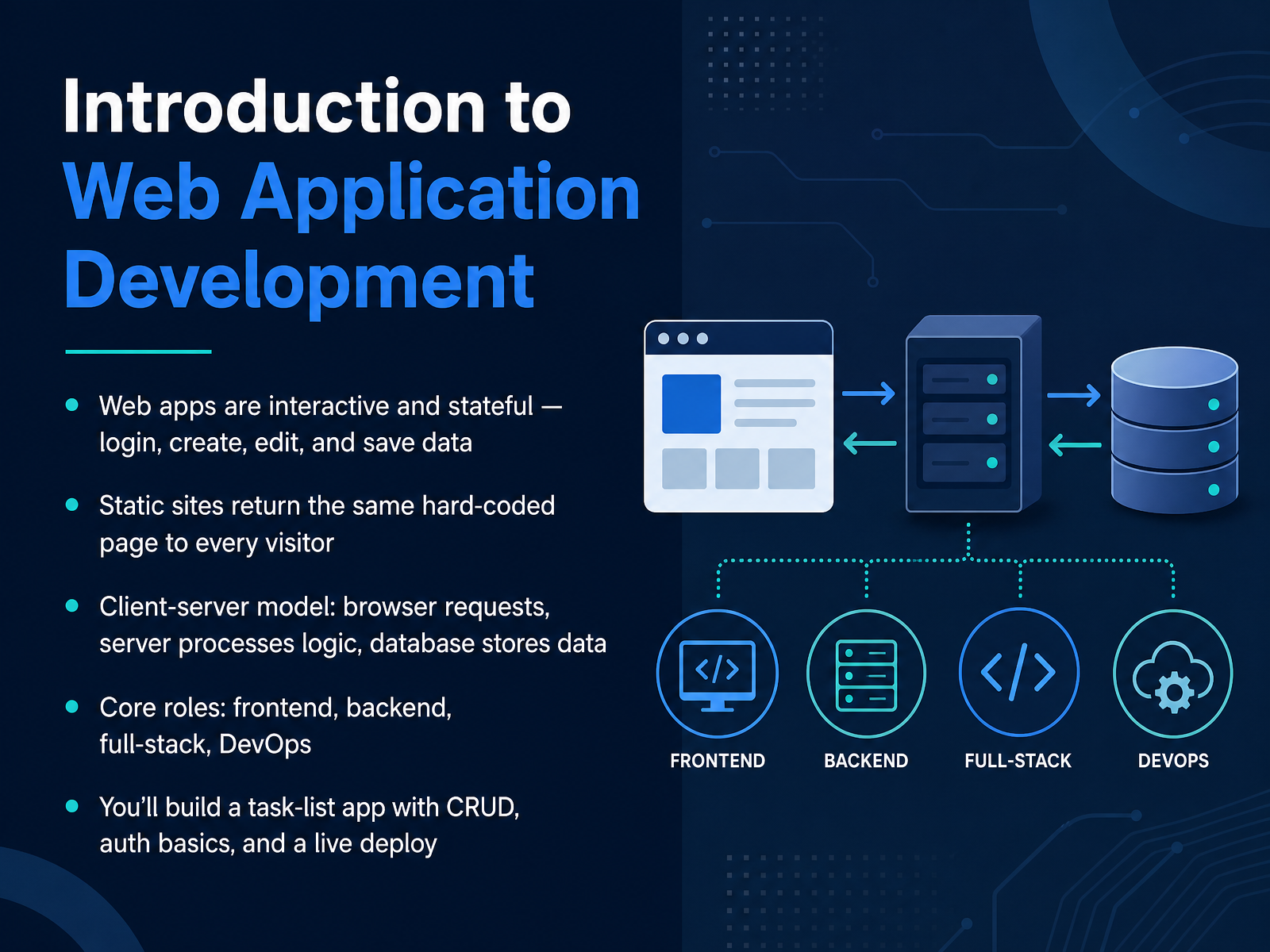
- 01Introduction to Web Application DevelopmentWelcome. In this course, you will learn how web applications are built, from the first request in a browser to a deployed, working app. Let's start with a simple definition. A web application is interactive and stateful. That means users can log in, create, edit, and save data, and those changes persist. A static site is different. It returns the same hard-coded page to every visitor. Most web apps follow the client-server model. Your browser, the client, sends a request. The server processes the logic, and a database stores the data. Within a team, you will hear four common roles: frontend, which handles the user interface; backend, which handles server logic and data; full-stack, which covers both; and DevOps, which manages deployment and operations. Throughout this course, you will build a task-list app that supports create, read, update, and delete operations, adds basic authentication, and goes live with a real deployment. Next, we will look at how the web works: browsers, HTTP, and the rendering pipeline.developer.mozilla.orgtopictrick.comthelinuxcode.com+22 min
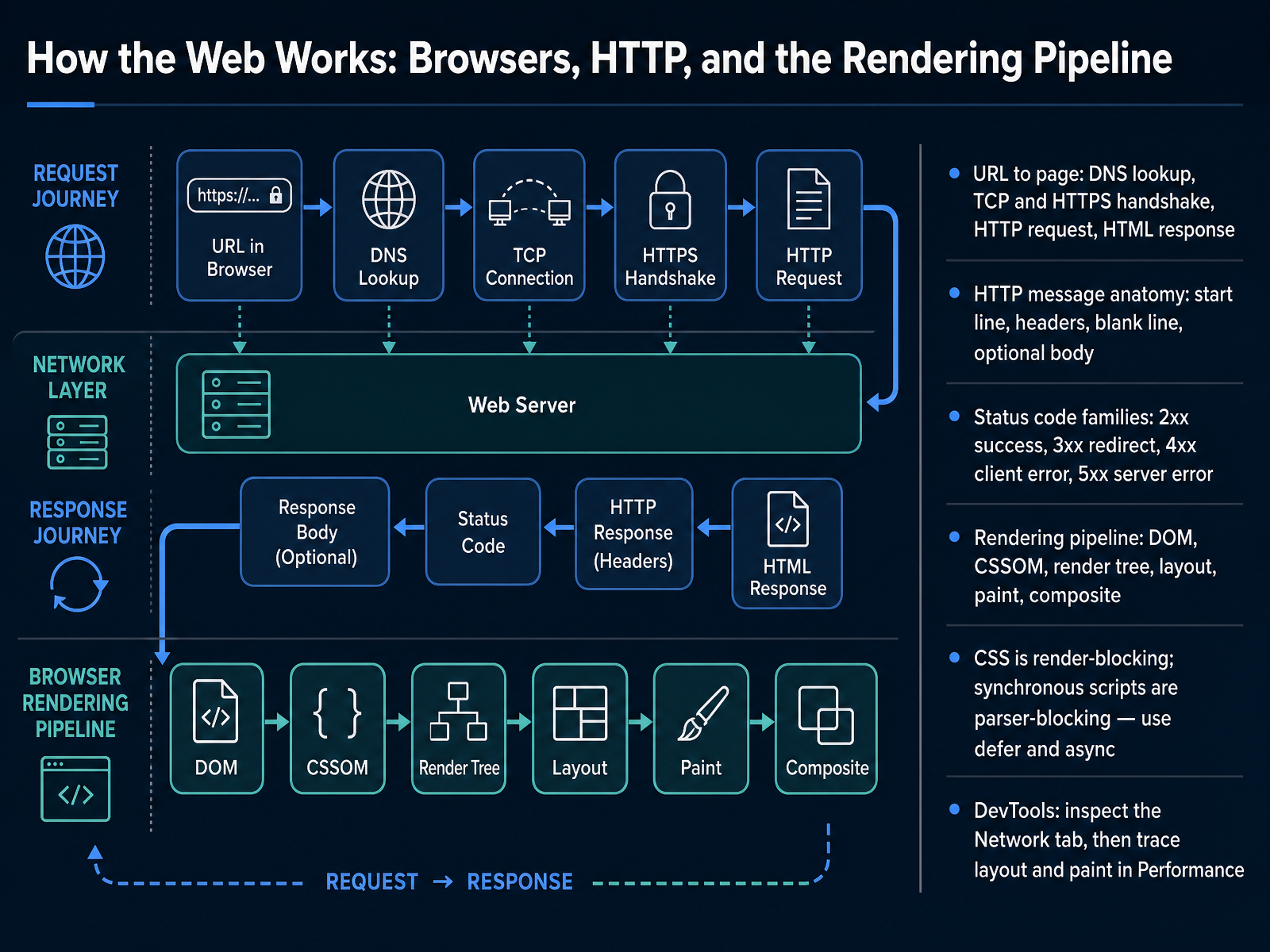
- 02How the Web Works: Browsers, HTTP, and the Rendering PipelineLet us start with what actually happens when someone visits a web page. When you type a URL, which stands for Uniform Resource Locator, the browser performs a DNS lookup to turn that name into an IP address. It then opens a TCP connection and completes an HTTPS handshake for security, sends an HTTP request, and receives an HTML response. That request and response follow a shared structure: a start line, headers, a blank line, and an optional body. The server also returns a status code. Two hundreds mean success, three hundreds mean a redirect, four hundreds point to a client error, and five hundreds indicate a server error. Once the HTML arrives, the browser builds the DOM and the CSSOM, combines them into a render tree, calculates layout, paints pixels, and composites layers. Keep in mind that CSS is render blocking, and synchronous scripts block the parser, so use defer or async. In DevTools, check the Network tab first, then trace layout and paint in Performance. Next, we will look at client-server architecture and application tiers.
 developer.mozilla.orgdeveloper.mozilla.orgweb.dev+22 min
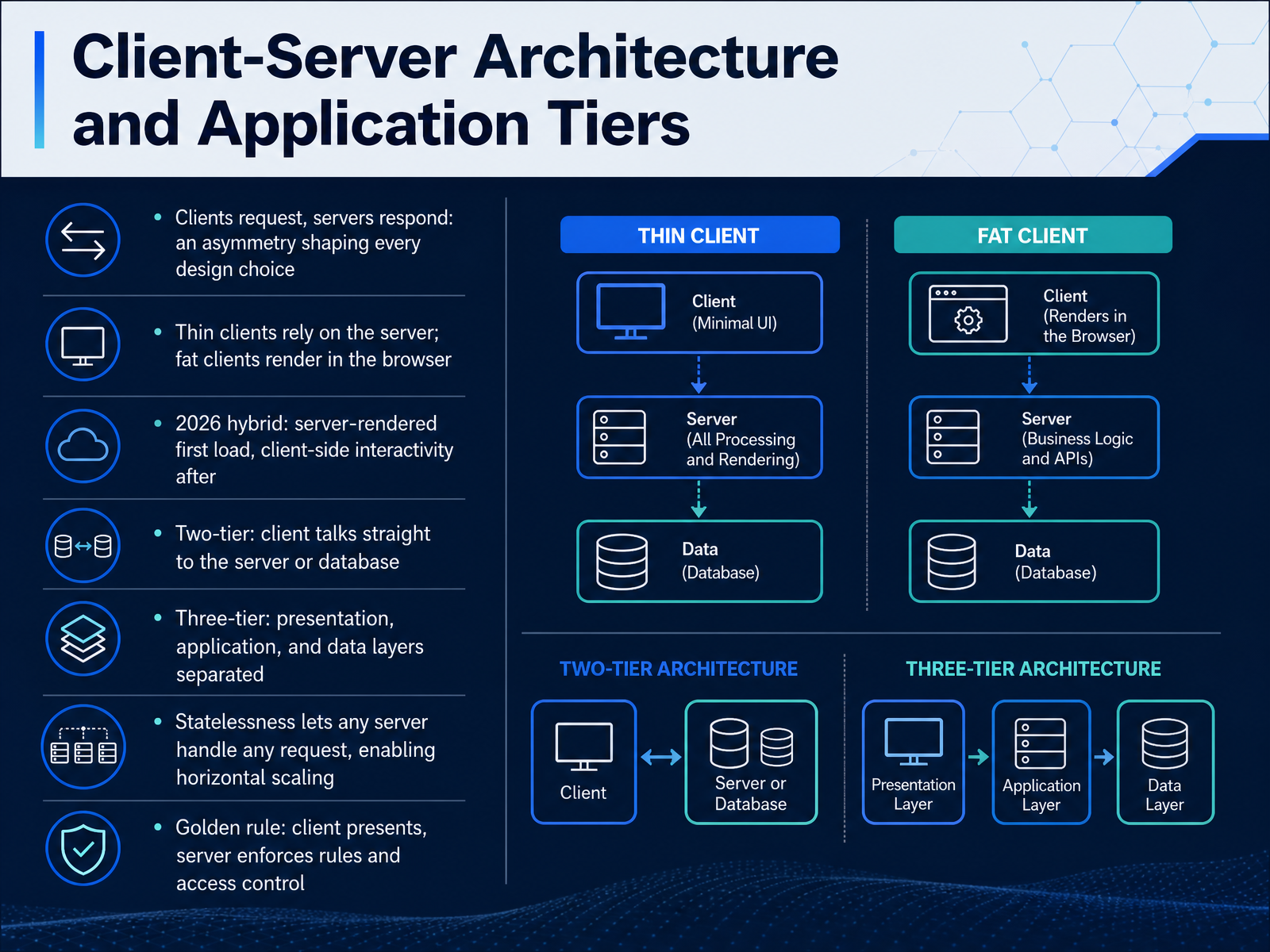
 - 03Client-Server Architecture and Application TiersLet's look at how web applications are structured. At the center is client-server architecture. A client, usually your browser, sends a request. A server receives it, processes it, and sends back a response. That asymmetry, one side asks, the other decides, shapes every design choice you will make.
Clients come in two main styles. A thin client relies on the server to do most of the work and simply displays the result. A fat client does more rendering in the browser itself. In twenty twenty-six, many apps use a hybrid. The server renders the first page for speed and search visibility, then the client handles interactivity afterward.
Applications are also organized into tiers. In a two-tier setup, the client talks straight to the server or database. That is simple but harder to secure and scale. In a three-tier setup, presentation, application logic, and data are separated. The client never touches the database directly. This is the most common pattern today.
One more key idea is statelessness. When the server keeps no memory between requests, any server can handle any request. That makes horizontal scaling possible. Add more servers, and traffic spreads across them.
Remember the golden rule. The client presents. The server enforces the rules and controls access. Never trust the client for security or validation.
Next, we move into frontend fundamentals, semantic HTML and modern CSS layout.
 developer.mozilla.orgtopictrick.comthelinuxcode.com+22 min
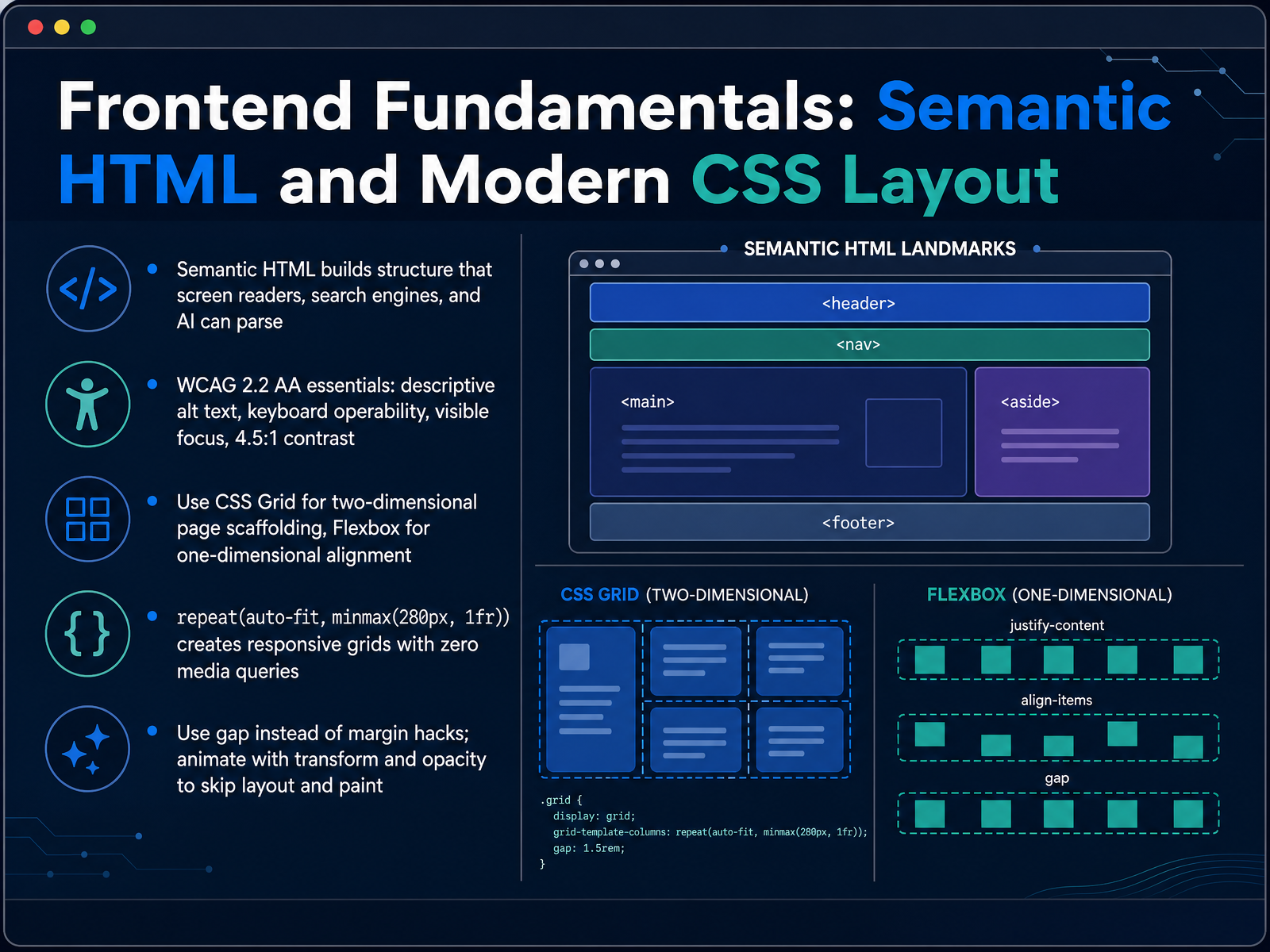
 - 04Frontend Fundamentals: Semantic HTML and Modern CSS LayoutNow let's focus on the frontend fundamentals, starting with semantic HTML and modern CSS layout. Semantic HTML means choosing elements for their meaning, not just their appearance. Tags like header, nav, main, article, and footer describe your page structure. Screen readers, search engines, and AI systems all rely on that structure to understand your content. For accessibility, aim for WCAG 2.2 AA essentials: descriptive alt text, keyboard operability, visible focus, and a contrast ratio of four point five to one for normal text. Next, layout. Use CSS Grid for two-dimensional page scaffolding, and Flexbox for one-dimensional alignment, like a row of buttons or a navigation bar. One line does a lot of work: repeat, auto-fit, minmax, two hundred eighty pixels, one fr. That creates a responsive grid with zero media queries. Also, use the gap property for spacing instead of margin hacks, and animate with transform and opacity to avoid layout and paint work. Together, these choices make your page more accessible, easier to maintain, and faster to render. Next, we'll look at JavaScript in the Browser: DOM, Events, and Data Fetching.
 socialanimal.devalbiorixtech.combotexy.com+22 min
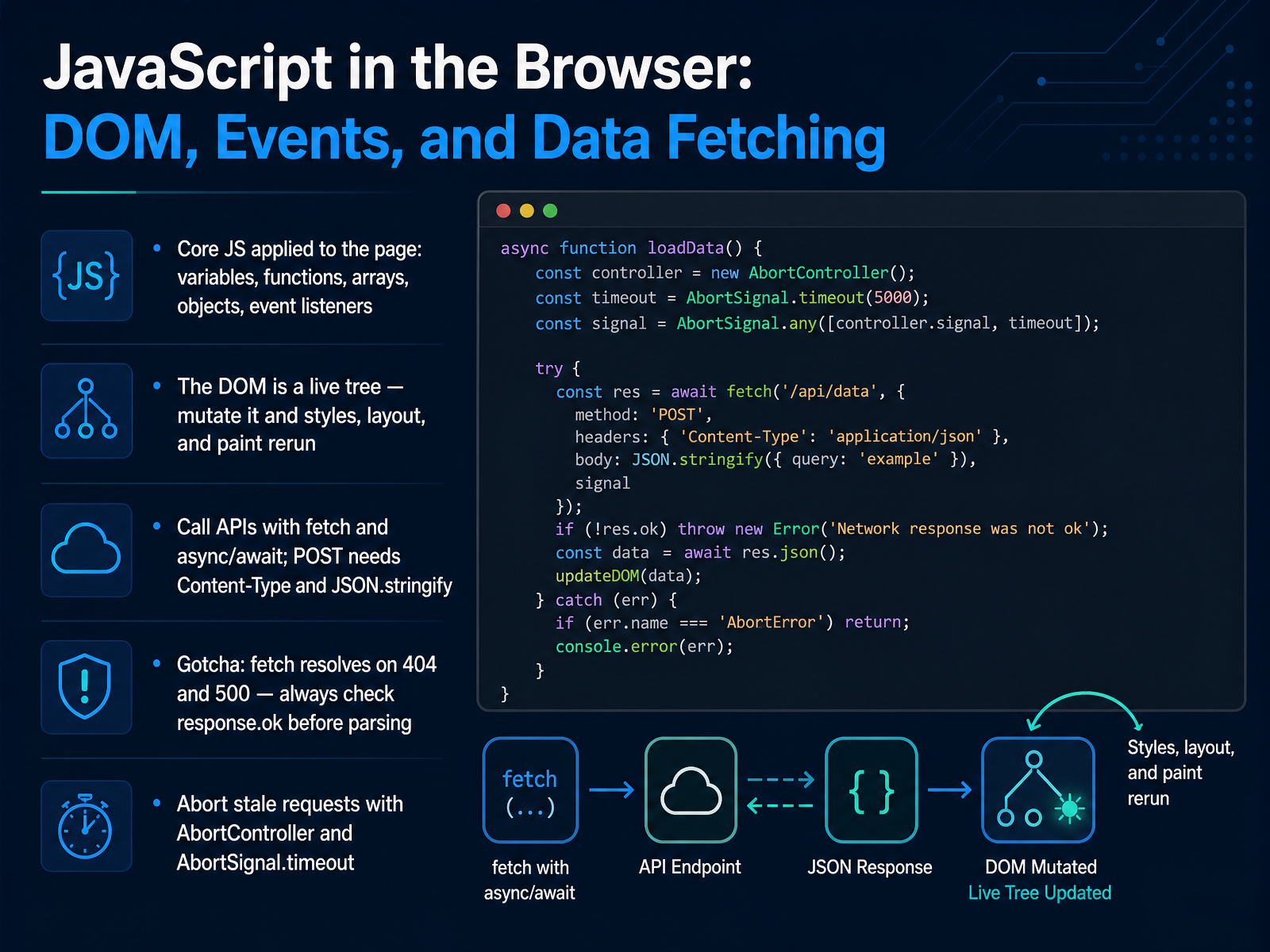
 - 05JavaScript in the Browser: DOM, Events, and Data FetchingLet's look at how JavaScript works inside the browser. Start with the basics you will apply directly to the page: variables, functions, arrays, and objects. Then use event listeners to respond to clicks, typing, and other user actions. The page itself is the DOM, short for Document Object Model. Think of it as a live tree. When you change a node, the browser re-runs styles, layout, and paint, so the page updates on screen. Next, talk to servers with the fetch function and async and await. For a GET request, call fetch, then check response.ok before you parse. Here is the important gotcha: fetch resolves normally even on a 404 or 500 response. It only rejects on network failures. So always check response.ok before calling response.json. For a POST request, set the Content-Type header to application json and convert your object with JSON.stringify. Finally, cancel stale requests with AbortController, or set a timeout with AbortSignal.timeout. Quick takeaway: listen for events, mutate the DOM, fetch data, and always check response.ok. That habit prevents confusing bugs. When Plain JavaScript Is Enough and When to Reach for a Framework.
 developer.mozilla.orgdeveloper.mozilla.orgthelinuxcode.com+21 min
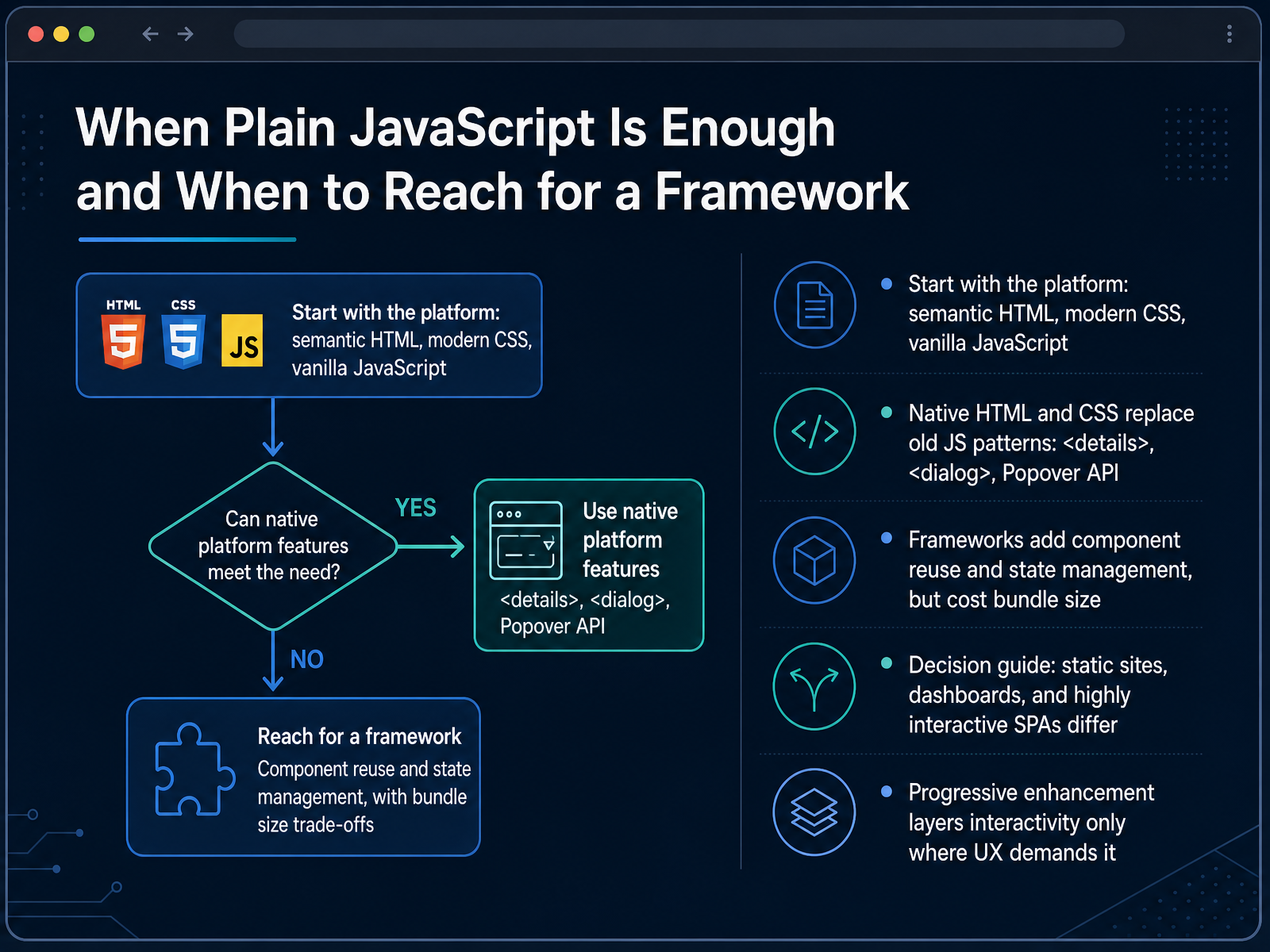
 - 06When Plain JavaScript Is Enough and When to Reach for a FrameworkLet us talk about choosing the right tool for the job. Start with the platform itself: semantic HTML, modern CSS, and plain JavaScript. These three cover more than many people expect. Native HTML elements now replace old JavaScript patterns. The details element makes an accordion. The dialog element creates a modal. The Popover API handles tooltips and dropdowns. So before you reach for a library, ask if the browser already does it. Frameworks add real value: component reuse and shared state management. But they also add bundle size, which slows load time and interactivity. Here is a simple decision guide. A static site rarely needs a framework. A data dashboard usually benefits from one. A highly interactive single page app almost certainly does. And progressive enhancement lets you layer interactivity only where user experience demands it, keeping everything else fast and simple. Next, we move into backend fundamentals: servers, REST APIs, and JSON.
 socialanimal.devalbiorixtech.combotexy.com+21 min
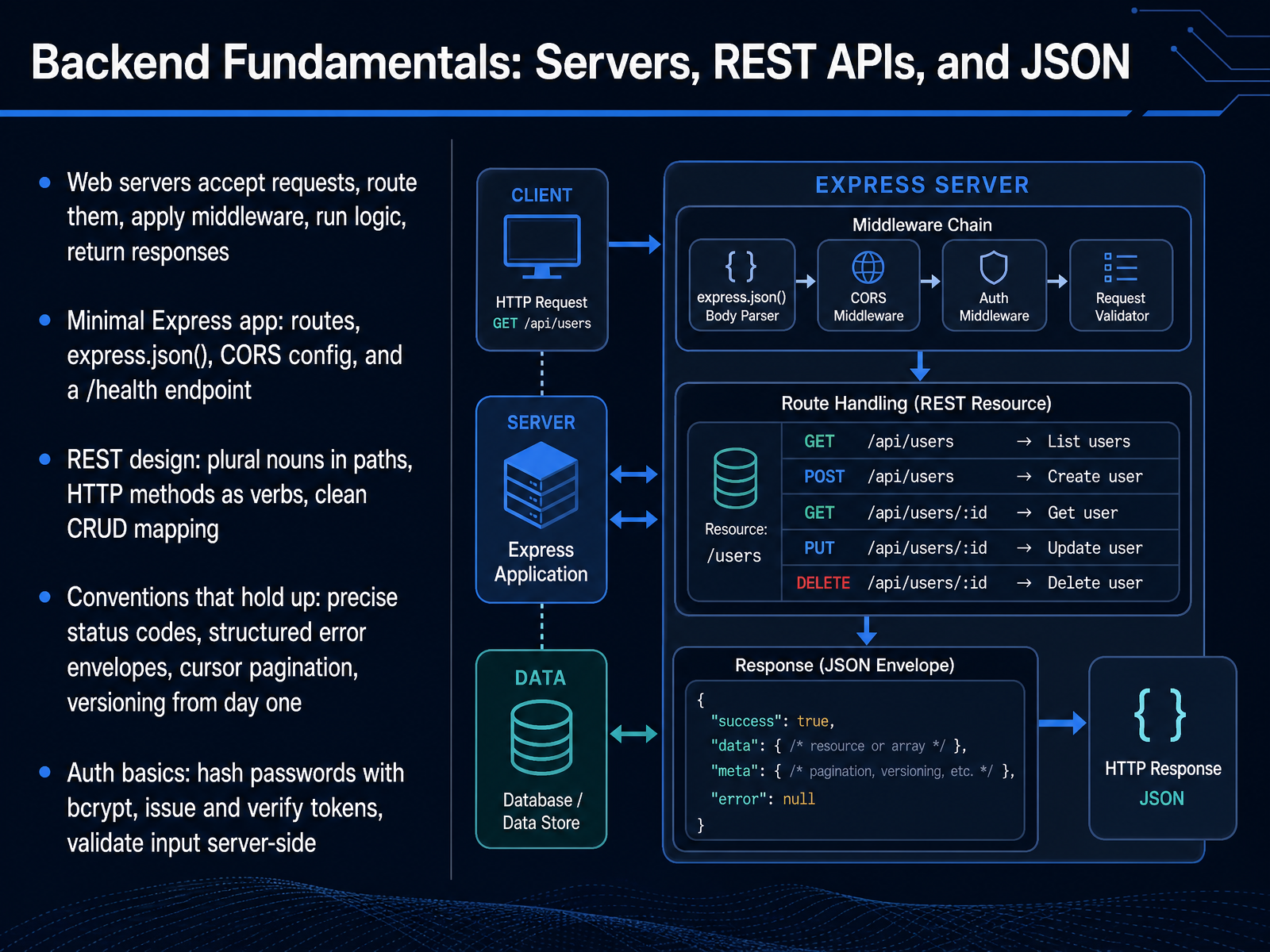
 - 07Backend Fundamentals: Servers, REST APIs, and JSONLet's move to the backend, where servers process requests and return responses. A web server accepts a request, routes it to the right handler, applies middleware, runs your logic, and returns a response. Middleware is code that runs between the request and your handler, useful for logging, authentication, or parsing.
In a minimal Express app, you define routes, call express.json() to parse JSON bodies, configure CORS so browsers can call your API, and add a /health endpoint for quick monitoring. CORS means Cross-Origin Resource Sharing, a browser rule controlling which sites may call your API.
For REST design, use plural nouns in paths, like /orders, and let HTTP methods act as verbs: GET reads, POST creates, PATCH updates, DELETE removes. That gives you a clean CRUD mapping. CRUD stands for Create, Read, Update, and Delete.
Conventions that hold up include precise status codes, structured error envelopes, cursor pagination, and versioning from day one, like /v1/orders. For auth, hash passwords with bcrypt, issue and verify tokens, and always validate input on the server side. Next, we will look at databases: persistence, relational modeling, and CRUD.
 2 min
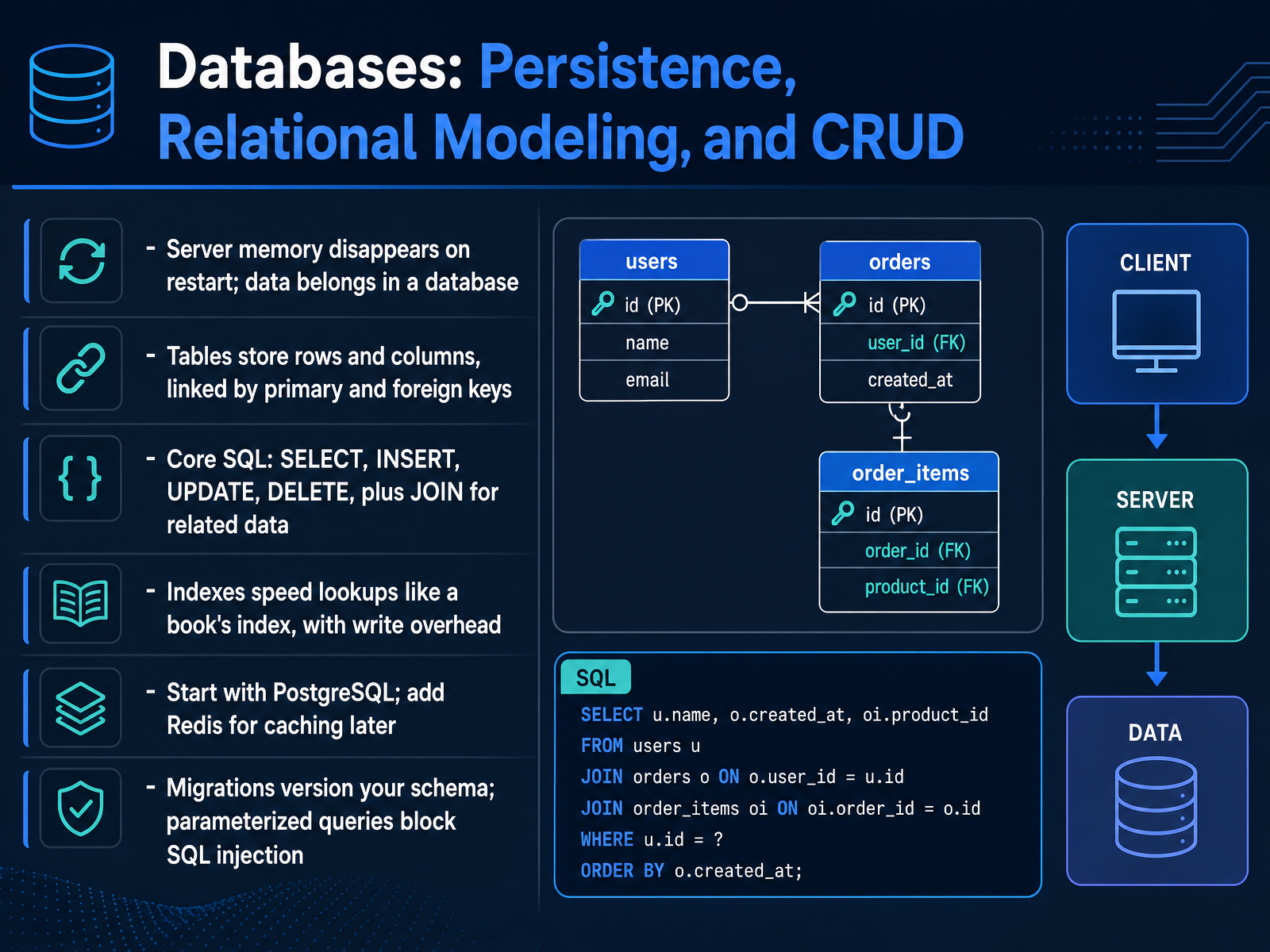
2 min - 08Databases: Persistence, Relational Modeling, and CRUDLet's move on to databases. When your server restarts, anything stored in memory disappears. A database keeps data on disk, so it survives restarts and crashes. Relational databases organize data into tables made of rows and columns. A primary key uniquely identifies each row, and a foreign key links a row in one table to a row in another. For example, an orders table can store a user_id that points to a user's primary key. You query these tables with SQL, which stands for Structured Query Language. The core commands are SELECT to read, INSERT to create, UPDATE to change, and DELETE to remove. JOIN combines related tables in a single result. Indexes make lookups fast, similar to a book's index, but they add overhead on writes. Start with PostgreSQL; add Redis for caching later. Two practices protect you. Migrations version your schema, and parameterized queries block SQL injection by keeping user input out of the SQL structure. Spend a few minutes writing one SELECT and one INSERT against a small table you create. Next, we look at the development workflow: Git, GitHub, and modern tooling.
 2 min
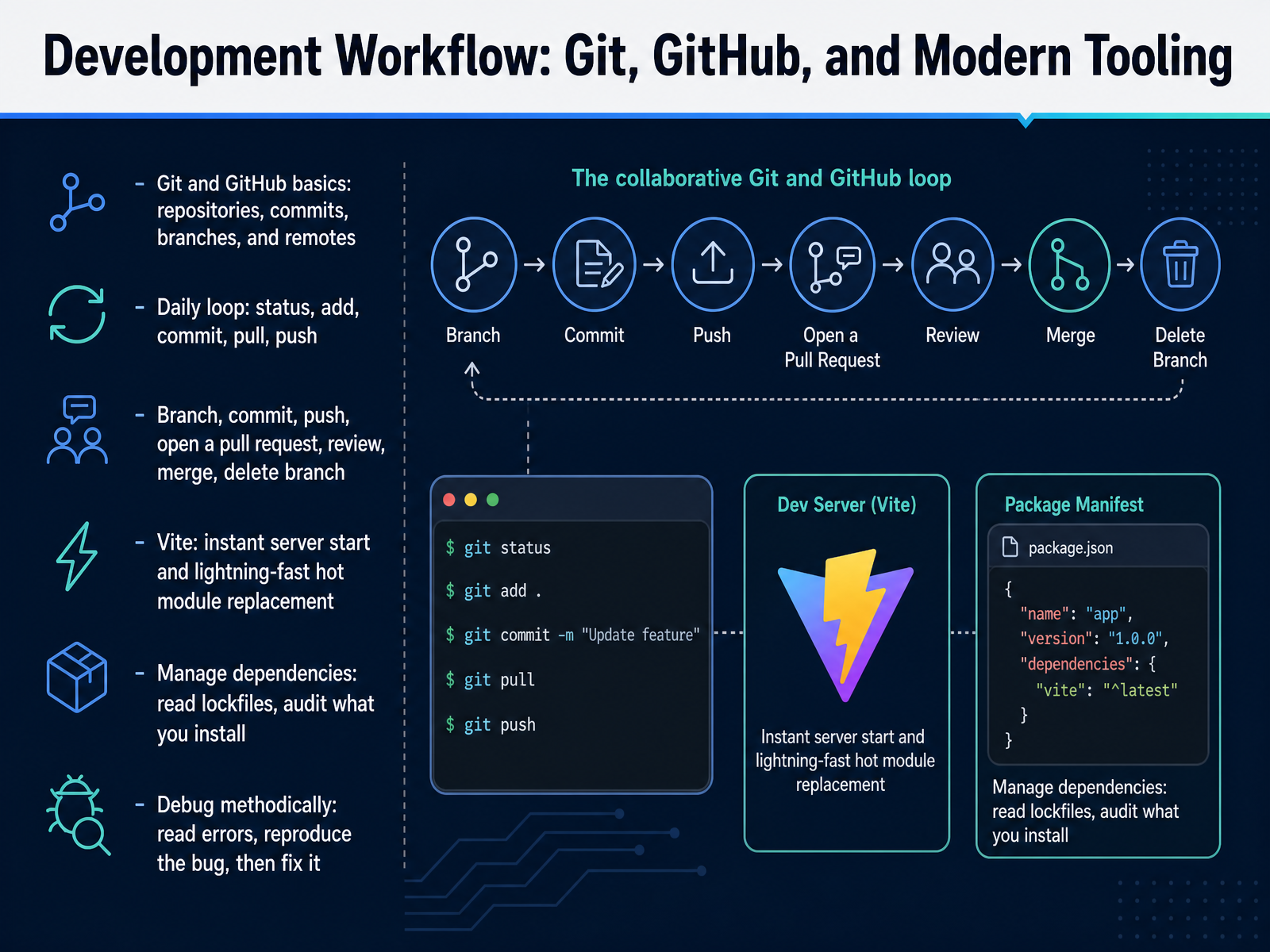
2 min - 09Development Workflow: Git, GitHub, and Modern ToolingNow let's look at the daily workflow you'll use on real projects. Git is the version control system that tracks changes on your computer. GitHub is the online platform that hosts those repositories, so teams can collaborate.
The core vocabulary is small. A repository is your project folder plus its full history. A commit is a snapshot with a message. A branch is a separate line of work where you can experiment safely. A remote is the online copy you push to and pull from.
Your daily loop is status, add, commit, pull, push. Run git status to see what changed, add the files you want, commit them with a clear message, pull to get teammates' updates, then push your work.
For a feature, create a branch, commit and push, open a pull request, get a review, merge it, then delete the branch. Vite gives you instant server start and lightning fast hot module replacement, so changes appear as you save. Read lockfiles, audit dependencies, and debug methodically: read the error, reproduce it, then fix it.
Next, we'll put these pieces together in Building Your First Full-Stack Application End to End.
 2 min
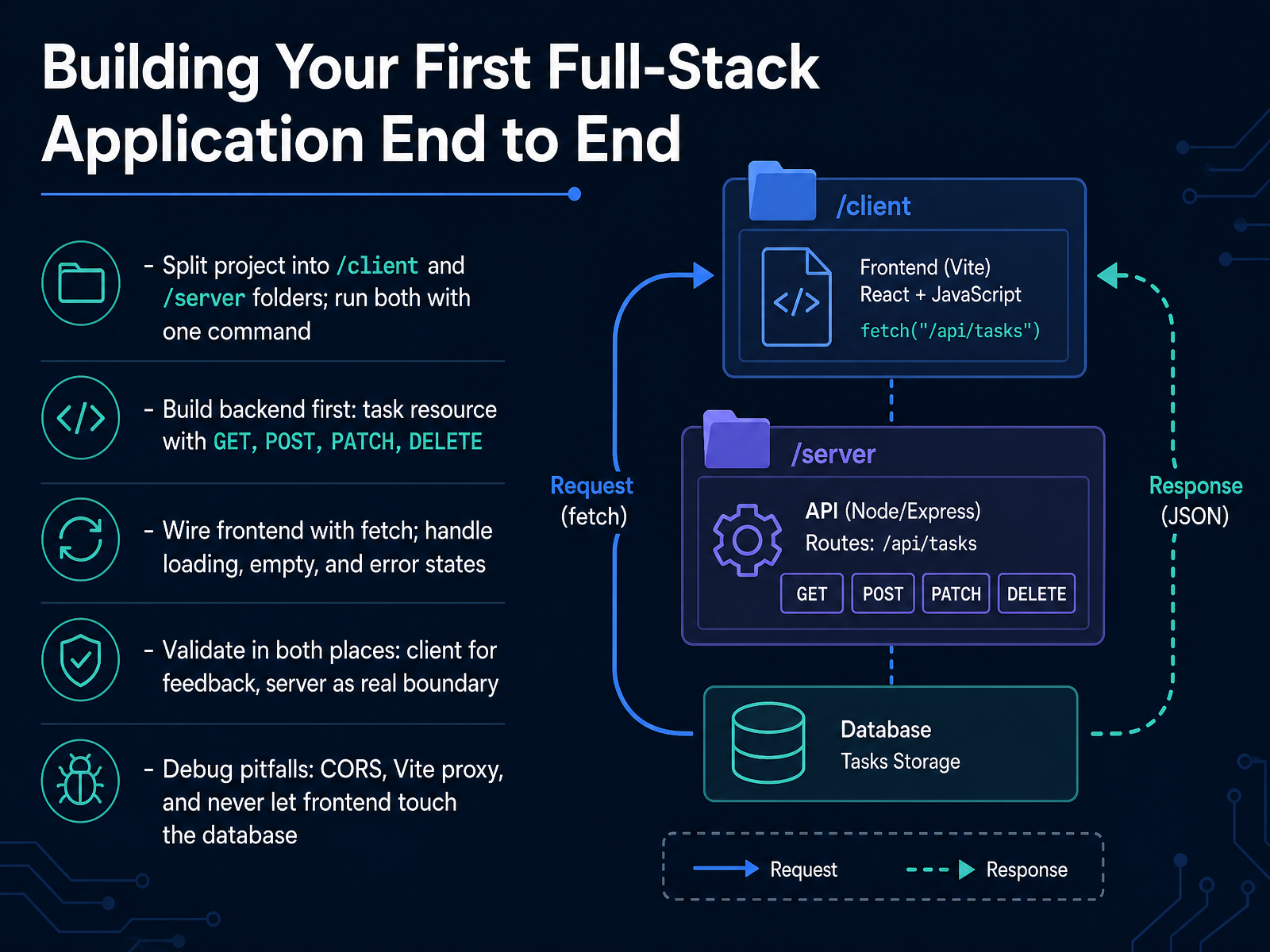
2 min - 10Building Your First Full-Stack Application End to EndNow let's put everything together and build your first full-stack application end to end. We'll use a simple task list as our example. First, split your project into two folders: a client folder for the browser-facing code, and a server folder for the back end. Use one root command to run both together, so you start them with a single step. Build the back end first. Create a task resource with four routes: GET to read tasks, POST to add one, PATCH to update one, and DELETE to remove one. Then wire the front end with the Fetch API, which is JavaScript's built-in way to make HTTP requests. Fetch returns a promise, so use async and await to read the response. Handle three states in your interface: loading while waiting, empty when there are no tasks, and error when the request fails. One critical habit: fetch does not throw on a 404 or 500 status, so always check response dot ok and throw your own error. Validate in both places. On the client for quick feedback, and on the server as the real boundary that protects your data. Finally, watch common pitfalls: cross-origin resource sharing, or CORS, and the Vite proxy that forwards API calls during development. And never let the front end touch the database directly. Everything goes through the server. Next, we'll cover security essentials every web developer should know.
 developer.mozilla.orgdeveloper.mozilla.orgthelinuxcode.com+22 min
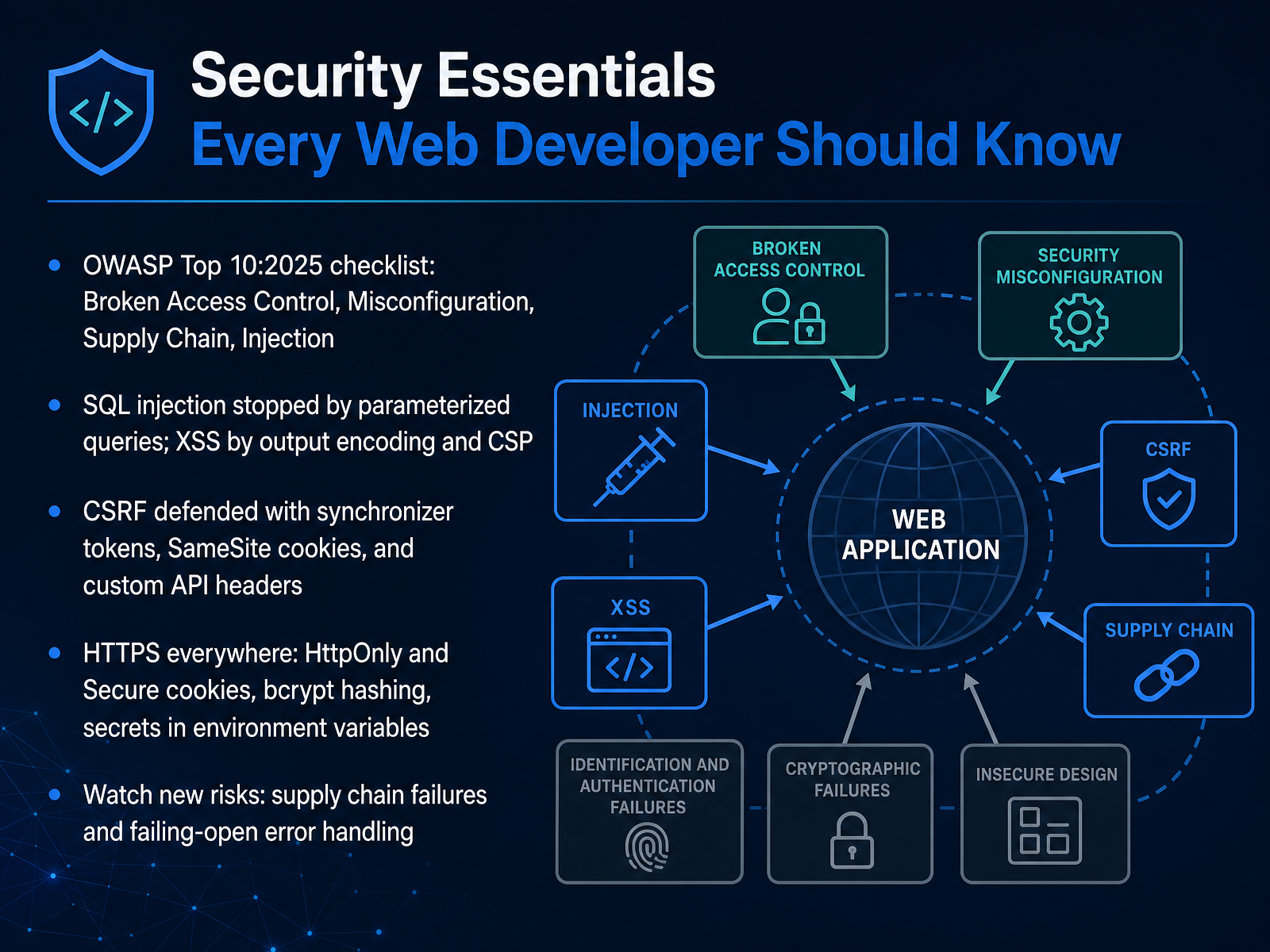
 - 11Security Essentials Every Web Developer Should KnowNow let's look at security essentials that every web developer should know. A practical starting point is the OWASP Top Ten, a widely trusted list of the most critical web application risks. The twenty twenty-five edition highlights broken access control, security misconfiguration, supply chain failures, and injection. You do not need to memorize the full list today. Instead, remember a few concrete defenses. SQL injection is stopped by parameterized queries, which keep user input separate from database commands. Cross-site scripting is reduced by output encoding and a Content Security Policy. Cross-site request forgery is defended with synchronizer tokens, SameSite cookies, and custom headers on API requests. Then apply the basics everywhere: serve your site over HTTPS, mark cookies HttpOnly and Secure, hash passwords with bcrypt, and keep secrets in environment variables, never in your code. Finally, watch newer risks like supply chain failures and error handling that fails open. When something breaks, fail closed and log it. Next, we will move from protecting the app to putting it online in Deployment and Going Live.
 2 min
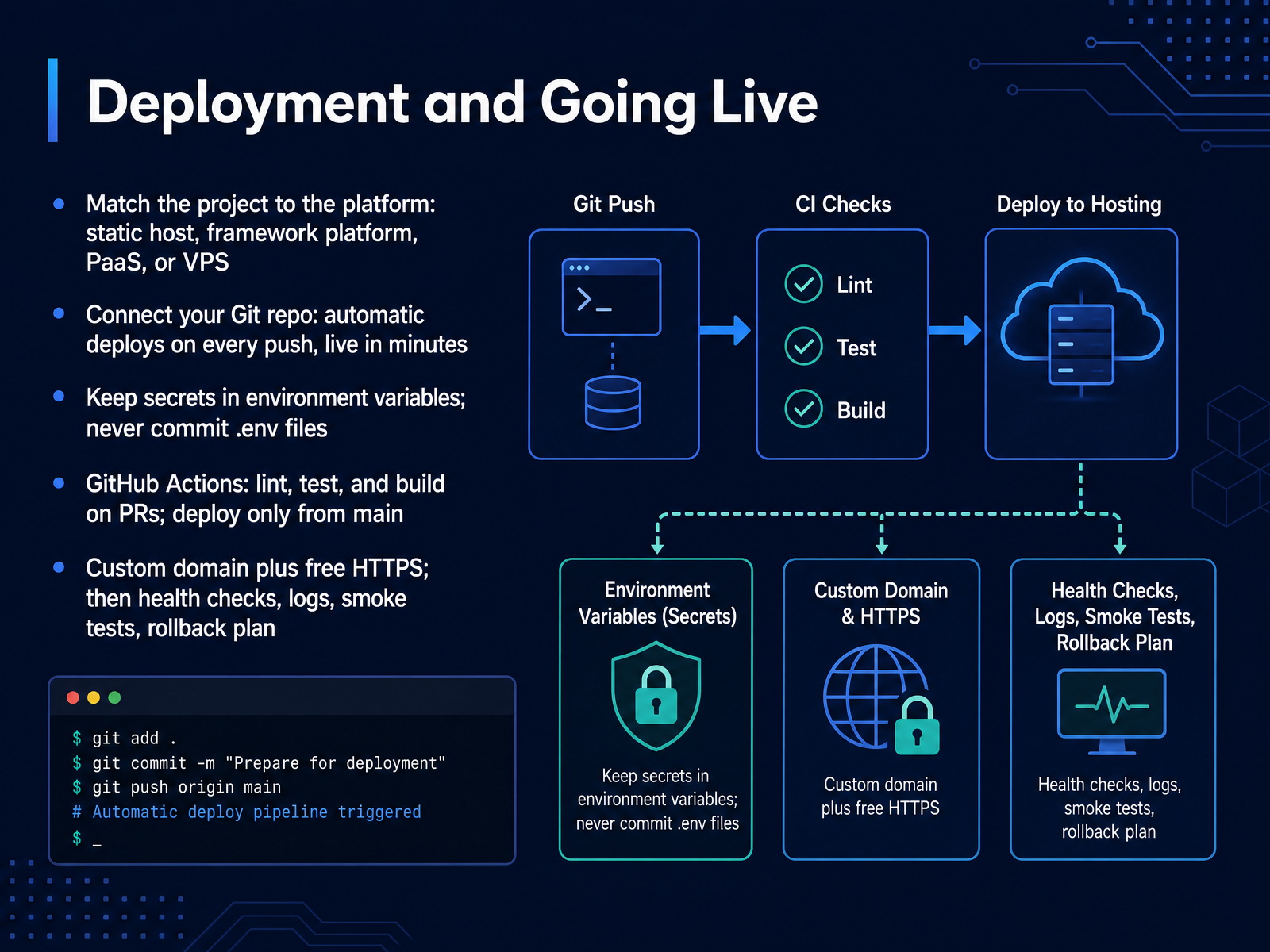
2 min - 12Deployment and Going LiveLet's talk about deployment and going live. Deployment means moving your finished files from your laptop to a server that stays on, so anyone with the address can open your app. The first step is matching your project to the right platform. A plain static site, meaning prebuilt HTML, CSS, and JavaScript, can go on a static host. Frontend apps built with React or Next.js usually go on a framework platform. A backend API with a database fits a platform as a service, or a virtual private server if you want full control. Next, connect your Git repository. Once connected, every push to your main branch triggers an automatic deploy, and you are live in minutes. Now a safety rule. Keep secrets, like API keys and database passwords, in environment variables, and never commit your dot E N V file. For automation, GitHub Actions can lint, test, and build on every pull request, and only deploy when code reaches main. Finally, add a custom domain with free HTTPS. Then set up health checks, review logs, run a quick smoke test after each release, and always keep a rollback plan. Choose one simple platform, connect your repo, and let automation handle the rest. Deployment is a skill you build by shipping, not by waiting until everything is perfect. Continuing to Learn: Portfolio, Open Source, and Staying Current.
 2 min
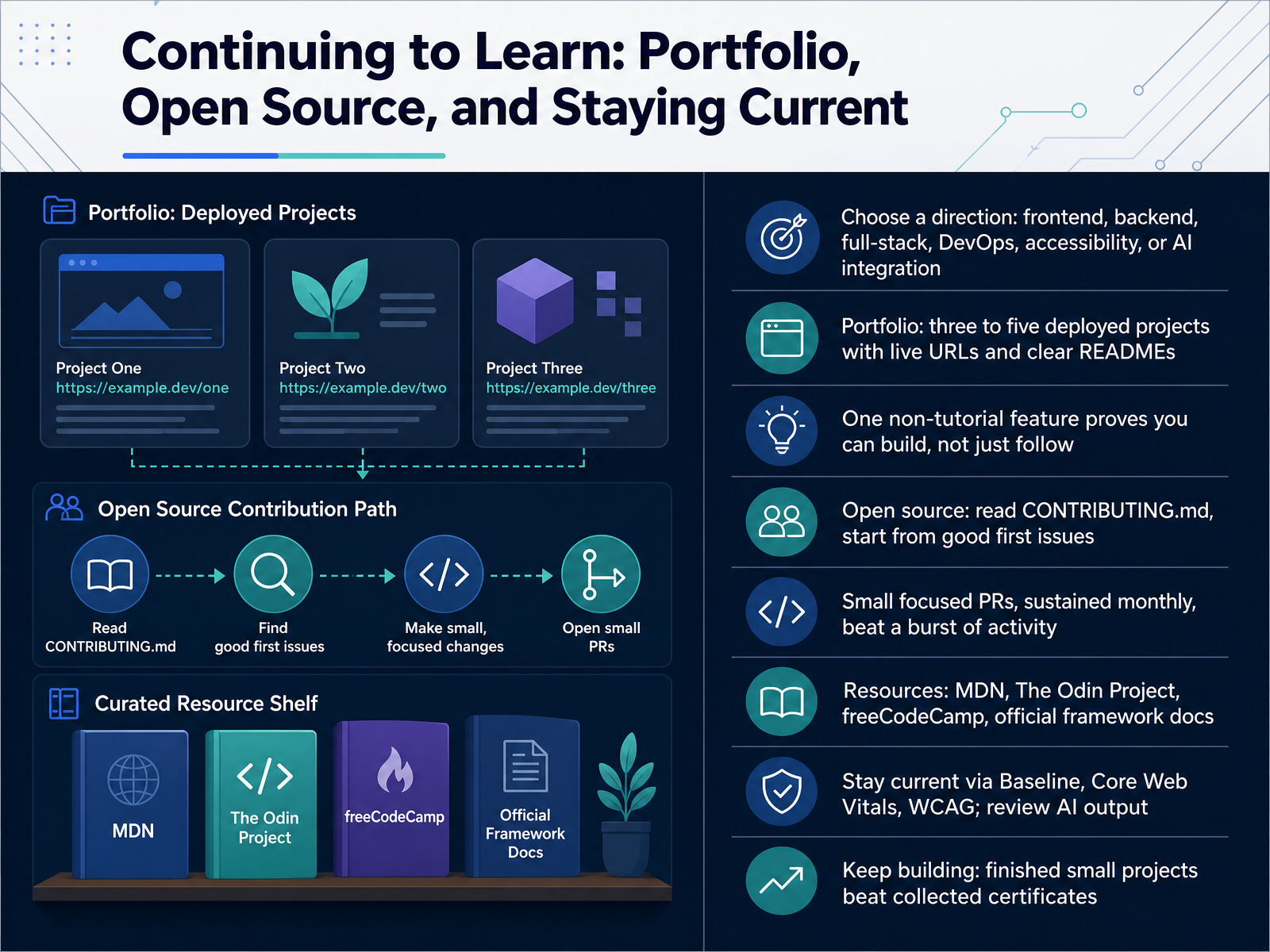
2 min - 13Continuing to Learn: Portfolio, Open Source, and Staying CurrentNow that you can build and test a web app, the next step is staying current and showing your work. First, choose a direction. Frontend, backend, full stack, DevOps, accessibility, or AI integration. Next, build a portfolio. Aim for three to five deployed projects with live URLs and clear READMEs. One feature that did not come from a tutorial proves you can build, not just follow along. For open source, read the CONTRIBUTING file and start with good first issues. For example, a small documentation fix is a fine first pull request. Small focused pull requests each month beat a burst of activity. Keep learning with MDN, The Odin Project, freeCodeCamp, and official framework docs. Stay current through Baseline, Core Web Vitals, and WCAG, and always review AI output. Above all, keep building. Finished small projects beat a pile of certificates. In the final slide, we will map out your next thirty days. Course Wrap-Up: Your Next 30 Days.
 2 min
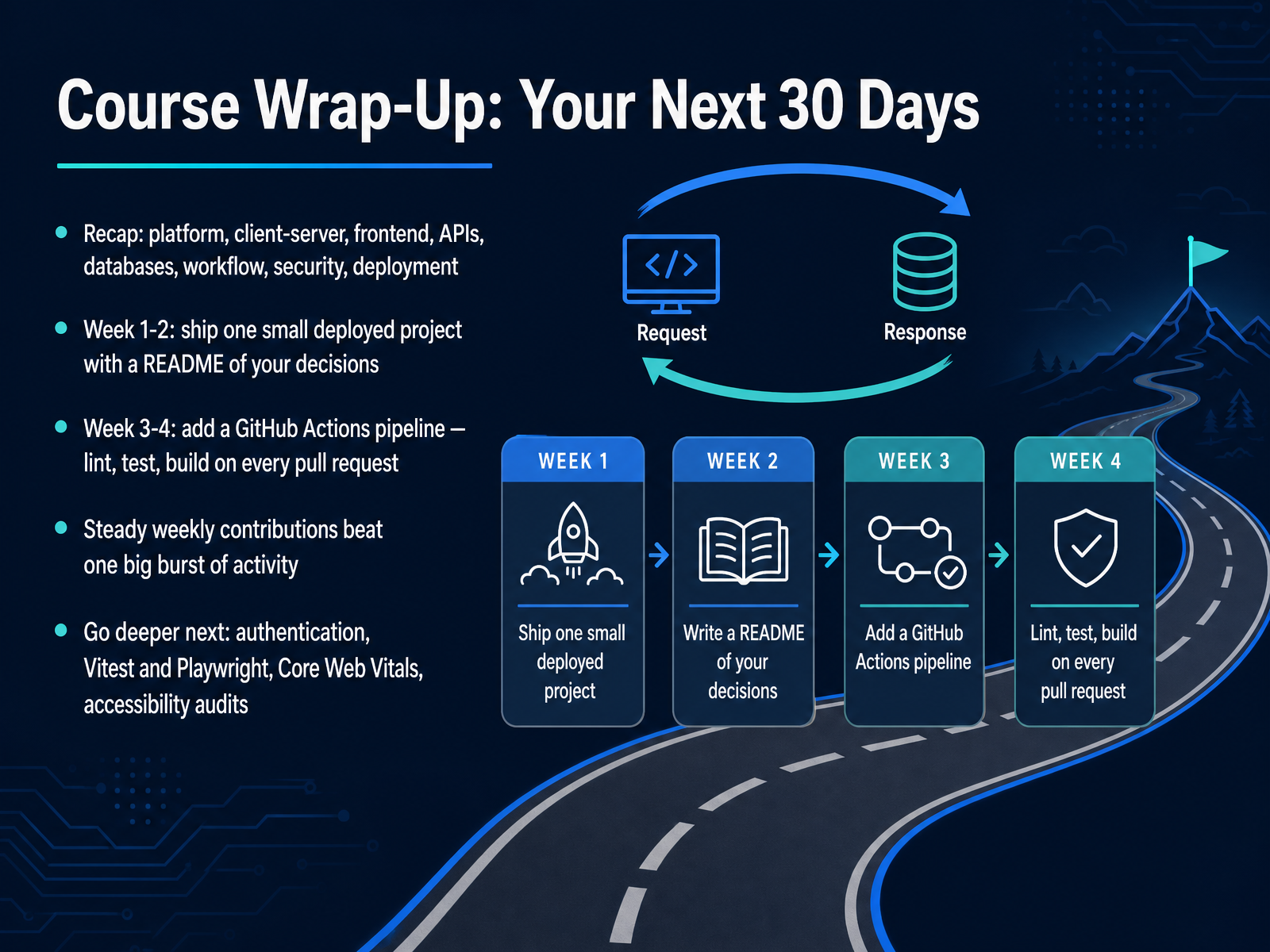
2 min - 14Course Wrap-Up: Your Next 30 DaysLet's bring it all together. Over this course, we covered the platform, the client-server model, the frontend, APIs, databases, workflow, security, and deployment. That is a complete picture of how a web application actually works, and you now have the vocabulary to discuss each piece with confidence.
So here is a simple plan for your next thirty days. During weeks one and two, ship one small deployed project. It does not need to be impressive. Keep it simple, get it live, and write a README that explains the decisions you made. For example, note why you chose a particular database, or how you handled errors. That written reasoning is what shows real understanding.
In weeks three and four, add a GitHub Actions pipeline. Configure it to lint, test, and build on every pull request. This is continuous integration, and it is standard practice on professional teams.
One more suggestion, steady weekly contributions beat one big burst of activity. Consistency is what builds real skill.
When you are ready to go deeper, explore authentication, testing tools like Vitest and Playwright, Core Web Vitals, and accessibility audits. For educators and creators, everything you built is ready to reuse and adapt.
Thank you for your attention throughout this course. You have built a strong foundation. Keep building, keep shipping, and keep learning. Good luck.
 2 min
2 min
Take the deck with you
Download this course as a file — free, no sign-up needed.
- PDF handoutEvery slide page, ready to print or share.15 pages · 3.8 MBDownload
- Narrated PowerPointThe deck that presents itself — every slide carries the digital human's narration video.15 pages · 29.9 MBDownload
- PowerPoint slidesThe full deck as a .pptx — open it in PowerPoint, Keynote, or Google Slides.15 pages · 3.7 MBDownload
Free to use in your own training — please keep the PersonWise credit page at the end.
Have your own deck? Turn it into a course
Sources consulted
Web sources consulted while building this course.
- Client-server overview - Learn web development | MDN — developer.mozilla.org
- Client-Server Architecture: The Complete Foundation Guide | TopicTrick — topictrick.com
- What a Web App Is in 2026: A Practical, Engineer’s View – TheLinuxCode — thelinuxcode.com
- Client-Server Model - GeeksforGeeks — geeksforgeeks.org
- Client-Server Architecture Explained | Chanh Le — chanhle.dev
- Populating the page: how browsers work - MDN Web Docs — developer.mozilla.org
- Critical rendering path - Performance - MDN Web Docs — developer.mozilla.org
- Render-tree Construction, Layout, and Paint | Articles | web.dev — web.dev
- Critical Rendering Path: DOM Construction — Sujeet Jaiswal - Principal Software Engineer — sujeet.pro
- Critical Rendering Path: Rendering Pipeline Overview — Sujeet Jaiswal - Principal Software Engineer — sujeet.pro
- Web Development Best Practices 2026 — Social Animal — socialanimal.dev
- Web Development Best Practices: Modern Websites Guide 2026 — albiorixtech.com
- Modern Web Stack Guide: HTML, CSS & JavaScript in the AI Era — botexy.com
- How to Design a Modern Website in 2026: A Developer's Practical Guide - DEV Community — dev.to
- Front End Development Best Practices for 2026 | Optimize Web Experience — webatou.info
- Using the Fetch API - MDN Web Docs — developer.mozilla.org
- Fetch API - MDN Web Docs — developer.mozilla.org
- Fetch API in JavaScript (2026): Practical Patterns for Requests, Errors, Timeouts, and Real-World Clients – TheLinuxCode — thelinuxcode.com
- Using fetch in JavaScript to Get Data from an API — lookkle.com
- The fetch() API: A Practical Guide (with the response.ok gotcha) — techearl.com