Begin
12 pages · ~24 min
Team Communication Tools Selection and Workflow Design
This training helps teams select and implement effective communication tools, designing workflows that streamline collaboration and improve productivity.
A digital instructor presents all 12 pages. Hold “Ask” at any point and ask out loud — the answer comes from this course. No sign-up needed.
What you’ll learn
- 01Team Communication Tools: Selection and Workflow DesignWelcome. If you are leading a team or managing projects, you already feel the pressure of communication tools. Too many apps, too many notifications, and still, things get missed. Here is the core truth we will build on today: the tools you choose shape your team's culture, focus, and operational risk. That is why selection and workflow design are not two separate tasks. They are one decision. In this session, you will learn to audit your current workflows, define clear requirements, design communication norms, and govern the tools your team actually uses. We will keep it practical and grounded in real scenarios. By the end, you will have a clear path to reduce friction and improve clarity. Let's start by looking at why tools often fail without workflow design.useworkshop.comcommswith.aihuler.io+21 min
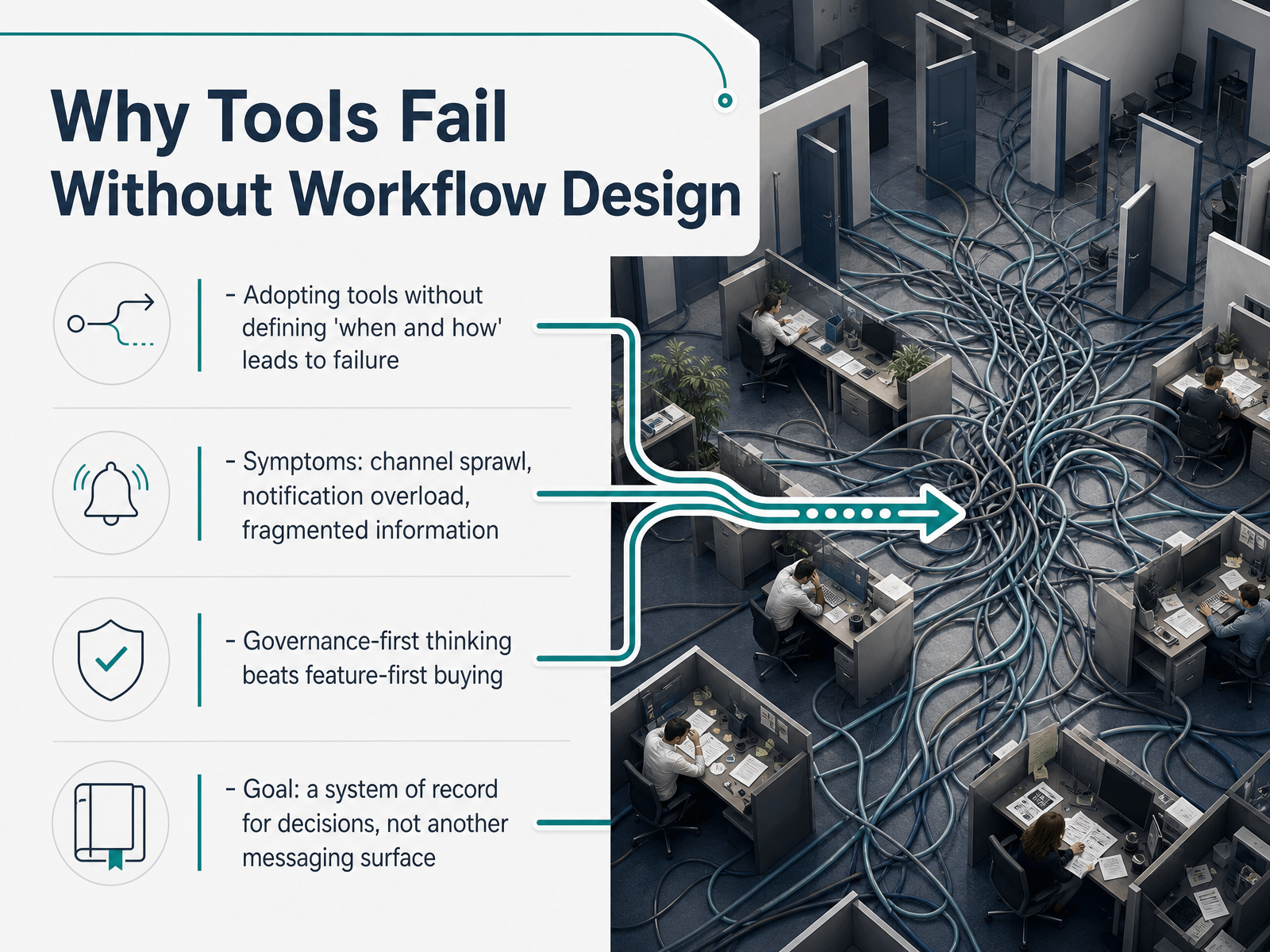
- 02Why Tools Fail Without Workflow DesignLet’s talk about why tools fail. It’s rarely the software. It’s the absence of workflow design. You can buy the best platform on the market, but if you don’t define when to use it and how to use it, you’re setting yourself up for failure. The symptoms are familiar. Channel sprawl. Notification overload. Fragmented information scattered across five different apps. Sound familiar? Here’s the shift. Governance first, not features first. Stop asking what the tool can do. Start asking what decisions it should record. Your goal isn’t another messaging surface. It’s a single system of record for decisions and approvals. One place where the truth lives. Everything else points back to it. When you build your workflow around that principle, you cut the noise and give your team clarity. Next, we’ll walk through auditing your current communication workflows.
 useworkshop.comcommswith.aihuler.io+22 min
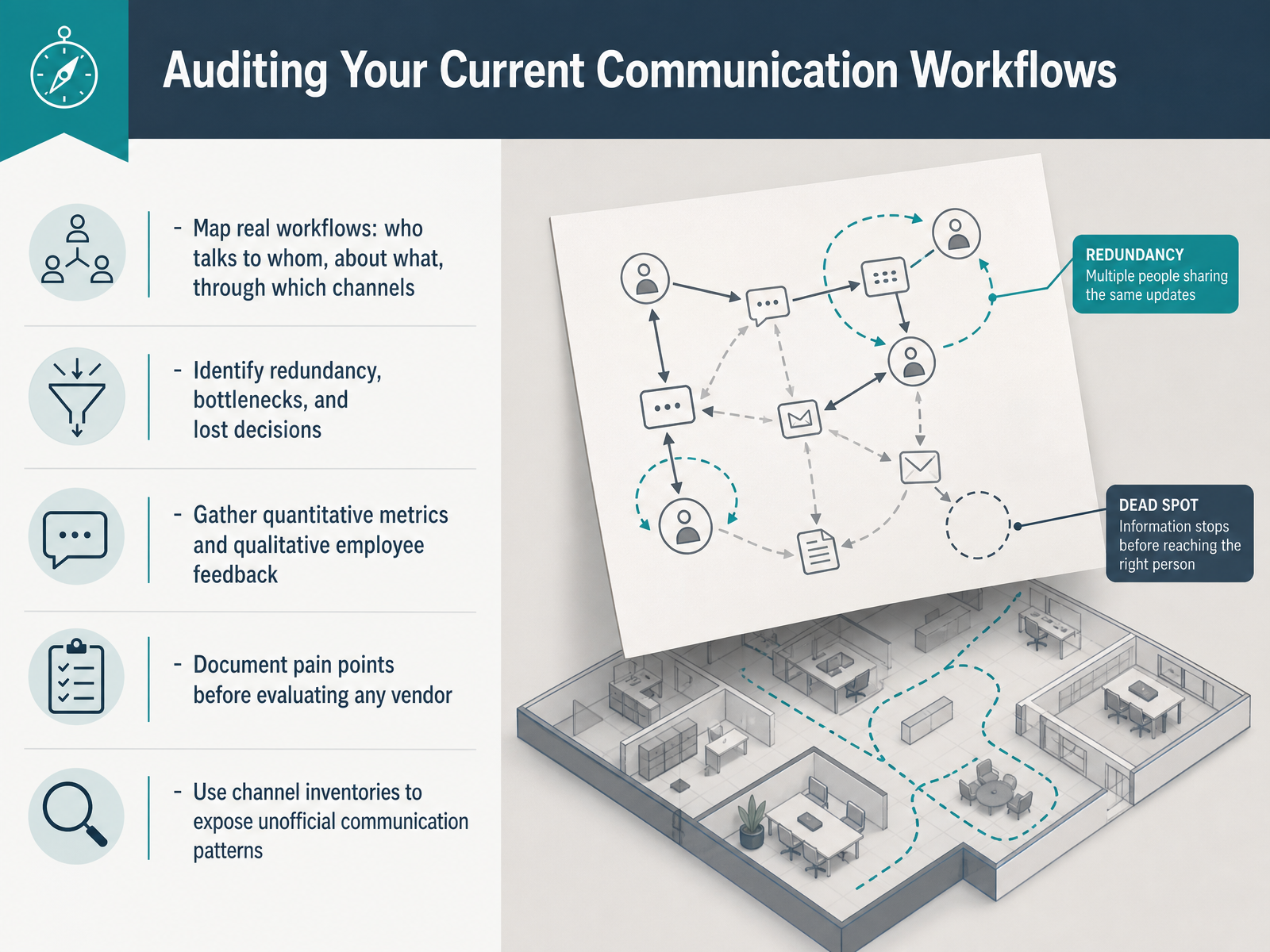
 - 03Auditing Your Current Communication WorkflowsLet's talk about where you are right now. Before you evaluate a single tool, you need to audit your current communication workflows. Start by mapping what actually happens. Who talks to whom, about what, and through which channels? You want the real process, not the one on paper. Then, look for the friction. Where do messages get stuck? Where do decisions get lost? Talk to your team. Combine the numbers from your tools with honest employee feedback. And build a channel inventory. This will expose the unofficial patterns that everyone relies on but nobody documents. The goal is a clear picture of your pain points before you look at any vendor. Document these findings. They become your benchmark for every decision that follows. Once you have that baseline, you can move forward and start defining the specific requirements that will actually fit your team.
 useworkshop.comcommswith.aihuler.io+22 min
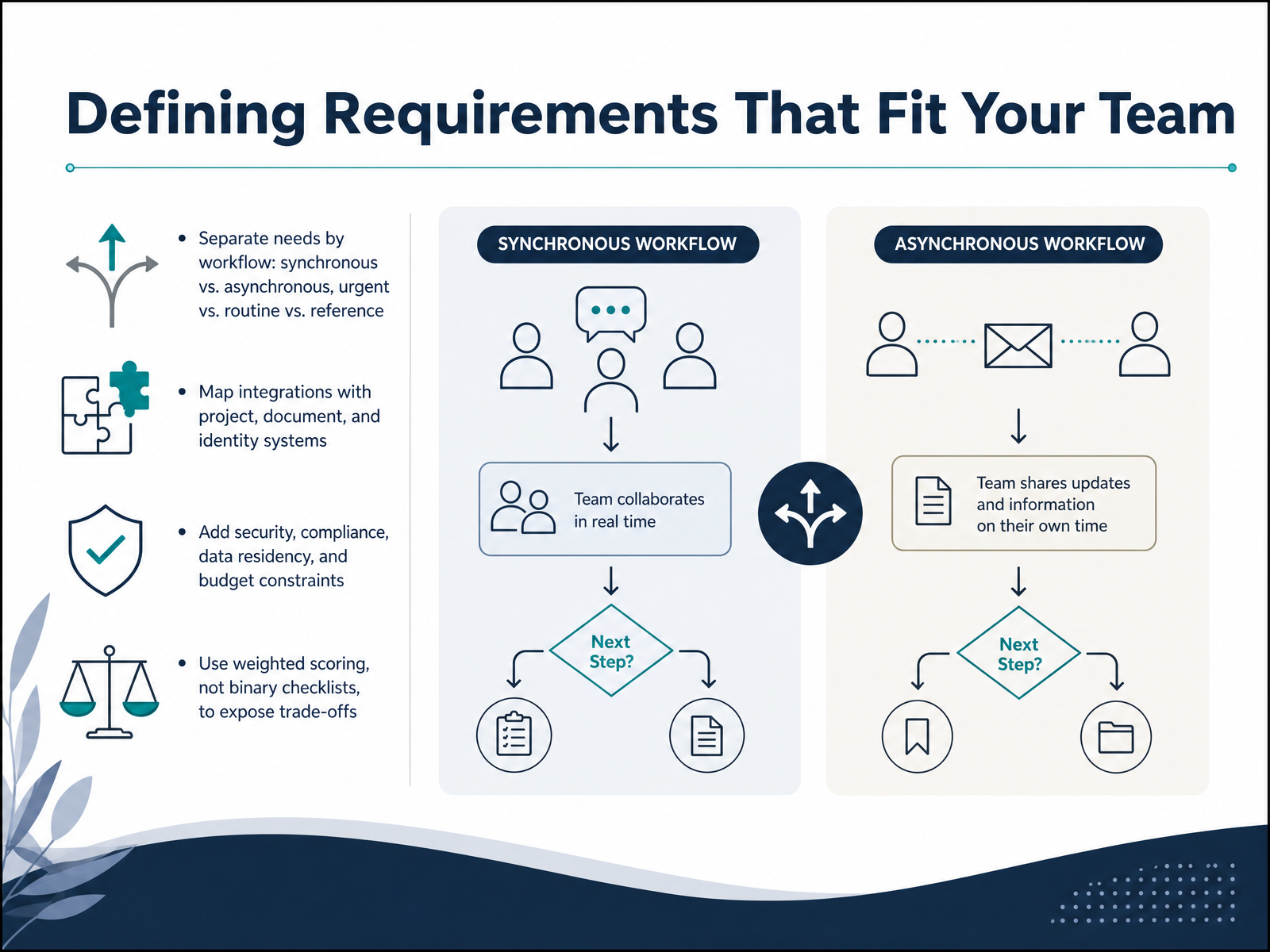
 - 04Defining Requirements That Fit Your TeamNow let's define what your team actually needs. Start by separating workflows. Synchronous needs like quick huddles, versus asynchronous updates for different time zones. Then split urgent alerts from routine status checks and reference documents. Next, map the integrations that matter: your project tools, document systems, and identity provider. If a tool can't connect cleanly to those, it creates friction. Add your constraints upfront: security, compliance, data residency, and budget. These can eliminate options quickly. Finally, use weighted scoring, not a binary checklist. A checklist hides trade-offs. Weighted scoring makes you decide what matters more: deep search or guest access, for example. This gives you a defensible decision your team understands. Now, let's look at the main tool categories and what each one actually trades off.
 useworkshop.comcommswith.aihuler.io+22 min
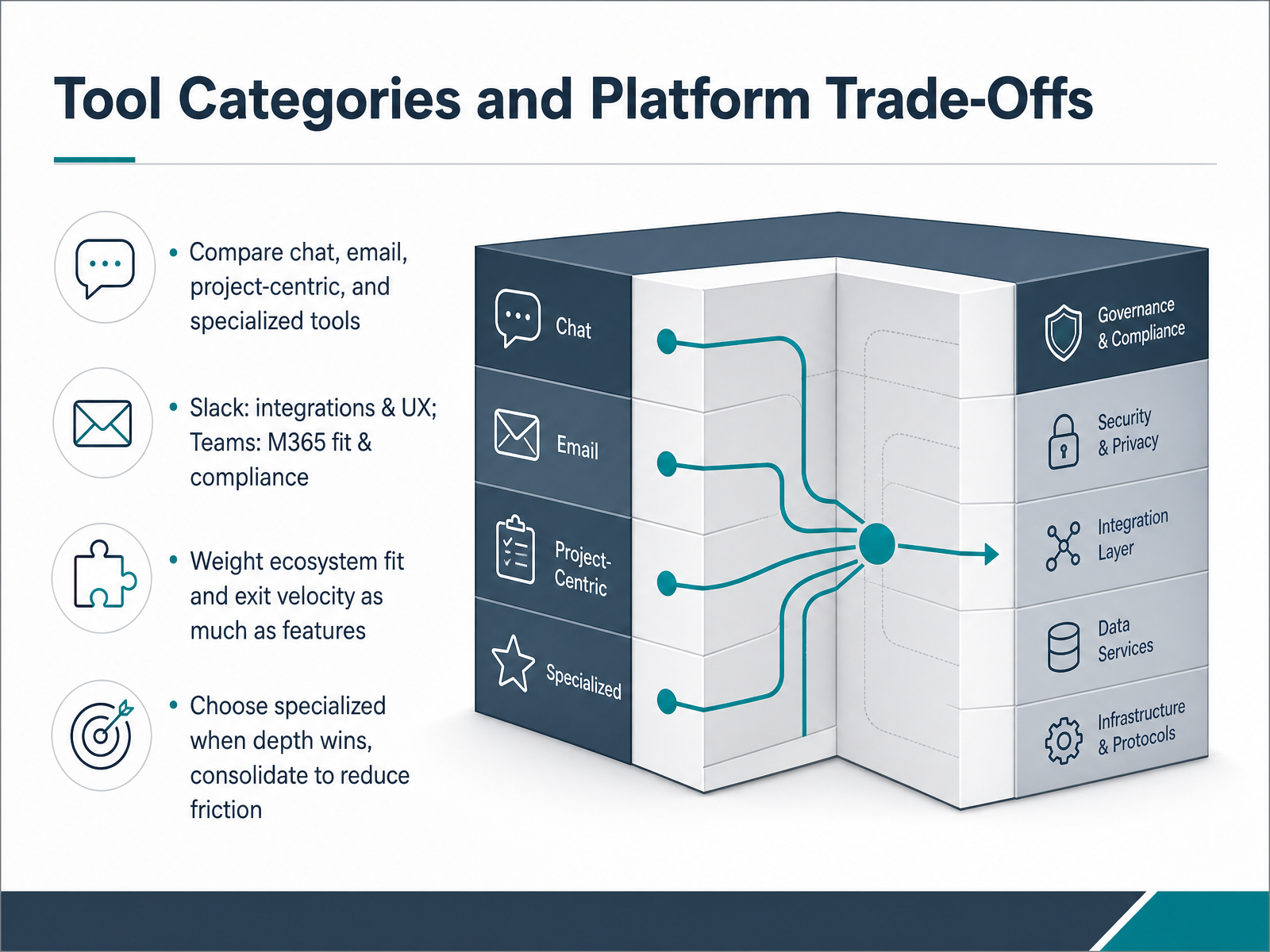
 - 05Tool Categories and Platform Trade-OffsNow let’s break down the main tool categories and the trade-offs you’ll face. Think of it in four buckets: chat tools like Slack or Teams, email, project-centric platforms, and specialized tools for specific jobs. The key is not to ask which one is best overall, but which one fits your ecosystem, your compliance needs, and your team’s daily reality. Slack shines with integrations and user experience, but if you’re already running Microsoft 365, Teams gives you native compliance and less friction across documents and meetings. Remember, features matter, but so does exit velocity—how easily you can leave if things change. And don’t fall into the trap of adopting a specialized tool for every small need. Consolidate when you can; use specialized only when depth really wins. For example, if you’re an engineering team that lives in Jira and GitHub, a tool with deep integration is worth it. If not, keep it simple and reduce the number of tools your team has to switch between. In short, weigh the ecosystem fit, the switching cost, and the actual workload you’re solving for. Next, we’ll talk about designing channel rules and notification norms so your tool doesn’t become noise.
 quickconnect.appwork-tech-institute.comblog.asa.team+22 min
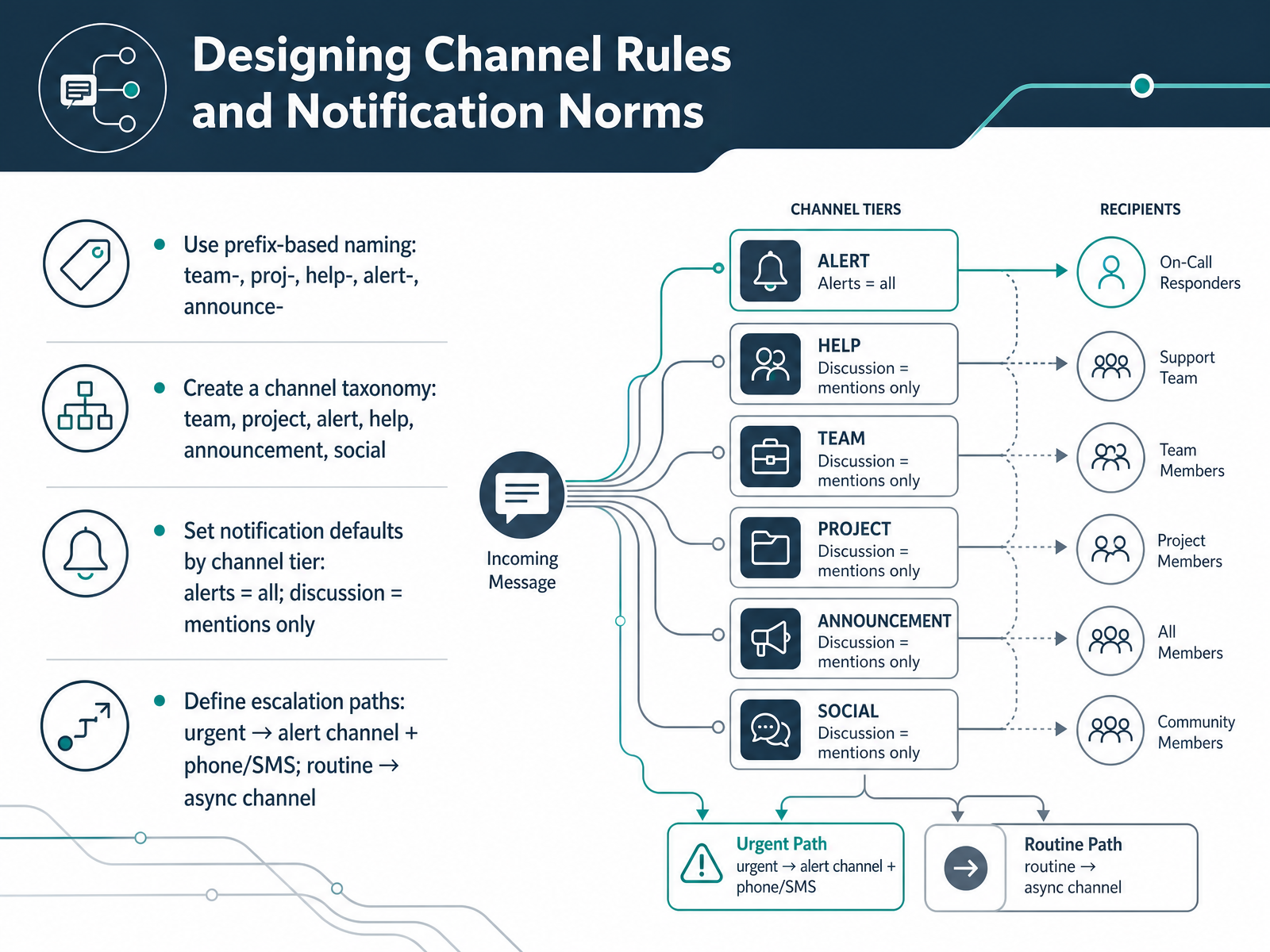
 - 06Designing Channel Rules and Notification NormsNow let's talk about channel rules and notification norms. The goal is simple: make sure people know where to post and when to pay attention. Start with naming. Use prefixes like team, proj, help, alert, and announce. This way, anyone can scan the channel list and instantly know what each channel is for. For example, proj-q3-launch is clearly a project channel, and alert-p1-production is where critical alerts go. Next, set notification defaults by tier. Alert channels should notify everyone, because those messages can't wait. Discussion channels should only notify when someone is mentioned. This prevents notification fatigue and keeps focus where it matters. Finally, define escalation paths. If something is truly urgent, it goes to the alert channel and you might add a phone or SMS alert. If it's routine, keep it in an async channel and let people respond when they can. A shared rule like this saves hours every week. Next, we'll look at workflow design and how to make the tool actually work for your team.
 buralog.jpslack.comslack.com+22 min
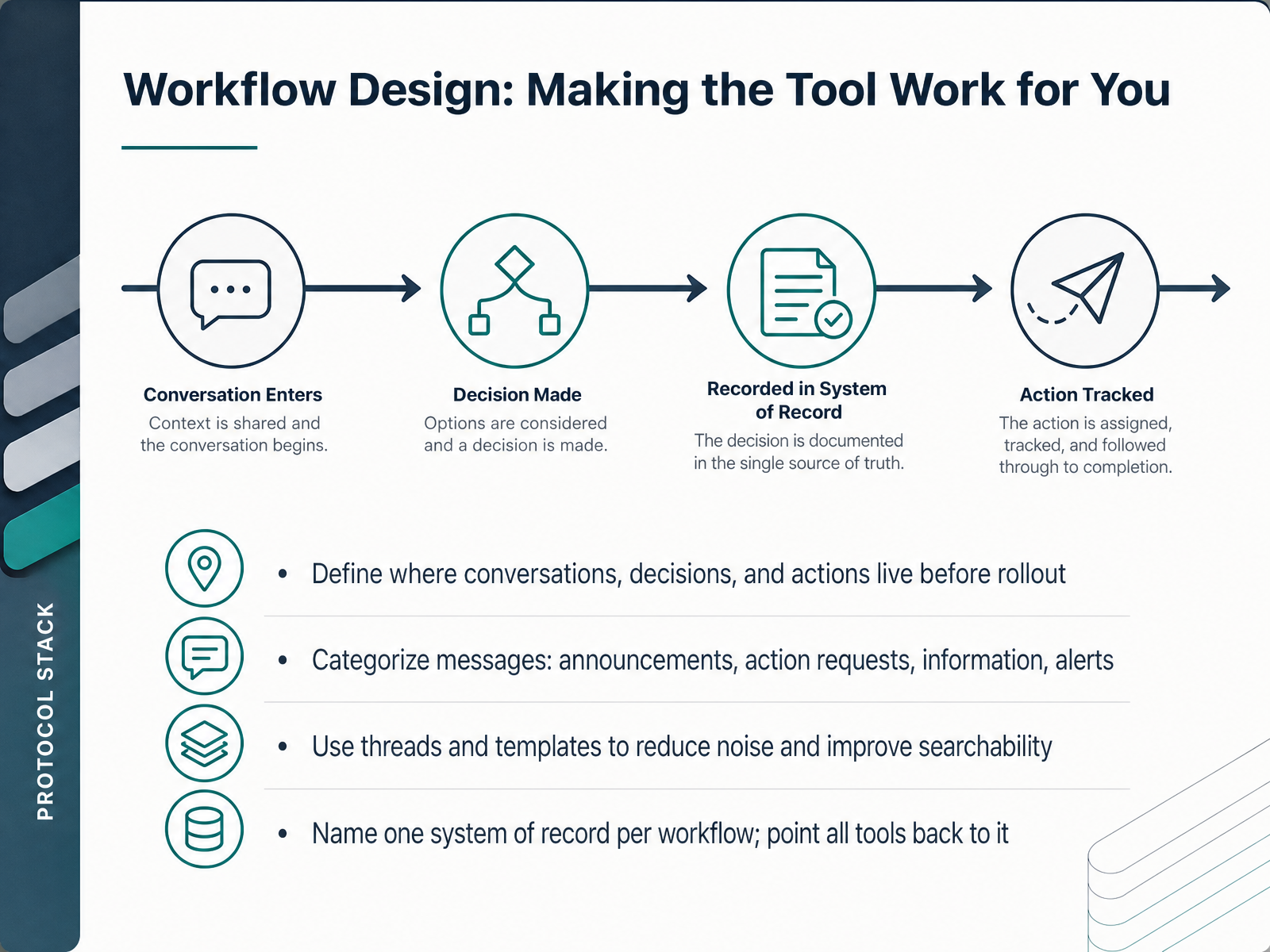
 - 07Workflow Design: Making the Tool Work for YouNow let's talk about workflow design, because the tool only works if the workflow around it is clear. Start by defining where conversations, decisions, and actions live before you roll anything out. If you don't, people will default to whatever is fastest, usually chat, and your system of record becomes the loudest voice in the room. Categorize your messages. Announcements are for must-read updates. Action requests are assignments with owners and deadlines. Information is just reference material, and alerts are for true emergencies. Use threads and templates to reduce noise and make everything searchable. A threaded discussion keeps the main channel scannable, and a template for action requests means people never miss a deadline. Finally, name one system of record per workflow. One place where the truth lives, and point every other tool back to it. When someone asks, where is the latest version, you should have one answer. This cuts rework, reduces context switching, and gives your team clarity. Next, we'll cover rollout planning, starting with your pilot, training, and launch.
 uctoday.comagilityportal.iocxm.world+22 min
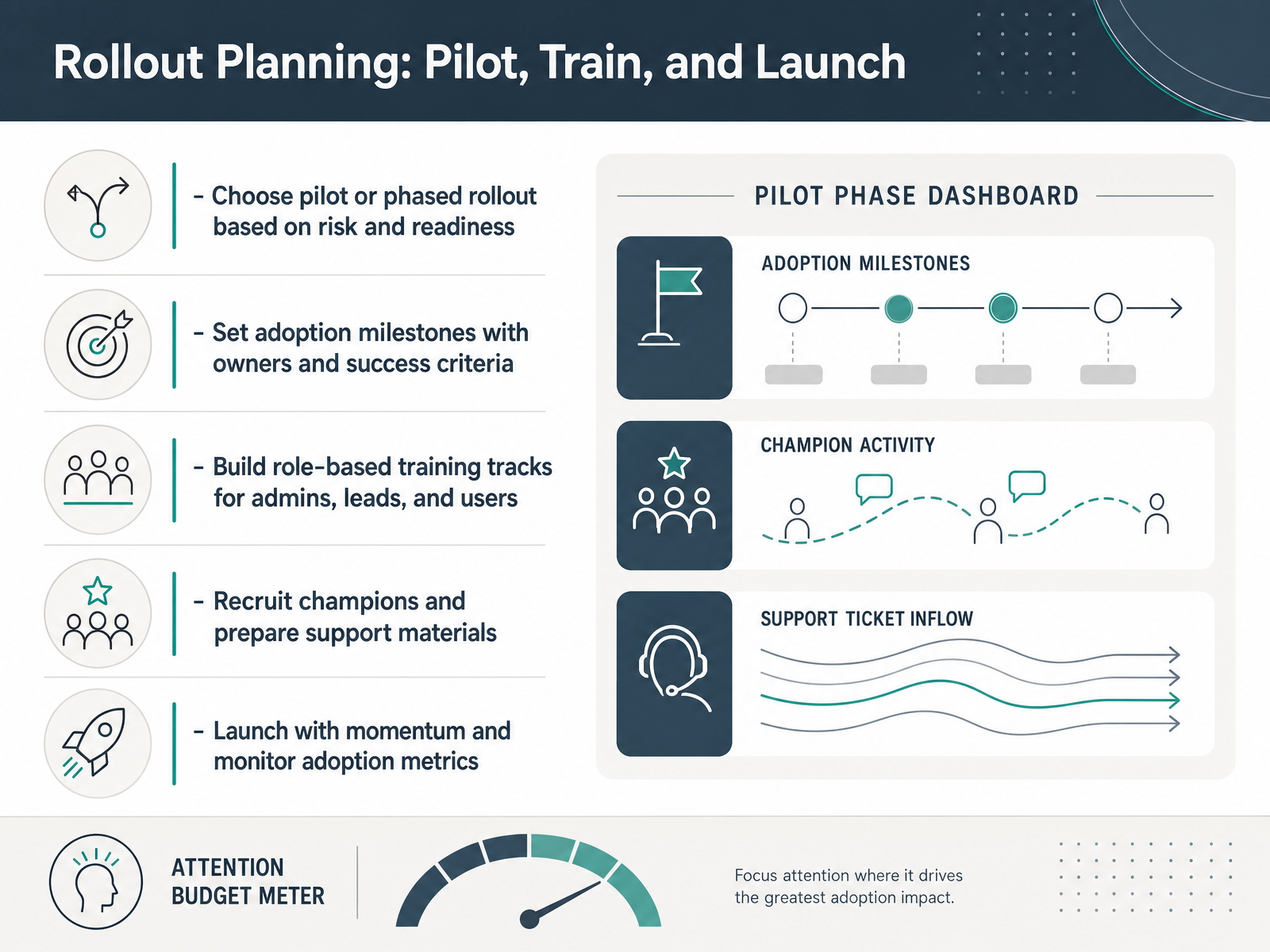
 - 08Rollout Planning: Pilot, Train, and LaunchNow let's talk about rollout planning. You've chosen the tool and designed the workflows. Next comes getting people to actually use them. Start by deciding between a pilot and a phased rollout. A pilot with ten to twenty percent of users lets you catch friction early. Then expand wave by wave. This lowers risk and builds confidence. Set adoption milestones with clear owners and success criteria. For example, aim for sixty percent active use in the first month. Assign someone to track it. Build training tracks by role. Admins need deep configuration. Team leads need workflow management. Everyday users need quick, practical guides. Recruit champions in each department. They test features, seed content, and coach peers. Give them early access and a simple checklist. Prepare support materials like FAQs and quick reference guides. Launch with momentum. Announce the date, run live demos, and have leaders post on day one. Then monitor adoption metrics weekly. Watch login rates, feature usage, and support tickets. Fix issues fast. This keeps the rollout on track and proves value early. Up next, we'll cover governance that keeps workflows sustainable.
 uctoday.comagilityportal.iocxm.world+21 min
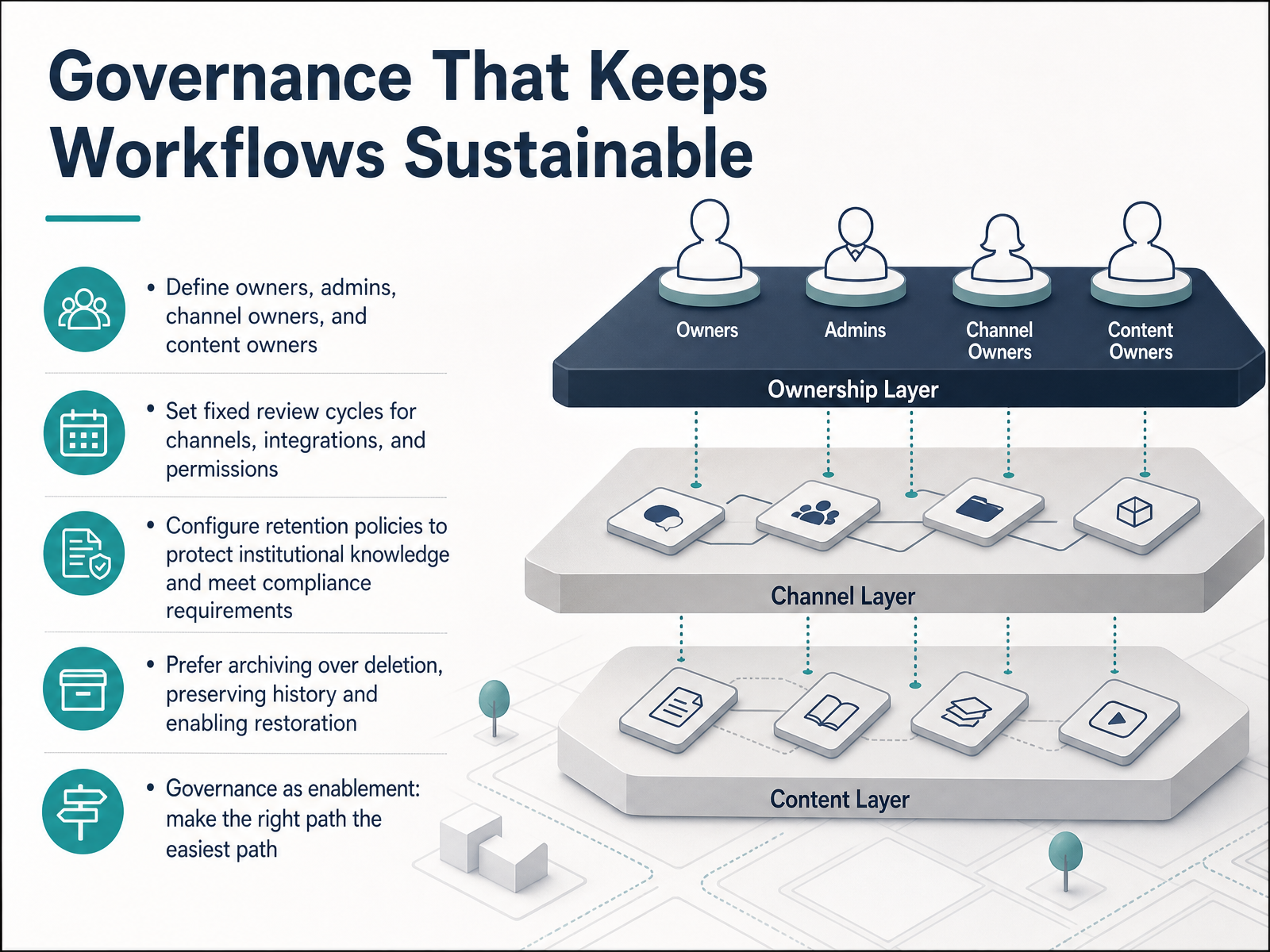
 - 09Governance That Keeps Workflows SustainableNow let's talk about the governance layer that keeps your workflows sustainable. Clear ownership is the foundation. Assign an owner for every channel, a system admin for the platform, and content owners for key documentation. When everyone knows who is accountable, decisions move faster. Next, set a fixed review cycle for channels, integrations, and permissions. A quarterly audit works well for most teams. In that review, archive inactive channels and remove stale integrations. Retention policies protect your institutional knowledge and meet compliance requirements. Configure them at the global level, then override at the channel level when needed. And always prefer archiving over deletion. An archived channel preserves history and can be restored. Deletion is permanent and irreversible. Governance should be enablement, not restriction. Make the right path the easiest path, and your team will follow it by default. Next, let's look at how to measure adoption and workflow health.
 buralog.jpslack.comslack.com+21 min
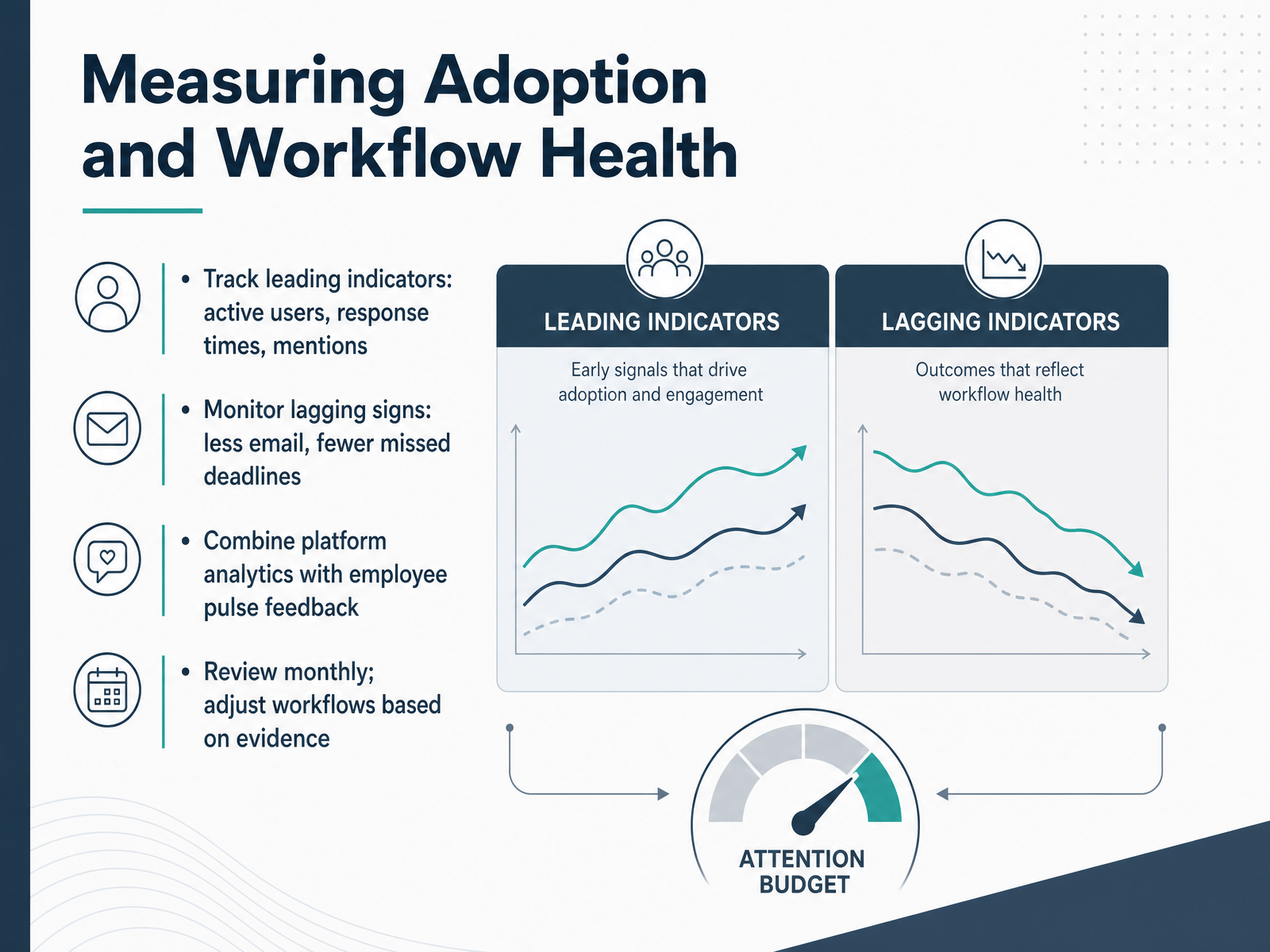
 - 10Measuring Adoption and Workflow HealthLet's talk about measuring adoption and workflow health. This is where you separate what's working from what's just active. Track leading indicators like active users, response times, and mentions. These tell you if the tool is becoming a daily habit. Also monitor lagging signs, such as less email and fewer missed deadlines. These show real workflow impact. Combine platform analytics with employee pulse feedback. Numbers tell you what is happening; people tell you why. Review everything monthly, and adjust workflows based on evidence. A simple dashboard with a few key metrics is enough. If one team is slower to adopt, target training there. If feature usage drops, find out why. Measure, adjust, and repeat. Next, let's look at common pitfalls and how to avoid them.
 uctoday.comagilityportal.iocxm.world+21 min
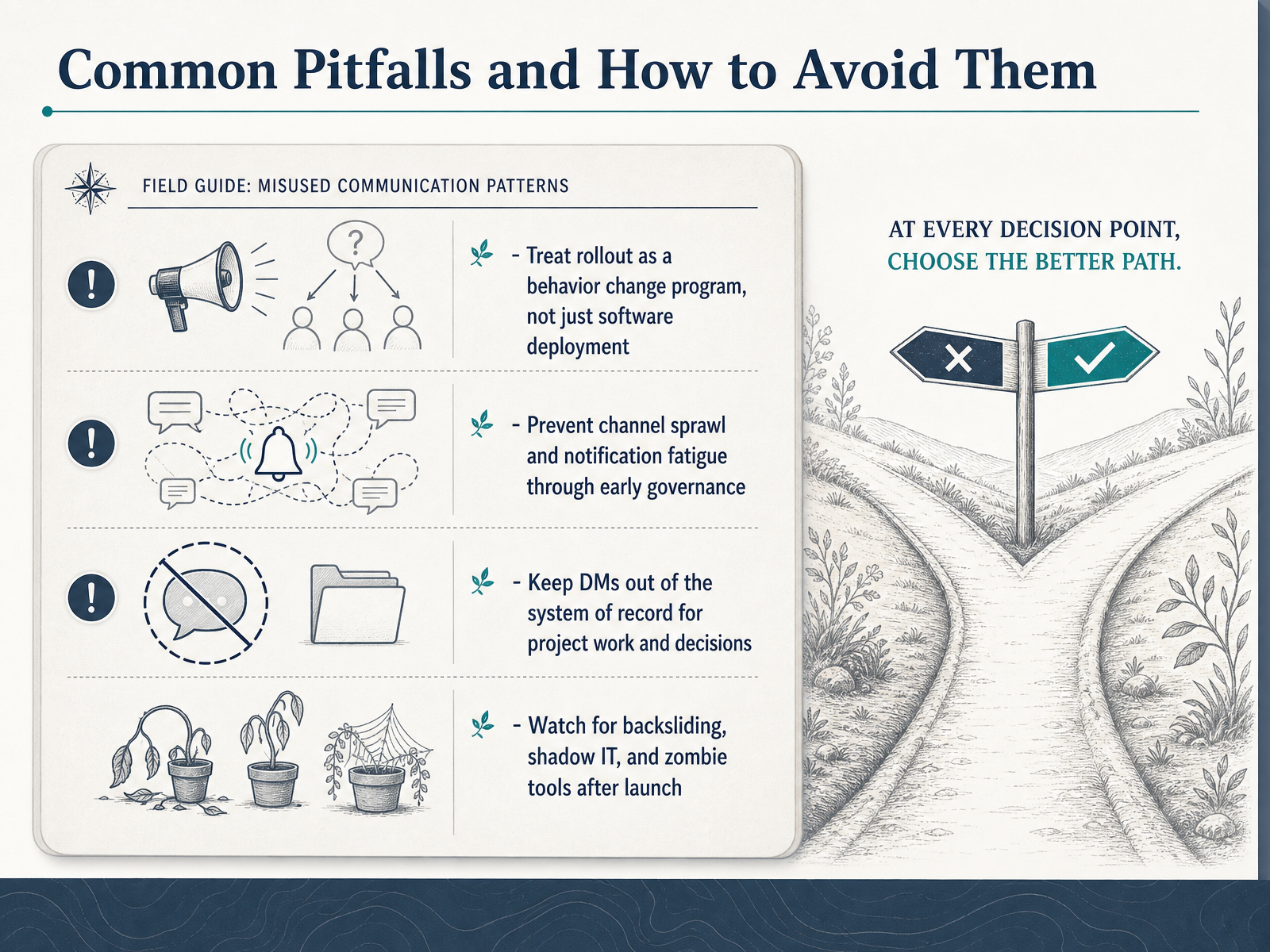
 - 11Common Pitfalls and How to Avoid ThemNow let's talk about the common pitfalls, because knowing them upfront will save you months of cleanup. First, treat rollout as a behavior change program, not just a software deployment. If you only install the tool, people will quietly go back to email and side chats. You need to show them the new workflow, not just the login page. Second, prevent channel sprawl and notification fatigue through early governance. Decide on a channel naming structure and posting rules before you launch. Otherwise, you will end up with dozens of overlapping channels and everyone muting everything. Third, keep direct messages out of the system of record. If a decision is made in a DM, it is invisible to the rest of the team. Insist that project work and approvals happen in the designated channel. Finally, watch for backsliding and shadow IT after launch. Teams often start using old tools again because they are faster or more comfortable. Schedule a weekly audit of active channels and tool usage. If you see inactive project channels, archive them. If you see important work happening outside the agreed tools, redirect it. Consistency here creates clarity, and that is what keeps your team working at full speed. Next, we will turn this into a concrete action plan, moving from audit to governed workflow.
 uctoday.comagilityportal.iocxm.world+22 min
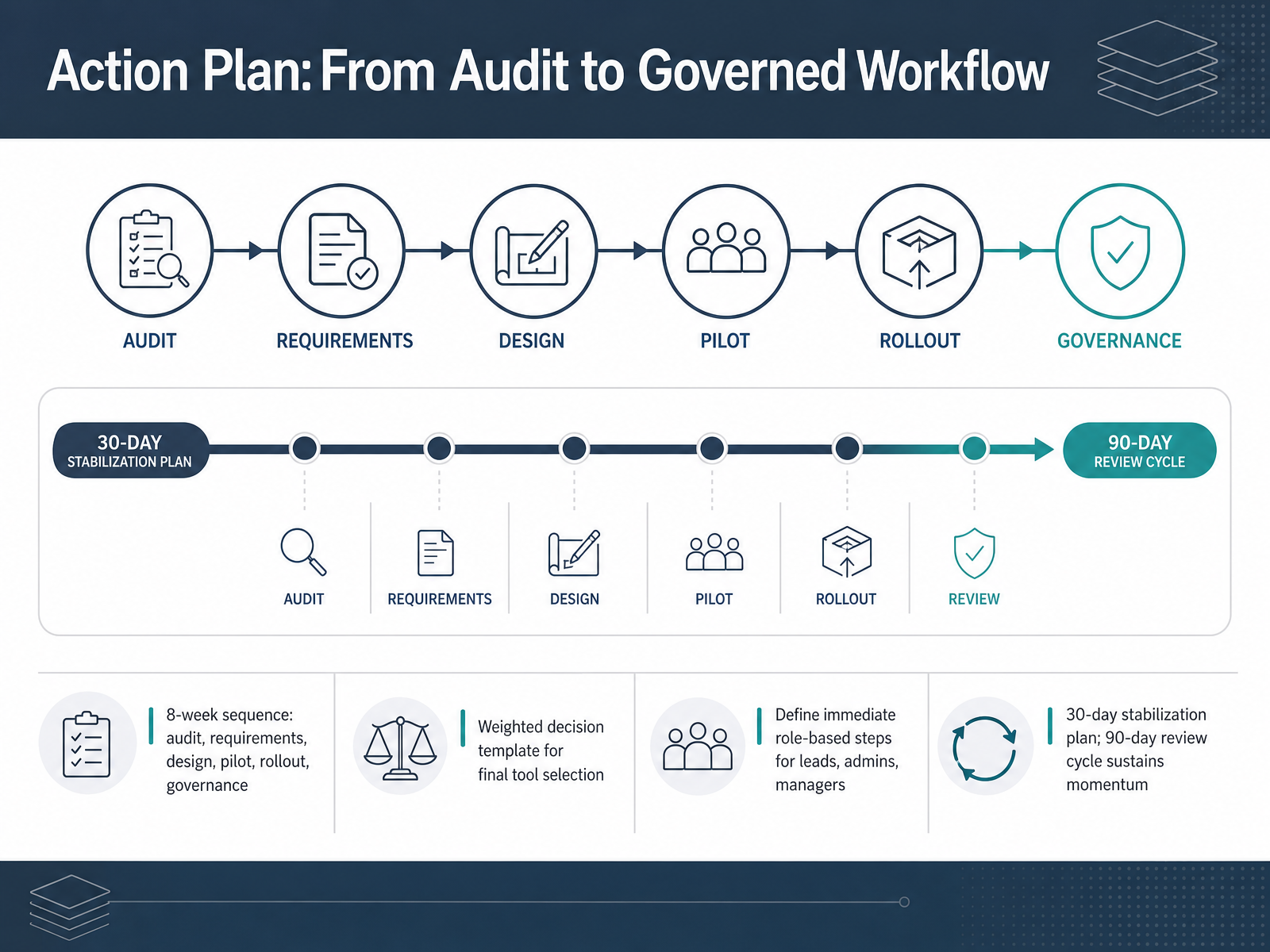
 - 12Action Plan: From Audit to Governed WorkflowYou now have the full picture. From audit to governed workflow, the path is clear. Start with an eight-week sequence: audit, requirements, design, pilot, rollout, and governance. Week one begins with the audit. Map every channel and workflow. Week two, define your requirements against real pain points. Week three, design the solution. Week four, build your weighted decision template. Score each tool against those requirements. Pilot in weeks five and six. Rollout in week seven. Govern in week eight. Now assign roles today. Team leads, identify your champions. Admins, set up the pilot environment. Managers, prepare your launch-day toolkit. Then commit to the stabilization plan. For the first thirty days, focus on fixing friction. No new features. For the next ninety days, review metrics and gather feedback. Adjust and improve. That cadence keeps momentum alive. This is your action plan. Share it, assign owners, and start week one tomorrow. You have what you need to cut through the noise and give your team a workflow that actually works. Thank you for your focus. Now go build it.
 useworkshop.comcommswith.aihuler.io+22 min
Take the deck with you
Download this course as a file — free, no sign-up needed.
- PDF handoutEvery slide page, ready to print or share.13 pages · 3.0 MBDownload
- Narrated PowerPointThe deck that presents itself — every slide carries the digital human's narration video.13 pages · 21.5 MBDownload
- PowerPoint slidesThe full deck as a .pptx — open it in PowerPoint, Keynote, or Google Slides.13 pages · 3.0 MBDownload
Free to use in your own training — please keep the PersonWise credit page at the end.
Have your own deck? Turn it into a course
Sources consulted
Web sources consulted while building this course.
- Workshop // 2025 Internal Communications Audit Template & Guide — useworkshop.com
- Comms Workflow AI Audit Template | Comms With AI — commswith.ai
- How to complete an internal comms audit + free template — huler.io
- Internal Communications Audit Template — Find gaps fast | MangoApps — mangoapps.com
- The ultimate internal comms audit in 4 easy steps | Staffbase — staffbase.com
- Team Messaging App Requirements Checklist — quickconnect.app
- Best collaboration tools for teams: a 2026 evaluation framework for enterprise buyers — work-tech-institute.com
- Team Collaboration Tools: The Workplace Guide to Choosing, Comparing, and Implementing the Best Options (2025) — blog.asa.team
- Staff Communication Tools: Enterprise Buyer's Guide — trueconf.com
- Team Communication Features 2026 — 30-Tool Side-by-Side Matrix | ProPicked — propicked.com
- Designing Chat Operation Rules to Prevent Notification Fatigue | buralog|ITトラブルと業務改善の実務メモ — buralog.jp
- Create guidelines for channel names | Slack — slack.com
- Collaborate with kindness: Consider these etiquette tips in Slack | Slack — slack.com
- 12 Essential Slack or Teams Channel Rules 2026 — dailygenius.com
- How to Optimize Cross-Channel Message Governance for Eng Orgs | how2 — how2.sh
- Work Collaboration Fatigue: The Governance Fix for Tool Sprawl — uctoday.com
- Internal Communications Strategy Examples: How Ops & IT Leaders Fix Broken Remote Communication Tools (2026 Guide) - Insight Blog — agilityportal.io
- Most Employees Say Their Workplace Communication Tools Simply Do Not Work - Customer Experience Magazine — cxm.world
- The Myth of the Unified Workplace Is Falling Apart — reworked.co
- As channels increase, so do communication gaps — nojitter.com