Begin
14 pages · ~28 min
LMS Workflow for Customer Education
Learn how to use an LMS to plan, deliver, and track customer education with a practical end-to-end workflow. Ideal for customer education and enablement teams.
A digital instructor presents all 14 pages. Hold “Ask” at any point and ask out loud — the answer comes from this course. No sign-up needed.
What you’ll learn
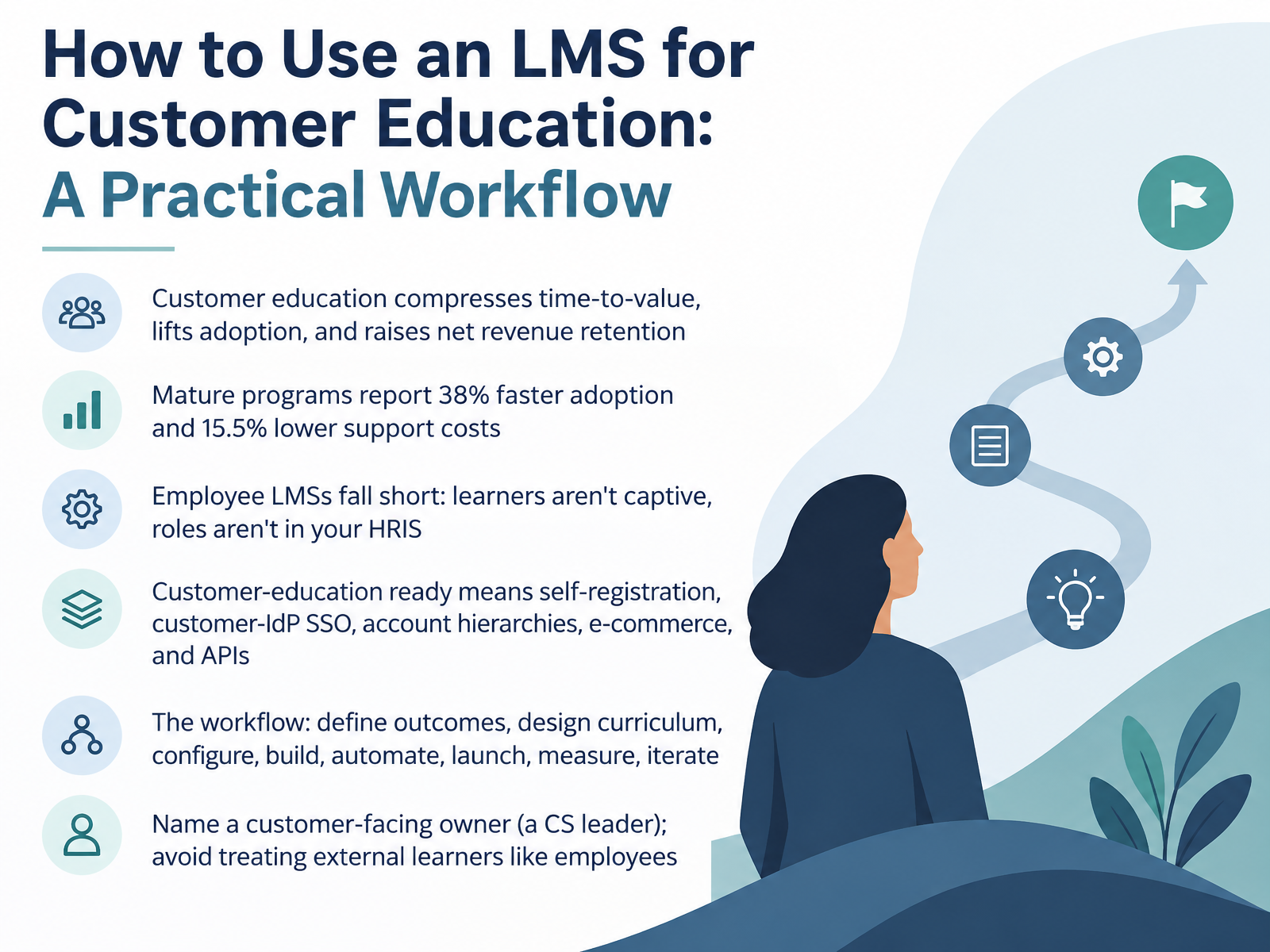
- 01How to Use an LMS for Customer Education: A Practical WorkflowWelcome. Over the next fourteen slides, we'll walk through a practical workflow for using an LMS for customer education, built for customer education teams, LMS admins, and trainers running external programs. Here's the case for getting this right. Customer education compresses time to value, lifts adoption, and raises net revenue retention. Mature programs report thirty-eight percent faster adoption and fifteen point five percent lower support costs. But a standard employee LMS falls short. Your learners aren't captive, and their roles don't live in your HRIS. So customer-education ready means self-registration, customer identity provider single sign-on, account hierarchies, e-commerce, and APIs. The workflow we'll follow has eight steps: define outcomes, design curriculum, configure, build, automate, launch, measure, and iterate. One last thing before we move on. Name a customer-facing owner, ideally a customer success leader, so you don't treat external learners like employees. Next, Customer Education versus Employee Training, and what actually changes.gainsight.comaicoursify.comelearningindustry.com+22 min
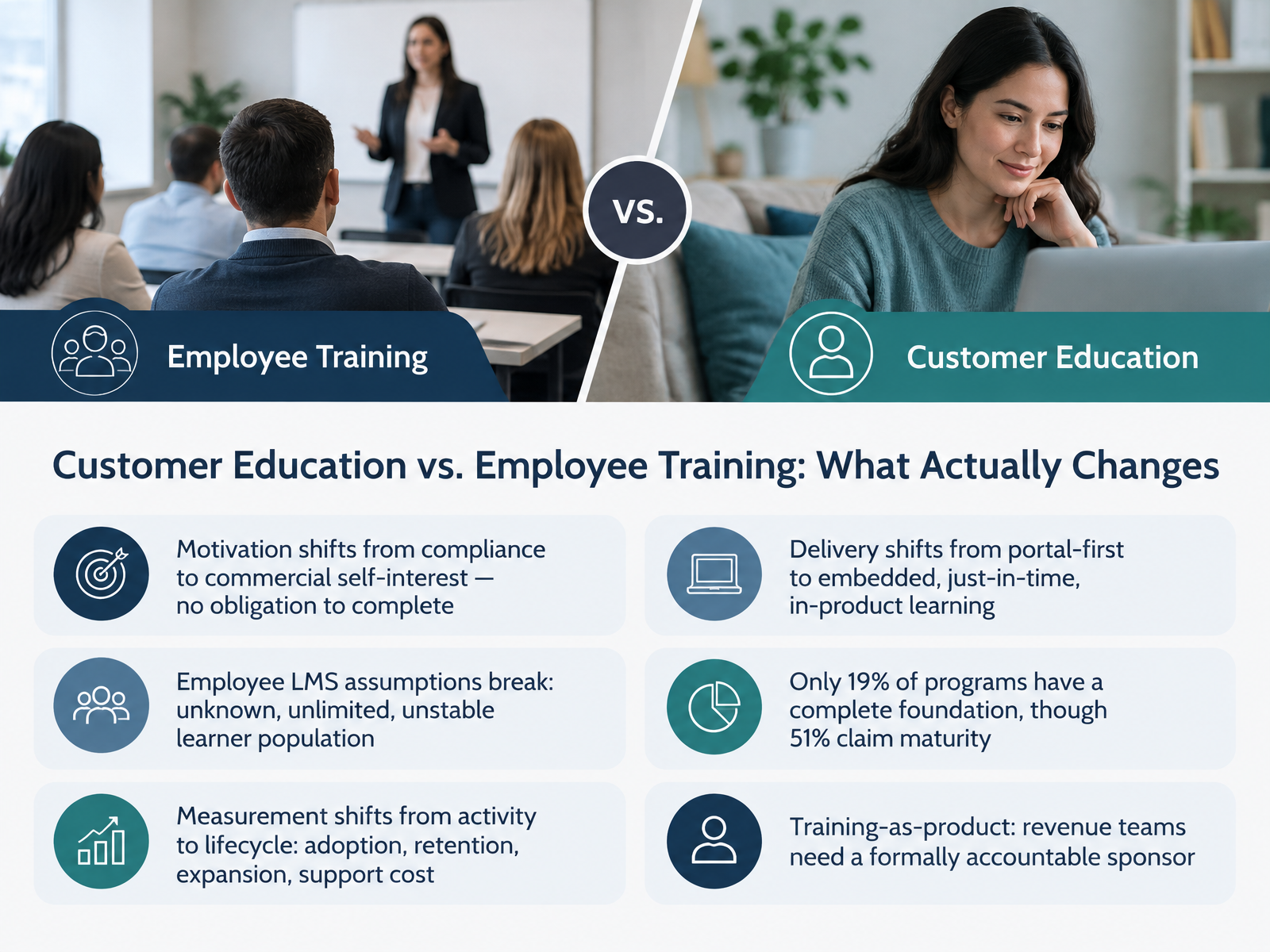
- 02Customer Education vs. Employee Training: What Actually ChangesNow that we've framed the workflow, let's get specific about what actually changes when your learners are customers instead of employees. Four shifts matter most. First, motivation. Employees complete training because it's required; customers complete it only when it solves a problem they already have. No one is making them finish. Second, your audience. Employee LMS assumptions break here, because your learner population is unknown, unlimited, and unstable. People arrive with different roles, different product knowledge, and they leave when their contract ends. Third, measurement. Activity metrics like completions tell you who showed up. With external learners, you report on adoption, retention, expansion, and support cost instead. Fourth, delivery. Employee training usually lives in a portal people have to remember to visit. Customer education works better embedded and just in time, inside the product, at the moment of need. One reality check on maturity. In a benchmark of five hundred organizations, fifty one percent claimed a mature program, but only nineteen percent had the foundation that sustains it: an accountable sponsor, a dedicated budget, current content, and a measurable line to a business outcome. So before you buy anything, be honest about which of those four you actually have. If you run training as a product, that sponsor matters even more, because revenue teams need a formally accountable owner. The practical takeaway is this: every design choice should trace back to the customer's commercial self interest, not your completion dashboard. That leads directly into the next decision, defining your outcomes and audience before you evaluate any features.
 gainsight.comaicoursify.comelearningindustry.com+22 min
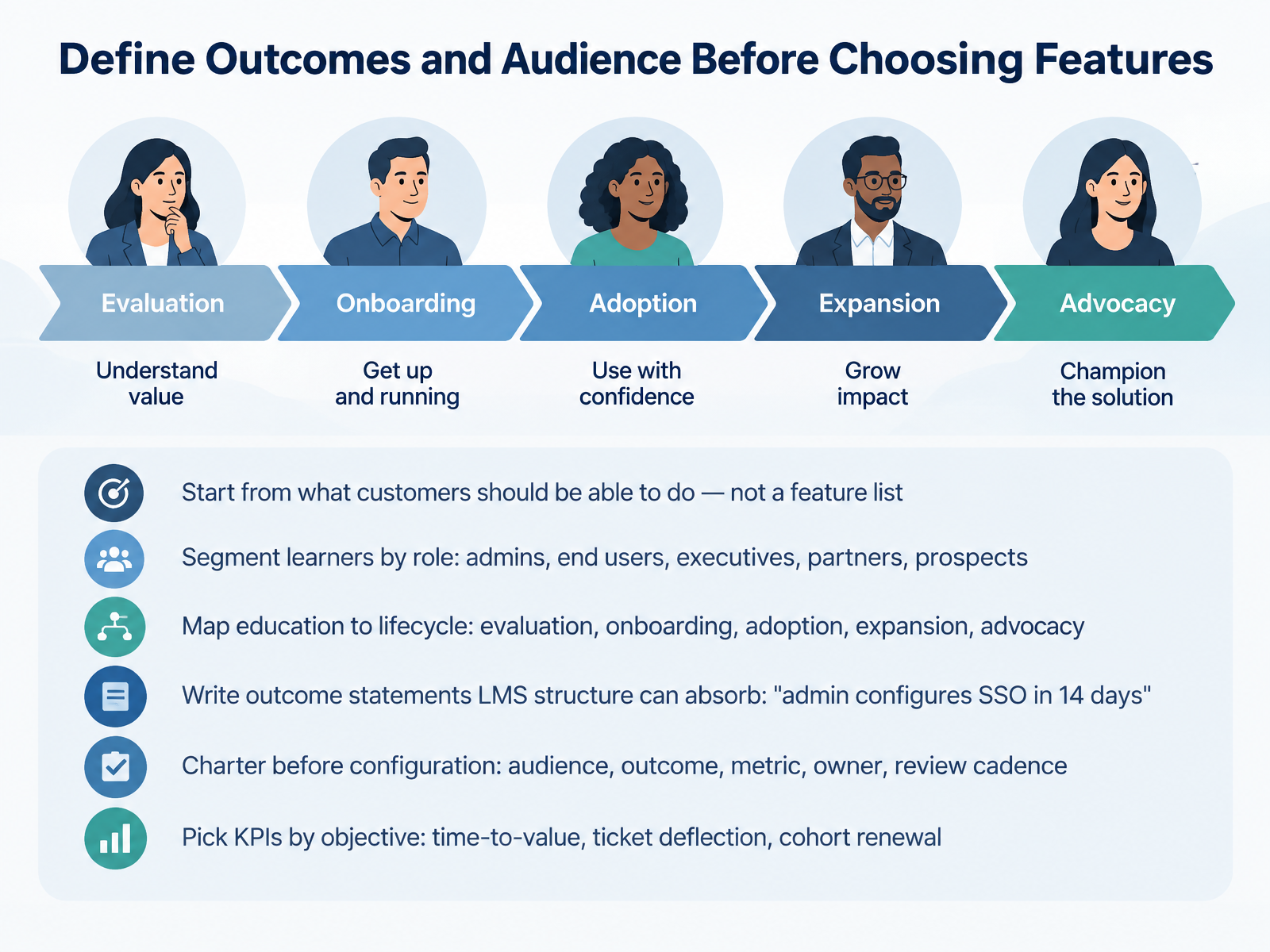
 - 03Define Outcomes and Audience Before Choosing FeaturesLet's talk about the step that saves you the most rework: define outcomes and audience before you pick a single feature. First, start from what customers should be able to do, not from a feature list. Then segment learners by role, because admins, end users, executives, partners, and prospects need different content. Next, map education to lifecycle stages: evaluation, onboarding, adoption, expansion, and advocacy. Write outcome statements your LMS structure can absorb, like "admin configures single sign-on in fourteen days." Before you configure anything, charter the work. Capture audience, outcome, metric, owner, and review cadence. Then pick KPIs by objective, whether that's time-to-value, ticket deflection, or cohort renewal. That order keeps configuration honest and protects your admin time. Let's move on to designing curriculum for busy external professionals.
 gainsight.comaicoursify.comelearningindustry.com+21 min
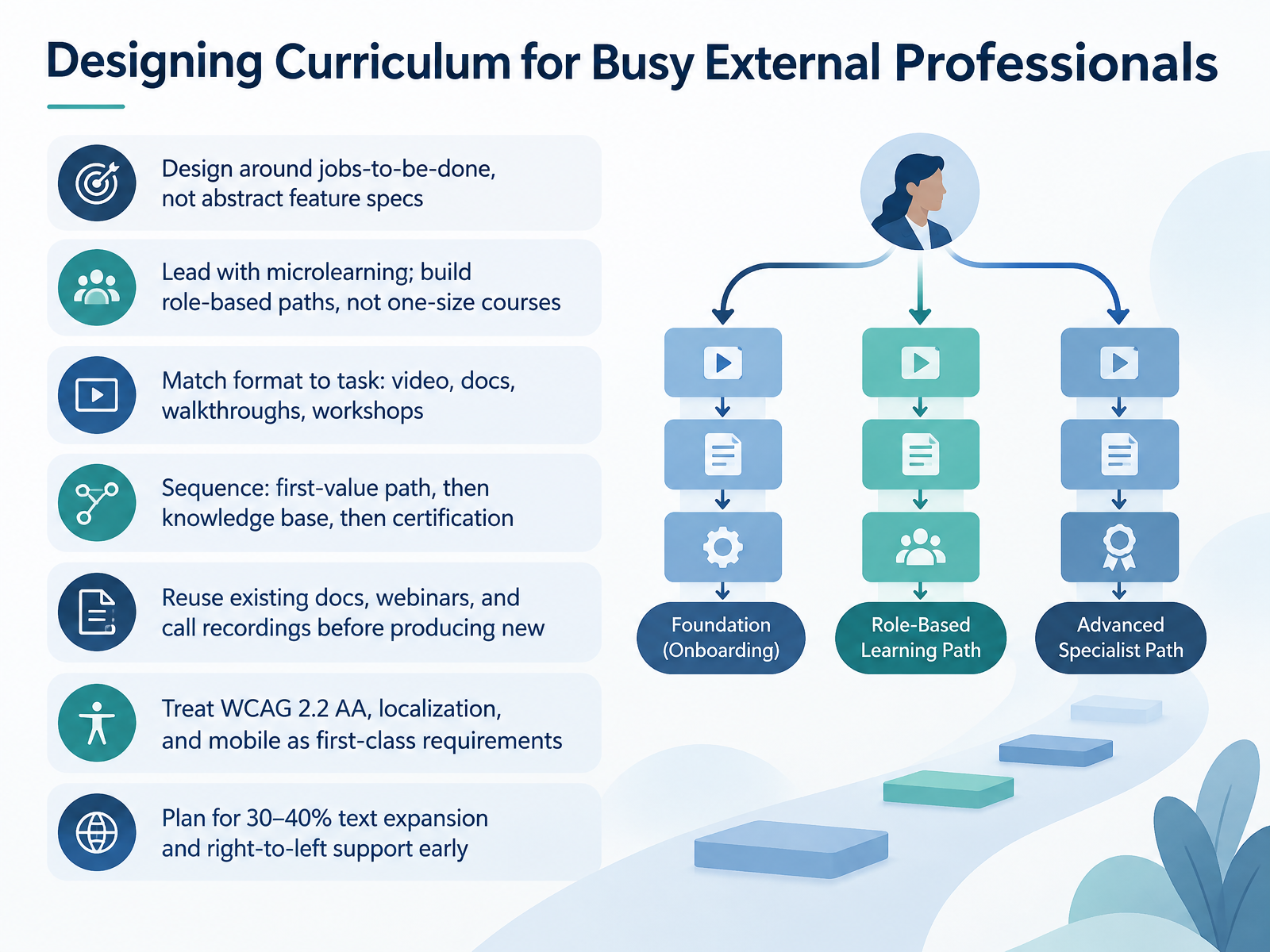
 - 04Designing Curriculum for Busy External ProfessionalsNow let's talk about designing curriculum for busy external professionals. Your customers don't have time to learn your product. They have a job to do, so design around jobs-to-be-done, not abstract feature specs. Lead with microlearning, and build role-based paths instead of one-size-fits-all courses. Match format to task: video for quick demos, docs for reference, walkthroughs for workflows, and workshops for complex rollouts. Sequence the journey deliberately. First, a first-value path that gets new customers to their aha moment. Then a searchable knowledge base for self-serve answers. Then certification for deeper skills and advocacy. Before you produce anything new, reuse what you already have, like existing docs, webinars, and call recordings. They're faster to turn into training and already reflect real customer questions. Treat accessibility, localization, and mobile as first-class requirements, not afterthoughts. Target WCAG 2.2 AA, plan for thirty to forty percent text expansion, and build in right-to-left support from the start, because retrofitting those later costs far more. Next, let's look at configuring the LMS for external audiences.
 absorbai.comcheck-n-click.comteachable.com+22 min
 - 05Configuring the LMS for External AudiencesNow let's configure your LMS for external audiences. Start with external identity. Decide how customers get in: self-registration, invitations, or single sign-on through their own identity provider. Then support multiple SSO configurations, because different customers bring different providers. Next, build your account and organization hierarchy, so content, enrollment, and reporting scope per customer. Segment with groups and tags, and keep SCIM-managed groups separate from manual structures. That way provisioning stays predictable and your manual segments don't get overwritten. Then enable commerce and entitlement for courses, bundles, and seats, and keep one master version so you update once and every customer sees the change. Finally, apply branding, custom domains, and lifecycle provisioning through SCIM, APIs, or webhooks. That covers configuration. Next, we'll look at content standards and platform decisions that shape reporting.
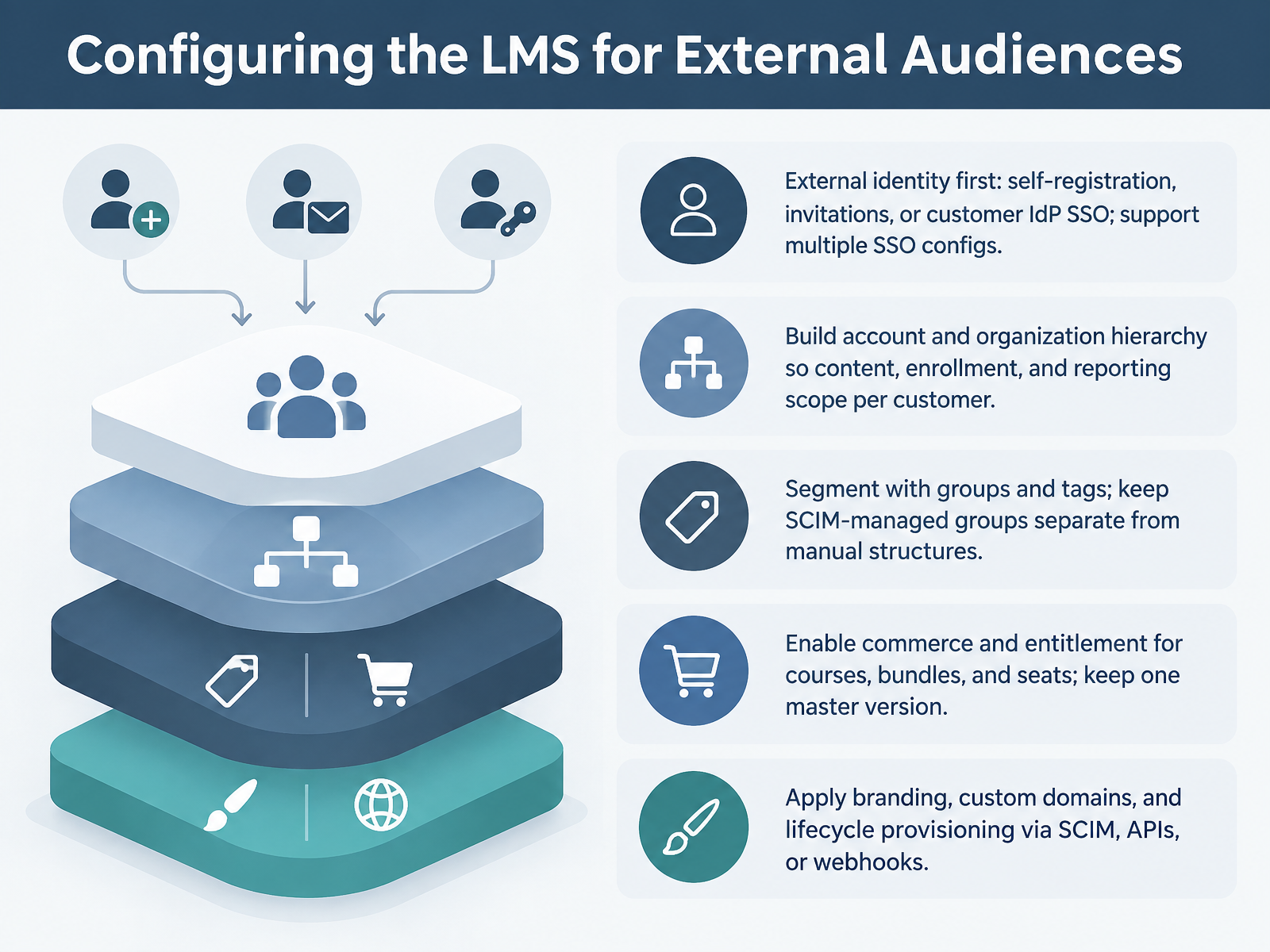 experienceleague.adobe.comdoc-en.scheer-imc.comlearn.microsoft.com+21 min
 - 06Content Standards and Platform Decisions That Shape ReportingNow let's talk about content standards, because the format you publish in decides what you can report on later. SCORM 1.2 or 2004 is your safe default. It's supported almost everywhere, but it only tracks completion, score, and time. If you need richer activity, inside or outside the LMS, that's xAPI, and it requires a Learning Record Store. Check that your LMS actually has one before you commit. cmi5 sits in between. It uses xAPI for data and SCORM-like launch, but support is growing, not universal. One trap to avoid: completion and success are separate in SCORM 2004 and cmi5. A learner can finish without passing, so don't conflate them in your reports. And always test completion tracking in the real destination LMS, not just the authoring tool preview. Finally, when you migrate, preserve historical completions, scores, and certification timestamps. Next, we'll build, load, and quality-assure the content.
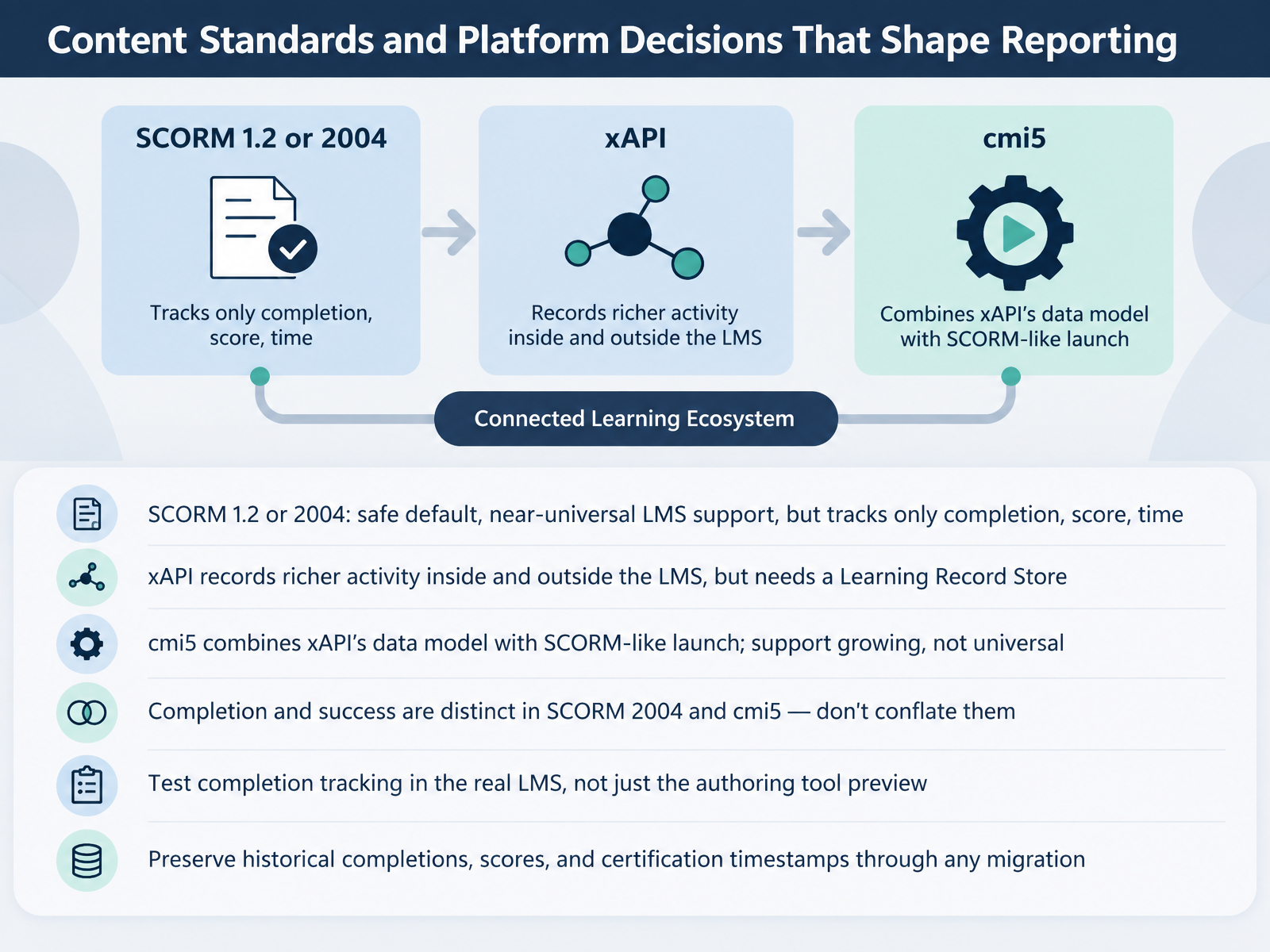 a11ycheck-dev.comscormspecialist.comgithub.com+21 min
 - 07Build, Load, and Quality-Assure the ContentNow let's talk about building, loading, and quality-assuring the content. First, convert your modules into LMS-ready objects, and standardize three things: metadata, file naming, and version control. Standardize them early, because inconsistency is what makes future updates painful. Next, run functional QA in the real destination LMS, not the authoring preview. Verify that completion fires, scores behave, suspend and resume works, and success status is actually set. Completion bugs hide in the handoff between tools. Then handle accessibility, because it is now a legal requirement under the European Accessibility Act and ADA Title Two. Check keyboard navigation, four point five to one contrast, captions, and transcripts. After that, pilot with a small customer cohort, and confirm single sign-on, assessments, certification, and CRM write-back all connect. Finally, maintain the content with named owners, a review cadence, a tracked last reviewed date, and a clear deprecation path. That keeps your library trustworthy long after launch. Next, we move into enrollment, access, and automation architecture.
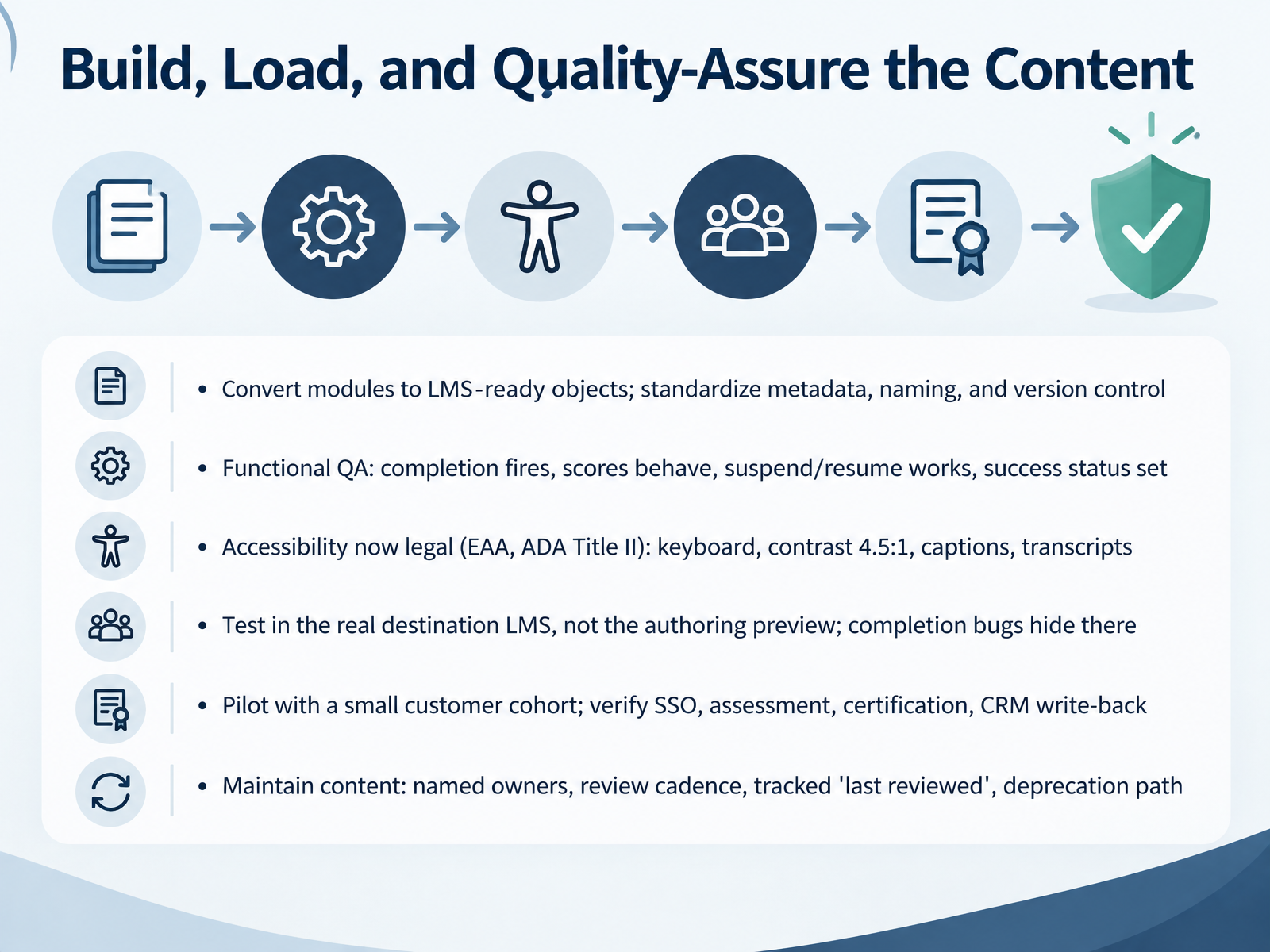 a11ycheck-dev.comscormspecialist.comgithub.com+22 min
 - 08Enrollment, Access, and Automation ArchitectureNow let's design the plumbing: enrollment, access, and automation architecture. Start by choosing enrollment models deliberately, because self-enrollment, entitlement-gated access, role-based assignment, admin-assigned seats, and bulk provisioning solve different problems. Then trigger provisioning from events that are already happening, such as deal won, contract signed, or product activation. Before you build anything, map your integrations: CRM, customer success platform, support desk, and product telemetry. Connect SSO first, because it reduces login friction, then CRM, and leave support and content tools for last. Automate invitations, due dates, escalations, and re-engagement nudges, but avoid over-communicating; three emails in a week reads as spam. Finally, scope mixed audiences with separate portals or groups so customers, partners, and prospects each see only what applies to them. Get this architecture right, and your admin time drops while reporting improves. That sets up our next topic, launching without the build it and hope failure.
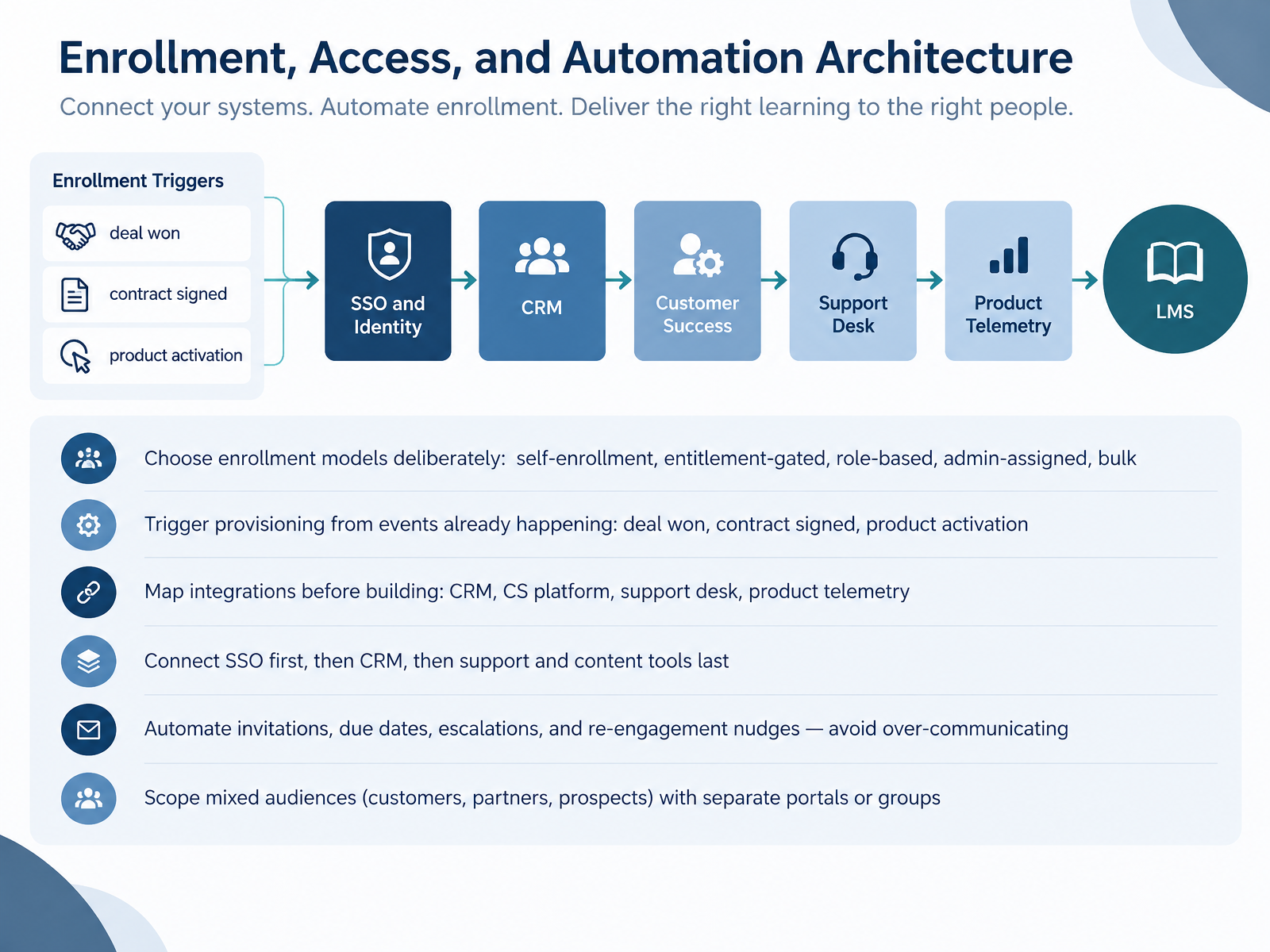 experienceleague.adobe.comdoc-en.scheer-imc.comlearn.microsoft.com+22 min
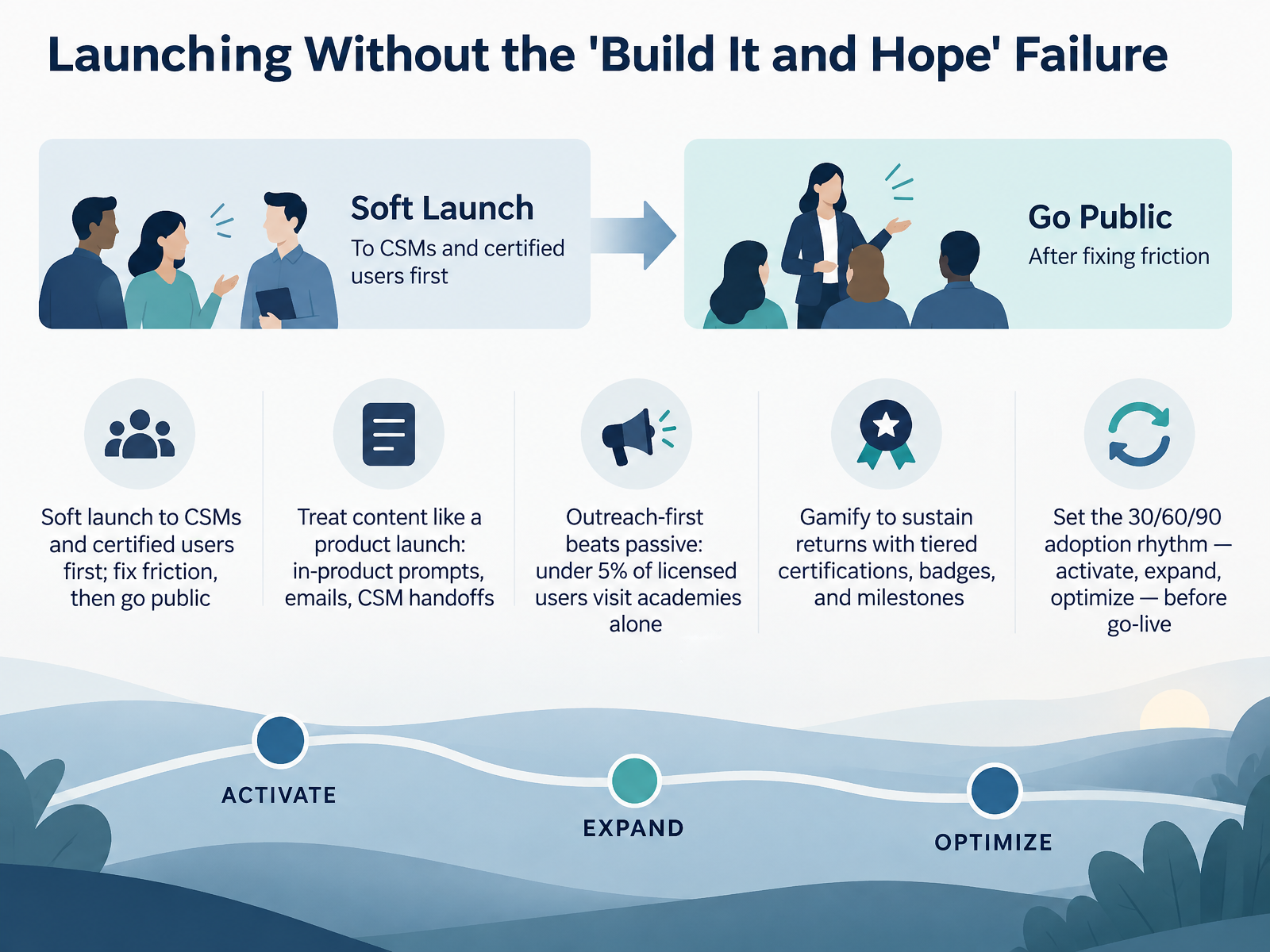
 - 09Launching Without the 'Build It and Hope' FailureNow let's talk about launching without the build it and hope failure. Here's the hard truth: fewer than five percent of licensed users ever visit a product academy on their own. So passive publishing does not work. You have to run outreach first. Start with a soft launch to your CSMs and certified users. Fix the friction they surface, then go public. Treat your content like a product launch, not a document dump. Use in-product prompts, targeted emails, and CSM handoffs so customers see the right lesson at the right moment. Once they arrive, keep them coming back. Tiered certifications, badges, and milestone recognition give learners a reason to return, and they prove real mastery. Finally, set your thirty sixty ninety adoption rhythm before go-live. Activate in the first thirty days, expand across segments from day thirty one to sixty, and optimize based on drop-off data from day sixty one to ninety. Launch with a plan, not a wish. Next, we'll look at embedding learning inside the product experience.
 gainsight.comaicoursify.comelearningindustry.com+22 min
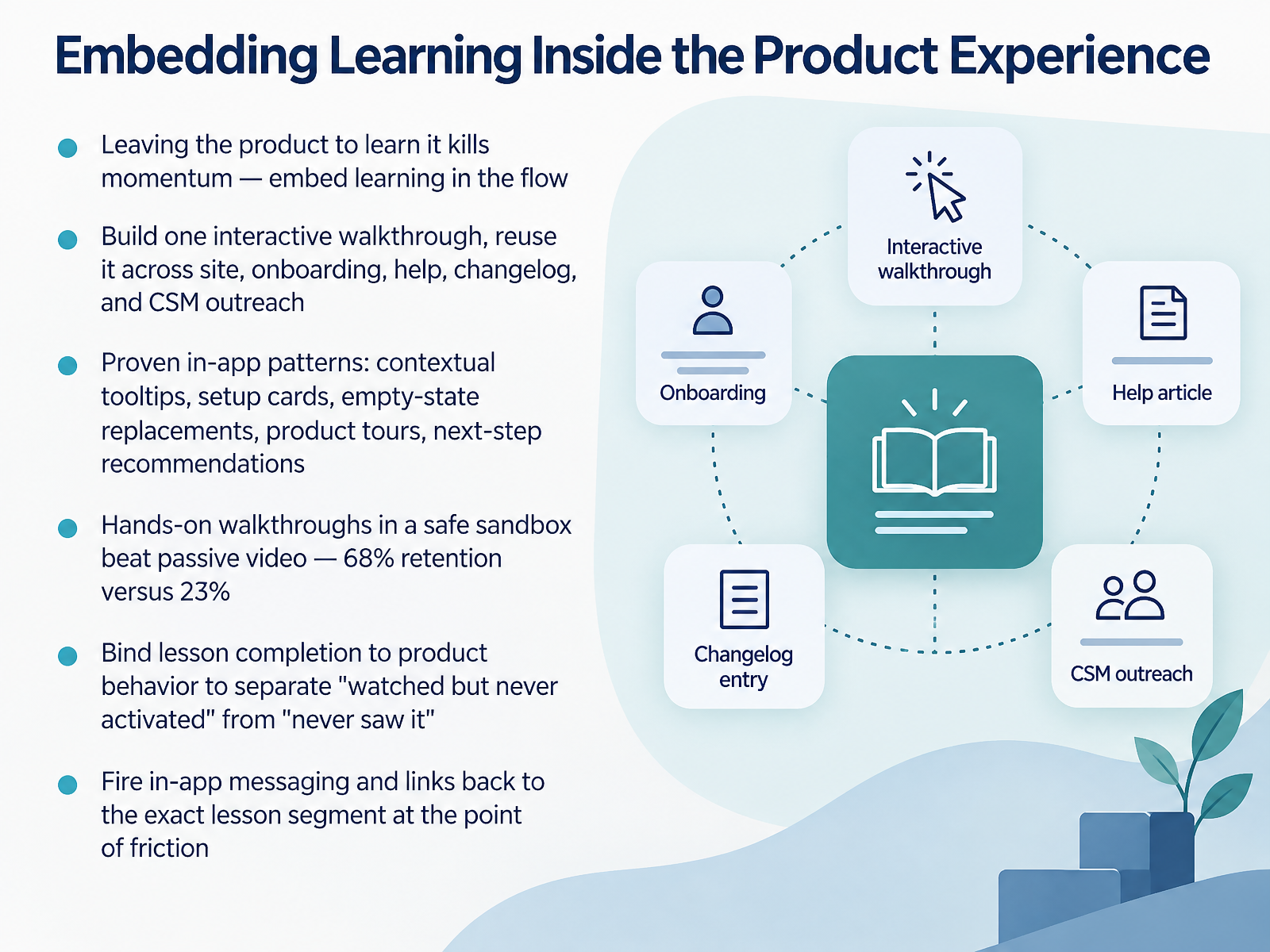
 - 10Embedding Learning Inside the Product ExperienceNow let's talk about embedding learning inside the product experience. The moment someone has to leave your product to learn it, you have already lost momentum, so keep learning in the flow. First, build one interactive walkthrough and reuse it everywhere: your site, onboarding, help articles, changelog, and customer success outreach. Next, rely on proven in-app patterns: contextual tooltips, setup cards, empty-state replacements, product tours, and next-step recommendations. Hands-on practice in a safe sandbox beats passive video, with sixty eight percent retention versus twenty three percent. Then bind lesson completion to product behavior, so you can separate users who watched but never activated from those who never saw the lesson at all. Finally, fire in-app messages and links that jump back to the exact lesson segment at the point of friction. That is how education becomes product behavior, not a side trip. Measurement, Reporting, and Continuous Improvement is where we go next.
 absorbai.comcheck-n-click.com1 min
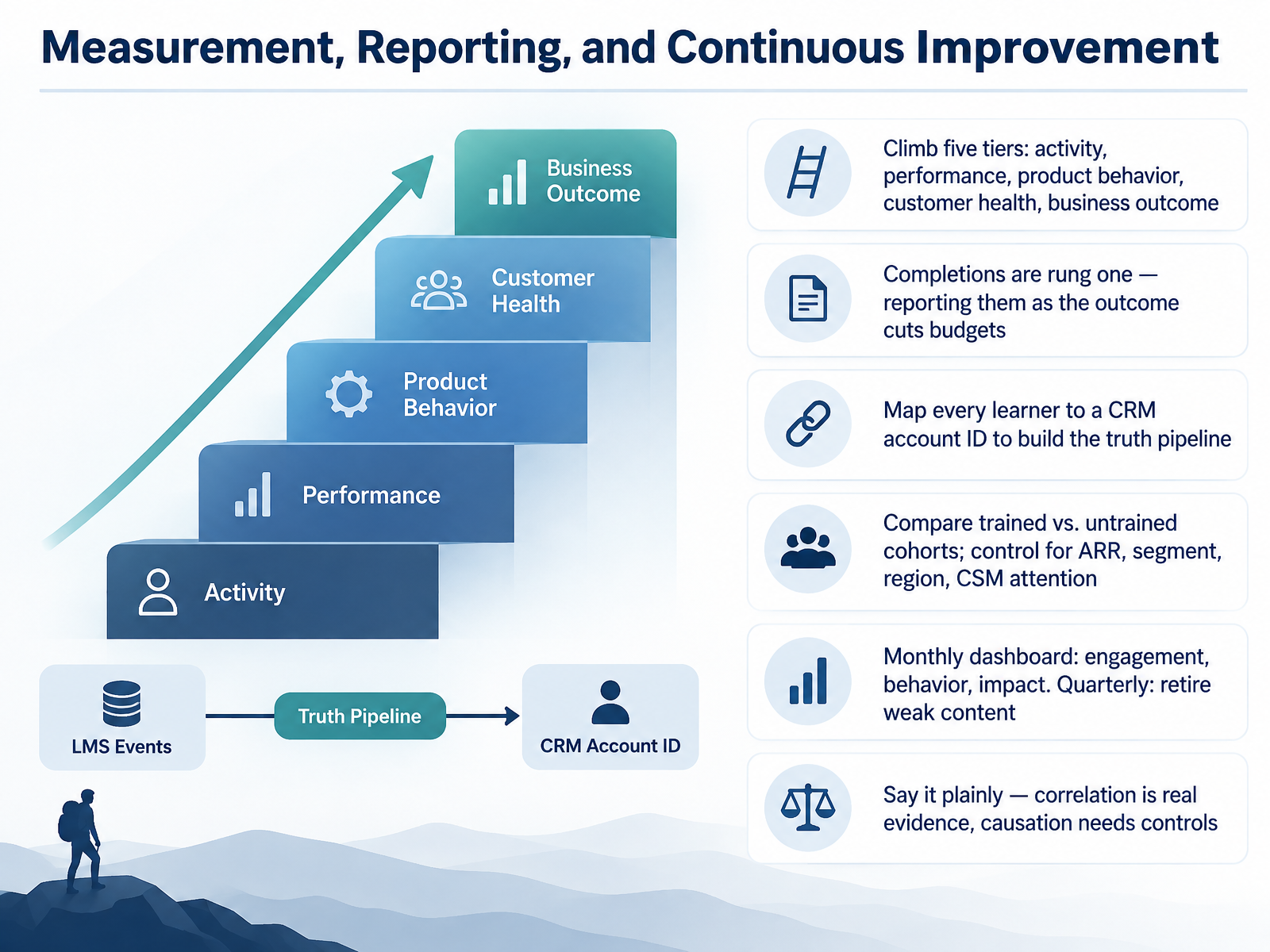
 - 11Measurement, Reporting, and Continuous ImprovementNext, let's look at measurement, reporting, and continuous improvement. Think of it as a five-tier climb: activity, performance, product behavior, customer health, and business outcome. Completions are rung one. If you report them as the outcome, your budget gets cut, because nobody funds clicks. So map every learner to a CRM account ID. That link is what builds your truth pipeline. Then compare trained versus untrained cohorts, and control for ARR, segment, region, and CSM attention. Skip those controls, and a sharp analyst will raise them for you, out loud. Build a monthly dashboard covering engagement, behavior, and impact. Each quarter, retire weak content. And say it plainly: correlation is real evidence, but causation needs controls. Now let's move on to governance, scale, and data protection.
 absorbai.comcheck-n-click.comteachable.com+22 min
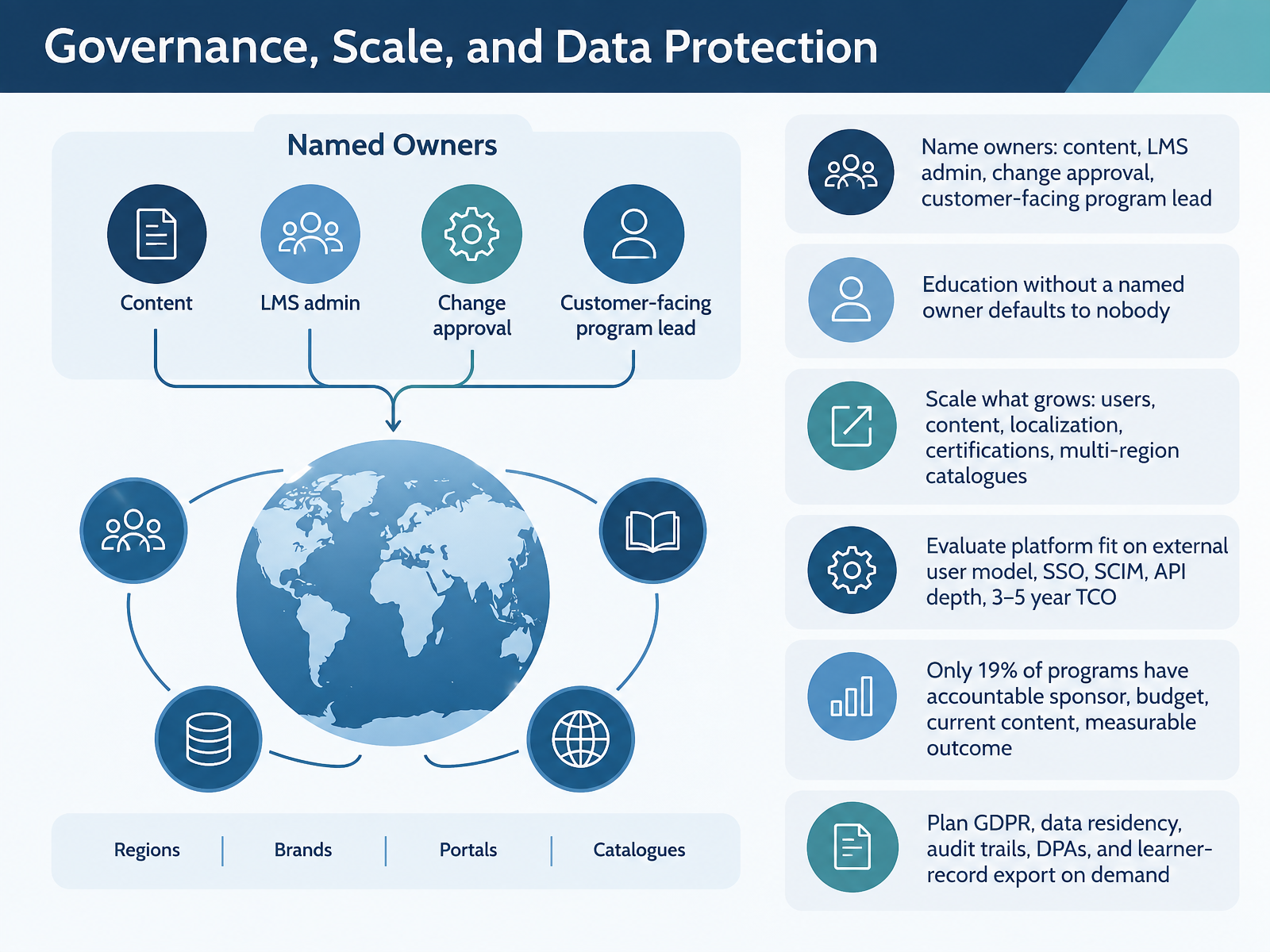
 - 12Governance, Scale, and Data ProtectionNow let's talk about governance, scale, and data protection, because this is where good programs either hold together or quietly fall apart. Start by naming owners. You need four: content owner, LMS administrator, change approver, and a customer-facing program lead. Education without a named owner defaults to nobody, and nobody means stale content and unanswered learner questions. Next, decide what scales. That usually means users, content volume, localization, certifications, and multi-region catalogues such as separate branded portals per customer segment. Then evaluate platform fit against your external user model, single sign-on, SCIM provisioning, API depth, and a three to five year total cost of ownership, not just the subscription line. Here is the sobering benchmark: only nineteen percent of programs have an accountable sponsor, dedicated budget, current content, and a measurable outcome. So plan for data protection early. GDPR, data residency, audit trails, data processing agreements, and learner-record export on demand are procurement requirements now, and your security and legal teams will ask. Next, we walk through a ninety day practical workflow, from charter to first review.
 absorbai.comcheck-n-click.comteachable.com+22 min
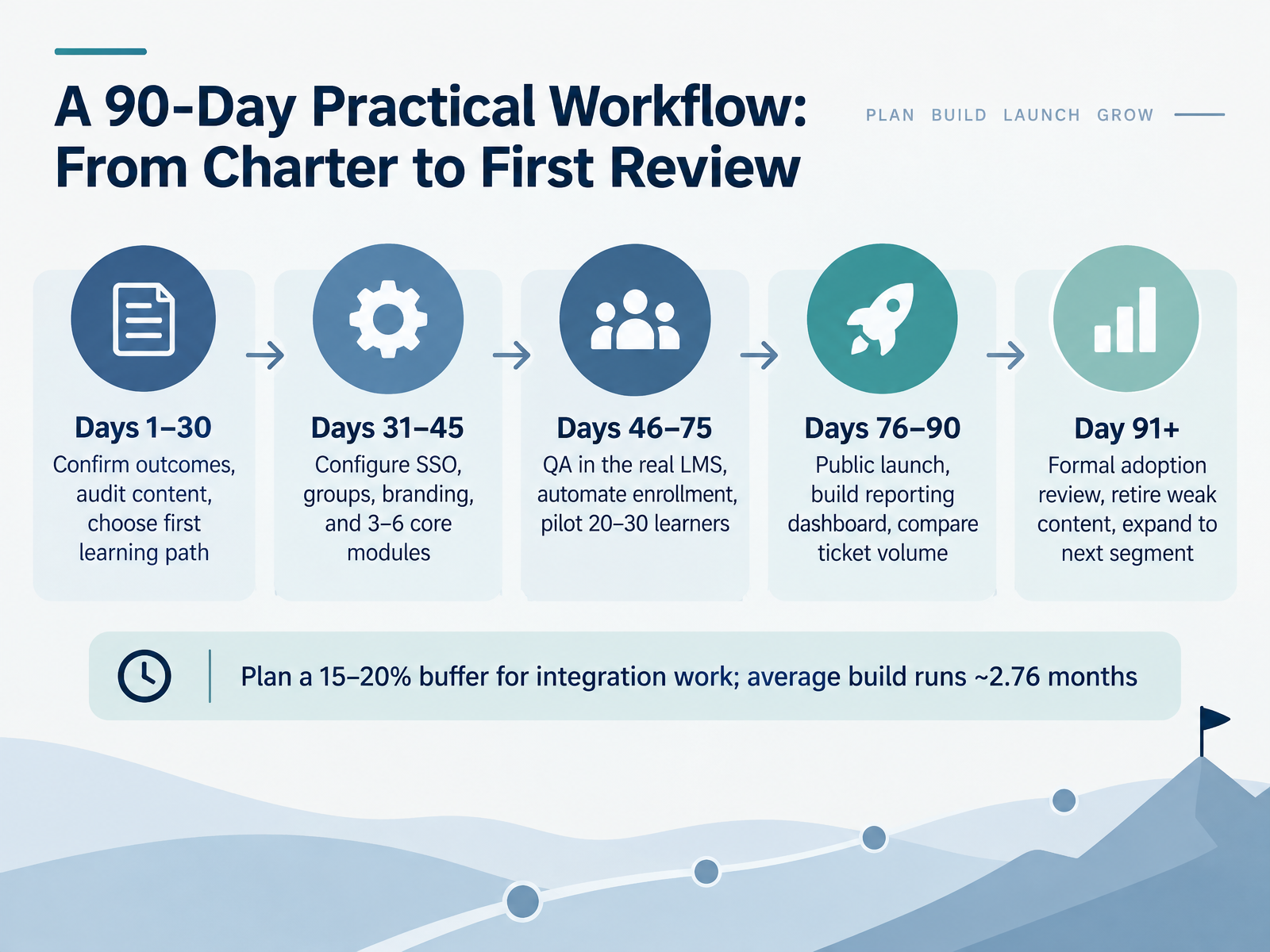
 - 13A 90-Day Practical Workflow: From Charter to First ReviewNow let's put a timeline on this. Here's a 90-day workflow that takes you from charter to first review. Think of it as four connected blocks, not one big project. Days 1 to 30, you confirm outcomes, audit existing content, and choose your first learning path. This is your foundation. Next, days 31 to 45, you configure SSO, groups, branding, and build 3 to 6 core modules. That's your minimum viable catalog. Then days 46 to 75, you QA everything in the real system, not a sandbox, automate enrollment, and pilot with 20 to 30 learners. Real customers, real feedback. Days 76 to 90, you launch publicly, build your reporting dashboard, and compare support ticket volume before and after. Finally, day 91 and beyond, you run a formal adoption review, retire weak content, and expand to your next segment. One practical note: plan a 15 to 20 percent buffer for integration work. The average build runs about 2.76 months, so build that cushion in from day one. The key takeaway: treat this as four sprints, each with a clear outcome. That keeps scope tight and momentum visible. Next, let's look at common bottlenecks and how to avoid them.
 gainsight.comaicoursify.comelearningindustry.com+22 min
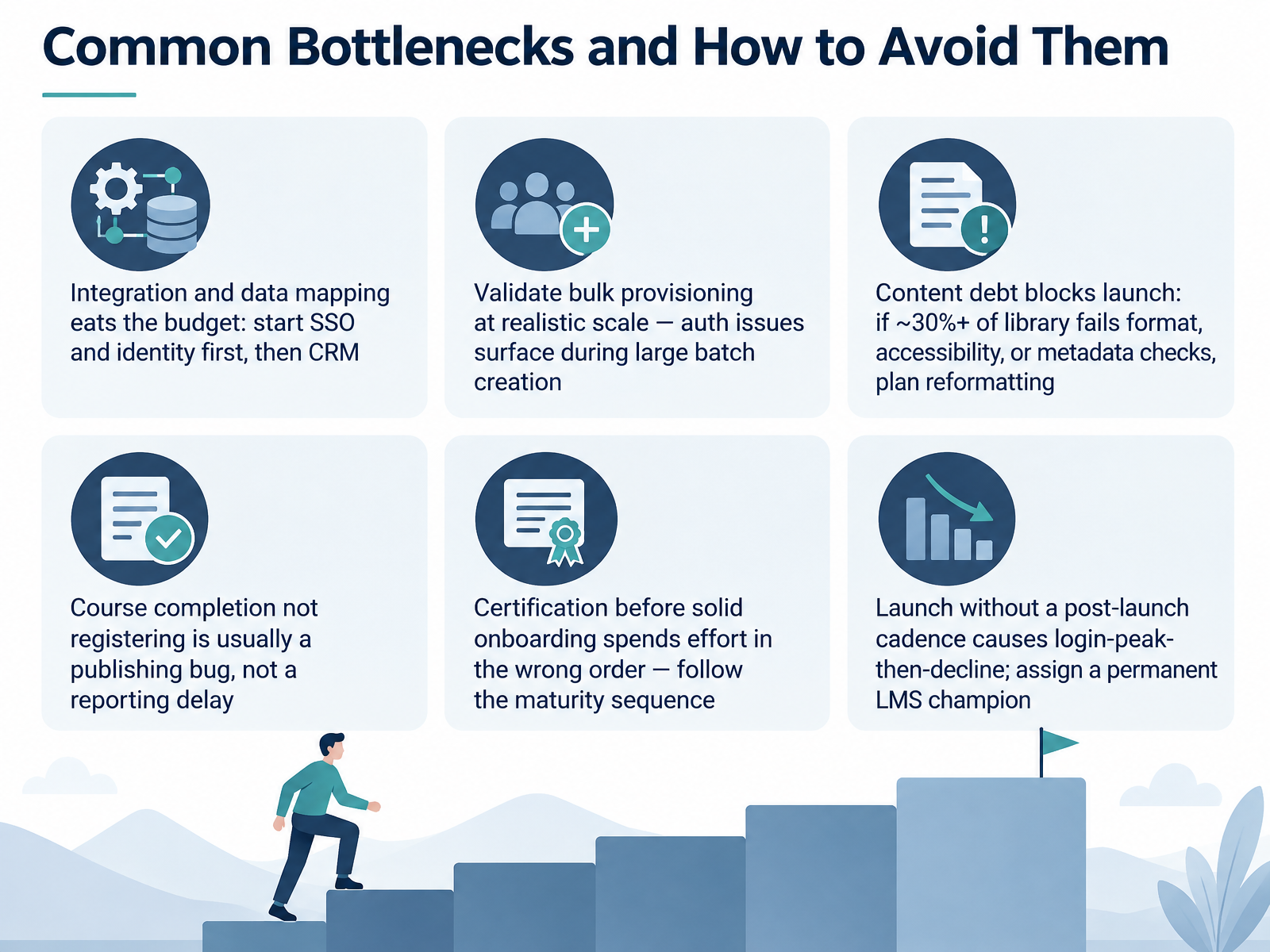
 - 14Common Bottlenecks and How to Avoid ThemLet's close on the bottlenecks that stall customer education launches, and how to avoid them. First, integration and data mapping will eat your budget, so start with single sign-on and identity, then connect your CRM. Second, validate bulk provisioning at realistic scale, because authentication issues surface during large batch creation, not in a two-user test. Third, content debt blocks launch. If roughly thirty percent or more of your library fails format, accessibility, or metadata checks, plan for reformatting up front. Fourth, when course completion doesn't register, it is usually a publishing bug, not a reporting delay, so test completion in the real LMS. Fifth, certification before solid onboarding spends effort in the wrong order. Follow the maturity sequence: onboarding first, certification later. And sixth, launching without a post-launch cadence gives you a login peak, then decline, so assign a permanent LMS champion. Avoid these six, and your rollout holds. Thank you for working through this, and go launch something your customers actually finish.
 a11ycheck-dev.comscormspecialist.comgithub.com+22 min
Take the deck with you
Download this course as a file — free, no sign-up needed.
- PDF handoutEvery slide page, ready to print or share.15 pages · 3.3 MBDownload
- Narrated PowerPointThe deck that presents itself — every slide carries the digital human's narration video.15 pages · 14.1 MBDownload
- PowerPoint slidesThe full deck as a .pptx — open it in PowerPoint, Keynote, or Google Slides.15 pages · 3.2 MBDownload
Free to use in your own training — please keep the PersonWise credit page at the end.
Have your own deck? Turn it into a course
Sources consulted
Web sources consulted while building this course.
- LMS Implementation: Checklist, Timeline, and Costs | Gainsight Software — gainsight.com
- Customer Education Platform: Build & Measure for 2026 — aicoursify.com
- External Learner Training In An LMS: Built For The Wrong Audience - eLearning Industry — elearningindustry.com
- LMS for Customer Training: The Complete Strategic Guide to Driving Adoption, Retention, and Revenue - eLeaP® — eleapsoftware.com
- Best customer training LMS (customer education platform) → Teachable — teachable.com
- The state of customer education in 2026 | Absorb LMS Software — absorbai.com
- Customer Education Metrics Guide: Proving ROI (2026) - Check N Click Learning and Technologies Pvt. Ltd. — check-n-click.com
- How to build a customer education program → Teachable — teachable.com
- Customer Education Best Practices: 12 Proven (2026) | Trainn — trainn.co
- Customer Education Maturity Assessment (CEMA) - Everest Group Research Portal — everestgrp.com
- Multiple SSO logins | Adobe Learning Manager — experienceleague.adobe.com
- SCIM Integration - Scope, Setup and Usage | Scheer IMC - Customer Documentation (EN) — doc-en.scheer-imc.com
- Configure Insite LMS for automatic user provisioning with Microsoft Entra ID - Microsoft Entra ID | Microsoft Learn — learn.microsoft.com
- Configure SCIM provisioning with Entra ID (Azure AD) – Udemy Business — business-support.udemy.com
- Configuring User Provisioning and Authentication via OIDC | Scheer IMC - Customer Documentation (EN) — doc-en.scheer-imc.com
- SCORM vs xAPI vs cmi5: What Course Publishers Need to Know | A11yCheck — a11ycheck-dev.com
- SCORM Testing Checklist (2026) | Free Download | SCORM Specialist — scormspecialist.com
- davenguyen87/Prism — github.com
- Rustici Software Accessibility Conformance Report (SCORM Cloud - April 2026) – Rustici Software Knowledge Base — support.scorm.com
- SCORM Compliance & Learning Analytics Testing for LMS 2025 — testriq.com