Begin
14 pages · ~28 min
Building Applications with Generative AI
Learn a practical workflow for building generative AI applications, from prompt design to deployment. Ideal for developers and technical professionals new to GenAI.
A digital instructor presents all 14 pages. Hold “Ask” at any point and ask out loud — the answer comes from this course. No sign-up needed.
What you’ll learn
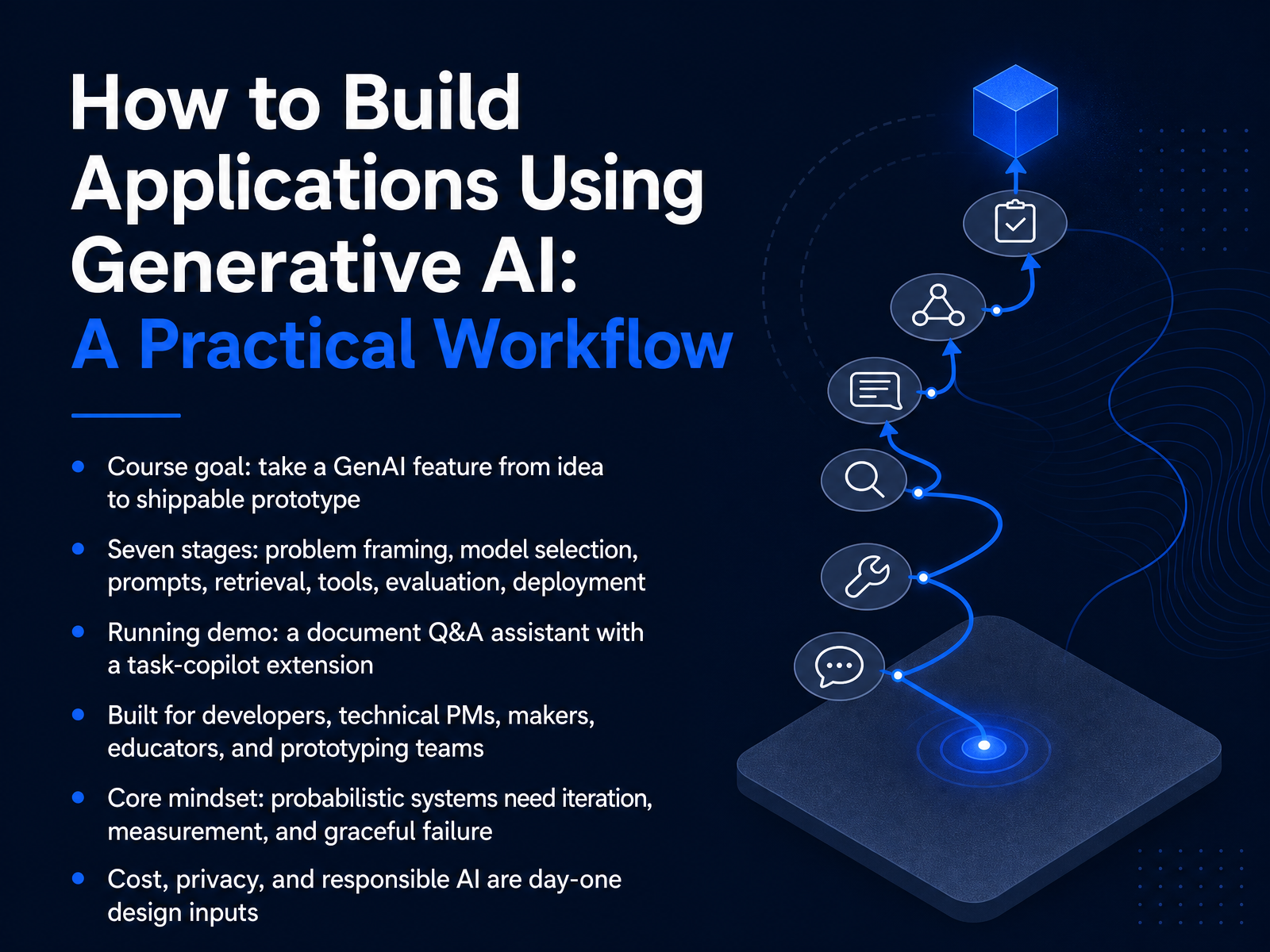
- 01How to Build Applications Using Generative AI: A Practical WorkflowWelcome. In this course, we take a generative AI feature from idea to shippable prototype. In seven stages: problem framing, model selection, prompts, retrieval, tools, evaluation, and deployment. We build one running demo the whole way through. A document question and answer assistant, then a task copilot extension on top of it. This is written for developers, technical product managers, makers, educators, and prototyping teams. The core mindset is simple. These are probabilistic systems. They need iteration, measurement, and graceful failure. A wrong answer in a demo is normal. A wrong answer in production is a design gap. So we treat cost, privacy, and responsible AI as day one design inputs, not cleanup work at the end. Expect short build steps with a verification check after each one. Expect rework. That is the workflow working, not breaking. Next, let us look at the landscape you are building in.amplifypartners.comsalesforce.comresources.anthropic.com+22 min
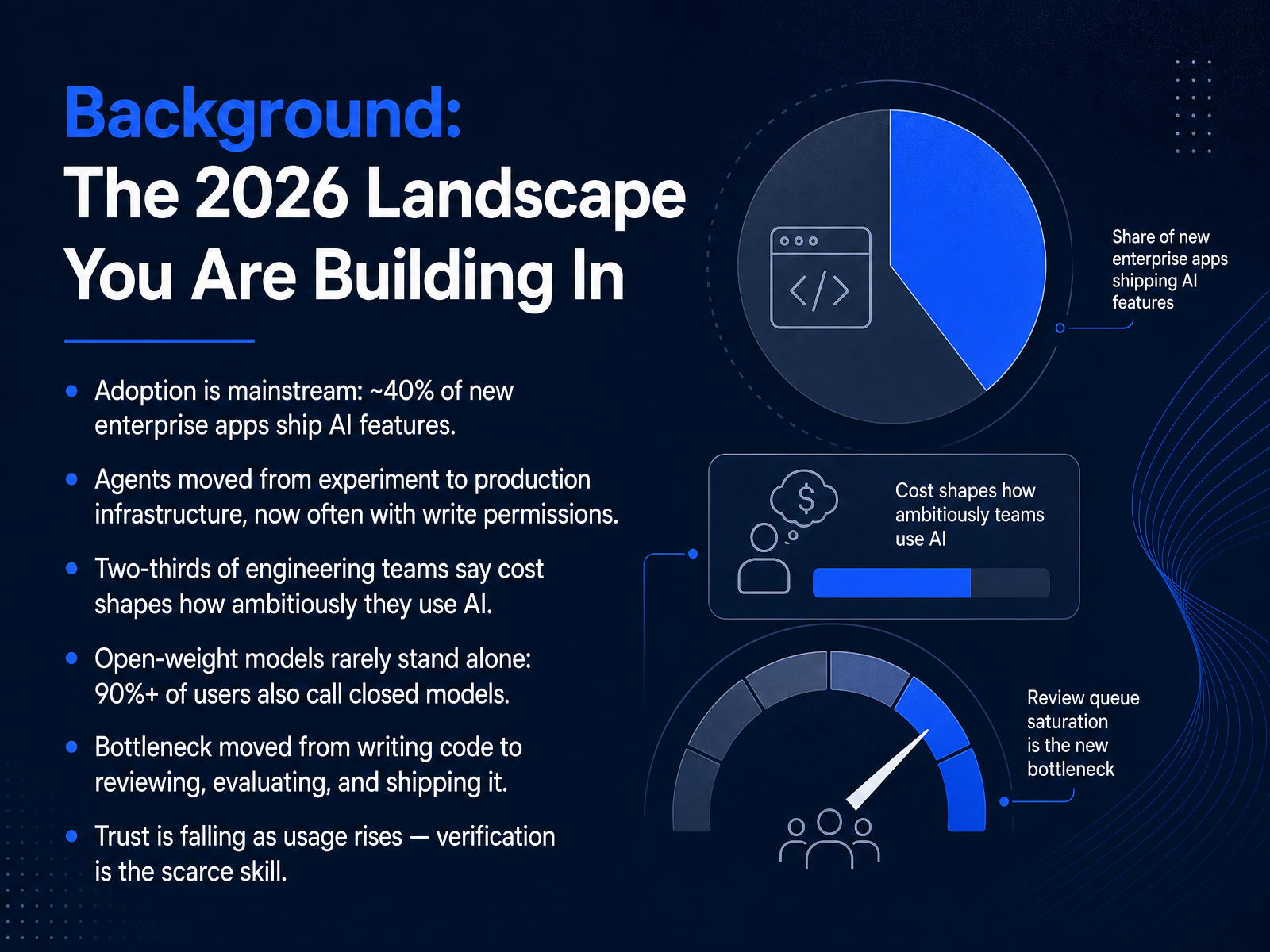
- 02Background: The 2026 Landscape You Are Building InBefore we start building, here is the landscape you are actually shipping into. Adoption is mainstream now. Roughly forty percent of new enterprise apps ship AI features. Agents have moved from experiment to production infrastructure, and most of them hold write permissions. That changes your threat model. Cost is no longer a footnote. About two thirds of engineering teams say cost shapes how ambitiously they use AI, so design your routing and caching early. Open weight models rarely stand alone. Over ninety percent of users who run them also call closed models. So plan for multiple providers, and keep your prompts portable. The real bottleneck has shifted. Writing code is cheap. Reviewing, evaluating, and shipping it is not. AI pull requests wait about four point six times longer for first review. And here is the pinch: trust is falling as usage rises. Verification is the scarce skill. So budget time for evals, canaries, and rollback. Next, let us look at what actually makes a generative AI app different.
 amplifypartners.comsalesforce.comresources.anthropic.com+22 min
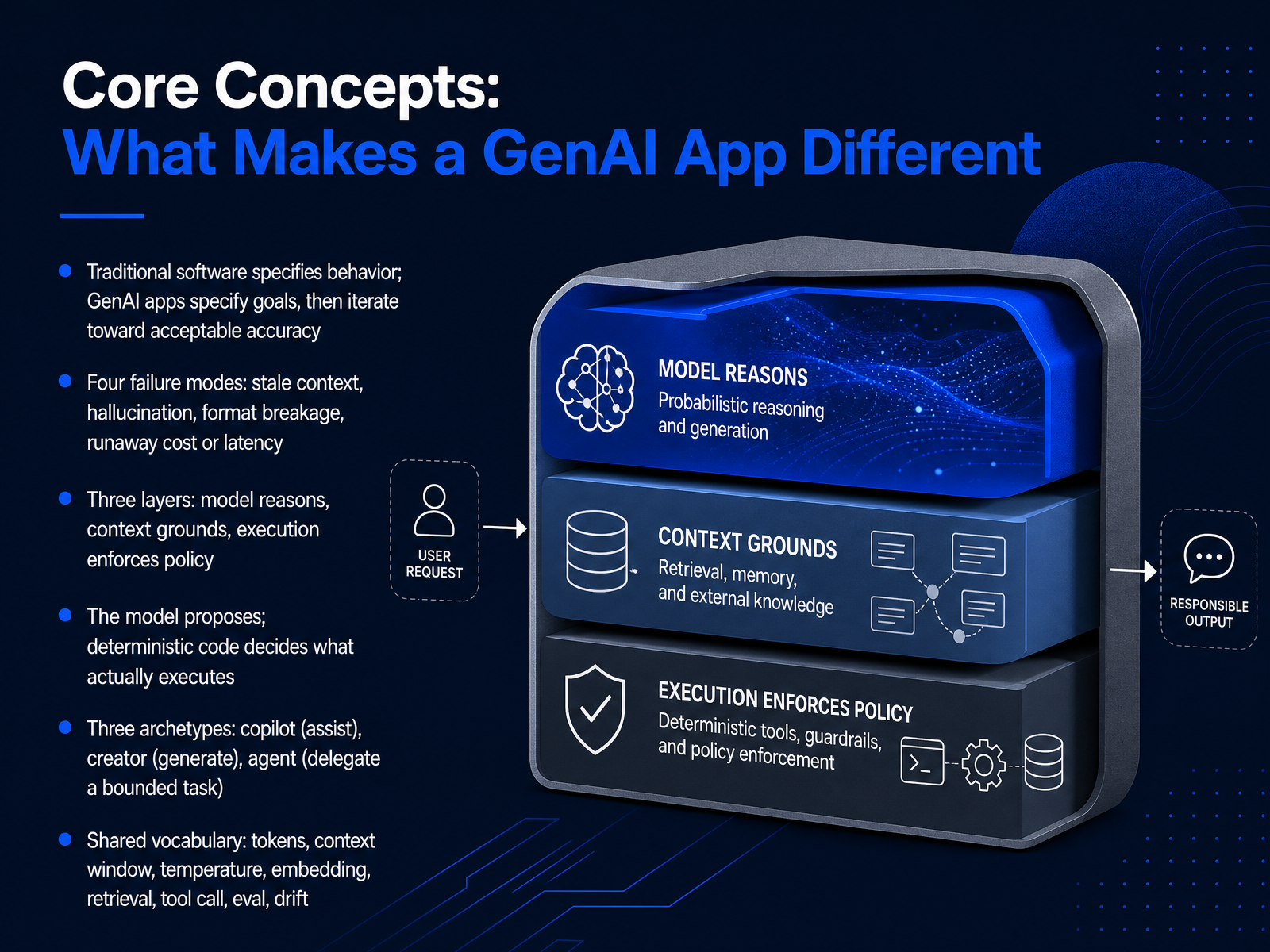
 - 03Core Concepts: What Makes a GenAI App DifferentNext, the core concepts that separate a GenAI app from ordinary software. Traditional software specifies behavior. GenAI apps specify goals, then iterate toward acceptable accuracy. That changes your whole build loop.
Keep four failure modes front of mind. Stale context. Hallucination. Format breakage. Runaway cost or latency. Each has a mitigation, and a verification check.
Architecturally, think in three layers. The model reasons. Context grounds it. Execution enforces policy. The model proposes. Deterministic code decides what actually executes. Build on that split, and your guardrails stop depending on the model behaving well.
Three archetypes cover most products. Copilot assists. Creator generates. Agent delegates a bounded task. Pick one per feature.
Shared vocabulary you will need. Tokens. Context window. Temperature. Embedding. Retrieval. Tool call. Eval. Drift. Now let us move into Stage 1, Frame the Problem Before Choosing a Model.
 aldeiadaponte.comprodmapping.comideaplan.io+22 min
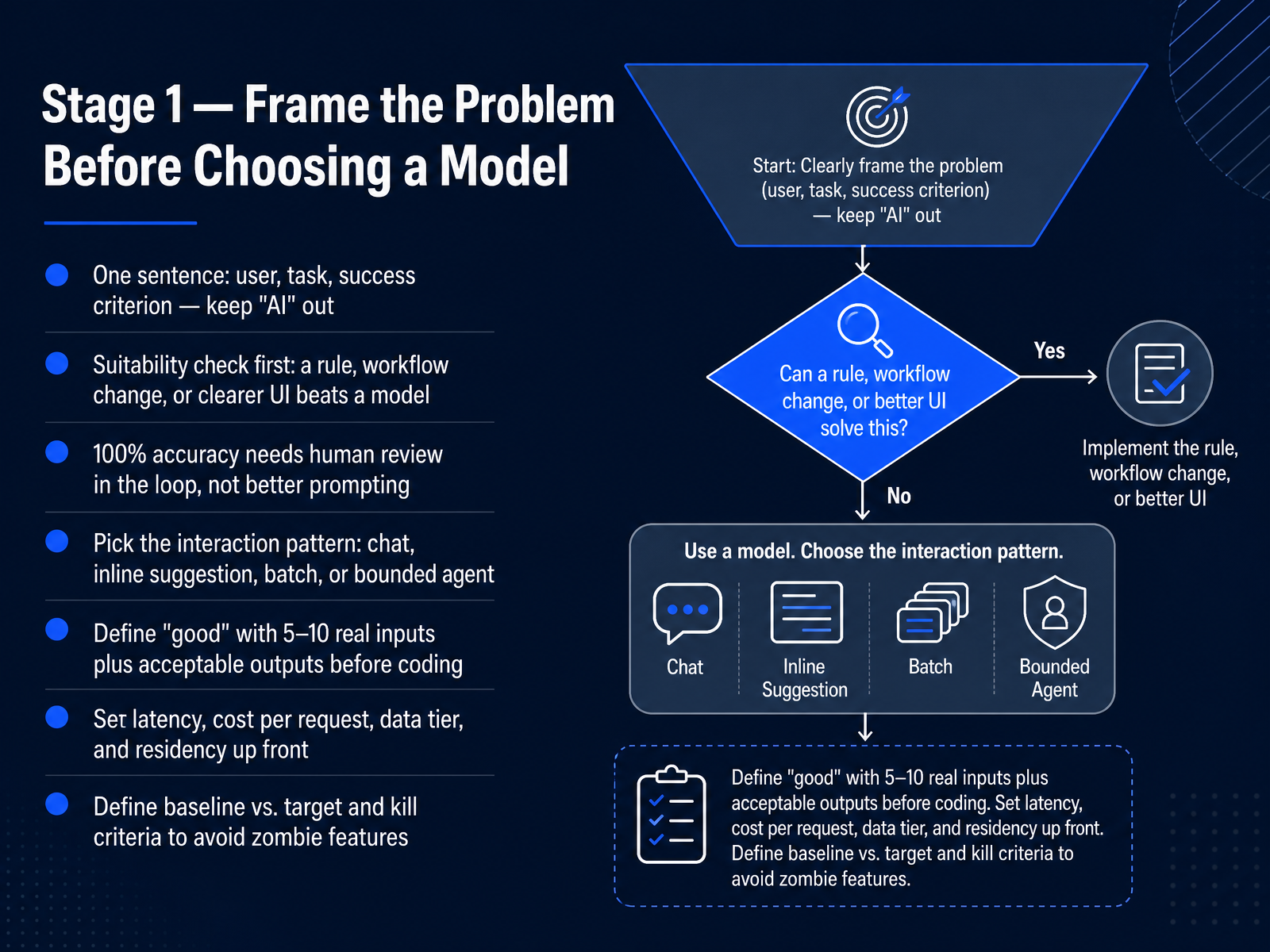
 - 04Stage 1 — Frame the Problem Before Choosing a ModelLet's move into Stage One. Frame the problem before you choose a model. Start with one sentence: who is the user, what is the task, and what does success look like. Keep the word AI out of that sentence entirely. Then run the suitability check first. If a rule, a workflow change, or a clearer interface solves it, do that instead. When you truly need one hundred percent accuracy, that calls for human review in the loop, not better prompting. Next, pick the interaction pattern. Chat, inline suggestion, batch, or a bounded agent. Before you write code, define good with five to ten real inputs and their acceptable outputs. Set latency, cost per request, data tier, and residency up front. Finally, define your baseline, your target, and your kill criteria. That last one prevents zombie features that quietly drain your budget. Next, Stage Two, choose models and access patterns.
 aldeiadaponte.comprodmapping.comideaplan.io+22 min
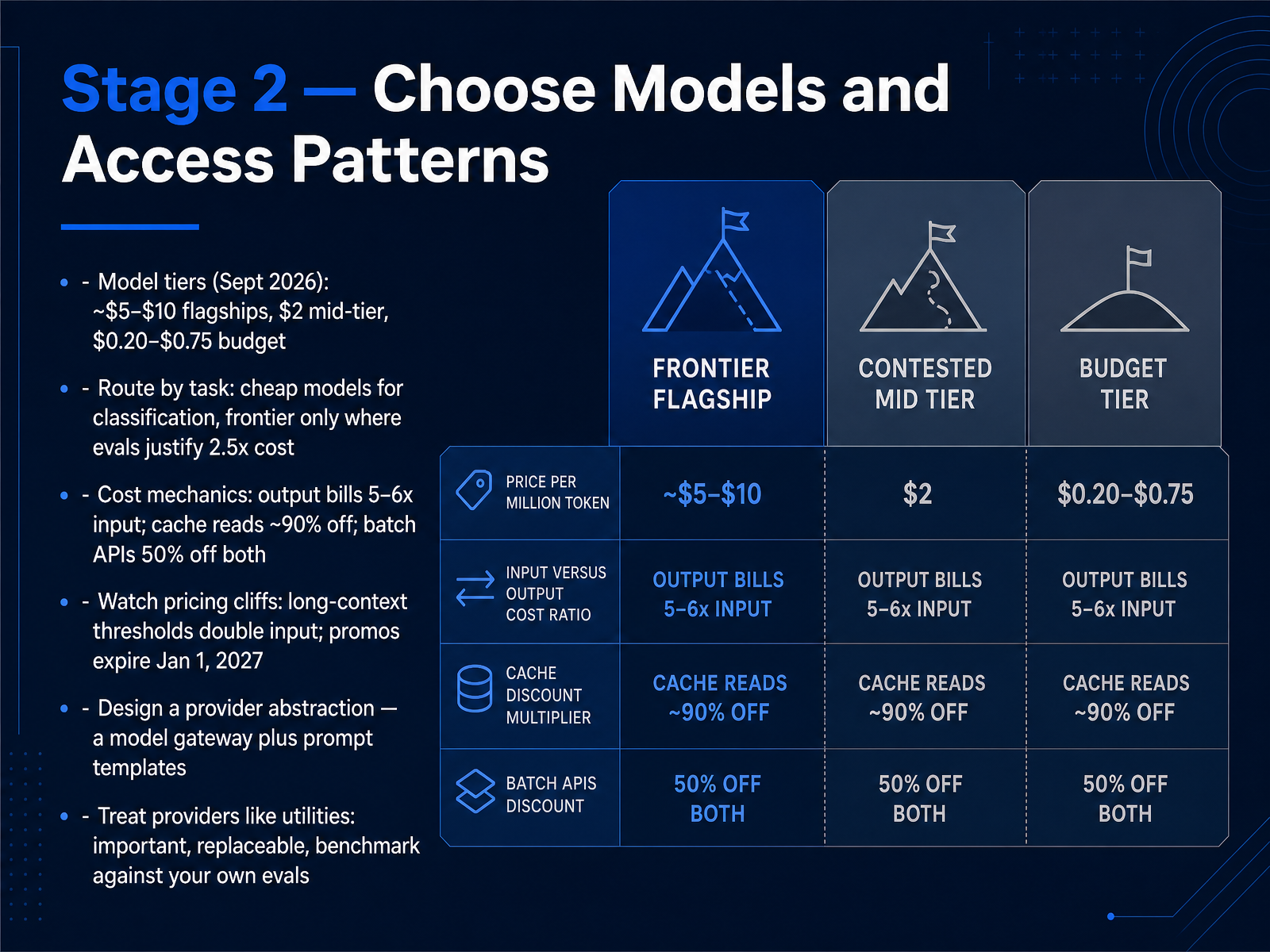
 - 05Stage 2 — Choose Models and Access PatternsNext, Stage 2. Choose models and access patterns. Start with tiers. As of September 2026, flagships run roughly five to ten dollars per million input tokens. Mid-tier sits near two dollars. Budget models land between twenty cents and seventy-five cents. Route by task. Put classification and extraction on the cheap tier. Reserve the frontier only where your own evals show a lift worth two and a half times the cost. Now the cost mechanics. Output bills five to six times more than input. Cache reads are about ninety percent off. Batch APIs cut both input and output in half. Watch the pricing cliffs. Long-context thresholds can double your input rate mid-run, and promo rates expire January 1, 2027. So put an abstraction in place. A model gateway plus prompt templates. Treat providers like utilities. Important, but replaceable. Benchmark them against your own evals before you commit traffic. That keeps you portable when prices and models shift. Now that models are selected, Stage 3. Prompt design that survives real users.
 dreaming.pressleanlm.aimodelpricewatch.com+22 min
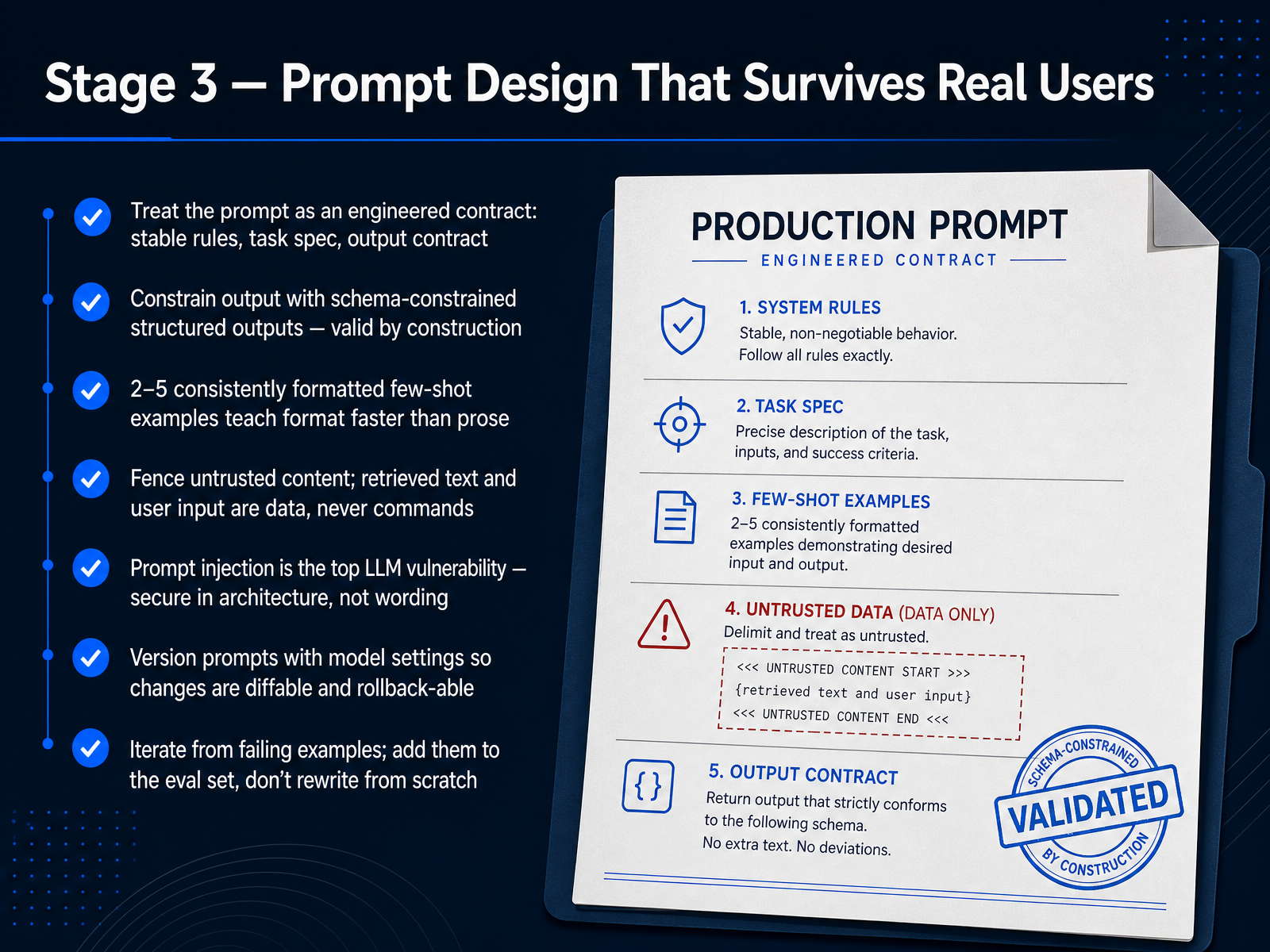
 - 06Stage 3 — Prompt Design That Survives Real UsersNow let's move into Stage 3: prompt design that survives real users. A demo prompt works once. A production prompt runs against thousands of varied inputs, feeds code that parses the output, and has to resist hostile users.
So treat the prompt as an engineered contract. Three parts: stable rules that carry across every request, the task stated as a spec, and an explicit output contract.
Enforce that contract with schema-constrained structured outputs. Not just JSON mode, which only guarantees valid JSON. Constrain to your schema so the object is valid by construction. Then validate the fields before anything downstream acts on them.
For format, two to five consistently formatted few-shot examples teach shape faster than paragraphs of prose.
Now, security. Fence untrusted content. Retrieved text, tool output, and user input are data, never commands. Prompt injection is the top LLM vulnerability, so secure it in architecture, not wording. Limit tool privileges. Validate outputs. And assume the prompt can be hijacked.
Version your prompts alongside model settings so changes are diffable and rollback-able.
Finally, when something fails, do not rewrite from scratch. Take that failing example, add it to your eval set, and iterate.
Next up is Stage 4: Grounding with Retrieval and Context.
 youngju.devoneapplefall.comaiworkflowlab.dev+22 min
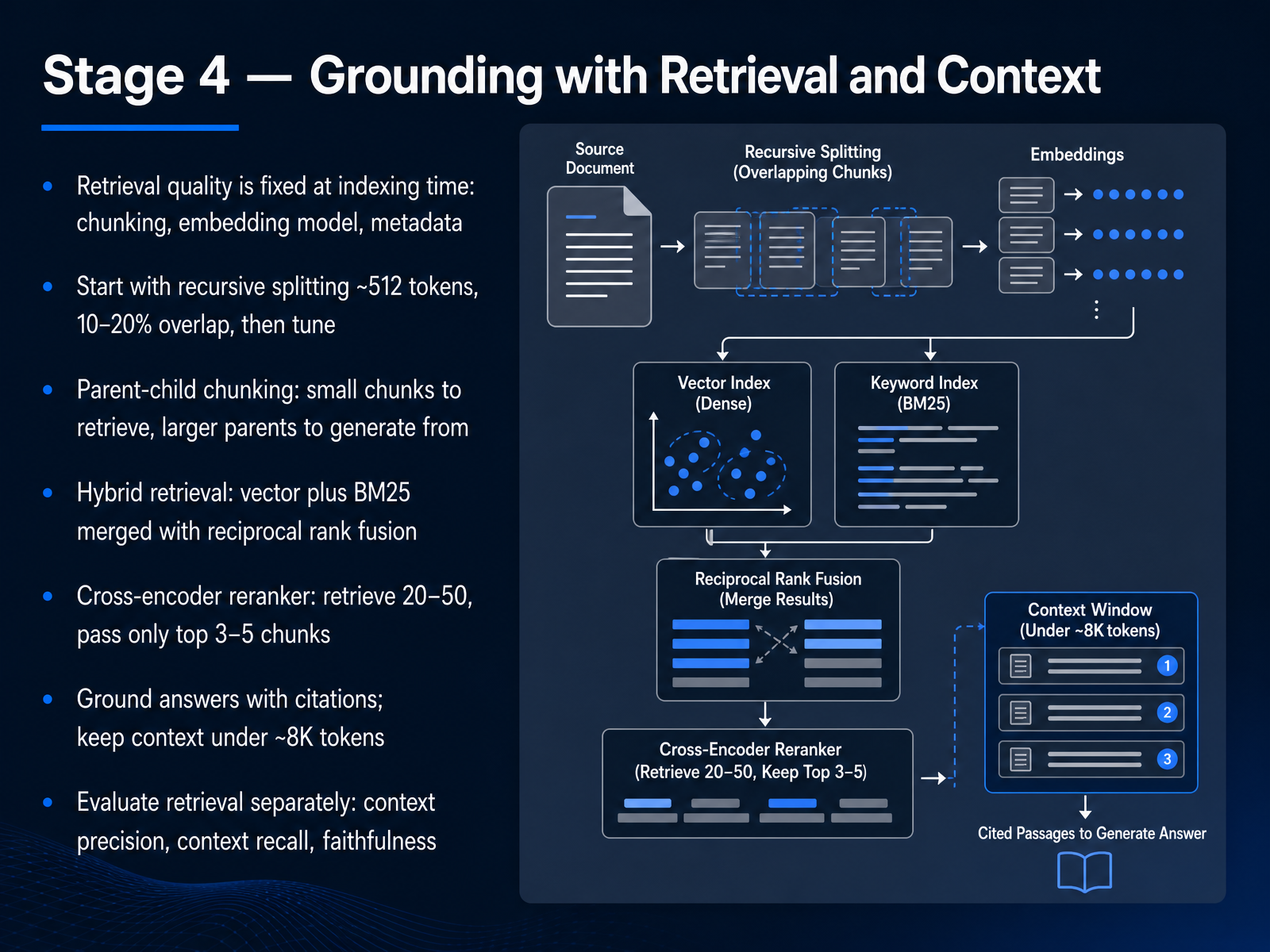
 - 07Stage 4 — Grounding with Retrieval and ContextNow let's ground the model with retrieval and context. Here's the key constraint. Retrieval quality is fixed at indexing time. Chunking, embedding model, and metadata are set before any query runs. So start with recursive splitting at around five hundred twelve tokens, with ten to twenty percent overlap. Then tune. Next, parent-child chunking. Small chunks to retrieve, larger parents to generate from. That resolves the tension between precision and context. For retrieval, go hybrid. Vector search plus BM25, merged with reciprocal rank fusion. Then add a cross-encoder reranker. Retrieve twenty to fifty candidates, and pass only the top three to five chunks into the prompt. Ground every answer with citations, and keep assembled context under roughly eight thousand tokens. Finally, evaluate retrieval separately from generation. Track context precision, context recall, and faithfulness. A faithfulness score below zero point eight five means you have a hallucination problem, not a prompt problem. Next, Stage 5, Tools, Agents, and Orchestration.
 dreaming.pressleanlm.aimodelpricewatch.com+22 min
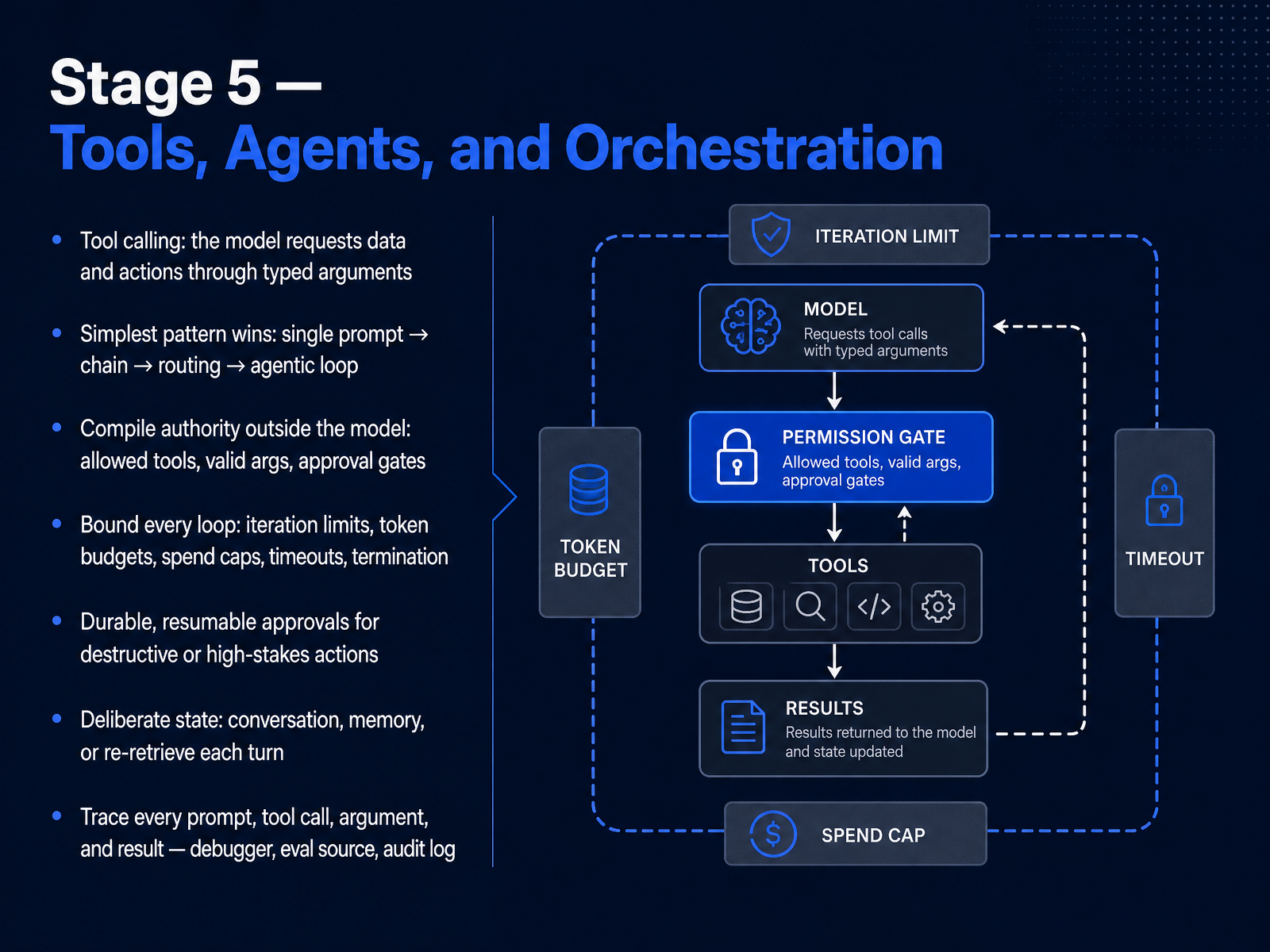
 - 08Stage 5 — Tools, Agents, and OrchestrationNext, Stage 5: tools, agents, and orchestration. Tool calling is where the model stops just generating text and starts requesting data and actions through typed arguments. But keep it simple. Use the simplest pattern that works: a single prompt, then a chain, then routing, then an agentic loop, in that order. You only graduate to an agentic loop when routing stops being enough. Now the critical part. Compile authority outside the model. The model does not decide what it is allowed to do. Your code defines the allowed tools, validates arguments, and enforces approval gates. If the model emits a call to a tool you never offered it, the engine rejects it, and nothing gets scheduled. This is the control plane and data plane split: the model reasons, your engine executes. That guarantee holds no matter what the model outputs. Then bound every loop: iteration limits, token budgets, spend caps, timeouts, and explicit termination conditions. A runaway agent loop is not a bug, it is a financial incident. For destructive or high-stakes actions, require durable, resumable approvals. The run pauses, and the approval survives a restart or a crash. Treat state deliberately, too. Decide whether you keep the conversation, persist memory, or re-retrieve context each turn. Finally, trace everything: every prompt, tool call, argument, and result. Your traces are your debugger, your evaluation source, and your audit log. Rule of thumb: the model proposes, the execution plane disposes. Next, Stage 6: evaluation, catching regressions before users do.
 youngju.devoneapplefall.comaiworkflowlab.dev+22 min
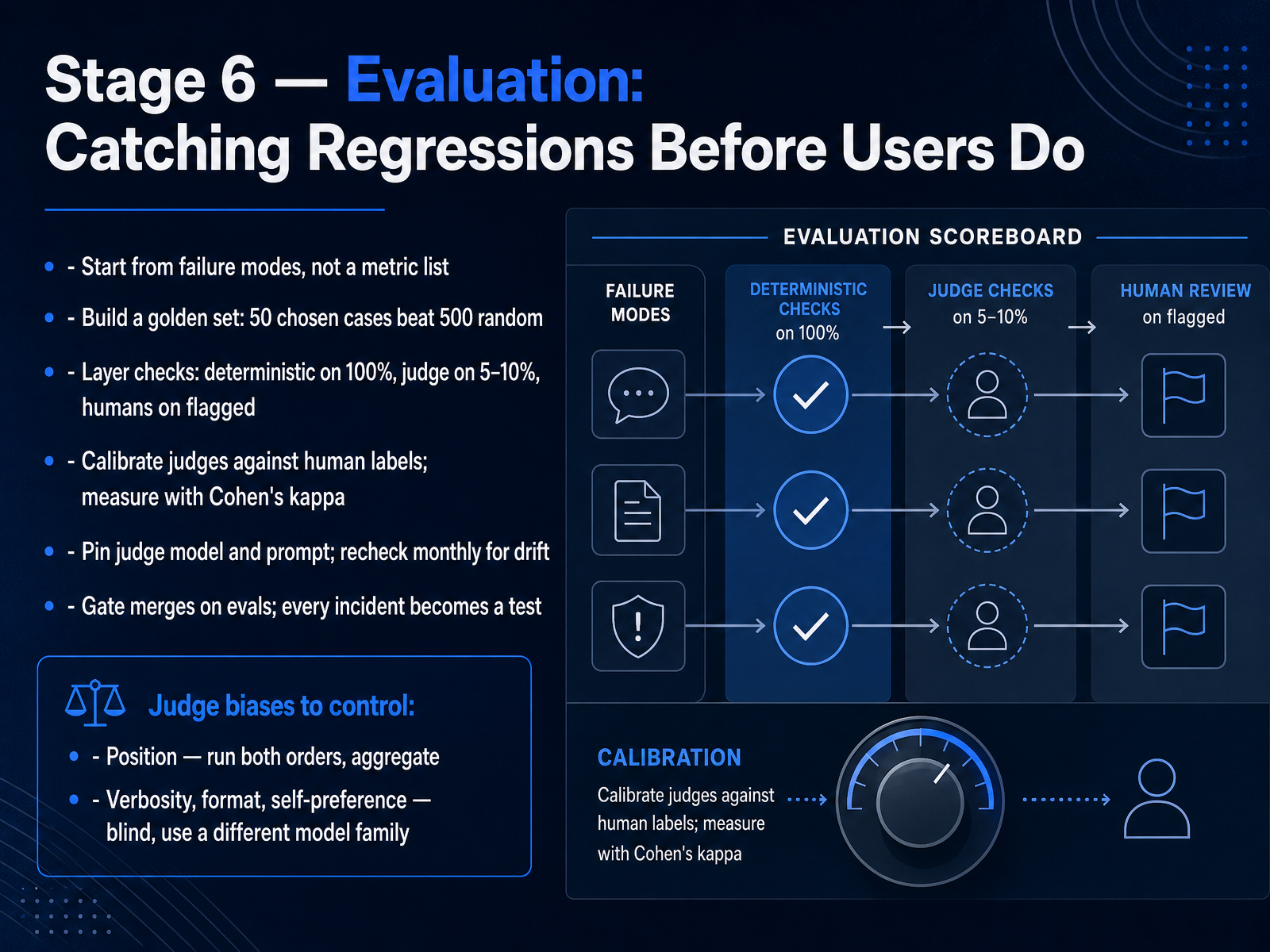
 - 09Stage 6 — Evaluation: Catching Regressions Before Users DoNow let's talk about Stage Six: evaluation. This is how you catch regressions before your users do. First, don't start with a metric list. Start from failure modes. Ask how your app breaks, then map each failure to a check. A retrieval bot fails by hallucinating facts, so you measure faithfulness. Next, build a golden set. Fifty chosen cases beat five hundred random ones. Then layer your checks. Run deterministic checks on one hundred percent of cases, an LLM judge on five to ten percent, and humans on the flagged ones. Calibrate that judge against human labels and measure agreement with Cohen's kappa, not raw accuracy. Pin the judge model and its prompt, and recheck monthly for drift. Gate your merges on evals, and turn every incident into a test. Control judge biases directly. For position bias, run both orders and aggregate. For verbosity, format, and self-preference, blind the inputs and use a different model family. Next, Stage Seven: Shipping, Cost Control, and Monitoring.
 amplifypartners.comsalesforce.comresources.anthropic.com+22 min
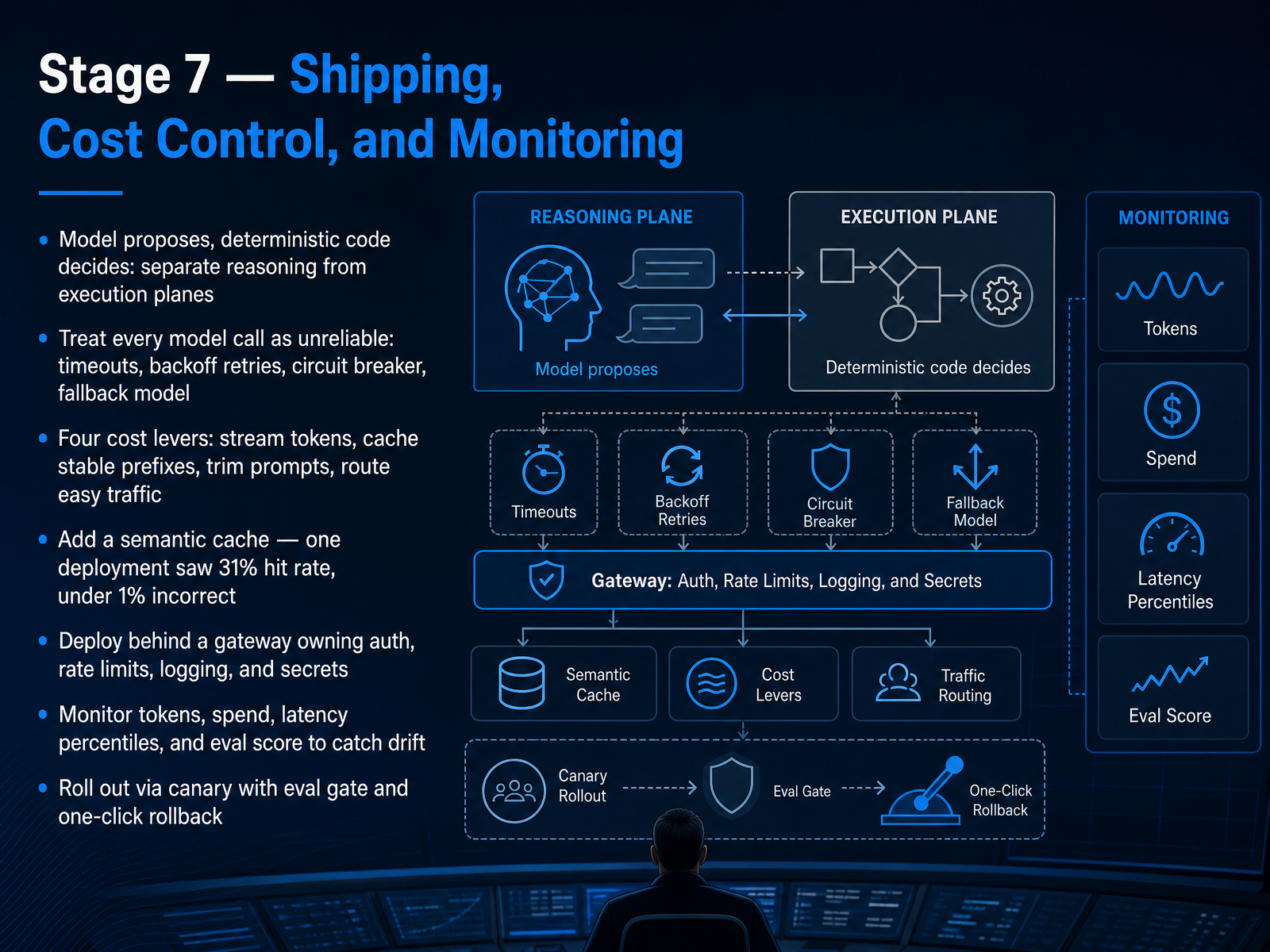
 - 10Stage 7 — Shipping, Cost Control, and MonitoringNow for the part that turns a working prototype into a system you can actually operate: shipping, cost control, and monitoring. Start with one architectural rule. The model proposes, deterministic code decides. Keep reasoning and execution on separate planes. Then treat every model call as unreliable. Set a timeout. Retry with exponential backoff and jitter. Add a circuit breaker. And keep a fallback model ready. For cost, you have four levers: stream tokens, cache stable prefixes, trim prompts, and route easy traffic to cheaper models. You can also add a semantic cache. One deployment reported a thirty one percent hit rate with under one percent incorrect. Deploy behind a gateway that owns auth, rate limits, logging, and secrets. Monitor tokens, spend, latency percentiles, and your eval score, so drift shows up before users report it. Finally, roll out with a canary behind an eval gate, and keep one-click rollback. That is your operating baseline. Next, we look at responsible AI, privacy, and compliance in practice.
 1 min
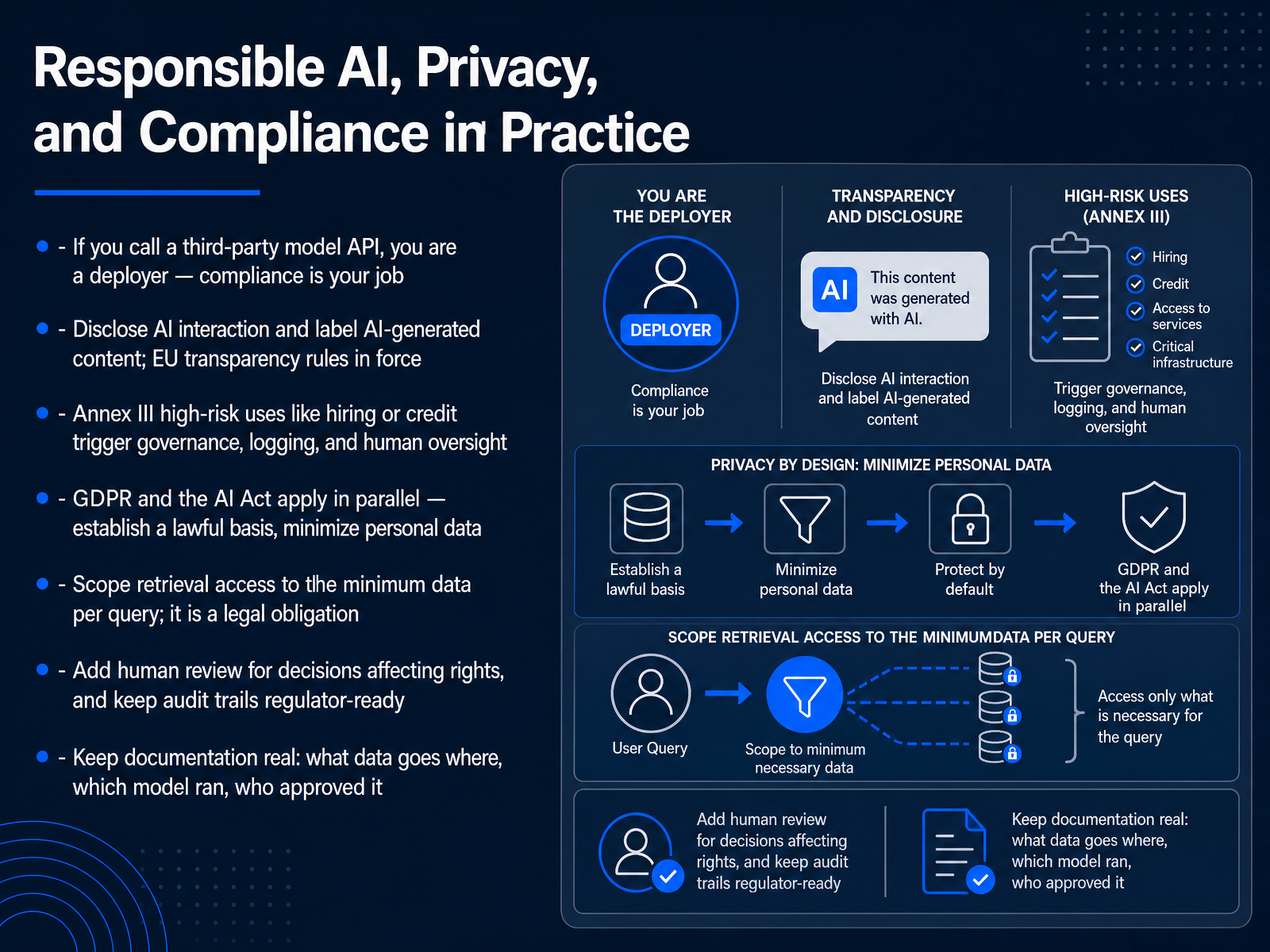
1 min - 11Responsible AI, Privacy, and Compliance in PracticeLet's talk about responsible AI, privacy, and compliance in practice. If you call a third-party model API, you are a deployer. Compliance is your job, not the provider's. So disclose AI interaction, and label AI-generated content. The EU transparency rules are in force. Next, know your risk tier. Annex III high-risk uses, like hiring or credit, trigger governance, logging, and human oversight. GDPR and the AI Act apply in parallel. Establish a lawful basis, and minimize personal data. Scope retrieval access to the minimum data per query. That is a legal obligation, not just good engineering. Add human review for any decision affecting rights, and keep audit trails regulator-ready. Finally, keep documentation real. Record what data goes where, which model ran, and who approved it. Clear scope, documented actions, and review loops are what make this work.
 1 min
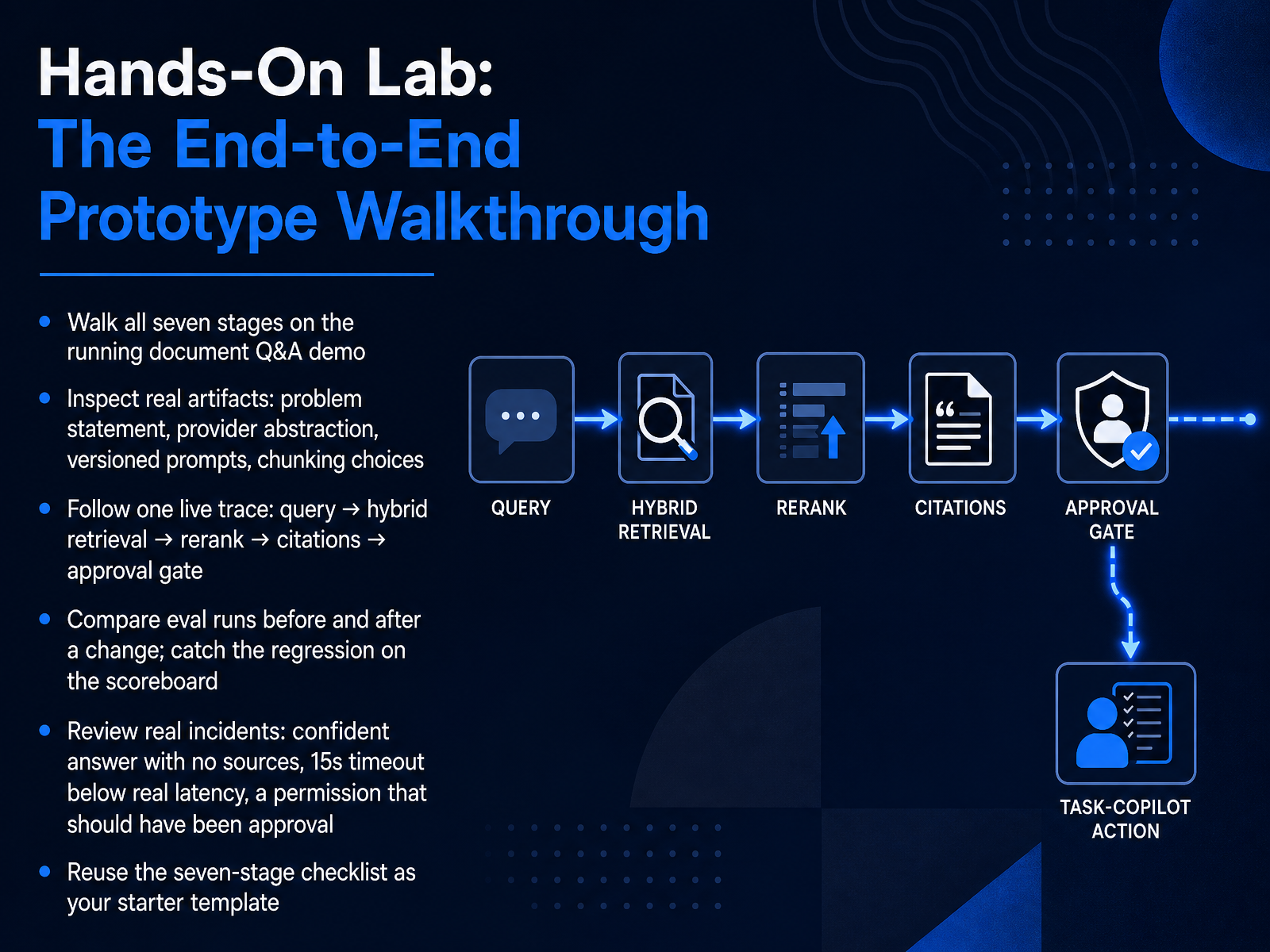
1 min - 12Hands-On Lab: The End-to-End Prototype WalkthroughNow let's walk the full seven-stage prototype together, end to end. Open the running document Q and A demo and follow along in your own environment. First, inspect the real artifacts: the problem statement, the provider abstraction, your versioned prompts, and the chunking choices. Then follow one live trace from query, through hybrid retrieval and rerank, into citations, and finally the approval gate. Pause after each stage and verify what you see. Next, compare two eval runs, one before a change and one after. Watch the scoreboard, and catch the regression instead of shipping it. Then review three real incidents. A confident answer with no sources. A fifteen second timeout set below real latency. And a permission that should have been an approval gate. None of these are exotic. They are normal rework. Finally, take the seven-stage checklist and reuse it as your starter template. In the next section, we look at common pitfalls and the prototype-to-product gap.
 2 min
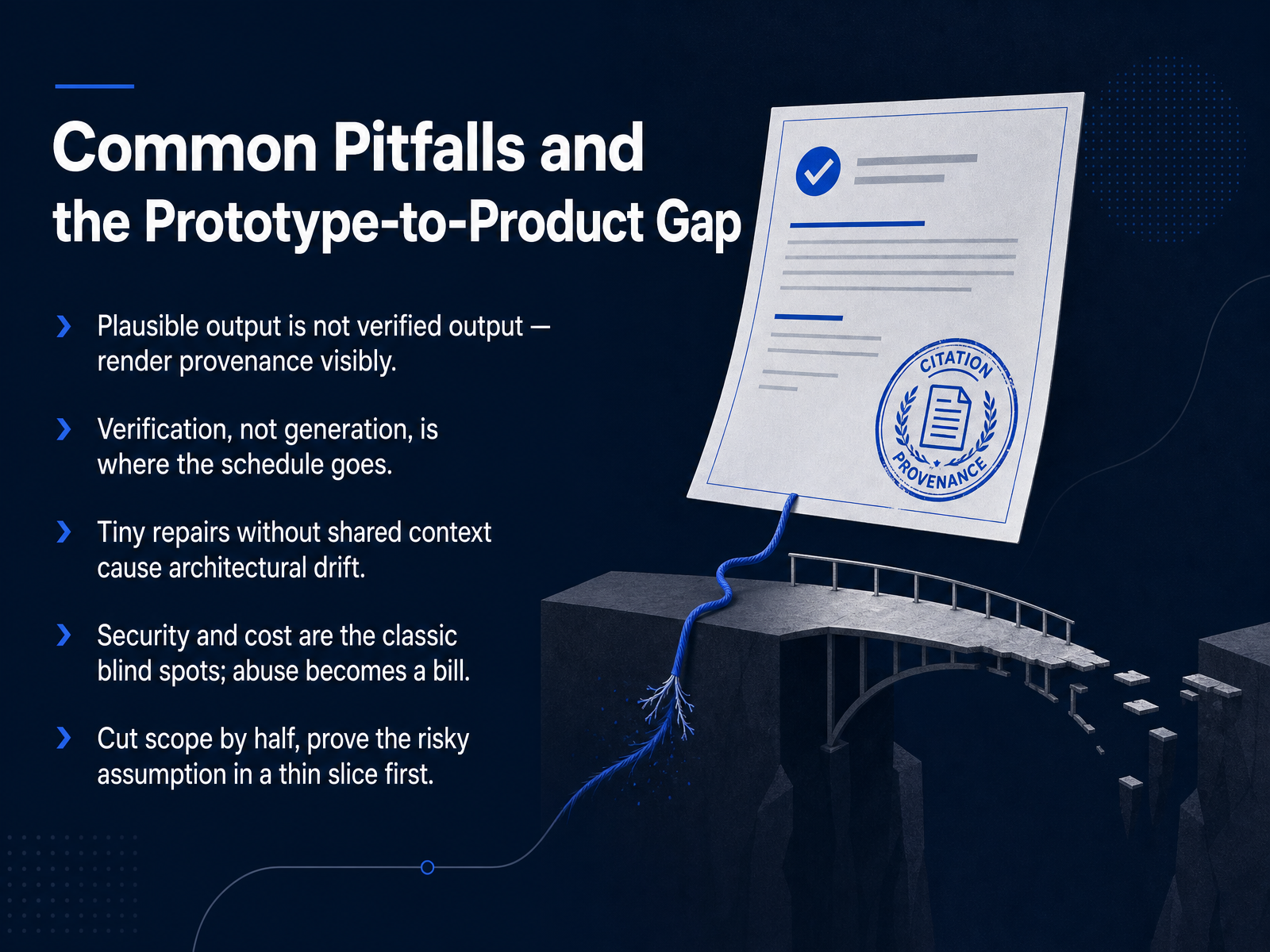
2 min - 13Common Pitfalls and the Prototype-to-Product GapBefore you ship, watch for a few common pitfalls. First, plausible output is not verified output. Render provenance visibly, showing sources, timestamps, and confidence, because confident formatting fools everyone, including you. Second, your schedule goes to verification, not generation. Budget the review, the test cases, and the eval runs. Third, tiny repairs without shared context cause architectural drift. Use one architecture, and give the model the constraints. Fourth, security and cost are the classic blind spots. Abuse becomes a bill, and unguarded endpoints become an attack surface. Add rate limits, signed webhooks, and spending caps early. Fifth, cut scope by half, and prove the riskiest assumption in a thin slice first. Build the smallest version that tests your core bet, then scale. That is how a weekend prototype survives contact with production.
 amplifypartners.comsalesforce.comresources.anthropic.com+21 min
 - 14Adapting the Workflow to Your Project and Next StepsNow let's close the loop and make this workflow yours.
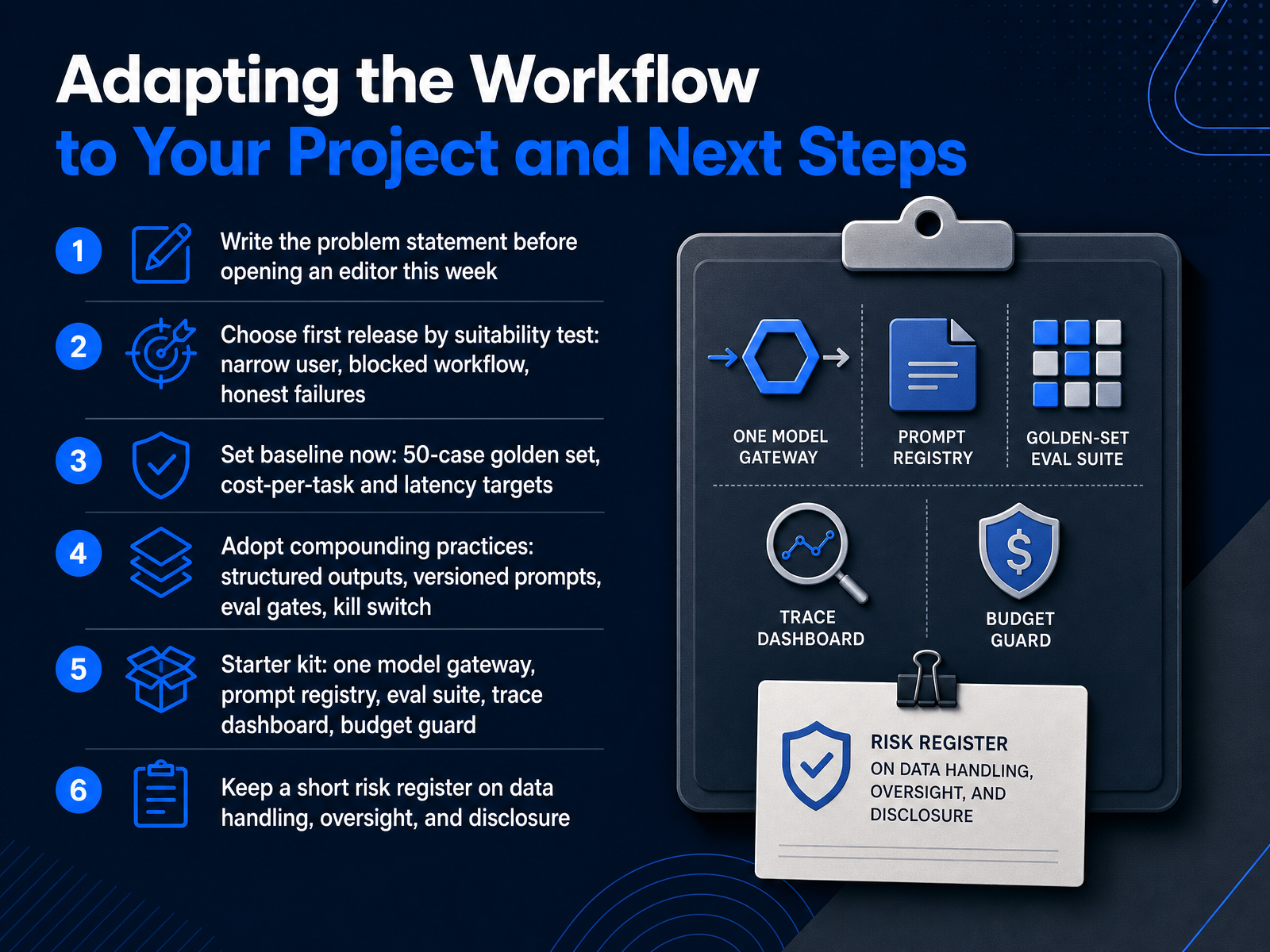
This week, before you open an editor, write the problem statement. Then pick your first release with three filters: one narrow user, a genuinely blocked workflow, and failures you can afford to be honest about.
Set your baseline now. Fifty golden cases. A cost-per-task target. A latency target. Those numbers become your reference point for every prompt or model change you make.
Adopt the practices that compound: structured outputs, versioned prompts, eval gates before deploy, and a kill switch you can pull without a redeploy.
Your starter kit is five things. One model gateway so you can swap providers. A prompt registry. An eval suite wired into continuous integration. A trace dashboard. And a budget guard with hard limits, because cost shapes real decisions now, and unguarded agent loops can drain a month's budget in an afternoon.
Keep a short risk register covering data handling, human oversight, and disclosure, so governance never surprises you at launch.
You don't need all of it to start. Pick one narrow case, instrument it, and ship something a real user can try this month. Thanks for working through this with me, and go build the next one.
 amplifypartners.comsalesforce.comresources.anthropic.com+22 min
Take the deck with you
Download this course as a file — free, no sign-up needed.
- PDF handoutEvery slide page, ready to print or share.15 pages · 3.9 MBDownload
- Narrated PowerPointThe deck that presents itself — every slide carries the digital human's narration video.15 pages · 14.4 MBDownload
- PowerPoint slidesThe full deck as a .pptx — open it in PowerPoint, Keynote, or Google Slides.15 pages · 3.8 MBDownload
Free to use in your own training — please keep the PersonWise credit page at the end.
Have your own deck? Turn it into a course
Sources consulted
Web sources consulted while building this course.
- The 2026 AI Engineering Report — Amplify Partners — amplifypartners.com
- AI & App Development Trends 2026 | Salesforce — salesforce.com
- The 2026 State of AI Agents Report — resources.anthropic.com
- The State of AI in the Enterprise - 2026 AI report — deloitte.com
- State of AI 2026 — 2026.stateofai.dev
- Product Management for Generative AI: Scoping, MVPs, and Metrics Guide — aldeiadaponte.com
- How to decide which generative AI feature to add to your product — prodmapping.com
- The AI Product Manager's Handbook - Full Guide | IdeaPlan — ideaplan.io
- The 2026 AI product strategy guide: How to plan, budget, and build without buying into the hype — mindtheproduct.com
- Write a PRD for a generative AI feature — reforge.com
- LLM API Pricing Comparison, September 2026: The New Ceiling, the Cache-Read War, and the Promo Prices That Reset January 1 — dreaming.press
- LLM Cost Calculator: Compare Real API Cost by Model — leanlm.ai
- State of LLM Pricing — September 2026 — modelpricewatch.com
- AI Model Comparison 2026 — Context, Price & Modality · BitByteCore — bitbytecore.com
- LLM API Pricing Comparison: 28 Models at 1M-Token Rates — Modellix Blog — modellix.ai
- Prompt Engineering Complete Guide: CoT, DSPy, Structured Output, and Prompt Security | Chaos and Order — youngju.dev
- Prompt Engineering Best Practices (2026): The Complete Guide — oneapplefall.com
- Prompt Engineering Guide 2026 (DSPy) | AI Workflow Lab — aiworkflowlab.dev
- LLM Prompt Injection Prevention Cheat Sheet — cheatsheetseries.owasp.org
- LLM Prompt Injection: 2026 Developer's Testing Cheat Sheet — securecodinghub.com