Begin
14 pages · ~28 min
Technical Writing Style: Patterns & Pitfalls
Teaches technical writers to recognize effective style patterns, strengths, and common pitfalls through professional examples, helping them apply clear, consistent style in workplace documents.
A digital instructor presents all 14 pages. Hold “Ask” at any point and ask out loud — the answer comes from this course. No sign-up needed.
What you’ll learn
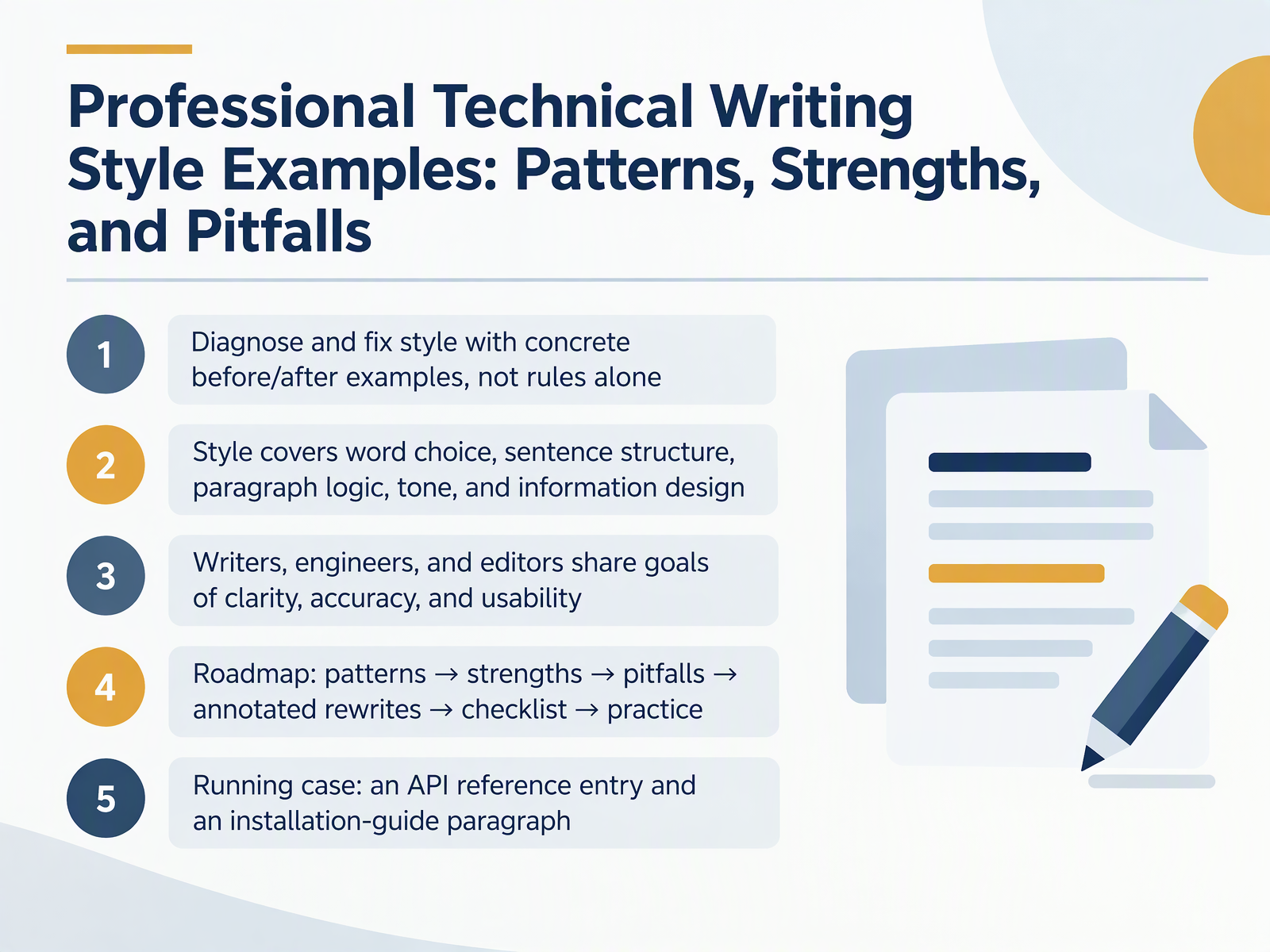
- 01Professional Technical Writing Style Examples: Patterns, Strengths, and PitfallsWelcome. In this course, you will learn to diagnose and fix technical writing style using concrete before and after examples, not rules alone. Style is more than wording. It covers word choice, sentence structure, paragraph logic, tone, and information design. Writers, engineers, and editors share the same goals: clarity, accuracy, and usability. Here is how we will work together. We start with patterns, then look at their strengths, then common pitfalls, then annotated rewrites, a checklist, and practice. Throughout, we will use one running case: an API reference entry and a paragraph from an installation guide. Take a moment to see how this version buries the action in abstract nouns. Your job is not to memorize rules, but to recognize the trade-offs in your own drafts. To start, here is the framework for reading each example: How to Read the Examples: A Four-Part Annotation Framework.documentation.suse.comgithub.commintlify.com+21 min
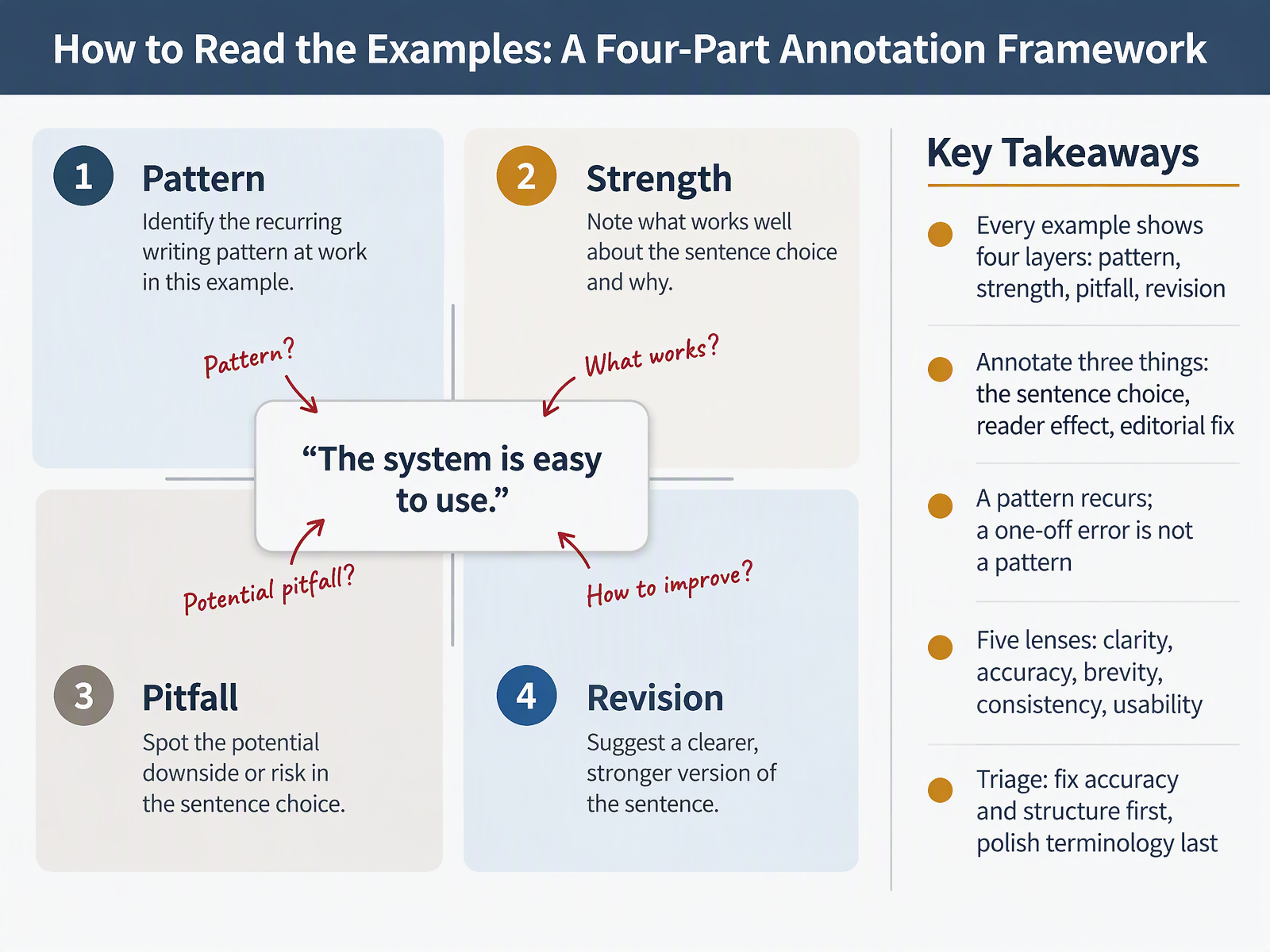
- 02How to Read the Examples: A Four-Part Annotation FrameworkNow let's set up how you'll read every example in this course. Each one shows four layers: the pattern, its strength, its pitfall, and a revision. For each sample, annotate three things: the sentence choice, the reader effect, and the editorial fix. Here's a concrete test. A single sentence with a hidden verb, like 'the implementation of the cache was completed,' is a one-off error. The same habit appearing across a whole draft is a pattern. Judge through five lenses: clarity, accuracy, brevity, consistency, and usability. Then triage. Fix accuracy and structure first; polish terminology last. Next, we move into the pattern gallery itself.
 documentation.suse.comgithub.commintlify.com+21 min
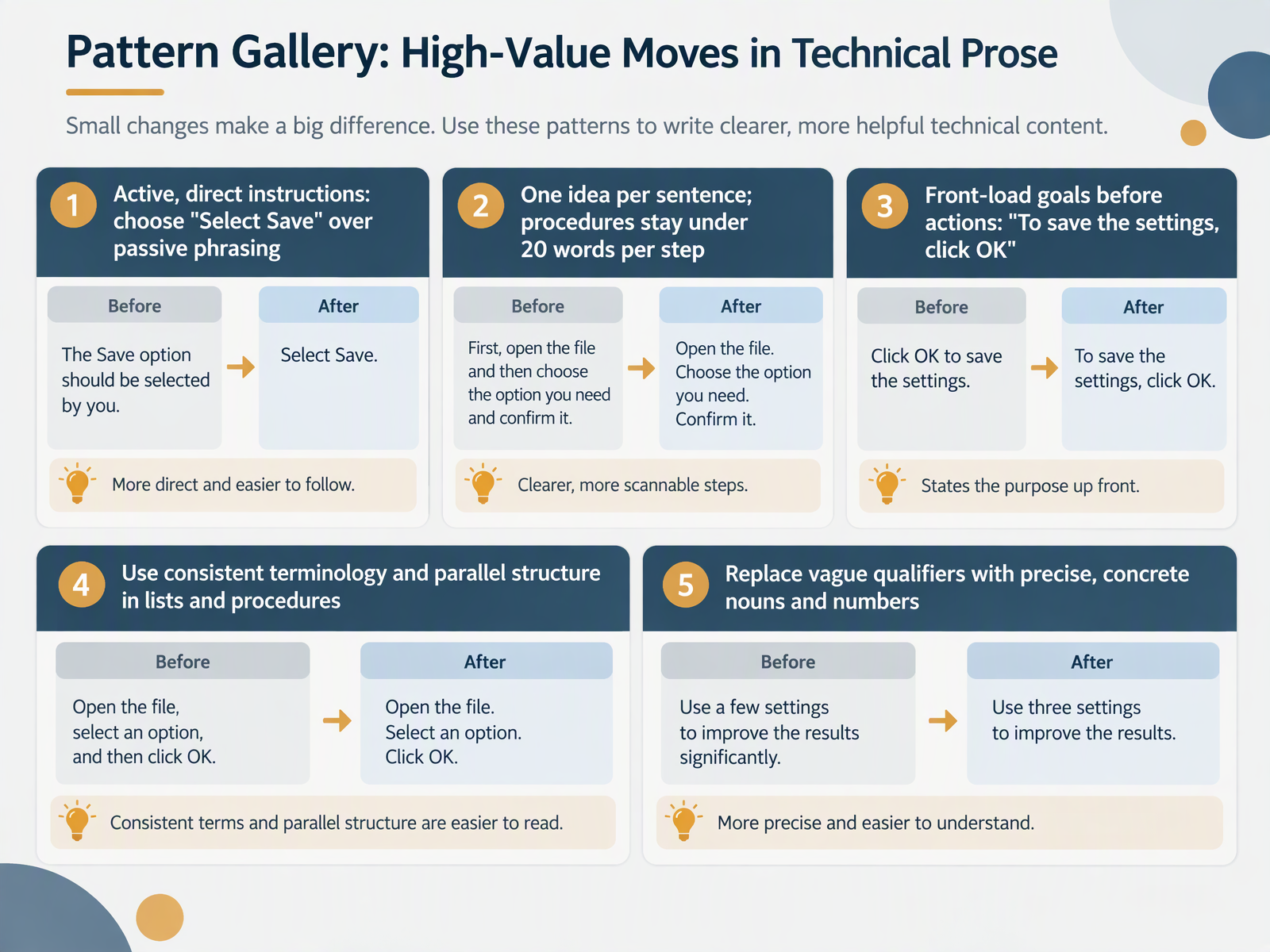
- 03Pattern Gallery: High-Value Moves in Technical ProseNext, let's look at a gallery of recurring patterns you can carry into your own drafts. Start with the verb: write "Select Save" rather than "The Save button should be selected," and the reader knows who acts. Then keep one idea per sentence, and hold each procedure step under twenty words, because readers scan steps while they work. Front-load the goal before the action, as in "To save the settings, click OK," so the reader can skip a step that doesn't match their aim. Use one term for each concept, and keep list items grammatically parallel, so "To take minutes, to answer correspondence, to write reports" matches, while mixing phrases and clauses forces a reread. Finally, swap vague qualifiers for concrete nouns and numbers: "up to twenty-hour battery life," not "good battery life." Next, strengths in context, and what good style actually buys you.
 archives.govopenoregon.pressbooks.pubdevelopers.google.com+22 min
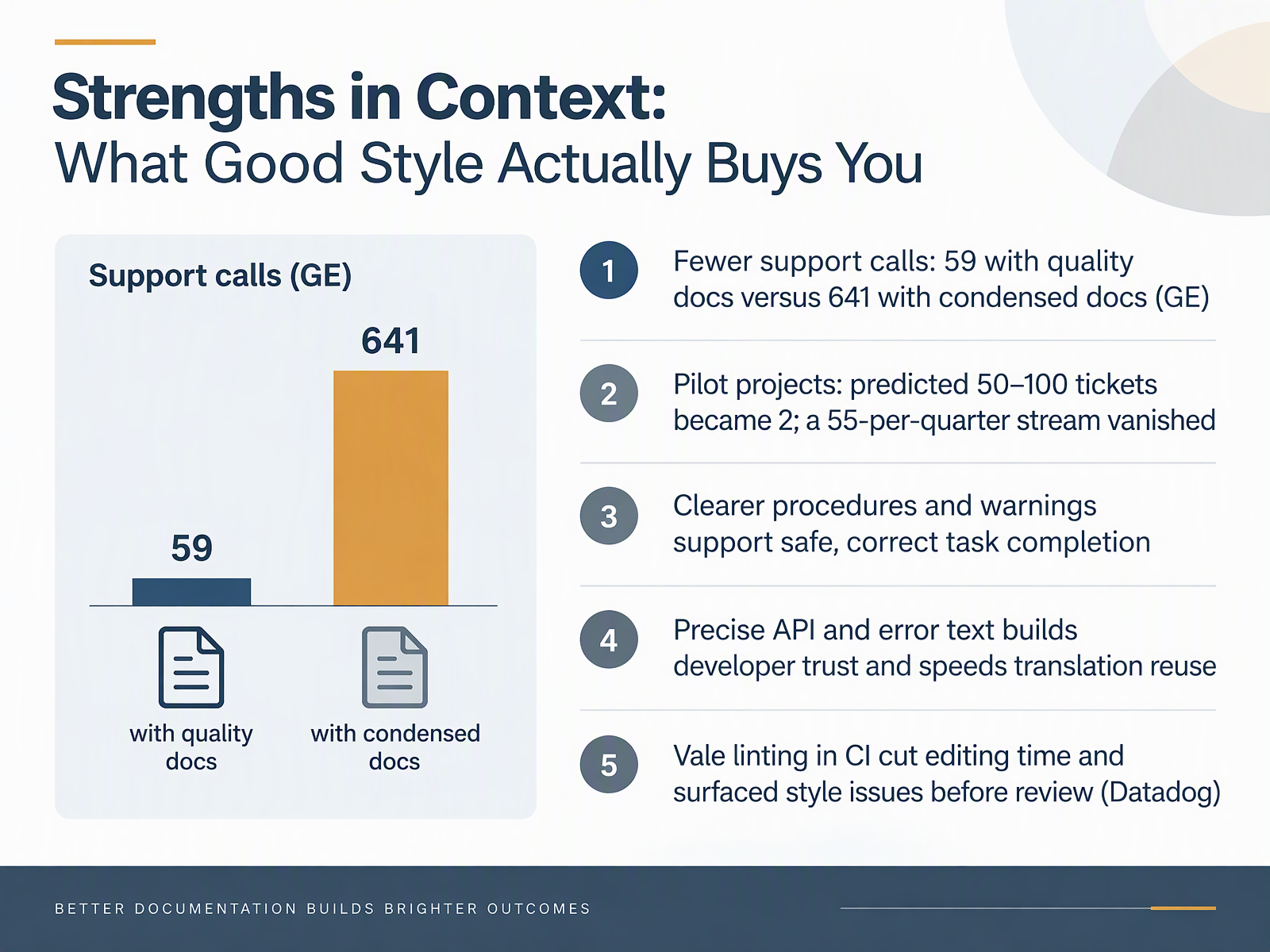
- 04Strengths in Context: What Good Style Actually Buys YouSo what does good style actually buy you? Start with support load. At GE Information Services, users with quality documentation made fifty nine support calls over five months. Users given a heavily condensed version made six hundred forty one. Same product, different documentation. Next, pilot projects aimed at preventing tickets: a product owner predicted fifty to one hundred tickets and got two, and a steady stream of fifty five per quarter disappeared. You also buy safety. A procedure that reads in order, with the warning placed before the risky step, lets someone complete a task correctly the first time. Precise API and error text builds developer trust and makes translation reuse faster. And tooling compounds it: at Datadog, running Vale in continuous integration cut editing time and surfaced style issues before review. So the trade-off is worth stating plainly: good style costs some upfront care and returns fewer interruptions downstream. Now let's look at the patterns that undercut it, starting with Pitfall Clinic, Part 1: Hidden Verbs and Noun Stacks.
 doi.orgingentaconnect.compureadmin.qub.ac.uk+22 min
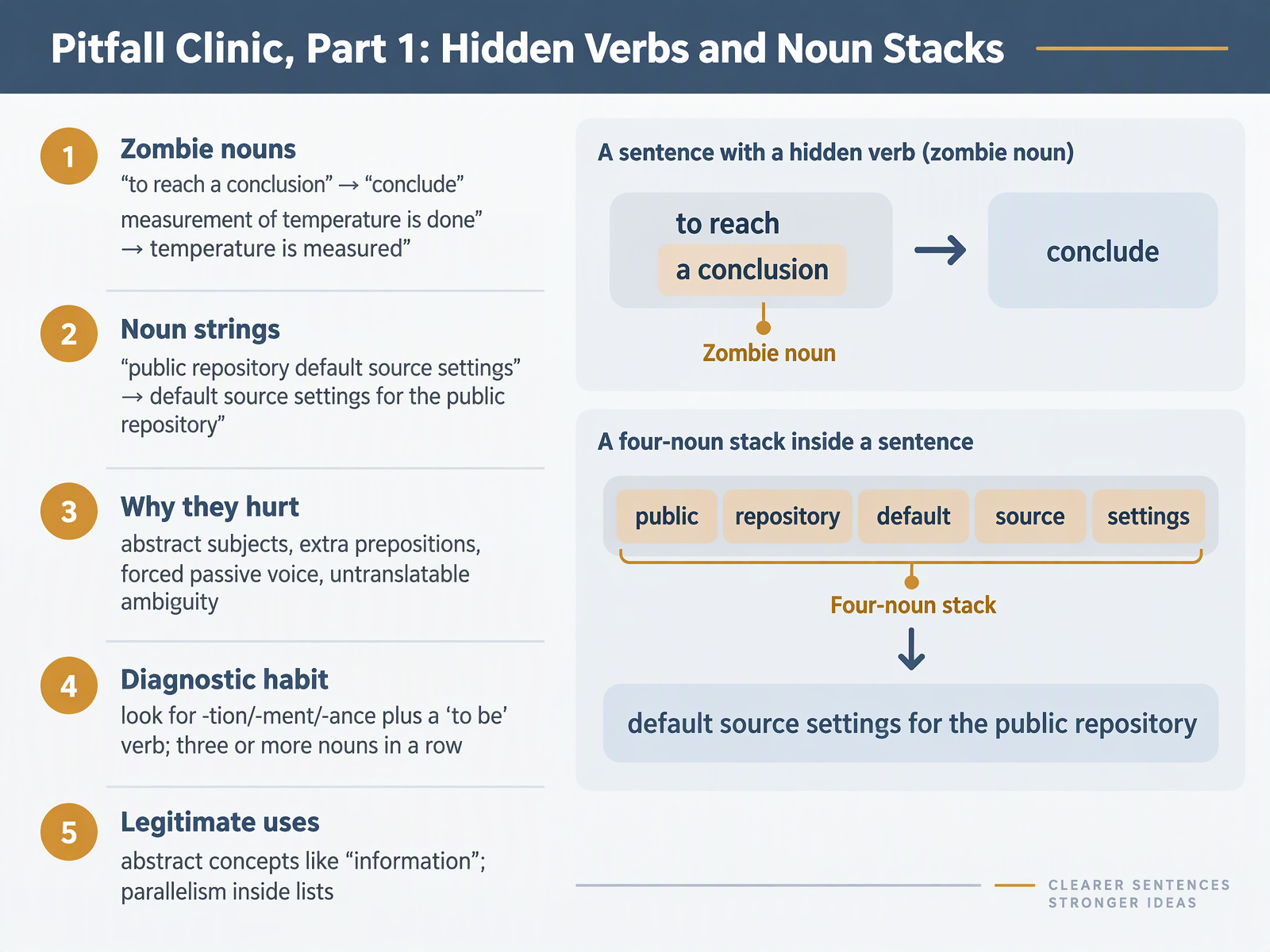
- 05Pitfall Clinic, Part 1: Hidden Verbs and Noun StacksLet's look at two common traps you can spot in your own drafts. First, hidden verbs. When you write "to reach a conclusion," the real action is hiding inside the noun. Write "conclude." When you write "measurement of temperature is done," the engine is a weak "to be" verb. Write "temperature is measured." Second, noun stacks. When you write "public repository default source settings," readers have to guess which noun modifies which. Write "default source settings for the public repository." These patterns hurt because they create abstract subjects, extra prepositions, forced passive voice, and ambiguity that translators cannot resolve. Build a diagnostic habit. Look for a word ending in t i o n, m e n t, or a n c e sitting next to a form of "to be." Also look for three or more nouns in a row. Some uses are legitimate. Abstract concepts like "information" have no handy verb form, and a noun can keep a list parallel. The point is to recognize the pattern in your own drafts and convert it when the action belongs in the verb. Next, we move to Pitfall Clinic, Part 2: Hedging, Passive Evasion, and Buried Answers.
 docs.github.comoer.pressbooks.pubdigital.gov+22 min
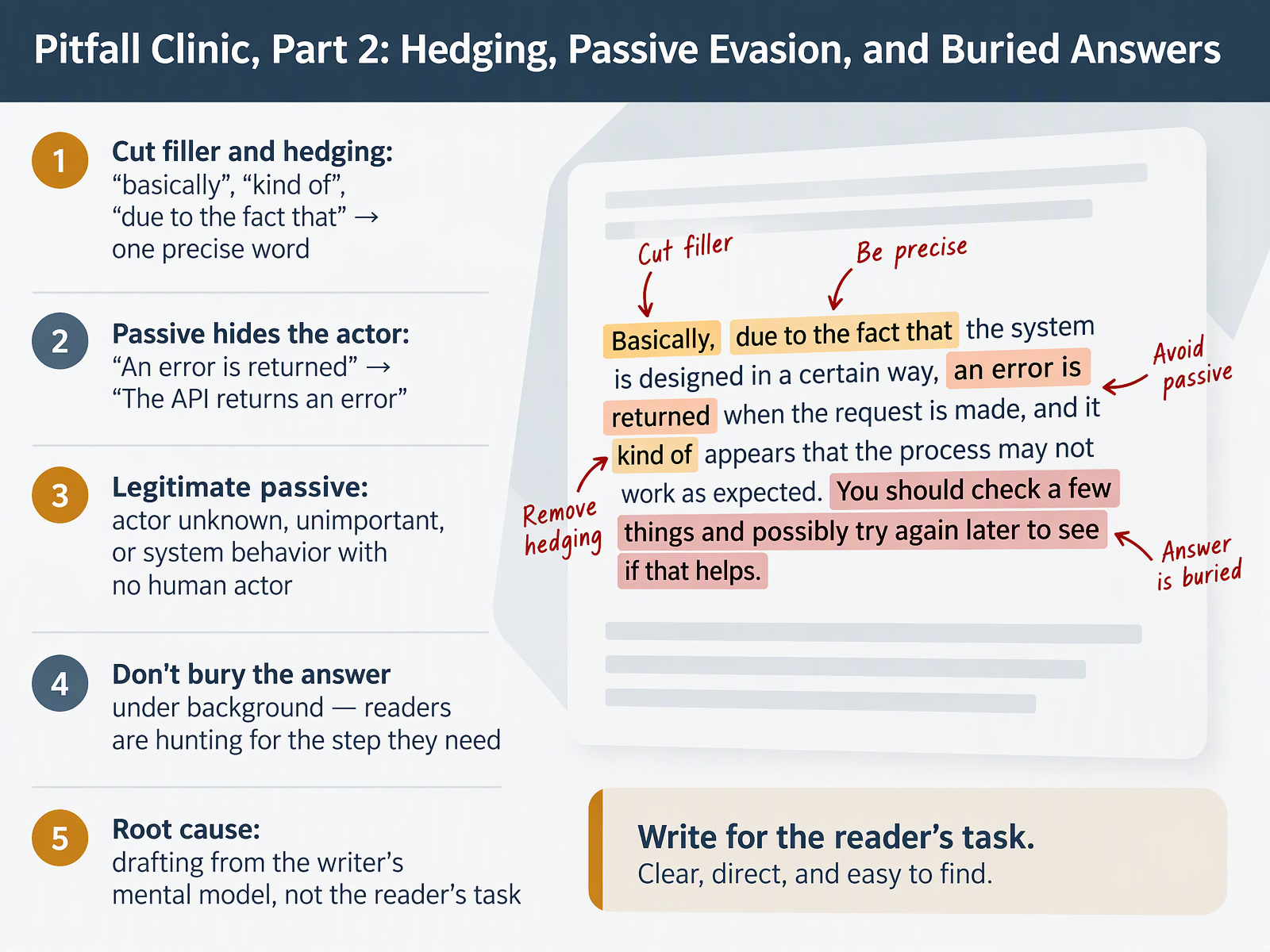
- 06Pitfall Clinic, Part 2: Hedging, Passive Evasion, and Buried AnswersLet's continue the pitfall clinic with three habits worth checking in your own drafts. First, cut hedging and filler down to one precise word. Instead of "due to the fact that," write "because." Instead of "kind of" or "basically," delete the word or name the exact condition. Second, watch for passive voice that hides the actor. "An error is returned" leaves readers asking, returned by what? "The API returns an error" names it. Passive is still legitimate when the actor is unknown, unimportant, or there is no human actor at all, as in "The request is routed to the primary shard." Third, don't bury the answer under background. Readers are hunting for the step they need, so lead with it. These pitfalls usually trace to one root cause: drafting from your own mental model instead of the reader's task. Next, we'll watch that fix happen line by line in Annotated Rewrite: A Procedure Paragraph.
 archives.govopenoregon.pressbooks.pubdevelopers.google.com+22 min
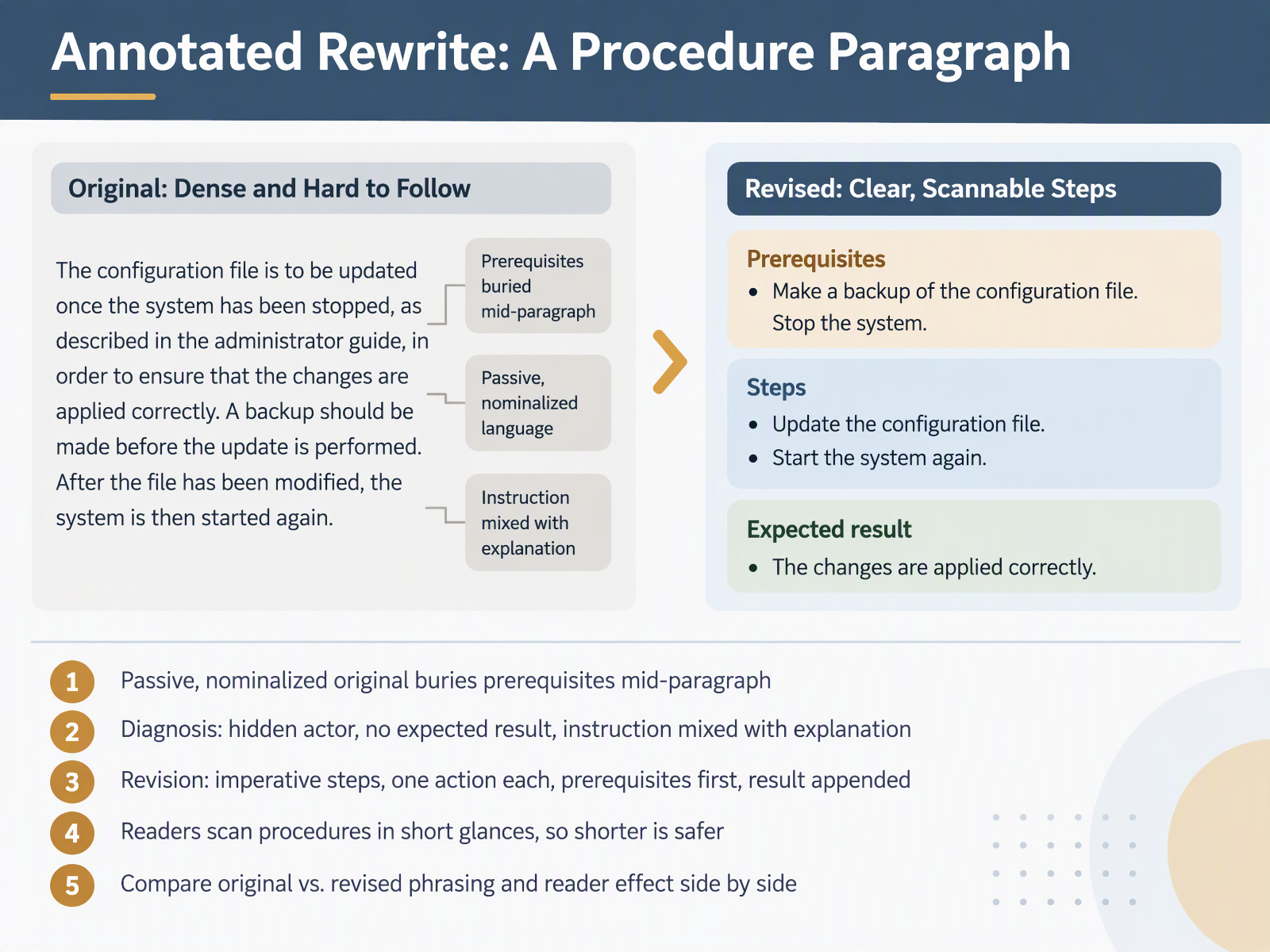
- 07Annotated Rewrite: A Procedure ParagraphLet's put the diagnosis to work on a procedure paragraph. Here is the passive, nominalized original: "Once the configuration file has been modified, the service should be restarted by the administrator in order for the changes to be applied." That version buries the prerequisite mid-paragraph. The actor is hidden, no expected result is stated, and the instruction is mixed with explanation. The revision fixes all three by leading with prerequisites and putting one imperative action per step. "Before you edit the configuration file, stop the service. Edit the file. Restart the service. The new settings take effect when the service restarts." Shorter is safer here, because readers scan procedures in short glances while they work. Compare the phrasing side by side. In the original, the reader has to finish the sentence before knowing who acts and what happens next. In the revision, each step names the action first, and the result is appended at the end. Your takeaway: move prerequisites to the top, one action per step, then state the expected result. Next, we will apply the same annotated rewrite to an API error description.
 documentation.suse.comgithub.commintlify.com+22 min
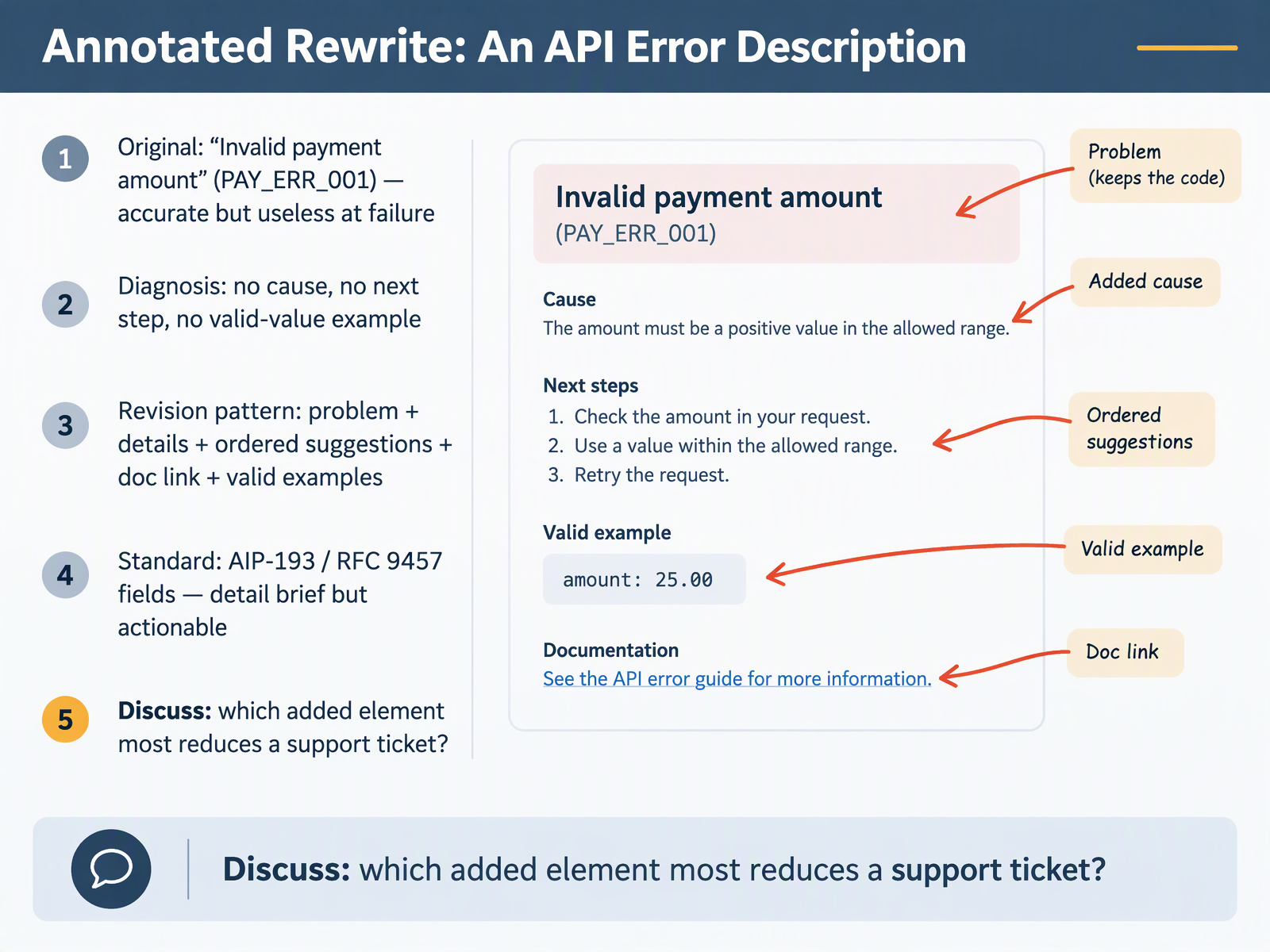
- 08Annotated Rewrite: An API Error DescriptionHere is an API error rewritten in front of you. The original message reads, Invalid payment amount, with code PAY ERR zero zero one. It is accurate, and it is useless at the moment of failure, because it names nothing you can act on. The diagnosis is simple: no cause, no next step, no valid-value example. So the rewrite follows the standard shape from AIP one ninety-three and RFC nine four five seven. The detail states the problem, in this case, the amount minus five point nine nine nine is negative and carries three decimal places. Then come ordered suggestions: make the value greater than zero, and use exactly two decimal places. A documentation link points to the amount-formatting section, and valid examples such as ten point nine nine and five point zero zero let you pattern-match. The standard is detail brief but actionable. Here is the discussion question. Which added element most reduces a support ticket? Next, we move into annotated rewrites, concept explanation and safety warning.
 2 min
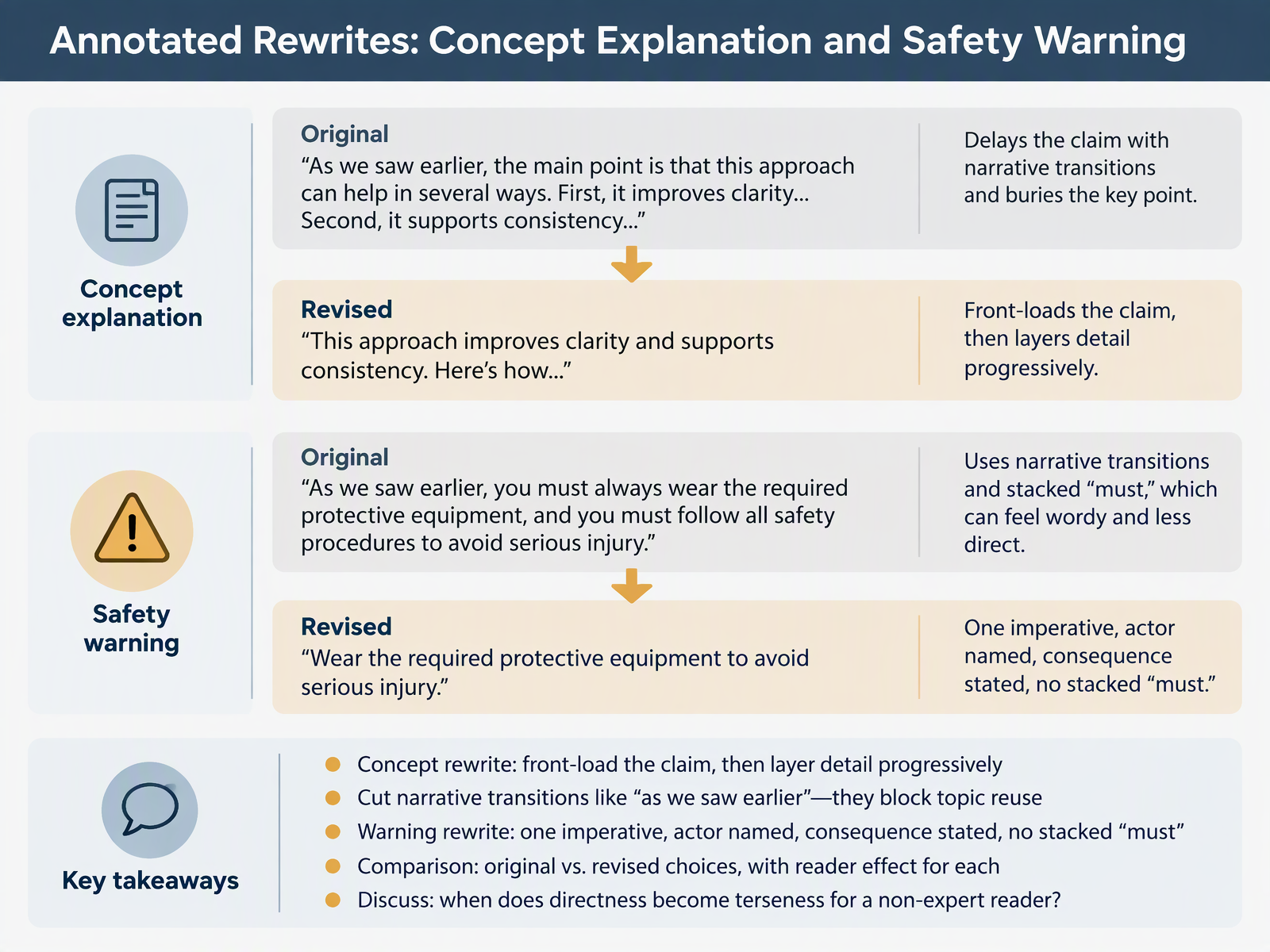
- 09Annotated Rewrites: Concept Explanation and Safety WarningLet's look at two annotated rewrites. For a concept, front-load the claim, then layer detail. Write "The cache expires after sixty seconds," then add scope and exceptions below. That version puts the answer in the first six words instead of burying it mid-paragraph. Also cut narrative transitions like "as we saw earlier." Those phrases break when a topic is reused; each topic should stand alone. For a safety warning, use one imperative, name the actor, and state the consequence. Write "Before you remove the disk, unmount the file system, or data loss may occur." Stacked "must" clauses push readers past the risk. Compare each revision against its original and ask what the reader now does differently. One trade-off to discuss: directness can turn terse for a non-expert reader. Next, we'll look at style choices by document type.
 documentation.suse.comgithub.commintlify.com+22 min
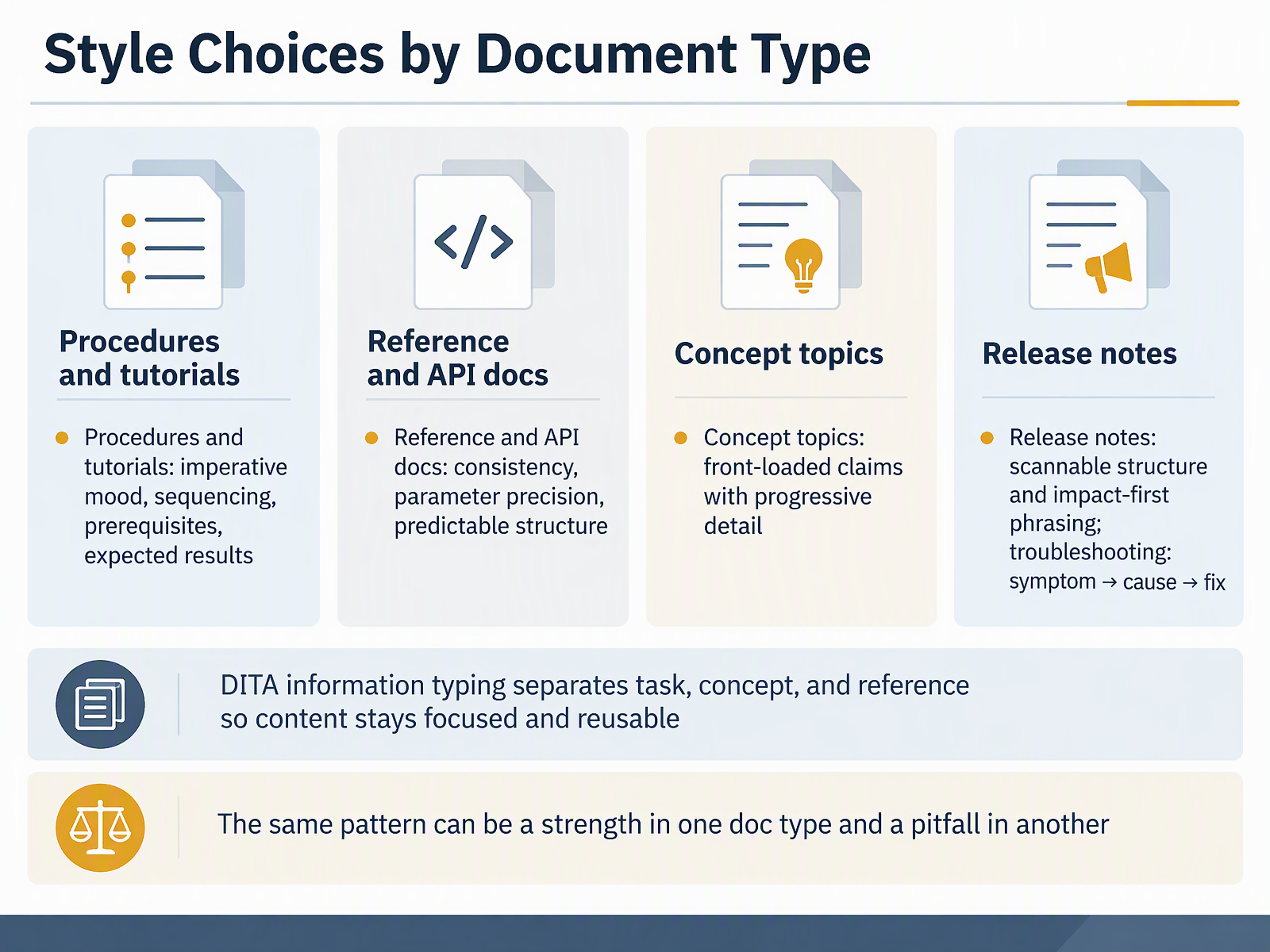
- 10Style Choices by Document TypeNow let's match style choices to document type. In procedures and tutorials, use imperative mood, sequence steps, state prerequisites up front, and name the expected result, so you write "Click Save" rather than "The Save button should be clicked." In reference and API docs, favor consistency, parameter precision, and a predictable structure, where every endpoint shows method, path, parameters, and response in the same order. In concept topics, front-load the claim, then add detail progressively. Release notes work best scannable and impact-first, while troubleshooting follows symptom, then cause, then fix. DITA information typing separates task, concept, and reference so content stays focused and reusable. Remember that the same pattern can be a strength in one doc type and a pitfall in another. Next, we look at Engineer-Written Documentation: Strengths to Keep, Habits to Fix.
 documentation.suse.comgithub.commintlify.com+21 min
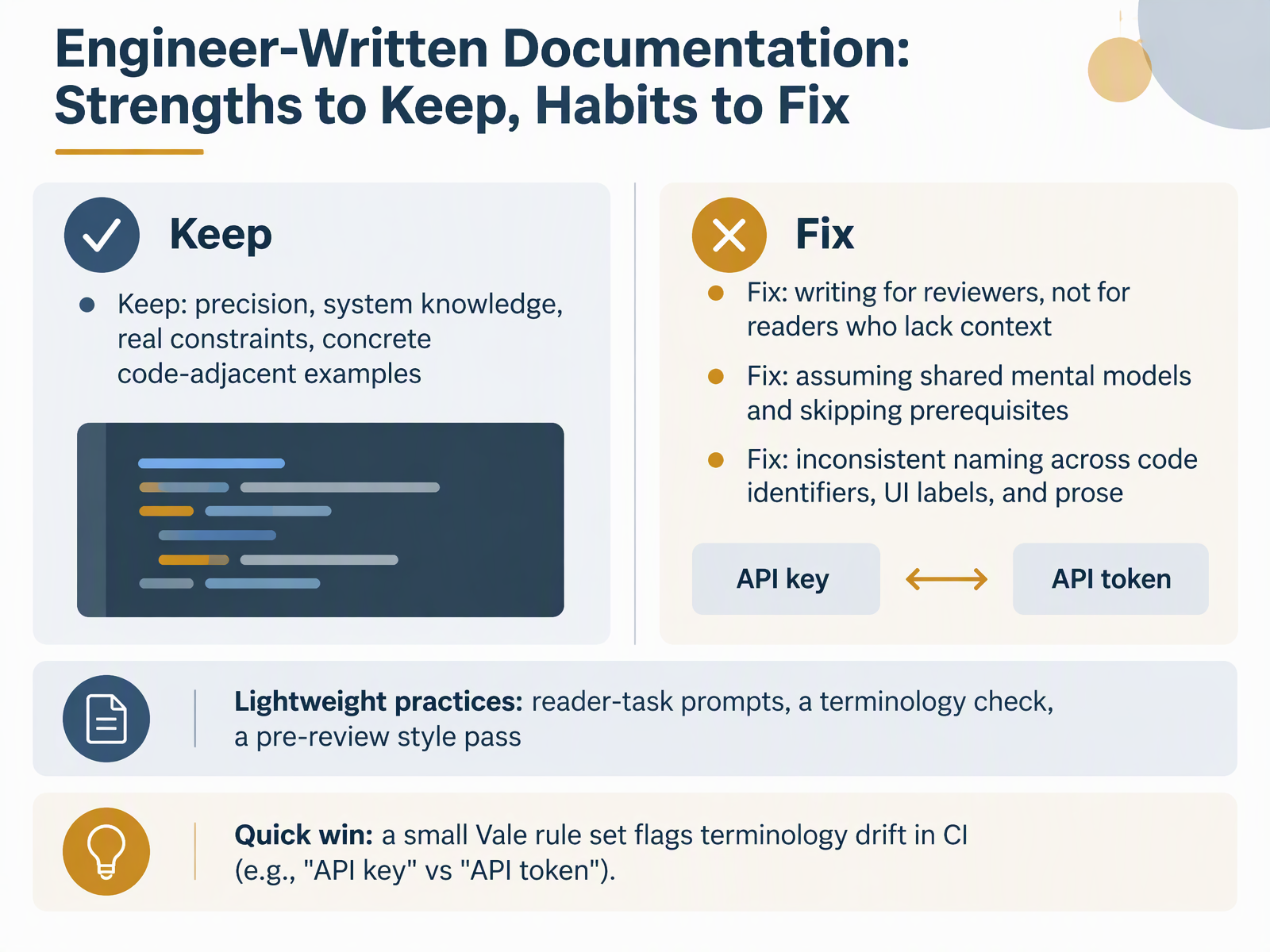
- 11Engineer-Written Documentation: Strengths to Keep, Habits to FixNext, let's look at documentation written by engineers. You bring real strengths to this, so keep them. Your precision, your system knowledge, and your awareness of real constraints make the docs trustworthy. A sentence like this request fails if the token is expired stays accurate because you know where failures happen. Now, three habits worth fixing. First, writing for reviewers instead of readers who lack context. Second, assuming a shared mental model and skipping prerequisites. Third, inconsistent naming across code identifiers, UI labels, and prose. Lightweight practices help here. Write reader-task prompts, run a terminology check, and do a pre-review style pass. A quick win is a small Vale rule set in CI that flags drift, such as API key versus API token. Next, we move on to automating the style pass with linting, terminology, and CI.
 documentation.suse.comgithub.commintlify.com+22 min
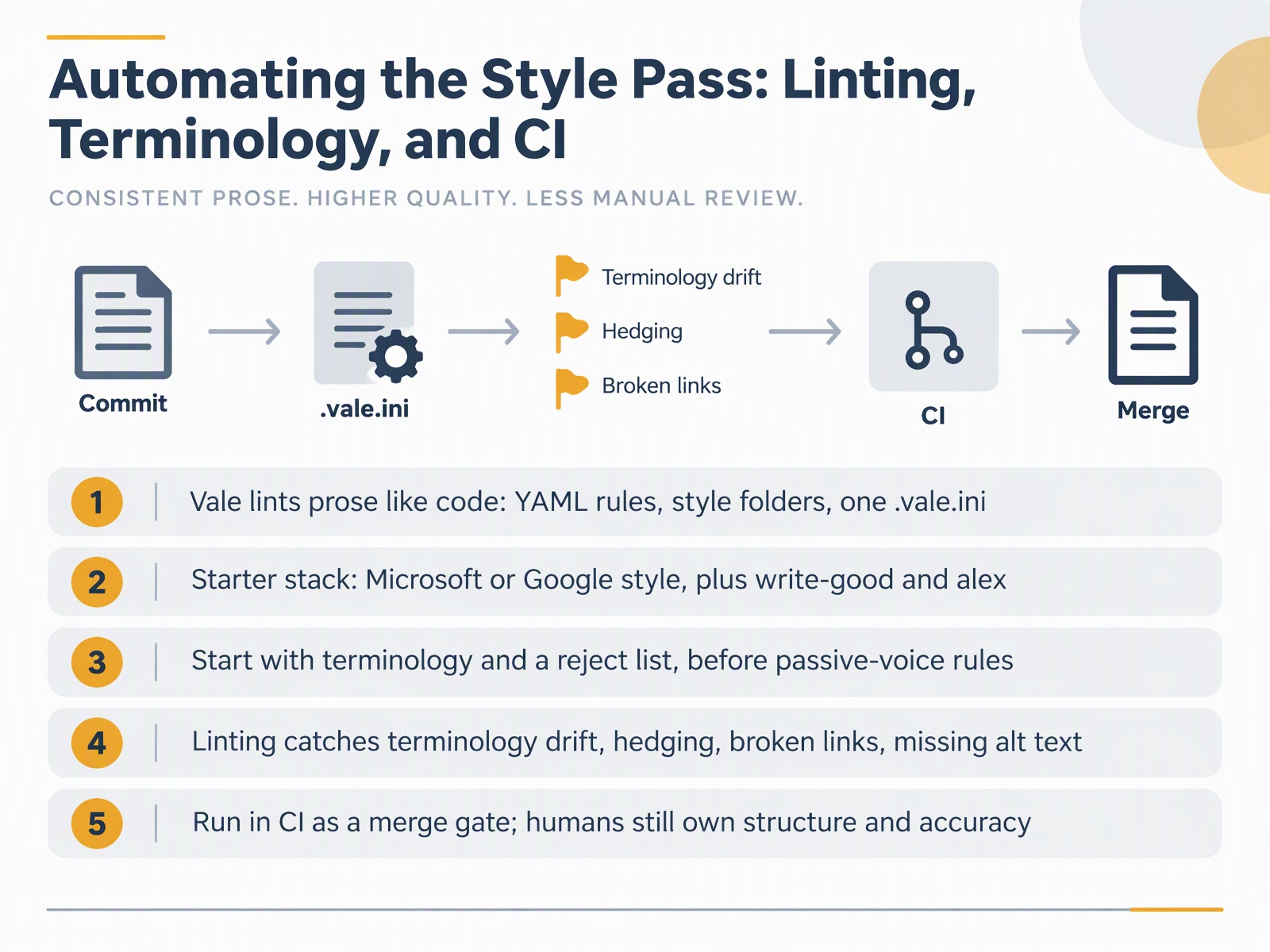
- 12Automating the Style Pass: Linting, Terminology, and CINow let's look at automating the style pass. Vale is the tool to know. It lints prose like code. Rules are YAML files, styles are folders of related rules, and one dot vale dot ini file at the repository root tells Vale which styles to apply to which file types. A starter stack is Microsoft or Google style, plus write good and alex. Begin with terminology and a reject list before you add passive voice rules. Here is why. A reject list bans a word outright, as in this example that flags route and asks for endpoint, and it yields a clear fix with few false positives. Passive voice rules come later, once writers trust the output. Linting catches terminology drift, hedging, broken links, and missing alt text. Run it in CI as a merge gate. A pull request with a dead link or a drifted product name fails before review. Humans still own structure and accuracy. Next, the Editor's Checklist and Triage Workflow.
 2 min
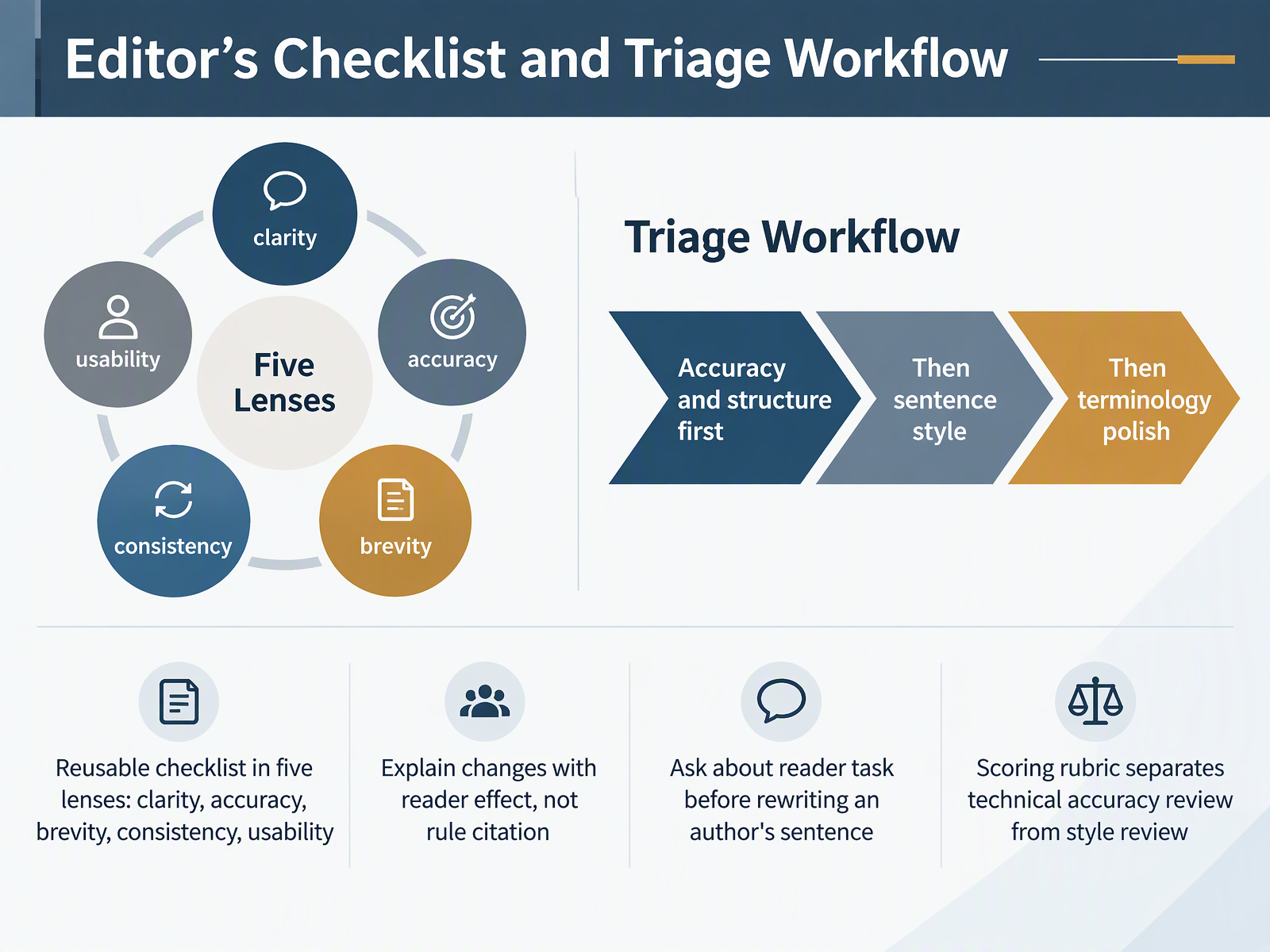
- 13Editor's Checklist and Triage WorkflowNow let's put the style patterns into a repeatable review process. Keep one reusable checklist with five lenses: clarity, accuracy, brevity, consistency, and usability. Triage in a fixed order. Check accuracy and structure first, then sentence style, then terminology polish. That way you never spend twenty minutes smoothing a paragraph that later turns out to describe the wrong command. When you explain a change, describe the reader effect, not the rule. Say, "this version buries the action," rather than citing a style guide clause. Before you rewrite an author's sentence, ask what task the reader is performing. A step someone scans mid-install has different needs than a reference table. And keep your scoring rubric split in two: one score for technical accuracy review, one for style review. A clean sentence about a broken command is still a failure. In the next session, you will revise a sample and build your own three-item plan.
 documentation.suse.comgithub.commintlify.com+22 min
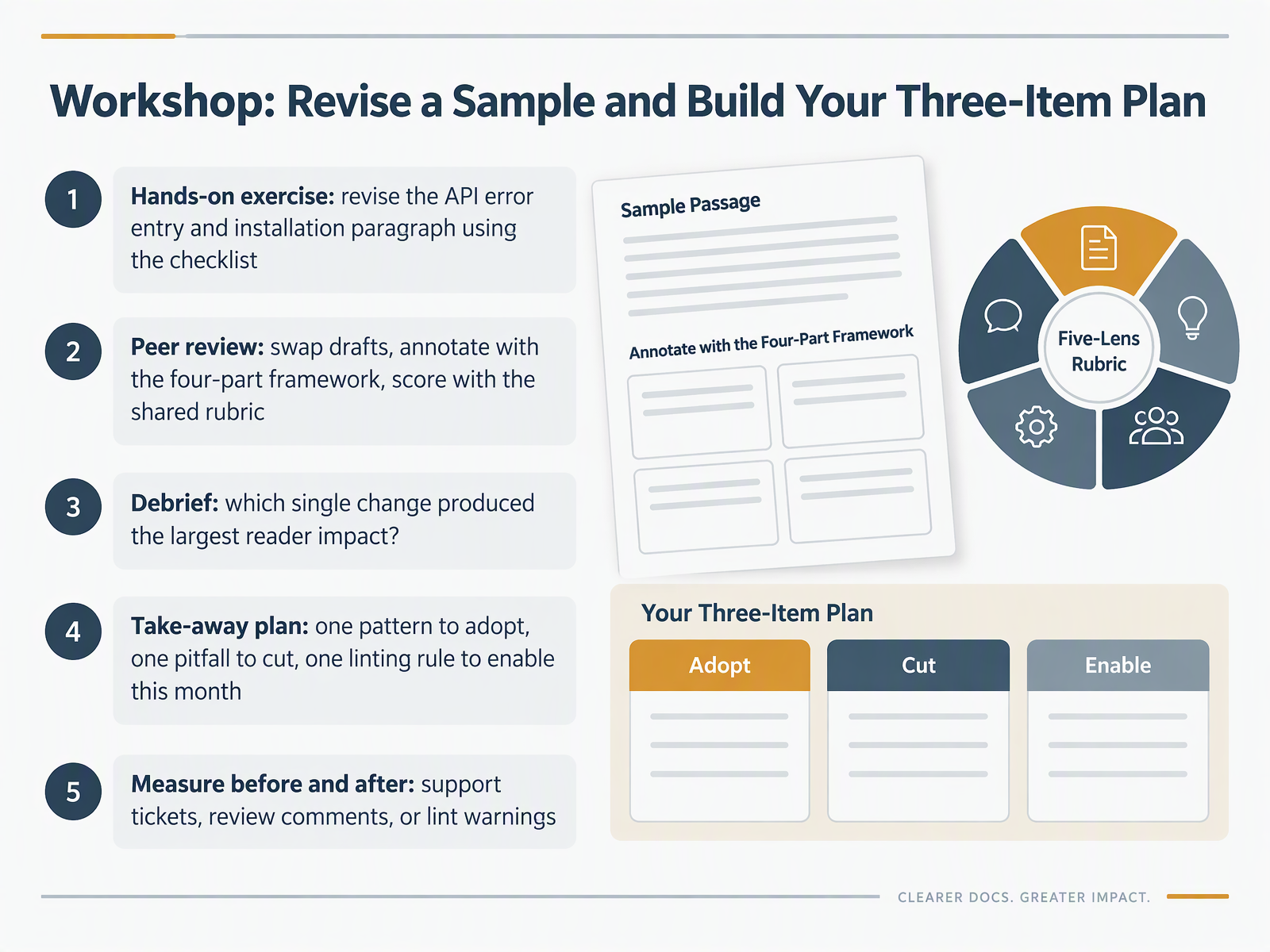
- 14Workshop: Revise a Sample and Build Your Three-Item PlanLet's close by putting the checklist to work. Revise the API error entry and the installation paragraph, then swap drafts with a peer. Annotate with the four-part framework and score with the shared rubric. In the debrief, ask which single change produced the largest reader impact. Often it is one edit, like turning "an error is returned when the token has expired" into "if the token is invalid, the request fails." Then write your plan: one pattern to adopt, one pitfall to cut, and one linting rule to enable this month, such as flagging passive voice or inconsistent product terms. Finally, measure before and after with support tickets, review comments, or lint warnings. Teams that improve docs see fewer tickets and faster answers. Thank you for your work today. Pick one pattern, cut one pitfall, enable one rule, and watch the numbers move. Keep going.
 doi.orgingentaconnect.compureadmin.qub.ac.uk+22 min
Take the deck with you
Download this course as a file — free, no sign-up needed.
- PDF handoutEvery slide page, ready to print or share.15 pages · 3.2 MBDownload
- Narrated PowerPointThe deck that presents itself — every slide carries the digital human's narration video.15 pages · 13.0 MBDownload
- PowerPoint slidesThe full deck as a .pptx — open it in PowerPoint, Keynote, or Google Slides.15 pages · 3.0 MBDownload
Free to use in your own training — please keep the PersonWise credit page at the end.
Have your own deck? Turn it into a course
Sources consulted
Web sources consulted while building this course.
- SUSE Documentation Style Guide (AsciiDoc) — documentation.suse.com
- contents/handbook/wizard-and-docs/docs-style-guide.mdx — github.com
- How to write technical documentation - Mintlify — mintlify.com
- PEGNL Practice Guideline for — pegnl.ca
- Chapter 2: Technical Writing Style – The Practical Guide to Technical Writing for Engineers and Computer Scientists — opentextbooks.concordia.ca
- Principles of Clear Writing | National Archives — archives.gov
- CH 8: Grammar & Style – TPW: Technical & Professional Writing — openoregon.pressbooks.pub
- Active voice vs. passive voice | Technical Writing — developers.google.com
- Concise Writing: Tips and Tricks – Graduate Writing and Presenting Lab — web.uri.edu
- Writing Guide | OpenSearch Content Style Guide — style-guide.opensearch.org
- Proactive Customer Education, Customer Retention, and Demand for Technology Support: Evidence from a Field Experiment — doi.org
- A Good User's Guide Means Fewer Support Calls and Lower Support Costs — ingentaconnect.com
- Evaluating usage and quality of technical software documentation: An empirical study — pureadmin.qub.ac.uk
- Using FAQs to Help Users Help Themselves — dl.acm.org
- Eliminating support tickets — istc.org.uk
- https://docs.github.com/en/contributing/writing-for-github-docs/writing-content-to-be-translated — docs.github.com
- 2.2 Sentence-Level Revision: Nominals, Noun Stacks, Redundancy, Expletives, Passive Voice, Readability – Technical Communication Across the Professions — oer.pressbooks.pub
- Style | Digital.gov — digital.gov
- Nominalizations: “Zombie nouns” — skagit.edu
- Revision Techniques – Howdy or Hello? Technical and Professional Communication — oer.pressbooks.pub