Begin
14 pages · ~28 min
Product Management Software Selection and Workflow
Learn how to select product management software, define requirements, and design effective workflows. Ideal for product managers and teams evaluating PM tools.
A digital instructor presents all 14 pages. Hold “Ask” at any point and ask out loud — the answer comes from this course. No sign-up needed.
What you’ll learn
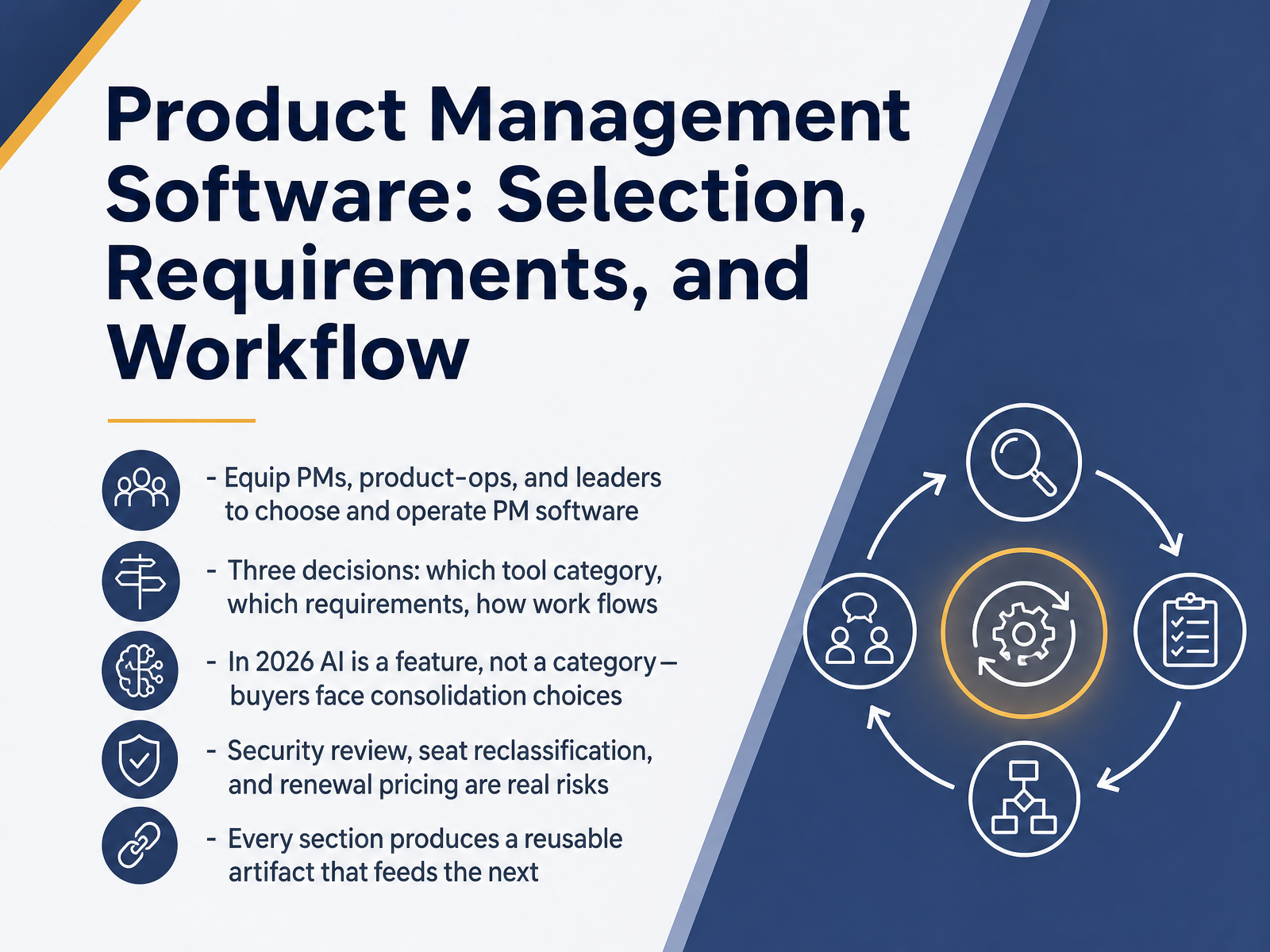
- 01Product Management Software: Selection, Requirements, and WorkflowWelcome. Over the next few sections, we'll work through how to select, scope, and operate product management software. This is a working session for PMs, product ops, and product leaders, so we'll stay close to trade-offs and ownership rather than fundamentals. Here's the frame. You're really making three decisions: which tool category you need, which requirements are non-negotiable, and how work will actually flow through the system. And in 2026, one shift matters. AI is a feature, not a category. Amplitude, Dovetail, and Notion all folded AI into existing products, so buyers now weigh consolidation more than standalone AI tools. Three risks deserve real attention before you sign. Security review, seat reclassification, and renewal pricing. Productboard buyers reported double-digit renewal increases and contributors reclassified as makers, so verify renewal terms in writing. What this means for your team: build a weighted scorecard, separate must-haves from nice-to-haves, and run a time-boxed proof of concept on your real data. Every section here produces a reusable artifact that feeds the next, from category shortlist to requirements doc to workflow map. Next, we look at the Product Tooling Landscape in 2026.ideaplan.ioresources.rework.comzendikt.com+22 min
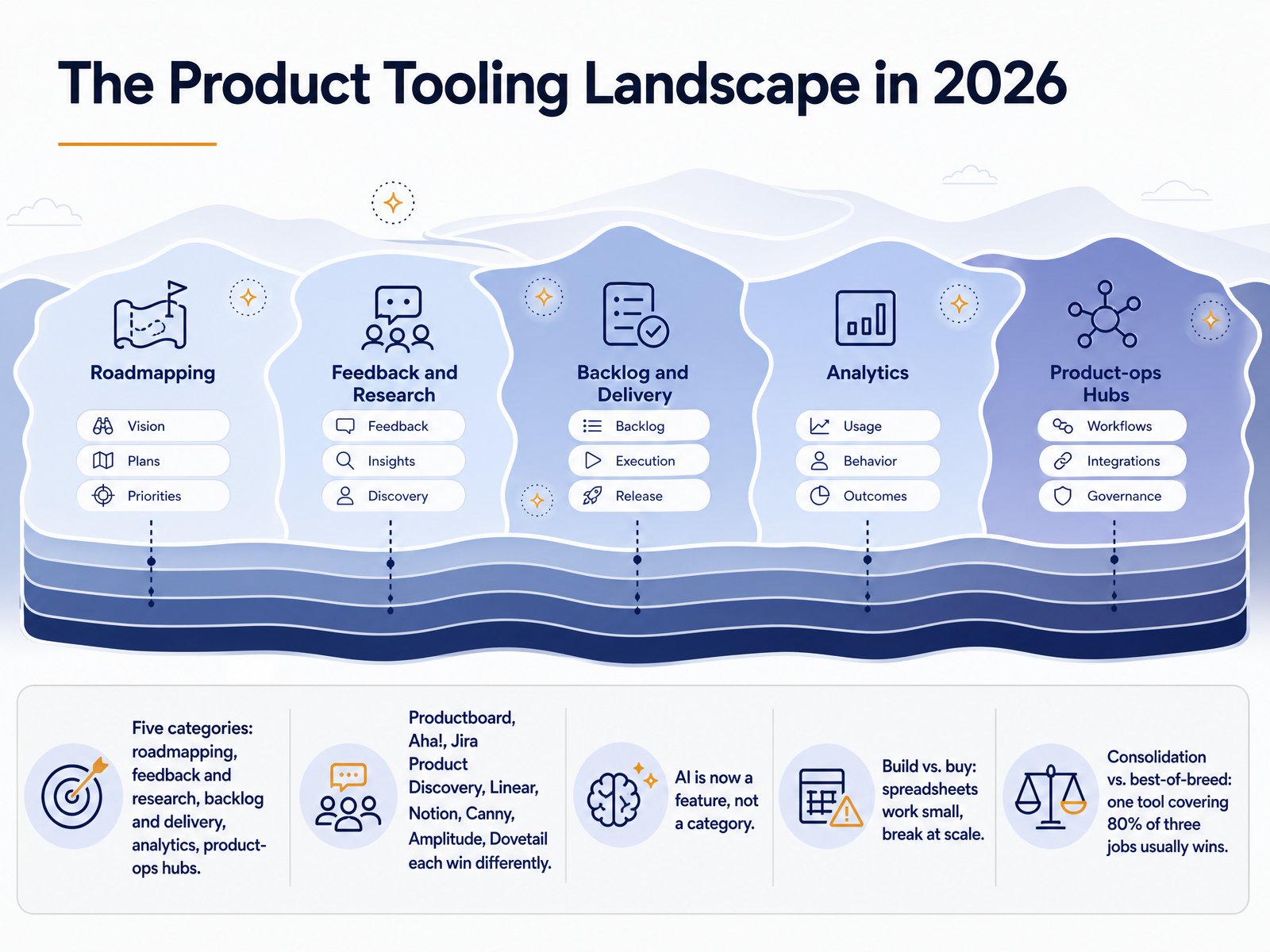
- 02The Product Tooling Landscape in 2026Let us map the landscape you are actually buying into this year. Five categories matter: roadmapping, feedback and research, backlog and delivery, analytics, and product-ops hubs. Productboard, Aha, Jira Product Discovery, Linear, Notion, Canny, Amplitude, and Dovetail each win differently, so match the tool to the gap you are closing. Then note two shifts. First, AI is now a feature, not a category. Amplitude, Dovetail, and Notion all folded it in. Standalone AI tools survive by going deep on one workflow. Second, build versus buy. Spreadsheets work for small teams, then break on traceability and reporting as you scale. And consolidation versus best of breed. One tool covering eighty percent of three jobs usually beats three specialized tools, because context stays in one place. What this means for your team: before you commit, name the workflow that stalls most, check who owns the data model, and verify renewal terms in writing. That is the practical lens for the rest of this section. Next, Defining the Category: PM Software vs. Adjacent Tools.
 ideaplan.ioresources.rework.comzendikt.com+22 min
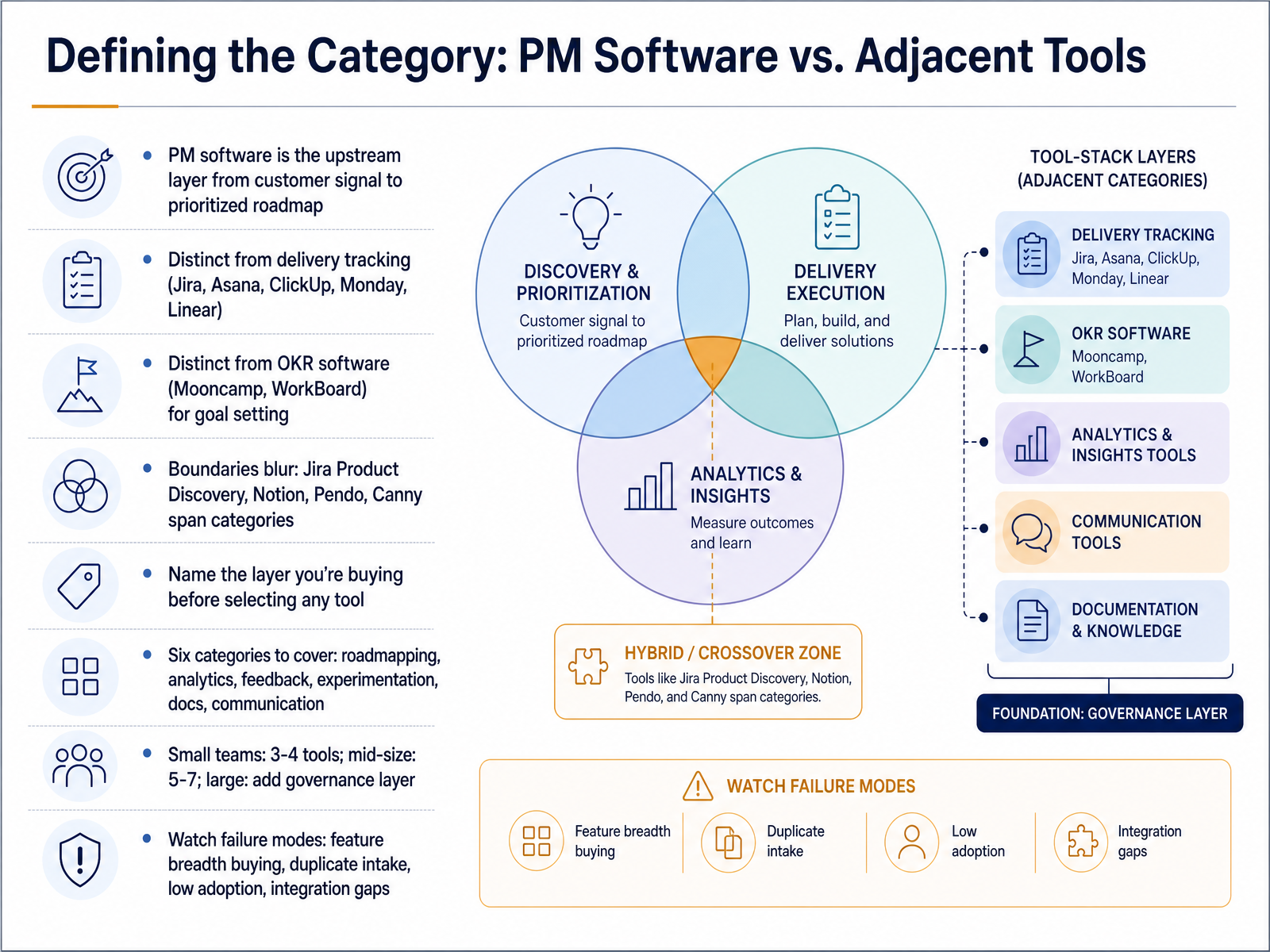
 - 03Defining the Category: PM Software vs. Adjacent ToolsLet's draw a hard line around the category before we compare any vendors. Product management software is the upstream layer: it turns customer signal, feedback, ideas, sales asks, and support tickets into a prioritized roadmap. It is not delivery tracking. Jira, Asana, ClickUp, Monday, and Linear move work once you've decided what to build. It is also not OKR software like Mooncamp or WorkBoard, which sets goals, not priorities. That said, the boundaries blur. Jira Product Discovery, Notion, Pendo, and Canny each span more than one category. So name the layer you're buying before you shortlist anything. Six categories typically need coverage: roadmapping, analytics, feedback, experimentation, documentation, and communication. Small teams can often cover these with three to four tools. Mid-size teams usually land at five to seven. Large teams add a governance layer on top. Then watch the failure modes: buying on feature breadth, maintaining duplicate intake channels, low adoption, and integration gaps. For your team, write down the one layer you're actually buying, and flag any overlap before you commit. Next, we look at who owns that decision. The Team Around the Decision: Roles, Stakeholders, and Alignment.
 ideaplan.ioresources.rework.comzendikt.com+22 min
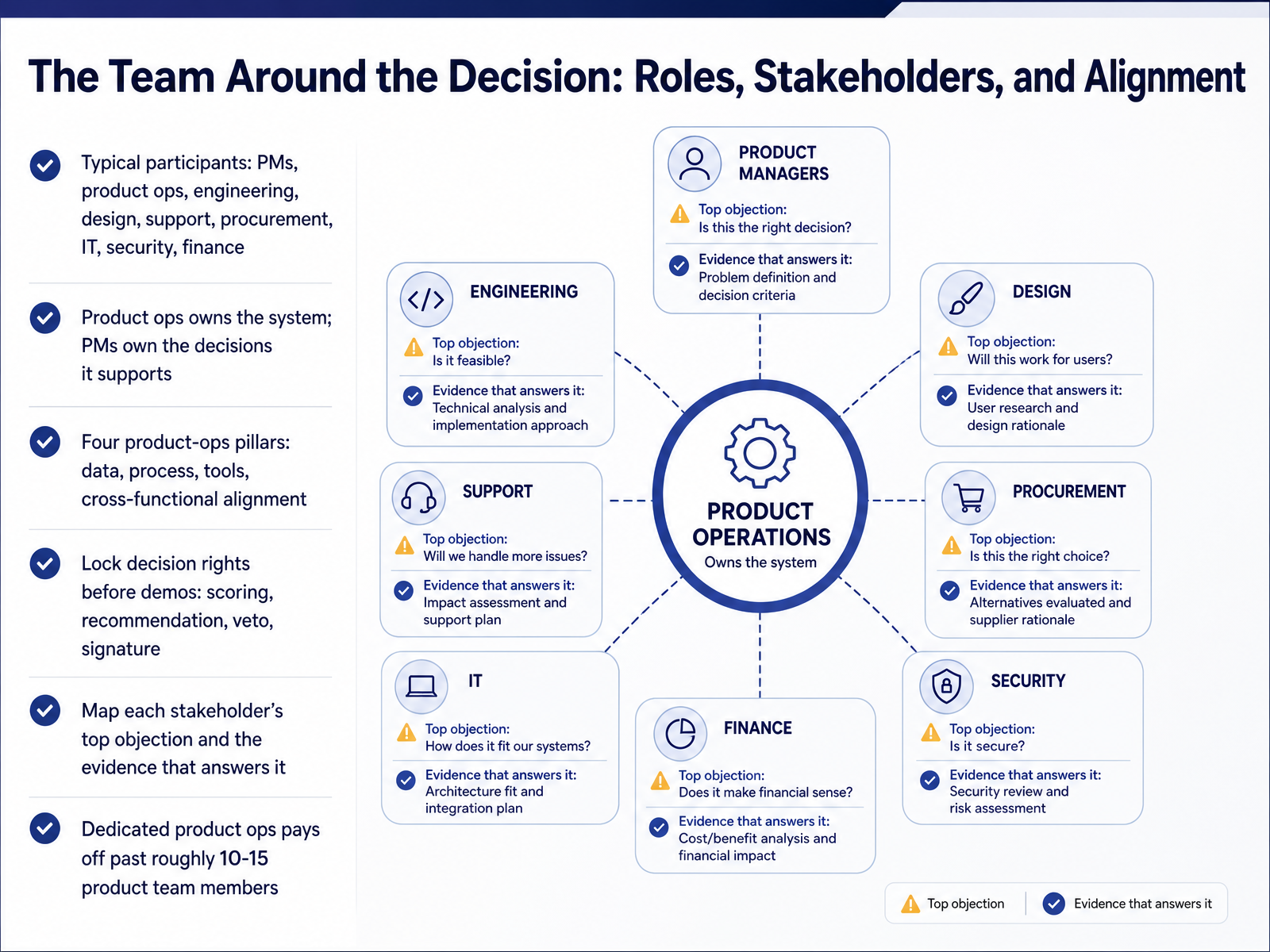
 - 04The Team Around the Decision: Roles, Stakeholders, and AlignmentNow let's talk about the team around the decision. Software selection is never a solo call. Expect PMs, product ops, engineering, design, support, procurement, IT, security, and finance at the table. The ownership line matters here. Product ops owns the system, while PMs own the decisions it supports. Those are different jobs. Product ops stands on four pillars: data, process, tools, and cross-functional alignment. Before you sit through any demo, lock decision rights. Who scores, who recommends, who can veto, and who signs? That clarity prevents a stalled evaluation. Then map each stakeholder's top objection to the evidence that answers it, whether that's a security document or an integration test. One benchmark to keep in mind: dedicated product ops tends to pay off past roughly ten to fifteen product team members. Below that, the overhead often outweighs the gain. So confirm who owns the system and who owns the call, and settle both before vendors start presenting. That foundation sets up our next step, which is to start with workflows, not features.
 ideaplan.ioresources.rework.comzendikt.com+22 min
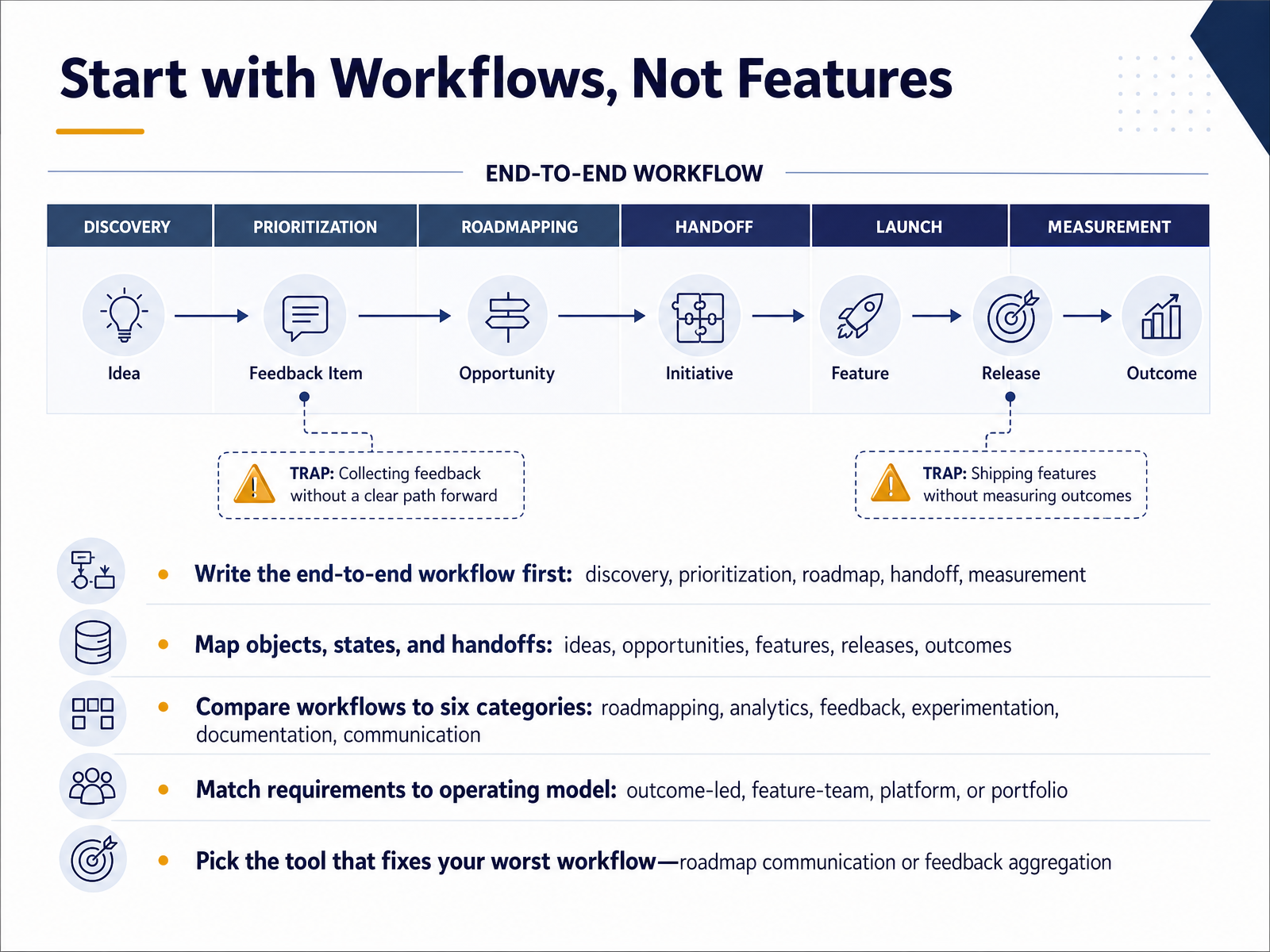
 - 05Start with Workflows, Not FeaturesLet's start where selection should start: with workflows, not features. Before you open a single demo, write your end-to-end workflow on one page. Discovery, prioritization, roadmap, handoff, measurement. Then map the objects and states that move through it. Ideas, opportunities, features, releases, outcomes. Where does an item enter, who owns it, and what signals it's ready to hand off? That map becomes your evaluation criteria. Next, score candidate tools against six categories: roadmapping, analytics, feedback, experimentation, documentation, and communication. Your goal is coverage without overlap. For your team, that means naming which category already works and which one stalls. Then match requirements to your operating model. Outcome-led, feature-team, platform, or portfolio. A platform team needs dependency views. A portfolio org needs rollups and governance. Feature teams mostly need clean handoffs. Finally, pick the tool that fixes your worst workflow. Usually that's roadmap communication or feedback aggregation. Fix the bottleneck first, then expand. Turning Product Workflow into Requirements.
 atlassian.comproductboard.comproductboard.com+22 min
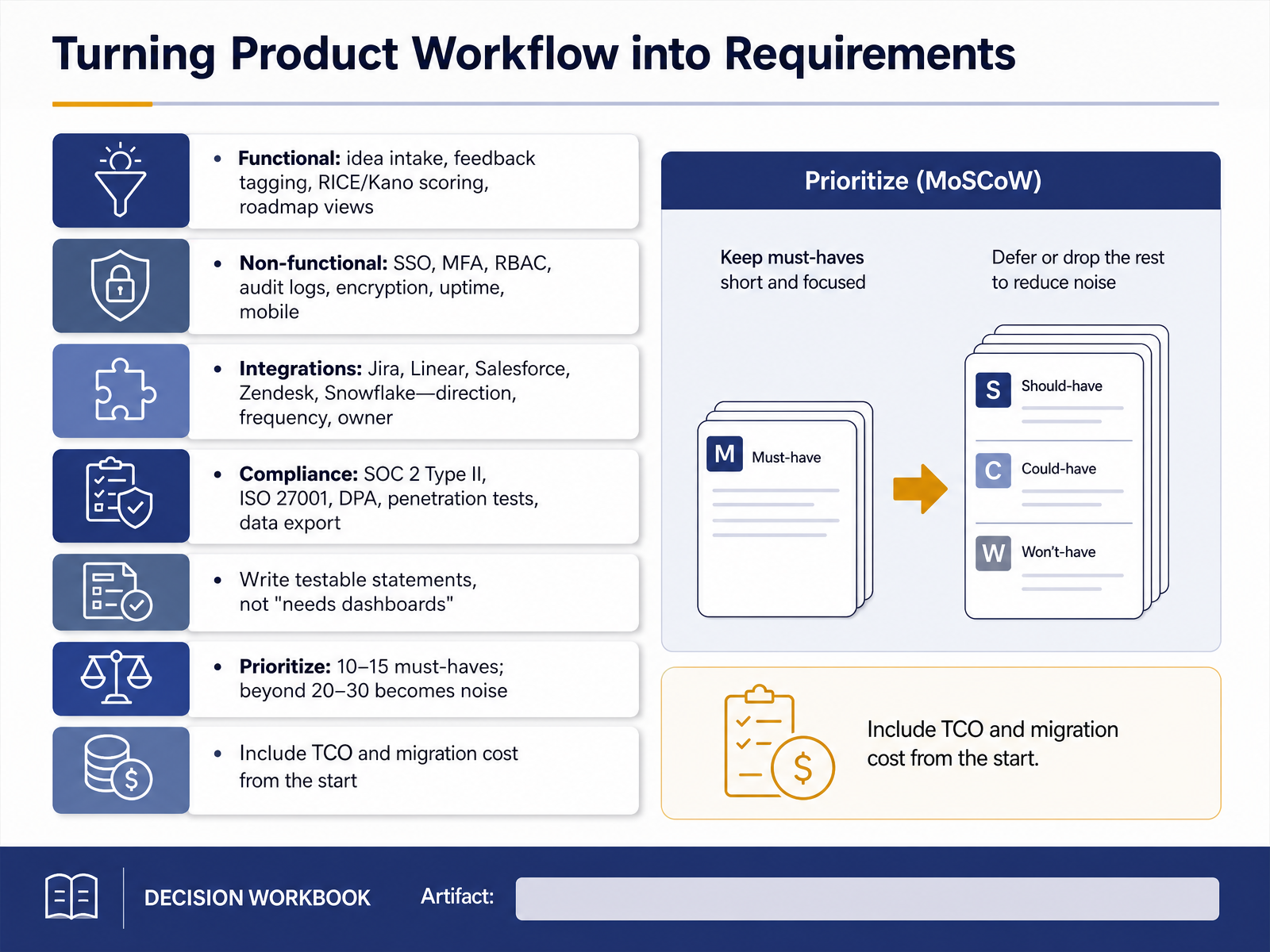
 - 06Turning Product Workflow into RequirementsNow let's turn workflow into requirements you can actually test. Start by splitting functional needs from non-functional ones. Functional covers idea intake, feedback tagging, RICE or Kano scoring, and roadmap views. Non-functional covers SSO, MFA, role-based access control, audit logs, encryption, uptime, and mobile. For integrations like Jira, Linear, Salesforce, Zendesk, or Snowflake, always specify the direction of data flow, the frequency, and the owner. For compliance, list what you need to verify: SOC 2 Type Two, ISO 27001, a data processing agreement, penetration test reports, and data export. One rule that saves pain later: write testable statements. Not needs dashboards, but portfolio managers must see budget variance across all active initiatives without exporting data. Then prioritize. Ten to fifteen must-haves is workable. Past twenty to thirty, the list becomes noise, and every extra must-have shrinks your shortlist. Finally, include total cost of ownership and migration cost from the start. Budget for implementation, data migration, training, and admin overhead, not just the subscription. What this means for your team: a tight, testable requirements list keeps demos honest and makes scoring defensible. Next, we'll walk through the selection process, from needs assessment to contract.
 ones.comcapterra.comones.com+22 min
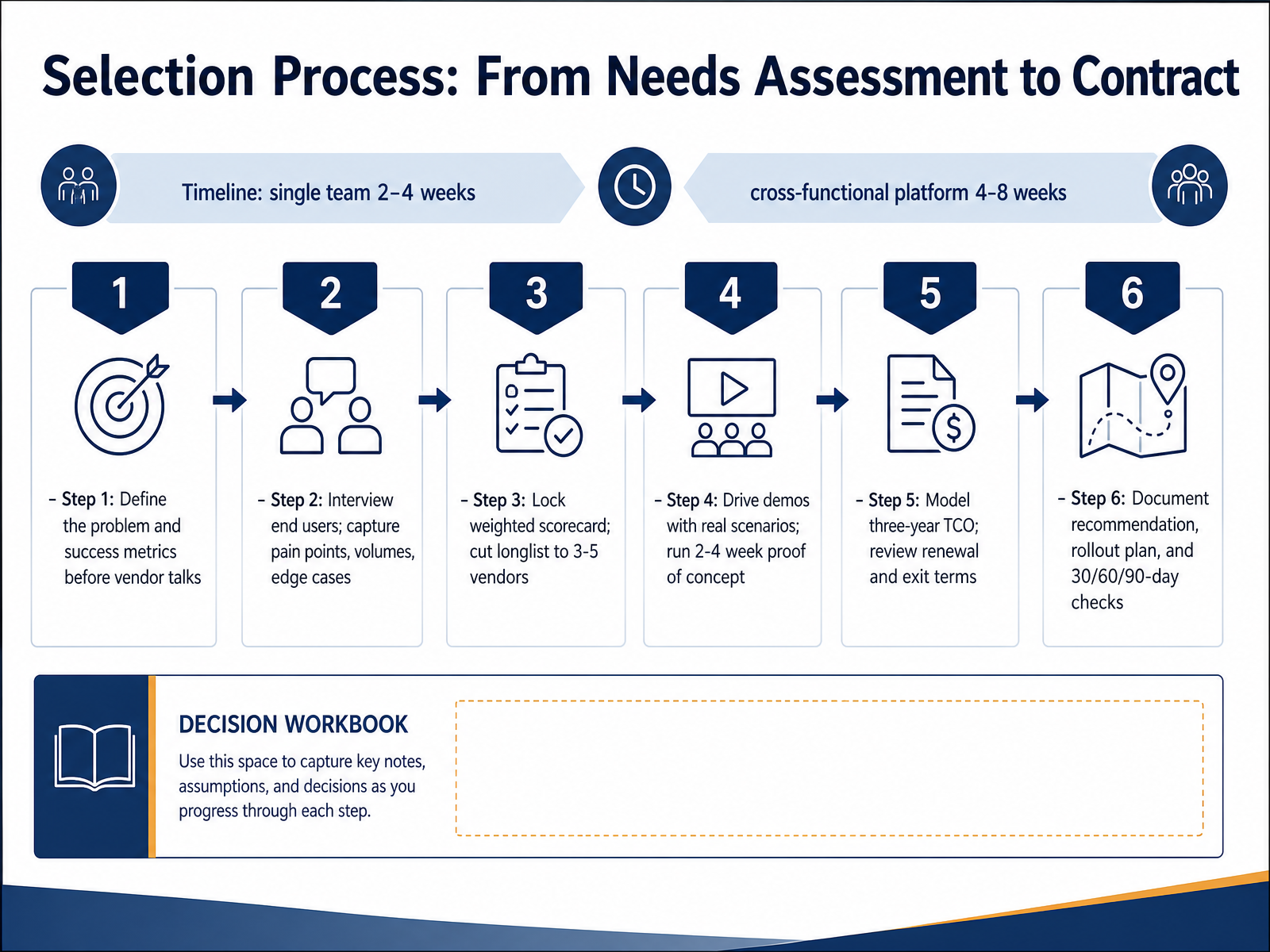
 - 07Selection Process: From Needs Assessment to ContractLet's walk through the selection process itself, from needs assessment to signed contract. Step one, define the problem and your success metrics before you talk to any vendor. Step two, interview end users and capture pain points, volumes, and edge cases. Then lock a weighted scorecard and cut your longlist to three to five vendors. Step four, drive demos with your real scenarios, then run a two to four week proof of concept on your own data. Step five, model three-year total cost of ownership and review renewal and exit terms, not just list price. Step six, document the recommendation, rollout plan, and thirty, sixty, ninety day checks. On timing, a single team needs two to four weeks. A cross-functional platform decision runs four to eight. What this means for your team: the scorecard and proof of concept are what make the final call defensible. Next, we look at evaluation criteria and scoring in practice.
 pmworld360.comsaaskart.coresources.rework.com+21 min
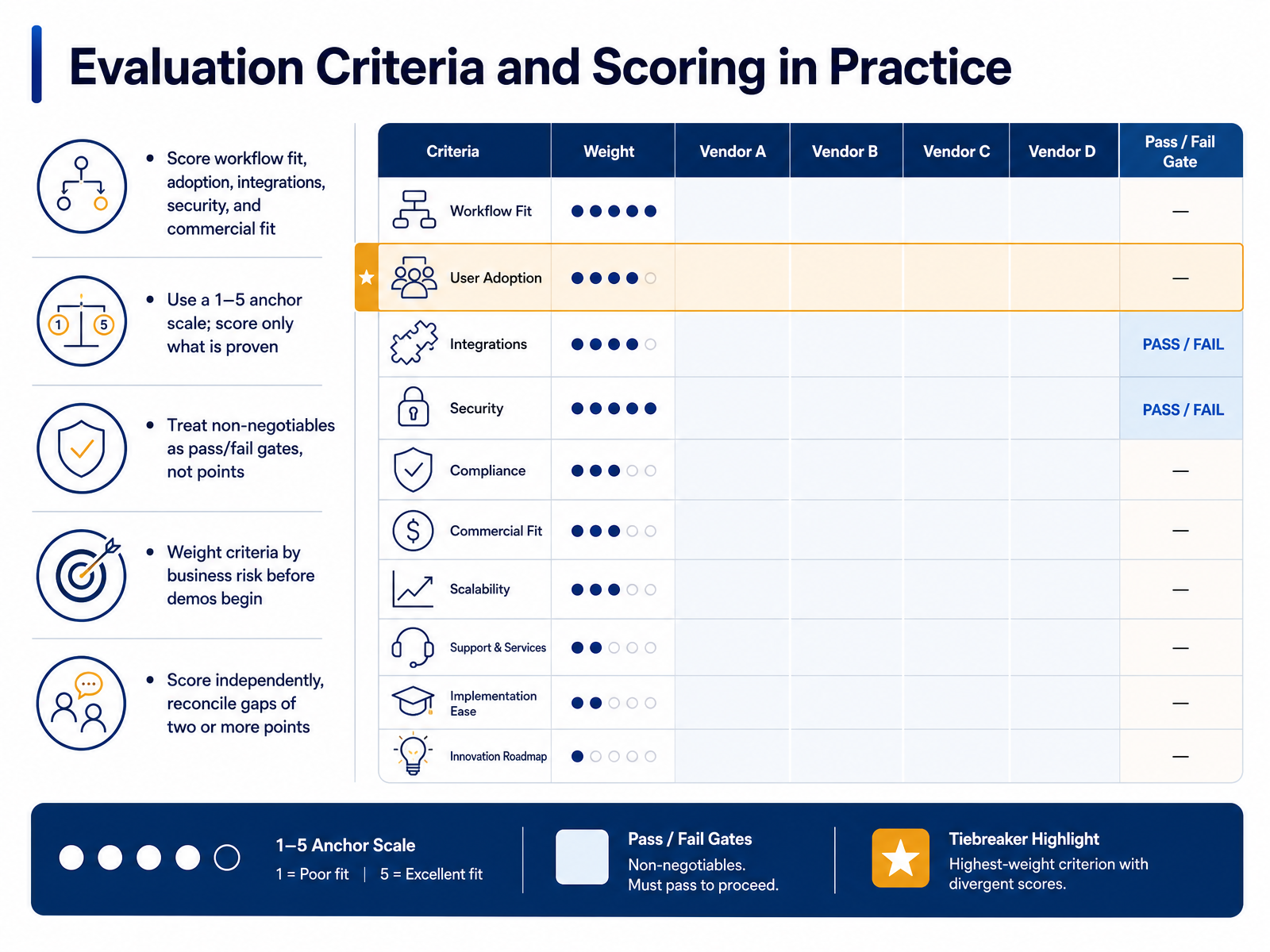
 - 08Evaluation Criteria and Scoring in PracticeLet's move from requirements into scoring, because this is where most evaluations quietly fall apart. A workable scorecard covers five buckets: workflow fit, adoption, integrations, security, and commercial fit. That set holds up across team sizes. Score each on a one to five scale, and only score what you have seen proven. A demo counts. Documentation counts. A roadmap promise does not.
Next, separate your non-negotiables. A missing SOC two report or a required integration is a pass or fail gate, not three points against a competitor's four. A high total should never rescue a failed must-have.
Weights need to reflect business risk, and you should agree on them before demos begin. A broad rollout weights adoption heavily. A regulated enterprise weights security and governance.
One more practice: have each evaluator score independently, then reconcile any gap of two or more points. Those gaps usually mean missing information, not a values conflict. Reconcile with evidence before you commit.
Now let's look at designing workflow, making the tool fit the team.
 pmworld360.comsaaskart.coresources.rework.com+22 min
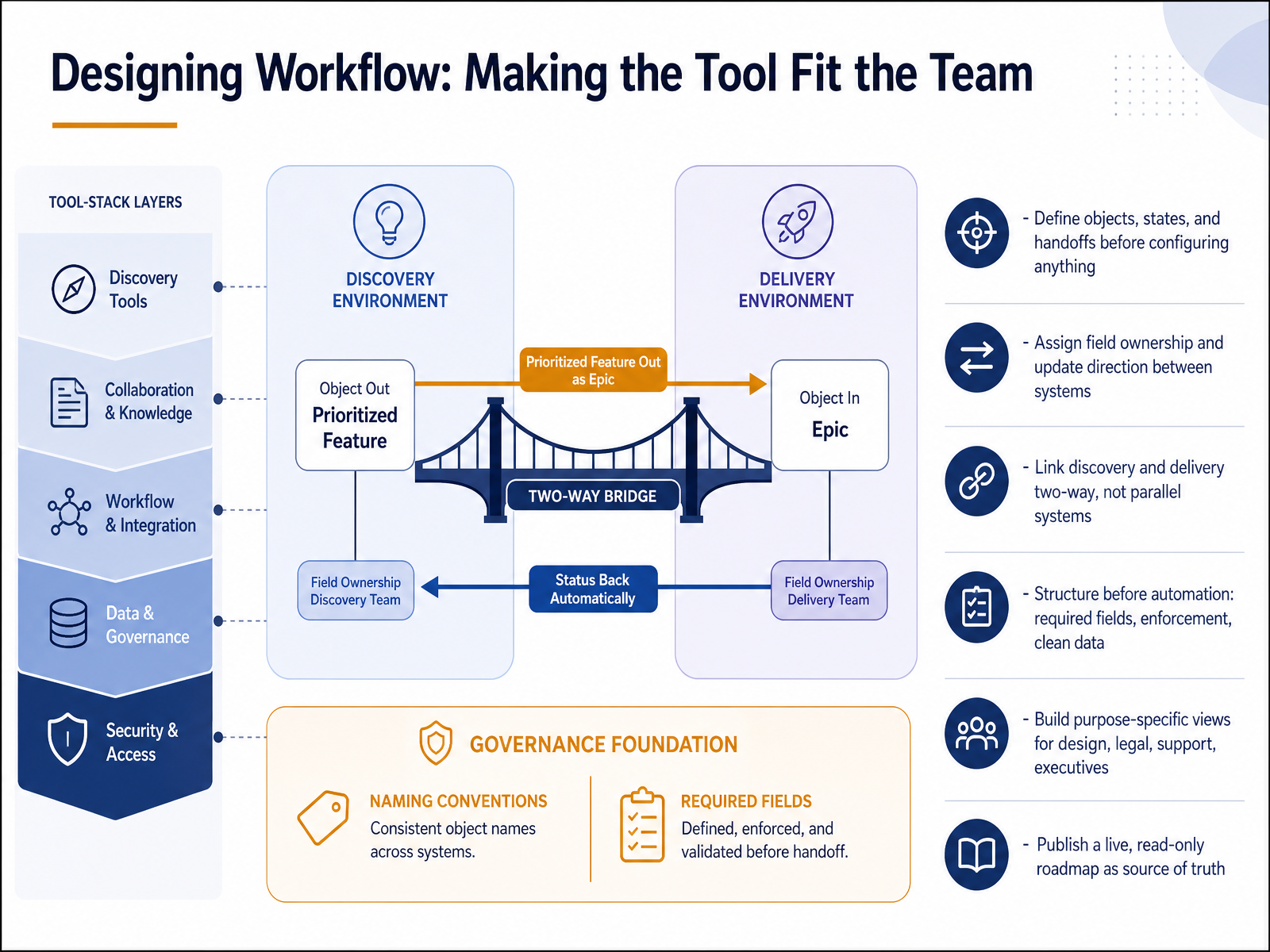
 - 09Designing Workflow: Making the Tool Fit the TeamNow let's look at designing workflow so the tool fits the team, not the other way around. Define objects, states, and handoffs before you configure anything. Map how a discovery item becomes a roadmap feature, then a delivery issue, and decide who owns each transition. Next, assign field ownership and update direction between systems. Pick which system is authoritative for status, dates, and priority, and document the sync rules. Link discovery and delivery two-way wherever you can; parallel systems create drift and duplicated effort. Structure before automation. Set required fields, enforcement, and clean data first, keeping them minimal and purposeful so you don't slow the team down. Then build purpose-specific views for design, legal, support, and executives, showing only what each audience needs. Finally, publish a live, read-only roadmap as your source of truth. Share the link instead of rewriting status updates. What this means for your team: keep the operating model simple, own the mapping, and let the tool adapt as your process matures. Coming up next, Integrations, Data, and the Product Tech Stack.
 atlassian.comproductboard.comproductboard.com+22 min
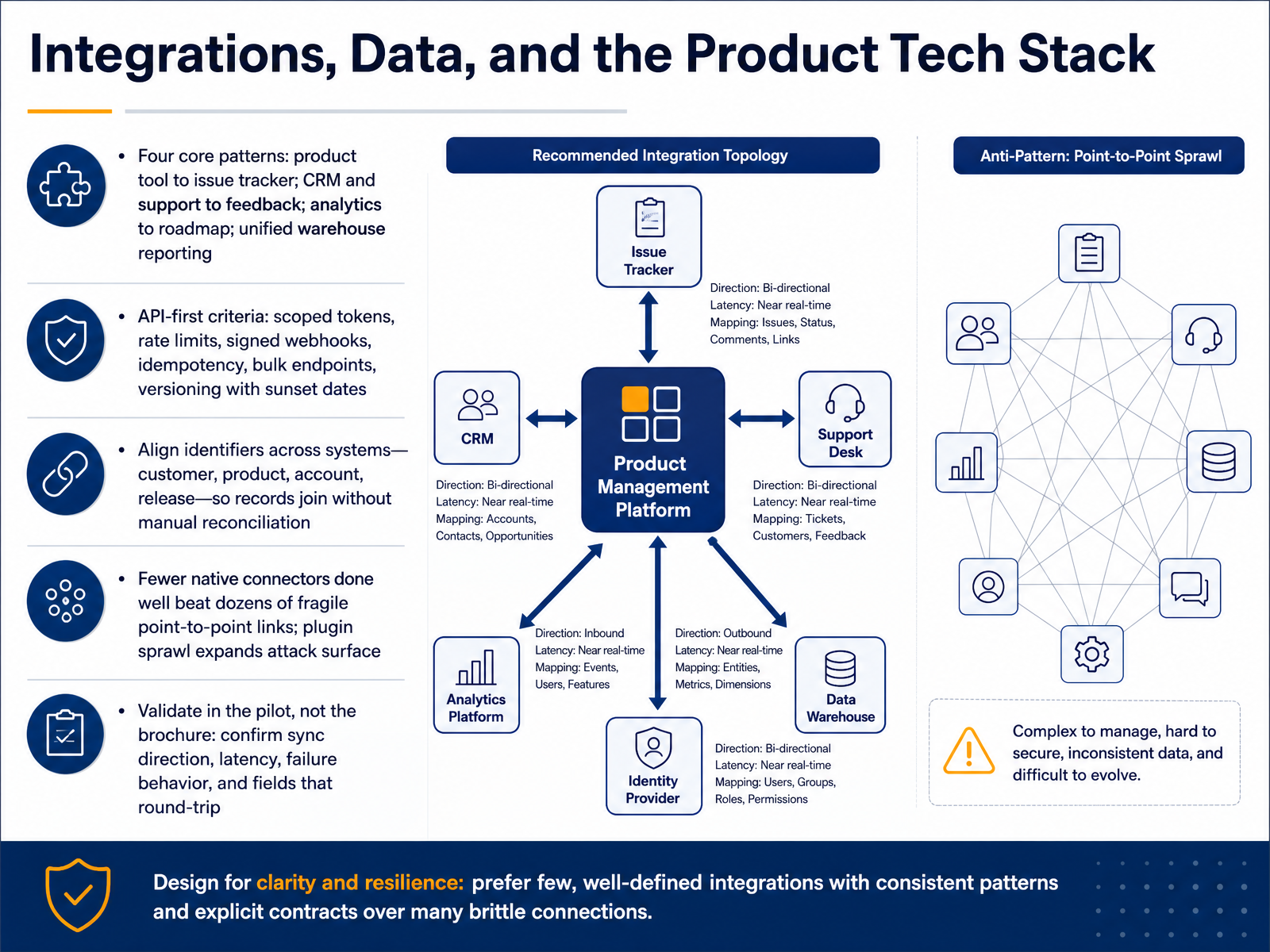
 - 10Integrations, Data, and the Product Tech StackNow let's talk about how your product tool fits the rest of your stack, because integrations are where most selections quietly succeed or fail. Four patterns cover most needs: product tool to issue tracker, CRM and support into feedback, analytics into the roadmap, and unified warehouse reporting. When you evaluate API depth, ask for scoped tokens, rate limits, signed webhooks, idempotency, bulk endpoints, and versioning with sunset dates. What this means for your team: if those six items are missing, your engineers will absorb the cost later. Next, align identifiers across systems. Customer, product, account, and release should join without manual reconciliation, or every report becomes a cleanup project. One practical caution: fewer native connectors done well beat dozens of fragile point-to-point links, and plugin sprawl expands your attack surface. Finally, validate in the pilot, not the brochure. Confirm sync direction, latency, failure behavior, and which fields actually round-trip. That pilot evidence is what you bring to procurement. Next, we move into governance, security, and total cost of ownership.
 ones.comones.comcapterra.com+22 min
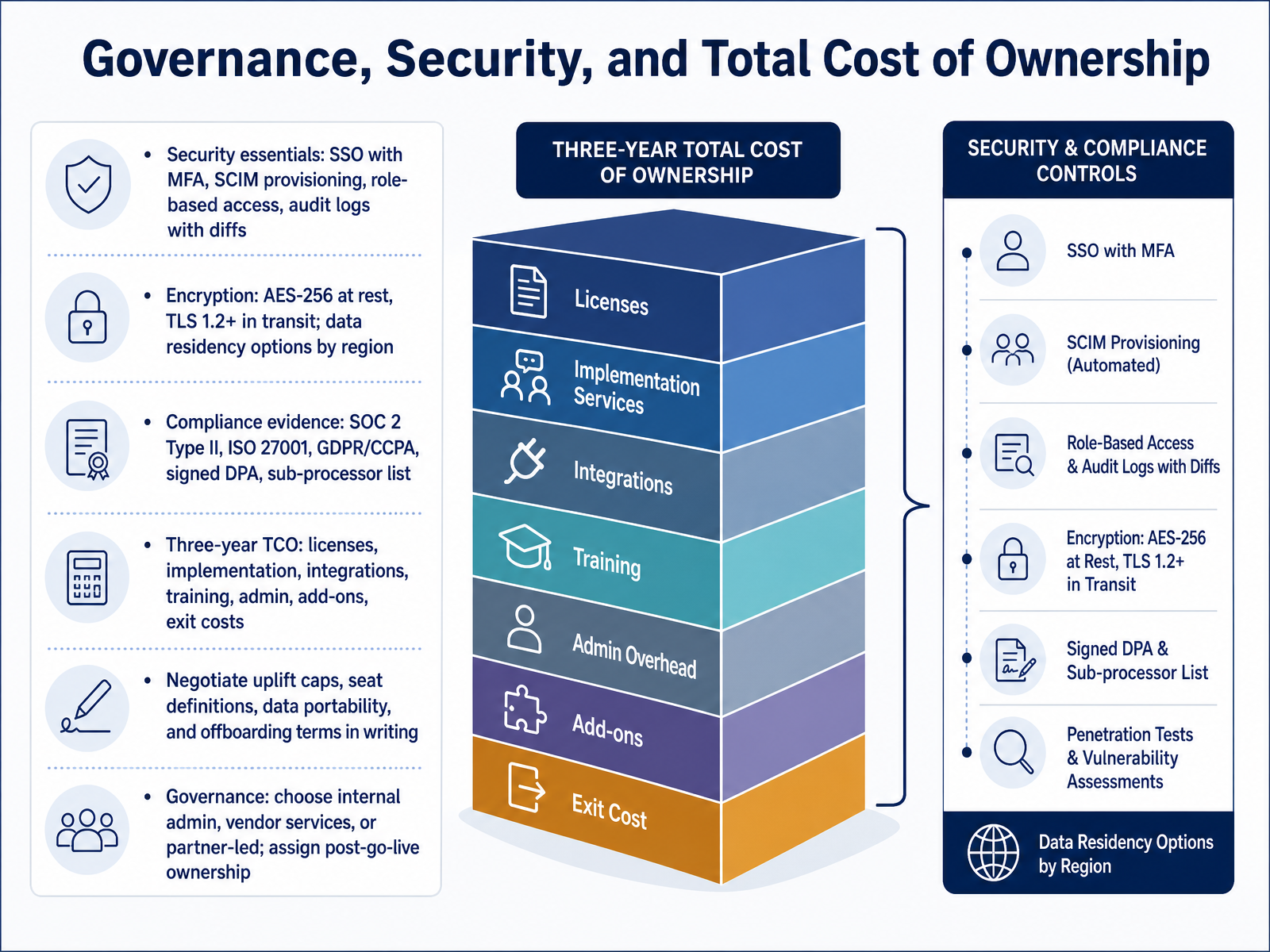
 - 11Governance, Security, and Total Cost of OwnershipNow let's talk about governance, security, and total cost of ownership, because these are the terms that decide whether a tool survives procurement. Start with security essentials: single sign-on with multi-factor authentication, SCIM provisioning, role-based access, and audit logs that show before-and-after diffs. For your team, that means a departing contractor loses access automatically, and you can prove who changed a requirement and when. Confirm encryption standards: AES-256 at rest, TLS 1.2 or higher in transit, and data residency options by region. Then request compliance evidence, not logos: SOC 2 Type II, ISO 27001, GDPR and CCPA coverage, a signed DPA, and the sub-processor list. On cost, model three-year TCO, including licenses, implementation, integrations, training, admin overhead, add-ons, and exit costs. Before signing, negotiate uplift caps, seat definitions, data portability, and offboarding terms in writing. Finally, decide your governance model: internal admin, vendor services, or partner-led, and name who owns the tool after go-live. Those written commitments are what protect you later. Next, we move into rollout, adoption, and change management.
 ones.comcapterra.comones.com+22 min
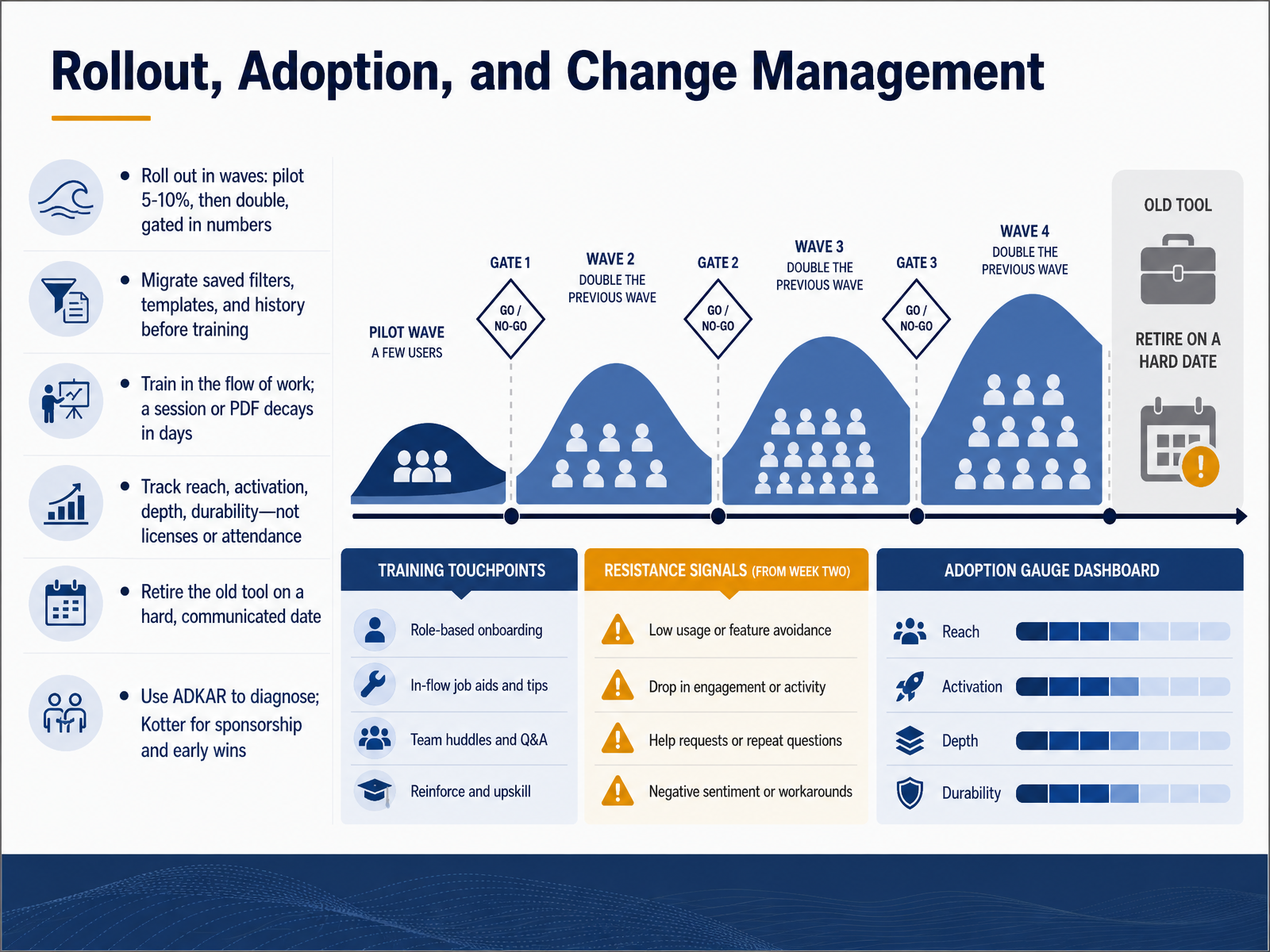
 - 12Rollout, Adoption, and Change ManagementNow let's talk rollout, adoption, and change management. This is where most tool investments quietly fail, so treat it as a program, not a launch day. Roll out in waves: pilot five to ten percent of users, then roughly double each wave, and gate every wave on numbers, not dates. For example, the next wave starts when seventy percent of the pilot completed the core task twice. Before training, migrate saved filters, templates, and history. If someone's twelve saved views don't come across, they'll keep the old tool open. What this means for your team: migration is adoption work, not IT cleanup. Train in the flow of work, inside the tool at the moment of need. A session or a PDF decays in days. Track reach, activation, depth, and durability, not licenses or attendance. Then retire the old tool on a hard, communicated date, and enforce it. Use ADKAR to diagnose which individual is stuck, and Kotter for sponsorship and early wins. Next, we'll walk through the Decision Framework and Scenario Playbooks.
 pmworld360.comsaaskart.coresources.rework.com+22 min
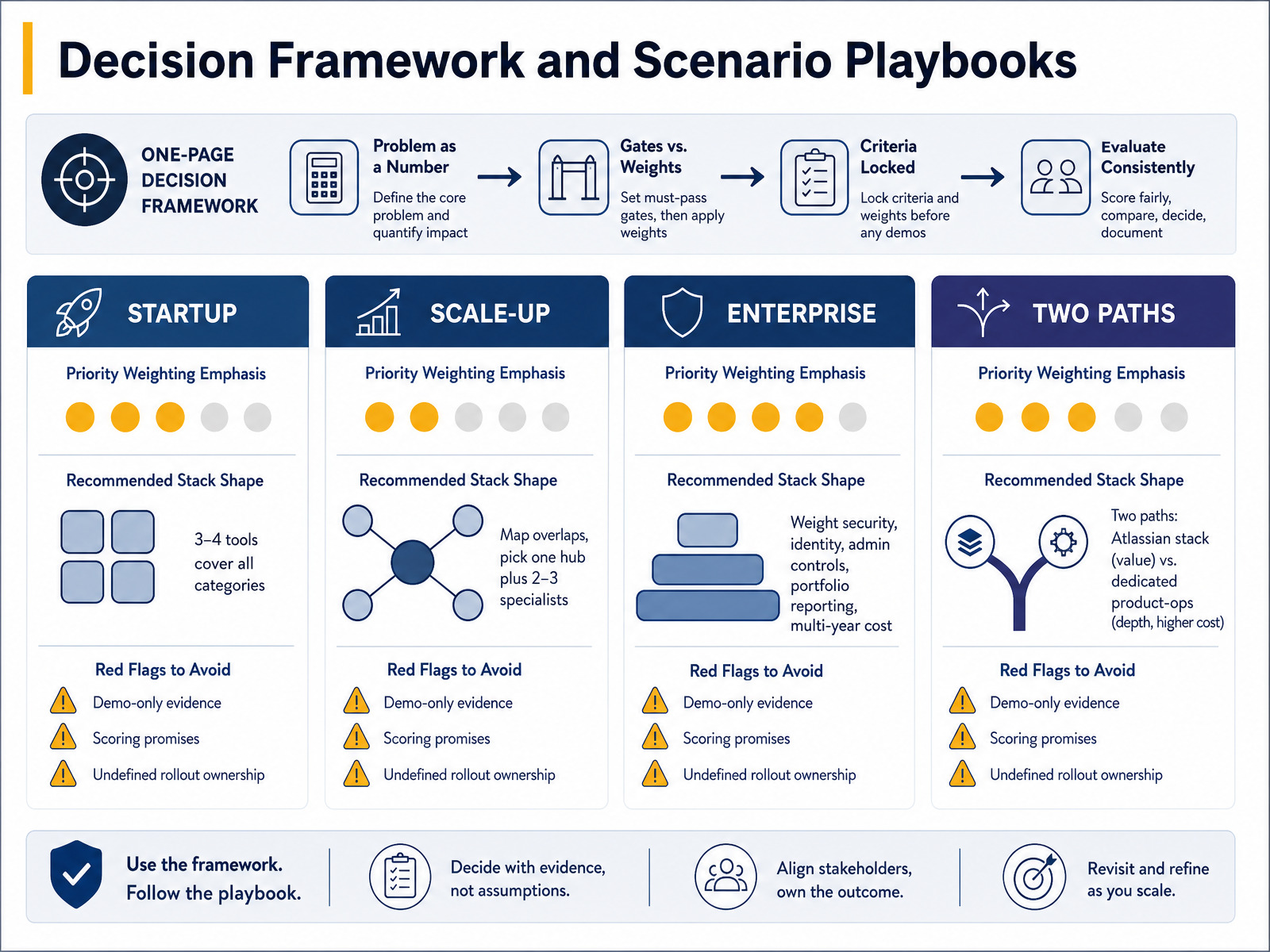
 - 13Decision Framework and Scenario PlaybooksLet's pull the evaluation work into one decision framework. Keep it to one page. State the problem as a number, define your gates and weights, and lock the criteria before any demo. Gates are non-negotiables like security or a required integration. Weights rank the rest. Once locked, enthusiasm for a slick demo can't quietly reshape your criteria. For a startup, weight usability, fast setup, and honest tier pricing highest. Three to four tools can cover every category. At scale-up, map overlaps first, choose one hub plus two or three specialists, and consolidate feedback intake into a single channel. Enterprise buyers should weight security, identity, admin controls, portfolio reporting, and multi-year cost. Watch the renewal curve, since list prices can climb year over year. Then pick a path. The Atlassian stack often wins on value and breadth. Dedicated product-ops tooling gives you depth, usually at a higher cost. Know which trade-off your team can live with. Finally, treat these as red flags. Demo-only evidence with no proof of concept. Scoring promises that skip your messy data. And rollout ownership left undefined. Any one of those can turn a defensible decision into an expensive lesson. Next, we'll turn this framework into a concrete plan with the 30-60-90 Day Action Plan and Artifacts.
 pmworld360.comsaaskart.coresources.rework.com+22 min
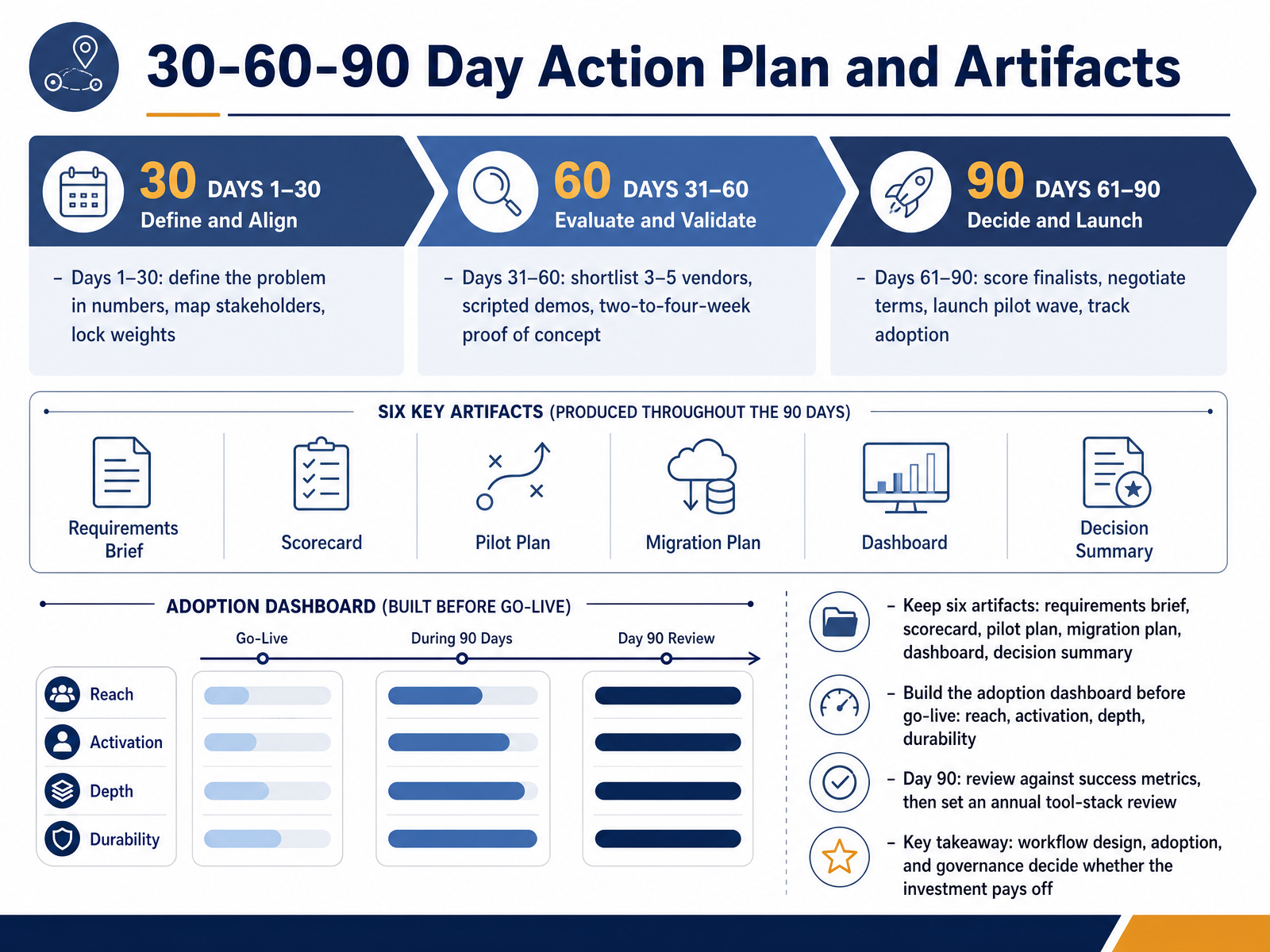
 - 1430-60-90 Day Action Plan and ArtifactsLet's close with a ninety-day plan and the artifacts that keep it honest. Days one to thirty: define the problem in numbers, map stakeholders, and lock your scoring weights before any demo. Days thirty-one to sixty: shortlist three to five vendors, run scripted demos against your own scenarios, and timebox a proof of concept to two to four weeks on real data. Days sixty-one to ninety: score finalists, negotiate terms, launch a pilot wave, and track adoption weekly. Keep six artifacts: a requirements brief, a weighted scorecard, a pilot plan, a migration plan, an adoption dashboard, and a one-page decision summary for your sponsor. Build that dashboard before go-live, measuring reach, activation, depth, and durability. Week two tells you more than month three. On day ninety, review against your original success metrics, then set an annual tool-stack review. Here's the takeaway: workflow design, adoption, and governance decide whether the investment pays off, not the feature list. Thank you for working through this course. You now have a repeatable process. Go run it on your next decision.
 pmworld360.comsaaskart.coresources.rework.com+22 min
Take the deck with you
Download this course as a file — free, no sign-up needed.
- PDF handoutEvery slide page, ready to print or share.15 pages · 3.9 MBDownload
- Narrated PowerPointThe deck that presents itself — every slide carries the digital human's narration video.15 pages · 18.2 MBDownload
- PowerPoint slidesThe full deck as a .pptx — open it in PowerPoint, Keynote, or Google Slides.15 pages · 3.8 MBDownload
Free to use in your own training — please keep the PersonWise credit page at the end.
Have your own deck? Turn it into a course
Sources consulted
Web sources consulted while building this course.
- State of PM Tools 2026 - Tool Analysis Report | IdeaPlan — ideaplan.io
- "Best Product Management Software in 2026: 14 Tools for ... — resources.rework.com
- Product Management Software: 10 platforms ranked | Zendikt — zendikt.com
- Best Product Management Roadmap Software | 2026 Edition — gitnux.org
- Best Online Product Management Software: 2026 Comparison — wifitalents.com
- Product Operations Guide: How to Scale Your Product Team | Atlassian — atlassian.com
- Product Workflows and Strategic Decisions in 2026 | Productboard — productboard.com
- Jira Integration | Productboard — productboard.com
- Jira Product Discovery vs. Productboard (2026) · Released — released.so
- Productboard vs Jira: PM vs Project (2026) — ideaplan.io
- 7 Steps to Evaluate Secure Requirements Software in 2026 — ones.com
- Project Management Software Requirements Checklist for ... — capterra.com
- 7 Best Product Management Tools for InfoSec Officers (2026 Picks) — ones.com
- Product Requirements Checklist: Never Miss a Critical Requirement - makeitnice.de — makeitnice.de
- Project Management Software Requirements Checklist ... — pmworld360.com
- Project Management Software Evaluation Scorecard & Vendor Matrix — pmworld360.com
- How to Choose Enterprise Software in 2026: Buyer's Guide | Saaskart — saaskart.co
- "Project Management Software Evaluation Criteria" — resources.rework.com
- PMO Guide: Agile Software Evaluation Criteria Checklist — ones.com
- 2026 Product Management Tool Comparison: Shortlist and — ones.com