Begin
14 pages · ~28 min
AI Literacy Tools: Selection and Workflow Design
This training helps professionals evaluate AI literacy tools and design effective workflows to integrate them into learning experiences.
A digital instructor presents all 14 pages. Hold “Ask” at any point and ask out loud — the answer comes from this course. No sign-up needed.
What you’ll learn
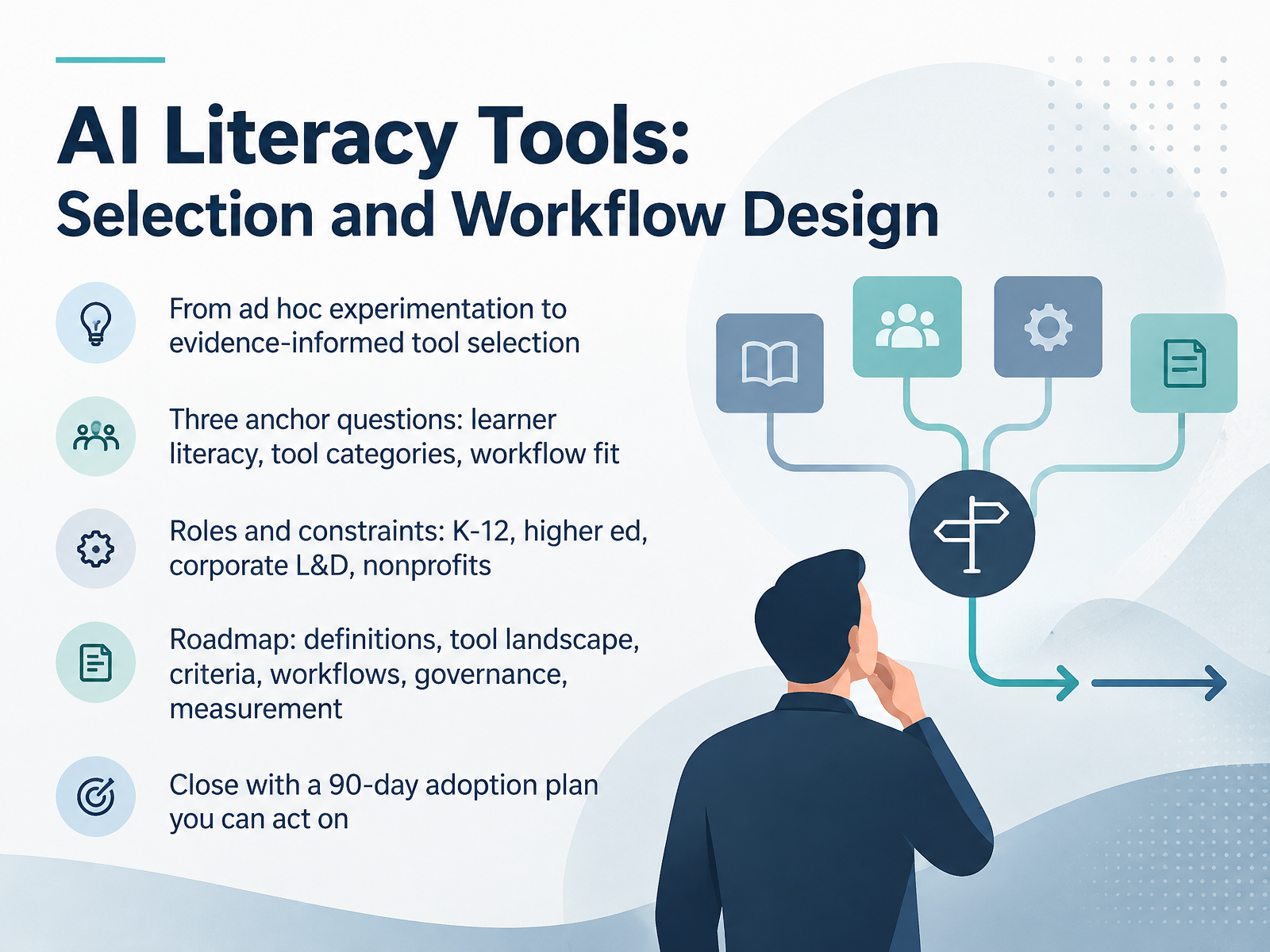
- 01AI Literacy Tools: Selection and Workflow DesignWelcome. I'm glad you're here, because this is a working session, not a vendor pitch. Over the next stretch, we'll move from ad hoc experimentation to evidence-informed tool selection. That shift is the whole point. So let's name the goal. By the end, you'll have a 90-day adoption plan you can actually act on. We'll organize the whole thing around three anchor questions. First, what level of AI literacy are your learners bringing? Second, which tool categories genuinely fit your needs? And third, does the tool fit your workflow? Throughout, we'll keep roles and constraints in view, because a K-12 classroom, a higher ed program, a corporate L&D team, and a nonprofit all face different trade-offs around budget, privacy, and time. Our roadmap moves through definitions, the tool landscape, selection criteria, workflow design, governance, and measurement. Then we close with that 90-day plan. For now, just notice your current selection habits. Are you choosing on evidence, or on enthusiasm? You don't need to answer yet. Let's move into what AI literacy actually means for educators and L&D.comparee.aicognitivefuture.aidevlinpeck.com+22 min
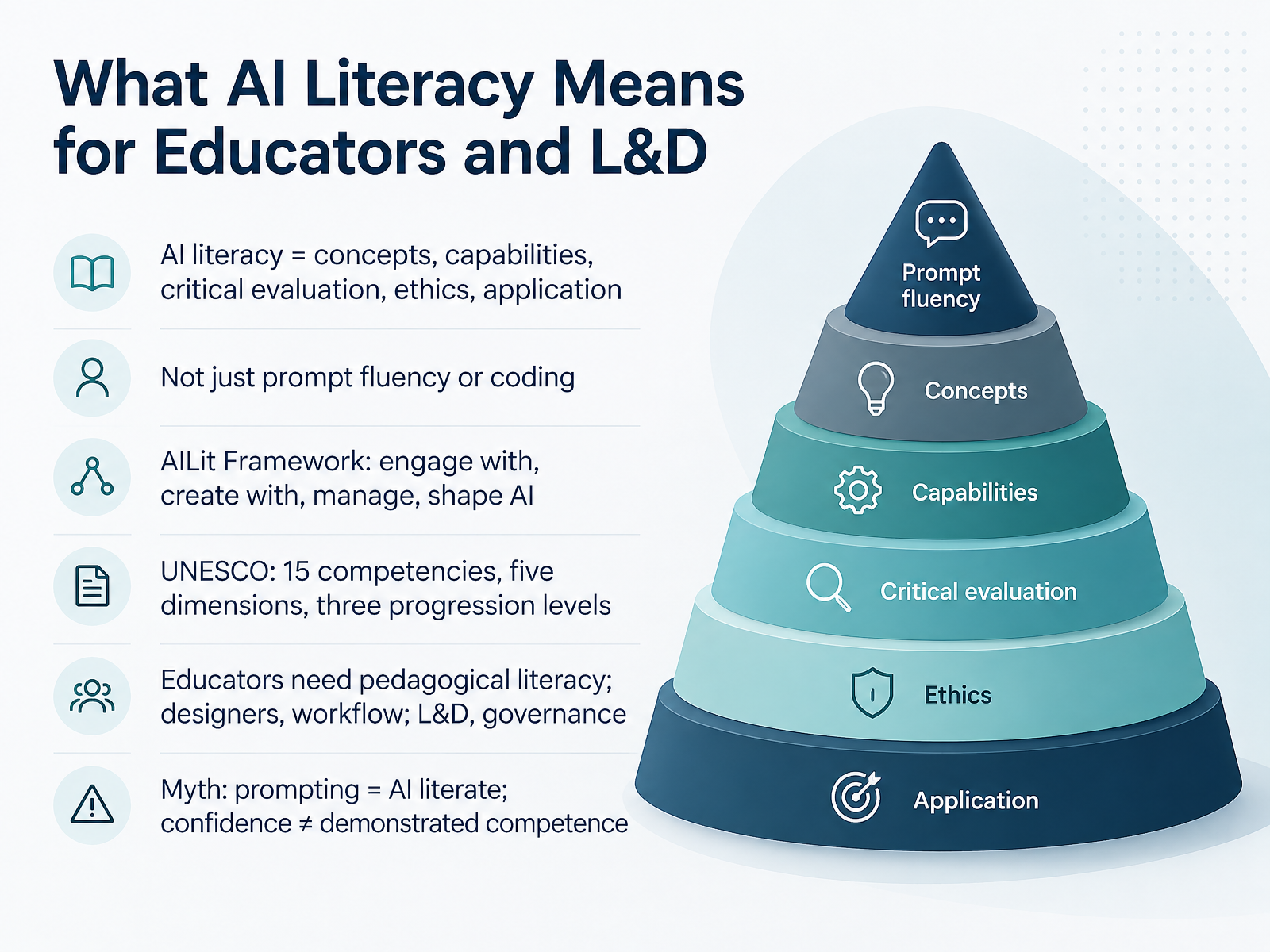
- 02What AI Literacy Means for Educators and L&DLet's define what AI literacy actually requires of us. It is not just prompt fluency, and it is not coding. It is a blend of concepts, practical capability, critical evaluation, ethics, and application. The AILit Framework, from the OECD and European Commission, organises this into four domains: engage with AI, create with AI, manage AI, and shape AI. UNESCO offers a complementary reference: fifteen competencies across five dimensions, with three progression levels, from Acquire to Deepen to Create. Now, the emphasis shifts by role. Educators need pedagogical literacy, so they can judge when AI supports learning and when it does not. Designers need workflow literacy, because tool choices shape what learners can actually do. And L and D teams need governance literacy, covering privacy, bias, and acceptable use. So test the myth directly: prompting skill is not AI literacy, and confidence is not demonstrated competence. Assess both perception and performance, and expect gaps. That distinction should shape every tool decision you make next, which brings us to frameworks to anchor your programme and tool choices.
 unesco.orgoecd.orgailiteracyframework.org+22 min
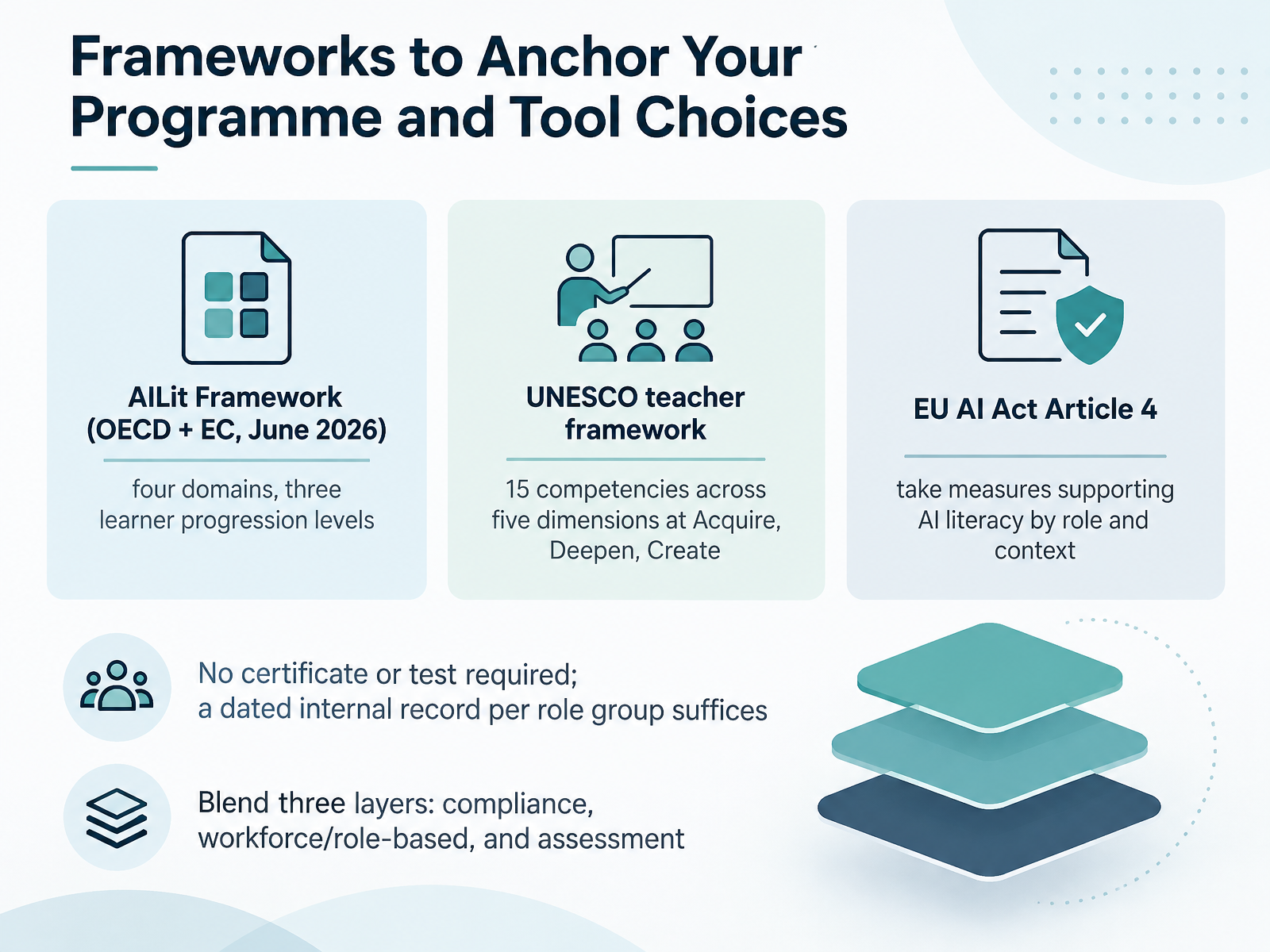
 - 03Frameworks to Anchor Your Programme and Tool ChoicesNow let's look at frameworks you can anchor your programme and tool choices to. There are three worth comparing. The AILit Framework, released jointly by the OECD and the European Commission in June 2026, organises literacy into four domains and three learner progression levels. UNESCO's teacher framework sets out fifteen competencies across five dimensions, at three levels: Acquire, Deepen, and Create. And EU AI Act Article 4 asks you to take measures supporting AI literacy, adapted by role and context. Here is the part that surprises people. No certificate and no test are required. A dated internal record per role group is enough. So keep it proportionate. Consider blending three layers rather than adopting one framework outright: a compliance layer for Article 4 evidence, a workforce layer with role-based categories, and an assessment layer so progress is visible. Document it in a single reference page. Next, we move on to mapping the 2026 tool landscape by category.
 learnwize.aielectives.iodegreed.com+21 min
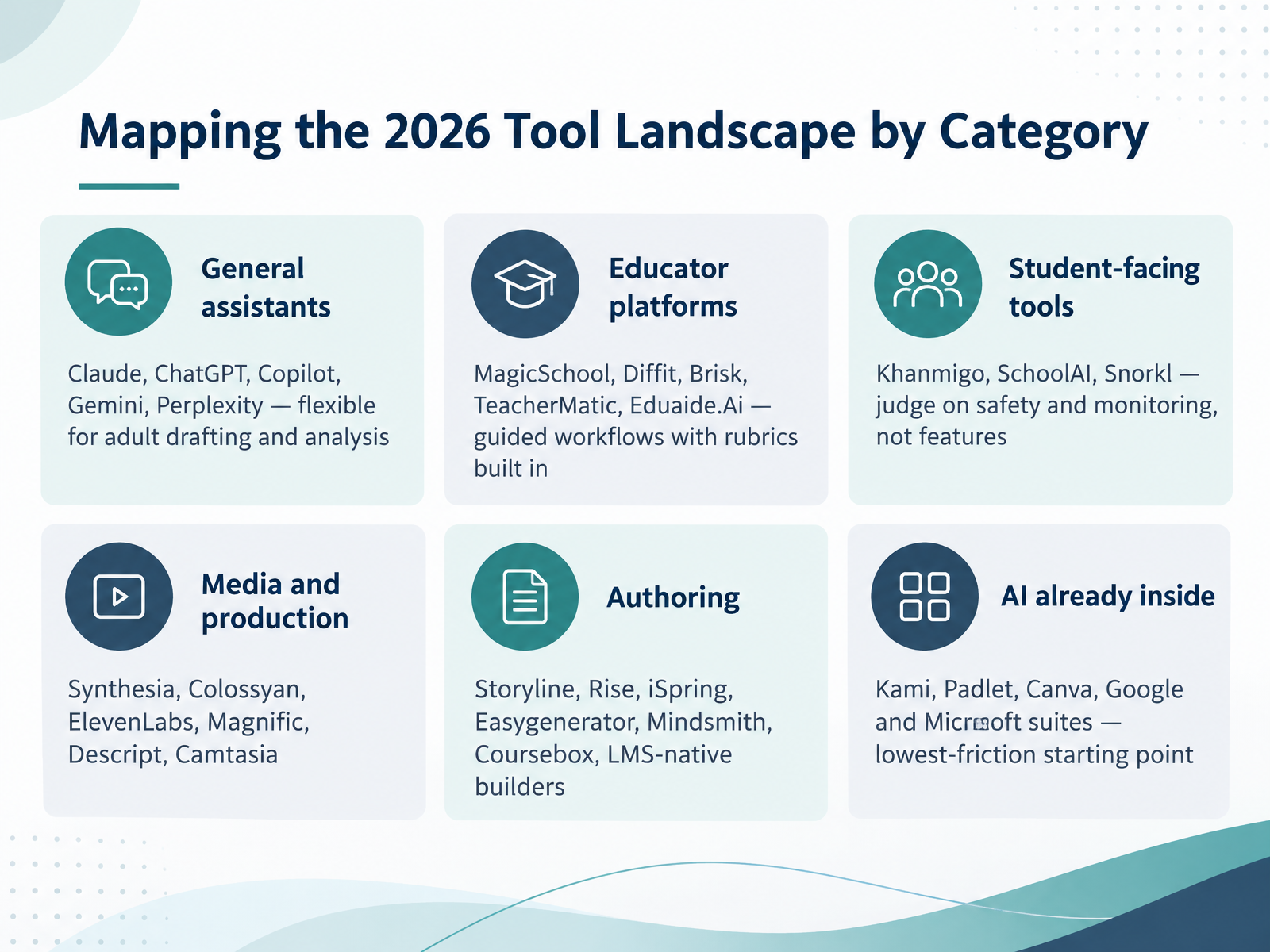
 - 04Mapping the 2026 Tool Landscape by CategoryLet's map the tool landscape by category, because the category usually tells you more about fit than any feature list. Start with general assistants like Claude, ChatGPT, Copilot, Gemini, and Perplexity. They are flexible, and best for adult-facing drafting, analysis, and planning. Next, educator platforms such as MagicSchool, Diffit, Brisk, TeacherMatic, and Eduaide.Ai wrap those same models in guided workflows, with rubrics and lesson structures built in. You give up some flexibility for speed. Then, student-facing tools like Khanmigo, SchoolAI, and Snorkl. Judge these on safety and monitoring first, not on features. Media and production tools come next, including Synthesia, Colossyan, ElevenLabs, Magnific, Descript, and Camtasia. Then authoring, from Storyline, Rise, and iSpring through Easygenerator, Mindsmith, and Coursebox, plus LMS-native builders. One more group to note: AI already inside Kami, Padlet, Canva, and the Google and Microsoft suites. That is usually your lowest-friction starting point. So shortlist by category, then compare privacy, cost, and export before you commit. Next, we will look at matching tools to workflow stages.
 comparee.aicognitivefuture.aidevlinpeck.com+22 min
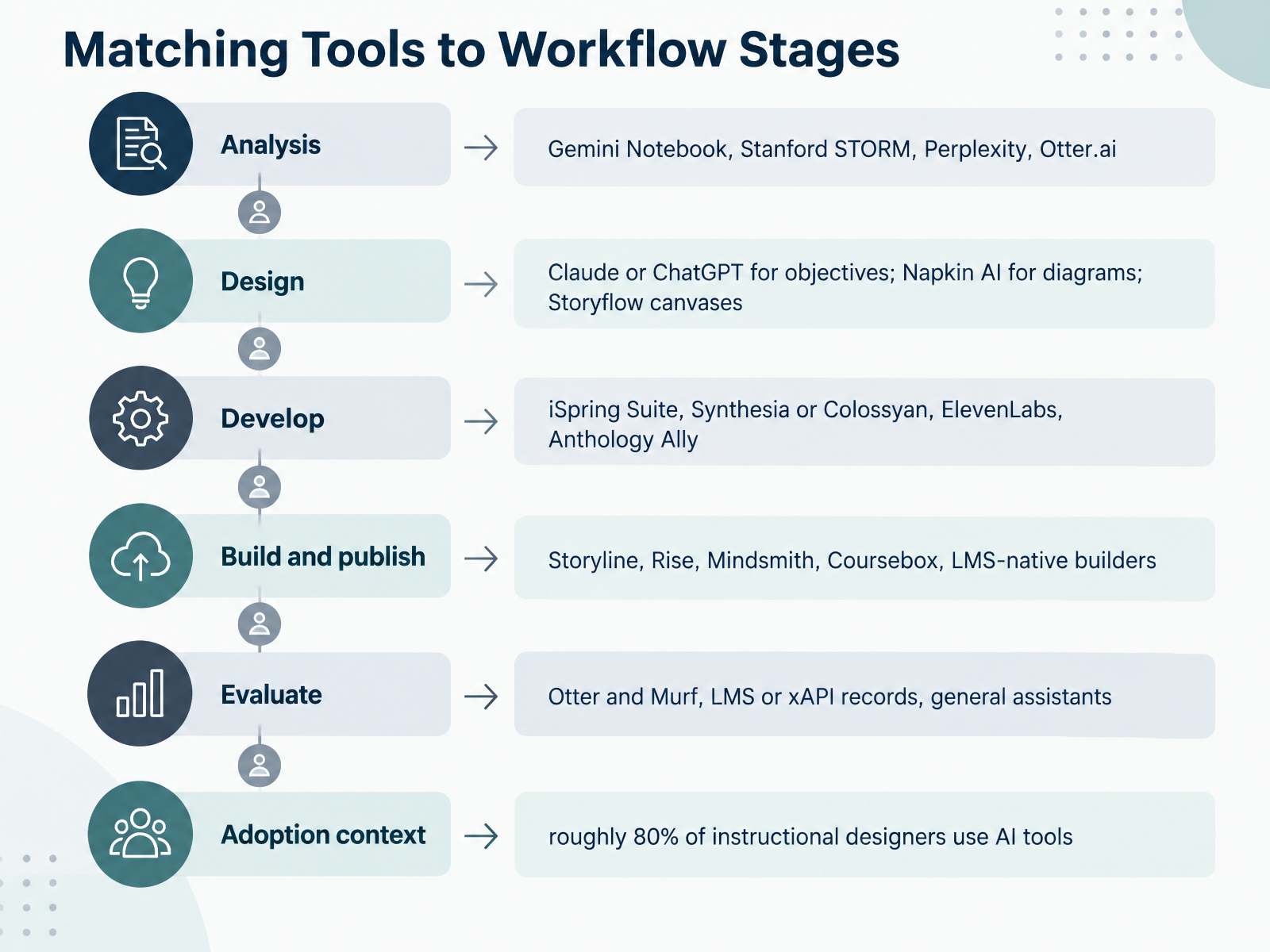
 - 05Matching Tools to Workflow StagesNow let's match tools to the stages of your workflow. Think of this as a menu, not a mandate. You pick one tool per phase and learn it well. For analysis, Gemini Notebook grounds research in your own documents, Stanford STORM drafts sourced outlines, Perplexity gives quick cited answers, and Otter.ai captures stakeholder interviews. In design, Claude or ChatGPT draft objectives and storyboards, Napkin AI turns text into diagrams, and Storyflow canvases check alignment across objectives, content, and assessment. For development, iSpring Suite converts PowerPoint into courses, Synthesia or Colossyan produce avatar video, ElevenLabs handles narration, and Anthology Ally flags accessibility issues. When you build and publish, Storyline gives you branching control, Rise gives you speed, while Mindsmith, Coursebox, and LMS-native builders generate fast first drafts. For evaluation, Otter and Murf support transcription and voiceover, your LMS or xAPI records supply the data, and general assistants help you interpret it. One context point: roughly eighty percent of instructional designers now use AI tools, so the question is not whether, but where. Add one tool, prove it saves real time on a real project, then move to the next phase. Next, we will look at how to judge these tools systematically, with a five-dimension evaluation framework.
 comparee.aicognitivefuture.aidevlinpeck.com+22 min
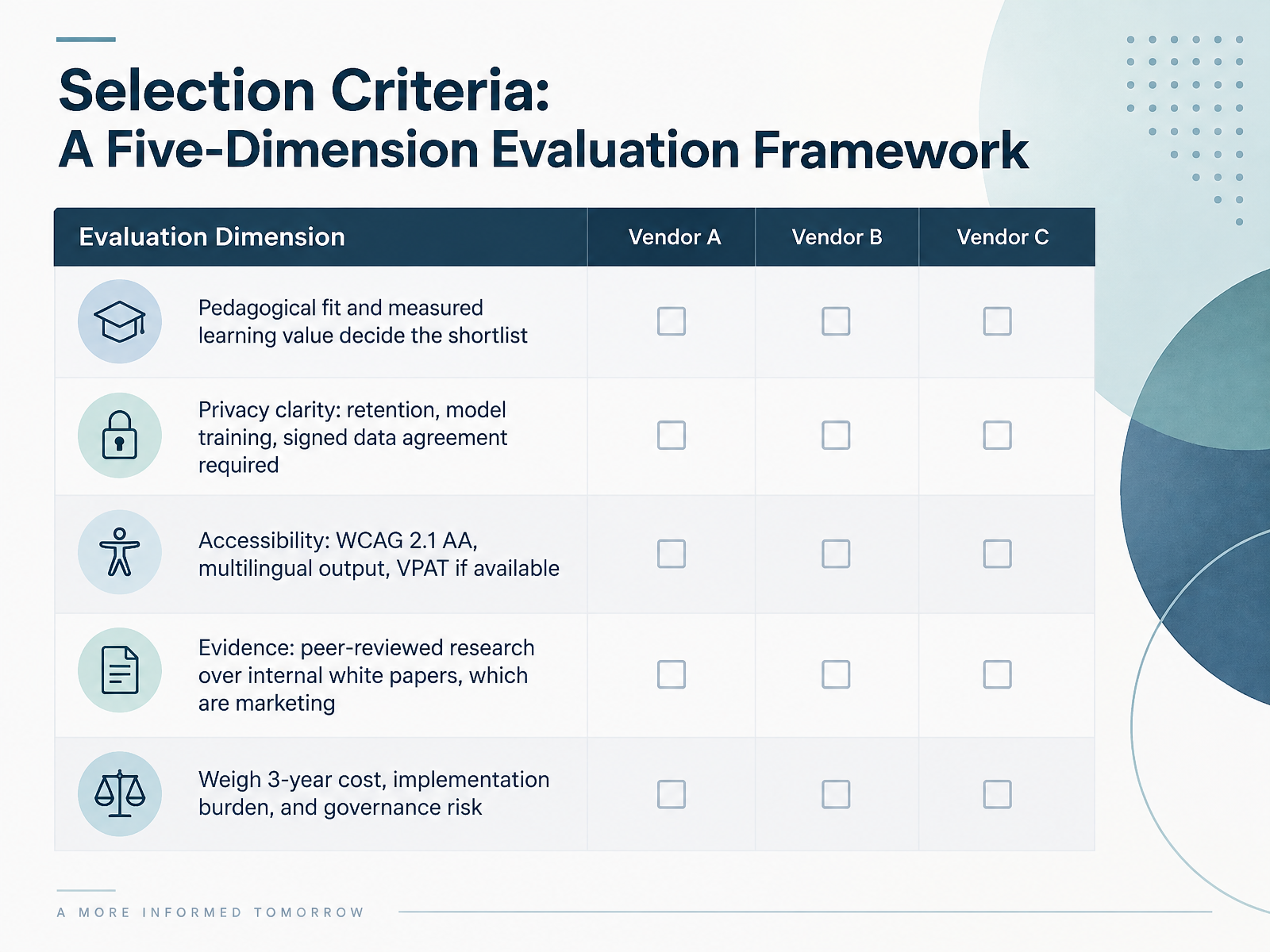
 - 06Selection Criteria: A Five-Dimension Evaluation FrameworkLet's turn to selection criteria. A practical way to compare tools is a five-dimension evaluation framework. First, pedagogical fit. Ask whether the tool measurably improves learning, not just whether it demos well. That decides your shortlist. Second, privacy clarity. You need clear retention terms, a commitment that learner data will not train vendor models, and a signed data agreement. If those are vague, pause. Third, accessibility. Look for WCAG 2.1 AA conformance, multilingual output, and a VPAT if one exists. Fourth, evidence. Prioritize peer-reviewed research. Internal white papers are marketing, not proof. Fifth, weigh the full picture over three years: total cost, implementation burden, and governance risk. One caution. A tool can look strong on pedagogy and still fail the privacy test. Score all five dimensions, not just the easy ones. Used consistently, this framework makes weak reasoning harder to hide. Next, we will look at building a lightweight scoring rubric.
 aiinaction.pressbooks.sunycreate.cloudaiforedu.aiasccc.org+22 min
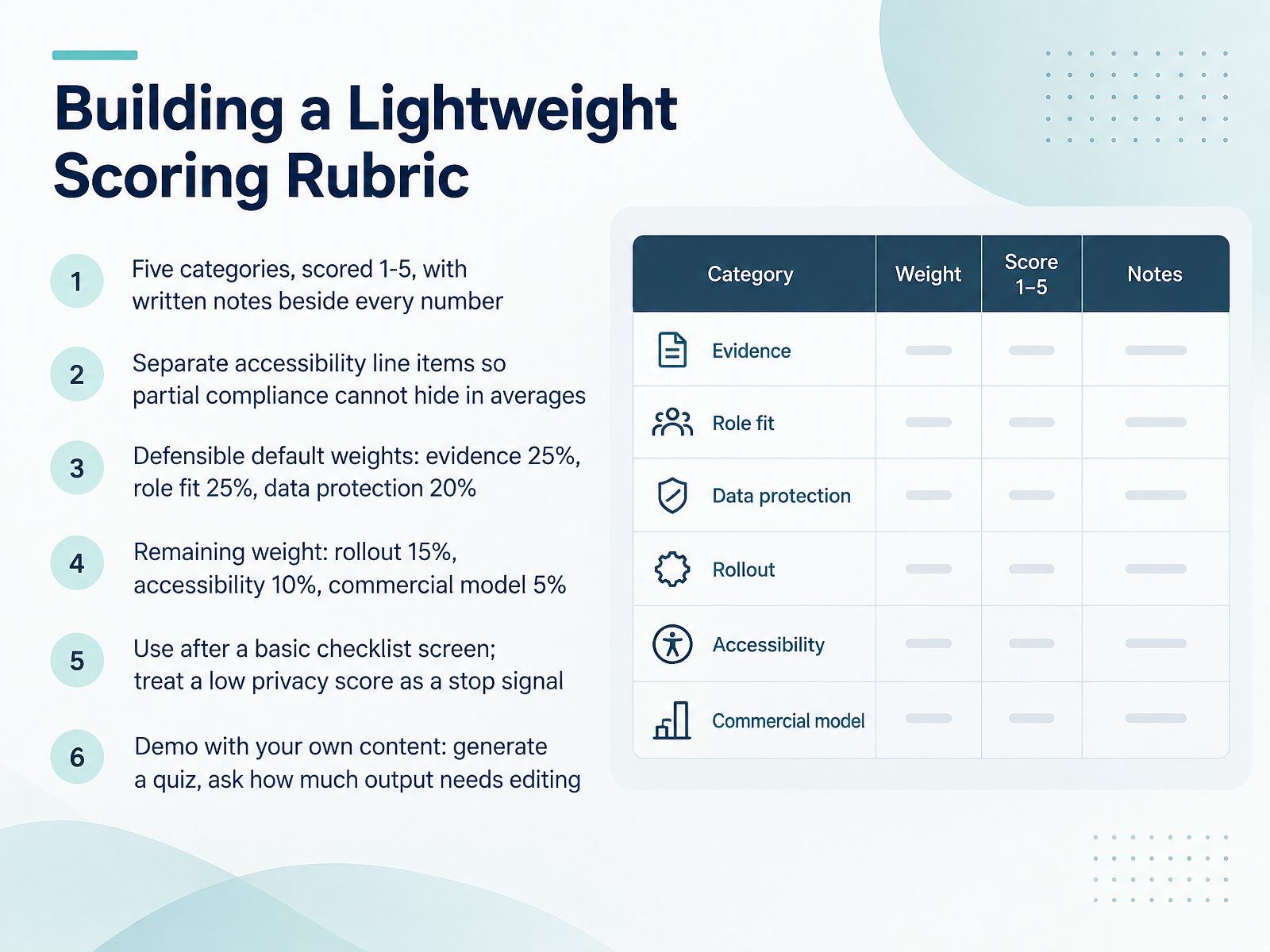
 - 07Building a Lightweight Scoring RubricNow let's turn that screening into something you can defend. A lightweight scoring rubric works well here. Keep it to five categories, each scored from one to five, and write a short note beside every number. Those notes are what make the score credible later. Score accessibility as its own line item rather than folding it into an average, so partial compliance cannot hide. For default weights, start with evidence at twenty-five percent, role fit at twenty-five percent, and data protection at twenty percent. Then add rollout at fifteen percent, accessibility at ten percent, and the commercial model at five percent. Use the rubric only after a basic checklist screen, and treat a low privacy score as a stop signal, not a penalty to average away. Finish with a demo using your own content. Ask the vendor to generate a quiz from your material, then judge how much of the output still needs editing. You need that signal before you commit. Next, we look at workflow design and start with the learning problem.
 aiinaction.pressbooks.sunycreate.cloudaiforedu.aiasccc.org+22 min
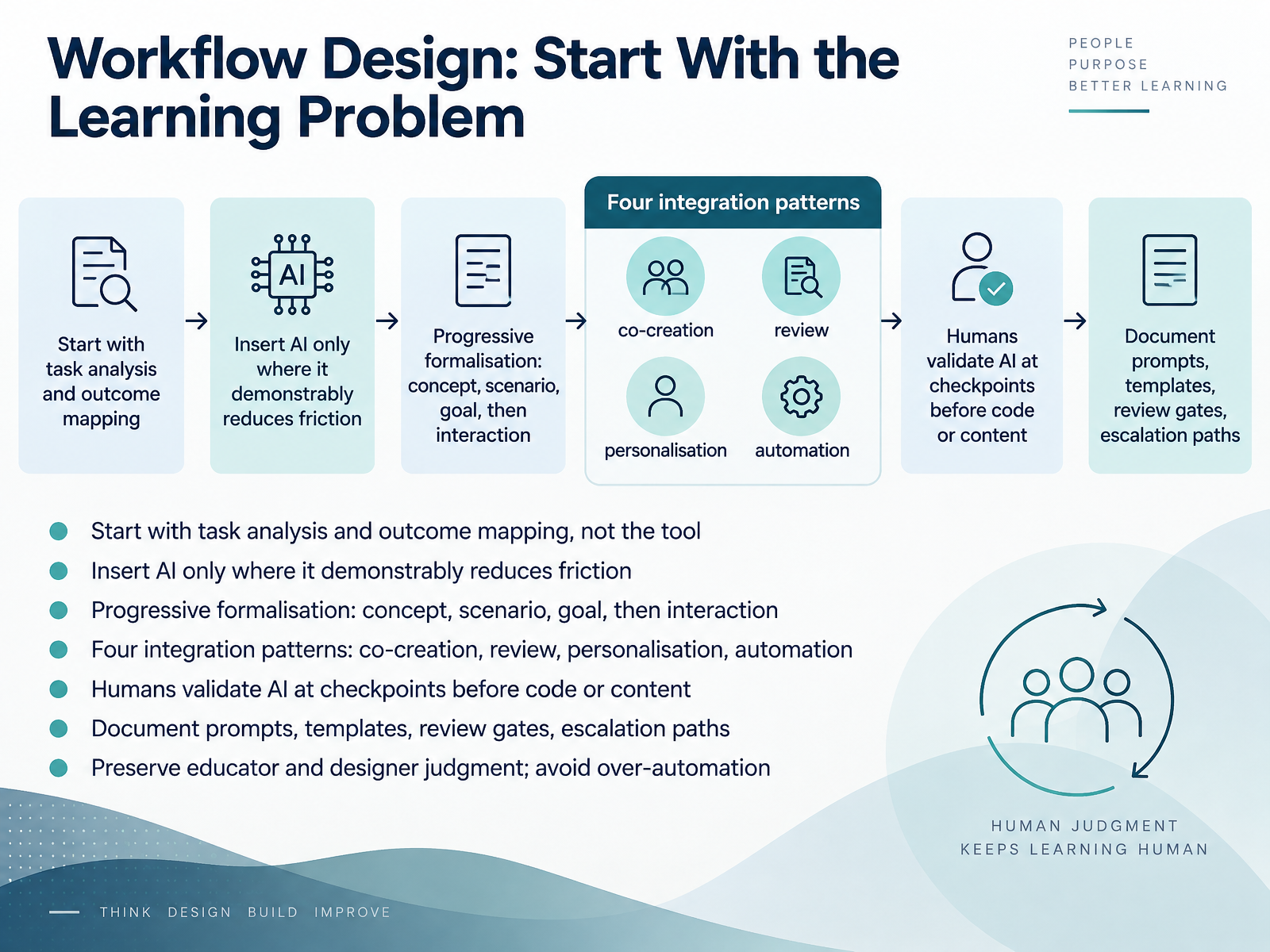
 - 08Workflow Design: Start With the Learning ProblemNow let's talk workflow design, and the first move is counterintuitive. Start with the learning problem, not the tool. Do task analysis and outcome mapping first, then insert AI only where it demonstrably reduces friction. One useful pattern is progressive formalisation: define the concept, then the scenario, then the goal, and only then the interaction. You can also think in four integration patterns: co-creation, review, personalisation, and automation. Whichever you choose, humans validate AI at checkpoints before anything becomes code or content. Then document what makes the workflow repeatable: prompts, templates, review gates, and escalation paths. The aim is to preserve educator and designer judgment, and avoid over-automation. Next, we'll walk through worked examples of ADDIE workflows with human gates.
 2 min
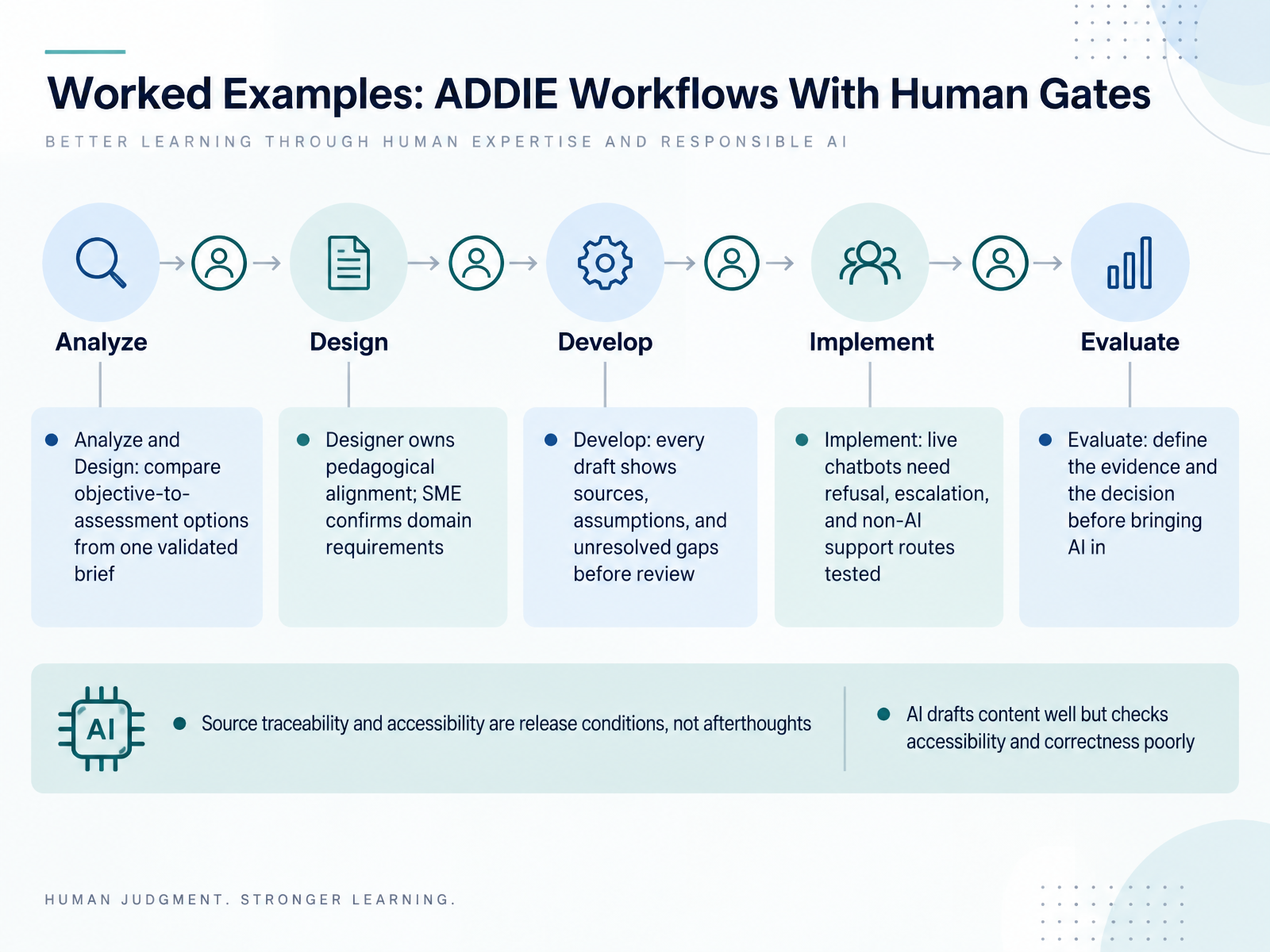
2 min - 09Worked Examples: ADDIE Workflows With Human GatesLet's walk through a worked example, mapping human gates onto each ADDIE phase. In Analyze and Design, give AI one validated brief and ask it to compare several objective-to-assessment options. Your instructional designer owns pedagogical alignment. Your subject matter expert confirms domain requirements. During Develop, require every draft to show its sources, its assumptions, and its unresolved gaps before anyone reviews it. Source traceability and accessibility are release conditions, not afterthoughts. In Implement, live chatbots need tested refusal, escalation, and non-AI support routes. And in Evaluate, define the evidence you will measure and the decision it informs before you bring AI in. Remember the pattern: AI drafts content well, but it checks accessibility and correctness poorly. So place your human gates where judgment matters most. Next, we turn to data privacy, ethics, and governance.
 comparee.aicognitivefuture.aidevlinpeck.com+22 min
 - 10Data Privacy, Ethics, and GovernanceLet's turn to the governance layer that sits underneath every tool decision: data privacy, ethics, and accountability.
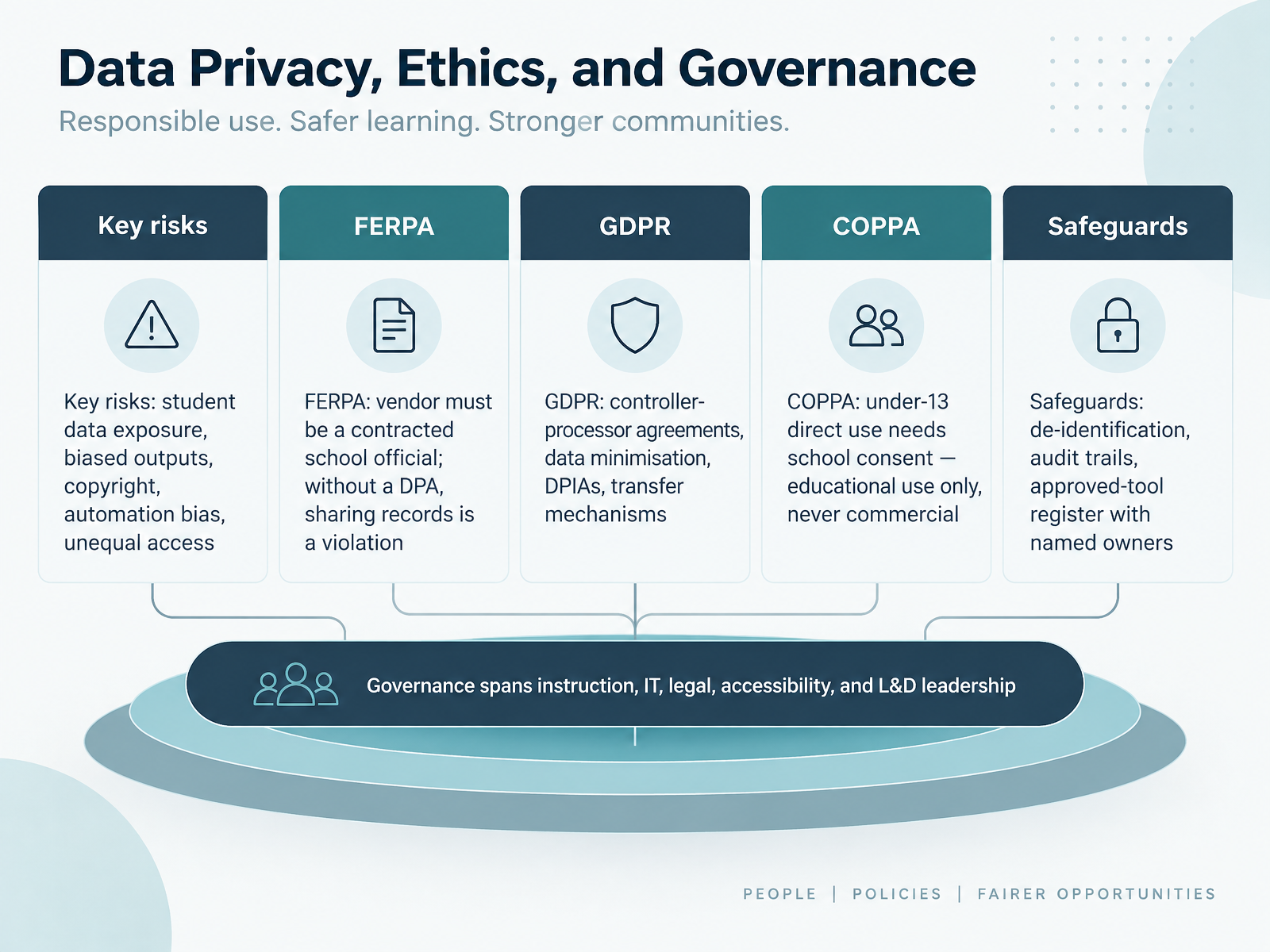
Start with the risks you are actually managing. Student data exposure. Biased outputs. Copyright questions. Automation bias, where staff trust a generated answer over their own judgment. And unequal access, where some learners simply get less. Name these plainly, because unnamed risks are unmanaged risks.
Now the legal floor. Under FERPA, a vendor must function as a contracted school official, and without a data processing agreement, sharing education records is a violation, no matter how strong the vendor's security looks.
GDPR adds controller and processor agreements, data minimisation, impact assessments, and transfer mechanisms for data leaving your region.
COPPA applies when children under thirteen use a tool directly. Schools can consent on their behalf, but only for educational use, never for commercial purposes.
Then build practical safeguards. De-identify where you can. Keep audit trails. Maintain an approved-tool register with a named owner for every entry.
And remember that governance is shared. Instruction, I.T., legal, accessibility, and L and D leadership each hold part of it.
That leads us to the next question: how do you know any of this is working? Let's look at evaluating impact through metrics, assessment, and feedback loops.
 2 min
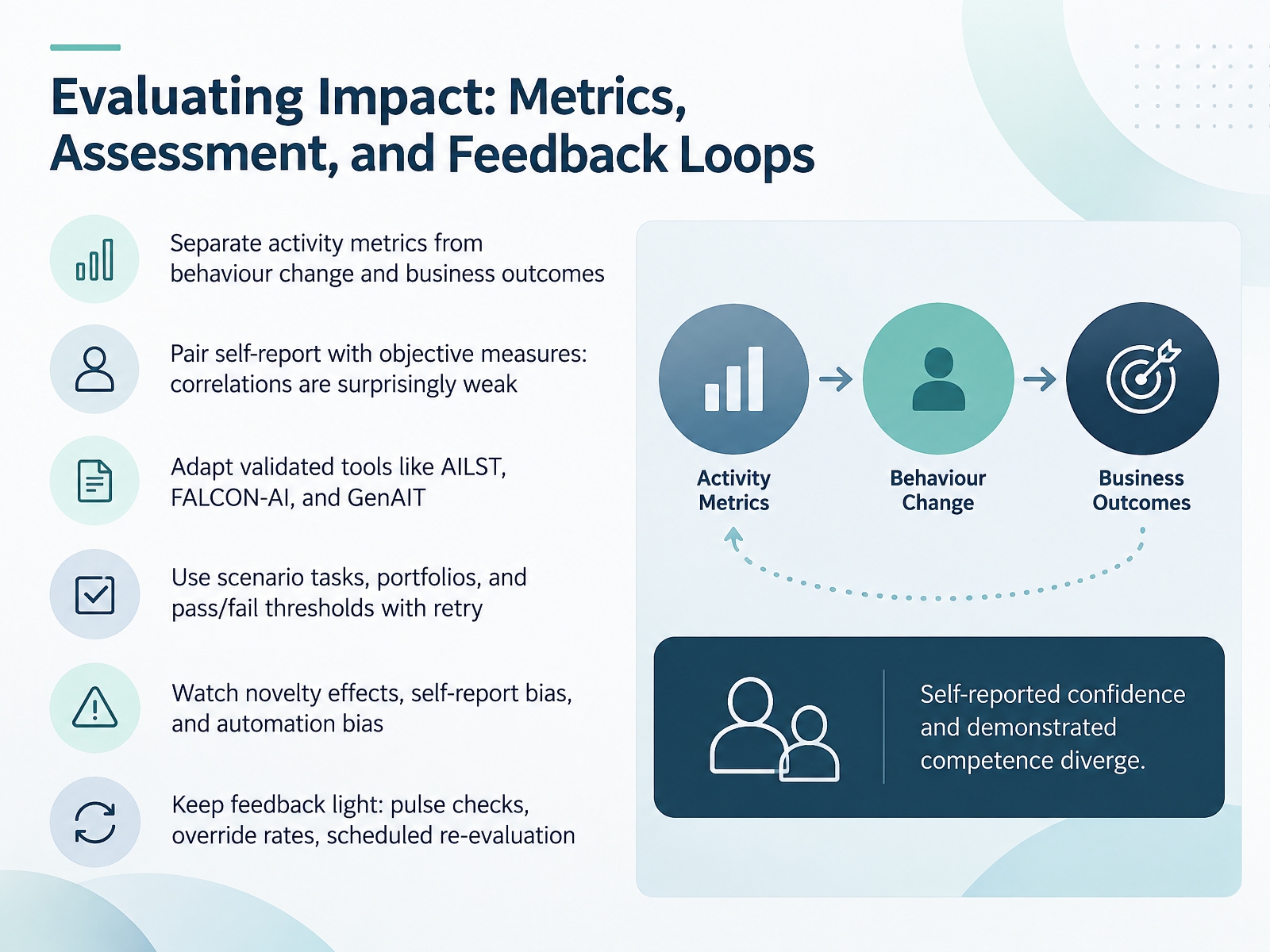
2 min - 11Evaluating Impact: Metrics, Assessment, and Feedback LoopsLet's turn to impact. Make one distinction first: separate activity metrics, like attendance or completions, from behaviour change and business outcomes. They tell different stories. Then pair self-report with objective measures. The correlation between what people say they can do and what they actually demonstrate is surprisingly weak, often below zero point three, so don't use one as a proxy for the other. Where you can, adapt validated instruments such as the A I L S T, F A L C O N dash A I, or Gen A I T, rather than building from scratch. For performance, use scenario tasks, portfolios, and pass or fail thresholds with retry allowed. And watch for novelty effects, self-report bias, and automation bias, where learners defer to the tool. Keep feedback light: pulse checks, override rates on AI suggestions, and scheduled re-evaluation. Next, we'll look at the implementation roadmap and change management.
 aiinaction.pressbooks.sunycreate.cloudaiforedu.aiasccc.org+22 min
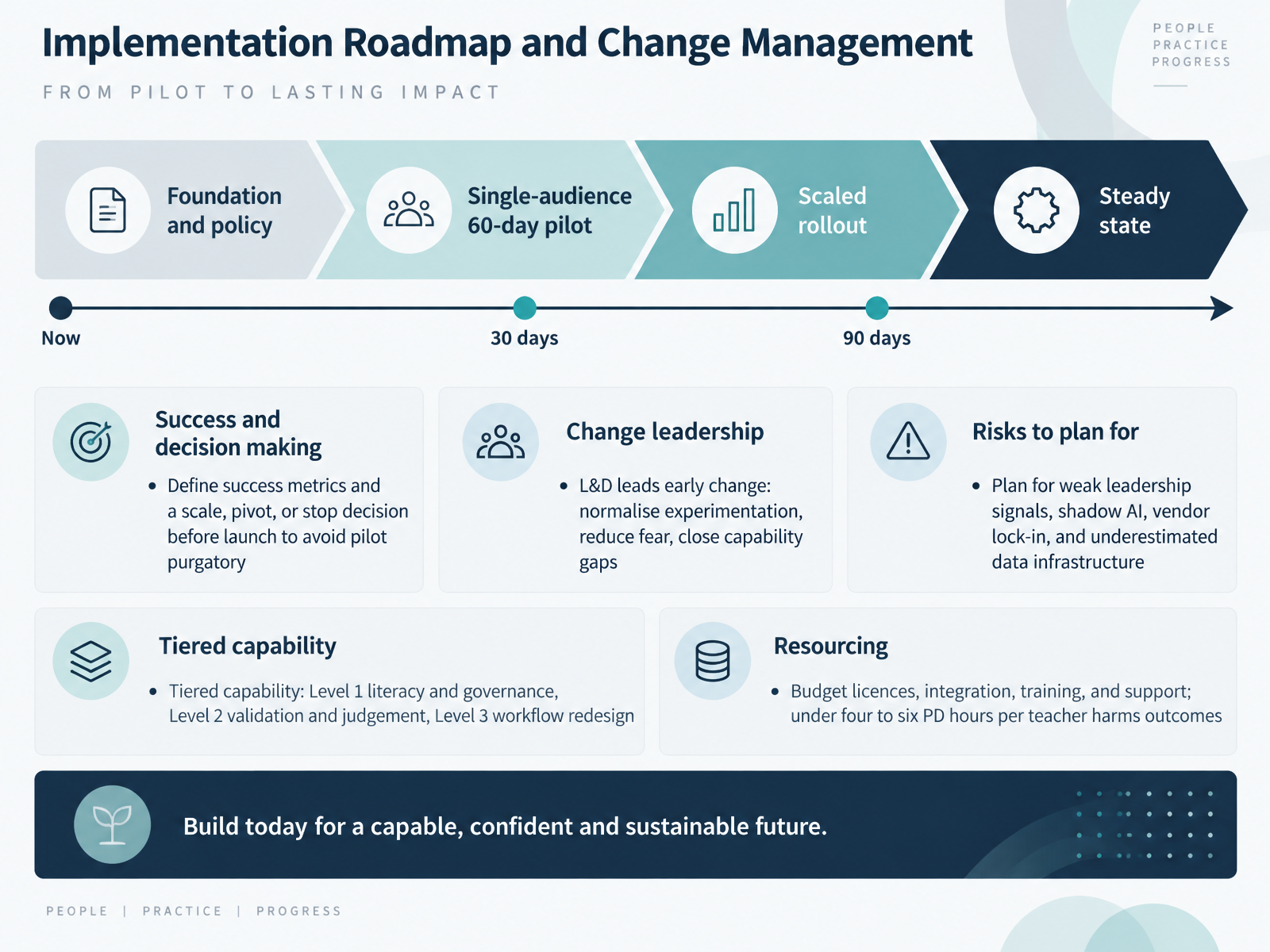
 - 12Implementation Roadmap and Change ManagementNow let's turn to your implementation roadmap. Phase it. Start with foundation and policy, run a sixty-day pilot with a single audience, scale what works, then settle into steady state. Before launch, define your success metrics and your scale, pivot, or stop decision. That single move is what keeps you out of pilot purgatory. L&D leads the early change: normalise experimentation, reduce fear, and close capability gaps. Think in tiers: Level one covers literacy and governance, Level two validation and judgement, Level three workflow redesign. Budget for licences, integration, training, and support. Under four to six professional development hours per teacher, outcomes measurably worsen. And plan now for weak leadership signals, shadow AI, vendor lock-in, and underestimated data infrastructure. Write those risks down with owners. In the next workshop, you will build your own selection and workflow plan.
 learnwize.aielectives.iodegreed.com+22 min
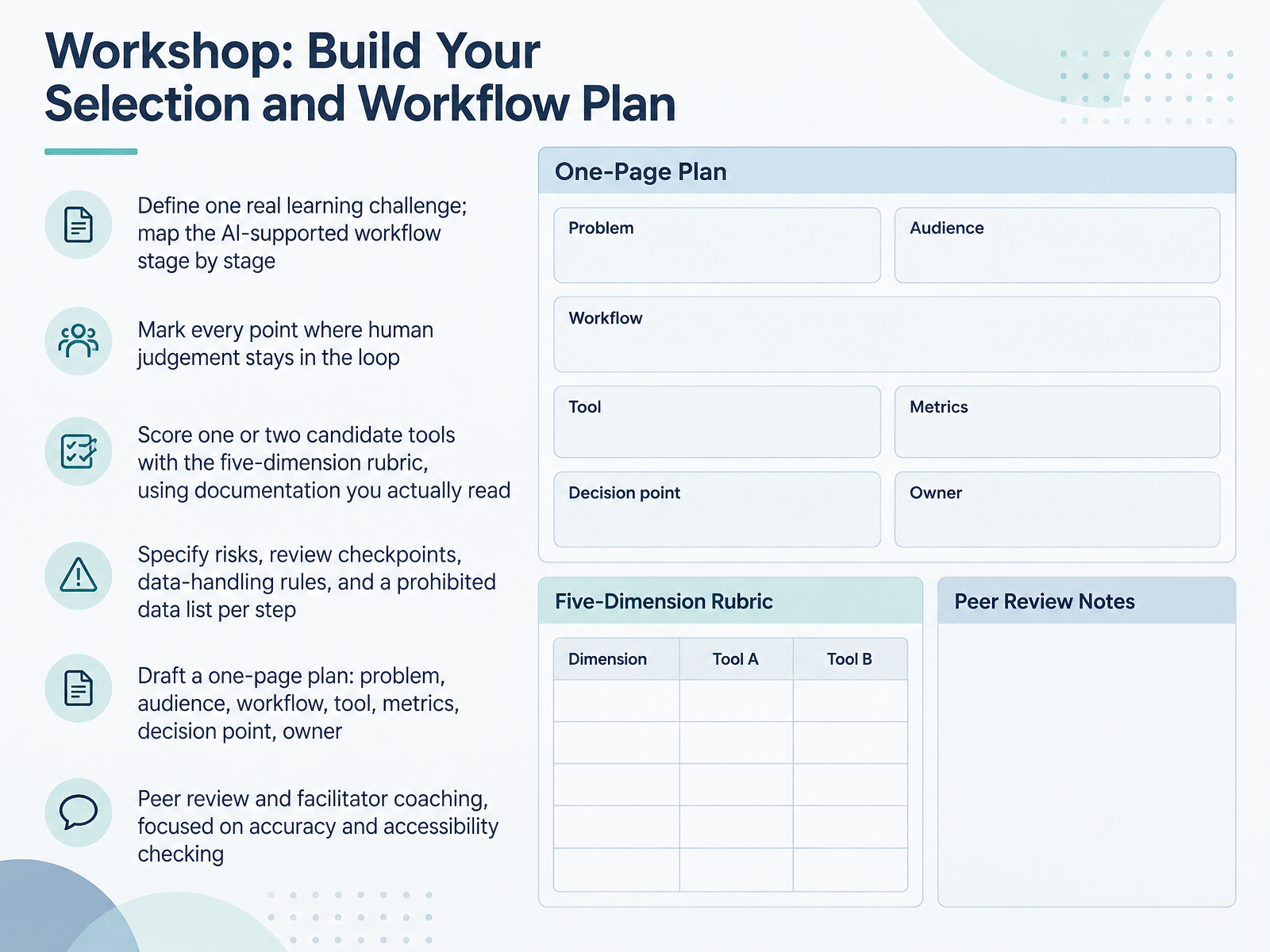
 - 13Workshop: Build Your Selection and Workflow PlanNow let's put all of this into practice. In this workshop, your goal is a one-page selection and workflow plan you can actually defend.
Start by naming one real learning challenge. Map the AI-supported workflow stage by stage. Then mark every point where human judgement stays in the loop. Those checkpoints are where your review checklist and release authority live, so be specific about who approves what.
Next, score one or two candidate tools on the five-dimension rubric. Use documentation you have genuinely read: privacy policies, accessibility statements, retention language. Write short notes beside every score, and treat a low privacy score seriously rather than rounding it up.
Then specify the risks, review checkpoints, data-handling rules, and a prohibited data list for each step. A one-page plan should cover the problem, audience, workflow, tool, metrics, decision point, and owner. No plan is complete without an owner.
Finally, peer review and facilitator coaching. Keep the focus on accuracy and accessibility checking. Test with real, non-sensitive material, and document where review effort moved.
With your draft in hand, let's move to the close: Key Takeaways and Your Next 90 Days.
 aiinaction.pressbooks.sunycreate.cloudaiforedu.aiasccc.org+22 min
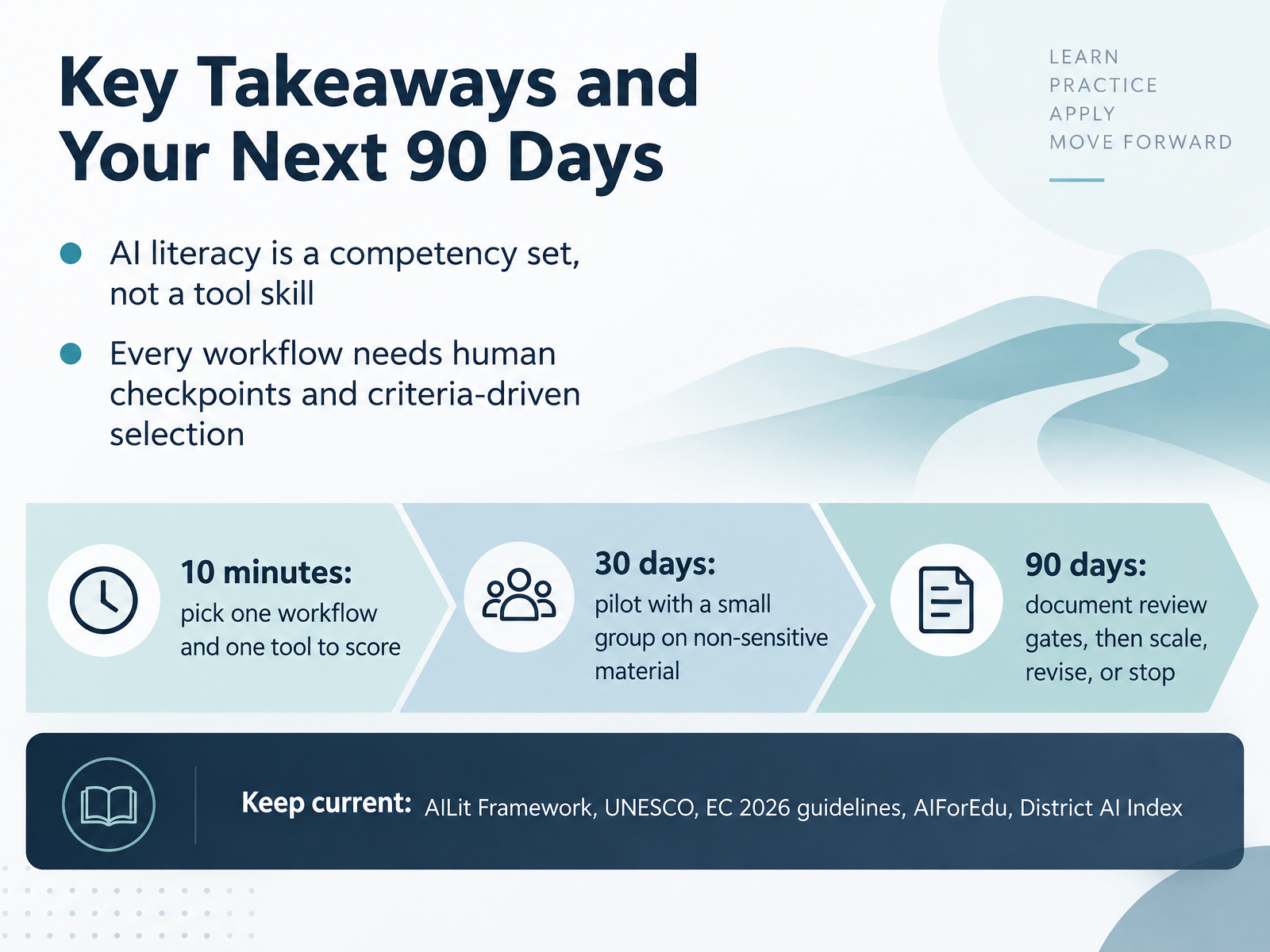
 - 14Key Takeaways and Your Next 90 DaysLet's close with what to carry forward. First, AI literacy is a competency set, not a tool skill, so your programmes should build judgement, not just familiarity with a product. Second, every workflow needs human checkpoints and criteria-driven selection. You are choosing for a reason, and you should be able to say what that reason is. Here is a practical next ninety days. In ten minutes, pick one workflow and one tool, and score it against your criteria. Within thirty days, run a pilot with a small group on non-sensitive material. By ninety days, document your review gates, then decide: scale, revise, or stop. Finally, keep current with the AILit Framework, the UNESCO competency frameworks, the European Commission's 2026 ethical guidelines, AIForEdu, and the District AI Index. Thank you for your attention and your work on this. Start small, document as you go, and let evidence guide your next move.
 oecd.orgoecd.orgailiteracyframework.org2 min
Take the deck with you
Download this course as a file — free, no sign-up needed.
- PDF handoutEvery slide page, ready to print or share.15 pages · 3.0 MBDownload
- Narrated PowerPointThe deck that presents itself — every slide carries the digital human's narration video.15 pages · 26.9 MBDownload
- PowerPoint slidesThe full deck as a .pptx — open it in PowerPoint, Keynote, or Google Slides.15 pages · 2.9 MBDownload
Free to use in your own training — please keep the PersonWise credit page at the end.
Have your own deck? Turn it into a course
Sources consulted
Web sources consulted while building this course.
- AI Tools for Teachers & Educators: The Complete Guide for 2026 | Comparee.ai — comparee.ai
- Best AI Tools for Instructional Designers (2026) — cognitivefuture.ai
- The Best AI Tools for Instructional Design (2026): What I Actually Use | Devlin Peck — devlinpeck.com
- AI Tools for Teachers: An Independent Comparison (2026) — structural-learning.com
- AI Course Creation Tools Comparison 2026 (Best Picks) — aicoursify.com
- AI competency framework for teachers — unesco.org
- Empowering Learners for the Age of AI | OECD — oecd.org
- Empowering Learners for the Age of AI — ailiteracyframework.org
- Empowering Learners for the Age of AI — oecd.org
- Artificial Intelligence (AI) Competencies Framework and AI Literacy Competence Development Model for Educators — teach.coventry.domains
- AI literacy platform RFP checklist for procurement teams — learnwize.ai
- The Best AI Literacy Platforms Compared | Electives — electives.io
- A Checklist for Selecting the Right AI Learning Vendor: Top Selection Criteria — degreed.com
- AI Literacy Tools, Platforms and Templates — aiawareness.ai
- Best e-learning platforms for AI literacy in 2026: which platform fits your organisation | Praxikon — praxikon.com
- Rubric for AI Tool Evaluation – AI in Action: A SUNY FACT2 Guide to Optimizing AI in Higher Education — aiinaction.pressbooks.sunycreate.cloud
- AI Vendor Evaluation Rubric for Schools | AIForEdu — aiforedu.ai
- Evaluating Artificial Intelligence (AI) Tools in an Academic Setting Rubric — asccc.org
- Introducing the Edu-GenAI Rubric: A Theory-Informed Tool for Assessing the Educational Value of Large Language Models and AI Media Generators — mdpi.com
- AI Tool Evaluation Rubric | Artificial Intelligence — niu.edu