Begin
14 pages · ~28 min
Python Data Types Fundamentals
This training teaches Python developers core data types, including integers, floats, strings, lists, tuples, and dictionaries, enabling effective data manipulation and storage in real-world applications.
A digital instructor presents all 14 pages. Hold “Ask” at any point and ask out loud — the answer comes from this course. No sign-up needed.
What you’ll learn
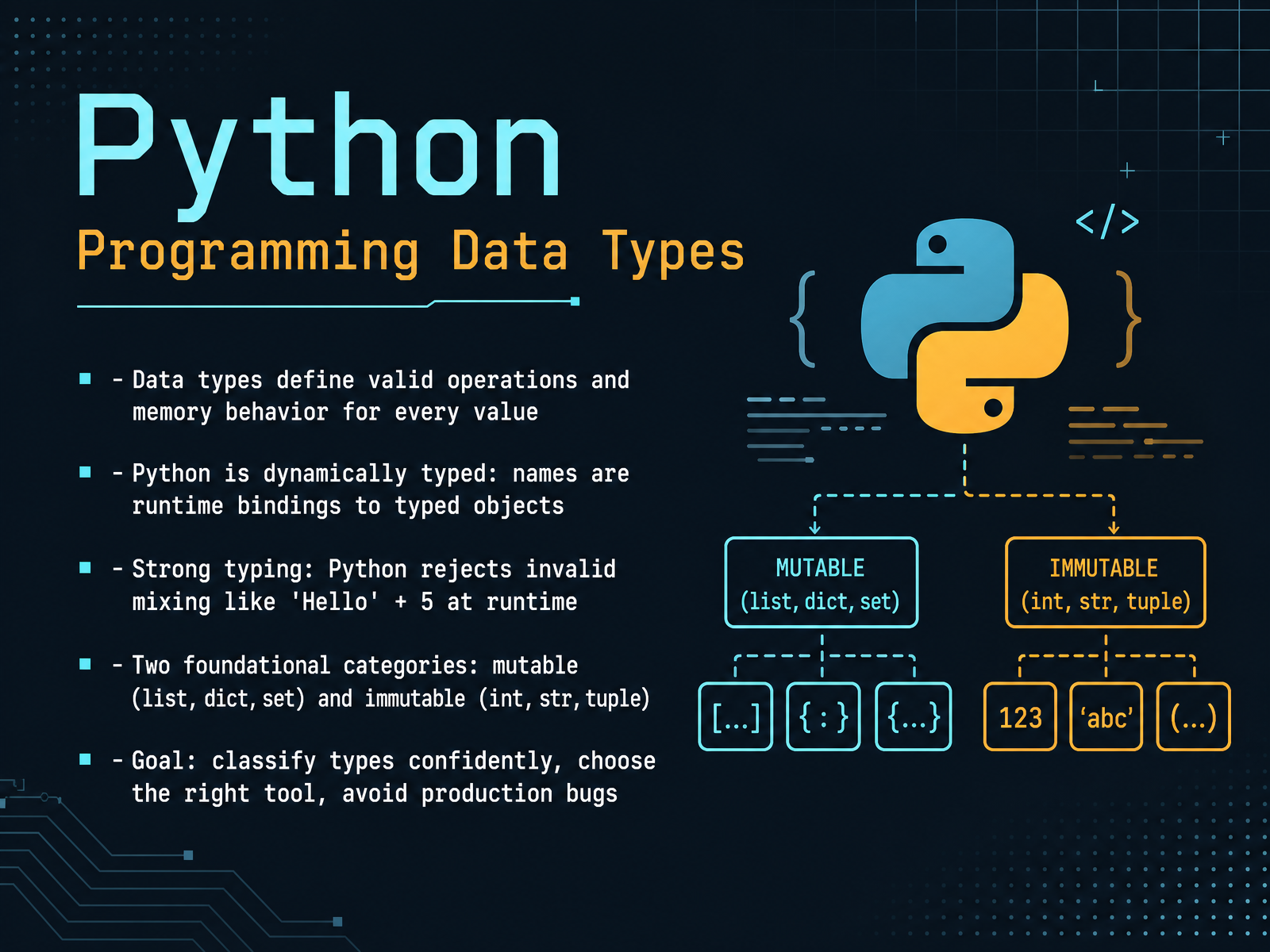
- 01Python Programming Data TypesHello, and welcome. Today we are going to talk about Python data types. Think of data types as the labels every value carries with it, telling Python what it can do and how much memory it needs. One of Python's strengths is that it's dynamically typed. That means you don't declare a type for a name. Instead, a name simply points to an object that knows its own type at runtime. But Python is also strongly typed. It won't quietly mix an integer with a string, so an expression like 'Hello' plus 5 would raise a type error instead of guessing. As we go, we'll focus on two big families: mutable types like lists, dictionaries, and sets, which you can change in place, and immutable types like integers, strings, and tuples, which can't be changed once created. Your goal here is simple: classify types with confidence, choose the right tool for the job, and avoid common production bugs. That foundation will serve you well. Next, we'll look at how Python's type system and type checking actually work.progressiverobot.comtomodahinata.comdocs.python.org+21 min
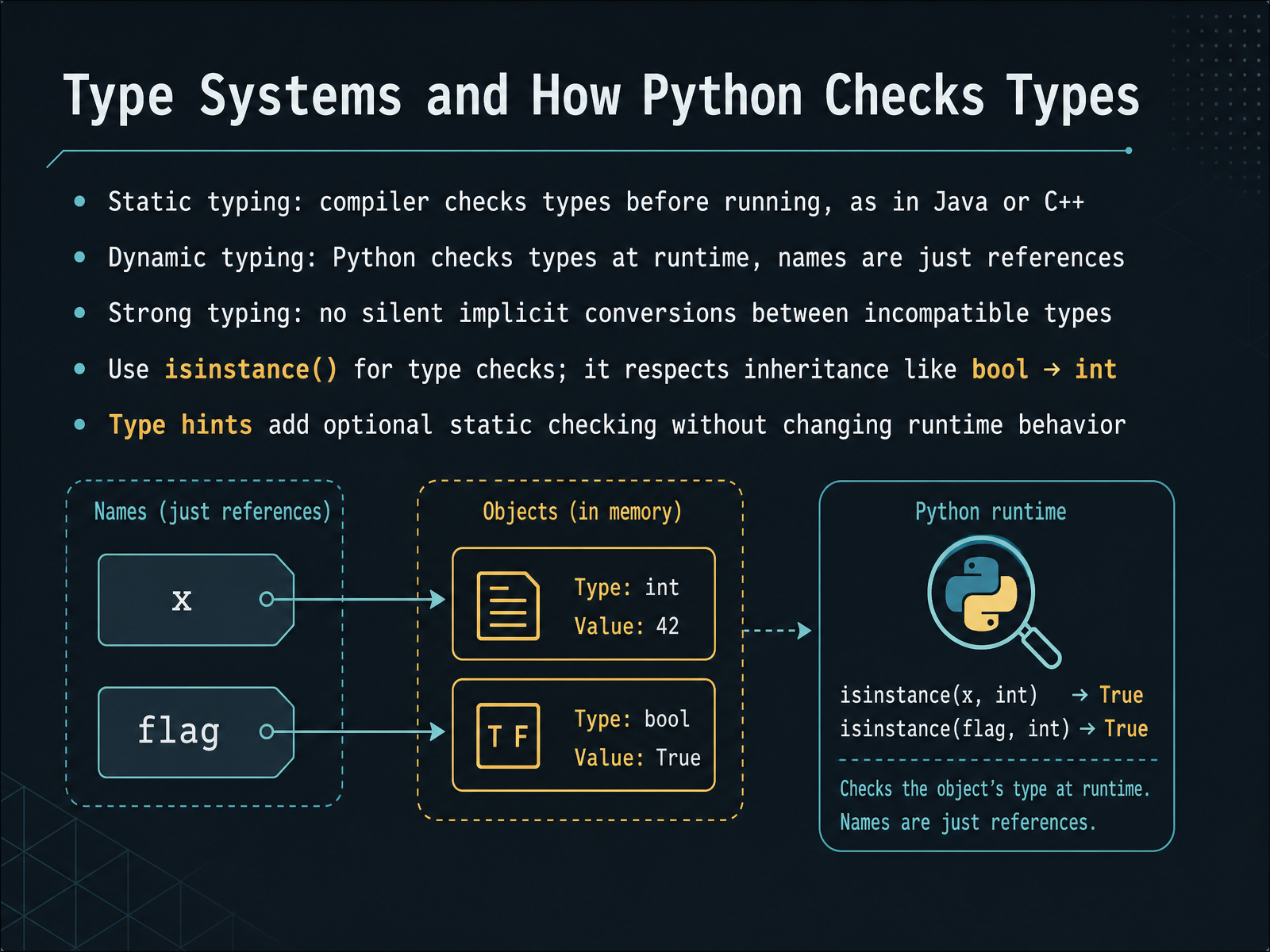
- 02Type Systems and How Python Checks TypesLet's take a closer look at how Python manages types. In languages like Java or C++, the compiler checks types before your program ever runs. That's static typing. Python works differently. It's dynamically typed, meaning it checks types at runtime, as your code executes. A variable name in Python is simply a label, or a reference, that points to an object. That object carries its type, not the name. So you can reassign a name to a string after it held a number, and Python won't complain at that moment. But Python is also strongly typed. It won't silently convert between incompatible types. For example, you cannot add a string and an integer together without explicitly converting one of them. To check a type in your code, you should use the isinstance() function. It's the recommended way because it respects inheritance, like how a boolean is considered an integer. Finally, Python allows you to add type hints to your code. These are optional and don't change how the program runs. They simply let tools, like type checkers, catch potential errors before runtime. Now, let's move on and look at the first major category of types, the numeric types: integers, floats, and complex numbers.
 typing.python.orgwiki.python.orggithub.com+22 min
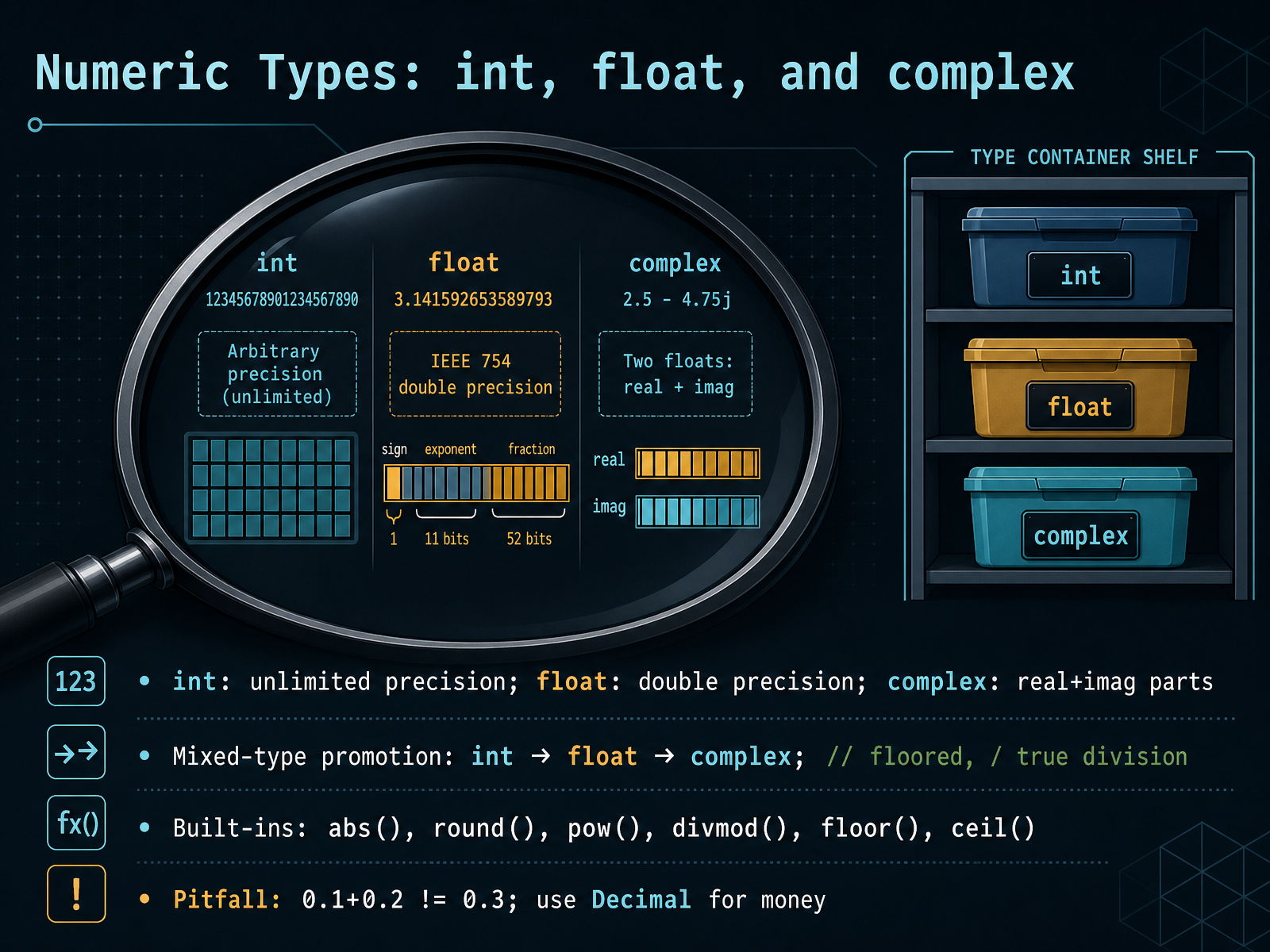
 - 03Numeric Types: int, float, and complexLet’s dig into Python’s three numeric types: int, float, and complex. Integers are whole numbers with unlimited precision, so they only stop when your memory does. Floats are double-precision numbers, which means they follow the hardware your program runs on. Complex numbers pair a real part and an imaginary part, and you can access them with z.real and z.imag. When you mix types, Python promotes upward, from int to float to complex, so you rarely lose data. Just remember that the slash operator gives true division, while double slash floors the result. Handy built-ins include abs, round, pow, and divmod, and for rounding up or down you can reach for math.ceil and math.floor. Now, here’s a classic pitfall. Try adding 0.1 and 0.2 and you’ll get something like 0.30000000000000004. That’s because floats are binary approximations. For precise decimal math, especially with money, use the decimal module instead. So, keep ints for counting, floats for measurement, and complex for scientific work. Next, we’ll look at Booleans and how truthiness shapes your logic.
 docs.python.orgdocs.python.orgdocs.python.org+21 min
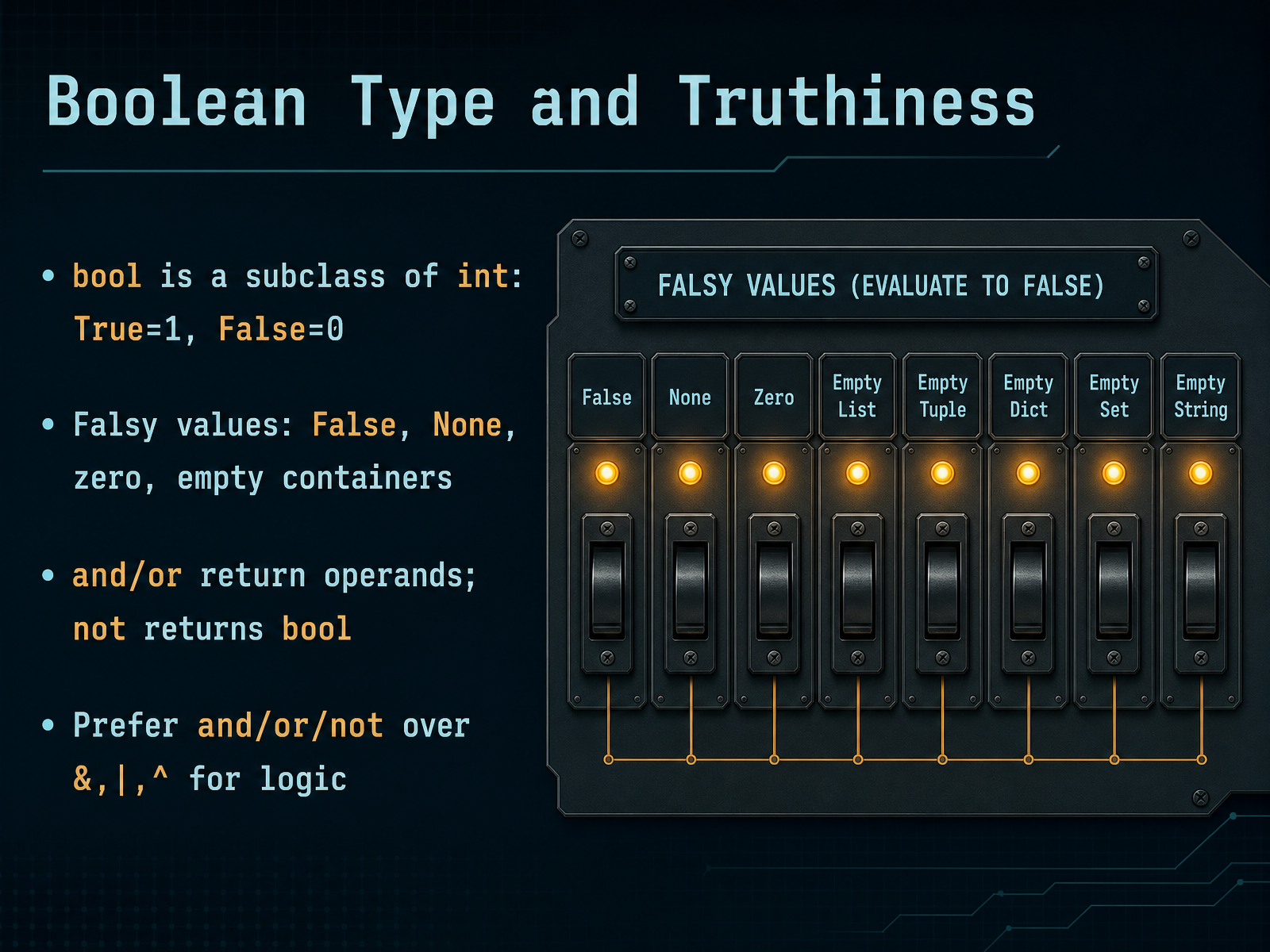
 - 04Boolean Type and TruthinessNow let's talk about booleans, but not just True and False. Truthiness in Python is a much richer concept. Every object can be tested for truth value, whether it's a number, a string, or a complex container. Here's the core idea: by default, an object is true unless it's specifically defined otherwise. The obvious false values are False, None, and numeric zero. But here's the part that surprises many beginners. Empty containers are also false. An empty string, an empty list, an empty dictionary, an empty set, all of them evaluate to False in a boolean context. So when you check if a list has items, writing 'if my_list' works perfectly. Another key point: the 'and' and 'or' operators are not your typical boolean operators. They don't always return True or False. Instead, they return one of their operands. For example, a common pattern is 'name or default_name'. If name is an empty string, it's false, so the expression returns the default. If name has content, it's true, so it returns name itself. This is a clean way to supply fallback values. One more tip: for logical operations, prefer and, or, and not instead of the bitwise operators ampersand, pipe, and caret. They're clearer and safer. So remember, truthiness is about what a value represents in context, not just its type. This understanding will save you from many subtle bugs. Up next, we dive into sequence types: strings, lists, and tuples. These are the workhorses of Python data handling.
 docs.python.orgdocs.python.orgdocs.python.org+22 min
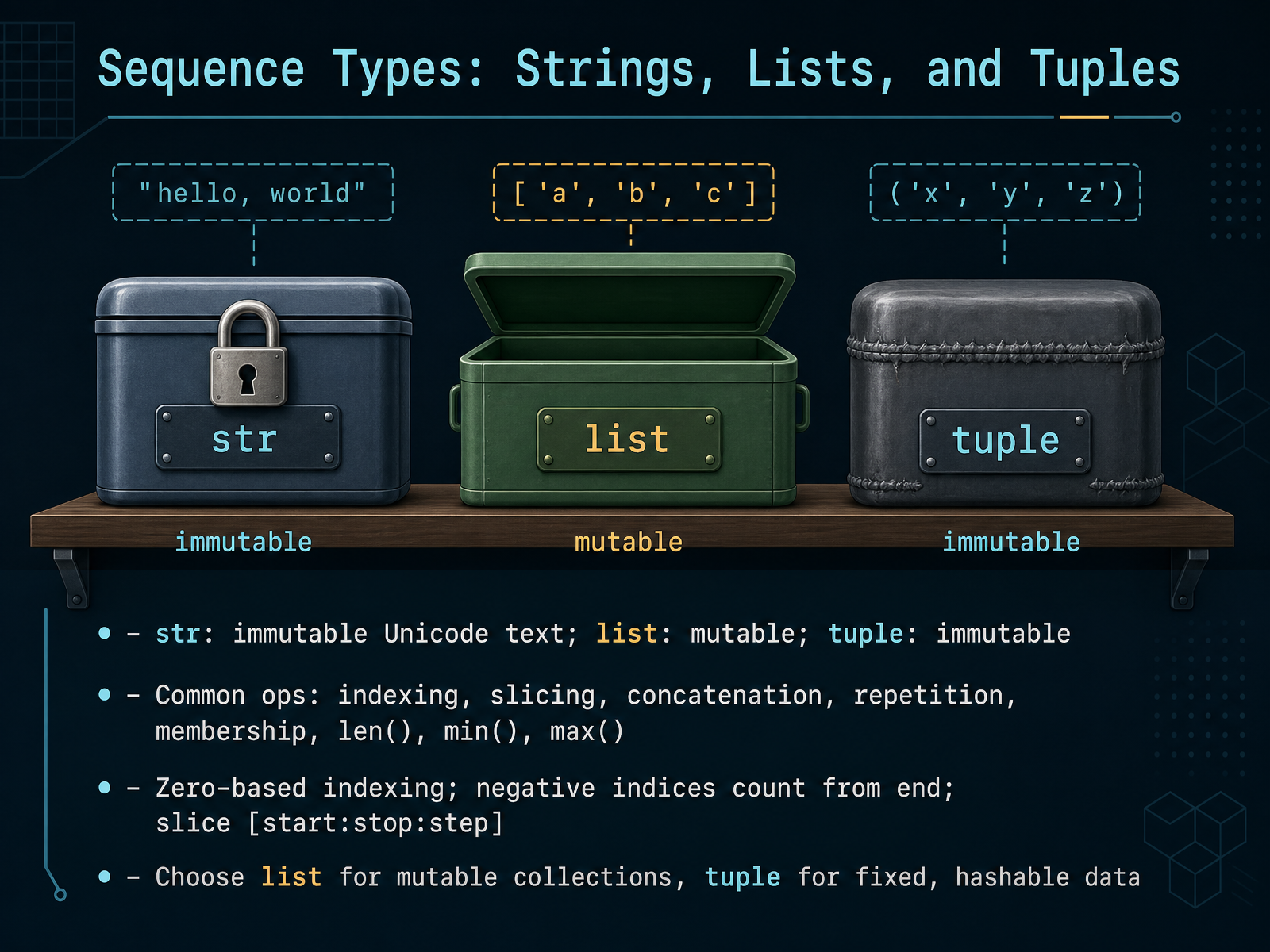
 - 05Sequence Types: Strings, Lists, and TuplesLet’s take a closer look at Python’s three most important sequence types: strings, lists, and tuples. They share a lot in common, but each has its own personality. Strings are immutable—once created, they cannot be changed. Lists are mutable, so you can add, remove, or modify items freely. Tuples are immutable like strings, but they can hold any mix of data types. All three support the same core operations: indexing to grab a single item, slicing to extract a range, concatenation to join sequences, repetition to repeat them, and membership tests with the keyword in. You also have built-in helpers like len, min, and max. Now, indexing is zero-based, meaning the first element sits at position zero. Negative indices count from the end, so minus one gives you the last element. Slicing uses the syntax start, colon, stop, colon, step, where the stop position is exclusive. So how do you choose? Use a list when you need a flexible, changeable collection. Use a tuple when the data is fixed and you want to protect it, or when you need a hashable value for dictionary keys. That distinction will guide you in many real-world decisions. Next, we’ll see how to work with strings in practice.
 docs.python.orgrealpython.comdocs.python.org2 min
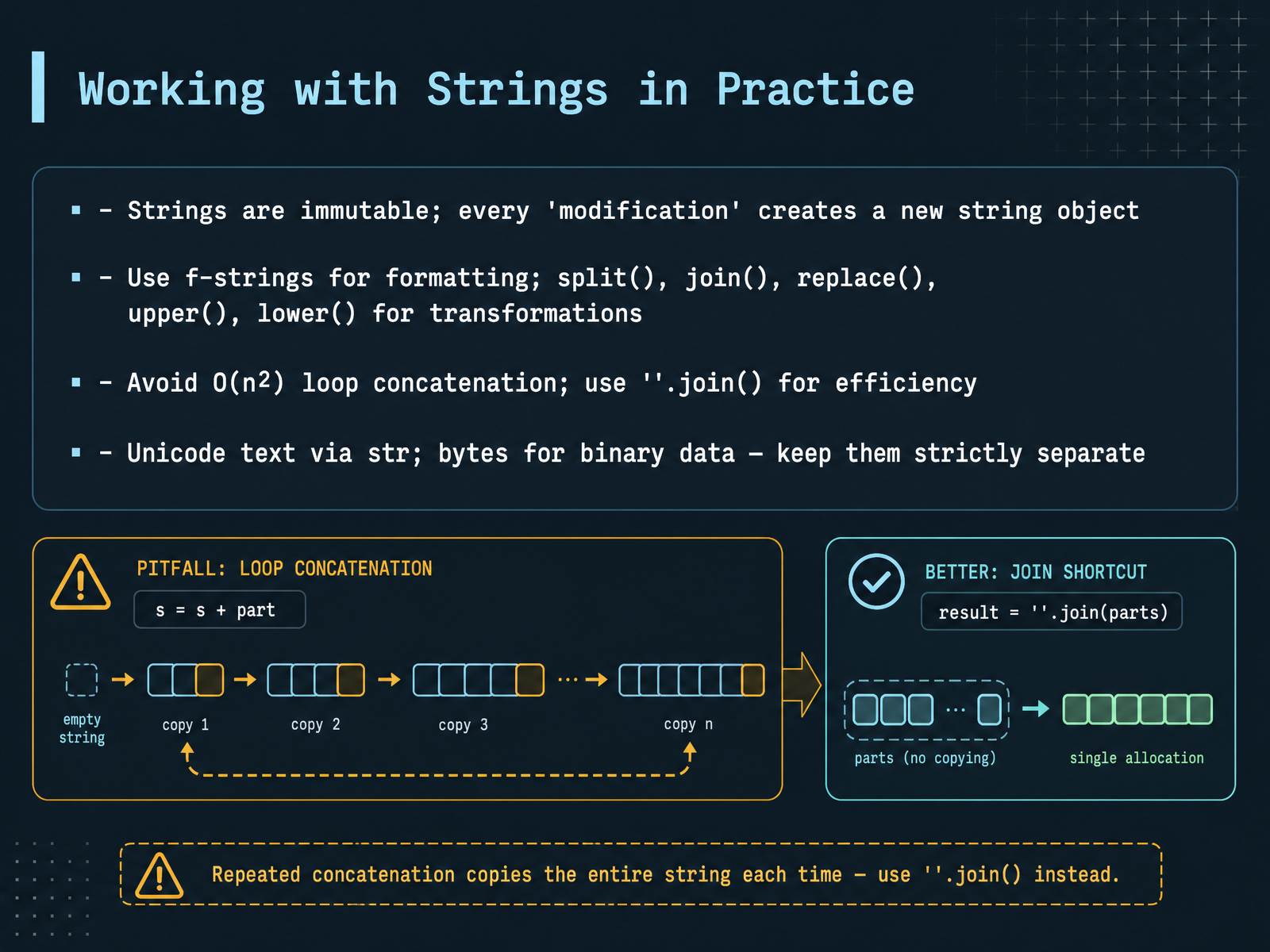
 - 06Working with Strings in PracticeLet's put strings to work in practice. First, remember that strings are immutable. When you modify a string, Python doesn't change the original. It creates a brand new one. So think of it like writing in pencil on paper — you can't erase, you just start a new sheet. For everyday text work, use f-strings for clean formatting. They let you drop variables right into your text. And methods like split, join, replace, upper, and lower make transformations simple and readable. Now, a common performance trap: building strings in a loop with the plus operator. That's slow. Each step creates a new object. Instead, collect the parts in a list and use join to combine them in one pass. Finally, keep text and binary data separate. Strings handle Unicode text. Bytes handle raw binary data, like files or network packets. Mixing them causes confusing errors, so choose the right type for the job. That's the practical side of strings. Now let's move on to another essential data structure: mapping types, specifically dictionaries.
 docs.python.orgrealpython.comdocs.python.org+21 min
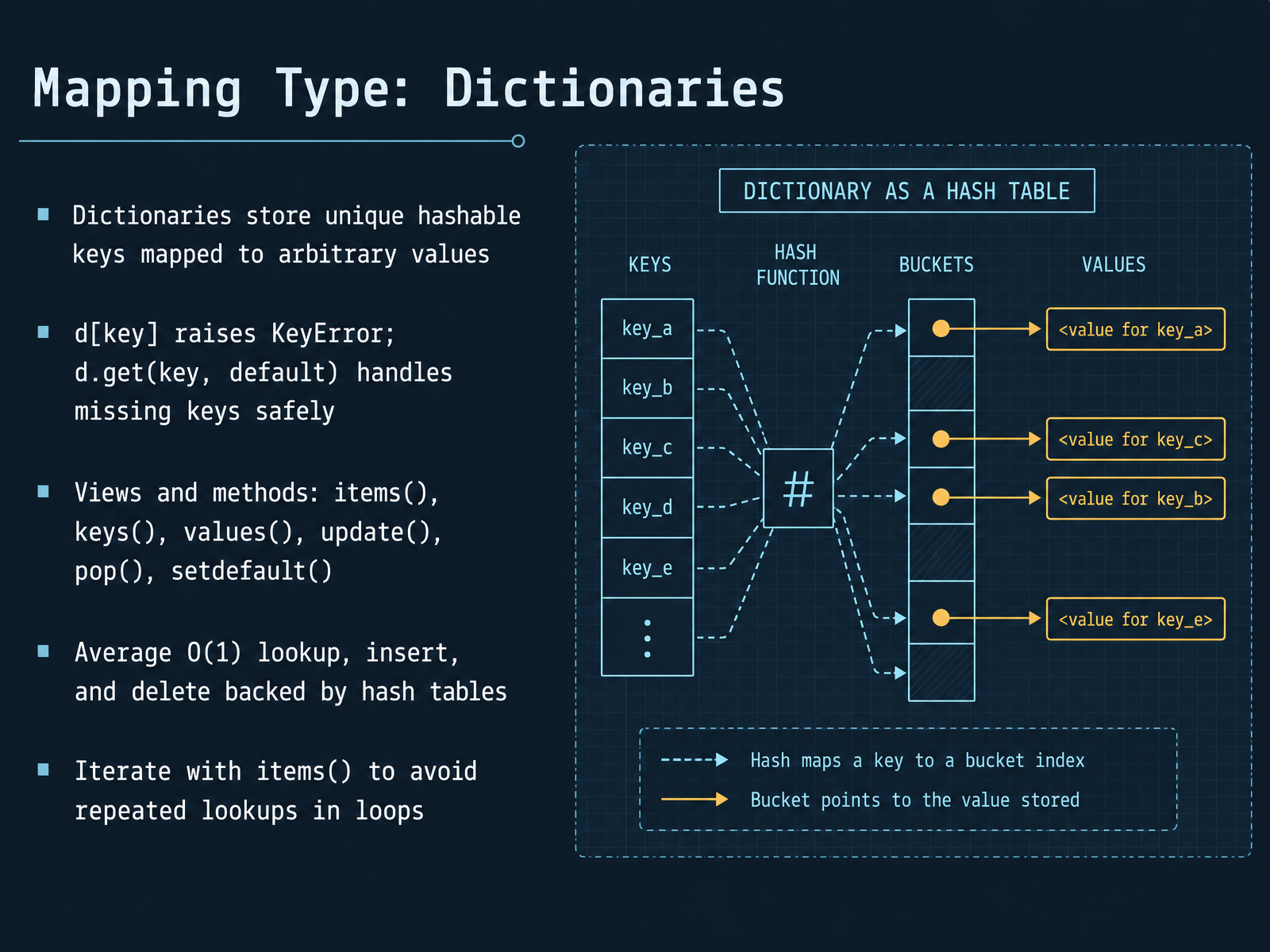
 - 07Mapping Type: DictionariesNow let’s look at one of the most powerful tools in Python: dictionaries. Think of a dictionary as a smart phone book. You look up a name, and instantly get the number. No searching line by line. That is the magic of the hash table behind it. Most operations, like lookup, insert, and delete, work in constant time on average. That means even with a million entries, the speed stays flat. But remember, direct access with square brackets raises an error if the key is missing. Use the get method instead when the key might not exist. It safely returns a default value. For example, user.get("email", "no email on file"). For loops, use the items method to get both keys and values in one pass. This avoids repeated lookups and is much cleaner. You can also update, pop, and set default values right on the spot. Dictionaries are everywhere in Python, from configuration files to API responses. Choose the right method for the context, and your code will be both fast and readable. Next, we’ll explore some efficient dictionary patterns you can use right away.
 2 min
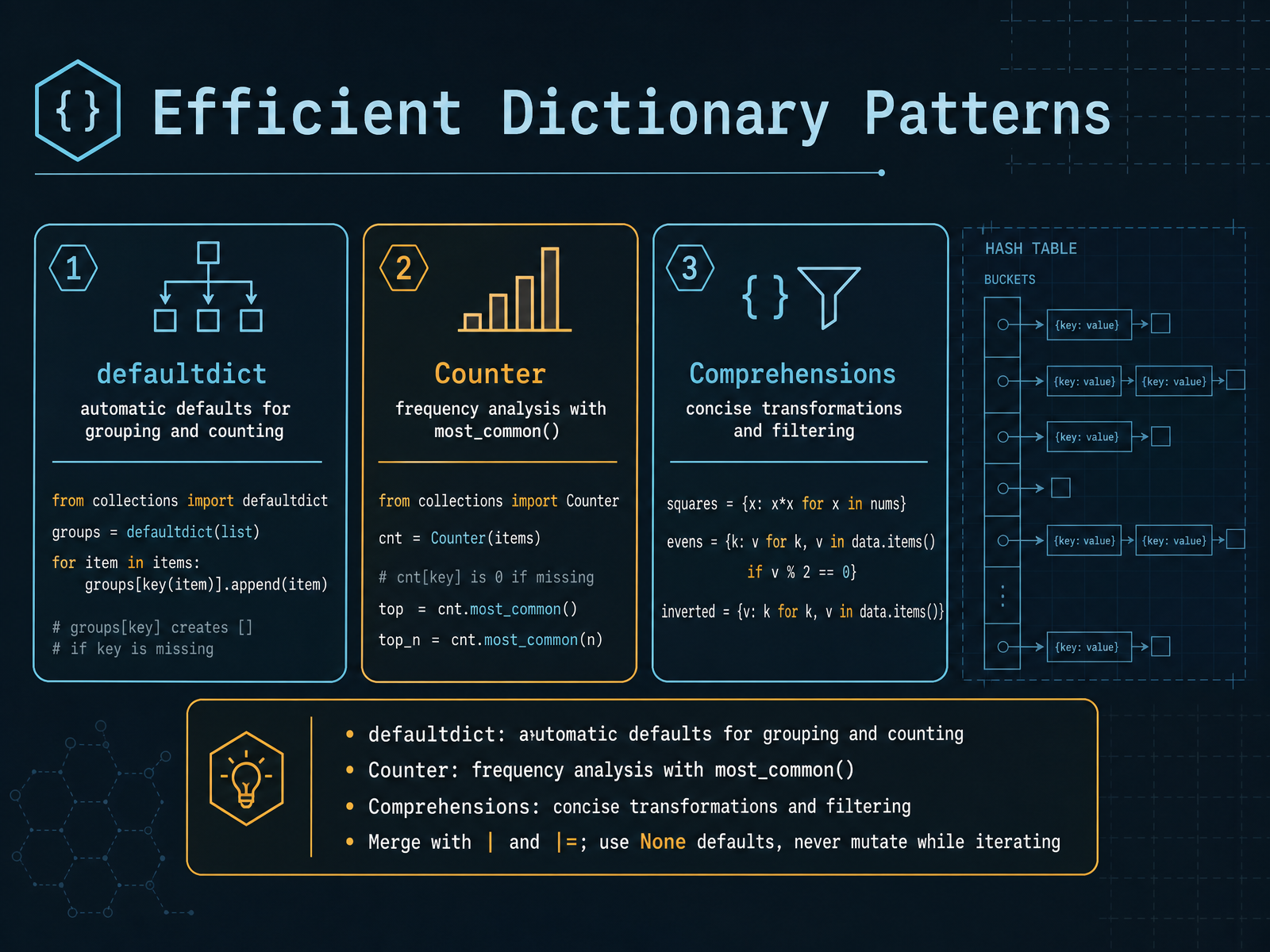
2 min - 08Efficient Dictionary PatternsNow let's look at efficient dictionary patterns. This is where really practical code starts to come together. The first tool is defaultdict from the collections module. When you're grouping or counting, it removes the need for those manual existence checks. Instead of writing if key in dict before every update, defaultdict automatically creates a default value, like a list for grouping or zero for counting. The result is cleaner code that focuses on intent. Then there's Counter, also from collections. It's purpose-built for frequency analysis. With one call to most_common, you get the top items directly, without writing your own counting logic. Both tools are not just less typing; they also have better performance for hot loops. Now for comprehensions. When you need to transform or filter a dictionary, comprehension is usually the clearest path. It creates the new structure in one pass, which is often faster than building it with a loop. For merging, use the pipe operator. That's cleaner than update in many cases. And remember two important rules: use None as mutable defaults, and never mutate the dictionary while you are iterating over it. Instead, iterate over a snapshot. These patterns take practice, but they make your code shorter and more maintainable. Next, we'll look at Set Types, specifically Sets and Frozensets.
 2 min
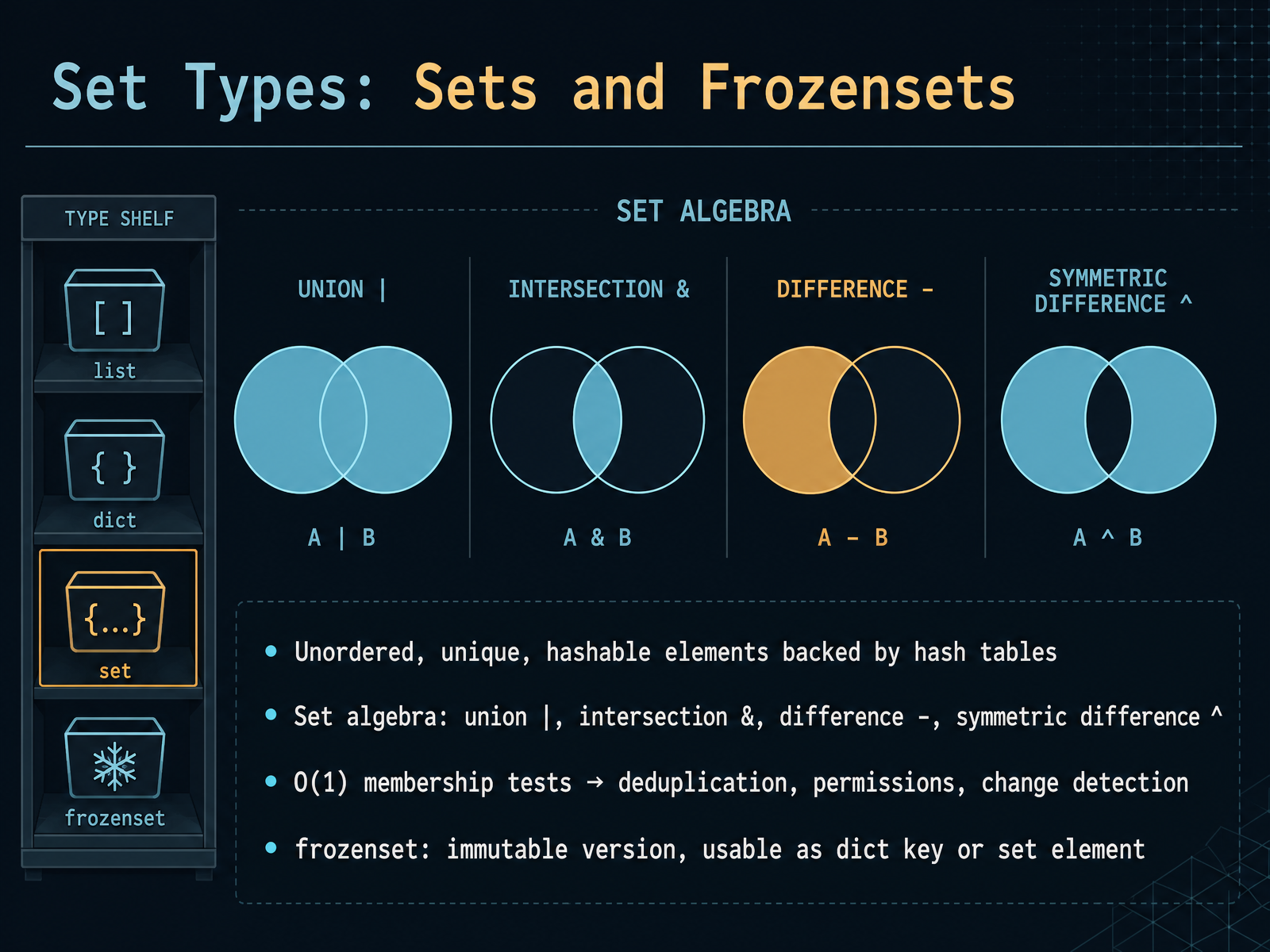
2 min - 09Set Types: Sets and FrozensetsNow let's talk about sets and their immutable counterpart, frozenset. A set is an unordered collection of unique, hashable elements. Think of it as a bag of distinct items where the order doesn't matter, and duplicates simply disappear. Under the hood, sets use hash tables, so membership tests are incredibly fast—constant time, in fact. That means checking whether an item is in a set is just as quick no matter how many items the set holds. This makes sets ideal for deduplication, permission checks, and change detection. For example, if you have a list with repeated names, converting it to a set instantly gives you the unique ones. Sets also support the classic set algebra: union with the pipe character, intersection with the ampersand, difference with the minus sign, and symmetric difference with the caret. These operations let you answer questions like, what do these two collections have in common, or what's new in this snapshot compared to the last one. Now, a frozenset is simply an immutable set. Once created, it cannot be changed. Because it's immutable, it's hashable, which means you can use it as a dictionary key or even as an element inside another set. Regular sets can't do that. So if you need a set that must stay constant, or you need to nest sets, reach for frozenset. In practice, remember this: use a set when you need fast membership checks and uniqueness, and use a frozenset when you need those same benefits but also need the value to be fixed, like a configuration constant. Next, we'll look at NoneType and how Python represents the absence of a value.
 2 min
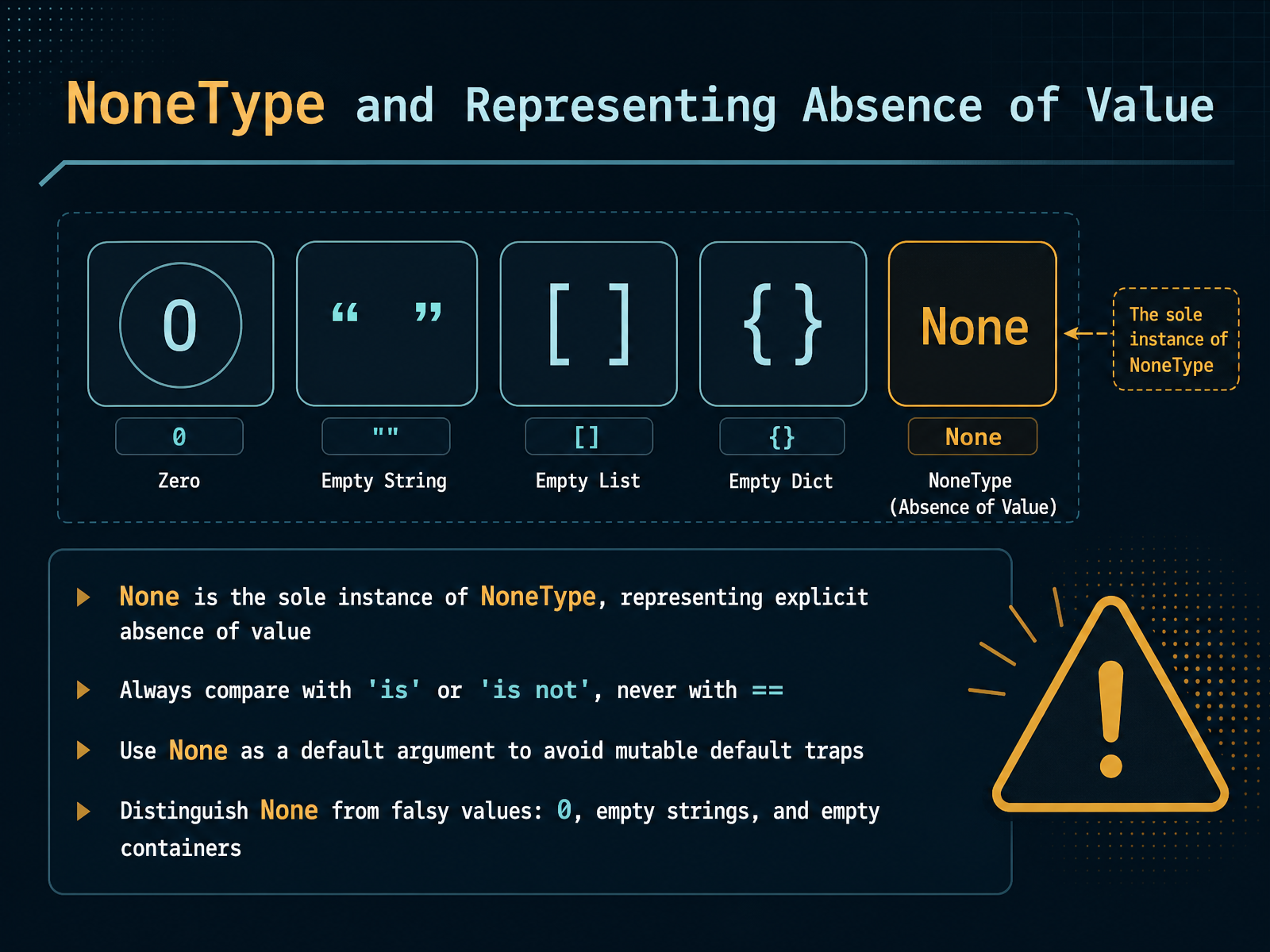
2 min - 10NoneType and Representing Absence of ValueNow let's talk about a special value in Python: None. None represents the explicit absence of a value, and it is the only instance of its type, NoneType. Think of it as Python's way of saying 'nothing is here, and that is intentional.' There is one key rule to remember: always compare None using 'is' or 'is not', never with the equality operator. This is because 'is' checks identity, while double equals checks equivalence, and for None, identity is the correct comparison. Next, using None as a default argument is a widely recommended practice. It protects you from the infamous mutable default trap, where a list or dictionary shared across function calls causes unexpected behavior. None is a safe starting point, and you can create a fresh container inside the function when needed. Now, a common point of confusion: None is not the same as falsy values like zero, empty strings, or empty lists. All those are meaningful false values. None specifically means no value at all. When you need to distinguish between them, test explicitly. Once you get comfortable with None, you will write clearer and safer code. Next, we will explore how Python handles changeable data with mutability and immutability.
 1 min
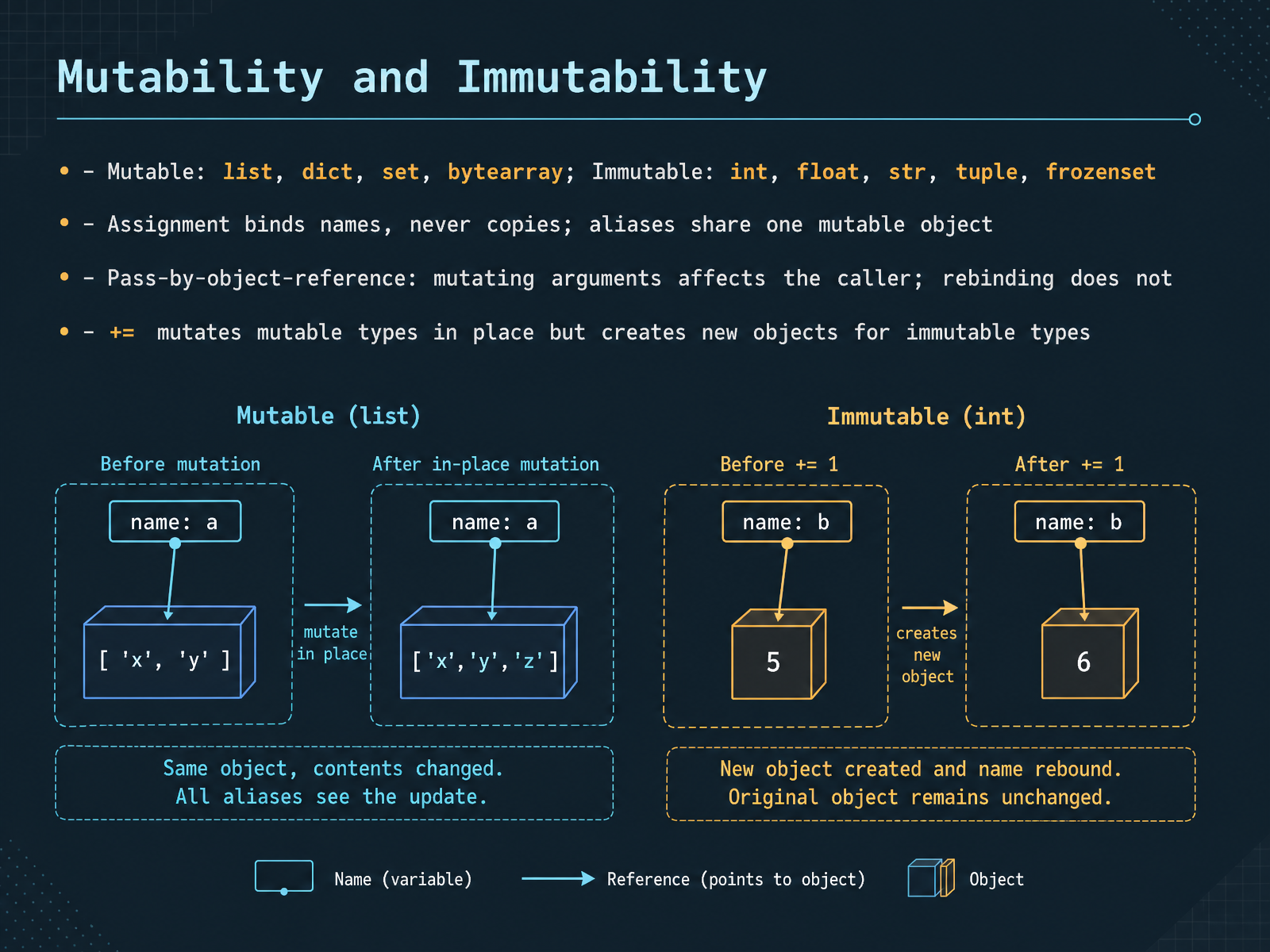
1 min - 11Mutability and ImmutabilityNow, let's talk about one of the most important concepts in Python: mutability. An object is mutable if its contents can change after creation. Lists, dictionaries, sets, and byte arrays are mutable. In contrast, immutable objects cannot be changed once they are created. Integers, floats, strings, tuples, and frozensets fall into this category. Here is the key idea. When you assign a variable, you are binding a name to an object, not copying the object itself. If two names bind to the same mutable list, and you change the list through one name, the other name will see that change. They are aliases to the same object. The same principle applies when passing arguments to functions. Python is pass-by-object-reference. If you mutate a mutable argument inside a function, the caller sees the change. But if you rebind the parameter to a new object, the original is untouched. Keep in mind that the plus-equals operator behaves differently. For a list, plus-equals performs an in-place mutation. For an integer, it creates a new object and rebinds the name. It looks like the same operation, but the mechanism is entirely different. A quick summary. Mutable types support in-place changes; immutable types require creating new objects. Understanding these distinctions is the key to avoiding subtle bugs. Next, we will look at object identity, copying, and common pitfalls.
 tomodahinata.com2 min
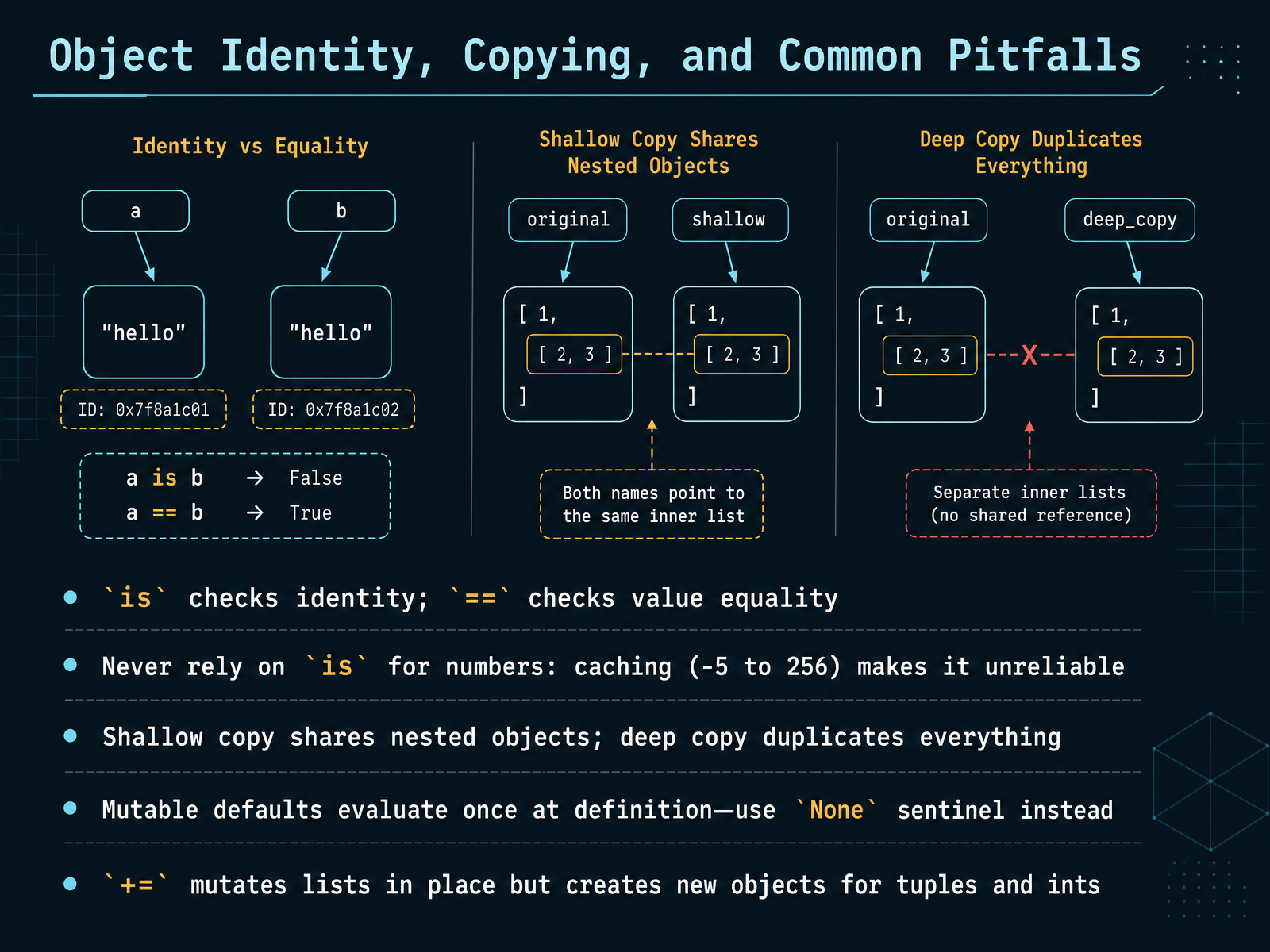
 - 12Object Identity, Copying, and Common PitfallsLet’s talk about one of the most common sources of confusion in Python: object identity, copying, and those subtle pitfalls that trip up even experienced developers. First, remember that `is` checks whether two names point to the exact same object in memory, while `==` checks whether their values are equal. For numbers, never rely on `is`, because Python caches small integers from negative five to two hundred fifty-six. That means `a is b` might be true for two hundred, but false for one thousand. Always use `==` for value comparison. Now, copying. A shallow copy creates a new container but shares the nested objects inside it. If you need everything duplicated, use a deep copy. Then there’s the classic mutable default argument trap. Defaults are evaluated once at function definition, not on each call, so a list default gets shared and mutated across calls. The fix is simple: use `None` as a sentinel and create a fresh list inside the function. Finally, the `+=` operator. For lists, it mutates in place. For tuples and integers, it creates a new object and rebinds the name. Understanding these pitfalls will save you from some very sneaky bugs. Next, we’ll look at type conversion and practical strategies to write cleaner, safer code.
 tomodahinata.com2 min
 - 13Type Conversion and Practical StrategiesLet's talk about type conversion with practical strategies. You've seen implicit and explicit conversion before. Python will safely promote an integer to a float automatically, but for everything else, you take control with int(), float(), and str(). Here's the key mindset: treat conversion as validation. When data comes from outside your program, like user input or a file, don't trust it. Convert at the boundary, as close to the source as possible, and fail early. Wrap external input in a try and except block. Never assume what a user types is valid, because it rarely is. Also, remember that int() truncates. It chops off the decimal part. If you need proper rounding, use round() instead. And be careful with the isdigit() method. It fails on negatives and decimals. So prefer a try and except approach for numeric checks. As a summary, convert early, convert explicitly, and treat every conversion as a moment to validate your data. Next, we'll look at choosing the right data type and avoiding production bugs.
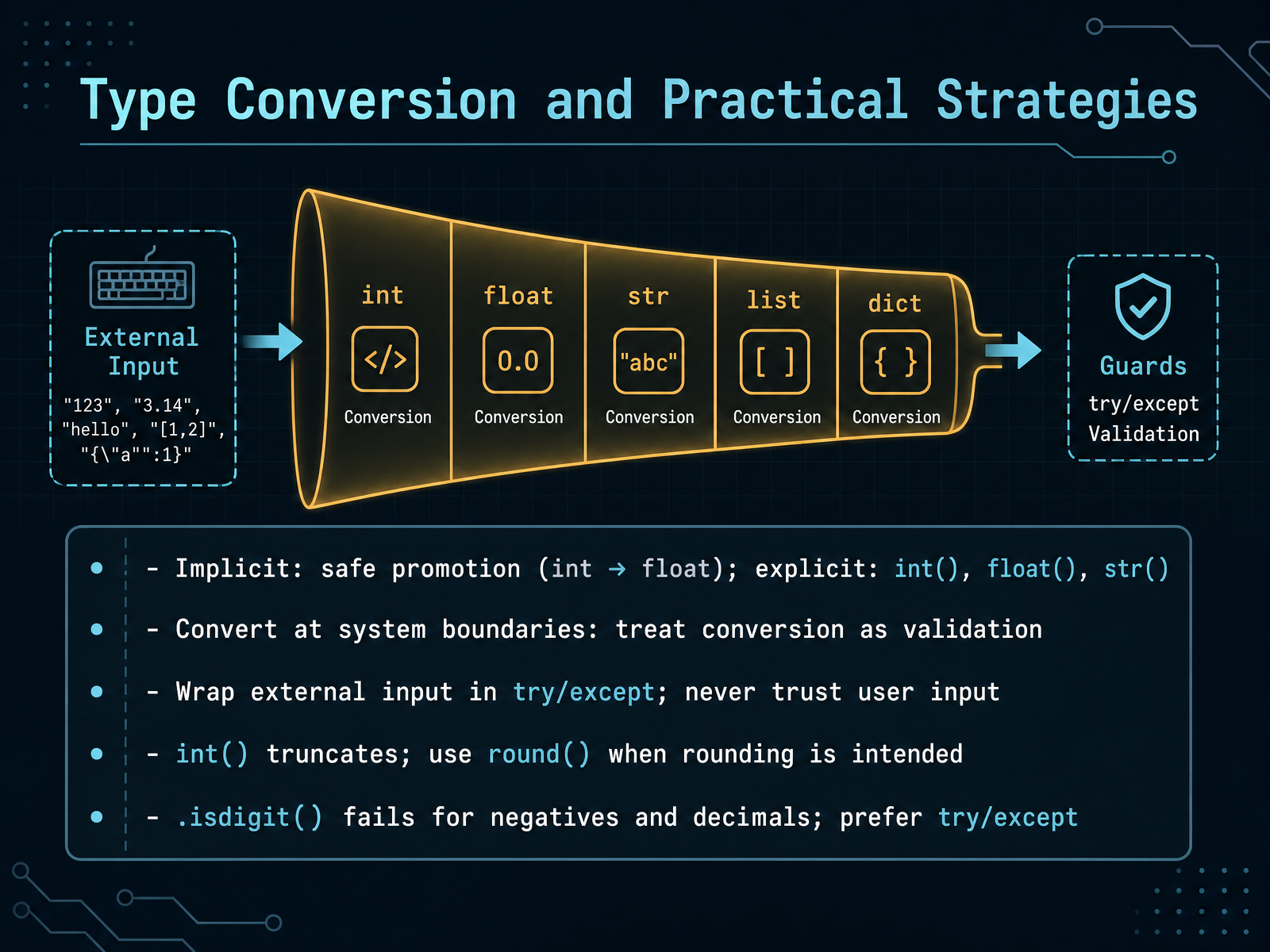 1 min
1 min - 14Choosing the Right Data Type and Avoiding Production BugsAs we wrap up this course, let's bring everything together around one central idea: choosing the right data type is a design decision. Think of it as a set of constraints that guide your code toward correctness. Use a list when you need ordered, changeable data. Use a tuple for something unchanging. Reach for a dictionary when you need fast lookups by key, a set for uniqueness, and a frozenset when you need an immutable set that can serve as a dictionary key. These choices shape how your code behaves. But type selection alone isn't enough. In modern production Python, type hints are effectively mandatory. Tools like mypy or pyright act as safety nets, catching bugs before your code ever runs. Finally, remember the system boundary. Data from outside—API responses, user input, files—must be validated at runtime. Tools like Pydantic help make invalid states unrepresentable. You've built a strong foundation. Thank you for learning with me. Now go write code that is clear, safe, and a joy to maintain.
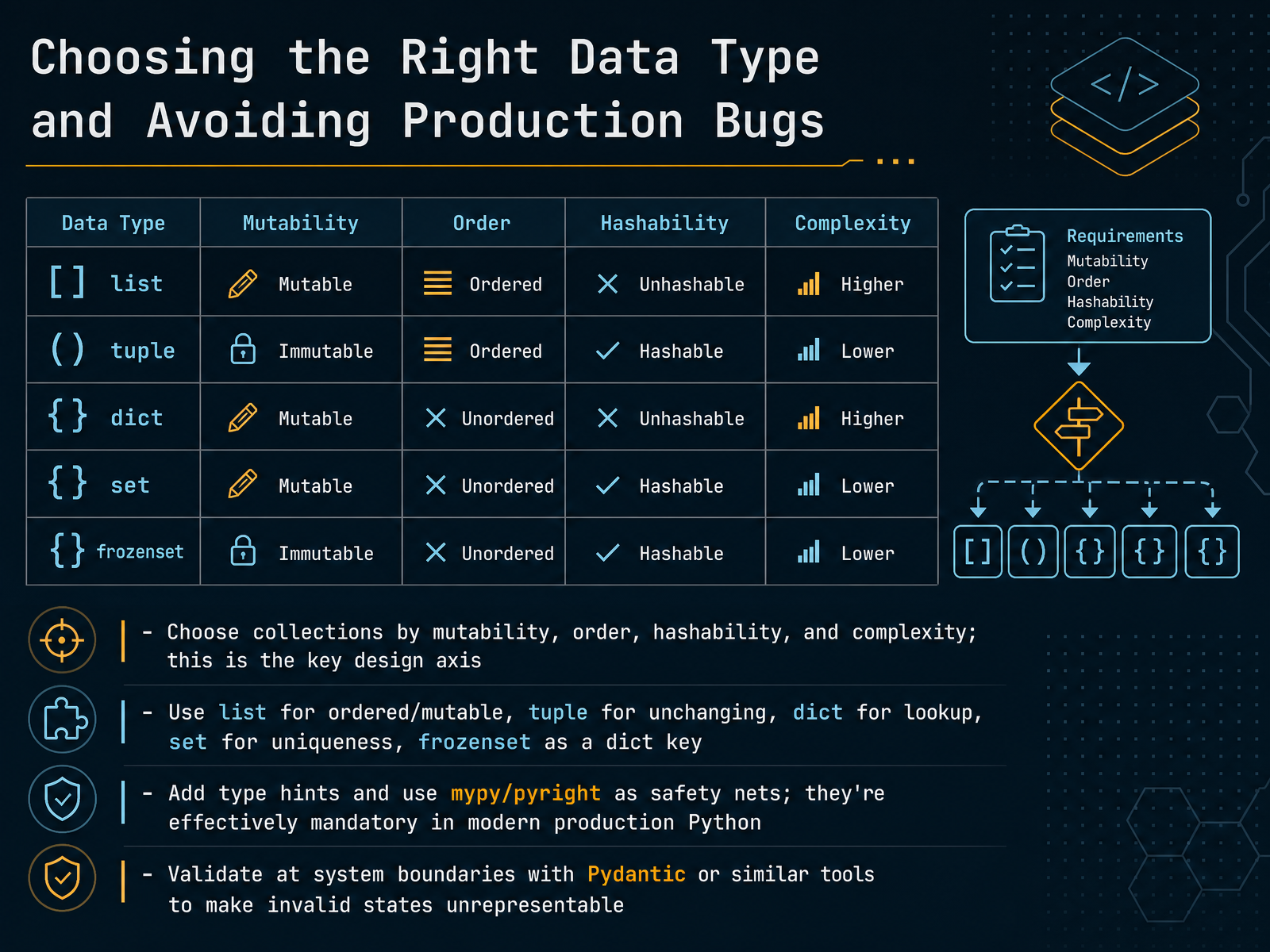 progressiverobot.comtomodahinata.comdocs.python.org+22 min
Take the deck with you
Download this course as a file — free, no sign-up needed.
- PDF handoutEvery slide page, ready to print or share.15 pages · 3.5 MBDownload
- Narrated PowerPointThe deck that presents itself — every slide carries the digital human's narration video.15 pages · 16.0 MBDownload
- PowerPoint slidesThe full deck as a .pptx — open it in PowerPoint, Keynote, or Google Slides.15 pages · 3.4 MBDownload
Free to use in your own training — please keep the PersonWise credit page at the end.
Have your own deck? Turn it into a course
Sources consulted
Web sources consulted while building this course.
- Data Types in Python 3: Understanding Data Types in Pyt - Progressive Robot — progressiverobot.com
- Python Data Types Complete Guide: The 'Right Use' of Numbers, Strings, and Collections, and Designs That Don't Break in Production | Tomoda Hinata — SaaS/DX — tomodahinata.com
- Data Types — Python 3.14.6 documentation — docs.python.org
- Python Data Types - GeeksforGeeks — geeksforgeeks.org
- Python Data Types: Complete Guide With Examples & Use Cases - Codingzap — codingzap.com
- Type system concepts — typing documentation — typing.python.org
- Why is Python a dynamic language and also a strongly typed language — wiki.python.org
- docs/spec/concepts.rst — github.com
- Why Python Is Called Dynamically Typed (and What That Really Means in Real Code) – TheLinuxCode — thelinuxcode.com
- What is Dynamic Typing in Python? All You Need To Know — guvi.in
- 3. Data model — Python 3.14.5 documentation — docs.python.org
- Built-in Types — Python 3.14.7 documentation — docs.python.org
- numbers — Numeric abstract base classes — Python 3.14.6 documentation — docs.python.org
- Python Numbers - W3Schools — w3schools.com
- Built-in Functions — Python 3.14.6 documentation — docs.python.org
- 6. Expressions — Python 3.14.6 documentation — docs.python.org
- Built-in Types — Python 3.11.15 documentation — docs.python.org
- 6. Expressions — Python 3.11.15 documentation — docs.python.org
- Python Sequences: A Comprehensive Guide – Real Python — realpython.com
- 5. Data Structures — Python 3.14.7 documentation — docs.python.org