Begin
14 pages · ~28 min
CAD Engineering Software Selection & Workflow
This training helps engineering teams select CAD software, define requirements, and build efficient workflows. Ideal for engineers and CAD managers.
A digital instructor presents all 14 pages. Hold “Ask” at any point and ask out loud — the answer comes from this course. No sign-up needed.
What you’ll learn
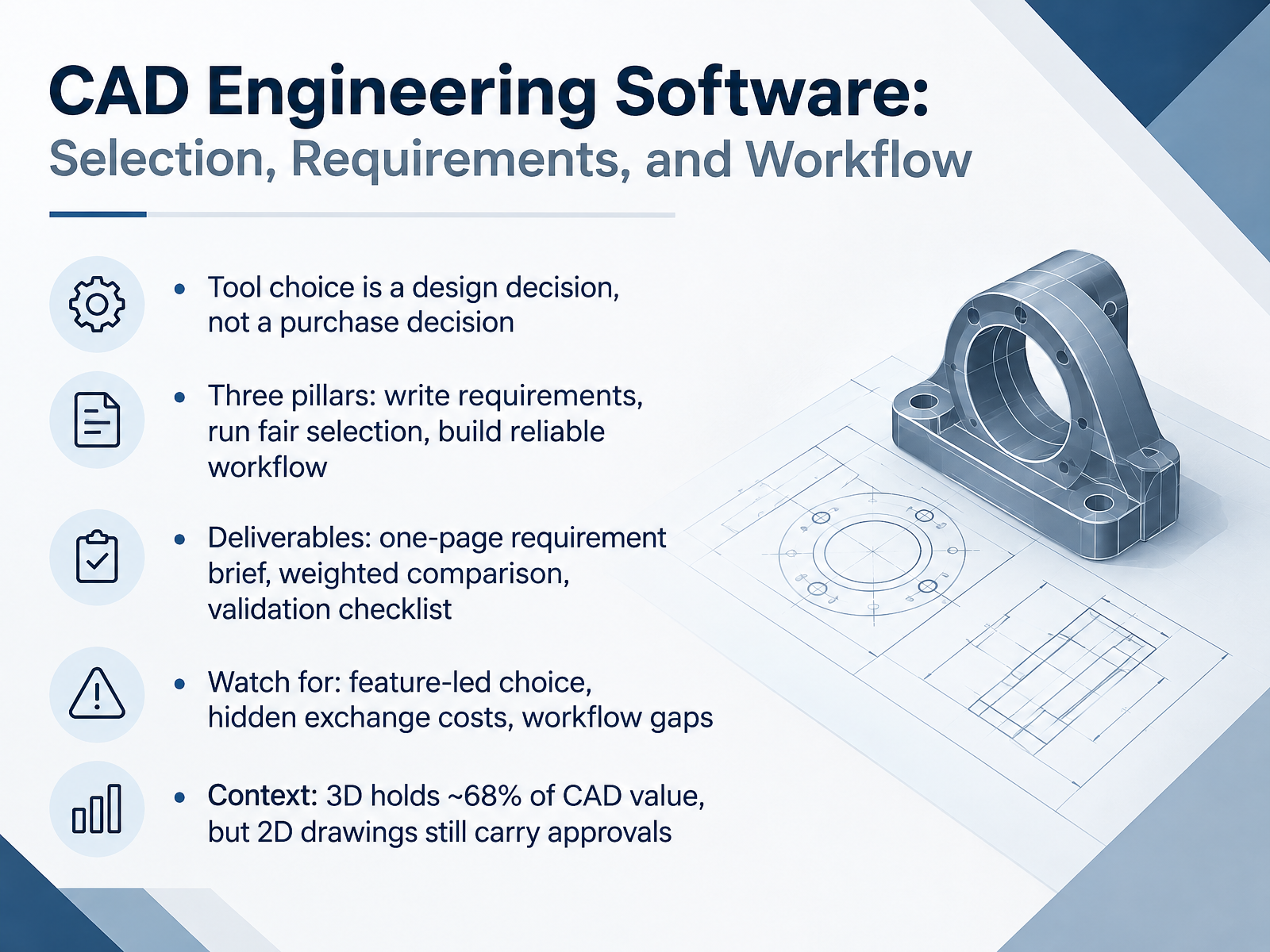
- 01CAD Engineering Software: Selection, Requirements, and WorkflowWelcome. In this course, you will learn how to choose CAD engineering software as a design decision, not a purchase decision. Our goal is practical. By the end, you will write requirements, run a fair selection, and build a workflow you can trust. Three pillars guide us. First, write requirements before you compare tools. Second, run a selection that weighs criteria fairly. Third, build a reliable workflow around file exchange and approvals. Your deliverables are concrete. A one-page requirement brief, a weighted comparison table, and a validation checklist you can test on a real part. Watch for three common traps. Feature-led choice, where a long feature list replaces your actual needs. Hidden exchange costs, such as lost dimensions when a STEP file reopens. And workflow gaps, where drafting, modeling, and approval steps do not connect. Context matters. Three-dimensional software holds about sixty-eight percent of CAD market value. Yet two-dimensional drawings still carry approvals in most shops and on most coursework submissions. So the question is never which tool is best. It is which tool fits your requirements, your exchange formats, and your review process. Next, we look at the 2026 CAD landscape, including categories and pricing anchors.researchandmarkets.comcambashi.comyano.co.jp+22 min
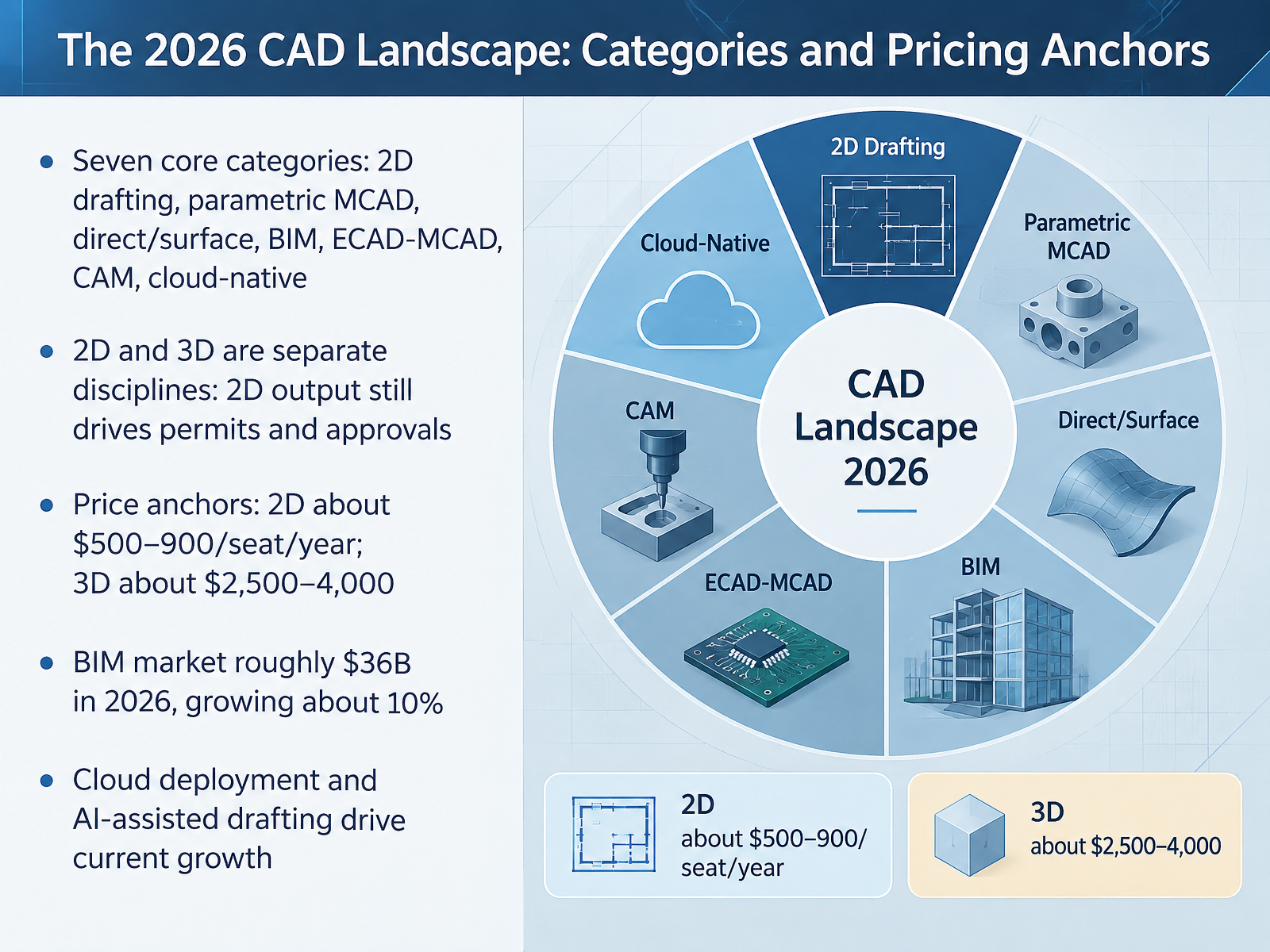
- 02The 2026 CAD Landscape: Categories and Pricing AnchorsNow let's map the landscape. Seven core categories cover most of what you'll meet: 2D drafting, parametric mechanical CAD, direct and surface modeling, BIM, ECAD-MCAD, CAM, and cloud-native tools. Treat 2D and 3D as separate disciplines. 2D is not a legacy step, because permit sets and approvals still run on drawings. Pricing follows that split. 2D averages about five hundred to nine hundred dollars per seat per year. 3D runs about twenty-five hundred to four thousand. BIM is roughly a thirty-six billion dollar market in 2026, growing about ten percent. Cloud deployment and AI-assisted drafting are driving current growth. Next, we'll look at matching tool category to deliverable.
 researchandmarkets.comcambashi.comyano.co.jp+21 min
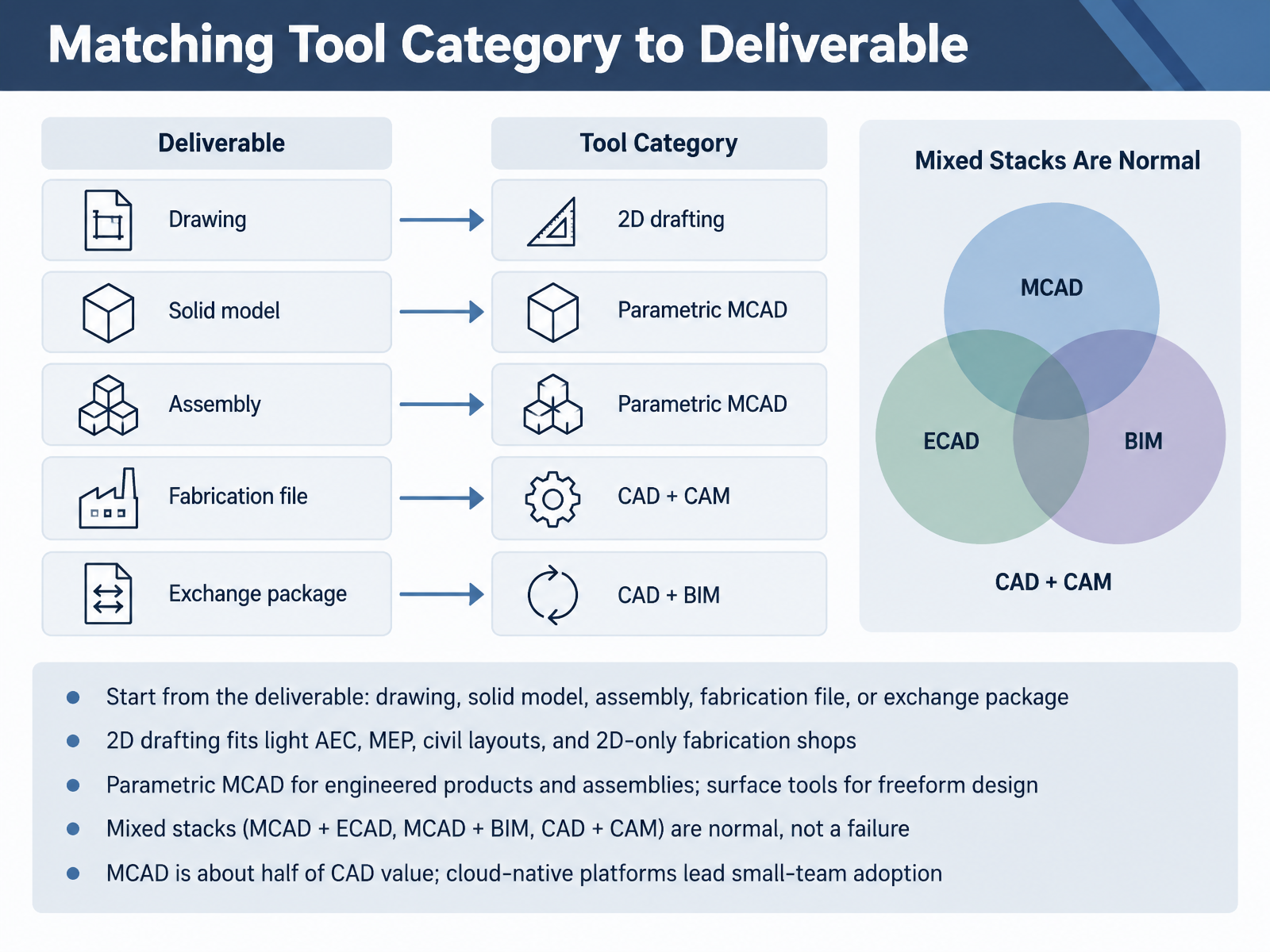
 - 03Matching Tool Category to DeliverableNext, let's match tool category to what you actually have to deliver. Start from the deliverable itself: a drawing, a solid model, an assembly, a fabrication file, or an exchange package. That choice does more to narrow the field than any feature list. For 2D drafting, use it for light AEC, basic MEP, civil site layouts, and 2D-only fabrication shops. Those teams work from lines, dimensions, and annotations, and often never open a 3D model. For engineered products and assemblies, go parametric MCAD, where dimensions and constraints drive the model. For freeform shapes, use surface tools instead. Mixed stacks are normal, not a failure. Mechanical CAD plus electrical CAD, mechanical CAD plus building information modeling, or CAD plus CAM all show up on real projects. And keep the market in perspective: mechanical CAD is about half of CAD value, while cloud-native platforms lead adoption among small teams. Pick the category that matches your deliverable first, then compare tools inside it. Now let's go deeper into core concepts: parametric modeling, assemblies, and drawing views.
 researchandmarkets.comcambashi.comyano.co.jp+22 min
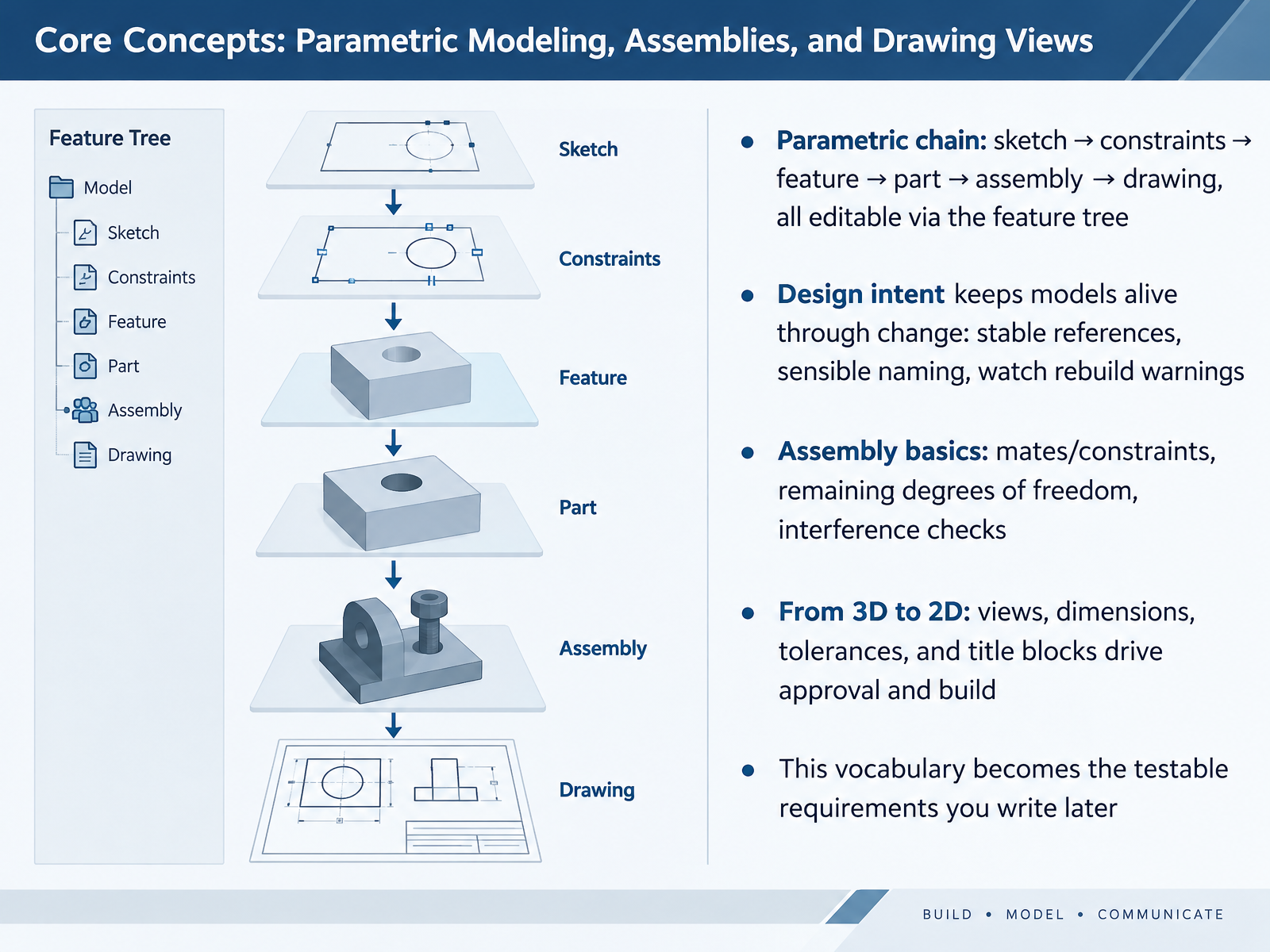
 - 04Core Concepts: Parametric Modeling, Assemblies, and Drawing ViewsLet's look at the core vocabulary behind how CAD actually works. Parametric modeling is a chain. You start with a sketch, add constraints, build a feature, then a part, then an assembly, and finally a drawing. All of it stays editable through the feature tree. Design intent is what keeps the model alive through change. Keep references stable, name features sensibly, and watch for rebuild warnings. In an assembly, mates constrain motion and remove degrees of freedom. Check what freedom remains, and run interference checks before you release a design. Then you move from 3D to 2D. Views, dimensions, tolerances, and title blocks drive approval and build. This vocabulary becomes the testable requirements you write later.
 ptc.comx-procad.compixycad.com+21 min
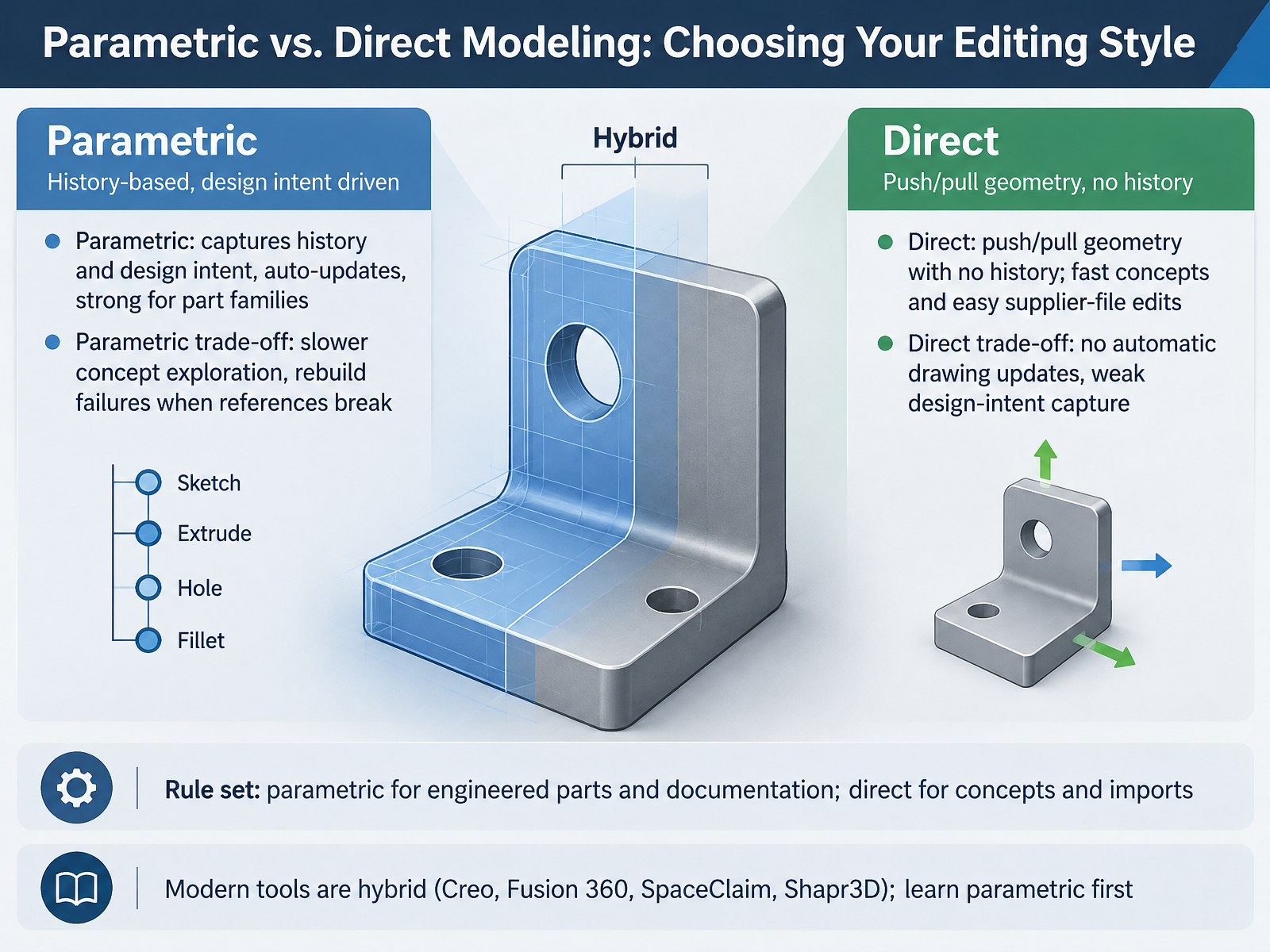
 - 05Parametric vs. Direct Modeling: Choosing Your Editing StyleNow let's look at how you edit geometry, because this choice affects your whole workflow. Parametric modeling captures design history and design intent. You set dimensions and constraints, and the model updates automatically when a value changes. That makes it strong for part families, like a bracket in five sizes. The trade-off is speed. Concept exploration is slower, and references can break, causing rebuild failures. Direct modeling skips history. You push and pull faces and edges to reshape the geometry. It is fast for early concepts and for editing supplier files, such as a STEP file you received. But drawings do not update automatically, and design intent is weakly captured. So use one rule set. Parametric for engineered parts and documentation. Direct for concepts and imports. Most modern tools are hybrid, including Creo, Fusion 360, SpaceClaim, and Shapr3D. Learn parametric first, then add direct editing. Turning Design Needs into Testable CAD Requirements.
 ptc.comx-procad.compixycad.com+21 min
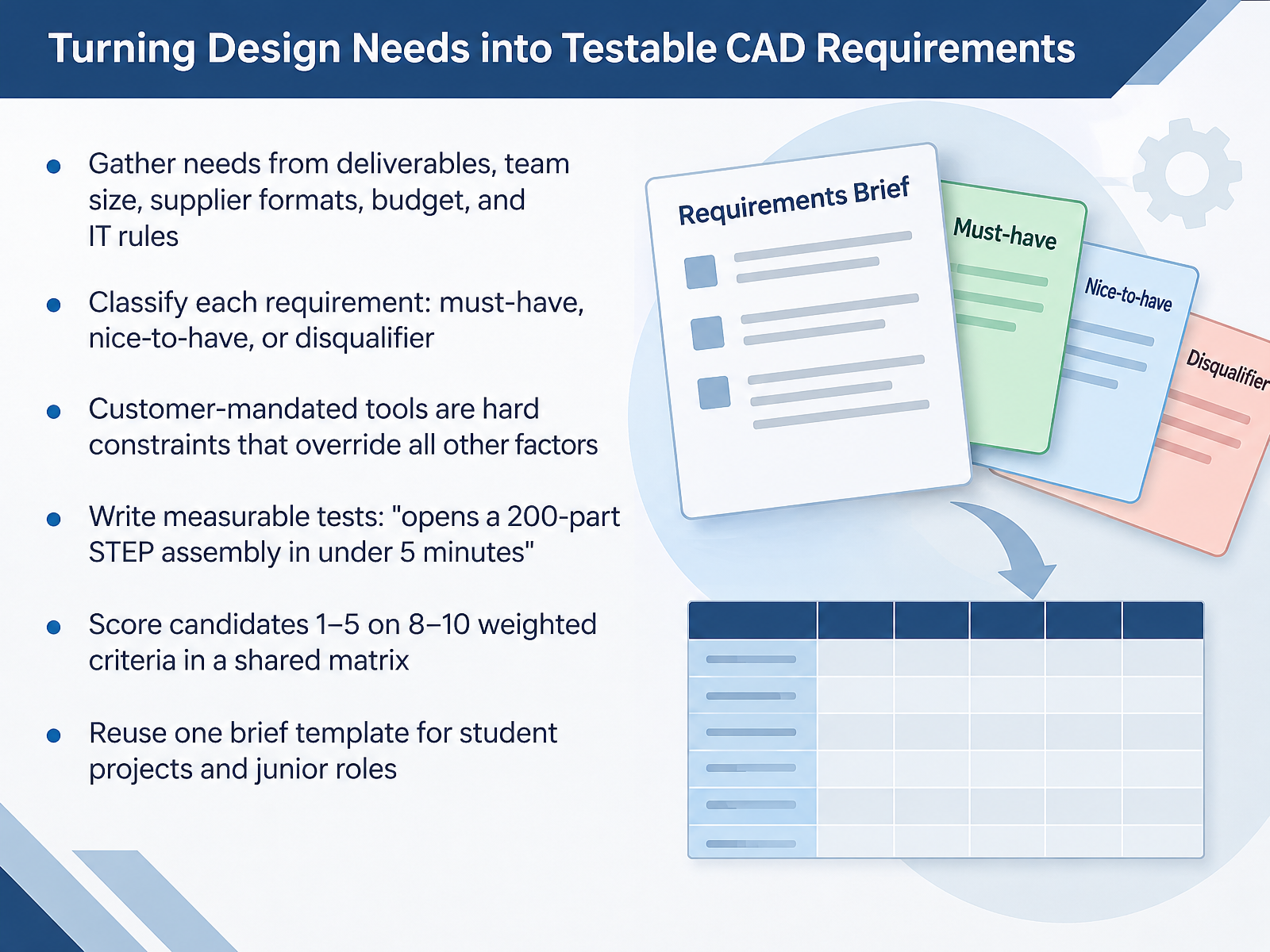
 - 06Turning Design Needs into Testable CAD RequirementsNow let's turn your design needs into requirements you can actually test. Start by gathering them from real sources. What deliverables do you owe? How many people need a seat? Which formats do suppliers send? What is the budget? And what does I T allow on your machines? Then classify each requirement as a must-have, a nice-to-have, or a disqualifier. Here is the hard rule. A customer-mandated tool overrides everything else. If a client requires SOLIDWORKS, you lose the contract without it, no matter how good the alternative looks. Next, write measurable tests. Not, it handles big assemblies. Instead, it opens a two-hundred-part STEP assembly in under five minutes. Then score candidates from one to five on eight to ten weighted criteria in one shared matrix. Keep the same brief template for student projects and junior roles, so you build the habit early. In short, gather, classify, test, and score. Next, we move to file formats and design exchange, covering STEP, IGES, Parasolid, STL, DXF, and JT.
 onshape.comddxgroup.comthreadmoat.com+22 min
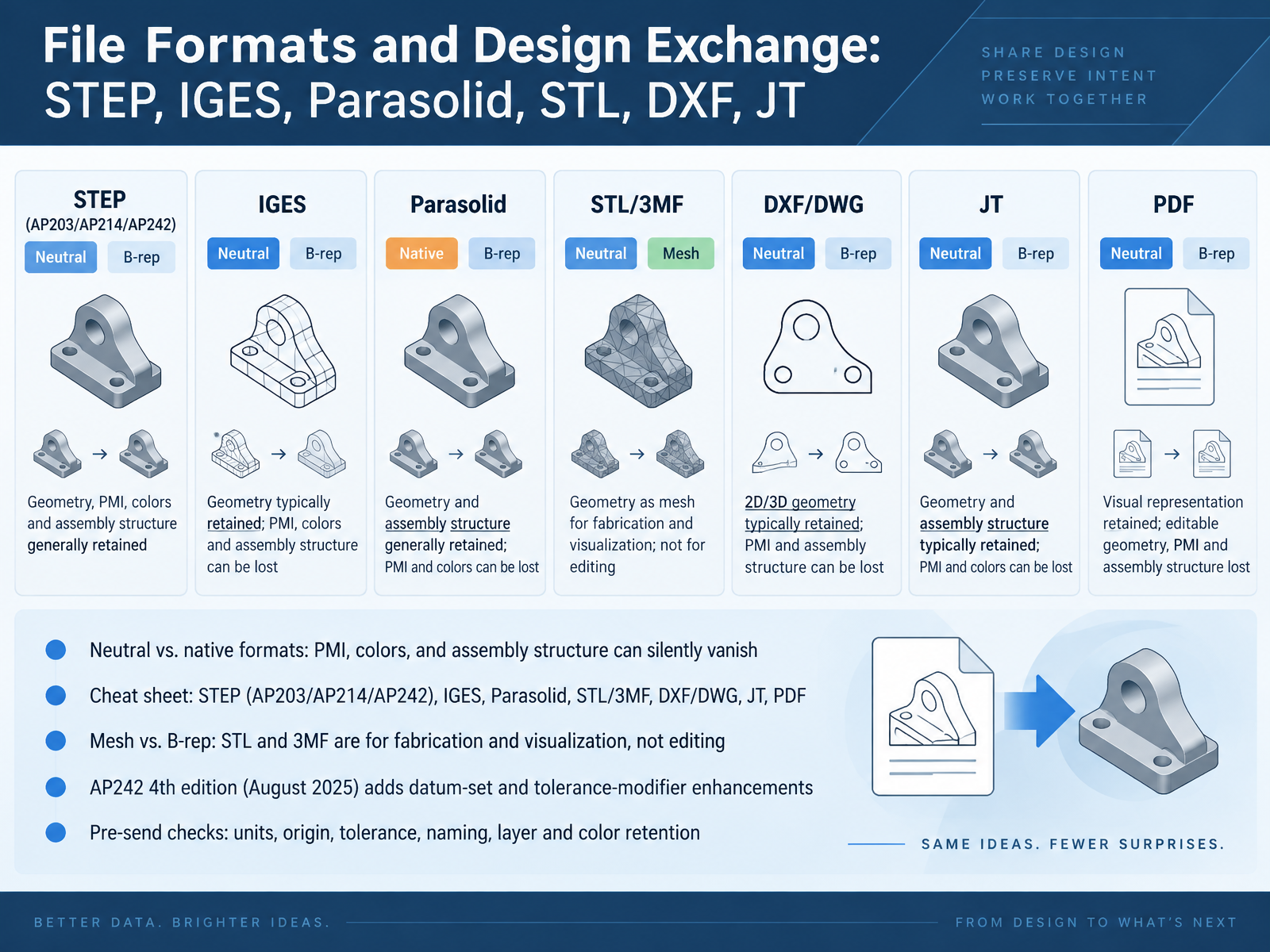
 - 07File Formats and Design Exchange: STEP, IGES, Parasolid, STL, DXF, JTNext, file formats and design exchange. The practical consequence comes first. When you export to a neutral format, your colors, assembly structure, and model-based annotations can silently disappear. Native formats keep them. Neutral formats may not. Here is your cheat sheet. STEP comes in AP203, AP214, and AP242. AP242 carries semantic PMI, meaning dimensions and tolerances. IGES handles older surface data. Parasolid is a kernel format. STL and 3MF are mesh formats for fabrication and visualization, not editing. DXF and DWG serve two-dimensional drawings. JT suits lightweight visualization, and PDF is for documentation only. One update worth knowing: AP242 fourth edition, published August twenty twenty-five, adds datum-set and tolerance-modifier enhancements. Finally, run these checks before you send anything: units, origin, tolerance, file naming, and whether layers and colors survived. That checklist catches most exchange failures.
 iso.orgmbx-if.orgmbx-if.org+22 min
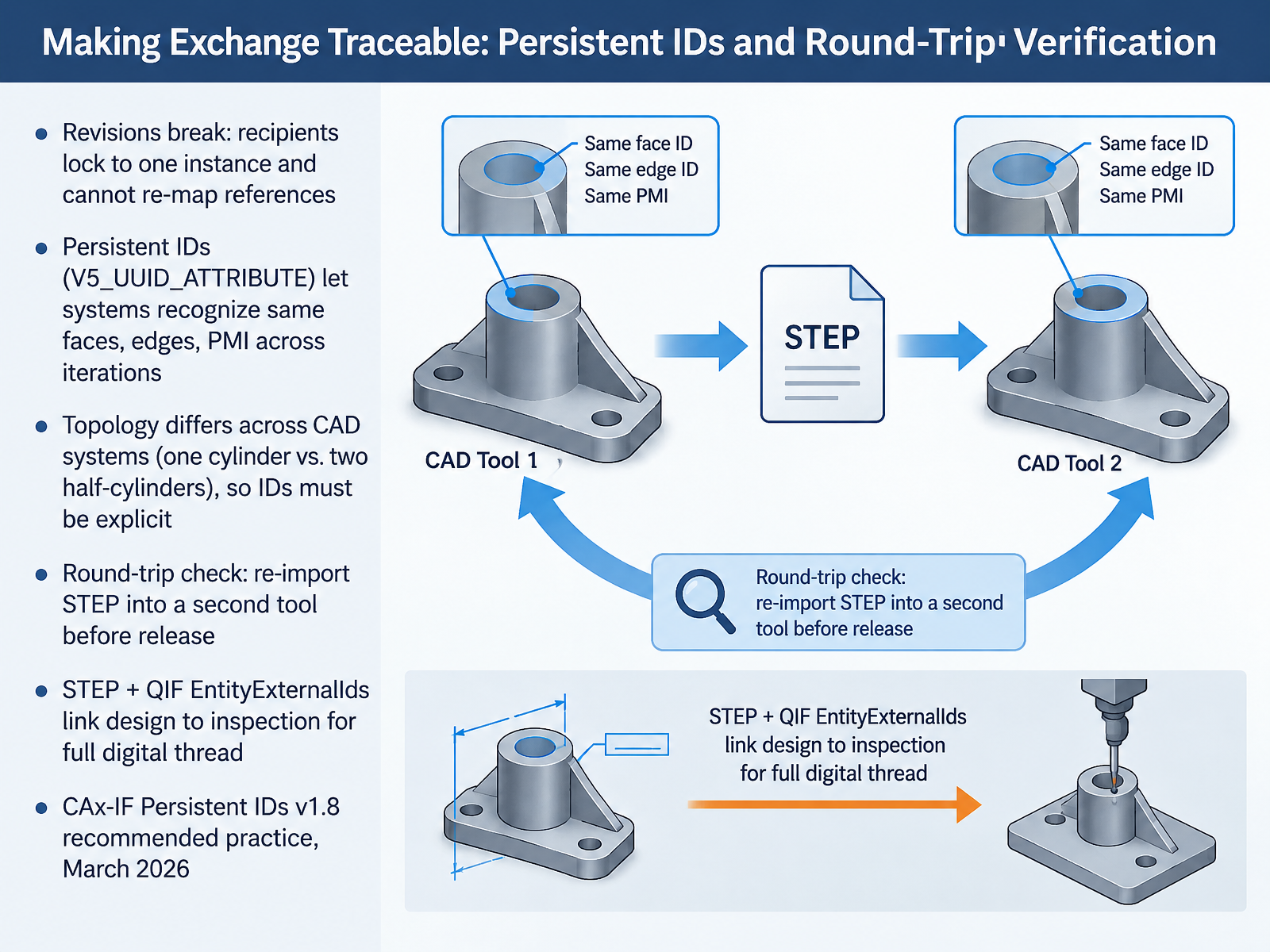
 - 08Making Exchange Traceable: Persistent IDs and Round-Trip VerificationNow let's make data exchange traceable. When a recipient locks onto one version of your model, later revisions break their references, and re-mapping by hand rarely works. Persistent IDs solve this. A version five UUID attribute, tagged on faces, edges, and PMI, lets each system recognize the same entities across iterations. This matters because topology differs between CAD systems. One tool may model a hole as a single cylinder, another as two half-cylinders. So IDs must be written explicitly. Before release, run a round-trip check: re-import your STEP file into a second tool and confirm the IDs survive. Pair STEP with QIF EntityExternalIds to link design to inspection, following the CAx-IF Persistent IDs version one point eight recommended practice from March twenty twenty-six. Next, let's look at licensing, education access, and hardware reality.
 iso.orgmbx-if.orgmbx-if.org+22 min
 - 09Licensing, Education Access, and Hardware RealityNow let's talk about what CAD access actually costs you. Student access is broad, but it's shifting. Fusion, SolidWorks, Creo, and NX offer free student plans. But Autodesk ended new network education licenses in March 2026. So expect to sign in with your own named user account, even in a lab. Certification is separate. A CSWA or CSWP attempt costs about ninety-nine dollars, though some student plans bundle vouchers. Hardware matters too. Desktop MCAD is Windows only and workstation hungry. Cloud tools run on any device, so a Chromebook can work. Budget for hardware, cloud storage, and certification fees, not just the license. Next, we'll walk through evaluating and selecting a tool with a structured workflow.
 2 min
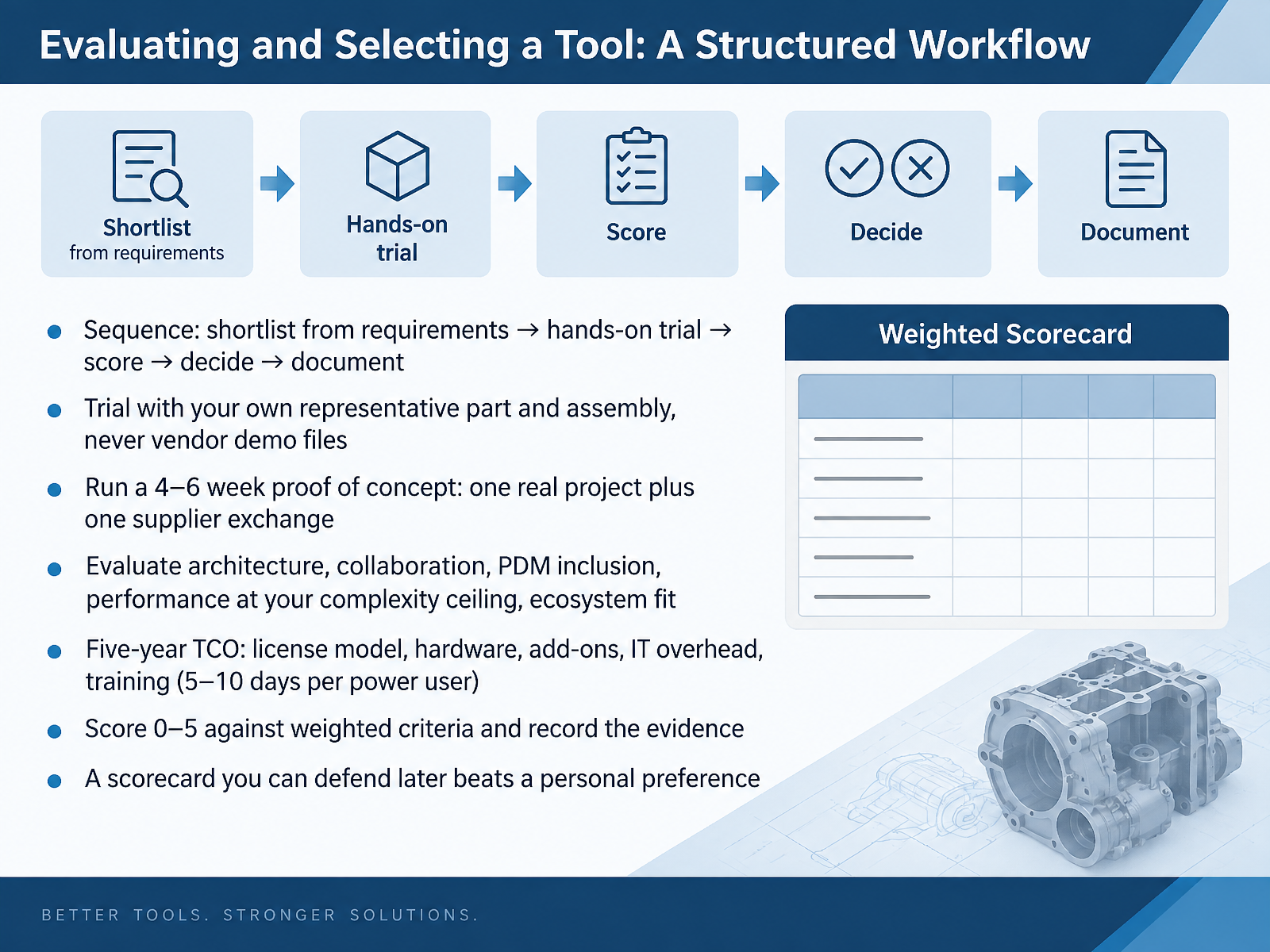
2 min - 10Evaluating and Selecting a Tool: A Structured WorkflowNow let us make that selection structured. Shortlist from your requirements first. Then run a hands-on trial, score the results, decide, and document the reasoning. During the trial, use your own representative part and assembly, never vendor demo files. Budget four to six weeks for a proof of concept that covers one real project and one supplier exchange, exported and re-imported. Evaluate architecture, collaboration, PDM included or add-on, performance at your complexity ceiling, and ecosystem fit. Model the five-year total cost of ownership: license model, hardware, add-ons, IT overhead, and training, roughly five to ten days per power user. Score each criterion from zero to five against weights, and record the evidence behind every score. A scorecard you can defend later beats a personal preference. Next, we move into designing a practical CAD workflow with revision control.
 onshape.comddxgroup.comthreadmoat.com+22 min
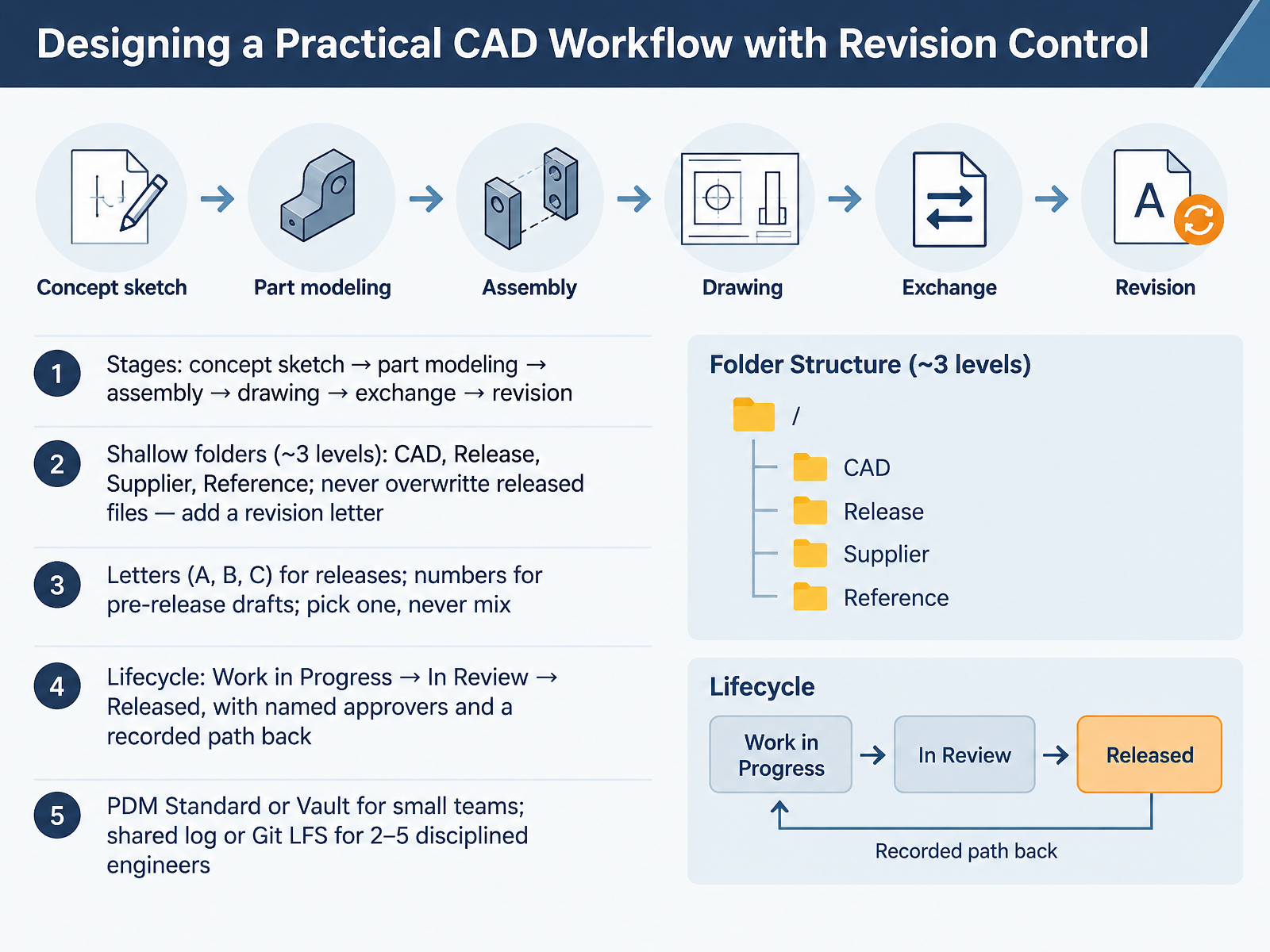
 - 11Designing a Practical CAD Workflow with Revision ControlNow let's turn the workflow itself into a system you can repeat. Every part moves through the same six stages: concept sketch, part modeling, assembly, drawing, exchange, and revision. Keep your folders shallow, about three levels deep, split into CAD, Release, Supplier, and Reference. The practical consequence comes first: never overwrite a released file. Add a revision letter instead, for example PRJ001-0010_RevB. Use letters A, B, C for releases and numbers for pre-release drafts. Pick one scheme and never mix them on the same project. Then give each file a lifecycle: Work in Progress, In Review, and Released, with a named approver for each step and a recorded path back when a released part needs changes. For a small team, SolidWorks PDM Standard or Autodesk Vault handles check-in and check-out. For two to five disciplined engineers, a shared log or Git Large File Storage can work. Next, we'll walk through that workflow on a real bracket, from brief to exchange package.
 2 min
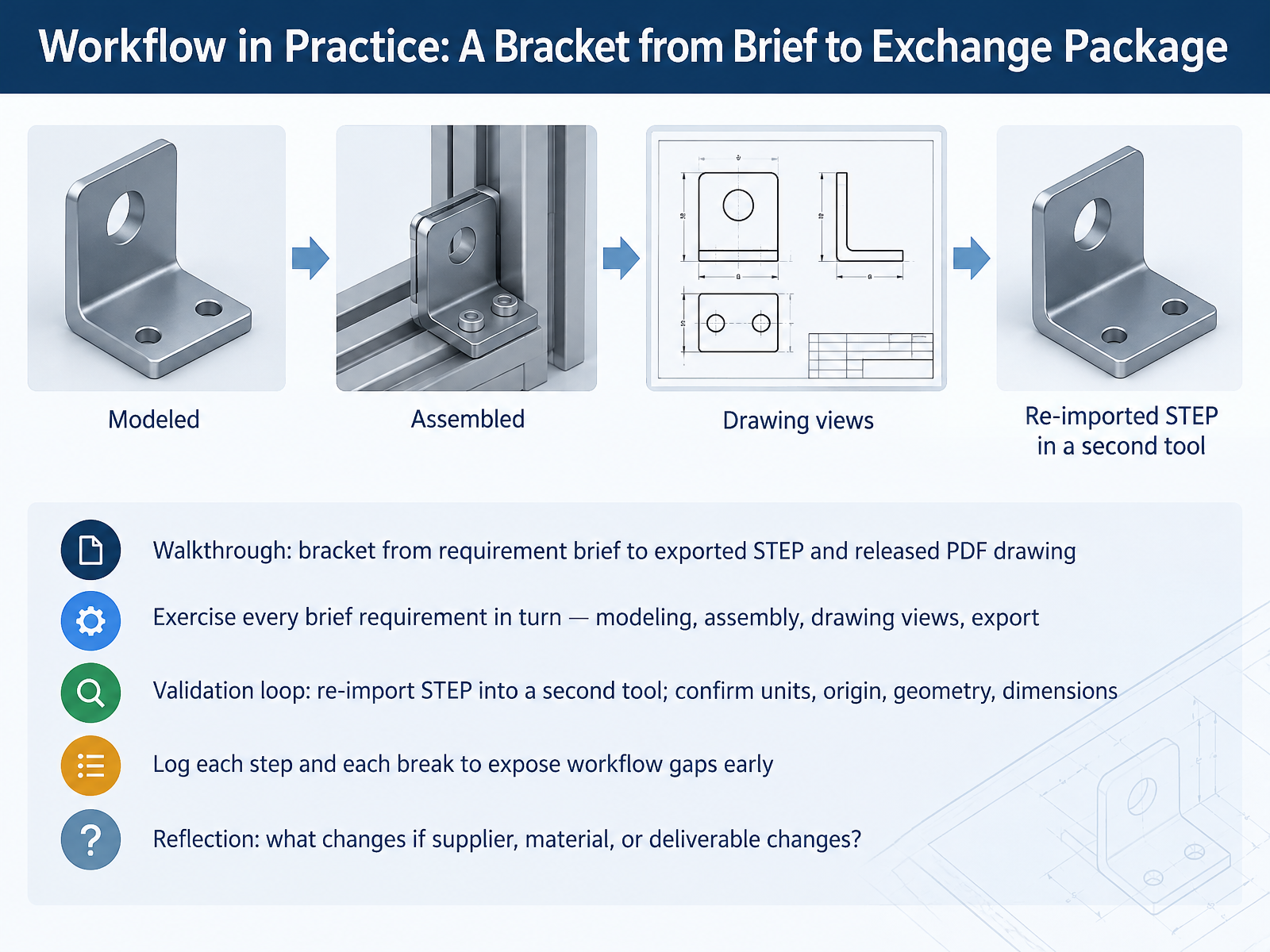
2 min - 12Workflow in Practice: A Bracket from Brief to Exchange PackageNow let's put the workflow into practice with a bracket. Start from the requirement brief and work through each requirement in turn: model the part, build the assembly, create the drawing views, and export. Your deliverables are a STEP file and a released PDF drawing. Then run the validation loop. Re-import the STEP file into a second tool and confirm four things: units, origin, geometry, and dimensions, including key tolerances. Log every step and every break you find. A broken reference or a unit mismatch surfaces early, before it reaches a supplier. For example, note that a hole imported as two half cylinders instead of one surface is a known mapping issue between systems. Finally, reflect. What changes if the supplier, the material, or the deliverable changes? That reflection reveals where your workflow is fragile. Next, we look at common pitfalls and how to avoid them.
 iso.orgmbx-if.orgmbx-if.org+22 min
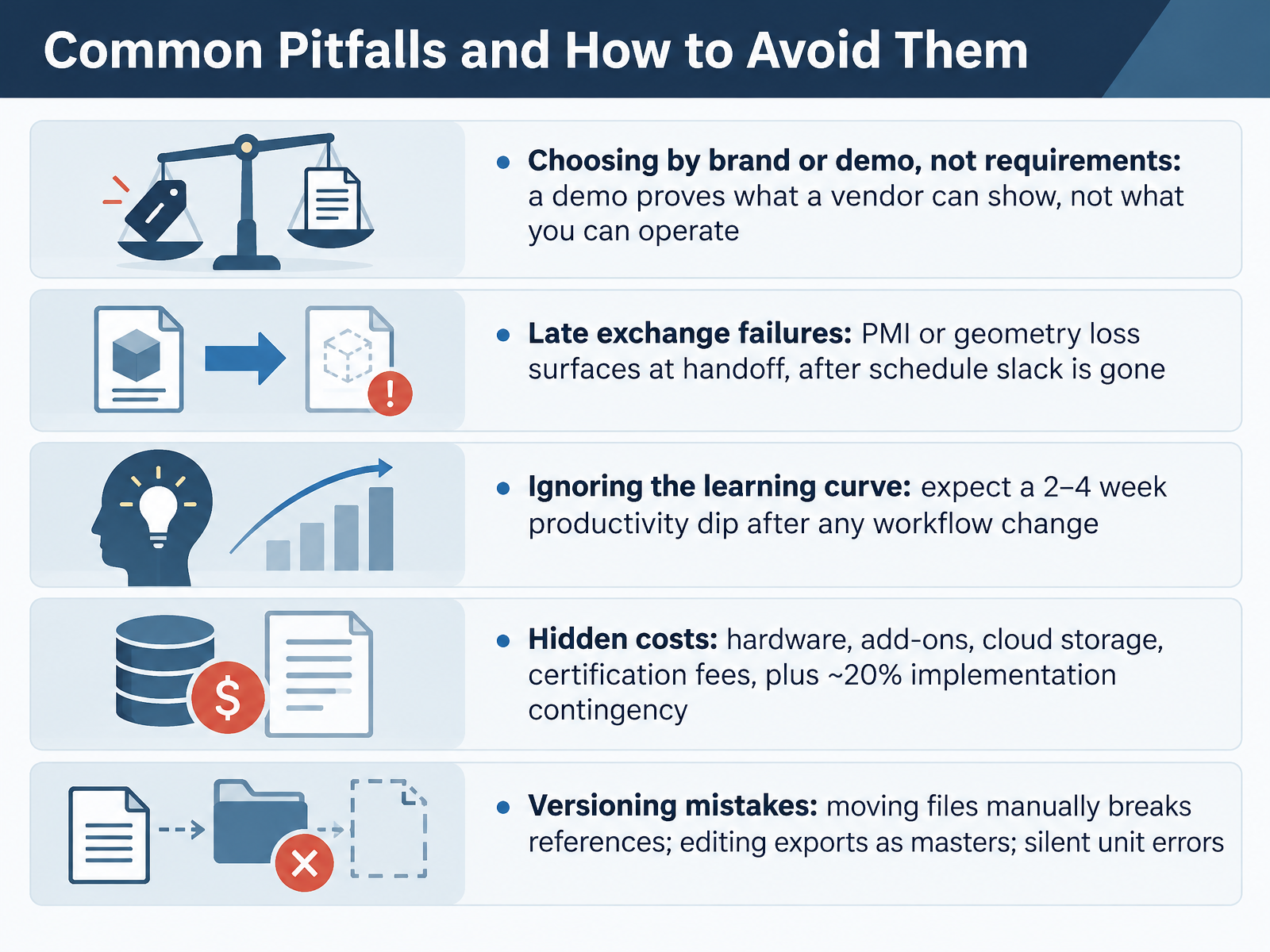
 - 13Common Pitfalls and How to Avoid ThemLet's talk about the pitfalls that catch people after the software is chosen. First, don't pick by brand or demo. A demo shows what a vendor can present, not what you can operate, so score candidates with your own part files and a weighted checklist. Second, test exchange early. PMI or geometry loss usually surfaces at handoff, when schedule slack is gone, so send a STEP AP242 file through your supplier's system before you commit. Third, expect a learning curve. Plan for a two to four week productivity dip after any workflow change, and avoid scheduling go-live during your busiest week. Fourth, budget hidden costs: workstations, add-ons, cloud storage, certification fees, plus about twenty percent implementation contingency. Fifth, manage versions carefully. Moving files manually breaks assembly references, editing an exported STEP file as your master loses design intent, and silent unit errors, say millimeters against inches, can ruin a part. Use your PDM or CAD tool to move and revise files, and check units on every import. The takeaway is simple: test with your data, budget the full cost, and control versions from day one. Next, we'll look at your next steps: templates, assessment, and learning paths.
 onshape.comddxgroup.comthreadmoat.com+22 min
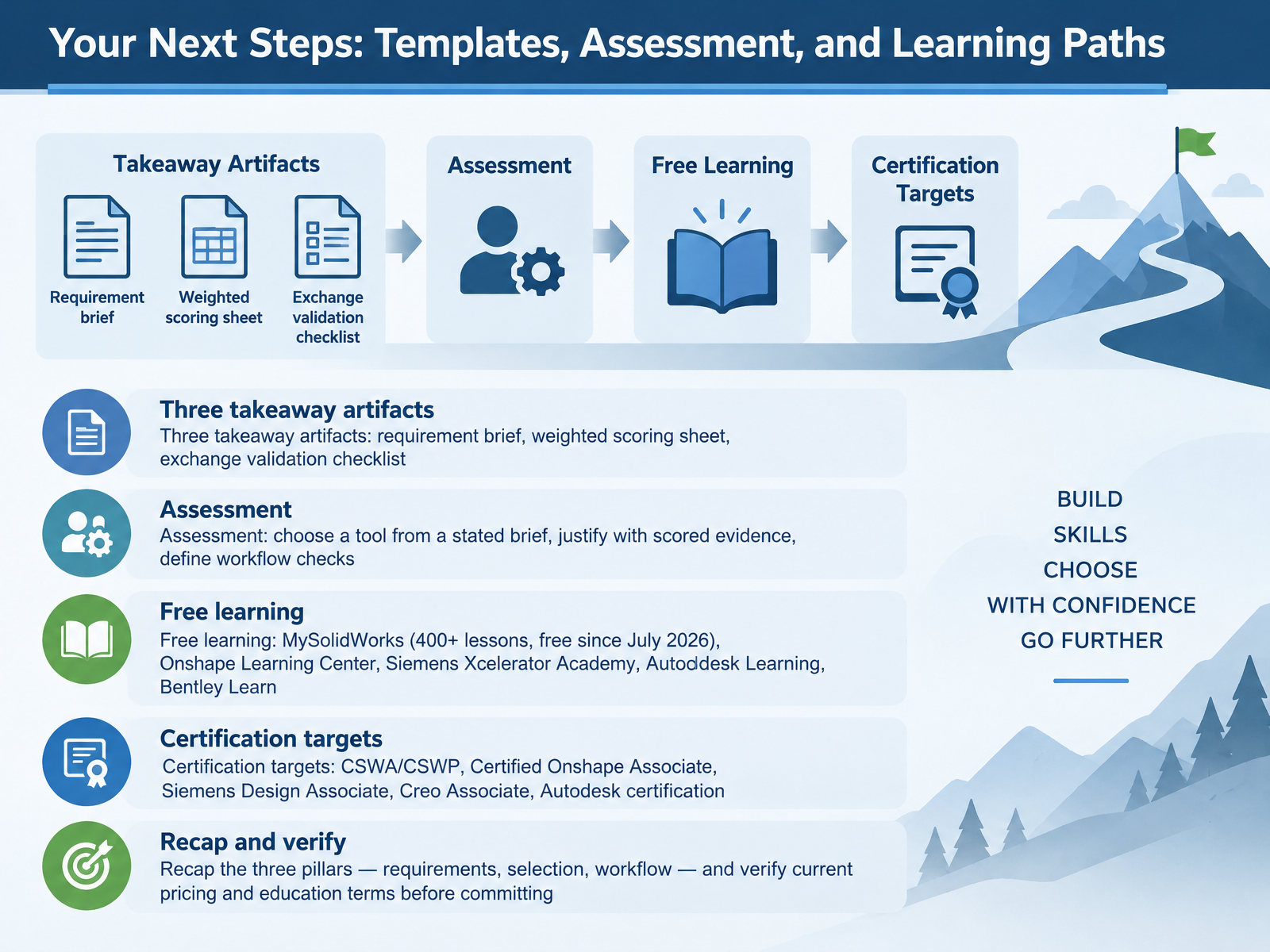
 - 14Your Next Steps: Templates, Assessment, and Learning PathsBefore you finish, leave with three artifacts. A requirement brief. A weighted scoring sheet. And an exchange validation checklist that names your file types, such as STEP and native parts. Your assessment asks you to pick a tool from a stated brief, justify it with scored evidence, and define your workflow checks. Keep learning for free. MySolidWorks has over four hundred lessons, free since July two thousand twenty six. You also have the Onshape Learning Center, Siemens Xcelerator Academy, Autodesk Learning, and Bentley Learn. Then set a certification target, like CSWA or CSWP, the Certified Onshape Associate, the Siemens Design Associate, the Creo Associate, or an Autodesk certification. Everything comes back to three pillars: requirements, selection, and workflow. Verify current pricing and education terms before you commit. Thank you for joining. Now go build your brief, and choose with confidence.
 2 min
2 min
Take the deck with you
Download this course as a file — free, no sign-up needed.
- PDF handoutEvery slide page, ready to print or share.15 pages · 3.6 MBDownload
- Narrated PowerPointThe deck that presents itself — every slide carries the digital human's narration video.15 pages · 25.4 MBDownload
- PowerPoint slidesThe full deck as a .pptx — open it in PowerPoint, Keynote, or Google Slides.15 pages · 3.5 MBDownload
Free to use in your own training — please keep the PersonWise credit page at the end.
Have your own deck? Turn it into a course
Sources consulted
Web sources consulted while building this course.
- Computer Aided Design (CAD) Software Market Report 2026 — researchandmarkets.com
- Industry Newsletter Q3 - 2026 - Cambashi — cambashi.com
- 2026 PLM/CAD/EDA市場の実態と展望 | 市場調査とマーケティングの矢野経済研究所 — yano.co.jp
- CAD (global market) — tadviser.com
- CAD Software Market Size, Share, Industry Report 2026-2030 — thebusinessresearchcompany.com
- Parametric vs. Direct Modeling: Which Side Are You On? — ptc.com
- CAD Modeling Guide: Parametric vs Direct Explained Simply — x-procad.com
- Parametric vs Direct Modeling for 3D Printing: Which Do You Need? | PixyCAD — pixycad.com
- Parametric vs. Direct Modeling: What's The Difference? — hpacademy.com
- Best Direct Modeling CAD Software in 2026: History-Free D... — cadguide.tools
- What to Consider When Evaluating CAD Software Alternatives — onshape.com
- Free Checklist: How to Choose the Right CAD/CAM Software | DDX — ddxgroup.com
- How to Choose CAD Software: Decision Framework + Evaluation Checklist — threadmoat.com
- Assessing CAD Tools for Modern Engineering: Creo, CATIA and More — eacpds.com
- Modernizing Your CAD: 7 Criteria to Consider — onshape.com
- ISO 10303-242:2025 - Industrial automation systems and integration — Product data representation and exchange — Part 242: Application protocol: Managed model-based 3D engineering — iso.org
- CAx Recommended Practices – MBx Interoperability Forum — mbx-if.org
- Recommended Practices Persistent IDs for Design Iteration and Downstream Exchange — mbx-if.org
- Enabling the Digital Thread with STEP AP242 — prostep.org
- AP242 Fourth Edition Changes — steptools.com