Begin
14 pages · ~28 min
Engineering Product Data Management Software Selection
This training helps engineers and data managers select EPDM software, define requirements, and design workflows for effective product data management.
A digital instructor presents all 14 pages. Hold “Ask” at any point and ask out loud — the answer comes from this course. No sign-up needed.
What you’ll learn
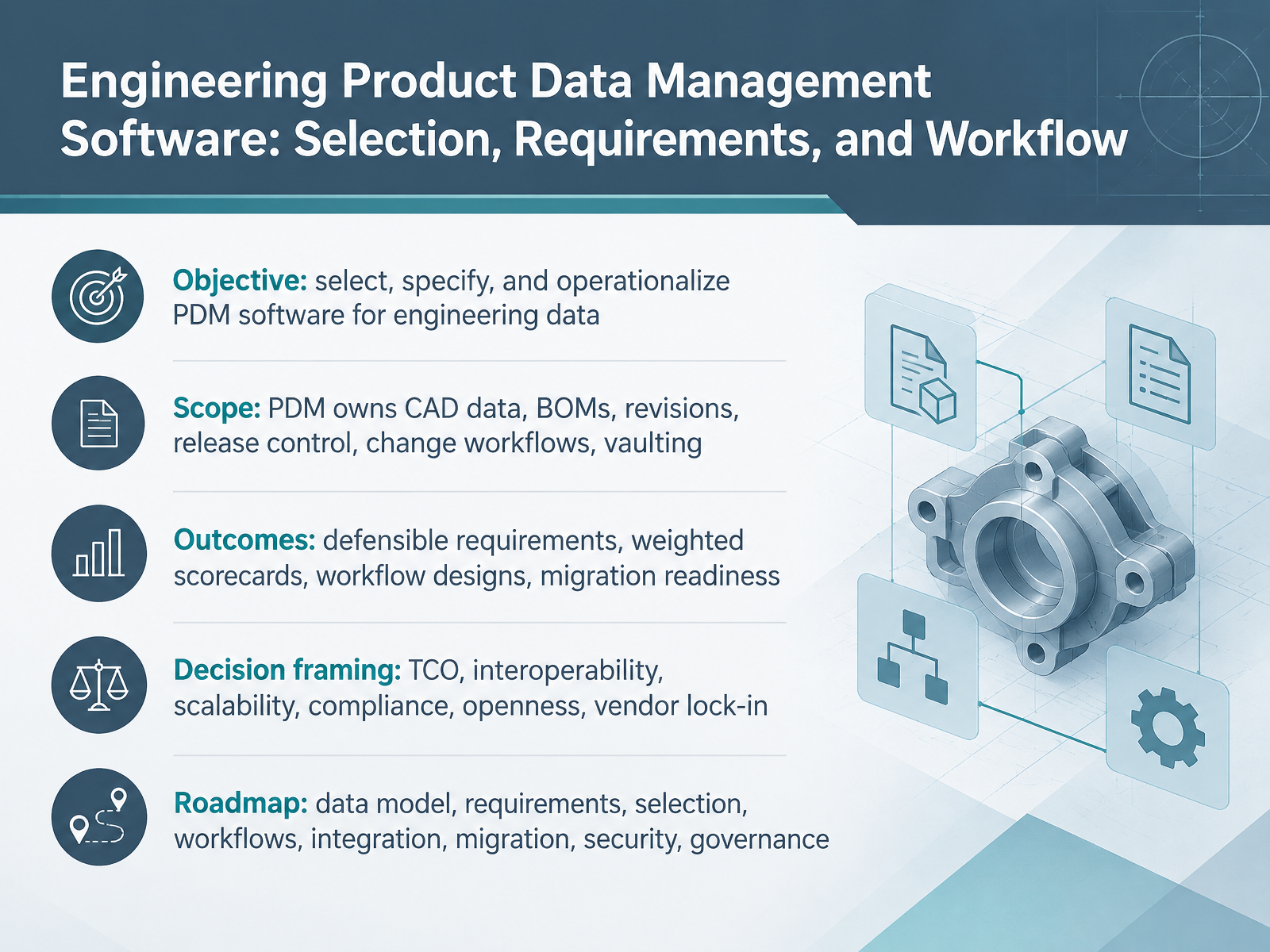
- 01Engineering Product Data Management Software: Selection, Requirements, and WorkflowWelcome. Over the next fourteen slides, we'll work through selecting, specifying, and operationalizing PDM software for engineering data. This isn't a vendor pitch. It's a peer-level evaluation framework you can defend in a procurement meeting.
Scope first. A PDM system owns CAD data, bills of materials, revisions, release control, change workflows, and vaulting. If your pain is which drawing is released, that's PDM. If it's process across the whole lifecycle, that's PLM, and we'll draw that line shortly.
By the end, you'll have defensible requirements, weighted scorecards, workflow designs, and a realistic view of migration effort.
We'll frame every decision against total cost of ownership, interoperability, scalability, compliance, openness, and vendor lock-in. Those six weights keep the comparison honest. Watch for the model that's cheap per seat but taxes API access, because your ERP integration never gets built.
The roadmap runs from data model, to requirements, selection, workflows, integration, migration, security, and governance. One takeaway before we move: define the problem list before you schedule a single demo.
Next, PDM, PLM, ERP, and MDM: Drawing the Boundaries.blog.cadrooms.comf.hubspotusercontent00.netopenbom.com+22 min
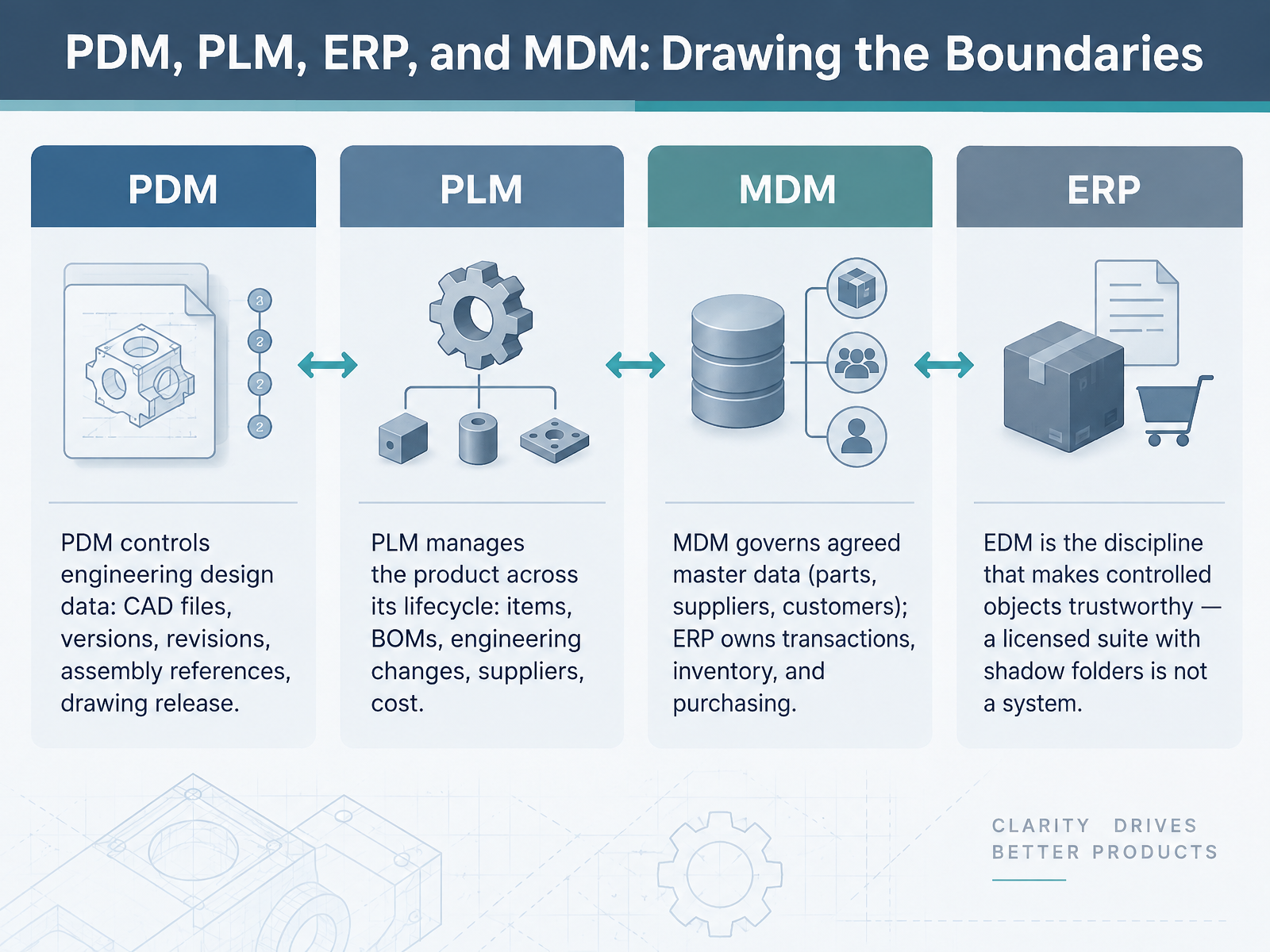
- 02PDM, PLM, ERP, and MDM: Drawing the BoundariesBefore we compare vendors, we need clean boundaries, because overbuying and overlap both kill adoption. PDM controls engineering design data: CAD files, versions, revisions, assembly references, and drawing release. Core check-in and check-out keeps one editor per file, so an assembly and its drawing never fork into two truths. PLM manages the product across its lifecycle: items, BOMs, engineering changes, approvals, suppliers, and cost. Here the evaluator question is simple. Which system owns item numbers, released engineering data, and the manufacturing BOM? MDM governs agreed master data like parts, suppliers, and customers, while ERP owns transactions, inventory, and purchasing. And EDM is the discipline that makes controlled objects trustworthy. A licensed suite with shadow folders is not a system. So draw the boundary before you scope the pilot, then move on to the data model itself: Core Data Model: Items, Revisions, Versions, and BOM Structure.
 blog.cadrooms.comf.hubspotusercontent00.netopenbom.com+22 min
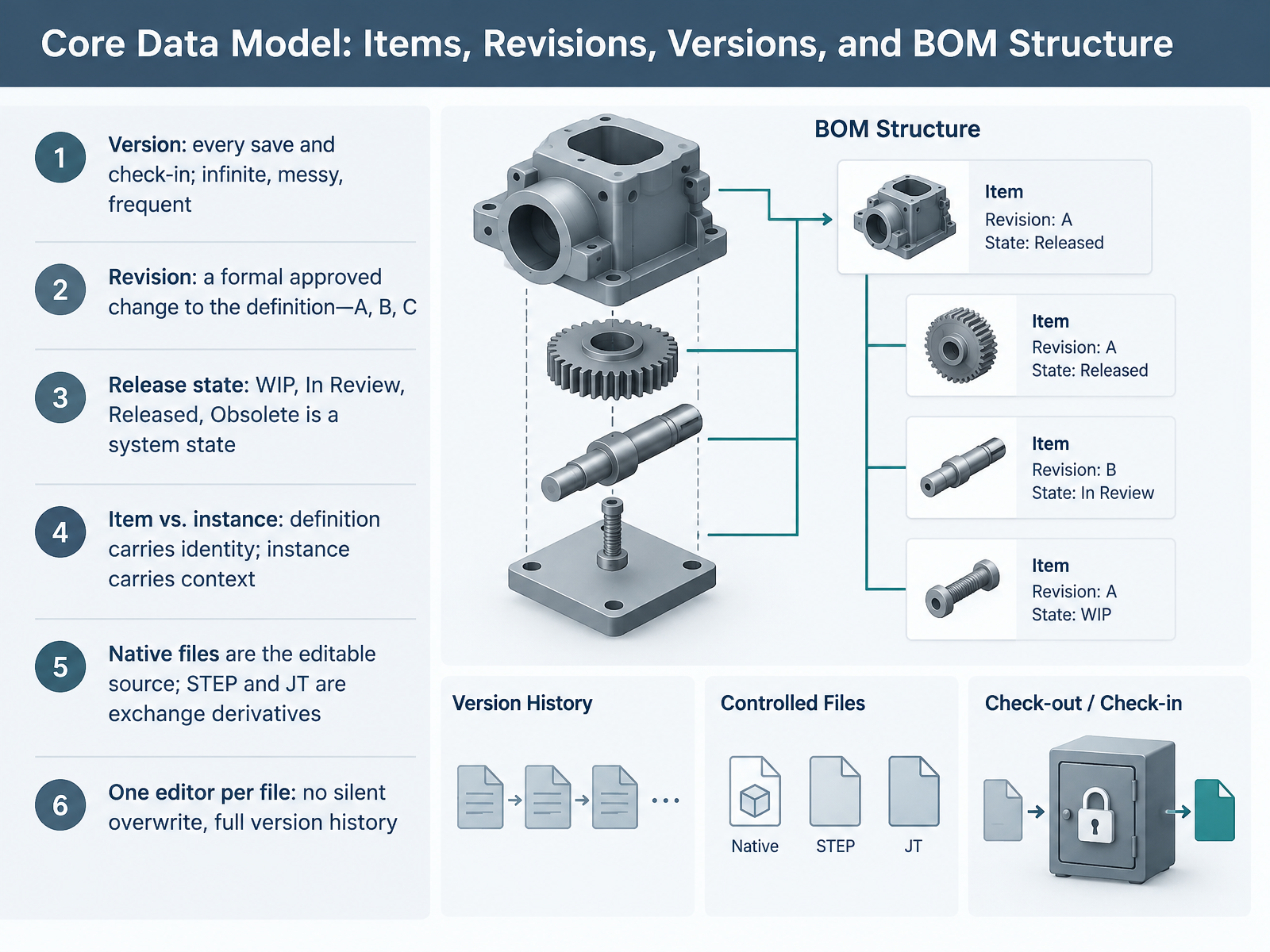
 - 03Core Data Model: Items, Revisions, Versions, and BOM StructureLet's unpack the core data model, because every evaluation decision downstream depends on it. Start with version versus revision. A version is every save and check-in, infinite, messy, frequent. A revision is a formal approved change to the definition, A, B, C, and it's controlled. Keep those separate, or your reviewers will treat every working save as a release. Release state is a system state, not a vibe: work in progress, in review, released, obsolete. For your CAD admins, the critical distinction is item versus instance. The item definition carries identity, the part number and core attributes; the instance carries context, quantity and position in a specific assembly. That separation is what lets engineering and manufacturing BOMs coexist without duplicating truth. Native files are the editable source; STEP and JT are exchange derivatives, and your procurement team reads those derivatives, so they must point back to the approved revision. Finally, enforce one editor per file. Check-out locks the file, no silent overwrite, full version history, so two engineers can never create two truths. Takeaway for your matrix: version is history, revision is the controlled unit, and release state is the gate. Lifecycle States, Release Gates, and Change Objects.
 openbom.cominfinisynapse.comlatentview.com+22 min
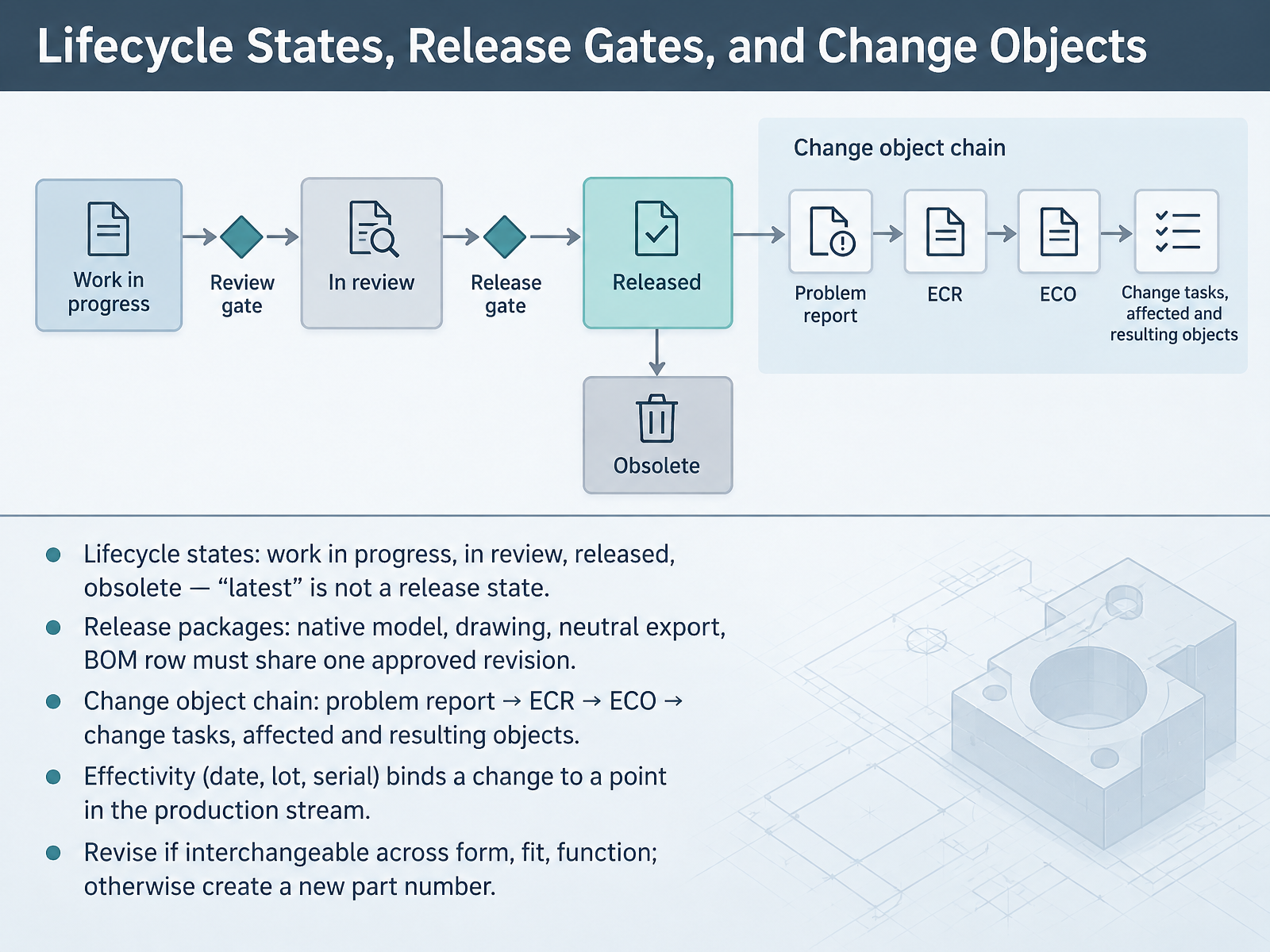
 - 04Lifecycle States, Release Gates, and Change ObjectsPicking up lifecycle mechanics now. Lifecycle states matter because latest is not a release state. Work in progress, in review, released, obsolete. CAD admins need that distinction so shop floor prints never pull a WIP file.
Next, release packages. The native model, drawing, neutral export, and BOM row must all share one approved revision. If Rev B moves a hole, the STEP file can silently stay at Rev A. That is how suppliers build wrong.
Then the change object chain. Problem report, ECR, ECO, change tasks, with affected and resulting objects tracked separately. Affected is what you supersede. Resulting is what you create.
Effectivity binds a change to a production point. Date, lot, or serial, so old and new configurations never collide on the line.
Finally, revise if the part is interchangeable across form, fit, and function. Otherwise, create a new part number.
Plain takeaway: states gate, packages consolidate, changes trace, effectivity times, interchangeability decides. Requirements Engineering: Turning Business Problems into PDM Requirements.
 openbom.cominfinisynapse.comlatentview.com+22 min
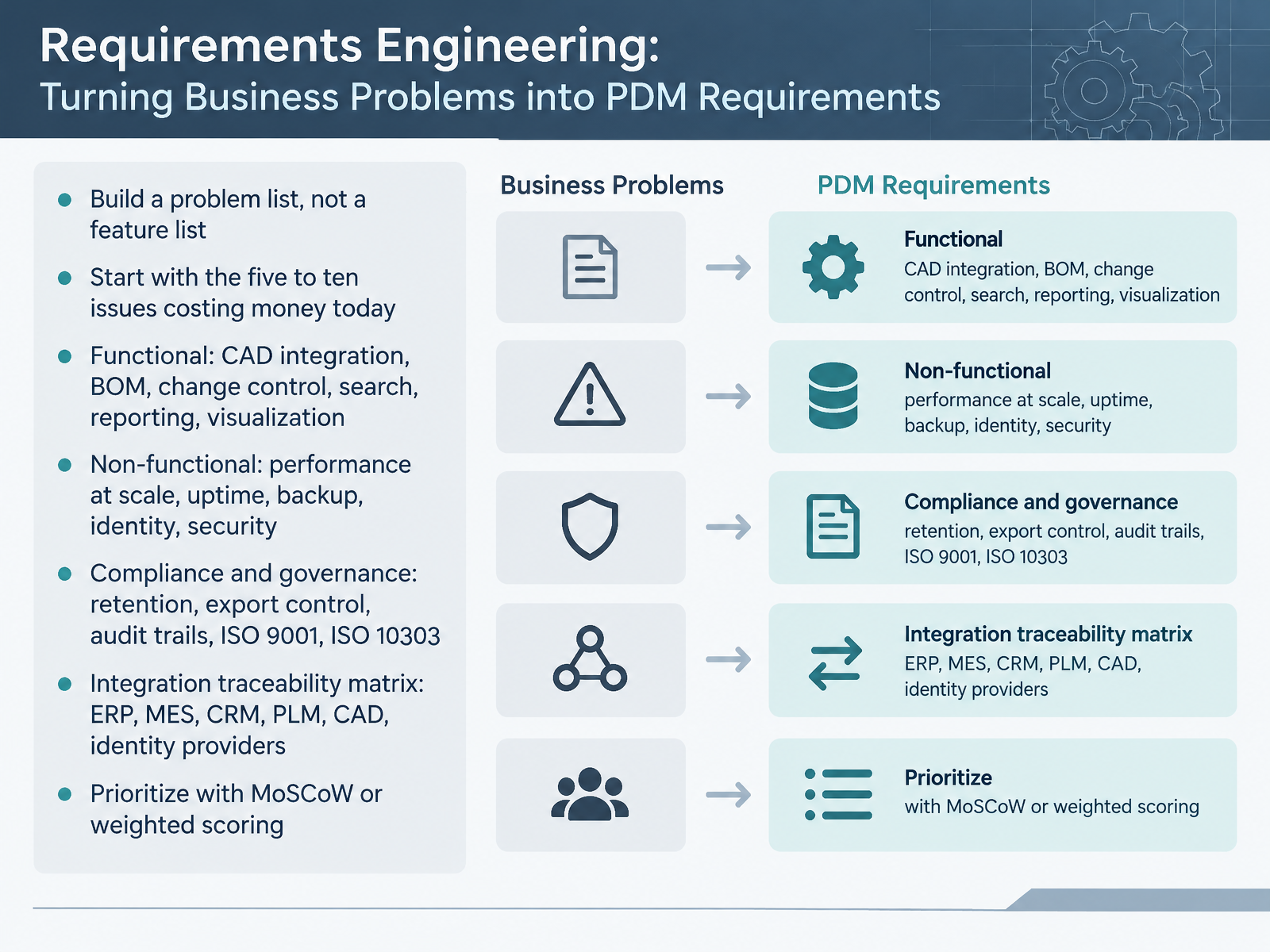
 - 05Requirements Engineering: Turning Business Problems into PDM RequirementsLet's talk about turning business problems into PDM requirements. Here's the core principle. Build a problem list, not a feature list. Start with the five to ten issues costing you money today, like engineers spending hours hunting for the right revision. Now, group your requirements by type. Functional covers CAD integration, BOM management, change control, search, reporting, and visualization. Non-functional covers performance at scale, uptime, backup, identity, and security. Compliance and governance covers retention, export control, audit trails, ISO 9001, and ISO 10303. The integration traceability matrix matters here. Map every connection to ERP, MES, CRM, PLM, CAD, and identity providers. For prioritization, use MoSCoW or weighted scoring. That gives your evaluators an objective way to compare vendors. The practical takeaway for your procurement meeting: requirements driven by real operational pain survive budget scrutiny, feature wish lists do not. Next, we move into evaluation and selection methodology.
 blog.cadrooms.comf.hubspotusercontent00.netopenbom.com+22 min
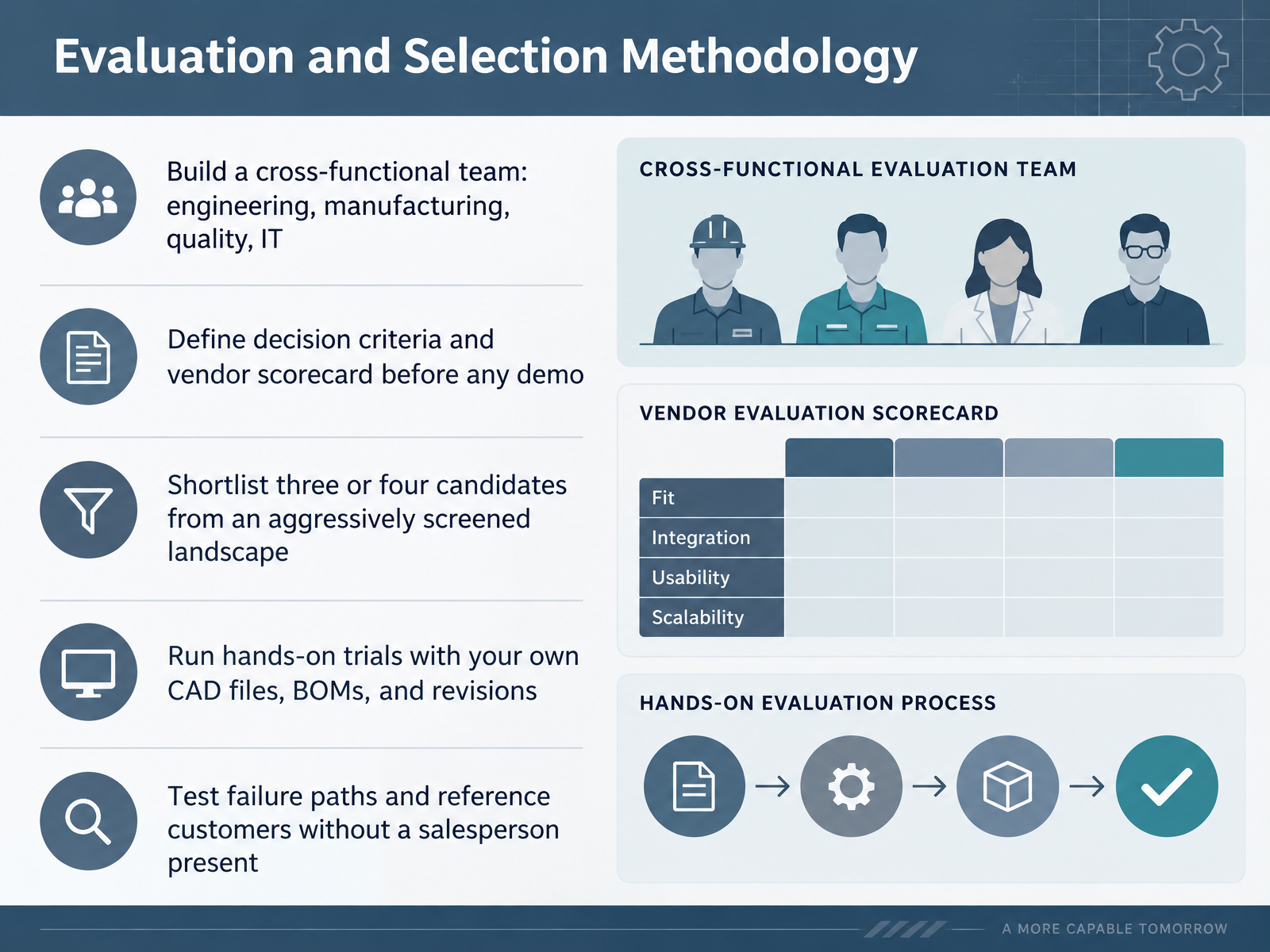
 - 06Evaluation and Selection MethodologyLet's talk about evaluation and selection methodology, because this is where most PDM decisions quietly go wrong. Build a cross-functional team first: engineering, manufacturing, quality, and IT. Manufacturing and quality will surface the release and audit constraints engineers alone won't flag, and IT owns the integration endpoints. Then define your decision criteria and scorecard before any demo, anchored to five to ten problems that are actually costing you money. Shortlist three or four candidates, not fifteen, screening aggressively on size, industry, CAD environment, ERP, and deployment model. Next, run hands-on trials with your own CAD files, BOMs, and revisions: open your largest assembly, branch a revision, regenerate the BOM, and check what breaks. Finally, test the failure paths, like what happens when the ERP connection drops overnight. And talk to reference customers without a salesperson present. Plain takeaway for procurement: score the product against your data, not the vendor's demo. Next, we move into TCO, Licensing, and Contracting Considerations.
 blog.cadrooms.comf.hubspotusercontent00.netopenbom.com+22 min
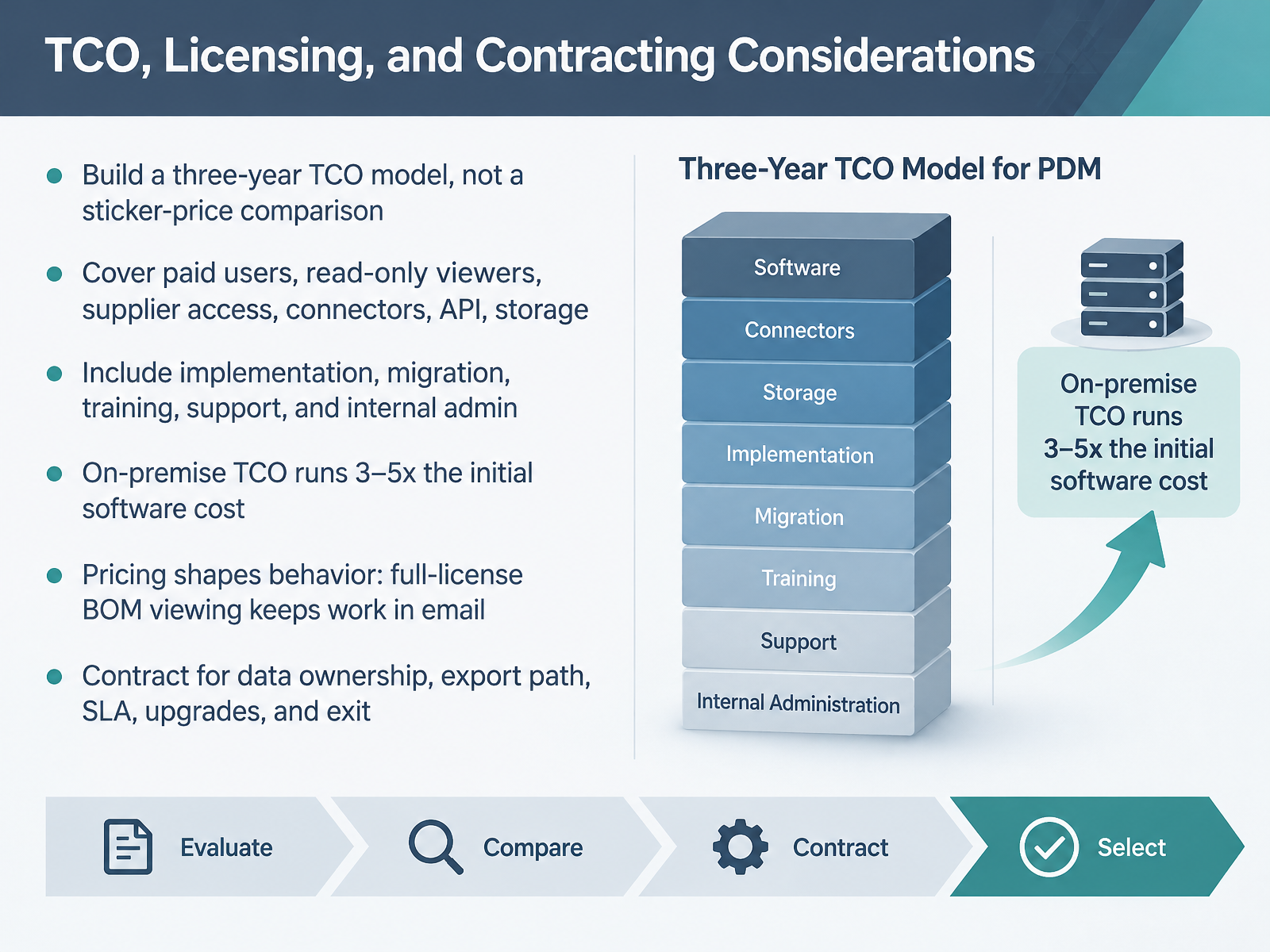
 - 07TCO, Licensing, and Contracting ConsiderationsNow let's talk about the money, because TCO and licensing are where PDM selections quietly fail. Start with a three-year total cost model, not a sticker-price comparison. Cover paid users, read-only viewers, supplier access, connectors, API access, storage, sandbox environments, implementation, migration, training, support, and internal administration time. On-premise deployments are the cautionary tale here: their true three-year cost typically runs three to five times the initial software license. A twenty-five seat on-premise PDM can land between one hundred eighty thousand and three hundred thousand dollars once you add servers, SQL, VAR implementation, IT maintenance, and upgrade projects. Then watch what the pricing model actually incentivizes. If viewing a BOM requires a full license, your reviewers will stay in email and your BOMs will drift. If API access sits behind an enterprise tier, your ERP integration never gets built. So contract deliberately: data ownership, export paths, SLA terms, upgrade rights, and a clean exit. The takeaway: model three years, cover every user class, and treat the pricing model as part of the architecture. Next, we move into workflow design, covering change, release, and approval processes.
 blog.cadrooms.comcatsy.comautodesk.com+22 min
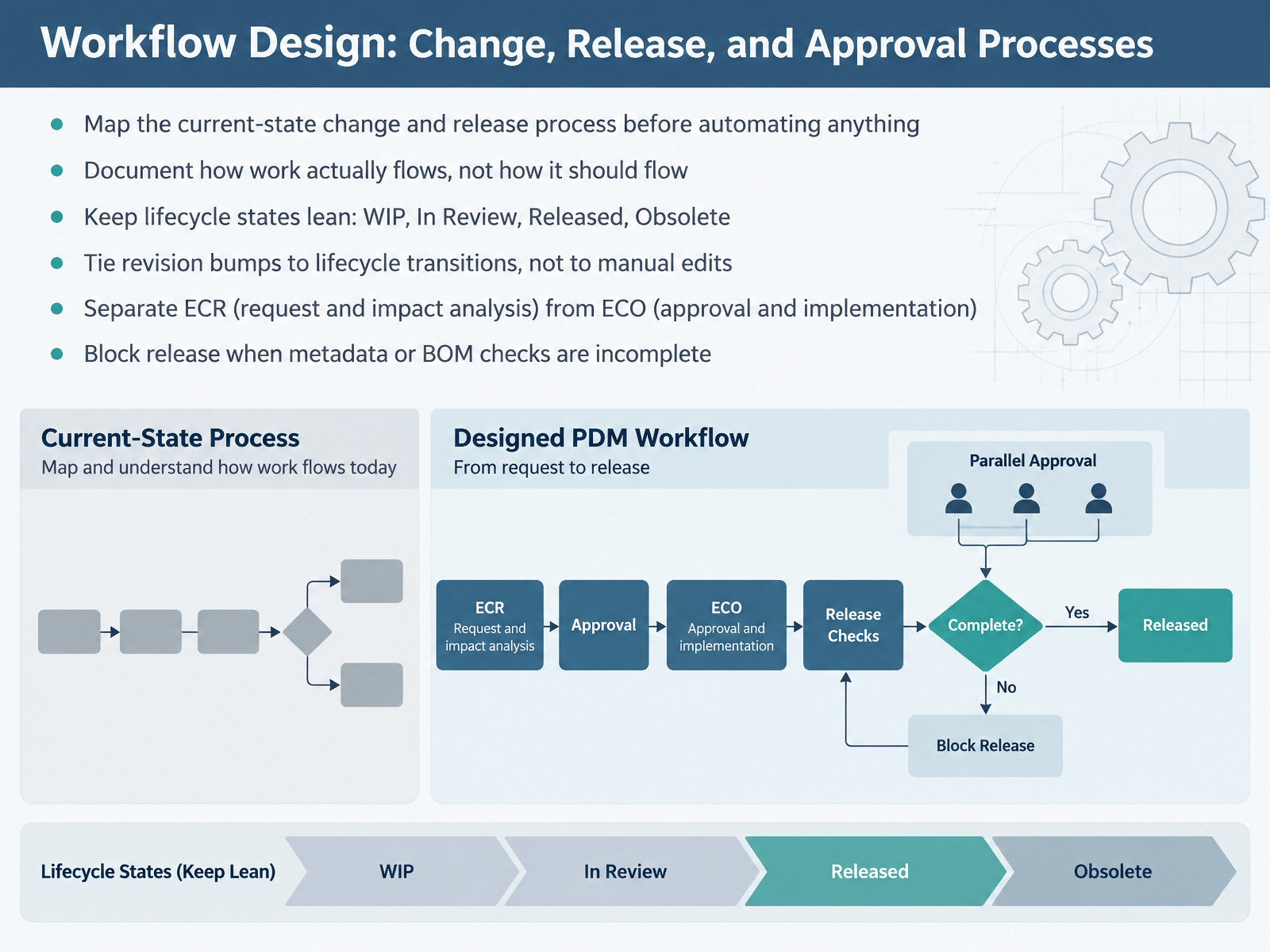
 - 08Workflow Design: Change, Release, and Approval ProcessesNow let's talk about workflow design for change, release, and approval. First rule: map your current-state change and release process before you automate anything. Document how work actually flows, not how it should flow, and let the product operations teams confirm it. Keep lifecycle states lean: Work in Progress, In Review, Released, and Obsolete. More states mean files get stuck. Tie revision bumps to lifecycle transitions, not manual edits, so no one releases the wrong revision. Separate the ECR, where you request the change and run impact analysis, from the ECO, where you approve and implement. For example, an ECR justifies a hole move; the ECO authorizes it and drives the revision. Finally, block release when metadata or BOM checks are incomplete. One plain takeaway: the system should refuse a bad release, not a person you trust. Next, we look at CAD and Toolchain Integration in Multi-CAD Environments.
 link.springer.compdm-studio.techautodesk.com+21 min
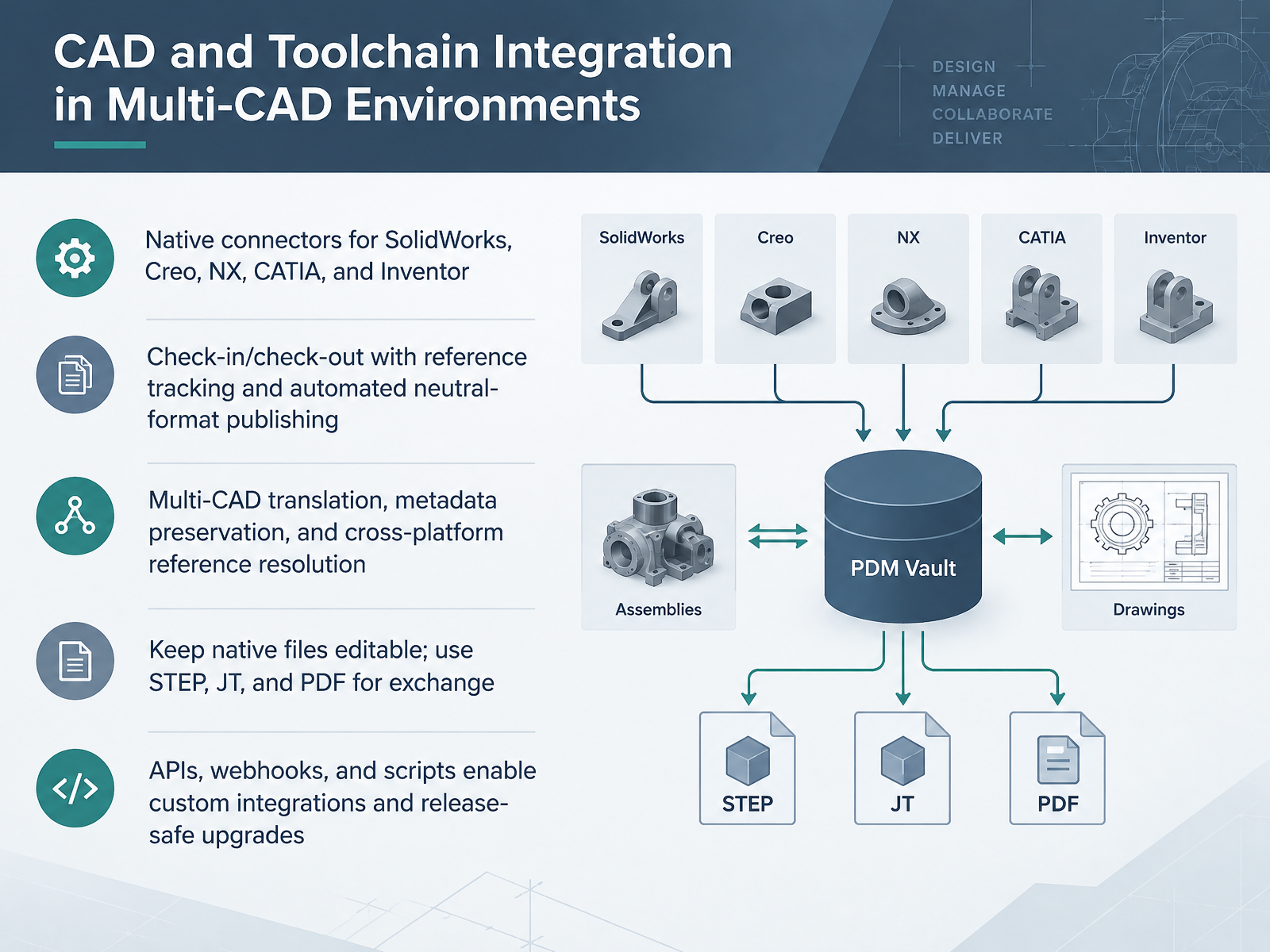
 - 09CAD and Toolchain Integration in Multi-CAD EnvironmentsLet's move to CAD and toolchain integration in multi-CAD environments. The first requirement is native connectors for SolidWorks, Creo, NX, CATIA, and Inventor. Without them, engineers re-upload files by hand, and the CAD administrator inherits the cleanup. Next, check-in and check-out must track references between parts, assemblies, and drawings, then publish neutral formats automatically. On multi-CAD translation, test cross-platform reference resolution before you trust it. Reference parsing differs by format, so pilot your worst assembly. Keep native files editable and treat STEP, JT, and PDF as exchange formats. Native retains feature history; neutral can drop it. Finally, APIs, webhooks, and scripts enable custom integrations and release-safe upgrades. For IT, that means renewing CAD versions without breaking the bridge. That is your takeaway for procurement: integration depth decides adoption. Now to PDM-to-ERP, MES, and Downstream Integration.
 manufacturing.toolsinfo.com1 min
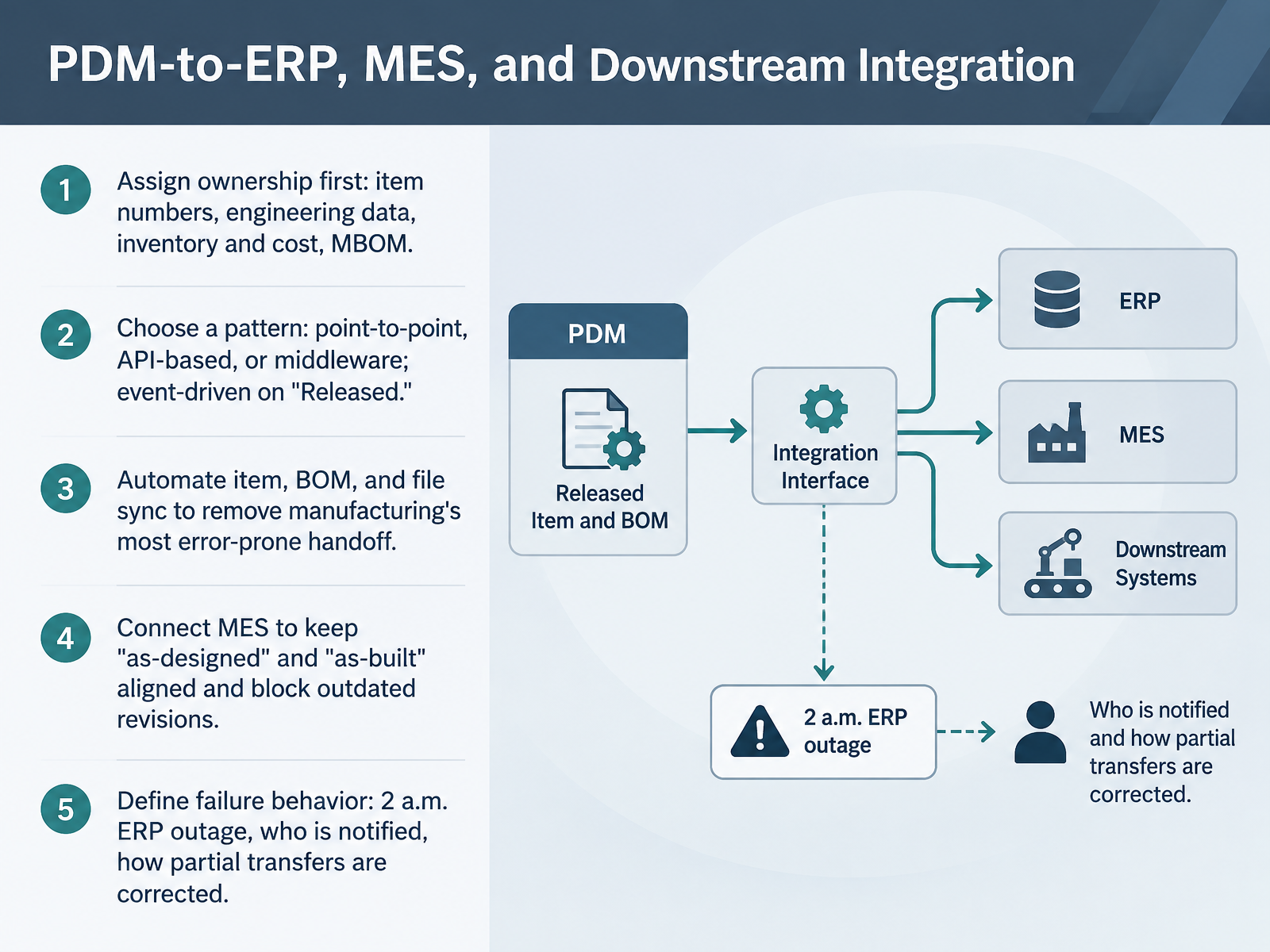
 - 10PDM-to-ERP, MES, and Downstream IntegrationNext, let's connect PDM downstream to ERP and MES. Start by assigning ownership before you build anything. Who owns item numbers, released engineering data, inventory and cost, and the MBOM? Ambiguity here produces duplicate records and no single source of truth. Then choose a pattern. Point-to-point is fastest for one connection, API-based scales better, and middleware pays off when ERP, MES, and CRM all need data. Trigger it event-driven on the Released state, so manufacturing only sees approved revisions. Automate item, BOM, and file sync. That removes manufacturing's most error-prone handoff, the manual re-entry into ERP. Connect MES to keep as-designed and as-built aligned and to block outdated revisions from the shop floor. Finally, define failure behavior. When ERP goes down at two in the morning, who gets notified, and how are partial transfers corrected? An export button is not an integration. Procurement takeaway: integration is defined by data ownership and failure handling, not by the connector list. Now let's look at the data itself, in Data Migration: Assessing, Cleansing, and Loading Legacy Data.
 manufacturing.toolsinfo.comblog.cadrooms.comf.hubspotusercontent00.net+22 min
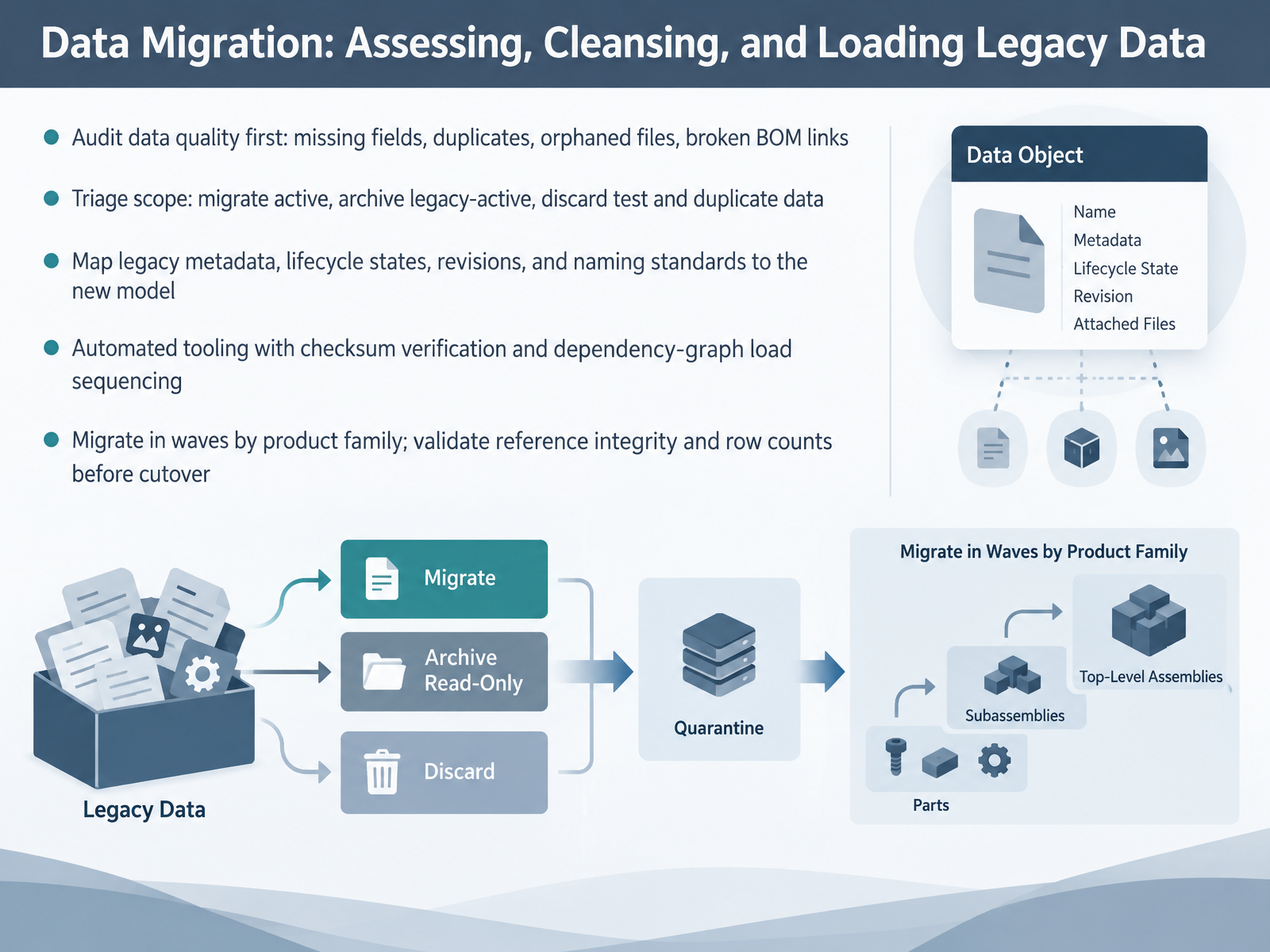
 - 11Data Migration: Assessing, Cleansing, and Loading Legacy DataLet's talk about the phase that sinks more PDM projects than any other: migrating legacy data. Start with a quality audit, not a migration plan. Scan your source for missing required fields, duplicate part numbers, orphaned CAD files, and broken BOM links. Expect the audit to show the scope is larger than you assumed. Then triage. Migrate active products fully. Keep legacy-active structure, but archive the files. Discard test data, duplicates, and obsolete records outright. Next, map legacy metadata, lifecycle states, revision schemes, and naming conventions onto the new data model, and normalize properties before load. Use automated tooling with checksum verification and dependency-graph load sequencing, checking in leaf-level parts before assemblies, so references resolve. Migrate in waves by product family, and validate reference integrity and row counts before each cutover. Two takeaways for your evaluation matrix: every item you archive instead of migrate saves hours of cleansing, and broken references surface weeks later, not day one. Cleaning before you migrate is non-negotiable. That sets up our next topic: security, access control, and compliance.
 ketiv.commanufacturing.toolsinfo.com2 min
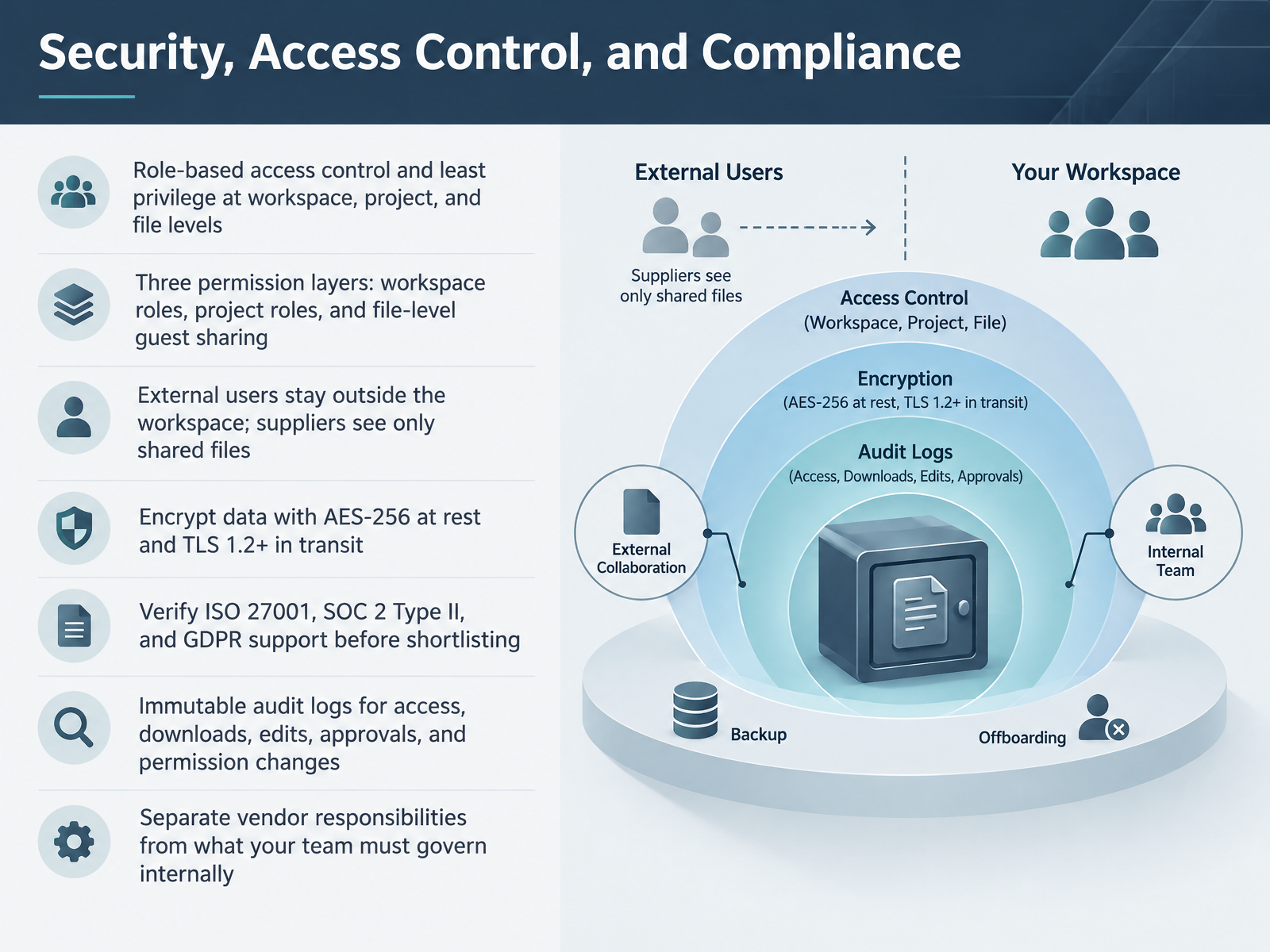
 - 12Security, Access Control, and ComplianceNow let's talk security, access control, and compliance, because this is where procurement teams and auditors will push hardest. Build your permission model on role-based access control with least privilege, applied at three layers: workspace roles, project roles, and file-level guest sharing. External users should never hold workspace or project membership. A supplier gets read-only access to the exact files you share, nothing else. Encrypt data with AES-256 at rest and TLS 1.2 or higher in transit. Before you shortlist, verify current ISO 27001 certification, SOC 2 Type II availability, and GDPR support, including a DPA and data residency options. Demand immutable audit logs covering access, downloads, edits, approvals, and permission changes, and confirm they are visible and exportable in the product. Then draw the line clearly: the vendor secures hosting, encryption, and core platform controls, while your team governs permission design, user lifecycle, and offboarding discipline. Test all of it in a proof of concept, not a slide deck. Next, we move to adoption, change management, and building the business case.
 pdm-studio.techblog.cadrooms.comf.hubspotusercontent00.net+22 min
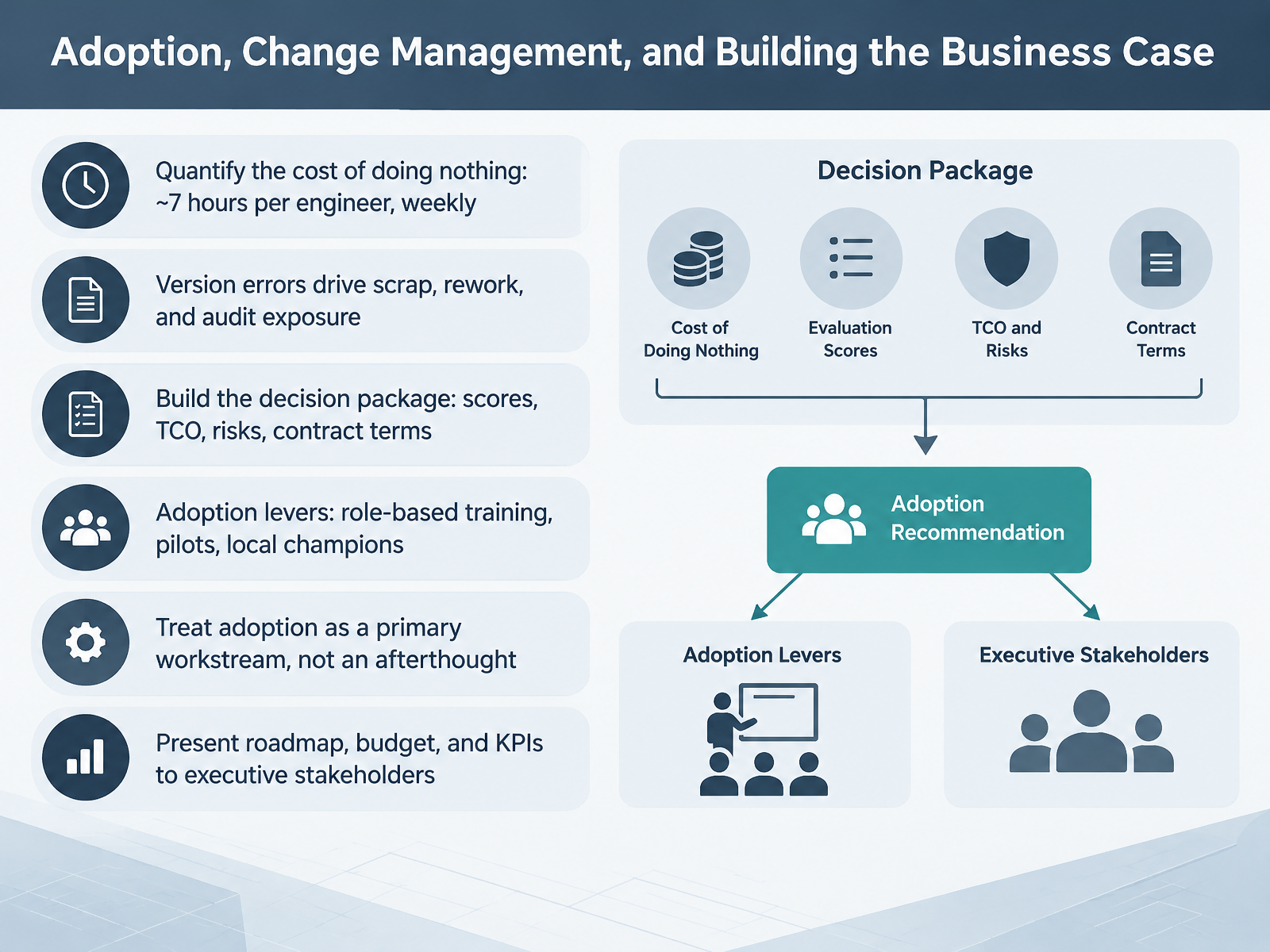
 - 13Adoption, Change Management, and Building the Business CaseNow let's talk about adoption and the business case, because this is where most PDM selections actually stall. Start with the cost of doing nothing. Engineers lose roughly seven hours a week to version hunting, broken references, and reworking wrong revisions. That's a defensible number, and it lands with finance. Then quantify the risk side: version errors drive scrap, rework, and audit exposure. Your decision package should hold scores, three-year TCO, risks, and contract terms, not just license price. For adoption levers, think role-based training, a pilot team, and local champions in each department. A champion per twenty-five to fifty engineers, given ten to twenty percent dedicated time, outperforms any central training push. So treat adoption as a primary workstream with named owners, not an afterthought after go-live. Finally, bring your executive sponsor a roadmap, a budget, and a short list of KPIs: search time, ECO cycle time, error rates, and license utilization. Next, the implementation roadmap, governance, and continuous improvement.
 blog.cadrooms.comopenbom.comketiv.com+22 min
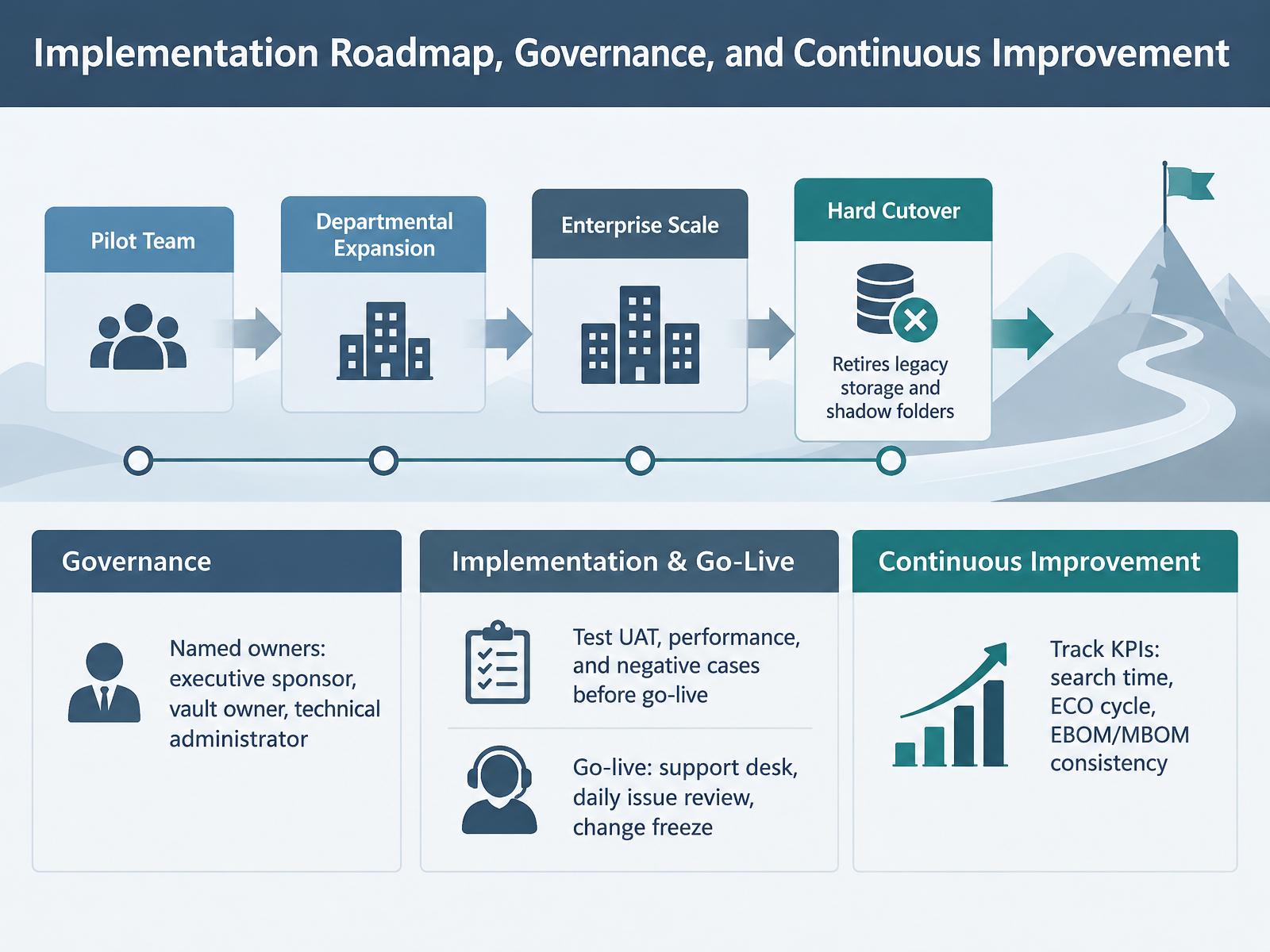
 - 14Implementation Roadmap, Governance, and Continuous ImprovementLet's close out the roadmap. Roll out in three phases: pilot team, then department, then enterprise. The pilot surfaces friction while the cost of correction is still low. Next, plan a hard cutover that retires legacy storage and shadow folders, because if the shared drive stays writable, engineers will keep using it. Name your owners upfront: one executive sponsor for funding and escalation, one vault owner for process, and one technical administrator for infrastructure and backups. Before go-live, run user acceptance testing, performance tests, and negative cases, like a rejected approval or a broken reference. Then cut over with a support desk, a daily issue review, and a change freeze on nonessential configuration. Finally, track a small KPI set: search time, engineering change order cycle, and EBOM to MBOM consistency. Takeaway: phased rollout, named owners, tested cutover, measured results. Structure beats speed every time. Thanks for sticking with the course, and good luck with your evaluation. You are ready to run the process with confidence.
 ketiv.comblog.cadrooms.comopenbom.com2 min
Take the deck with you
Download this course as a file — free, no sign-up needed.
- PDF handoutEvery slide page, ready to print or share.15 pages · 3.3 MBDownload
- Narrated PowerPointThe deck that presents itself — every slide carries the digital human's narration video.15 pages · 16.4 MBDownload
- PowerPoint slidesThe full deck as a .pptx — open it in PowerPoint, Keynote, or Google Slides.15 pages · 3.2 MBDownload
Free to use in your own training — please keep the PersonWise credit page at the end.
Have your own deck? Turn it into a course
Sources consulted
Web sources consulted while building this course.
- How to Choose Cloud PDM for Enterprise | CAD ROOMS — blog.cadrooms.com
- PDM Buyer’s Guide — f.hubspotusercontent00.net
- How to Evaluate a PDM/PLM System in 2026: A Practical Guide — openbom.com
- Product Data Management Tool Finder - ToolsInfo — manufacturing.toolsinfo.com
- PDM Implementation Checklist for Manufacturers — ketiv.com
- Item Revision And Product Lifecycle - OpenBOM — openbom.com
- Engineering Data Management 2026: A Practical Guide — infinisynapse.com
- What Is Engineering Data Management (EDM)? Definition & Implementation — latentview.com
- Collaborative Workspace vs Traditional PDM/PLM Architecture — openbom.com
- Engineering Change Management Architecture: ECR to ECO in PLM (2026) - IoT Digital Twin PLM — iotdigitaltwinplm.com
- Cloud PDM vs On-Premise PDM: TCO Analysis (2026) — blog.cadrooms.com
- Cloud PDM vs On-Premise: Which Deployment Model Fits Your Business? – Catsy DAM + PIM — catsy.com
- Embracing Modern Manufacturing Solutions - Fusion Blog — autodesk.com
- Cloud PLM vs On-Premise PLM: Deployment Models, Costs, and Trade-offs | DemystifyingPLM — demystifyingplm.com
- How much does PIM software cost? A complete pricing guide | Inriver — inriver.com
- Integrated engineering change management framework for efficient information flow to product design systems — link.springer.com
- PDM Studio — pdm-studio.tech
- Engineering Change Management Chaos: How Vault Reduces ECO Cycle Times and Speeds Time to Market - Design & Manufacturing — autodesk.com
- Implementing a Change Form in SOLIDWORKS PDM Professional | GoEngineer — goengineer.com
- PDM Studio 2026 is now available — pdm-studio.tech