Begin
14 pages · ~28 min
Technical Documentation Writing Practices
This training teaches technical documentation writing practices, equipping professionals with essential skills to create clear, accurate, and user-friendly documentation.
A digital instructor presents all 14 pages. Hold “Ask” at any point and ask out loud — the answer comes from this course. No sign-up needed.
What you’ll learn
- 01Technical Documentation Writing PracticesWelcome. I’m glad you’re here. Over the next few sessions, we’re going to look at technical documentation as a craft and as a product decision. We’ll cover document types, audience analysis, writing principles, structure, style, review workflows, docs-as-code tooling, and maintenance. And we’ll talk about why quality matters not just for your users, but for your product team and for AI-assisted discovery in 2026. The course is organized to take you from foundational principles through practical workflows, tooling, collaboration, and quality measurement, and it ends with a 30-day action plan you can apply right away. Our primary goal is to help you create documentation that is clear, accurate, maintainable, and machine-readable. So as we go, think about your own projects and where you feel the friction. That’s where the learning will stick. Let’s start by understanding why documentation quality is a product problem, not just a writing problem.2 min
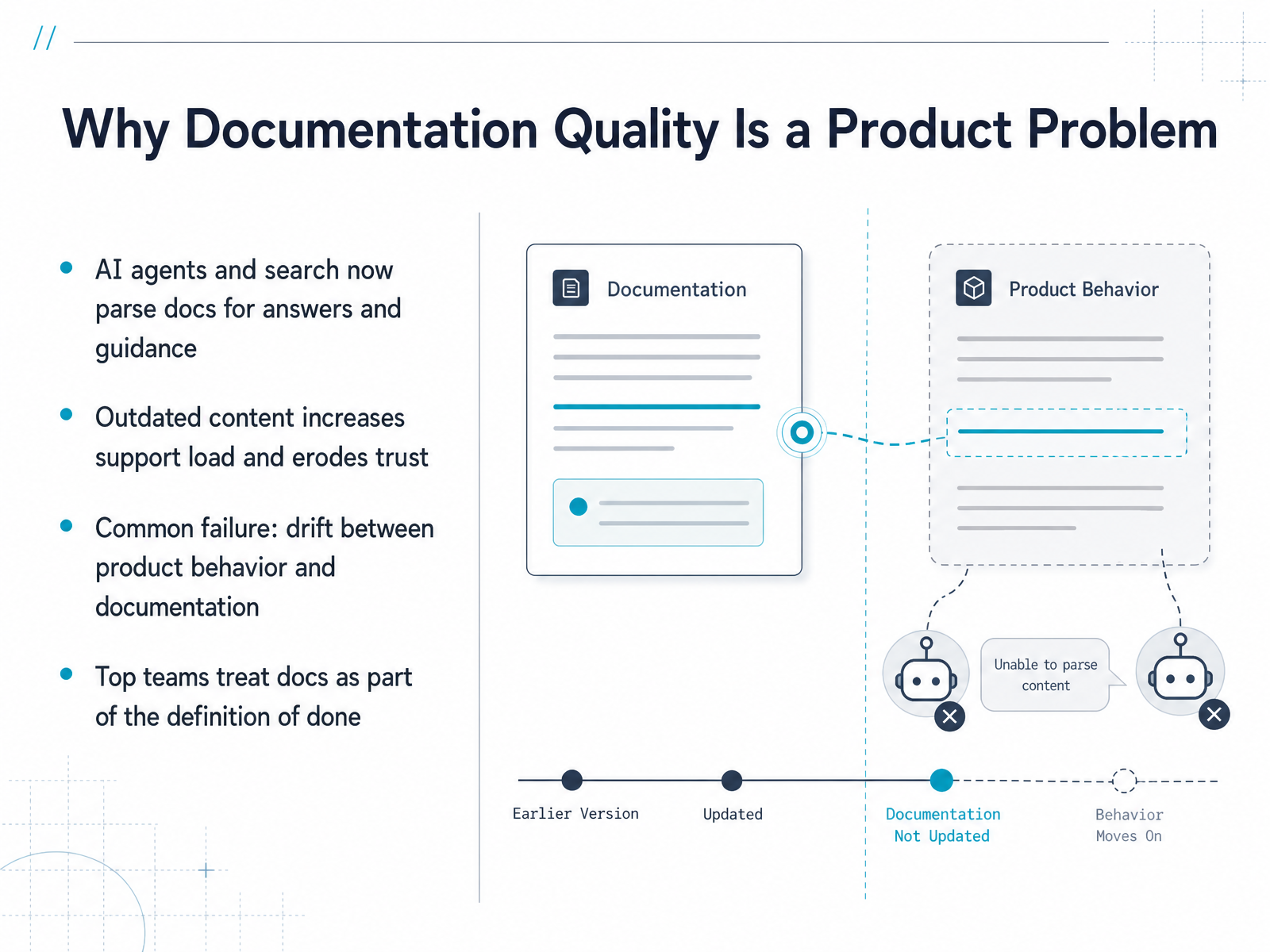
- 02Why Documentation Quality Is a Product ProblemLet’s talk about why documentation quality is really a product problem, not just a writing problem. Today, AI agents and search engines parse your docs to find answers and guide users. If your content is outdated or inaccurate, that’s what they’ll surface. Outdated content also increases support load and erodes trust—users stop relying on your docs, and your team pays the price in extra tickets and frustrated customers. A common failure is drift: the product changes, but the documentation doesn’t keep up. That gap between what the software does and what the docs say is a silent killer of user confidence. Top teams treat documentation as part of the definition of done. That means every feature, every fix, every release isn’t complete until the docs are updated and accurate. So as we move forward, think of documentation as a product feature, not an afterthought. Next, let’s look at the different document types and the Diátaxis framework, which gives us a clear structure for creating docs that truly serve users.
 1 min
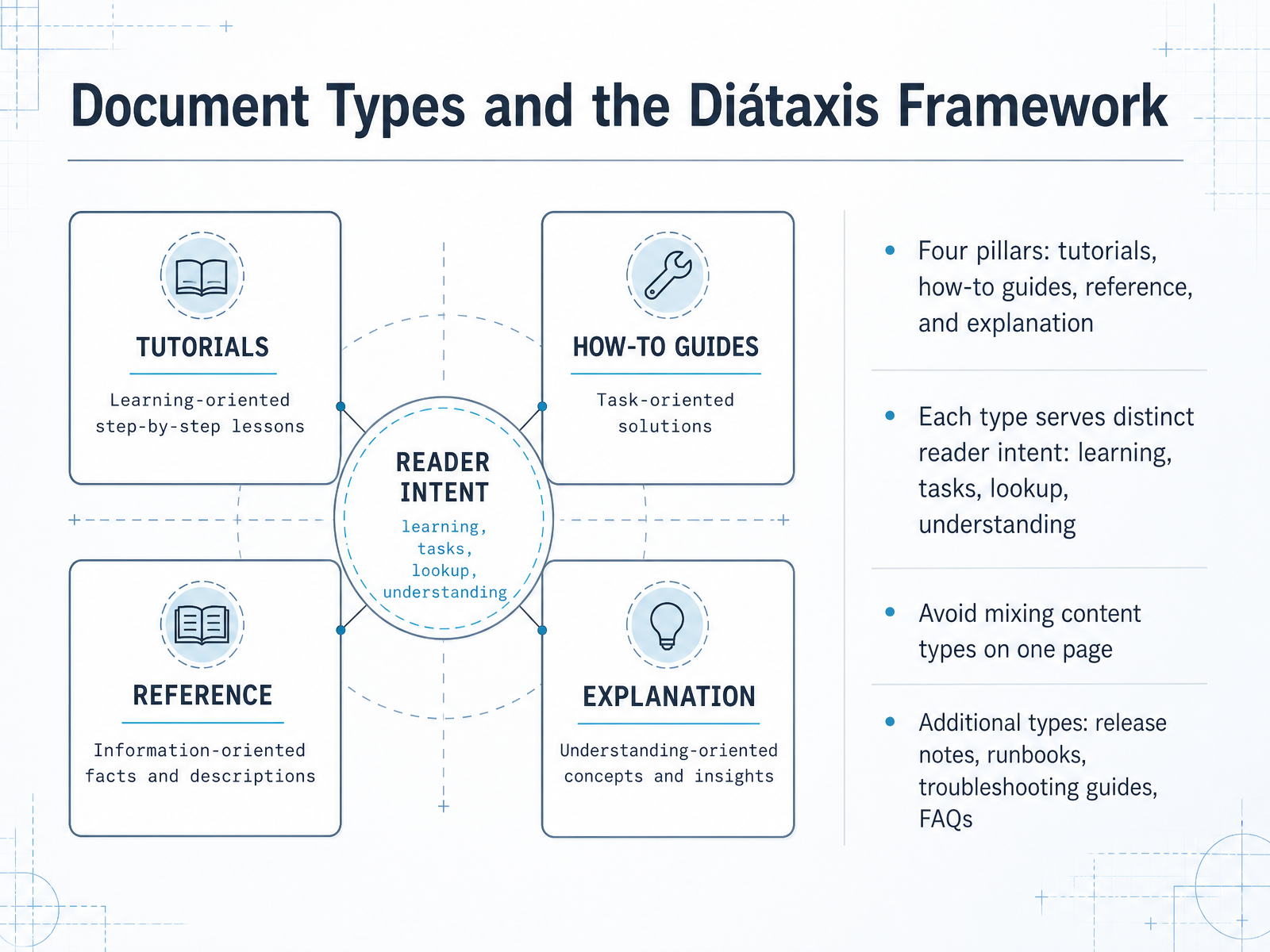
1 min - 03Document Types and the Diátaxis FrameworkNow let’s talk about the types of documentation you’ll actually produce, using the Diátaxis framework. It organizes everything into four pillars: tutorials, how-to guides, reference, and explanation. Each one serves a different reader intent. Tutorials support learning. How-to guides support completing a task. Reference is for quick lookup, and explanation builds deeper understanding. The key discipline here is to avoid mixing these types on one page. A tutorial should not double as a reference manual, and a how-to guide should not drift into conceptual background. If a reader lands on a page, they should know within seconds what job it does. Beyond the four pillars, you’ll often need release notes, runbooks, troubleshooting guides, and FAQs. These support specific moments in the product lifecycle, like shipping a version or recovering from an incident. Keep them distinct and clearly labeled. So, before you write, decide which type this page is, then choose its structure accordingly. Next, we’ll look at how to analyze your audience before you write a single word.
 buildwithfern.comdocumentation.suse.comdocsio.co+21 min
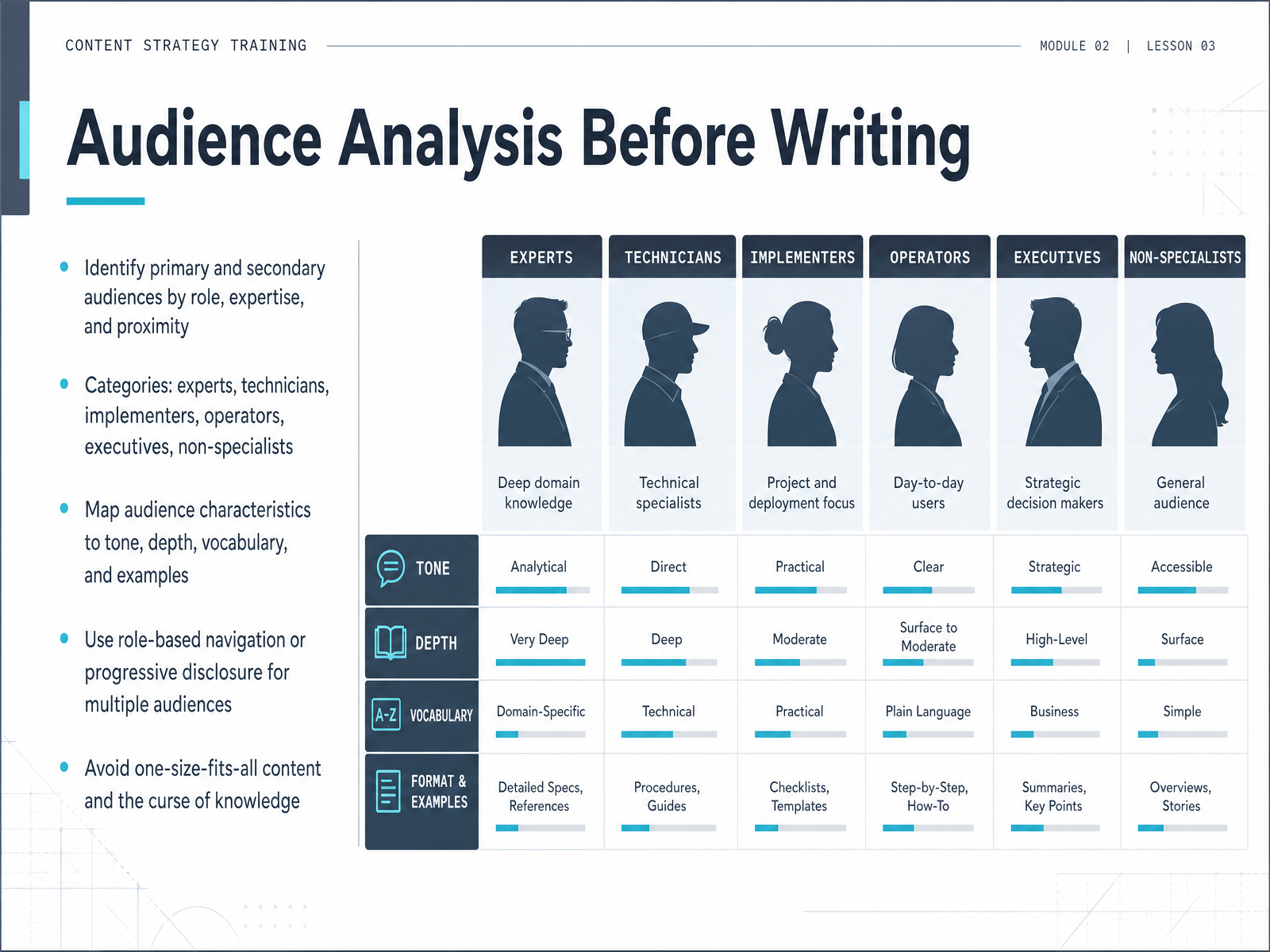
 - 04Audience Analysis Before WritingLet’s shift focus to audience analysis before writing. This is where effective documentation truly begins. Start by identifying your primary and secondary audiences by role, expertise, and proximity to the subject matter. Common categories include experts, technicians, implementers, operators, executives, and non-specialists. Each group expects different depth and vocabulary. For example, an executive needs a concise summary of value and risk, while an operator needs precise, repeatable procedures. Map your audience characteristics to tone, depth, vocabulary, and examples. When you must serve multiple audiences, use role-based navigation or progressive disclosure to let each reader find their layer quickly. Above all, avoid one-size-fits-all content and the curse of knowledge. Just because you understand a concept deeply doesn’t mean your reader does, so explain unfamiliar abbreviations and implementation details explicitly. This analysis isn’t just a planning step; it is the foundation for every writing decision you’ll make. Next, we’ll look at the core writing principles that turn this audience insight into clear, maintainable documentation.
 developers.google.cnhuman.libretexts.orgpressbooks.pub+22 min
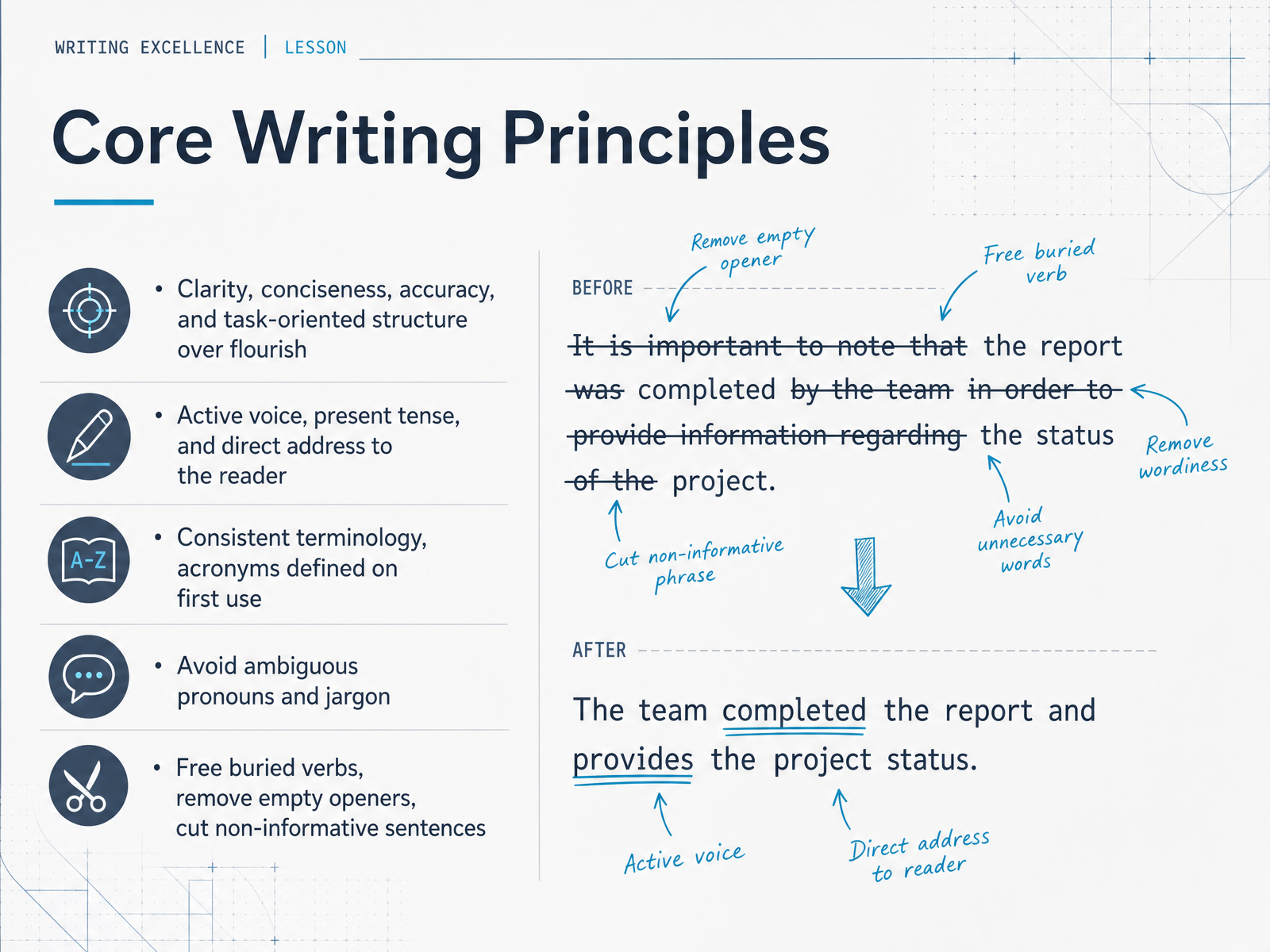
 - 05Core Writing PrinciplesLet’s now turn to the core writing principles that should guide every sentence you draft. Think of clarity, conciseness, accuracy, and a task-oriented structure as your foundation. Favor active voice, present tense, and address your reader directly. Say: "Run the build command" rather than "The build command should be run." Keep your terminology consistent across the document, and define acronyms the first time you use them. Avoid ambiguous pronouns like "it" or "this" when the reader might have to guess what you’re referring to, and steer clear of jargon unless you’re certain the audience knows it. Watch for buried verbs — "make a decision" becomes simply "decide" — and cut empty openers like "there are" or "it is important to note that." If a sentence doesn’t help the reader take a step forward, remove it. Each sentence must earn its place. Keep these principles in mind as we move into information architecture and readability.
 developers.google.comdocs.openstack.orgdevelopers.google.com+21 min
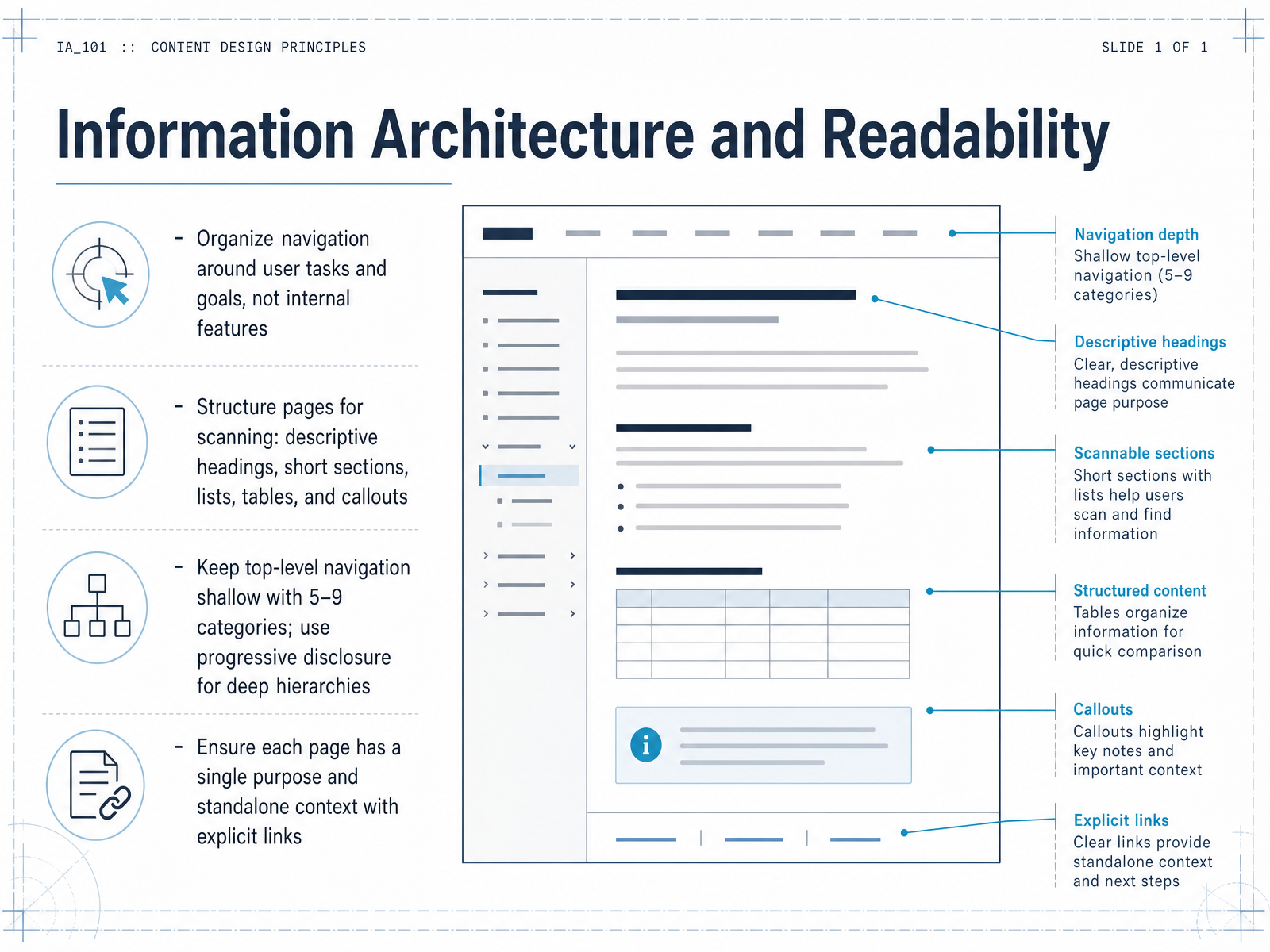
 - 06Information Architecture and ReadabilityNow let's look at how readers actually move through your documentation. This is where information architecture and readability meet. Start by organizing navigation around user tasks and goals, not around your internal product features. If you group pages by internal modules, readers who don't know your structure will get lost. Instead, group by what the user is trying to accomplish. Next, structure pages for scanning. Use descriptive headings, short sections, lists, tables, and callouts to break up text. This lets readers skim for what they need. When designing the top-level navigation, keep it shallow with five to nine categories. For deeper hierarchies, use progressive disclosure, like accordions or collapsible menus, to reveal detail only when needed. Finally, ensure every page has a single purpose and can stand alone. Include explicit links to related topics so readers don't have to hunt for context. When readers can predict where content lives, they move faster, and your team will maintain the material much more easily. Up next, we'll get into the granular work of writing procedures and task-based content.
 buildwithfern.comdocsio.codocs.docmd.io+22 min
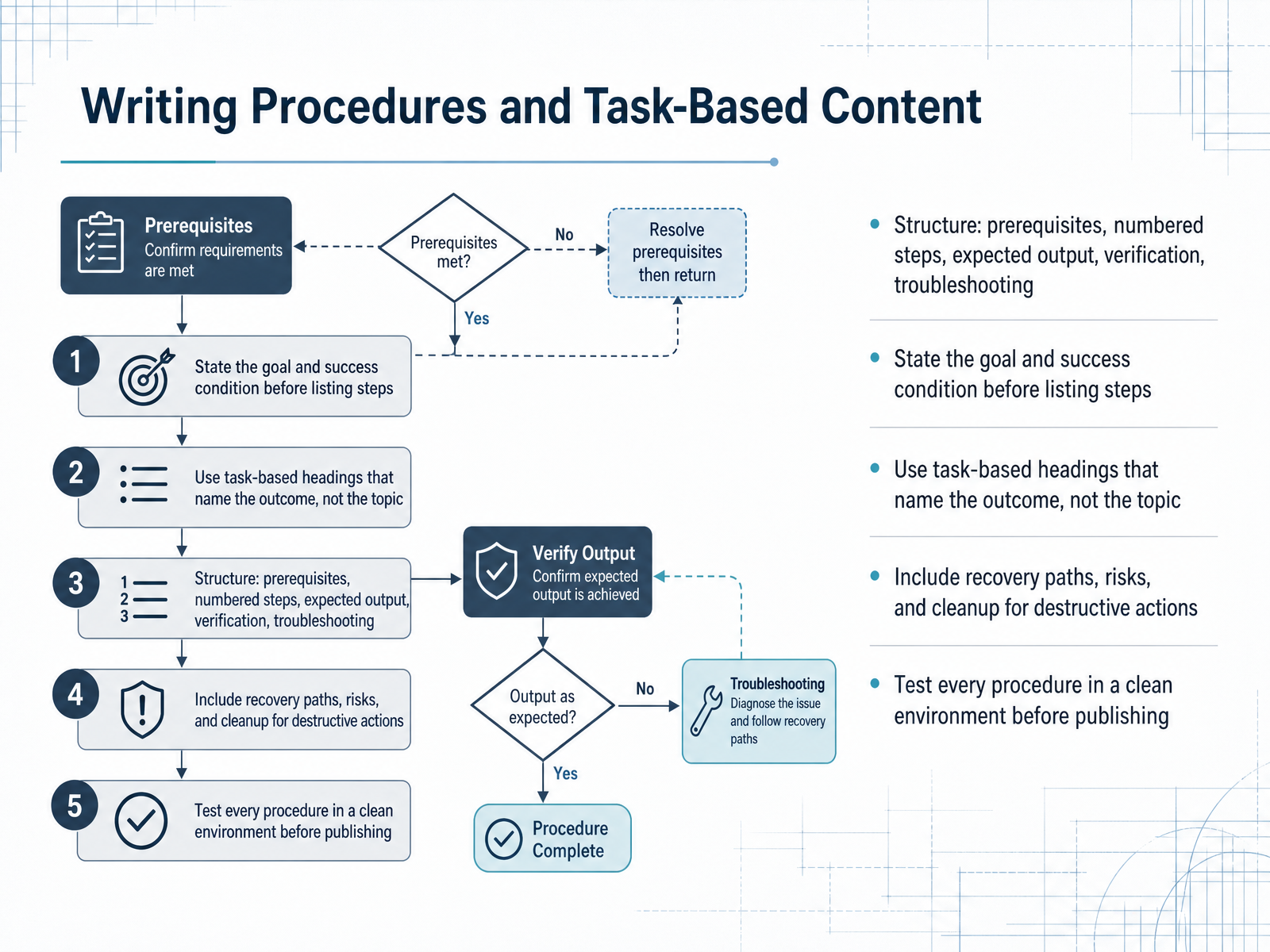
 - 07Writing Procedures and Task-Based ContentNow let’s look at how to write procedures and task-based content. This is where documentation becomes truly useful. Start by structuring every procedure with the same five parts: prerequisites, numbered steps, the expected output, verification, and troubleshooting. But before you list any steps, state the goal and the success condition. Tell readers what they’ll achieve and how they’ll know it worked. Use task-based headings that name the outcome, not just the topic. Instead of “Configuration,” write “Configure the client with an API key.” That way, scanning readers know exactly what they’ll get. For any destructive action, include recovery paths, risks, and cleanup steps. If something can go wrong, tell readers how to spot it and how to fix it. Finally, test every procedure in a clean environment before publishing. Follow your own steps exactly as written, in a fresh setup, and fix anything that fails. A procedure that works only on your machine isn’t a procedure—it’s a suggestion. When you structure tasks this way, your readers move from confusion to completion with confidence. Next, we’ll explore how to build an API reference that complements these task-based guides.
 buildwithfern.comdocsio.codocs.docmd.io+22 min
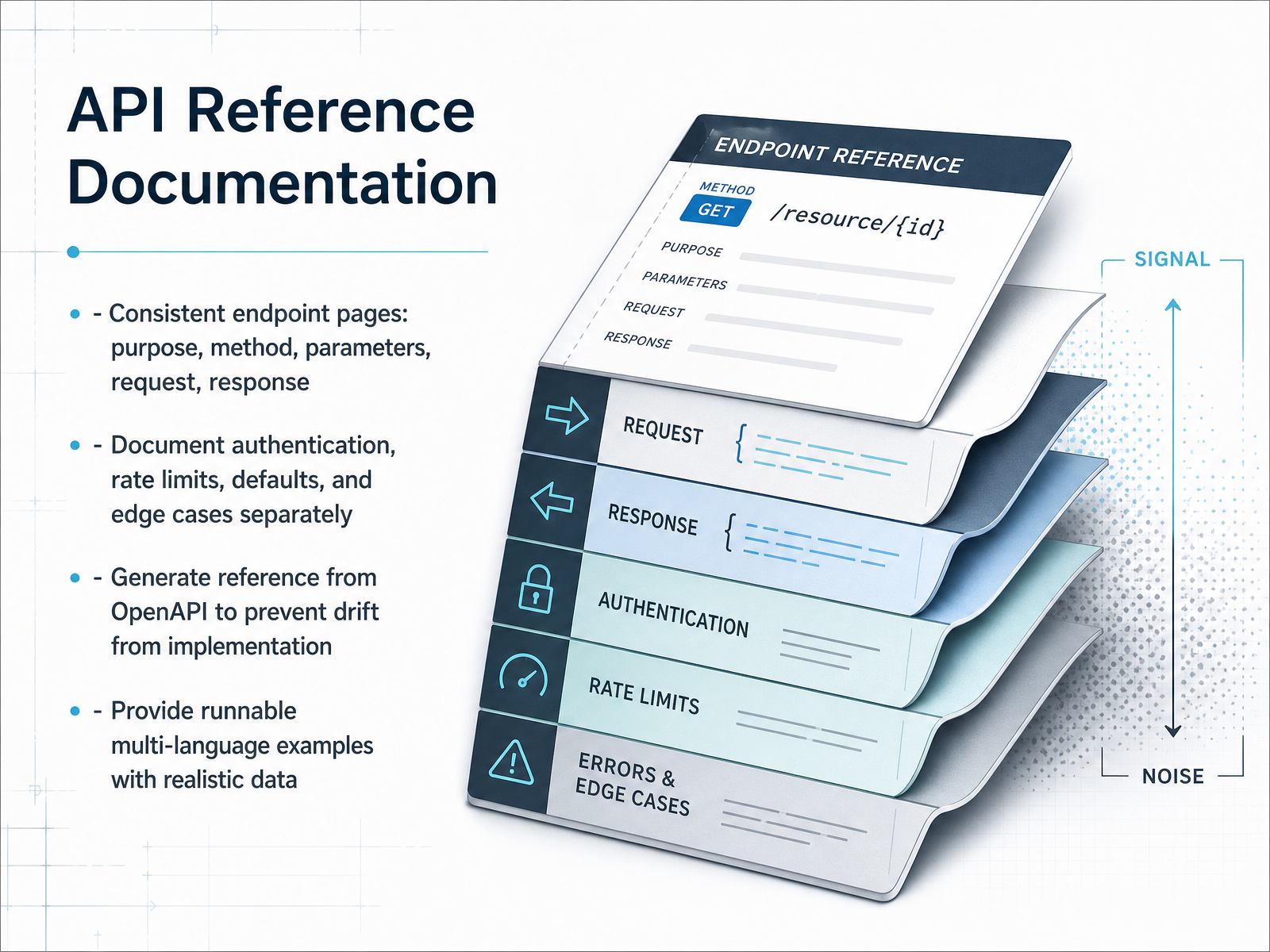
 - 08API Reference DocumentationNow let's focus on API reference documentation, where consistency is more important than prose flair. Every endpoint page should follow the same structure: purpose, method, parameters, request, and response. This way, developers who have seen one page can quickly scan any other. Also, keep authentication, rate limits, defaults, and edge cases in separate sections, because these are the first places integrations break silently. To prevent drift between docs and implementation, generate the reference from your OpenAPI specification. That way, any change to the API schema updates the docs automatically, and you avoid the classic problem of outdated parameter tables. Finally, always provide runnable examples in multiple languages, with realistic data. Test them before publishing and again whenever the API changes. A code sample that fails on copy-paste erodes trust faster than any missing feature. Remember, your reference is a contract with your users — make it accurate, consistent, and verifiable. Next, we'll look at how style guides, templates, and consistency keep all your documentation aligned. Stay with me.
 1 min
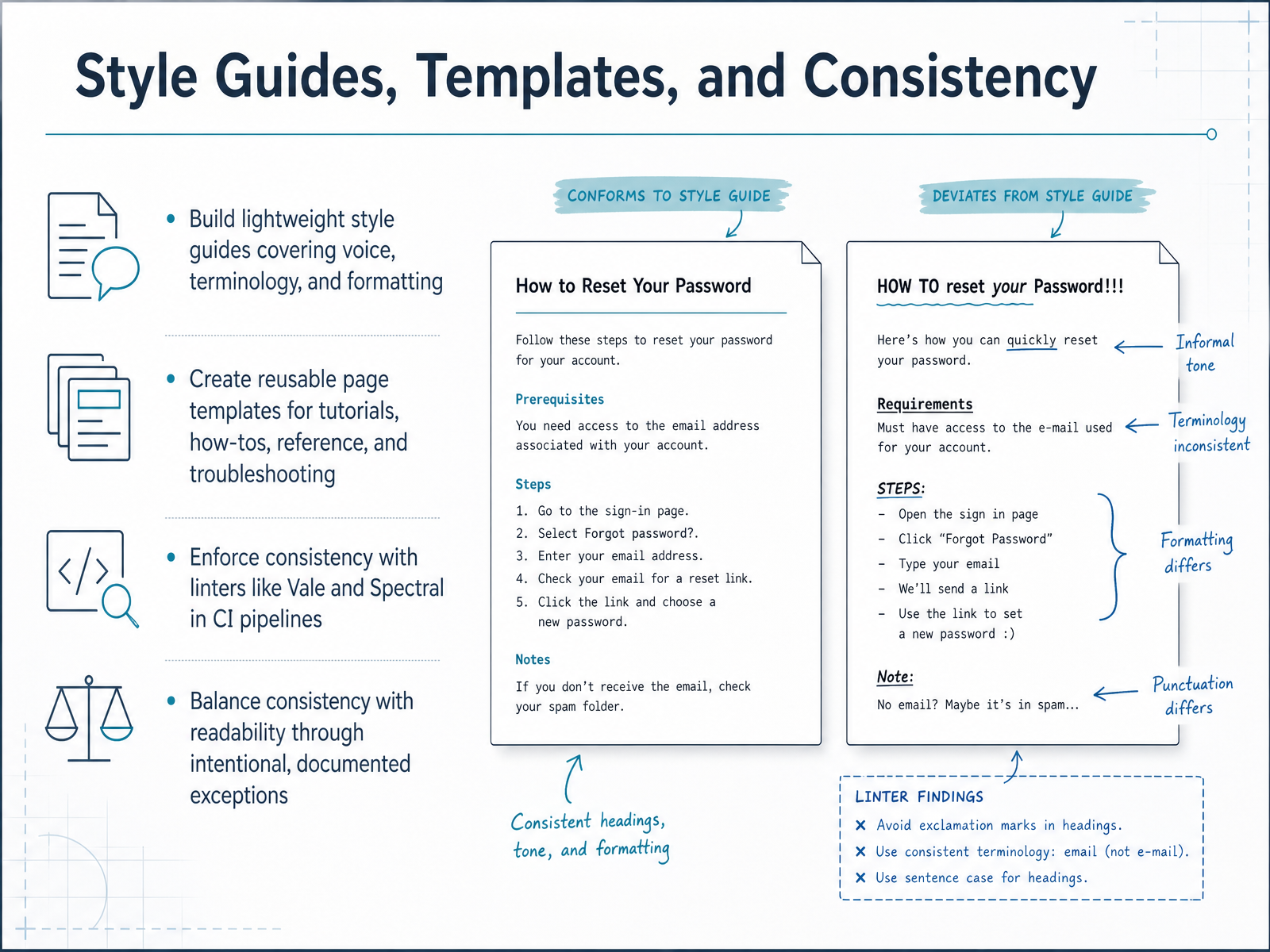
1 min - 09Style Guides, Templates, and ConsistencyLet's talk about how to keep all your documentation feeling like it came from one clear voice. Start with a lightweight style guide that covers voice, terminology, and formatting. It should be short enough that people actually read it. For example, define whether you say "click" or "select," and how you handle acronyms. Next, create reusable page templates for each doc type: tutorials, how-tos, reference, and troubleshooting. This gives writers a consistent structure without reinventing the wheel each time. Then, enforce consistency with linters like Vale or Spectral in your CI pipeline. These tools catch drift automatically, checking sentence length, banned phrases, and glossary terms. They work well as guardrails, not gatekeepers. And remember, consistency shouldn't crush readability. If a rule doesn't fit a specific context, allow it through an intentional, documented exception. That way, your standards stay useful instead of becoming bureaucratic. The takeaway is this: a style guide gives you direction, templates give you structure, and linters give you enforcement, all working together to make your docs predictable and professional. Next, we'll look at how to review, test, and approve documentation before it ships.
 2 min
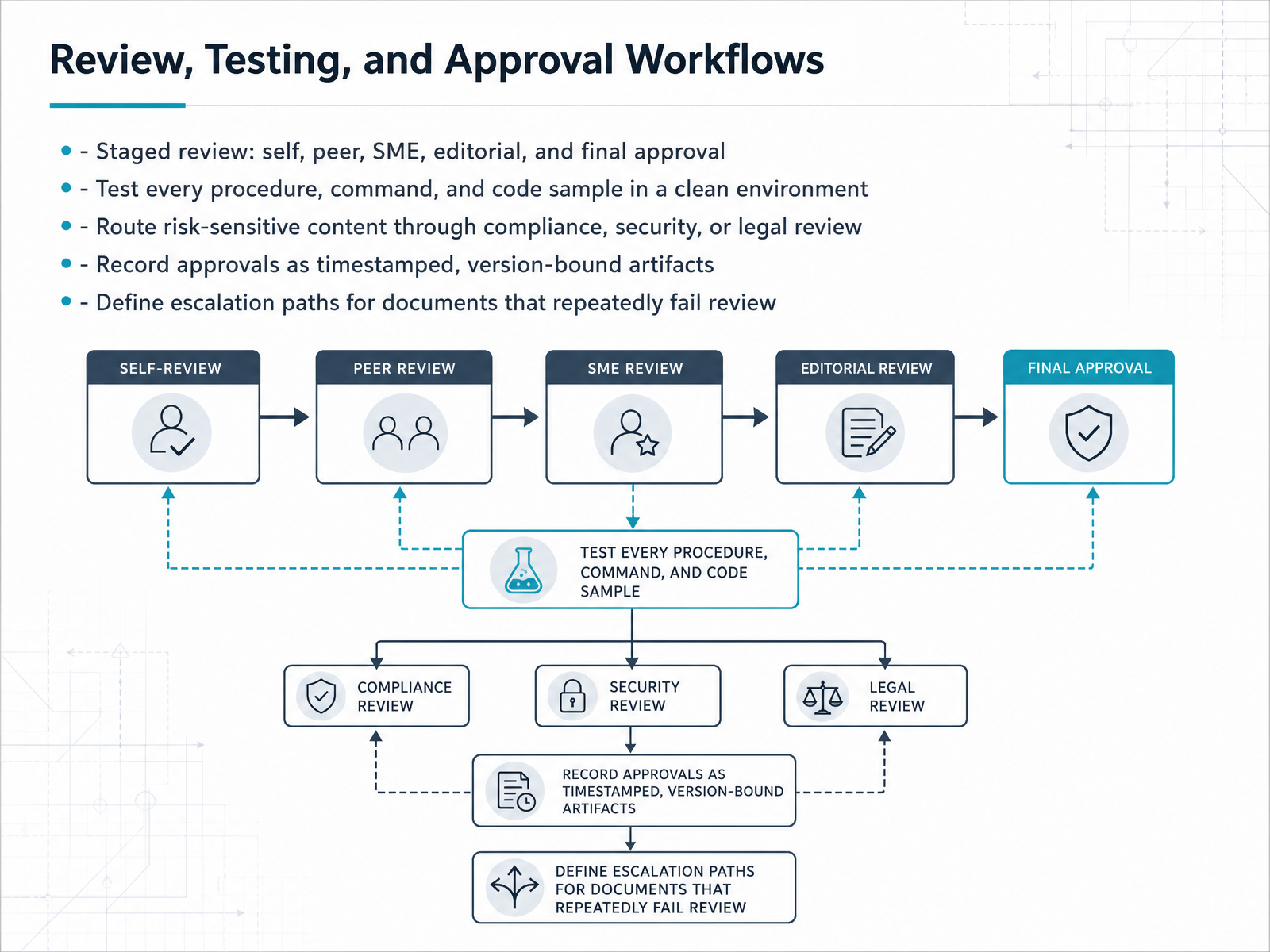
2 min - 10Review, Testing, and Approval WorkflowsNow let's talk about how documents actually get approved. Review should never be a single pass. Structure it in stages: self-review for clarity, peer review for structure, subject matter expert review for technical accuracy, editorial review for style, and a final approval gate before publishing. And here's the critical part: the SME must test every procedure, command, and code sample in a clean environment. A quick skim is worse than no review at all, because it gives the document false authority. If the content touches compliance, security, or legal topics, route it through those teams early, while the document is still flexible enough to absorb structural changes. Every approval should be recorded as a timestamped artifact, bound to the specific document version that was reviewed. Verbal sign-offs do not survive an audit. Finally, define an escalation path before you need it. If a document fails review more than twice, have a plan: the documentation lead and the SME sit down together and resolve it directly, rather than letting it sit in draft for months. The goal is a repeatable gate that protects quality, not a process that slows publishing. With that gate in place, the next question is how you keep documents accurate long after they go live, which is the topic of maintenance and ownership.
 1 min
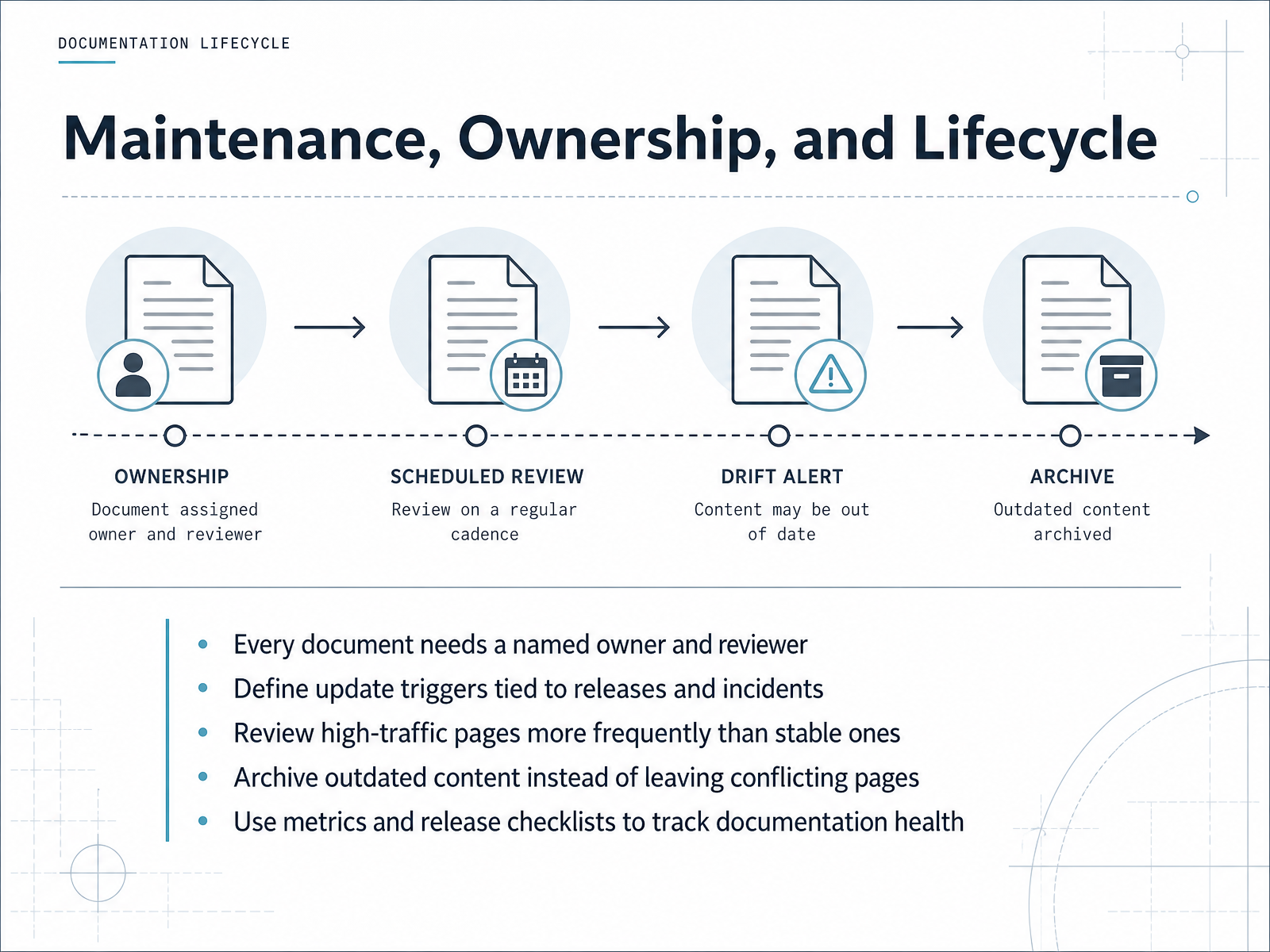
1 min - 11Maintenance, Ownership, and LifecycleNow let's talk about keeping documentation alive after publication. Every document needs a named owner and a reviewer, not just at launch, but for its entire lifecycle. Ownership is about accountability, ensuring content stays accurate as products and processes evolve. Define clear update triggers tied to releases and incidents. When a feature ships or a support ticket reveals a gap, that is your signal to review and revise. Prioritize high-traffic pages, reviewing them more frequently than stable reference material. A quarterly pass on popular topics prevents slow decay. When content is outdated, archive it deliberately instead of leaving conflicting pages that confuse readers. Track documentation health with simple metrics, like the percentage of pages reviewed on time or the number of outdated pages found per audit. Release checklists also keep updates embedded in the workflow. The goal is a sustainable system, not heroic effort. When ownership, triggers, and measurement work together, documentation becomes a reliable asset. Next, let's explore how treating docs as code transforms this entire workflow.
 2 min
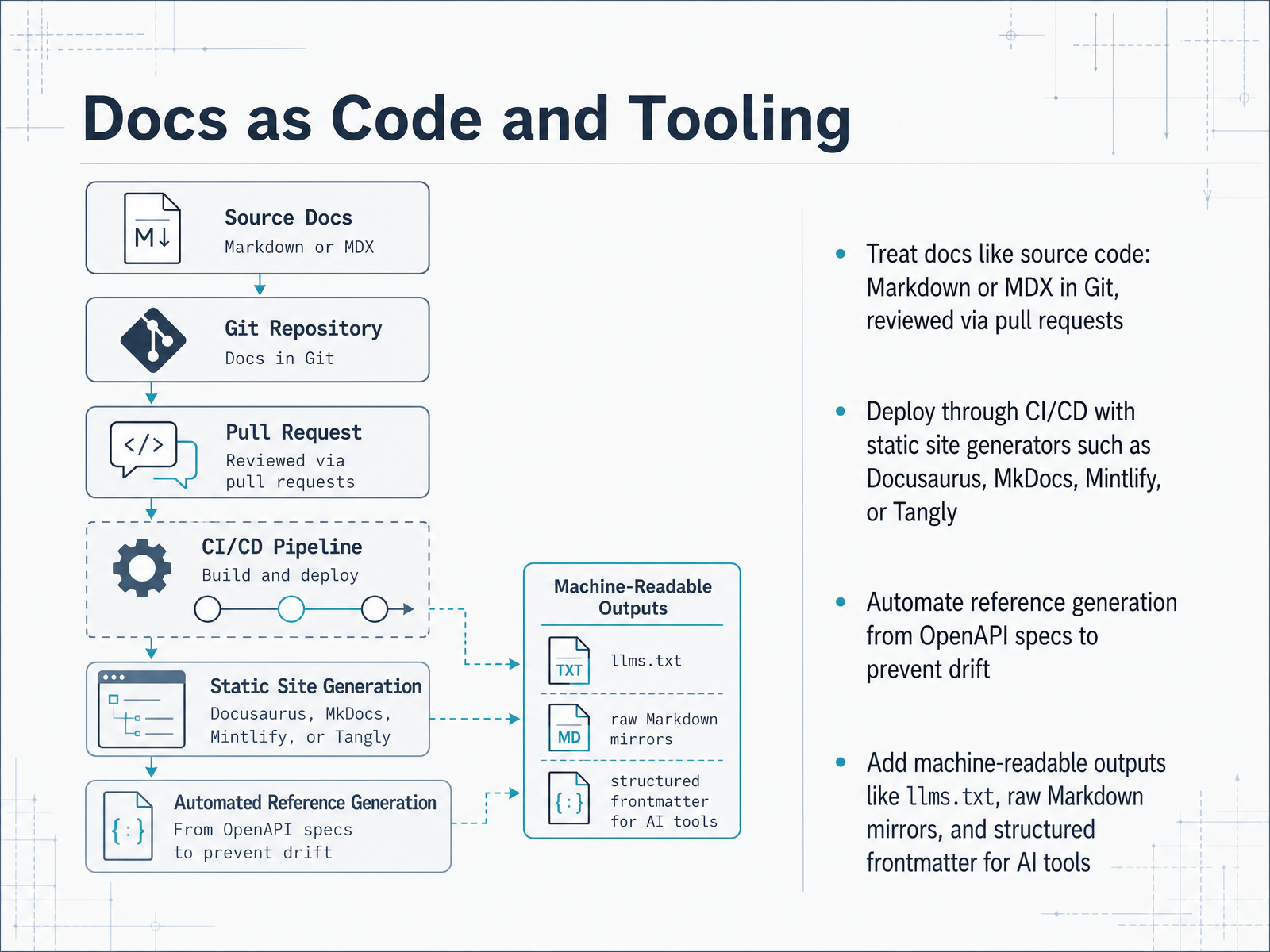
2 min - 12Docs as Code and ToolingLet's talk about docs as code and tooling. This is the practice of treating documentation exactly like software source code. You write in Markdown or MDX, store everything in Git, and every change goes through a pull request for review. That way, documentation gets the same rigor, versioning, and accountability as the code it describes. Once docs live in a repository, you can generate and deploy the site through your CI/CD pipeline using a static site generator. Docusaurus and MkDocs are the familiar choices. Newer tools like Mintlify and Tangly offer self-hosted, no-lock-in alternatives that compile Markdown into fast static sites. For API documentation, automate the reference generation directly from your OpenAPI spec. That prevents drift between what the API actually does and what the docs say, because both are generated from the same source of truth. Finally, think about machine-readable outputs. Add an llms.txt file, mirror pages as raw Markdown, and use structured frontmatter. These formats let AI tools and agents consume your documentation efficiently without scraping HTML. The core takeaway is simple: when docs are versioned, reviewed, deployed, and machine-readable, they become a reliable product asset instead of a burden. Now let's move on to practical strategies for product teams.
 1 min
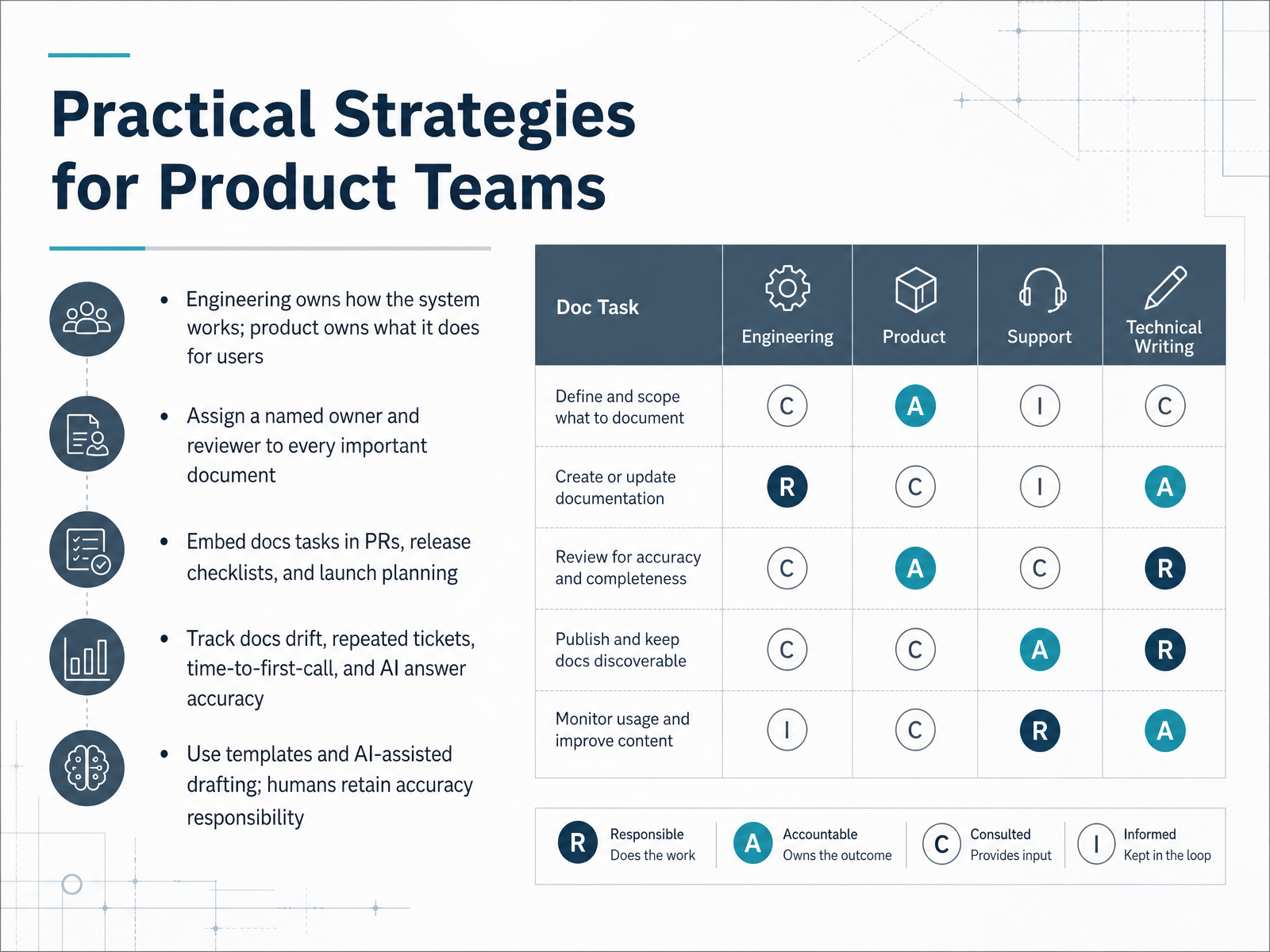
1 min - 13Practical Strategies for Product TeamsNow let’s turn these principles into practical strategies your product team can apply right away. Start with a simple ownership split: engineering owns how the system works, and product owns what it does for users. API docs, architecture notes, and setup guides belong to engineering. Feature announcements, onboarding flows, and user-facing release notes belong to product. But clear ownership doesn’t mean solo work. Assign a named owner and a reviewer to every important document. The author drafts, the reviewer checks accuracy, and the owner keeps it current. Also, embed docs tasks into your existing workflow. Add a docs check to pull requests when code changes behavior. Include it in release checklists and launch planning. That way, updates happen as part of shipping, not as an afterthought. Measure what matters: track documentation drift, repeated support tickets, time to first successful call, and even how accurately AI assistants answer product questions. These numbers tell you where the gaps really are. Finally, use templates to remove the blank page problem, and let AI draft a first pass from commits or issue summaries. But keep the human in charge. A person must verify accuracy and sign off on anything that changes behavior or promises a capability. Remember, distribution beats centralization. There’s no bottleneck, just clear accountability. Up next, we’ll walk through a practical checklist and a thirty day action plan to put these ideas into motion.
 2 min
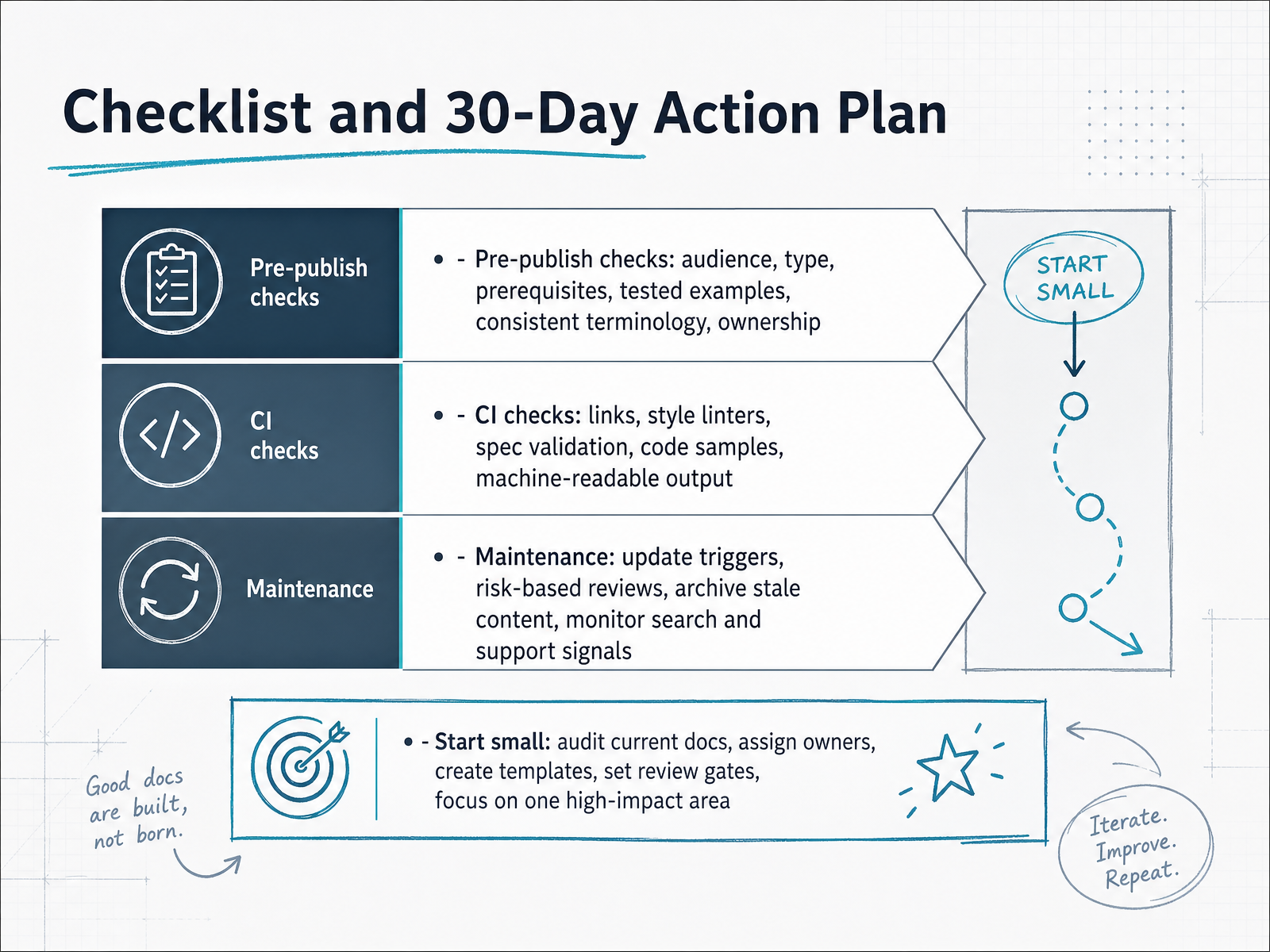
2 min - 14Checklist and 30-Day Action PlanLet's bring everything together with a simple checklist and a thirty-day plan. Before you hit publish, confirm your audience, the content type, and prerequisites are clear. Test every code example in a clean environment, ensure terminology is consistent, and assign an owner who keeps the page current. Let automation handle the mechanical checks—links, style linters, spec validation, and machine-readable output—so reviewers can focus on accuracy and user value. For maintenance, define update triggers tied to releases or support signals, review risky content on a schedule, and archive anything stale before it misleads someone. Now, the thirty-day plan: start small. Audit your current docs, assign owners, create templates, and set review gates. Focus on one high-impact area first. If you only remember one thing, let it be this—documentation is a system, not a deliverable. Build the workflow, and the quality will follow. Thank you for your time, and good luck with your documentation practice.
 2 min
2 min
Take the deck with you
Download this course as a file — free, no sign-up needed.
- PDF handoutEvery slide page, ready to print or share.15 pages · 3.4 MBDownload
- Narrated PowerPointThe deck that presents itself — every slide carries the digital human's narration video.15 pages · 28.0 MBDownload
- PowerPoint slidesThe full deck as a .pptx — open it in PowerPoint, Keynote, or Google Slides.15 pages · 3.2 MBDownload
Free to use in your own training — please keep the PersonWise credit page at the end.
Have your own deck? Turn it into a course
Sources consulted
Web sources consulted while building this course.
- How to write technical documentation: a complete guide (August 2026) | Fern — buildwithfern.com
- Writing technical documentation | SUSE Documentation Style Guide (AsciiDoc) | 2026-08 — documentation.suse.com
- Documentation Best Practices for 2026 | Docsio — docsio.co
- Your Technical Writing Style Guide for 2026 — dokly.co
- What Is Technical Documentation? 2026 Guide & Best Practices — dokly.co
- Audience | Technical Writing | Google for Developers — developers.google.cn
- 4.2: Audience analysis - Humanities LibreTexts — human.libretexts.org
- Audience Analysis – Technical Writing — pressbooks.pub
- Audience Analysis in Technical Writing — archbee.com
- Chapter 2: Audience – Technical and Professional Writing ... — open.library.okstate.edu
- Active voice vs. passive voice | Technical Writing | Google for Developers — developers.google.com
- General writing guidelines — Documentation Contributor Guide documentation — docs.openstack.org
- Active voice | Google developer documentation style guide | Google for Developers — developers.google.com
- https://docs.ansible.com/projects/ansible/latest/dev_guide/style_guide/voice_style.html — docs.ansible.com
- Chapter 2: Technical Writing Style – The Practical Guide to Technical Writing for Engineers and Computer Scientists — opentextbooks.concordia.ca
- Info Architecture for Docs: February 2026 | Fern — buildwithfern.com
- How to Organize Documentation: The Four Shelves Model | Docsio — docsio.co
- Task vs. Concept : docmd docs — docs.docmd.io
- How to structure technical documentation: information architecture ... — gitbook.com
- Information Architecture for Technical Writing (9 Easy Steps) — instantdocs.com