Begin
14 pages · ~28 min
Employee Onboarding Automation Workflow
Learn to streamline employee onboarding with an automated workflow, covering key steps, tools, and best practices for HR professionals.
A digital instructor presents all 14 pages. Hold “Ask” at any point and ask out loud — the answer comes from this course. No sign-up needed.
What you’ll learn
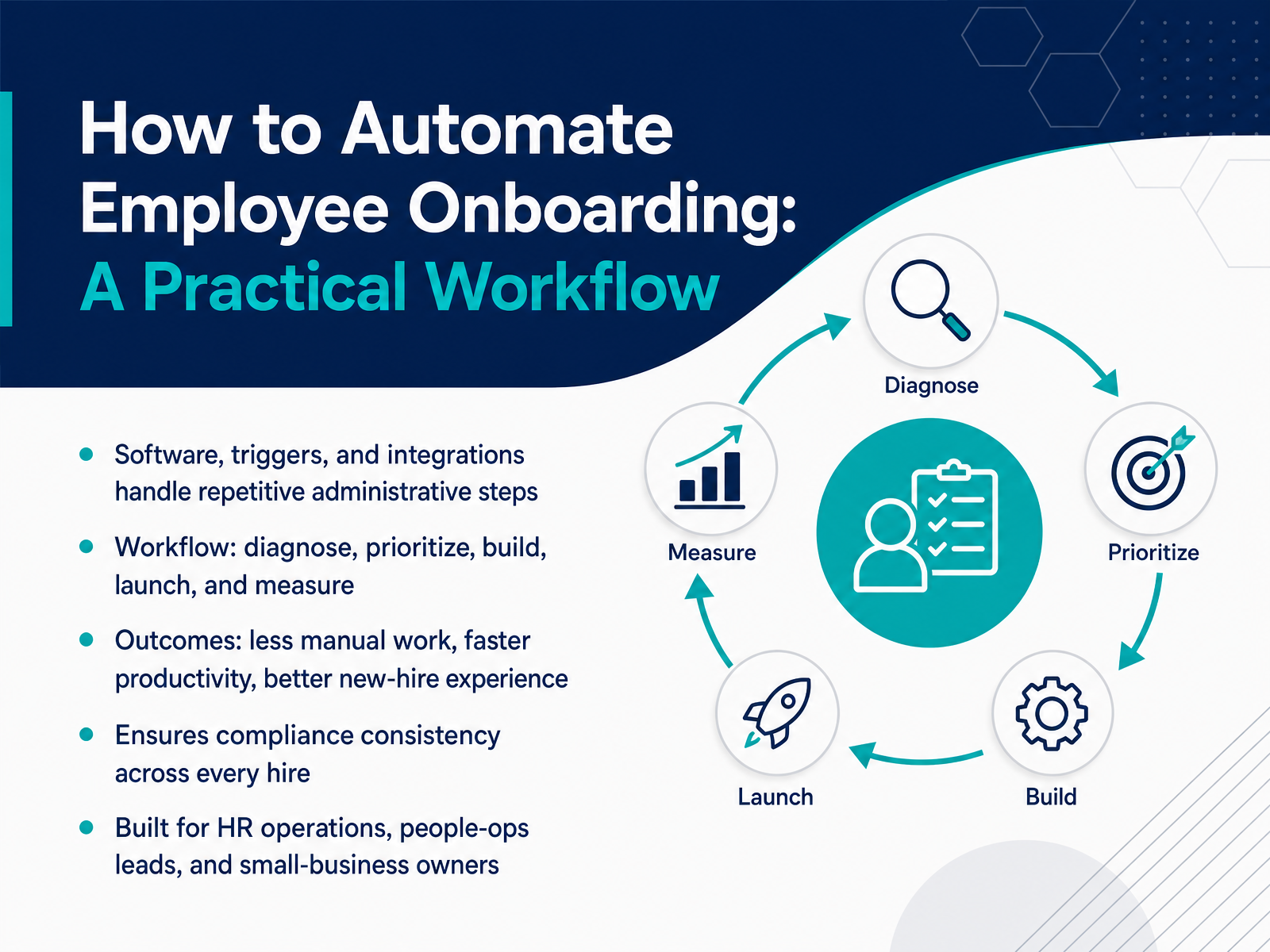
- 01How to Automate Employee Onboarding: A Practical WorkflowWelcome. This course is about automating employee onboarding, and the goal is simple: take the repetitive administrative work off your team's plate so people can focus on the thing that actually matters, helping new hires succeed. If you are in HR operations, people ops, or you run a small business, you already know what manual onboarding costs. Lost paperwork, delayed access, and endless follow-up emails. Automation fixes that by using software, triggers, and integrations to handle the repetitive steps for you. The workflow we will follow is straightforward: diagnose what is broken, prioritize the highest-friction tasks, build the automations, launch them, and measure the results. And the outcomes are concrete. Less manual work, faster time-to-productivity, a better new-hire experience, and compliance that stays consistent across every single hire. We will start by looking at why manual onboarding breaks down in the first place, because you cannot fix a process you do not fully understand.learn.g2.commonday.comgreenhouse.com+21 min
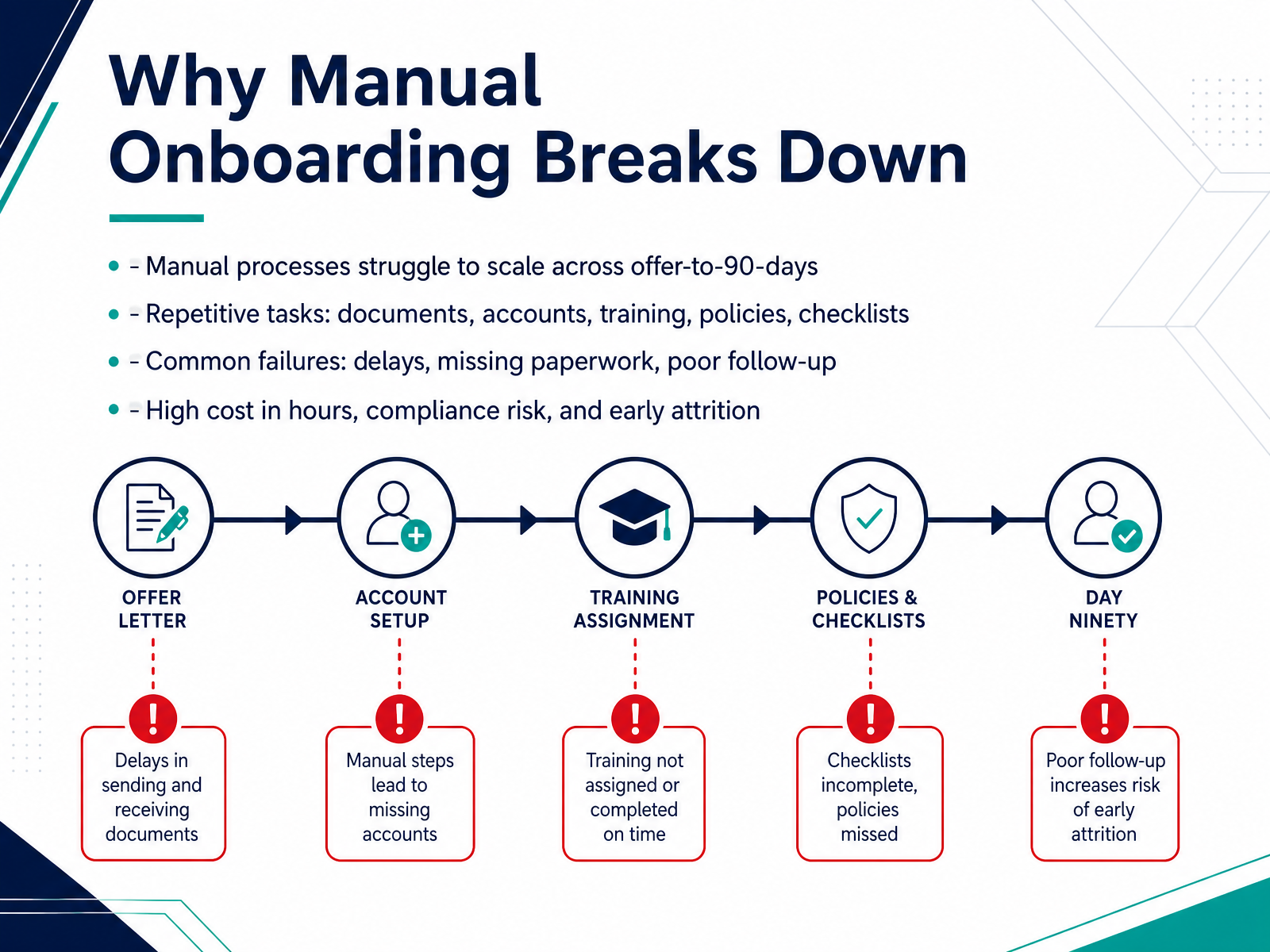
- 02Why Manual Onboarding Breaks DownLe's frame the problem clearly. Manual onboarding tends to hold up fine with one or two hires a month. But scale that to twenty, and the cracks show fast. You are tracking documents, chasing signatures, and reopening tickets for access that should have gone out on day one. These are not one-off fixes. They are the same repetitive tasks every single time. Forms get lost. System access stalls. Policy acknowledgments sit unsigned. And because there is no single view of where each new hire stands, you spend your week following up instead of moving work forward. The cost is not abstract either. It shows up in delayed payroll, compliance exposure, and new hires who lose confidence before their first week ends. Up to twenty percent of turnover happens in the first forty-five days. That is often a direct result of a rocky start. So the takeaway here is simple. Manual onboarding does not scale. It adds hours, adds risk, and quietly pushes good hires away. Next, let's look at what automation actually changes and why the business case is stronger than most teams expect.
 hirium.comhrcloud.comhrcloud.com+22 min
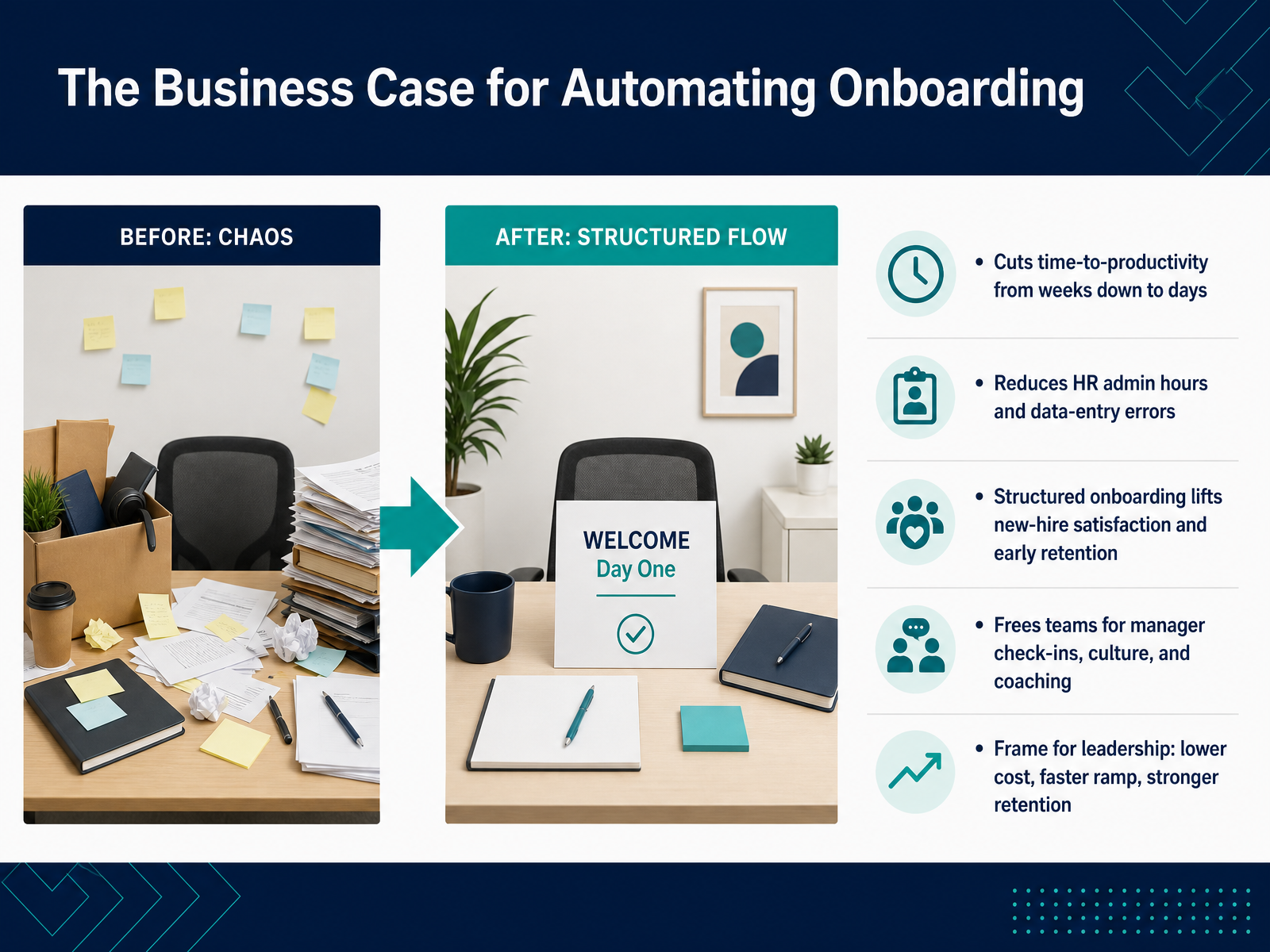
 - 03The Business Case for Automating OnboardingLet's talk about why this matters in operating terms. Automating onboarding isn't just about making HR's life easier, though it does. The real payoff shows up in time to productivity. Instead of a new hire spending their first two weeks waiting on access and paperwork, they can be contributing in days. We've seen this compress from weeks down to just a few working days. That speed comes from eliminating manual handoffs and data entry errors. When a process moves automatically, you aren't fixing salary typos or chasing missing forms. You're cutting administrative hours per hire. This also changes the employee experience. A structured flow lifts early retention because the new hire isn't starting with a bad first impression. They have their laptop, their logins, and their training ready on day one. And here is the important part for getting buy in. This isn't a soft benefit. Frame it for leadership as lower cost, faster ramp, and stronger retention. That is a direct business case, not an HR wish list. Next, we'll look at where to start: what to automate first, and where to keep the human moments.
 monday.comgreenhouse.comlearn.g2.com+22 min
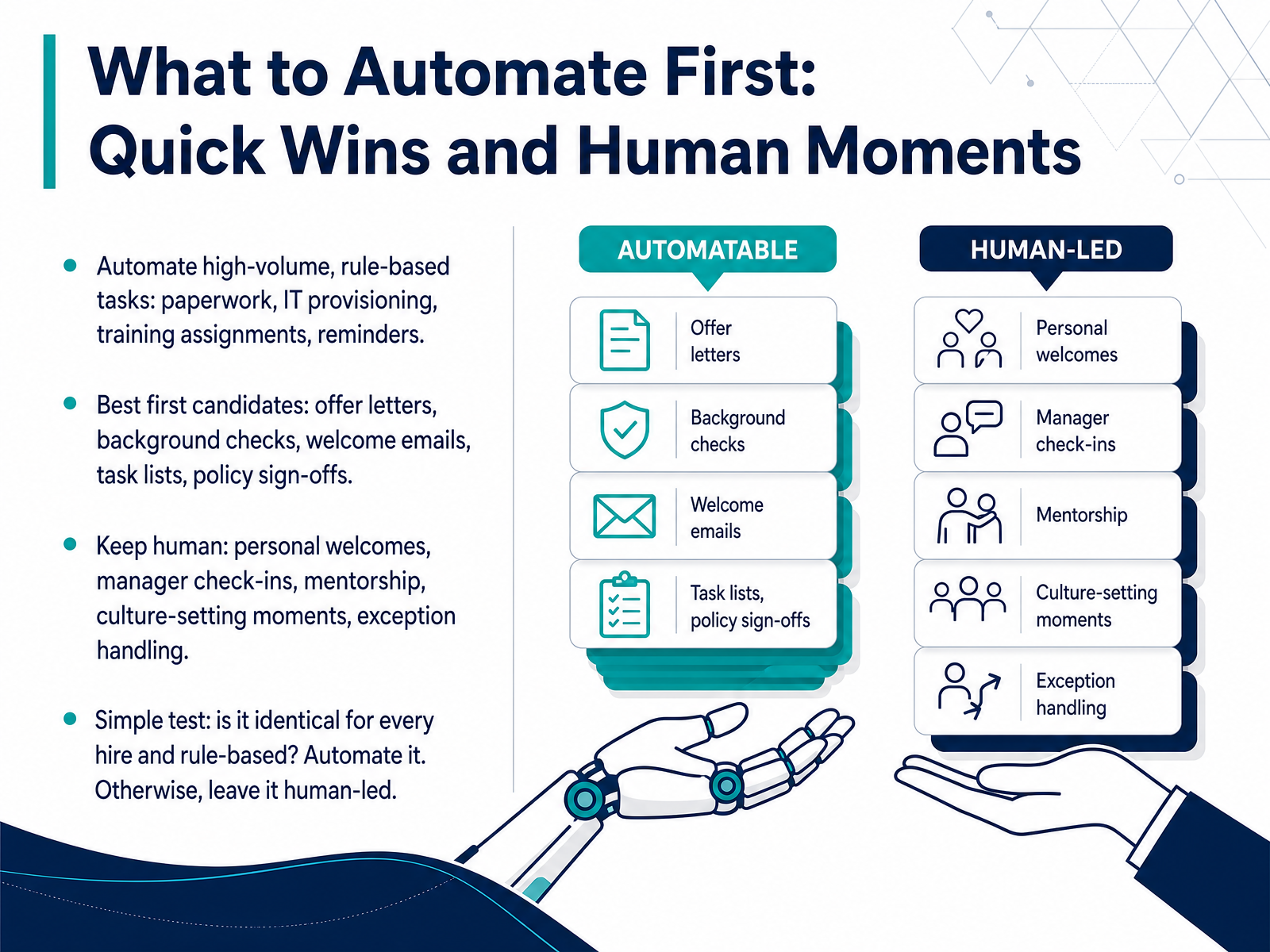
 - 04What to Automate First: Quick Wins and Human MomentsSo the big question is where to start. The answer is to automate the high volume, rule based work first. That means paperwork, IT provisioning, training assignments, and reminders. These tasks are usually identical for every single hire. Good candidates for quick wins are offer letters, background checks, welcome emails, task lists, and policy sign offs. Routing these automatically removes the bottlenecks that slow down day one. Now, there are moments you should not automate. Personal welcomes, manager check ins, mentorship, and culture setting conversations need to stay human. Also, exception handling stays with your team. Here is a simple test to apply. If a task is identical for every hire and follows a rule, automate it. If it requires judgment or relationship building, leave it human led. Use automation to clear the admin, so your team has time for the personal connection. Next, we will look at designing the workflow, specifically the triggers, stages, and handoffs.
 learn.g2.commonday.comgreenhouse.com+21 min
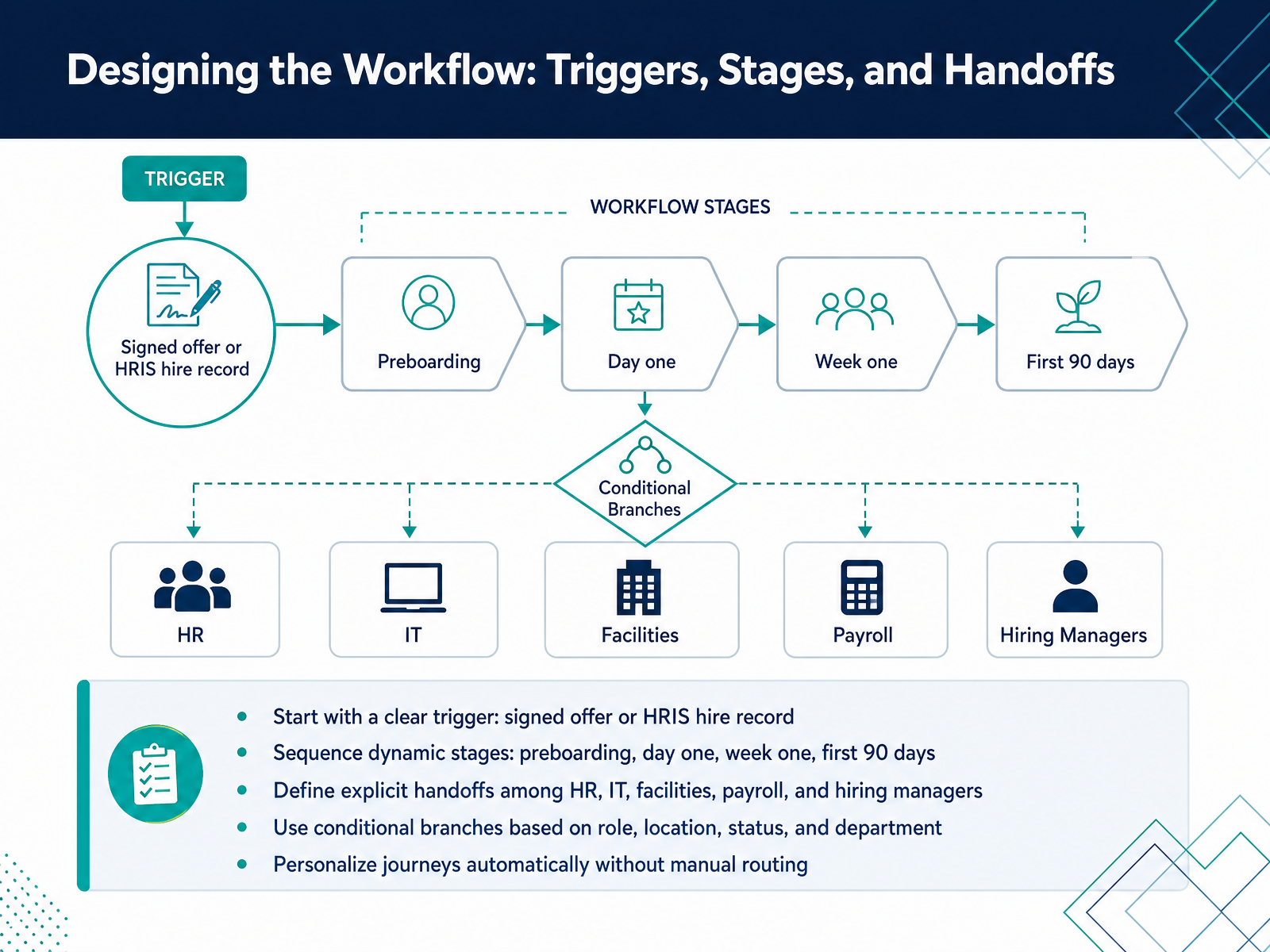
 - 05Designing the Workflow: Triggers, Stages, and HandoffsNow let's design the workflow itself. This is where you map the journey from signed offer to fully productive team member. Start with a clean trigger. A signed offer, or a hire record created in your HRIS, fires the first series of tasks. No one has to remember to tell anyone else. Then, sequence your stages: preboarding, day one, week one, and the first ninety days. Each stage has its own milestones and checkpoints. Next, define explicit handoffs. When HR finishes collecting paperwork, IT gets notified to provision equipment. When IT closes their ticket, facilities can prepare the desk, and payroll can finalize setup. The system routes the work. You also need conditional branches. A remote engineer in one country has different requirements than an in-office sales rep in another. Role, location, and department all change the journey automatically. This personalization happens without manual routing or someone cross-referencing a spreadsheet. The takeaway is simple. Map the trigger, stage the journey, route the handoffs, and let conditions do the personalizing. Once this structure is solid, the next decision is choosing the right automation tooling.
 greenhouse.commoxo.comlearn.g2.com+22 min
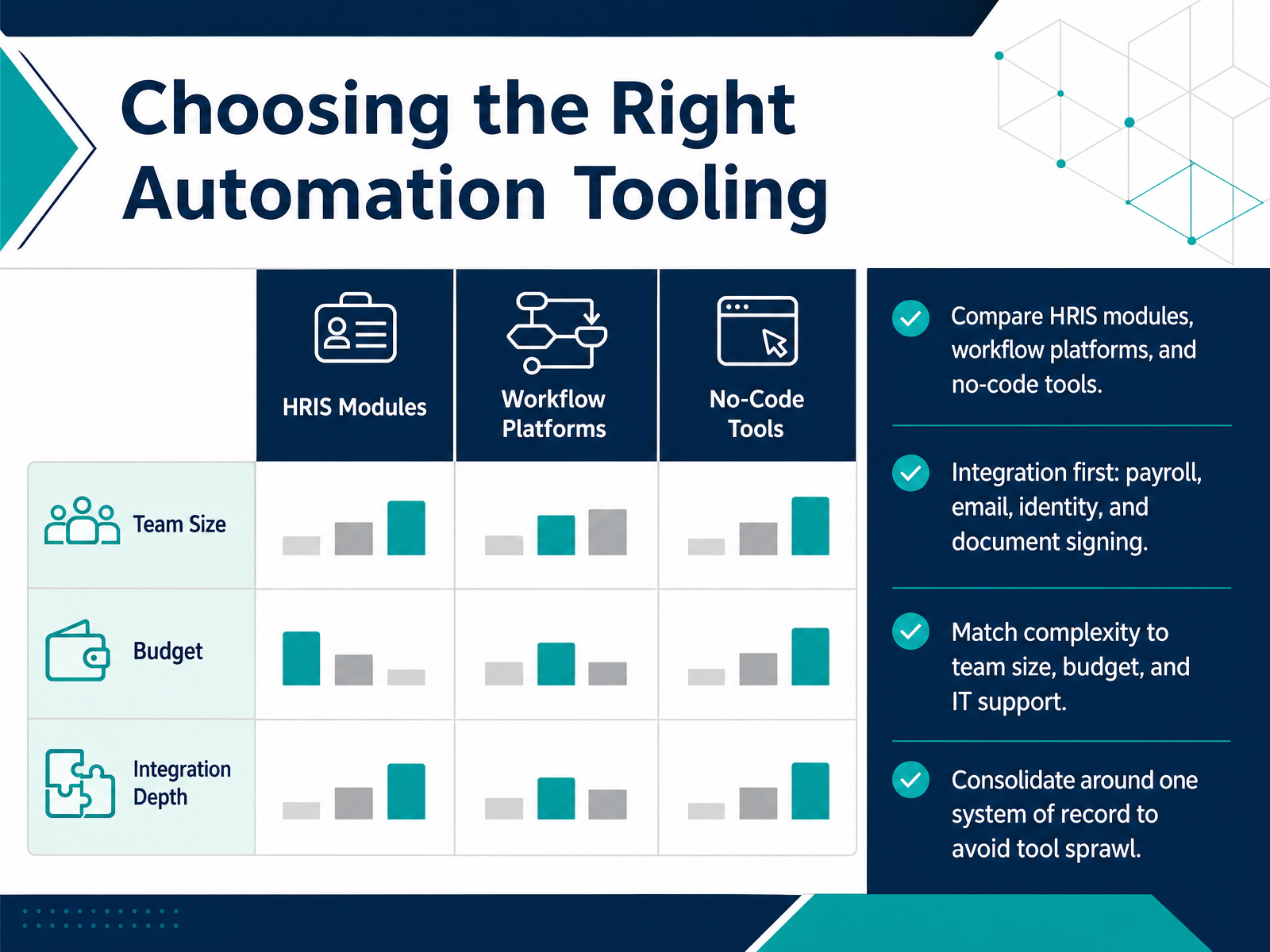
 - 06Choosing the Right Automation ToolingNow, let's talk about how you actually choose the tooling for this. Start by mapping your options into three categories: your existing HRIS module, dedicated workflow platforms, and no-code tools. The selection decision should center on integration first. Your onboarding software must connect to payroll, email, identity, and document signing, otherwise you will re-enter every new hire manually and recreate the data reconciliation problem you are trying to eliminate. Match the complexity to your reality. If you are under twenty-five employees and do not need advanced IT provisioning, a payroll-first system like Gusto gives you a complete onboarding-to-payroll flow with the lowest overhead. If you have more complex workflows, or you need to provision devices and app access automatically, platforms like BambooHR or Rippling offer deeper configuration, but they also demand more setup and budget. The key is to consolidate around one system of record. Tool sprawl is where handoffs break, status gets lost, and your team ends up chasing completion. With that foundation set, let's move to compliance, data, and security by design.
 smallbusiness.managementfirsthr.apptechnologyadvice.com+22 min
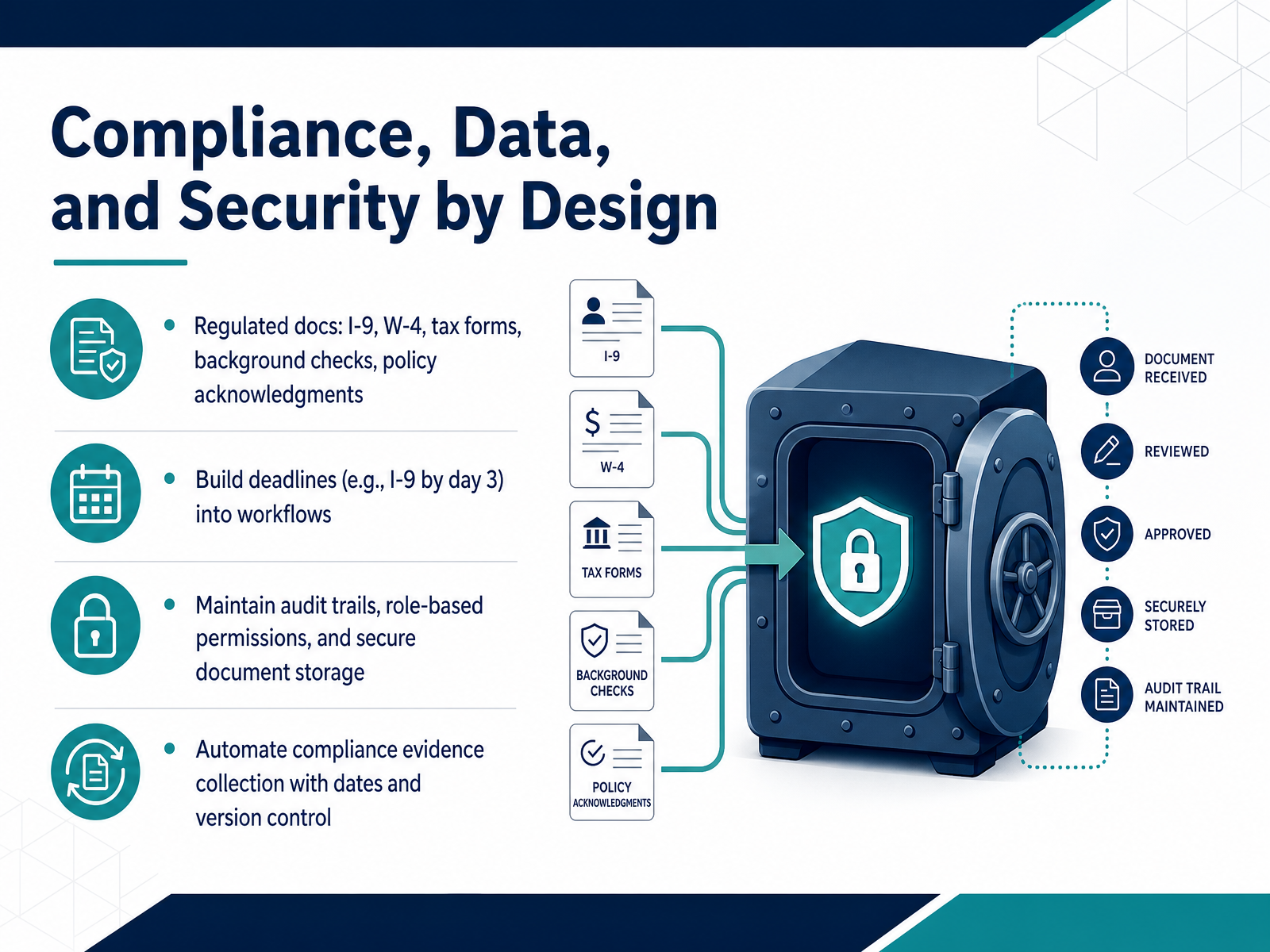
 - 07Compliance, Data, and Security by DesignCompliance is where onboarding workflows either hold up or fall apart. Most of the risk sits in a handful of regulated documents. I nine, W four, tax forms, background checks, policy acknowledgments. These are not suggestions. They carry fixed deadlines and real penalties. So build those deadlines directly into the workflow. For example, the I nine must be completed by day three after the employee starts. Do not leave that to memory. Trigger the task, route it to the right owner, and flag it if it slips. Same with the W four before first payroll. You also need an audit trail. Every signature, every upload, every version. Store documents securely. Use role based permissions so only the people who need access have it. And automate your evidence collection. Capture dates, timestamps, and version history without chasing files through email. That gives you a clean record if you are ever asked to prove compliance. Next, we will look at how templates and trigger based communications keep all of this moving without manual follow up.
 adp.com1 min
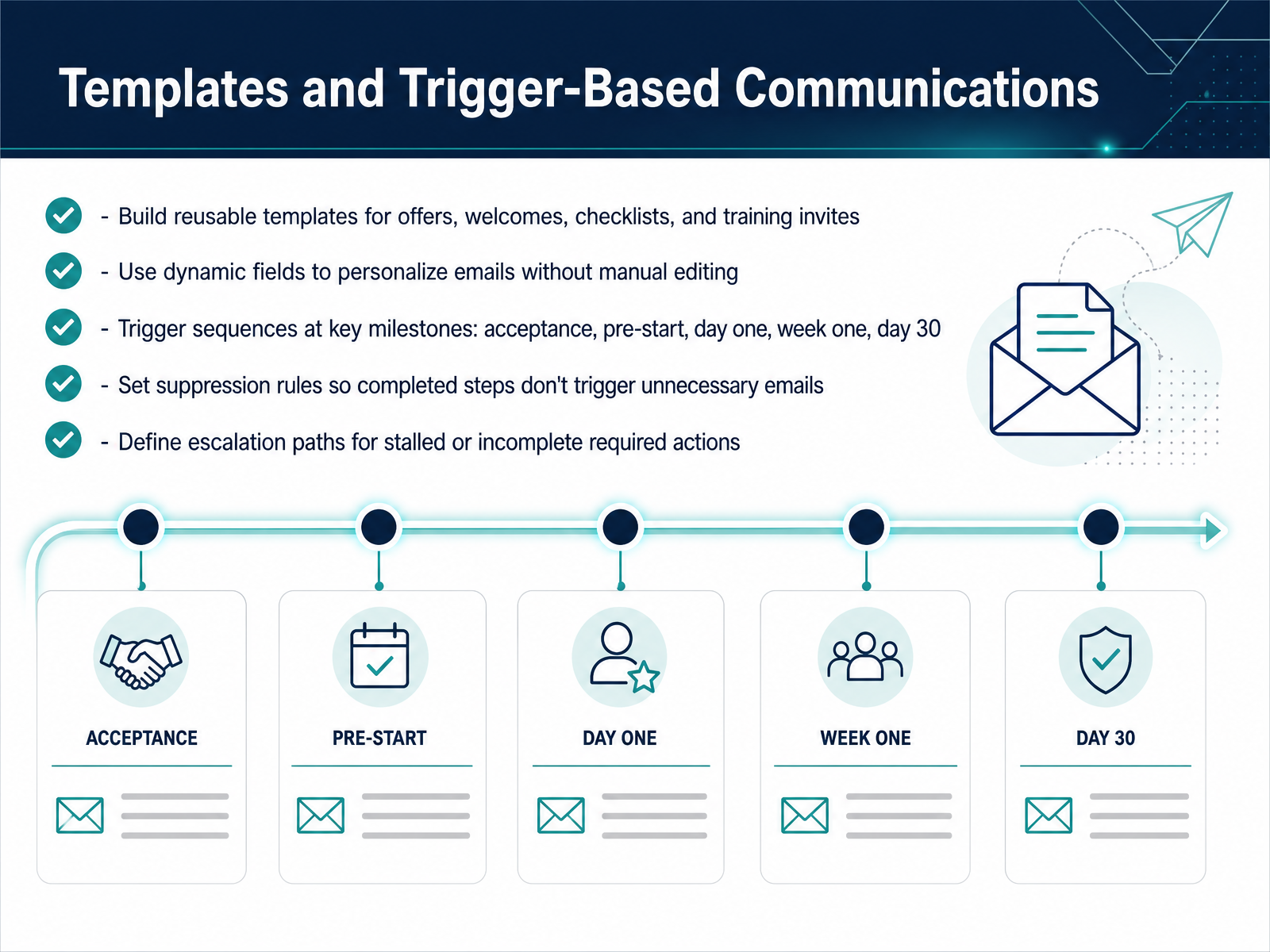
 - 08Templates and Trigger-Based CommunicationsNow let's talk about how your communications should actually go out. Stop writing one-off emails. Build reusable templates for offers, welcome messages, checklists, and training invites. Use dynamic fields to drop in names, roles, and start dates automatically, so nobody is hand-editing an email at six in the morning. Then wire those templates to triggers at the right milestones. Acceptance, pre-start, day one, week one, day thirty. Each message fires only when the new hire reaches that point, not because you remembered to hit send. And here's the part most teams skip. Set suppression rules. If someone already completed a step, they should not get a reminder to do it. That is how you lose trust fast. Finally, flag what matters. If a required action sits incomplete, have the system escalate it to the right person instead of letting it go quiet. Think of it as a guardrail, not a nag. Next, let's look at automating IT provisioning and account setup.
 2 min
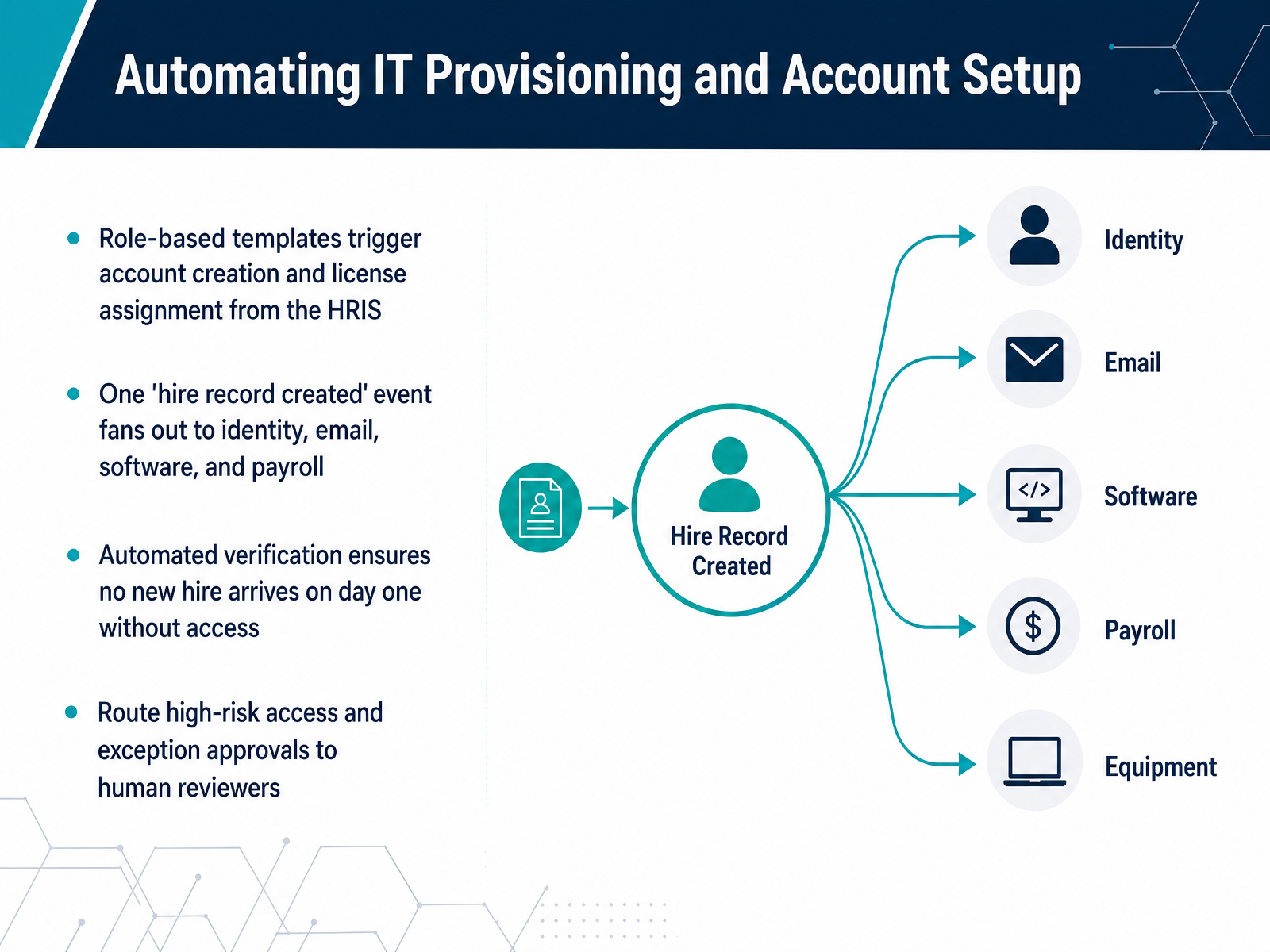
2 min - 09Automating IT Provisioning and Account SetupNow let's talk about IT provisioning, because this is where day-one scrambles usually start. The fix is to let your HRIS drive account setup. Build role-based templates that trigger the moment a hire record is created. That single event fans out to identity, email, software licenses, and payroll. No one has to send a ticket or remember to flip a switch. The system verifies every account before day one, so a new hire never shows up without access to the tools they need. For anything sensitive, like admin rights or high-risk systems, route that request to a human reviewer. Automate the standard stuff. Flag the exceptions. That keeps IT moving fast without giving away the keys to the building. Next, we'll apply the same logic to training assignment and the thirty, sixty, and ninety day check-ins.
 learn.g2.commonday.comgreenhouse.com+21 min
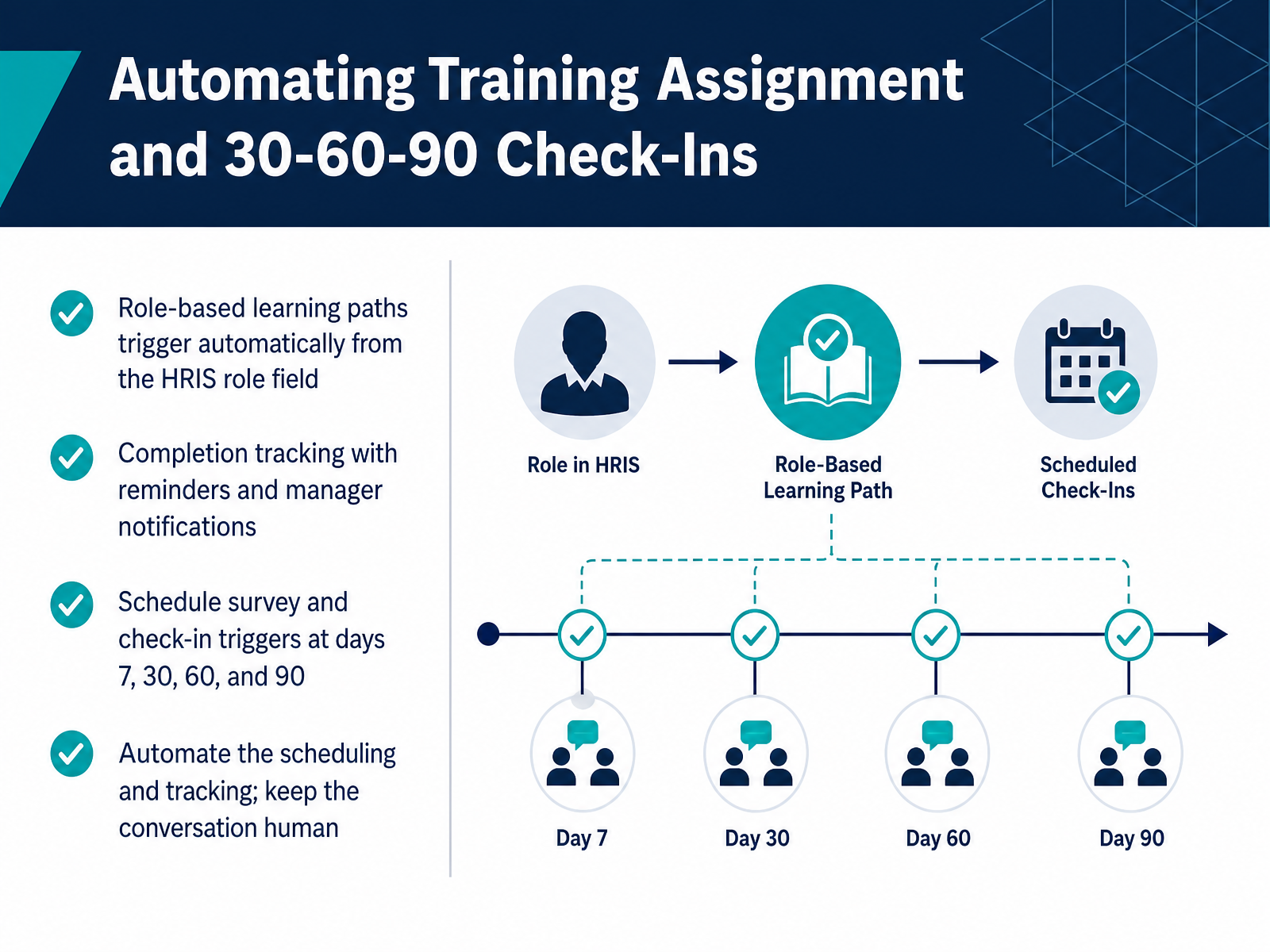
 - 10Automating Training Assignment and 30-60-90 Check-InsNext, let's talk about automating training and the thirty, sixty, ninety-day check-ins. This is where you close the gap between getting someone hired and getting them productive. First, training. Build a default learning path every new hire completes, then add role-specific overlays. Tie each path to the role field in your HRIS, so the assignment fires automatically the moment a profile is created. No manual enrollment. No one forgets. Turn on completion tracking too, with reminders and manager notifications. That way, a stalled course flags itself instead of surfacing weeks later. Second, check-ins. Set survey triggers at days seven, thirty, sixty, and ninety. These run on schedule without anyone chasing a calendar. Keep each survey short. Focus on role clarity, support, and engagement. Now the rule that matters most. Automate the scheduling and the tracking. Keep the conversation human. The survey gets sent, the meeting gets booked, and the data gets routed. But the actual conversation sits with the manager. That's the split. Automation handles cadence and follow-through. People handle judgment and connection. Next, we'll look at measuring and improving the workflow.
 learn.g2.commonday.comgreenhouse.com+21 min
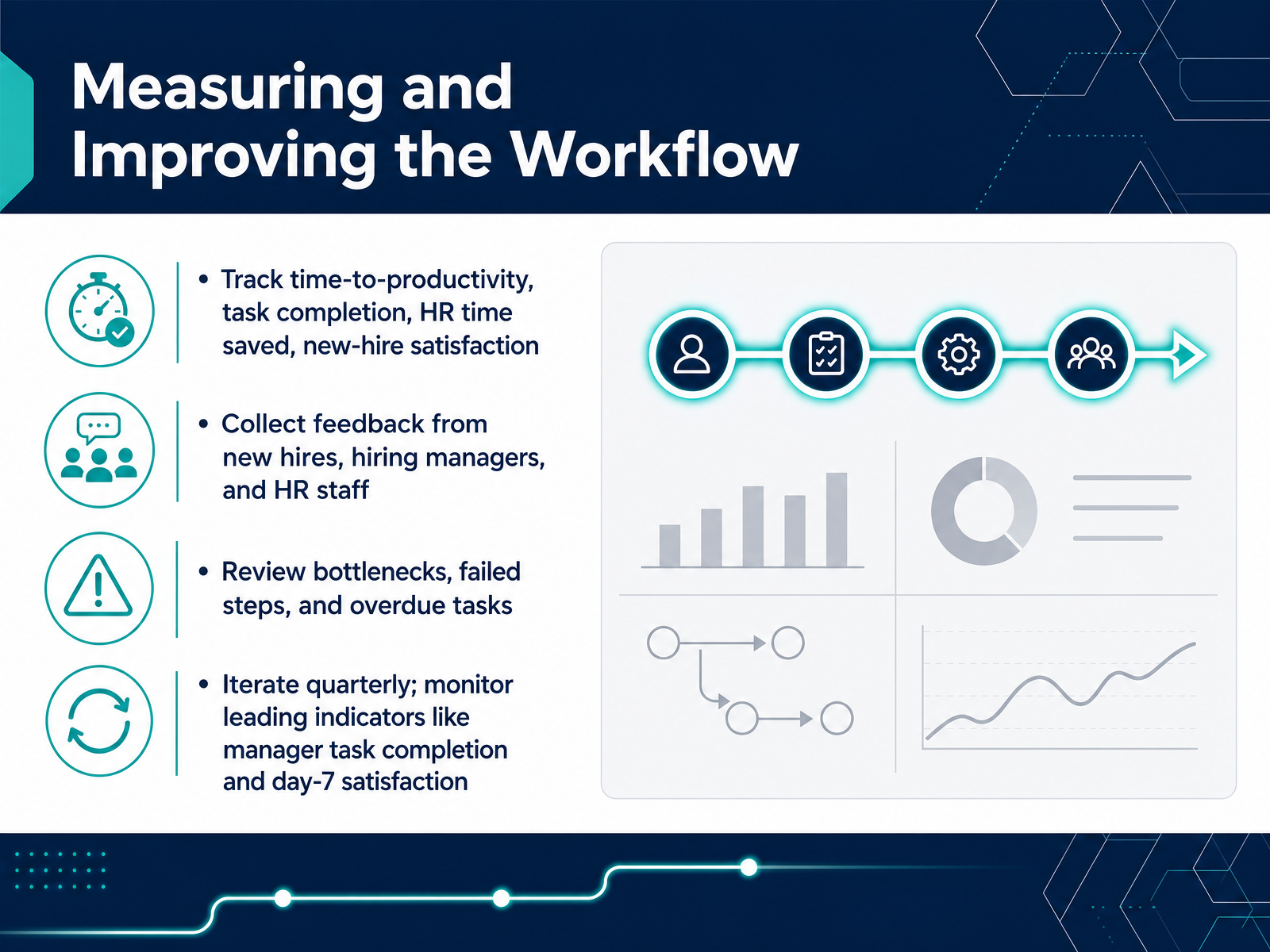
 - 11Measuring and Improving the WorkflowA workflow that runs quietly in the background is easy to ignore, so now we measure it. Pick four or five signals and track them monthly. Time-to-productivity tells you how fast a new hire actually starts contributing. Task completion and HR time saved show where the process earns its keep. New-hire satisfaction catches friction before it becomes attrition. Then go get qualitative input. Ask new hires, hiring managers, and your own HR staff what actually slowed them down. Look specifically at bottlenecks, failed steps, and overdue tasks. Those are your operational leaks. Also remember that some metrics are leading and some are lagging. Manager task completion and a day-seven satisfaction check predict outcomes. Ninety-day retention confirms them. So act on the leading numbers early, and use lagging numbers to grade the system. Review the whole workflow quarterly. Adjust one or two things at a time, not everything at once. That is how a decent onboarding flow becomes a reliable one. Next, we will turn this into an implementation plan and talk through the change management side.
 1 min
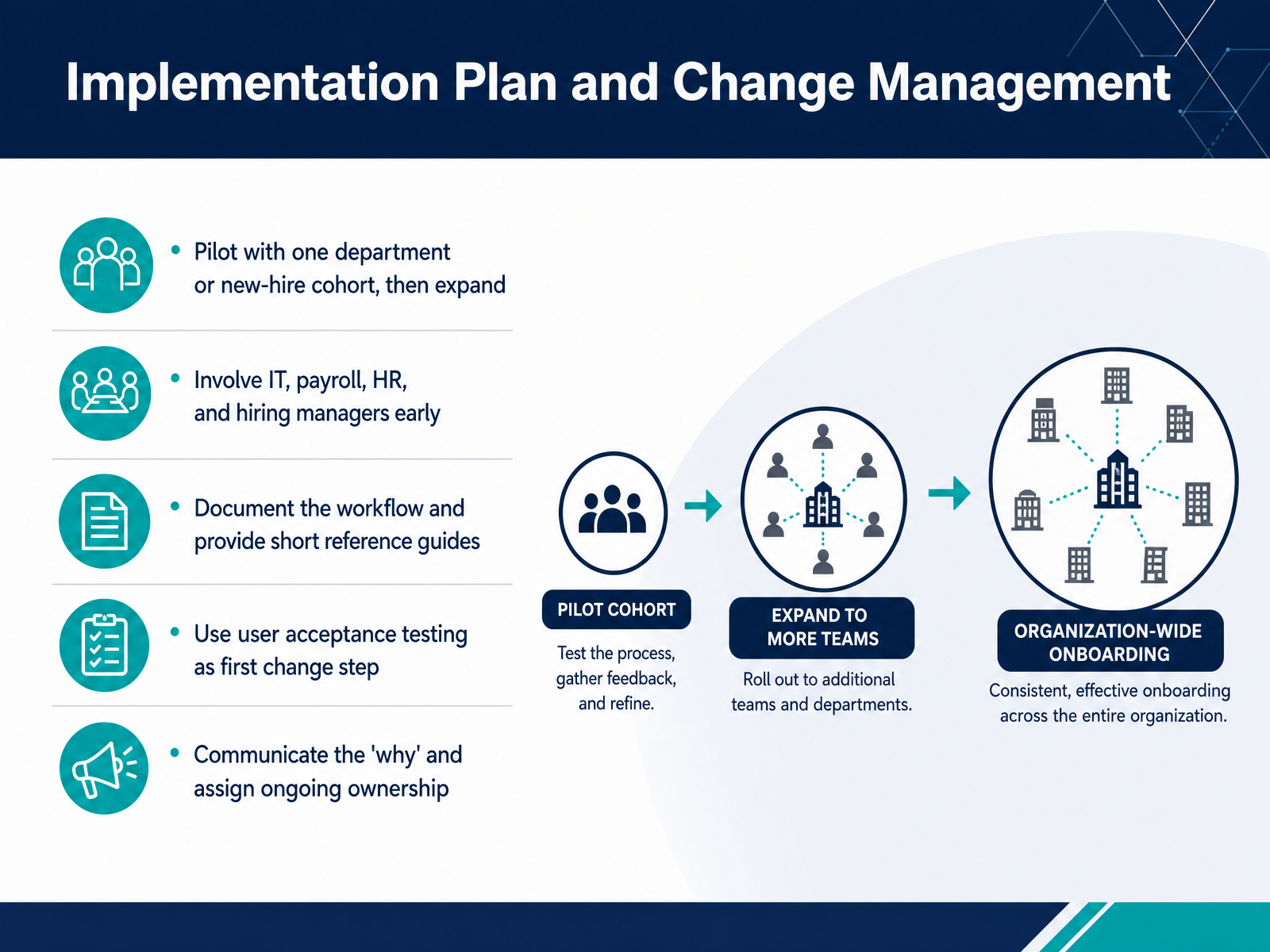
1 min - 12Implementation Plan and Change ManagementRolling this out is where a lot of onboarding projects stall, so keep the launch tight. Start with a pilot. Pick one department or one new hire cohort, run the automated workflow end to end, and fix what breaks before you expand. Bring IT, payroll, HR, and hiring managers in early. Their handoffs are exactly where the old process leaked, so their input is non-negotiable. Document the workflow and create short reference guides. People will not retain a long manual, but they will follow a one page checklist. Treat user acceptance testing as your first real change management step. When process owners test the system themselves, they stop defending the old way and start owning the new one. And communicate the why, not just the what. Tell managers this reduces their admin load and gives new hires a cleaner start. Finally, assign one person ongoing ownership. If nobody owns the workflow after launch, it drifts. Next, let's look at common mistakes and how to avoid them.
 moxo.commonday.comlearn.g2.com2 min
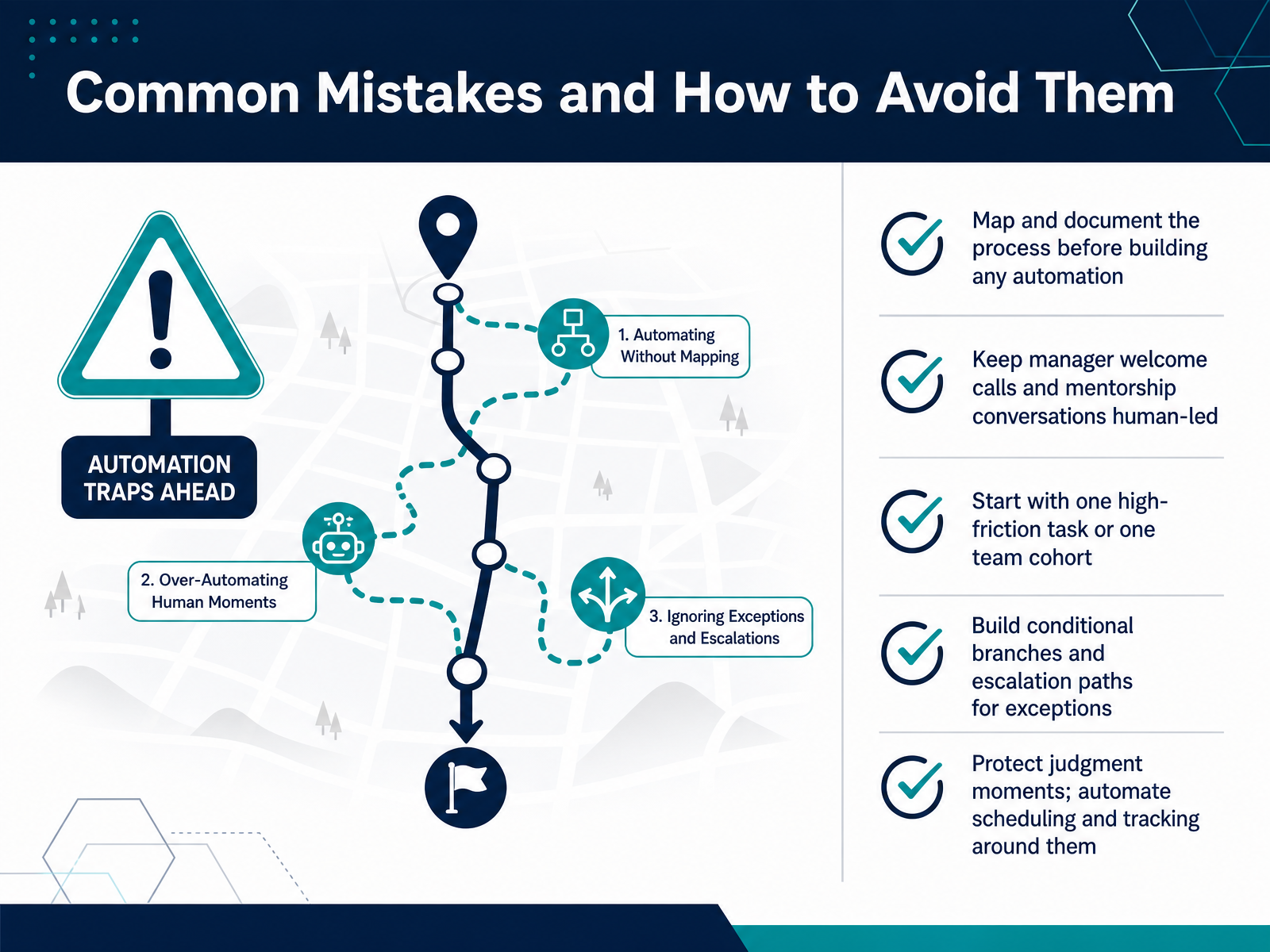
 - 13Common Mistakes and How to Avoid ThemNow let's look at the mistakes that quietly break onboarding automation. The first one is automating before you map. If the current process is unclear, you will just build faster confusion. Document every task, owner, and handoff first. The second mistake is trying to automate the human moments. Manager welcome calls, mentorship conversations, those stay human. Automate the scheduling and reminders around them, not the conversation itself. Third, don't try to launch everything at once. Pick one high-friction task or one team cohort. Prove the value there, then expand. Fourth, a flat workflow will fail the moment a hire has an exception. Build conditional branches and escalation paths so the system routes unusual cases to a person instead of stalling. And finally, protect the judgment moments. Compliance approvals, exception decisions, those need an accountable human. Automation handles the legwork. Your team handles the decisions. That is the balance. Next, let's close this out with the immediate next steps for your team.
 hirium.comhrcloud.comhrcloud.com+22 min
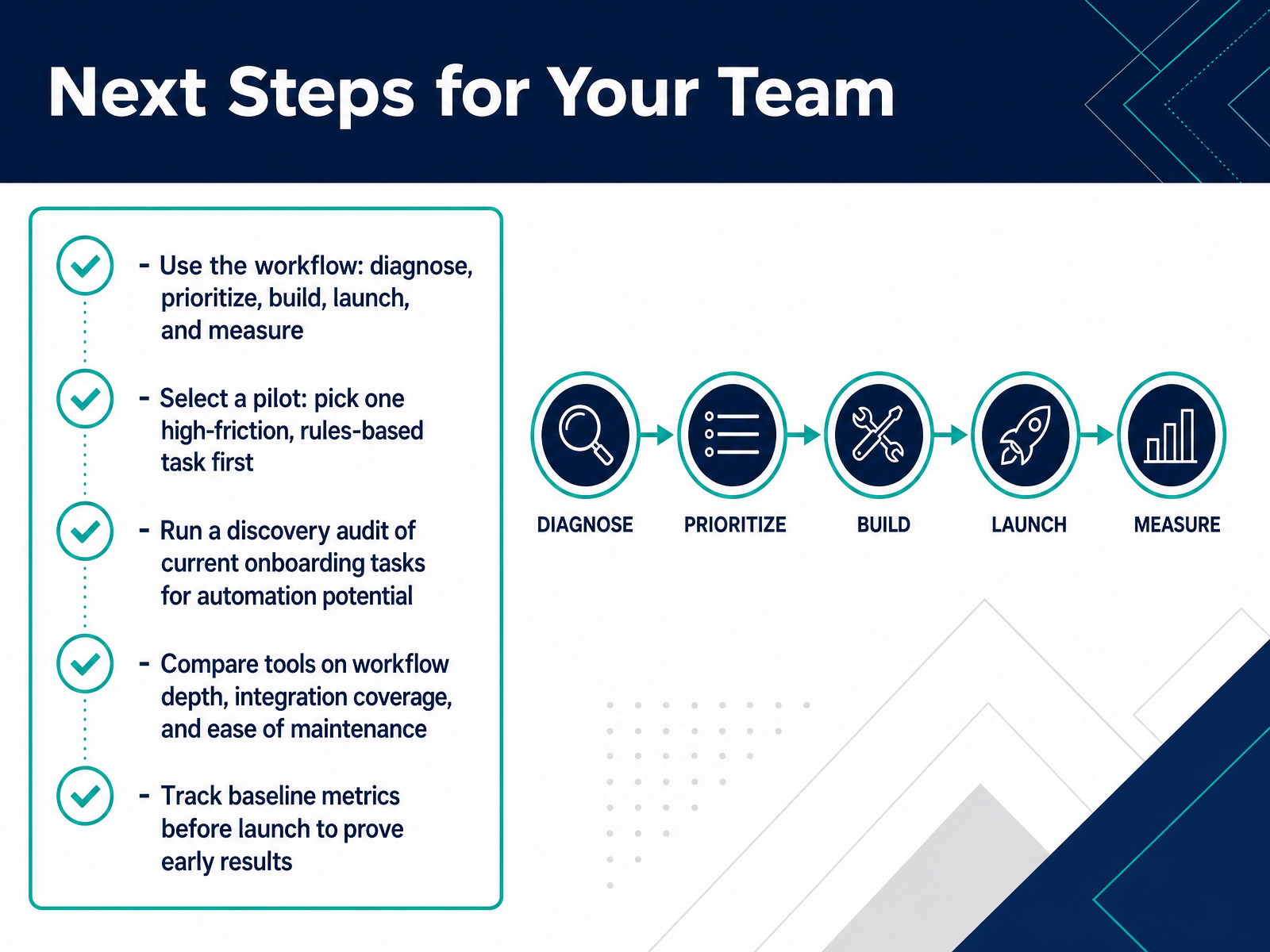
 - 14Next Steps for Your TeamLet's close this out with a practical starting point for your team. Use the full workflow we covered: diagnose, prioritize, build, launch, and measure. Don't try to boil the ocean. Select one pilot first. Pick a single high friction, rules based task. For most teams, that's IT provisioning or paperwork collection. Run a discovery audit of your current onboarding tasks and flag anything that repeats for every hire and follows clear steps. Then compare tools on the three things that actually matter. Workflow depth, integration coverage, and how easy the platform is to maintain once it's live. And before you launch anything, track your baseline metrics. You need to know your current time to productivity and completion rates to prove the impact later. Start small, measure the result, and expand from there. Thanks for joining, and good luck building a smoother onboarding process for your team.
 learn.g2.commonday.comgreenhouse.com+22 min
Take the deck with you
Download this course as a file — free, no sign-up needed.
- PDF handoutEvery slide page, ready to print or share.15 pages · 3.3 MBDownload
- Narrated PowerPointThe deck that presents itself — every slide carries the digital human's narration video.15 pages · 14.2 MBDownload
- PowerPoint slidesThe full deck as a .pptx — open it in PowerPoint, Keynote, or Google Slides.15 pages · 3.2 MBDownload
Free to use in your own training — please keep the PersonWise credit page at the end.
Have your own deck? Turn it into a course
Sources consulted
Web sources consulted while building this course.
- How to Automate Onboarding Process in 5 Steps: Tips for HRs — learn.g2.com
- Employee Onboarding Automation in 2026: What It Is and How to Get Started — monday.com
- How to automate employee onboarding (the right way) — greenhouse.com
- How Do Automated Onboarding Workflows Work in HR? - Worknice — worknice.com
- How to Implement Employee Onboarding Automation + Examples — techrepublic.com
- 10 Common Challenges in Manual Onboarding — hirium.com
- Manual HR Process Costs | HR Cloud — hrcloud.com
- Digitizing Employee Onboarding HR Cloud Guide — hrcloud.com
- Employee Onboarding: 9 Pain Points and Fixes | Whale — usewhale.io
- Improve Efficiency with Employee Onboarding Software — trupay.com
- Onboarding Automation — ibm.com
- IDC TechBrief: AI-Empowered New Hire Onboarding — my.idc.com
- 7 essential best practices for implementing onboarding automation successfully | Moxo — moxo.com
- Automated onboarding process: Guide to HR automation | iCIMS — icims.com
- Best Employee Onboarding Software for Small Business - Small Business Management — smallbusiness.management
- Onboarding Automation Software for Small Business | FirstHR | FirstHR — firsthr.app
- Best Human Resources (HR) Software for Small ... — technologyadvice.com
- Best HR Software for Small Businesses in 2026 — clearpick.io
- 7 Best HRIS for Small Business Owners for 2026 — fitsmallbusiness.com
- New Hire Checklist | Onboarding and Training Best Practices — adp.com