Begin
14 pages · ~28 min
Python Troubleshooting Essentials
This training helps developers diagnose and fix common Python programming errors. It covers practical debugging techniques for syntax, runtime, and logic issues.
A digital instructor presents all 14 pages. Hold “Ask” at any point and ask out loud — the answer comes from this course. No sign-up needed.
What you’ll learn
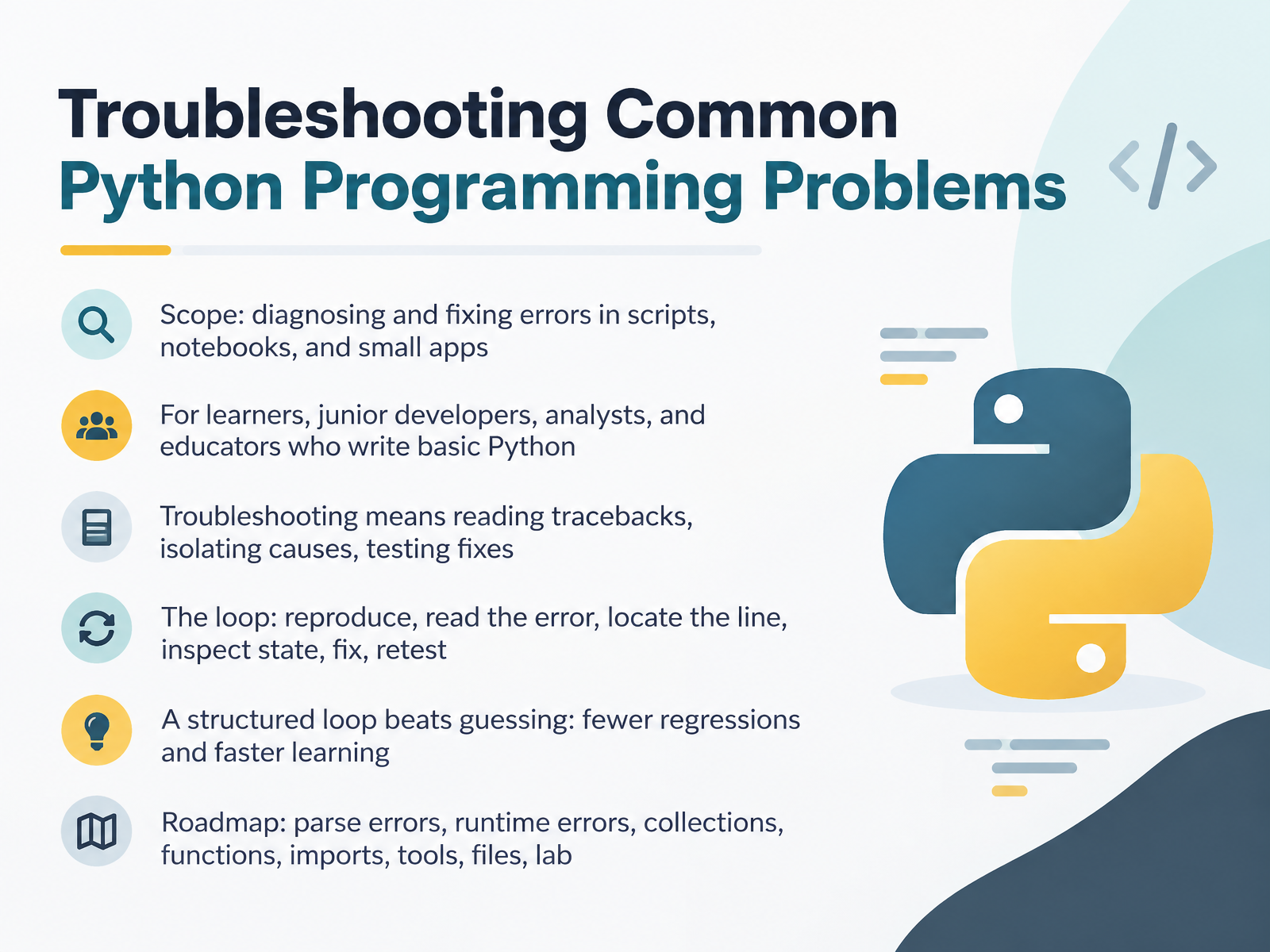
- 01Troubleshooting Common Python Programming ProblemsWelcome. If Python errors slow you down, you are in the right place. This course is about troubleshooting common Python problems in scripts, notebooks, and small applications. It is built for learners, junior developers, analysts, and educators who already write basic Python. Here is the core idea. Troubleshooting is not guessing. It is a repeatable loop. First, reproduce the problem. Then read the traceback carefully. Next, locate the exact file and line. After that, inspect the values and state at that point. Then apply one fix. Finally, retest. A structured loop beats guessing almost every time. It reduces regressions, and it helps you learn faster. Over the next slides, we will cover parse errors, runtime errors, collections, functions, imports, tools, files, and a short lab. For now, keep one thing in mind. An error is a diagnostic signal, not a failure. Next, we will focus on reading Python tracebacks without panic.1 min
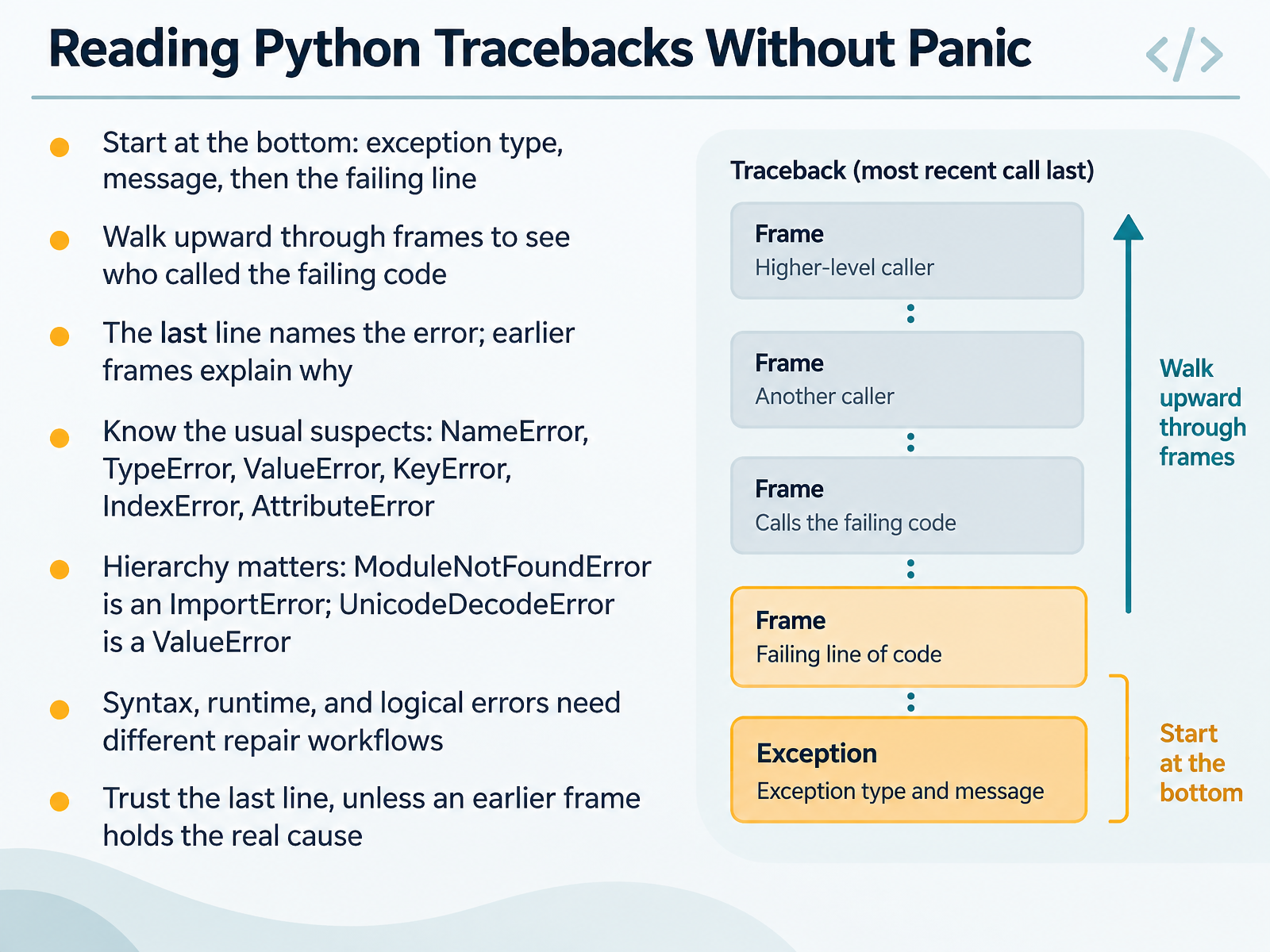
- 02Reading Python Tracebacks Without PanicNext, let's make tracebacks feel less intimidating. When Python crashes, do not read from the top. Start at the bottom. The last line gives you the exception type, then the message, then the failing line. For example, TypeError, unsupported operand type. That tells you what broke. Now walk upward through the frames. Each frame shows which file and function called the failing code. The last line names the error. Earlier frames often explain why. You will see the usual suspects: NameError, TypeError, ValueError, KeyError, IndexError, and AttributeError. Their hierarchy matters too. ModuleNotFoundError is a kind of ImportError. UnicodeDecodeError is a kind of ValueError. Also, syntax, runtime, and logical errors each need a different repair workflow. Trust the last line, unless an earlier frame clearly holds the real cause. Try this now. Trigger one small error, then read the traceback from bottom to top. Next, we will fix syntax and indentation errors first.
 1 min
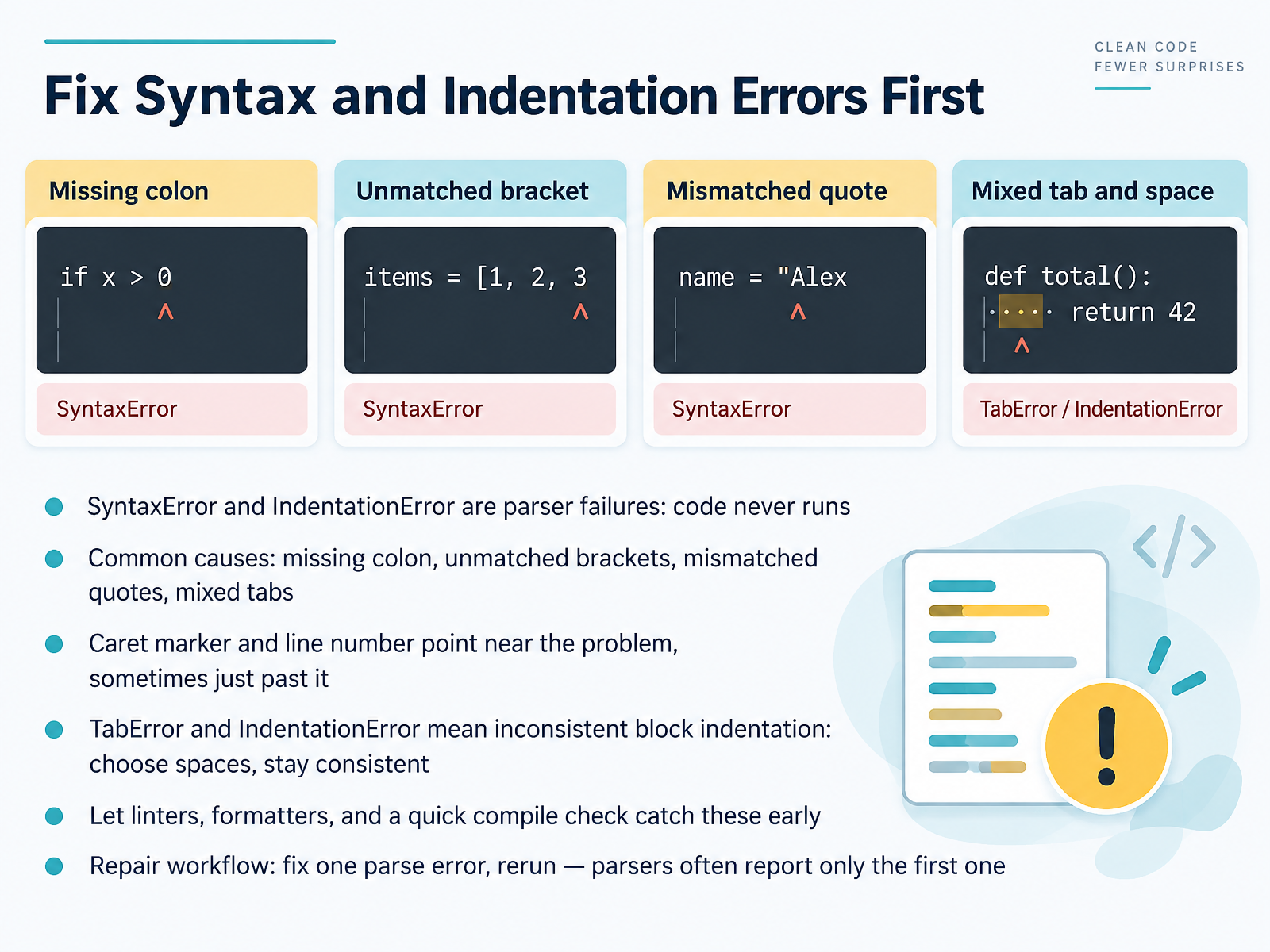
1 min - 03Fix Syntax and Indentation Errors FirstNow let us start where every Python problem starts: before the code even runs. A SyntaxError or an IndentationError is a parser failure. That means Python stopped reading your file, so nothing executed. The message is a clue, not a verdict. Look for a missing colon, an unmatched bracket, mismatched quotes, or mixed tabs. The caret marker and line number point near the problem, though sometimes just past it. If you see TabError or IndentationError, your block indentation is inconsistent. Pick spaces, and stay consistent. Let a linter, a formatter, and a quick compile check catch these early. Here is the repair workflow. Fix one parse error, then rerun. Parsers often report only the first one. So change one thing, run it again, and repeat. That keeps your fix small and easy to verify. Next, we move into names, types, and values, and the common runtime errors you will meet there.
 2 min
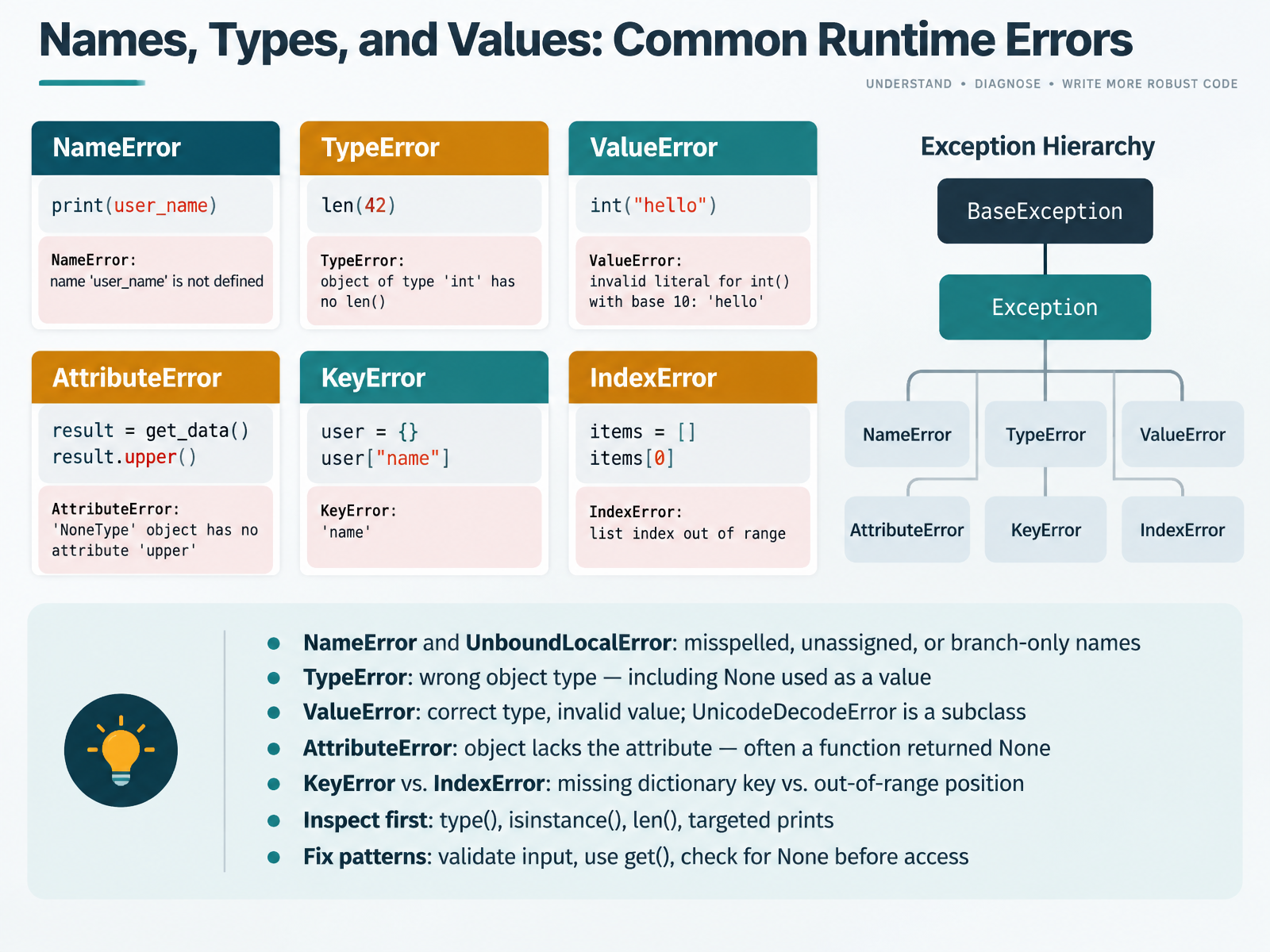
2 min - 04Names, Types, and Values: Common Runtime ErrorsLet's look at runtime errors that show up while your code is running. A NameError means Python cannot find that name. It is usually a typo, or a variable used before assignment. UnboundLocalError is related. It happens when a name is only assigned inside one branch of a function. Check the spelling first, then confirm the variable is assigned on every path. A TypeError means the type is wrong for the operation. That includes using None as a value. Print the type, and check whether a function returned None. A ValueError means the type is right but the value is invalid. For example, converting a non-numeric string to an integer. UnicodeDecodeError is a subclass of ValueError, so it belongs in the same family. An AttributeError means the object does not have that attribute. Often, a function returned None, and you called a method on it. Add a quick print before that line. Now compare KeyError and IndexError. A KeyError is a missing dictionary key. An IndexError is an out-of-range position in a sequence. Inspect first. Use type, isinstance, len, and targeted prints. For fixes, validate input, use dictionary get, and check for None before access. Try one check in your editor now. Next, we will cover comprehensions, loops, and collection pitfalls.
 2 min
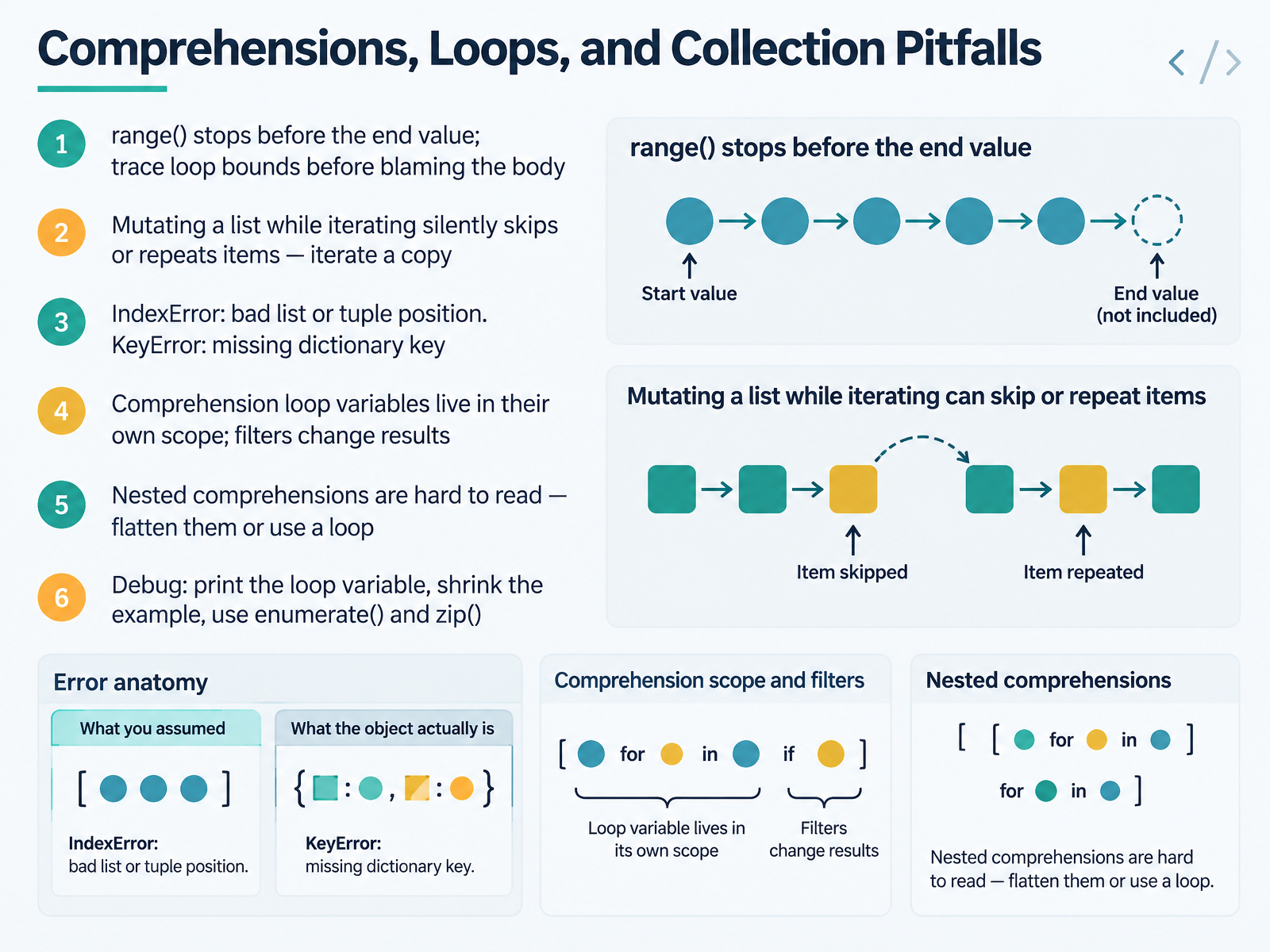
2 min - 05Comprehensions, Loops, and Collection PitfallsNext, let's look at comprehensions, loops, and collection pitfalls. These are common sources of quiet bugs in Python. Start with range. It stops before the end value. So range of five gives zero through four. Trace your loop bounds before blaming the body. If you mutate a list while iterating over it, items can be skipped or repeated silently. Iterate over a copy instead. Then check your indexes. An IndexError means a bad list or tuple position. A KeyError means a missing dictionary key. Comprehension variables live in their own scope, and filters change the results. Nested comprehensions are hard to read, so flatten them or use a regular loop. When debugging, print the loop variable, shrink the example, and try enumerate or zip to track positions and pairs. Test one small change in your editor now. Coming up next, function calls, arguments, and scope.
 1 min
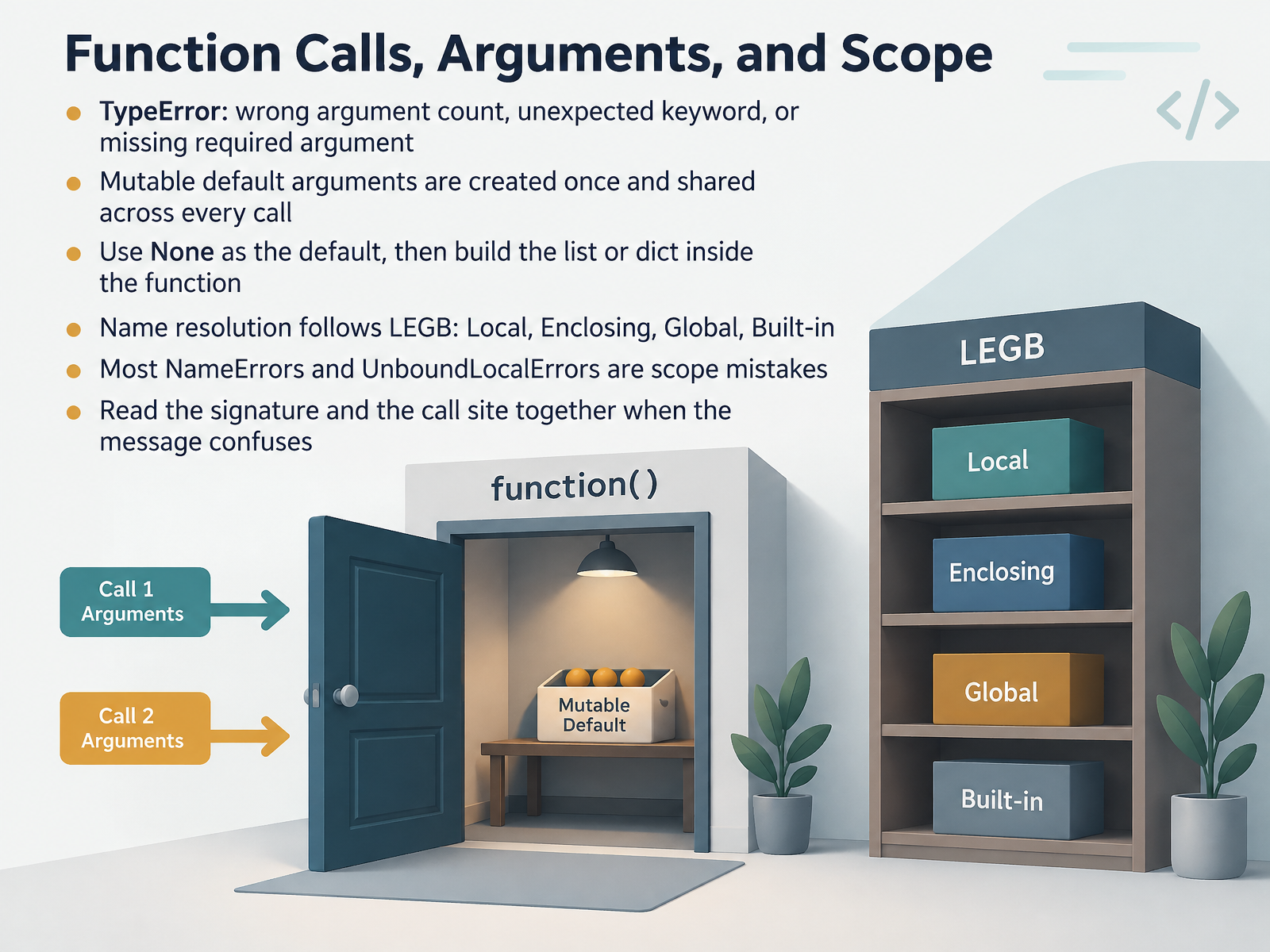
1 min - 06Function Calls, Arguments, and ScopeNow let's talk about function calls, arguments, and scope. Start with the most common one. A TypeError usually means the argument count is wrong, a keyword is unexpected, or a required argument is missing. Read the signature and the call site together before you change anything. Then test it in your editor.
Next, watch out for mutable default arguments. A default list or dict is created once, at function definition time, and shared across every call. That means your data can leak between calls. The fix is simple. Use None as the default, then build the list or dict inside the function. Try it and confirm the output is fresh each time.
Finally, scope. Python resolves names using L E G B, spelled out as Local, Enclosing, Global, Built in. Most NameErrors and UnboundLocalErrors are scope mistakes, not typos. Check where the name is assigned before you use it.
So read the call and the definition together. That single habit clears up most of these errors. Coming up next, Import Errors and Environment Mismatches.
 1 min
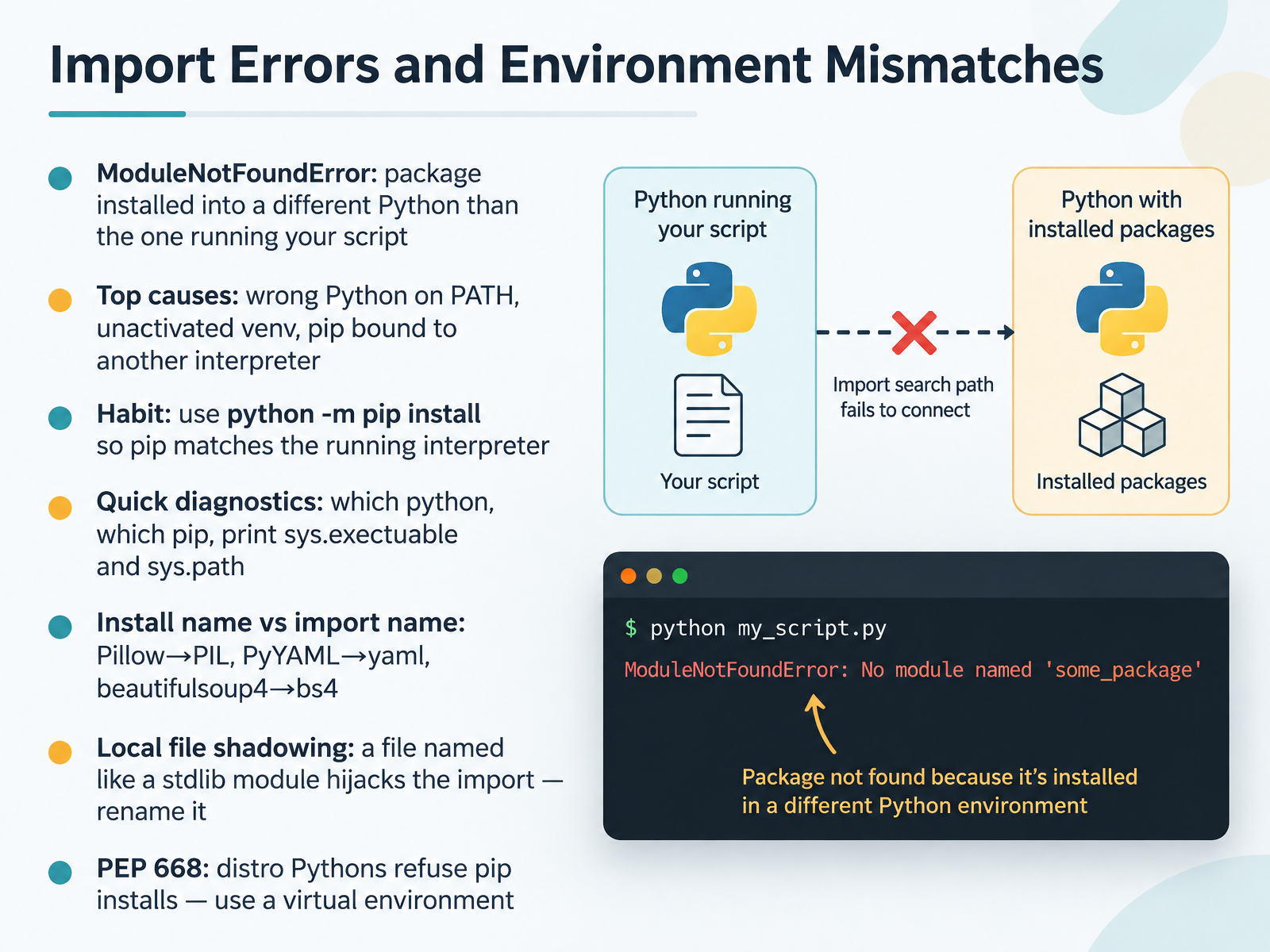
1 min - 07Import Errors and Environment MismatchesNext, let's talk about import errors and environment mismatches. If you see ModuleNotFoundError, the package probably isn't missing. It's likely installed into a different Python than the one running your script. The top causes are the wrong Python on your PATH, an unactivated virtual environment, or pip bound to another interpreter. A good habit is to install with python -m pip install, so pip matches the running interpreter. For a quick check, run which python, which pip, and print sys.executable and sys.path. Also remember that install names and import names can differ. Pillow imports as PIL. PyYAML imports as yaml. And beautifulsoup4 imports as bs4. One more gotcha: a local file named like a standard library module can hijack the import. If that happens, rename the file. On newer Linux distributions, PEP 668 may block pip installs into the system Python. The fix is to use a virtual environment. Try running python -m pip list in your terminal right now, and confirm you're in the environment you expect. That one check prevents many confusing import errors. Coming up next, Debugging Tools: From Print to Breakpoints.
 2 min
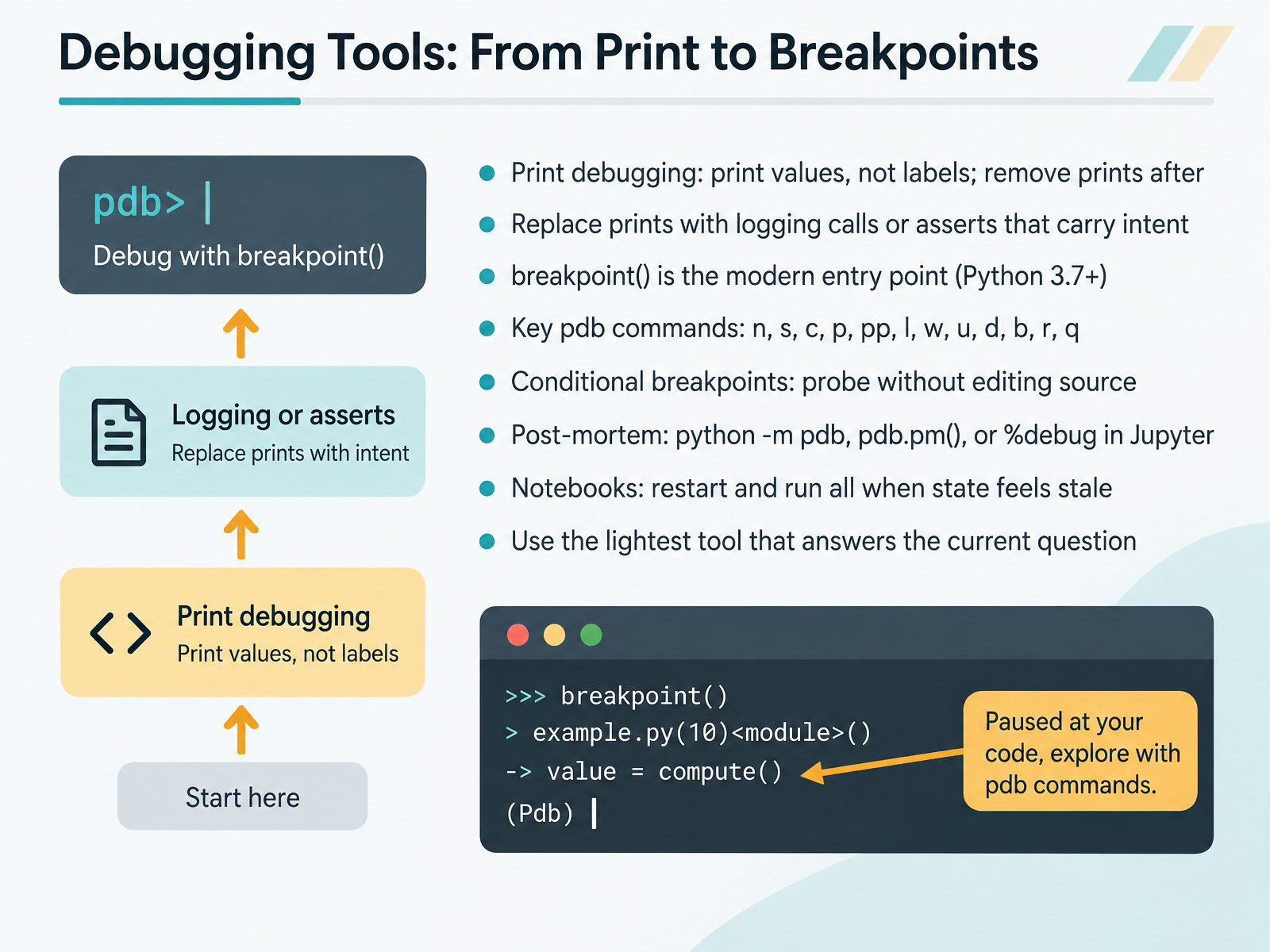
2 min - 08Debugging Tools: From Print to BreakpointsLet's look at the debugging tools you'll actually reach for, from simple prints to full breakpoints. Start with print debugging, but print values, not labels. A line like print(user_id) tells you more than print("here"). Remove those prints once you've answered your question. As your script grows, replace prints with logging calls or asserts that carry intent, so your diagnostics stay meaningful. In Python three point seven and later, call breakpoint() to drop into the debugger. From there, the key pdb commands are n to step over, s to step into, c to continue, p and pp to print values, l to list lines, w for the stack, u and d to move up and down, b to set a breakpoint, r to return, and q to quit. Conditional breakpoints let you probe without editing source. For crashes after the fact, use post-mortem debugging: run python dash m pdb, call pdb dot p m, or use percent debug in Jupyter. In notebooks, when state feels stale, restart and run all. Choose the lightest tool that answers your current question. Take a moment now and try breakpoint() in one small script. Next, we'll move into Data, Files, and Encoding Troubles.
 2 min
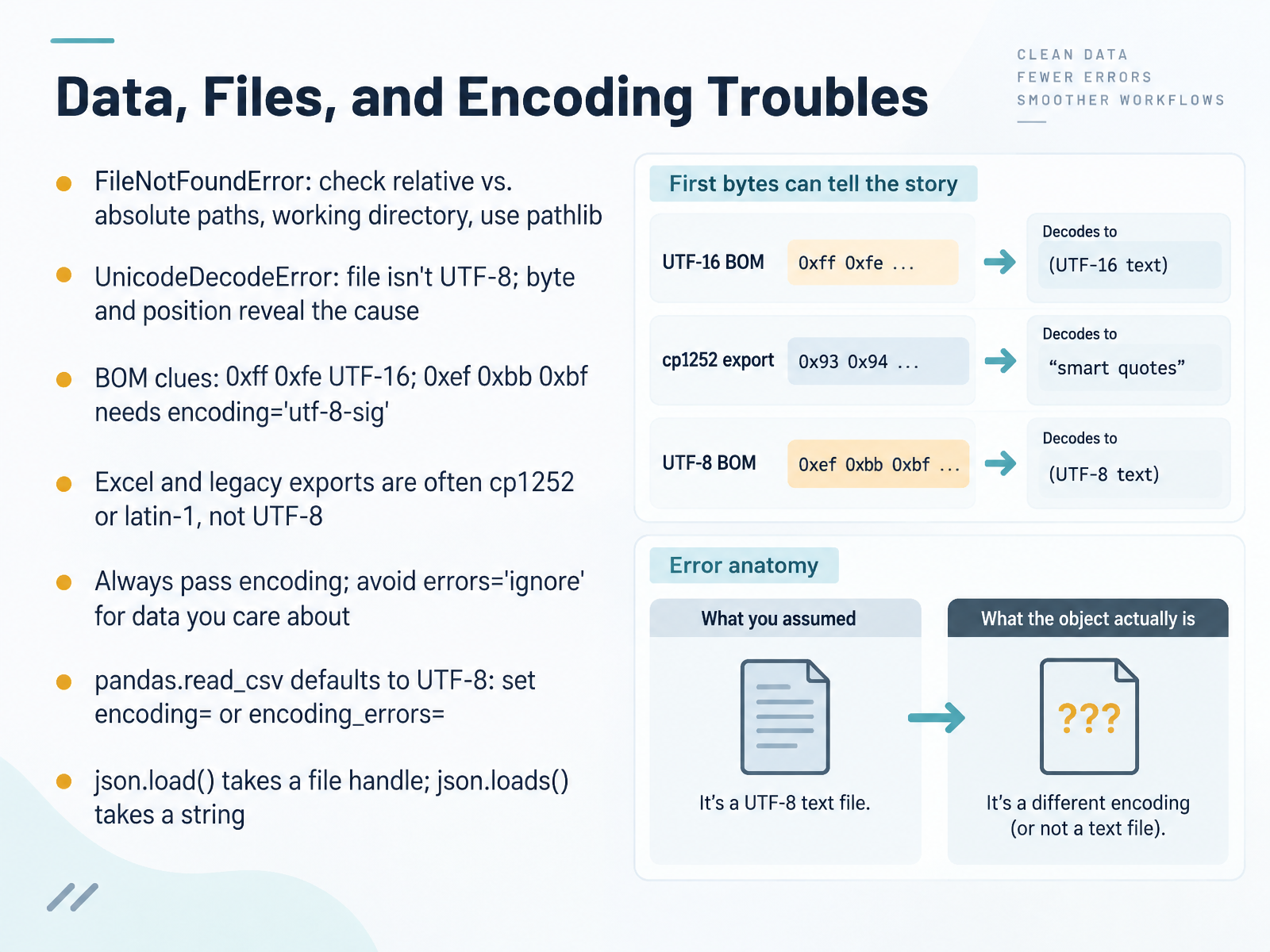
2 min - 09Data, Files, and Encoding TroublesNext, let's look at data, files, and encoding troubles. A FileNotFoundError usually means the path and the working directory disagree. Check relative versus absolute paths, and prefer pathlib. Then print your current directory to confirm where your script is actually looking. A UnicodeDecodeError means the file isn't UTF-8. The byte and position in the message point to the exact spot causing trouble. If the start of the file shows two bytes, 0xff 0xfe, that's a byte order mark hinting at UTF-16. And 0xef 0xbb 0xbf means you should pass encoding equals utf-8-sig. Excel and legacy exports are often cp1252 or latin-1, not UTF-8. So always pass encoding, and avoid errors equals ignore for data you care about, because it silently drops characters. In pandas, read_csv defaults to UTF-8, so set encoding, or use encoding_errors when needed. Finally, remember json.load takes a file handle, while json.loads takes a string. Try one of these fixes on your own file now. That leads us into handling and raising exceptions effectively.
 2 min
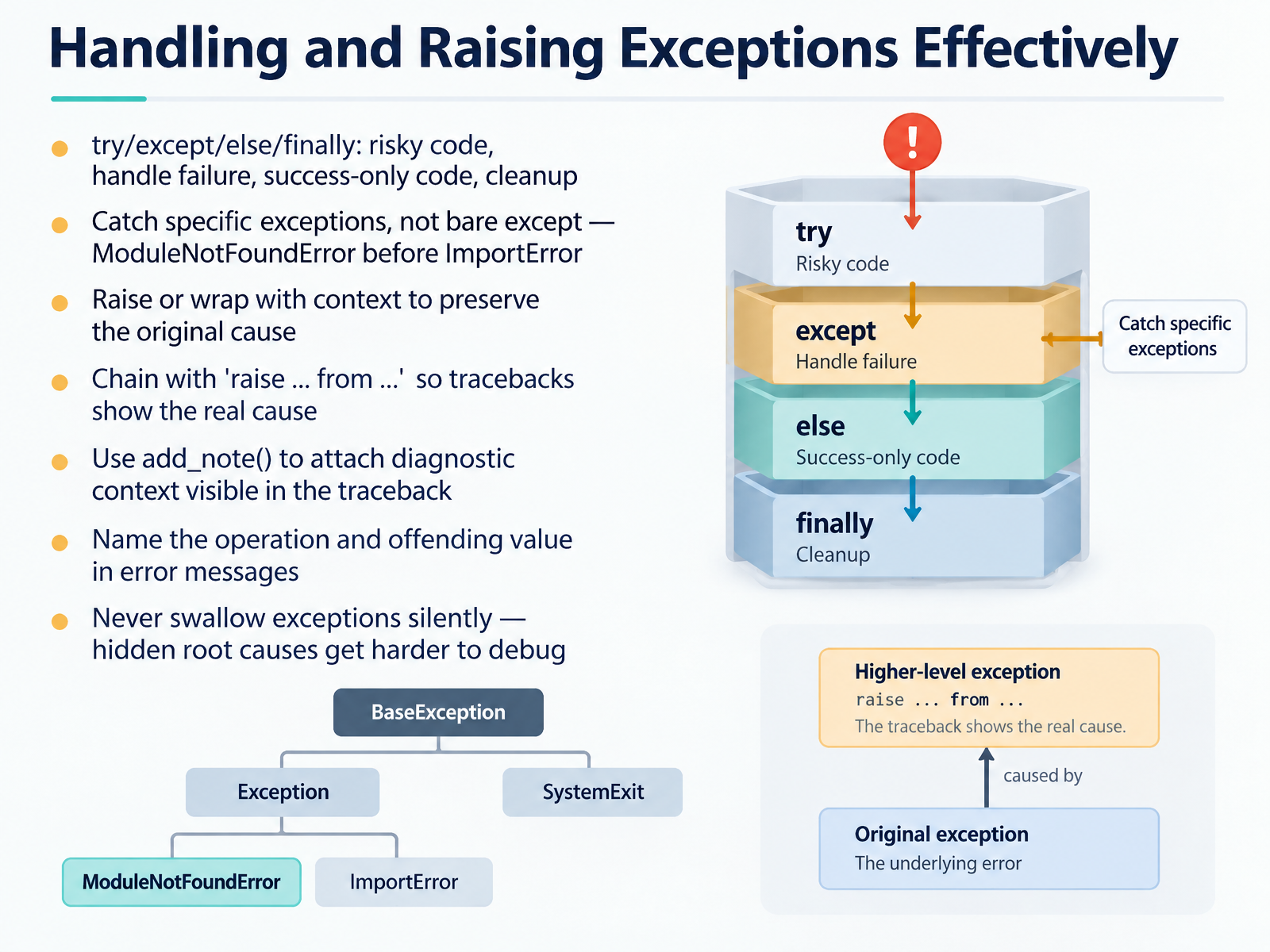
2 min - 10Handling and Raising Exceptions EffectivelyNext, let's look at handling and raising exceptions effectively. The try, except, else, and finally blocks have clear roles. Put risky code in try. Handle failures in except. Put success-only code in else. Use finally for cleanup. Catch specific exceptions, not a bare except. If you do catch ModuleNotFoundError and ImportError, order ModuleNotFoundError first, because it's the more specific case. When you raise an error, preserve the original cause. Use raise from to chain exceptions, so the traceback shows the real root cause. You can also call add_note to attach diagnostic context that appears in the traceback. In your error messages, name the operation and the offending value. And never swallow exceptions silently. Hidden root causes only get harder to debug. Your next action is to open one script where you catch a broad exception, narrow it to the exact error type, and add a note or message with the failing value. Coming up next, a guided lab where you'll fix a broken script from start to finish.
 1 min
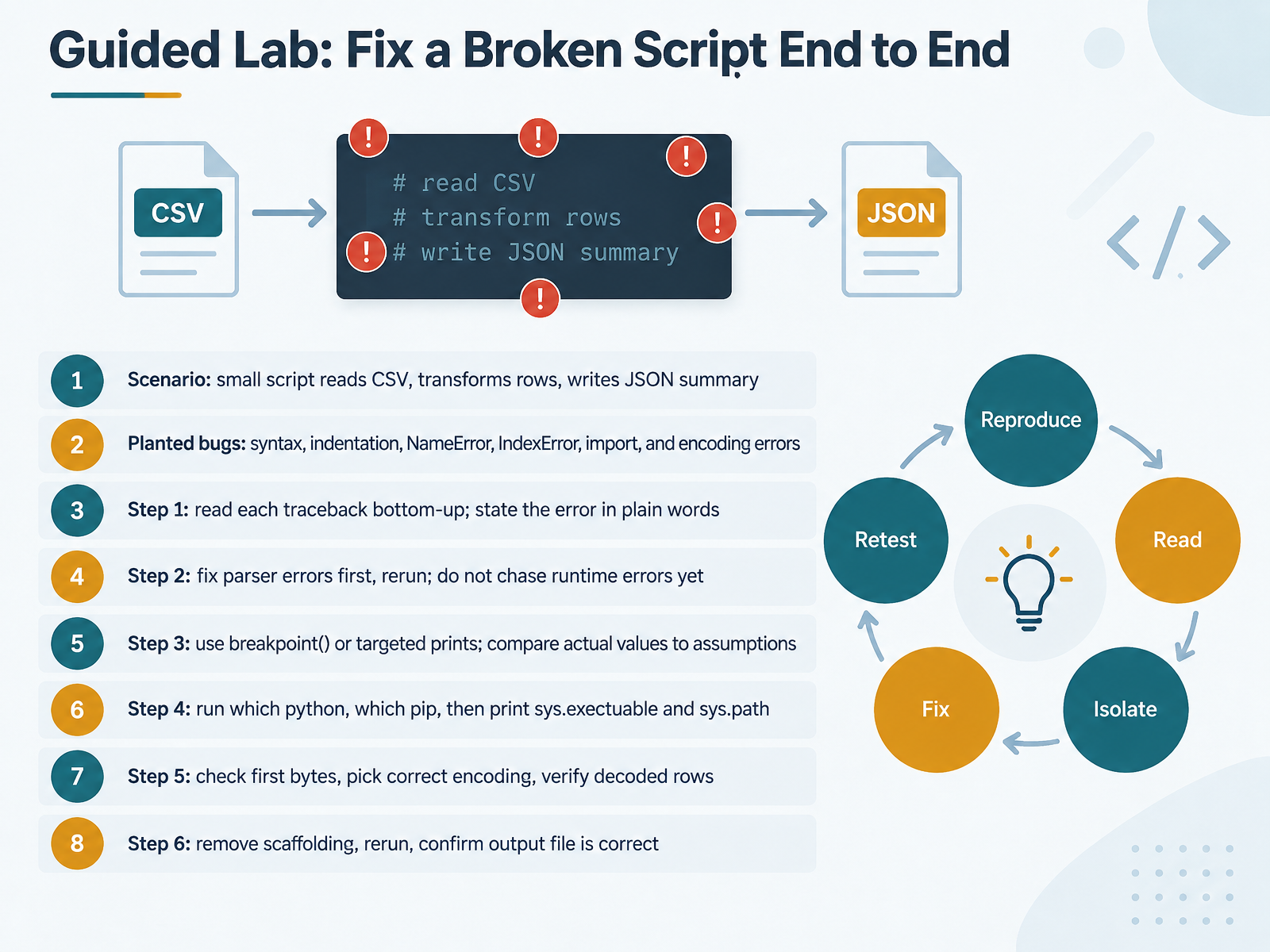
1 min - 11Guided Lab: Fix a Broken Script End to EndNow let's put troubleshooting into practice with a guided lab. Picture a small script that reads a CSV file, transforms each row, and writes a JSON summary. It has several planted bugs: a syntax error, an indentation problem, a NameError, an IndexError, an import issue, and an encoding error. Start by reading each traceback from the bottom up. Say the error in plain words before changing anything. Fix parser errors first, then rerun. Do not chase runtime errors yet. When the script finally runs, use breakpoint or targeted prints, and compare actual values to your assumptions. If imports or environment paths look wrong, run which python, which pip, then print sys dot executable and sys dot path. For encoding issues, check the first bytes of the file, choose the correct encoding, and verify decoded rows. Finally, remove the scaffolding, rerun, and confirm the output file is correct. Take one step, test it, then move on. Up next, Pitfalls to Avoid When Troubleshooting.
 2 min
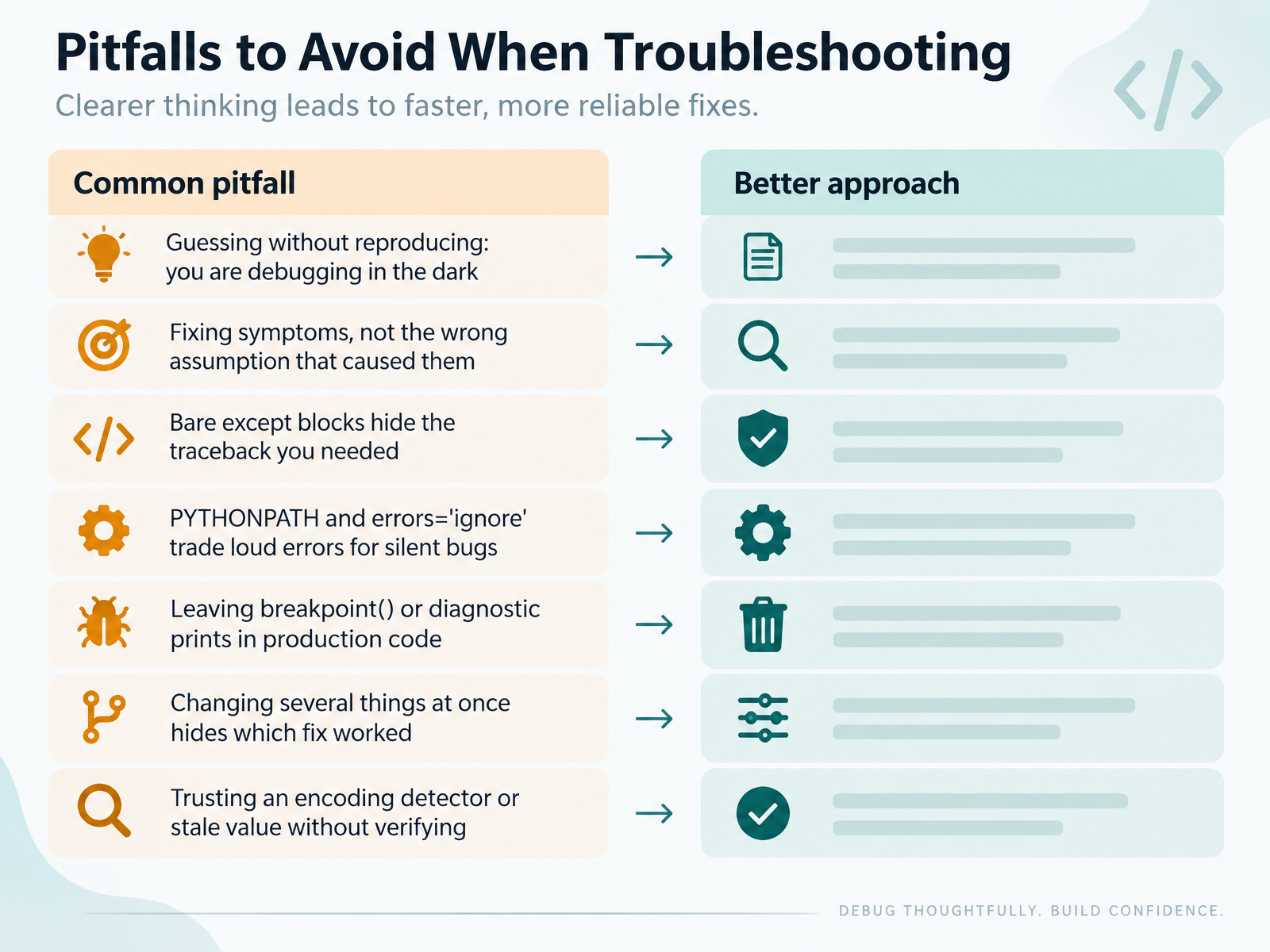
2 min - 12Pitfalls to Avoid When TroubleshootingNow let's look at the pitfalls to avoid. First, guessing without reproducing. If you cannot make the error happen on demand, you are debugging in the dark. Reproduce it once, then fix it. Next, fixing the symptom instead of the wrong assumption behind it. Ask what you believed was true, then test that belief. Watch for bare except blocks. They hide the traceback you needed. Change them to catch specific exceptions. PYTHONPATH changes and errors equals ignore trade loud errors for silent bugs. Those silent bugs cost more time later. Remove breakpoint calls and diagnostic prints before code ships. If you change several things at once, you will not know which fix worked. Change one thing, retest, then move on. And never trust an encoding detector or a stale value without verifying it. So, reproduce, question your assumption, and change one thing at a time. That is how you turn errors into clear signals. Next, we will build a troubleshooting habit you can reuse.
 2 min
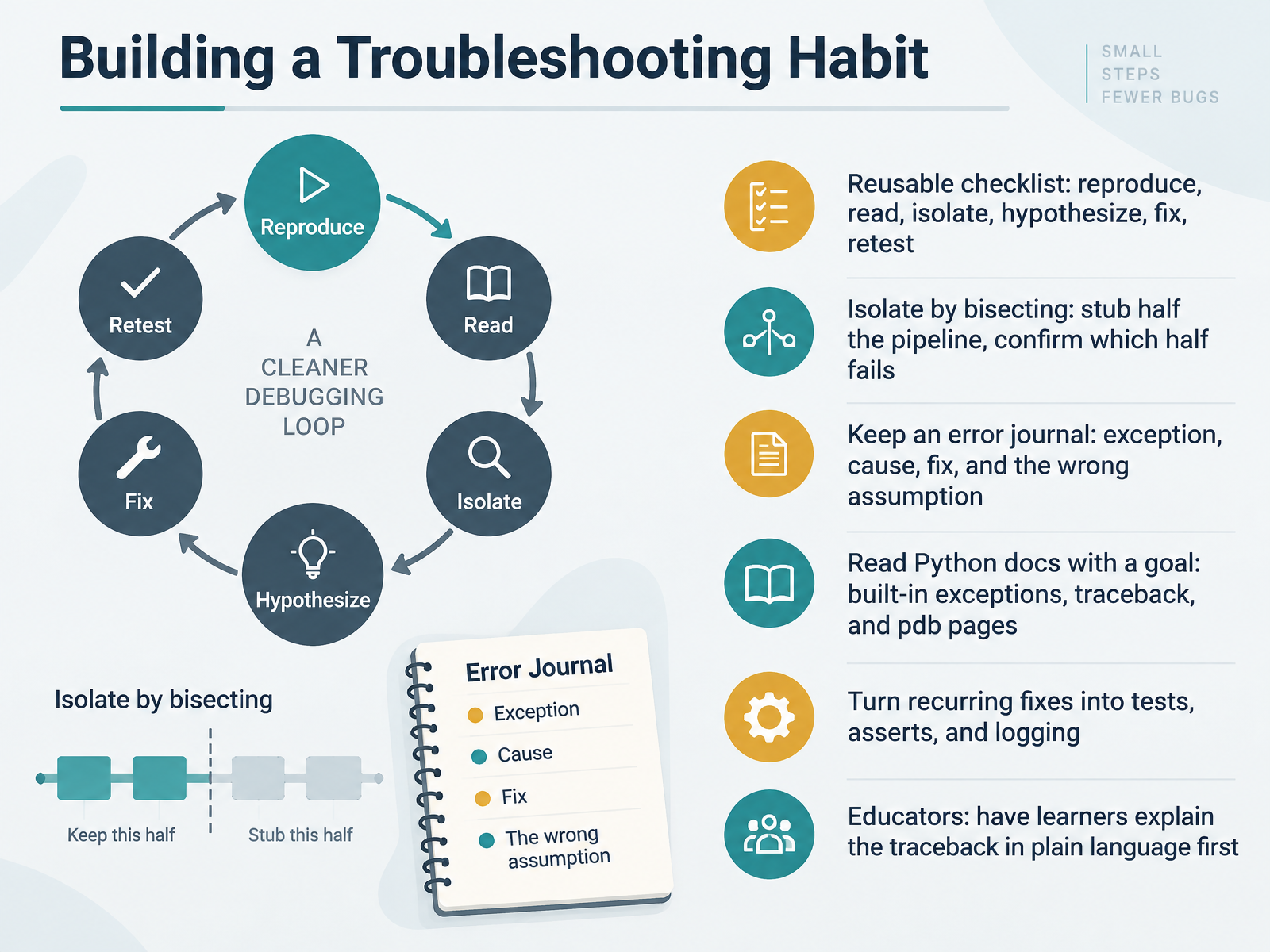
2 min - 13Building a Troubleshooting HabitLet's pull this together into a troubleshooting habit you can reuse. Start with a checklist you can run every time: reproduce the problem, read the message, isolate the cause, form a hypothesis, apply one fix, and retest. Keep it short enough to remember under pressure. When isolating, bisect. Stub out half the pipeline, run it, and confirm which half actually fails. For example, replace a database call with a fixed return value. If the error disappears, the fault is behind that call. Keep an error journal. For each entry, note the exception, the cause, the fix, and the wrong assumption you made. That last column is where the real learning lives, because it stops you from repeating the same mental shortcut. Read the Python docs with a goal, not cover to cover. The built-in exceptions page explains what each error type means. The traceback module page shows how errors are reported. The pdb page helps when print statements are not enough. When a fix keeps coming back, turn it into a test, an assert, or a log line. Then the code catches it for you. And if you teach, ask learners to explain the traceback in plain language before they touch the code. That single step reveals whether they truly understand the failure. Pick one item from this checklist and use it on your very next error. Coming up next, we will wrap up with a self-check and your next steps.
 2 min
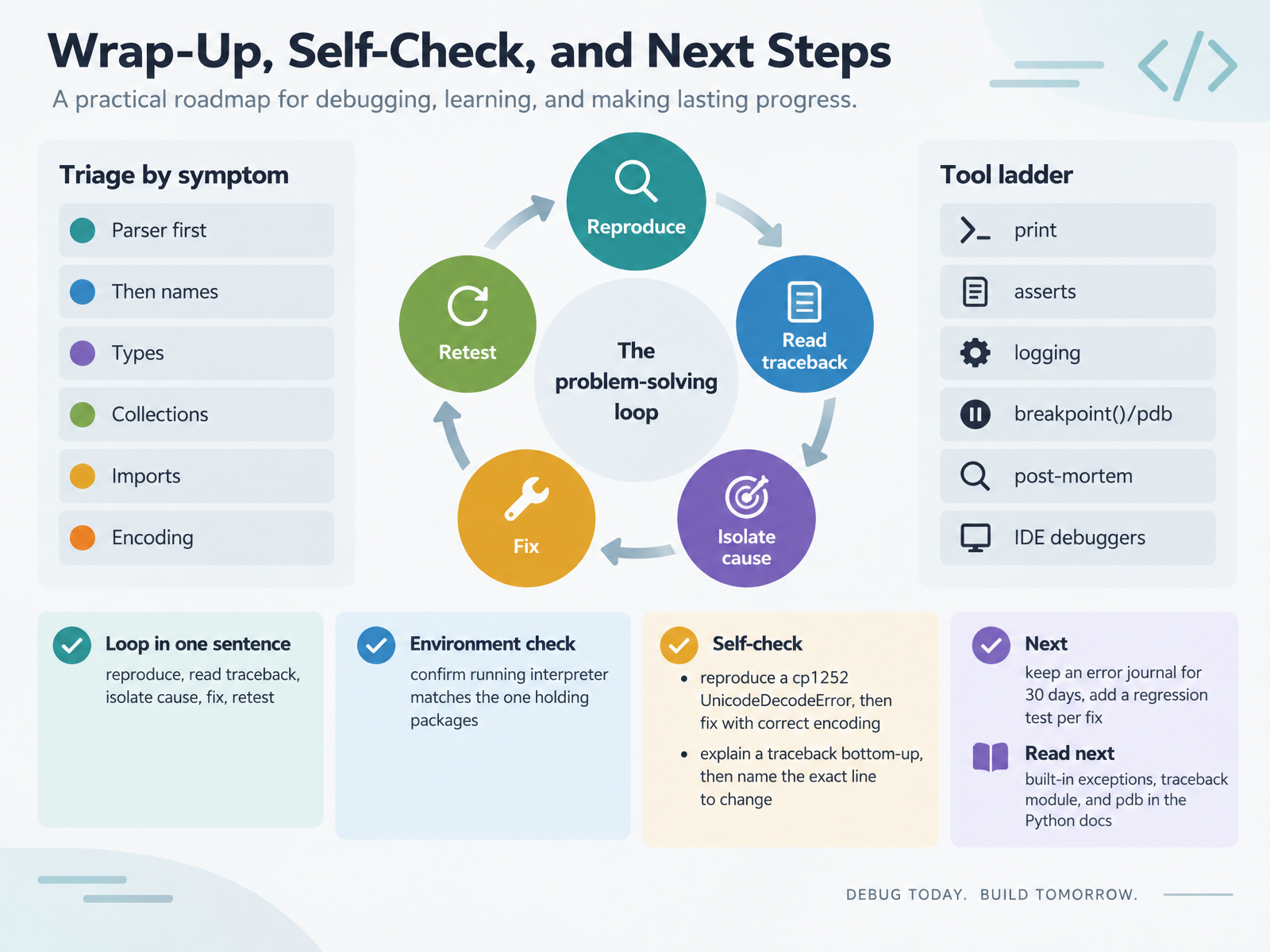
2 min - 14Wrap-Up, Self-Check, and Next StepsLet's wrap up. You now have a loop you can repeat: reproduce the error, read the traceback, isolate the cause, fix it, then retest. When you're stuck, triage by symptom. Parser errors first. Then names, types, collections, imports, and encoding. For tools, start with print, then asserts, then logging. Move up to breakpoint and pdb for a live look, post-mortem for a crash, and your IDE debugger when you need to step through. One more check: confirm the interpreter you're running is the same one holding your packages. Here are two self-checks. First, reproduce a cp1252 UnicodeDecodeError, then fix it with the correct encoding. Second, explain a traceback from the bottom up, then name the exact line to change. Going forward, keep an error journal for thirty days, and add one regression test per fix. To learn more, read the built-in exceptions, the traceback module, and pdb in the Python docs. Thank you for working through this with me. You're building real debugging skill, one error at a time. Keep going.
 2 min
2 min
Take the deck with you
Download this course as a file — free, no sign-up needed.
- PDF handoutEvery slide page, ready to print or share.15 pages · 3.3 MBDownload
- Narrated PowerPointThe deck that presents itself — every slide carries the digital human's narration video.15 pages · 13.9 MBDownload
- PowerPoint slidesThe full deck as a .pptx — open it in PowerPoint, Keynote, or Google Slides.15 pages · 3.2 MBDownload
Free to use in your own training — please keep the PersonWise credit page at the end.
Have your own deck? Turn it into a course