Begin
14 pages · ~28 min
Employee Onboarding Platform Architecture
This training helps engineers and architects evaluate, design, and select an employee onboarding platform, covering key architecture decisions and tradeoffs.
A digital instructor presents all 14 pages. Hold “Ask” at any point and ask out loud — the answer comes from this course. No sign-up needed.
What you’ll learn
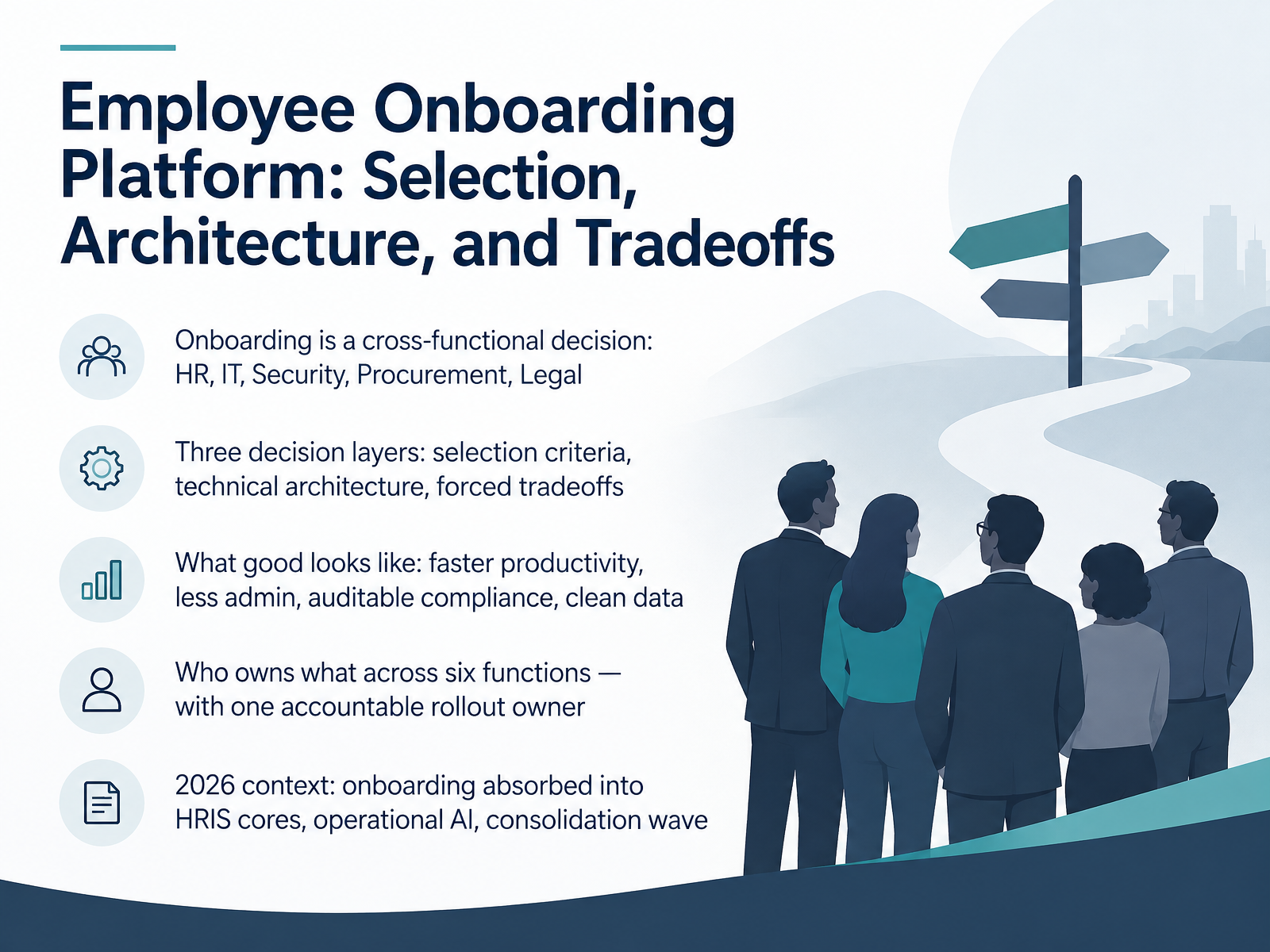
- 01Employee Onboarding Platform: Selection, Architecture, and TradeoffsWelcome. Over the next fourteen slides, we will work through how to choose and architect an employee onboarding platform, and what each option genuinely costs you in effort, risk, and flexibility.
Start with the core point. Onboarding is a cross-functional decision. HR, IT, Security, Procurement, and Legal all hold a piece of it, and any one of them can stall a rollout alone.
We will move through three decision layers. First, selection criteria. Second, technical architecture. Third, the forced tradeoffs, because you cannot optimize everything at once.
What good looks like is concrete: faster productivity, less admin, auditable compliance, and clean data flowing into your systems of record. Keep those four as your scorecard.
We will also map who owns what across six functions, with one accountable rollout owner. That single owner is usually what separates a working launch from a stalled one.
Finally, the twenty twenty-six context. Onboarding is being absorbed into HRIS cores, operational AI is moving from pilot to production, and a consolidation wave is reshaping the vendor landscape.
Let's begin with the problem space itself.hbsp.harvard.eduaieh.comfuture-proof.app+22 min
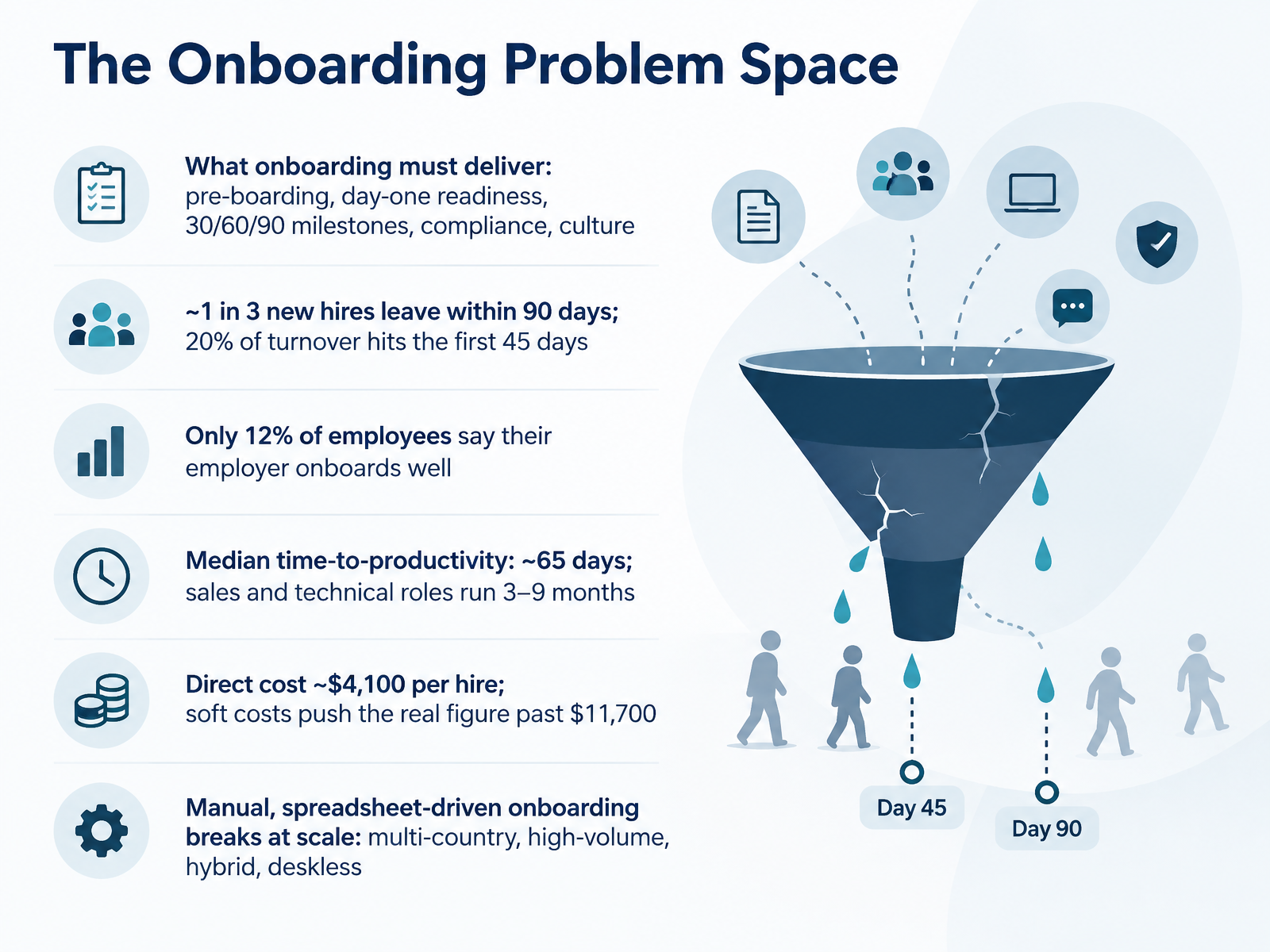
- 02The Onboarding Problem SpaceHere is the problem we are actually solving. Onboarding has to deliver six things: pre-boarding, day-one readiness, 30, 60, and 90-day milestones, compliance, and culture. Miss any one, and you feel it in the numbers. About one in three new hires leave within 90 days, and 20 percent of turnover happens in the first 45. Only 12 percent of employees say their employer onboards well. Median time to productivity sits around 65 days. Sales and technical roles run 3 to 9 months. Direct cost runs about $4,100 per hire, and soft costs push the real figure past $11,700. Now, spreadsheet-driven onboarding breaks at scale: multi-country compliance, high-volume hiring, hybrid teams, and deskless workers. Keep that list in mind as your evaluation criteria. What actually moves outcomes? Evidence for design choices.
 hbsp.harvard.eduaieh.comfuture-proof.app+22 min
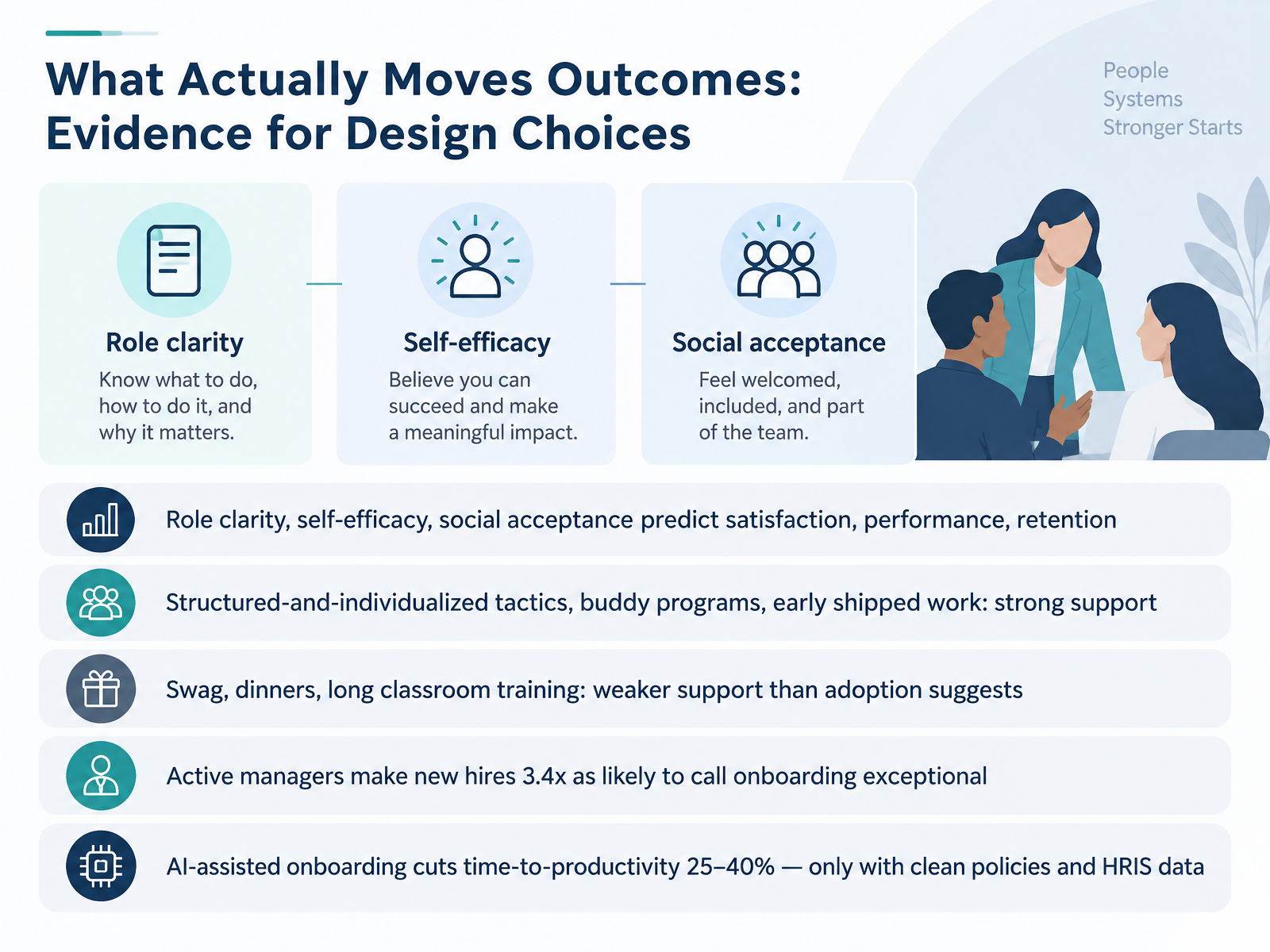
 - 03What Actually Moves Outcomes: Evidence for Design ChoicesLet's look at what the evidence actually says moves outcomes, because design choices need to be defensible. Three near-term states drive results: role clarity, self-efficacy, and social acceptance. Those predict satisfaction, performance, and retention. On tactics, structured and individualized programs have strong support, and so do buddy programs with a real agenda and early shipped work within the first thirty days. Swag, dinners, and long classroom training get weaker support than their adoption suggests. One number worth remembering: when managers take an active role, new hires are three point four times as likely to call onboarding exceptional. And AI-assisted onboarding can cut time-to-productivity by twenty-five to forty percent, but only if your policies and HRIS data are clean. Now, Requirements First: Turning Needs into Selection Criteria.
 hbsp.harvard.eduaieh.comfuture-proof.app+22 min
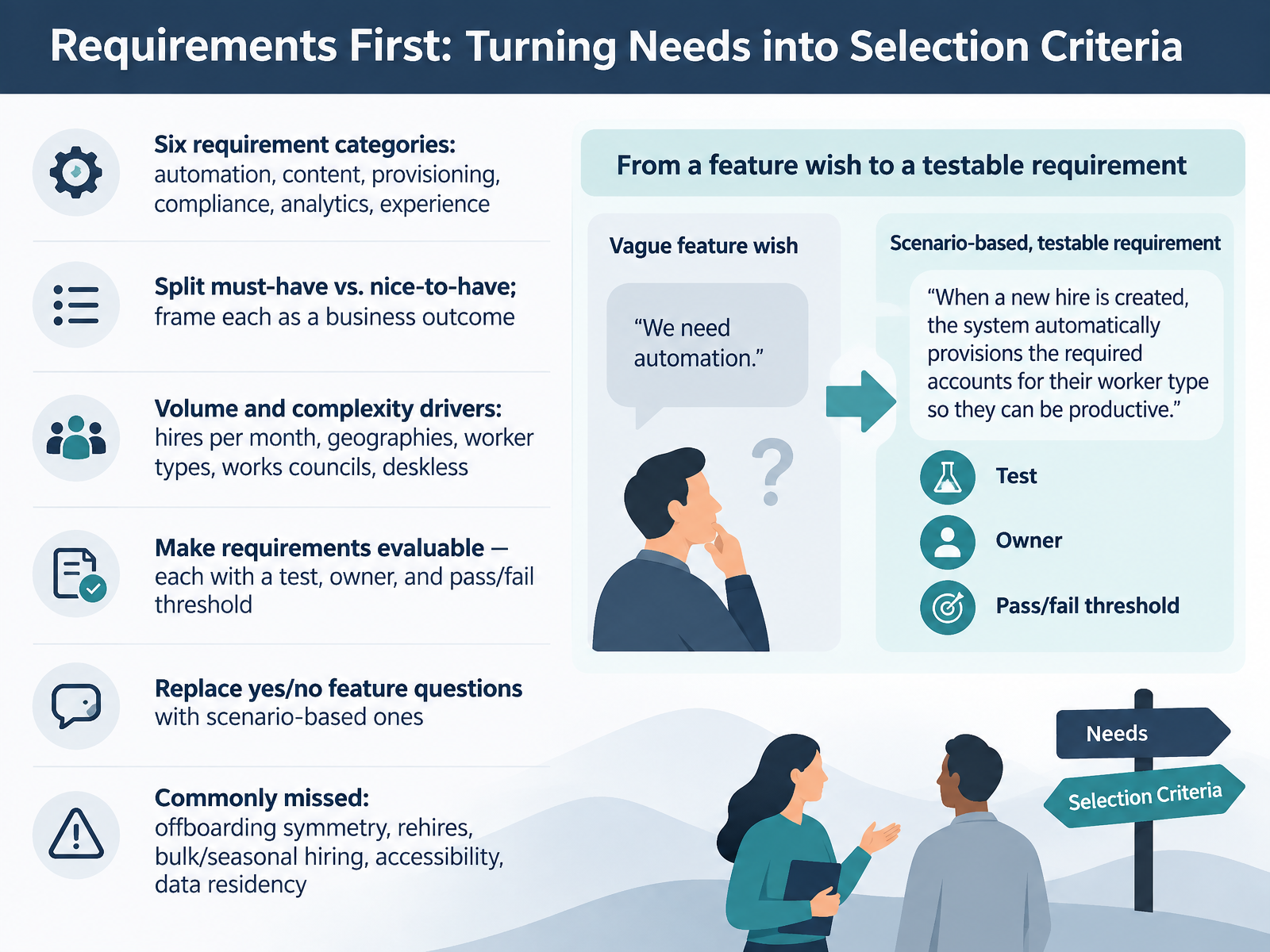
 - 04Requirements First: Turning Needs into Selection CriteriaLet's talk about turning needs into selection criteria. Start with six requirement categories: automation, content, provisioning, compliance, analytics, and experience. Then split them into must-have versus nice-to-have, and frame each one as a business outcome, not a feature name. Your volume and complexity drivers shape everything: hires per month, geographies, worker types, works councils, and deskless workers. Next, make every requirement evaluable. Give each one a test, an owner, and a pass or fail threshold. Replace yes or no feature questions with scenario-based ones. For example, instead of asking whether a vendor supports onboarding, ask them to walk through how a hiring manager requests a laptop, assigns a buddy, and schedules week one check-ins. And watch for the commonly missed items: offboarding symmetry, rehires, bulk or seasonal hiring, accessibility, and data residency. Lock these down before you write a single vendor-facing word. Next, we look at the selection process, from longlist to signed contract.
 rippling.comrippling2.imgix.netcompono.com+22 min
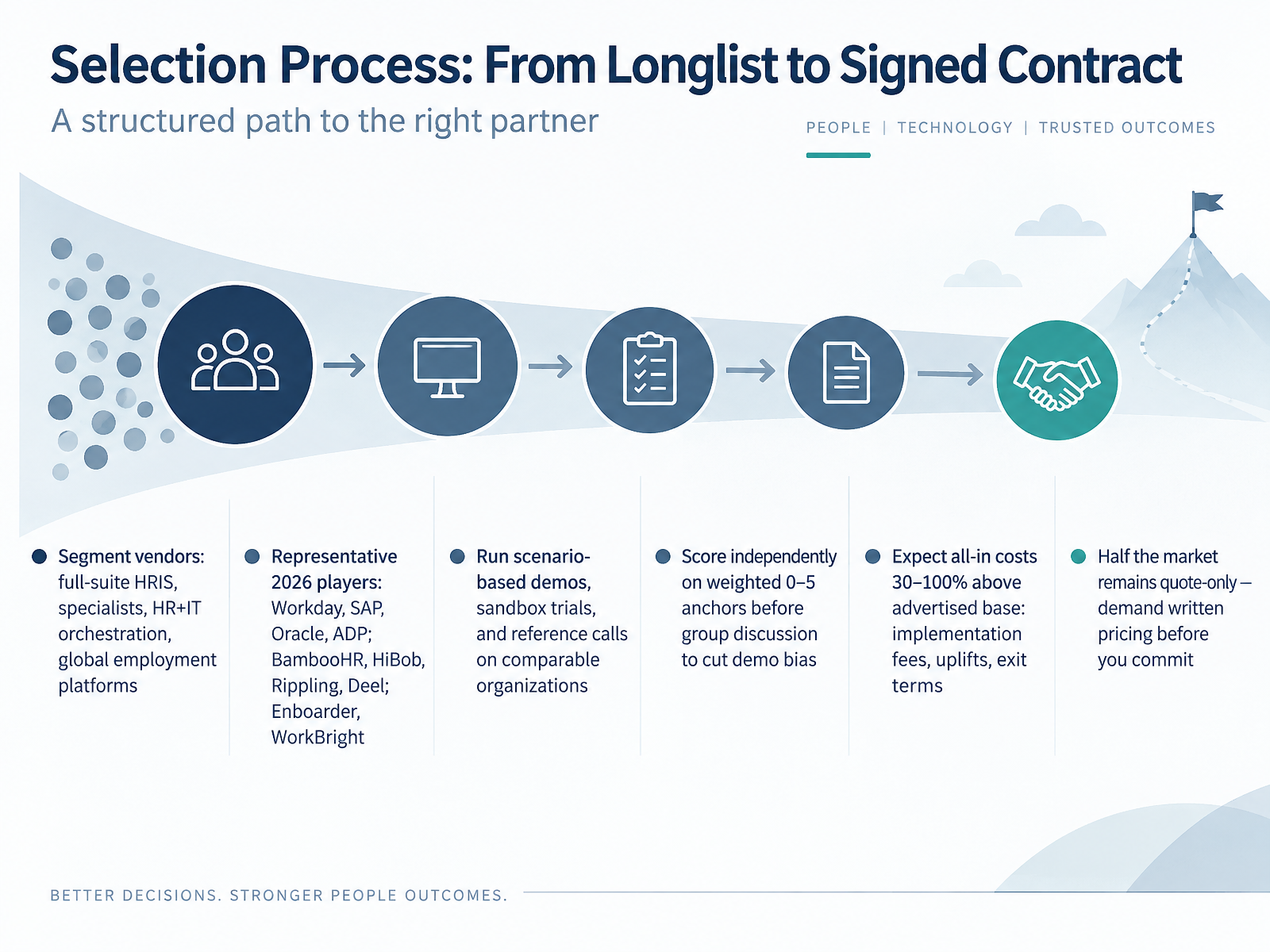
 - 05Selection Process: From Longlist to Signed ContractLet's walk through the selection process, from longlist to signed contract. First, segment the vendors, because they solve different problems. You have full-suite HRIS platforms like Workday, SAP, Oracle, and ADP. You have specialists like BambooHR and HiBob. You have HR plus IT orchestration from Rippling, global employment from Deel, and experience tools like Enboarder and WorkBright. Next, run scenario-based demos, sandbox trials, and reference calls with organizations your size. Before group discussion, have each evaluator score independently on weighted zero to five anchors. That cuts demo bias. Then budget realistically. All-in costs typically run thirty to one hundred percent above the advertised base, once you add implementation fees, annual uplifts, and exit terms. And remember, roughly half the market is quote-only, so demand written pricing before you commit. Your takeaway: compare vendors on total cost and demonstrated fit, not the demo. Next, we will look at the core tradeoff between suite, best-of-breed, and build.
 firsthr.apphrget.comzendikt.com+22 min
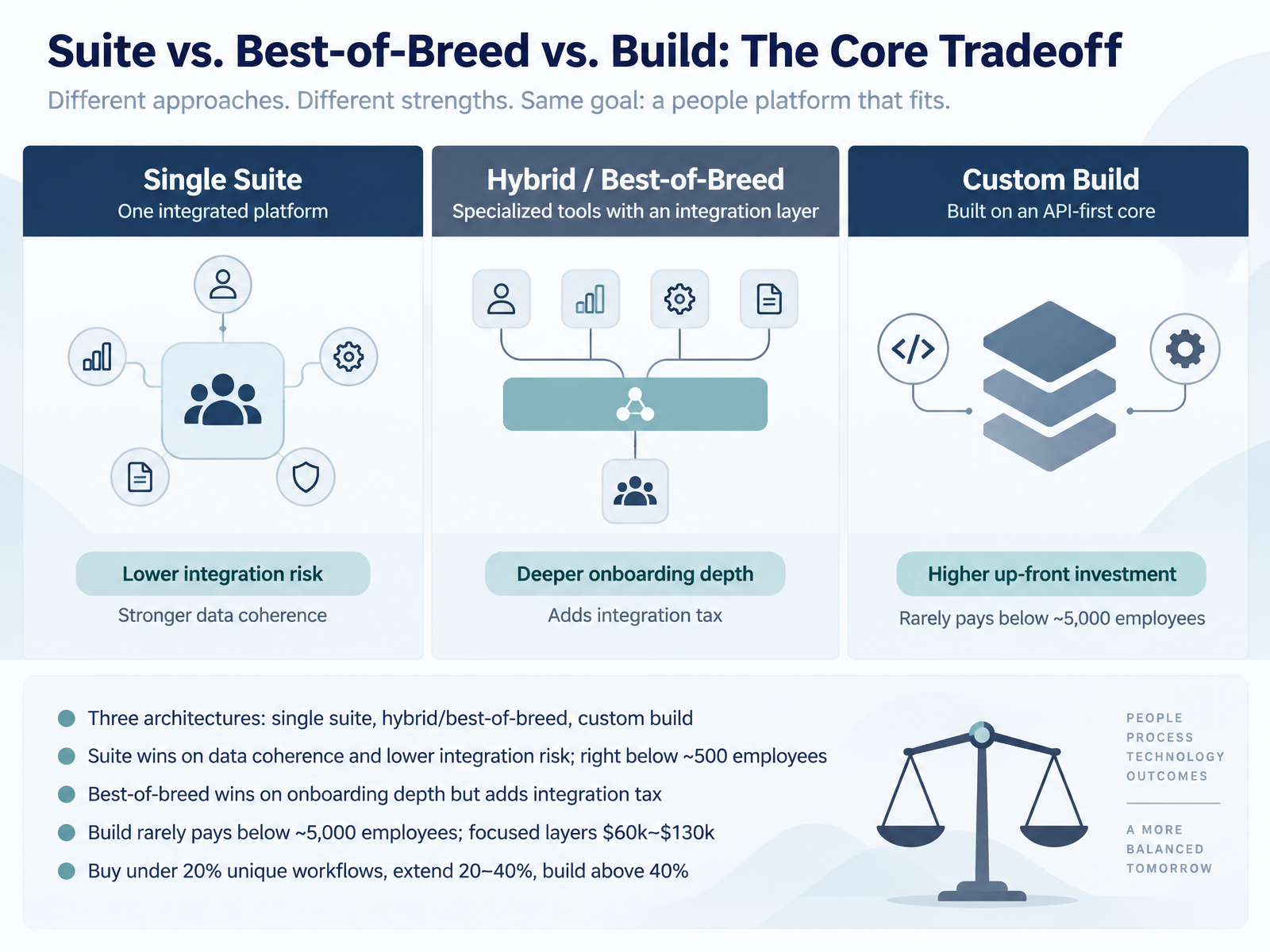
 - 06Suite vs. Best-of-Breed vs. Build: The Core TradeoffLet's get to the decision most teams argue about: suite, best-of-breed, or build. There are three architectures. A single suite, where onboarding lives inside your HRIS. A hybrid, where a specialist tool sits on top of the suite. Or a custom build, using APIs and internal engineering. The suite wins on data coherence and lower integration risk, and it is usually the right call below roughly five hundred employees. Best-of-breed wins on onboarding depth, but you pay an integration tax that rarely shows up in the first business case. Build rarely pays below about five thousand employees, where a focused first layer runs sixty thousand to one hundred thirty thousand dollars. So use the workflow test. Buy when under twenty percent of your workflows are unique. Extend between twenty and forty percent. Build above forty percent. Next, let's look at the reference architecture: systems, data, and integration patterns.
 onboarding-experience.netgiiresearch.comviewpointanalysis.com+21 min
 - 07Reference Architecture: Systems, Data, and Integration PatternsLet's walk through the reference architecture, so you can see where each system sits and where it tends to break.
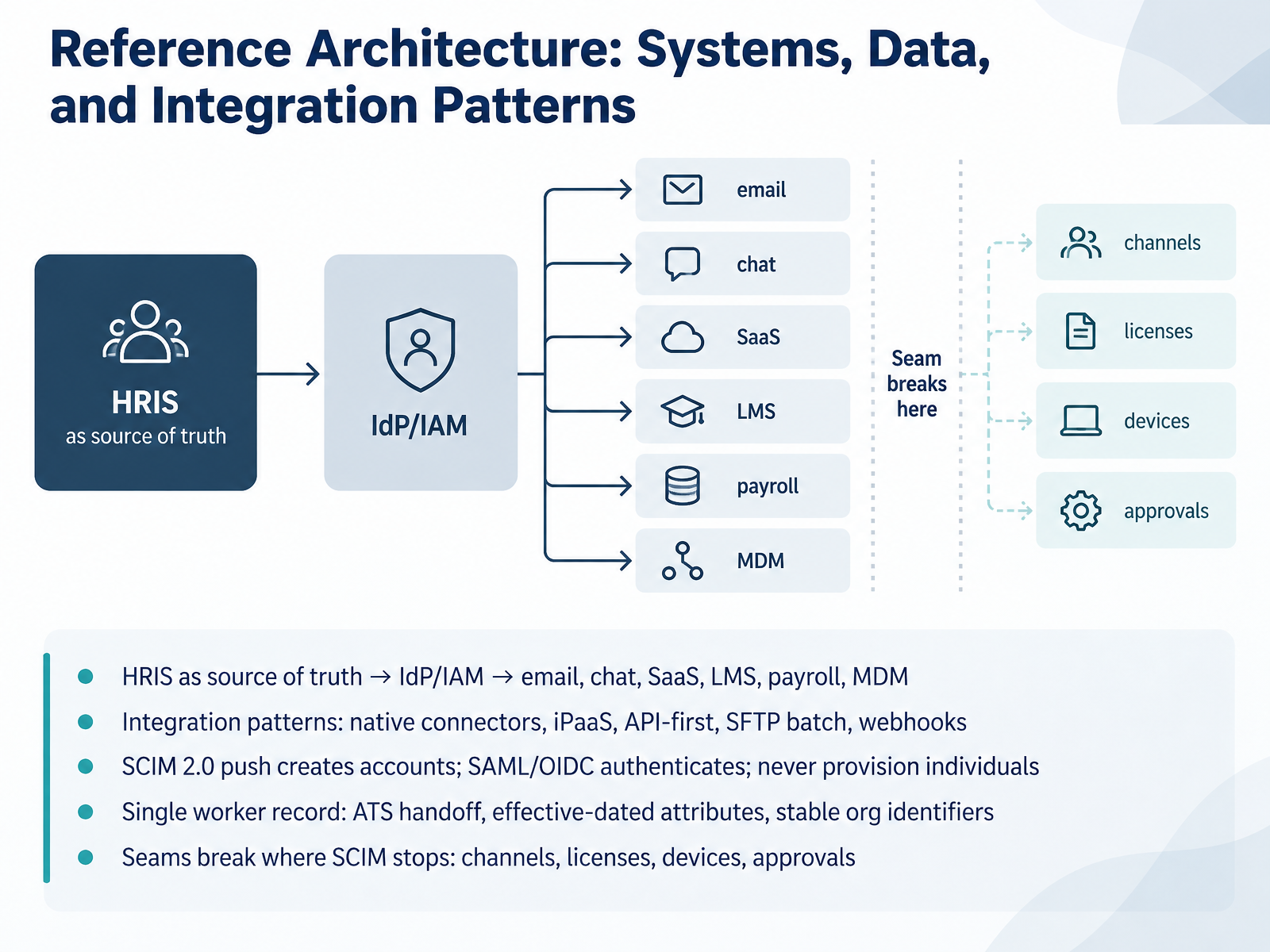
Start with your HRIS as the source of truth. It feeds your identity provider, which then provisions accounts across email, chat, SaaS tools, payroll, and device management. On integration patterns, you have native connectors, an integration platform, API-first builds, SFTP batch files, or webhooks. Most teams run a mix, and that mix becomes your maintenance burden.
The mechanism is simple. SCIM 2.0 push creates accounts. SAML or OIDC authenticates people into them. Keep those roles separate, and never provision individuals directly. Provision groups, then put people in groups.
Aim for a single worker record: the applicant tracking system hands off the accepted candidate, attributes carry effective dates, and you use stable organizational identifiers, not job titles that get renamed.
Now the seams. SCIM stops where channel memberships, licenses, devices, and manager approvals begin. Those need workflow automation, or someone does them by hand on day one. That gap is exactly what we'll tackle next, in Making Provisioning Actually Reliable.
 onboarding-experience.netgiiresearch.comviewpointanalysis.com+22 min
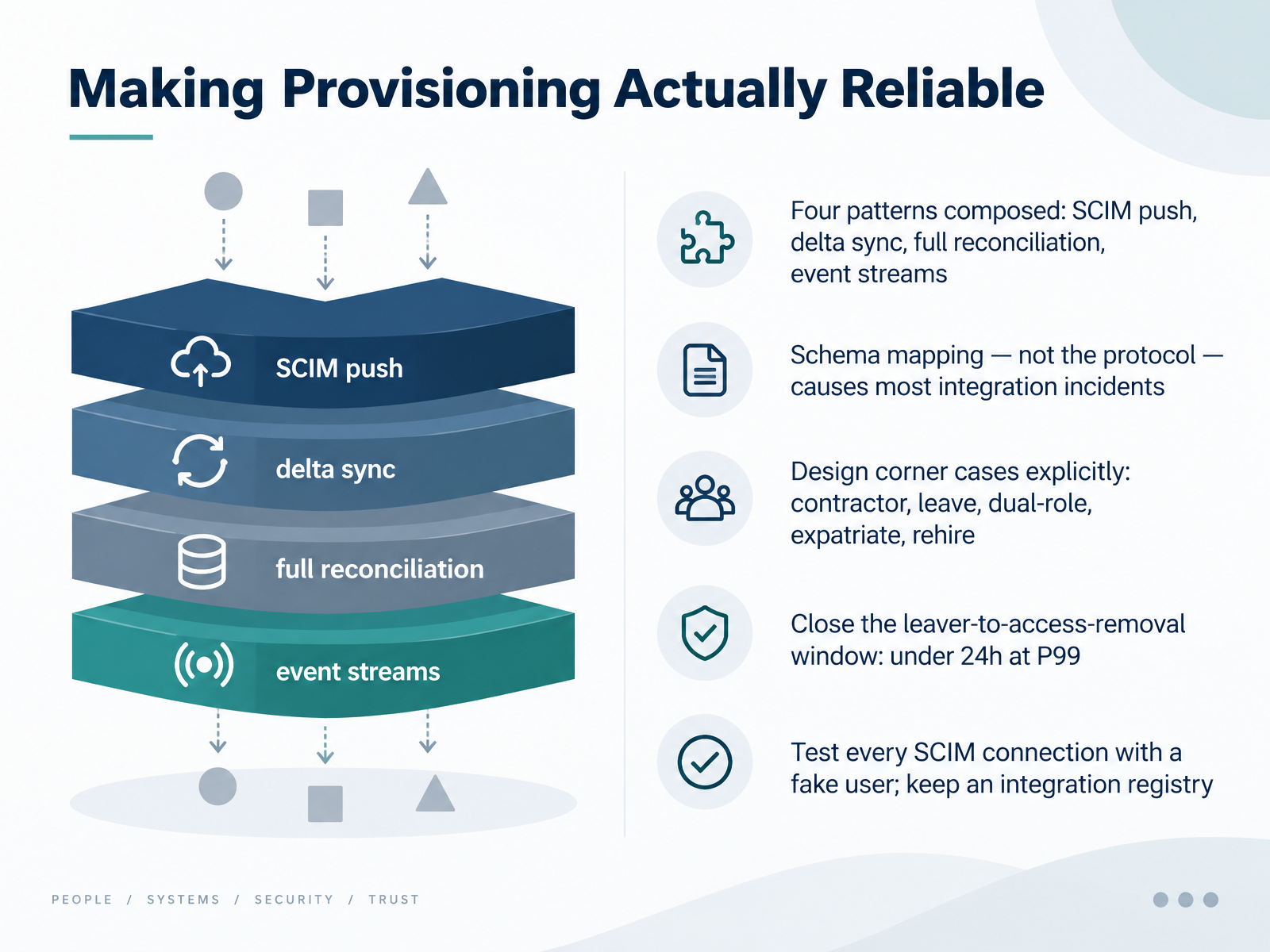
 - 08Making Provisioning Actually ReliableNow let's talk about making provisioning actually reliable. The mature pattern composes four things, not one: SCIM push for real time events, delta sync as a backup for anything push drops, full reconciliation on a daily or weekly cadence to catch drift, and event streams for high volume cases. Push alone leaves gaps. Here is the part teams underestimate. Most integration incidents are not protocol failures. SCIM either works or it does not. The breakage happens in schema mapping, where an HR field like department gets turned into an access decision. Normalize those mappings and version them. Then design your corner cases explicitly, with business sign off. Contractors, leave of absence, dual roles, expatriates, rehires. Decide in advance whether access is suspended, maintained, or partially removed. Watch your leaver window too. Aim to close the gap from HR termination event to access removal in under twenty four hours at the ninety ninth percentile. And before any connector goes live, test it with a fake user, then record its behavior in an integration registry. That registry is what survives staff turnover. Next, let's look at security, privacy, and compliance architecture.
 datatracker.ietf.org2 min
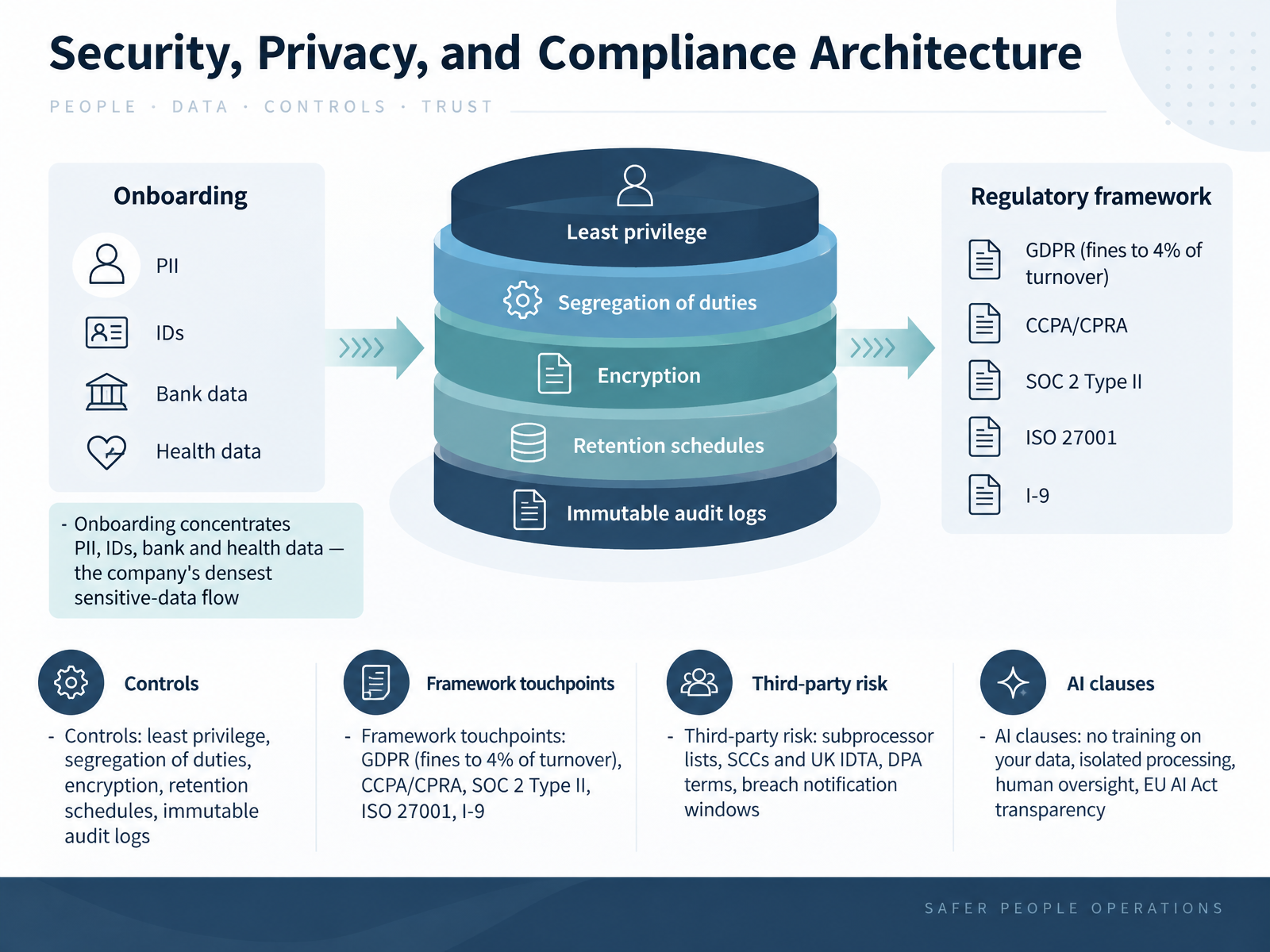
 - 09Security, Privacy, and Compliance ArchitectureNow let's talk about the part your security and procurement teams will scrutinize hardest. Onboarding concentrates more sensitive data than almost any other HR process: identity documents, bank details, health information, all in one flow. So ask vendors to prove four controls: least privilege access, segregation of duties, encryption in transit and at rest, and immutable audit logs with defined retention schedules. Framework touchpoints matter too. GDPR penalties reach four percent of global turnover, and you also need CCPA and CPRA coverage, SOC 2 Type II, ISO 27001, and I-9 handling. On third-party risk, get the subprocessor list, confirm Standard Contractual Clauses or the UK International Data Transfer Agreement, review DPA terms, and pin down breach notification windows. Finally, AI clauses: no training on your data, isolated processing environments, human oversight, and EU AI Act transparency. Next, we move to automation versus human touch, and the cost of customization.
 rippling.comrippling2.imgix.netcompono.com+22 min
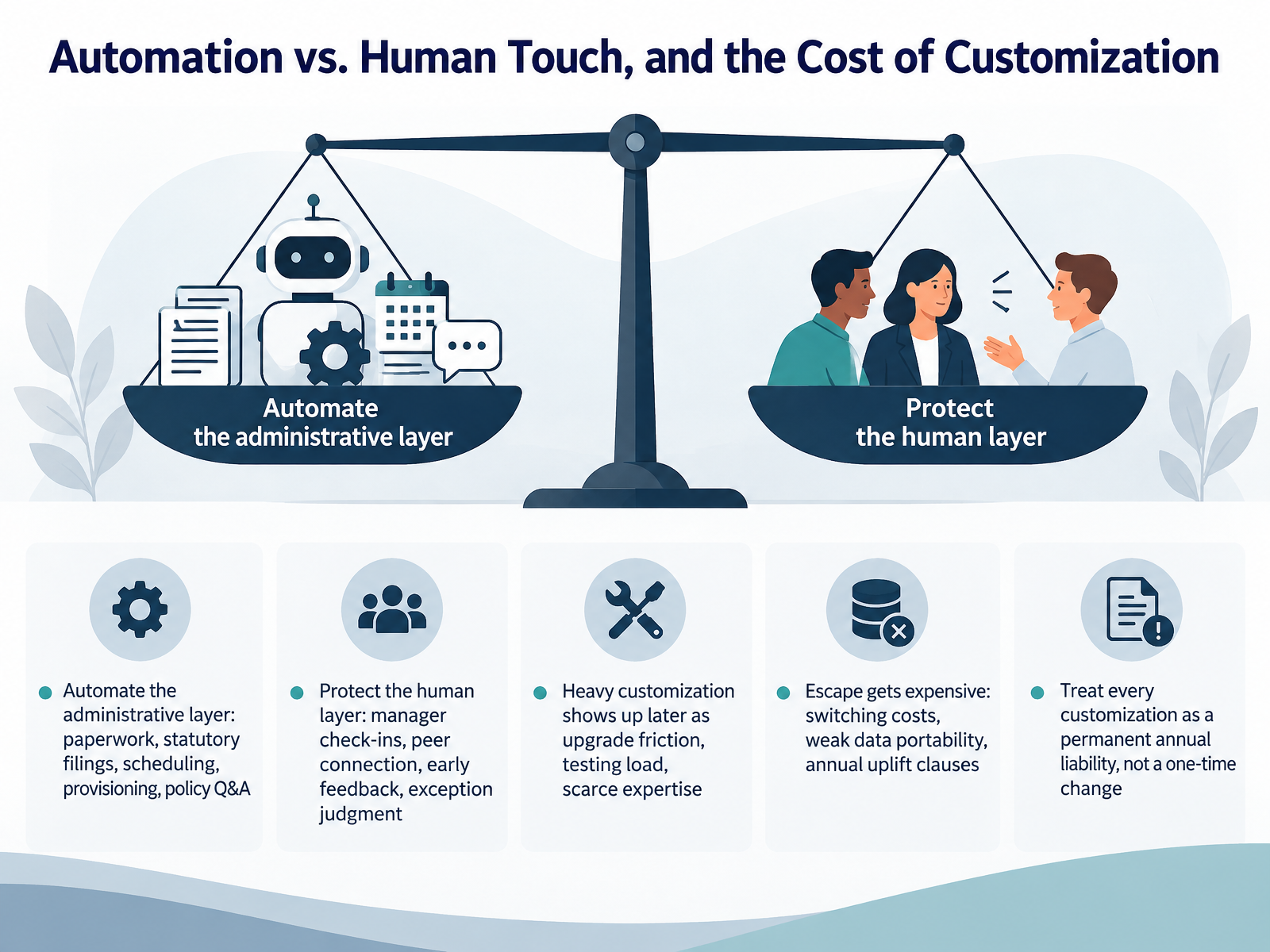
 - 10Automation vs. Human Touch, and the Cost of CustomizationNow let's talk about where to automate and where to keep a human, and what customization really costs you. Start with the administrative layer. Automate the paperwork, statutory filings, scheduling, provisioning, and policy questions. That is repeatable, high volume work, and machines do it faster and more consistently. Then protect the human layer. Manager check-ins, peer connection, early feedback, and exception judgment. Those moments drive retention, so do not automate them away. Now the harder part: every customization you add becomes a permanent annual liability, not a one time change. Heavy customization shows up later as upgrade friction, extra testing load, and scarce expertise. Meanwhile, escape gets expensive. Switching costs rise, data portability weakens, and annual uplift clauses compound against a growing headcount. So treat each customization as a decision you will pay for every year. Next, we move into implementation, rollout, change management, and metrics.
 firsthr.apphrget.comzendikt.com+21 min
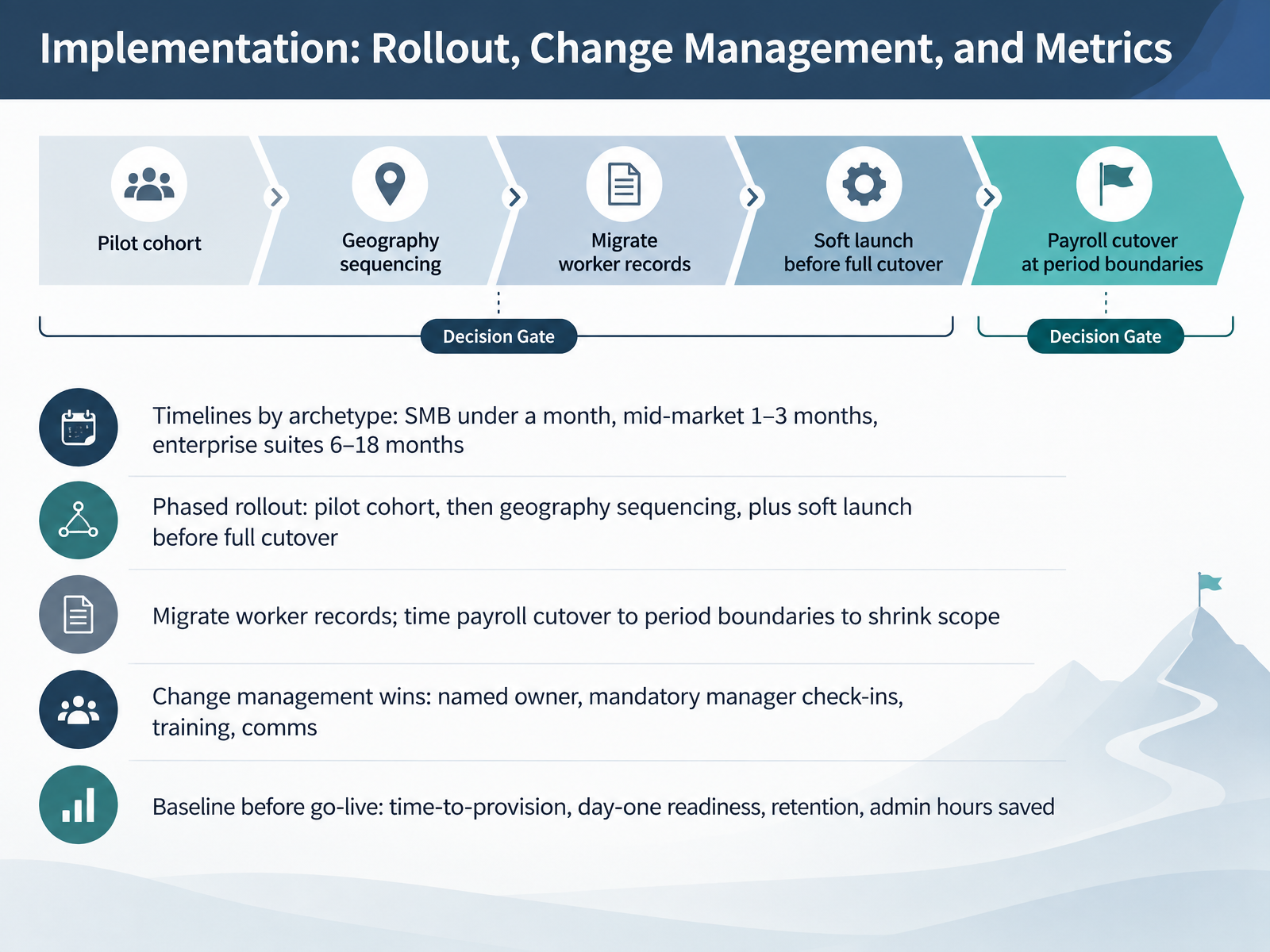
 - 11Implementation: Rollout, Change Management, and MetricsNow let's talk about implementation. Your timeline depends on your archetype. Small businesses typically go live in under a month. Mid-market, one to three months. Enterprise suites, six to eighteen months. Those are not vendor promises, they are planning inputs, so size your change effort accordingly. Roll out in phases. Start with a pilot cohort, then sequence by geography, and always run a soft launch before full cutover. On data, migrate worker records early, and time payroll cutover to a period boundary, because that shrinks what you have to reconcile. Change management is what makes this stick. Name one owner, require manager check-ins, run training, and over-communicate. Finally, baseline before go-live. Track time-to-provision, day-one readiness, retention, and admin hours saved. Without a baseline, you cannot prove the value later. Next, we will build your decision framework and reusable toolkit.
 firsthr.apphrget.comzendikt.com+21 min
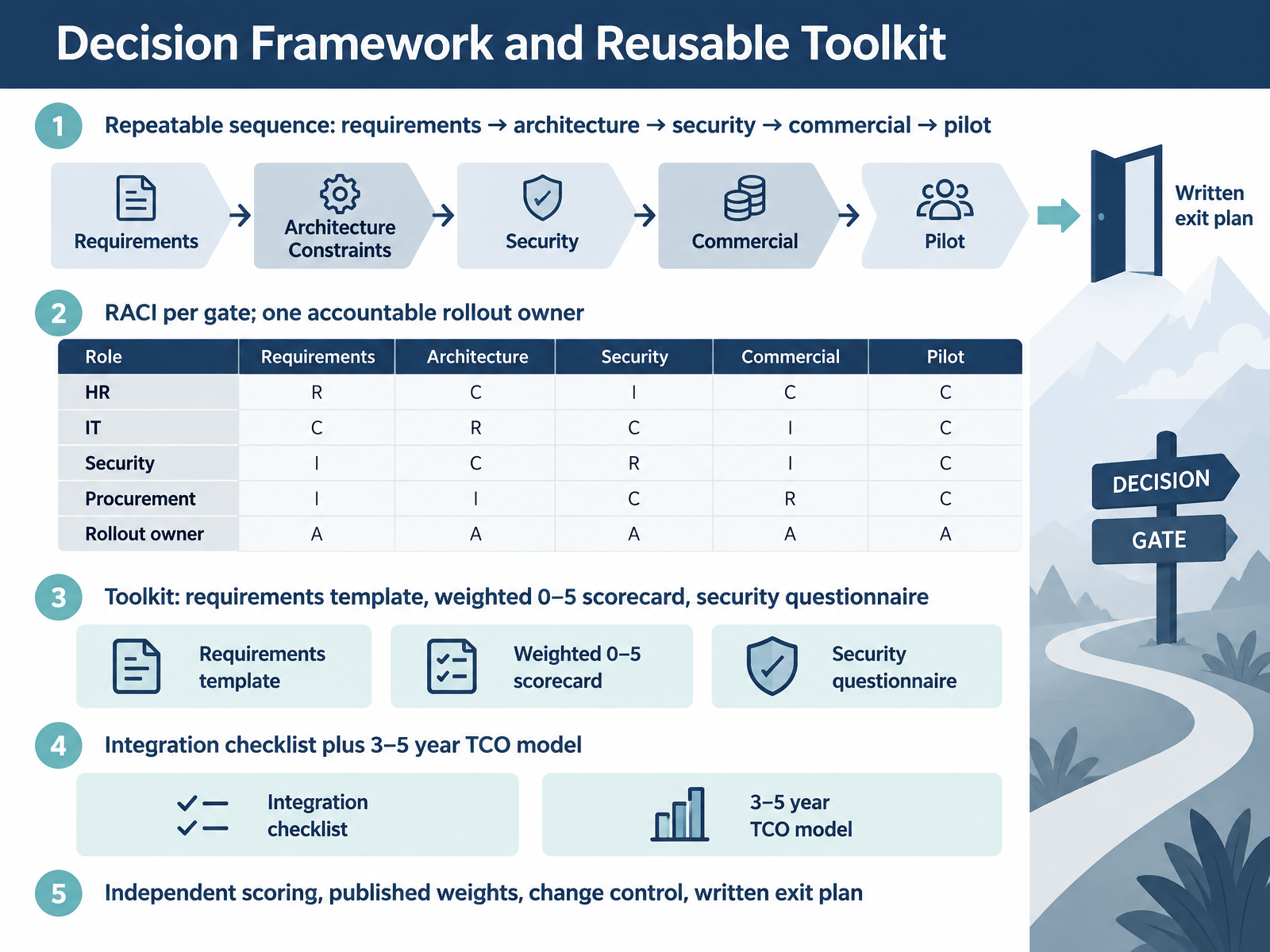
 - 12Decision Framework and Reusable ToolkitNow let's make the decision repeatable. Lock one sequence: requirements, then architecture, then security, then commercial, then pilot. Never let a vendor demo pull you out of order. Assign responsibility per gate, and name exactly one accountable rollout owner. Publish the roles so IT, security, and procurement each know what they sign off on. Build a small toolkit you reuse every time: a requirements template, a weighted scorecard scored from zero to five, and a standard security questionnaire. Add an integration checklist and a three to five year total cost of ownership model. Model per employee pricing against flat fee and per record, because the pricing model matters more than the rate. Then protect the process. Score independently before the committee meets, publish your weights up front, run every scope change through change control, and write an exit plan before you sign. That is what keeps the choice defensible a year later. Next, we put this framework to work in Case Workshop A: High-Volume, Multi-Country Frontline Hiring.
 firsthr.apphrget.comzendikt.com+22 min
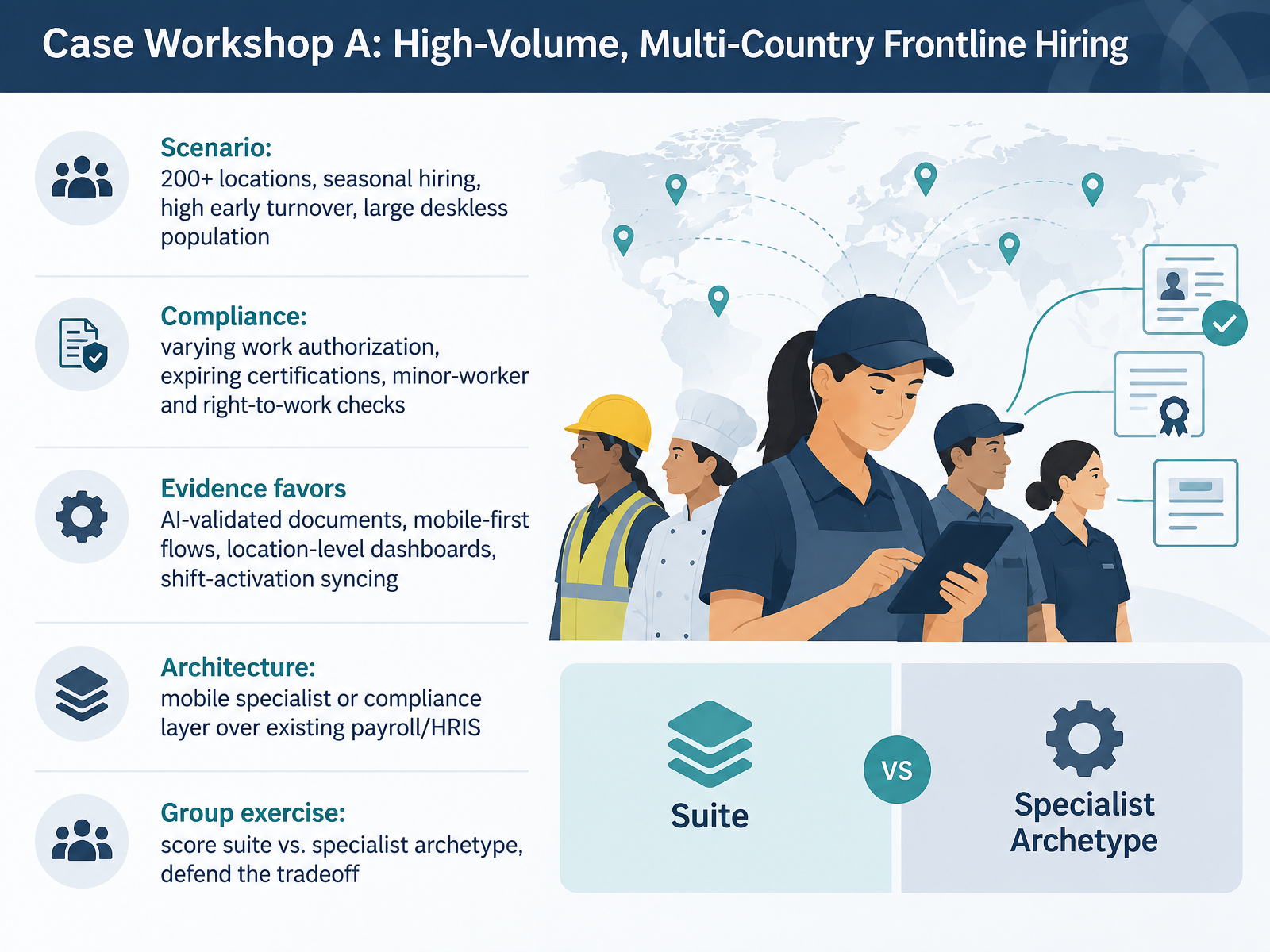
 - 13Case Workshop A: High-Volume, Multi-Country Frontline HiringNow let's apply everything to a real scenario. Imagine two hundred plus locations, seasonal hiring spikes, high early turnover, and a mostly deskless workforce. That's case workshop A. Compliance is the hard part here. Work authorization varies by country and state. Certifications expire. And minor-worker and right-to-work checks must be handled consistently across every site. So what does the evidence favor? AI-validated documents that flag invalid or expired uploads and trigger instant re-uploads. Mobile-first flows, because your hires are on phones, not laptops. Location-level dashboards, so managers see who is ready today. And shift-activation syncing, so verified workers drop straight into scheduling. Architecturally, most teams layer a mobile specialist or compliance engine over their existing payroll or HRIS, rather than replacing the core. Your exercise: score the suite versus specialist archetype, and defend the tradeoff to leadership. Next, case workshop B: knowledge-worker, hybrid-first onboarding.
 hbsp.harvard.eduaieh.comfuture-proof.app+22 min
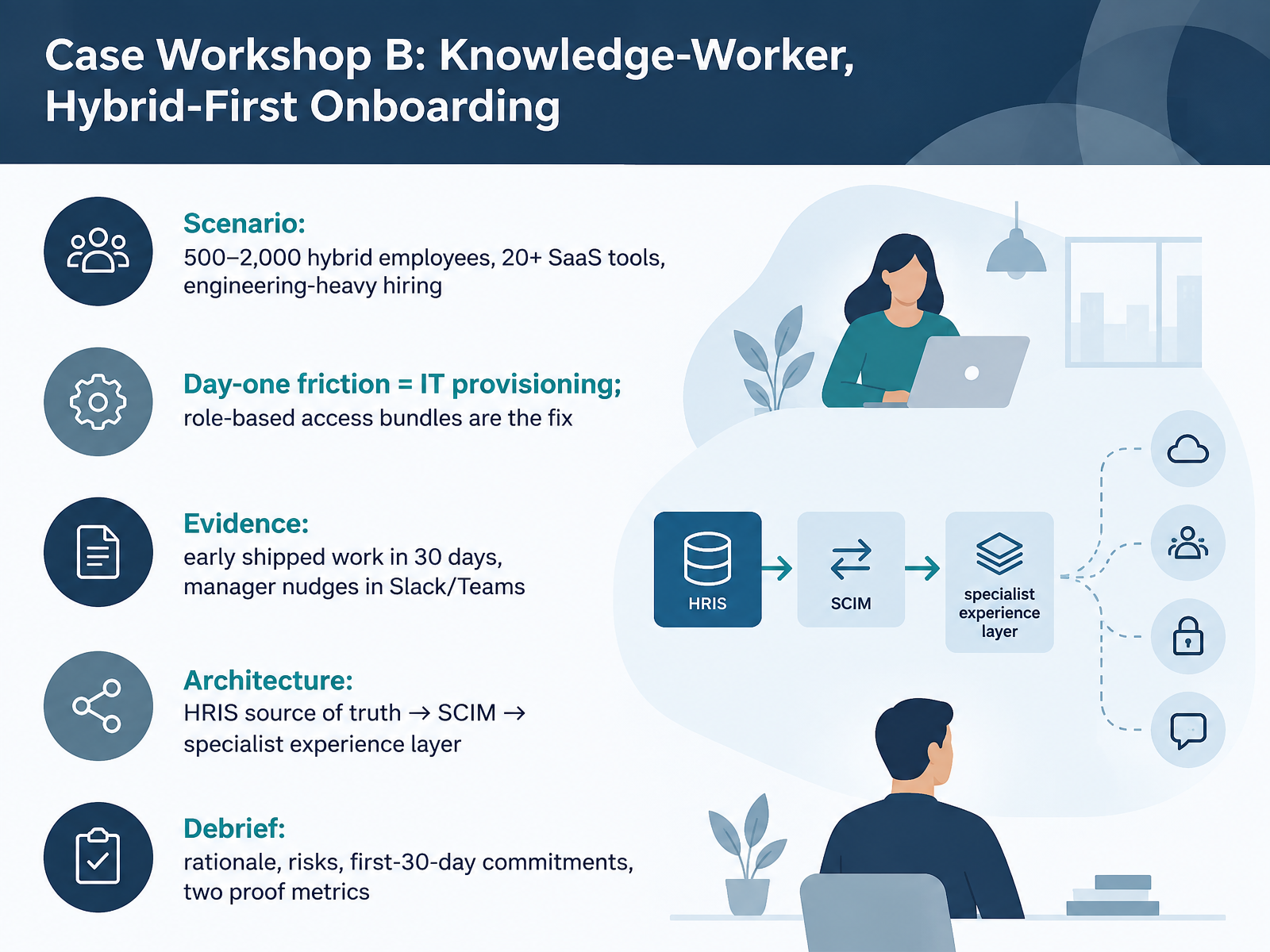
 - 14Case Workshop B: Knowledge-Worker, Hybrid-First OnboardingLet's close with a practical case. Picture a company of five hundred to two thousand hybrid employees, more than twenty SaaS tools, and engineering-heavy hiring. Day-one friction is almost always IT provisioning, not paperwork. The fix is role-based access bundles, because manual account creation will always cost you a day. Architecturally, keep your HRIS as the source of truth, push identity through SCIM into your identity provider, then let a specialist experience layer own nudges and manager workflows in Slack or Teams. The evidence to watch is early shipped work within thirty days and manager nudges that actually get actioned. In your debrief, defend the rationale, name the risks, including integration maintenance and non-SCIM apps, and commit to first-thirty-day actions. Choose two proof metrics, such as 90-day retention and time-to-productivity, then measure them by cohort. Thank you for working through all fourteen slides. You now have the framework to compare options, defend the tradeoffs, and move deliberately. Go make your next launch a confident one.
 hbsp.harvard.eduaieh.comfuture-proof.app+22 min
Take the deck with you
Download this course as a file — free, no sign-up needed.
- PDF handoutEvery slide page, ready to print or share.15 pages · 3.2 MBDownload
- Narrated PowerPointThe deck that presents itself — every slide carries the digital human's narration video.15 pages · 25.6 MBDownload
- PowerPoint slidesThe full deck as a .pptx — open it in PowerPoint, Keynote, or Google Slides.15 pages · 3.1 MBDownload
Free to use in your own training — please keep the PersonWise credit page at the end.
Have your own deck? Turn it into a course
Sources consulted
Web sources consulted while building this course.
- Onboarding Can Make or Break a New Hire's Experience — hbsp.harvard.edu
- Onboarding Design: What the Evidence Says About Effective First-90-Days Programs | AIEH — aieh.com
- Onboarding, Measured | Future Proof — future-proof.app
- New-Hire Onboarding and the 30-60-90 Ramp: the Research | TrueStep HR — truestephr.com
- Employee Onboarding Statistics (2025): Time-to-Productivity, Retention & Engagement | Docustream.ai - From Documents to Video, Chats, Podcasts, Quizzes and more — docustream.ai
- How to evaluate an HRIS: RFP criteria and template | Rippling — rippling.com
- Human capital management (HCM) RFP template — rippling2.imgix.net
- HR Software RFP Template: Stop Buying the Wrong Tech in 2026 — compono.com
- https://www.spotsaas.com/resources/hr-software/rfp-template — spotsaas.com
- HRIS RFP Template and Checklist for Midsize Businesses — darwinbox.com
- Onboarding Software Cost: Full Pricing Comparison | FirstHR — firsthr.app
- Best Employee Onboarding Software 2026: Reviews & Pricing - HRGet — hrget.com
- Employee Onboarding Software: 10 platforms ranked | Zendikt — zendikt.com
- 12 Best Cloud Employee Onboarding Software in 2026 | FirstHR | FirstHR — firsthr.app
- Best Employee Onboarding Software in 2026 (Tested and Compared) | Dupple — dupple.com
- Buy, build, or bolt-on: the onboarding stack decision HRIS leads are about to face in 2026 — onboarding-experience.net
- Employee Onboarding Software Global Market Report 2026 — giiresearch.com
- Onboarding Software Options 2026 — viewpointanalysis.com
- Employee Onboarding Software Market Demand, Trends & Forecast by 2034 — theinsightpartners.com
- draft-ietf-scim-use-cases-reloaded-00 — datatracker.ietf.org