Begin
14 pages · ~28 min
Design Systems Tools and Workflow Design
This training helps designers and developers select the right design systems tools and build efficient workflows for consistent, scalable UI delivery.
A digital instructor presents all 14 pages. Hold “Ask” at any point and ask out loud — the answer comes from this course. No sign-up needed.
What you’ll learn
- 01Design Systems Tools: Selection and Workflow DesignWelcome. This course is about choosing design system tools and designing the workflow around them.
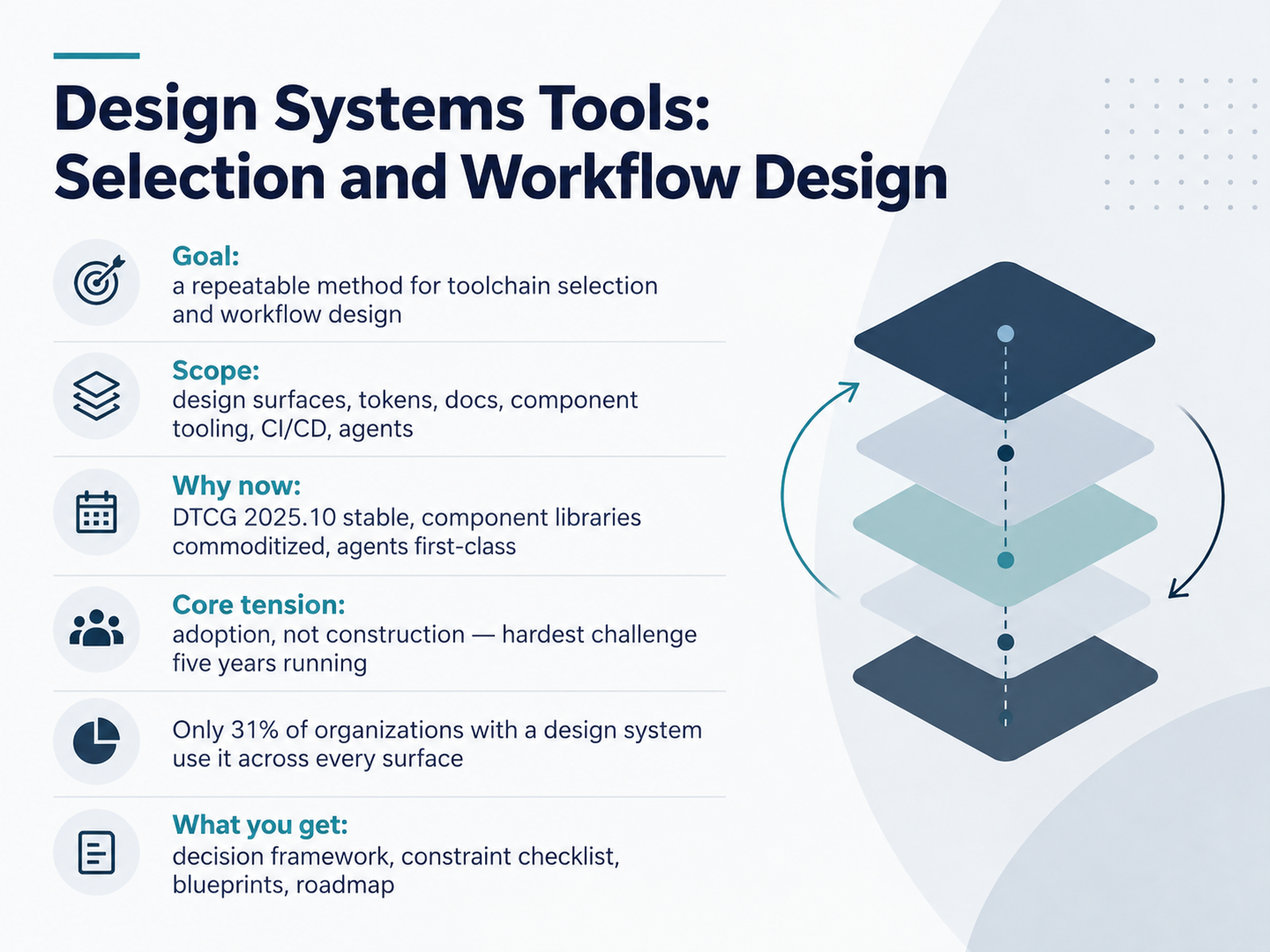
Our goal is a repeatable method for toolchain selection. Not a shopping list, a method you can defend when budgets and headcount are tight.
Scope covers design surfaces, tokens, documentation, component tooling, CI/CD, and agents. Here is why now matters. The D T C G token spec reached a stable release in October 2025, component libraries are commoditized, and AI agents are now a first class category in the stack.
The core tension is adoption, not construction. It has been the top challenge five years running. Only thirty one percent of organizations with a design system use it across every surface.
Across this course you get a decision framework, a constraint checklist, blueprints, and a roadmap. Let's look at the landscape next.report.zeroheight.comzeroheight.comthestackstories.com+21 min
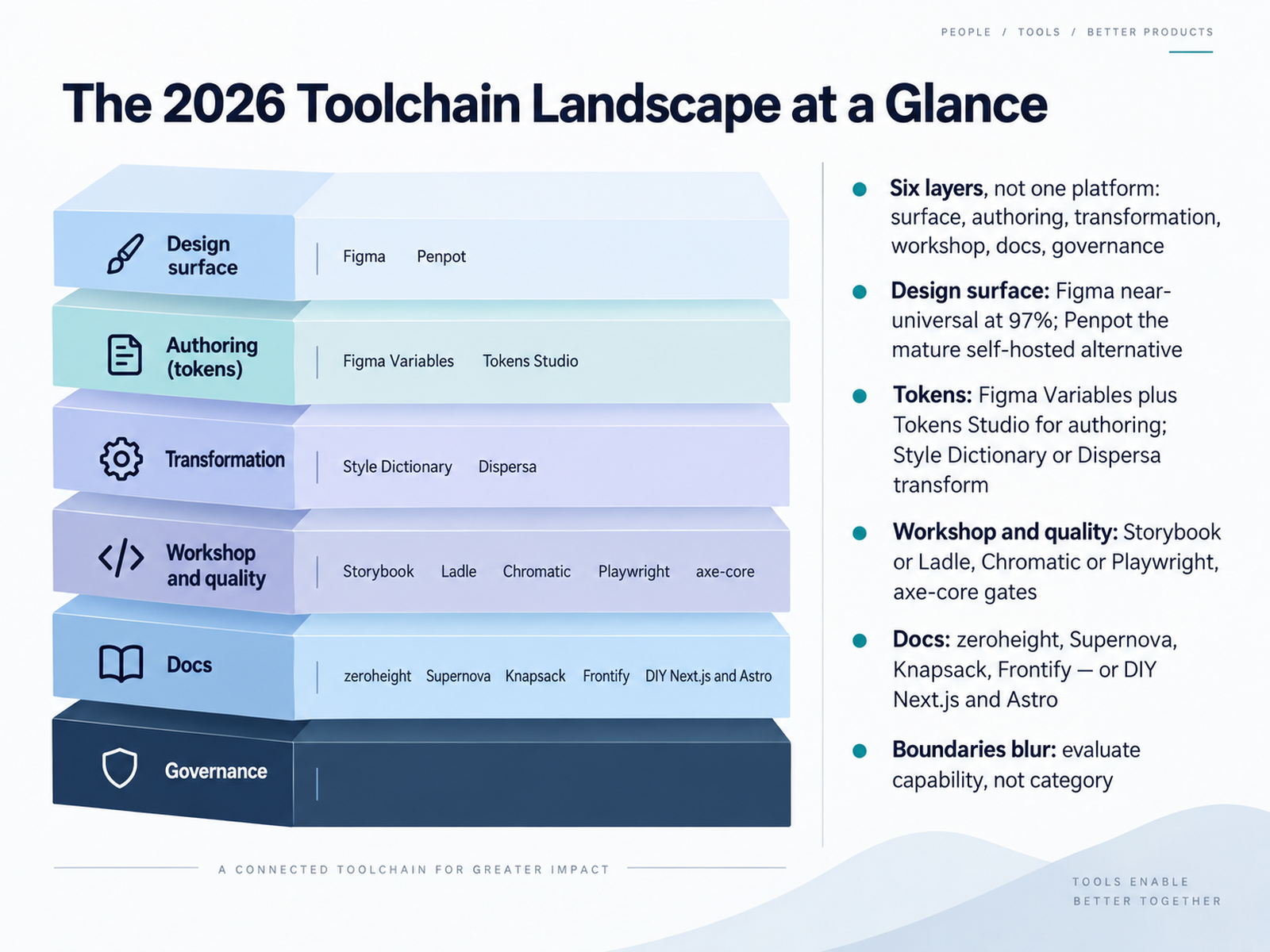
- 02The 2026 Toolchain Landscape at a GlanceLet's map the terrain you're actually buying into. It's six layers, not one platform: design surface, authoring, transformation, component workshop, docs, and governance. Pick one tool to cover all six and you get drift, duplicated effort, and lock-in.
Start with the surface. Figma sits at ninety-seven percent adoption. Penpot is the mature self-hosted alternative if data residency or budget pushes you that way.
Tokens come next. Author in Figma Variables, or Tokens Studio when native variables aren't enough. Then transform with Style Dictionary or Dispersa into CSS, iOS, and Android outputs.
For workshop and quality, Storybook or Ladle for isolation, Chromatic or Playwright for visual regression, axe-core gates for accessibility.
Docs: zeroheight, Supernova, Knapsack, or Frontify. Plenty of teams build their own on Next.js or Astro.
The takeaway: evaluate capability, not category. Boundaries blur, so judge a tool on adoption cost, governance model, token pipeline, and handoff friction against your stack. Next, what actually changed since twenty twenty-three.
 spektral.designfenly.iocolorsphere.com+22 min
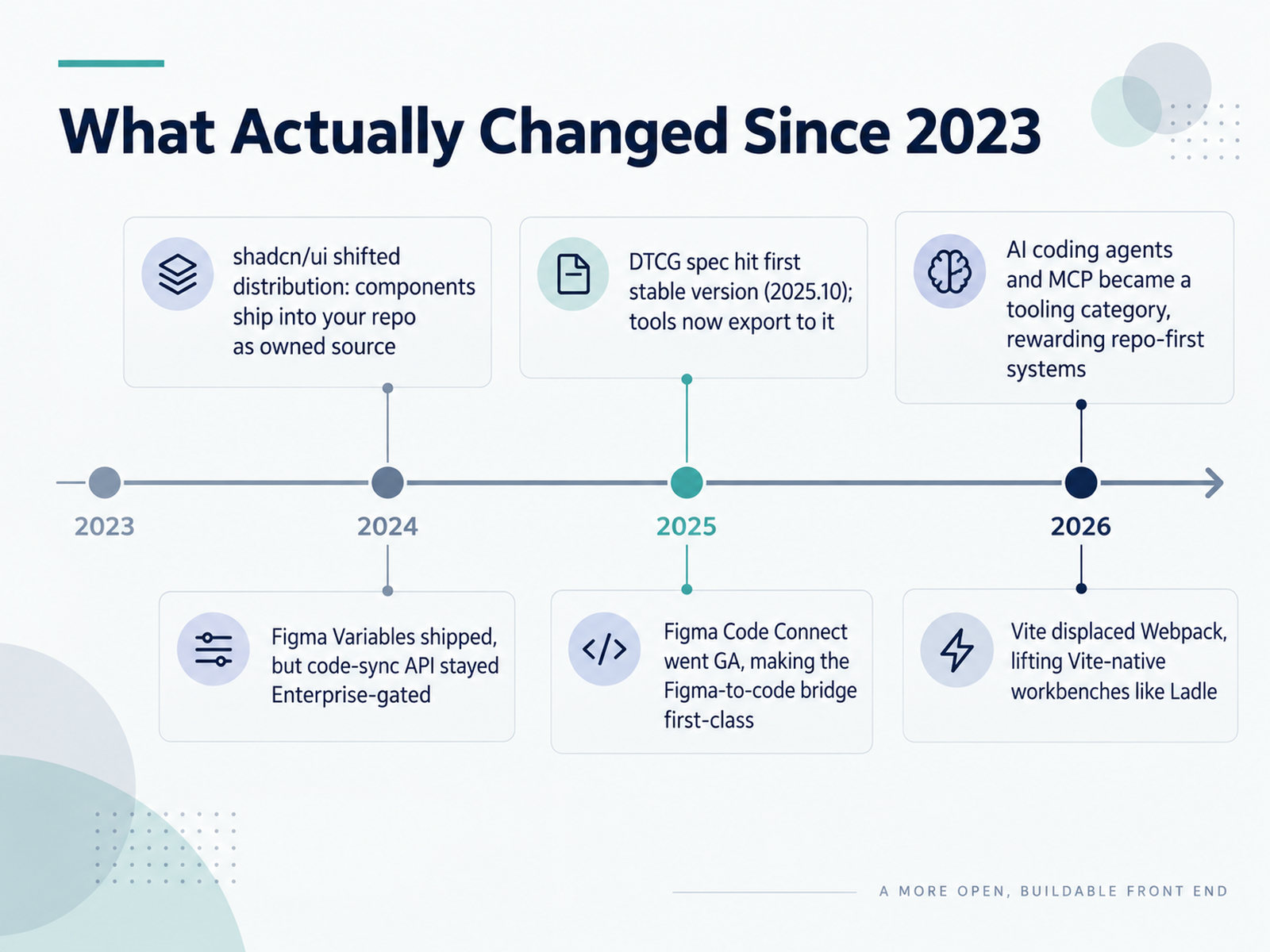
 - 03What Actually Changed Since 2023Let's talk about what actually changed since 2023. Six shifts, and each one moves your tool selection.
First, the DTCG spec reached its first stable version in October 2025. Tools now export to it. That means token interchange is no longer a custom glue-code problem.
Second, shadcn/ui changed distribution. Components ship into your repo as owned source, not as an npm dependency. Your system, your upgrade schedule, your maintenance cost.
Third, Figma Variables shipped, but the code-sync API stayed Enterprise-gated. If you're not on Enterprise, Tokens Studio plus GitHub is still the practical path.
Fourth, Figma Code Connect went generally available, making the Figma-to-code bridge a first-class workflow instead of a plugin science project.
Fifth, AI coding agents and MCP became a real tooling category. Agents read repos, not canvas files, so repo-first systems ship faster with AI assistance.
Sixth, Vite displaced Webpack, which lifted Vite-native workbenches like Ladle. Fast hot reload is now a selection criterion, not a nice-to-have.
The thread through all six: decisions that were made in 2022 deserve an audit. Next, we'll walk through the reference architecture, starting with the five-stage pipeline.
 w3.orgdesigntokens.orgdesigntokens.org+22 min
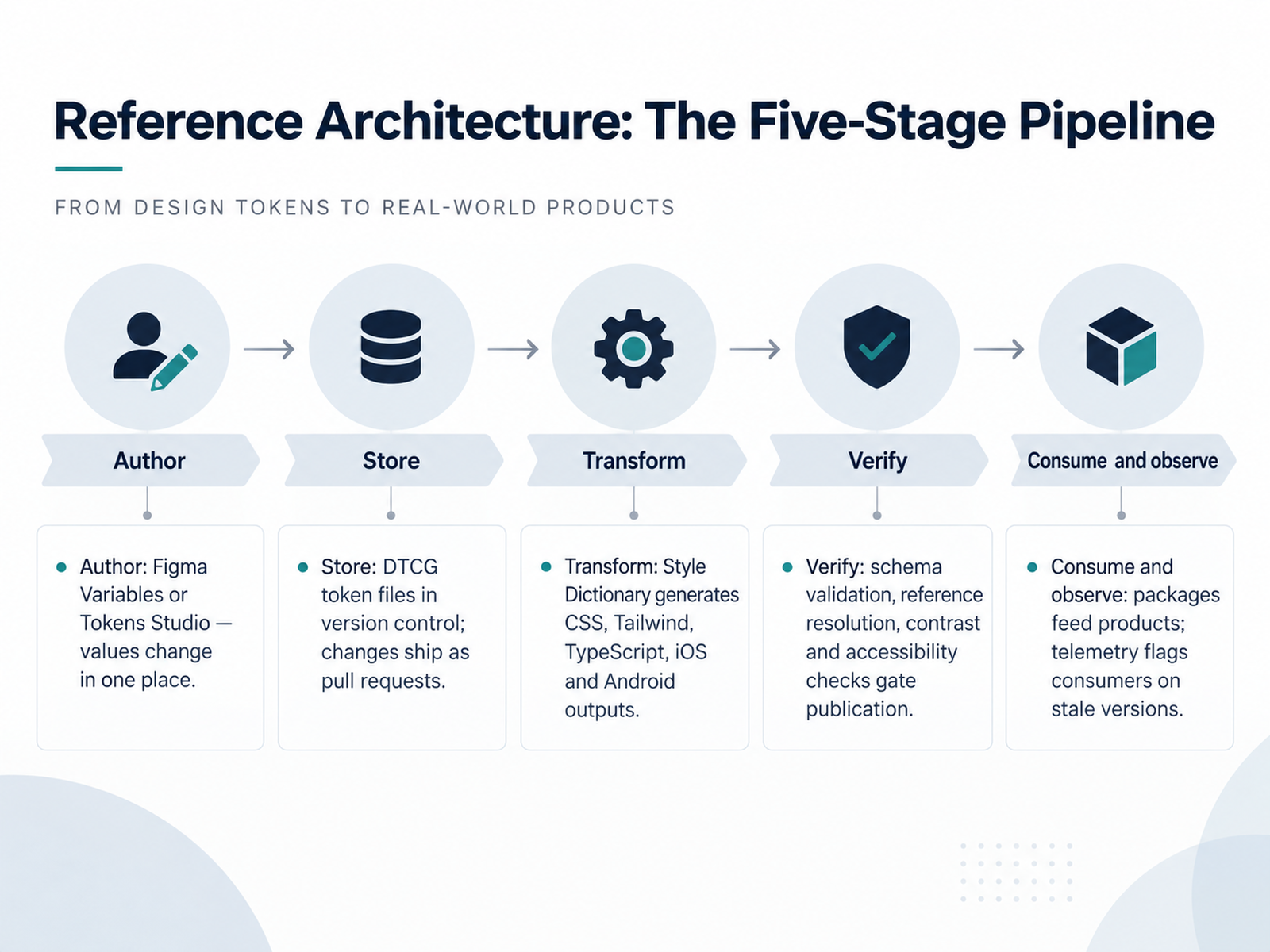
 - 04Reference Architecture: The Five-Stage PipelineSo here is the reference architecture. Five stages, and each one has a clear owner and a clear failure mode. First, Author. Values change in one place, either Figma Variables or Tokens Studio. If a designer can edit a value somewhere else, your pipeline is already broken. Second, Store. DTCG token files live in version control, and every change ships as a pull request. That gives you review, history, and rollback for free. Third, Transform. Style Dictionary reads that single source and generates your CSS variables, your Tailwind theme, TypeScript constants, and your iOS and Android outputs. No one hand-edits the generated files. Fourth, Verify. Schema validation, reference resolution, contrast, and accessibility checks gate publication. This is where a semantic token change that breaks contrast gets caught in review instead of by a user. Fifth, Consume and observe. Packages feed products, and telemetry tells you which teams are still on stale versions. That last stage is the one most teams skip. Without it, you are guessing at adoption, and migration quietly stalls. Treat each stage as infrastructure, not a project. Next, we get concrete about how to weigh these options for your own team: Selection Criteria and a Weighted Decision Framework.
 137foundry.comframingui.compathtoproject.com+22 min
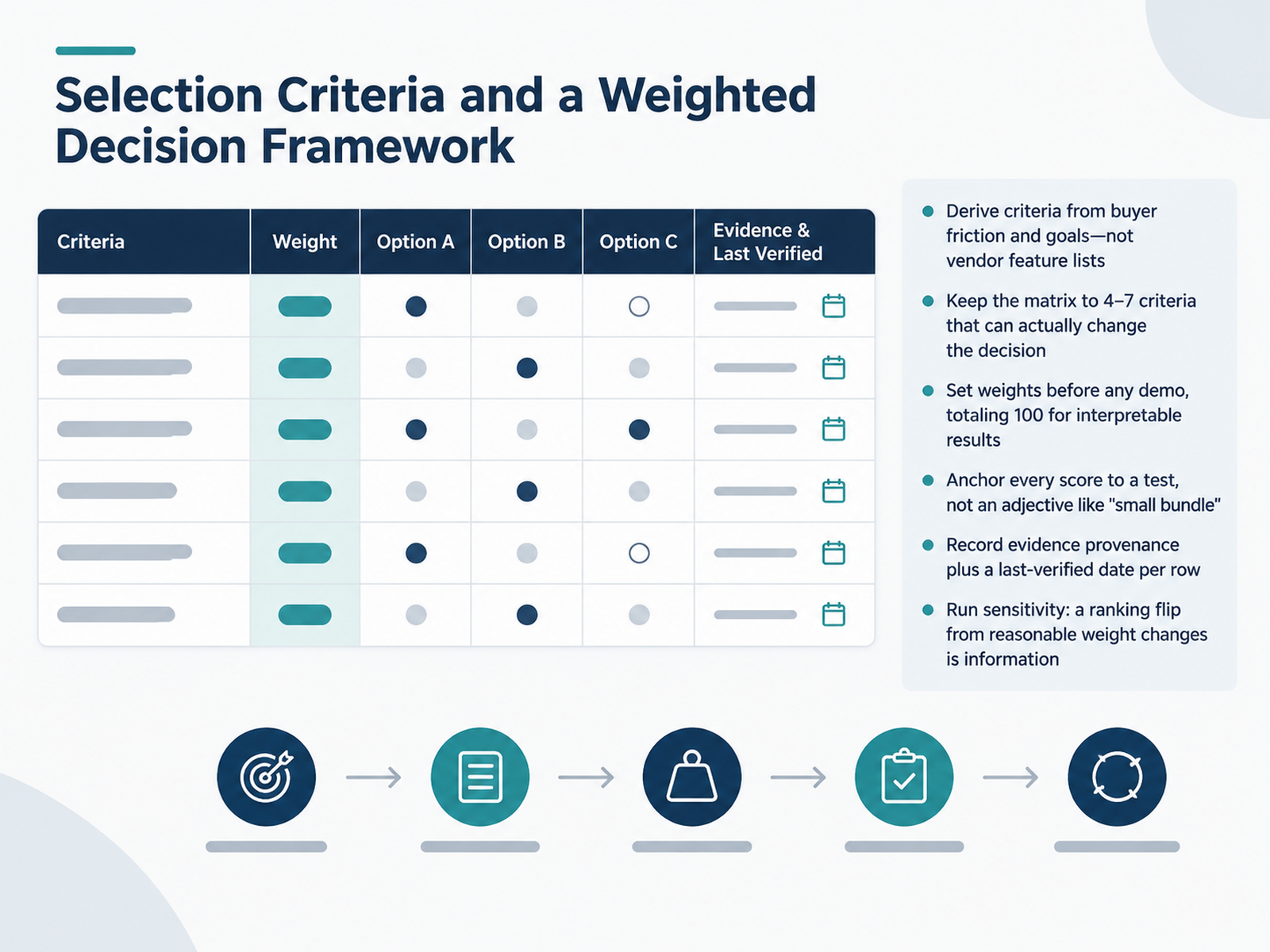
 - 05Selection Criteria and a Weighted Decision FrameworkLet's get practical. How do you actually build the selection criteria? Start with buyer friction, not vendor feature lists. Sit with design, engineering, and procurement, and ask what slows them down today: a fragmented token pipeline, unclear component ownership, costly handoff. Those pain points become your rows. Keep the matrix to four to seven criteria that can genuinely change the decision. If a criterion never flips the ranking, cut it. Then set weights before any demo, totaling one hundred, so the math stays interpretable. Critically, anchor every score to a test, not an adjective. Instead of calling a bundle small, define the build conditions and the acceptable size, and score against that. Record evidence provenance and a last verified date per row, so stale claims get caught. Finally, run sensitivity. If a reasonable weight change flips the ranking, that is useful information, not a failure. It tells you where your team's real priorities sit. Now let's apply this to hard constraints: solving for constraints, multi-brand, accessibility, and migration.
 2 min
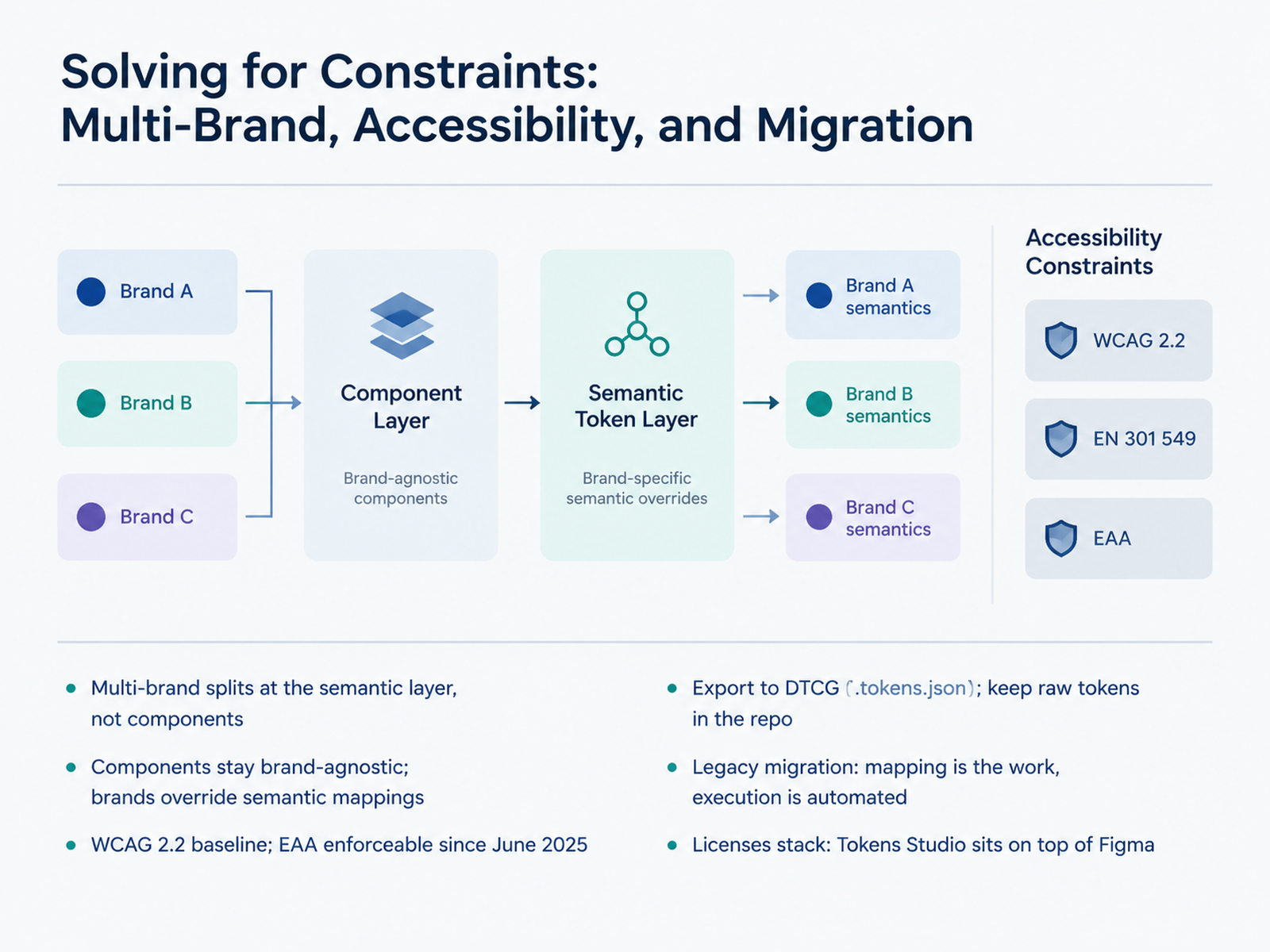
2 min - 06Solving for Constraints: Multi-Brand, Accessibility, and MigrationLet's talk about constraints, because they usually decide your toolchain more than features do. Take multi-brand first. Don't fork components. Split at the semantic layer instead. Components stay brand-agnostic; each brand overrides semantic mappings, so one button serves three brands without three codebases. On accessibility, treat WCAG 2.2 as your floor, and remember the European Accessibility Act has been enforceable since June 2025. If your contrast and focus states live in tokens, you fix them once. On format, export to the DTCG token file format and keep raw tokens in the repo. That keeps you portable across tools. For legacy migration, the mapping is the real work; execution gets automated. And know your licenses stack, because Tokens Studio sits on top of Figma, so you're paying for both. Next, the workflow blueprint, from token to production component.
 w3.orgdesigntokens.orgdesigntokens.org+22 min
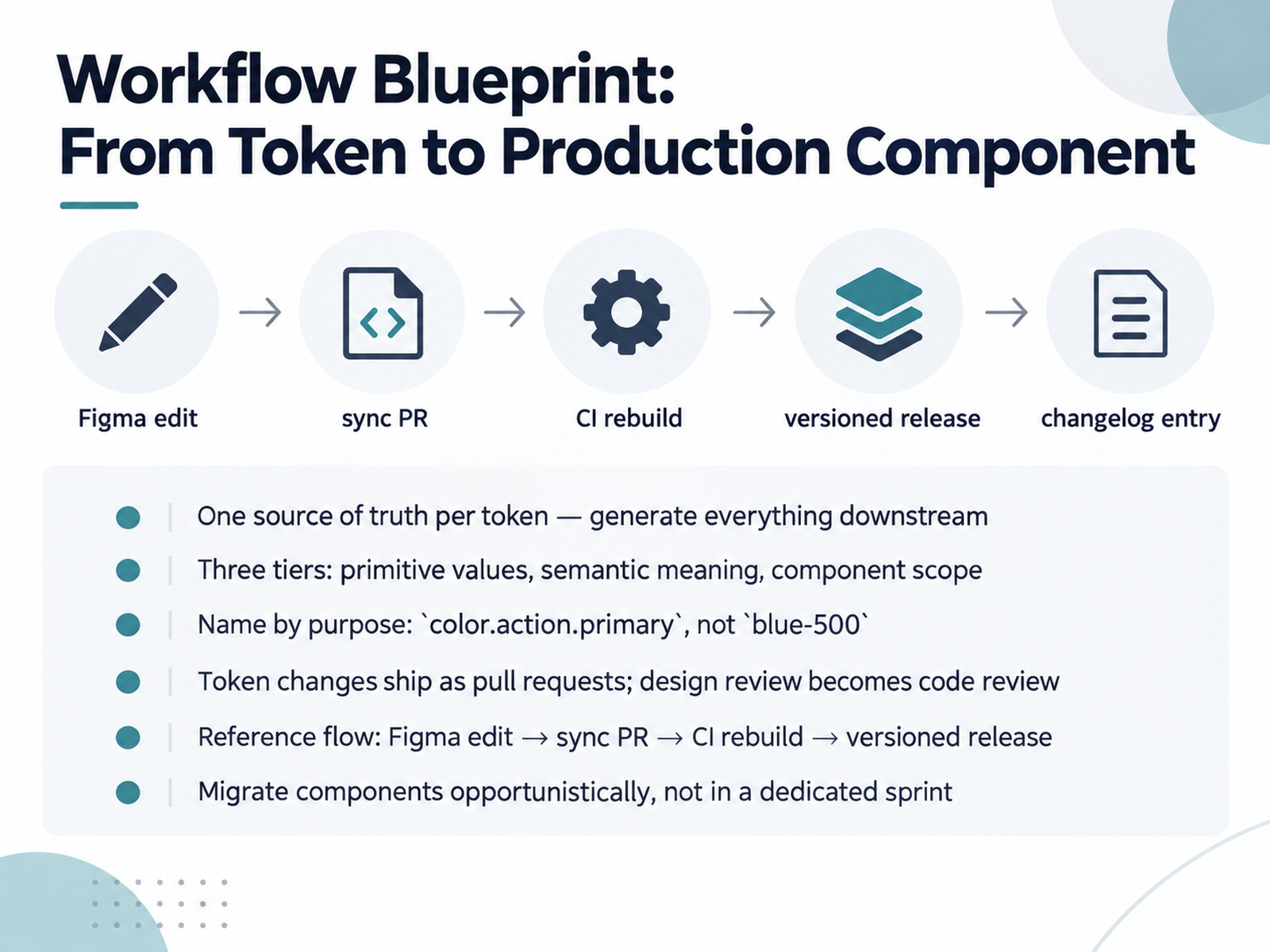
 - 07Workflow Blueprint: From Token to Production ComponentLet's walk through the workflow blueprint, from token to production component. The first rule is one source of truth per token. Pick one place a value can change, and generate everything downstream from it. The moment two files can both claim ownership, you are maintaining two design systems. Structure your tokens in three tiers. Primitive values hold raw data. Semantic tokens carry meaning. Component tokens scope decisions to one piece of UI. Most teams only need the first two at the start. Name by purpose, so color.action.primary, not blue dash five hundred. The name is the architecture, and most token migrations are really renaming projects. Then treat token changes as pull requests. Design review becomes code review, and you get history and rollback for free. The reference flow looks like this: a Figma edit opens a sync pull request, CI rebuilds every platform output, and the change ships as a versioned release. Finally, migrate components opportunistically, as they are touched for other work, not in a dedicated sprint. Track the list so migration does not stall at sixty percent. Next, let's look at integrating tools into engineering delivery.
 137foundry.comframingui.compathtoproject.com+22 min
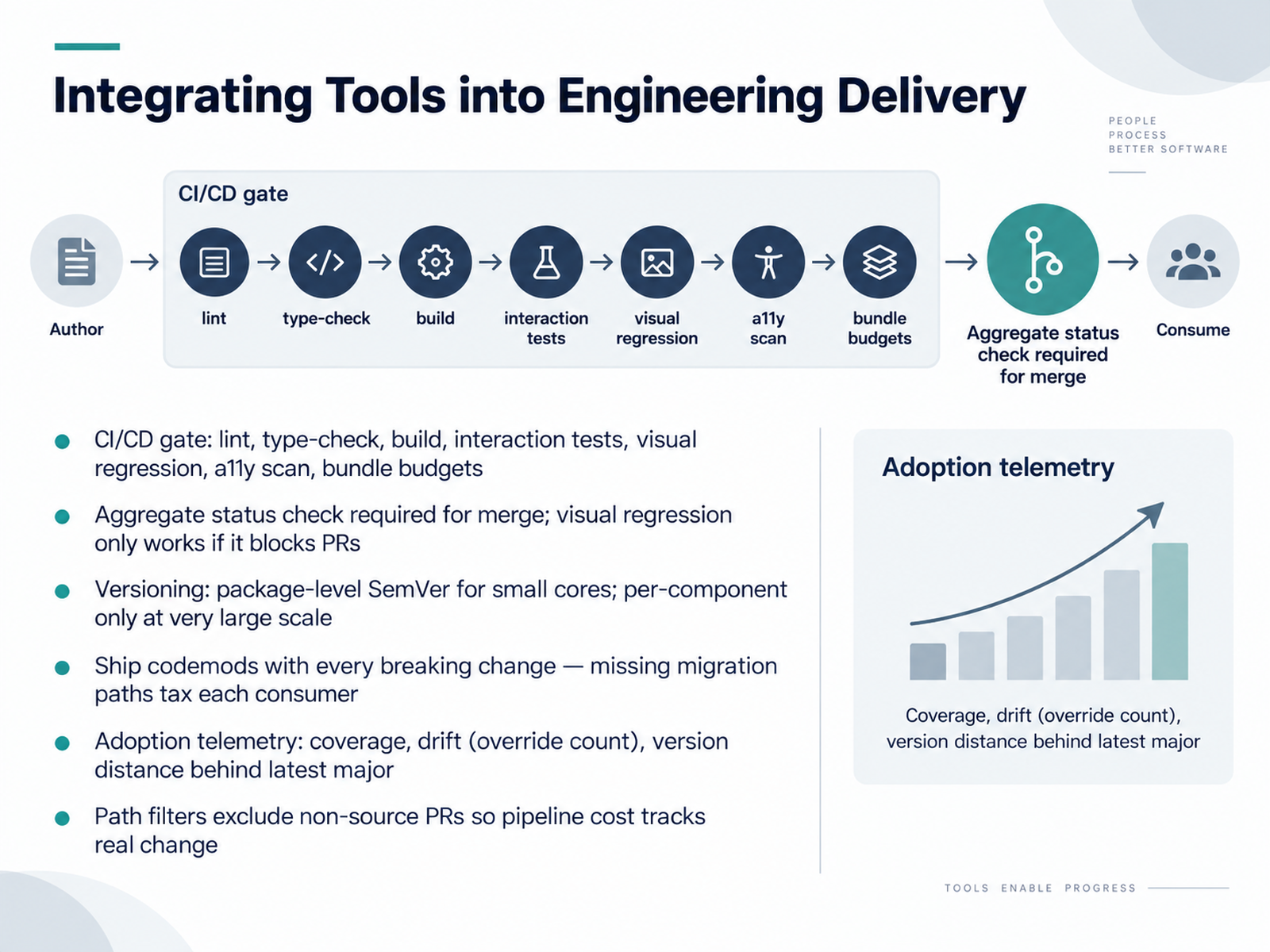
 - 08Integrating Tools into Engineering DeliveryLet's talk about how these tools actually land in engineering delivery. Your pipeline should gate on a fixed sequence: lint, type-check, build, interaction tests, visual regression, accessibility scan, and bundle budgets. Then wire one aggregate status check as the required merge gate. One nuance: visual regression only prevents regressions if it actually blocks pull requests. If it runs and just posts a comment, people merge past it. On versioning, package-level semantic versioning is enough for a small core. Per-component versioning only pays off at very large scale, with a dedicated platform team, because coordinating compatible combinations becomes a full-time job. Ship a codemod with every breaking change. A rename without a migration script is a tax on every consumer, and with ten consumers that tax compounds. Track adoption with real numbers: coverage, drift measured as override count, and version distance behind the latest major. Finally, use path filters so doc-only and audit-only pull requests skip the heavy jobs. Your pipeline cost should track real source change.
 zeroheight.comreport.zeroheight.com2 min
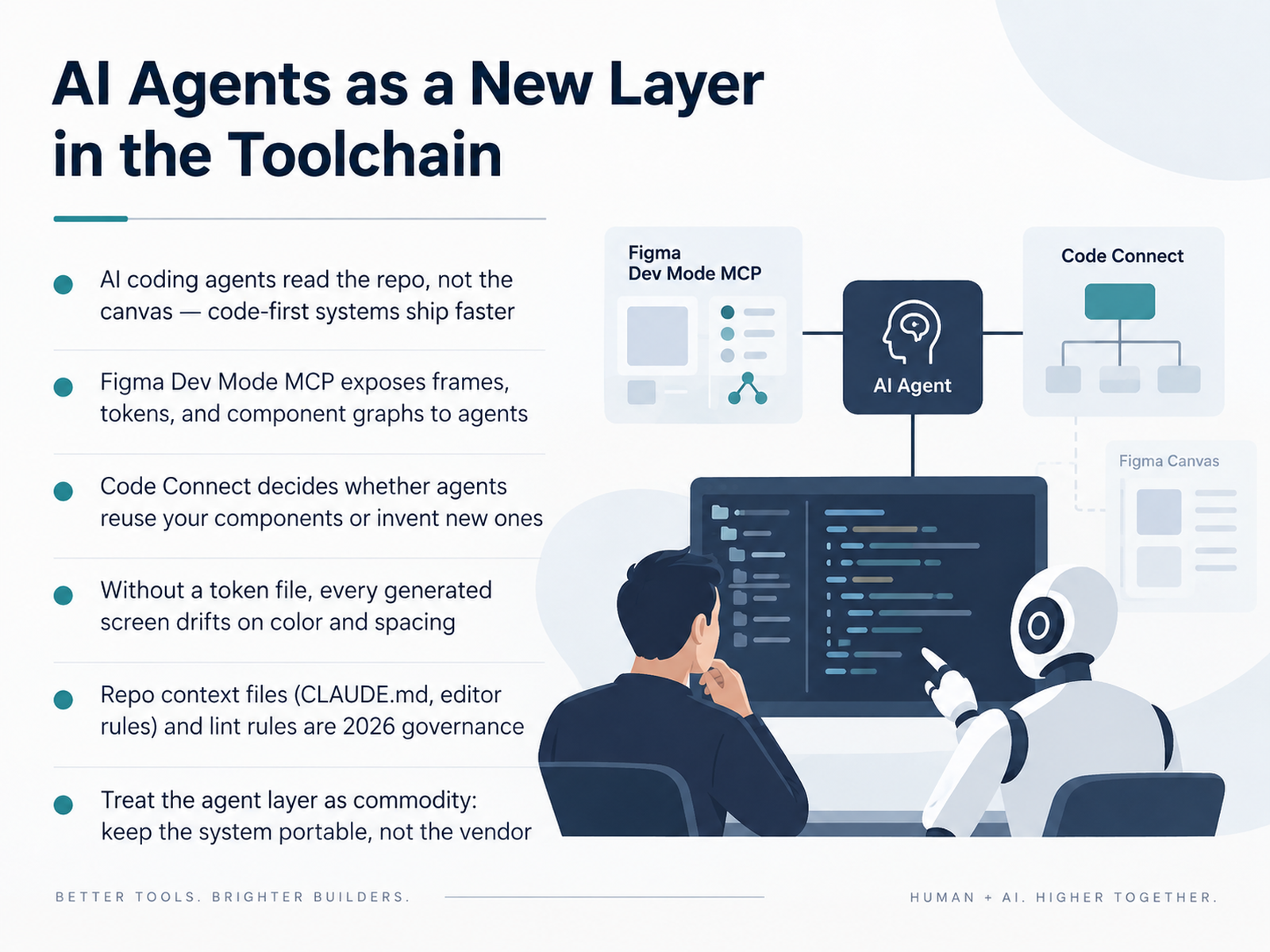
 - 09AI Agents as a New Layer in the ToolchainLet's talk about the newest layer in your toolchain: AI coding agents. The key shift is simple. Agents read the repo, not the canvas. So code-first systems ship faster. Figma Dev Mode's MCP server exposes frames, tokens, and component graphs to those agents. But here is the decision point. Code Connect decides whether agents reuse your components or invent new ones. Skip it, and every generated screen bypasses your library. And without a token file, every generated screen drifts on color and spacing. Concrete criteria to apply: does the agent read your tokens, your components, and your conventions? If not, it is guessing. So repo context files, like CLAUDE dot M D and editor rules, plus lint rules, are your 2026 governance. They are cheap, and they work. One strategic note. Treat the agent layer as commodity. Models will churn. Keep the system portable, not the vendor. That is how you avoid lock-in. Next, we look at Governance, Ownership, and Contribution at Scale.
 report.zeroheight.comzeroheight.comthestackstories.com+22 min
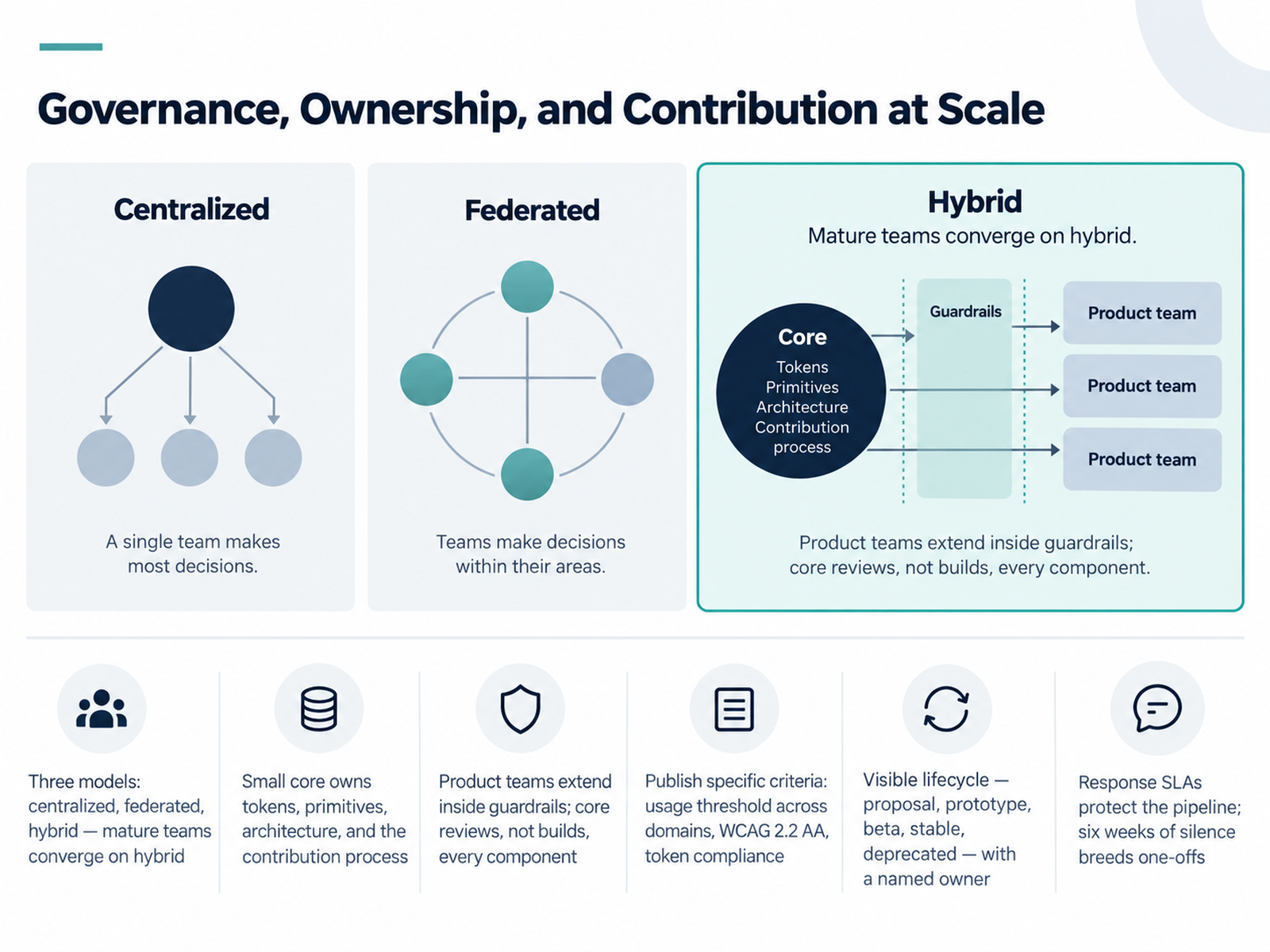
 - 10Governance, Ownership, and Contribution at ScaleNow let's talk about governance, ownership, and contribution at scale. There are three models: centralized, federated, and hybrid. Mature teams almost always converge on hybrid — a small core owns tokens, primitives, architecture, and the contribution process, while product teams extend the system inside guardrails. The core reviews contributions instead of building every component itself. That keeps a five-to-ten person team serving dozens of products without becoming a bottleneck.
But this only works if the criteria are public and specific. Publish your bar: a pattern must appear in at least three distinct product domains, meet WCAG 2.2 AA, and use existing tokens with no hardcoded values. Vague criteria like should be reusable means every review turns into a negotiation.
Run a visible lifecycle: proposal, prototype, beta, stable, deprecated. Every stage needs a named owner, because shared ownership spreads accountability so thin that nobody fixes bugs or handles deprecation. And protect the pipeline with response SLAs. Six weeks of silence breeds one-offs. Acknowledge receipt fast, give first feedback within a week, decide within two. Even a no with reasons beats silence. Get this right and the compliant path becomes the fastest path.
Next, we'll look at measuring success and making the R O I case.
 2 min
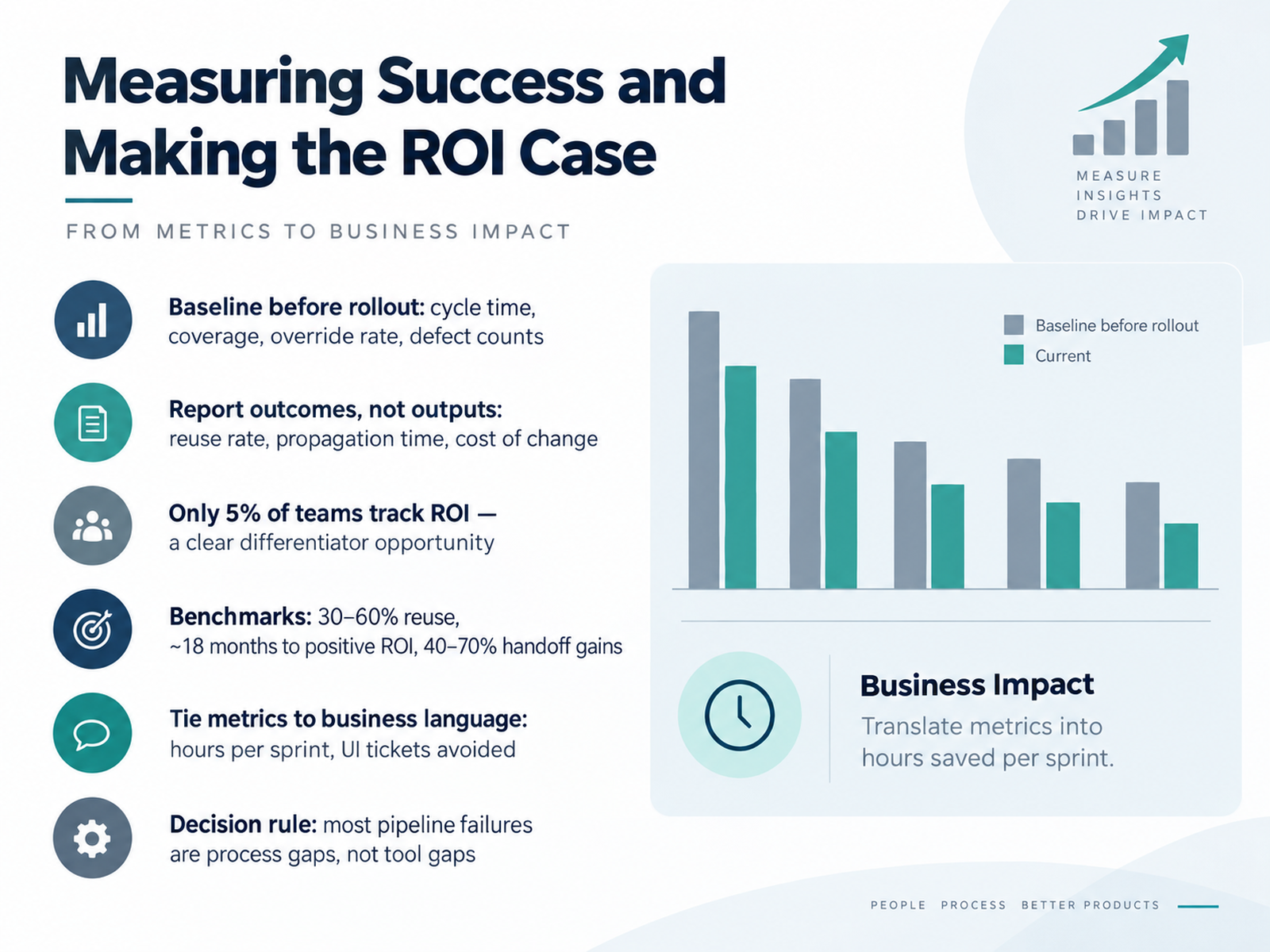
2 min - 11Measuring Success and Making the ROI CaseNow let's talk about measuring success, because this is where most design system teams lose the budget argument. Baseline before rollout: cycle time, component coverage, override rate, and defect counts. Then report outcomes, not outputs. Reuse rate and propagation time matter more than how many components you shipped. Tie it all to business language: hours saved per sprint, UI tickets avoided.
Want the differentiator? Only five percent of teams actually track ROI. Benchmarks to aim for: thirty to sixty percent reuse, roughly eighteen months to positive ROI, and forty to seventy percent gains in handoff speed. One decision rule before you go: most pipeline failures are process gaps, not tool gaps. Next, we'll look at tool selection scenarios for small teams versus enterprise.
 zeroheight.comreport.zeroheight.comzeroheight.com+21 min
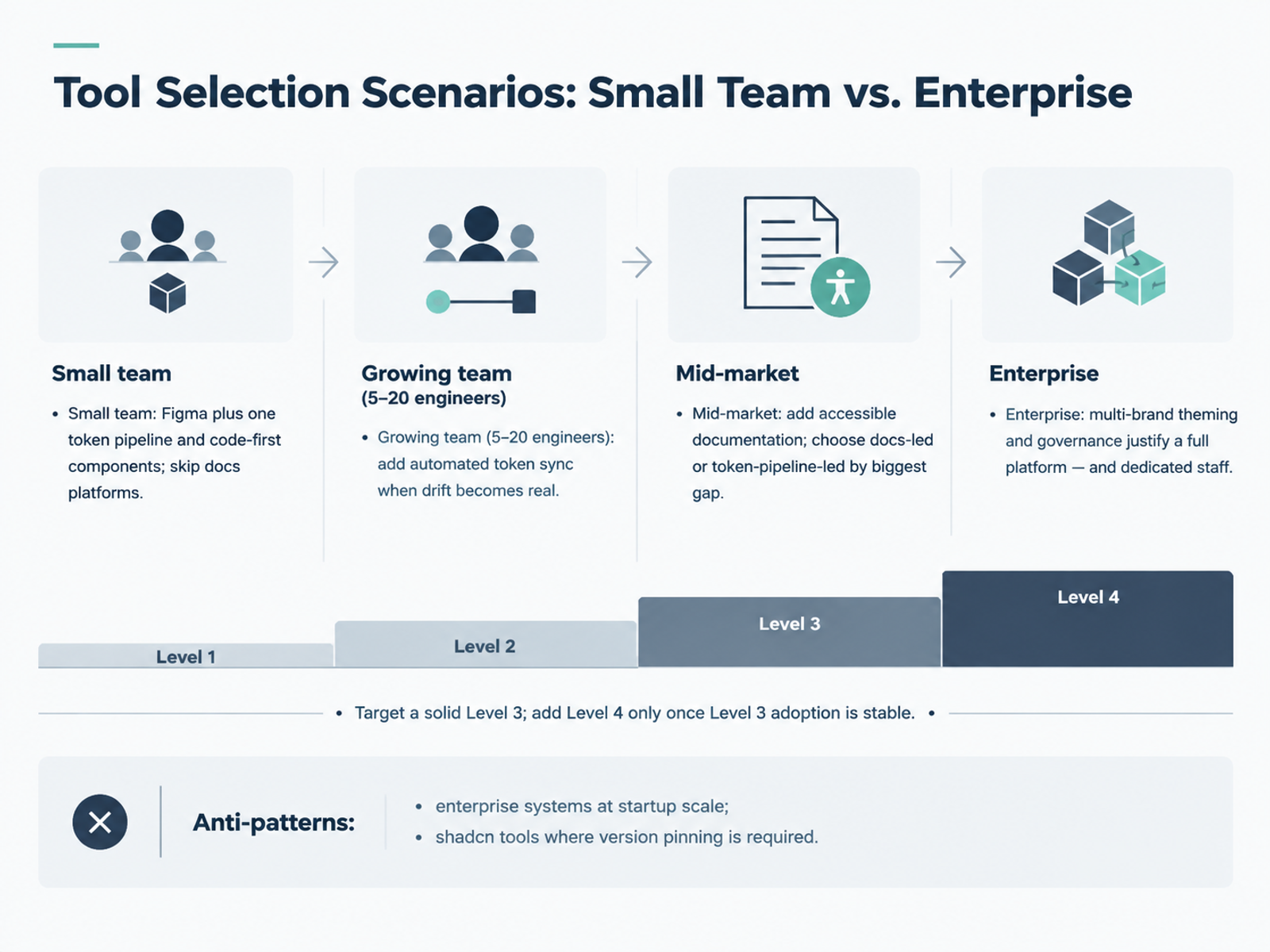
 - 12Tool Selection Scenarios: Small Team vs. EnterpriseLet's move from criteria to scenarios, because the right stack depends entirely on team shape. At small scale, one to five people, run Figma plus one token pipeline and code-first components. Skip documentation platforms entirely. Embed guidelines in Figma or Storybook. A token catalog is overhead when you have ten components. Growing team, five to twenty engineers: add automated token sync only when drift is real, meaning a Figma color change takes days to reach every codebase. Supernova or Tokens Studio plus GitHub at that point. Mid-market, twenty to one hundred engineers: add accessible documentation. Then choose docs-led or token-pipeline-led by your biggest gap. If external partners need polished guidelines, go Zeroheight. If propagation hurts more, prioritize Supernova. Enterprise: multi-brand theming and cross-team governance justify a full platform like Knapsack, and dedicated staff to run it. Aim for a solid Level 3. Add Level 4 only once Level 3 adoption is stable. And watch two anti-patterns: enterprise systems at startup scale, and shadcn-style registries where version pinning is a hard requirement. Next, migration pitfalls and lessons learned.
 spektral.designfenly.iocolorsphere.com+22 min
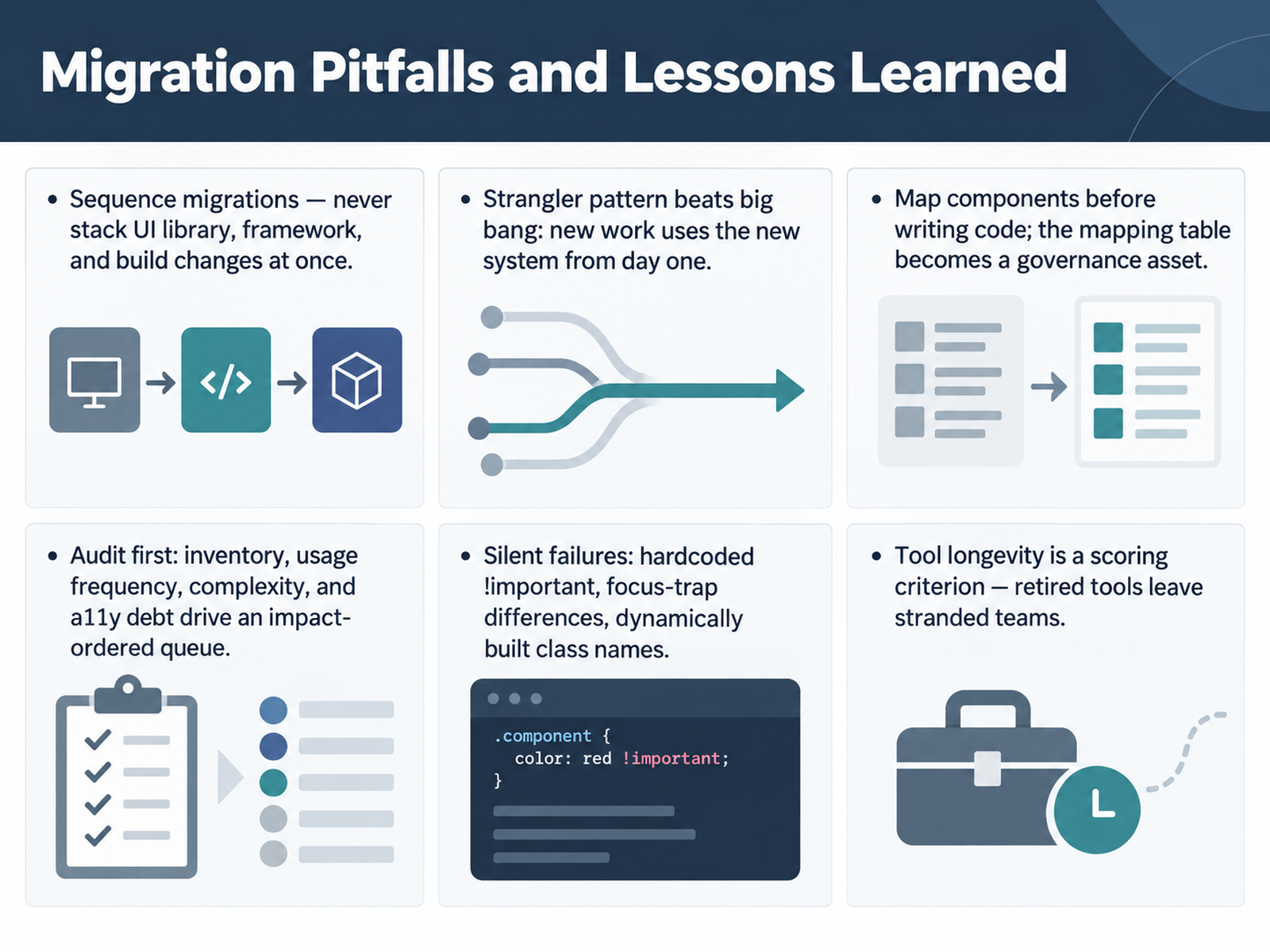
 - 13Migration Pitfalls and Lessons LearnedLet's talk about migration pitfalls, and the lessons teams keep learning the hard way. First rule: sequence your migrations. Never stack a UI library change, a framework upgrade, and a build tool swap in the same window. Teams that moved all three at once lost days untangling crossed wires. Pick one, land it, then start the next.
Second, use the strangler pattern, not a big bang. New work uses the new system from day one, so the legacy pile stops growing immediately. Touched screens get migrated as you go.
Third, map components before writing code. The mapping table, old component to new component, owners, edge cases, becomes a governance asset you reuse on every migration run.
Fourth, audit first. Inventory every import, then tag usage frequency, complexity, and accessibility debt. That gives you an impact-ordered queue: high-frequency, low-complexity components first.
Now the silent failures. Hardcoded important flags that win specificity battles. Focus-trap differences between libraries that break keyboard navigation with no visible error. And class names built dynamically in JavaScript, which a text search never finds. Those show up weeks later in visual review.
Last, score tool longevity. Retired tools leave stranded teams, so treat active maintenance as a real selection criterion.
Next, we'll move to the Adoption Roadmap and Your Next Steps.
 2 min
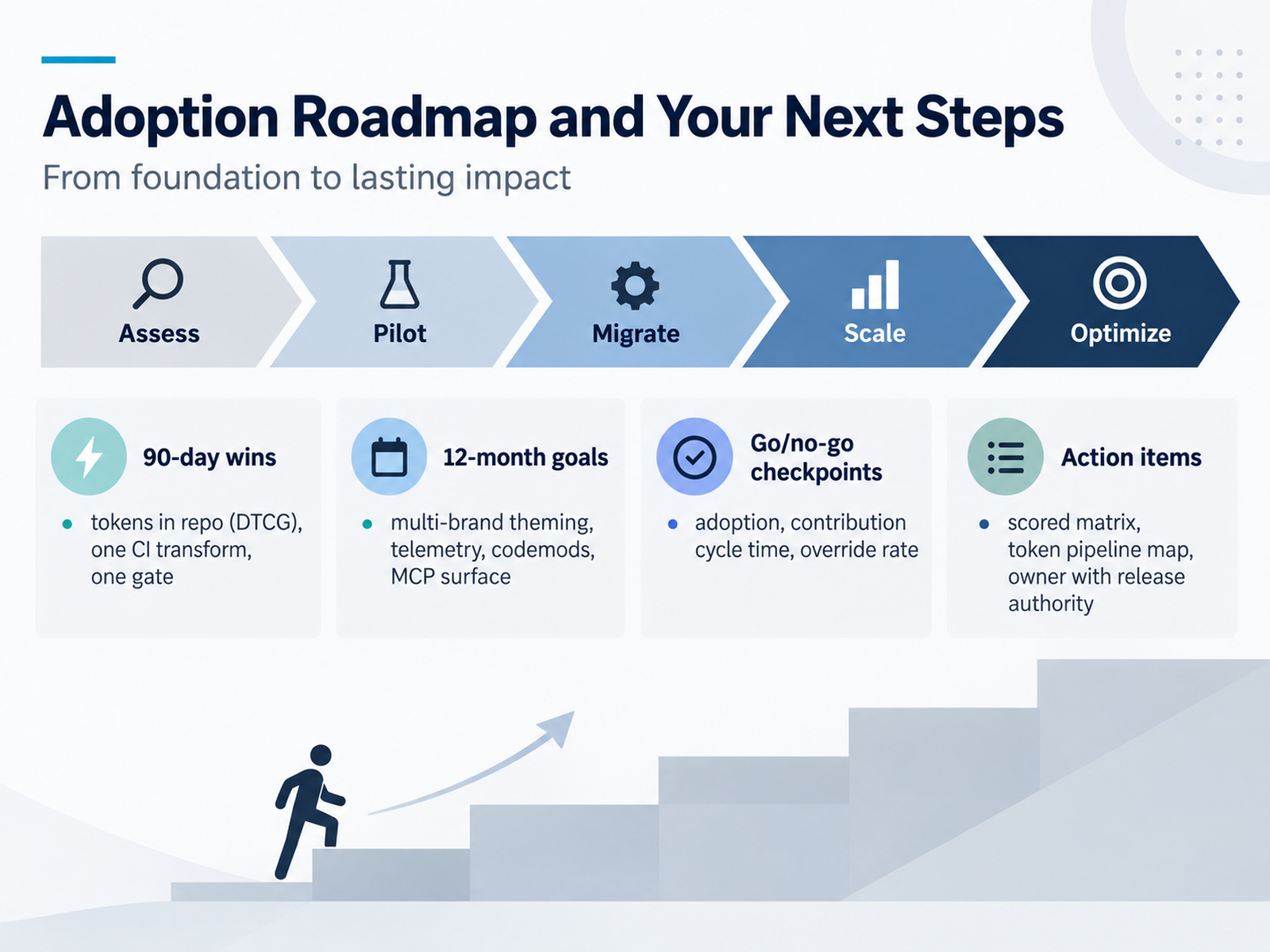
2 min - 14Adoption Roadmap and Your Next StepsLet's land this. You've compared the tools, so here's how you actually roll them out. Five phases: assess, pilot, migrate, scale, then optimize. Don't skip the pilot. It's where you find the real integration cost before you commit a whole org.
For ninety-day wins, keep it boring. Get tokens into the repo in the DTCG format, wire one continuous integration transform, and add one gate that blocks a pull request. That is enough to prove the pipeline works end to end.
Twelve-month goals look different: multi-brand theming, telemetry, codemods, and an MCP surface so agents query your tokens instead of guessing them.
Set go and no-go checkpoints on three numbers: adoption, contribution cycle time, and override rate. If override rate climbs, your components don't fit real product needs. Stop and fix, don't push forward.
Your action items: build the scored matrix, map the token pipeline, and name one owner with release authority. Someone has to be able to merge, deprecate, and communicate. Without that, nothing here holds.
So thank you for staying with me through all fourteen slides. You don't need the perfect stack. You need a governed one. Pick your next step, name your owner, and start the pilot this quarter.
 137foundry.comframingui.compathtoproject.com+22 min
Take the deck with you
Download this course as a file — free, no sign-up needed.
- PDF handoutEvery slide page, ready to print or share.15 pages · 2.7 MBDownload
- Narrated PowerPointThe deck that presents itself — every slide carries the digital human's narration video.15 pages · 15.2 MBDownload
- PowerPoint slidesThe full deck as a .pptx — open it in PowerPoint, Keynote, or Google Slides.15 pages · 2.6 MBDownload
Free to use in your own training — please keep the PersonWise credit page at the end.
Have your own deck? Turn it into a course
Sources consulted
Web sources consulted while building this course.
- Design Systems Report 2026 - brought to you by zeroheight — report.zeroheight.com
- Design Systems Report 2026: The Findings - zeroheight — zeroheight.com
- State of Design Systems 2026: Tokens, Components, and the New Frontier | The Stack Stories — thestackstories.com
- Design Systems Report 2026 - zeroheight — zeroheight.com
- Design System Tooling 2026 — MCP, Agents & The New Pipeline | DesignSystems.one — designsystems.one
- Spektral — Design systems, built to spec — spektral.design
- Home | Fenly — Design systems, simplified — fenly.io
- Colorsphere | The Home for Your Design System - Colorsphere — colorsphere.com
- https://tokenqo.com/ — tokenqo.com
- Frontfriend by Donux — donux.com
- Design Tokens Format Module 2025.10 — w3.org
- Design Tokens Format Module 2025.10 — designtokens.org
- FAQ | Design Tokens Community Group — designtokens.org
- Design Tokens specification reaches first stable version — w3.org
- Design Tokens Format Module 2025.10 — designtokens.org
- Design Token Pipeline: A Guide for Design and Dev Teams | 137Foundry — 137foundry.com
- Automating Design Token Workflows: From Design Tools to Production | Tekton Blog | framingui — framingui.com
- Design Token Promotion Pipeline for Multi-Brand Platforms — pathtoproject.com
- Design Tokens: A Practical Guide for 2026 | Masterly — themasterly.com
- Figma Design System Guide 2026: Tokens, Governance & Scale — Hedrick — hedrick.io