Begin
14 pages · ~28 min
Email Marketing for Sales Workflow
Learn a practical email marketing workflow to drive sales, ideal for marketers and sales professionals seeking actionable strategies.
A digital instructor presents all 14 pages. Hold “Ask” at any point and ask out loud — the answer comes from this course. No sign-up needed.
What you’ll learn
- 01How to Use Email Marketing for Sales: A Practical WorkflowWelcome. Over the next few slides, we're going to build a practical email workflow for sales, one you can actually ship in thirty days. Let's start with why this matters. Email remains the highest-return channel in 2026, averaging thirty-six to forty-two dollars for every dollar you spend. But the rules have changed. Consent is no longer a legal nicety. It's a deliverability requirement. Gmail, Yahoo, and Microsoft now enforce domain authentication and one-click unsubscribe, and spam complaint ceilings sit around one-tenth to three-tenths of one percent. Cross that line, and your sequences go dark. So here's our roadmap. We'll cover consent, workflow mapping, writing, automation, measurement, and a thirty-day launch. If you're a sales or marketing team, a founder, or a small business building consent-based email, this workflow is for you. Let's begin with why consent-based email still wins for sales.allegrow.coapollo.iocleanmylist.io+21 min
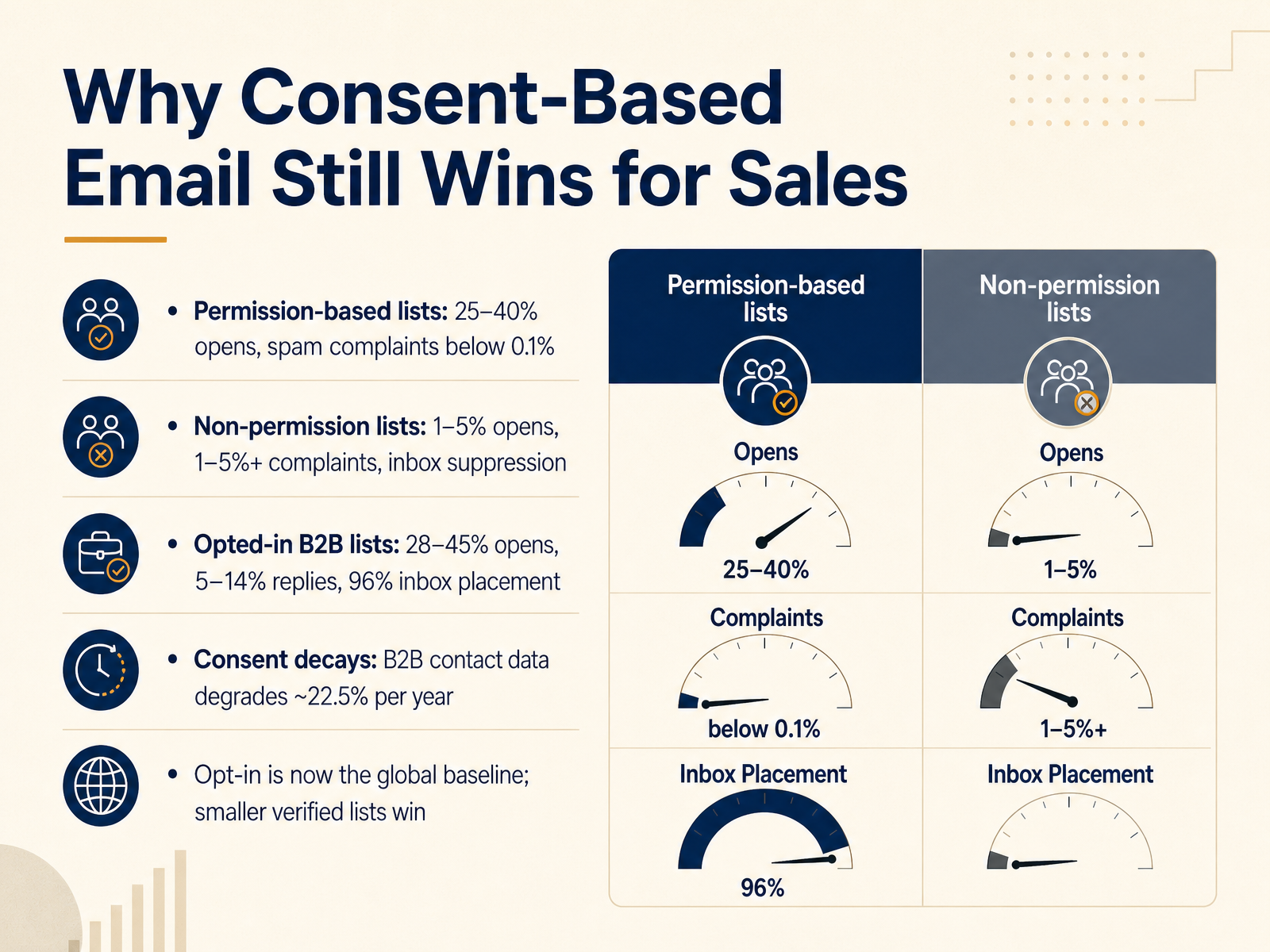
- 02Why Consent-Based Email Still Wins for SalesLet's look at why consent-based email still outperforms everything else in sales. The numbers are not close. Permission-based lists open at twenty-five to forty percent, while non-permission lists land between one and five percent, with spam complaints over one percent and inbox suppression to follow. On opted-in B two B lists, expect twenty-eight to forty-five percent opens, five to fourteen percent replies, and ninety-six percent inbox placement. Two things drive that gap. First, consent decays. B two B contact data degrades about twenty-two point five percent per year through job changes alone, so an opt-in from two years ago may now be a dead address on a domain that no longer routes. Second, opt-in is now the global baseline under GDPR, CASL, and inbox provider rules. If your complaint rate crosses zero point three percent, you can be filtered before anyone notices. So smaller verified lists beat larger unverified ones, every time. Verify on a schedule, not just at launch. Next, we'll cover building a permission-based list people actually want.
 allegrow.coapollo.iocleanmylist.io+22 min
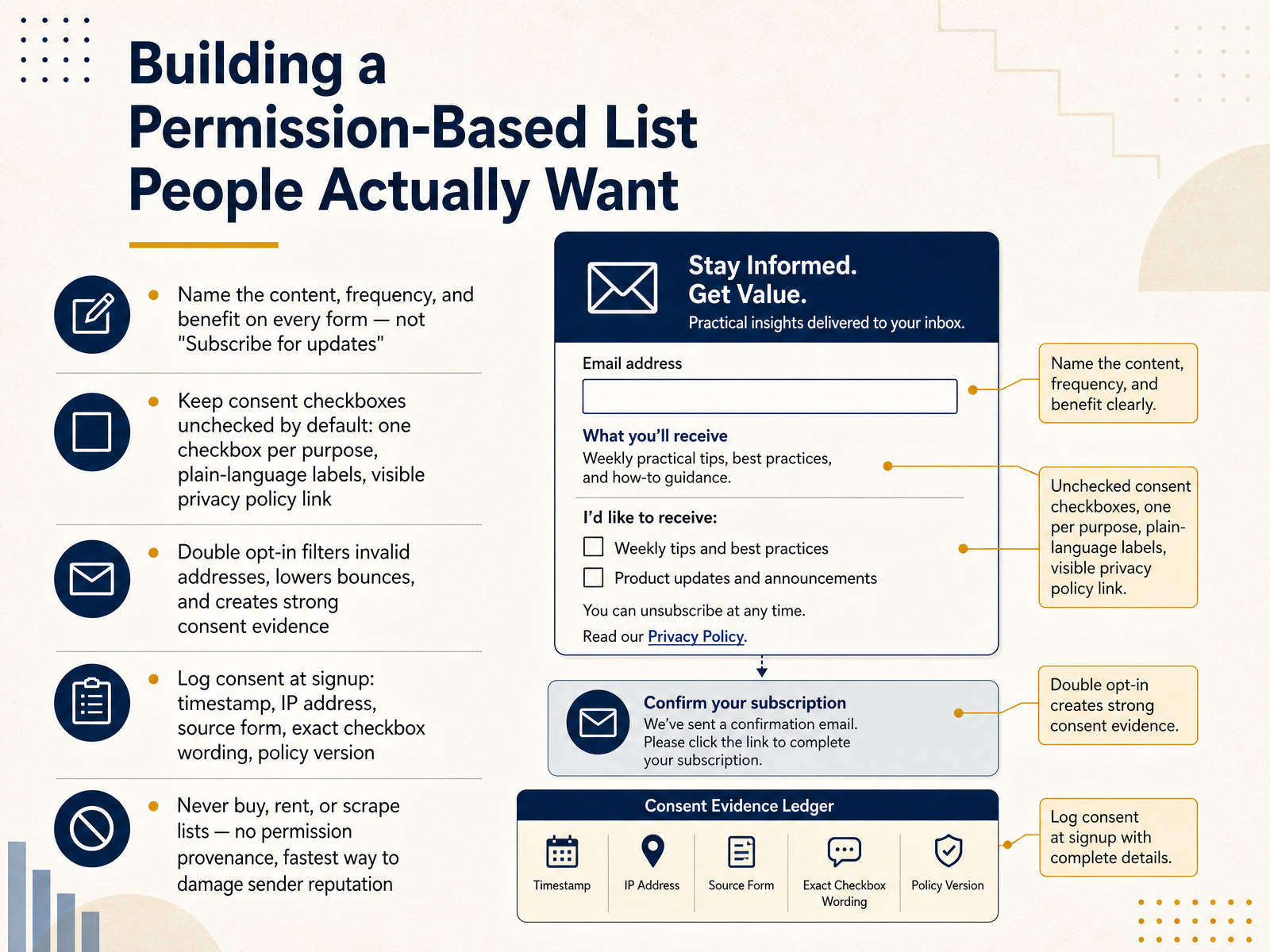
 - 03Building a Permission-Based List People Actually WantNow let's talk about building a permission-based list people actually want. This is where your sender reputation is won or lost, so get the details right. First, name the content, frequency, and benefit on every form. Not subscribe for updates, but something like, get our weekly sales playbook. That specificity prevents weak intent and reduces future complaints. Second, keep consent checkboxes unchecked by default. Use one checkbox per purpose with plain-language labels, and make your privacy policy link visible. Third, use double opt-in. Yes, it trims your list, but it filters invalid addresses, lowers bounces, and creates strong consent evidence. Fourth, log consent at signup. Capture the timestamp, IP address, source form, exact checkbox wording, and the policy version in force. That record is your proof. And never buy, rent, or scrape lists. There is no permission provenance, and it is the fastest way to damage sender reputation. The rule is simple: if you cannot show where consent came from, do not send. Next, we will look at compliance essentials: GDPR, CAN-SPAM, and CASL in practice.
 allegrow.coapollo.iocleanmylist.io+22 min
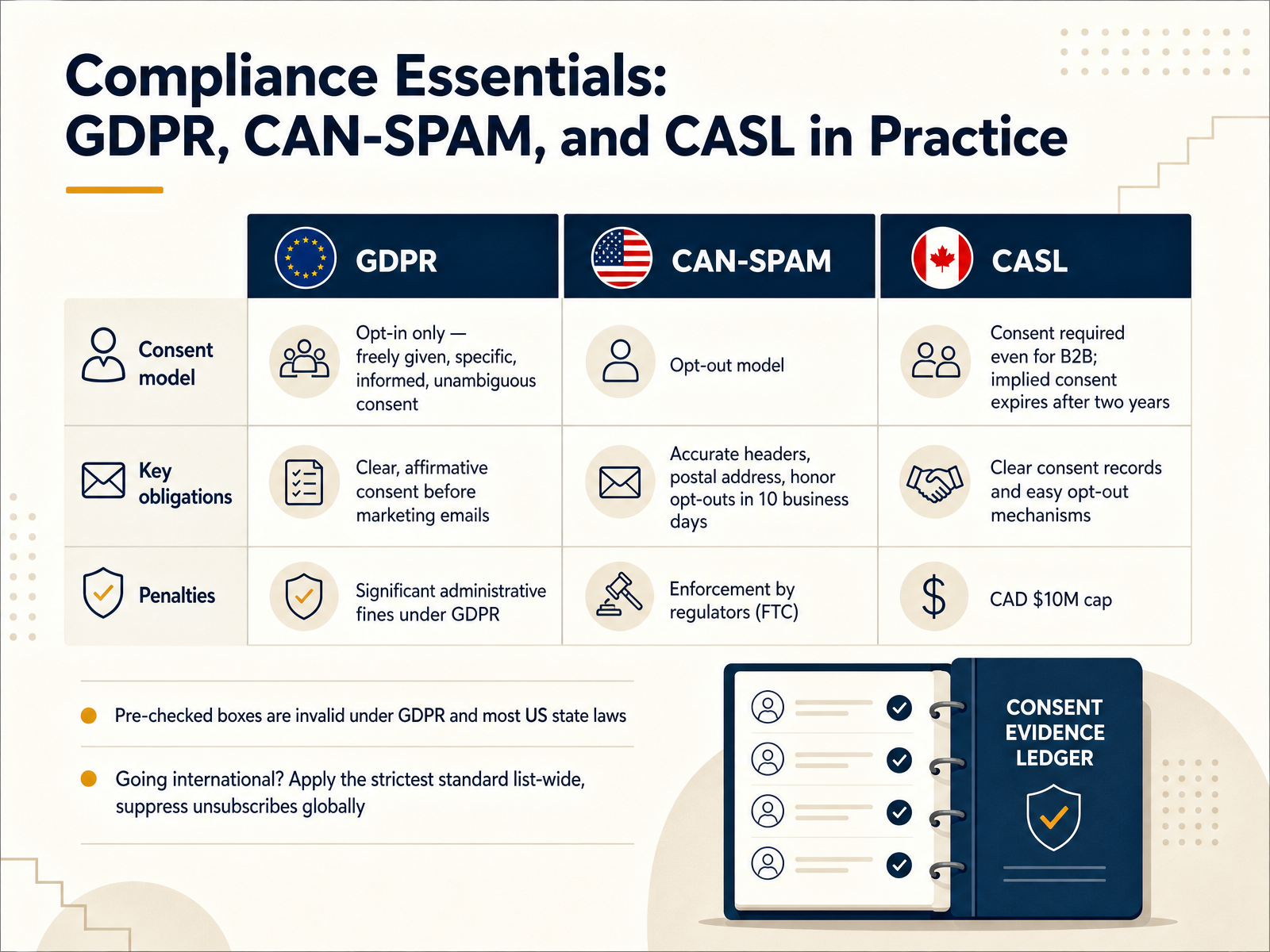
 - 04Compliance Essentials: GDPR, CAN-SPAM, and CASL in PracticeNow let's get practical about compliance. Three laws matter most here: GDPR, CAN-SPAM, and CASL. GDPR is opt-in only. Consent must be freely given, specific, informed, and unambiguous, and you have to be able to prove it. CAN-SPAM works the opposite way. It's opt-out, but it still requires accurate headers, a real postal address, and honoring opt-outs within ten business days. CASL applies in Canada and requires consent even for business-to-business email. Implied consent from an existing relationship expires after two years, and the maximum penalty is ten million Canadian dollars. One mistake to avoid outright: pre-checked boxes. They are invalid under GDPR and most US state laws. And if you send internationally, apply the strictest standard list-wide and suppress unsubscribes globally, so a single opt-out never gets re-mailed from another segment. Next, let's make sure your sending domain is actually trusted, with authentication setup: SPF, DKIM, and DMARC.
 e-maildeliverypro.comemailcalculator.comsendpulse.com+21 min
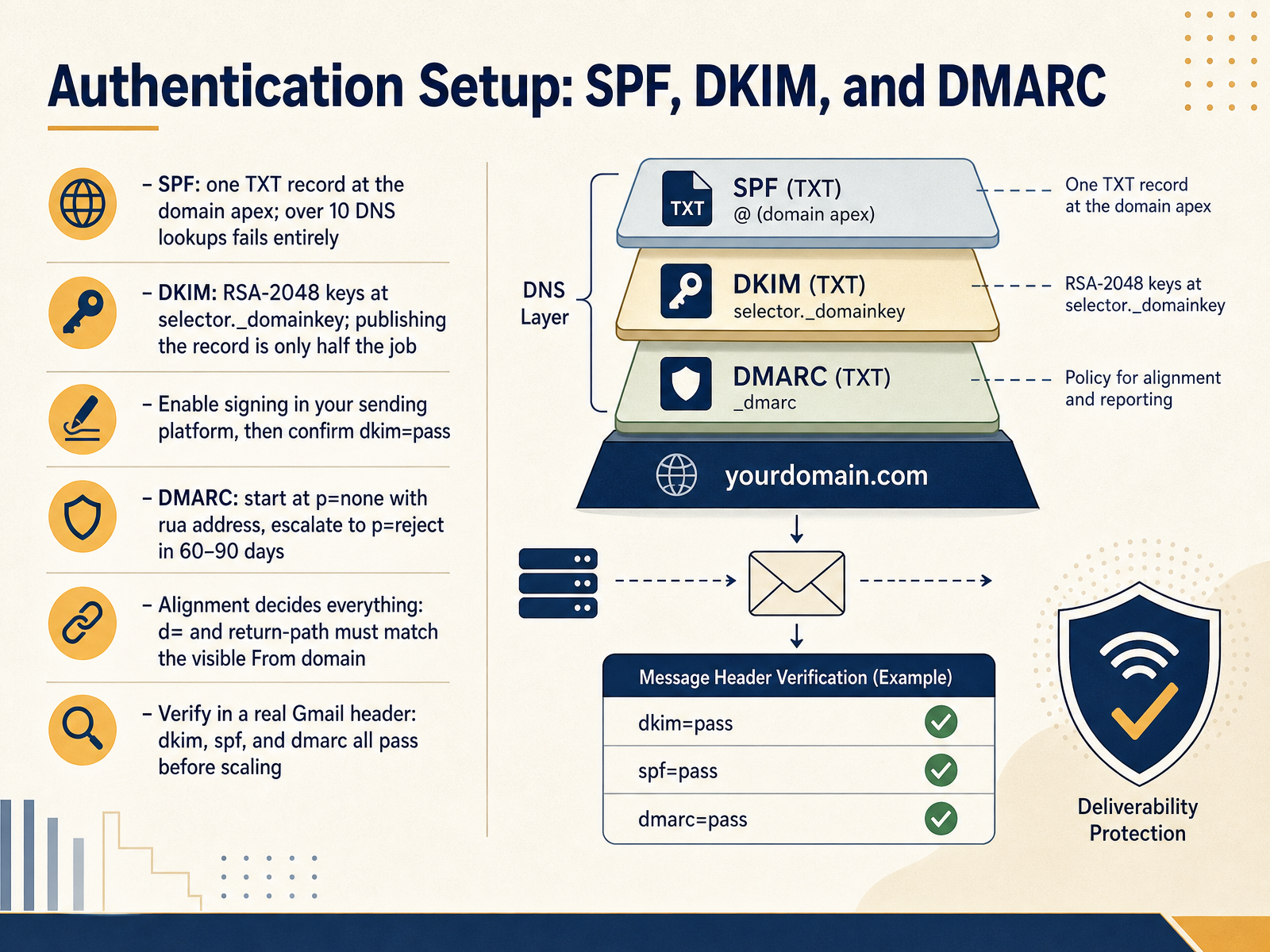
 - 05Authentication Setup: SPF, DKIM, and DMARCLet's talk authentication. Three records, but one outcome you actually care about: does mail pass in a real inbox. Start with SPF. One TXT record at the domain apex, never two. Each include counts as a DNS lookup, and past ten, SPF fails entirely. Then DKIM. Publish your public key at selector dot underscore domainkey, use RSA two thousand forty-eight, and enable signing inside your sending platform. Publishing the record is only half the job. DMARC comes next. Start at p equals none with a real rua address, then escalate toward p equals reject within sixty to ninety days. Here is the part that decides everything: alignment. Your DKIM d equals value and your return path must match the visible From domain, or DMARC fails even when SPF and DKIM both pass. So before you scale, send one test to a Gmail account you own, open the original, and confirm all three read pass. No exceptions. Next, we'll look at list hygiene, re-permissioning, and suppression.
 theinboxledger.compostscale.iotinysend.co+22 min
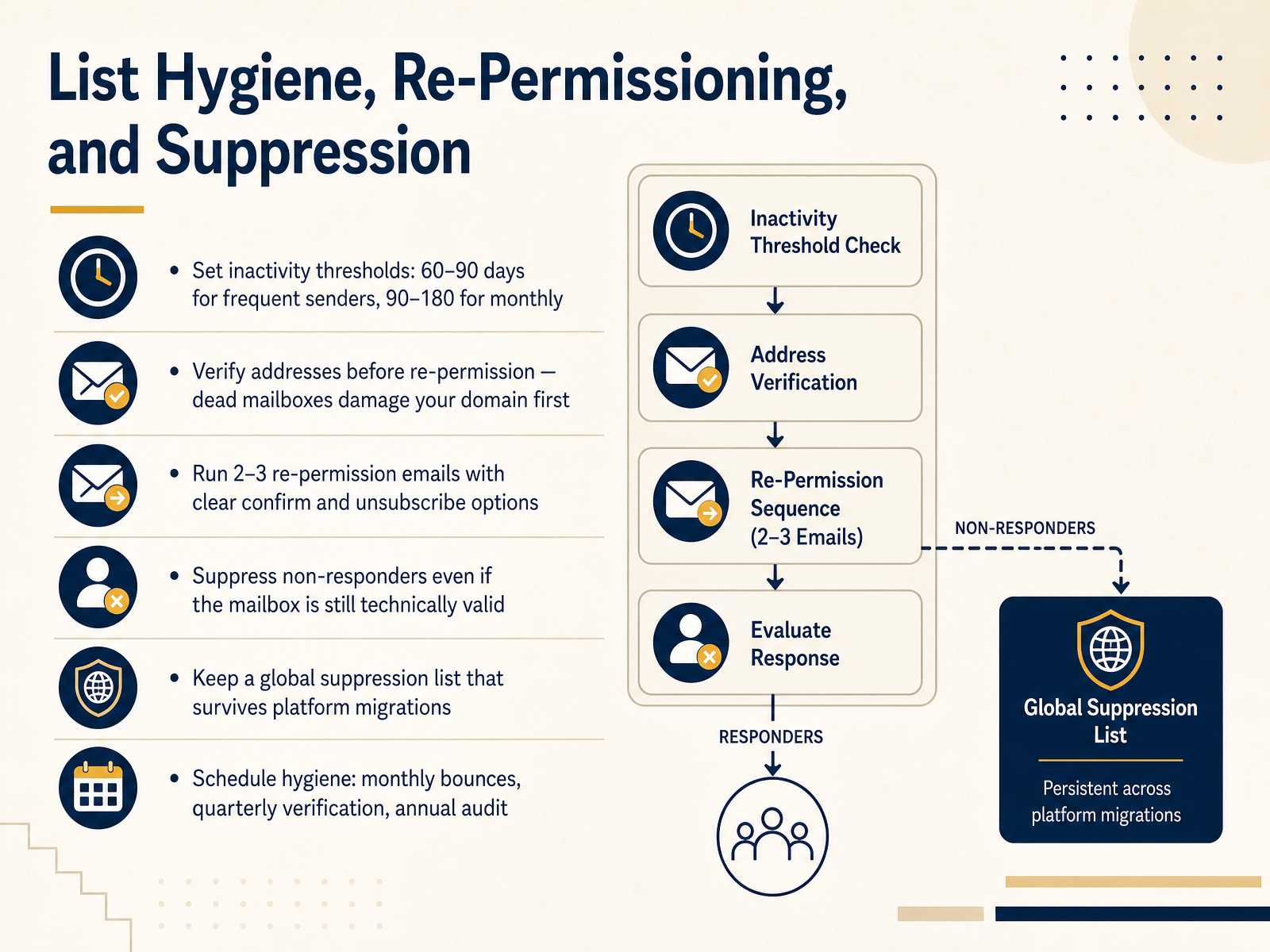
 - 06List Hygiene, Re-Permissioning, and SuppressionNow let's talk about keeping that list clean. Start by setting inactivity thresholds. If you send frequently, flag contacts after sixty to ninety days with no engagement. If you send monthly, stretch that to ninety or one hundred eighty days. Next, verify addresses before any re-permission attempt. Dead mailboxes damage your domain first, so clean them out before you send recovery emails. Run a short sequence of two or three re-permission emails. Give people a clear confirm button and an obvious unsubscribe option. Here's the part teams resist. Suppress non-responders, even if the mailbox is still technically valid. Silence is data. Keep a global suppression list that survives platform migrations, so unsubscribes never get re-added by accident. Finally, put hygiene on a schedule. Monthly, clear bounces. Quarterly, verify your list. Annually, run a full audit. The practical takeaway is this. A smaller, verified, actively consented list will outperform a bloated one every time. Let's map the sales email workflow end to end.
 allegrow.coapollo.iocleanmylist.io+21 min
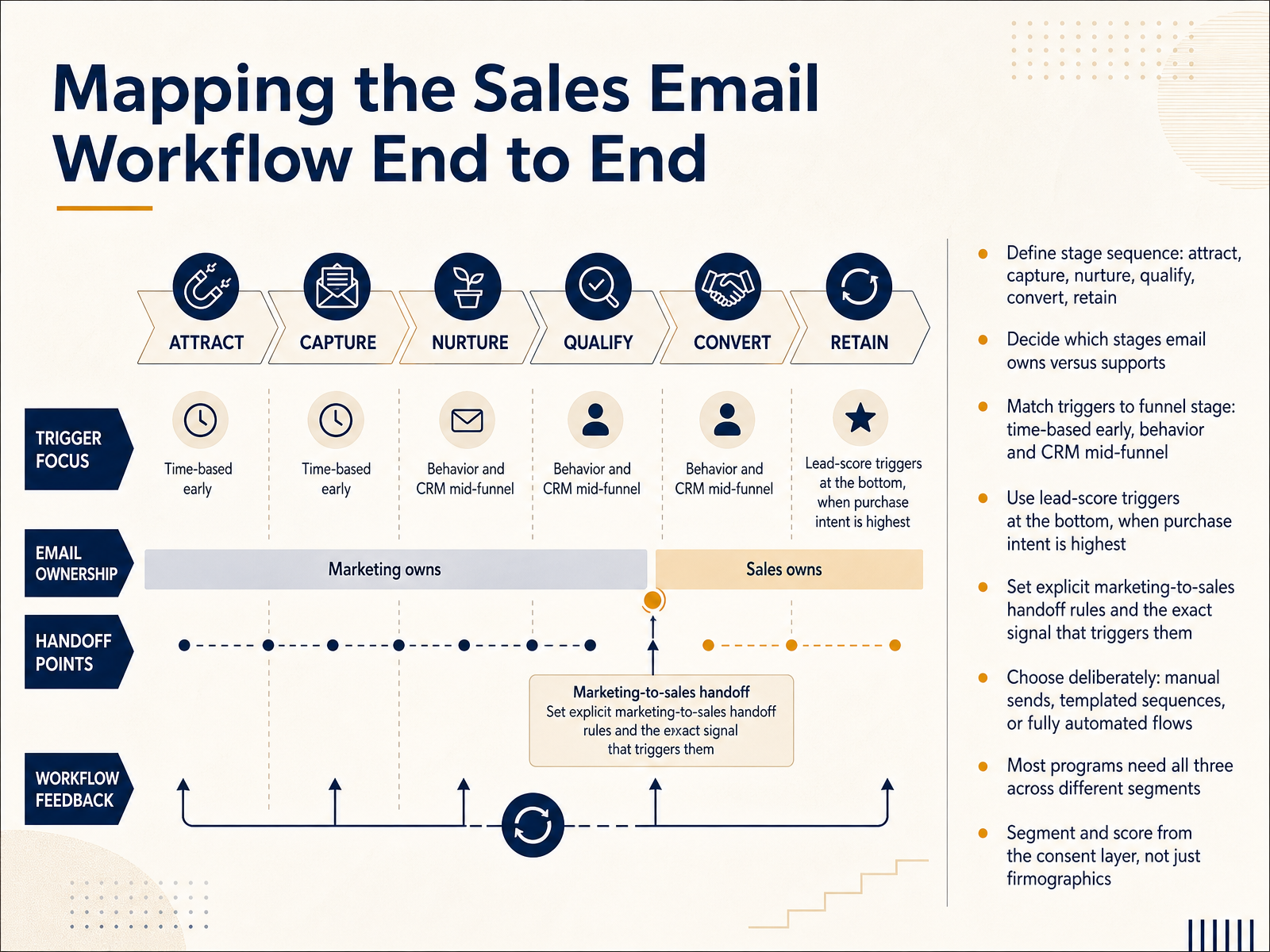
 - 07Mapping the Sales Email Workflow End to EndNow let's map the sales email workflow end to end. Start by defining your stage sequence: attract, capture, nurture, qualify, convert, and retain. Then decide which stages email owns outright and which it only supports. This decision shapes everything downstream.
Next, match your triggers to the funnel stage. Use time-based triggers early, where you control the pacing. Switch to behavior and C R M field triggers mid-funnel, because buyer intent varies and a pricing page visit tells you more than a timer ever will. Save lead-score triggers for the bottom, when purchase intent is highest and speed matters most.
Then set explicit marketing-to-sales handoff rules, and name the exact signal that triggers them. A pricing page visit, a reply, a demo request. Write it down so no one guesses.
Finally, choose deliberately between manual sends, templated sequences, or fully automated flows. Most programs need all three across different segments. And here's the one teams get wrong: segment and score from the consent layer, not just firmographics. Consent tells you who you can actually contact.
Get those decisions documented, and your workflow runs on purpose instead of by accident. Next, we'll break down the anatomy of a multi-step sales sequence.
 revenuegrid.comblog.superhuman.comserif.ai+22 min
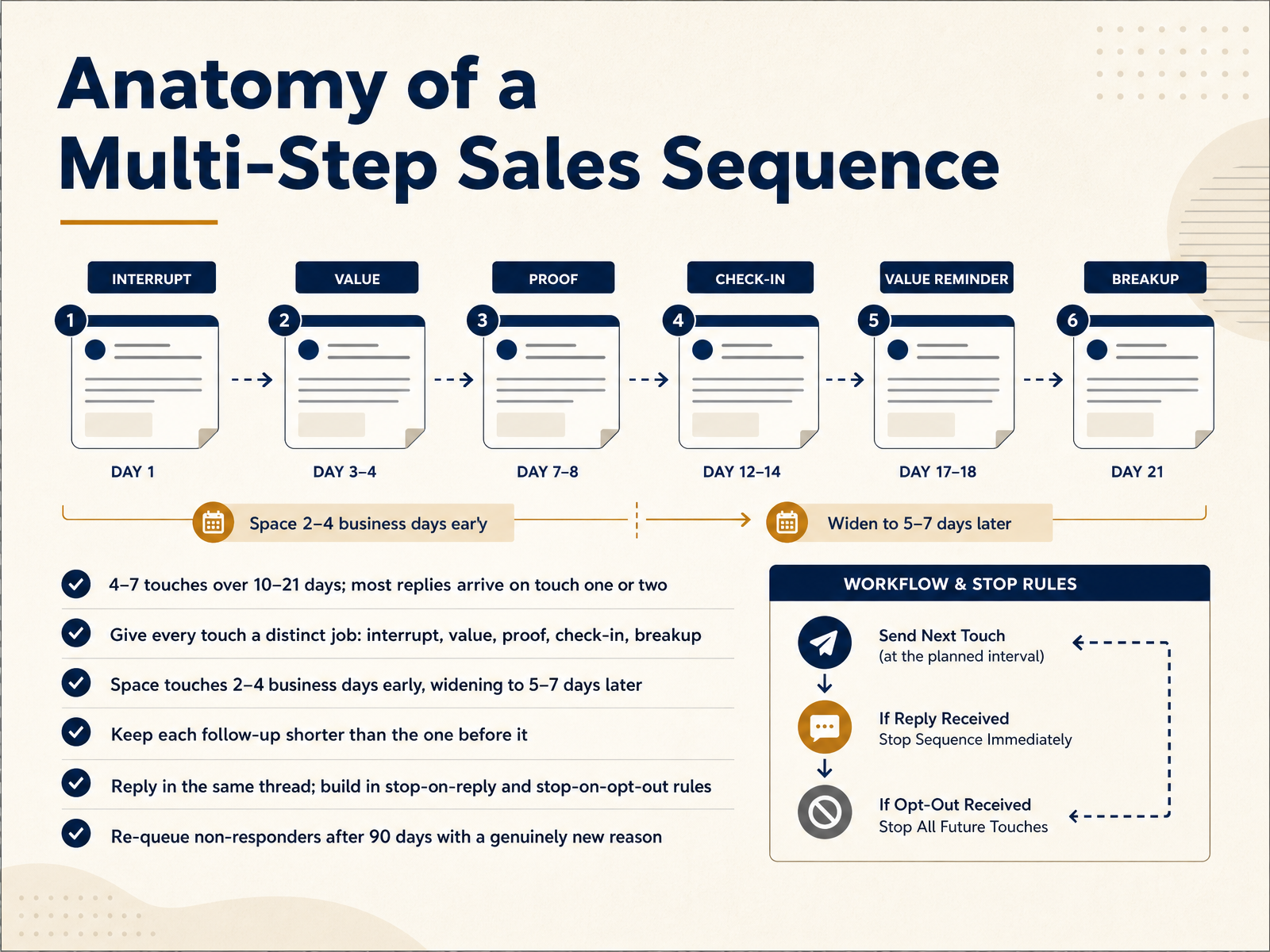
 - 08Anatomy of a Multi-Step Sales SequenceEvery multi step sequence has a working anatomy. First, four to seven touches over ten to twenty one days. And here is the part to internalize: most replies arrive on touch one or two, so your opener carries disproportionate weight. Give every touch a distinct job. Interrupt, add value, show proof, check in, then break up. Space touches two to four business days apart early, widening to five to seven days later. Keep each follow up shorter than the one before it. Reply in the same thread, never start a new subject line. Then wire in your stop rules: stop on reply, and stop on opt out. When someone replies, every queued touch has to pause automatically. And re queue non responders after ninety days with a genuinely new reason, not a simple check in. That is the shape that keeps you persistent instead of pushy. Next, timing, cadence, and knowing when to stop.
 revenuegrid.comblog.superhuman.comserif.ai+21 min
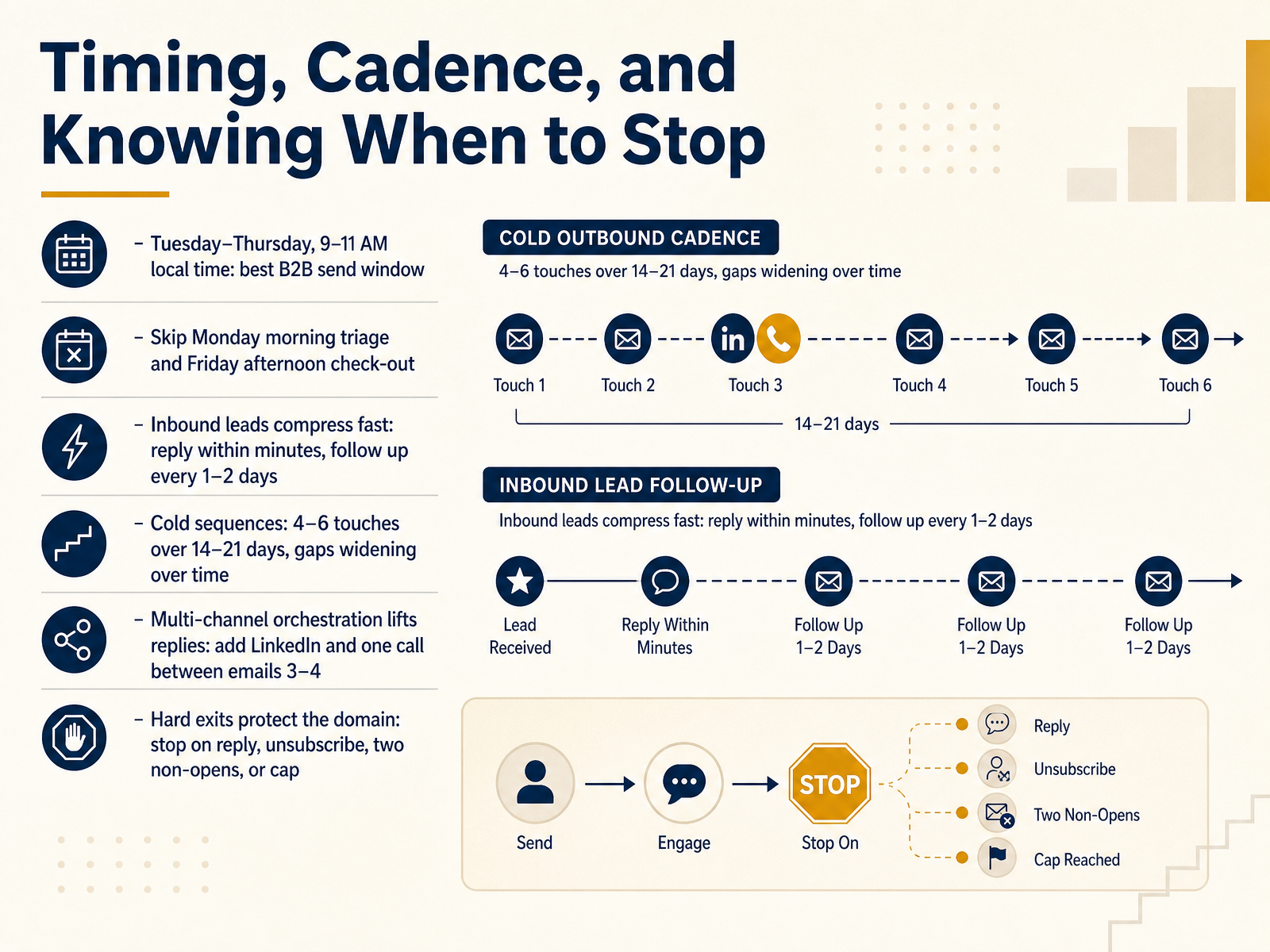
 - 09Timing, Cadence, and Knowing When to StopNow let's talk about timing, cadence, and knowing when to stop. For B2B, Tuesday through Thursday, nine to eleven A M in the prospect's local time, is your best send window. Skip Monday morning triage and Friday afternoon check-out; both kill reply rates. Inbound leads are different. They compress fast, so reply within minutes, and follow up every one to two days. For cold sequences, plan four to six touches over fourteen to twenty-one days, with the gaps widening as you go. And orchestrate across channels: adding LinkedIn and one call between emails three and four reliably lifts replies. Finally, hard exits protect your domain. Stop the sequence on any reply, an unsubscribe, two non-opens, or your touch cap. Decide those rules up front, before you send. Next, we'll look at writing sales emails that get replies.
 revenuegrid.comblog.superhuman.comserif.ai+21 min
 - 10Writing Sales Emails That Get RepliesNow let's talk about writing sales emails that actually get replies.
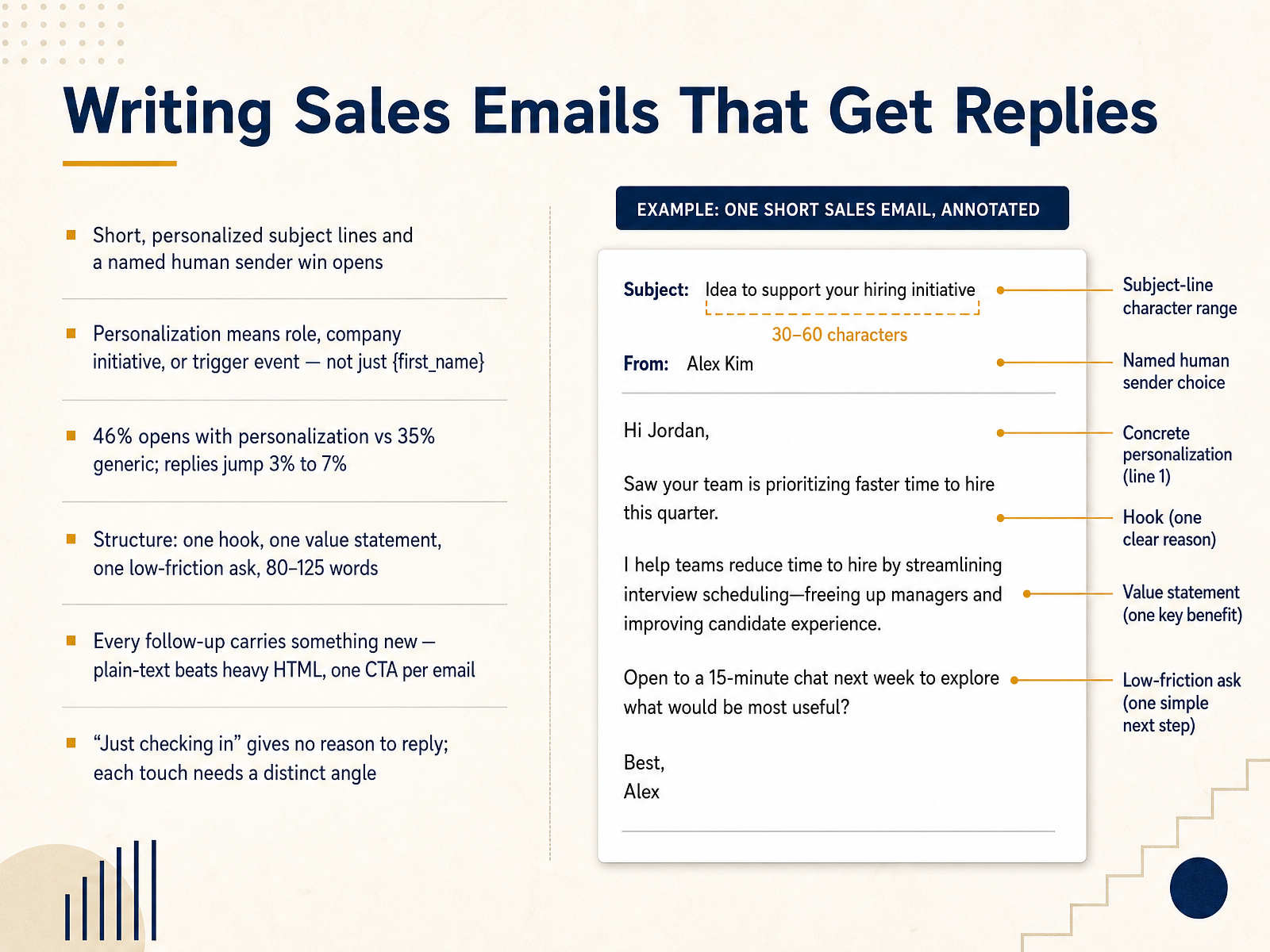
Start with the subject line and the sender name. Short, personalized subject lines plus a named human sender win opens. And personalization means referencing their role, their company initiative, or a trigger event, not just inserting their first name. The data backs this up: personalized subject lines hit forty-six percent opens versus thirty-five percent for generic ones, and replies climb from three percent to seven percent.
For structure, keep it tight. One hook, one value statement, one low-friction ask, and land between eighty and one hundred twenty-five words. Every follow-up needs to carry something new. Plain text beats heavy HTML, and stick to one call to action per email.
Here's the mistake to avoid. "Just checking in" gives no reason to reply. Each touch needs a distinct angle, a new data point, a case study, or a question worth answering.
Next, let's move into building and automating the sequence.
 2 min
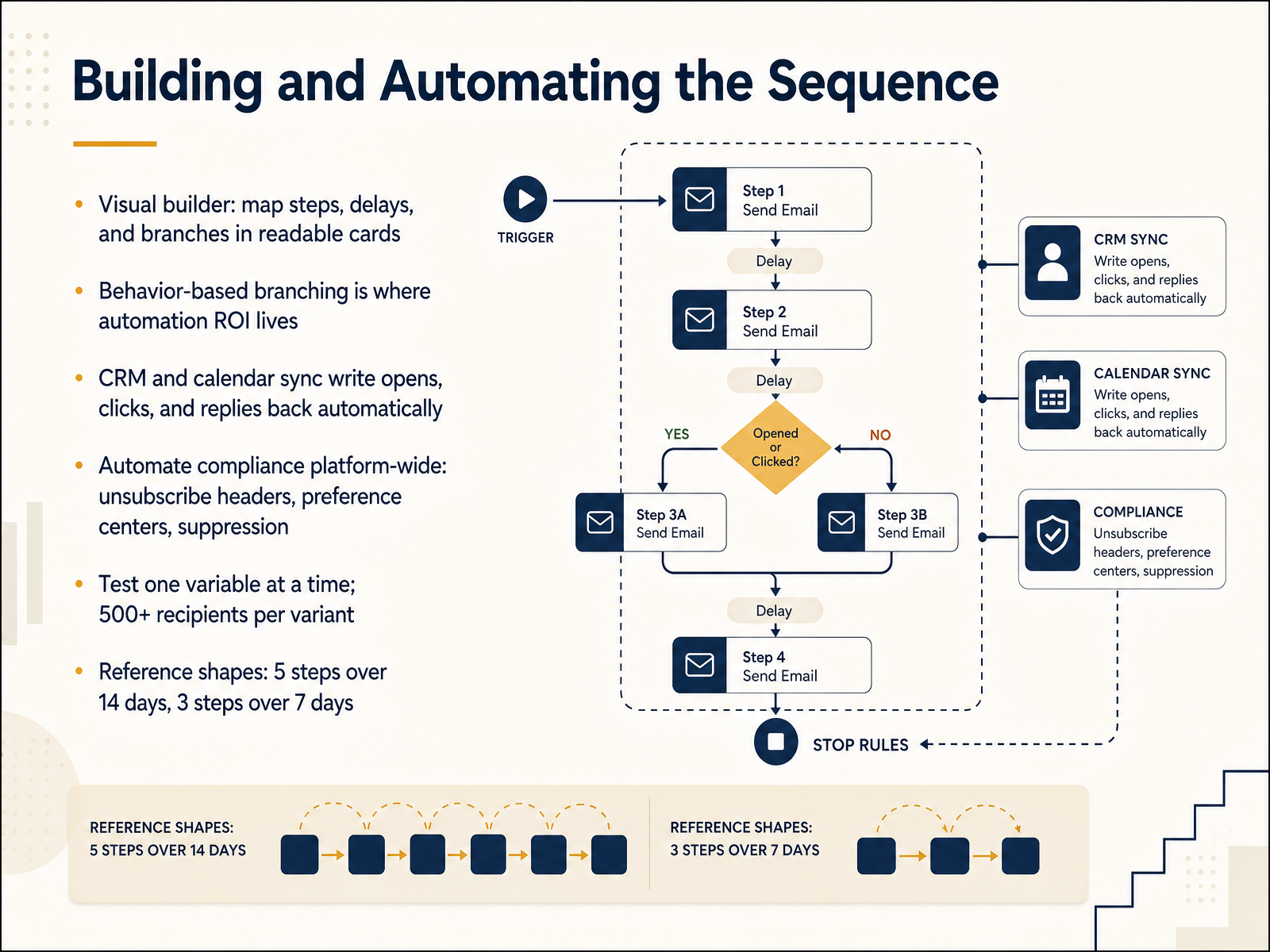
2 min - 11Building and Automating the SequenceNow let's build and automate the sequence itself. Work inside a visual builder that maps steps, delays, and branches as readable cards. If you can't explain the flow at a glance, it's too complicated. Behavior-based branching is where automation ROI lives. Did they open the pricing email? Route them one way. Silence for three days? Route another. Your CRM and calendar sync then write opens, clicks, and replies back automatically, so reps act on signal, not guesswork. Automate compliance platform-wide: unsubscribe headers, preference centers, and suppression lists apply everywhere, not just this campaign. When testing, change one variable at a time and use at least five hundred recipients per variant. As reference shapes, start with five steps over fourteen days, or three steps over seven days for re-engagement. Next, we look at measuring what matters: from opens to pipeline.
 revenuegrid.comblog.superhuman.comserif.ai+22 min
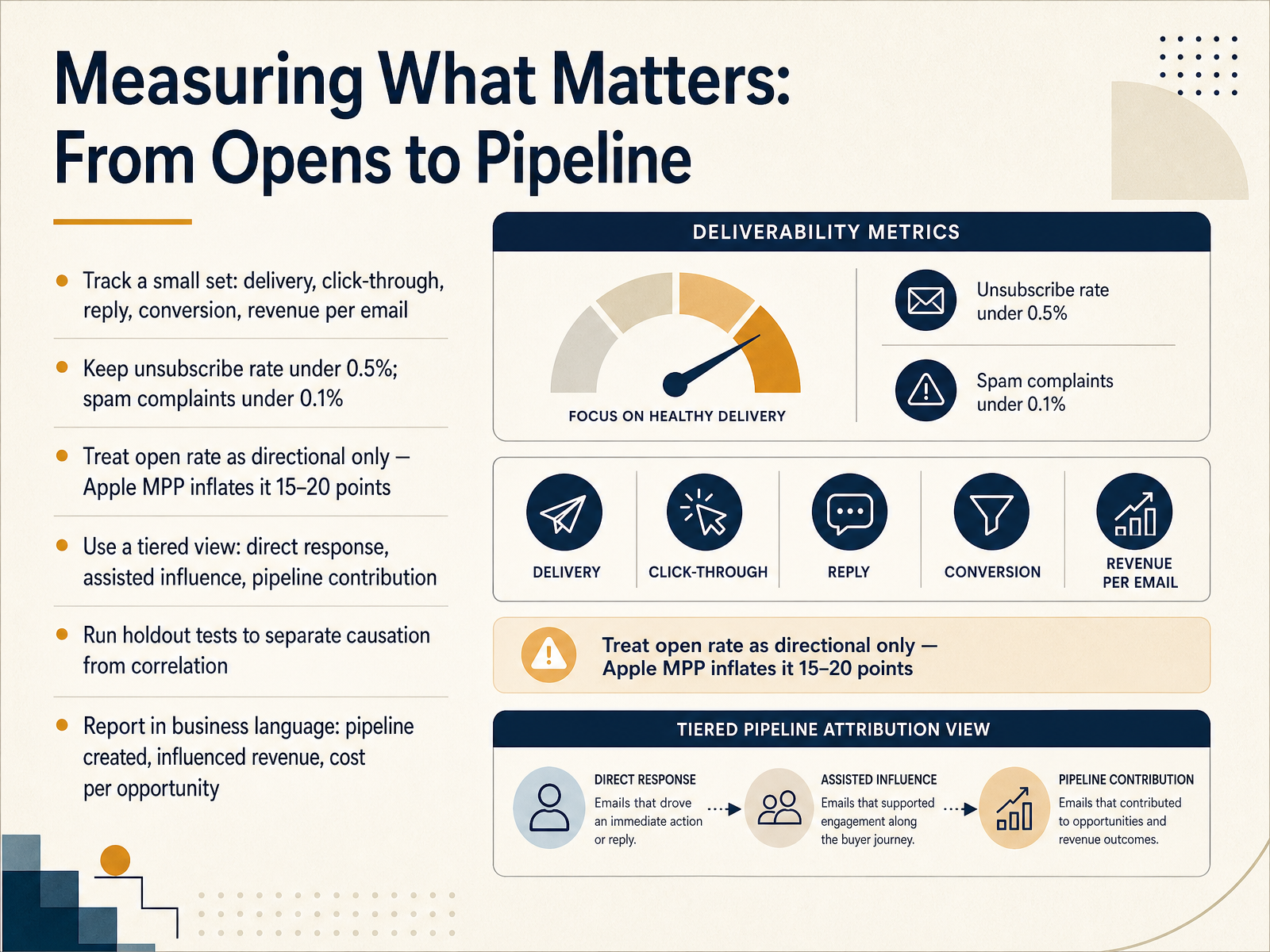
 - 12Measuring What Matters: From Opens to PipelineNow let's talk about measuring what actually matters, moving from opens to pipeline. Track a small set of metrics consistently: delivery, click-through, reply, conversion, and revenue per email. Keep your unsubscribe rate under zero point five percent, and spam complaints under zero point one percent. Treat open rate as directional only. Apple Mail Privacy Protection inflates it by fifteen to twenty points, so a strong-looking open rate can be pure noise. Instead, use a tiered view: direct response, assisted influence, and pipeline contribution. Direct response tells you which campaigns drive immediate action. Assisted influence shows which programs support the buying journey. Pipeline contribution tells you whether email deserves budget as a revenue driver. To separate causation from correlation, run holdout tests. Withhold a random segment, compare behavior, and you will see the incremental lift that email actually caused. Then report in business language: pipeline created, influenced revenue, and cost per opportunity. That is what leadership budgets against. Next, we will look at optimizing, re-engaging, and scaling the workflow.
 2 min
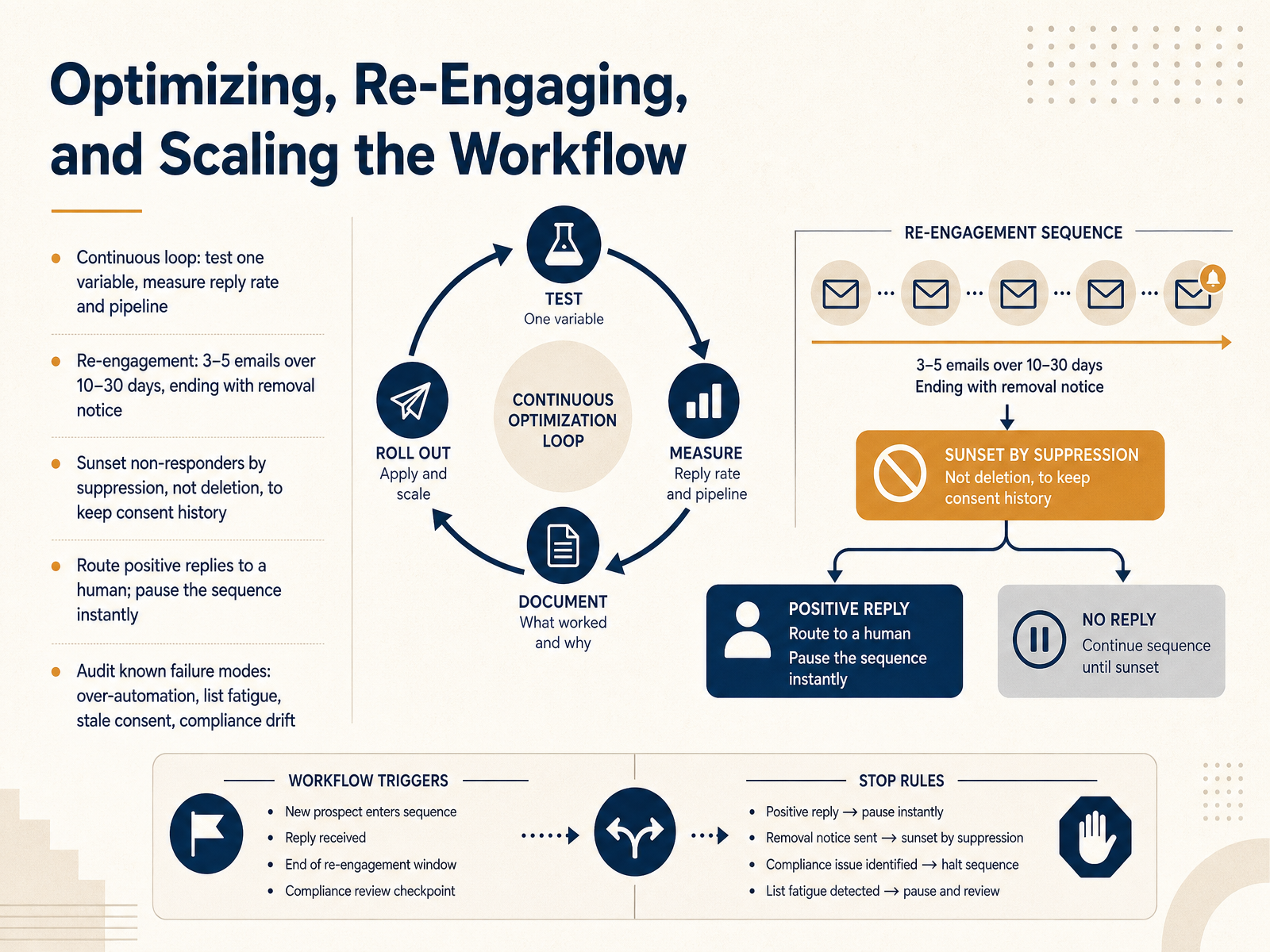
2 min - 13Optimizing, Re-Engaging, and Scaling the WorkflowSo let's close the loop: optimizing, re-engaging, and scaling your workflow. Treat this as a continuous cycle. Test one variable at a time, then measure reply rate and pipeline, not opens. A clean subject line test tells you almost nothing if it doesn't move conversations.
For subscribers who've gone quiet, run a re-engagement sequence of three to five emails over ten to thirty days, and end with a clear removal notice. For example: a soft check-in, then an offer tied to their history, then a final last-chance email.
When someone doesn't respond, sunset them by suppression, not deletion. That keeps your consent history intact and stops them being re-added by a new form. And route positive replies to a human immediately, pausing the sequence the moment intent shows up.
Finally, audit the known failure modes: over-automation, list fatigue, stale consent, and compliance drift. Left unchecked, they quietly erode deliverability and pipeline. Your next step is turning this into an operating plan with your thirty-day plan to launch the workflow.
 allegrow.coapollo.iocleanmylist.io+22 min
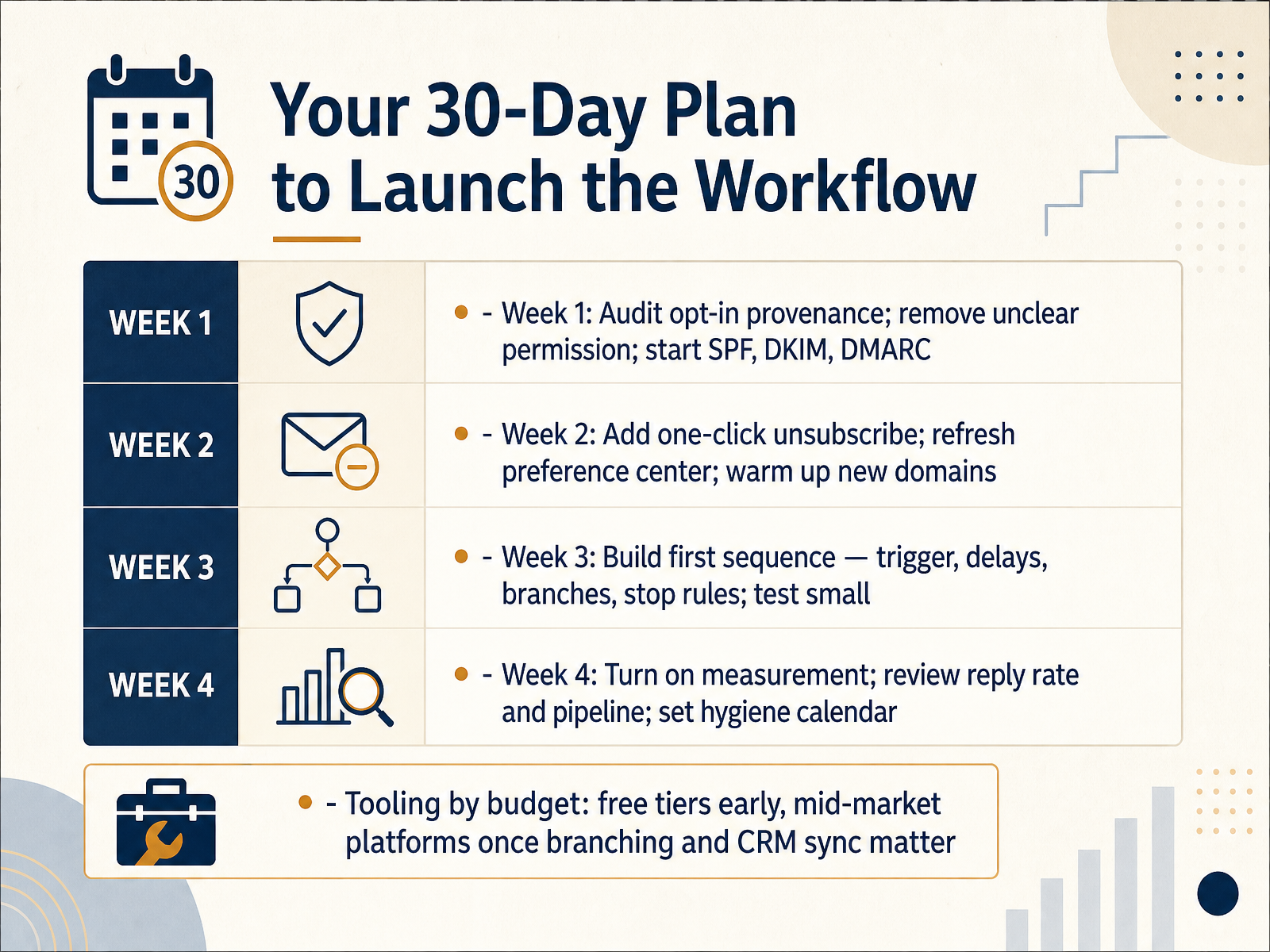
 - 14Your 30-Day Plan to Launch the WorkflowLet's close with a thirty-day plan you can actually run. Week one: audit your opt-in provenance. Remove any contacts whose permission you can't explain, then start your S P F, D K I M, and D M A R C authentication. Week two: add one-click unsubscribe, refresh your preference center, and warm up any new sending domains. Week three: build your first sequence with triggers, delays, branches, and stop rules, and test it on a small segment first. Week four: turn on measurement, review reply rate and pipeline, and put list hygiene on a recurring calendar. On tooling, let budget guide you. Free tiers are fine early. Move to a mid-market platform once branching and C R M sync actually matter. That's the workflow: clean permission, authenticated sending, disciplined automation, honest measurement. Thank you for working through this with me. Start with week one this week, and build from there. You've got this.
 allegrow.coapollo.iocleanmylist.io+22 min
Take the deck with you
Download this course as a file — free, no sign-up needed.
- PDF handoutEvery slide page, ready to print or share.15 pages · 3.9 MBDownload
- Narrated PowerPointThe deck that presents itself — every slide carries the digital human's narration video.15 pages · 26.6 MBDownload
- PowerPoint slidesThe full deck as a .pptx — open it in PowerPoint, Keynote, or Google Slides.15 pages · 3.8 MBDownload
Free to use in your own training — please keep the PersonWise credit page at the end.
Have your own deck? Turn it into a course
Sources consulted
Web sources consulted while building this course.
- Permission-Based Email Marketing Guide (2026 Deliverability) — allegrow.co
- What Is Permission-Based Email Marketing in 2026? | Apollo — apollo.io
- Permission Based Email Marketing: Boost ROI 2026 — CleanMyList — cleanmylist.io
- Consent Email Guide: Best Practices for 2026 - Minimo Blog — minimo.it
- GDPR Email Marketing: The Complete 2026 Guide to Compliance — sender.net
- Email Compliance in 2026 — CAN-SPAM, GDPR, CASL, and Beyond - Email Delivery Pro — e-maildeliverypro.com
- Email Marketing Laws in 2026: GDPR, CAN-SPAM, CASL | Email Calculator Blog — emailcalculator.com
- Email Marketing Laws: A Compliance Guide for Senders | SendPulse — sendpulse.com
- Email Compliance: CAN-SPAM, GDPR, CASL Guide | EmailCloud — emailcloud.com
- 2026 Email Marketing Compliance Checklist | mailfloss — mailfloss.com
- SPF DKIM DMARC setup guide: the 2026 operator walkthrough | The Inbox Ledger — theinboxledger.com
- SPF, DKIM, and DMARC: the 2026 setup guide | Postscale Blog — postscale.io
- DKIM, SPF, and DMARC Setup Guide: Complete Email Authentication (2026) — tinysend.co
- SPF, DKIM & DMARC Setup: The Complete 2026 Guide — mailafiniti.com
- How to set up SPF, DKIM and DMARC records (2026 guide) | dummyipsum.com — dummyipsum.com
- Sales Email Sequences: 7 Proven Examples, Templates & Timing Guide — revenuegrid.com
- Sales email sequences: The complete guide to building pipeline in 2026 — blog.superhuman.com
- Sales Email Sequence: A 6-Step Outreach Flow With Templates (2026) | Serif — serif.ai
- Automated Email Workflow Sales: Architecture, ROI — worksbuddy.ai
- AI Sales Email Sequences That Get Replies (2026 Templates) — aimadefor.com