Begin
14 pages · ~28 min
Technical Writing for Software Developers
Technical writing fundamentals for software developers. Learn to create clear, user-focused documentation, including API guides and tutorials, using structured writing techniques and best practices.
A digital instructor presents all 14 pages. Hold “Ask” at any point and ask out loud — the answer comes from this course. No sign-up needed.
What you’ll learn
- 01Technical Writing for Software Developers: Course OverviewWelcome. If you write code, you write documentation, whether you plan to or not. This course treats technical writing as a core developer skill, not as an afterthought. We will cover the main document types: task-oriented instructions, API references, worked examples, style, and ongoing maintenance. By the end, you should be able to diagnose weak documentation, rewrite it with a clear audience in mind, test the examples so they actually run, and keep everything from going stale. We will address the classic failure points. Documentation drift, when the text no longer matches the code. Unclear audiences, where the page fails to say who it is for. And broken examples that destroy trust. Finally, we will balance the four modes of documentation: reference material, guides, tutorials, and release notes. Expect real fixes and practical takeaways you can apply in your next pull request. Let's get started with why technical writing matters for software teams.llmbestpractices.comdevelopers.google.comdeveloper.mozilla.org+21 min
- 02Why Technical Writing Matters for Software TeamsLet's start with the most direct question: why does technical writing matter for a software team? Because code is read far more than it is written, and documentation amplifies that ratio. A design doc you write today might be read by dozens of engineers over the next few years. That alone makes writing a leverage activity. Second, writing forces clarity. If you can't explain a system in writing, you don't fully understand it. The act of writing exposes gaps in your reasoning, edge cases you hadn't considered, and assumptions you didn't know you were making. Third, poor docs have a real cost. They raise support load, slow down onboarding, and erode developer trust. A broken example costs more trust than a missing one. And here's the part that often surprises people: at the senior level, writing becomes a primary output. Design docs, RFCs, ADRs, and PR descriptions are how you align a team and build consensus. If you can't write clearly, you hit a career ceiling. Finally, documentation quality is now a key signal for adoption. Developers evaluate a product by its docs before they write a line of code. Good docs reduce friction and build trust. That's the why. Now let's look at the different types of documentation and the jobs they do.
 llmbestpractices.comdevelopers.google.comdeveloper.mozilla.org+22 min
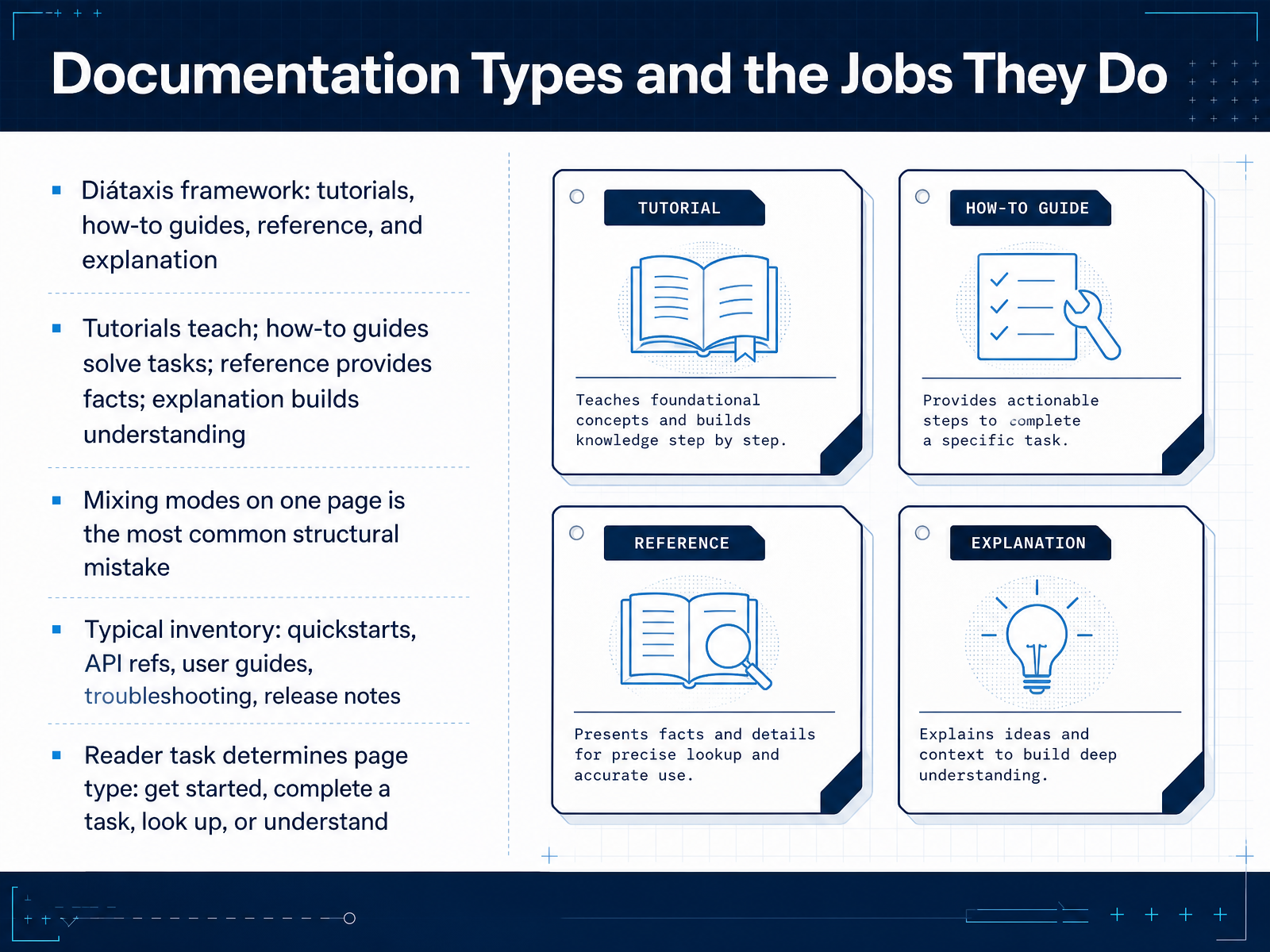
 - 03Documentation Types and the Jobs They DoLet's talk about documentation types and the jobs they do. The Diátaxis framework is your best mental model here. It splits everything into four modes. Tutorials teach. How-to guides solve tasks. Reference provides facts. And explanation builds understanding. The most common structural mistake I see? Mixing these modes on a single page. A tutorial clogged with reference detail stops teaching. Reference docs padded with explanation become hard to scan. So keep them separate. In practice, your typical inventory will look like this. Quickstarts. API references. User guides. Troubleshooting pages. Release notes. Each one serves a different reader task. Get started. Complete a task. Look something up. Or understand a system. When you're about to write a page, ask yourself what the reader is actually trying to do. That question decides the type. And the type decides the structure. Up next, we'll look at how to match these documentation types to your specific audience and context.
 softwarephilosopher.comdocsio.cotechtarget.com+21 min
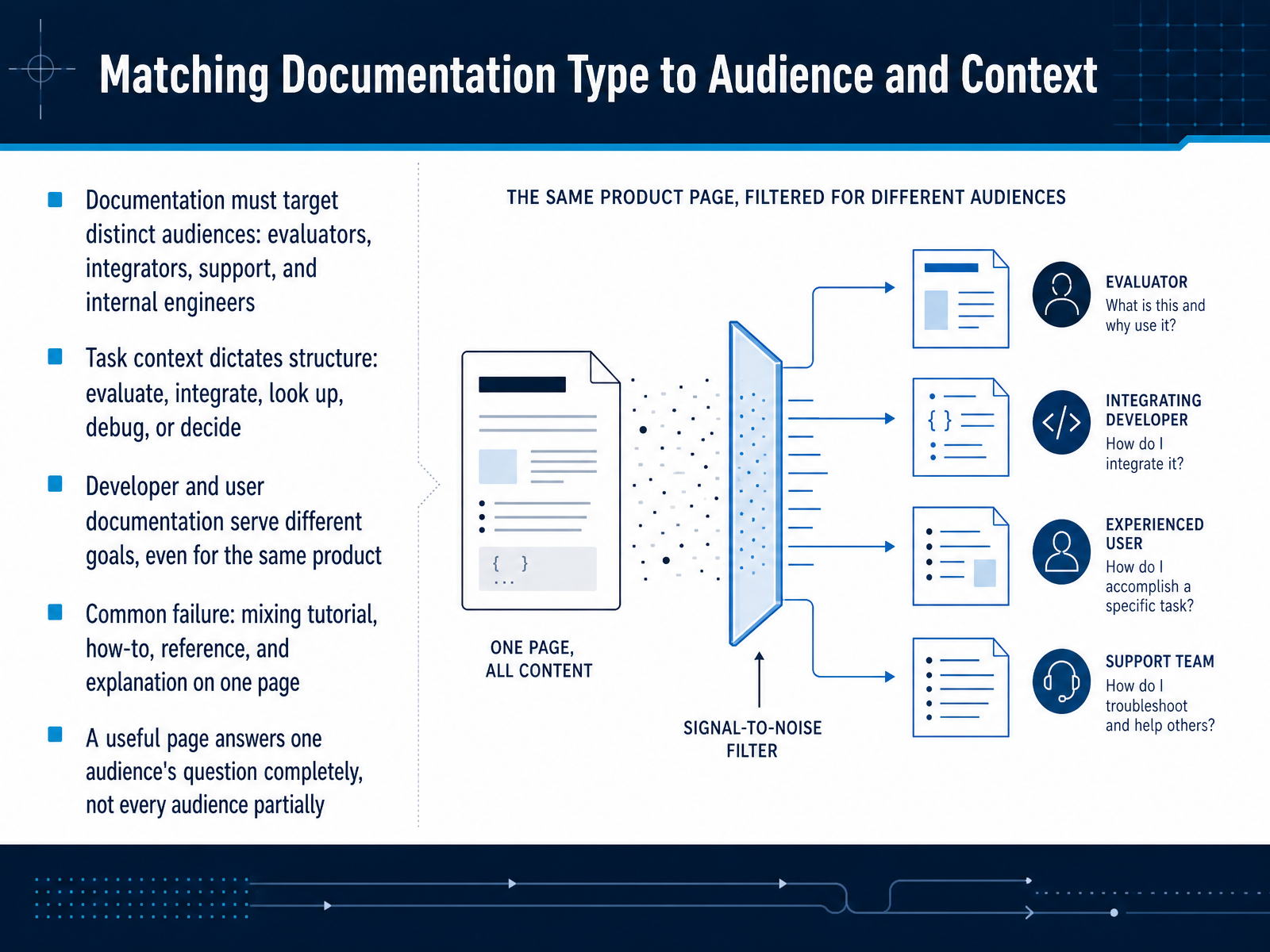
 - 04Matching Documentation Type to Audience and ContextSo here is where most documentation goes off the rails. Different readers come to your docs with completely different jobs. An evaluator wants to know if your product is worth trying. An integrator wants to make the first API call. A support engineer wants to fix a specific error. And an internal engineer wants to understand why a design decision was made. The reader's task should dictate the structure. A tutorial teaches from zero. A how-to solves a real problem. Reference answers a precise question. Explanation builds understanding. These four types are not interchangeable. The most common failure is mixing them on one page. That tutorial that stops to list every parameter? It stops teaching. That reference page that explains the history of the system? It stops being scannable. A useful page answers one audience's question completely, not every audience partially. So before you write, ask yourself: who is reading this, and what will they do with the answer? That discipline will shape everything that follows. Next, let's talk about how to write instructions people can actually follow.
 softwarephilosopher.comdocsio.cotechtarget.com+21 min
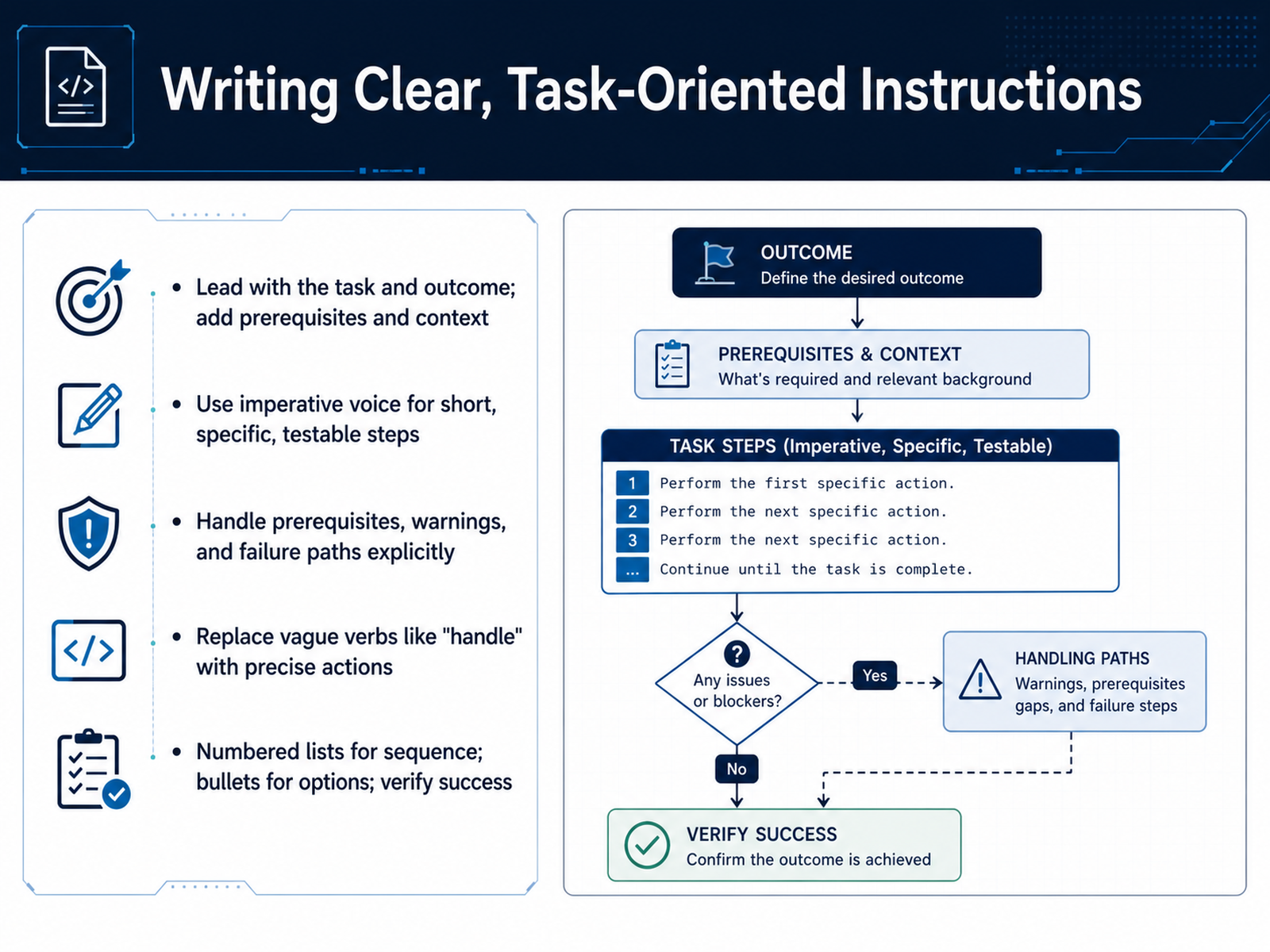
 - 05Writing Clear, Task-Oriented InstructionsLet’s talk about writing instructions that actually work. The key is to lead with the task and the outcome. State what the reader will achieve in one sentence, then list the prerequisites. Don’t bury the goal in background. Use the imperative voice for each step. Keep steps short, specific, and testable. Instead of 'handle the configuration,' write 'set the timeout value to 30 seconds.' And handle the edge cases explicitly. Warnings, failure paths, and prerequisites should be visible, not implied. For structure, use numbered lists for sequences, bullets for options, and always end with a verification step so the reader knows they succeeded. This turns a vague description into a reliable procedure. Next, we’ll look at writing effective API reference content.
 llmbestpractices.comdevelopers.google.comdeveloper.mozilla.org+21 min
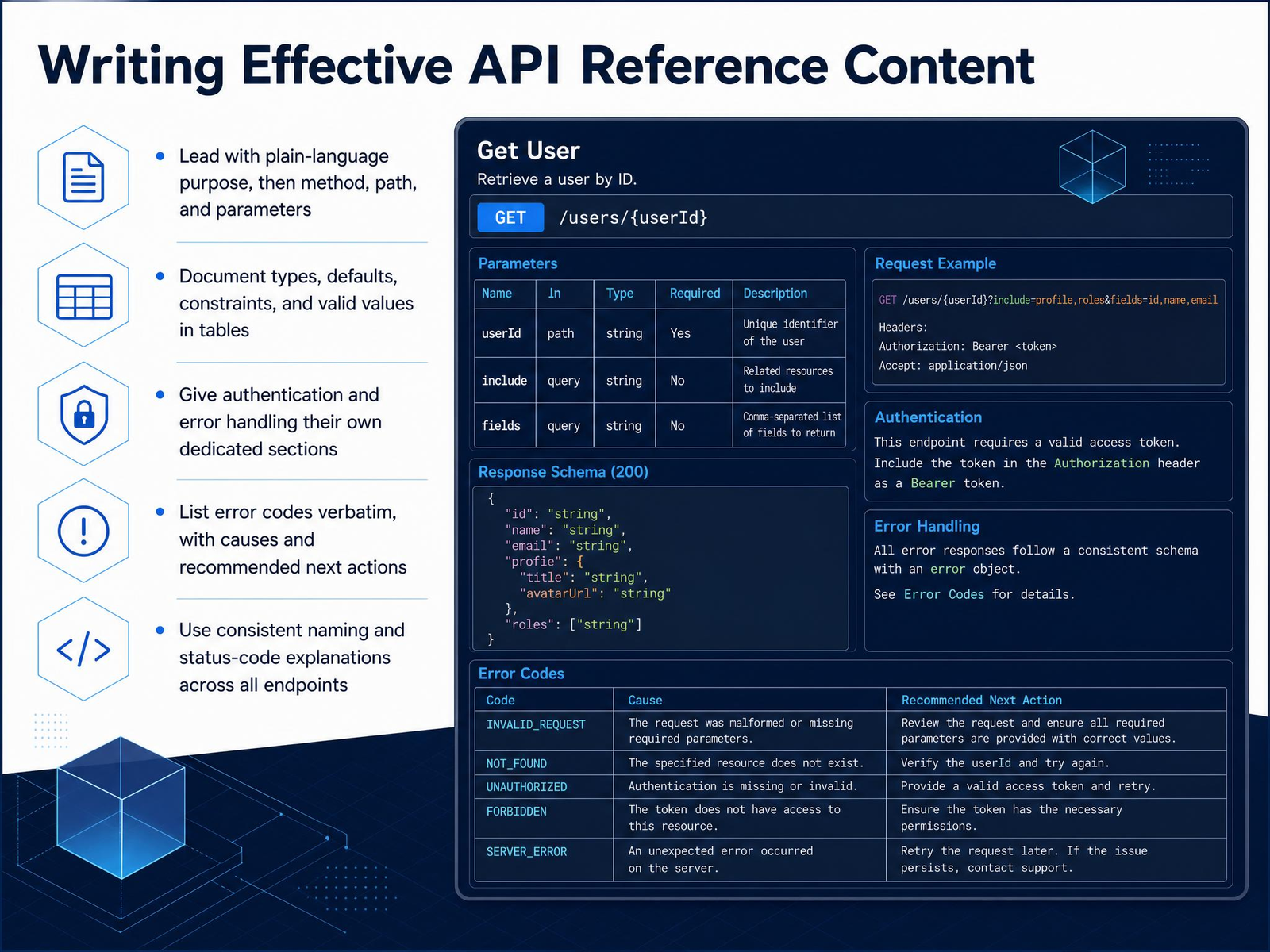
 - 06Writing Effective API Reference ContentNow let's get into the heart of the matter: writing API reference content that developers can actually use. The first rule is to lead with plain language. State the endpoint's purpose in one sentence before you show the method and path. For example, instead of just saying 'POST /users,' say 'Creates a new user account and triggers a verification email.' Then, document the parameters in a table. Include the name, type, whether it's required, the default, any constraints, and valid values. Tables are scannable; long paragraphs are not. Also, give authentication and error handling their own dedicated sections. Don't bury them in the endpoint description. For errors, list the codes verbatim, exactly as they appear in the response, then explain the cause and the recommended next action. For instance, '401 invalid_api_key' should clearly say 'Check your Authorization header format.' Finally, keep naming and status-code explanations consistent across every endpoint. If you call it an 'API key' in one place, don't call it an 'access token' in another. Consistency builds trust. That's the foundation. Next, we'll look at writing code examples that actually help developers.}
 docsio.cobuildwithfern.commintlify.com+21 min
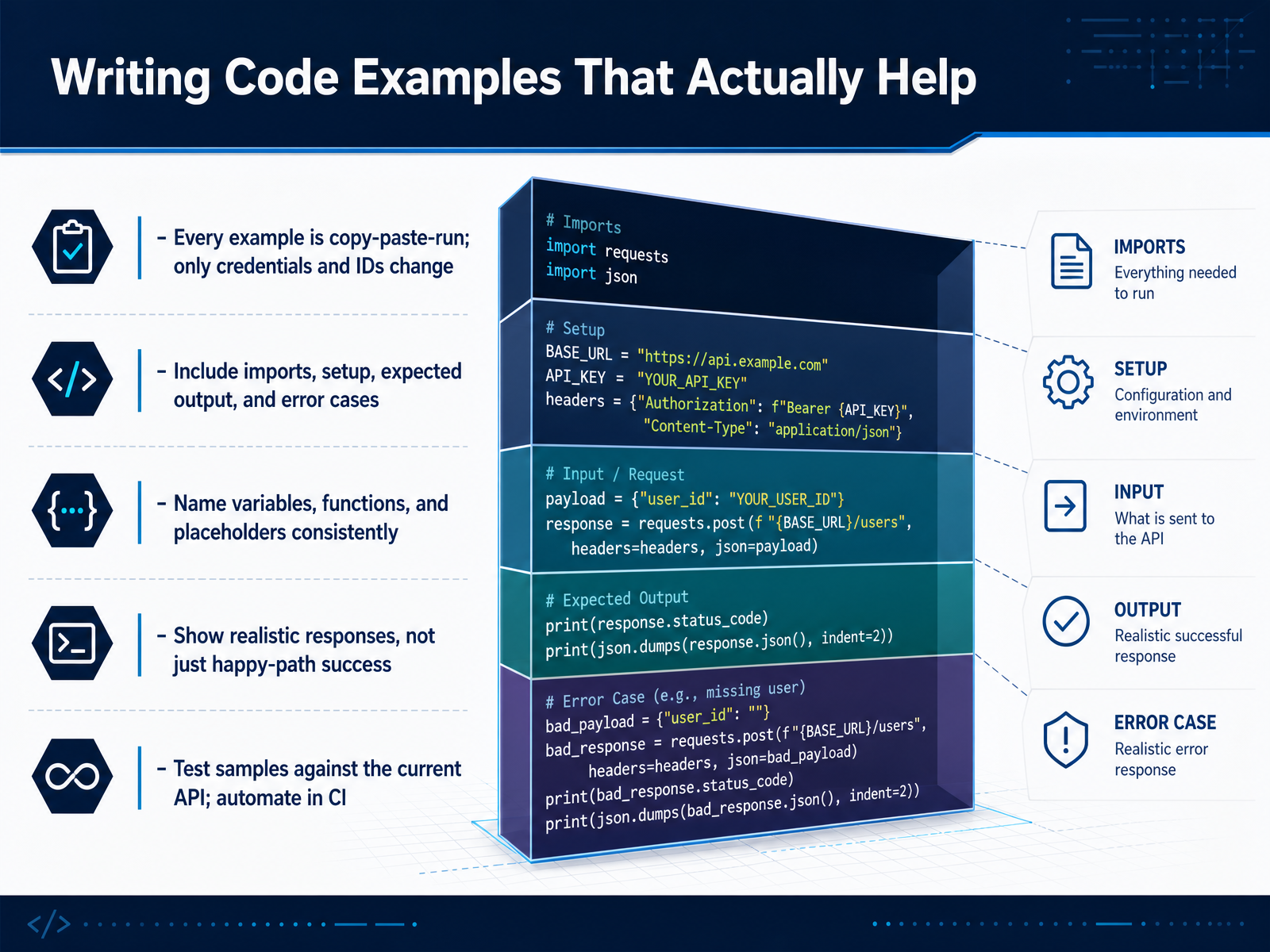
 - 07Writing Code Examples That Actually HelpLet's talk about writing code examples that actually help. The golden rule is simple: every example must be copy, paste, run. The only things a reader should change are credentials and IDs. If they have to reconstruct imports or setup, you have lost them. Show the complete picture. Include the imports, the setup, and the expected output. And do not hide the error cases. Show what a failed request looks like. Developers learn more from a realistic 4 0 1 response than from a perfect 2 0 0. Keep your variable names and placeholders consistent. Don't call it a token one place and a key the next. Use realistic data. A response full of empty strings teaches nothing about the structure. Finally, test your samples. Run them against the current API. Automate that check in your continuous integration pipeline, so a broken example blocks the merge. A stale example costs more trust than a missing one. Up next, we'll look at how structure and information architecture make your docs easier to navigate.
 llmbestpractices.comdevelopers.google.comdeveloper.mozilla.org+22 min
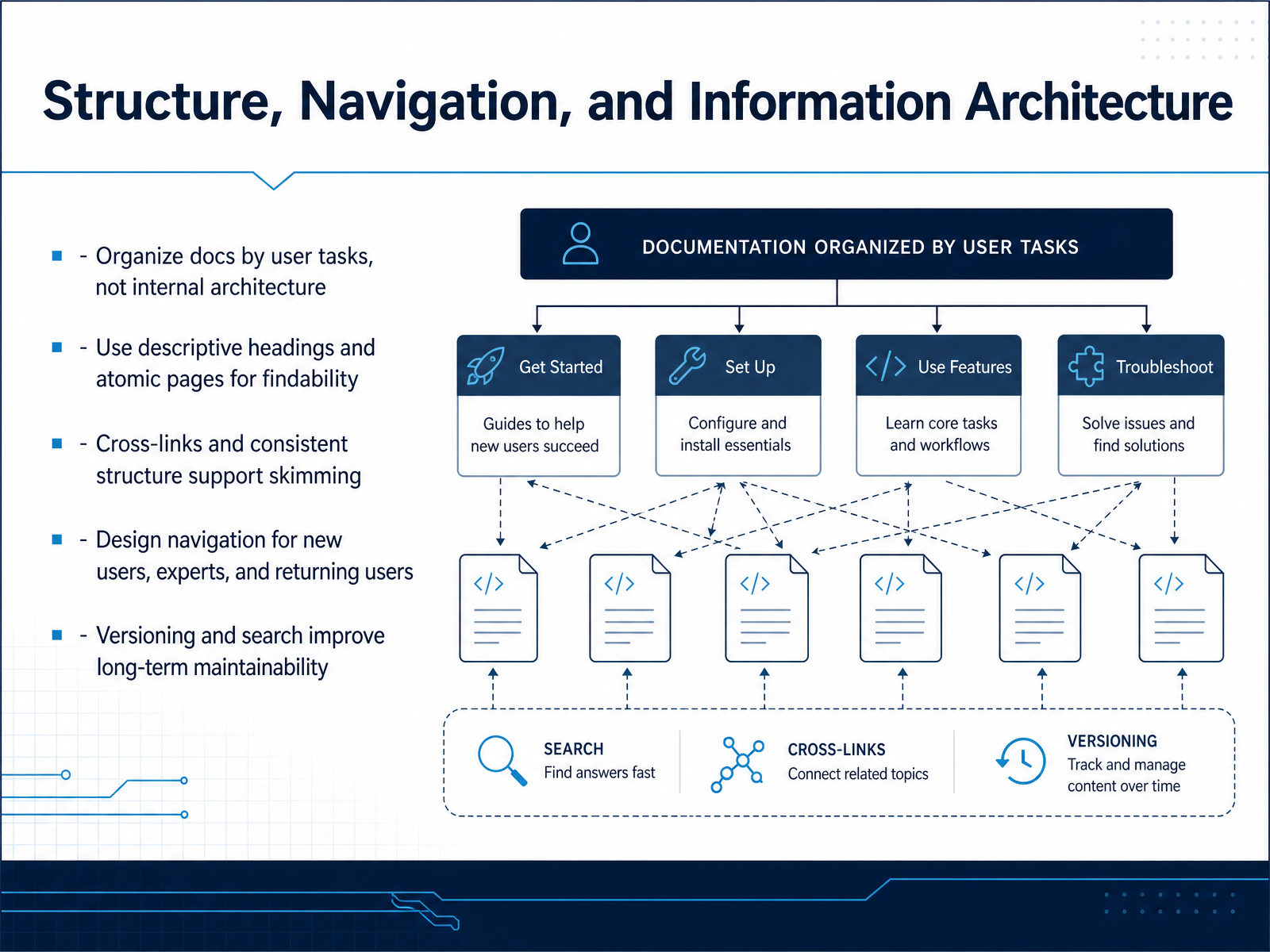
 - 08Structure, Navigation, and Information ArchitectureNow let's talk about structure, navigation, and information architecture. This is where most documentation projects succeed or fail. The golden rule: organize your docs around user tasks, not your internal architecture. Nobody cares which team owns which service. They care about deploying a static site, or debugging an authentication failure. So title pages by task, not by module name. Next, use descriptive headings and keep pages atomic. One page should answer one question completely. When a page grows beyond that, split it and link the parts. Atomic pages are easier to find, easier to update, and they don't rot. Cross-links and consistent structure support skimming. Engineers don't read docs linearly. They scan for keywords and jump to the answer. So make sure every page links to the next logical step, and that your navigation mirrors that flow. Design navigation for three audiences: new users need a getting-started path, experts need direct access to reference, and returning users need search and versioning to find what changed. Versioning and search are what keep docs maintainable long-term. If a developer can't find the right version, they'll assume the docs are wrong. So structure for tasks, keep pages atomic, and design for the way people actually scan.
 softwarephilosopher.comdocsio.cotechtarget.com+21 min
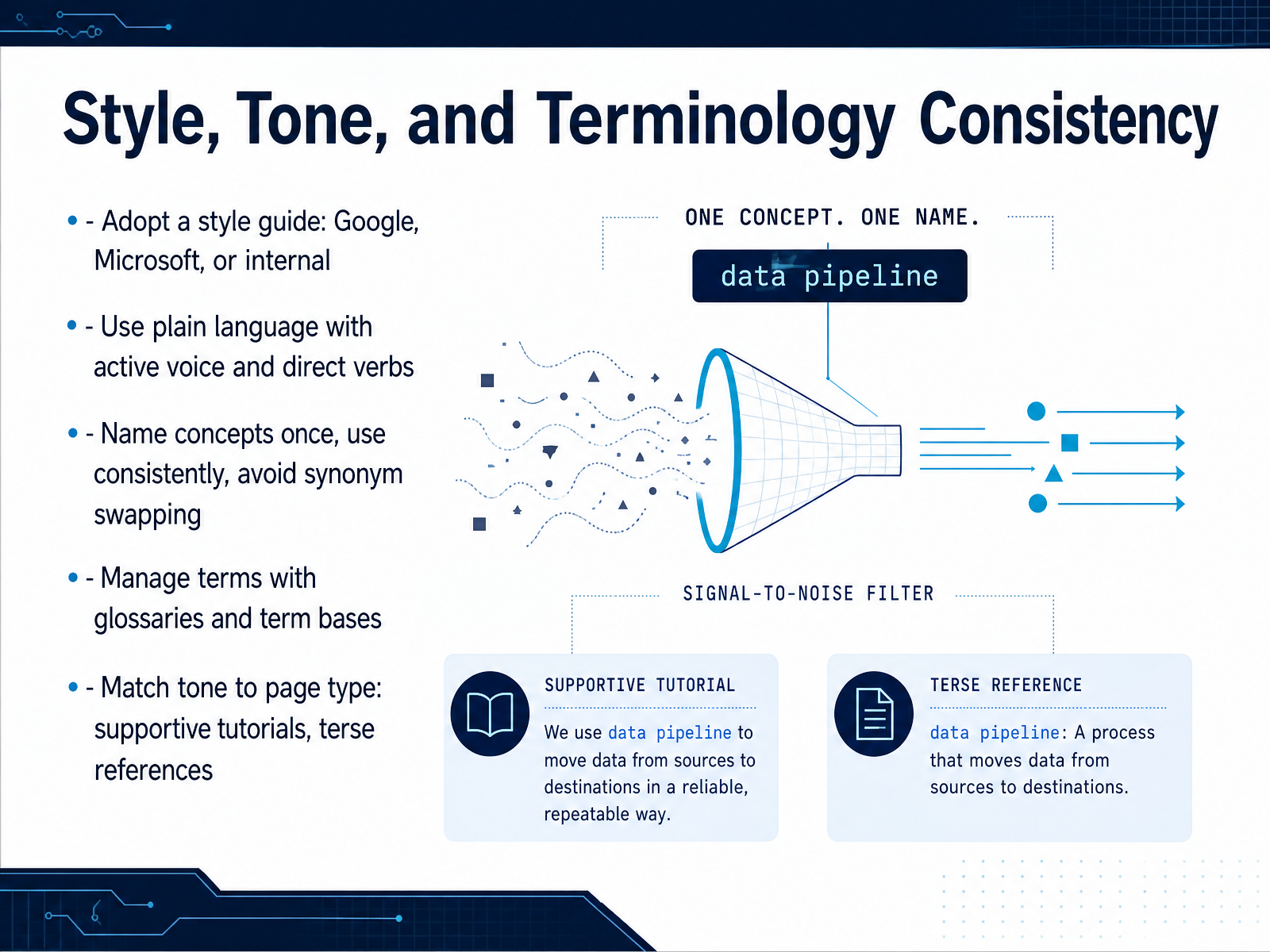
 - 09Style, Tone, and Terminology ConsistencyNow, let's talk about how consistency feeds into your writing process. The fastest way to achieve it is to adopt a style guide. Google's and Microsoft's are both solid, but an internal guide tailored to your product often works best. The point is to standardize decisions so no one has to make them from scratch. Use plain language, active voice, and direct verbs. Say "the API returns a token" instead of "a token is returned by the API." That clarity matters. Next: name each concept once. Pick a term and stick with it. Don't swap "request" for "call" for "invocation" to add variety. That makes one concept look like three. A glossary or term base keeps everyone aligned. Finally, match your tone to the page type. Tutorials should feel supportive; reference pages should be terse and factual. A tutorial that reads like a spec will frustrate beginners, and a reference page with tutorial fluff gets in the way of experts. Consistency is what turns a pile of documents into a trustworthy system. Next, we'll cover how to review, test, and keep that documentation alive.
 llmbestpractices.comdevelopers.google.comdeveloper.mozilla.org+22 min
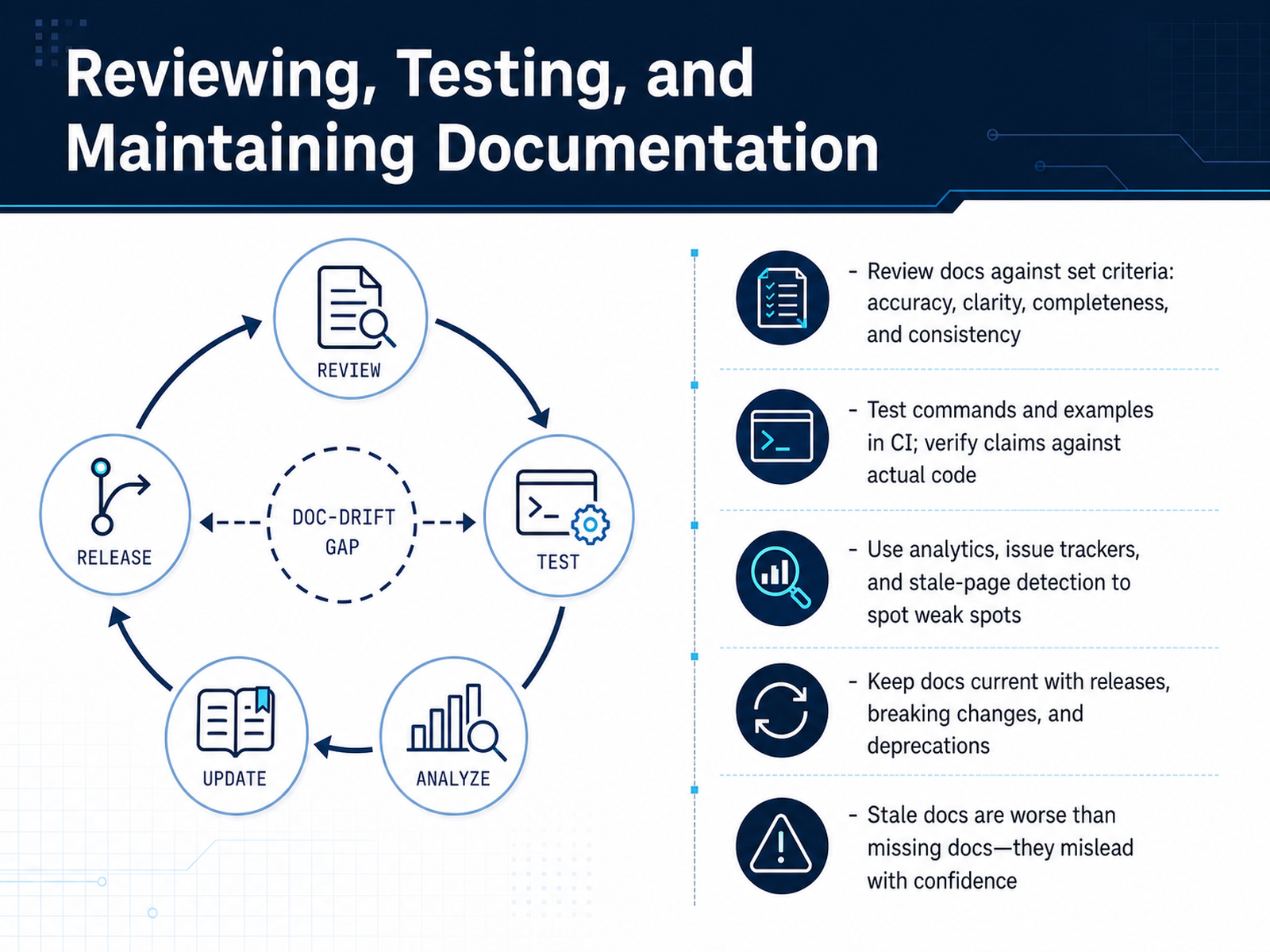
 - 10Reviewing, Testing, and Maintaining DocumentationWriting is only half the job. The other half is making sure the docs stay honest as the code evolves. So, let's talk about reviewing, testing, and maintaining documentation. First, define review criteria. Accuracy. Clarity. Completeness. Consistency. When you review, you check against those, not just for typos. Second, automate. Test every command and code example in CI. If your examples fail, they erode trust faster than missing them. Third, rely on data. Use analytics, issue trackers, and stale-page detection to find the weak spots. The pages people skip often point to the real problems. And critically, keep docs in sync with releases. Every breaking change or deprecation should land in the same pull request as the code change. Remember the rule: stale docs are worse than missing ones. Missing docs just create a question. Stale docs create a wrong answer, with confidence. So, treat maintenance as part of the engineering work, not an afterthought. Up next, we'll look at Docs as Code: Collaboration for Developers and Writers.
 llmbestpractices.comdevelopers.google.comdeveloper.mozilla.org+21 min
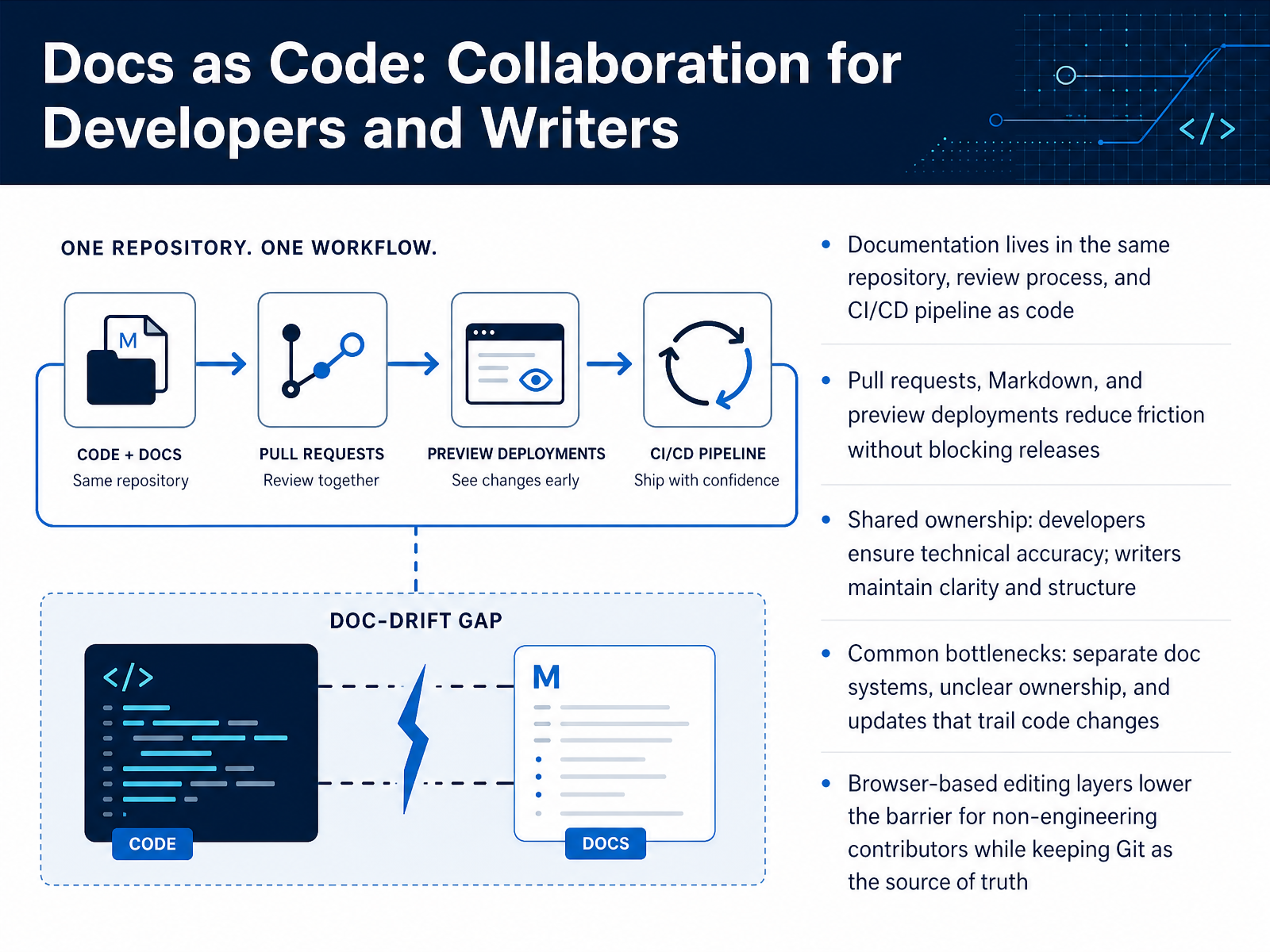
 - 11Docs as Code: Collaboration for Developers and WritersLet’s talk about how docs as code changes collaboration between developers and writers. The core idea is simple: documentation lives in the same repository as the code. It goes through the same pull requests, the same reviews, and the same CI/CD pipeline. That means a change to an API and its documentation can ship together in one atomic unit. No more separate doc systems, no more updates trailing behind the code. Instead, you get shared ownership. Developers verify technical accuracy, writers maintain structure and clarity. The pull request becomes the meeting point where both skill sets come together. Markdown keeps things simple, and preview deployments let reviewers see the rendered result before anything merges. Now, the common bottlenecks to watch for: separate documentation platforms that drift from the code, unclear ownership where nobody feels responsible, and updates that always lag behind the actual changes. One practical way to lower the barrier for non-engineers is a browser-based editing layer. It lets writers and product folks contribute without touching Git directly, while Git remains the source of truth. The result is a workflow where docs and code evolve together, reviewed and published through the same pipeline. Up next, we’ll look at automating documentation quality checks.
 sourcegraph.comdocslikecode.commintlify.com+22 min
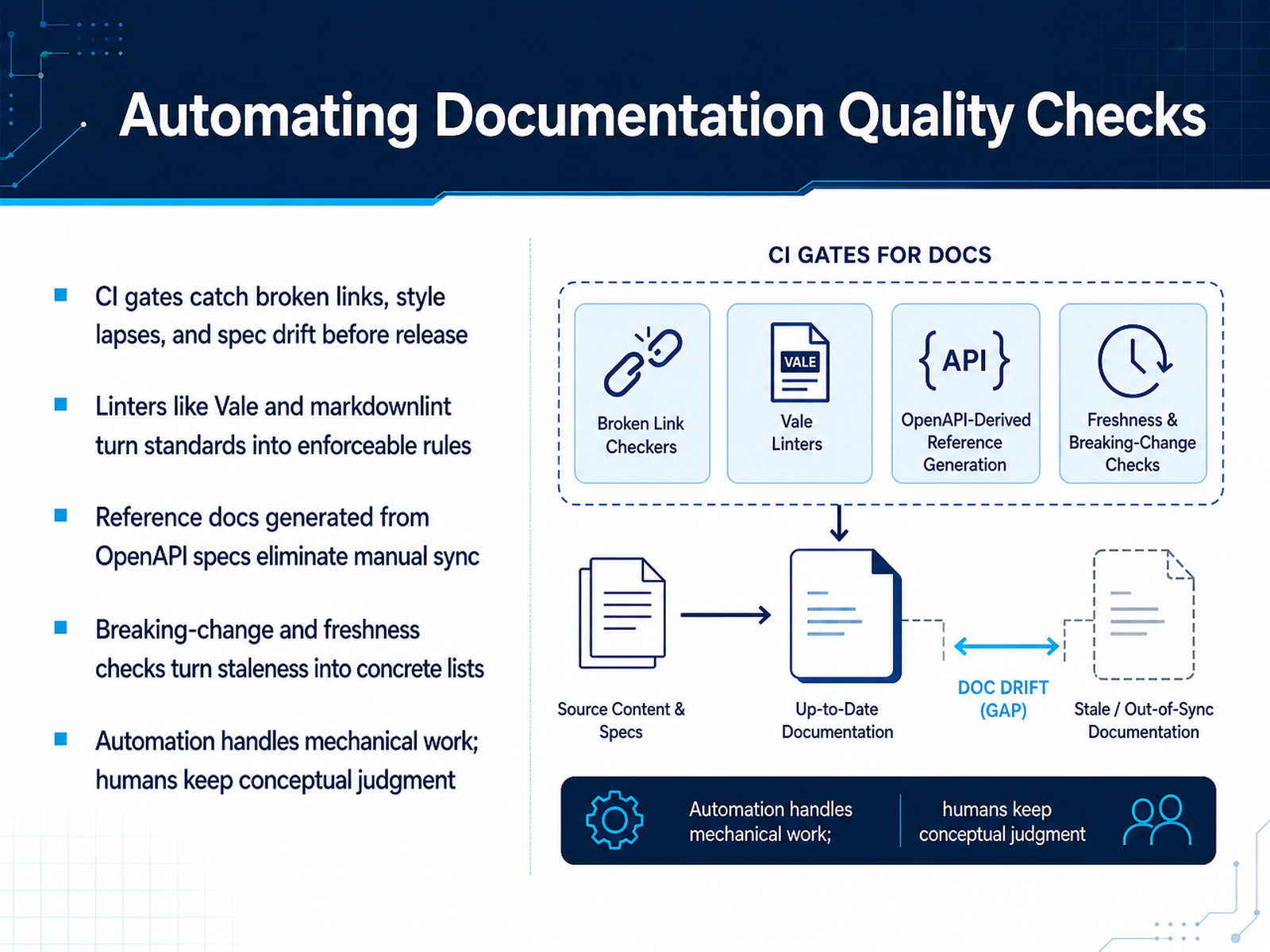
 - 12Automating Documentation Quality ChecksNow let's talk about automating quality checks. The safest way to keep documentation honest is to stop relying on memory and start relying on pipelines. Here's the principle: automation handles the mechanical work, and humans keep the conceptual judgment. Start with CI gates. They catch broken links, style lapses, and spec drift before anything ships. If a pull request breaks a link or violates a style rule, the build fails. That's it. No negotiation. Tools like Vale and markdownlint turn your standards into enforceable rules, so consistency isn't a matter of opinion. For API reference content, generate it directly from the OpenAPI spec. That way, the documentation cannot drift from the contract, because they come from the same source. Add breaking-change detection in CI, so a removed field gets flagged before it reaches the published page. And for staleness, schedule automated freshness checks that flag pages untouched for too long. That turns a vague worry into a concrete list. The takeaway is simple: let machines do the repetitive checks, and free your team for the judgment calls only humans can make. Next, let's look at writing for both humans and AI readers.
 llmbestpractices.comdevelopers.google.comdeveloper.mozilla.org+22 min
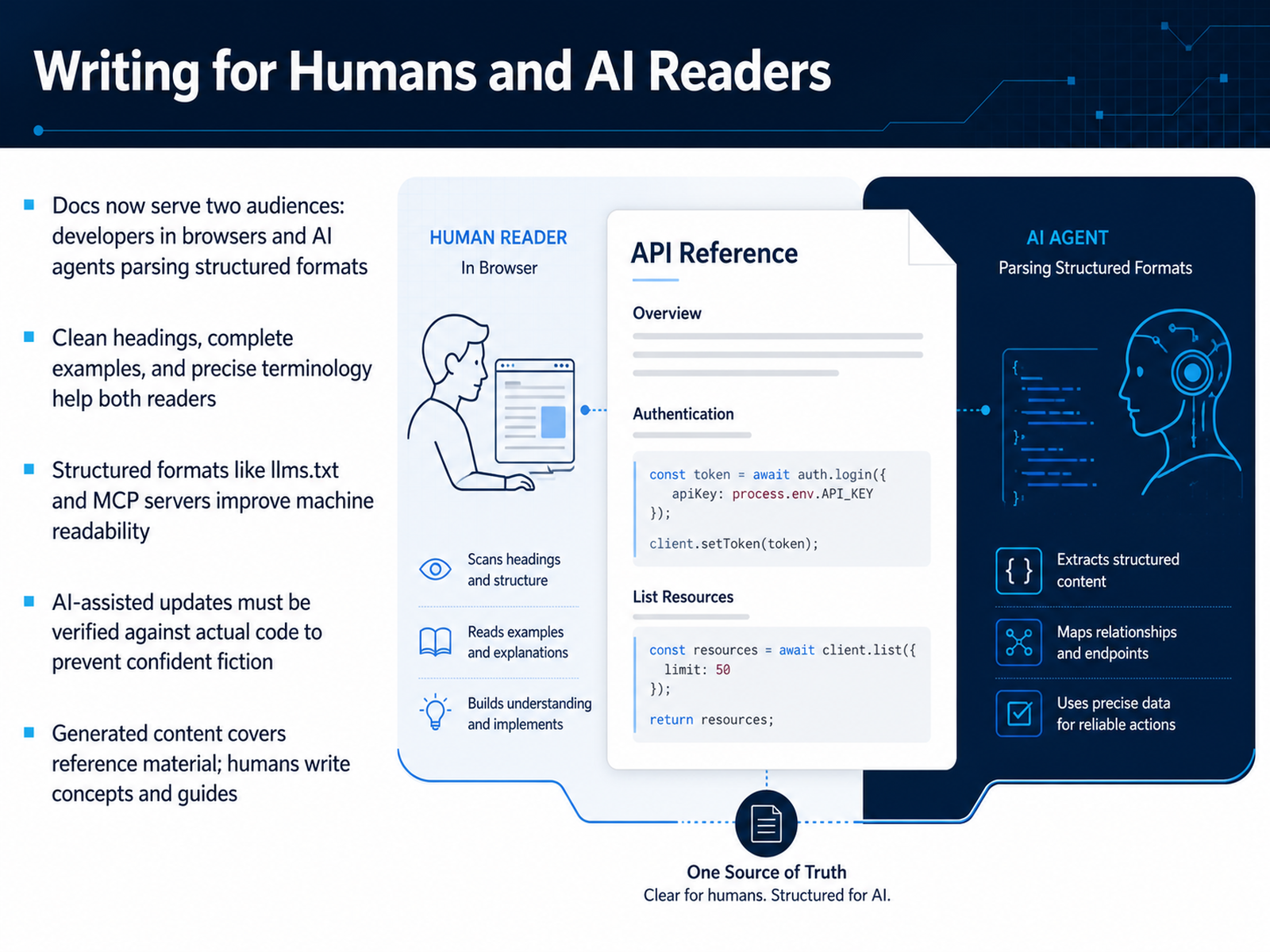
 - 13Writing for Humans and AI ReadersLet's talk about the newest member of your audience: the AI reader. Your documentation now serves two very different consumers. On one side, a developer scanning for a quick answer in the browser. On the other, an AI agent parsing your pages as structured data to complete a coding task. The good news? Clean headings, complete examples, and precise terminology serve both equally well. A descriptive heading helps a human skim, and it helps a model retrieve the right section. A runnable example proves your claim to a developer, and it gives an agent ground truth to reference. Structured formats like llms.txt files and MCP servers take this further. They give machines a direct, well-organized path into your knowledge, which is like providing a table of contents for your docs' robotic visitors. But here's the critical caution. AI-generated updates are a real risk. They can be confidently wrong. An assistant might update a page to match what it thinks your code does, not what it actually does. You must verify those claims against the real source code. Think of the division this way: generated content is perfect for covering reference material. Humans write the concepts, judgments, and guides. That part is irreplaceable. So, as you write, remember your shared foundation: structure for clarity, and always verify the facts. Which leads us to our final step, applying all of this to a real documentation fix.
 llmbestpractices.comdevelopers.google.comdeveloper.mozilla.org+22 min
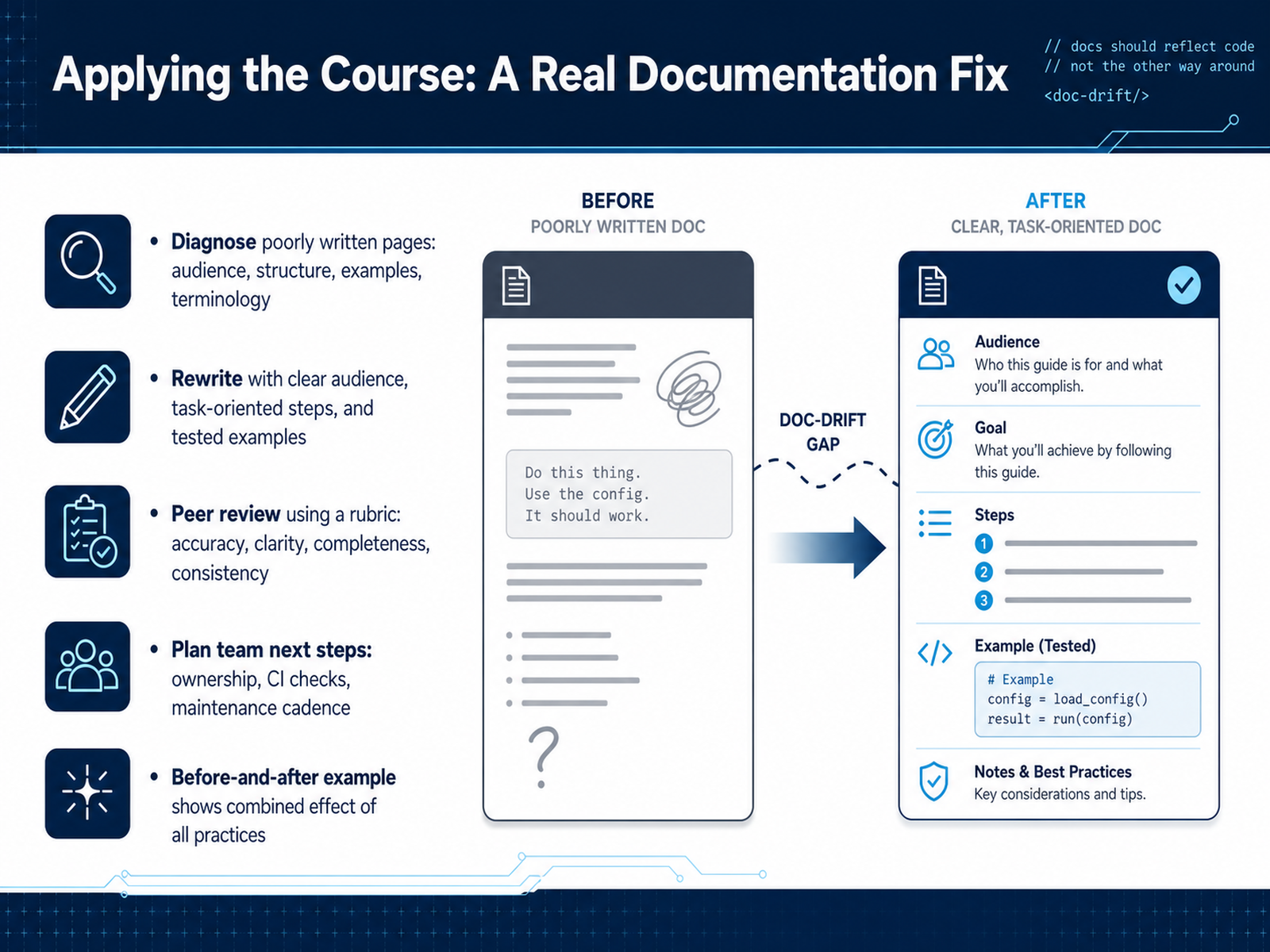
 - 14Applying the Course: A Real Documentation FixLet’s bring everything together with a real documentation fix. Start by diagnosing the problem page. Ask who reads it, what task they’re trying to complete, and whether the structure supports them. If it mixes reference with a how-to, that’s usually the first smell. Next, rewrite with a clear audience and task-oriented steps. Lead with the outcome, list prerequisites, and use examples you’ve actually tested. A code sample that doesn’t run is worse than a missing one. Then move to peer review. Use a rubric focused on four things: accuracy, clarity, completeness, and consistency. Accuracy means the docs match the code. Clarity means a new reader can follow it cold. Completeness covers edge cases and errors. Consistency is about terminology and format. Finally, plan team next steps. Assign a named owner for that section, add CI checks for links and example builds, and set a maintenance cadence. That might be quarterly or tied to releases. A before-and-after example shows the combined effect of all these practices. One page improved this way becomes the template for every other page. Thanks for working through this course. You now have the tools to make your docs genuinely useful. Go fix one page today, and let that momentum carry you forward.
 softwarephilosopher.comdocsio.cotechtarget.com+22 min
Take the deck with you
Download this course as a file — free, no sign-up needed.
- PDF handoutEvery slide page, ready to print or share.15 pages · 3.7 MBDownload
- Narrated PowerPointThe deck that presents itself — every slide carries the digital human's narration video.15 pages · 14.7 MBDownload
- PowerPoint slidesThe full deck as a .pptx — open it in PowerPoint, Keynote, or Google Slides.15 pages · 3.5 MBDownload
Free to use in your own training — please keep the PersonWise credit page at the end.
Have your own deck? Turn it into a course
Sources consulted
Web sources consulted while building this course.
- Technical writing standards for developer documentation · llmbestpractices — llmbestpractices.com
- Technical Writing | Google for Developers — developers.google.com
- Creating effective technical documentation — developer.mozilla.org
- How to write technical documentation: a complete guide (August 2026) | Fern — buildwithfern.com
- Technical Writing for Engineers: The 80/20 Guide | Ninad Pathak — ninadpathak.com
- Types of software documentation (with examples) - Software Philosopher — softwarephilosopher.com
- Software Documentation Examples That Actually Help | Docsio — docsio.co
- What is Software Documentation? Definition, Types and Examples — techtarget.com
- Documentation Types - Documentation Guide — docs-guide.readthedocs.io
- What Is Technical Documentation, and What Should It Include? | Ninad Pathak — ninadpathak.com
- 12 API Documentation Best Practices That Actually Work (2026) | Docsio — docsio.co
- API documentation best practices guide Feb 2026 - Fern: Docs — buildwithfern.com
- How to write API documentation: a step-by-step guide — mintlify.com
- Best Practices for API Documentation: How to Write, ... — readme.com
- API Documentation Best Practices: Complete Guide for 2026 | API Status Check Blog — apistatuscheck.com
- Documentation as Code: A Practical Guide for Dev Teams | Sourcegraph — sourcegraph.com
- Set Up Automated Tests for Docs | Let’s Treat Docs Like Code — docslikecode.com
- What is docs-as-code? Approach, workflows, and how to adopt it — mintlify.com
- Docs-as-Code in 2026: The Complete Guide | Unmarkdown™ Blog — unmarkdown.com
- What Is Docs as Code? A Practical Guide for 2026 | Docsio — docsio.co