Begin
14 pages · ~28 min
SQL Query Patterns: Strengths and Pitfalls
Learn common SQL query patterns, their strengths, and pitfalls in this training for database users seeking to write more effective queries.
A digital instructor presents all 14 pages. Hold “Ask” at any point and ask out loud — the answer comes from this course. No sign-up needed.
What you’ll learn
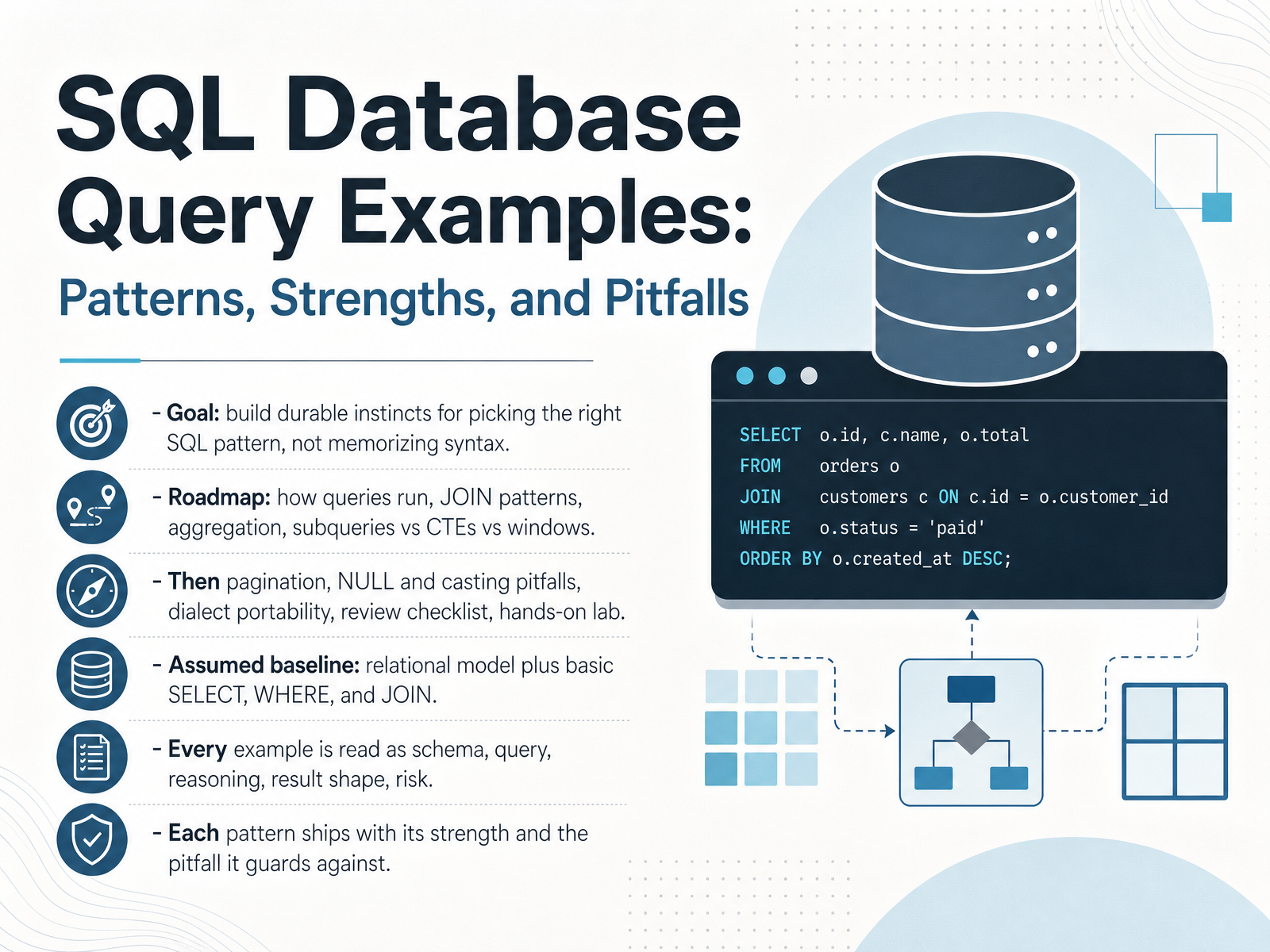
- 01SQL Database Query Examples: Patterns, Strengths, and PitfallsWelcome. I'm glad you're here. In the next few minutes, we're going to build durable instincts for choosing the right SQL query pattern, instead of memorizing syntax you'll forget next week. Here's the roadmap. We'll start with how a query actually runs, then move through join patterns, aggregation, and the choice between subqueries, common table expressions, and window functions. From there, we'll cover pagination, null handling and casting pitfalls, dialect portability, a review checklist, and a hands-on lab. I'm assuming you already know the relational model and basic select, where, and join statements. That's enough. Every example follows the same path. First the schema, then the query itself, then the reasoning behind it, then the shape of the result, and finally the risk it carries. Each pattern ships with its strength and the pitfall it guards against. So by the end, you'll recognize trouble before it reaches production. Let's start with our first topic: how a query actually runs, reading an example end to end.learn.microsoft.compostgresql.orgsqlite.org+22 min
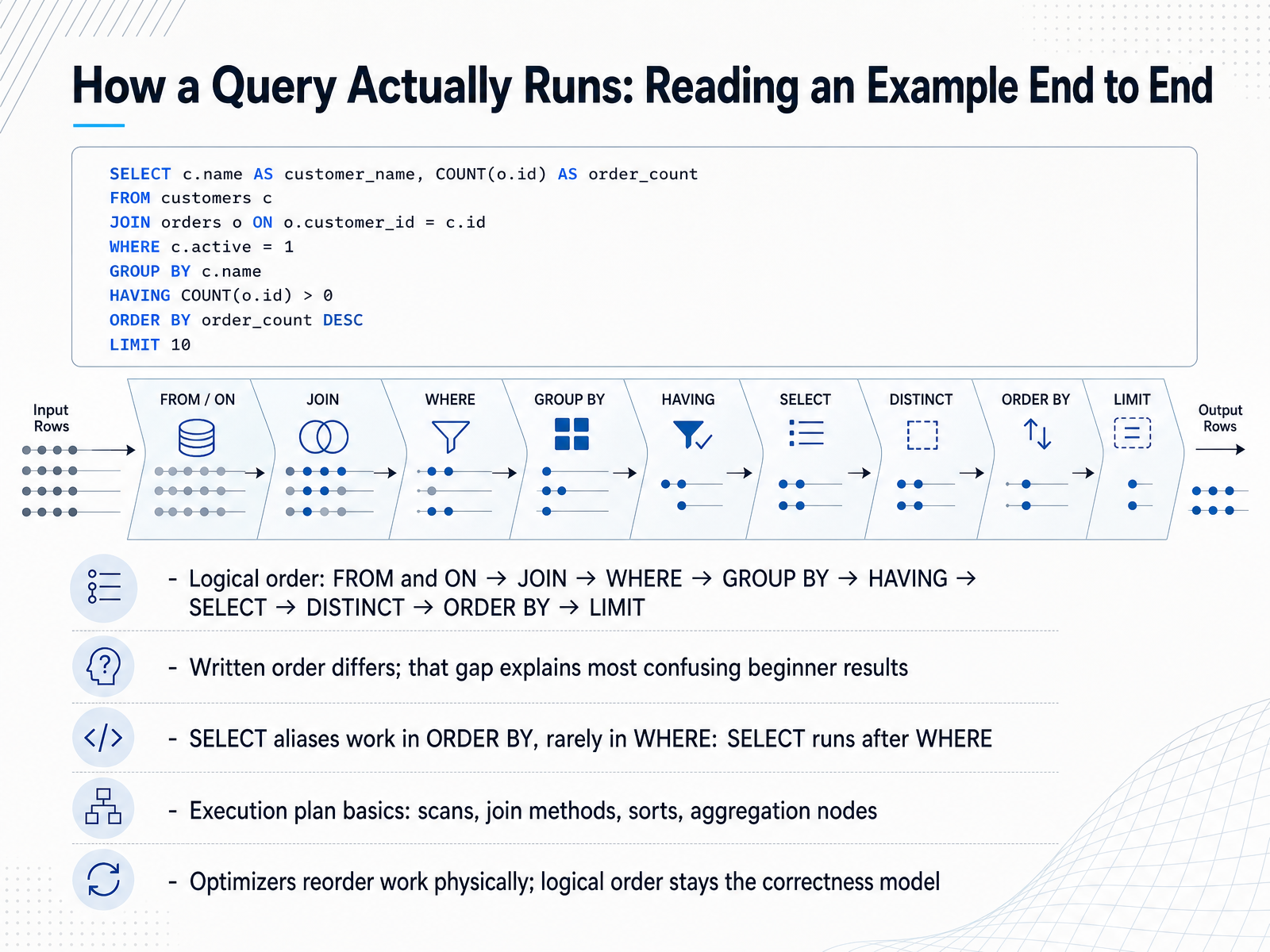
- 02How a Query Actually Runs: Reading an Example End to EndLet's open up the hood and walk through one query end to end. When you write a SELECT statement, you type the clauses in one order, but the database evaluates them in a different logical order. That order is FROM and ON, then JOIN, then WHERE, then GROUP BY, then HAVING, then SELECT, then DISTINCT, then ORDER BY, and finally LIMIT. Here's why this matters. SELECT runs after WHERE. So a column alias you define in SELECT cannot be used in WHERE, because that alias does not exist yet. You will usually see an error like invalid column name. But ORDER BY runs later, so the same alias works fine there. For example, you can write SELECT price times quantity AS total, and then order by total. When you look at an execution plan, you see physical operators like table scans, join methods, sorts, and aggregation nodes. The optimizer is free to reorder that physical work for speed. The logical order stays your correctness model. Keep it in mind, and most confusing results start to make sense.
Next, we will look at WHERE versus HAVING, aliases, and other ordering traps.
 learn.microsoft.compostgresql.orgsqlite.org+22 min
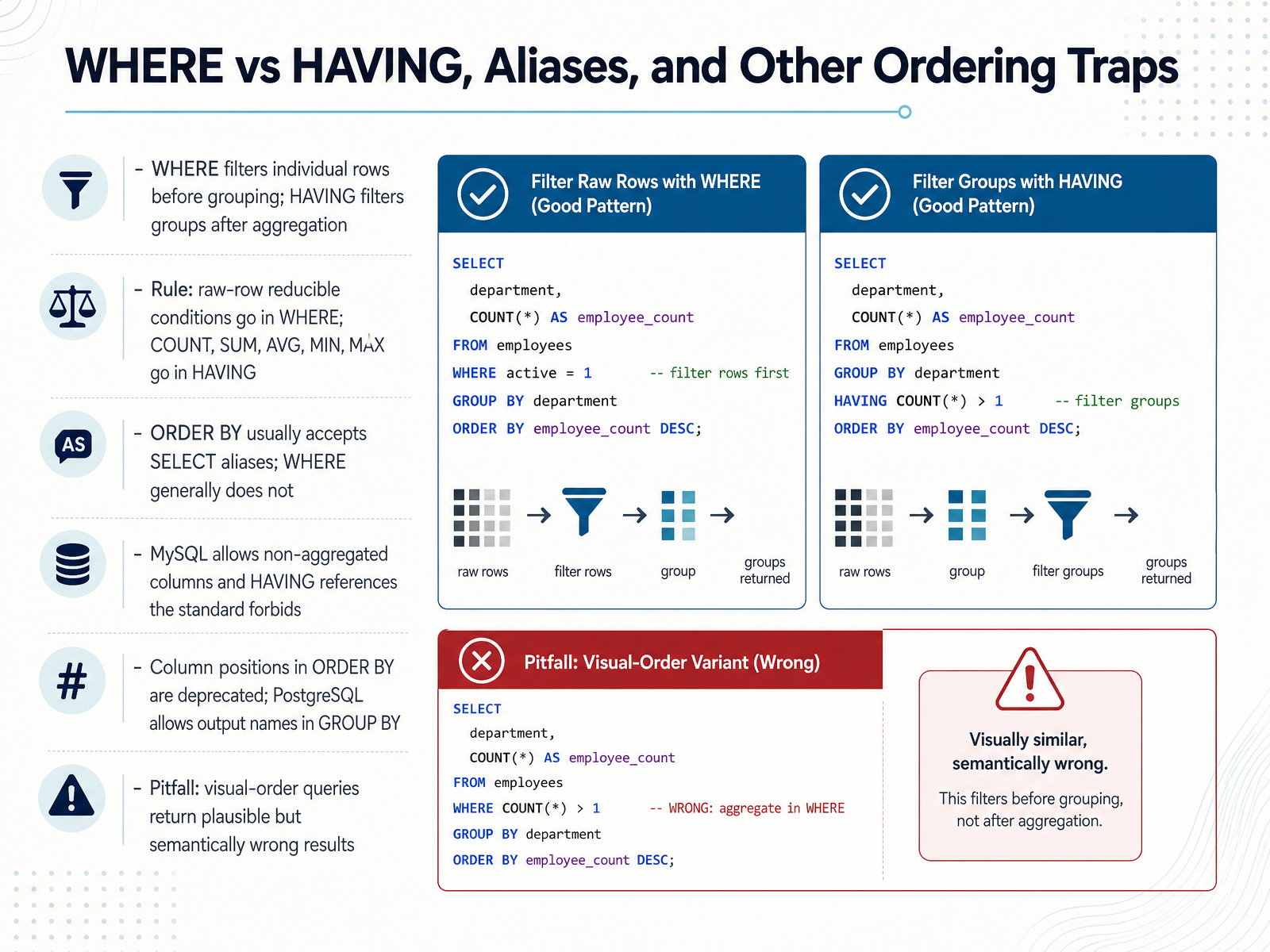
 - 03WHERE vs HAVING, Aliases, and Other Ordering TrapsNow let's look at three ordering traps that trip up even experienced SQL writers. First, WHERE versus HAVING. WHERE filters individual rows before grouping. HAVING filters groups after aggregation. So a condition you can check on raw rows, like order_status equals paid, goes in WHERE. A condition that needs an aggregate, like COUNT of orders greater than or equal to three, goes in HAVING. A simple rule: if it can reduce raw rows before grouping, put it in WHERE. If it needs COUNT, SUM, AVG, MIN, or MAX across a group, put it in HAVING. Second trap: aliases. ORDER BY is evaluated after SELECT, so it can normally use a SELECT alias, such as ORDER BY order_count. WHERE runs before SELECT, so it usually cannot use that alias. Third trap: permissive behavior in MySQL and PostgreSQL. MySQL allows non-aggregated columns in the select list and lets HAVING reference things the SQL standard forbids. PostgreSQL allows output names in GROUP BY. Column positions in ORDER BY, like ORDER BY two, are deprecated because the standard removed that syntax. The pitfall to remember: if you write clauses in visual order rather than logical order, the query still runs, but it can return plausible results that are semantically wrong. Trust the logical order: FROM, WHERE, GROUP BY, HAVING, SELECT, ORDER BY. Next, we move into join patterns, covering INNER, LEFT, RIGHT, FULL, CROSS, and self joins.
 learn.microsoft.compostgresql.orgsqlite.org+22 min
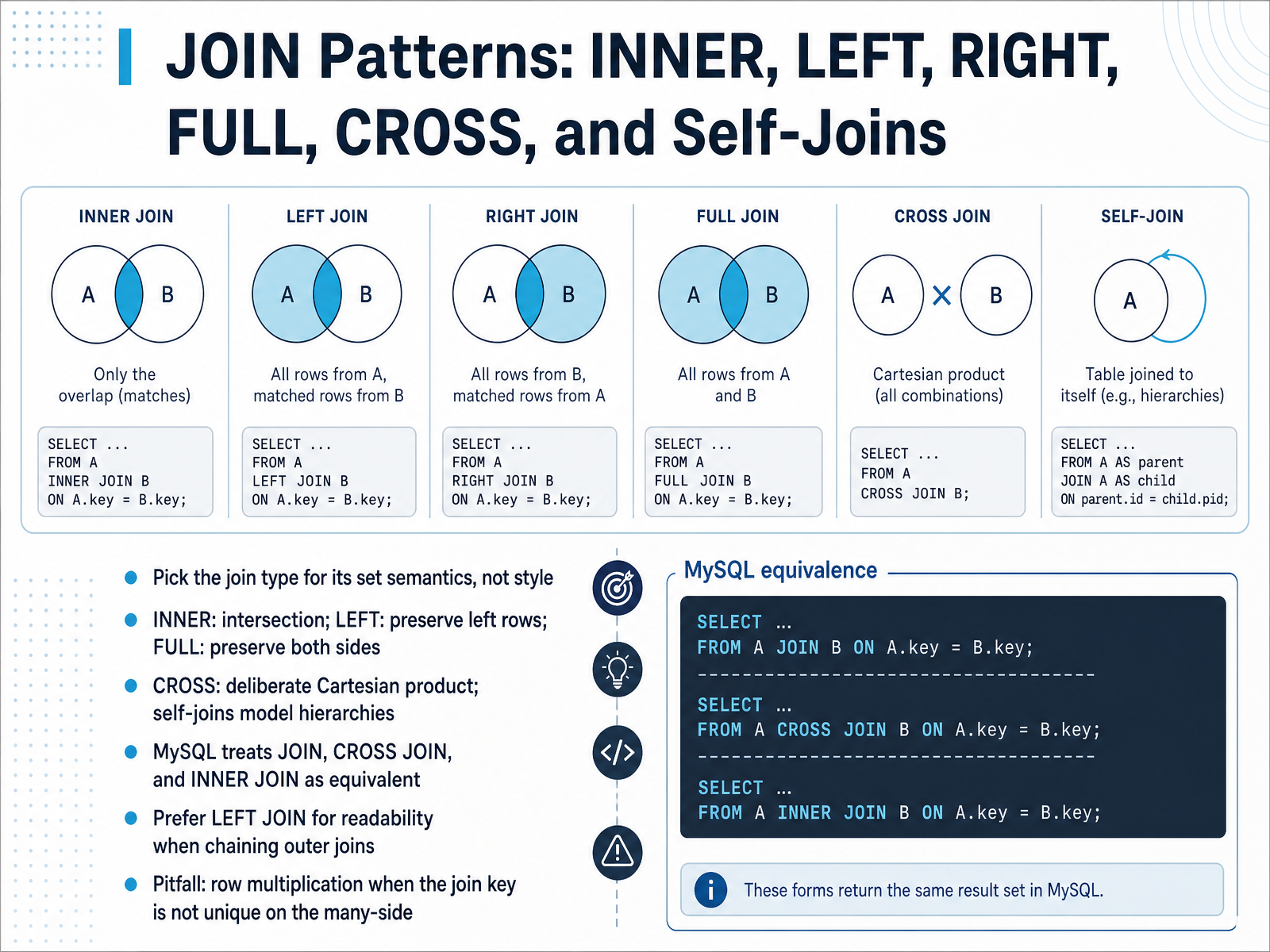
 - 04JOIN Patterns: INNER, LEFT, RIGHT, FULL, CROSS, and Self-JoinsNow let's talk about JOIN patterns. Choose a join type for its set semantics, not for style. INNER JOIN returns the intersection, only rows that match on both sides. LEFT JOIN keeps every row from the left table and pads missing right columns with NULL. FULL JOIN preserves rows from both sides. CROSS JOIN produces a deliberate Cartesian product, so a table with one hundred rows joined to one with fifty rows gives you five thousand rows. A self-join is when you join a table to itself, which is useful for modeling hierarchies like employees and their managers. One practical note. In MySQL, JOIN, CROSS JOIN, and INNER JOIN are syntactic equivalents. Also, prefer LEFT JOIN over RIGHT JOIN when chaining outer joins, because it reads top to bottom and keeps your intent clearer. Here is the pitfall to watch. If the join key is not unique on the many-side, each match multiplies your rows. You will see duplicated values in the left table columns, and your totals will be wrong. Always check the cardinality of your join key before trusting the count. Next, we focus on the left join filter trap, and how it can quietly turn into an inner join.
 stackoverflow.comdev.mysql.comoneuptime.com+22 min
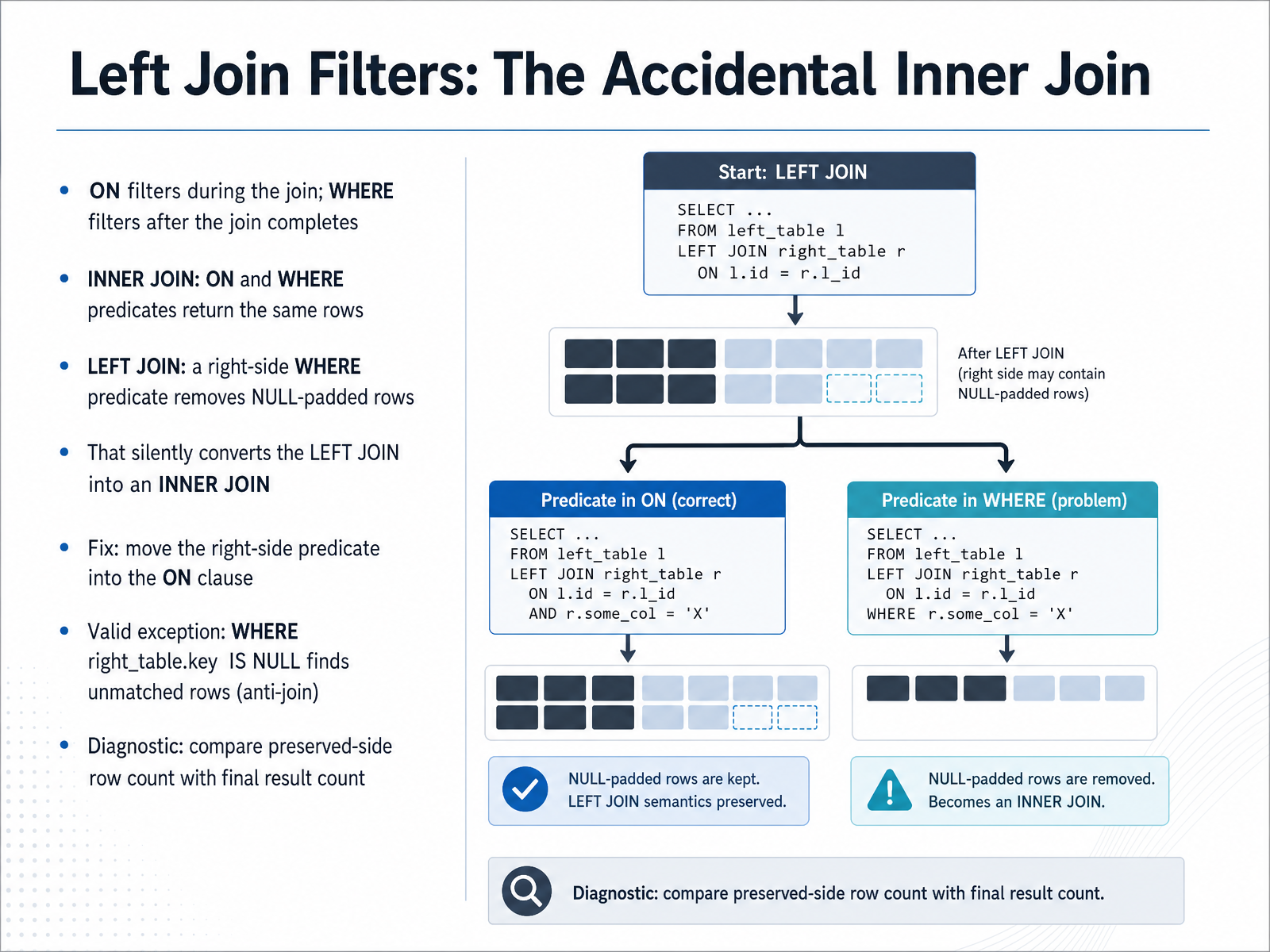
 - 05Left Join Filters: The Accidental Inner JoinLet's look at one of the most common silent bugs in SQL, where a LEFT JOIN quietly turns into an INNER JOIN. The key principle is this. The ON clause filters during the join, while the WHERE clause filters after the join completes. With an INNER JOIN, this distinction rarely matters. A condition placed in ON or WHERE returns the same rows. But with a LEFT JOIN, the behavior changes completely. Say you write a LEFT JOIN, then add WHERE orders.status equals shipped. For any left row with no matching order, the order columns are filled with NULL. Now that NULL fails the comparison, the row is discarded, and those preserved rows disappear. Your LEFT JOIN has silently become an INNER JOIN. The fix is simple. Move the right-side predicate into the ON clause, so it limits which rows match without removing the left rows. There is one valid exception. A condition like WHERE right_table.key IS NULL intentionally finds unmatched rows, the anti-join pattern. To diagnose the problem, compare the count of preserved-side rows with the final result count. If fewer rows survive than expected, check whether a right-side filter landed in WHERE. Next, we'll look at aggregation and GROUP BY: Trustworthy Summaries.
 stackoverflow.comdev.mysql.comoneuptime.com+22 min
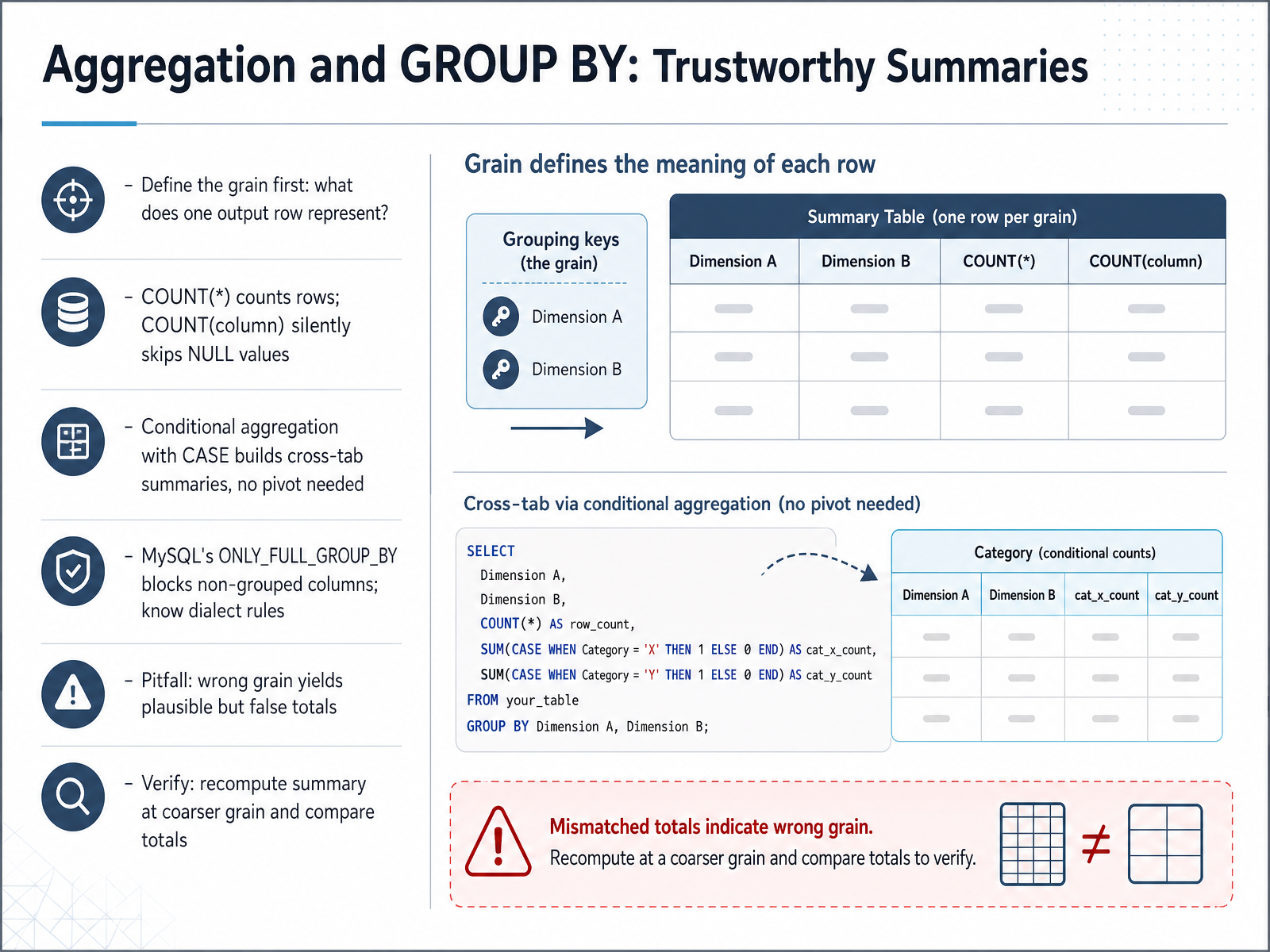
 - 06Aggregation and GROUP BY: Trustworthy SummariesNow let's talk about aggregation and GROUP BY, and how to produce summaries you can actually trust. The first step is defining the grain, which means asking what one output row represents. Is it one customer, one day, or one order? Get that wrong, and every number downstream is wrong. Next, remember that COUNT with an asterisk counts rows, while COUNT of a column silently skips NULL values. So if a column has missing entries, those two counts will disagree. You can also build cross-tab summaries without a pivot, using conditional aggregation. For example, SUM of CASE WHEN status equals paid THEN amount, and zero otherwise. Each group then yields one row with multiple measures. One more thing: MySQL's ONLY FULL GROUP BY setting blocks selecting columns that are not grouped or aggregated, so know your dialect's rules. Finally, before you trust a summary, verify it. Recompute the totals at a coarser grain, like month instead of day, and compare. If the numbers do not reconcile, your grain is likely wrong. Coming next, we will compare subqueries, CTEs, and window functions, and help you choose the right tool.
 learn.microsoft.compostgresql.orgsqlite.org+22 min
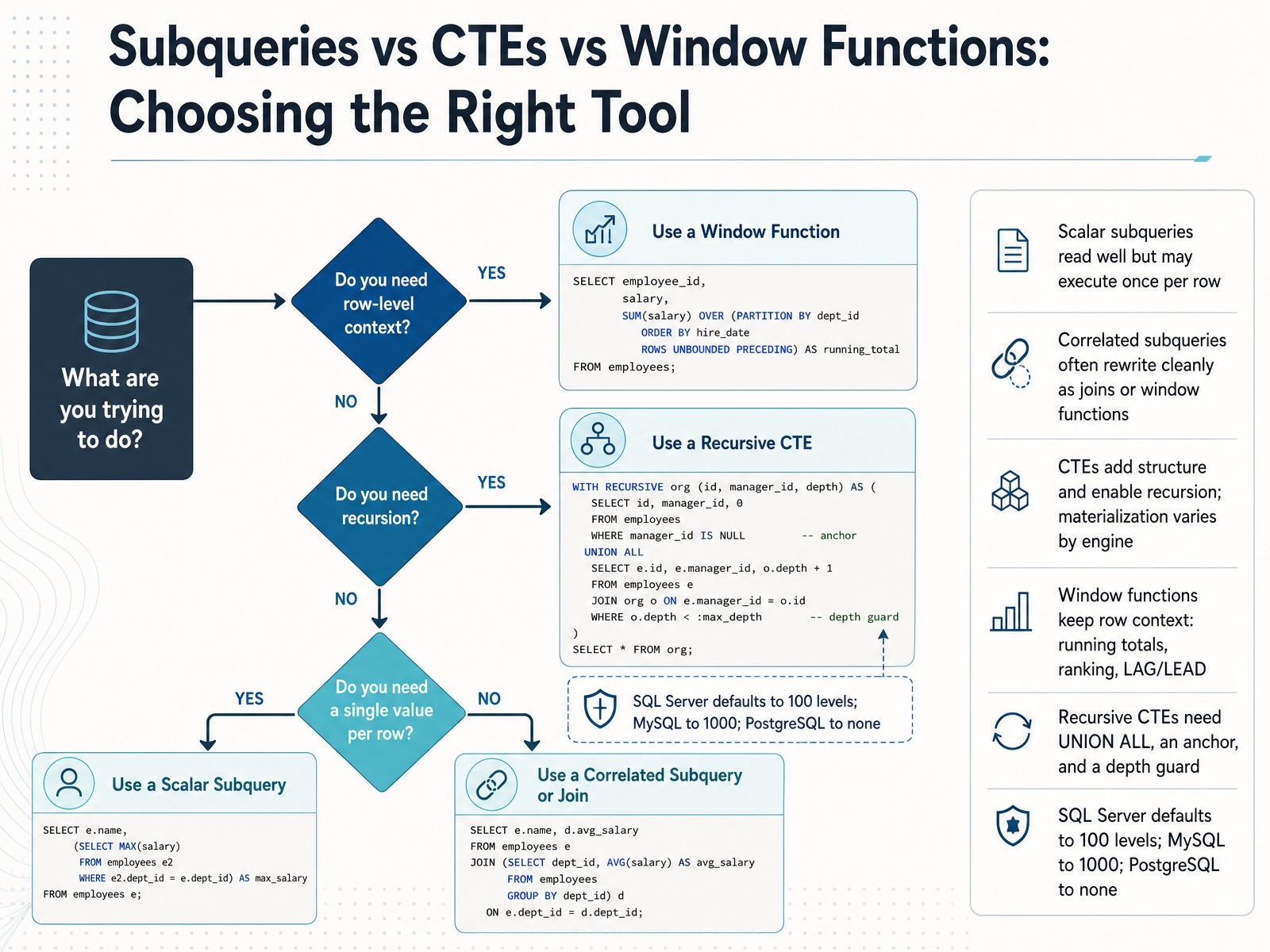
 - 07Subqueries vs CTEs vs Window Functions: Choosing the Right ToolLet's compare three ways to organize complex queries: subqueries, common table expressions, and window functions. A scalar subquery reads cleanly, but watch out, because it may execute once for every row in your result, which gets slow fast. A correlated subquery, one that references the outer row, often rewrites cleanly as a join or a window function, and frequently runs much faster. A common table expression, or CTE, is a named subquery that adds structure, and it can also call itself, which enables recursion. Just know that whether the engine materializes it or inlines it varies by database. Window functions keep the original row context, so you can compute a running total, rank rows, or use LAG and LEAD without collapsing your rows. Now on recursive CTEs, you need three things: UNION ALL, not plain UNION, an anchor query that defines the starting rows, and a depth guard. That guard matters because engines differ. SQL Server defaults to one hundred levels, MySQL to one thousand, and PostgreSQL has no default limit at all. Next, let's look at pagination, ordering, and determinism.
 builder.ai2sql.iodatadriven.iolearn.microsoft.com+22 min
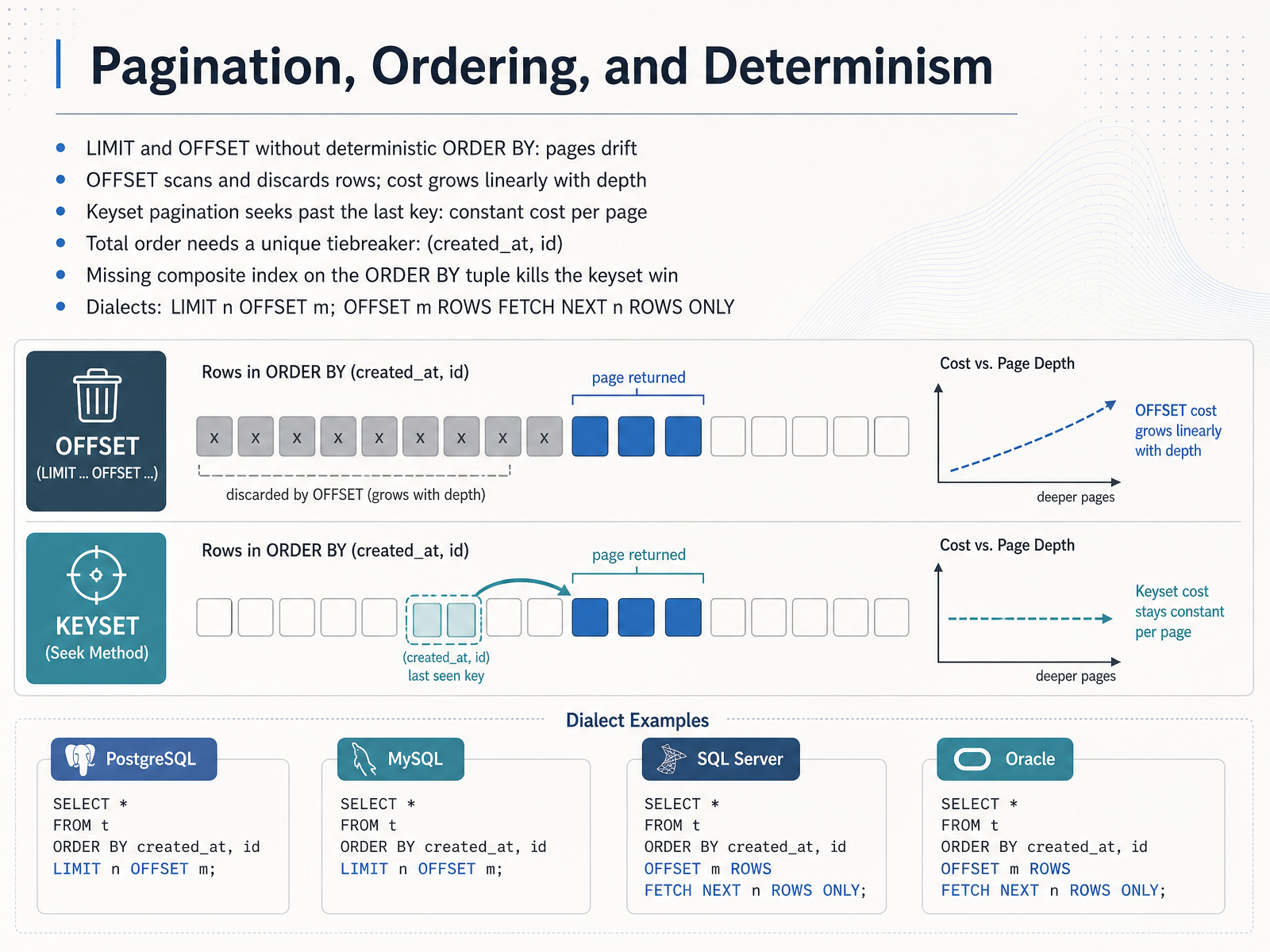
 - 08Pagination, Ordering, and DeterminismLet's look at pagination, ordering, and determinism. When you write LIMIT and OFFSET without a deterministic ORDER BY, pages drift. Rows can repeat or disappear between requests. That is the symptom you will actually see. OFFSET also scans and discards rows before returning your page, so cost grows linearly with depth. Page five thousand is far slower than page one, even with an index. Keyset pagination fixes this. Instead of skipping a count, you seek past the last key you saw. With a filter like WHERE created_at, id is less than the last pair, the engine jumps straight to the position, so every page costs roughly the same. One caution. A total order needs a unique tiebreaker, such as created_at plus id. Without it, boundary rows can be skipped or duplicated. Also make sure a composite index matches the ORDER BY tuple. If it is missing, the keyset win disappears. For syntax, PostgreSQL, MySQL, SQLite, and BigQuery use LIMIT n OFFSET m. SQL Server and Oracle use OFFSET m ROWS FETCH NEXT n ROWS ONLY. Next, we move on to NULLs, implicit casts, and duplicate rows.
 vladmihalcea.comuse-the-index-luke.comdevops-daily.com+22 min
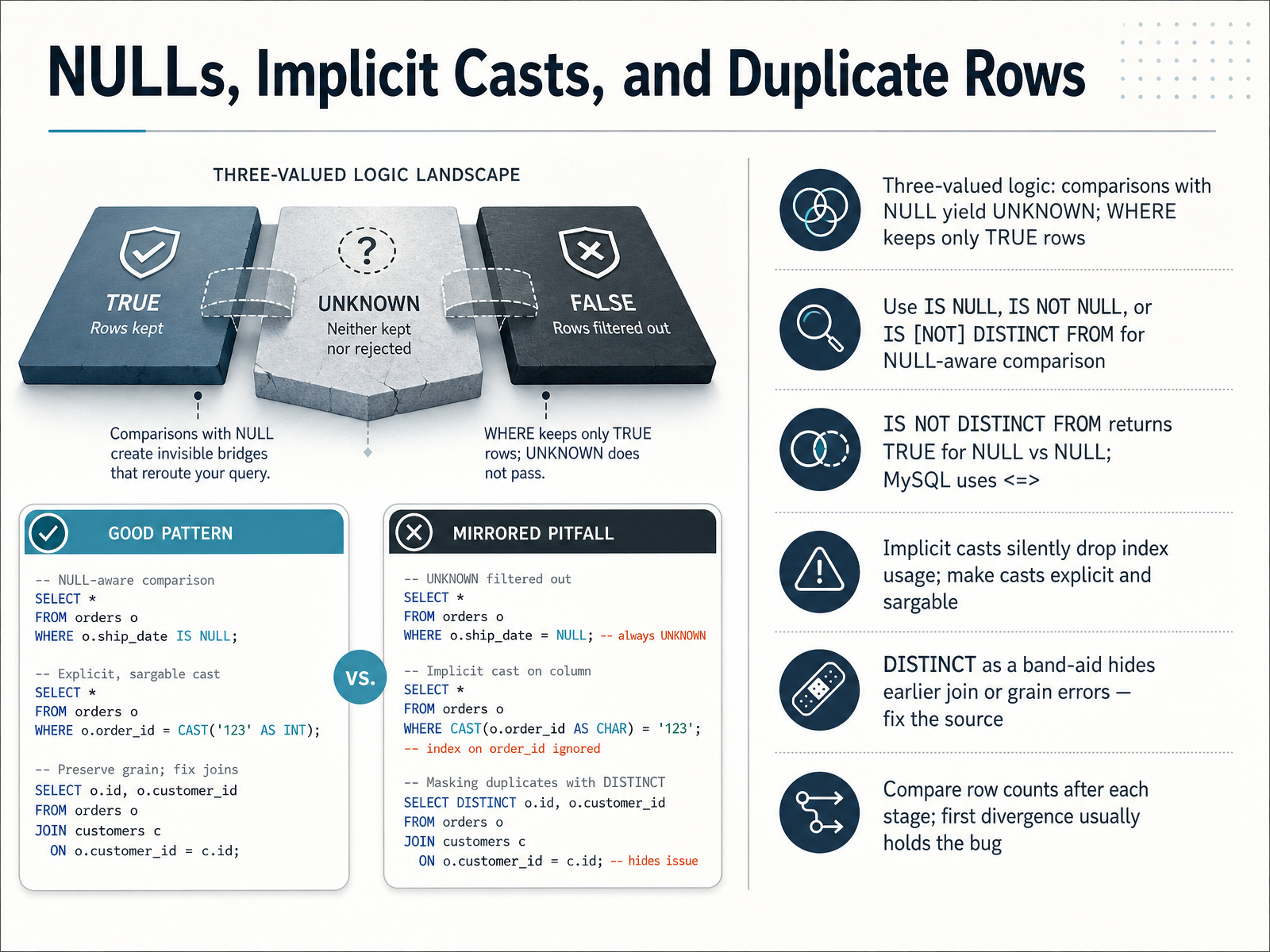
 - 09NULLs, Implicit Casts, and Duplicate RowsMoving on, let's talk about NULLs, implicit casts, and duplicate rows. First, remember three-valued logic. A comparison with NULL doesn't return true or false. It returns UNKNOWN. Since WHERE keeps only rows where the condition is TRUE, a row where the comparison is UNKNOWN gets dropped. For example, if shippeddate equals NULL evaluates to UNKNOWN, that order disappears from your results. To compare NULLs safely, use IS NULL or IS NOT NULL. When you compare two columns, use IS NOT DISTINCT FROM. It returns TRUE when both sides are NULL, and MySQL uses the spaceship operator for the same behavior. Next, implicit casts. When you compare a column to a value of a different type, the database may convert the column and silently stop using its index. Keep casts explicit so the predicate stays sargable, meaning the index can still be used. Finally, duplicate rows. Adding DISTINCT to remove duplicates often hides an earlier join or grain error. Fix the source instead. A practical habit: compare row counts after each stage, like after each join. The first stage where the count diverges usually holds the bug. Next, we'll look at portable versus dialect-specific query patterns.
 2 min
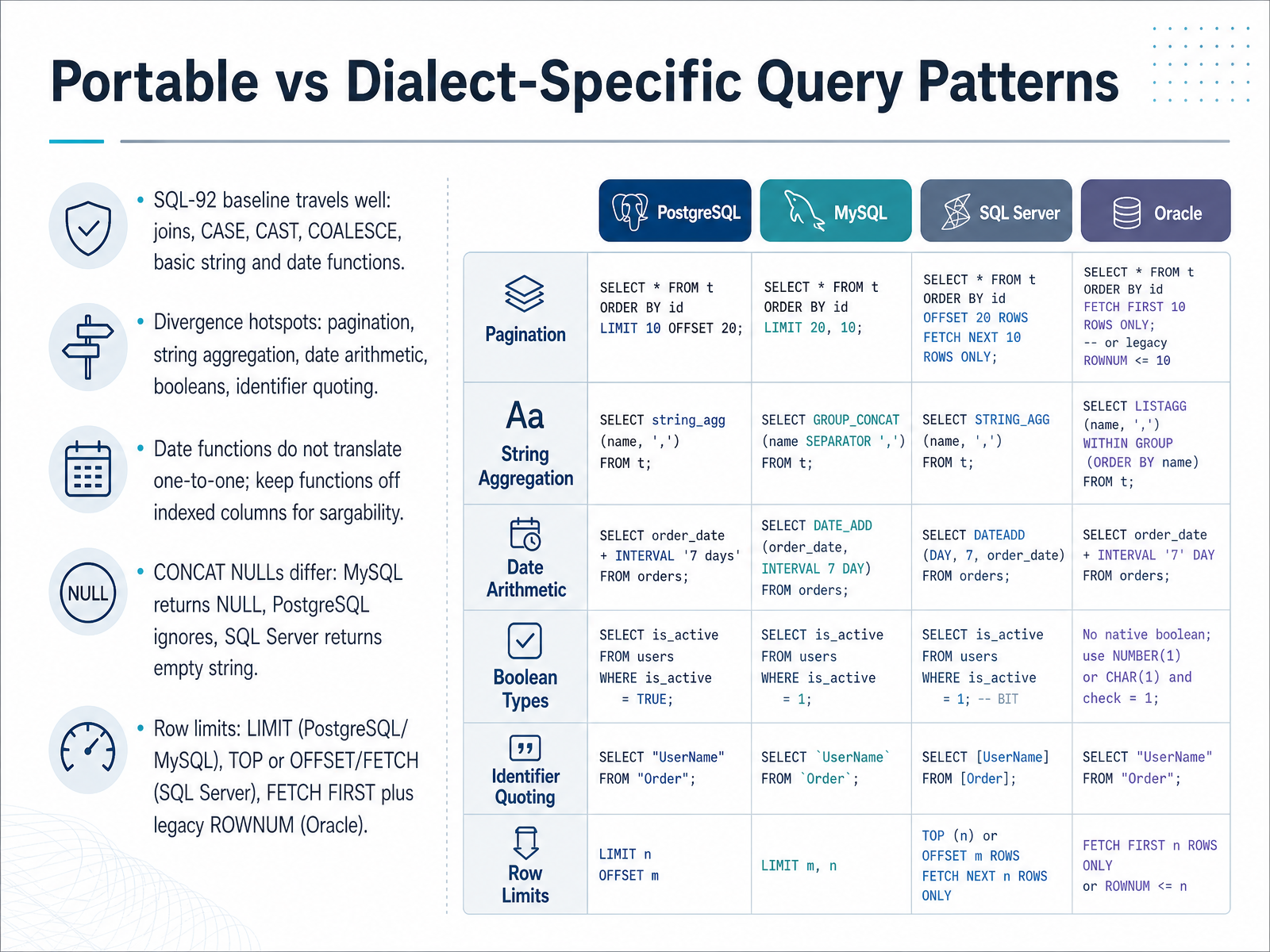
2 min - 10Portable vs Dialect-Specific Query PatternsLet's compare portable patterns with dialect specific ones. The SQL ninety two baseline travels well. Joins, CASE expressions, CAST, COALESCE, and basic string and date functions work almost everywhere. Divergence shows up around pagination, string aggregation, date arithmetic, booleans, and identifier quoting. Date functions never translate one to one. In PostgreSQL you add an interval, in MySQL you use DATE ADD, and in SQL Server you use DATEADD. Keep functions off indexed columns. Writing WHERE YEAR order date equals twenty twenty four forces a scan. Instead compare the column to a range, so the index still works. That property is called sargability. Concatenation with nulls also differs. MySQL returns null, PostgreSQL ignores the null, and SQL Server returns an empty string. Wrapping arguments in COALESCE keeps results stable. For row limits, PostgreSQL and MySQL use LIMIT, SQL Server uses TOP or OFFSET with FETCH, and Oracle uses FETCH FIRST, with legacy ROWNUM in older versions. Now let's rewrite a query across these dialects in the next slide, Worked Cross Dialect Rewrite.
 2 min
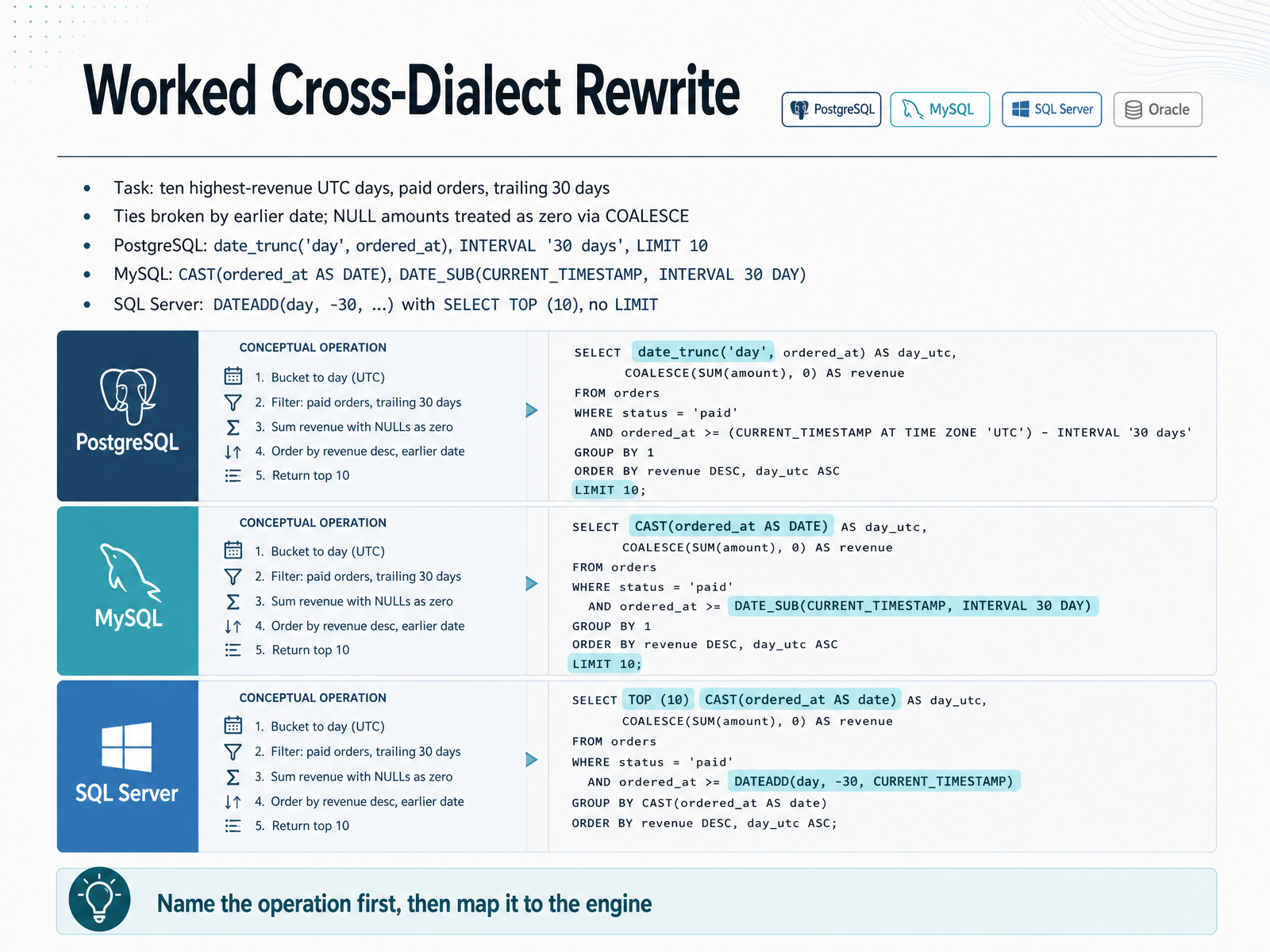
2 min - 11Worked Cross-Dialect RewriteLet's bring the patterns together in a worked cross-dialect rewrite. The task: find the ten highest-revenue calendar days in Coordinated Universal Time, or U T C, among paid orders in the trailing thirty days. Ties break by earlier date, and null amounts count as zero through COALESCE. Always name the operation first, then map it to your engine. Operation one: truncate the timestamp to a day. In PostgreSQL, use date_trunc with day on ordered_at. In MySQL, cast ordered_at as date. In SQL Server, also cast as date. Operation two: filter the last thirty days. PostgreSQL uses an INTERVAL of thirty days. MySQL uses DATE_SUB of thirty days. SQL Server uses DATEADD with a negative thirty. Operation three: limit rows. PostgreSQL and MySQL use LIMIT ten after ORDER BY. SQL Server has no LIMIT, so place SELECT TOP ten at the top. Keep the filter on the raw column, not a function, so indexes still work. Next, we move into a query review checklist covering strengths, risks, and testing.
 2 min
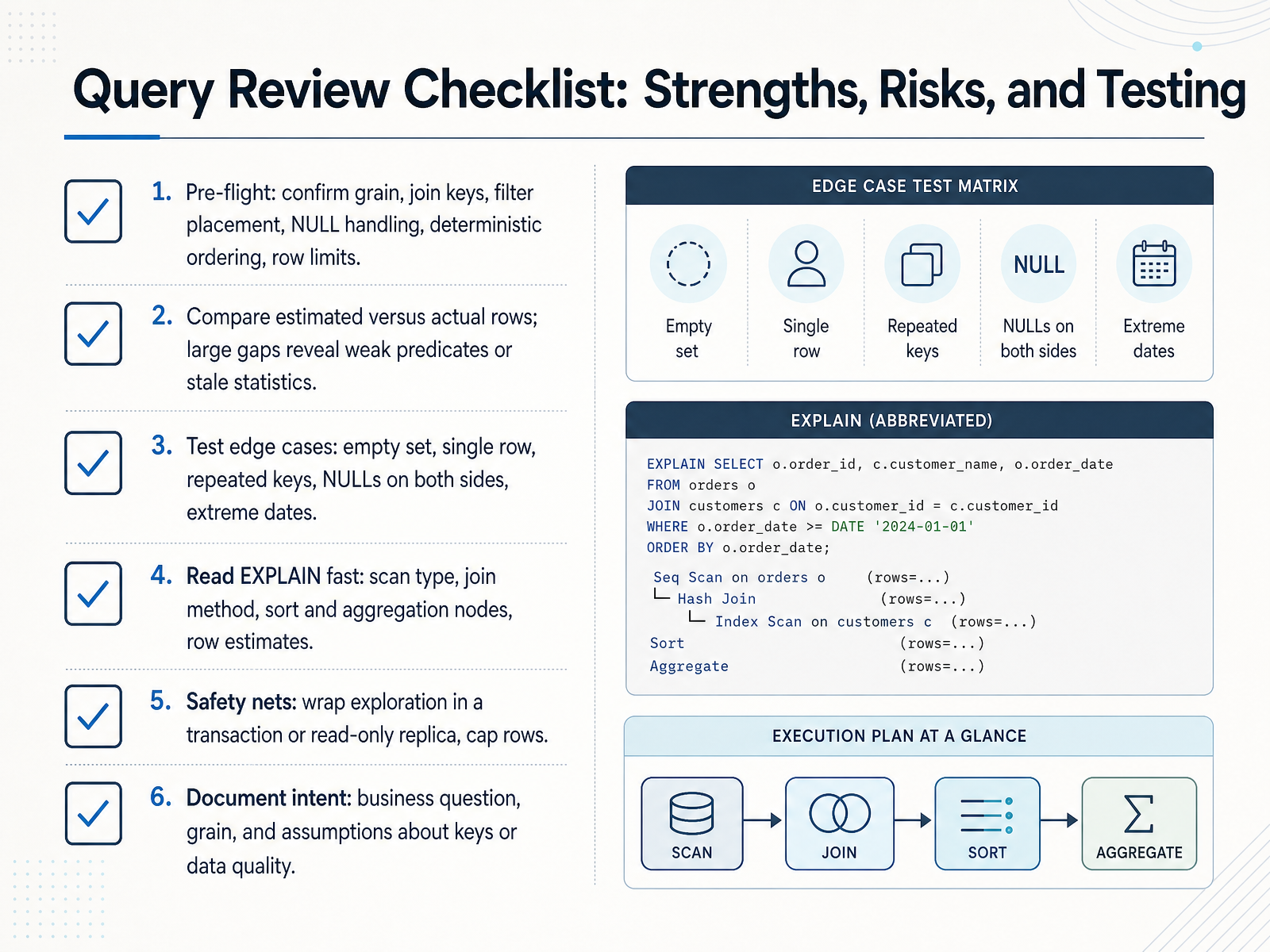
2 min - 12Query Review Checklist: Strengths, Risks, and TestingBefore you run a query in production, review it like a checklist. First, pre-flight: confirm the grain of the result, the join keys, where your filters sit, how NULLs are handled, whether your ordering is deterministic, and that you have a row limit. Second, compare estimated rows to actual rows in the plan. A large gap usually means weak predicates or stale statistics. Third, test edge cases: an empty set, a single row, repeated keys, NULLs on both sides of a join, and extreme dates. Fourth, read the execution plan quickly: scan type, join method, sort and aggregation nodes, and row estimates. Fifth, use safety nets: wrap exploration in a transaction or a read-only replica, and cap rows. Finally, document intent: the business question, the grain, and your assumptions about keys or data quality. Run this checklist every time, and you will catch most correctness and performance issues before they reach users. Next, let us put these patterns into practice.
 learn.microsoft.compostgresql.orgsqlite.org+21 min
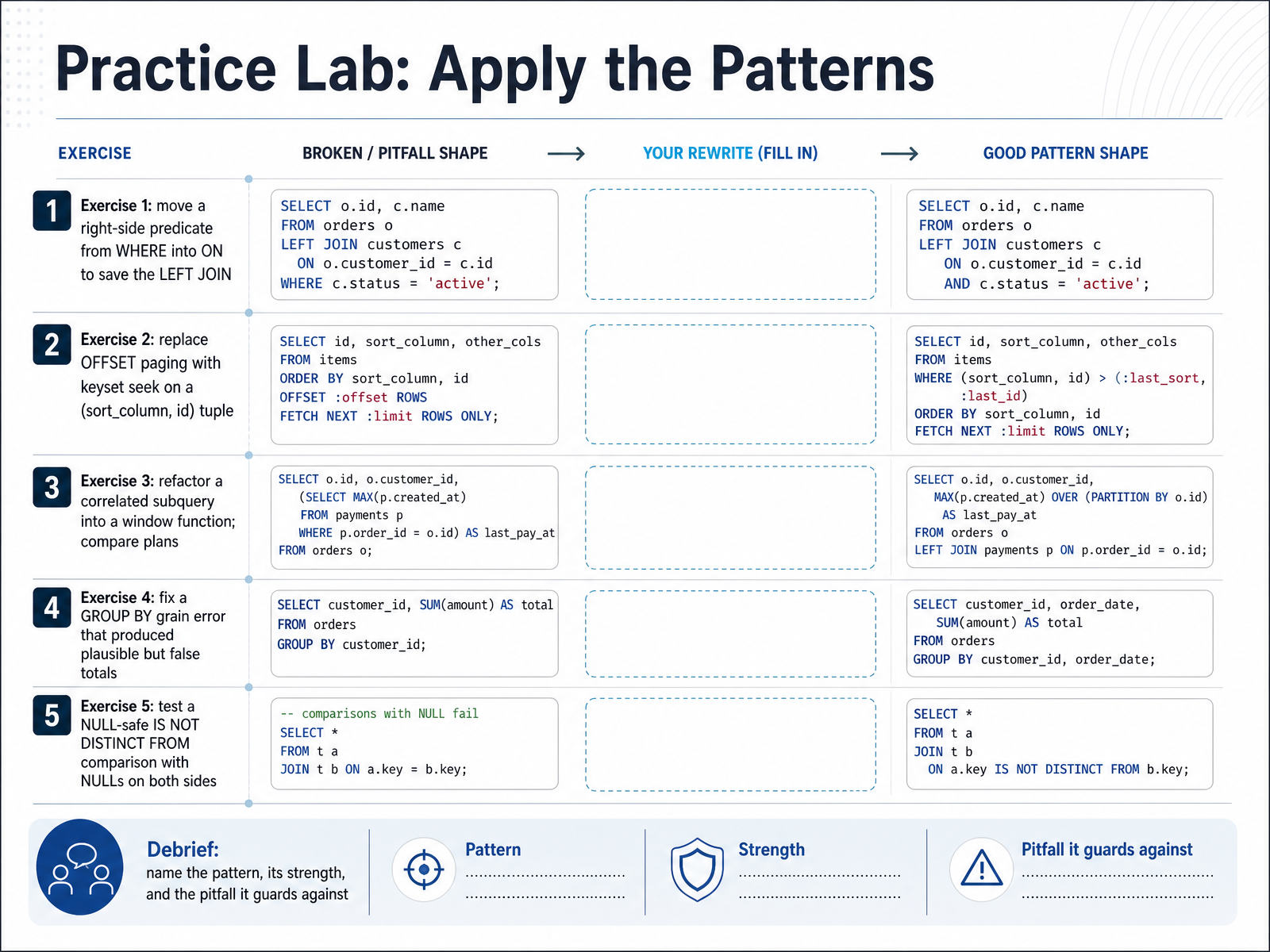
 - 13Practice Lab: Apply the PatternsNow let us put those patterns into practice. Five quick exercises, each one small on purpose.
Exercise one. Move a right side predicate from the WHERE clause into the ON clause. Remember, ON controls the match and WHERE filters the joined result. If you leave that predicate in WHERE, the NULL padded rows fail the comparison, and your LEFT JOIN silently becomes an inner join. You lose the unmatched rows you meant to keep.
Exercise two. Replace offset paging with keyset seek. Do not count past rows you plan to discard. Order by a tuple of sort column and id, then filter on the last value you saw. The index seeks straight to the position, so page one and page five thousand cost about the same.
Exercise three. Refactor a correlated subquery into a window function, then compare the execution plans. Look at how many times each version scans the table.
Exercise four. Fix a GROUP BY grain error. Grouping at the wrong level produces totals that look plausible but are wrong, so verify the grain before you trust the number.
Exercise five. Test an IS NOT DISTINCT FROM comparison with NULLs on both sides. Plain equality returns unknown, but this predicate returns true when both sides are NULL.
For the debrief, name each pattern, its strength, and the pitfall it guards against. In the next slide, we will close with the instincts that matter more than memorized syntax.
 builder.ai2sql.iodatadriven.iolearn.microsoft.com+22 min
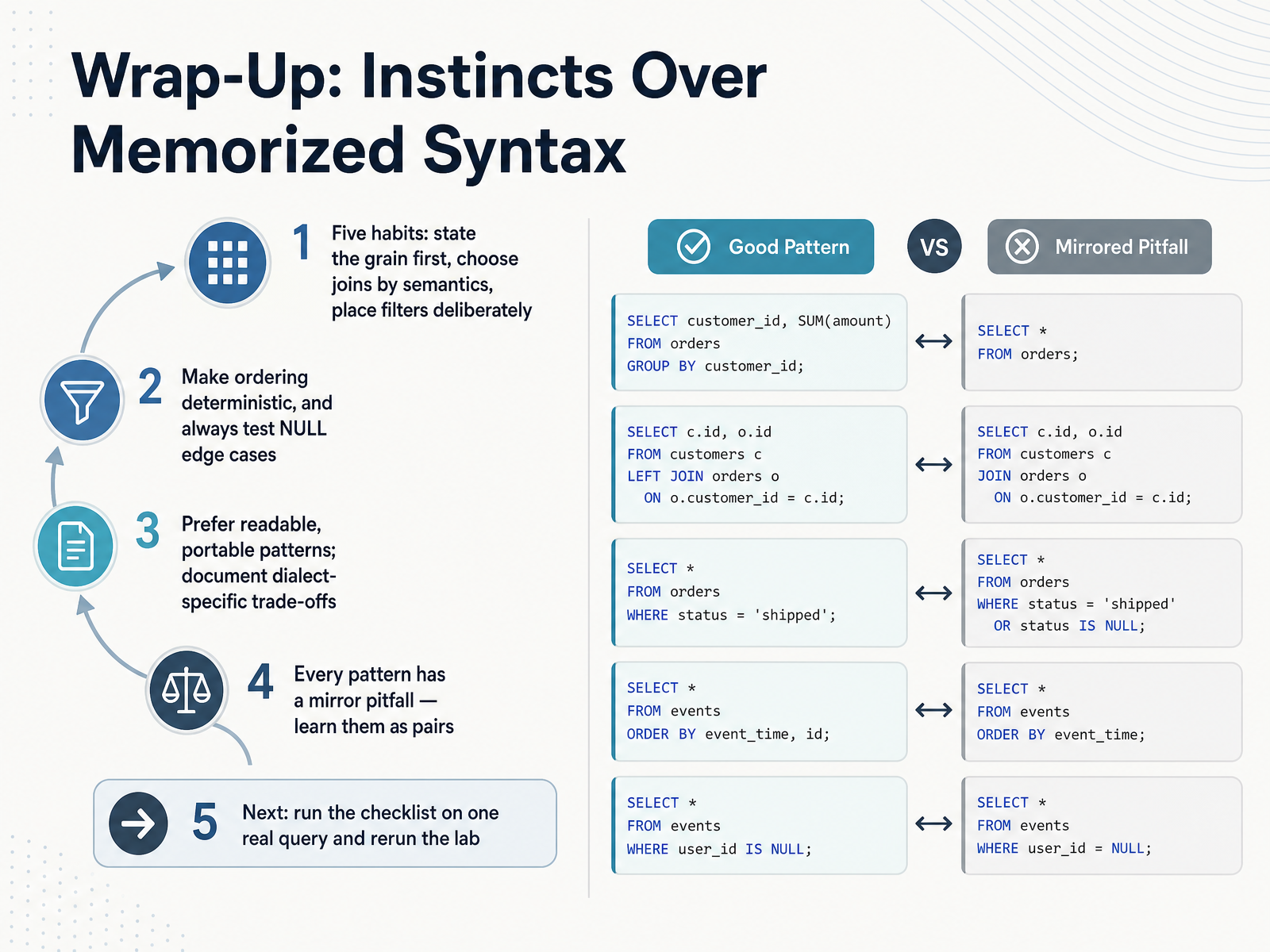
 - 14Wrap-Up: Instincts Over Memorized SyntaxLet's pull this together. The habits matter more than memorized syntax. First, state the grain of your result before you write anything, and let that decide your joins and your filters. Second, choose joins by their meaning, and remember that a condition in ON matches, while a condition in WHERE filters after the join. That single placement can silently turn a left join into an inner join. Third, place filters deliberately and make ordering deterministic. When you sort, add a unique tiebreaker, so paging does not skip or repeat rows. Fourth, test null edge cases, because comparisons with null return unknown, not true. Fifth, prefer readable, portable patterns, and document dialect trade-offs, like LIMIT versus FETCH. Learn every pattern with its mirror pitfall as a pair. Now take one real query, run the checklist, and rerun the lab. Thank you for your attention, and keep practicing. You have built instincts that will serve you well.
 learn.microsoft.compostgresql.orgsqlite.org+22 min
Take the deck with you
Download this course as a file — free, no sign-up needed.
- PDF handoutEvery slide page, ready to print or share.15 pages · 4.0 MBDownload
- Narrated PowerPointThe deck that presents itself — every slide carries the digital human's narration video.15 pages · 28.9 MBDownload
- PowerPoint slidesThe full deck as a .pptx — open it in PowerPoint, Keynote, or Google Slides.15 pages · 3.9 MBDownload
Free to use in your own training — please keep the PersonWise credit page at the end.
Have your own deck? Turn it into a course
Sources consulted
Web sources consulted while building this course.
- https://learn.microsoft.com/en-us/sql/t-sql/queries/select-transact-sql?view=sql-server-ver16 — learn.microsoft.com
- PostgreSQL: Documentation: 19: SELECT — postgresql.org
- SELECT — sqlite.org
- MySQL :: MySQL 26.7 Reference Manual :: 15.2.13 SELECT Statement — dev.mysql.com
- Lexical and logical SELECT clause order — jooq.org
- Why and when a LEFT JOIN with condition in WHERE clause is not equivalent to the same LEFT JOIN in ON? — stackoverflow.com
- MySQL :: MySQL 8.4 Reference Manual :: 15.2.13.2 JOIN Clause — dev.mysql.com
- How to Use JOIN with WHERE vs ON in MySQL — oneuptime.com
- Using ON Versus WHERE Clauses to Combine and Filter ... — pluralsight.com
- SQL Gotcha: When an OUTER JOIN Accidentally Becomes ... — nolongerset.com
- SQL Recursive Queries and CTEs: Tutorial with Examples (2026) | AI2SQL — builder.ai2sql.io
- Recursive CTE SQL: Hierarchies, Date Series, and Graph... — datadriven.io
- Recursive queries using common table expressions (Transact-SQL) — learn.microsoft.com
- Recursive Common Table Expressions (CTEs) in SQL | Tutorial Reference — tutorialreference.com
- Recursive CTEs for Hierarchical Data Queries — stackpractices.com
- SQL Seek Method or Keyset Pagination - Vlad Mihalcea — vladmihalcea.com
- We need tool support for keyset pagination — use-the-index-luke.com
- Stop Paginating With OFFSET: Keyset Pagination and the Deep-Page Cliff — devops-daily.com
- OFFSET Pagination Will Not Scale. Might I Suggest Keyset? | Gold Lapel — goldlapel.com
- Pagination at Scale: Choosing Between Offset, Keyset, and Cursor Strategies – WorthPosting — blog.teliaz.com