AI UX/UI Design Tools: Selection and Workflow
Begin
14 pages · ~28 min
AI UX/UI Design Tools: Selection and Workflow
This training helps UX/UI designers and product teams evaluate, select, and integrate AI design tools, covering requirements gathering and workflow setup.
What you’ll learn
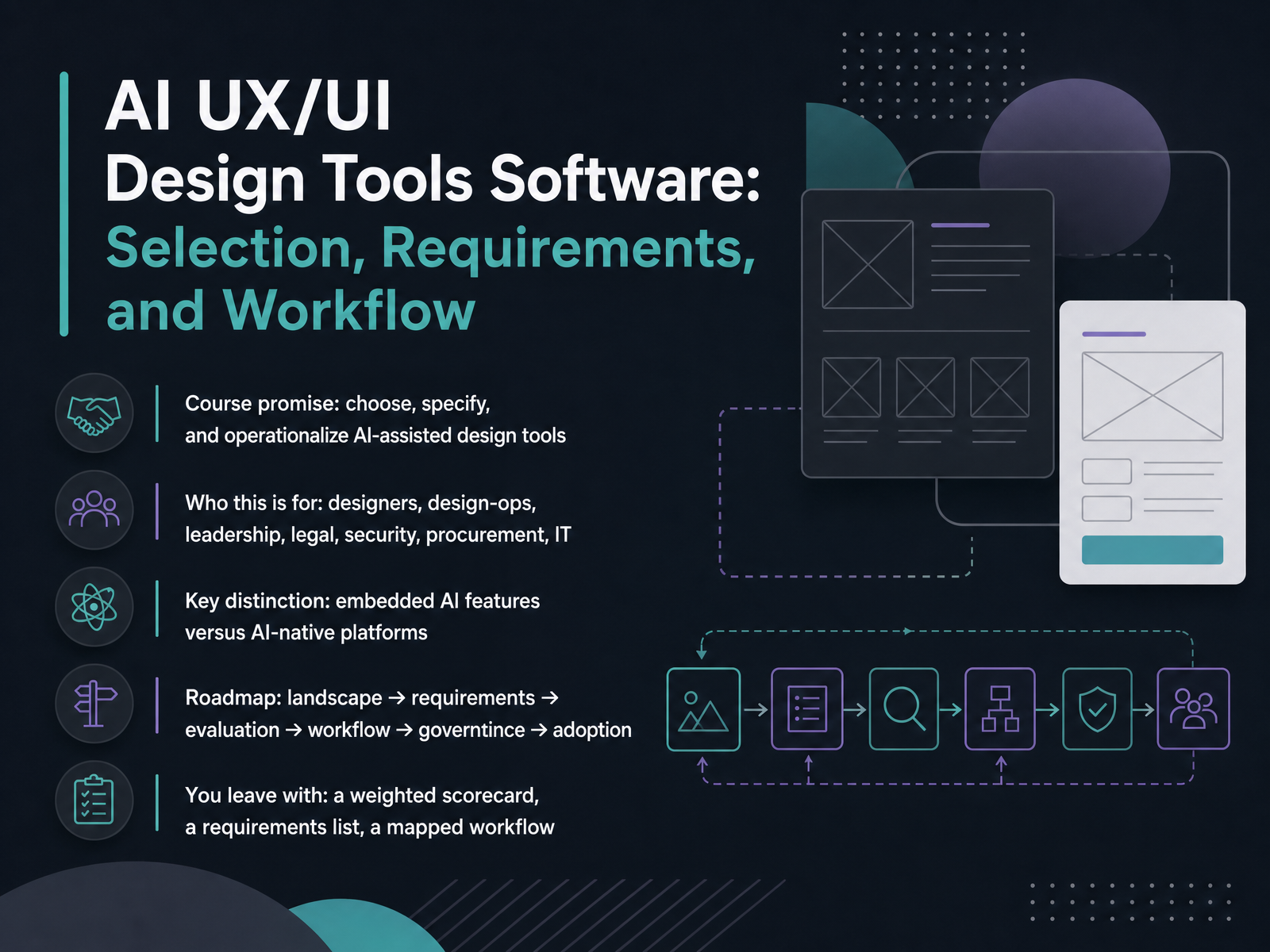
- 01AI UX/UI Design Tools Software: Selection, Requirements, and WorkflowWelcome. Over the next fourteen slides, we're going to work through something most design teams are now actively wrestling with: how to choose, specify, and operationalize AI-assisted design tools without turning your stack into a pile of credit meters.
This is written for a mixed room, and that's deliberate. Designers and design-ops will recognize the workflow language. Leadership, legal, security, procurement, and IT will recognize the evaluation criteria, because the decision is genuinely joint.
One distinction frames everything we cover. Embedded AI features, like generation inside a canvas you already own, are not the same as AI-native platforms built around generation first. They carry different risks, costs, and governance questions. Conflating them is where most evaluations go sideways.
Our roadmap runs six stages: landscape, requirements, evaluation, workflow, governance, then adoption. You'll leave with three artifacts: a weighted scorecard, a requirements list, and a mapped workflow.
Next, background: why AI tool selection became a design-ops discipline.presenc.aisuperdesign.devenergent.ai+22 min
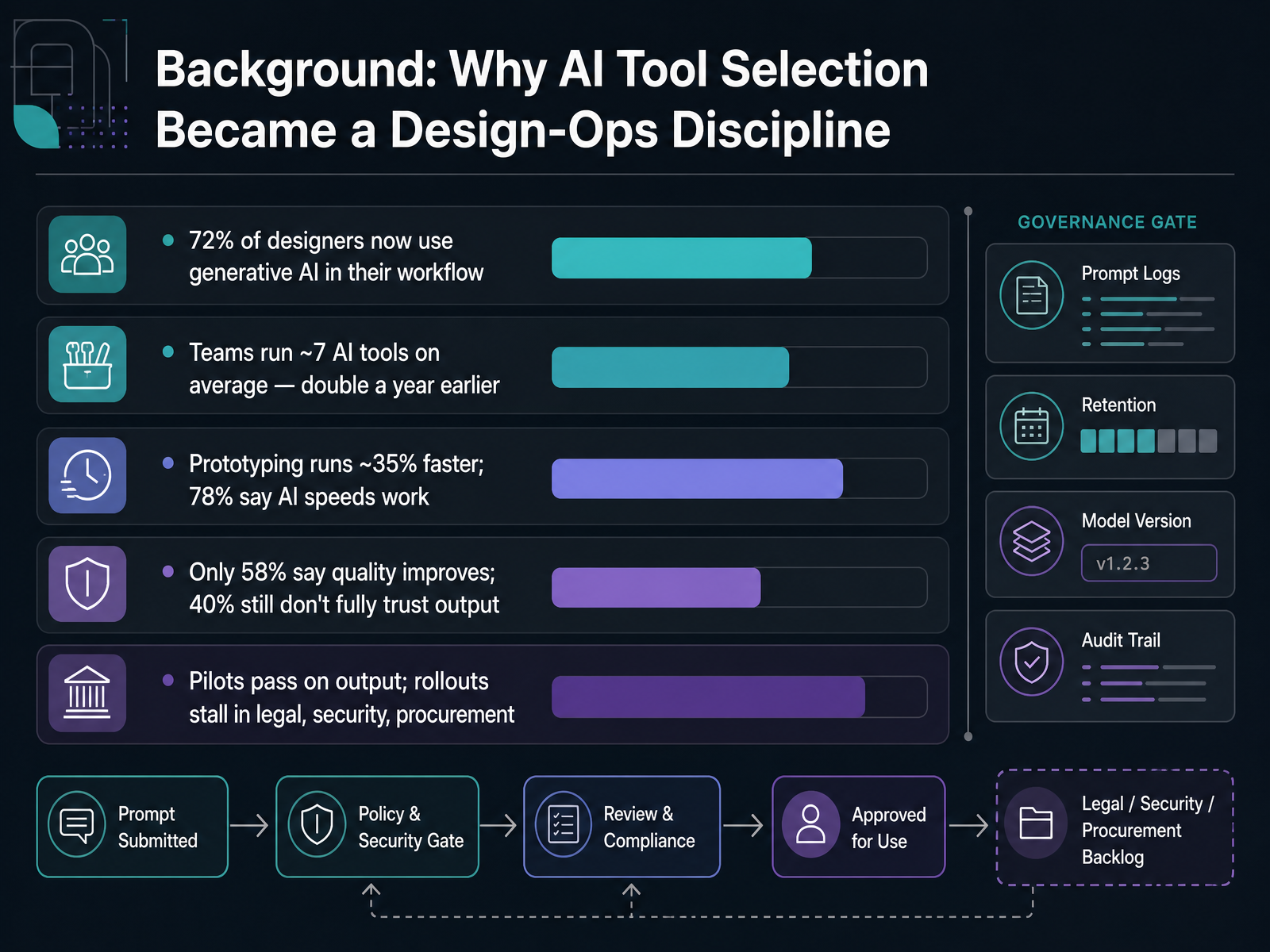
- 02Background: Why AI Tool Selection Became a Design-Ops DisciplineLet's ground this in the numbers, because the discipline didn't emerge from enthusiasm. It emerged from pressure. Seventy-two percent of designers now use generative AI in their workflow, and the median team is running about seven AI tools, roughly double a year earlier. The speed story holds up: prototyping runs about thirty-five percent faster, and seventy-eight percent of professionals say AI speeds their work. Now the caveat. Only fifty-eight percent say quality actually improves, and forty percent still don't fully trust the output. So where do rollouts break? Usually not on output quality. Pilots pass. Then they stall in legal, security, and procurement review over training data, residency, retention, and commercial rights. That gap between a demo that impresses and a tool you can govern is exactly why selection became a design-ops discipline. Next, we'll build the vocabulary, in core concepts and vocabulary: AI features, copilots, and AI-native environments.
 presenc.aisuperdesign.devenergent.ai+21 min
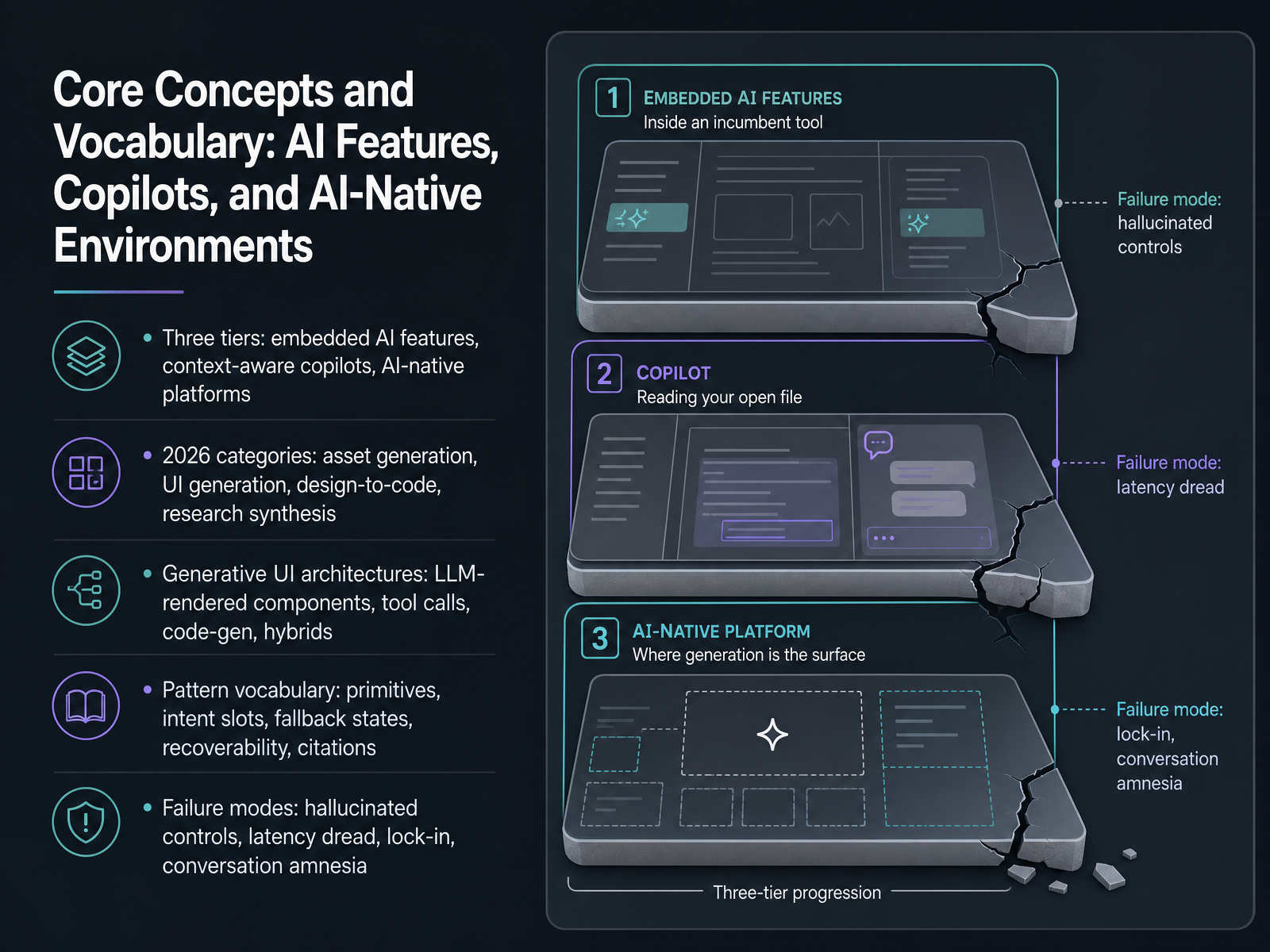
 - 03Core Concepts and Vocabulary: AI Features, Copilots, and AI-Native EnvironmentsLet's get our vocabulary straight, because these terms get used loosely and that causes real evaluation mistakes. Start with three tiers. Embedded AI features are the layer inside tools you already use. Figma AI renaming layers or Adobe Firefly generating assets inside Photoshop sit here. Context-aware copilots read your files or codebase and propose work. AI-native platforms make generation the core interaction, not an add-on.
In 2026 the category map splits into four jobs: asset generation, UI generation, design-to-code, and research synthesis. Those are distinct buying decisions, and most teams run two or three tools, not one.
Next, architectures. LLM-rendered components pick from your typed vocabulary. Tool calls return structured data into a fixed layout. Code generation writes the interface outright. Hybrids combine a trusted shell with a dynamic middle, and that is where serious products land.
Then the pattern vocabulary. Primitives are the components the model may use. Intent slots are named regions it fills. Fallback states, recoverability, and citations are design artifacts, not edge cases.
And name the failure modes: hallucinated controls, latency dread, single-model lock-in, and conversation amnesia. If you can't test for them, you can't ship safely. Next, let's map the 2026 landscape: Market Landscape 2026: Category Map, Representative Tools, and Positioning.
 presenc.aisuperdesign.devenergent.ai+22 min
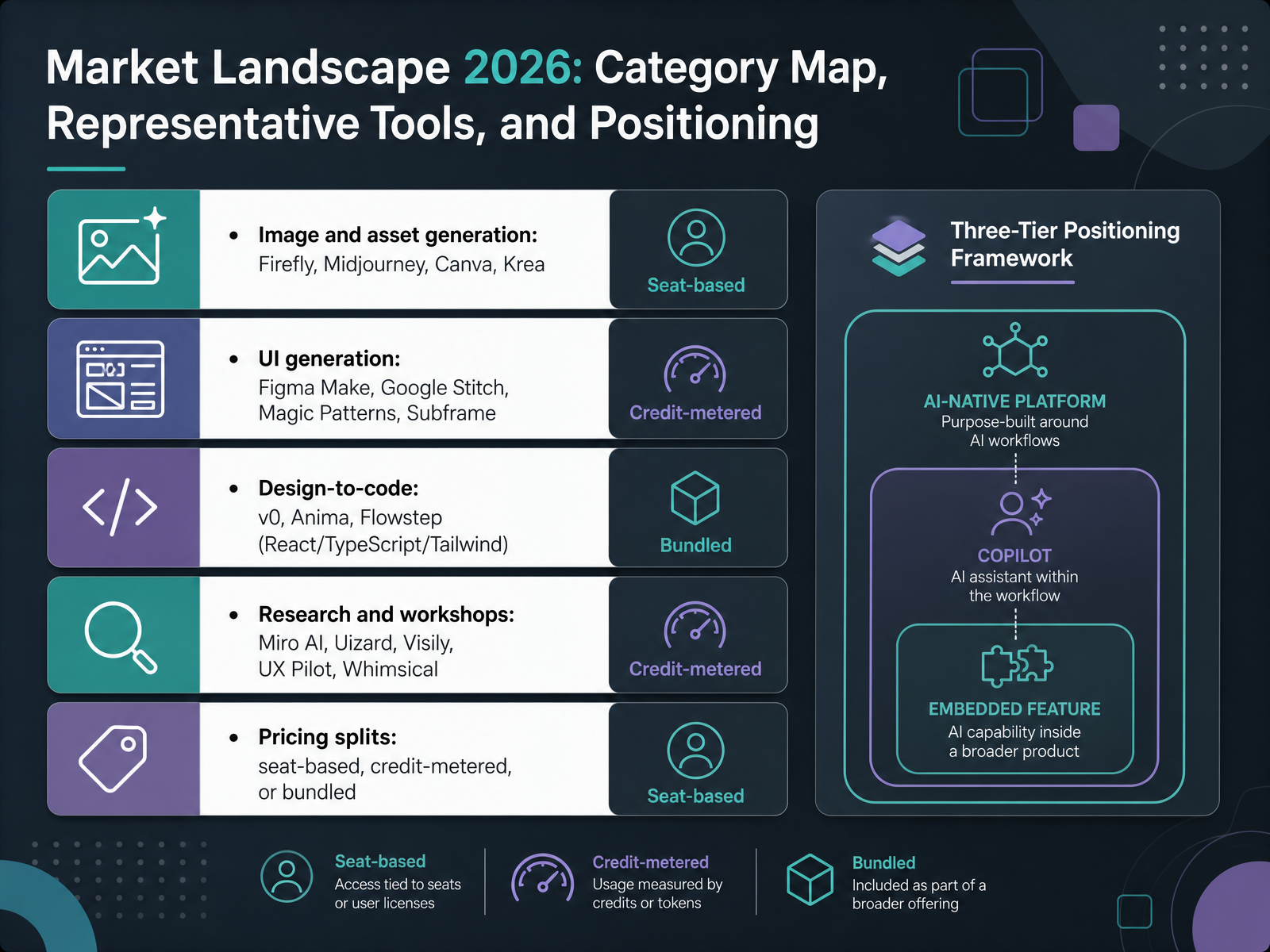
 - 04Market Landscape 2026: Category Map, Representative Tools, and PositioningLet's map the market as it stands in 2026. Five categories matter. Image and asset generation, that's Firefly, Midjourney, Canva, and Krea. Firefly leans on brand-safe licensing, Midjourney holds the aesthetic ceiling, Krea is real-time. UI generation, that's Figma Make, Google Stitch, Magic Patterns, and Subframe. Figma Make keeps you inside the Figma file, Stitch handles hand-off-ready output, and Magic Patterns and Subframe are design-system-aware. Design-to-code, that's v0, Anima, and Flowstep, mostly shipping React, TypeScript, and Tailwind. Research and workshops, that's Miro AI, Uizard, Visily, UX Pilot, and Whimsical. Then pricing. And this is where budget surprises come from. Some tools are seat-based, some are credit-metered, some bundled. Credit models burn fast on fix-the-AI loops, so match the meter to how much you iterate there. And note, most teams run two to three tools side by side, not one. Now let's place each category into the pipeline. Matching Tools to Workflow Stages: Ideation, Iteration, Build, Polish.
 presenc.aisuperdesign.devenergent.ai+22 min
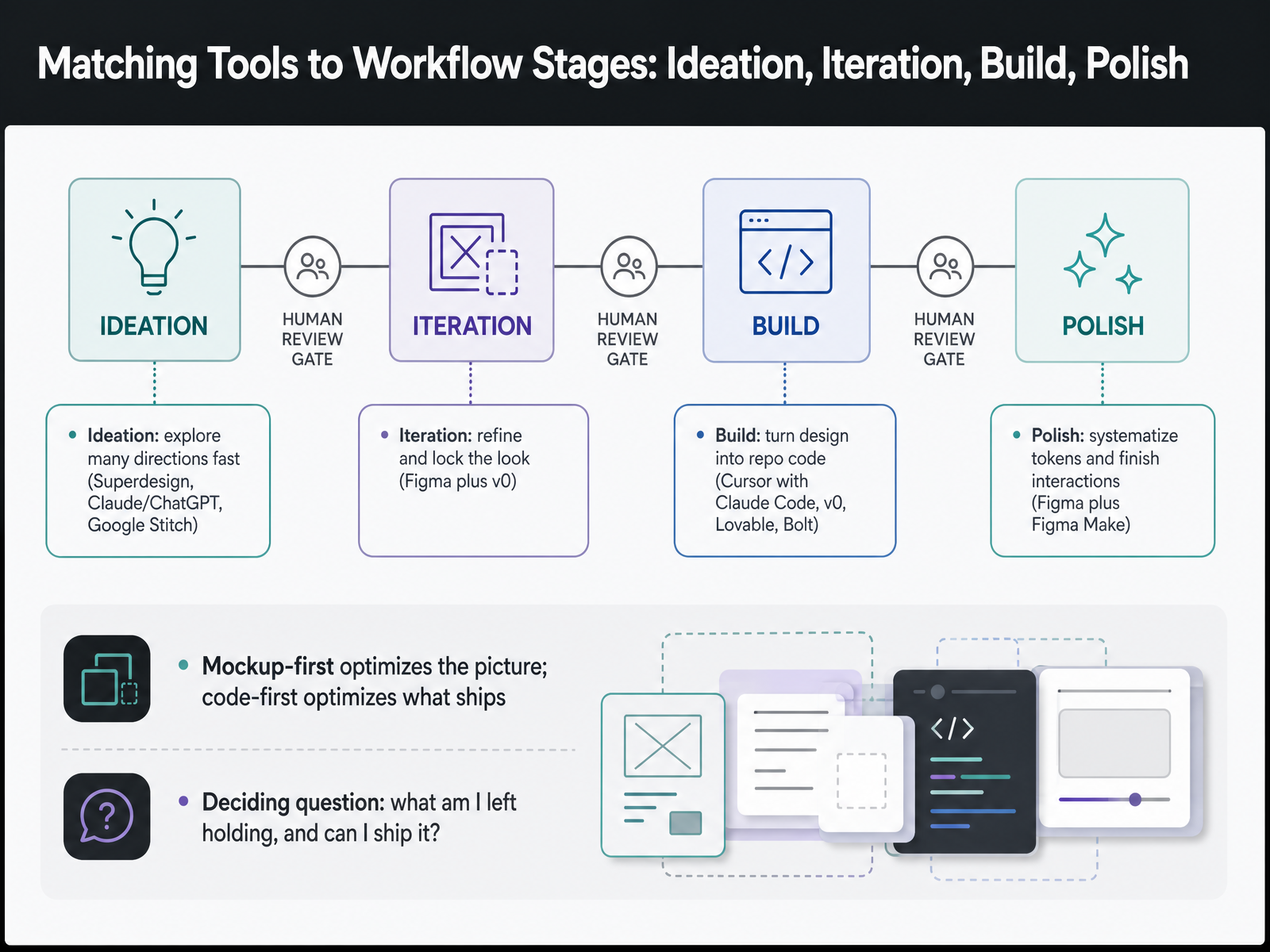
 - 05Matching Tools to Workflow Stages: Ideation, Iteration, Build, PolishLet's map tools to the four stages where design work actually happens. Ideation is about breadth. You want many directions fast, so you reach for Superdesign, Claude or ChatGPT for the brief, and Google Stitch. Iteration is narrowing. You refine the chosen direction and lock the look, typically Figma alongside v zero. Build turns that decision into repository code. Cursor with Claude Code, v zero, Lovable, and Bolt all live here. Polish is where you systematize tokens and finish interactions, so that's Figma plus Figma Make. Now here's the framing that should drive your selection. Mockup-first tools optimize the picture. Code-first tools optimize what actually ships. Most of these tools are genuinely strong at one or two stages and weak everywhere else, so naming your stage tells you which tool to open. Before you commit budget to any of them, ask the deciding question: what am I left holding, and can I ship it? Next, we'll look at defining functional requirements for AI-assisted design tools.
 presenc.aisuperdesign.devenergent.ai+22 min
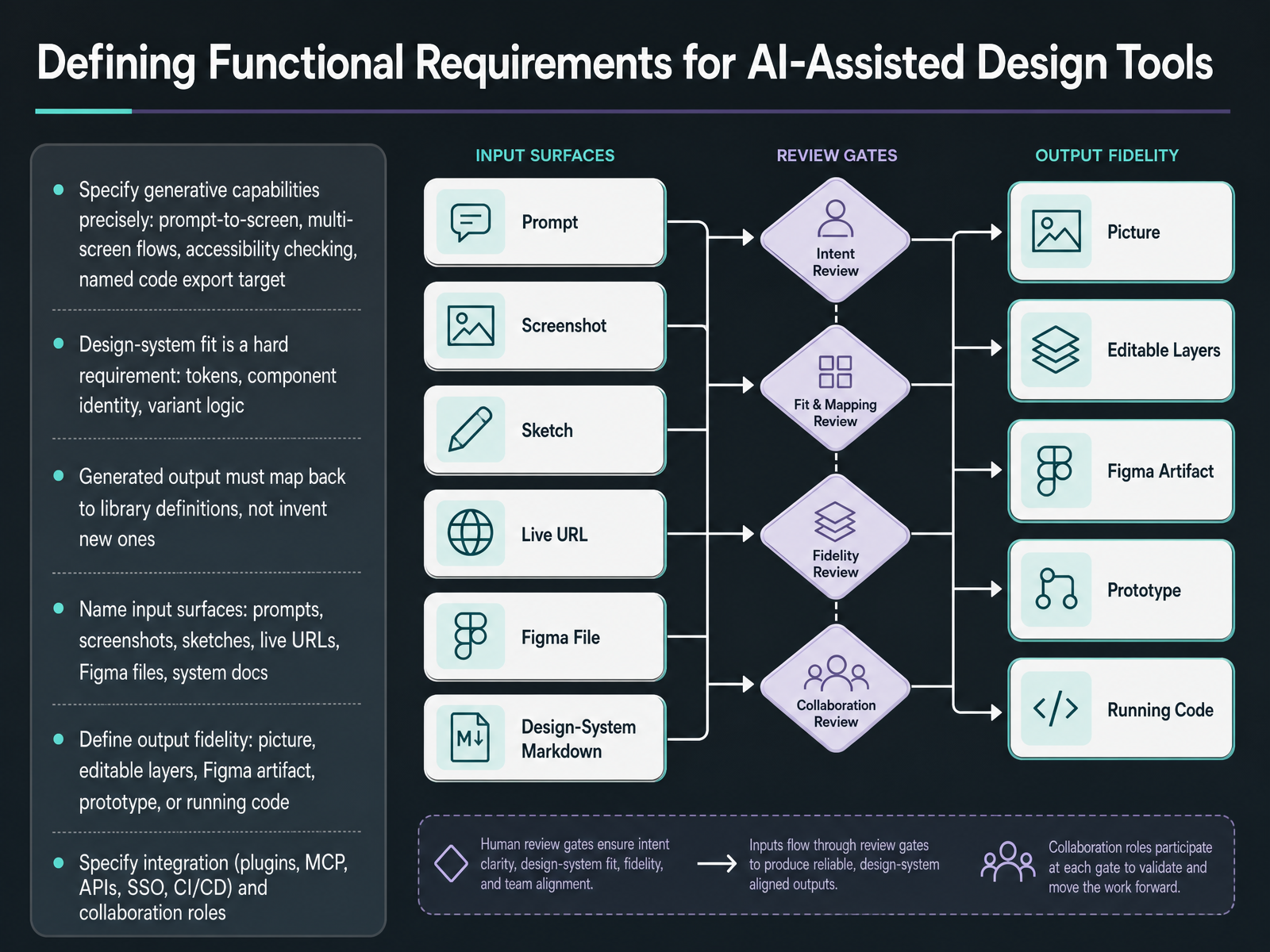
 - 06Defining Functional Requirements for AI-Assisted Design ToolsNow let's turn requirements into something you can actually score. Start with generative capability, and be specific. Does it do prompt to screen, or full multi-screen flows? Does it check accessibility? Which code target does it export? Next, treat design system fit as a hard requirement, not a nice-to-have. The output has to map back to your tokens, your component identity, and your variant logic, not invent new components that fragment the library. Then name your input surfaces, because that drives quality: prompts, screenshots, sketches, live URLs, Figma files, or system docs. Define output fidelity the same way, a picture, editable layers, a Figma artifact, a prototype, or running code. Finally, specify integration: plugins, MCP, APIs, single sign-on, CI/CD, and collaboration roles. Write these down as pass or fail before you demo anything, and the shortlist mostly writes itself. Up next, non-functional and compliance requirements, covering latency, data, accessibility, and security.
 presenc.aisuperdesign.devenergent.ai+22 min
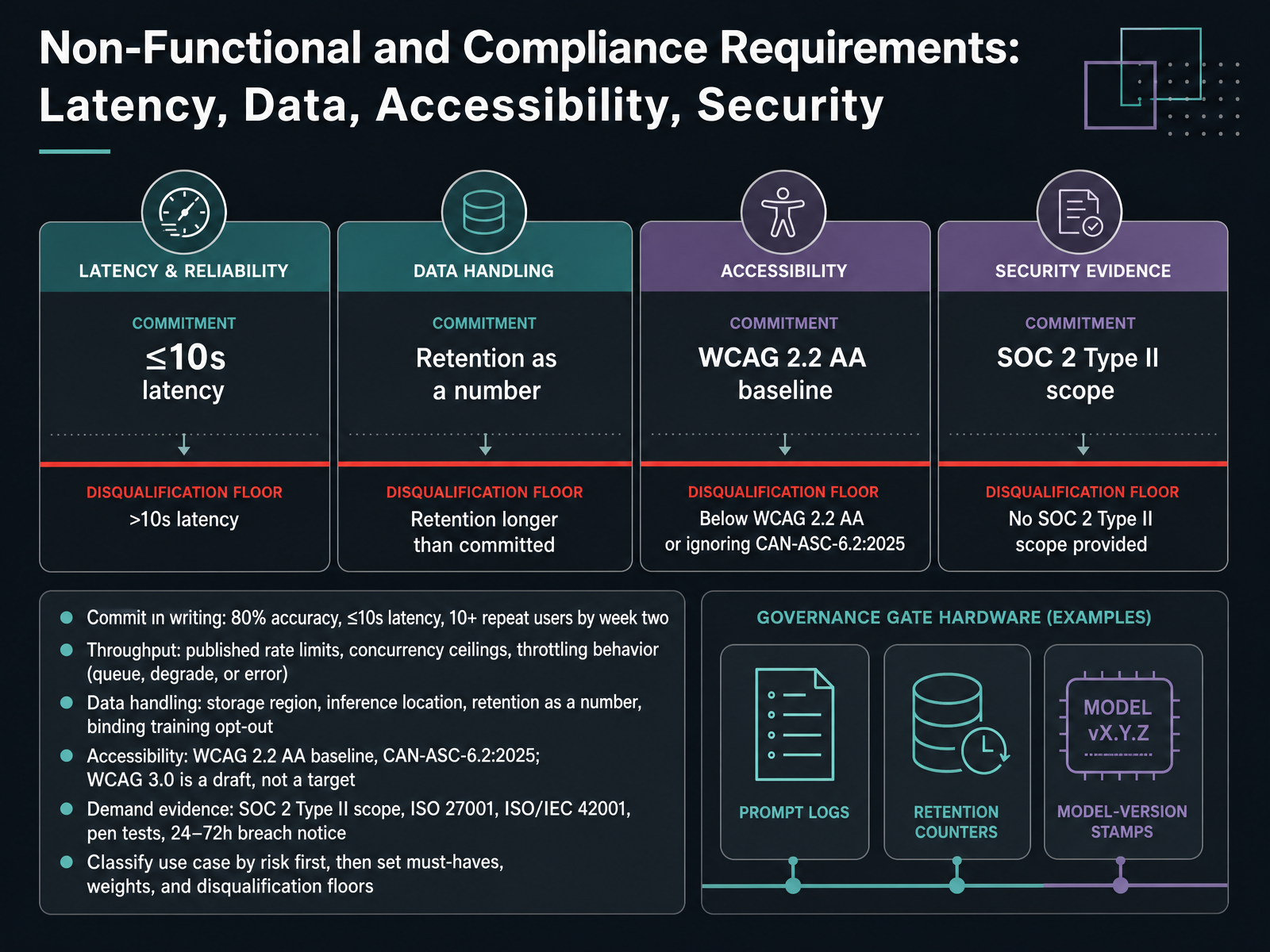
 - 07Non-Functional and Compliance Requirements: Latency, Data, Accessibility, SecurityNext, let's get the non-functional and compliance requirements in writing, because these are what decide whether a pilot survives security and legal review. First, commit the pilot metrics: eighty percent accuracy, measured as outputs your team accepts with light edits, latency of ten seconds or less, and ten or more repeat users by week two. Then throughput. Ask for published rate limits, concurrency ceilings, and what happens under throttling: does it queue, degrade, or error out? For data handling, get the storage region, the inference location, retention stated as a number, and a binding training opt-out, not a policy page. On accessibility, hold vendors to WCAG 2.2 Level AA, and CAN-ASC-6.2:2025. WCAG 3.0 is still a draft, so treat it as a signal, not a target. Demand evidence, not badges: read the SOC 2 Type II scope, check ISO 27001 and ISO/IEC 42001 coverage, request recent penetration tests, and negotiate breach notice in the twenty-four to seventy-two hour range. And sequence matters: classify the use case by risk first, then set must-haves, weights, and disqualification floors. Building a Weighted Evaluation Scorecard.
 aelira.aifigr.designprogressiverobot.com+22 min
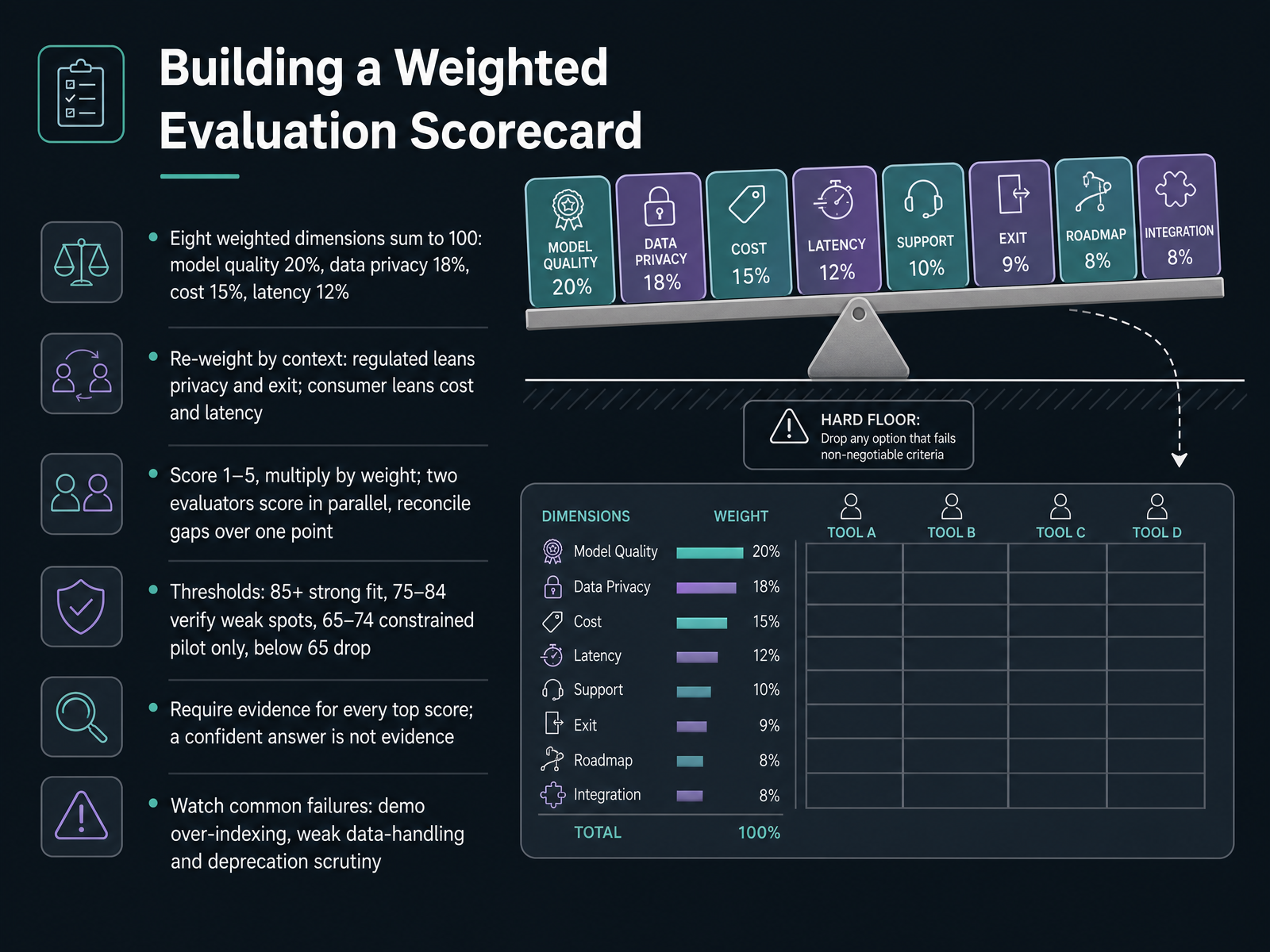
 - 08Building a Weighted Evaluation ScorecardLet's move from criteria to scoring. The core of this is a weighted scorecard, and the structure matters more than the spreadsheet. Eight dimensions sum to one hundred. Model quality takes twenty percent, data privacy eighteen, cost fifteen, latency twelve, with support, roadmap, integration, and exit filling out the rest. Those defaults flex. A regulated deployment shifts weight toward privacy and exit. A consumer prototype leans on cost and latency. Next, the mechanics. Score each dimension from one to five, multiply by the weight, and run two evaluators in parallel. They submit before comparing, then reconcile only the dimensions where they differ by more than one point. A five point scale forces commitment; a ten point scale turns into mush. Read the total against thresholds: eighty-five and above is a strong fit, seventy-five to eighty-four means verify the weak spots, sixty-five to seventy-four is a constrained pilot with hard exit criteria, and below sixty-five you drop the vendor. One rule holds throughout. Require evidence for every top score, because a confident answer is not evidence. And watch the usual failures: over-indexing on demo quality, and under-scrutinizing data handling and model deprecation. Next, we'll cover total cost of ownership, pilot design, and decision outputs.
 elvex.comaininza.compresenc.ai+22 min
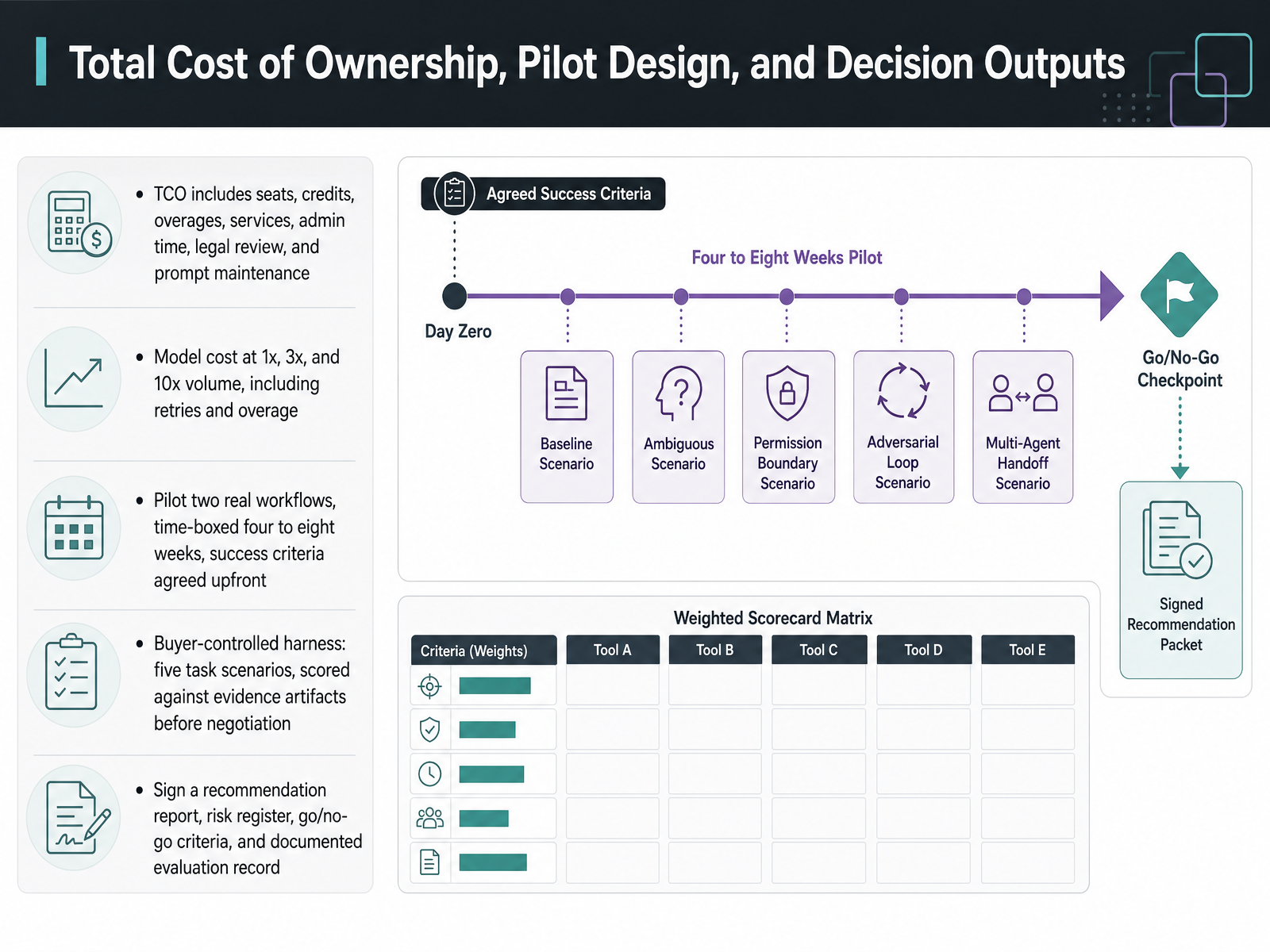
 - 09Total Cost of Ownership, Pilot Design, and Decision OutputsLet's talk about the cost and decision side, because that's where good pilots quietly go wrong. Total cost of ownership is wider than the seat price. Count credits and overages, professional services, admin time, legal review, and the ongoing maintenance of your prompts and workflows. Then model it at one times, three times, and ten times your current volume, including retries and overage charges. A price that looks fine at pilot scale can look very different at ten times. For the pilot itself, pick two real workflows, time-box it to four to eight weeks, and agree success criteria before you start. Longer pilots rarely produce more information. Just sunk cost. I'd also run a buyer-controlled harness: five task scenarios scored against evidence artifacts before you negotiate. That keeps the evaluation yours, not the vendor's. Finally, sign off on four outputs: a recommendation report, a risk register, go, no-go criteria, and a documented evaluation record. That paper trail is what makes the decision defensible. Next, we'll look at where these tools actually plug into design work, in Workflow Integration: Research Synthesis, Ideation, and Design-System Production.
 elvex.comaininza.compresenc.ai+22 min
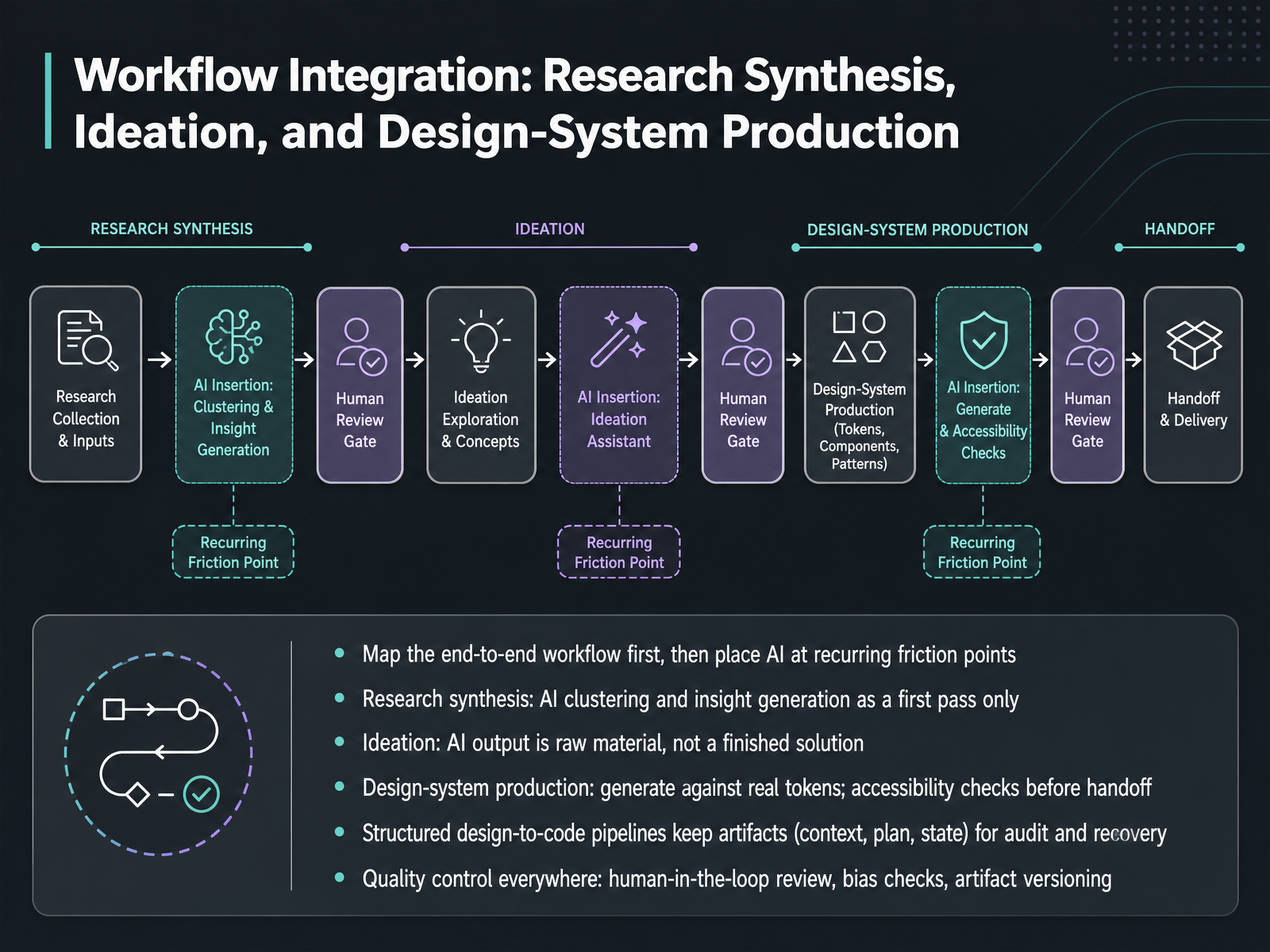
 - 10Workflow Integration: Research Synthesis, Ideation, and Design-System ProductionNow let's put this together into an actual workflow. Start by mapping the end-to-end process, then place AI only at recurring friction points, not everywhere.
For research synthesis, treat AI clustering and insight generation as a first pass. It gets you to a draft fast, but you still verify themes and quotes against the raw data.
For ideation, AI output is raw material, not a finished solution. Feed it constraints, then select and refine with intent.
On design-system production, generate against real tokens and run accessibility checks before handoff. Structured design-to-code pipelines make this workable because they keep intermediate artifacts: context, plans, and task state. That's what makes review, audit, and recovery possible when something fails, rather than a single opaque generation.
And quality control applies everywhere. Human-in-the-loop review, bias checks, and artifact versioning are the guardrails that keep AI fast without letting errors scale.
The takeaway: map first, place AI at friction points, and govern with artifacts. Next, we'll look at Governance, Security, and Responsible AI Use.
 miro.comarxiv.orgsciencedirect.com+22 min
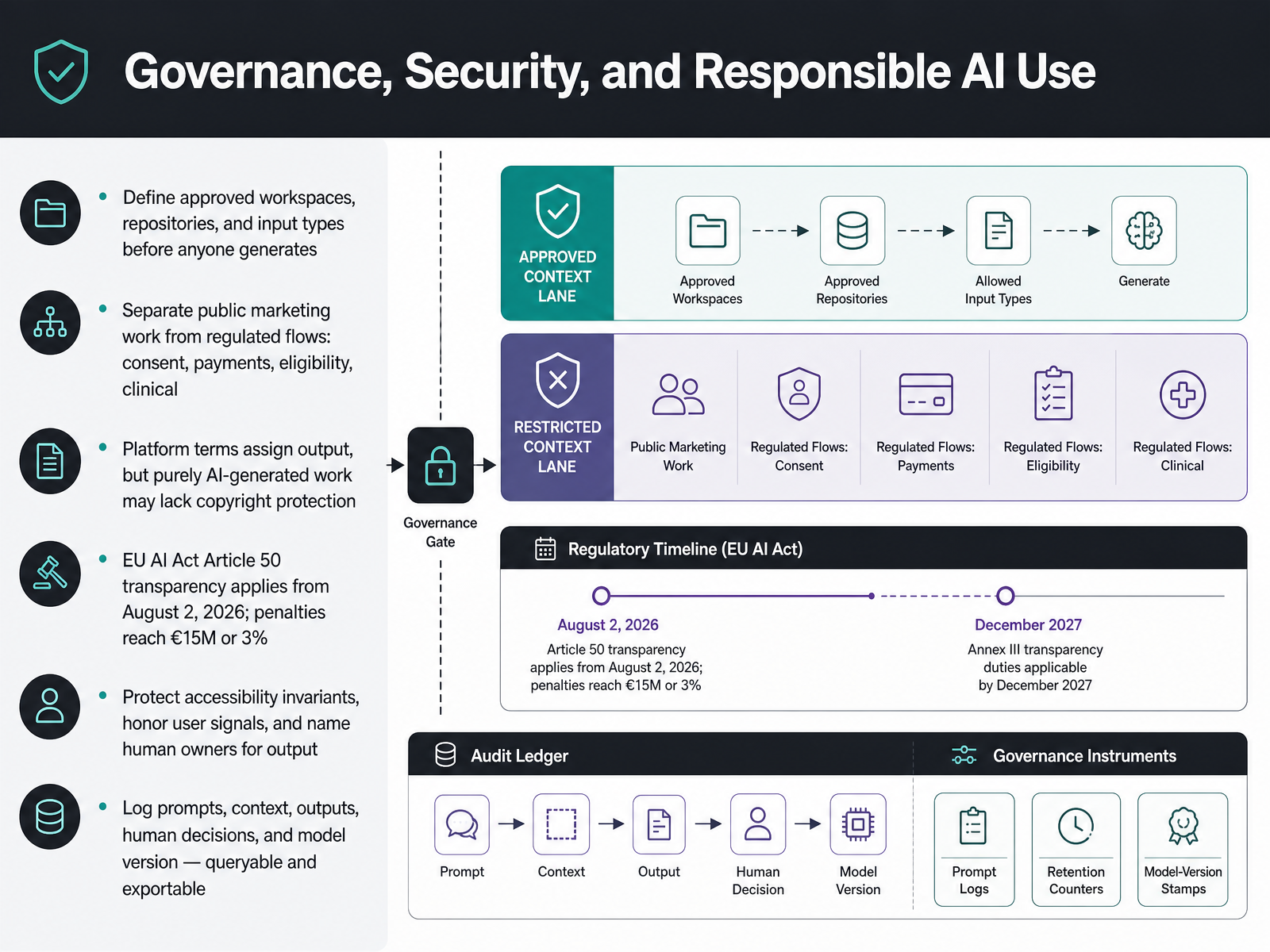
 - 11Governance, Security, and Responsible AI UseBefore you scale any AI design tool, you need to settle governance. Start by defining approved workspaces, repositories, and input types before anyone generates a single asset. Keep public marketing work separate from regulated flows like consent, payments, eligibility, and clinical guidance.
On rights: most platform terms assign output ownership to you, but purely prompt-generated work may not qualify for copyright protection. You can use it commercially. You just may not be able to stop someone from copying it. Human modification is what earns protection.
Regulation matters here. EU AI Act Article 50 transparency obligations apply from August second, 2026, with penalties reaching fifteen million euros or three percent of worldwide turnover.
Protect your accessibility invariants, honor user signals like reduced motion and contrast preferences, and name a human owner for every output. Then log everything: prompts, context, outputs, human decisions, and model version, queryable and exportable.
Next, the implementation roadmap and organizational adoption.
 aelira.aifigr.designprogressiverobot.com+22 min
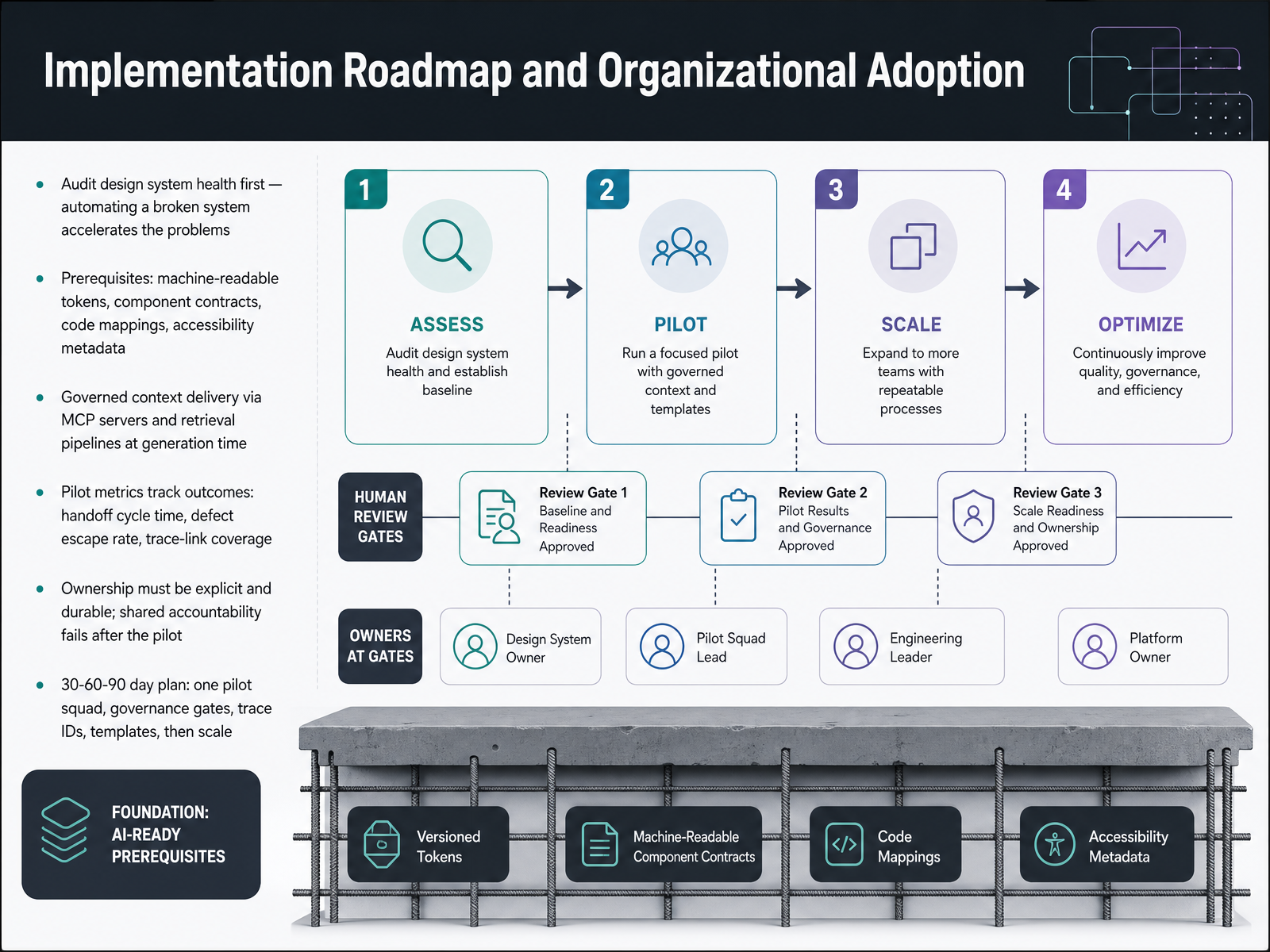
 - 12Implementation Roadmap and Organizational AdoptionLet's talk about turning all of this into an implementation roadmap. Start with an audit of your design system health before you automate anything. Automating a broken system just accelerates the problems. You need prerequisites in place: machine-readable tokens, defined component contracts, code mappings, and accessibility metadata. Then you deliver that context to your AI tools in a governed way, through MCP servers and retrieval pipelines at generation time, so the model pulls from your actual system rather than guessing. For your pilot, track real outcomes: handoff cycle time, defect escape rate, and trace-link coverage. And make ownership explicit and durable, because shared accountability tends to fall apart once the pilot ends. A practical thirty, sixty, ninety day plan looks like this: one pilot squad, governance gates, trace IDs, and reusable templates, then scale from there. Next, we'll put this into practice with an exercise to build your scorecard, requirements, and workflow map.
 miro.comarxiv.orgsciencedirect.com+21 min
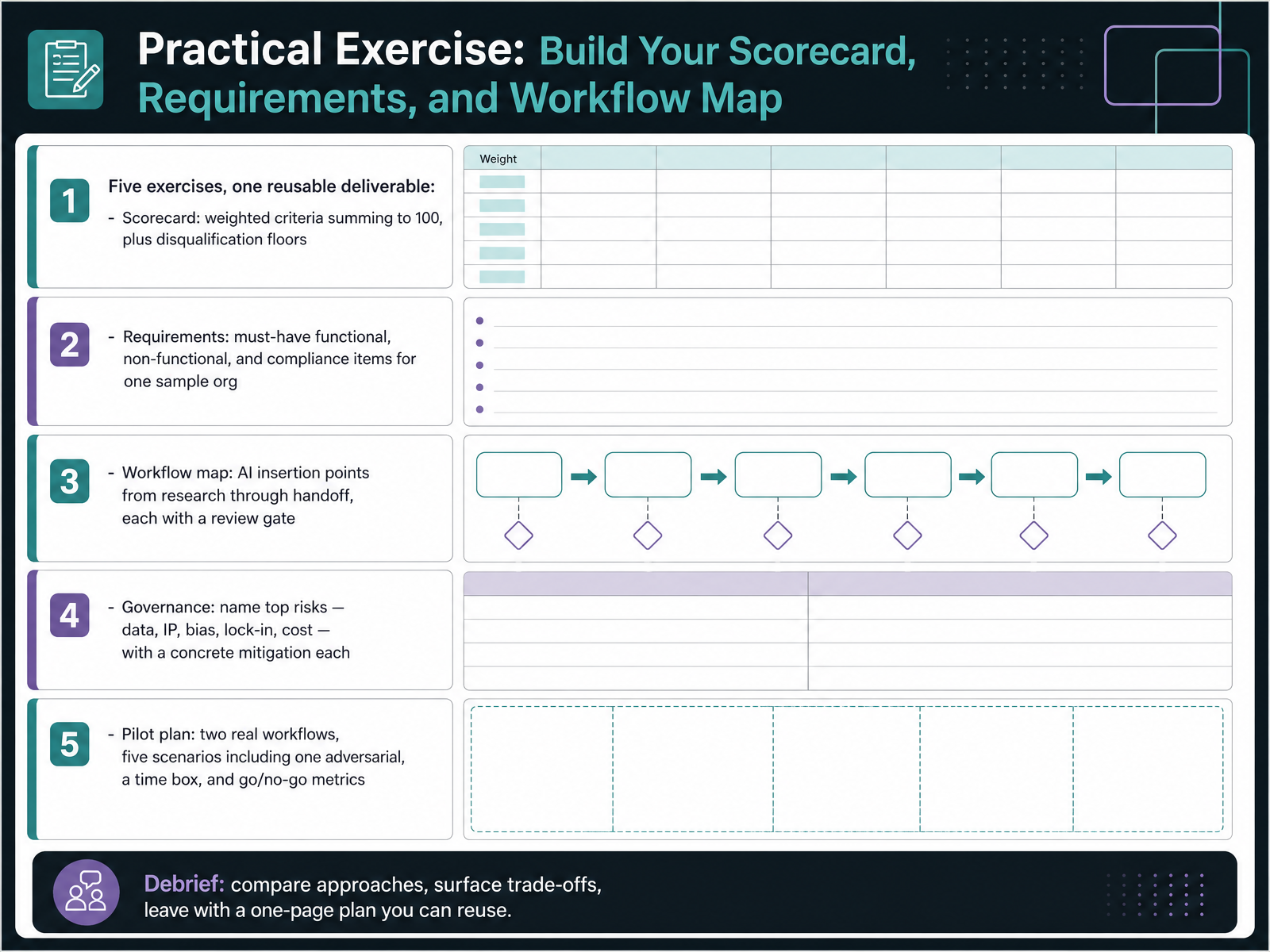
 - 13Practical Exercise: Build Your Scorecard, Requirements, and Workflow MapNow let's put all of this into practice. Time to build your own scorecard, requirements, and workflow map. There are five exercises, and they roll up into one reusable deliverable. First, the scorecard. Set weighted criteria that sum to one hundred, and add disqualification floors for anything non-negotiable, like data privacy or exit terms. A score below the floor ends the evaluation, regardless of the total. Second, write the requirements for one sample organization. Separate must-have functional, non-functional, and compliance items, so legal and security review against the same list. Third, map AI insertion points from research through handoff, and attach a review gate to each one. Fourth, name your top governance risks, data, IP, bias, lock-in, and cost, and pair each with one concrete mitigation. Fifth, sketch a pilot plan: two real workflows, five scenarios including one adversarial case, a time box, and go or no-go metrics agreed upfront. In the debrief, compare approaches, surface trade-offs, and leave with a one-page plan you can reuse. Next, we move to resources, standards, and continuing research.
 elvex.comaininza.compresenc.ai+22 min
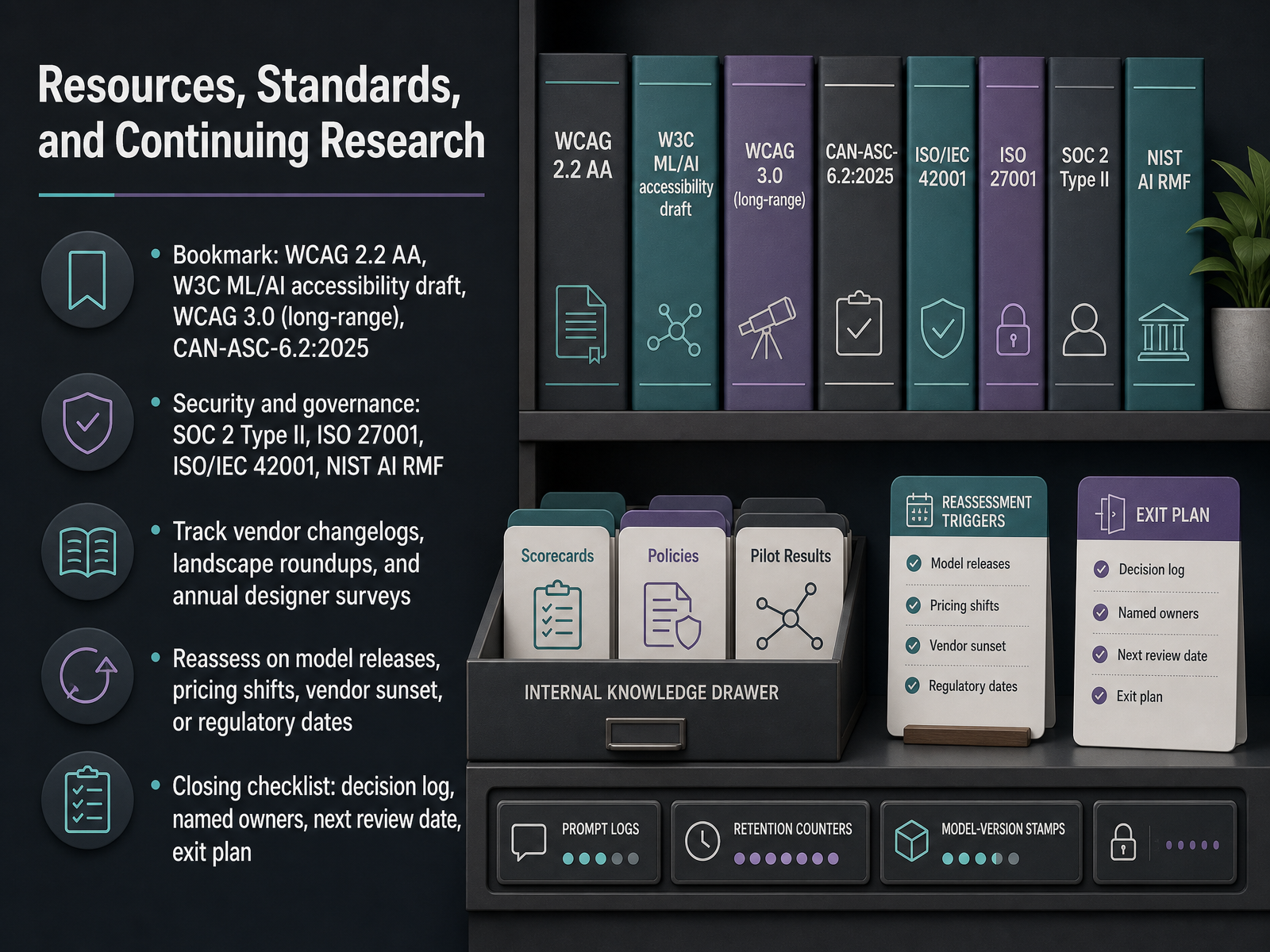
 - 14Resources, Standards, and Continuing ResearchLet's close with the resources and habits that keep a tool evaluation from going stale. For accessibility, bookmark WCAG 2.2 double A as your working baseline, the W 3 C draft on machine learning and AI accessibility, WCAG 3 point 0 as the long-range successor, and CAN-ASC-6.2:2025 if equitable AI governance applies to you. On the governance side, expect questions about SOC 2 Type II, ISO 27001, ISO/IEC 42001, and the NIST AI Risk Management Framework. For staying current, track vendor changelogs, landscape roundups, and annual designer surveys. Then set explicit reassessment triggers: a major model release, a pricing shift, a vendor sunset, or a regulatory date. Your closing checklist is four items: a decision log, named owners, a next review date, and an exit plan. That last one matters most. Before you commit, know how you'd migrate out. Decision log, owners, review date, exit plan. Thanks for working through this with me. Ship deliberately, and keep your system, not the model, as the source of truth.
 presenc.aisuperdesign.devenergent.ai+22 min
Take the deck with you
Download this course as a file — free, no sign-up needed.
- PDF handoutEvery slide page, ready to print or share.15 pages · 3.7 MBDownload
- Narrated PowerPointThe deck that presents itself — every slide carries the digital human's narration video.15 pages · 15.9 MBDownload
- PowerPoint slidesThe full deck as a .pptx — open it in PowerPoint, Keynote, or Google Slides.15 pages · 3.5 MBDownload
Free to use in your own training — please keep the PersonWise credit page at the end.
Have your own deck? Turn it into a course
Sources consulted
Web sources consulted while building this course.
- Design AI Tools Landscape 2026: Figma Make, Adobe Firefly, Galileo, Magic Patterns | Presenc AI — presenc.ai
- AI Design Stack 2026: The Right Tool at Every Stage of a Real Workflow | Superdesign — superdesign.dev
- AI for UI UX Design Services: 2026 Market Report | Energent.ai — energent.ai
- "Best AI Tools for UI/UX Design in 2026: 13 Tools Ranked by Use Case" — resources.rework.com
- A review of generative AI tools for user interface design and designer experience — aaltodoc.aalto.fi
- What Procurement Should Demand in an Accessibility AI Contract: A Due-Diligence Checklist | Aelira Blog — aelira.ai
- AI Design Regulated Industries: 2026 Compliance Guide — figr.design
- AI Procurement Checklist: Essential Guide for Safe Buying — progressiverobot.com
- Enterprise AI Creative Tools: The Procurement Checklist — designerbox.ai
- AI Vendor Due Diligence Checklist 2026 | GLACIS — glacis.io
- Enterprise AI Platform Evaluation Worksheet — elvex.com
- AI Vendor Evaluation Framework 2026: 30-Point Scorecard — aininza.com
- AI Vendor Evaluation Rubric (2026) | Presenc AI — presenc.ai
- Enterprise AI Vendor Shortlist Scorecard 2026 | SitePilot — sitepilot.co
- AI Vendor Evaluation Scorecard Template (with Weights) — institutepm.com
- Design Handoff Best Practices: Beyond Static Mockups — miro.com
- https://www.arxiv.org/pdf/2603.01460 — arxiv.org
- DesignCoder: Hierarchy-aware and self-correcting UI code generation with large language models - ScienceDirect — sciencedirect.com
- [2608.28122] Agentic Artifact Creation: Systems, Evaluation, Principles, and Opportunities — arxiv.org
- ymt23/cx-design-gate — github.com