Begin
13 pages · ~26 min
Software Testing Fundamentals
This training covers the fundamentals of software testing, equipping learners with key concepts and techniques to identify defects and ensure software quality.
A digital instructor presents all 13 pages. Hold “Ask” at any point and ask out loud — the answer comes from this course. No sign-up needed.
What you’ll learn
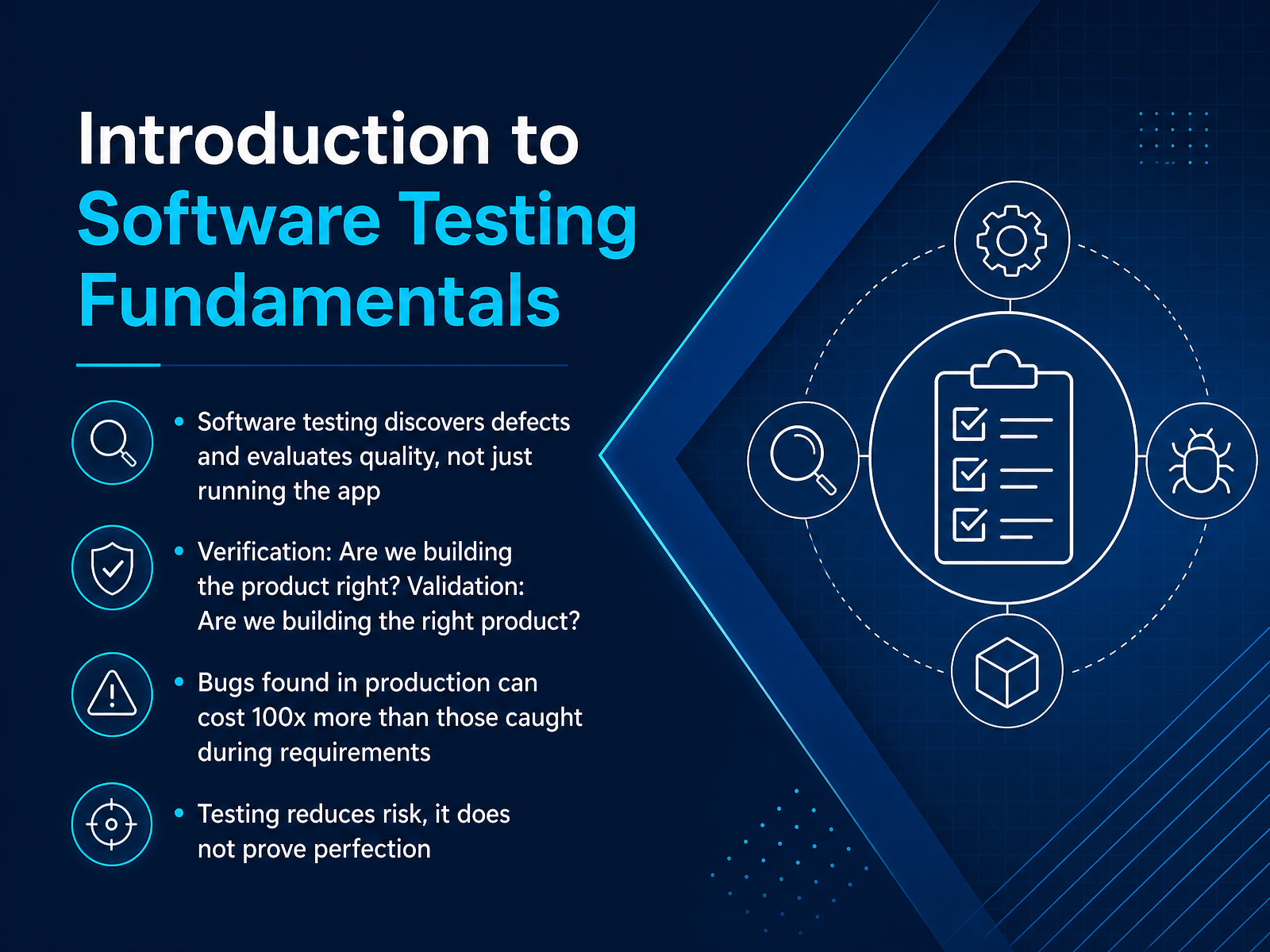
- 01Introduction to Software Testing FundamentalsWelcome to Software Testing Fundamentals. This course is for new technical creators who want to check whether software behaves as expected. Let's start with a clear picture of what testing really is. Testing is not just running the app and hoping it works. It is a set of activities to discover defects and evaluate quality. Think of it as asking two key questions. First, verification: are we building the product right? This means checking that the software matches the written requirements. Second, validation: are we building the right product? This means checking that it actually solves the user's problem in the real world. Catching issues early matters a lot. A bug found during requirements or design can be fixed cheaply. That same bug found in production can cost one hundred times more to fix. Testing helps us reduce risk, but it never proves perfection. We cannot test everything, so we focus on the most important areas. In the next slide, we will explore key testing principles every tester should know.astqb.orgibm.comgeeksforgeeks.org+22 min
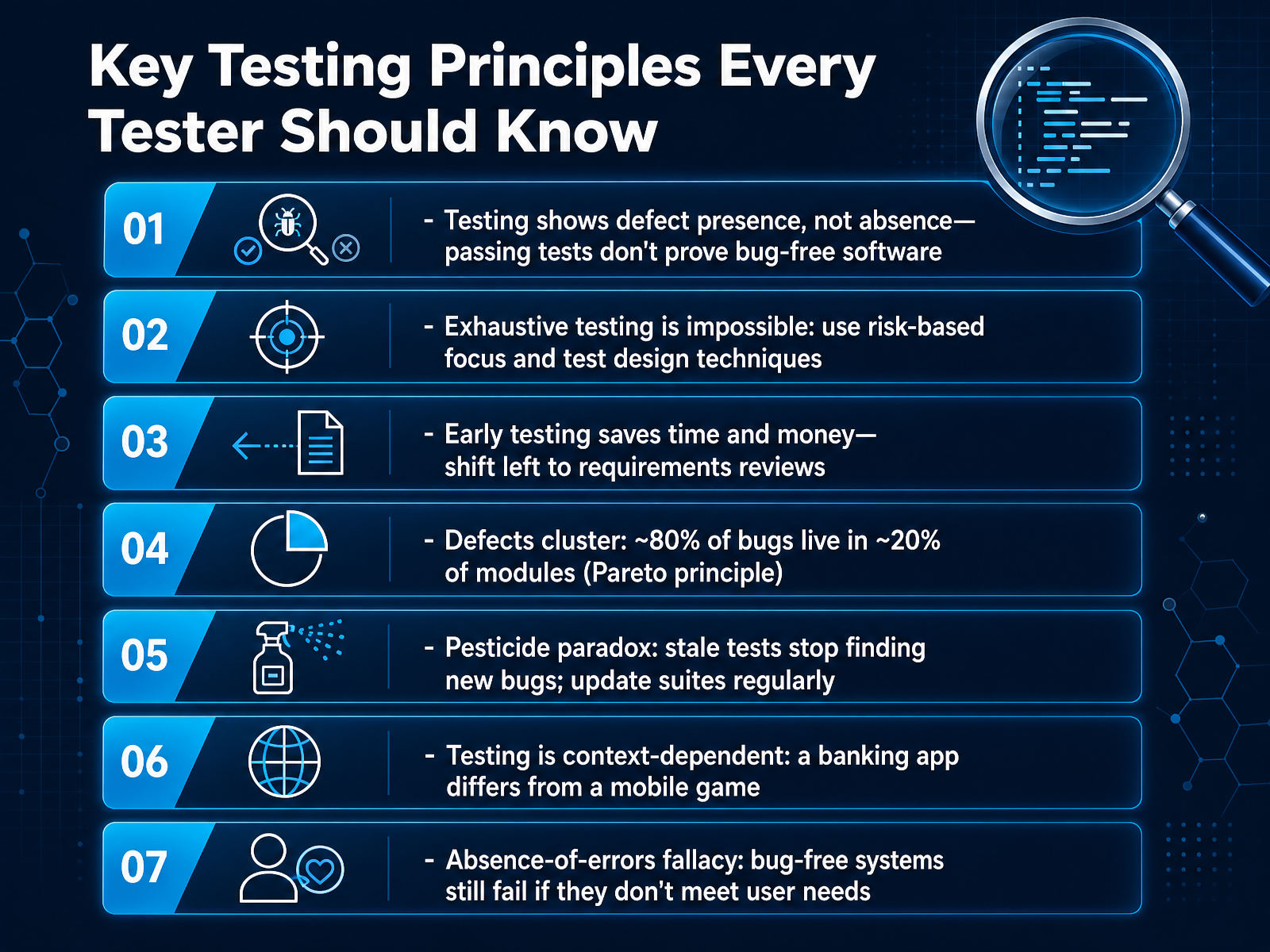
- 02Key Testing Principles Every Tester Should KnowNow let's walk through the seven key testing principles that guide every good tester. First, testing shows the presence of defects, not their absence. Passing a test does not prove your software is bug free. It only means those specific checks did not fail right now. Second, exhaustive testing is impossible. You cannot test every possible input or path. Instead, use risk-based focus and test design techniques to cover the most important areas. Third, early testing saves time and money. Catch problems in requirements reviews before code is written. That is much cheaper than fixing them later. Fourth, defects cluster together. About eighty percent of bugs often live in just twenty percent of the modules. When you find a hot spot, dig deeper there. Fifth, beware of the pesticide paradox. If you run the same tests again and again, they stop finding new bugs. Update your test suites regularly to keep them effective. Sixth, testing is context dependent. A banking app needs a very different approach than a mobile game. Always match your testing to the project's risks and goals. Seventh, the absence-of-errors fallacy. Even bug-free software can fail if it does not meet real user needs. Always check whether the system actually solves the right problem. Next, we will look at the difference between defects, errors, and failures.
 astqb.orgistqb.guruyrkan.com+22 min
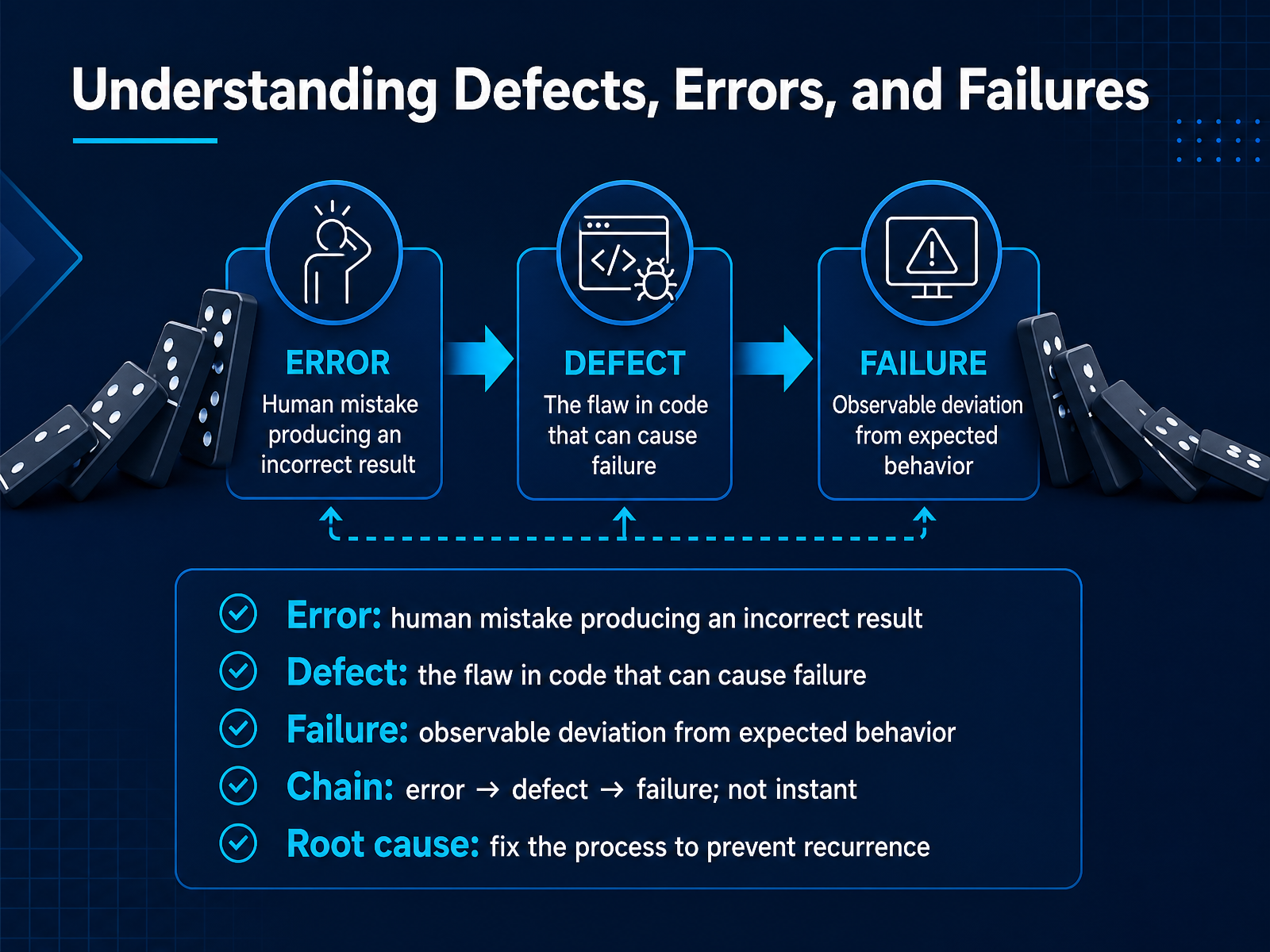
 - 03Understanding Defects, Errors, and FailuresLet's look at three words that often get mixed up. Error, defect, and failure. Think of an error as a human mistake. A developer types the wrong variable name. That is the error. A defect is the flaw that mistake leaves in the code. The wrong variable name is now sitting inside the software. It is a hidden problem. A failure is what you actually see when the software runs. For example, you click a button, and the wrong total appears on the screen. That visible wrong behavior is the failure. The chain works like this. An error leads to a defect. And a defect can lead to a failure. But it is not always instant. The defect might stay hidden until you test a specific screen. Your main job is to find those failures. When you see a failure, you report what you observed. Later, the team looks for the root cause. They fix the defect and, more importantly, they fix the process that allowed the original human error. That prevents the same mistake from happening again. Next, we will look at the different testing levels, from unit to acceptance.
 astqb.orgibm.comgeeksforgeeks.org+22 min
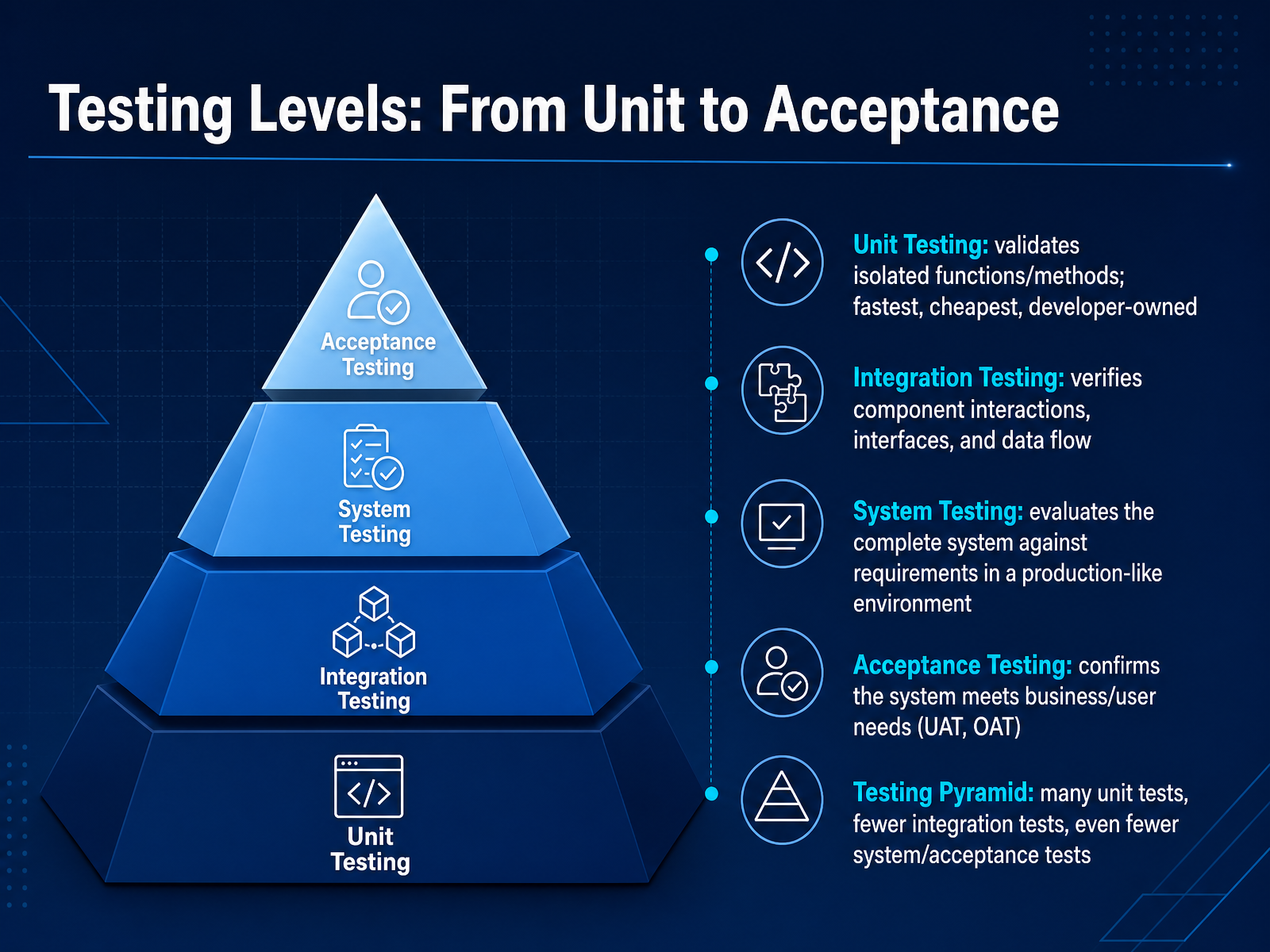
 - 04Testing Levels: From Unit to AcceptanceNow, let's talk about testing levels. Think of testing as a pyramid. At the bottom, you have unit testing. This checks the smallest piece of code, like a single function, in complete isolation. It's fast, it's cheap, and developers own it. Next up is integration testing. Here, you check how those individual pieces talk to each other, like verifying a login screen correctly saves data to a database. This catches problems at the boundaries. Then we have system testing. This is where you evaluate the complete, fully assembled application against the requirements, in an environment that looks just like production. Finally, at the top, is acceptance testing. This confirms the software meets the real business needs, often done by actual users or stakeholders. The key idea is the testing pyramid: you should have many fast unit tests, fewer integration tests, and even fewer, but crucial, system and acceptance tests. This gives you fast feedback and solid confidence. Next, we'll look at the difference between static and dynamic testing, and explore different test types.
 softwareengineeringauthority.comkeploy.ioapidog.com+22 min
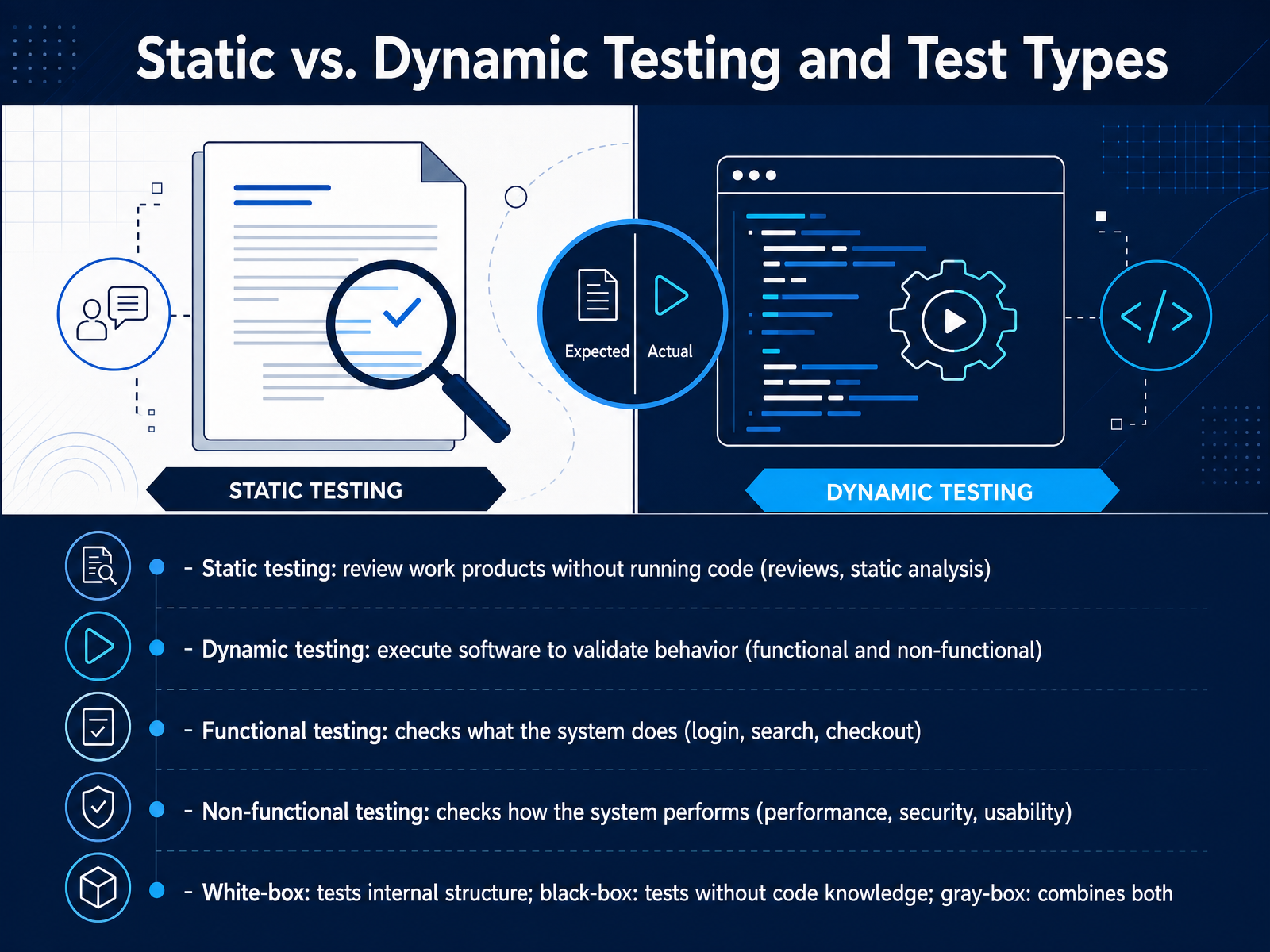
 - 05Static vs. Dynamic Testing and Test TypesNow let's look at two broad ways to think about testing: static and dynamic. Static testing means checking work products without running the code. Think of reviewing a design document or running a static analysis tool that scans the source code. You are finding issues early, before the software even executes. Dynamic testing is the opposite. You actually run the software to see how it behaves. This is where you check a login screen or a search function in real time. We also group tests into functional and non-functional types. Functional testing answers the question, what does the system do? For example, you click a button and verify that a checkout process completes correctly. Non-functional testing answers, how does the system perform? Here you might check page load speed, security, or how easy a screen is to use. Finally, we describe test perspectives as white-box, black-box, and gray-box. White-box testing looks at the code's internal structure. Black-box testing checks the software without any code knowledge, just like a user. Gray-box testing combines both. Next, we'll move into the structured test process.
 astqb.orgibm.comgeeksforgeeks.org+22 min
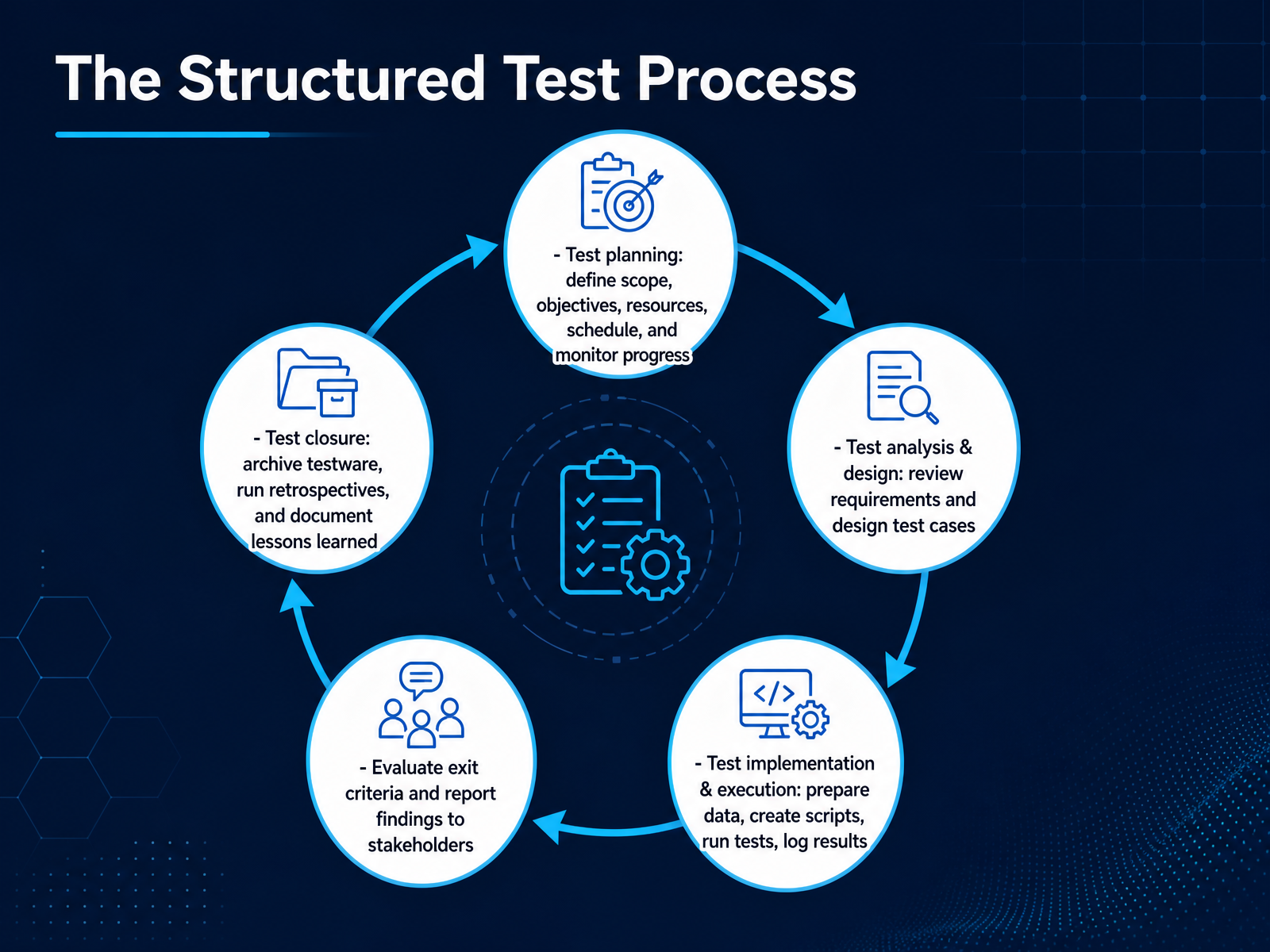
 - 06The Structured Test ProcessNow let's walk through the structured test process. Think of it as a roadmap that keeps your testing organized and thorough. It starts with test planning. Here you define the scope, set your objectives, and figure out what resources and schedule you need. You also monitor progress throughout. Next comes test analysis and design. You review the requirements and then design your test cases, which are simply the specific steps and checks you will perform. After that, you move into test implementation and execution. This is the hands-on part where you prepare your data, maybe create automated scripts, actually run the tests, and log the results. Then you evaluate exit criteria and report your findings to stakeholders. You ask, 'Do we feel confident enough to ship this?' Finally, there is test closure. You archive all your test materials, hold a retrospective meeting to discuss what went well and what did not, and document the lessons learned for next time. Following these steps helps you move from just clicking around to a repeatable, professional testing approach. Next, we will dive into designing effective test cases with black-box techniques.
 astqb.orgibm.comgeeksforgeeks.org+22 min
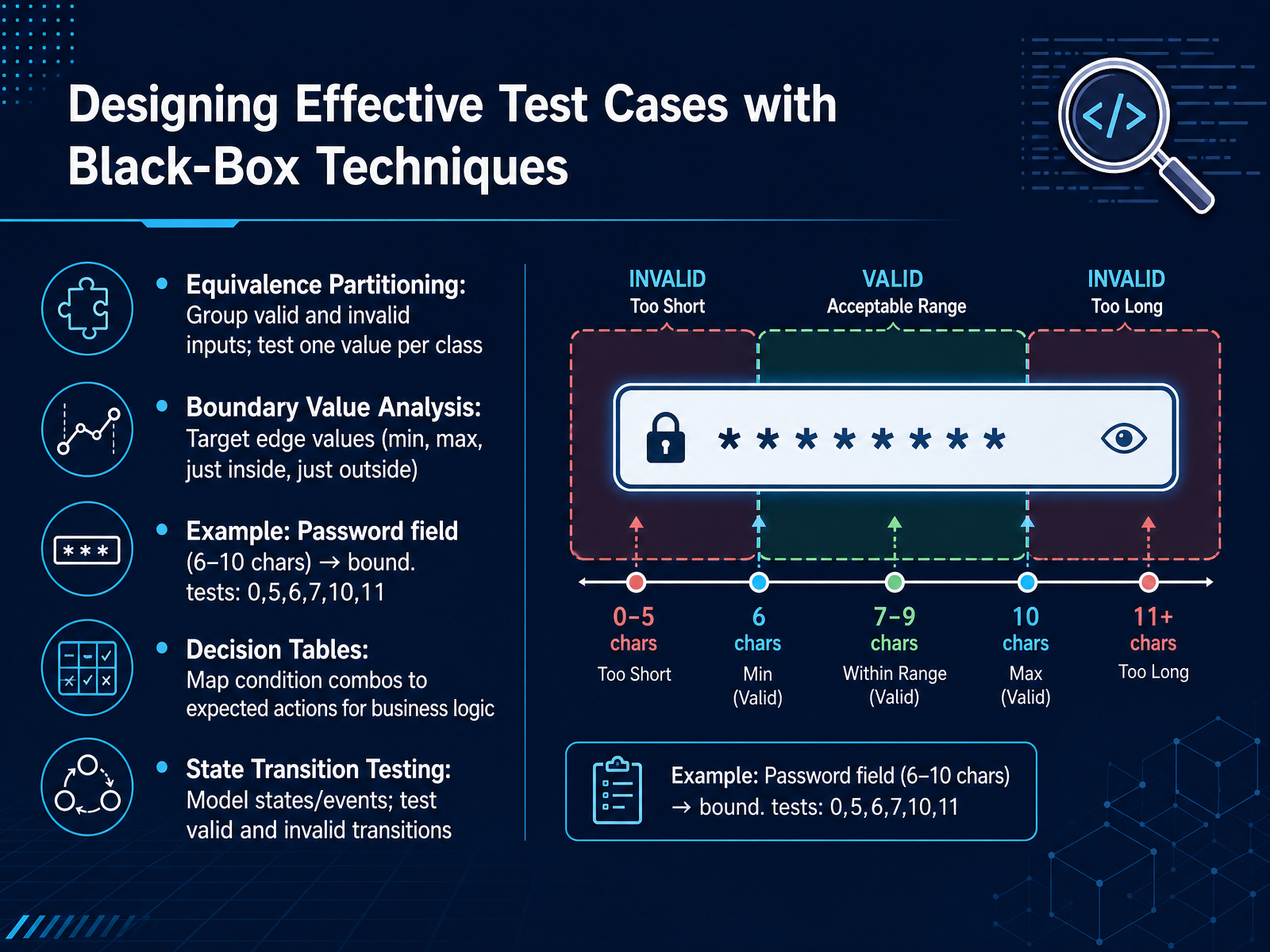
 - 07Designing Effective Test Cases with Black-Box TechniquesLet's move on to designing effective test cases with black-box techniques. These methods help you choose smart test data without testing every single possible value. First, Equivalence Partitioning. You group inputs into valid and invalid classes, then test just one value from each class. For example, if a field accepts ages 18 to 65, a value under 18 is one invalid class, a value in the range is valid, and a value over 65 is another invalid class. Next, Boundary Value Analysis targets the edges where bugs often hide. You test the exact minimum and maximum, plus values just inside and just outside. Look at the slide's password example. The field accepts 6 to 10 characters. Boundary tests would include 0, 5, 6, 7, 10, and 11 characters. These edge cases catch off-by-one errors. Beyond these two, Decision Tables map different combinations of conditions to expected actions. This is perfect for business logic with multiple inputs. Finally, State Transition Testing models the system's states and events. You test both valid and invalid paths between states. Using these techniques together gives you strong coverage with fewer test cases. Next, we'll apply this knowledge by writing your first tests with pytest.
 softwaretestinghelp.comsoftwaretestingclass.comguru99.com+22 min
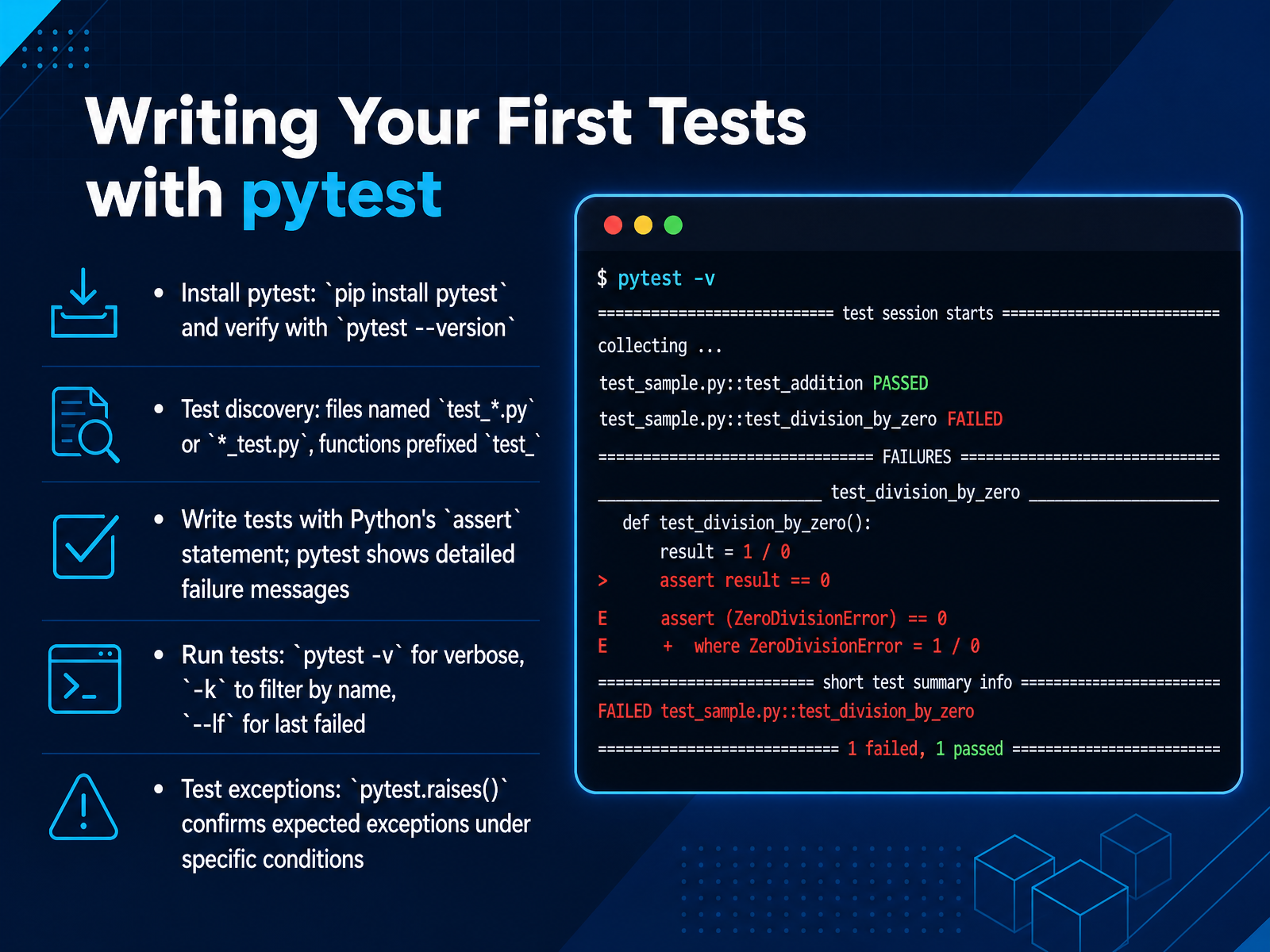
 - 08Writing Your First Tests with pytestNow let's write our first tests using pytest. Start by installing it. Open your terminal and run pip install pytest. Then confirm it worked by typing pytest space dash dash version. You should see a version number appear. Next, let's talk about how pytest finds your tests. It automatically looks for files named test underscore something dot py or something underscore test dot py. Inside those files, it runs any function whose name starts with test underscore. To write a test, you just use Python's built-in assert statement. For example, assert add of two comma three equals five. If the condition is true, the test passes. If not, pytest shows you exactly what values differed, saving you debugging time. When you run your tests, use pytest space dash v for a detailed list of each test's result. You can run a specific group of tests with dash k and a keyword, or rerun only the tests that failed last time with dash dash lf. Finally, sometimes you expect code to raise an error. You can confirm this with pytest dot raises. Wrap the problem code, and pytest will pass the test only if that specific exception is thrown. These basics let you start checking your own software right away. Next, we'll look at structuring tests with fixtures and parametrization.
 2 min
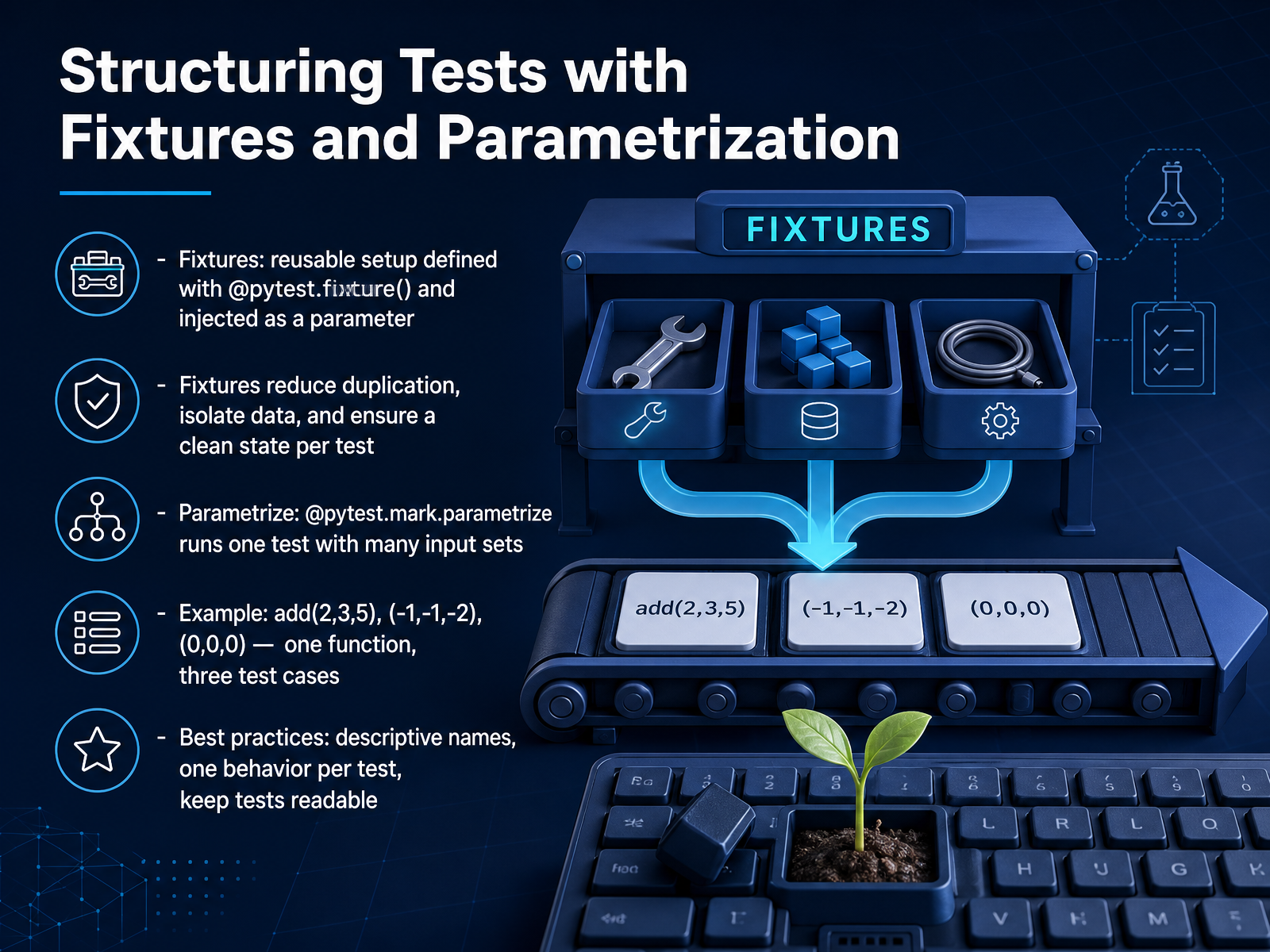
2 min - 09Structuring Tests with Fixtures and ParametrizationNow we look at two features that help you stop repeating the same setup code over and over. First, fixtures. A fixture is a reusable piece of setup that you define once with the at-pytest-fixture decorator. You then inject it into a test as a parameter. Fixtures reduce duplication, isolate test data, and give each test a clean starting state. Next, parametrization. Use the at-pytest-mark-parametrize decorator to run one test function with many sets of inputs. For example, you can check an add function with three pairs of numbers and expected results in a single test. Think of it as one function that produces three separate test cases. A few best practices. Give your tests descriptive names. Test only one behavior per test. Keep your tests readable. When you follow these habits, your test suite grows without becoming hard to understand. Let's move on and compare manual testing with automated testing, so you know when to use each.
 1 min
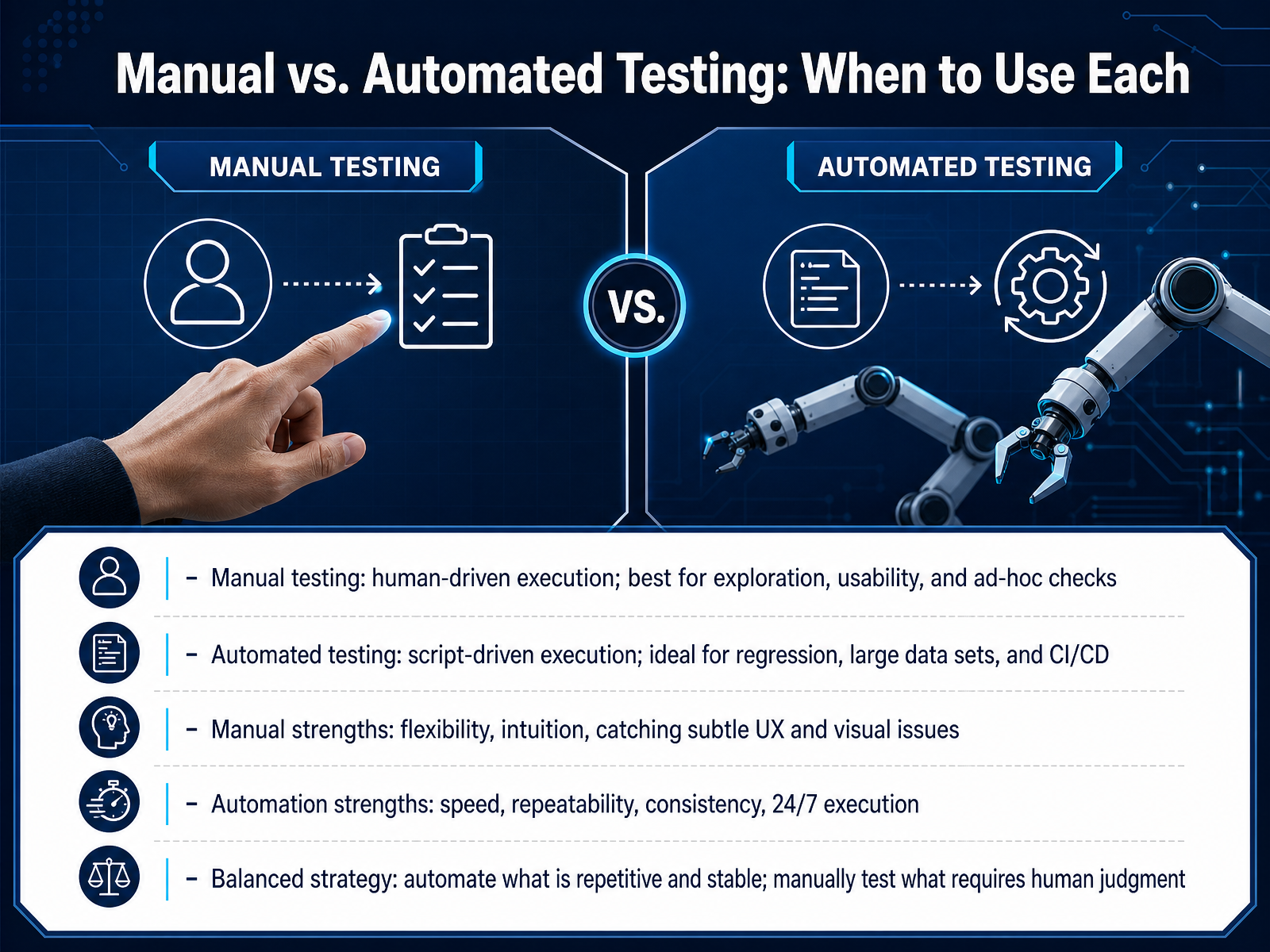
1 min - 10Manual vs. Automated Testing: When to Use EachNow let's talk about the two main ways to test software. Manual testing, and automated testing. Think of manual testing as you, a person, clicking through the application just like a user would. You explore the screens, try different paths, and look for things that feel off. This method is great for checking usability, layout, and catching subtle visual issues. Your human intuition is the key tool here. Automated testing is different. You write a script, a set of instructions, and a tool executes those clicks and checks for you. This approach is ideal for repetitive tasks, like checking that a login still works after every code change. It runs fast, it runs consistently, and it can even run overnight. A balanced strategy is best. Automate the checks that are stable and need to be repeated often. Use manual testing to explore new features and judge the user experience. Next, we'll look at a core part of that workflow, defect reporting and tracking.
 astqb.orgibm.comgeeksforgeeks.org+22 min
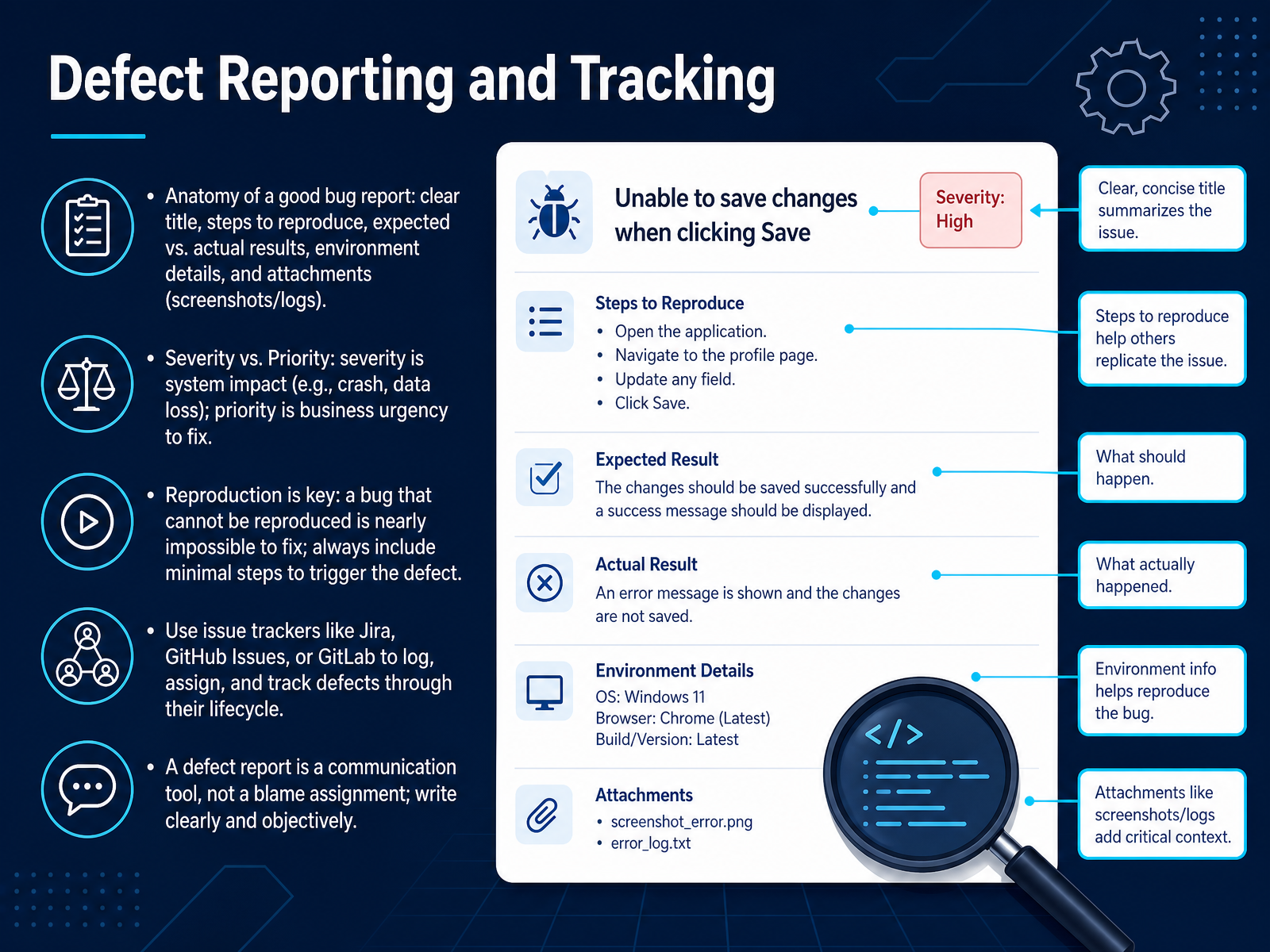
 - 11Defect Reporting and TrackingNow let's talk about what happens when you find a problem. Reporting a defect clearly is one of the most important things you can do. Think of a good bug report like a clear instruction manual. It needs a clear title that summarizes the issue. Then, list the exact steps to reproduce the problem. Describe what you expected to see versus what actually happened. Also include environment details, like the browser or device you used. And whenever possible, attach screenshots or logs. These attachments are like evidence that helps a developer understand the problem quickly. When you log an issue, you will often see two labels: severity and priority. Severity is about the system impact. For example, a crash or data loss is high severity. Priority is about business urgency. Something might be high severity but low priority if it only affects a rare edge case. The most critical part of any report is reproduction. A bug that cannot be reproduced is nearly impossible to fix. So always include the minimal steps to trigger the defect. You can use tools like Jira, GitHub Issues, or GitLab to log and track these reports. But remember, a defect report is a communication tool, not a way to blame anyone. Always write clearly and objectively. Next, we will explore the tester's mindset and real-world collaboration.
 astqb.orgibm.comgeeksforgeeks.org+22 min
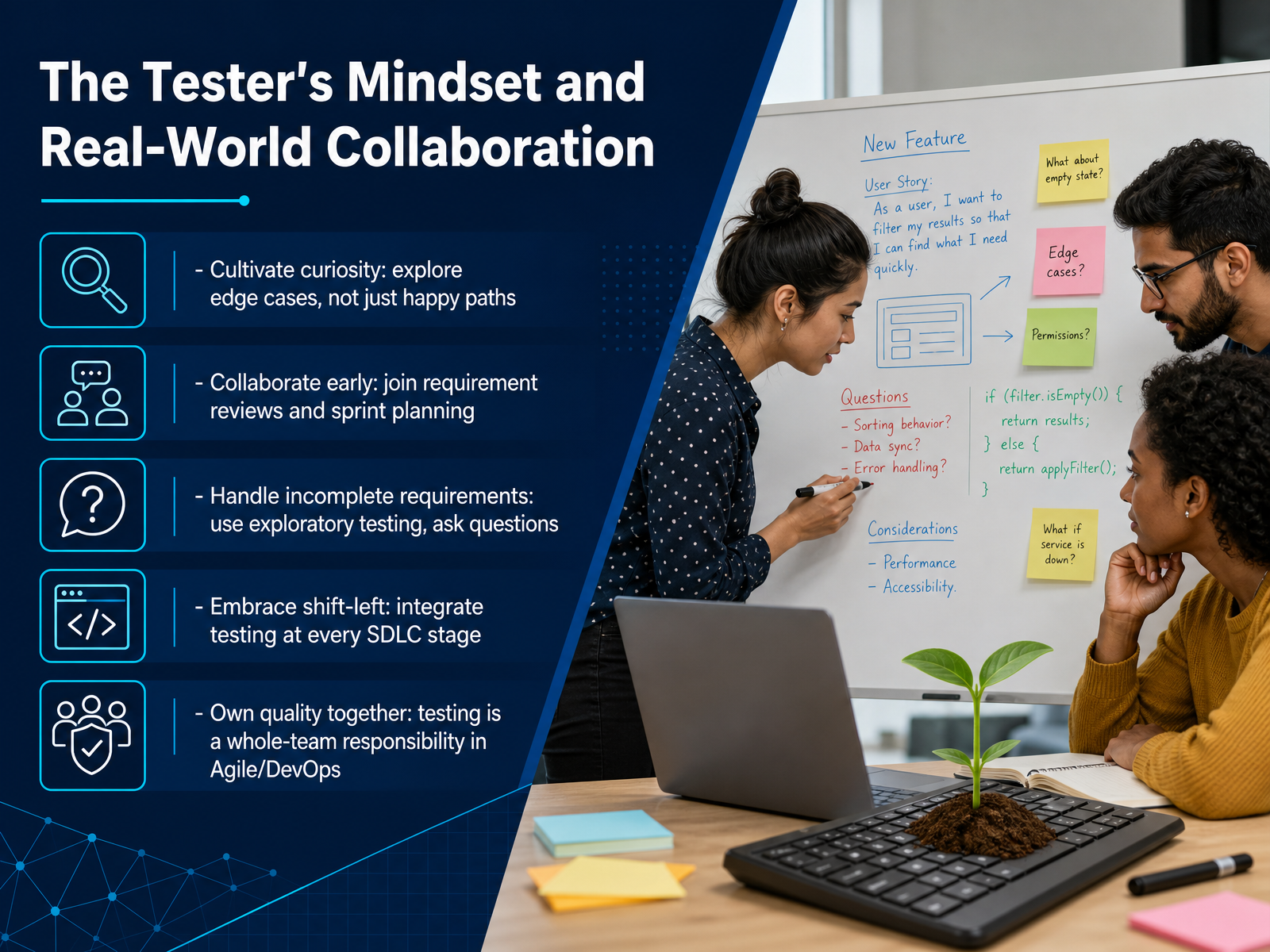
 - 12The Tester's Mindset and Real-World CollaborationNow let's talk about the mindset and collaboration that make testing effective. First, cultivate curiosity. Don't just check the happy path where everything works. Ask what happens if a user types letters in a number field or leaves a form blank. Explore those edge cases early. Next, collaborate early. Join requirement reviews and sprint planning meetings. When you hear a new feature being described, start thinking about how you would test it right then. You will often deal with incomplete requirements. In those moments, use exploratory testing to investigate the software, and simply ask questions. The best testers are not afraid to say, I don't understand this yet. Embrace what we call shift-left. This means integrating testing at every stage, from planning to coding, not just at the end. Finally, own quality together. In Agile and DevOps, testing is not a solo activity. Developers, product owners, and you all share responsibility for building reliable software. Let's continue to the final slide, 'Your Testing Journey: Next Steps and Resources.'
 2 min
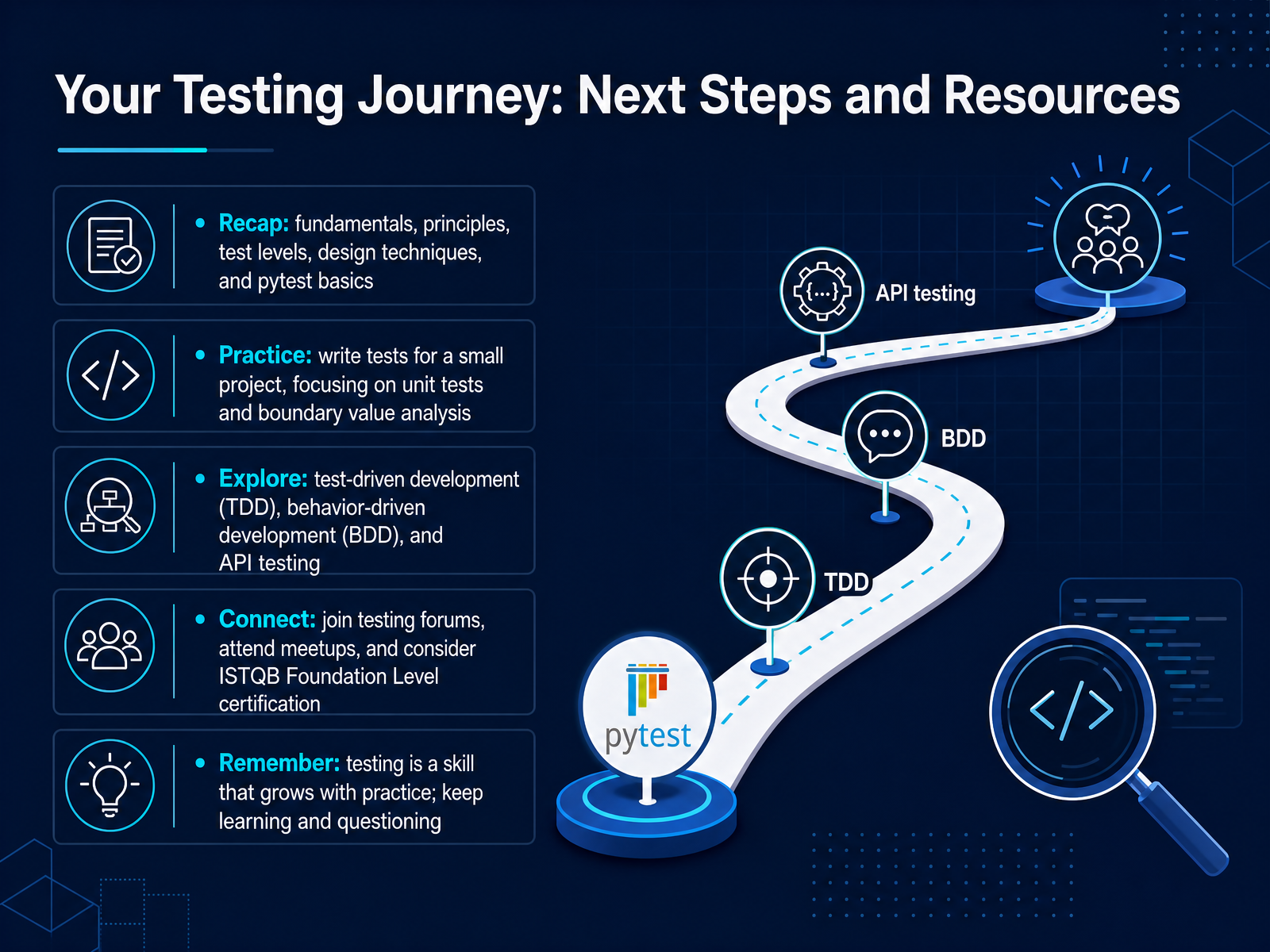
2 min - 13Your Testing Journey: Next Steps and ResourcesWe've covered a lot of ground together. You now know the fundamentals of testing, why we test, and how to think about test levels and design techniques. You also got hands-on with pytest basics. What comes next is practice. Start with a small project and write unit tests. Focus on boundary value analysis to check the edges of what your code expects. When you're ready, explore test-driven development, where you write the test before the code. Look into behavior-driven development and API testing too. Connect with other testers online, join forums, or attend local meetups. If you want a formal credential, consider the ISTQB Foundation Level certification. Remember, testing is a skill that grows every time you practice. Keep questioning, keep learning, and enjoy the confidence that good testing brings. Thank you, and happy testing.
 astqb.orgibm.comgeeksforgeeks.org+22 min
Take the deck with you
Download this course as a file — free, no sign-up needed.
- PDF handoutEvery slide page, ready to print or share.14 pages · 3.6 MBDownload
- Narrated PowerPointThe deck that presents itself — every slide carries the digital human's narration video.14 pages · 13.9 MBDownload
- PowerPoint slidesThe full deck as a .pptx — open it in PowerPoint, Keynote, or Google Slides.14 pages · 3.5 MBDownload
Free to use in your own training — please keep the PersonWise credit page at the end.
Have your own deck? Turn it into a course
Sources consulted
Web sources consulted while building this course.
- 1.1 What is Testing?Official ISTQB Exam — astqb.org
- What is Software Testing? — ibm.com
- Introduction to Software Testing — geeksforgeeks.org
- Software Testing: Complete Beginner's Guide — splunk.com
- Software Testing Basics Simplified: A Guide For Beginners ... — keploy.io
- ISTQB Foundation Level – Seven Testing Principles — astqb.org
- The 7 Principles of Software Testing (ISTQB) with Real ... — istqb.guru
- Testing Principles: 7 Golden Rules of ISTQB · Yuri Kan - Senior QA Lead and Test Automation Expert — yrkan.com
- 7 principles of software testing - ISTQB guide (2026) — betterqa.co
- https://www.guru99.com/software-testing-seven-principles.html — guru99.com
- Software Testing Types: Unit, Integration, System, and Acceptance Testing | Software Engineering Authority — softwareengineeringauthority.com
- Levels of Software Testing: A Complete Guide with Examples (2026) | Keploy Blog — keploy.io
- Unit Testing vs Integration Testing vs System Testing: What is the Difference? — apidog.com
- The different types of software testing — atlassian.com
- Unit vs Integration vs System Testing (2026) — totalshiftleft.ai
- Boundary Value Analysis & Equivalence Partitioning Examples — softwaretestinghelp.com
- Boundary Value Analysis and Equivalence Class Partitioning With Simple Example | Software Testing Class — softwaretestingclass.com
- Boundary Value Analysis and Equivalence Partitioning — guru99.com
- Software Testing - Boundary Value Analysis vs Equivalence Partitioning - GeeksforGeeks — geeksforgeeks.org
- Boundary Value Analysis & Equivalence Partitioning with Examples — tutorialspoint.com