Begin
16 pages · ~32 min
How the Internet Works
This course explains the fundamentals of internet infrastructure for beginners, covering how data moves across networks.
A digital instructor presents all 16 pages. Hold “Ask” at any point and ask out loud — the answer comes from this course. No sign-up needed.
What you’ll learn
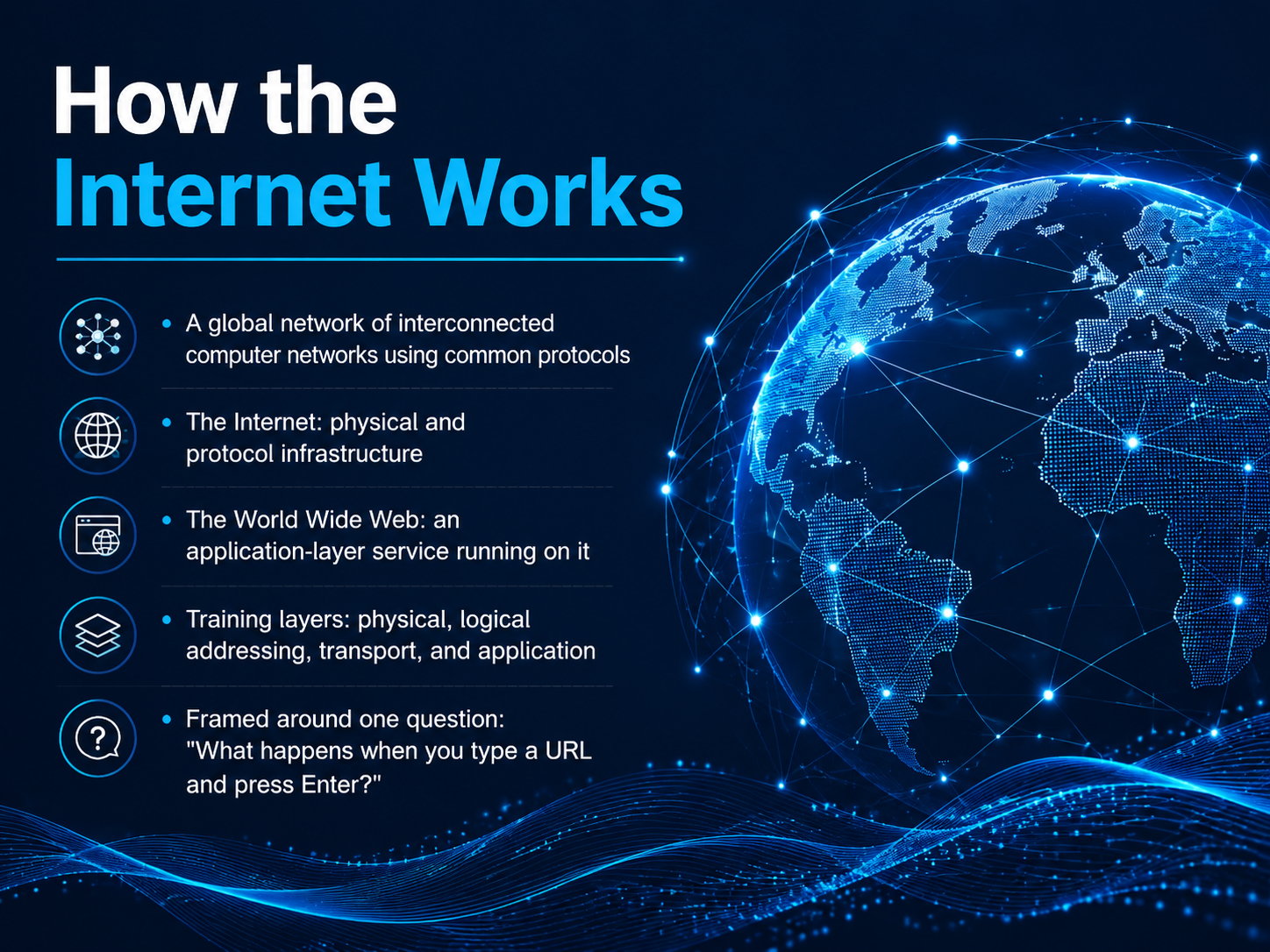
- 01How the Internet WorksWelcome to How the Internet Works. In this course, we're going to pull back the curtain on something you use every single day. You'll click a link, type an address, or tap a button countless times, but what actually happens in that split second? That's the question at the heart of our training. We'll frame the entire journey around one simple scenario: what happens when you type a URL and press Enter? To answer that, we need to think about the Internet itself. It's a global network of interconnected computer networks, all using a common set of rules, or protocols, to communicate. Picture it as two layers. The Internet is the physical and protocol infrastructure, the highways, cables, and addressing systems. The World Wide Web is an application layer service running on top of that infrastructure. To make sense of it all, we'll explore four key layers: the physical layer, the logical addressing layer, the transport layer, and the application layer. By the end, that simple URL request will feel like a well-choreographed, global journey. Let's get started with the big picture, a thirty-second tour of how it all fits together.w3techs.comtechnologychecker.iotechnologychecker.io+22 min
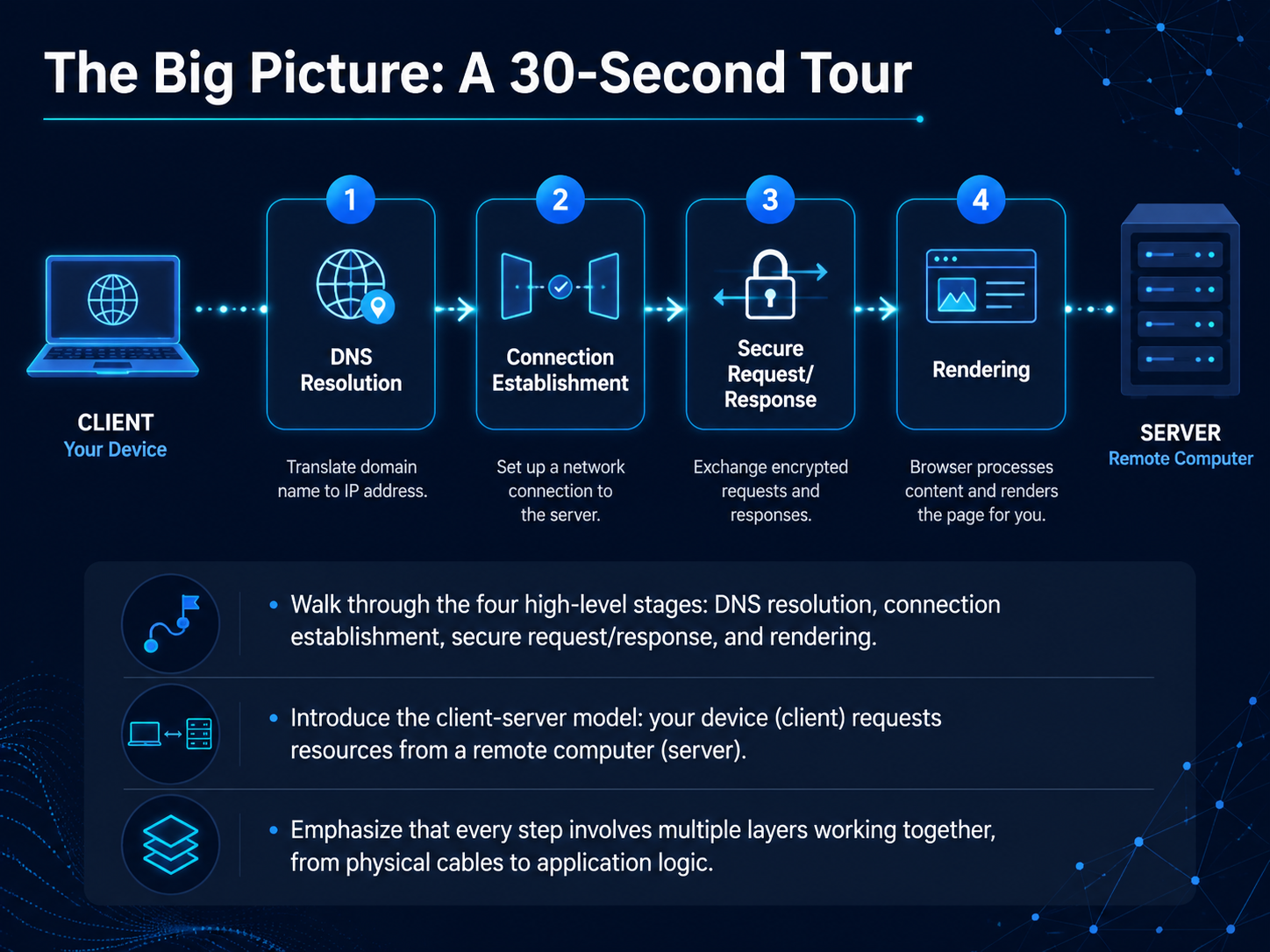
- 02The Big Picture: A 30-Second TourNow that we've set the stage, let's zoom out for a moment and see the whole journey our data takes in just a few seconds. Think of it like a high-speed tour of a package delivery system. First, your browser needs to find the address of the website you typed in, which is a process called DNS resolution. Once it knows the address, your device—the client—reaches out to the other computer, the server, to establish a connection. It's like a handshake that says, 'I'm ready to talk.' After that, the actual request is sent securely, and the server sends back the webpage data. Finally, your browser takes all that raw code and renders it into the page you see. What's fascinating is that every single step relies on layers of technology working together, from the physical cables under the ocean to the logic built into the app you're using. Up next, we'll dig into the very first step of this journey: how your device identifies the other computer on the network using something called an IP address.
 1 min
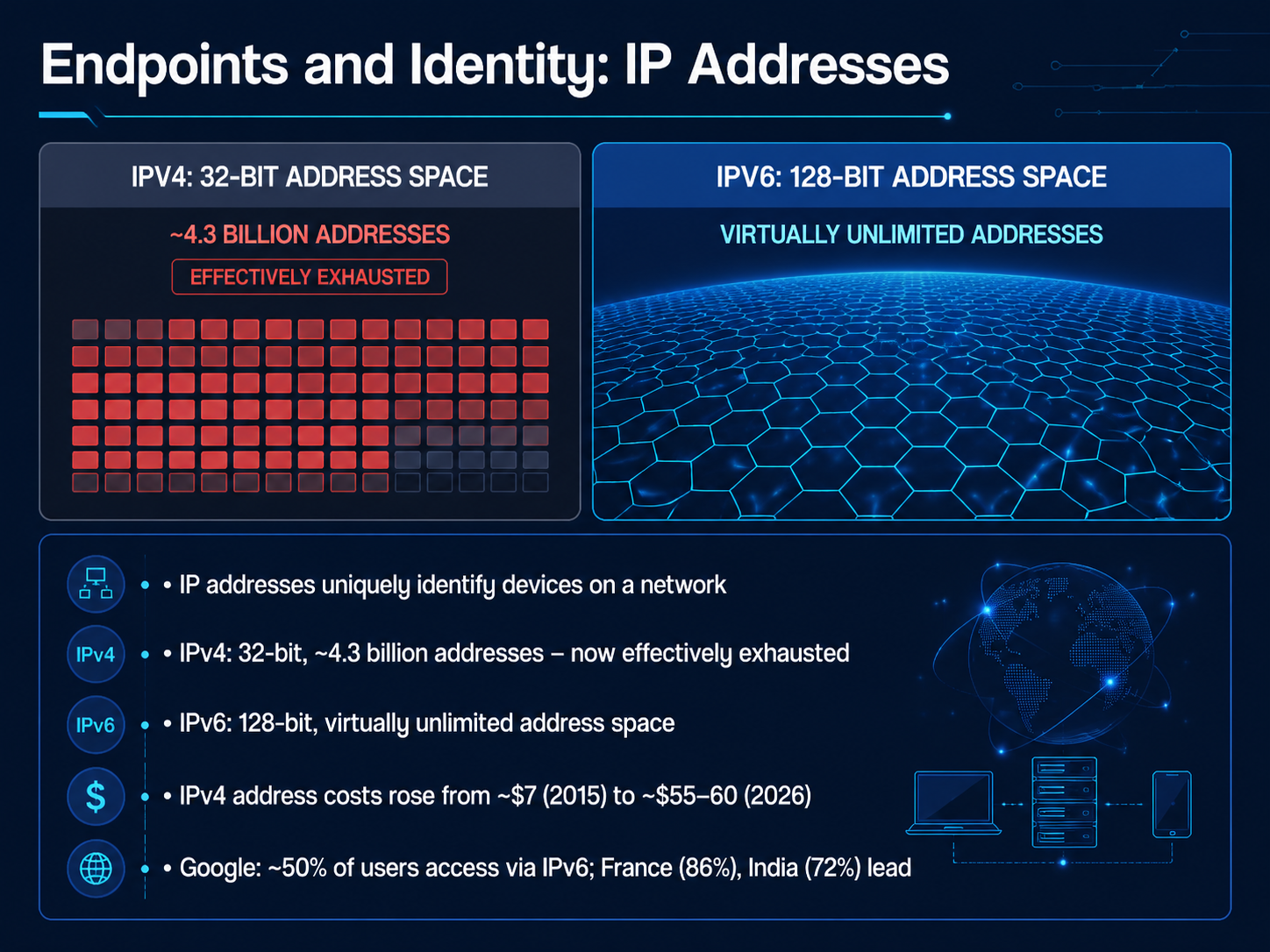
1 min - 03Endpoints and Identity: IP AddressesNow, let's talk about how devices actually find each other on a network. Every device connected to the internet needs a unique identifier, much like a postal address for your house. We call this an IP address. Think of it as a digital name tag that ensures data gets to the right place. The original system, called IPv4, uses a 32-bit format, which gave us about 4.3 billion addresses. That sounded like a lot in the 1980s, but with billions of smartphones, laptops, and smart devices, we've completely run out of new ones. In fact, the cost of buying a single IPv4 address on the open market has jumped from roughly seven dollars in 2015 to around fifty-five to sixty dollars today. To solve this, we have a newer standard: IPv6. It uses a 128-bit address space, which provides a virtually unlimited number of addresses—enough for every grain of sand on the planet to have its own. The transition is well underway. For example, Google now reports that around half of its global users connect via IPv6, with countries like France and India leading the way at over 70 percent. This shift is crucial for the internet to keep growing without the complexity and cost of recycling old addresses. Next, we'll explore how we translate those numbers into names we can actually remember, when we look at the internet's phonebook: DNS.
 blog.apnic.netpulse.internetsociety.org6lab.cisco.com+22 min
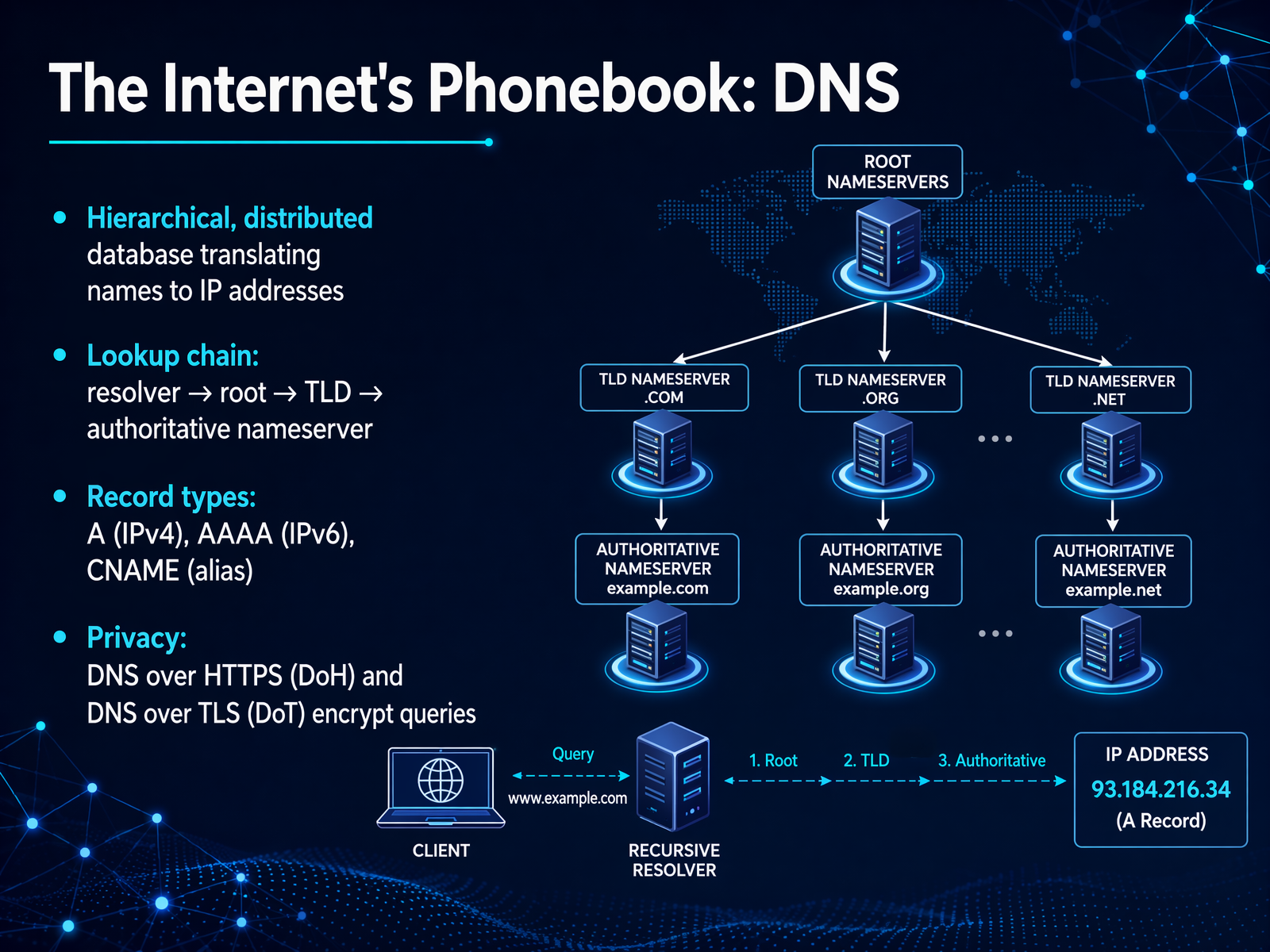
 - 04The Internet's Phonebook: DNSSo, how does your browser actually find the server that holds a website? You type a name, but the Internet runs on IP addresses. That's where DNS comes in—the Domain Name System. Think of it as the Internet's phonebook. It's a massive, distributed database that translates human-friendly names like 'example.com' into machine-readable IP addresses. When you hit enter, your device starts a lookup chain. First, it asks a resolver, usually run by your ISP. If the resolver doesn't know the address, it asks a root server, which points to the relevant top-level domain server, like '.com'. That server then directs the query to the authoritative nameserver, which finally provides the IP address. All this happens in milliseconds. DNS uses different record types for this. An 'A' record maps a name to an IPv4 address, while a 'AAAA' record maps to an IPv6 address. A 'CNAME' record acts as an alias, pointing one name to another. Now, traditional DNS queries were sent in plain text, which is a privacy risk. That's why we now have DNS over HTTPS, or DoH, and DNS over TLS, or DoT. These protocols encrypt your queries, so nobody can snoop on which websites you're looking up. Next, we'll move from the digital phonebook to the physical world, and explore the actual cables and routes that make up the Internet's global backbone.
 blog.apnic.netpulse.internetsociety.org6lab.cisco.com+22 min
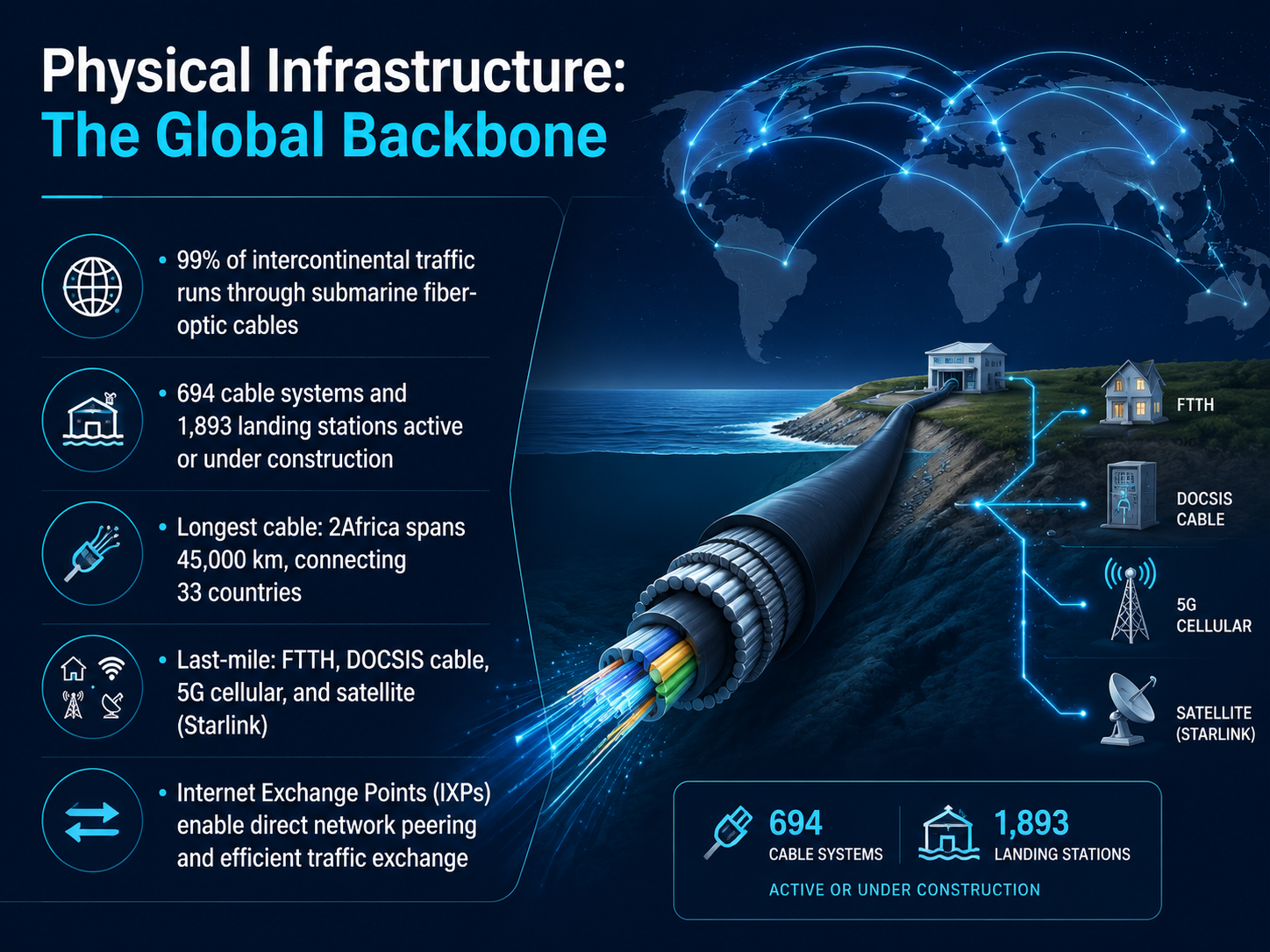
 - 05Physical Infrastructure: The Global BackboneNow let's talk about the physical backbone that makes all of this possible. When you send an email or load a video, you might picture a signal beaming through the air. But here's a surprising fact: ninety-nine percent of all intercontinental data travels through cables on the ocean floor. These are submarine fiber-optic cables, no thicker than a garden hose, carrying pulses of light across entire oceans. As of twenty twenty-six, there are six hundred ninety-four cable systems active or under construction, connecting one thousand eight hundred ninety-three landing stations around the globe. The longest of these is called 2Africa. It stretches forty-five thousand kilometers—that's longer than the Earth's circumference—and connects thirty-three countries. Once the data reaches your neighborhood, the last mile takes over. This might be fiber running directly to your home, coaxial cable, a five-g cellular tower, or even a satellite service like Starlink. And to keep things moving efficiently, Internet Exchange Points, or IXPs, let different networks connect and exchange traffic directly, without a detour. Coming up next, we'll look at how all that data is broken down and routed through packets and packet switching.
 submarine-cable-map-2026.telegeography.comsubmarinecablemap.comresources.telegeography.com+22 min
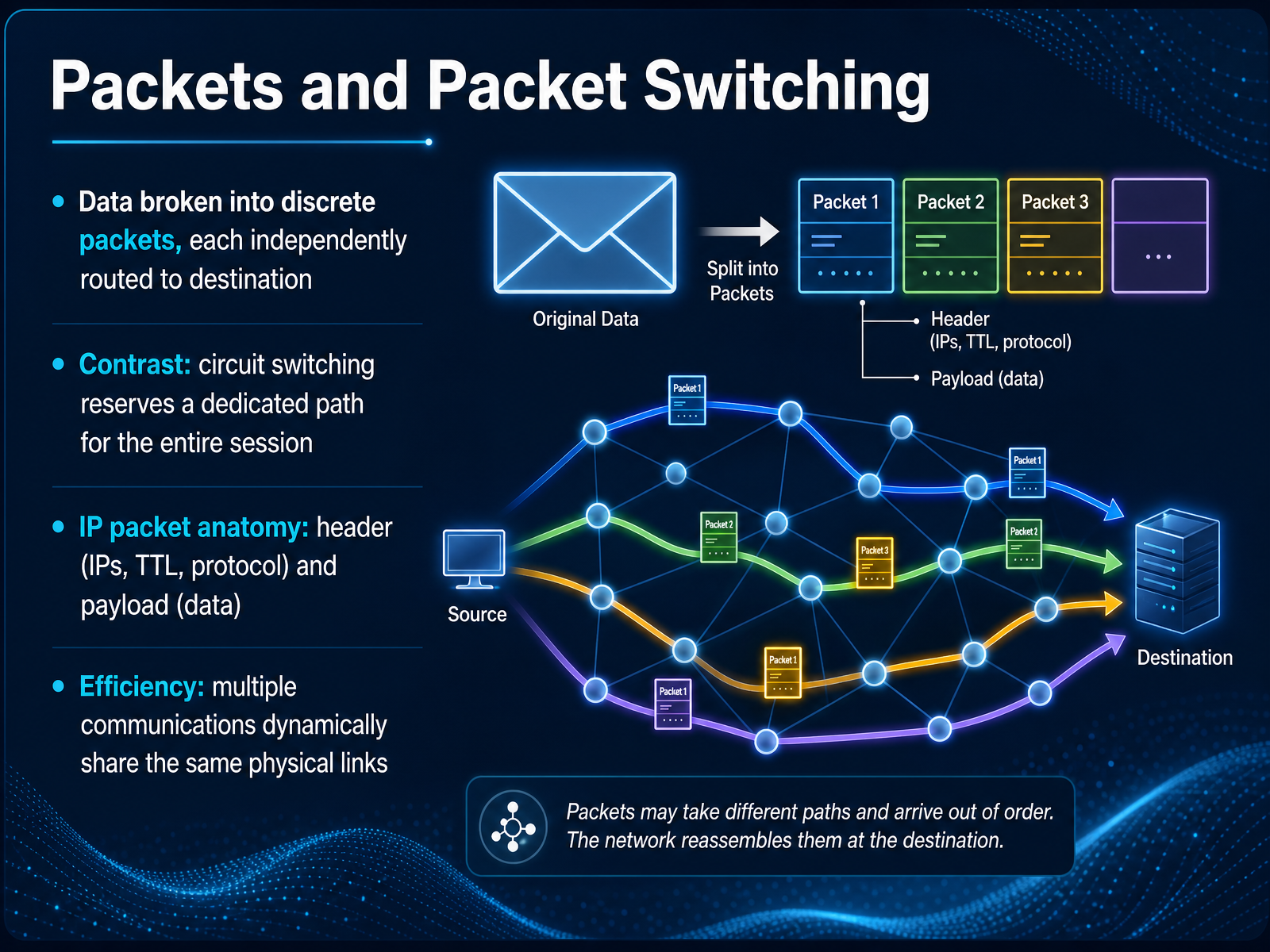
 - 06Packets and Packet SwitchingNow, let's talk about how that data actually gets from one place to another. It's not like a dedicated phone call, where a single line is held open just for you. Instead, the internet uses a method called packet switching. Think of it like sending a long letter, but instead of one big envelope, you tear it into many smaller postcards. Each postcard has the final address and your return address, and you drop them all in the mail. Each one might take a slightly different route to get there, and at the destination, they're reassembled into the original letter. That's what happens to your data. It's broken into discrete packets, each independently routed. This is the opposite of a circuit-switched system, like an old phone network, which reserves a dedicated path for the entire conversation. An IP packet itself has two main parts. There's a header, which contains the essential instructions, like the source and destination IP addresses, a time-to-live counter so packets don't loop forever, and the protocol being used. The second part is the payload, which is the actual chunk of your data. This packet-switching design is incredibly efficient, letting countless communications, from video calls to emails, dynamically share the same physical links all at once. Next, we'll explore how routers make the split-second decisions to find the best path for each of those packets.
 2 min
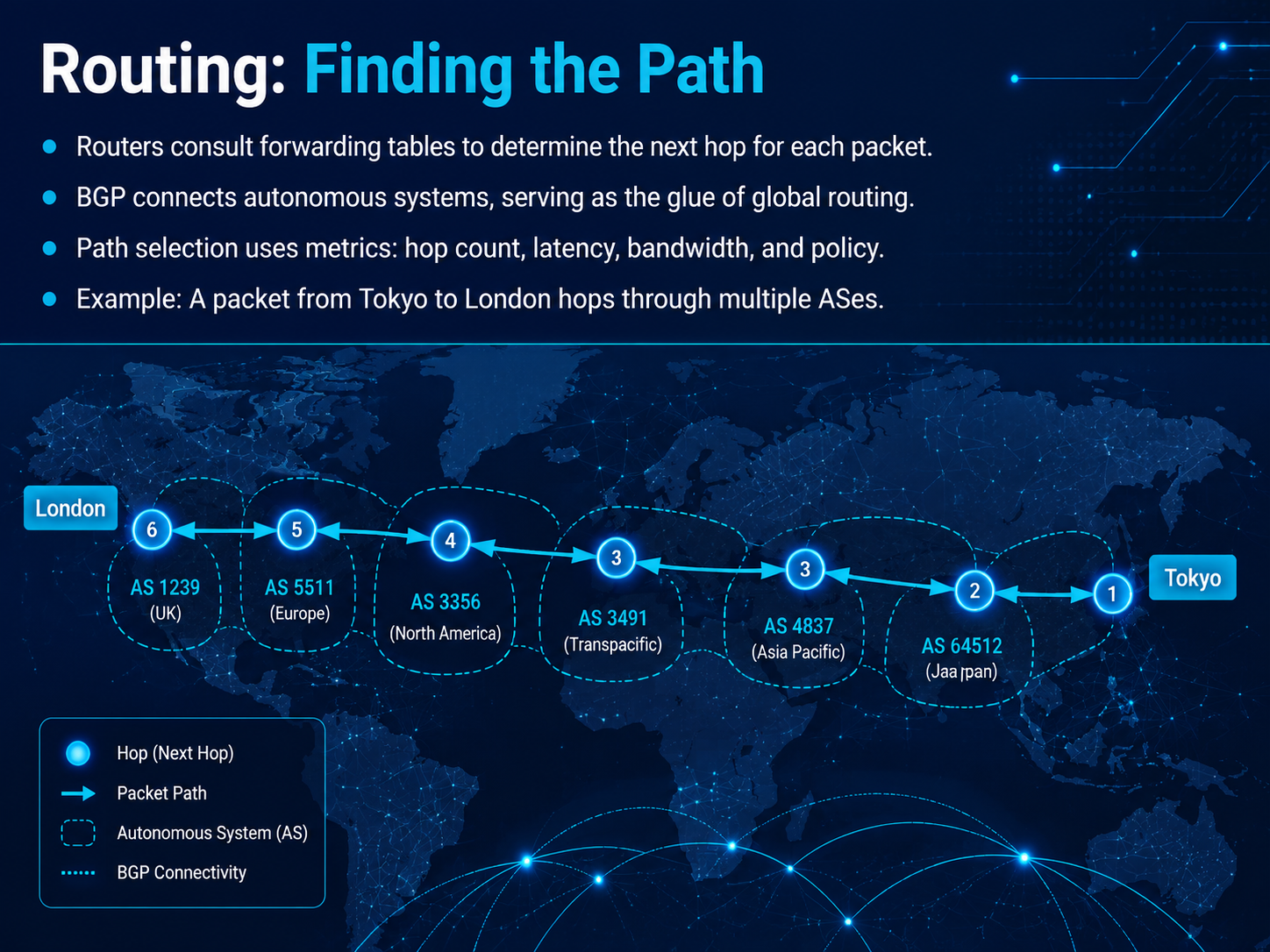
2 min - 07Routing: Finding the PathSo, we know our data is broken into packets, but how does each packet actually find its way across the world? That's what we call routing. Think of a router as a local post office. When a packet arrives, the router checks its forwarding table—a big, constantly updated list of destinations—to decide the best next step, or 'next hop.' Now, the internet isn't one giant network; it's a network of networks, called autonomous systems. They're glued together by a protocol called BGP, which is essentially the master map of the internet. It lets one network know how to reach another. Path selection isn't random. Routers weigh different metrics, like the number of hops, how fast the link is, and even business policies. For example, a packet traveling from Tokyo to London might leave one network in Japan, hop through a few major transit providers in the US, and then enter a final network in the UK. All of this happens in milliseconds. What we've covered here is how the path is found. But once a packet arrives, we need to make sure it's reassembled correctly and reliably. That job falls to the transport layer, which we'll look at next.
 2 min
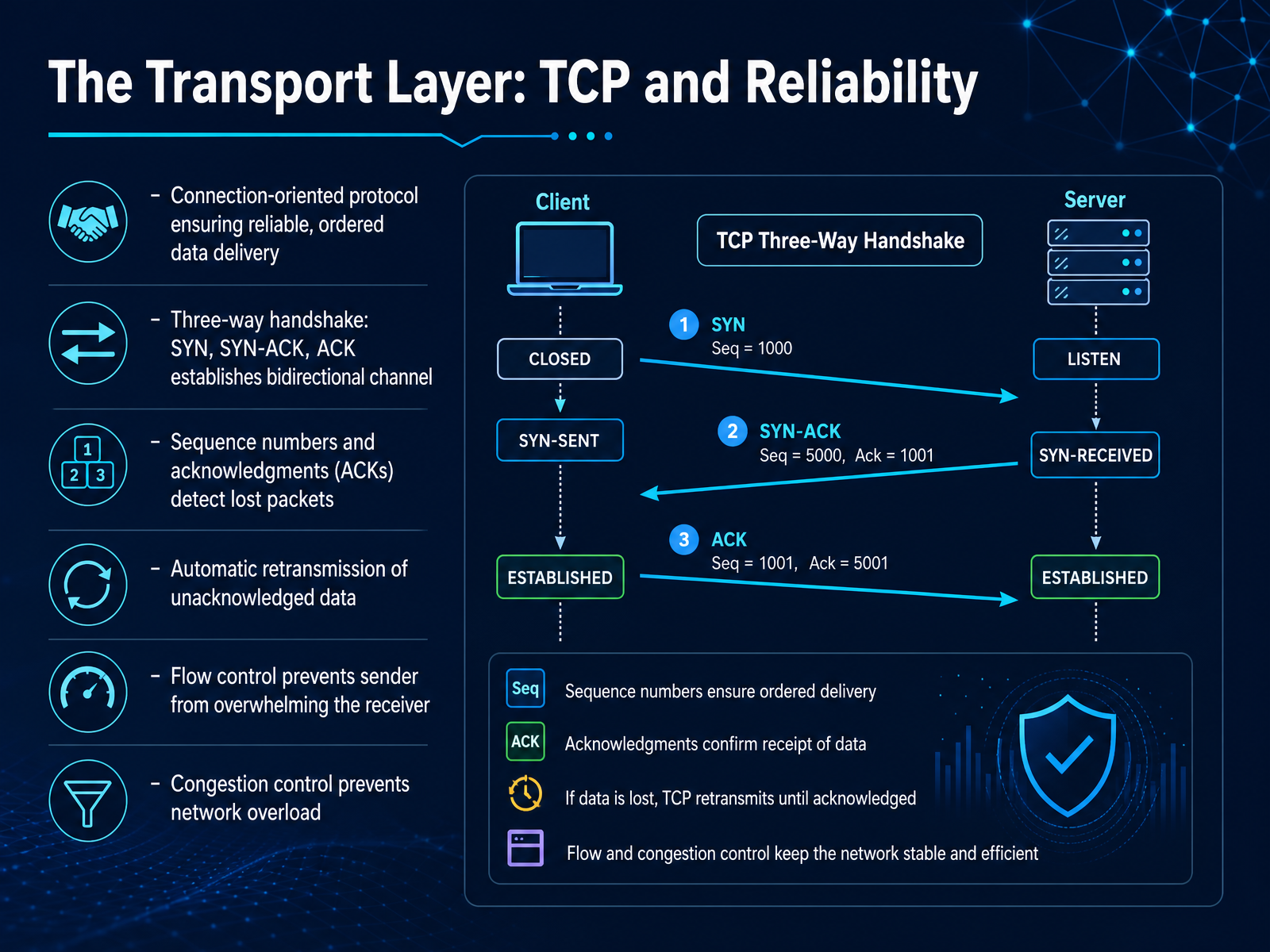
2 min - 08The Transport Layer: TCP and ReliabilityNow that we've seen how IP addresses get packets to the right machine, let's talk about how those packets actually arrive in one piece and in the right order. That's the job of the Transport Layer, and specifically a protocol called TCP, the Transmission Control Protocol. Think of TCP as a phone call for your data. Before any real information is sent, the two computers have a quick conversation to set up a reliable, two-way connection. This is called the three-way handshake. It's a simple 'Hey, I'm ready to send'—that's a SYN. The other side says, 'Got it, I'm ready too'—that's a SYN-ACK. And the first side replies, 'Great, let's begin'—that's an ACK. Just like that, a reliable channel is established. Once the conversation is going, TCP gives every byte of data a sequence number. It's like numbering the pages of a book. The receiver constantly sends back acknowledgments, or ACKs, saying, 'I've received everything up to page fifty.' If page fifty-one is missing, the sender knows to resend it automatically. This also prevents a fast sender from overwhelming a slow receiver with a feature called flow control, and it avoids jamming the entire network with a mechanism called congestion control. So TCP guarantees that your data arrives complete, in order, and without errors. But what if you don't need a perfect, ordered conversation, and speed is more important? That's where our next topic comes in: UDP and real-time applications.
 2 min
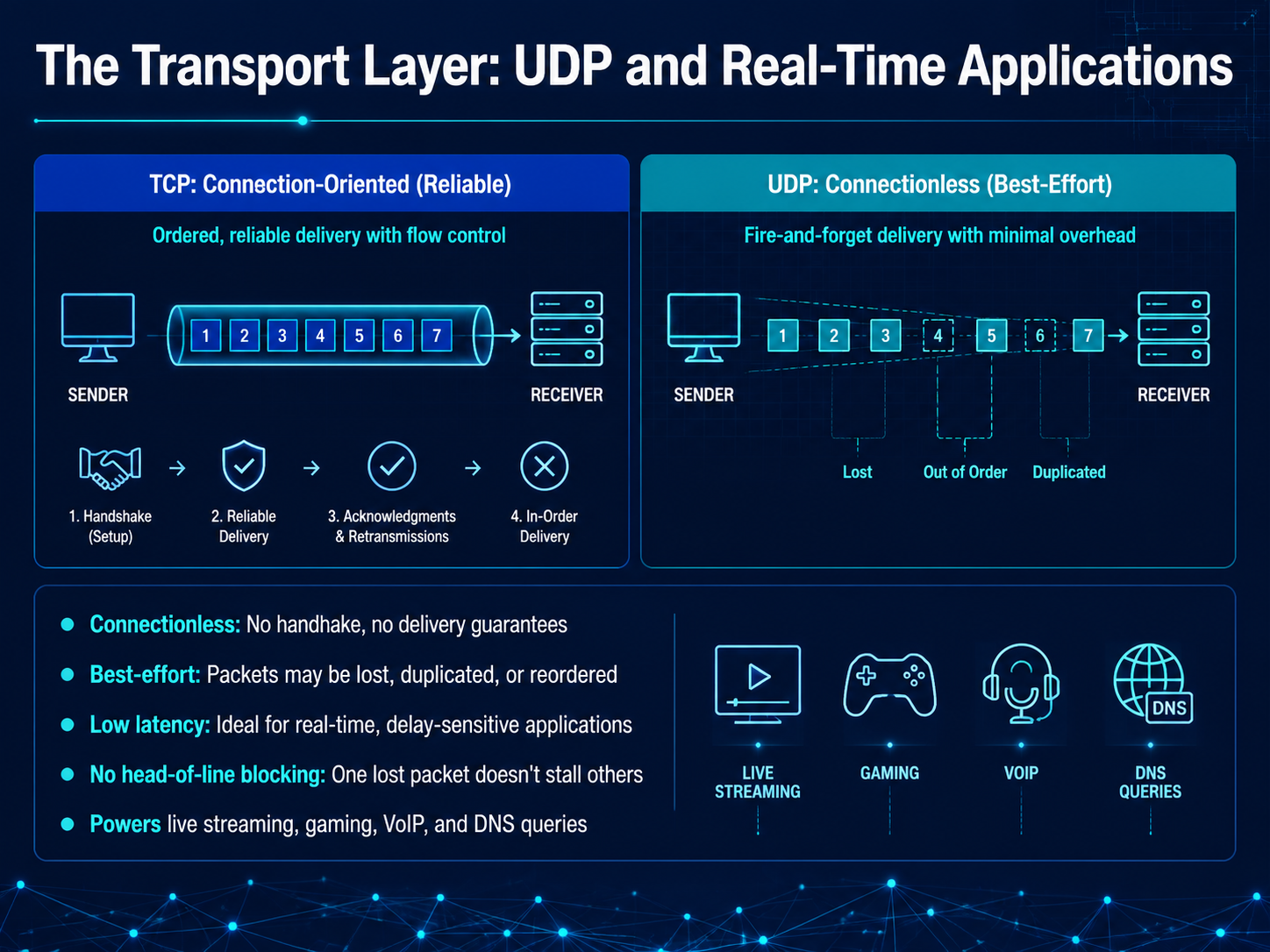
2 min - 09The Transport Layer: UDP and Real-Time ApplicationsNow let's zoom in on another key player at the transport layer: UDP, the User Datagram Protocol. If TCP is like a tracked, certified parcel delivery, UDP is more like sending a fast stream of postcards. It's a best-effort, connectionless protocol. There's no formal handshake to set up the call, and the sender doesn't wait for an acknowledgment. This means packets can be lost, duplicated, or arrive out of order, but the trade-off is speed. Because there's no head-of-line blocking, one lost packet doesn't stall the entire stream of data behind it. This makes UDP the perfect engine for real-time applications where low latency is the absolute priority, like live streaming, online gaming, and voice over IP calls. It's also the workhorse for quick, single-request tasks like DNS queries. It's worth noting that the modern web is increasingly built on this foundation. For example, the QUIC protocol, which powers HTTP/3, runs on top of UDP to combine the speed of a postcard with modern encryption and reliability. In fact, as of mid-2026, over ninety-three percent of global web traffic is secured by modern transport layer security, with QUIC and UDP driving more than eighty percent of network-layer traffic. Up next, we'll build on this to explore the application layer, where protocols like HTTP turn these raw data streams into the web pages we interact with every day.
 stats.labs.apnic.netblog.apnic.nettechnologychecker.io+22 min
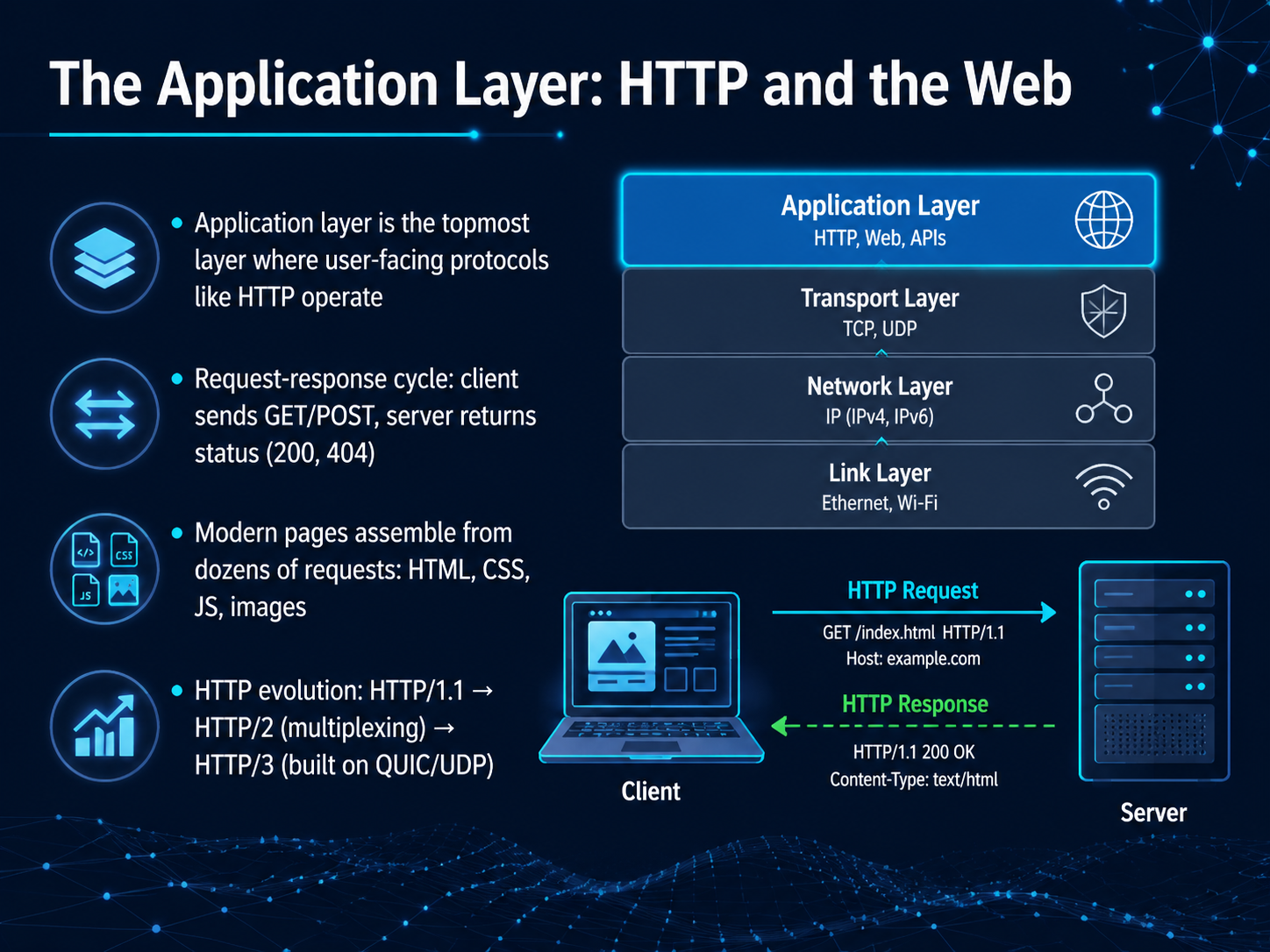
 - 10The Application Layer: HTTP and the WebNow we arrive at the top, the application layer. This is where protocols like HTTP do the work you actually see. When you type a URL and hit enter, your browser sends a request, a GET or a POST, and the server replies with a status like 200 for OK, or 404 for not found. But here is the part that surprises people. A modern web page is not one file. Your browser fires off dozens of requests, pulling together the HTML, the CSS, the JavaScript, images, and fonts, and assembles them all into a single page. HTTP has evolved dramatically to handle this. The original HTTP one point one opened a new connection for every request. HTTP two introduced multiplexing, so many requests can share a single connection at once. Now HTTP three is built on an entirely new transport called QUIC, which runs over UDP. It eliminates stubborn delays, especially on mobile and lossy networks. Right now, roughly 21 percent of web traffic moves over HTTP three, and that number is steadily climbing. The key takeaway is that the web is becoming faster and more resilient, and you are seeing a live transition from TCP to QUIC right under your fingertips. Now that we have seen how data moves, let's look at how it stays safe. Next up, securing the web with HTTPS and TLS.
 w3techs.comtechnologychecker.iotechnologychecker.io+22 min
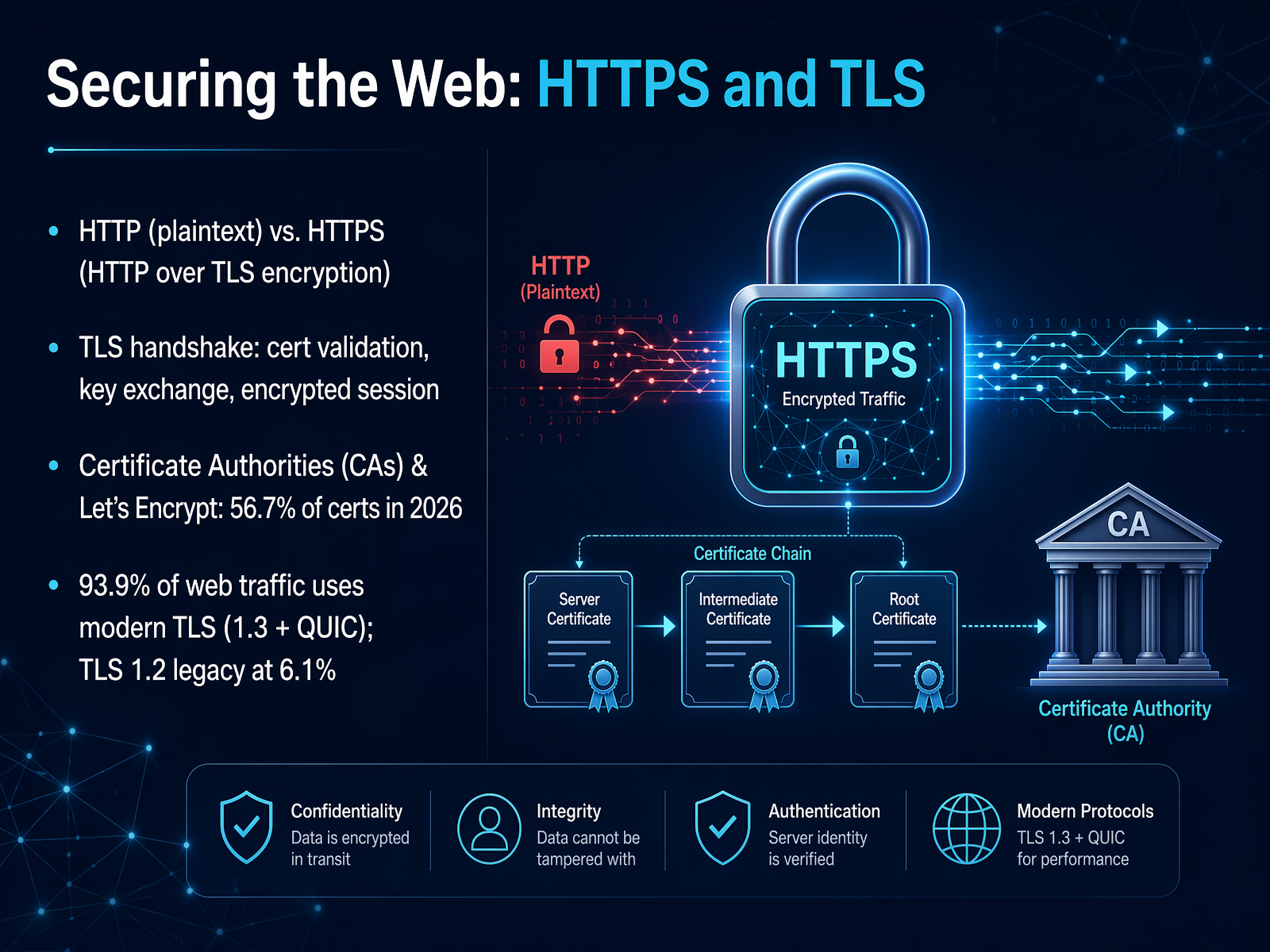
 - 11Securing the Web: HTTPS and TLSNow let's talk about how all that web traffic stays private. You've probably seen the little padlock in your browser's address bar. That padlock means you're using HTTPS, not plain HTTP. Think of HTTP like sending a postcard: anyone handling it can read the message. HTTPS wraps that postcard in an opaque envelope. The magic behind that envelope is TLS, Transport Layer Security. When your browser connects to a secure site, they perform a quick TLS handshake. The server presents a certificate to prove its identity, sort of like a digital passport. Your browser checks that passport against a trusted Certificate Authority, or CA, before they agree on secret keys for the session. Organizations like Let's Encrypt now issue over 56 percent of these certificates, making encryption free and automatic for millions of sites. The result is that nearly 94 percent of all web traffic is protected by modern TLS encryption. Only a small legacy fraction still runs on the older TLS 1.2. This is the baseline security layer for the modern web. Next, we'll explore the latest evolution of the transport layer that carries all this encrypted traffic: QUIC and HTTP/3.
 w3techs.comtechnologychecker.iotechnologychecker.io+22 min
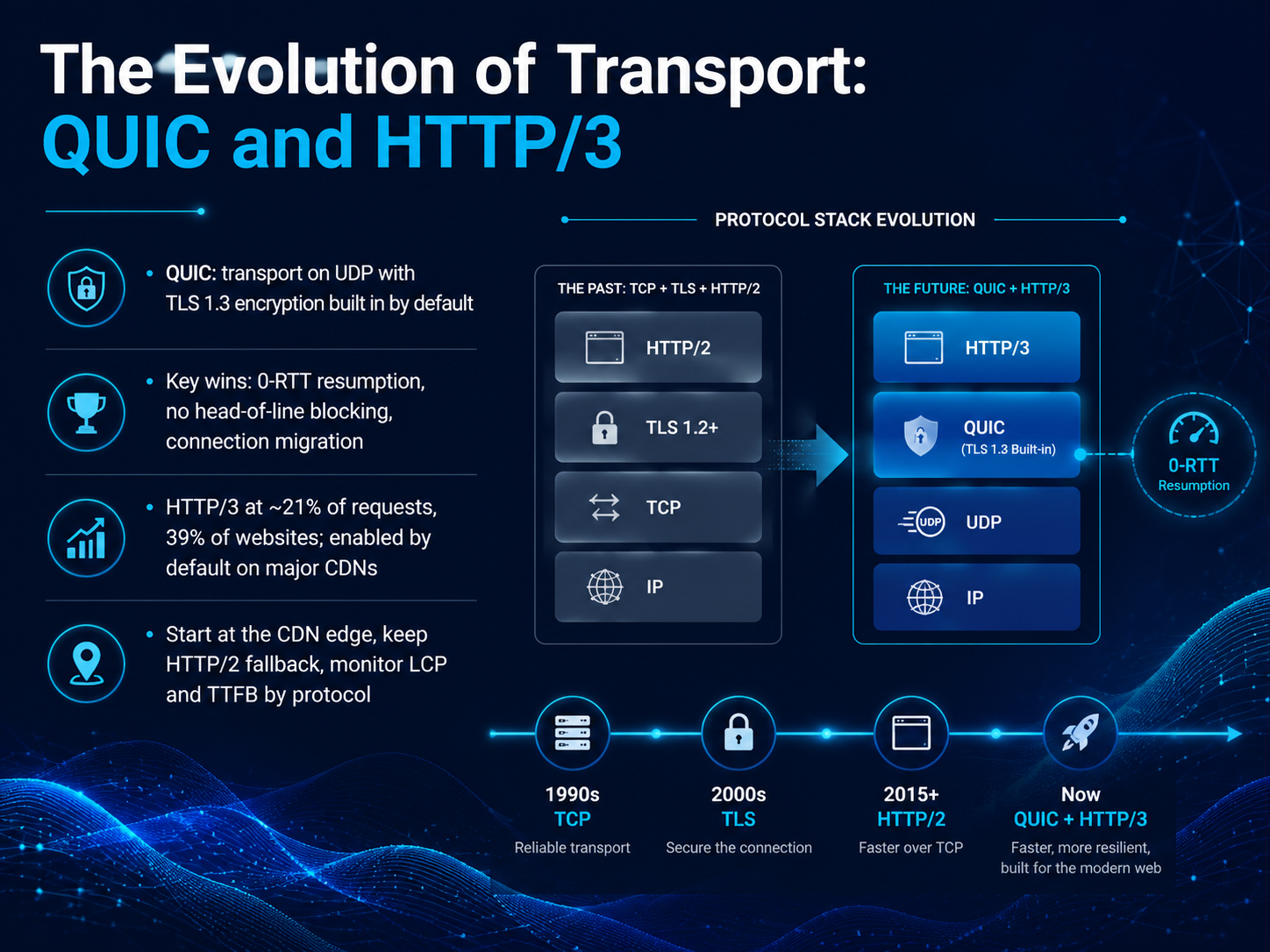
 - 12The Evolution of Transport: QUIC and HTTP/3Now let's talk about the real evolution happening in transport: QUIC and HTTP/3. Think of QUIC as a completely redesigned highway for your data. It runs over UDP, and unlike the older TCP road, it has TLS 1.3 encryption built in by default, not bolted on later. This creates three massive wins. First, zero-RTT resumption, which means a returning visitor can start sending data almost instantly, without the usual three-way handshake. Second, no head-of-line blocking. If a single packet gets lost in one stream, it doesn't jam up all the others like it does with HTTP/2. And third, connection migration. Your connection can move seamlessly from Wi-Fi to cellular without dropping. So where does this stand today? HTTP/3 is enabled by default on major CDNs. It powers about 21 percent of all requests and is available on roughly 39 percent of websites. A practical tip: start at the CDN edge, keep HTTP/2 as your fallback, and monitor your core metrics like Largest Contentful Paint and Time to First Byte, segmented by protocol. Next, let's put all of this together and follow a real request from start to finish in an end-to-end journey.
 w3techs.comtechnologychecker.iotechnologychecker.io+22 min
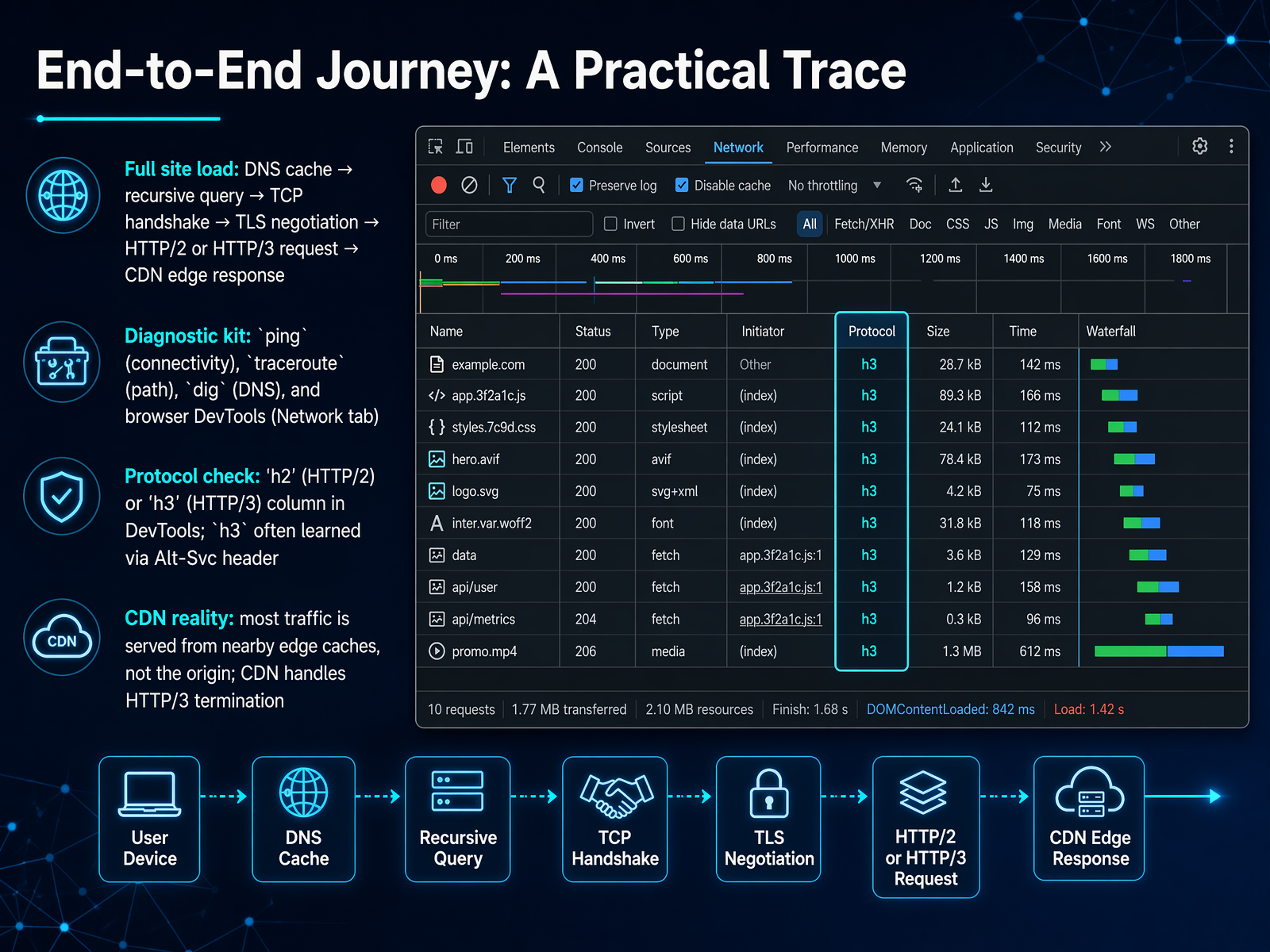
 - 13End-to-End Journey: A Practical TraceNow let's pull all these pieces together and trace what actually happens when you load a full website. It starts with a DNS cache lookup to avoid repeating work, then a recursive query if needed. Once we have the IP, we get a TCP handshake, a TLS negotiation for security, and finally an HTTP/2 or HTTP/3 request. Often, a nearby CDN edge server responds instead of the origin, which is why the page feels so fast. You have a diagnostic kit to see this yourself: ping to test connectivity, traceroute to see the path, dig for DNS, and your browser's DevTools Network tab to watch every request. In the Network tab, enable the Protocol column. If you see h2, that's HTTP/2. If you see h3, it's HTTP/3, often learned through an Alt-Svc header. The reality is that most traffic is served from edge caches, and the CDN handles the HTTP/3 termination for you. So next time you're debugging, remember these tools and what they reveal about the journey. Next, let's talk about how this connects to the massive scale of the Internet of Things.
 w3techs.comtechnologychecker.iotechnologychecker.io+22 min
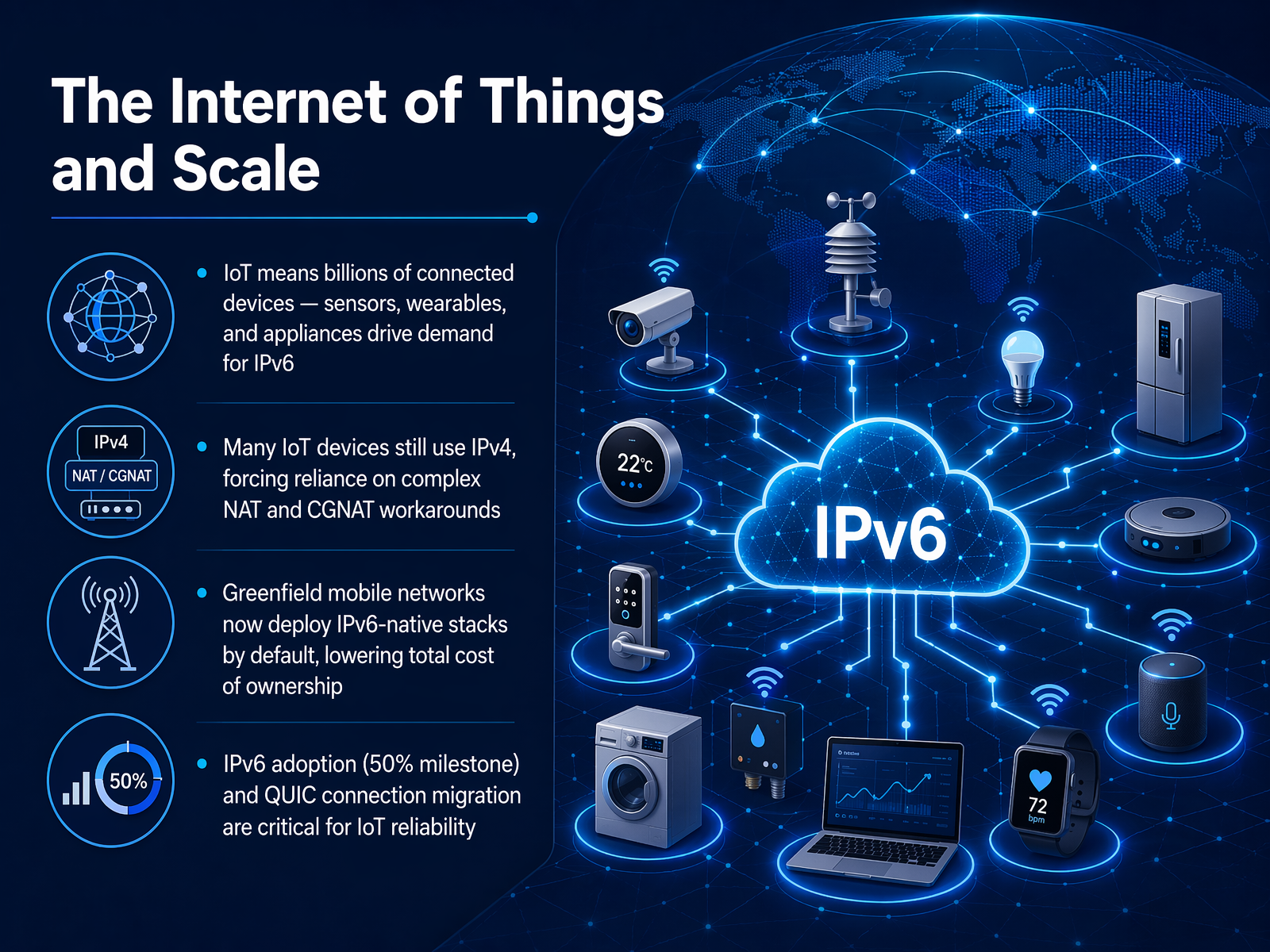
 - 14The Internet of Things and ScaleNow, let's talk about where all this addressing really matters: the Internet of Things, and the sheer scale it demands. Think about it. We're not just connecting laptops and phones anymore. We're talking about billions of sensors, wearables, smart appliances, all needing a unique identity online. This is exactly why the world needs the massive address space of IPv6. But here's the challenge: many IoT devices on the market today still rely on the older IPv4 standard. To make them work, networks often use complex workarounds like NAT, or even Carrier-Grade NAT, which is like putting an entire apartment building behind a single street address. It adds latency and complexity. The good news is that new mobile networks are being built from the ground up with IPv6 as the default. This 'greenfield' approach dramatically lowers the total cost of ownership and simplifies everything. Now, we've recently hit a major milestone with over half of Google's global traffic using IPv6, and technologies like QUIC connection migration are becoming critical for IoT reliability, ensuring a device's connection stays seamless as it moves. But the journey isn't over. Let's build on this idea of a smarter, faster network as we explore Edge Computing and the Future of Latency.
 blog.apnic.netpulse.internetsociety.org6lab.cisco.com+22 min
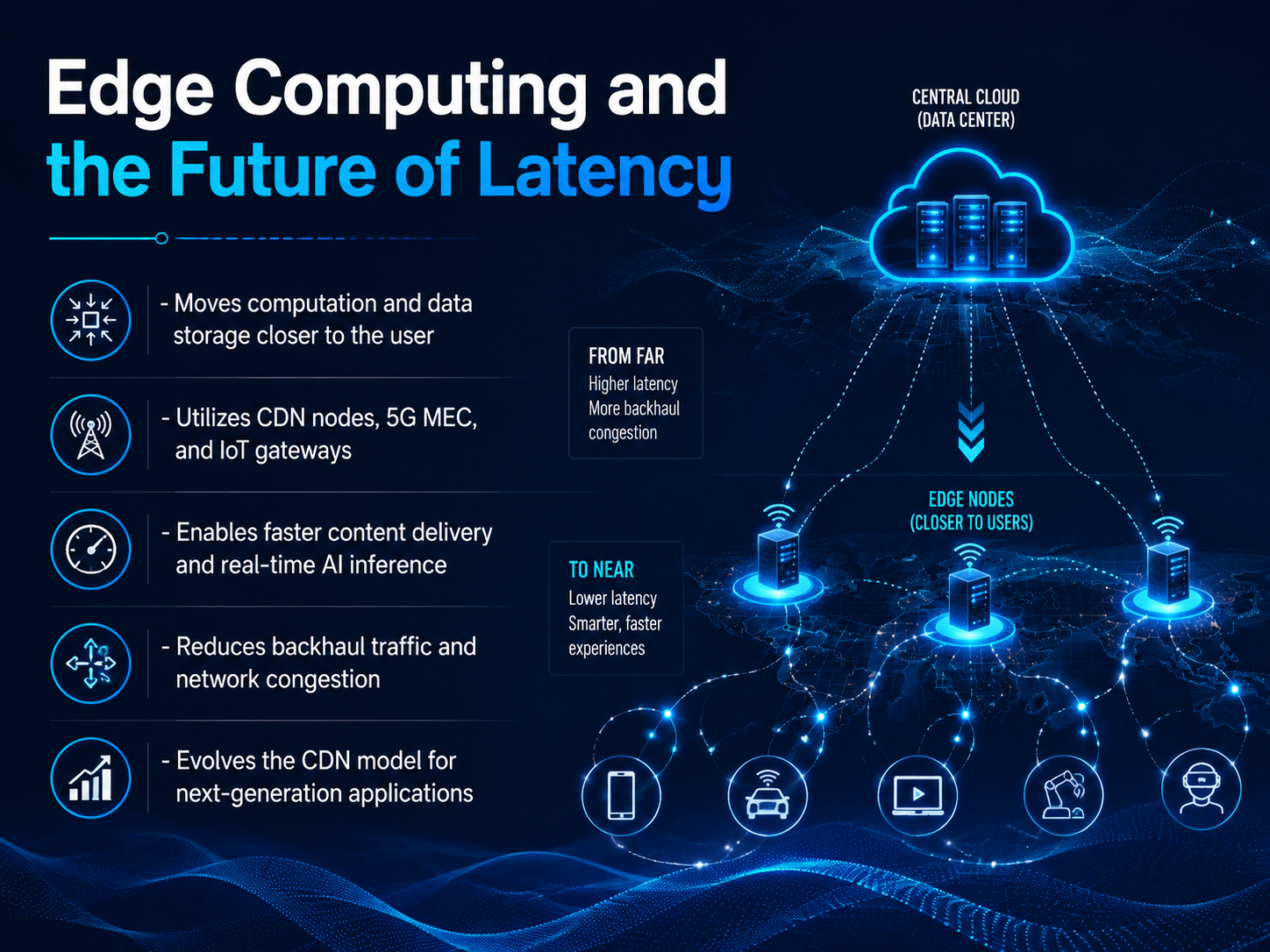
 - 15Edge Computing and the Future of LatencyNow, let's bring everything even closer to home. All the optimization we've discussed so far is about to take a huge leap forward with edge computing. Think of it less like a distant warehouse and more like a neighborhood pantry. Instead of routing every request back to a massive, centralized data center, edge computing places processing power and storage physically closer to you—right at the 'edge' of the network. This goes beyond just caching static content on a CDN node. We're talking about utilizing 5G mobile edge computing, or MEC, and even IoT gateways to perform complex tasks nearby. Why does this matter? It drastically reduces latency, enabling real-time AI inference—like your phone instantly translating a sign using just its camera, or a factory robot making split-second safety decisions. It also cleverly reduces backhaul traffic, which is the data that normally clogs the main network arteries. By handling the heavy lifting locally, we avoid network congestion. This evolution of the CDN model is the foundation for next-generation applications that simply weren't possible before. Next, let's bring all these concepts together in our final segment: Review and the Road Ahead.
 2 min
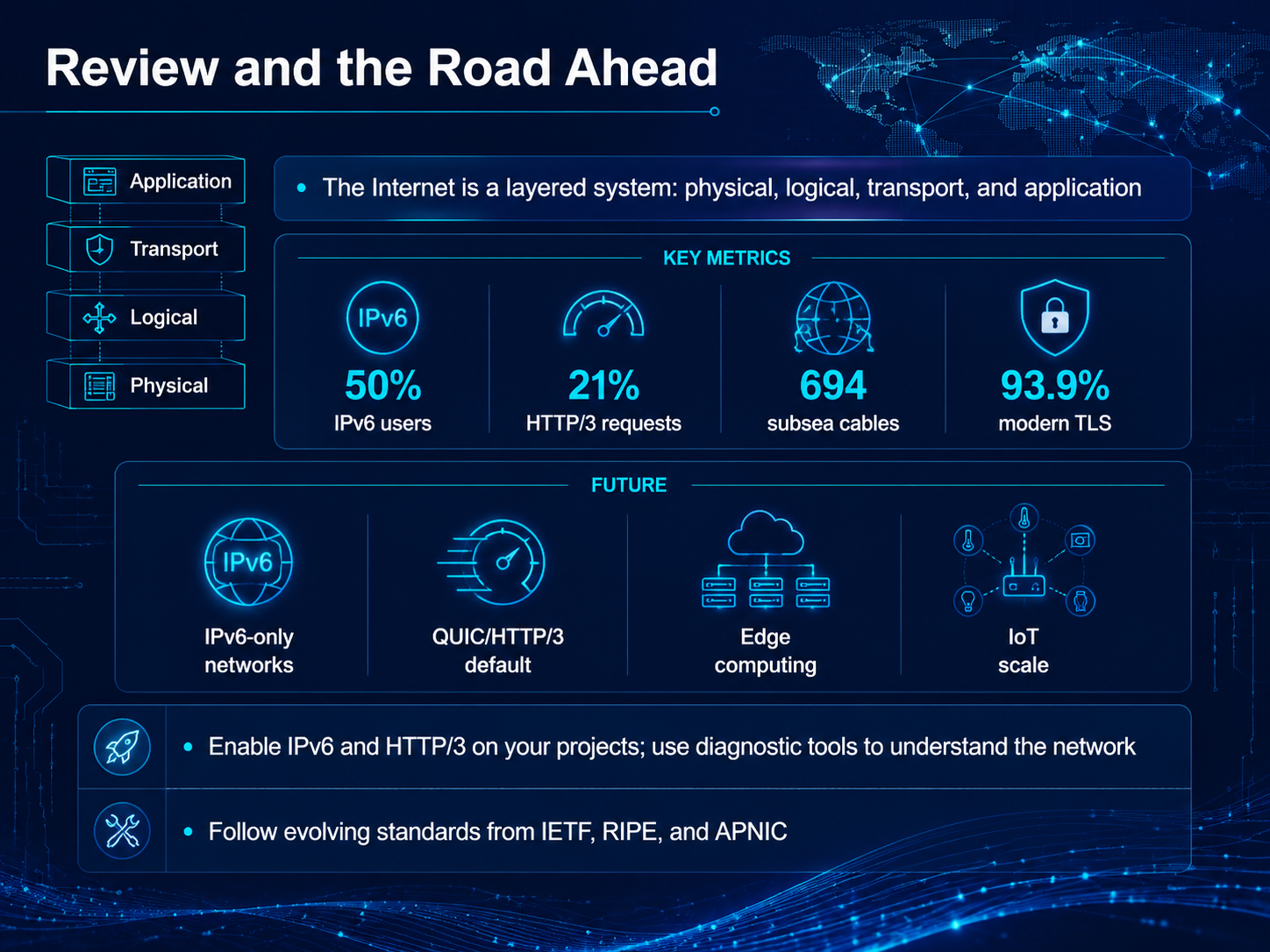
2 min - 16Review and the Road AheadSo, let's pull it all together and look at what's next. You've learned that the Internet isn't some magical cloud. It's a layered system: physical cables crossing oceans, logical addressing, reliable transport, and the applications you use every day. And the numbers tell a clear story. Half of all Google users are now on IPv6. Over 93 percent of web traffic is already using modern TLS encryption. Nearly 700 submarine cables carry the world's data, and HTTP/3, though plateauing around 21 percent of requests, is the new baseline for performance. But the road ahead is even more interesting. We're moving toward IPv6-only networks and QUIC and HTTP/3 becoming the default. Edge computing is pushing processing closer to you, and the scale of the Internet of Things will demand all of this innovation. So, what can you do? Enable IPv6 and HTTP/3 on your projects now. Use tools like Wireshark or curl to understand what's happening on your network. And follow the evolving standards from the IETF, RIPE, and APNIC. The Internet is a living, breathing system, and you now have the map to navigate it. Thank you for joining me, and keep building a faster, safer Internet for everyone.
 w3techs.comtechnologychecker.iotechnologychecker.io+22 min
Take the deck with you
Download this course as a file — free, no sign-up needed.
- PDF handoutEvery slide page, ready to print or share.17 pages · 4.6 MBDownload
- Narrated PowerPointThe deck that presents itself — every slide carries the digital human's narration video.17 pages · 17.0 MBDownload
- PowerPoint slidesThe full deck as a .pptx — open it in PowerPoint, Keynote, or Google Slides.17 pages · 4.5 MBDownload
Free to use in your own training — please keep the PersonWise credit page at the end.
Have your own deck? Turn it into a course
Sources consulted
Web sources consulted while building this course.
- Usage Statistics of HTTP/3 for Websites, June 2026 — w3techs.com
- We analyzed HTTP protocol adoption in 2026: 27.8% of the web still runs HTTP/1.x (June 2026 Update) - TechnologyChecker.io — technologychecker.io
- Web Traffic Statistics Q2 2026: We Analyzed Billions of Requests - Here Are the 15 Numbers That Matter (July 2026 Update) - TechnologyChecker.io — technologychecker.io
- HTTP/3 Adoption and State Today | NetworkSpy — networkspy.app
- HTTP/3 Adoption in 2026: The Real Numbers and the Operational Gotchas · BIPI — bipi.in
- Google hits 50% IPv6 | APNIC Blog — blog.apnic.net
- 18 Years Later, IPv6 Reaches Majority — Internet Society Pulse — pulse.internetsociety.org
- Cisco IPv6 Lab: IPv6 Deployment — 6lab.cisco.com
- IP Resource Distribution Reports — potaroo.net
- IPv6 traffic reaches parity with IPv4 for the first time, Google data shows | TechSpot — techspot.com
- Submarine Cable Map 2026 — submarine-cable-map-2026.telegeography.com
- Submarine Cable Map — submarinecablemap.com
- TeleGeography's 2026 Submarine Cable Map — resources.telegeography.com
- Submarine Cable Map — submarinecablemap.com
- GeoCables — Submarine Cable Encyclopedia, Live Routes & Latency Monitoring — geocables.com
- HTTP/3 Use World Map — stats.labs.apnic.net
- A QUIC progress report | APNIC Blog — blog.apnic.net
- Waiting for QUIC: Passive Measurements to Understand QUIC Deployments — zirngibl.github.io