Begin
14 pages · ~28 min
SEO Tools: Selection and Workflow Design
This training helps marketers and content specialists select SEO tools and design efficient workflows to improve search visibility and productivity.
A digital instructor presents all 14 pages. Hold “Ask” at any point and ask out loud — the answer comes from this course. No sign-up needed.
What you’ll learn
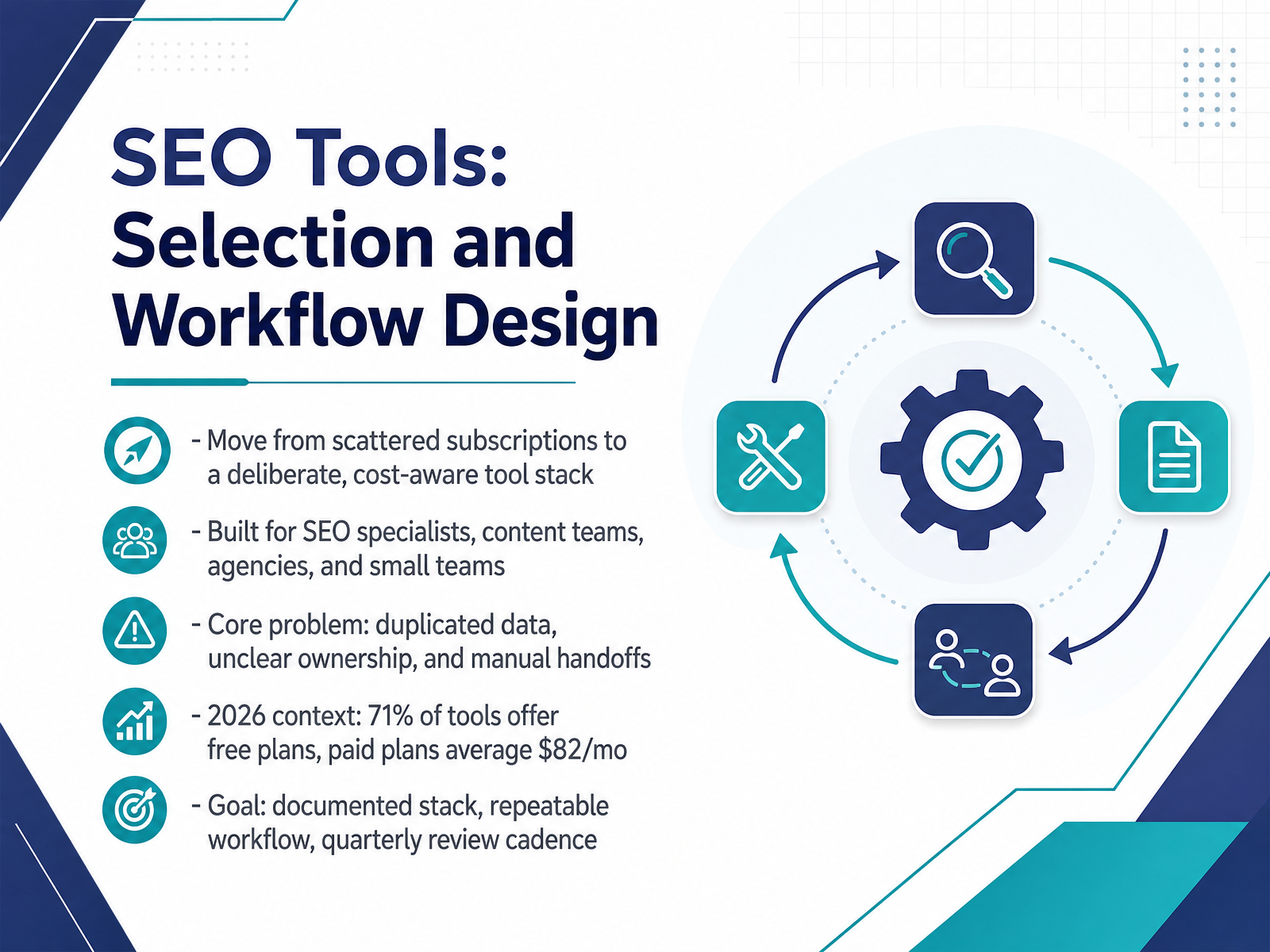
- 01SEO Tools: Selection and Workflow DesignWelcome. This course is about SEO tools, specifically how to select them and design a workflow around them. By the end, you will have a documented tool stack, a repeatable workflow, and a quarterly review cadence. We are aiming to move you from scattered subscriptions to a deliberate, cost-aware setup. This is built for SEO specialists, content teams, agencies, and small teams. The core problem we are solving is duplicated data, unclear ownership, and manual handoffs between tools. Here is the 2026 context. Seventy-one percent of tools offer free plans, and paid plans average eighty-two dollars a month. That means you can test before you commit, but you still need a plan for combining tools, because no single platform does everything perfectly. As we go, think about your own team size, budget, and content volume. Pause after each comparison and ask whether that tool fits your situation. Next, let us look at how the SEO tool landscape evolved to get here.propicked.comcyberpanel.nethoneyb.ai+22 min
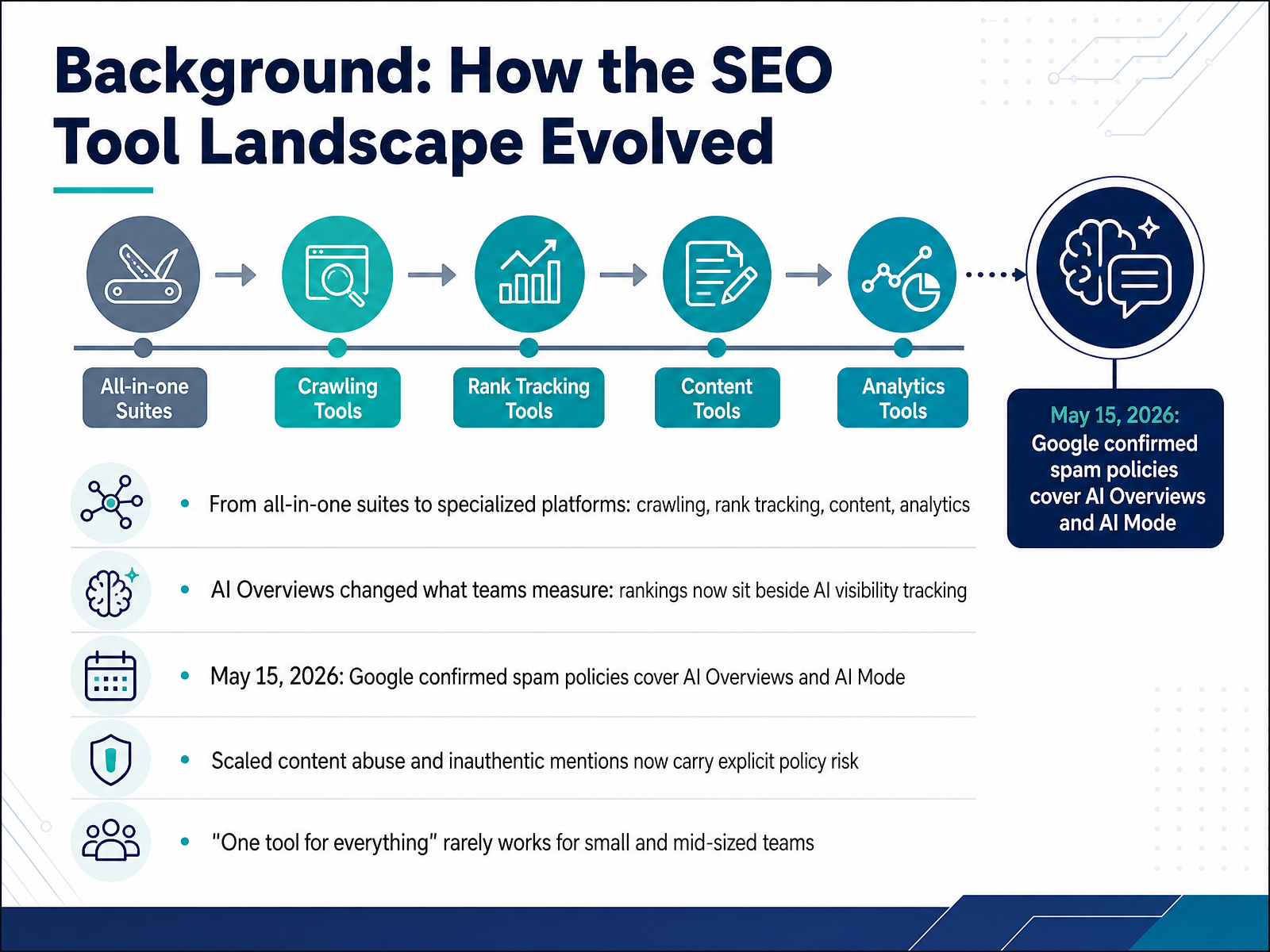
- 02Background: How the SEO Tool Landscape EvolvedLet's start with how the SEO tool landscape got here, because that history explains your buying decisions today. A decade ago, most teams bought one big suite. Now the market has split into specialized platforms: crawlers like Screaming Frog or Sitebulb, rank trackers, content optimization tools, and analytics. The reason is simple. No single tool stays excellent at everything.
The bigger shift is measurement. AI Overviews, those generated answers at the top of Google, mean rankings now sit beside AI visibility tracking. So you may rank third and still get cited in the AI answer, or the reverse.
Then came May fifteenth, twenty twenty-six. Google confirmed its spam policies cover AI Overviews and AI Mode. No new rules, just existing ones extended. That matters because scaled content abuse, meaning mass-producing low-value pages to manipulate rankings, and inauthentic mentions, meaning buying or faking brand citations, now carry explicit policy risk in AI surfaces too. If a vendor promises AI mentions per month, treat that like buying links.
So here is your takeaway. For most small and mid-sized teams, one tool for everything rarely works. Pick a crawler, a rank tracker, and a content workflow that fit your page volume and budget, and let the rest go. Next, let's break down the tool categories and what each one actually does.
 developers.google.comppc.landaioseo.com+22 min
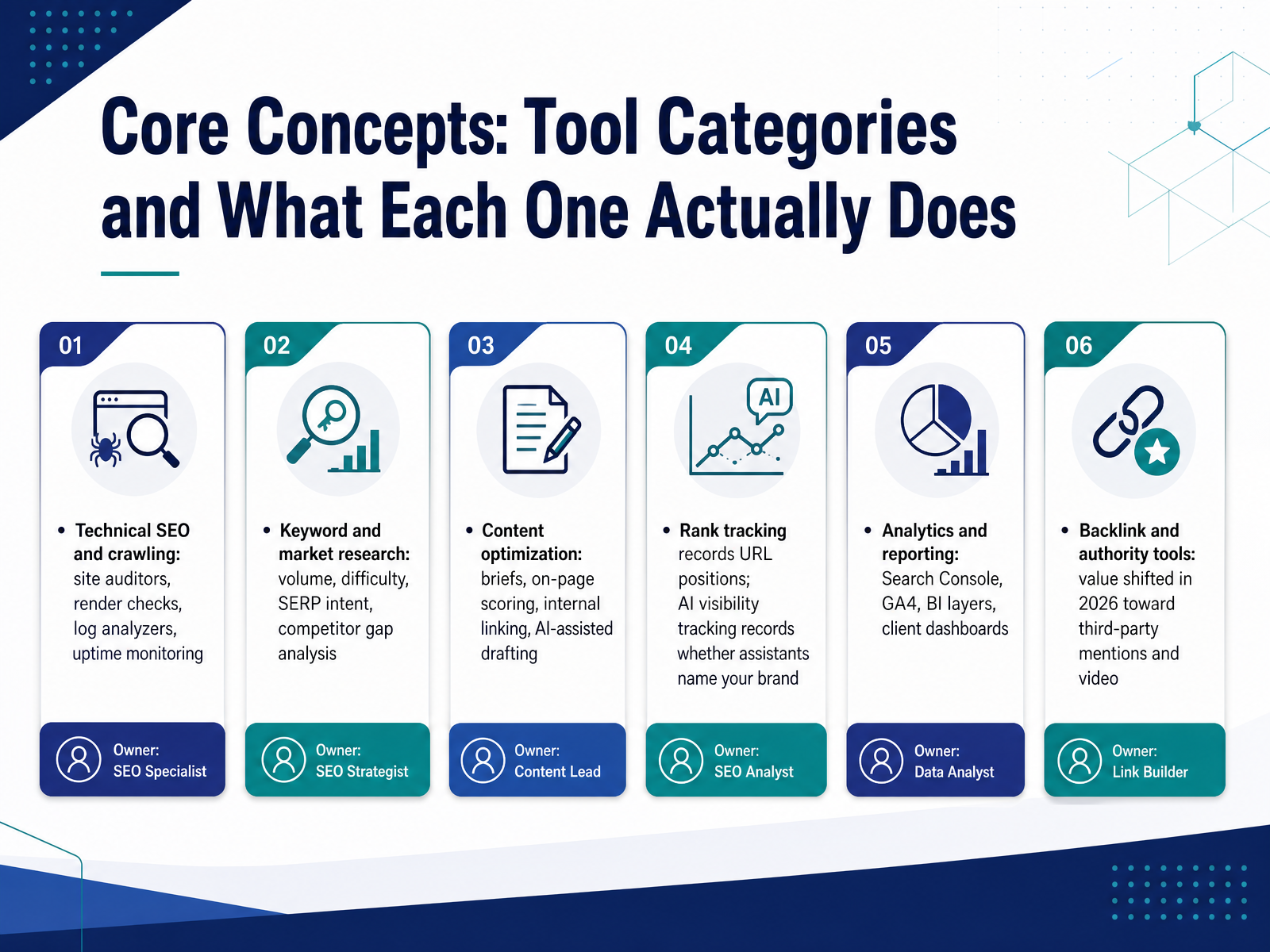
 - 03Core Concepts: Tool Categories and What Each One Actually DoesNow let's break down the tool categories, because most buying mistakes come from comparing tools that do completely different jobs. Think of your stack in layers. Technical SEO covers crawling: a site auditor simulates a search engine bot across your pages and flags broken links, redirect chains, indexation issues, and rendering problems, meaning content that only appears after JavaScript runs. Keyword and market research gives you volume, difficulty, and SERP intent, plus competitor gap analysis. Content optimization handles briefs, on-page scoring, internal linking, and AI-assisted drafting. Rank tracking records where your URLs sit. AI visibility tracking is different: it records whether assistants like ChatGPT or Perplexity name your brand in an answer. Analytics and reporting pull Search Console, GA4, and dashboards together. And backlink tools now matter most for third-party mentions and video. Your decision: know which layer you're solving before you buy. Next, we'll look at the pricing models behind the sticker price.
 honeyb.aicrawlraven.comaicomparison.ai+22 min
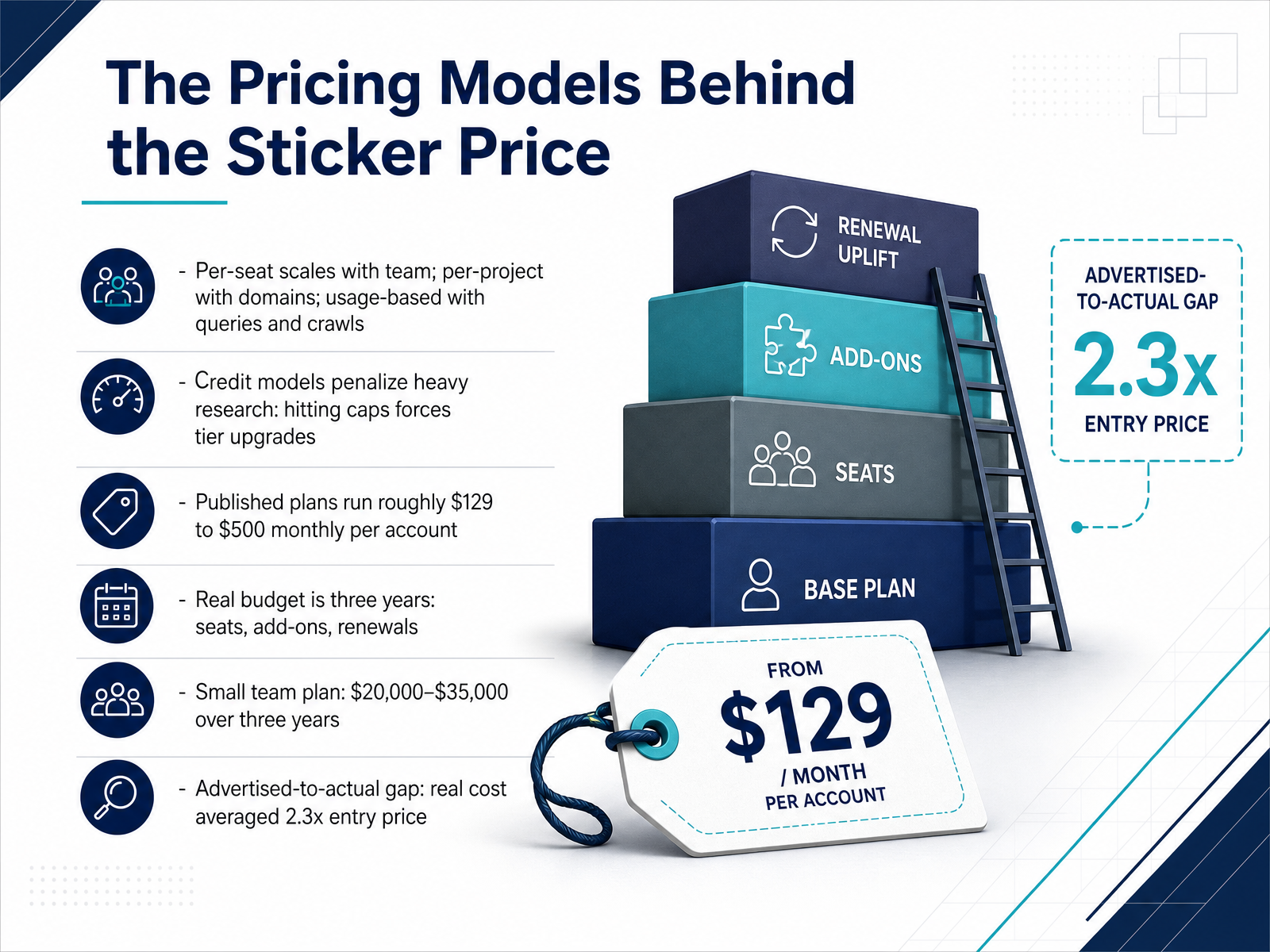
 - 04The Pricing Models Behind the Sticker PriceNow let's look past the sticker price, because the pricing model matters as much as the number. Most SEO platforms bill in one of three ways: per seat, which scales with your team; per project, which scales with domains; or usage-based, metered by queries and crawls. Watch the credit models especially. Credits get consumed by every report view and list filter, so heavy research hits caps mid-month and forces a tier upgrade you didn't plan for. Published plans run roughly one hundred twenty-nine to five hundred dollars a month per account. But the real budget is a three-year number: seats, add-ons, and renewals. A small team plan often lands between twenty thousand and thirty-five thousand dollars over three years. Across forty-seven platforms audited, the real cost averaged two point three times the entry price. So before you commit, model seats, add-ons, and renewal terms. Next, we'll build a scoring framework to compare vendors on fit, not just price. Selection Criteria: A Practical Scoring Framework.
 propicked.comcyberpanel.nethoneyb.ai+21 min
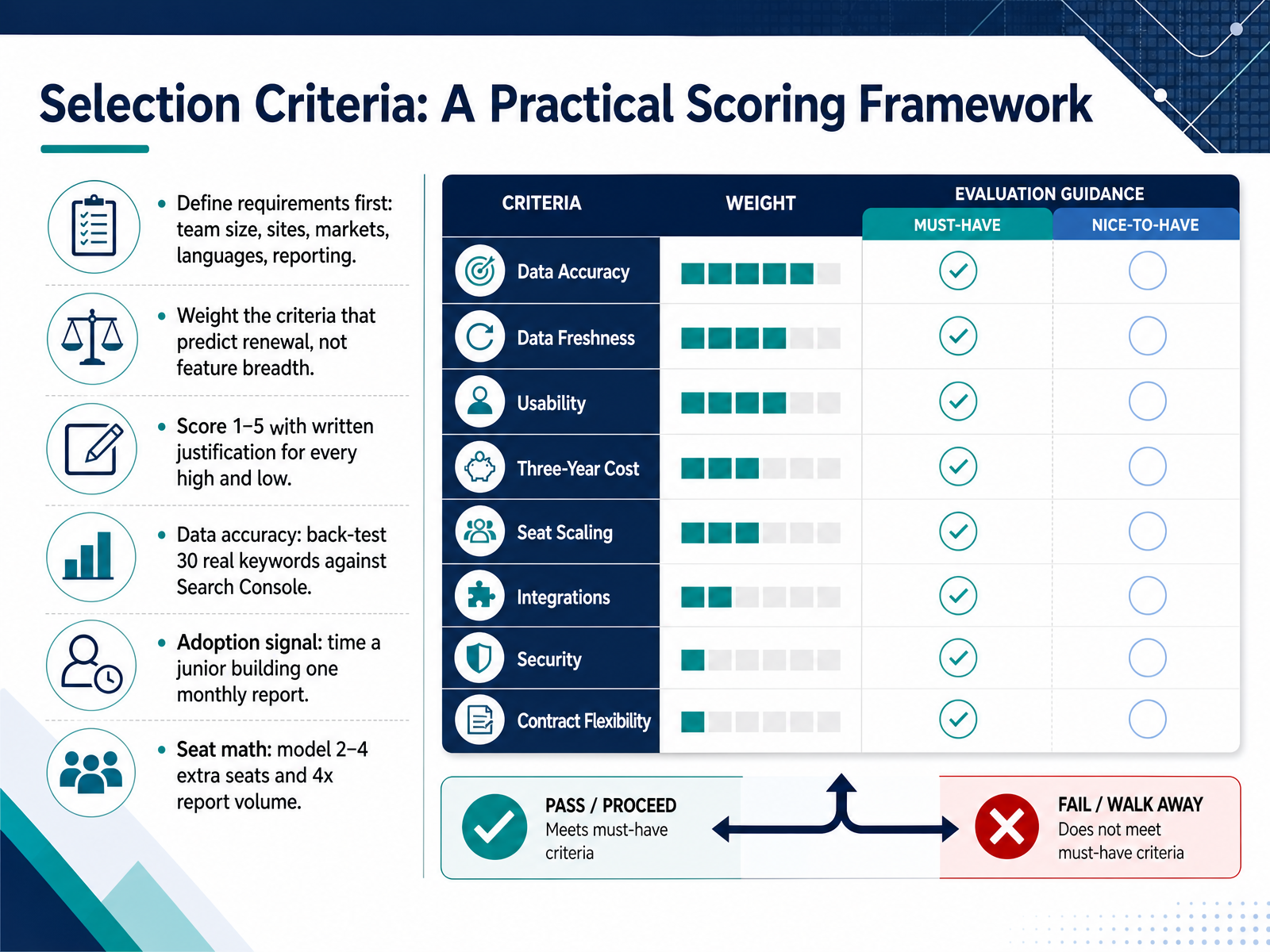
 - 05Selection Criteria: A Practical Scoring FrameworkLet's walk through a scoring framework you can actually defend. Start by defining requirements, not features. Team size, number of sites, markets, languages, and reporting cadence. These set the baseline. Next, weight the criteria that predict renewal, not feature breadth. Data accuracy, adoption, seat economics. Every major suite does keywords and audits, so that checklist tells you nothing. Then score each criterion from one to five, and write a justification for every high and low. Evidence beats opinion. Here's how you back it up. For data accuracy, take thirty real keywords your business cares about and back-test the tool against Search Console. If the numbers drift, that's your answer. For adoption, time a junior building one monthly report from scratch. That's your real time-to-value signal. For seat math, model two to four extra seats and four times report volume, then demand the line-item delta. That last one catches the costs that show up at renewal. Weigh data quality and adoption above everything else. A tool the team actually opens every week beats a feature monster four people log into once. Keep the whole scorecard to one page. It should read as a verdict, not a spreadsheet. You want defensible numbers before anyone talks price. Next, we move on to running a fair bake-off before you sign.
 topickz.comseo-catalog.comsearchatlas.com+22 min
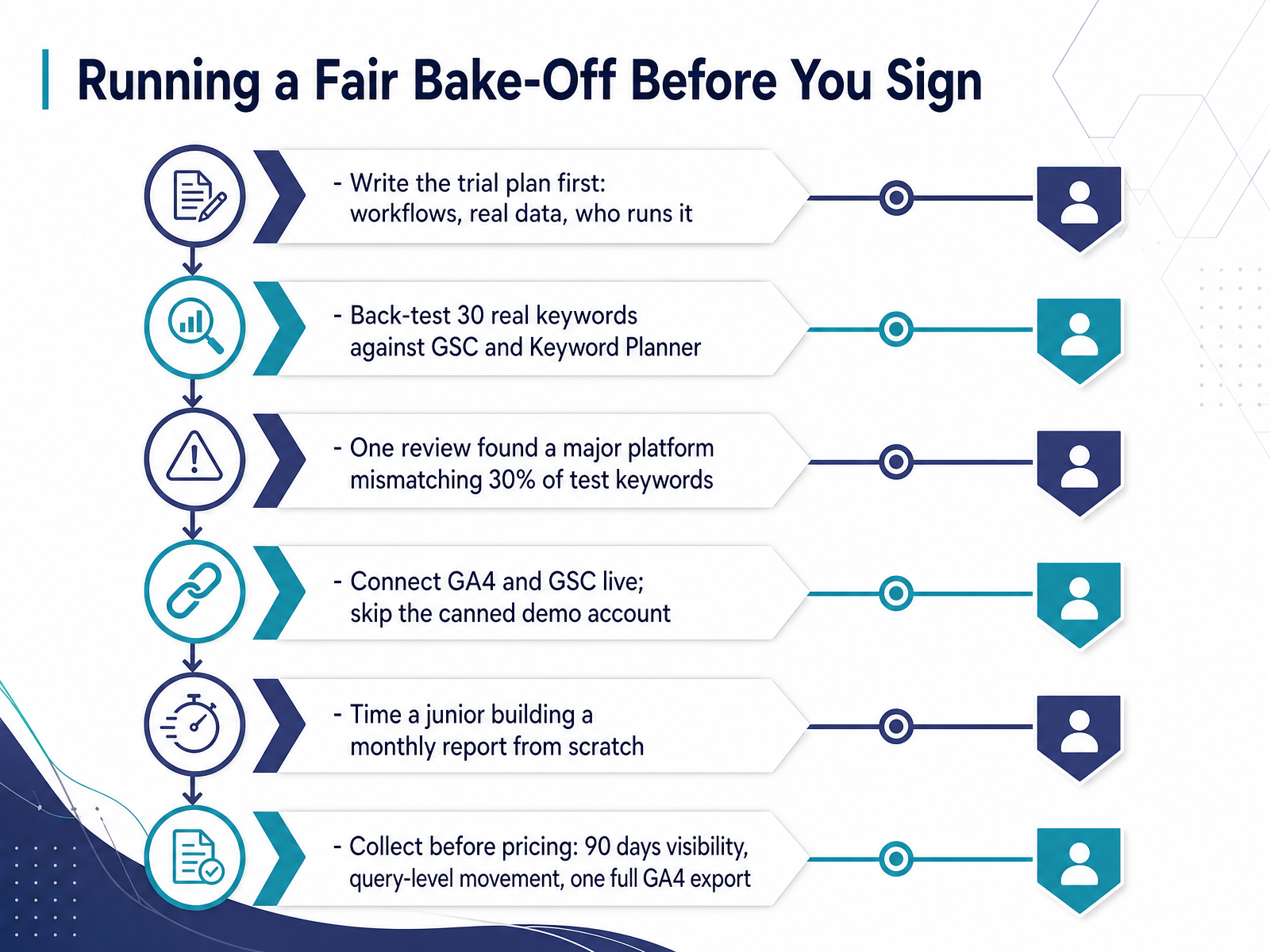
 - 06Running a Fair Bake-Off Before You SignMoving on, before you sign anything, you need to run a fair bake-off. That means writing the trial plan first, not after the demo. Define the workflows you'll test, the real data you'll use, and who runs it. Then back-test thirty real keywords against Google Search Console and Keyword Planner. One review found a major platform mismatching thirty percent of test keywords, so this step is not optional. Connect G A four and G S C live during the trial. Skip the canned demo account. Next, time a junior building a monthly report from scratch. That gives you a real adoption signal. Finally, collect your evidence before anyone talks pricing. Ask for ninety days of visibility data, query-level movement, and one full G A four export. If the vendor can't provide it, that's your answer. Run the bake-off like a test, score it honestly, and let the evidence decide. Next, we'll look at free versus paid tools, covering Search Console, G A four, and budget stacks.
 topickz.comseo-catalog.comsearchatlas.com+22 min
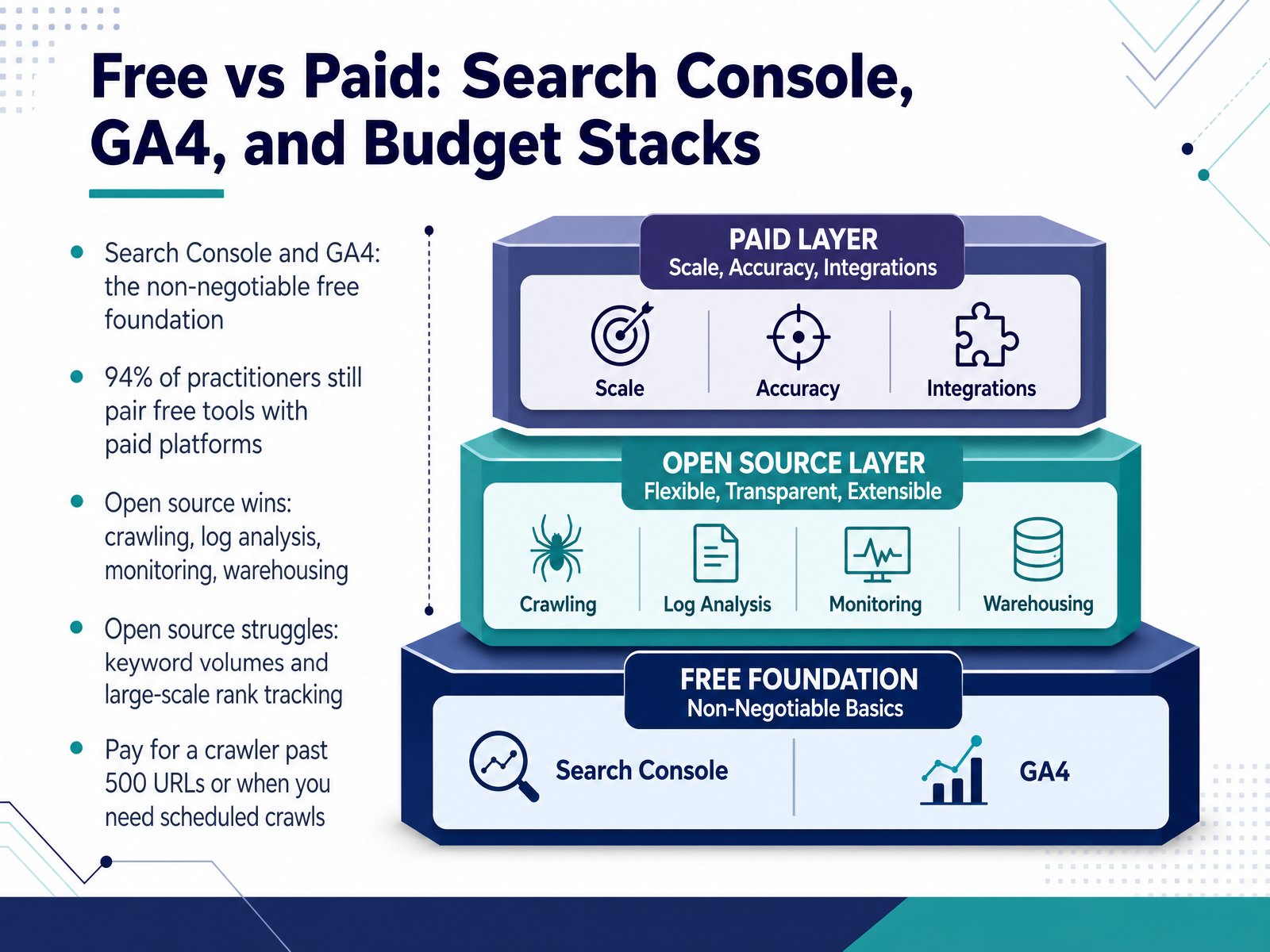
 - 07Free vs Paid: Search Console, GA4, and Budget StacksLet's talk about where free ends and paid begins. Start with your non-negotiable foundation: Google Search Console and G A four. These two cost nothing, and they show what Google actually did with your site, impressions, clicks, index coverage, and field data. Every other tool is optional. And here's the reality: ninety-four percent of practitioners still pair free tools with paid platforms. Open source, or free and self-hosted tools, wins at crawling, log analysis, monitoring, and warehousing. Think GoAccess for server logs, or a self-hosted crawler with no URL cap. Where open source struggles is keyword volumes and large-scale rank tracking. Real search volume data is expensive, and tracking thousands of keywords gets blocked by CAPTCHAs and location targeting. So when do you pay? Pay for a crawler once you regularly exceed five hundred URLs, or the moment you need scheduled crawls. Below that, a free crawl plus Search Console coverage is often enough. Ask yourself three things: how many URLs do you crawl, how many keywords do you track, and how many sites do you own? Those answers tell you whether your budget goes to crawl scale or keyword data. Next, we bring it together in Workflow Design: From Audit to Content to Reporting.
 freecrawl.net2 min
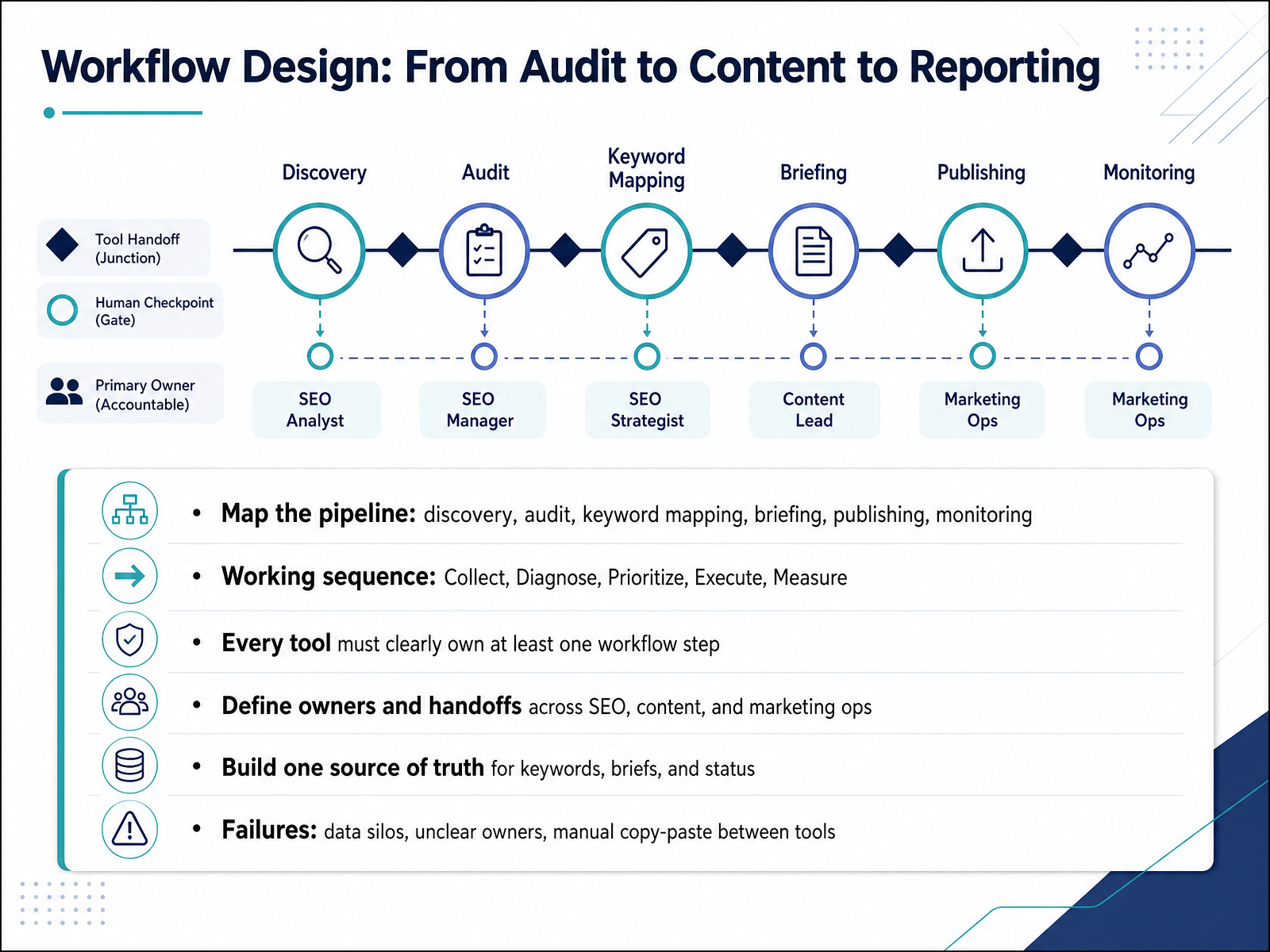
 - 08Workflow Design: From Audit to Content to ReportingNow let's wire the tools into an actual workflow. Think of it as a pipeline with six stages: discovery, audit, keyword mapping, briefing, publishing, and monitoring. The working sequence is Collect, Diagnose, Prioritize, Execute, Measure. And here's the rule that keeps your stack honest: every tool must clearly own at least one workflow step. If a tool doesn't own a step, it's drag.
Next, define owners and handoffs across SEO, content, and marketing ops. Who receives the audit findings? Who approves the brief? Who hits publish? Then build one source of truth for keywords, briefs, and status, so nobody hunts for the latest version.
Watch for three common failures: data silos, unclear owners, and manual copy-paste between tools. Take a minute, and check whether each tool in your stack has a named owner and a clear handoff. That's your next action.
Next, we'll look at automation boundaries and human checkpoints.
 2 min
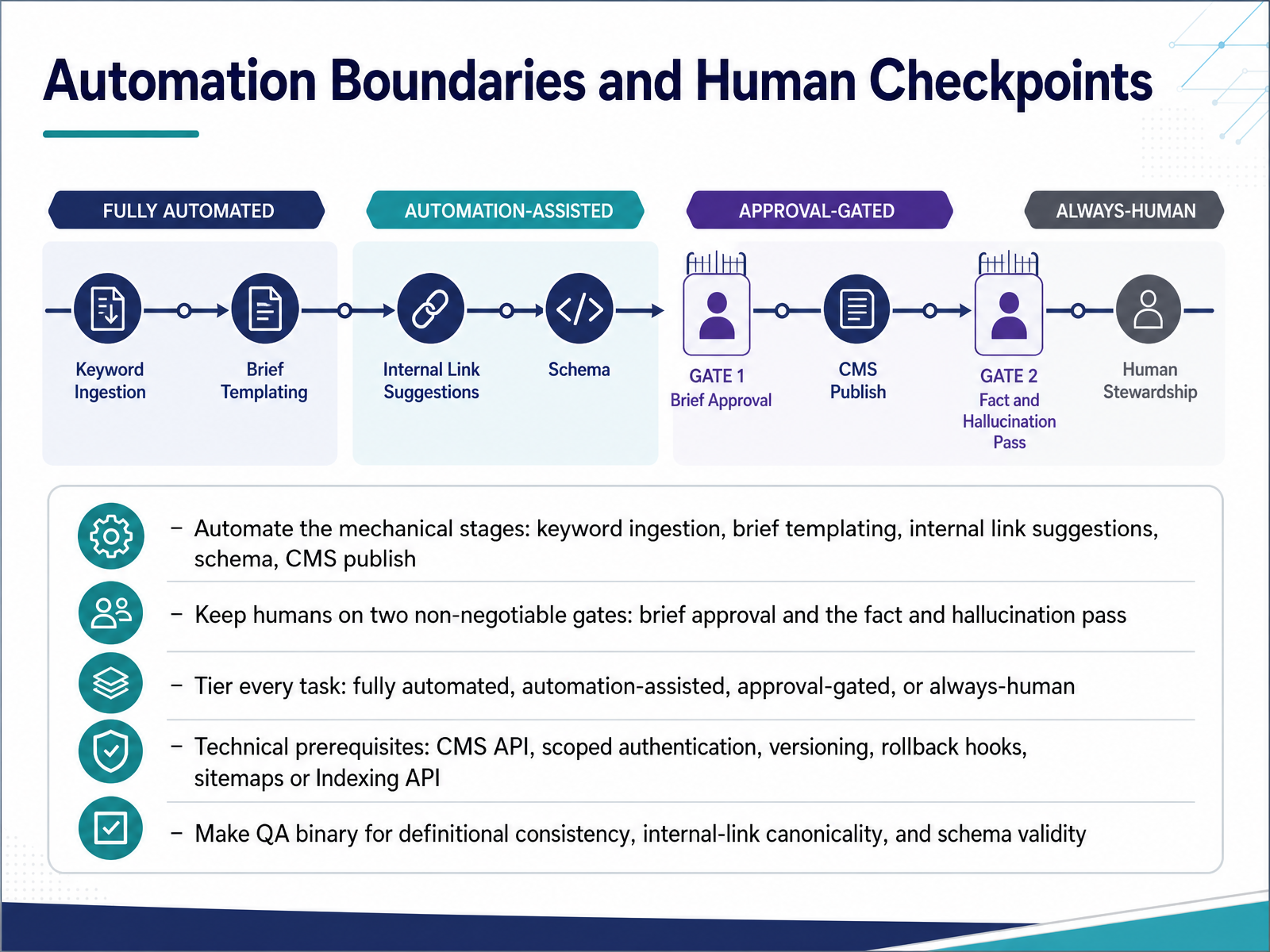
2 min - 09Automation Boundaries and Human CheckpointsLet's talk about where automation stops and people step in. Automate the mechanical stages: keyword ingestion, brief templating, internal link suggestions, schema generation, and the CMS publish itself. These are repeatable and cheap to verify. But keep humans on two non-negotiable gates: brief approval, and the fact and hallucination pass. Skip the brief and you generate a polished article about the wrong thing. Skip the fact pass and you publish a hallucinated statistic that damages your credibility. So tier every task. Fully automated, automation-assisted, approval-gated, or always-human. Before any of this works, check your technical prerequisites: a CMS API, scoped authentication, versioning, rollback hooks, and sitemaps or the Indexing API. Then make QA binary for the rules that matter most. Definitional consistency, internal-link canonicality, and schema validity either pass or block delivery. Everything else can stay advisory. Tier your tasks, protect those two gates, and your pipeline becomes safely auditable. Next, we'll look at small teams and agencies scaling the stack.
 2 min
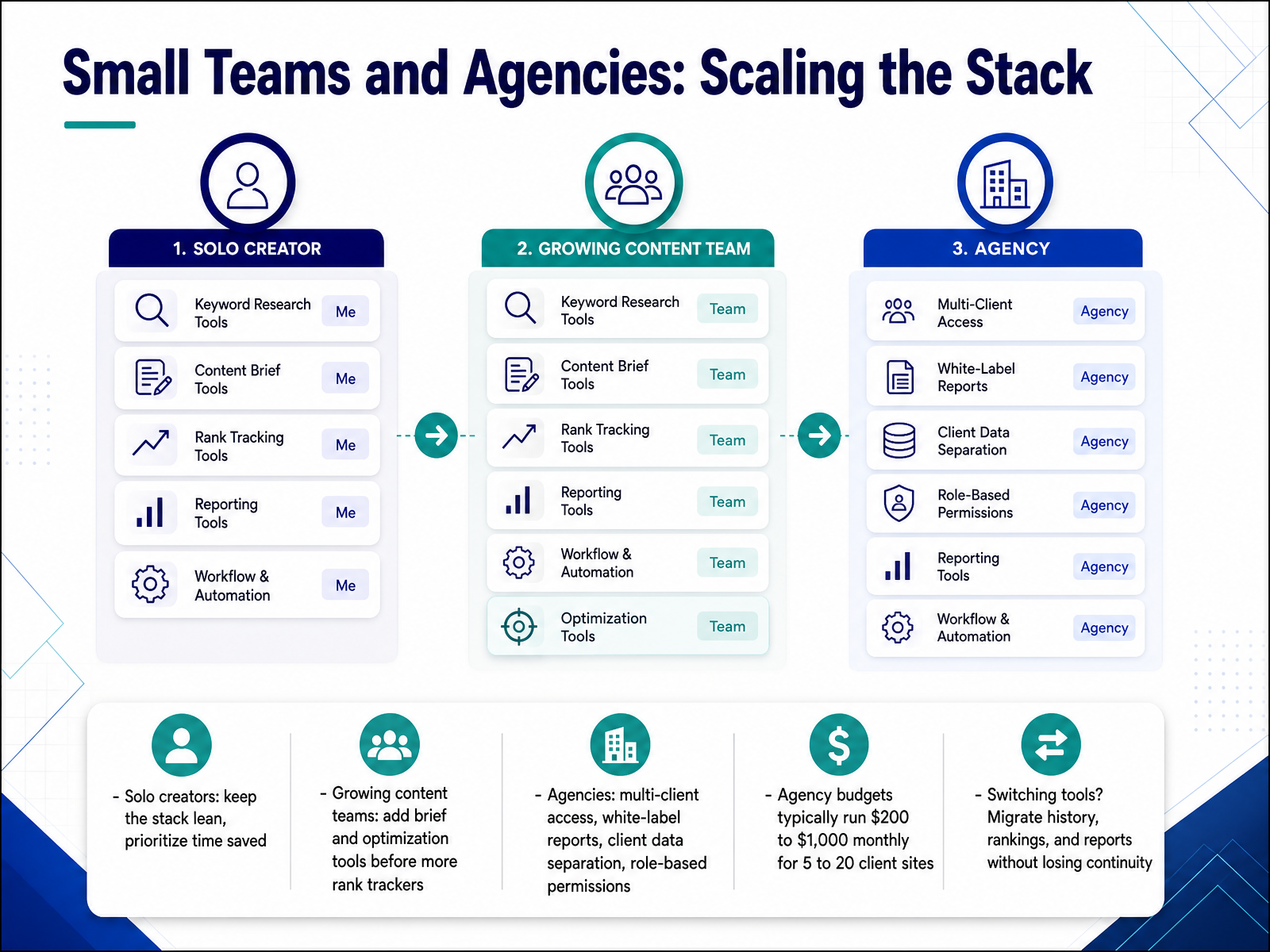
2 min - 10Small Teams and Agencies: Scaling the StackLet's talk about scaling your stack by team size, because the right answer for a solo creator is a bad answer for an agency. If you're a solo creator, keep the stack lean and prioritize time saved over feature depth. One rank tracker, one reporting layer, done. Growing content teams should add brief and optimization tools before buying another rank tracker. You likely have enough ranking data; what you lack is a fast path from insight to published content. Agencies have a different shape entirely. They need multi-client access, white-label reporting so clients see your logo and domain, client data separation, and role-based permissions. Give account managers view-only access, analysts edit rights, and keep admin controls with leadership. Budget-wise, agency stacks typically run two hundred to one thousand dollars monthly for five to twenty client sites. And if you're switching tools, migrate your history, rankings, and reports so you don't lose continuity. Export historical data before you cancel anything. Next, making the business case and ongoing governance.
 2 min
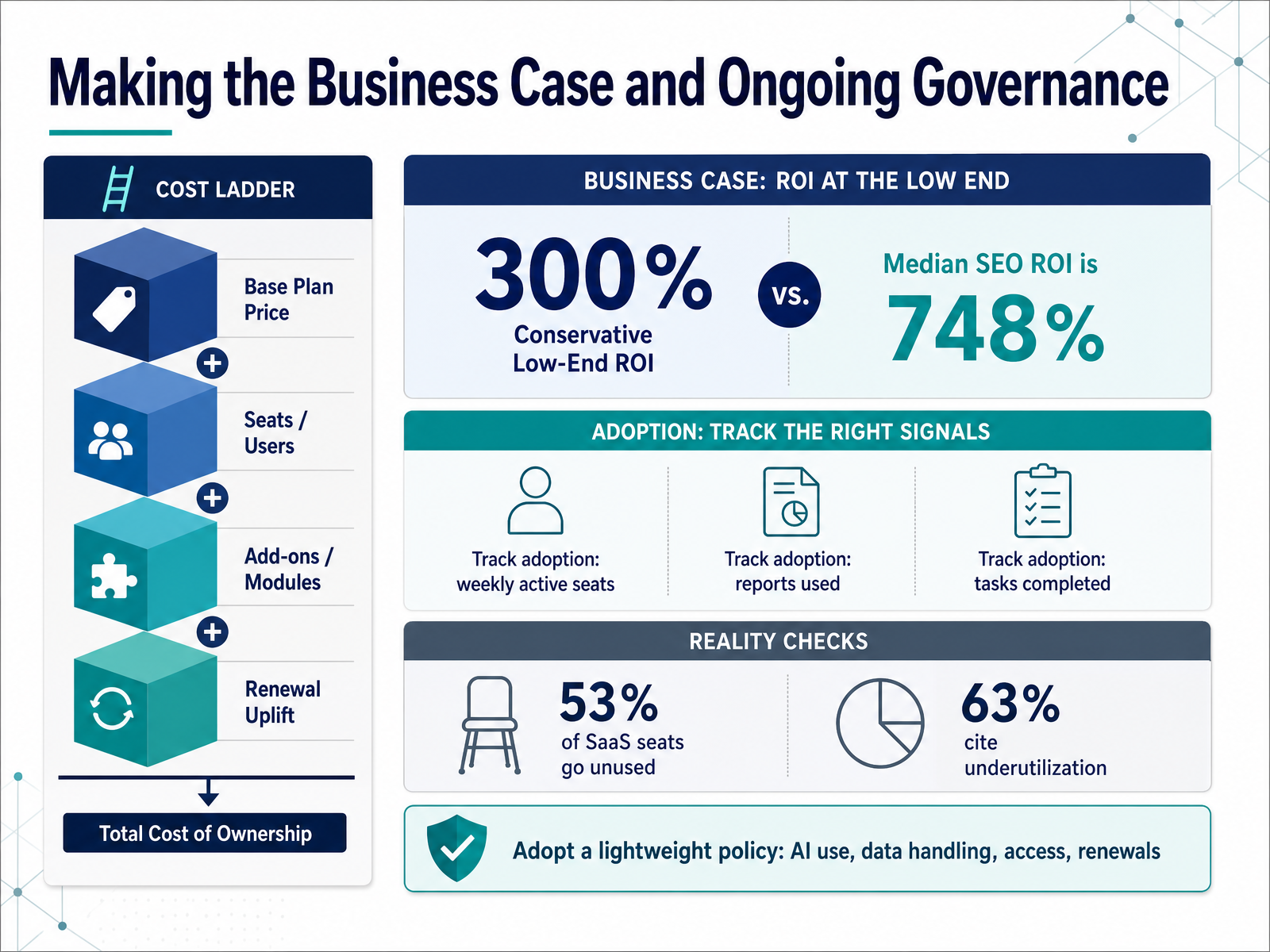
2 min - 11Making the Business Case and Ongoing GovernanceNow let's turn to making the business case and governing the tools you choose. Start by translating tool cost into time saved and output gained. If a platform saves your team ten hours a week, put a dollar figure on those hours. Then anchor your return on investment, or ROI, at a conservative 300 percent. Here's why: a well-run SEO program shows a median ROI of 748 percent over three years, so 300 is a floor your finance team can trust. But the tool only pays off if people use it. Track adoption weekly: how many active seats, how many reports actually get read, how many tasks get completed. This matters because 53 percent of SaaS seats go unused, and 63 percent of teams cite underutilization as their biggest problem. So adopt a lightweight policy covering four things: AI use, data handling, access, and renewals. A one-page document your team can actually follow. Keep it simple, review it quarterly, and you'll keep the stack lean and defensible. Next, we look at The Procurement and Security Gate.
 2 min
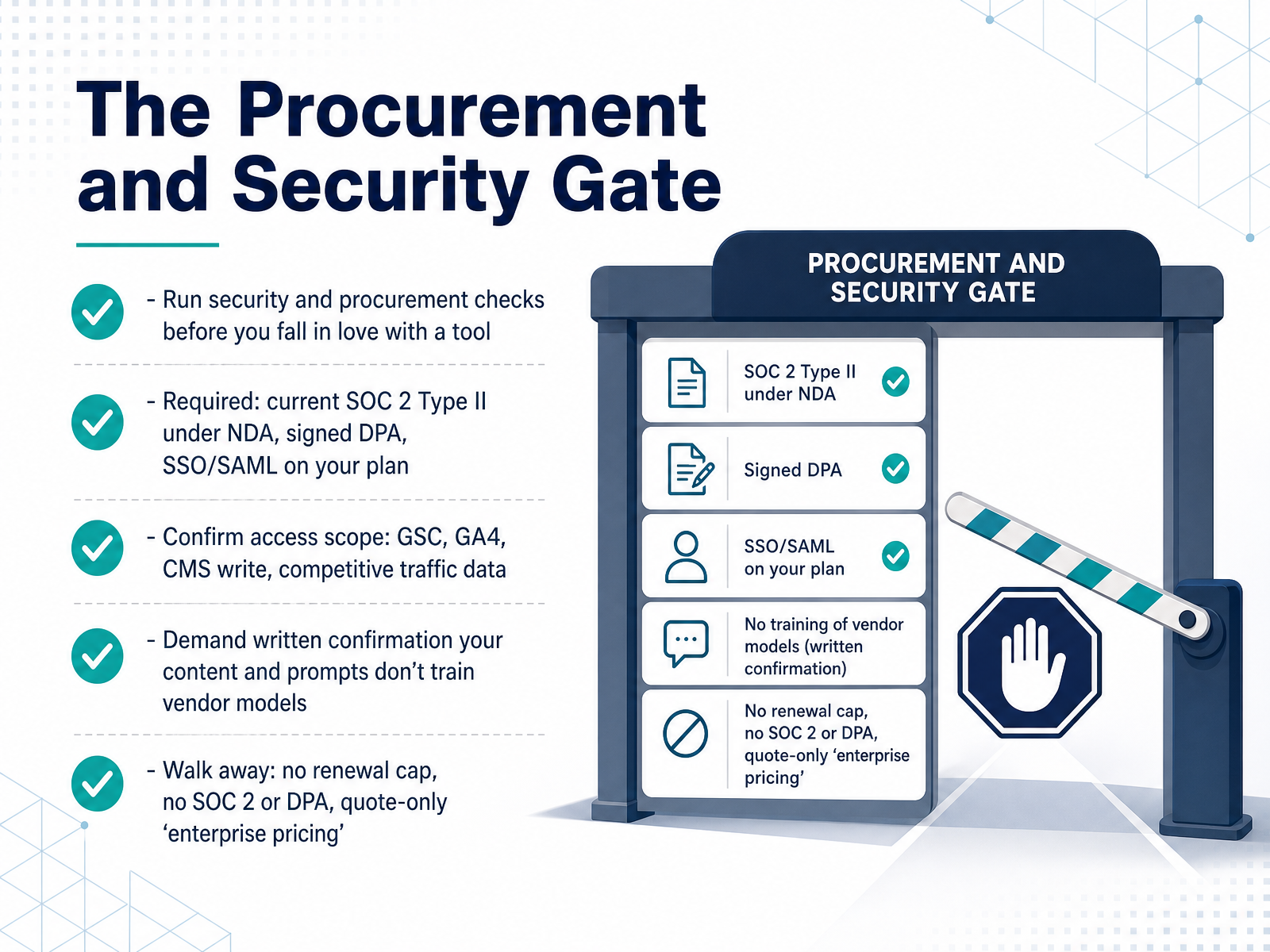
2 min - 12The Procurement and Security GateNow let's talk about the procurement and security gate. This is the stage that can quietly kill a deal after you've already fallen in love with a tool, so you run it before the demo excitement sets in. Treat it as pass or fail, not a negotiation. First, the required items. You need a current SOC 2 Type II report, shared under an N D A. That's an independent audit of the vendor's security controls. You need a signed Data Processing Agreement before any production data connects, and you need S S O and S A M L on the plan you are actually buying, not a quote-only enterprise add-on. Next, confirm access scope. Which systems does the tool touch? Google Search Console, G A four, CMS write access, competitive traffic data. As a rule, a junior seat should not be able to export your full backlink database or billing. Then demand written confirmation that your content and prompts do not train the vendor's models. If your unpublished strategy becomes training data, you've leaked your roadmap to competitors. And know when to walk away. A vendor that won't share SOC 2 or sign a DPA, won't cap your renewal increase in writing, or quotes enterprise pricing only after a mandatory sales call is telling you exactly how the renewal will go. So, next, let's put all of this into practice. Hands-On: Build Your Stack and Workflow in 90 Minutes.
 topickz.comseo-catalog.comsearchatlas.com+22 min
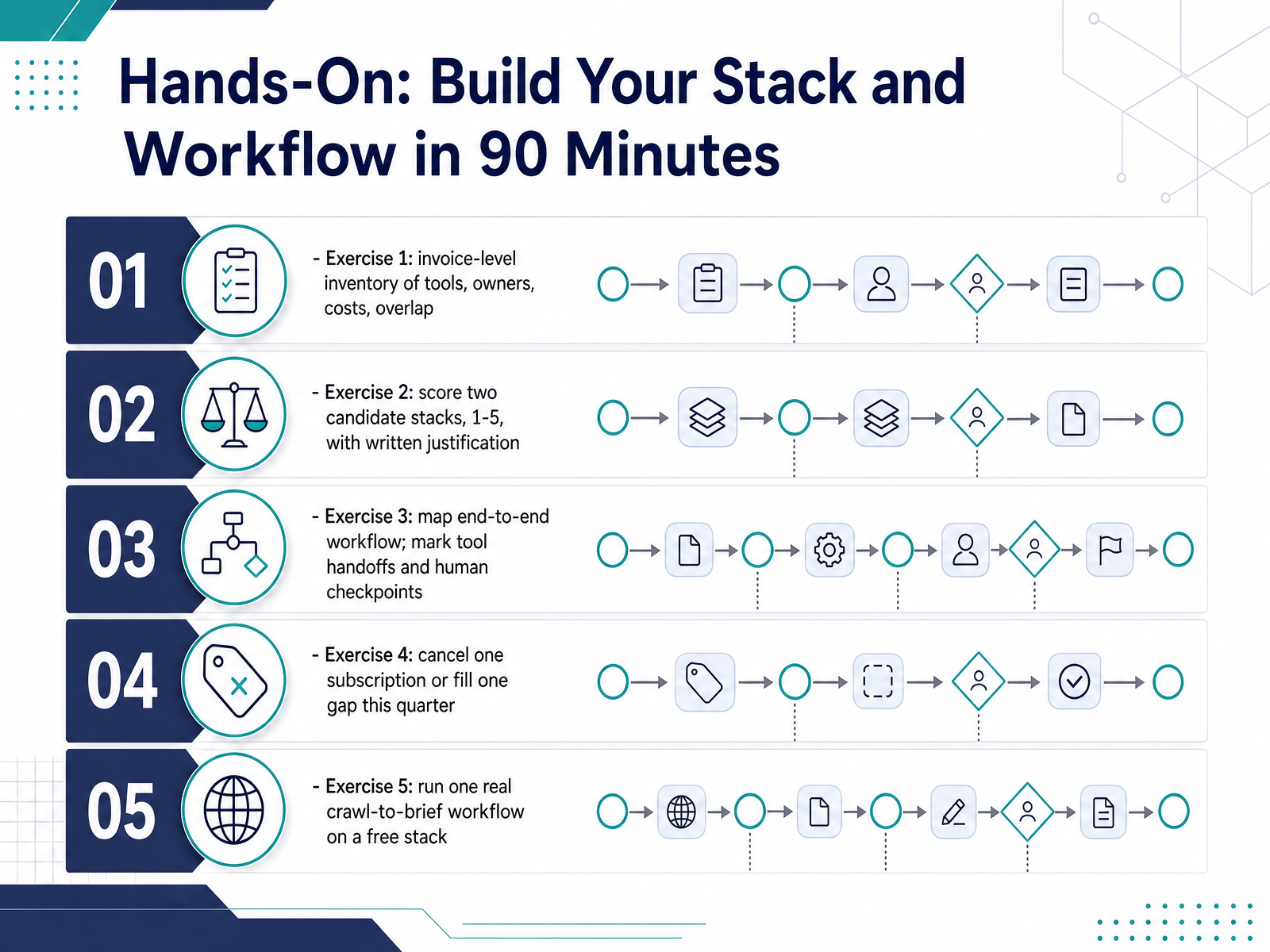
 - 13Hands-On: Build Your Stack and Workflow in 90 MinutesLet's put all of this into practice. This is your ninety-minute build session, and it runs as five short exercises. Exercise one is an invoice-level inventory of every tool you pay for. List the owner, the monthly cost, and any overlap. Exercise two is a scored comparison. Rate two candidate stacks from one to five and write your justification in plain sentences. Exercise three is a workflow map. Draw the path end to end and mark every tool handoff and every human checkpoint, the points where someone reviews before the work moves forward. Exercise four is one concrete decision this quarter: cancel one subscription or fill one gap. Exercise five is a real run: take one page from crawl through to content brief on a free stack, using Google Search Console, a free crawler like Screaming Frog, and a brief template. Keep it small and finish all five. Next, let's pull the key takeaways and next steps together.
 1 min
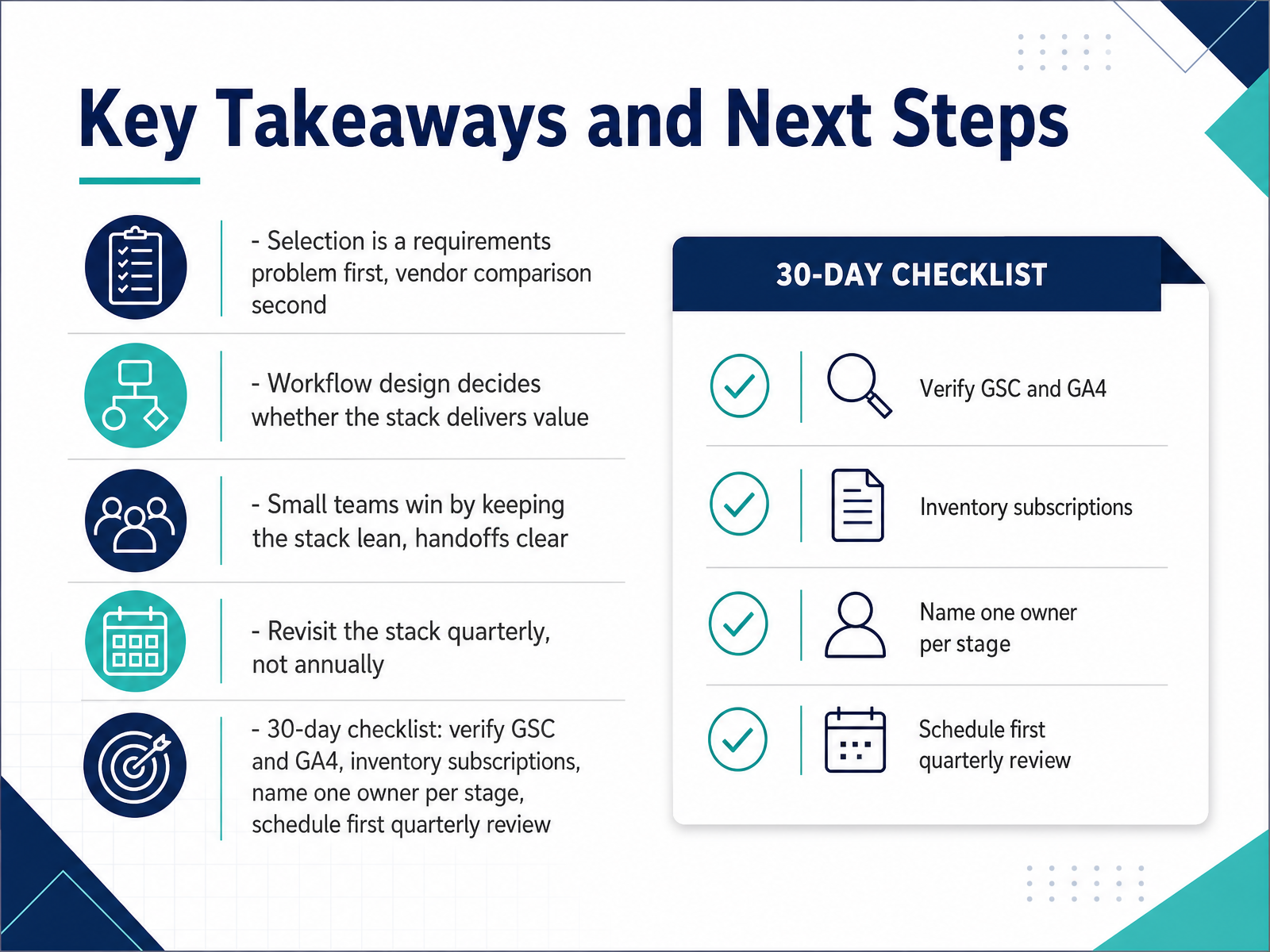
1 min - 14Key Takeaways and Next StepsLet's wrap this up. Five things to carry out of this course. First, tool selection is a requirements problem before it is a vendor comparison. Write down the jobs your stack must do, then buy. Second, workflow design decides whether the stack delivers value. A tool with no owner and no review cadence is just a subscription. Third, small teams win by staying lean, with clear handoffs. One primary source per signal beats five overlapping dashboards. Fourth, revisit the stack quarterly, not annually. Annual billing hides tools nobody opens, and a quarterly audit is a quick way to find them. Here is your thirty-day checklist. Verify Google Search Console and GA4 tracking. Inventory every subscription and its renewal date. Name one owner per workflow stage. And schedule your first quarterly review now, so it actually happens. Remember, Google's spam policies now extend to AI responses, so keep content genuinely useful as you scale. Thank you for working through this course. You now have a repeatable way to choose tools and design workflows. Go run the checklist this week, keep the stack lean, and let the results compound.
 developers.google.comppc.landaioseo.com+22 min
Take the deck with you
Download this course as a file — free, no sign-up needed.
- PDF handoutEvery slide page, ready to print or share.15 pages · 3.7 MBDownload
- Narrated PowerPointThe deck that presents itself — every slide carries the digital human's narration video.15 pages · 15.3 MBDownload
- PowerPoint slidesThe full deck as a .pptx — open it in PowerPoint, Keynote, or Google Slides.15 pages · 3.5 MBDownload
Free to use in your own training — please keep the PersonWise credit page at the end.
Have your own deck? Turn it into a course
Sources consulted
Web sources consulted while building this course.
- SEO Tools Trends 2026: What’s Changing in the Market | ProPicked — propicked.com
- 8 Best SEO Tools in 2026: Pricing, APIs & AI Tracking Compared — cyberpanel.net
- SEO Optimization Software: 2026 Buyer's Map — Honeyb Blog — honeyb.ai
- The 2026 SEO Technology Report: Market Analysis, Tooling Efficacy, and the Generative Shift – nbloglinks — nbloglinks.com
- SEO Platform Cost: 2026 Pricing Guide | The Seo Engine — The Seo Engine — blog.theseoengine.com
- Spam Policies for Google Web Search — developers.google.com
- Google spam policies now officially cover AI Overviews and AI Mode in Search — ppc.land
- Google June 2026 Spam Update: What You Need To Know — aioseo.com
- Buying mentions to rank in AI? Google now calls it spam — cicero.studio
- New ways we're tackling spammy, low-quality content on ... — blog.google
- Best AI SEO Tools in 2026: All 5 Categories, Compared | CrawlRaven — crawlraven.com
- 28 Best SEO Tools in 2026 (Free + Paid) — aicomparison.ai
- Best AI Tools for SEO: A 2026 Stack Framework for Search and AI Visibility - MaxAEO Blog — maxaeo.ai
- Automated SEO Tools: The Complete 2026 Buyer's Guide - A1Publishing — a1publishing.org
- How to Evaluate SEO Tools (and Defend the Spend to a CFO) | TopickZ.com — topickz.com
- SEO Tool Pricing Comparison for 2026 — seo-catalog.com
- SEO Vendor Evaluation Checklist: How to Compare SEO Platforms Before B — searchatlas.com
- How to Compare SEO Platforms: A Framework for Choosing the Right Tool | Rankwise Resources | Rankwise — tryrankwise.com
- How to Evaluate AI SEO Tools: The Scorecard, the True Cost, and the Case You Take to Finance | TopickZ.com — topickz.com
- FreeCrawl — Free Open-Source Alternative to Screaming Frog — freecrawl.net