Begin
13 pages · ~26 min
Business Analytics Core Skills
This training builds core business analytics skills for professionals seeking to analyze data and drive data-informed decisions.
A digital instructor presents all 13 pages. Hold “Ask” at any point and ask out loud — the answer comes from this course. No sign-up needed.
What you’ll learn
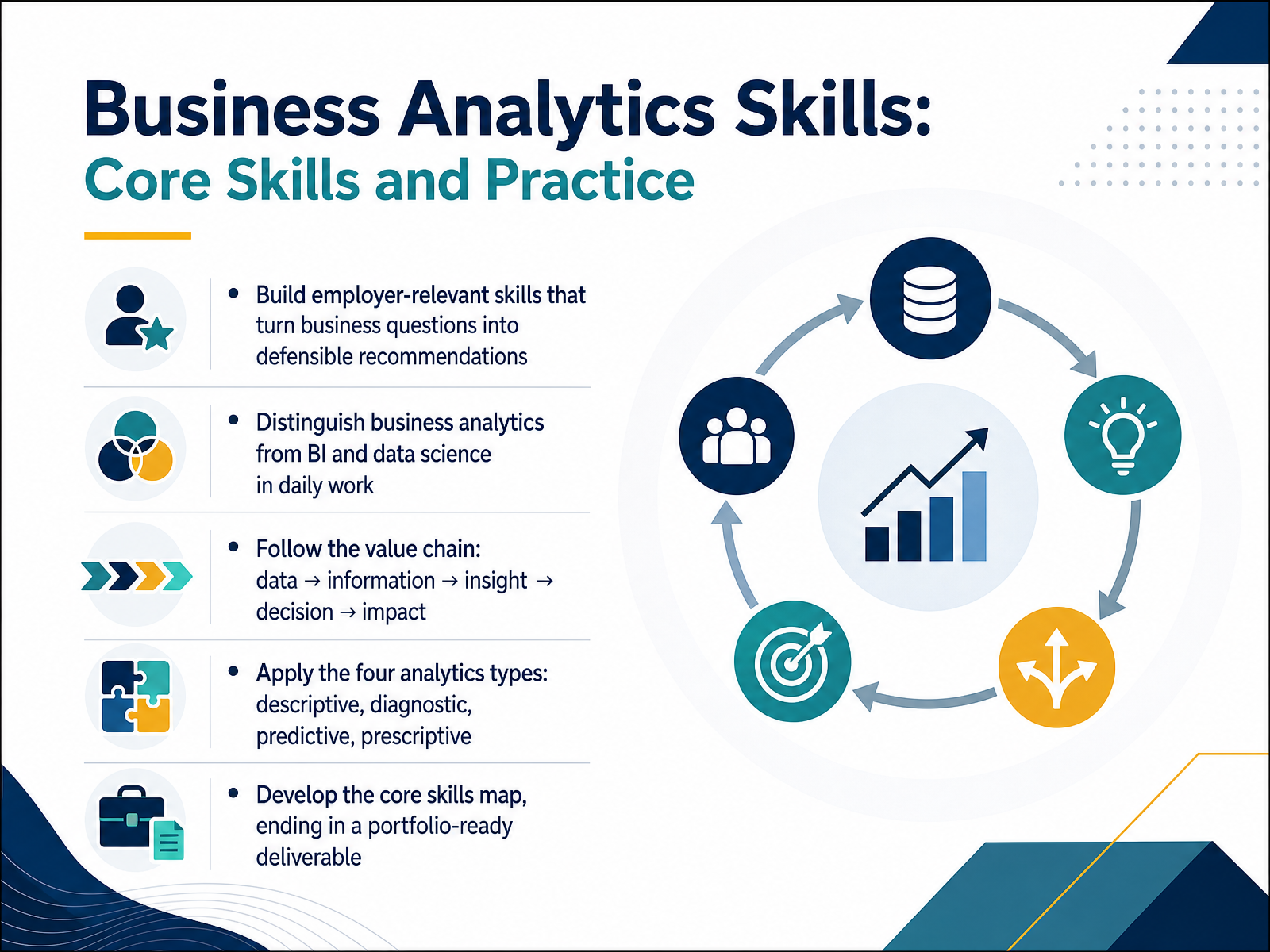
- 01Business Analytics Skills: Core Skills and PracticeWelcome. I'm glad you're here. This course is called Business Analytics Skills: Core Skills and Practice. Our goal is simple: to help you build employer-relevant skills that turn business questions into clear, defensible recommendations. You do not need any prior analytics experience to succeed here. We will start by distinguishing business analytics from business intelligence and data science in everyday work, so you know where your role fits. From there, we will follow the value chain: data becomes information, information becomes insight, insight drives a decision, and that decision creates impact. You will also learn the four analytics types: descriptive, diagnostic, predictive, and prescriptive. Each one answers a different question. Finally, we will build your core skills map, ending with a portfolio-ready deliverable you can show an employer. Take this one step at a time. Let's begin by looking at what employers expect from early-career analysts in 2026.businessanalyst.techcanvass.comdatamatastudios.comacciojob.com+21 min
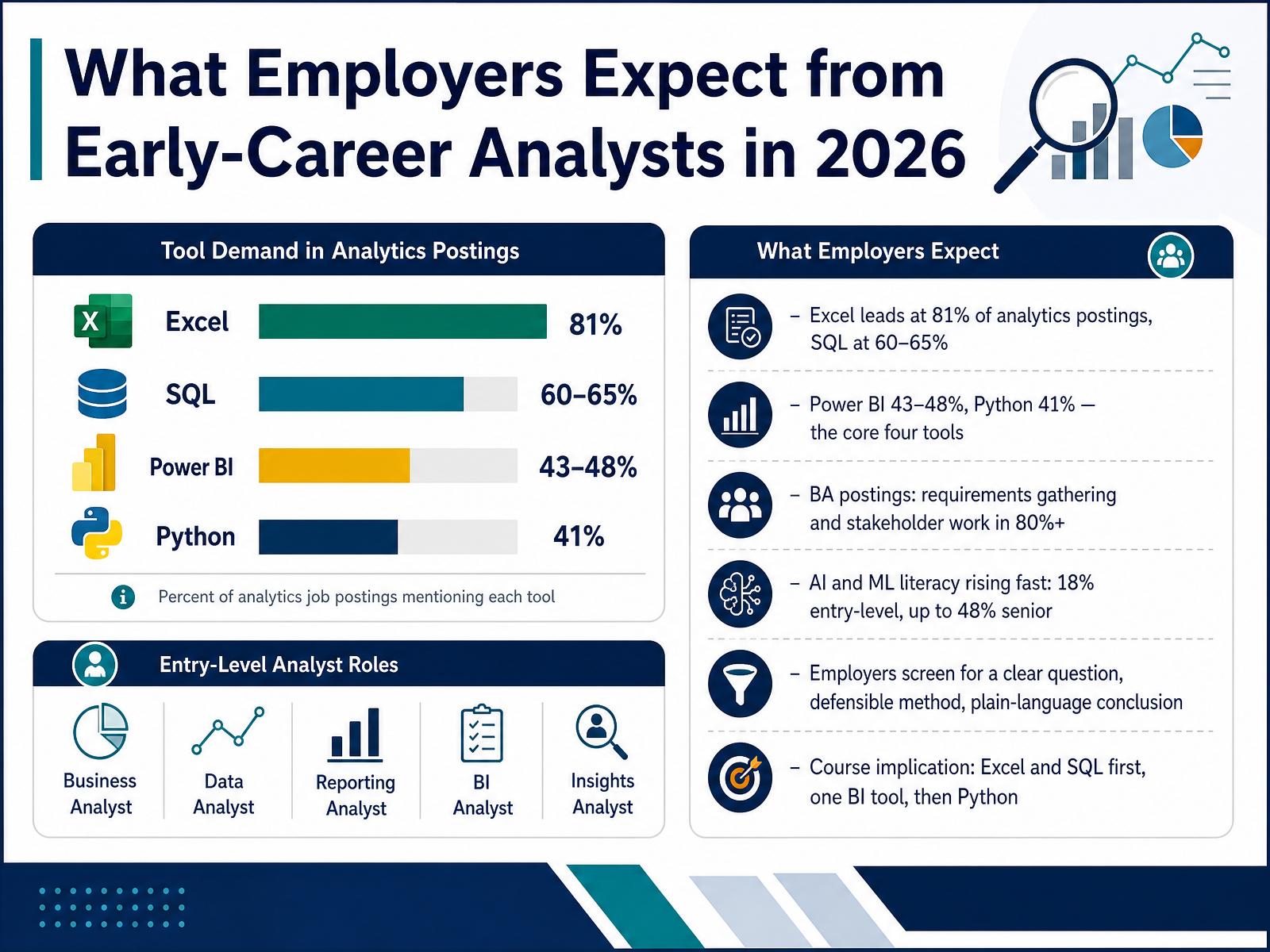
- 02What Employers Expect from Early-Career Analysts in 2026Now, let's look at what employers actually expect from early-career analysts in 2026. The good news is that the bar is clear and reachable. Across real job postings, four tools form the core: Excel leads at eighty-one percent, SQL at sixty to sixty-five percent, Power BI at forty-three to forty-eight percent, and Python at forty-one percent. So if you learn Excel and SQL first, then one business intelligence tool like Power BI, and finally Python, you cover the vast majority of openings. But tools alone are not enough. Requirements gathering and stakeholder work appear in over eighty percent of business analyst postings, so being able to ask good questions and work with people matters just as much. AI and machine learning literacy is also rising fast, showing up in about eighteen percent of entry-level roles and up to forty-eight percent at senior level. Employers screen for three simple things: a clear question, a defensible method, and a plain-language conclusion. So start with Excel and SQL, add one BI tool, then layer in Python. Next, we'll walk through the analytics workflow, from business question to decision.
 businessanalyst.techcanvass.comdatamatastudios.comacciojob.com+22 min
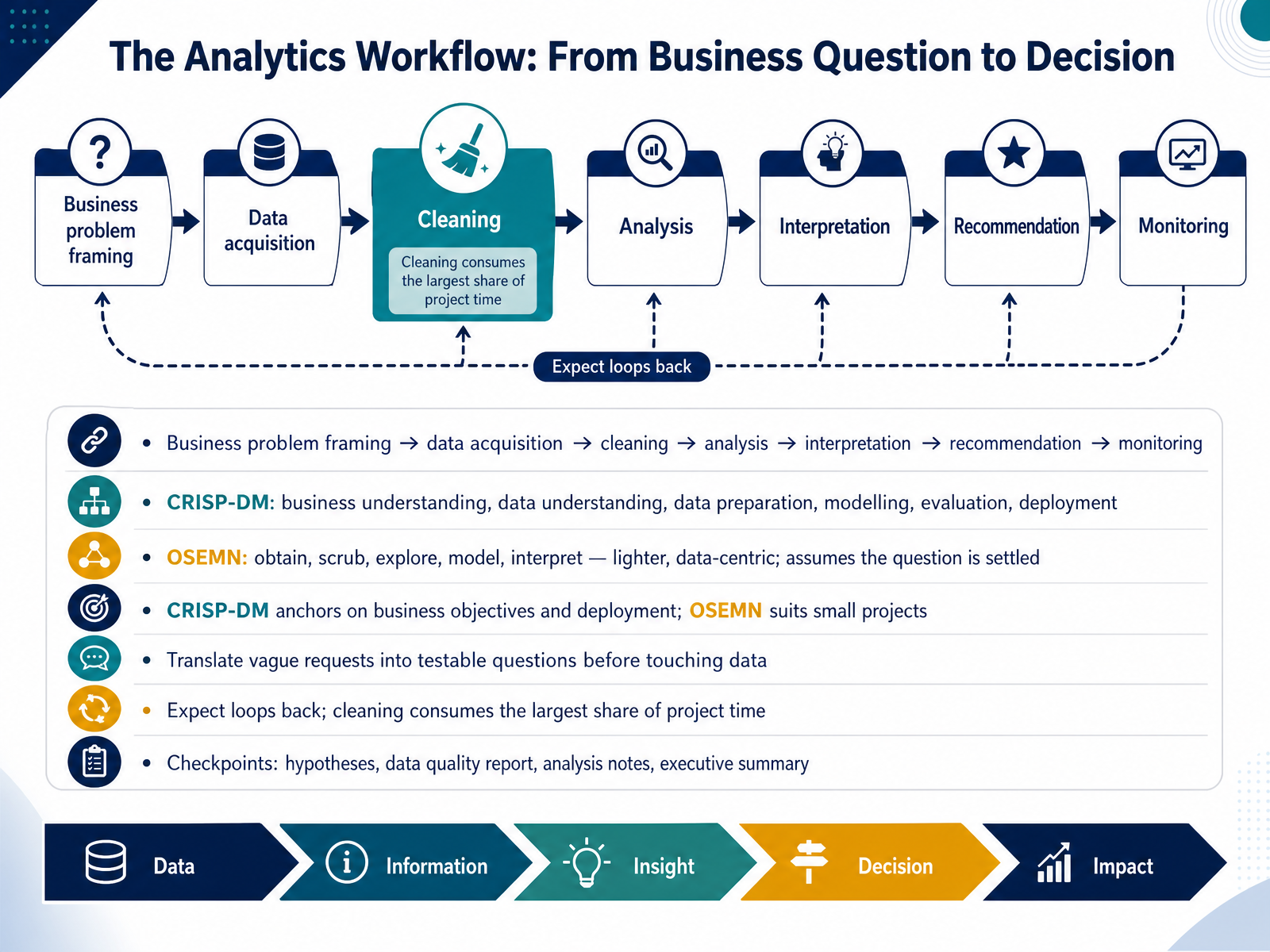
 - 03The Analytics Workflow: From Business Question to DecisionLet's walk through how analytics work actually happens, from a business question to a decision. A common flow looks like this. Frame the business problem, acquire data, clean it, analyze it, interpret what it means, make a recommendation, then monitor the results. Several formal frameworks describe these steps. One is CRISP-DM, the Cross Industry Standard Process for Data Mining. It has six phases: business understanding, data understanding, data preparation, modelling, evaluation, and deployment. The other is OSEMN, which stands for obtain, scrub, explore, model, and interpret. It is lighter and more data-centric. The key difference: CRISP-DM anchors everything to business objectives and deployment, while OSEMN works well for smaller projects where the question is already settled. Two practical habits matter. First, translate vague requests into testable questions before touching data. For example, instead of improve sales, ask which customer segments drove last quarter's decline. Second, expect loops back. Cleaning usually consumes the largest share of project time. Build in checkpoints: your hypotheses, a data quality report, analysis notes, and an executive summary. Next, we look at data literacy, sourcing, assessing, and preparing business data.
 doi.orgdatarundown.comcloudoffice.io+22 min
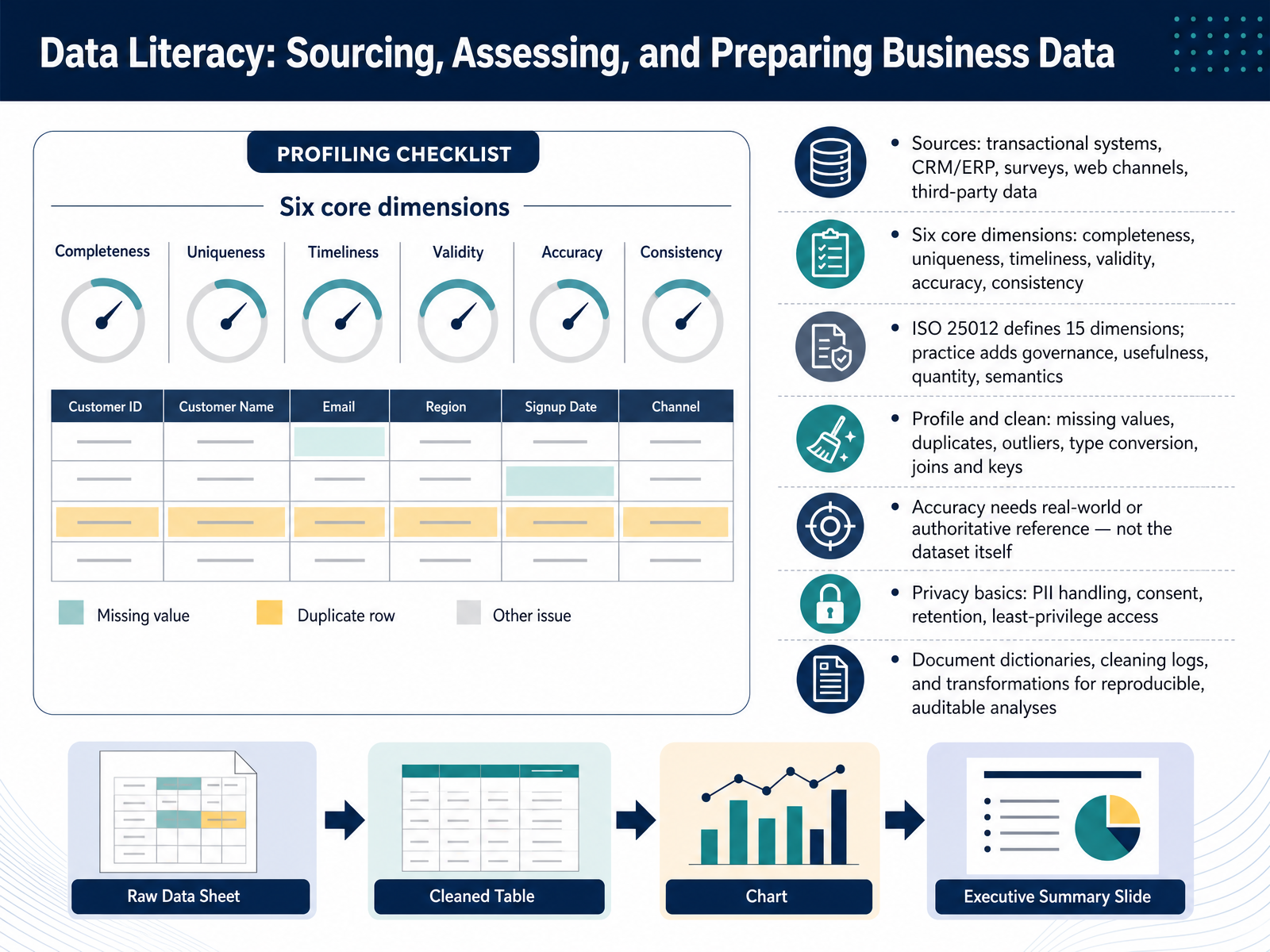
 - 04Data Literacy: Sourcing, Assessing, and Preparing Business DataNow let's look at where business data actually comes from and how we prepare it. Common sources include transactional systems that record everyday operations, CRM and ERP platforms, surveys, web channels, and third-party data. Every source has its own quirks, so your first job is to assess quality. A practical starting point is six core dimensions: completeness, uniqueness, timeliness, validity, accuracy, and consistency. In plain terms, are values missing? Are there duplicates? Is the data fresh enough to act on? Does it follow the expected format? Does it reflect reality? And does it agree across systems? ISO 25012 defines fifteen dimensions, and in practice we often add governance, usefulness, quantity, and semantics. A key point: accuracy can only be judged against a real-world or authoritative reference, never against the dataset itself. Next, profile and clean the data by checking missing values, duplicates, outliers, data types, and joins or keys. Finally, handle privacy carefully. Manage personally identifiable information, consent, retention, and least-privilege access. Document data dictionaries, cleaning logs, and transformations, so your analysis stays reproducible and auditable. Next, we move into descriptive analytics and how we summarise and visualise business performance.
 dama-nl.orggbv.dedqglobal.com+22 min
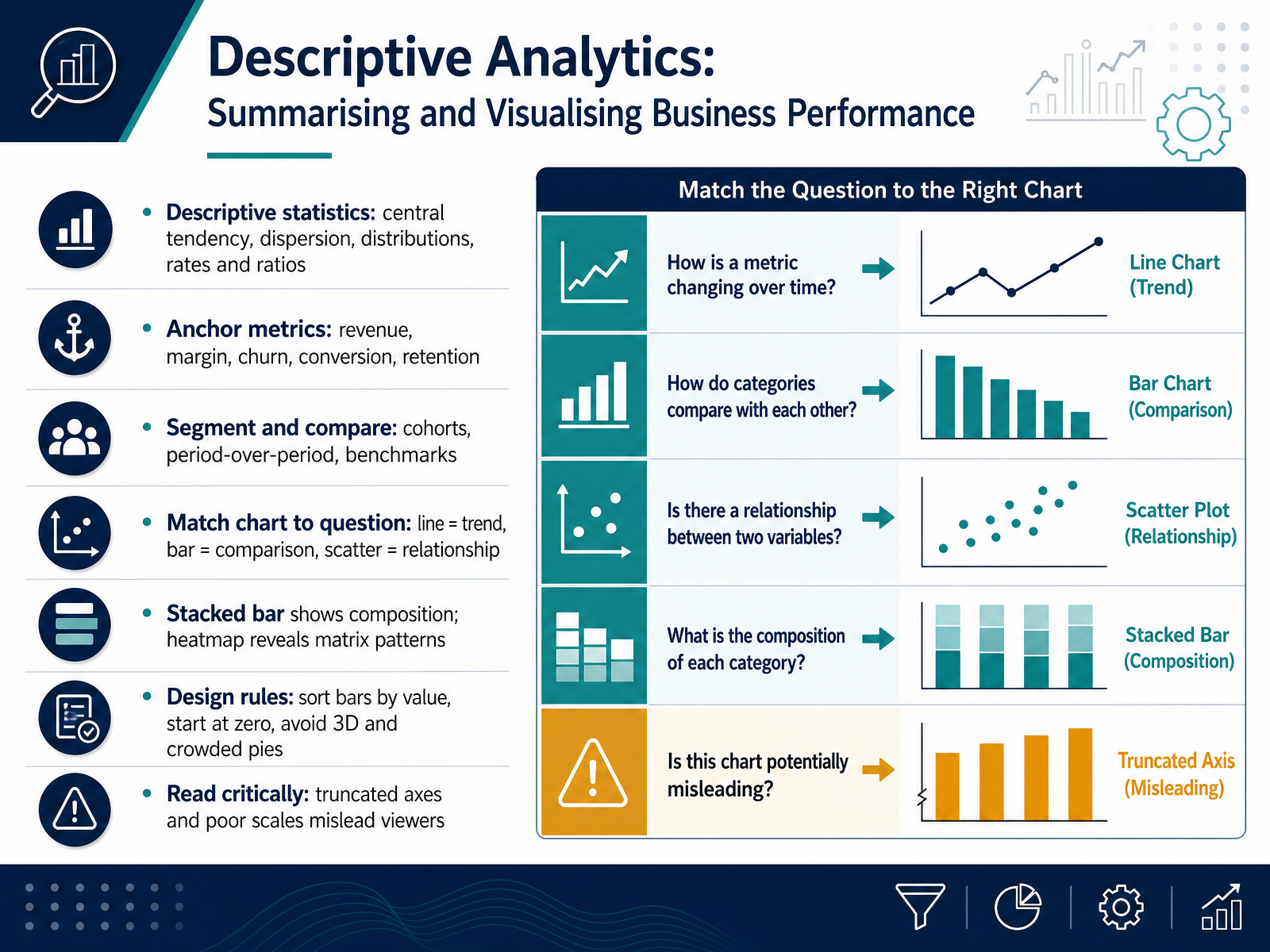
 - 05Descriptive Analytics: Summarising and Visualising Business PerformanceNow let's ground analytics in the fundamentals with descriptive analytics, which simply means summarising what already happened. We start with descriptive statistics. Central tendency describes the typical value, like an average. Dispersion describes how spread out values are. Distributions show the shape of the data, and rates and ratios put numbers in comparable terms. Next, anchor metrics like revenue, margin, churn, conversion, and retention tie your analysis to business performance. Always add context by segmenting and comparing: look at cohorts, period-over-period changes, and benchmarks. Then match the chart to the question. A line chart shows trend, a bar chart compares categories, and a scatter plot reveals relationships. A stacked bar shows composition, while a heatmap reveals patterns across a matrix. Follow a few design rules: sort bars by value, start at zero, and avoid 3D or crowded pies. Finally, read critically. Truncated axes and poor scales can mislead viewers. So when you build or review a chart, ask what decision it supports. Next, we'll look at Dashboard Design: Turning Metrics into Decision Tools.
 domo.comclearpointstrategy.combprglobal.co+22 min
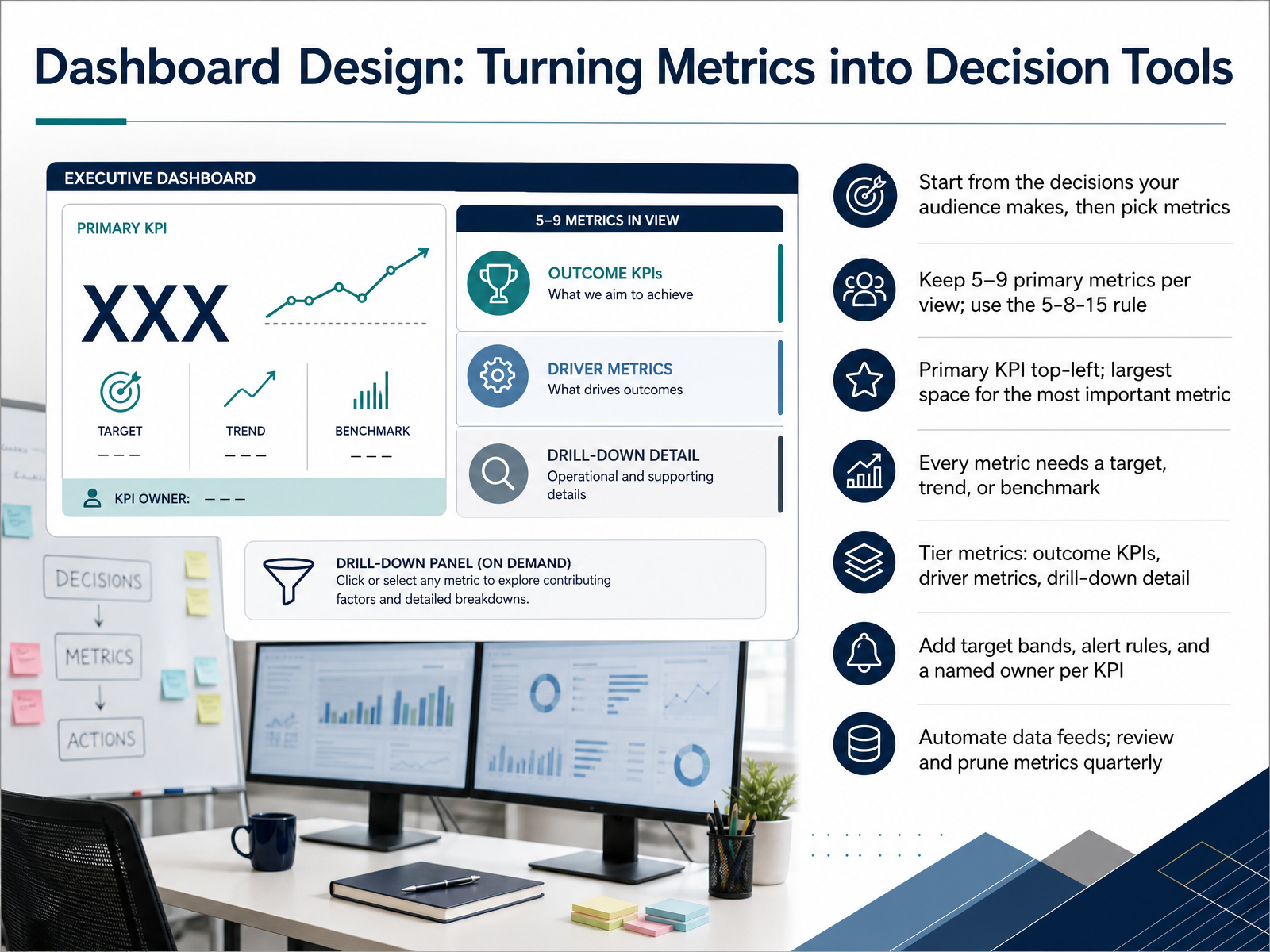
 - 06Dashboard Design: Turning Metrics into Decision ToolsNow, let's talk about dashboard design. A dashboard is not a data dump. It is a decision tool. So start with the decisions your audience makes, then choose the metrics that support them. Keep it focused. Aim for five to nine primary metrics per view, and remember the five, eight, fifteen rule: five for an executive view, eight for a department, fifteen at most for operations. Place the most important KPI in the top left, where the eye lands first, and give it the largest space. Every metric needs context, a target, a trend, or a benchmark. Without that, a number cannot tell you if it is good or bad. Tier your metrics into outcome KPIs, driver metrics, and drill-down detail. Then add target bands, alert rules, and a named owner for each KPI. Automate your data feeds, because manual updates go stale fast. Finally, review and prune your metrics every quarter. Keep only what drives action. Next, we move into diagnostic analytics, root-cause analysis, and business reasoning.
 domo.comclearpointstrategy.combprglobal.co+22 min
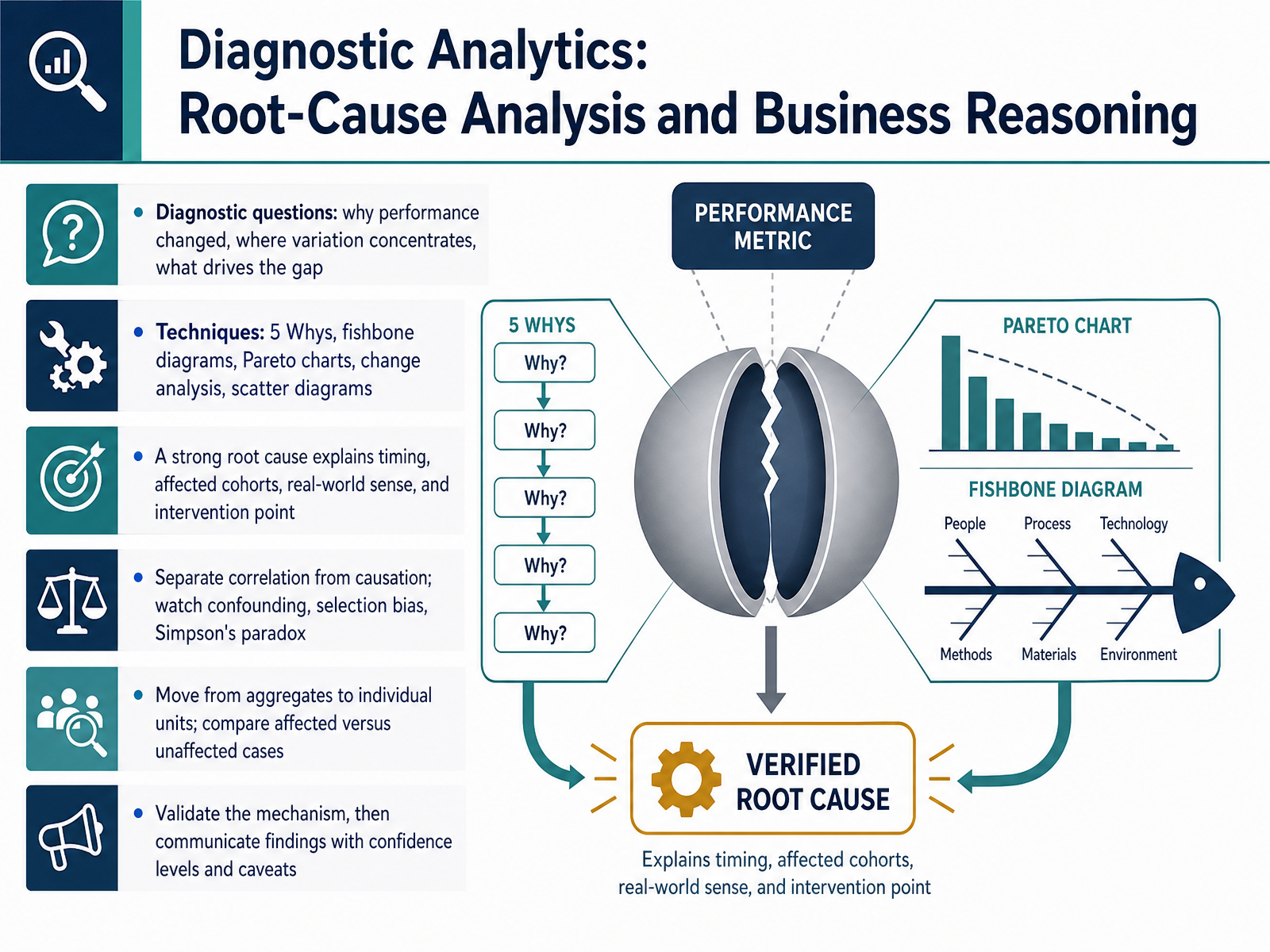
 - 07Diagnostic Analytics: Root-Cause Analysis and Business ReasoningNow let's move from describing what happened to explaining why it happened. That's diagnostic analytics, and its central tool is root-cause analysis. You start with three questions. Why did performance change? Where is the variation concentrated? And what is driving the gap? To answer them, try the Five Whys, asking why repeatedly until you reach something fixable. Use a fishbone diagram to map causes by category. A Pareto chart ranks which causes matter most. Change analysis compares before and after an event. And a scatter diagram checks whether two variables move together. A strong root cause explains timing, which groups were affected, makes real-world sense, and points to where you should intervene. Be careful here. Correlation is not causation. Watch for confounding, selection bias, and Simpson's paradox, where a trend reverses when you combine groups. So compare affected cases against unaffected ones. Validate the mechanism, then share findings with confidence levels and honest caveats. That kind of diagnosis sets up the next step, forecasting and basic predictive concepts for business.
 2 min
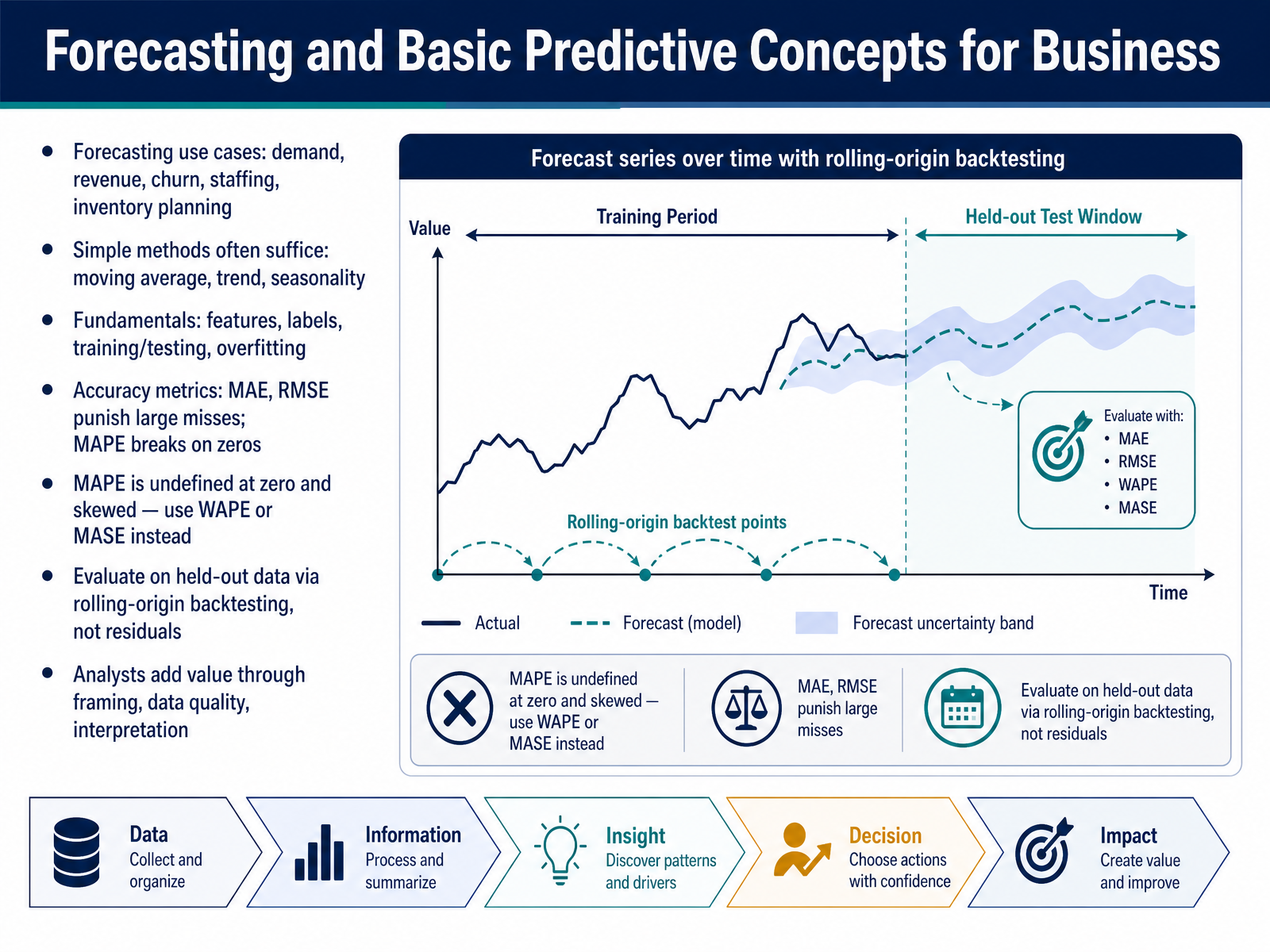
2 min - 08Forecasting and Basic Predictive Concepts for BusinessLet's move on to forecasting and basic predictive concepts. Forecasting simply means predicting a future number using past data. You'll see it in demand planning, revenue projections, customer churn, staffing, and inventory. Here's the encouraging part. Simple methods often work well. A moving average smooths out noise. A trend follows the general direction. Seasonality captures repeating patterns, like higher sales each December.
Now, some fundamentals. Features are the input variables. Labels are what you're predicting, such as next month's revenue. You train a model on historical data, then test it on data the model has never seen. Overfitting is when a model memorizes the past instead of learning general patterns, so it looks great in training and fails in production.
For accuracy, mean absolute error and root mean squared error are common. Both punish large misses, with root mean squared error punishing them harder. Mean absolute percentage error breaks when actual values are zero. It's undefined there and skewed, so prefer weighted absolute percentage error or mean absolute scaled error. Always evaluate on held-out data using rolling-origin backtesting, not residuals. And remember, analysts add value through framing the question, checking data quality, and interpreting results.
Next, we'll look at prescriptive analytics and decision support.
 2 min
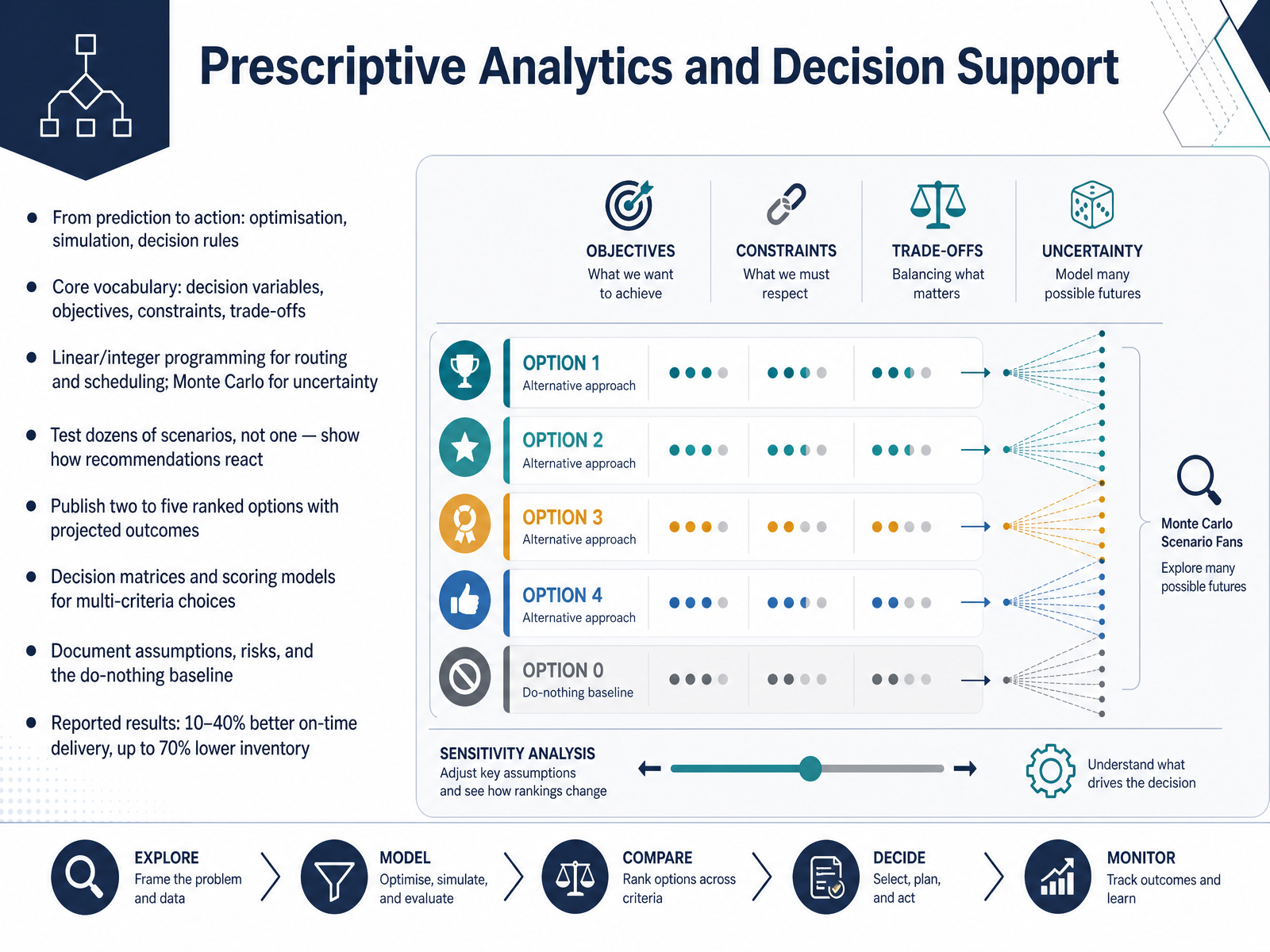
2 min - 09Prescriptive Analytics and Decision SupportNow let's move from predicting what might happen to deciding what to do. That's prescriptive analytics. It uses optimisation, simulation, and decision rules to recommend specific actions. Here's the core vocabulary. Decision variables are the choices you control, like how many units to produce. The objective is what you want to maximise or minimise, such as cost. Constraints are your limits, like capacity or time windows. And trade offs are the give and take between them. Linear and integer programming handle routing and scheduling with hard limits. Monte Carlo simulation models uncertainty, like fluctuating demand. A key habit is testing dozens of scenarios, not just one, so you can see how recommendations react to change. Then publish two to five ranked options with projected outcomes, not a single directive. For multi criteria choices, decision matrices and scoring models help. Always document your assumptions, risks, and the do nothing baseline. In practice, teams report ten to forty percent better on time delivery and up to seventy percent lower inventory. Next, we'll look at the tools and technical skills that make this possible.
 2 min
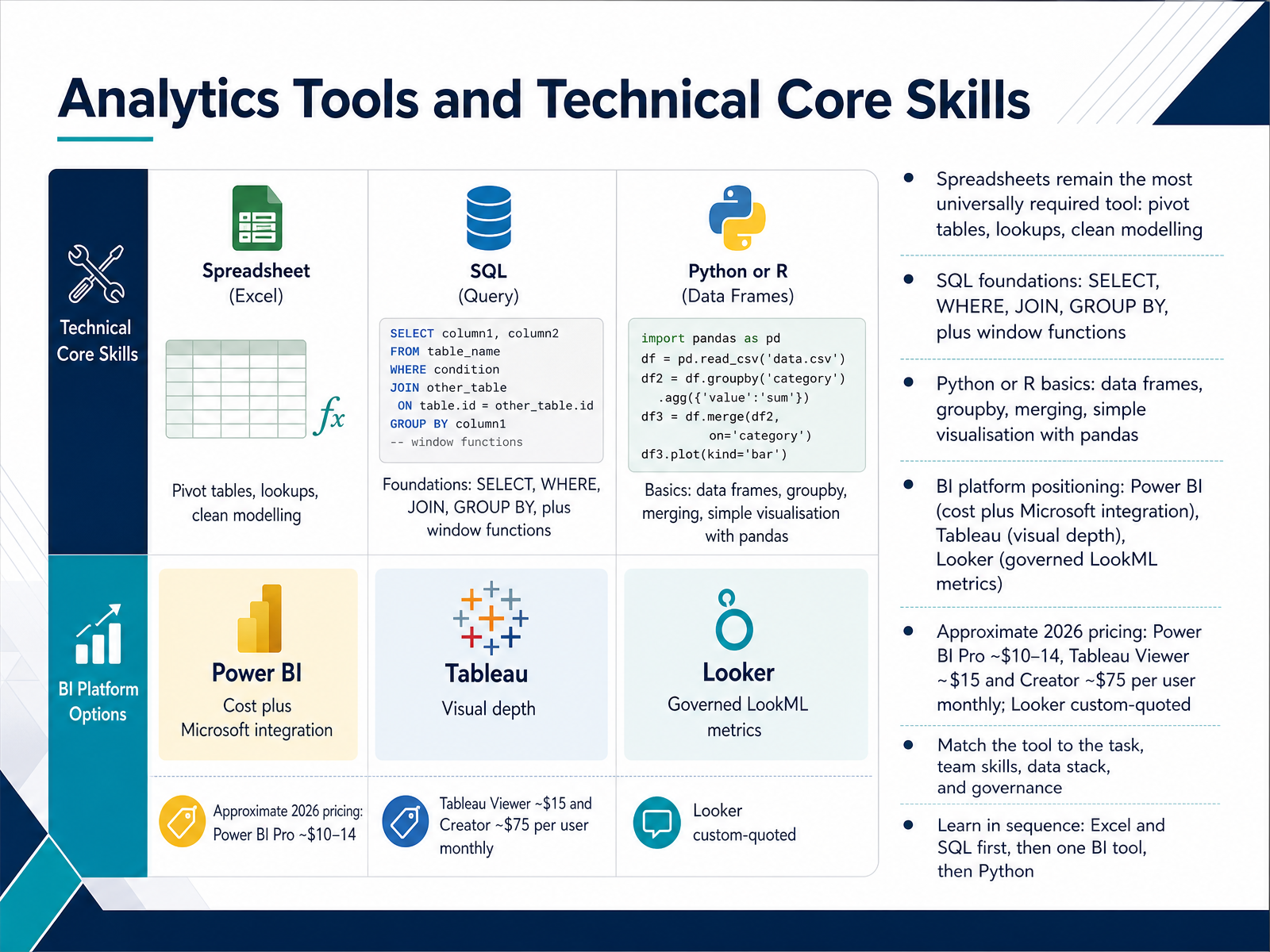
2 min - 10Analytics Tools and Technical Core SkillsLet's look at the tools and technical skills that support this work. Start with spreadsheets. They remain the most universally required tool, especially pivot tables, lookups, and clean data modelling. Next, SQL foundations matter. That means SELECT to choose columns, WHERE to filter, JOIN to combine tables, GROUP BY to summarise, and window functions for ranking and running totals. Then Python or R basics, where you work with data frames, groupby, merging, and simple charts, often with pandas. For dashboards, match the platform to the task. Power BI offers strong value and Microsoft integration. Tableau offers visual depth. Looker provides governed metrics through LookML. Approximate monthly costs are around ten to fourteen dollars for Power BI Pro, fifteen dollars for a Tableau Viewer and seventy-five for a Creator, while Looker is custom-quoted. Learn in sequence: Excel and SQL first, then one BI tool, then Python. Next, we move into data storytelling: communicating findings that drive decisions.
 businessanalyst.techcanvass.comdatamatastudios.comacciojob.com+22 min
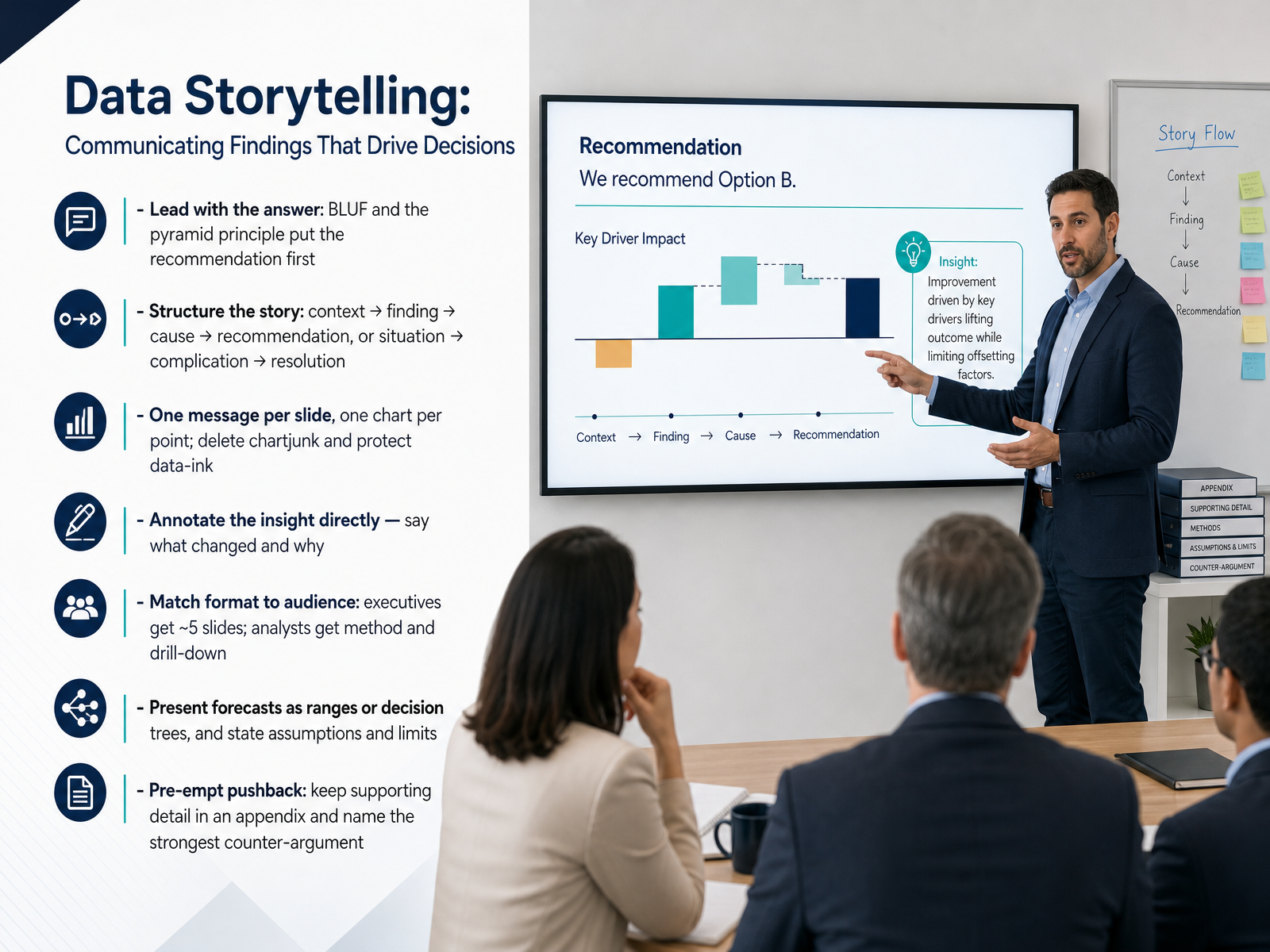
 - 11Data Storytelling: Communicating Findings That Drive DecisionsNow let's talk about the last mile of analytics: data storytelling. This is how you turn a finding into a decision. Lead with the answer. Put your recommendation in the first sentence, then support it. That is the pyramid principle, and it respects your audience's time. Structure the story as context, finding, cause, and recommendation. One message per slide, one chart per point. Delete anything that does not carry information, and annotate the insight directly. For example, instead of a bare line, label the point where a process changed, and say what moved and why. Match the format to your audience. Executives need about five slides focused on impact and trade-offs. Analysts need method and drill-down. Present forecasts as ranges or decision trees, and always state your assumptions and limits. Finally, pre-empt pushback. Keep detailed evidence in an appendix, and name the strongest counter-argument yourself. That builds trust fast. Next, we put all of this into practice in the Practice Lab: An End-to-End Business Analytics Case.
 2 min
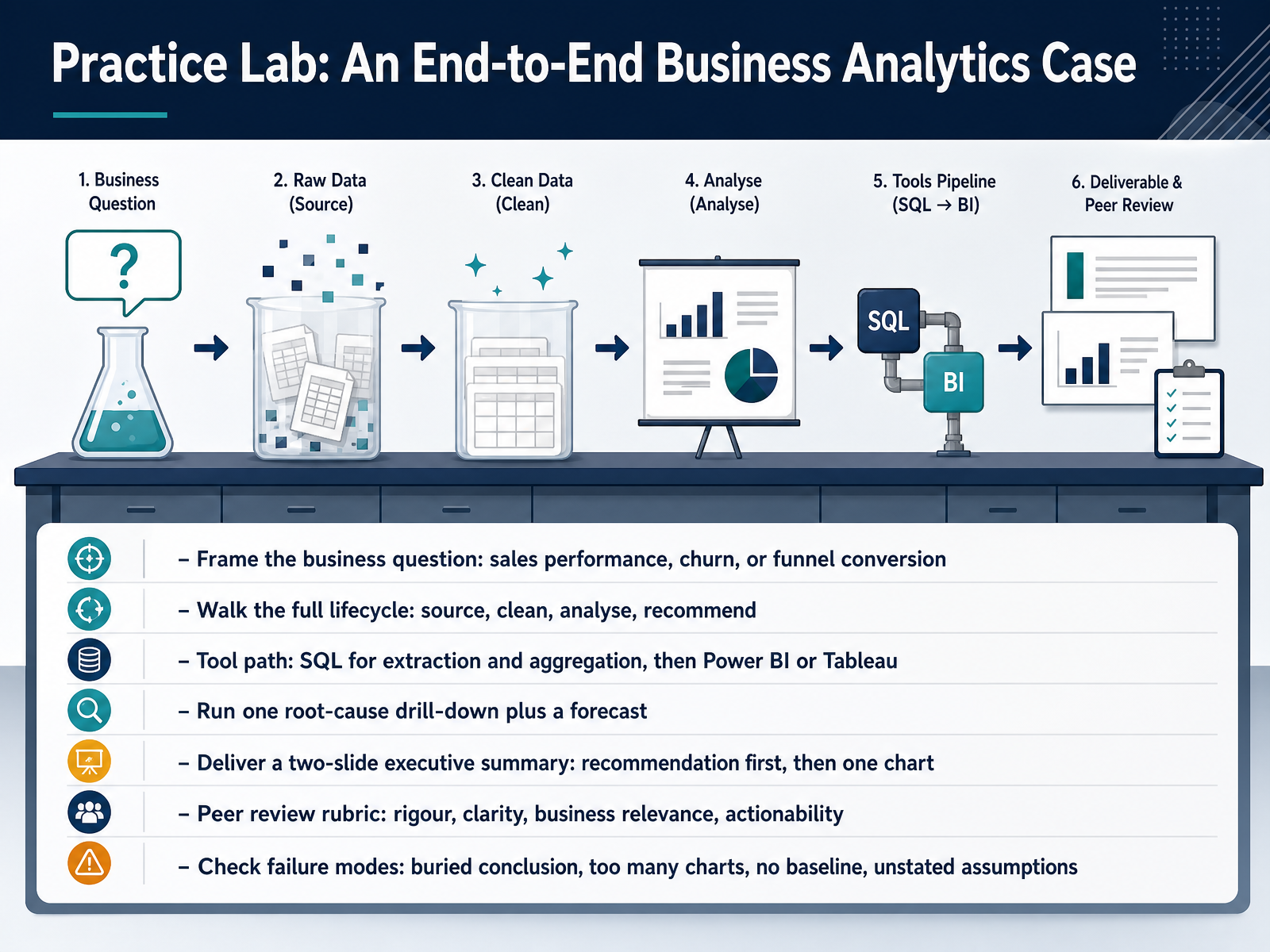
2 min - 12Practice Lab: An End-to-End Business Analytics CaseNow let's put everything together in a practice lab. You'll work one end-to-end case. Start by framing a single business question, such as why sales dropped in a region, why customers are leaving, or where a funnel loses conversions. Then walk the full lifecycle: source the data, clean it, analyse it, and recommend an action. Your tool path is SQL for extraction and aggregation, then Power BI or Tableau for visuals. Run one root-cause drill-down and one forecast. Finally, deliver a two-slide executive summary. Recommendation first, then one chart that supports it. Review your work with a simple rubric: rigour, clarity, business relevance, and actionability. Also check common failure modes: a buried conclusion, too many charts, no baseline for comparison, and unstated assumptions. Remember, the goal is not a perfect analysis. It is a clear, defensible recommendation a manager can act on. Next, we'll look at building your portfolio and continuing professional growth.
 2 min
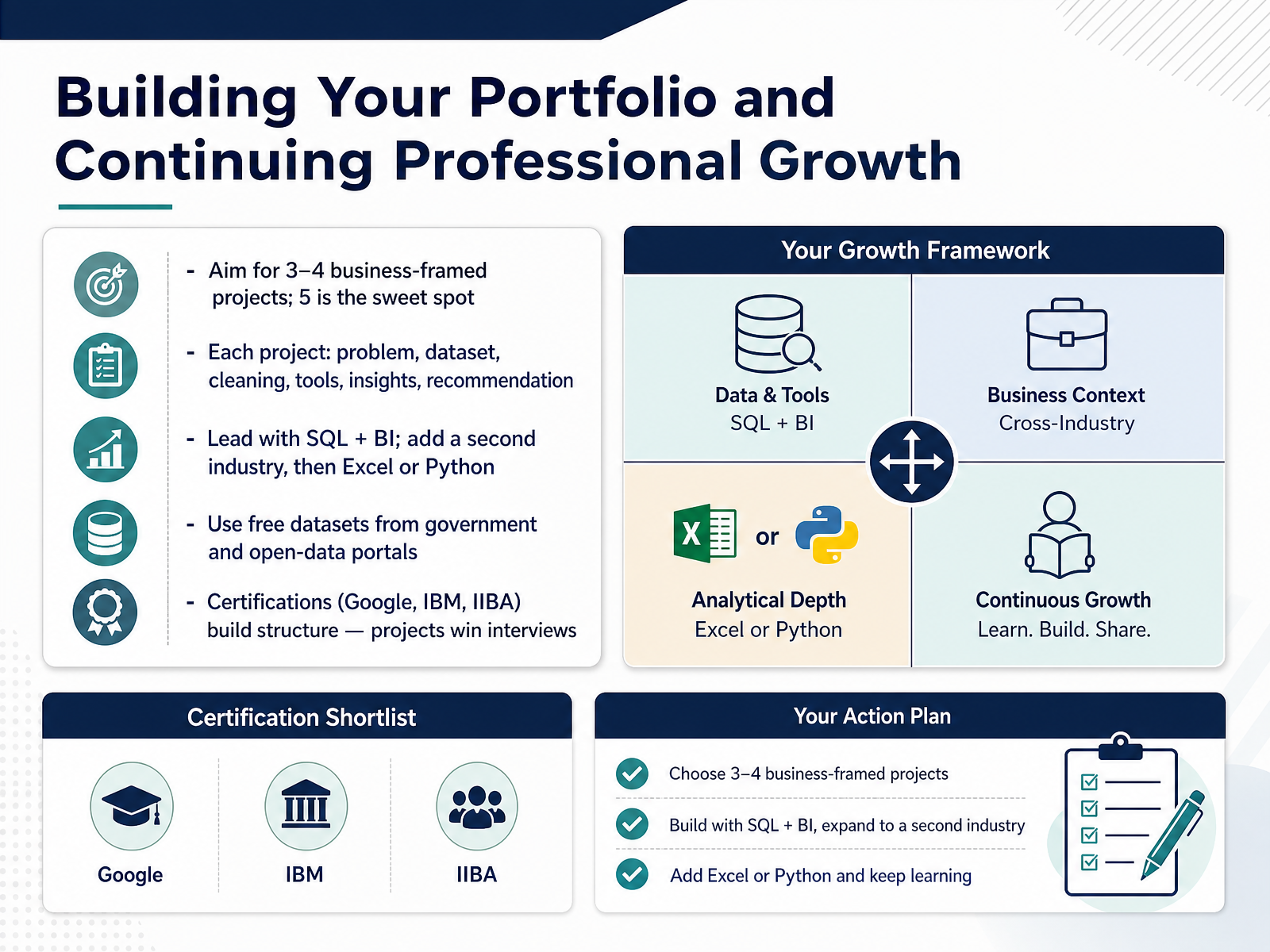
2 min - 13Building Your Portfolio and Continuing Professional GrowthLet's bring everything together, because this slide is about turning your new skills into proof. Aim for three to four business-framed projects, and five is often the sweet spot. Why five? It shows range without overwhelming the person reviewing your work. Each project should follow a simple structure: the problem, the dataset, how you cleaned the data, the tools you used, the insights you found, and one clear recommendation. For example, a sales dashboard that identifies an underperforming region is far stronger than a random chart. Start with SQL and a business intelligence tool, then add a project from a second industry, and later bring in Excel or Python to show versatility. You do not need expensive data. Government and open-data portals offer free datasets you can use today. Certifications from Google, IBM, or the International Institute of Business Analysis can give you structure, but remember: projects win interviews. So pick one dataset this week, frame a business question, and build your first portfolio piece. Thank you for learning with me, and keep growing. You are more ready than you think.
 businessanalyst.techcanvass.comdatamatastudios.comacciojob.com+22 min
Take the deck with you
Download this course as a file — free, no sign-up needed.
- PDF handoutEvery slide page, ready to print or share.14 pages · 3.7 MBDownload
- Narrated PowerPointThe deck that presents itself — every slide carries the digital human's narration video.14 pages · 15.0 MBDownload
- PowerPoint slidesThe full deck as a .pptx — open it in PowerPoint, Keynote, or Google Slides.14 pages · 3.6 MBDownload
Free to use in your own training — please keep the PersonWise credit page at the end.
Have your own deck? Turn it into a course
Sources consulted
Web sources consulted while building this course.
- Business Analyst Skills: The Complete Guide For 2026 — businessanalyst.techcanvass.com
- Business Analyst Resume Guide (2026): What Hiring Teams Want — datamatastudios.com
- Most In-Demand Data Analytics Skills in 2026 (Based on 328 Real Job Descriptions) - AccioJob Blog — acciojob.com
- Business Analyst Skills You Need to Succeed in 2026 — online.csp.edu
- Business Analyst Skills Employers Are Hiring for in 2026 — onlinedegrees.scu.edu
- Comparison of CRISP ‐ DM Versus OSEMN Methodologies Using Linear Regression and Statistical Analysis — doi.org
- Data Science Life Cycle: CRISP-DM and OSEMN frameworks — datarundown.com
- AI Engineering Management: Is There a Methodology for AI Model Development? | by Mahmudur R Manna | Purple Thinkers — cloudoffice.io
- OSEMN Data Science Life Cycle - Data Science PM — datascience-pm.com
- CRISP-DM VERSUS OSEMN METHODOLOGY USING ... — dspace.epoka.edu.al
- Code for Information Quality 2019 — dama-nl.org
- Measuring data quality for ongoing improvement : a data quality assessment framework — gbv.de
- The six Primary dimensions for Data Quality asseSsment — dqglobal.com
- Data Quality Model Specification for Structured and Systematic Assessment and Improvement | IntechOpen — intechopen.com
- Data quality good practice guide — doi.org
- Dashboard Design Best Practices: Layouts & Examples — domo.com
- KPI Dashboard Best Practices: 12 Rules for 2026 — clearpointstrategy.com
- KPI Dashboard: Proven 7-Step Guide to Drive Decisions | BPR Global — bprglobal.co
- Dashboard UI Design: Patterns and Best Practices — uxmagic.ai
- Dashboard Design: Best Practices & How-Tos 2026 — improvado.io