Begin
13 pages · ~26 min
Change Management Software Selection
This training guides teams through selecting change management software, defining requirements, and building effective workflows for smooth implementation.
A digital instructor presents all 13 pages. Hold “Ask” at any point and ask out loud — the answer comes from this course. No sign-up needed.
What you’ll learn
- 01Change Management Software: Selection, Requirements, and WorkflowWelcome. Over the next few sections, we will work through how to select change management software, define your requirements, and design a workflow that actually holds up in practice. This is written for people who already carry change portfolios, so we will stay focused on decisions and trade-offs, not theory.
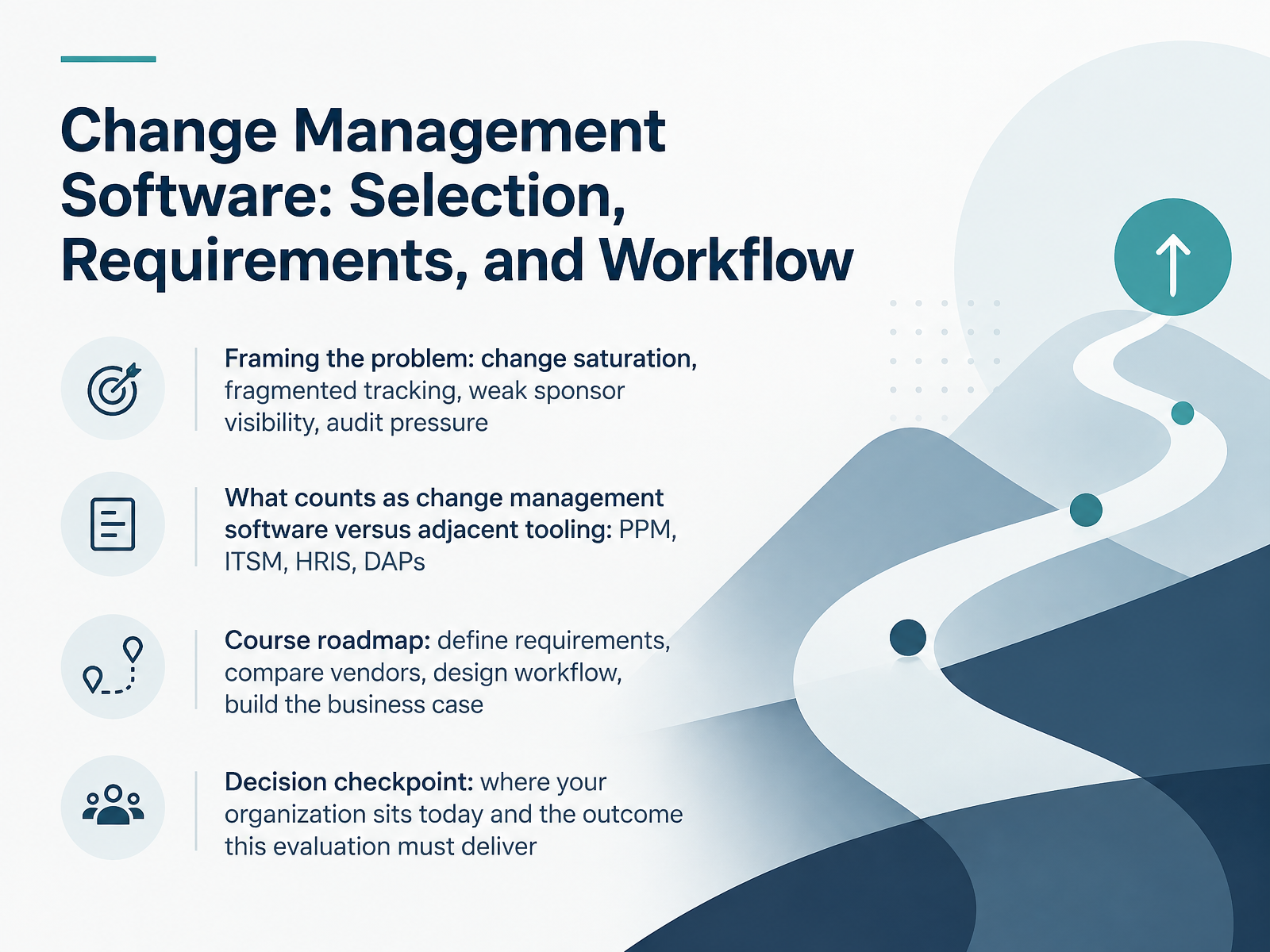
Start with the problem you are solving. Most organizations face change saturation across overlapping initiatives, fragmented tracking in spreadsheets, weak sponsor visibility, and rising audit pressure. Any platform you buy has to reduce those pressures, not add a new one.
Next, a definition that matters. True change management software supports portfolio-level planning, impact analysis, approvals, and adoption tracking. That is different from adjacent tooling such as project portfolio management, I T service management, H R information systems, and digital adoption platforms. Some of those overlap. Know which gap you are closing.
From there, the course roadmap is straightforward. Define requirements, compare vendors against a weighted scorecard, design the workflow, then build the business case.
Before we go further, pause on one question. Where does your organization sit today, and what outcome must this evaluation deliver? Keep that answer in front of you.
Let's turn to why spreadsheets and generic tools break down.theinsightpartners.comgiiresearch.comgiiresearch.com+22 min
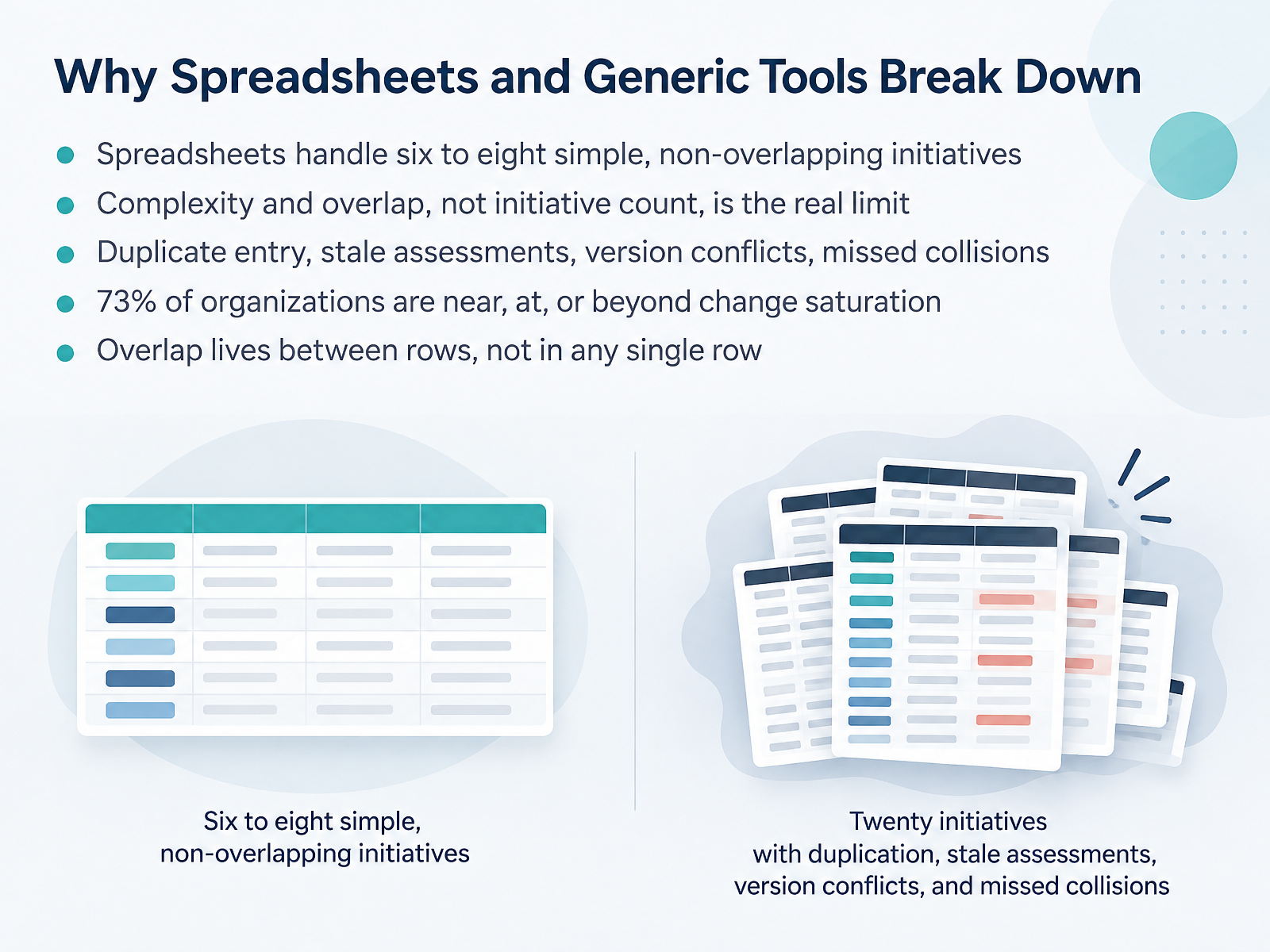
- 02Why Spreadsheets and Generic Tools Break DownLet's talk about why spreadsheets and generic tools break down. Spreadsheets handle six to eight simple, non-overlapping initiatives. That sounds reasonable. But here's the distinction that matters. Complexity and overlap, not initiative count, is the real limit. A portfolio of three or four heavily overlapping initiatives will break a spreadsheet faster than eight simple ones. Think about what happens between the rows. Does the same stakeholder group appear in two initiatives, in the same week? Is an assessment two months stale? A row-per-initiative format is structurally worst at answering this, because the overlap lives between rows, not in any single row. So the classic symptoms appear. Duplicate entry. Stale assessments. Version conflicts. Missed collisions. And the stakes are real. Prosci found that seventy-three percent of organizations are near, at, or beyond change saturation. These are portfolio-level risks that a row-based tracker was never built to show you. Now, let's move on to the 2026 market landscape and adjacent tooling.
 thechangecompass.comthechangecompass.comprosci.com+22 min
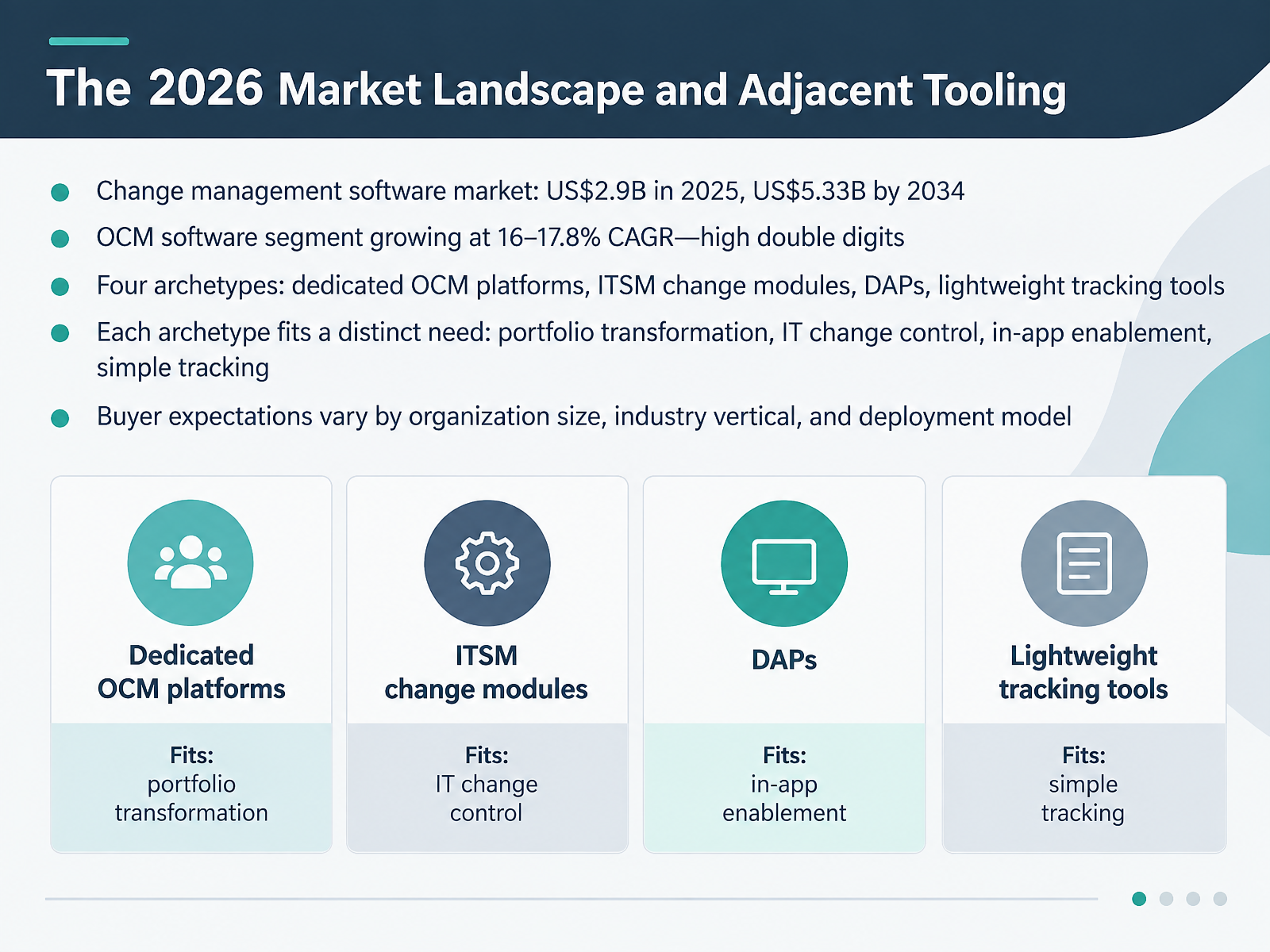
 - 03The 2026 Market Landscape and Adjacent ToolingLet's look at the market you're buying into. In 2025, change management software was worth about 2.9 billion dollars. By 2034, forecasts put it near 5.33 billion. The organizational change management segment is growing faster, at roughly sixteen to eighteen percent a year. So you're choosing in a crowded, expanding field. Four archetypes matter. Dedicated OCM platforms cover portfolio-level transformation. ITSM change modules handle IT change control and governance. Digital adoption platforms drive in-app enablement. Lightweight tracking tools handle simple coordination. Each fits a distinct need. Match the archetype to your problem, not the brand. And expect buyer expectations to shift by organization size, industry, and deployment model. Regulated sectors prioritize audit trails and data residency. Mid-market teams prioritize speed and cost. Test fit before you shortlist. Next, let's map the capabilities your software must deliver.
 theinsightpartners.comgiiresearch.comgiiresearch.com+22 min
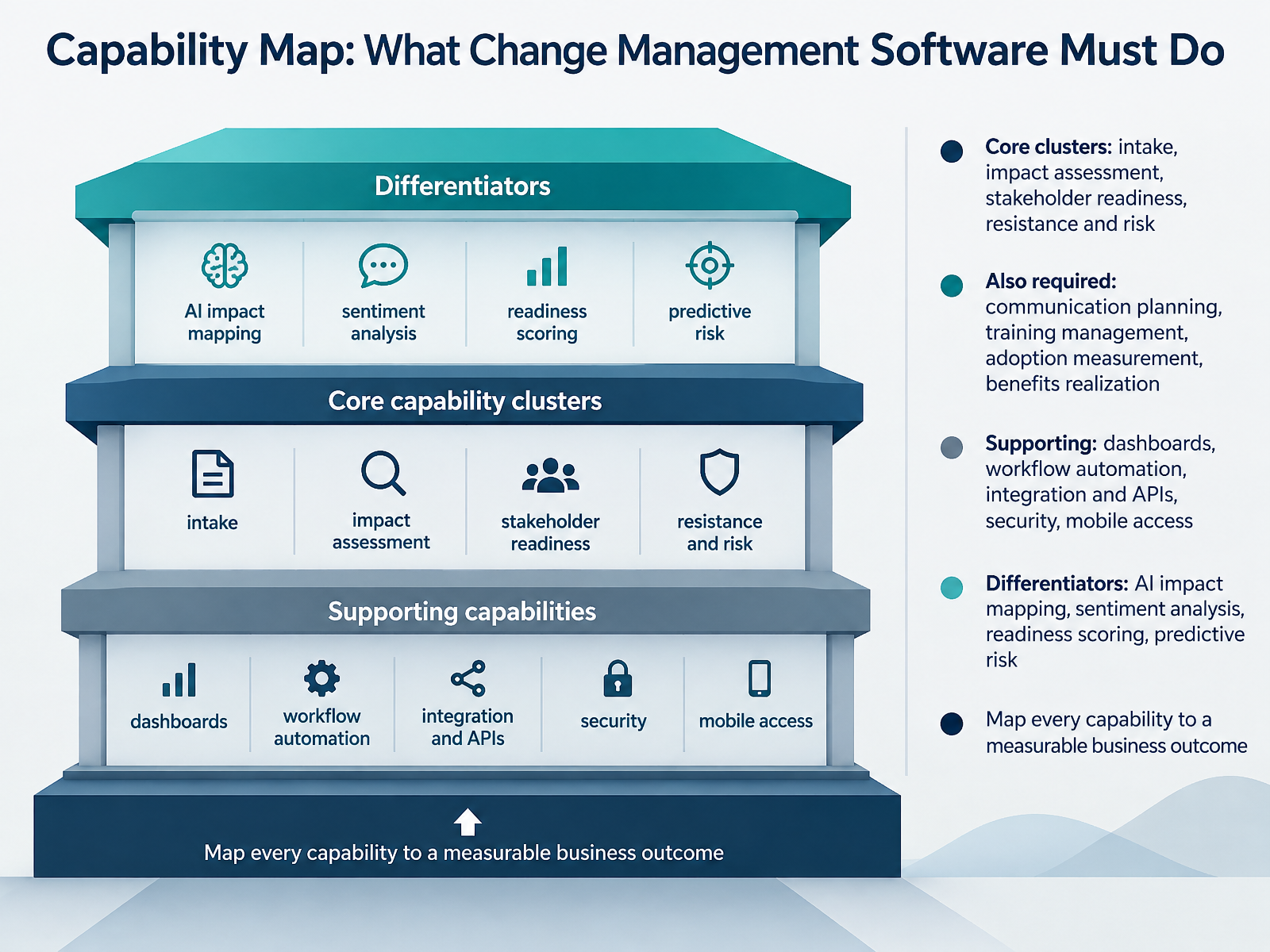
 - 04Capability Map: What Change Management Software Must DoSo, what should the software actually do? Think in four layers. The core cluster is intake, impact assessment, stakeholder readiness, and resistance and risk. That is the daily work. Get this wrong and nothing downstream holds. Next is the required layer: communication planning, training management, adoption measurement, and benefits realization. A platform that plans well but cannot show whether people actually adopted the change is only half a platform. Then the supporting layer: dashboards, workflow automation, integration and APIs, security, and mobile access. These rarely win deals, but weak integration or missing API access becomes a real tax on your team. Now the differentiators: AI impact mapping, sentiment analysis, readiness scoring, and predictive risk. Ask one hard question here. Does the AI work on your data, or just draft content? Analytical engines change what a small team can do. Content assistants do not. And finally, the discipline that ties it together. Map every capability to a measurable business outcome. If you cannot name the outcome, name the metric, and name who reviews it, treat that capability as optional. Let's translate those needs into requirements next.
 thechangecompass.comhelpdesk.comvirima.com+22 min
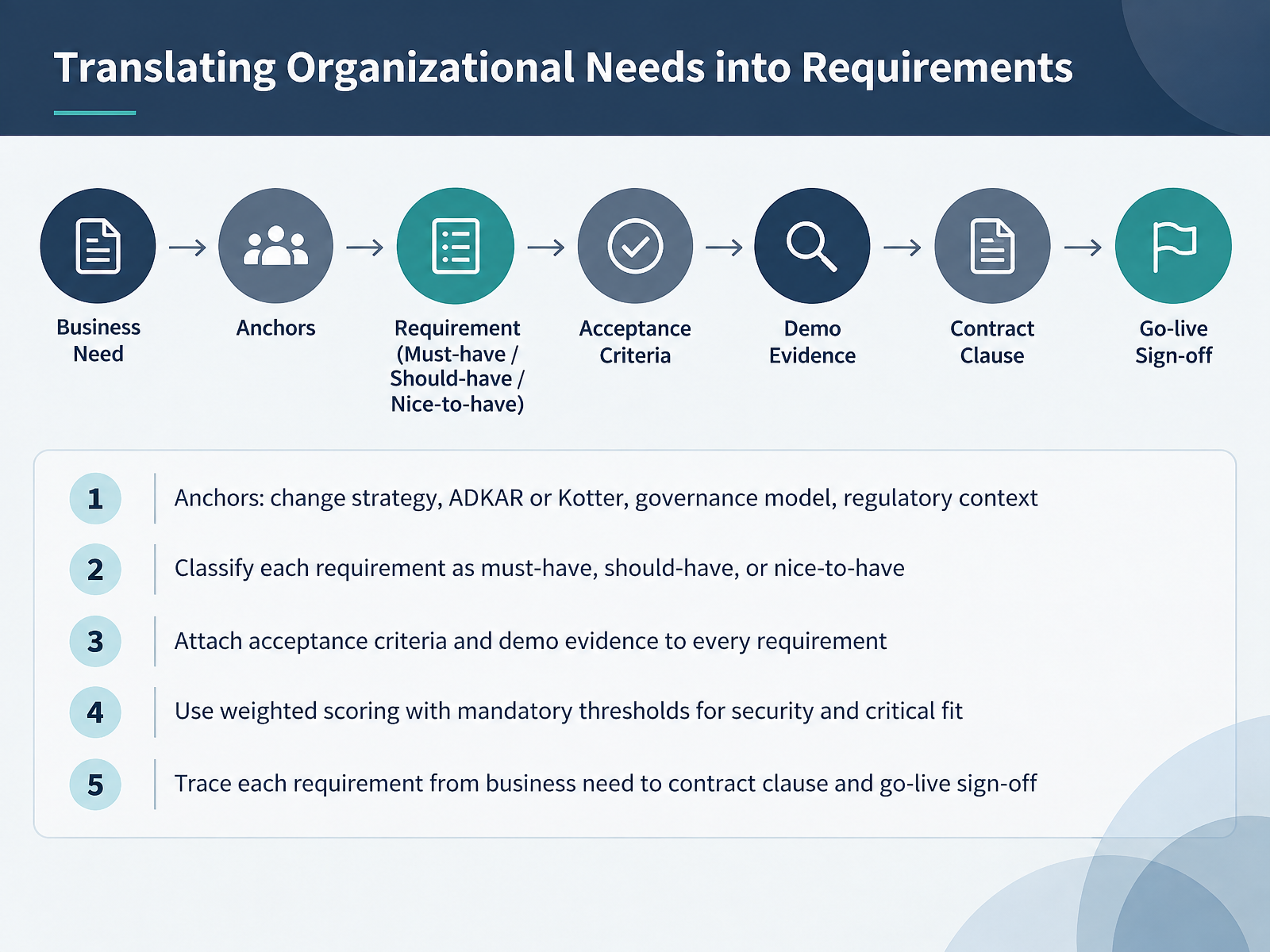
 - 05Translating Organizational Needs into RequirementsLet's turn to translating organizational needs into requirements. The decision you face is whether your requirements reflect your change strategy, or just a vendor feature list. Start with anchors. Your change strategy, your chosen framework such as ADKAR or Kotter, your governance model, and your regulatory context. Then classify every requirement as must-have, should-have, or nice-to-have. For each one, attach acceptance criteria and demo evidence. Ask vendors to show the workflow live, not just write compliant. Next, use weighted scoring with mandatory thresholds for security and critical fit. Set those thresholds before demonstrations and publish the method. That prevents a polished demo from outranking a requirement you cannot waive. Finally, trace each requirement from business need to contract clause to go-live sign-off. This traceability is what protects you at implementation. If it is not written down and tested, it is a claim, not a requirement. Next, we move into the selection process, from longlist to signed contract.
 durhamnc.govbfm.sd.govbcm.center+22 min
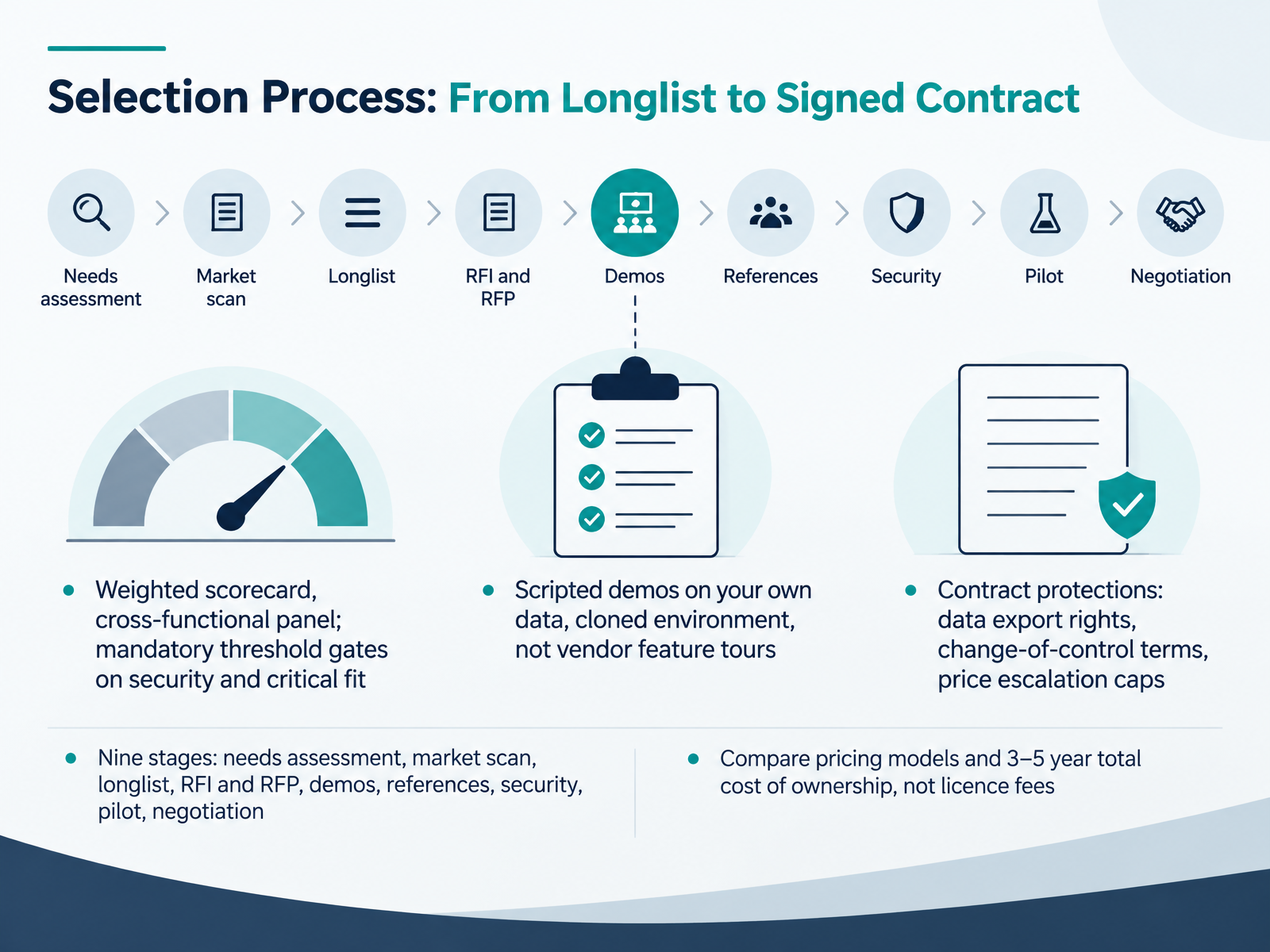
 - 06Selection Process: From Longlist to Signed ContractLet's walk through the selection process, from longlist to signed contract. There are nine stages here: needs assessment, market scan, longlist, RFI and RFP, demos, references, security, pilot, and negotiation. The decision you face is sequencing them properly, so you never sign a contract before security and critical fit are proven. Run a weighted scorecard with a cross-functional panel. Weight each criterion before you see any vendor. Then set mandatory threshold gates on security and critical fit. Fail a gate, and the vendor is out, no matter how strong the total score. Next, insist on scripted demos on your own data, in a cloned environment. Not vendor feature tours. Give every vendor the same scenarios and score what you observe, not how well they present. On cost, compare pricing models and three to five year total cost of ownership, not licence fees. Then protect the contract itself: data export rights, change-of-control terms, and caps on price escalation. Those clauses matter more than any feature on the scorecard. Next, we look at red flags and vendor disqualifiers.
 thechangecompass.comdurhamnc.govbfm.sd.gov+22 min
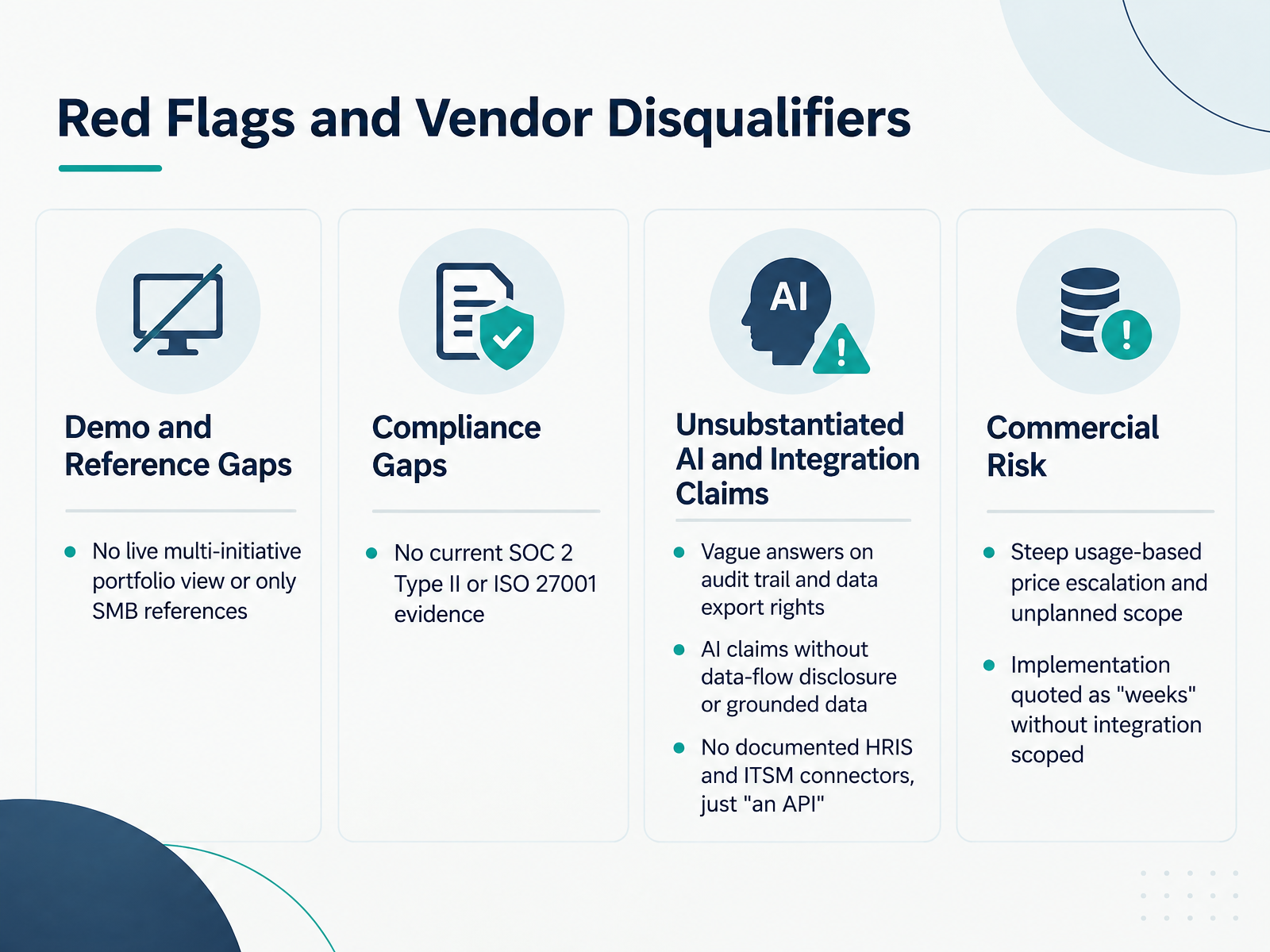
 - 07Red Flags and Vendor DisqualifiersNow let's talk about red flags. These are disqualifiers, not preferences. If you see them, walk away, no matter how good the demo looked. First, the product cannot show a live portfolio view across multiple initiatives. Or the only references are small businesses. That tells you it was built for one project manager, then marketed up-market. Second, no current SOC 2 Type Two or ISO 27001 evidence. Enterprise security diligence should not be a negotiation. Third, vague answers on audit trail and data export rights. You need immutable records and the right to take your data with you. Fourth, AI claims without data-flow disclosure or grounded data. If the vendor cannot say where inference happens and what data the model uses, treat it as a wrapper, not an integrated system. Fifth, no documented HRIS and ITSM connectors, just an API. That means your team becomes the permanent integration layer, copying data by hand. Sixth, steep usage-based price escalation and unplanned scope. Adopting the tool widely should not create cost risk. And seventh, implementation quoted as weeks without integration scoped. Real enterprise implementations typically run eight to sixteen weeks. Weeks usually means software activation, not implementation. So treat these as hard stops. Now let's look at how to model the workflow. Workflow Design: Modeling How Change Actually Moves.
 2 min
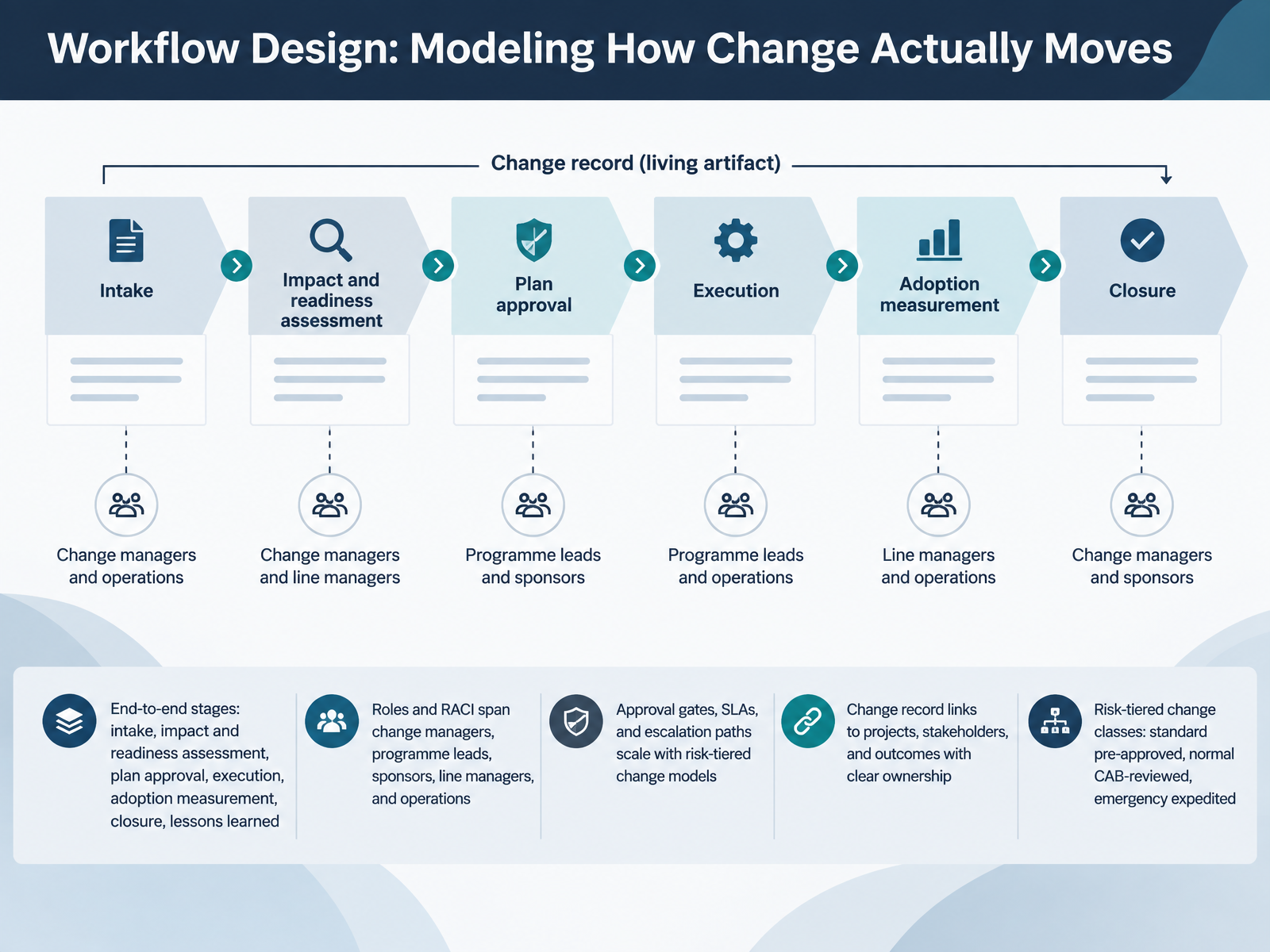
2 min - 08Workflow Design: Modeling How Change Actually MovesLet us look at workflow design, and specifically how you model the way change actually moves through your organization. The core decision here is how much structure you build into the end-to-end path: intake, impact and readiness assessment, plan approval, execution, adoption measurement, closure, and lessons learned. Too little, and requests turn into urgent projects before anyone understands the scope. Too much, and review becomes an indefinite loop. Next, define roles with a clear RACI. Change managers, programme leads, sponsors, line managers, and operations each own different decisions. Name one accountable owner per change, and avoid consensus by default. Then think about how approval gates, service level agreements, and escalation paths scale. They should scale with risk-tiered change classes: standard changes that are pre-approved, normal changes reviewed by a change advisory board, and emergency changes expedited through a narrower path. Every change record should link to projects, stakeholders, and outcomes, so ownership stays visible. The practical takeaway is simple. Design the workflow so smaller changes move quickly, and higher-risk changes get the scrutiny they deserve. This sets up our next topic: rethinking governance, risk-tiered approvals, and the modern CAB.
 2 min
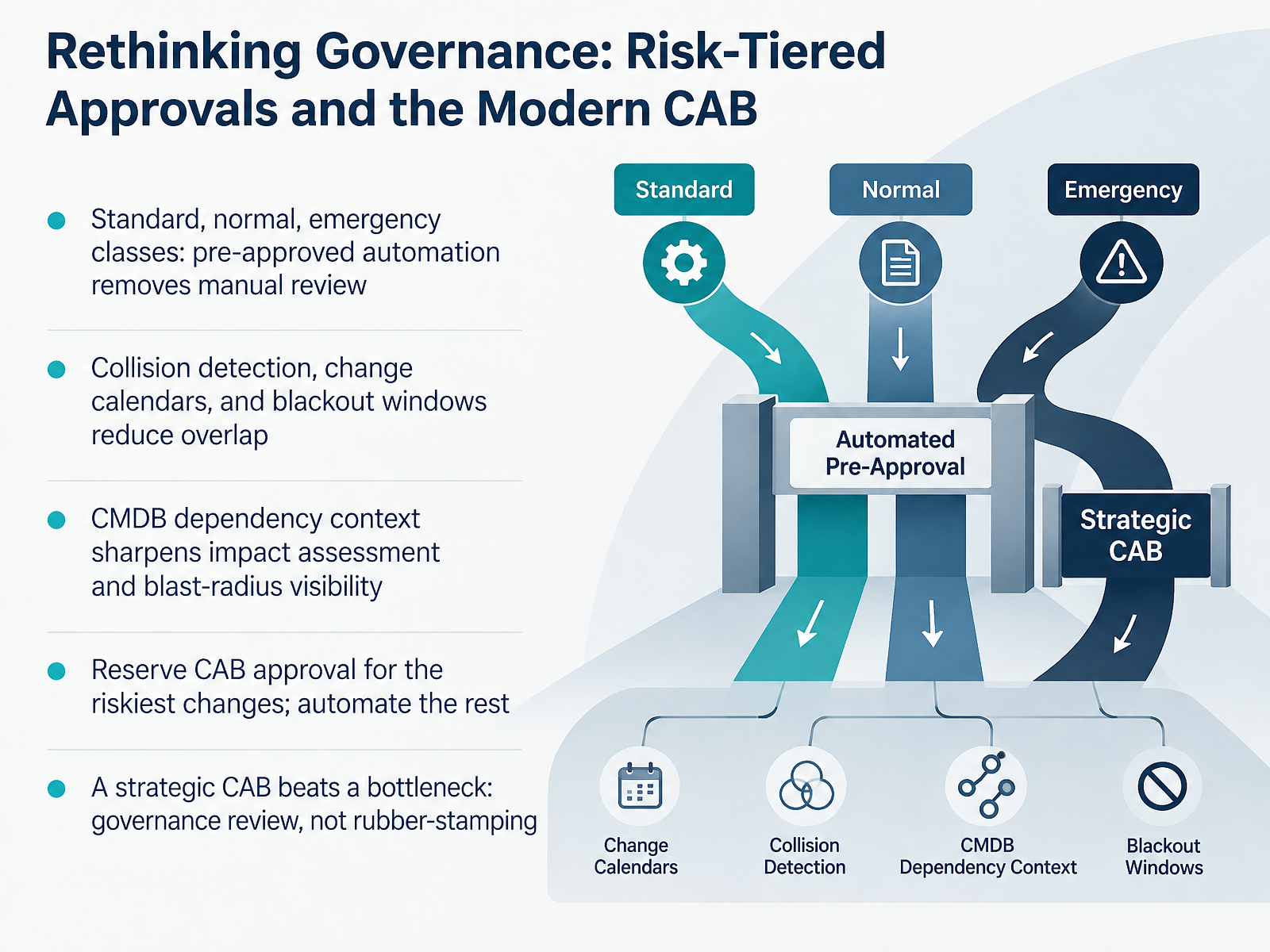
2 min - 09Rethinking Governance: Risk-Tiered Approvals and the Modern CABLet's talk about governance, because this is where many change programmes quietly stall. The trade-off is simple. Every change that waits for a full board review slows delivery. But approving everything unchecked raises risk. So the practical answer is classification. Most platforms define standard, normal, and emergency classes. Standard changes are pre-approved, so routine work moves without manual review. Normal changes follow the full process. Emergency changes get a fast path. The goal is to reserve board approval for your riskiest changes and automate the rest. Two other controls do real work here. Collision detection, shared change calendars, and blackout windows reduce overlapping work and protect peak periods. And dependency data from your configuration database sharpens impact assessment, so you can see the blast radius before you approve. The bottom line: a strategic board is a governance review, not a bottleneck. If yours is rubber-stamping routine changes, the criteria are wrong. Next, we move into configuration, integration, and data migration.
 2 min
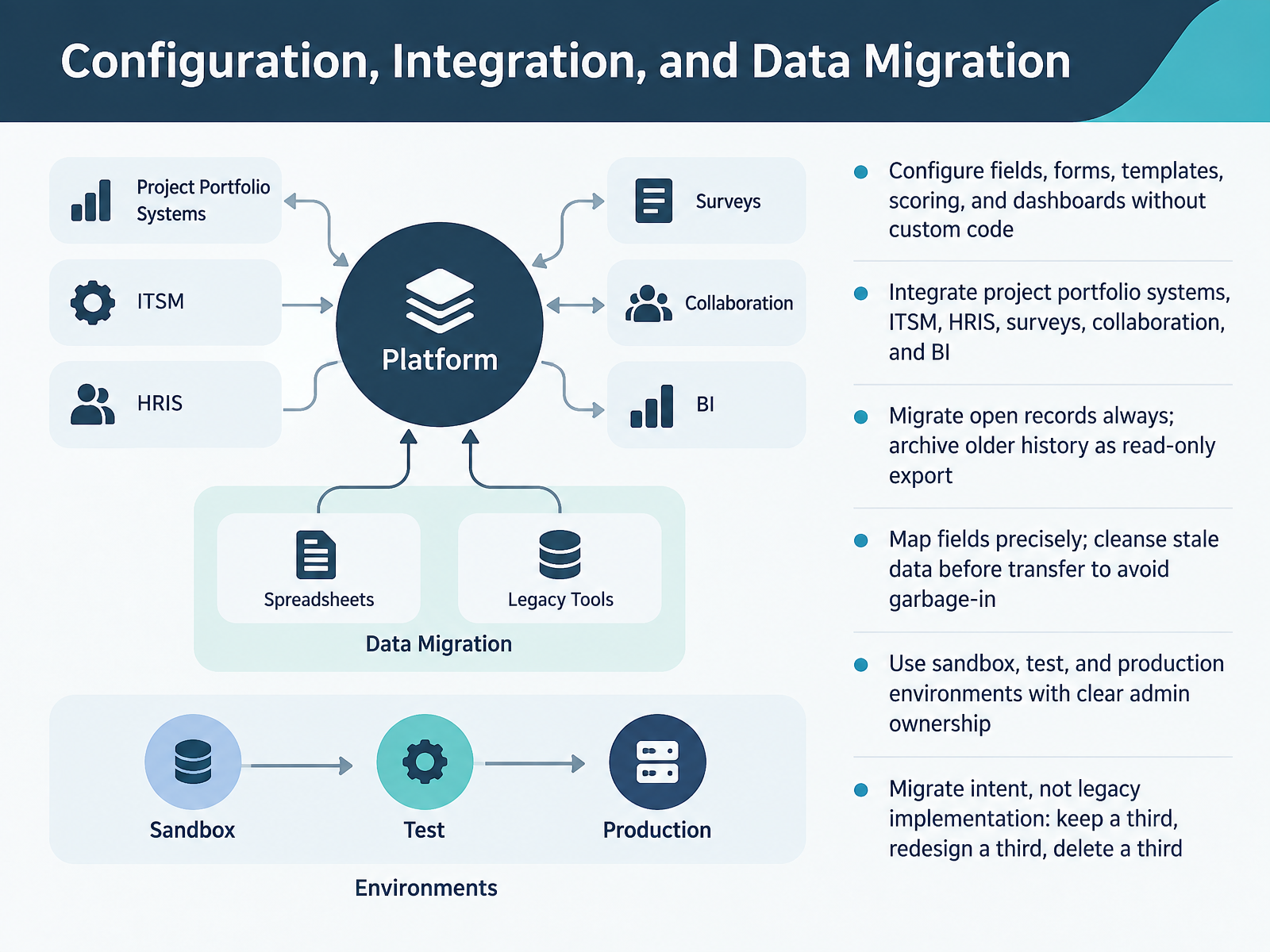
2 min - 10Configuration, Integration, and Data MigrationNow let's talk about configuration, integration, and data migration. These three decisions usually determine whether your rollout feels smooth or painful. First, configuration. You want to reshape fields, forms, templates, scoring, and dashboards without writing custom code. If every change needs a developer, your admins lose control of the tool. So test that in the demo. Next, integration. Your change platform will not live alone. It needs to connect to project portfolio systems, IT service management, HR systems, surveys, collaboration tools, and business intelligence. Ask one blunt question for each connection: does the data move on its own, or does someone still copy and paste? Then, migration. Migrate every open record, always. Archive older history as a read-only export instead of paying to move records nobody will open. Map fields precisely. Cleanse stale data before transfer, or you simply give the mess a new home. And keep separate sandbox, test, and production environments with clear admin ownership. Finally, use the rule that saves the most time. Migrate intent, not legacy implementation. Keep about a third of your workflows. Redesign a third. Delete a third. That single discipline prevents old complexity from rebuilding itself in the new platform. With your configuration, integrations, and data plan in place, the next question is how people actually adopt it. Let's move on to adoption, training, and change enablement.
 2 min
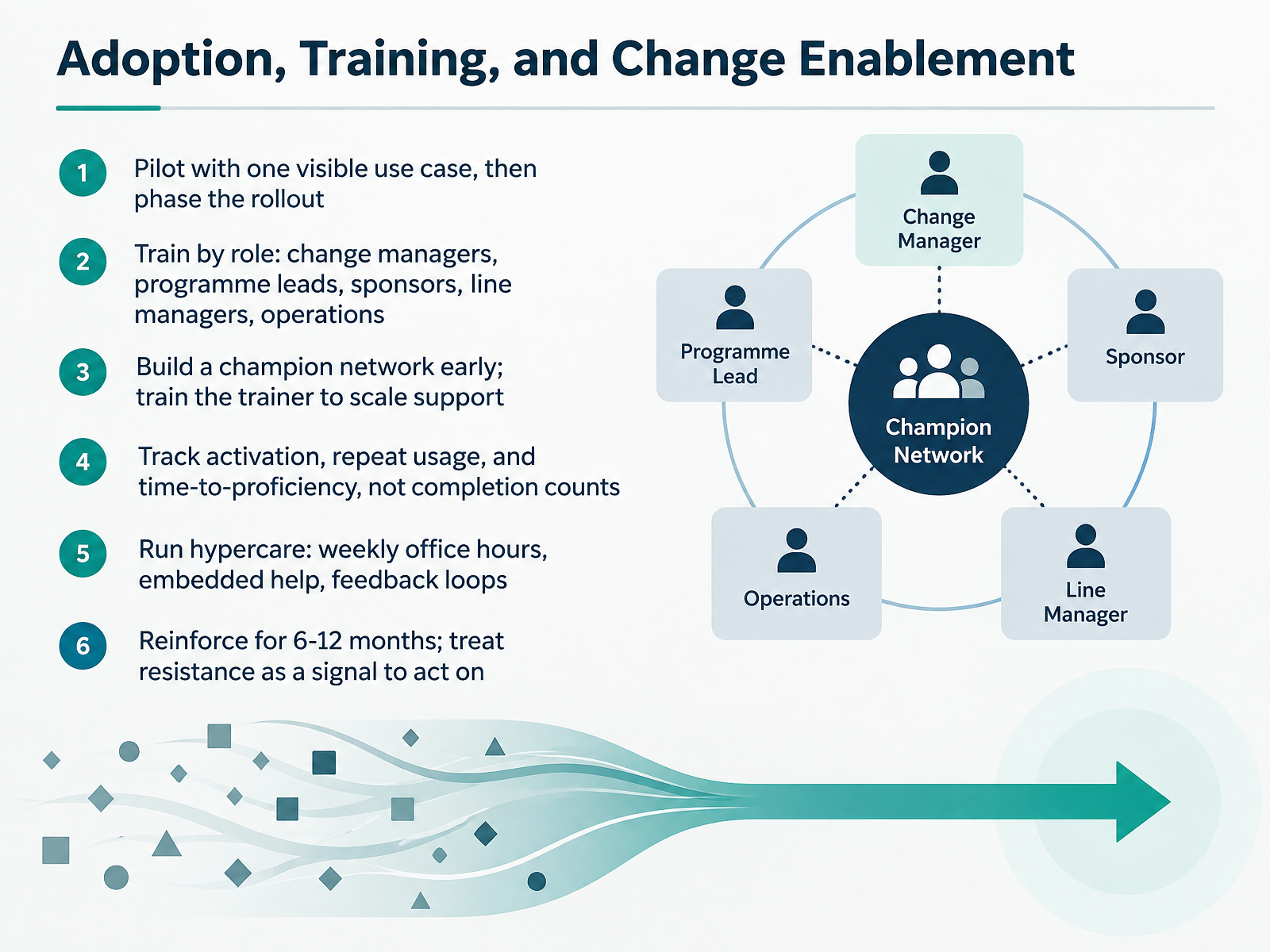
2 min - 11Adoption, Training, and Change EnablementLet's talk about adoption, training, and change enablement. This is where most rollouts are won or lost. So the first decision is how to start. Pilot with one visible use case. Prove real value in a real workflow, then phase the rollout by team or region. Next, design training by role. Change managers, programme leads, sponsors, line managers, and operations all need different depth. Sponsors need enough to advocate visibly. Line managers need enough to coach their teams. Also, build a champion network early, and train the trainer so support scales beyond your central team. Now here is the measurement trap. Do not track completion counts. Track activation, repeat usage, and time to proficiency. A user can finish a course and still struggle under deadline pressure. Then run hypercare. Weekly office hours, embedded help, and clear feedback loops. Reinforce for six to twelve months. And treat resistance as a signal to act on, not a compliance problem. That sustained reinforcement is exactly what protects your return. Which brings us to measuring value and building the business case.
 2 min
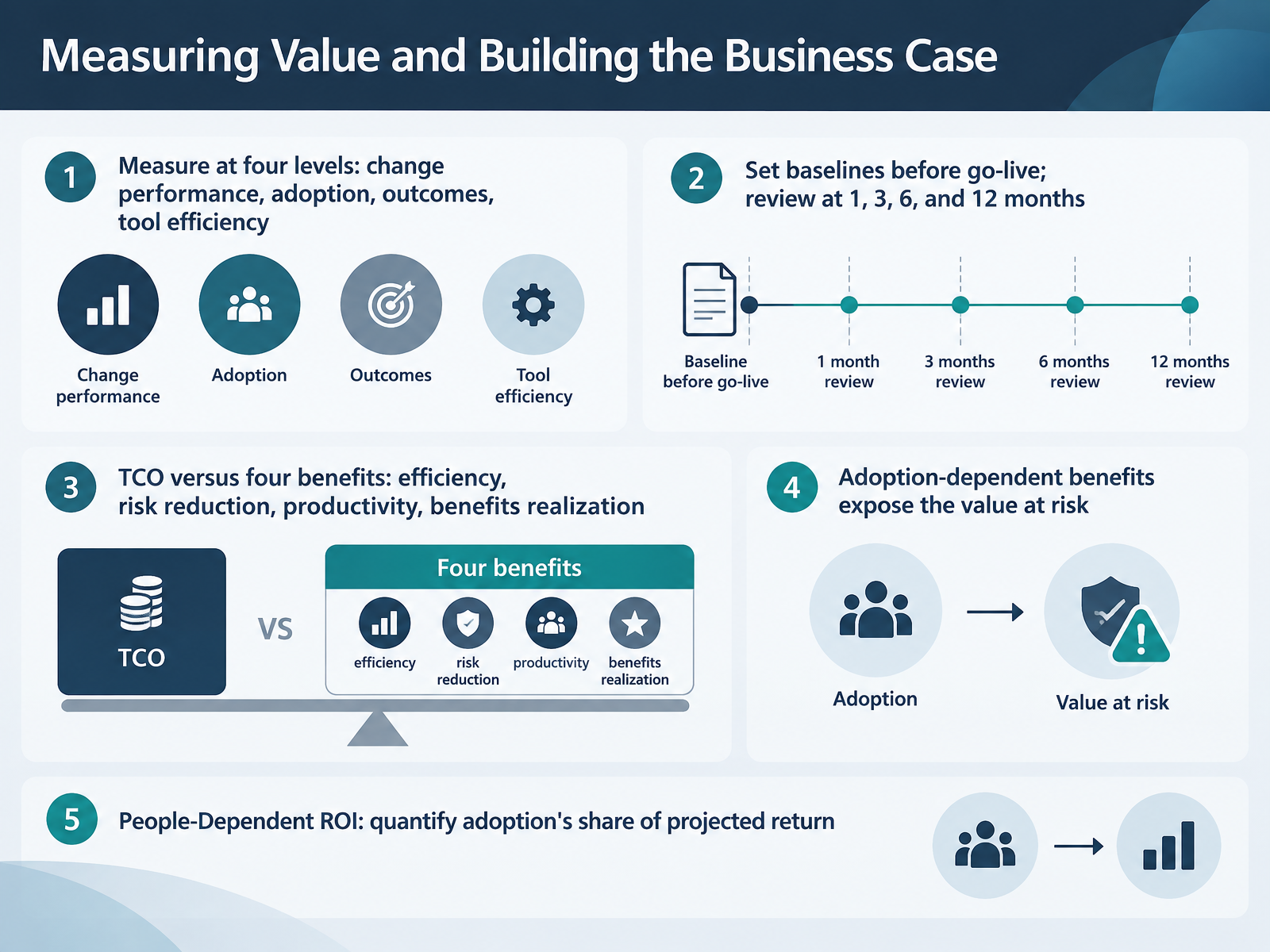
2 min - 12Measuring Value and Building the Business CaseLet's talk about measuring value and building the business case. This is where most change managers lose the room, so get the logic right before the numbers. Measure at four levels: change performance, adoption, business outcomes, and tool efficiency. Set baselines before go-live, then review at one, three, six, and twelve months. Compare total cost of ownership against four benefit categories: efficiency, risk reduction, productivity, and benefits realization. Now the critical distinction. Adoption-dependent benefits are the ones exposed when people do not change how they work. A new platform delivers nothing if teams keep using workarounds. So quantify what we call People-Dependent ROI. Model your projected return at different adoption rates. If sixty percent adoption unlocks part of the benefit and ninety percent unlocks considerably more, that gap is the value at risk, and it is your strongest argument for funding the people side of change. Next, we look at risks, pitfalls, and the path to AI-enabled change intelligence.
 prosci.com2 min
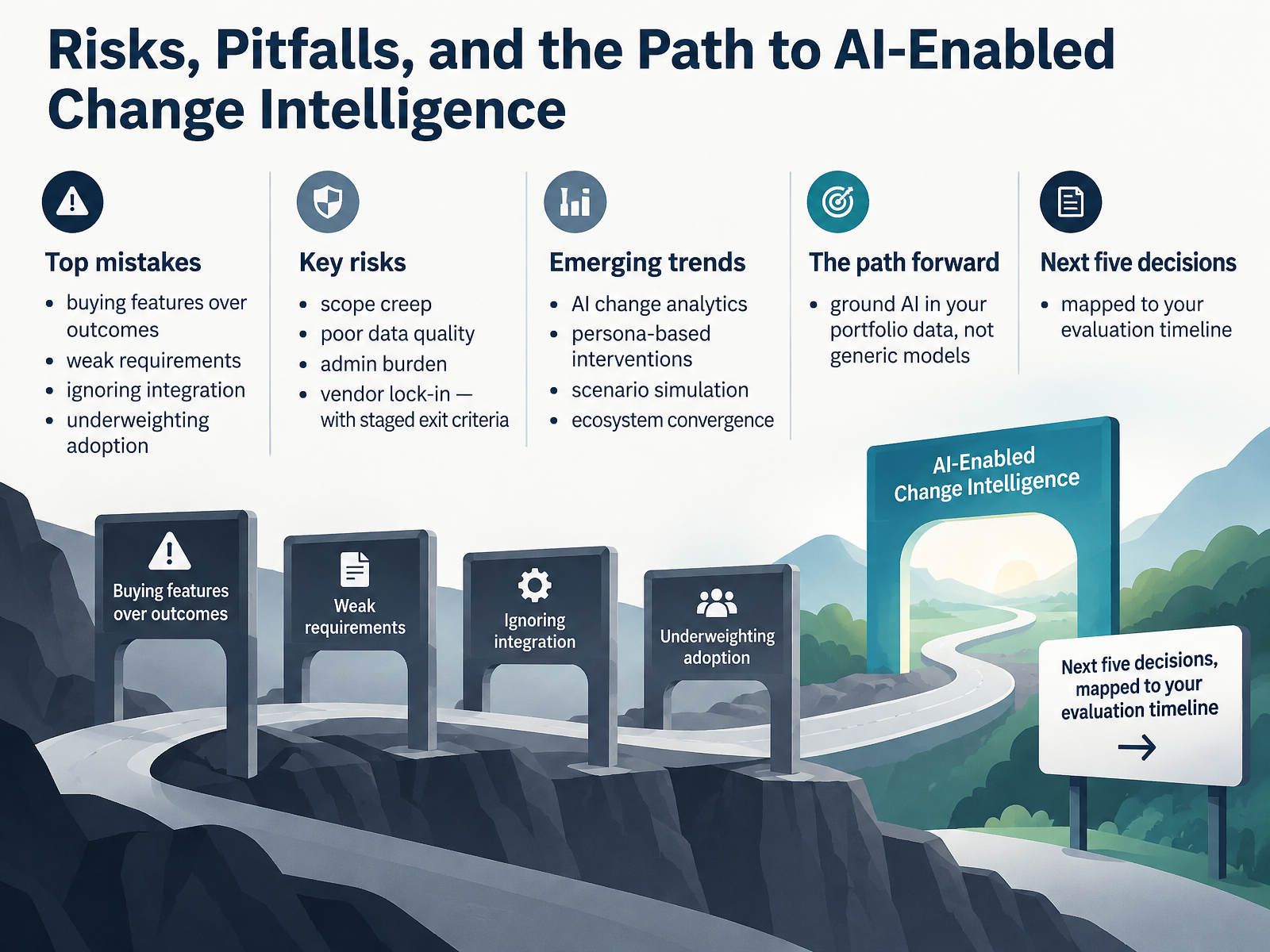
 - 13Risks, Pitfalls, and the Path to AI-Enabled Change IntelligenceLet's close on risks, pitfalls, and where this is heading. The most common mistakes we see: buying features instead of outcomes, weak requirements, ignoring integration, and underweighting adoption. Treat those four as disqualifiers, not preferences.
Then watch the live risks. Scope creep. Poor data quality. Admin burden. Vendor lock-in. Each one deserves staged exit criteria agreed before you sign, so leaving is a planned option, not an argument.
The trends are real: AI change analytics, persona-based interventions, scenario simulation, and ecosystem convergence. But here's the discipline. Ground AI in your portfolio data, not generic models. Generic output looks credible and is often contextually wrong.
So, your next five decisions. Prioritise outcomes over features. Lock your requirements and integration scope. Set exit criteria. Choose data over demos. And sequence AI after your data foundation, roughly twelve to twenty-four months.
Thank you for working through this with me. You now have the criteria to buy well and the discipline to keep the platform useful in two years. Go run the evaluation, and buy for the organisation you will be, not the one you are today.
 2 min
2 min
Take the deck with you
Download this course as a file — free, no sign-up needed.
- PDF handoutEvery slide page, ready to print or share.14 pages · 3.0 MBDownload
- Narrated PowerPointThe deck that presents itself — every slide carries the digital human's narration video.14 pages · 13.7 MBDownload
- PowerPoint slidesThe full deck as a .pptx — open it in PowerPoint, Keynote, or Google Slides.14 pages · 2.9 MBDownload
Free to use in your own training — please keep the PersonWise credit page at the end.
Have your own deck? Turn it into a course
Sources consulted
Web sources consulted while building this course.
- Change Management Software Market Trends, Share & Demand by 2034 — theinsightpartners.com
- Change Management Software Global Market Report 2025 — giiresearch.com
- IT Change Management Software Market by Organization Size, Deployment Model, Service Type, Solution Module, Industry Vertical - Global Forecast 2026-2032 — giiresearch.com
- Organizational Change Management Software Market Size Report 2026-2030 — thebusinessresearchcompany.com
- Change Management Software Market to Reach US$ 3,294.9 Mn by 2026 — transparencymarketresearch.com
- Change initiative tracking: spreadsheet to software guide — thechangecompass.com
- Why relying on Excel for change reporting is seriously — thechangecompass.com
- Metrics for Measuring Change Management - Prosci — prosci.com
- From Manual to Managed: The Compliance Risk of Excel-Based Reg Change Trackers | Empowered | GRC Software for Audit, Risk & Compliance — empoweredsystems.com
- Should you run compliance in spreadsheets or GRC software? | Zavior — zavior.com.au
- Organisational change management software compared: a comprehensive guide for enterprise teams - The Change Compass — thechangecompass.com
- 17 Best Change Management Software Tools for 2026 ... — helpdesk.com
- Best IT Change Management Tools: Buyer's Guide — virima.com
- Change Management Software: 9 Tools Compared (2026) — blog.invgate.com
- Top 10 change management software tools in 2026 — freshworks.com
- City of Durham RFP#23-0008 — durhamnc.gov
- RFP 23RFP8918 Att 5 Model Statement of Work — bfm.sd.gov
- BCM Software RFP Requirements Checklist | BCM.Center — bcm.center
- OCM RFP Draft(29-03-2022_10-41-03)-126 — its.ny.gov
- Software Development RFP Template: Technical Requirements, Scoring, and Examples (2026) | RequestForProposalTemplate.com — requestforproposaltemplate.com